

De 10 beste programvarene for bestilling av møterom i 2026

10 Kortliste over de beste programmene for bestilling av møterom


Det kan føles overveldende å finne riktig programvare for bestilling av møterom når det finnes så mange alternativer. Du trenger et verktøy som effektiviserer planleggingen og eliminerer konflikter, men det tar tid å begrense antallet valgmuligheter.
Denne veiledningen tar deg gjennom den beste programvaren for bestilling av møterom, slik at du kan skape en mer organisert og effektiv arbeidsplass. Med utgangspunkt i min erfaring som ekspert på HR-programvare hjelper jeg deg med å finne frem blant de beste alternativene med trygghet.
Why Trust Our Software Recommendations
Our team has been testing and reviewing software since 2012. As HR experts ourselves, we know how difficult—and important—it is to choose the right software.
For this guide, we evaluated tools using hands-on testing and independent research, scoring tools using our selection criteria. We also draw on insights from industry thought leaders and practicing HR experts.
Our reviews reflect our human editorial judgment, not a sales pitch.
Expert reviewers:
Sammenligningstabell: Programvare for bestilling av møterom
Denne sammenligningstabellen oppsummerer prisdetaljene for mine beste utvalg av programvare for bestilling av møterom.
| Tool | Best For | Trial Info | Price | ||
|---|---|---|---|---|---|
| 1 | Best meeting space software for hybrid teams | Free demo available | From $3000/year | Website | |
| 2 | Best for real-time room booking and management | Free demo available | Pricing upon request | Website | |
| 3 | Best for cross-platform room booking | 14-day free trial + free demo available | From $159/month | Website | |
| 4 | Best for company-wide scheduling | Free plan + free demo available | From $500/month | Website | |
| 5 | Best for 3D floor plan visualization | Free plan + free trial + free demo available | From $4/resource/month (billed annually) | Website | |
| 6 | Best for small & shared workspaces | 14-day free trial | From $19/spot/month | Website | |
| 7 | Best for interactive floor plans | Free demo available | Pricing upon request | Website | |
| 8 | Best for Microsoft and Google integrations | Free version available | From $32.47/user/month (billed annually) | Website | |
| 9 | Best meeting room booking tool for synchronizing with Outlook and Google Calendar | Free trial + free demo available | From $5/user/month (billed annually) | Website | |
| 10 | Best for QR check-ins | 7-day free trial + free demo available | From $1.79/user/month (billed annually) | Website |


Anmeldelser av den beste programvaren for bestilling av møterom
Her er mine detaljerte sammendrag av den beste programvaren for planlegging av møterom som kom med på min liste over de 20 beste, inkludert notater om hvorfor jeg valgte dem. Hver anmeldelse gir en detaljert gjennomgang av de viktigste funksjonene, fordeler \u0026 ulemper, integrasjoner og ideelle bruksområder for å hjelpe deg med å finne det beste verktøyet for deg.
Tactic
Best meeting space software for hybrid teams
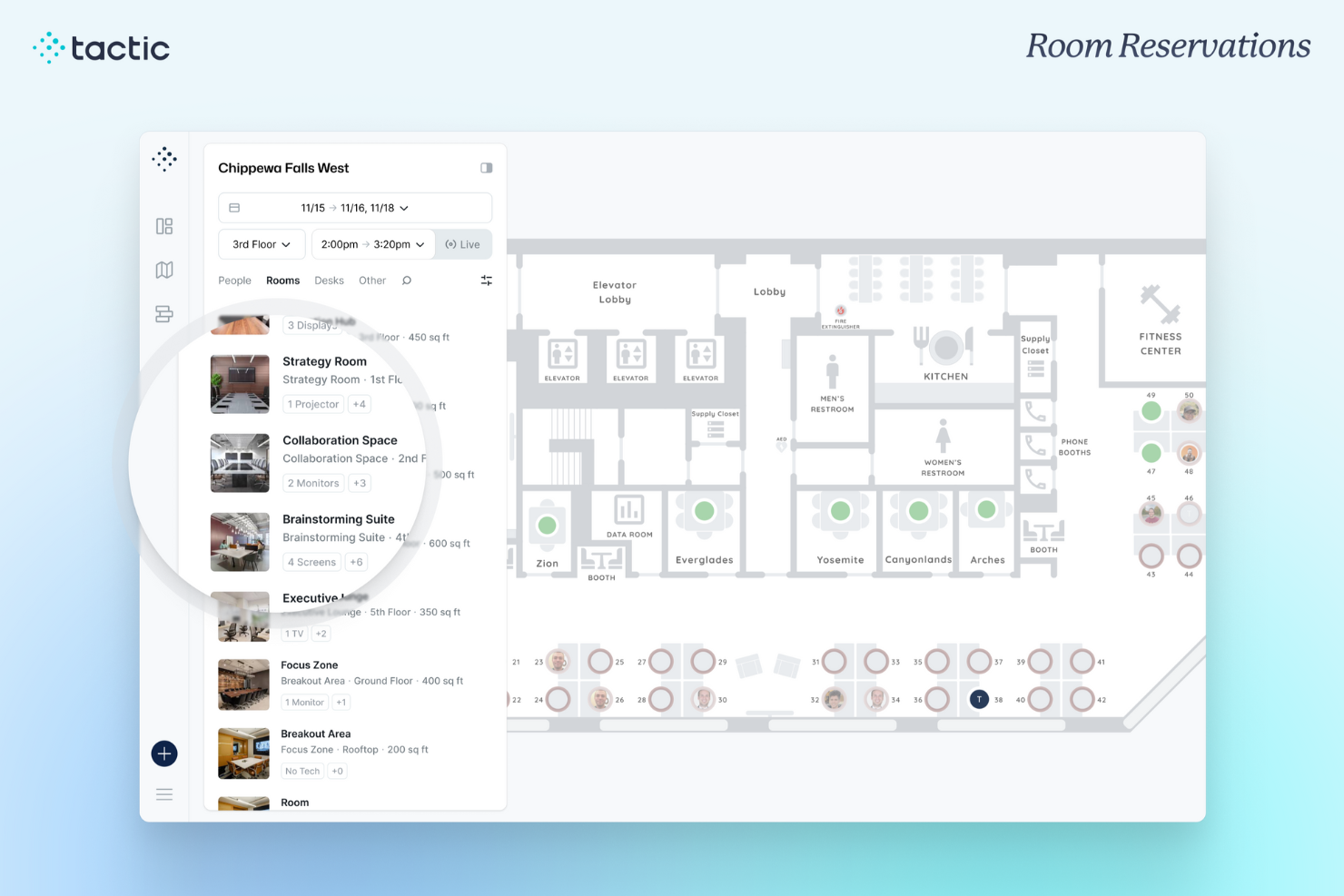
Tactic gives organizations a single interface to manage meeting room and desk bookings, helping office managers and hybrid teams coordinate space, schedules, and resources in dynamic workplaces.
Who Is Tactic Best For?
Tactic is a strong fit for mid-sized companies managing hybrid work schedules who need a single place to coordinate office space across flexible, rotating teams.
Why I Picked Tactic
Tactic is one of my top picks because I love how it handles the full hybrid scheduling picture, not just room booking in isolation. When my team books a meeting room, they can simultaneously see which colleagues are coming into the office that day, check schedule overlaps, and reserve a space that fits the actual meeting needs—filtering by capacity, AV equipment, or whiteboard availability in seconds. The auto-release feature frees a room if someone books it and doesn't check in via Slack or Microsoft Teams, making it available for others. The Tessa AI assistant takes it a step further, letting you describe what you need in plain language and showing available rooms that match.
Tactic Key Features
- Interactive floor plans: View and book desks or rooms directly on a visual map of your office layout.
- Team scheduling visibility: See which teammates plan to be in the office on any given day before booking a space.
- Usage analytics: Track room and desk occupancy data over time to identify underused spaces and peak demand periods.
- Visitor management: Register and manage guest visits alongside internal bookings to coordinate front-desk logistics.
Tactic Integrations
Integrations include Microsoft Teams, Slack, Google Calendar, Outlook, Zoom, Microsoft Entra ID, and Avigilon.
Pros and Cons
Pros:
- Interactive, detailed office maps
- Mobile app for on the go booking
- Real-time visibility into desk and room availability
Cons:
- Could have more customization options
- May not be the best for large organizations with complex office setups
Best for real-time room booking and management
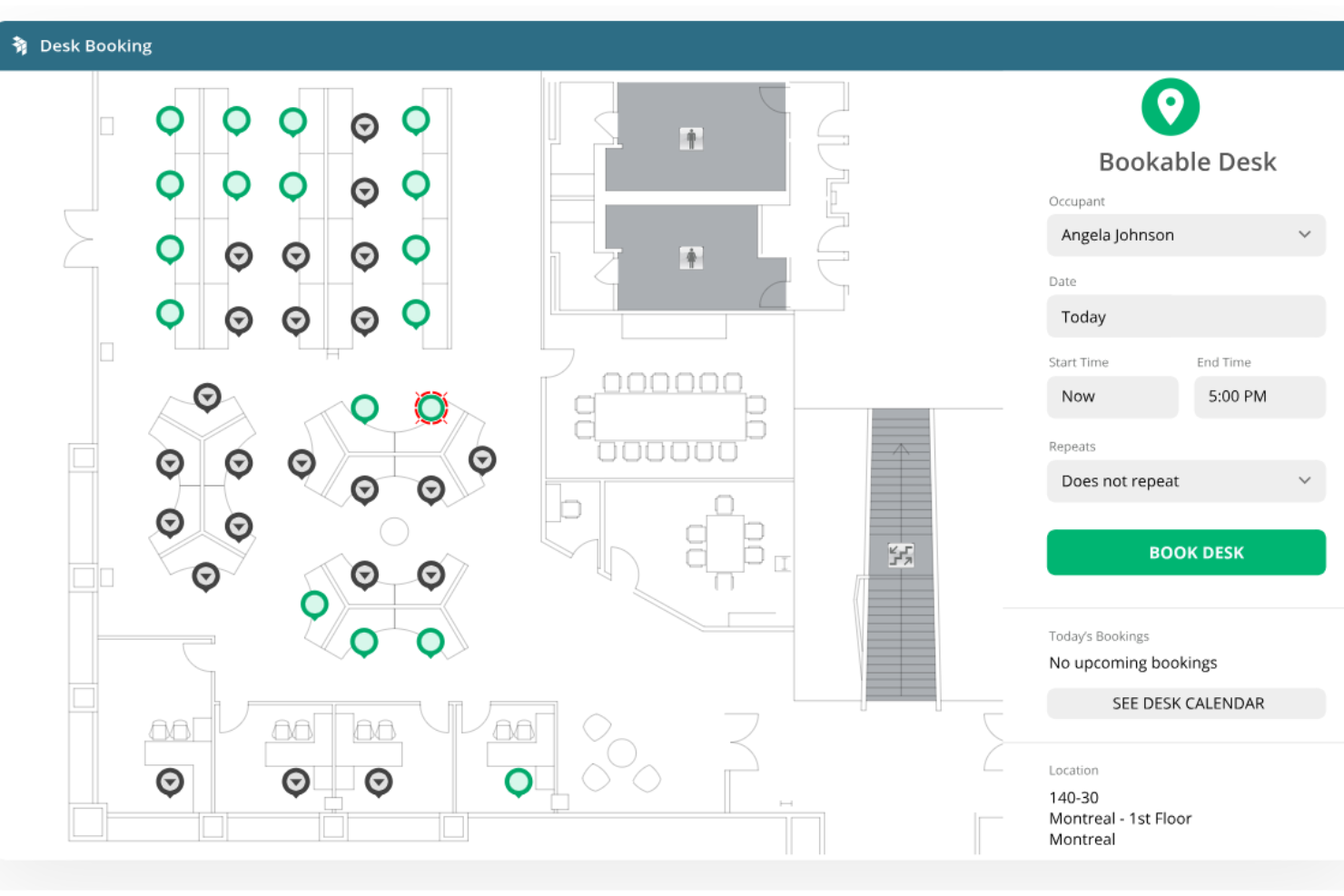
OfficeSpace simplifies meeting room bookings, manages space usage, and keeps hybrid offices running smoothly with interactive floor plans and real-time scheduling tools.
Who Is OfficeSpace Best For?
OfficeSpace is a strong fit for mid-size to enterprise companies managing hybrid workplaces with multiple meeting rooms across one or more office locations.
Why I Picked OfficeSpace
I picked OfficeSpace as one of the best because of how well it handles real-time room booking at scale. What I like most is the real-time availability feature—my team can check which rooms are open from any device and book instantly, without the back-and-forth that usually comes with shared calendars. The auto-release policy is another feature I rely on: if someone books a room and doesn't show up, OfficeSpace automatically frees it up, which cuts down on ghost meetings and wasted space. The AI-informed scheduling suggestions surface the right room based on usage patterns, so we're not just booking the same two rooms while others sit empty.
OfficeSpace Key Features
- Privacy controls: Set reservation guidelines and hide organizer or meeting names to protect sensitive or confidential meetings.
- Kiosk and tablet check-in: Use iPads or Android tablets on-site to check room availability, reserve spaces, and check in on the spot.
- Room profile customization: Add capacity, equipment, and amenity details to room profiles so employees can filter and find the right space for their needs.
- Setup and A/V request attachment: Add catering, tech support, or other service requests directly to the room booking workflow.
OfficeSpace Integrations
Integrations include Microsoft Teams, Slack, Google Workspace, Office 365, Zoom, Okta, Workday, Active Directory, Greetly, and Single Sign-On (SSO) systems.
Pros and Cons
Pros:
- Good reporting features
- Scenario planning capabilities
- Real-time data synchronization
Cons:
- Most room booking features are not available on the Lite version
- Dashboards could be more customizable
New Product Updates from OfficeSpace

OfficeSpace Adds Work Order Status and Cost Reports
OfficeSpace adds Work Order Status and Work Order Cost reports for built-in maintenance reporting. These reports help facilities teams track work order activity and costs without relying on manual spreadsheets. For more information, visit OfficeSpace’s official site.
 .
.
Archie
Best for cross-platform room booking
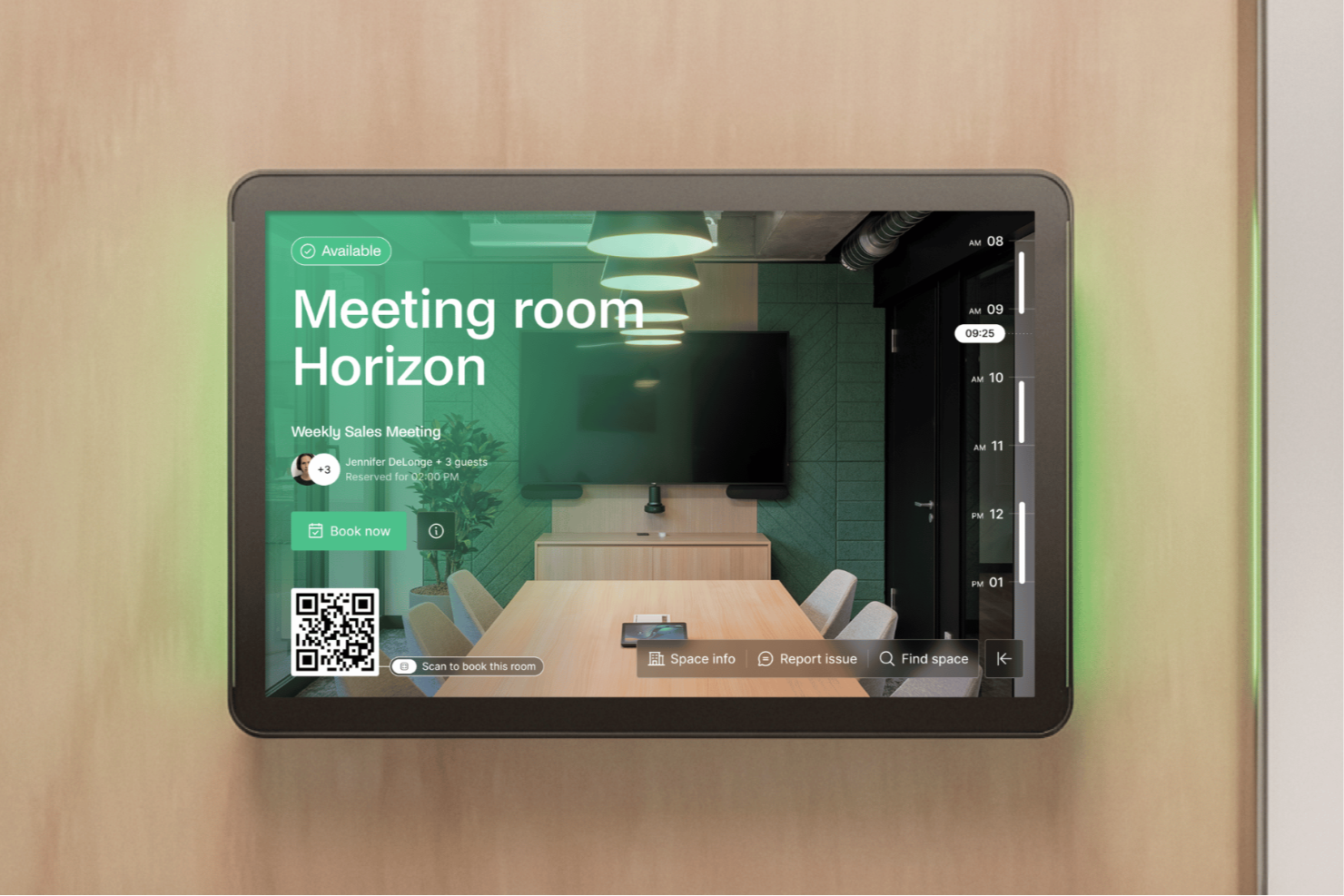
Archie is a meeting room booking platform designed for modern workplaces and coworking spaces that need to manage shared spaces, automate reservations, and give teams real-time visibility into room availability.
Who Is Archie Best For?
Archie is a strong fit for hybrid teams and coworking space operators that need a flexible, easy-to-manage room booking system across multiple locations.
Why I Picked Archie
Archie earns its spot as one of the best on my shortlist because it lets teams book meeting rooms from wherever they already work. I like that you can reserve a room directly from Microsoft Teams or Outlook without switching to a separate tool, and the two-way calendar sync means your booking shows up instantly across both platforms. The dedicated Archie Rooms app for iOS and Android adds another layer of flexibility—teams can check real-time availability, book on the spot, and check in via QR code from their phones. For hybrid teams juggling multiple channels, cross-platform consistency is useful.
Archie Key Features
- Interactive floor plans: View a map of your office layout to see which rooms and desks are available before booking.
- Room display tablets: Connect Archie to a tablet outside any meeting room to show live availability and allow walk-up bookings.
- Automated booking rules: Set capacity limits, booking windows, and approval requirements to control how rooms get reserved.
- Space utilization reports: Access usage data and occupancy trends to understand how your meeting rooms are being used.
Archie Integrations
Integrations include Microsoft Teams, Slack, Google Calendar, Microsoft Outlook, Zoom, QuickBooks, Xero, Stripe, GoCardless, and HubSpot.
Pros and Cons
Pros:
- Branded app options available
- Can book through the web or mobile app
- Comprehensive tools for managing workspaces
Cons:
- May not support all meeting room tablet models
- Could offer more customizations for reporting
elia
Best for company-wide scheduling
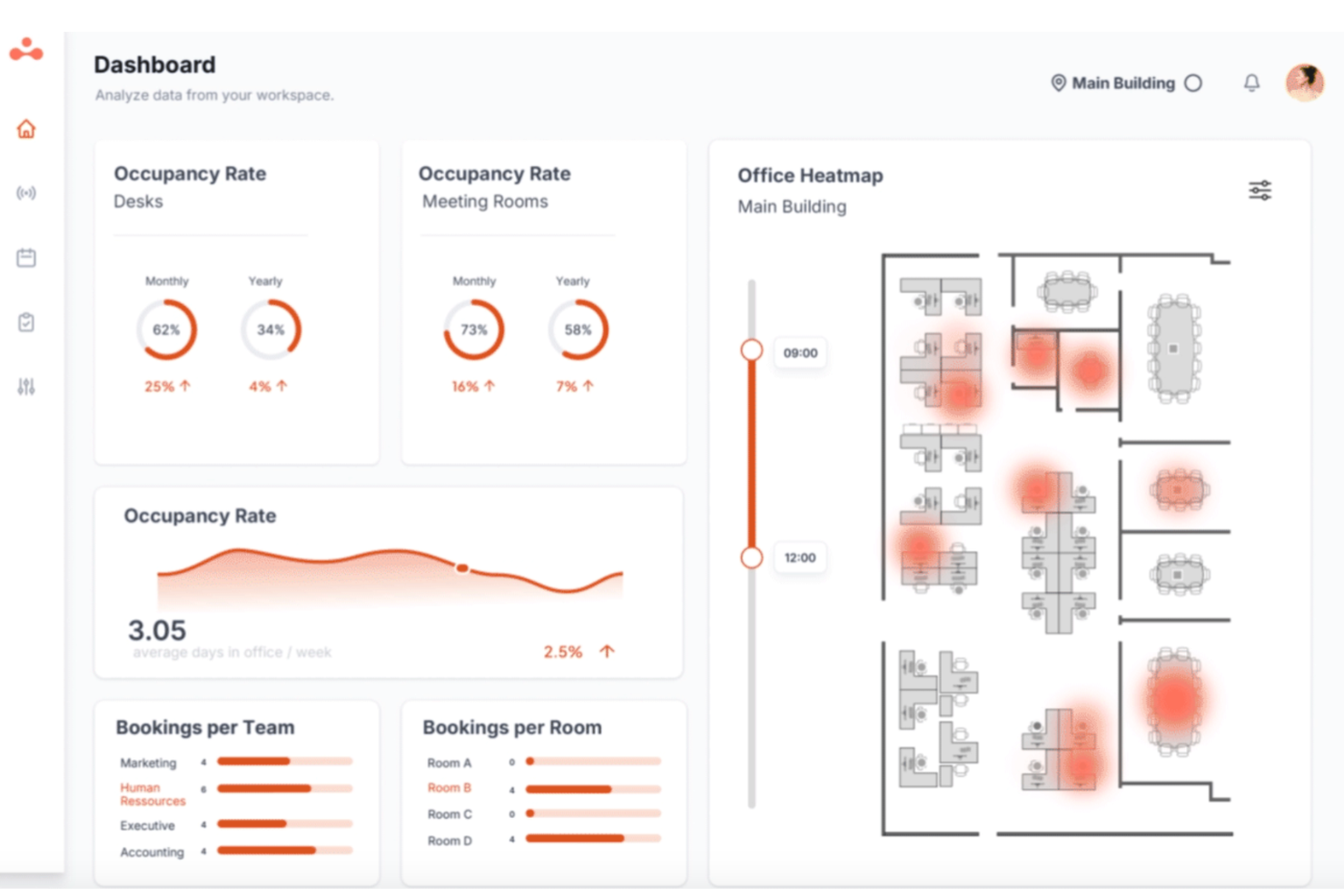
Built as an all-in-one workplace operations platform, elia covers meeting room booking, desk reservations, occupancy tracking, visitor management, and service requests across a single interface.
Who Is elia Best For?
elia is a good fit for mid-size to enterprise companies managing hybrid workplaces across multiple office locations or teams.
Why I Picked elia
I've included elia in my top picks because it handles scheduling across an entire organization from one admin dashboard, rather than forcing each office or department to manage bookings separately. My team is able to oversee room availability, desk reservations, and visitor scheduling across multiple locations simultaneously. elia's role-based permissions let administrators define who can book what, in which building, and under which conditions, which is something I find genuinely useful at scale.
elia Key Features
- Digital room displays: Connect compatible screens outside meeting rooms to show real-time availability and allow on-the-spot bookings directly from the display.
- Calendar sync: Two-way integration with Microsoft 365 and Google Workspace keeps room bookings aligned with employees' existing calendar events.
- Automatic room release: Rooms are automatically freed up when a meeting is cancelled or no one checks in, preventing ghost bookings.
- Room usage analytics: Track how frequently meeting rooms are booked, how long they're used, and which rooms go underutilized across your office locations.
elia Integrations
elia offers native integrations with Microsoft 365, Google Workspace, Slack, and specific tools within those ecosystems, including Google Calendar, Microsoft Teams, and Microsoft Outlook.
Pros and Cons
Pros:
- Real-time colleague presence visibility
- Supports multi-location office management
- Built-in floor plan maps for visual booking
Cons:
- Lobby kiosk requires iPad only
- Limited occupancy statistics and reporting depth

anny
Best for 3D floor plan visualization
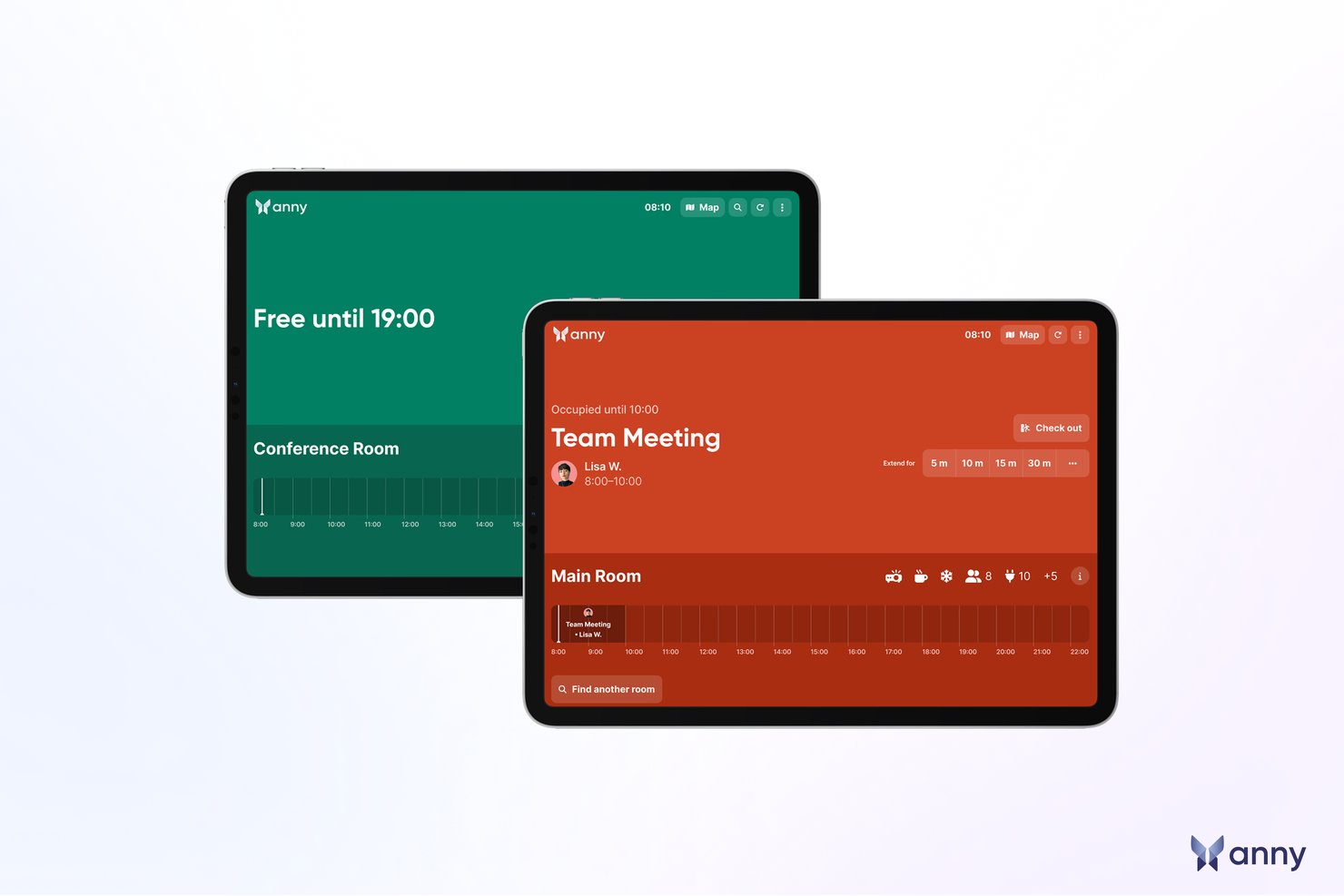
anny is a room booking system built around an interactive 3D office map. A single reservation can arrange catering, sync to your calendar, and unlock the door—and the same platform extends to desks, parking, equipment, and more.
Who Is anny Best For?
anny is a strong fit for hybrid and multi-location organizations—from enterprises to coworking spaces and public institutions—that want to manage internal reservations and external rentals in one GDPR-compliant, ISO 27001-certified system.
Why I Picked anny
I picked anny because it excels at providing a streamlined booking experience through its unique 3D floor-plan feature. This allows your team to visualize and select available meeting spaces effortlessly, enhancing the overall booking process. Additionally, anny's automated check-in capabilities ensure that unused bookings are released, maximizing room utilization. These features directly tackle the common issues of space management and coordination, making anny a valuable tool for any organization.
anny Key Features
- Interactive 3D Office Map: Navigate rooms, desks, and parking on a true 3D view of each floor—far clearer than a flat list or 2D plan.
- Access-Controlled Bookings: Entry can be tied to the reservation, with time-limited door access granted automatically—no keys or manual sign-in required.
- anny AI Booking Assistant: Staff can secure a room 24/7 by phone or chat through Teams, Slack, or a web widget, with anny AI matching an available space.
- Room Displays & Auto-Release: Live availability shows on door displays for tap-to-book check-in, and unused rooms automatically free themselves when no one turns up.
anny Integrations
Integrations include Microsoft 365, Outlook, Google Workspace, Google Calendar, Microsoft Teams, Slack, Stripe, PayPal, SSO/SAML, and a broad range of smart-lock and access-control systems—Salto, Nuki, dormakaba, Tapkey, iLOQ, KleverKey, Comydo, UniFi and Shelly.
Pros and Cons
Pros:
- QR code check-ins enhance security and convenience
- Supports mobile booking for on-the-go management
- Real-time room availability prevents double bookings
Cons:
- Admin interface can feel complex
- Some users report occasional slow performance

Whatspot
Best for small & shared workspaces
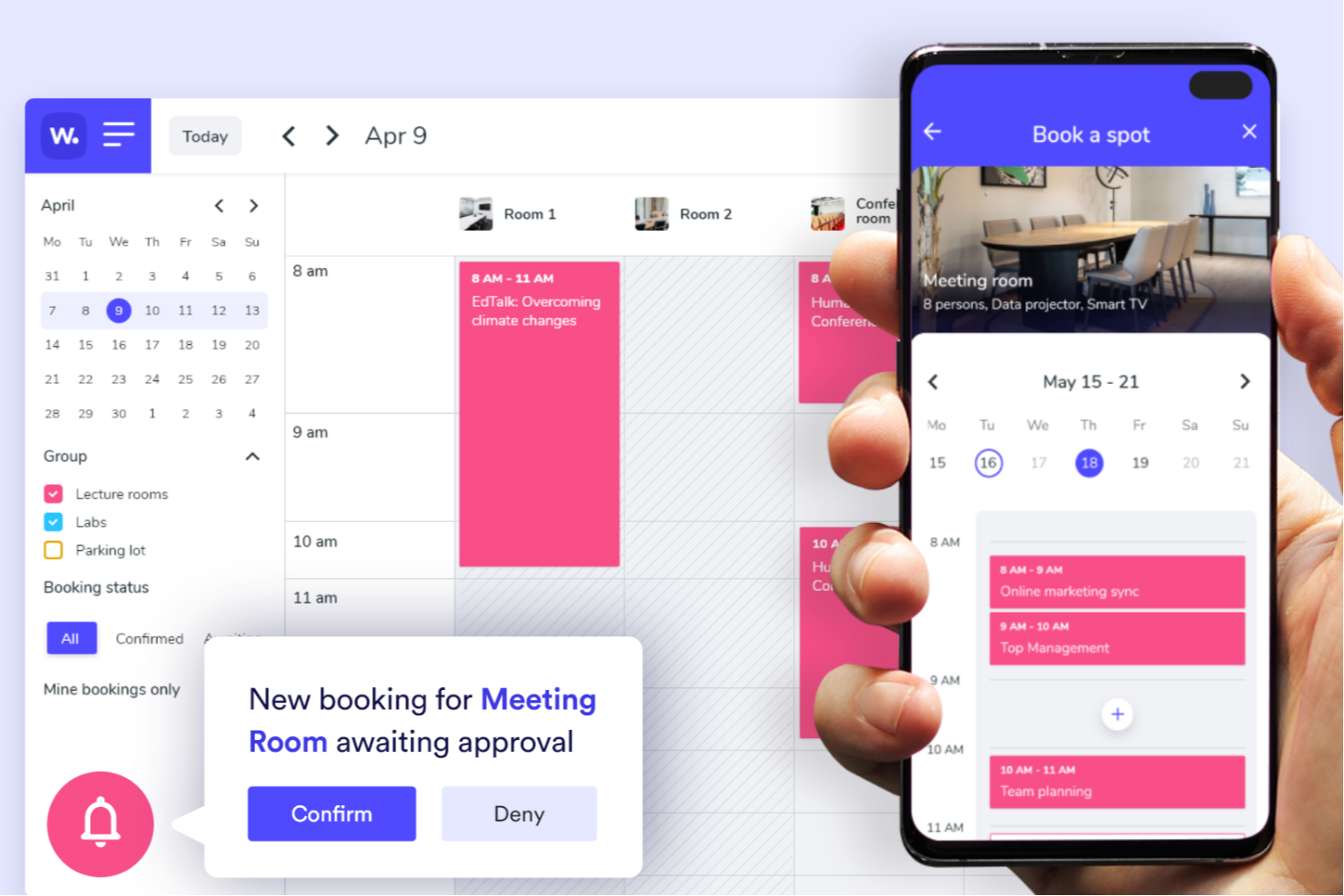
Whatspot is a booking platform designed for businesses and organizations that need a simple way to manage meeting rooms and shared spaces, helping teams avoid double bookings and streamline reservations with quick, on-the-spot scheduling.
Who Is Whatspot Best For?
Whatspot is a good fit for small businesses, coworking spaces, and shared office environments that need a lightweight, no-fuss way to manage room and resource bookings.
Why I Picked Whatspot
Whatspot earns its spot on my shortlist because it's purpose-built for the kind of low-complexity, high-turnover booking environments that larger platforms tend to overcomplicate. I like how QR code booking works here—you place a code on the door of a meeting room, and anyone can scan it to check availability and confirm a reservation in two taps. For shared spaces where people often need a room on the spot, that's genuinely useful. I also use the check-in feature to cut down on no-shows: if someone doesn't confirm their booking on arrival, Whatspot automatically releases the space so it doesn't sit empty.
Whatspot Key Features
- Booking approval workflows: Set up rules that require manager sign-off before a reservation is confirmed, giving admins control over who books what and when.
- Interactive floor plans: Upload a map of your space so users can visually select a room or desk directly from the layout.
- Recurring bookings: Schedule repeating reservations for regular meetings or standing team sessions without re-entering details each time.
- Booking calendar overview: View all upcoming reservations across rooms and resources in a shared calendar to track space usage at a glance.
Whatspot Integrations
Integrations include Microsoft Outlook, Microsoft Teams, and Google Calendar.
Pros and Cons
Pros:
- Interactive floor plans for efficient desk management
- Multilingual support, making it accessible for diverse teams
- QR code functionality for quick and easy reservations
Cons:
- No integrations presently listed
- Limited customization options for specific needs
New Product Updates from Whatspot

Whatspot Adds Booking Modes for Different Space Types
Whatspot introduces Booking Modes to support different reservation rules for different space types. Admins can choose flexible bookings, fixed durations, or fixed intervals based on how each space is used. For more information, visit Whatspot's official site.
 .
.
Best for interactive floor plans
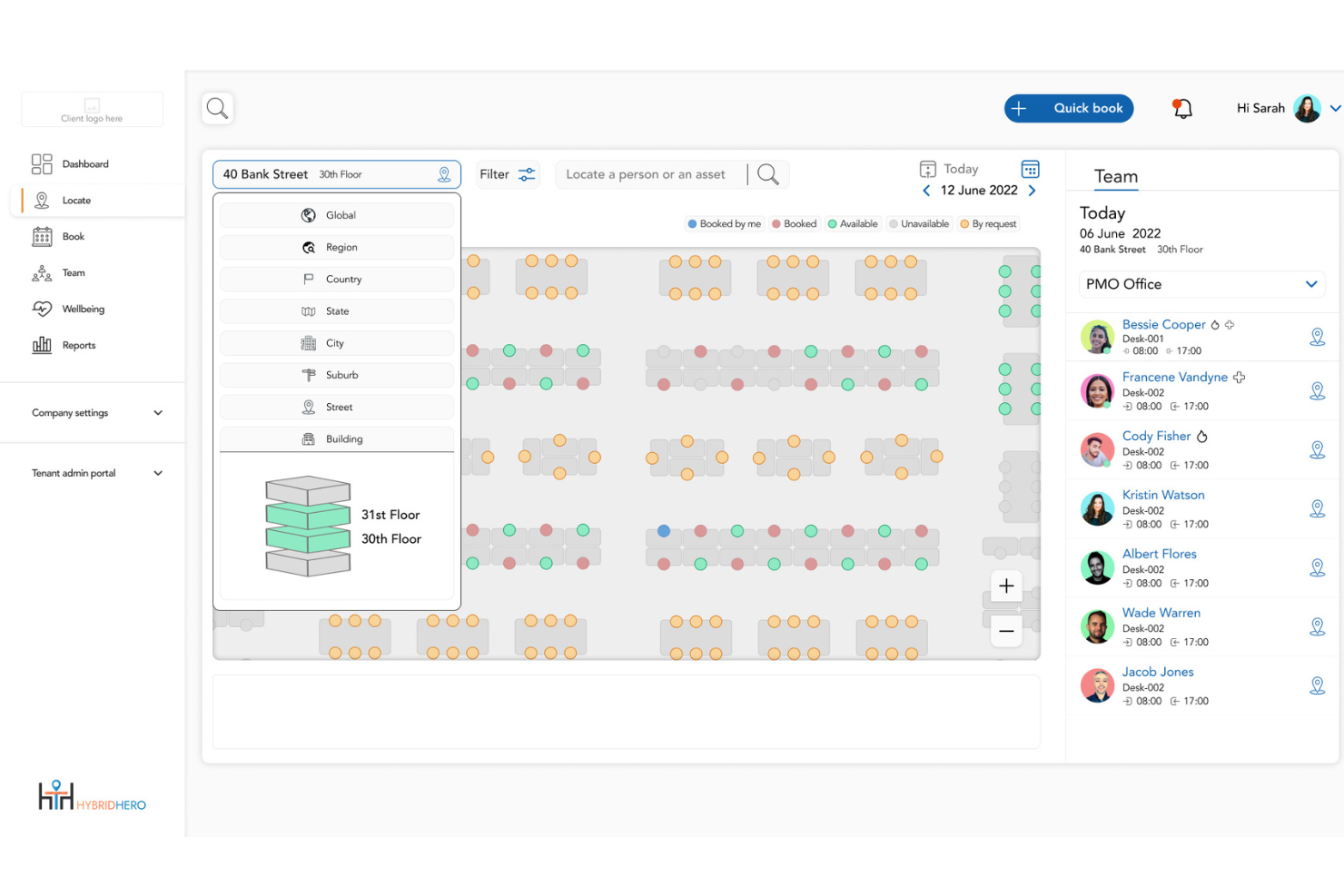
Hybrid Hero helps organizations manage meeting room bookings and workspace reservations, giving office managers and facilities teams clear visibility to optimize space, reduce scheduling conflicts, and improve the workplace experience.
Who Is Hybrid Hero Best For?
Hybrid Hero is a strong fit for mid-market and enterprise organizations managing meeting rooms, desks, visitors, and parking across multiple office locations.
Why I Picked Hybrid Hero
Hybrid Hero stands out because meeting room booking is part of a broader workplace operations platform rather than a standalone scheduling tool. Room reservations connect with desk booking, visitor management, parking, and floor plan visibility within the same system, helping organizations manage multiple workplace resources from a centralized environment.
Hybrid Hero Key Features
- Meeting room booking with interactive floor plans: View real-time room availability on live office maps with amenity and capacity filters, then book directly from the floor plan interface.
- Auto-release for no-shows: Rooms that are not checked into within a configured time window can automatically return to availability.
- Multi-site management: Manage room booking administration, reporting, and availability across multiple office locations from a centralized dashboard.
- Visitor and parking management: Coordinate visitor check-ins, external attendees, and parking reservations alongside desk and meeting room bookings within the same workplace platform.
Hybrid Hero Integrations
Integrations include Microsoft 365, Outlook, Teams, Azure Active Directory, Google Workspace, and a custom API for additional workflows.
Pros and Cons
Pros:
- Highly visual floor plan interface
- Caters to hybrid team needs
- Automatic release of unused bookings
Cons:
- Mobile app navigation is slightly dense
- Limited offline booking capabilities
Best for Microsoft and Google integrations
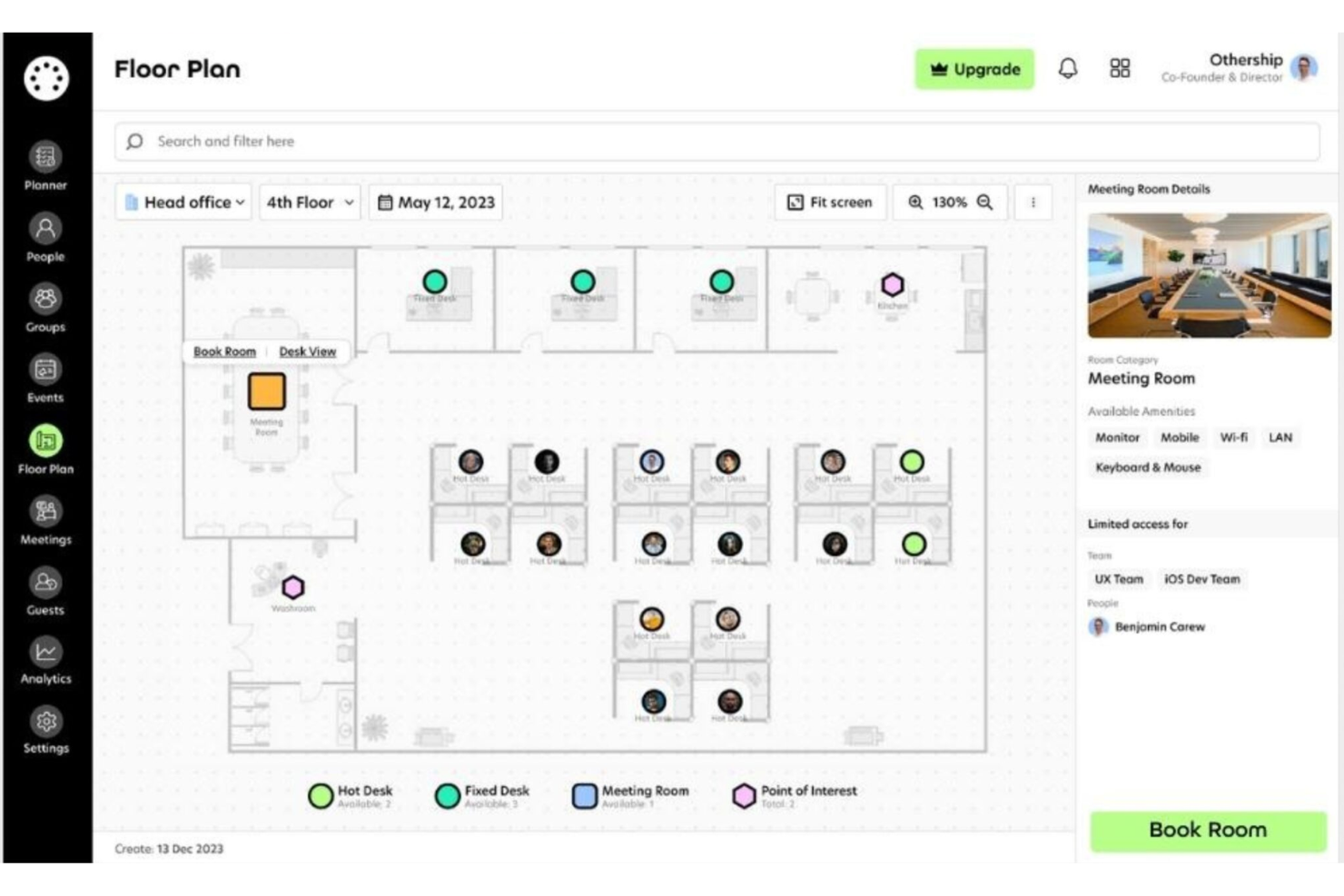
Othership is a workspace-and-meeting-room booking platform built for teams that move between offices, coworking hubs and remote settings. If your organisation uses on-demand spaces, shared desks or hybrid work locations, Othership gives you a way to manage bookings and workflows under one roof.
Why I Picked Othership
I picked Othership because it supports flexible, coworking-style work setups—not just fixed office rooms. You can book meeting rooms, hot desks or on-demand workspace by the hour or day, so your team isn’t tied to one location.
You’ll find built-in support for mixed-location usage—own offices plus coworking spaces—so you can coordinate across multiple venues without juggling separate tools. I also like that the platform offers booking via phone, browser, calendar or entry tablet, letting your team use what they already do. Lastly, its analytics help you see how spaces are used—perfect for optimising flexible footprints.
Othership Key Features
Here are some standout features worth highlighting:
- On-demand workspace booking: Reserve desks, meeting rooms or coworking spots for just the time you need.
- Visual floorplans & multi-venue support: Map offices, coworking sites and hot-desking layouts so you manage all locations in one system.
- Built-in booking policy automation: Set rules like buffer times, no-show releases and workspace approval flows tailored for flexible environments.
- Usage analytics for flexible space: Dashboards show how often venues and desks get used so you can adjust your footprint or membership strategy.
Othership Integrations
Integrations include Microsoft Outlook, Microsoft Teams, Google Calendar, Slack, Workday HCM, Auth0 (SSO) and more.
Pros and Cons
Pros:
- Ability to book rooms on different devices
- Meeting room and desk booking analytics
- Easy booking process with its user-friendly interface
Cons:
- Plan inclusions may be difficult to understand without expert advice
- Limited availability for additional languages

deskbird
Best meeting room booking tool for synchronizing with Outlook and Google Calendar
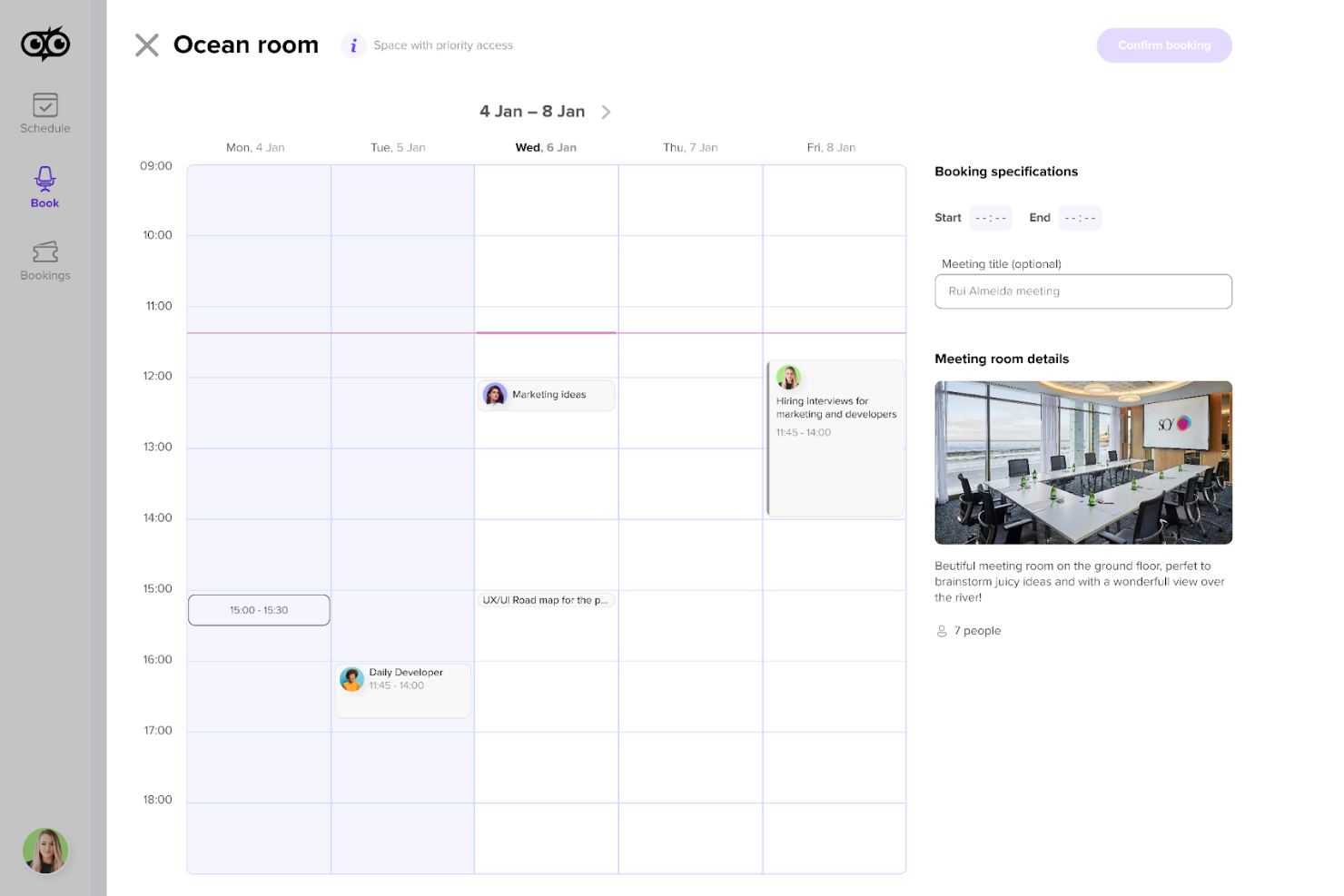
Deskbird is a hybrid workplace management platform designed to simplify desk and room booking, week planning, and office administration.
Why I picked Deskbird: I chose Deskbird because of its integration with Outlook and Google Calendar, ensuring that booking a meeting room is a smooth and intuitive process. Deskbird allows users to schedule rooms with just a few clicks, and the synchronization with popular calendar systems means that all reservations are automatically updated and visible across platforms. This functionality is enhanced by its compatibility with MS Teams and Slack, which improves its usability within existing workflows.
Standout features & integrations:
Standout features include hot desk booking, phone booth booking, parking spot booking, week planning, real-time office attendance updates, floor plan integration, office analytics, role assignment for safety and compliance, and QR codes for on-the-spot bookings.
Integrations include MS Teams, Slack, Office 365, Google Calendar, Outlook, and various HRIS platforms.
Pros and Cons
Pros:
- Straightforward booking process
- Mobile and web integrations
- Great dashboarding capabilities for insights into office usage
Cons:
- Could benefit from a booking confirmation feature
- Limited customization options

WorkInSync
Best for QR check-ins
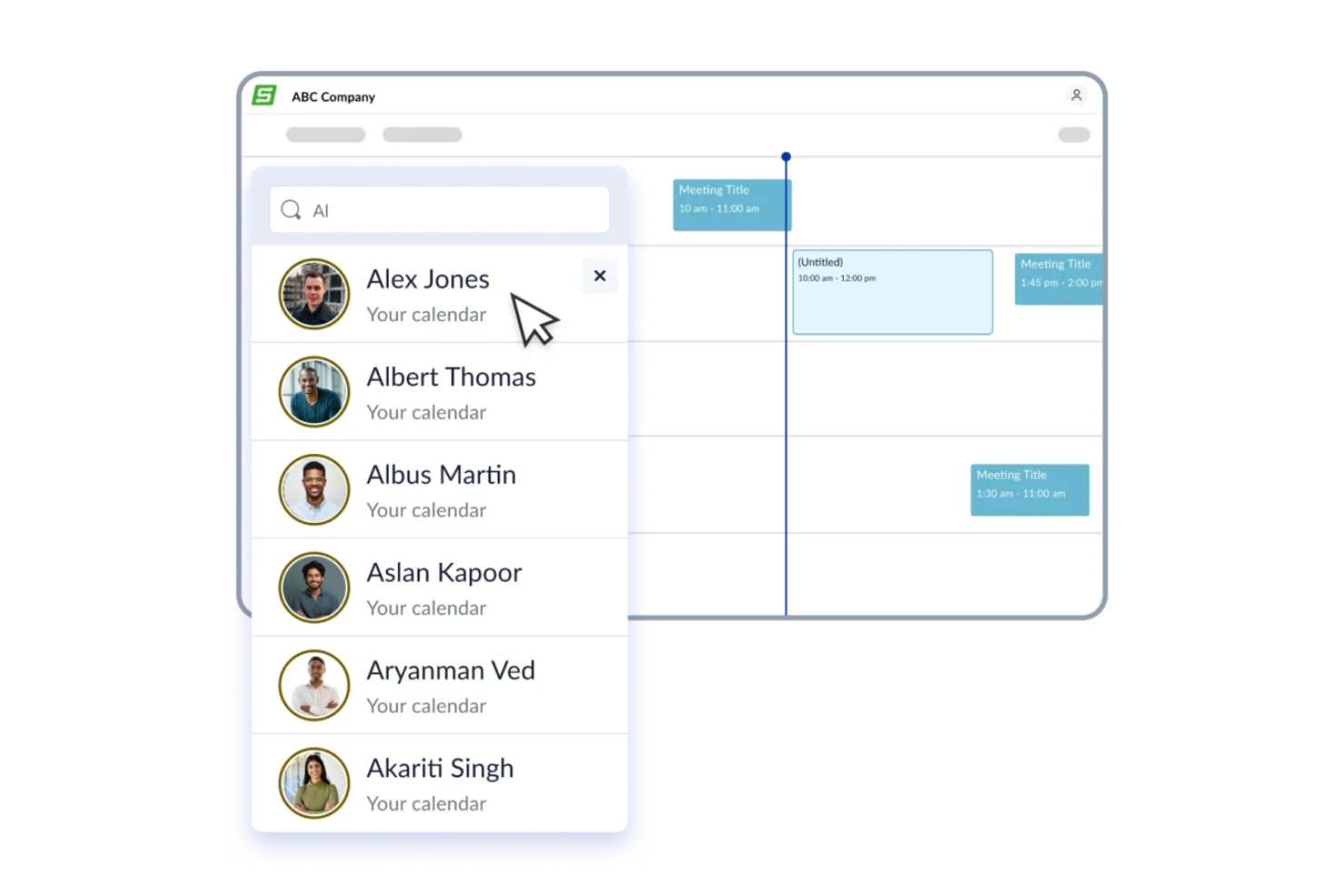
WorkInSync is a workplace management platform designed for businesses that need to simplify meeting room bookings, manage space utilization, and support hybrid work environments with real-time scheduling and occupancy insights.
Who Is WorkInSync Best For?
WorkInSync is a good fit for mid-sized to large companies managing hybrid workplaces who need structured room booking and space visibility across multiple office locations.
WorkInSync supports QR code check-ins for meeting rooms, automatically releases unused bookings when no check-in occurs, and provides real-time usage analytics.
Why I Picked WorkInSync
I picked WorkInSync as one of the best because of how it handles the ghost meeting problem. When someone books a room and doesn't show up, WorkInSync uses QR code check-ins to confirm actual attendance. If no one scans in within a set window, the booking is automatically released and the room becomes available again. I also like that QR codes can be affixed directly to room resources, so employees scan on arrival rather than logging into a separate system. On top of that, the platform tracks all of this in real time, so my team can see which rooms are genuinely occupied versus just reserved on paper.
Beyond QR check-ins, auto-release of unused rooms, and real-time occupancy tracking, other notable features include interactive floor maps/wayfinding, amenities booking, usage analytics/reporting, and calendar integrations.
WorkInSync Key Features
- Interactive floor map: View a touch-enabled floor plan to browse available meeting rooms by location before booking.
- Amenities booking: Add catering, equipment, or other room services directly when making a reservation.
- Room usage analytics: Track booking patterns, peak usage times, and occupancy rates across all meeting spaces.
- Calendar sync: Connect with Outlook and Google Calendar so room bookings reflect in employees' existing schedules.
WorkInSync Integrations
Integrations include Microsoft Teams, Microsoft Outlook, Google Calendar, Google Workspace, OneLogin, Okta, Active Directory, Slack, Zoom, and ServiceNow.
Pros and Cons
Pros:
- Automated booking conflict resolution
- Built-in visitor management
- Real-time availability tracking
Cons:
- Large-team focus may overwhelm SMBs
- Advanced analytics setup required
Annen programvare for bestilling av møterom
Nedenfor finner du en liste over flere systemer for bestilling av møterom som ikke kom med på min liste over de 20 beste, men som likevel er verdt å se nærmere på:
- YAROOMS
For coordinating hybrid meeting scheduling
- OfficeRnD Workplace
Meeting space software for flex space operations
- Clearooms
For visual floor plans
- Dibsido
For tracking office space utilization
- CalendarHero
Booking system for automated meeting scheduling
- Meetio
Meeting room booking app for booking simplicity
- Officely
For Teams and Slack integration
- Smartway2
Meeting room software for tailored booking recommendations
- HubStar
For AI booking assistance
- Envoy Workplace
For visitor management systems
- Nexudus
For scaling coworking spaces
- anny
For using integrated display systems
- Optix
Conference room booking tool for mobile-first workplaces
- Condeco
For workspace scheduling
- AskCody
For Microsoft Office users
- DeskFlex
For real-time occupancy tracking & safety
- MOFFI
For smart room occupancy
- Meeting Rooms by Officely
For Slack and Teams integrations
- Wayleadr
For parking space optimization
- GemEx App
For occupancy-based room booking
- Roomzilla
For room display functionality
- Skedda
For customizable booking systems


Relaterte anmeldelser av HR-programvare
Hvis du fortsatt ikke har funnet det du ser etter her, kan du ta en titt på disse andre relaterte verktøyene som vi har testet og evaluert:
- HR-programvare
- Lønnsprogramvare
- Rekrutteringsprogramvare
- Tjenester for arbeidsgiverregistrering
- Systemer for søkeroppfølging
- Programvare for arbeidsstyring
How I Evaluate Meeting Room Booking Software
I split my evaluation into two layers: the core booking fundamentals every tool must have, and the differentiators—like HRIS integrations and hybrid desk management—that separate good from great.
Core Functionality (Table Stakes For This List)
When I'm selecting tools for my list, I rank each one on a scale from 0 (does not offer the functionality) to 5 (excels in this area) for each core functionality listed below. Then, I calculate the tool's total score into a percentage. Each tool needs to achieve a minimum total score of 65% to be considered for inclusion.
- Real-Time Room Availability: I check whether the tool shows live booking status and prevents double-bookings—like when two interviewers unknowingly grab the same room for back-to-back candidate panels.
- Calendar Integration: Two-way sync with Google Calendar and Outlook matters here, so HR teams can schedule review meetings or training sessions without toggling between platforms.
- Interactive Floor Plans: I look for visual maps that let users browse rooms by floor or building, filter by capacity, and spot open spaces—especially useful for multi-floor offices.
- Room Resource Management: Each room should carry detailed attributes like AV equipment, seating capacity, and wheelchair accessibility so organizers can match room setup to meeting needs.
- Check-In & No-Show Management: I evaluate whether the tool supports app-based or panel-based check-ins and auto-releases ghost bookings, freeing up rooms that someone reserved but never used.
- Usage Analytics & Reporting: Dashboards should surface occupancy trends and peak usage times so workplace teams can make informed decisions about space allocation across locations.
Once I have a list of tools that meet the criteria, I consider what sets each platform apart.
Differentiating Factors (What Sets Vendors Apart)
Here's how I compare and contrast different vendors:
Standout Features
Visitor management integration is a big one—I look for tools that auto-register external guests when a room is booked, so recruiters aren't manually logging interview candidates at the front desk. Desk and hot-desk booking also matters for HR teams managing hybrid workforces, since it lets employees reserve both a workspace and a meeting room in one flow. A well-built mobile app rounds things out, giving HR staff the ability to rebook or cancel rooms between interviews without returning to a desktop.
Beyond Features
Integrations matter a lot here. I check whether the tool connects with HRIS platforms and applicant tracking systems, since HR teams need interview room bookings to flow from their ATS without manual steps. Security is another key factor—SSO support and SOC 2 compliance are worth confirming, especially when the system handles employee and candidate data. I also evaluate multi-location support, because organizations with offices across several regions need centralized admin controls and time zone-aware scheduling from a single dashboard.
Slik velger du programvare for bestilling av møterom
Når du går gjennom din egen unike prosess for valg av programvare, bør du ha følgende punkter i mente:
- Brukeropplevelse: Programvaren bør være intuitiv og enkel å bruke for alle ansatte. Et komplisert system kan føre til manglende bruk og frustrasjon. Hvis ansatte for eksempel synes det er vanskelig å navigere i bestillingsgrensesnittet, kan de gå over til manuelle metoder, noe som motvirker hensikten med programvaren.
- Integrasjonsmuligheter: Sørg for at programvaren kan integreres med de eksisterende kalender- og e-postsystemene dine. Dette er avgjørende for organisasjoner som bruker Microsoft Outlook eller Google Kalender til planlegging. Integrasjon muliggjør oppdateringer i sanntid og forhindrer dobbeltbookinger.
- Skalerbarhet: Programvaren må kunne vokse sammen med virksomheten din. For virksomheter som ekspanderer, er det avgjørende å kunne legge til flere rom og ressurser uten at ytelsen reduseres. Dette sikrer at programvaren forblir nyttig etter hvert som antallet møterom øker.
- Rapporteringsfunksjoner: Tilgang til data og analyser er viktig for å forstå bruksmønstre for rom. Dette er spesielt relevant for selskaper som ønsker å optimalisere arealutnyttelsen. Detaljerte rapporter kan fremheve lite brukte rom eller perioder med høy aktivitet, og dermed gi grunnlag for fremtidig planlegging av kontorarealer.
- Støtte og opplæring: Tilgangen på kundestøtte og opplæringsmateriell kan ha stor innvirkning på en vellykket innføring av programvaren. Dette gjelder spesielt for organisasjoner med ansatte som har begrenset teknologisk kompetanse. Tilgjengelig støtte kan bidra til å overvinne innledende utfordringer og oppmuntre til bruk.
Trender innen programvare for bestilling av møterom
Programvare for bestilling av møterom fortsetter å utvikle seg for å møte behovene ved administrasjon av hybride arbeidsplasser. Her er flere viktige trender som former fremtiden:
- Integrasjon med virtuell og utvidet virkelighet: Virtuell og utvidet virkelighet innarbeides i systemer for bestilling av møterom. Dette gjør det mulig for brukerne å visualisere og samhandle med møterom før de bestiller. Det er et betydelig skritt mot mer interaktiv og brukervennlig programvare.
- Bruk av kunstig intelligens til planlegging: Kunstig intelligens kan hjelpe team med å effektivisere planleggingsprosessen. KI kan foreslå optimale møtetidspunkter og bistå med fordeling av rom basert på deltakerdata. Denne trenden gjør planleggingen mer effektiv og datadrevet.
- Forbedret tilgjengelighet på mobile enheter: Mobiltilgjengeligheten i bestillingsprogramvare blir stadig mer avansert. Brukerne kan nå bestille, endre eller avbestille reservasjoner på farten på en enklere måte. Denne mobiliteten er avgjørende for den stadig mer fleksible og dynamiske arbeidsstyrken.
- Bærekraftfunksjoner: Bærekraft får stadig større oppmerksomhet i programvare for planlegging av rom og ressurser. Funksjoner som sporing av energiforbruk og optimalisering av rombruk tas i bruk. Denne trenden gjenspeiler den økende betydningen av miljøvennlig praksis i virksomheter.
- Sanntidsanalyse og rapportering: Sanntidsanalyser integreres i bestillingssystemer. Dette gir umiddelbar innsikt i bruken av rom og hjelper med fremtidig planlegging. Betydningen av data i styringen av arbeidsområder driver denne trenden.
Disse trendene hjelper programvareutviklere med å tilby mer interaktive, effektive og ansvarlige opplevelser ved bestilling av møterom, tilpasset ulike virksomheters behov.
Hva er programvare for bestilling av møterom?
Programvare for bestilling av møterom er et digitalt verktøy utviklet for å administrere reservasjon og planlegging av konferanserom og andre møteområder. Den brukes av organisasjoner av alle størrelser til å fordele møteområder effektivt, samtidig som andre viktige bruksmålinger spores. Programvaren fungerer som en sentralisert plattform der ansatte kan se tilgjengeligheten til rom, reservere plasser og administrere bestillinger for å unngå konflikter og sikre at møter kan gjennomføres uten avbrudd.
Programvare for bestilling av møterom består vanligvis av et kalendergrensesnitt for planlegging, funksjoner for administrasjon av romfasiliteter og utstyr, samt integrasjonsmuligheter med andre systemer for administrasjon av arbeidsplassen. Den gir oversikt over bruken av rom og kan støtte beslutninger om arealutnyttelse.
Funksjoner i programvare for bestilling av møterom
Programvare for bestilling av møterom er et viktig verktøy for å administrere kontorressurser og sikre at møter kan planlegges uten konflikter. Den forenkler prosessen med å reservere områder for samarbeid og bidrar til å opprettholde en organisert timeplan for alle teammedlemmer. Her er noen av de viktigste funksjonene du bør se etter når du velger et system for bestilling av møterom:
- Tilgjengelighet i sanntid: Denne funksjonen lar brukerne se hvilke rom som er ledige i sanntid. Den er avgjørende for å forhindre dobbeltbookinger og sikre at alle kan finne et sted for møtet sitt når de trenger det.
- Integrasjon med kalendere: Ved å synkronisere med populære kalenderapplikasjoner sørger denne funksjonen for at rombestillinger er tilpasset personlige timeplaner. Den bidrar til å unngå planleggingskonflikter og hjelper med planleggingen.
- Mobilkompatibilitet: Et mobilvennlig grensesnitt eller en dedikert mobilapp lar brukerne bestille rom mens de er på farten. Dette er viktig for å håndtere endringer i siste liten og for ansatte som ofte er borte fra skrivebordet.
- Brukervennlig grensesnitt: Et intuitivt design gjør det enkelt for alle ansatte å bruke programvaren uten omfattende opplæring. Dette er viktig for å oppmuntre til utbredt bruk og effektiv utnyttelse av bestillingssystemet.
- Avansert bestilling: Muligheten til å planlegge rom i god tid gjør det enklere å planlegge fremtidige møter og arrangementer. Denne funksjonen er avgjørende for organisasjoner med stor etterspørsel etter møterom.
- Støtte for flere lokasjoner: For virksomheter med flere kontorer lar denne funksjonen brukerne bestille rom på ulike steder. Dette er viktig for å koordinere møter på tvers av forskjellige lokasjoner.
- Automatiske varsler: Utsending av påminnelser og oppdateringer om bestillinger bidrar til å redusere antall uteblivelser og sikrer at rommene brukes som planlagt. Denne funksjonen er avgjørende for å opprettholde en effektiv møteplan.
- Rapportering og analyse: Dette gir innsikt i bruksmønstre for rommene og kan bidra til å ta informerte beslutninger om arealforvaltning. Det er viktig for å optimalisere bruken av møterom.
- Tilpassbare innstillinger: Muligheten til å tilpasse programvaren til organisasjonens spesifikke behov er avgjørende. Denne funksjonen gjør det mulig å ta hensyn til unike bestillingsregler og preferanser.
- Støtte og opplæring: Ved å tilby hjelp med feilsøking og brukeropplæring sikrer man at eventuelle problemer kan løses raskt. Dette er viktig for å opprettholde bestillingssystemets funksjonalitet.
Valg av riktig verktøy for bestilling av møterom kan ha stor betydning for hvordan en organisasjon fungerer. Det kan bidra til å sikre at møterommene brukes effektivt, og at de ansatte kan samarbeide på en god måte. Når du vurderer alternativene, bør du se nøye på disse funksjonene for å finne en løsning som passer best til behovene på arbeidsplassen din.
Fordeler med programvare for bestilling av møterom
Programvare for bestilling av møterom er et verktøy som er utviklet for å administrere reservasjon og planlegging av møterom i en organisasjon. Den tilbyr en rekke funksjoner som kan hjelpe virksomheter av alle størrelser med å administrere møterom og tilknyttede ressurser effektivt. Her er flere fordeler du kan forvente ved å innføre et system for bestilling av møterom i organisasjonen din:
- Bedre ressursforvaltning: Programvare for planlegging av rom og ressurser gjør det mulig for brukerne å se tilgjengeligheten til rom og andre ressurser i sanntid, noe som forhindrer dobbeltbookinger og sikrer optimal utnyttelse av arealet.
- Tidsbesparelser: Programvaren automatiserer planleggingsprosessen og reduserer tiden de ansatte bruker på å administrere bestillinger, slik at de får mer tid til å konsentrere seg om andre produktive oppgaver.
- Bedre tilgjengelighet: Brukerne kan bestille møterom fra alle enheter med internettilgang, noe som gir de ansatte fleksibilitet og gjør det enkelt å administrere timeplanene sine.
- Datadrevet beslutningstaking: Programvaren samler inn bruksdata som kan analyseres for å ta informerte beslutninger om arealutnyttelse og fremtidig ressursfordeling.
- Redusert administrativ belastning: Ved å effektivisere bestillingsprosessen minimerer programvaren det administrative arbeidet som er forbundet med manuell administrasjon av møterom.
Programvare for bestilling av møterom kan være en verdifull ressurs for organisasjoner som ønsker å forbedre effektiviteten og virkningsgraden i administrasjonen av møterom. Ved å utnytte mulighetene i slik programvare kan virksomheter sikre at møterommene brukes til sitt fulle potensial, samtidig som de ansatte får en brukervennlig opplevelse.
Kostnader og priser for programvare for bestilling av møterom
Programvare for bestilling av møterom tilbyr en rekke funksjoner, blant annet muligheten til å sjekke romtilgjengelighet i sanntid, integrasjon med eksisterende kalendersystemer og administrative funksjoner for å administrere bestillinger.
Kostnaden for disse systemene kan variere betydelig avhengig av faktorer som antall rom som skal administreres, hvor avanserte funksjoner som kreves, og valget mellom skybaserte tjenester eller lokale løsninger. Her er en detaljert oversikt over abonnementsalternativene og prisene for løsninger for bestilling av møterom.
Sammenligningstabell for abonnementer for programvare for bestilling av møterom
| Plantype | Gjennomsnittlig pris | Vanlige funksjoner |
| Gratisalternativ | $0 | Begrensede funksjoner sammenlignet med betalingsplaner, vanligvis inkludert grunnleggende funksjoner for bestilling og planlegging |
| Skybasert | $5 til $17 per rom/måned | Ad hoc-bestilling, daglig agenda, tilgjengelighetssignaler, kansellering av arrangementer, fullskjermmodus, skjermsparer, synkronisering med kontorsystemer, PIN-beskyttelse, varsler, eksterne innstillinger, møtets emne, invitasjon fra et nettbrett, rengjørings-, serverings- eller utstyrsproblemer, bedriftsdesign |
| Lokalt installert | Etter tilbud | Ubegrenset antall møterom, engangsavgift og årlig vedlikehold, samt alle funksjonene som er inkludert i den skybaserte planen |
Ved valg av programvare for bestilling av møterom er det avgjørende at kjøpere vurderer hvor godt planen kan skaleres i takt med organisasjonen, samt hvilket nivå av kundestøtte som er tilgjengelig. Programvarens kompatibilitet med eksisterende kontorsystemer og den generelle brukervennligheten er også viktige faktorer å ta hensyn til.
Vanlige spørsmål om programvare for bestilling av møterom
Her er noen vanlige spørsmål om programvare for bestilling av møterom og hvordan den fungerer:
Hvordan forbedrer programvare for bestilling av møterom effektiviteten på arbeidsplassen?
Ved å bruke programvare for bestilling av møterom kan virksomheter unngå dobbeltbestillinger, redusere planleggingskonflikter og spare tid som ellers ville blitt brukt på manuell koordinering. Programvaren gir oversikt over romtilgjengelighet, noe som gjør det enklere for ansatte å finne og bestille egnede lokaler til møtene sine. Automatiske påminnelser og varsler bidrar til å holde alle informert og sørge for at tidsplanen overholdes.
Kan programvare for bestilling av møterom integreres med andre verktøy på arbeidsplassen?
Ja, mange systemer for bestilling av møterom er utviklet for å integreres med en rekke verktøy på arbeidsplassen, for eksempel e-postklienter, kalendersystemer og systemer for virksomhetsressursplanlegging (ERP). Denne integrasjonen gir en mer sammenhengende arbeidsflyt og kan bidra til å synkronisere data på tvers av ulike plattformer.
Er det mulig å spore rombruk og generere rapporter med programvare for bestilling av møterom?
Programvare for bestilling av møterom omfatter ofte analyse- og rapporteringsfunksjoner som gjør det mulig for organisasjoner å spore rombruk og samle inn data om mønstre i møteaktiviteten fra bestillingsdata og fysiske enheter, for eksempel beleggssensorer. Denne informasjonen kan brukes til å ta informerte beslutninger om arealutnyttelse og forbedre ressursstyringen.
For å få mest mulig ut av kontordesignet kan det være lurt å vurdere å investere i annen kontorteknologi, for eksempel IoT-teknologi og avanserte sikkerhetssystemer, for å skape en mer intelligent, datadrevet arbeidsplass.
Hva bør vurderes ved valg av programvare for bestilling av møterom?
Ved valg av programvare for bestilling av møterom bør du vurdere faktorer som brukervennlighet, kompatibilitet med eksisterende systemer, skalerbarhet og de spesifikke funksjonene organisasjonen trenger. Det er også viktig å vurdere nivået på kundestøtten som leverandøren tilbyr.
Hvor sikker er programvare for bestilling av møterom?
Sikkerhet er et kritisk aspekt ved programvare for bestilling av møterom. Anerkjente leverandører iverksetter robuste sikkerhetstiltak, inkludert datakryptering, sikker autentisering og regelmessige sikkerhetsrevisjoner, for å beskytte sensitiv informasjon og sikre at data håndteres på en trygg måte.
Kan programvare for bestilling av møterom støtte flere lokasjoner?
Ja, mange systemer for bestilling av møterom er utviklet for å støtte flere lokasjoner, noe som gjør dem egnet for organisasjoner med flere kontorer eller campusområder. Brukere kan administrere bestillinger på tvers av ulike steder fra én enkelt plattform, noe som forenkler koordineringen for organisasjoner med en geografisk spredt arbeidsstyrke.
Finnes det mobilapplikasjoner for programvare for bestilling av møterom?
Mange løsninger for bestilling av møterom tilbyr mobilapplikasjoner som gjør det mulig for brukere å opprette og administrere bestillinger mens de er på farten. Disse appene har vanligvis samme funksjonalitet som skrivebordsversjonen, slik at ansatte kan få tilgang til systemet hvor som helst og når som helst.