10 beste programmer for kontoradministrasjon i 2026

10 Beste programvare for kontoradministrasjon – kortliste


Den beste programvaren for administrasjon av kontorlokaler hjelper deg med å effektivisere den daglige driften, optimalisere bruken av arbeidsplassen og legge til rette for et mer effektivt og fleksibelt kontormiljø – samtidig som den tilbyr ulike styrker innen brukervennlighet, automatisering og skalerbarhet for å passe bedriftens behov.
Med så mange tilgjengelige verktøy kan det være utfordrende å velge riktig plattform. Avhengig av kontorløsningen, den hybride arbeidsmodellen eller hvor mye oversikt og koordinering du trenger, kan enkelte løsninger tilby bedre ressursstyring, tydeligere innsikt eller mer intuitive arbeidsflyter.
Med utgangspunkt i min praktiske erfaring med å administrere kontordrift og evaluere verktøy for arbeidsplasser har jeg gjennomgått og sammenlignet den beste programvaren for administrasjon av kontorlokaler. I denne veiledningen finner du fremstående plattformer med viktige funksjoner, praktiske bruksområder og oversiktlige priser – slik at du trygt kan velge programvaren som holder arbeidsplassen i gang på en smidig måte.
Hva er programvare for kontoradministrasjon?
Programvare for kontoradministrasjon viser til en samling verktøy som er utviklet for å forenkle og organisere administrative oppgaver og arbeidsprosesser på en arbeidsplass. Begrepet omfatter et bredt spekter av programvareløsninger som håndterer alt fra bedriftens eiendeler til dokumenter, tidsplaner, prosjekter, arbeidsflyter og kontorlokaler.
Du kan bruke dem til å samle viktig informasjon på ett sted og optimalisere administrative prosedyrer som tidligere vanligvis ble utført manuelt.
Bruk av programvare for kontoradministrasjon gir en rekke fordeler, blant annet forbedret effektivitet og produktivitet, bedre kommunikasjon og samarbeid, bedre tidsstyring, effektivisert datainnsamling og rapportering samt kostnadsbesparelser ved å utnytte de eksisterende medarbeiderressursene mer effektivt.
Why Trust Our Software Recommendations
Our team has been testing and reviewing software since 2012. As HR experts ourselves, we know how difficult—and important—it is to choose the right software.
For this guide, we evaluated tools using hands-on testing and independent research, scoring tools using our selection criteria. We also draw on insights from industry thought leaders and practicing HR experts.
Our reviews reflect our human editorial judgment, not a sales pitch.
Expert reviewers:
Sammenligningstabell for programvare for kontoradministrasjon
Denne sammenligningstabellen oppsummerer prisopplysningene for mine beste valg av programvare for kontoradministrasjon:
| Tool | Best For | Trial Info | Price | ||
|---|---|---|---|---|---|
| 1 | Best for actionable workplace occupancy data | Free demo available | Pricing upon request | Website | |
| 2 | Best for workspace utilization analytics | Free demo available | Pricing upon request | Website | |
| 3 | Best for predictive space planning insights | Free demo available | Pricing upon request | Website | |
| 4 | Best for calendar integrations | Free plan + free demo available | From $500/month | Website | |
| 5 | Best for enterprise workplace operations | Free demo available | Pricing upon request | Website | |
| 6 | Best for mobile scheduling and team coordination | 14-day free trial | From $29/month (billed annually) | Website | |
| 7 | Best for coworking and hybrid environments | 14-day free trial + free demo available | From $159/month | Website | |
| 8 | Best for hybrid workplace flexibility | Free demo available | From $3000/year | Website | |
| 9 | Best for small & shared workspaces | 14-day free trial | From $19/spot/month | Website | |
| 10 | Best for no code app building | Free plan available; 14-day free trial | From $20/user/month (billed annually) | Website |

Anmeldelser av den beste programvaren for kontoradministrasjon
Her finner du mine anmeldelser av den beste programvaren for kontoradministrasjon på markedet i dag, inkludert en oppsummering av de viktigste funksjonene, begrunnelsen min for å ta dem med på denne listen, skjermbilder samt informasjon om prøveperioder og priser (oppsummert i en sammenligningstabell).
Her er min vurdering av de beste verktøyene for kontoradministrasjon:
Kadence
Best for actionable workplace occupancy data

Kadence is a workplace management platform designed for organizations managing hybrid teams, helping office managers and HR professionals coordinate desk bookings, meeting spaces, and workplace attendance.
Who Is Kadence Best For?
Kadence is a strong fit for mid-sized to enterprise companies running hybrid work models that need visibility into how their office space is being used.
Why I Picked Kadence
I picked Kadence as one of the best because of how it turns raw booking data into occupancy intelligence you can act on. The Insights Plus feature lets me build custom analytics dashboards in collaboration with Kadence's data science team, so I'm not limited to generic reports; I can track occupancy trends, check-in rates vs. bookings, and underused areas across office locations. I also like Kadence Sense, which delivers precise occupancy data without deploying any physical sensors. That combination of software-only occupancy tracking and custom reporting makes it genuinely useful for justifying lease renewals or planning a real estate reconfiguration.
Kadence Key Features
- Desk booking: Reserve individual desks or neighborhoods in advance, with real-time availability visible across floor plan maps.
- Team scheduling: See when teammates plan to be in the office so employees can coordinate in-person days together.
- Meeting room booking: Search, filter, and reserve meeting rooms based on capacity, equipment, and location.
- Visitor management: Pre-register guests, send arrival instructions, and track visitor check-ins from a single dashboard.
Kadence Integrations
Integrations include Microsoft Teams, Slack, Google Workspace, BambooHR, Gusto, Okta, Workday, Zendesk, Jira, and ServiceNow.
Pros and Cons
Pros:
- Helps manage and coordinate employee schedules
- Automated features for enhancing workspace management
- Analyzes usage patterns to enhance the efficiency of desks, rooms, and shared spaces
Cons:
- Booking multiple users at once can be challenging
- Some users report difficulties with navigating the user interface
New Product Updates from Kadence
Kadence MCP Comes to Popular AI Assistants
Kadence launches MCP support for Claude, ChatGPT, and Microsoft Copilot to manage workplace tasks and access space insights. This brings booking, scheduling, and reporting into the AI assistants teams already use. For more information, visit Kadence’s official site.
 .
.
Best for workspace utilization analytics

OfficeSpace is a workplace management platform for organizations that optimize office layouts, manage desk and room bookings, and support hybrid work arrangements with real-time space insights.
Who Is OfficeSpace Best For?
OfficeSpace is a good fit for facilities and workplace teams at mid-size to enterprise companies managing hybrid work across multiple office locations.
Why I Picked OfficeSpace
OfficeSpace earns its spot on my shortlist because of how well it turns raw space data into actionable decisions. I particularly like the utilization analytics dashboard, which shows exactly how desks, rooms, and zones are being used across the office in real time. My team can pull occupancy trend reports to identify underused areas and right-size the office footprint accordingly. The visual floor plan overlays make it easy to spot patterns at a glance, without digging through spreadsheets.
OfficeSpace Key Features
- Room booking with auto-release: Reserve meeting rooms directly from Outlook, Google, Slack, or Microsoft Teams, with automatic room release when no one checks in.
- Moves, adds, and changes management: Drag and drop employee seating assignments on digital floor plans to coordinate both ad hoc seat changes and large-scale office relocations.
- Facility request management: Create, approve, and manage facility maintenance tickets with a configurable request manager that tracks progress and priority.
- Visitor management: Book desks for guests and receive notifications when clients or deliveries arrive, with delegate booking permissions for front desk teams.
OfficeSpace Integrations
Integrations include Microsoft Teams, Slack, Google Workspace, Office365, Zoom, Okta, Workday, Active Directory, Greetly, and SSO systems.
Pros and Cons
Pros:
- Includes visitor registration features
- User-friendly interface
- Extensive reporting and analytics capabilities
Cons:
- Pricing details are not transparent
- Slight learning curve to master all the features
New Product Updates from OfficeSpace

OfficeSpace Adds Work Order Status and Cost Reports
OfficeSpace adds Work Order Status and Work Order Cost reports for built-in maintenance reporting. These reports help facilities teams track work order activity and costs without relying on manual spreadsheets. For more information, visit OfficeSpace’s official site.
 .
.
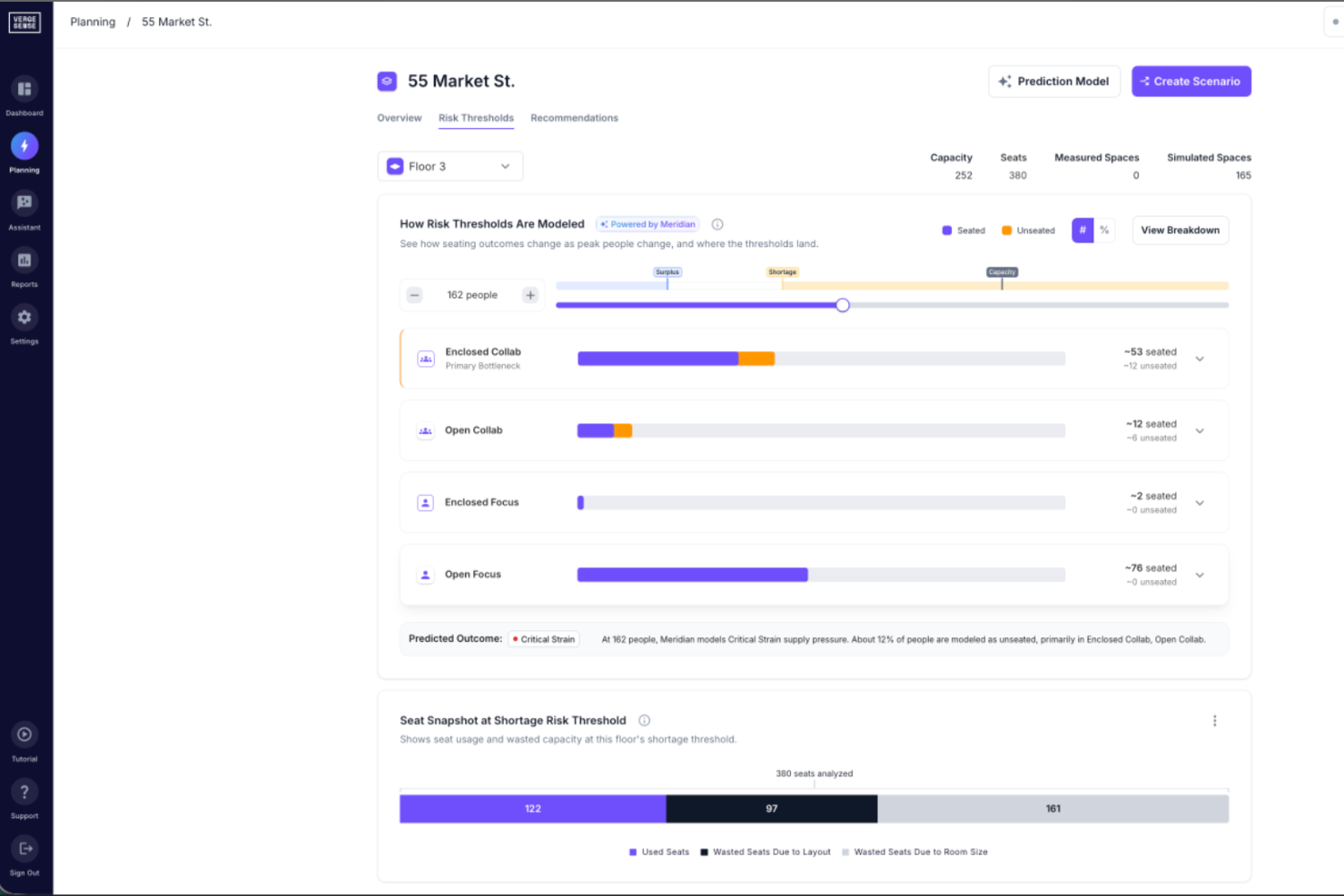
VergeSense is an AI-powered occupancy intelligence platform that gives corporate real estate and workplace teams tools for space planning, portfolio right-sizing, capacity forecasting, and office layout decisions using real utilization data from physical sensors.
Who Is VergeSense Best For?
VergeSense is a strong fit for corporate real estate teams and workplace strategists at mid-to-large enterprises managing complex, multi-location office portfolios.
Why I Picked VergeSense
VergeSense is one of my top picks because I love how its Predictive Planning tool turns vague "what if" questions into concrete, data-backed space decisions. I can upload a floor plan and run scenario models against real utilization data in minutes, testing headcount growth, hybrid attendance shifts, or consolidations before committing. The Large Spatial Model is trained on 200M+ sq ft of real workplace behavior, so capacity forecasts aren't built on industry averages—they reflect how offices actually get used.
VergeSense Key Features
- Real-time occupancy monitoring: Sensors track live space usage across floors and zones, showing which areas are occupied at any given moment.
- Space utilization dashboards: Visual analytics display historical usage patterns by space type, floor, or building over customizable time periods.
- Portfolio-level reporting: Aggregate occupancy and utilization data across multiple office locations into a single, unified view.
- Sensor hardware deployment: VergeSense provides its own purpose-built workplace sensors, capturing passive occupancy data without requiring employee check-ins or manual input.
VergeSense Integrations
VergeSense offers 50+ native integrations across its workplace tech stack, including Accruent EMS, Archibus by Eptura, Aruba, Cisco Meraki, Cloudbooking, Comfy, Condeco by Eptura, and Crestron, as well as Microsoft 365, Google Workspace, ServiceNow, and leading space booking platforms. An open API is available for custom integrations.
Pros and Cons
Pros:
- Supports both wired and wireless sensors
- Multi-site benchmarking across entire portfolios
- Sensor accuracy above 95% for occupancy
Cons:
- Requires physical hardware installation on-site
- Camera-based sensors trigger privacy reviews
elia
Best for calendar integrations
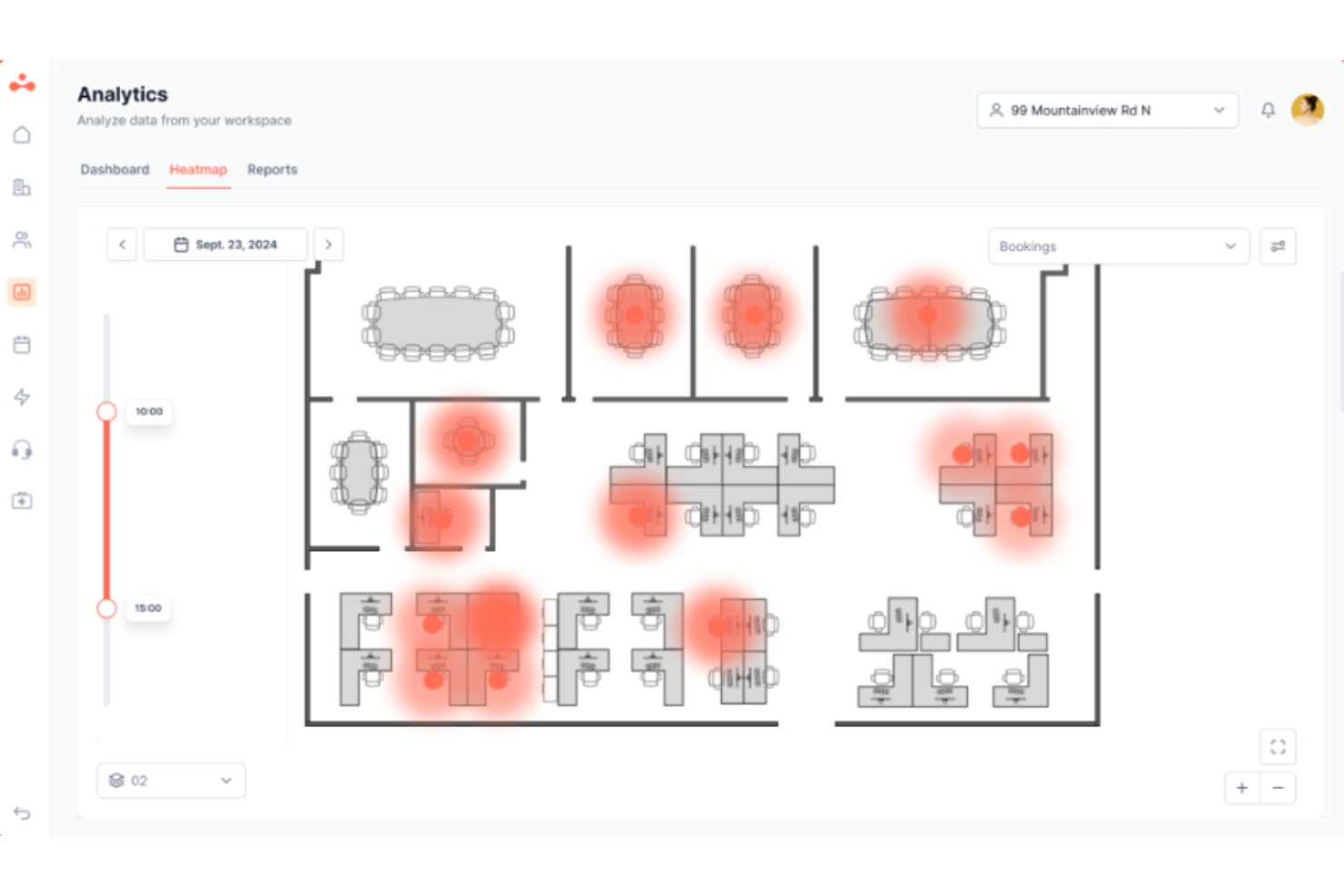
elia is a workplace operations platform that covers desk and room booking, visitor management, service request tracking, occupancy management, hybrid office coordination, and health and safety management.
Who Is elia Best For?
elia is a strong fit for facilities and workplace teams in mid-to-large organizations managing hybrid work across multiple office locations.
Why I Picked elia
I picked elia as one of the best because of how its calendar integrations actually work in practice. It's a true two-way sync: when someone books a room in elia, it auto-syncs to Google Calendar or Outlook, and vice versa. That means no double bookings and no stale room data. I also like that elia pushes booking confirmations and check-in reminders directly through Outlook, so employees never have to leave the tools they already use to manage their day.
elia Key Features
- Interactive floor plans: Browse a visual map of your office to find and book an available desk or workspace by location.
- Visitor management: Register guests in advance, trigger host notifications on arrival, and manage check-ins through a self-service kiosk.
- Service request management: Submit and track requests for catering, IT support, or facility maintenance directly within the platform.
- Occupancy analytics: View real-time and historical space usage data to track how desks, rooms, and zones are being used across your office.
elia Integrations
elia offers native integrations with Microsoft 365, Google Workspace, Slack, and specific tools within those ecosystems, including Google Calendar, Microsoft Teams, and Microsoft Outlook.
Pros and Cons
Pros:
- Modular setup with minimal IT effort
- Supports hybrid work scheduling
- Built-in IoT sensor occupancy tracking
Cons:
- Occupancy statistics could be more detailed
- Limited analytics on lower-tier plans
Best for enterprise workplace operations
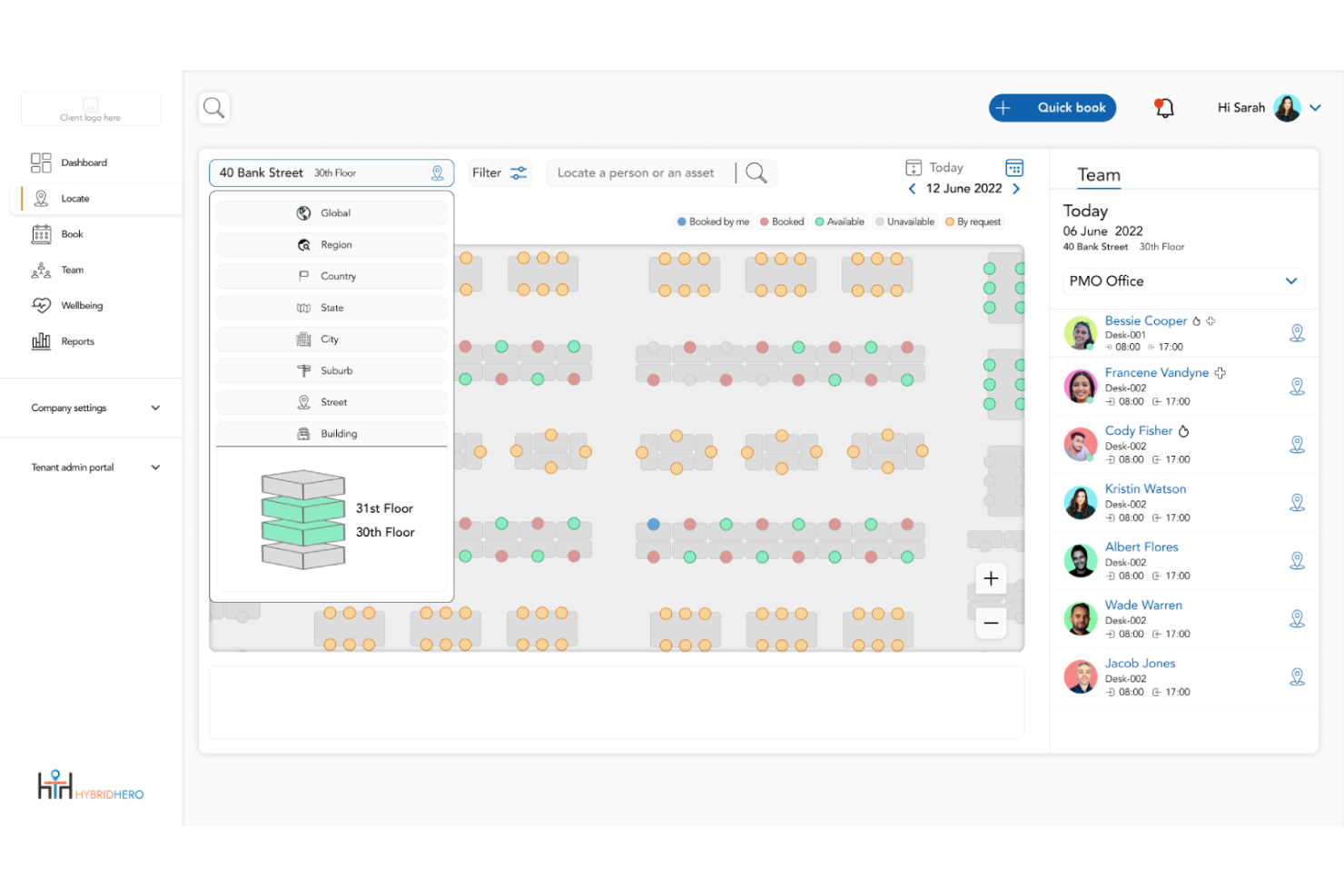
Hybrid Hero helps businesses manage hybrid workplaces by offering tools for desk booking, meeting room scheduling, and workspace analytics, making it easier for office managers and facilities teams to optimize space and support flexible work arrangements.
Who Is Hybrid Hero Best For?
Hybrid Hero is a strong fit for mid-market to enterprise organizations managing hybrid workforces across multiple office locations. It is commonly used by operations, facilities, and HR teams that need centralized workplace management, occupancy visibility, desk booking, visitor management, and reporting across sites.
Why I Picked Hybrid Hero
Hybrid Hero earns its place on this list because it combines workplace operations tools that many organizations manage separately. The platform includes desk booking, meeting room scheduling, visitor and contractor management, parking management, HR management, and compliance reporting within a centralized system. This gives enterprise teams a single place to manage workplace operations, occupancy visibility, and reporting across multiple office locations.
Hybrid Hero Key Features
- Multi-site workplace management: Manage desk bookings, meeting rooms, and occupancy reporting across multiple office locations from a centralized dashboard.
- Visitor and contractor management: Register guests and contractors with check-in workflows, host notifications, and access logging across locations.
- Workplace analytics dashboard: View occupancy trends, reporting insights, and workplace utilization data to support operational planning and compliance visibility.
- Interactive floor plans: Display real-time desk and room availability with live occupancy mapping and workspace filters.
Hybrid Hero Integrations
Integrations include Microsoft 365, Outlook, Teams, Azure Active Directory, Google Workspace, SSO, and Slack.
Pros and Cons
Pros:
- ISO 27001 certified
- Centralized workplace management
- Multi-site reporting tools
Cons:
- Mobile app still evolving
- Requires onboarding for adoption
Best for mobile scheduling and team coordination
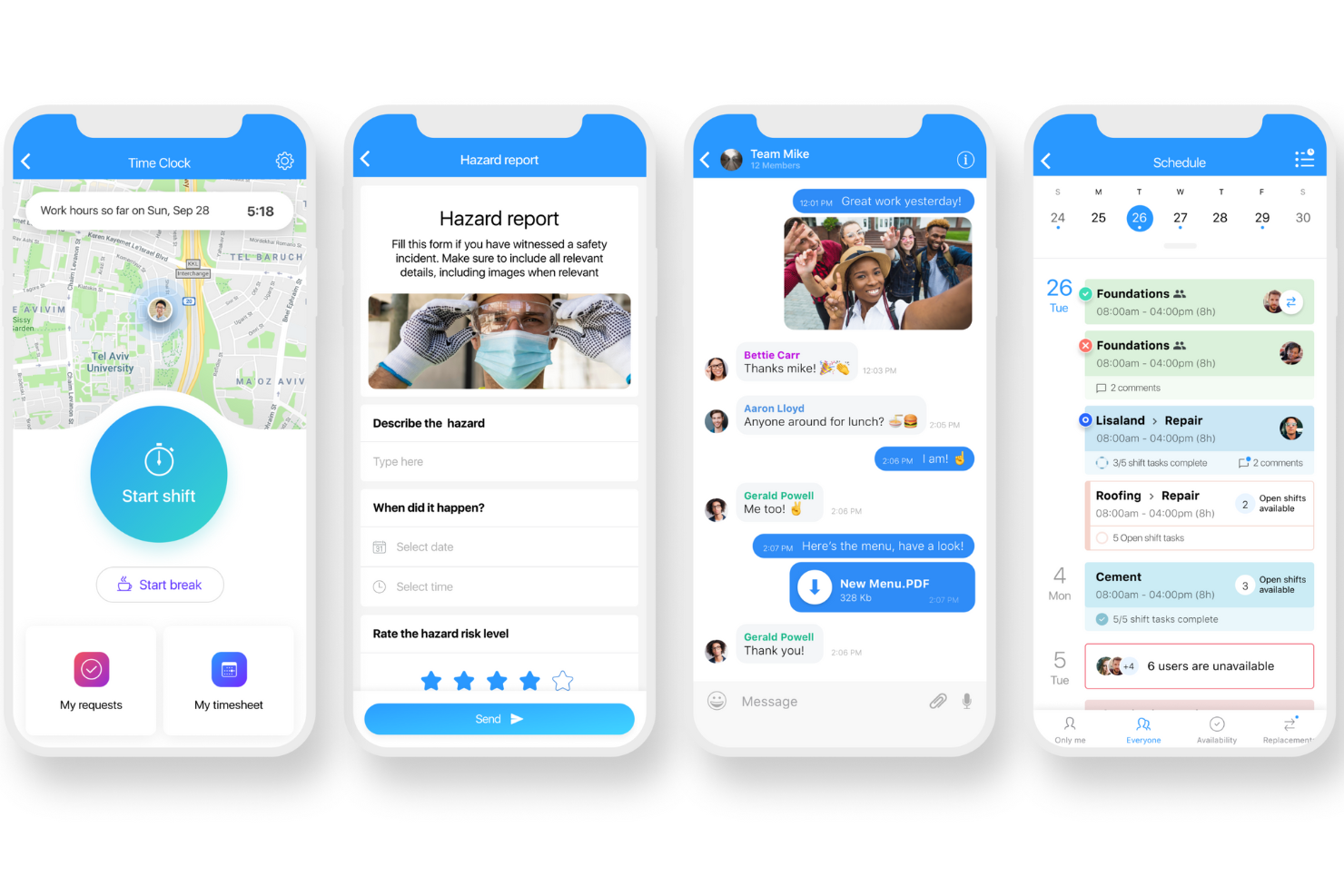
Connecteam is a mobile-first office management platform for businesses with deskless or distributed teams, helping managers coordinate schedules, track time, assign tasks, and streamline communication from a single app.
Who Is Connecteam Best For?
Connecteam is a great fit for small to mid-sized businesses in industries like retail, hospitality, and field services that manage hourly or shift-based workers.
Why I Picked Connecteam
Connecteam earns its spot on my shortlist because of how well it handles mobile employee scheduling for teams that are rarely at a desk. I like that managers can build and publish shift schedules from their phone, and employees get instant notifications when their schedule is updated or a shift opens up. The drag-and-drop schedule builder also lets me set recurring shifts, manage availability, and handle shift swaps without any back-and-forth over email or text. For businesses running multiple locations or shifts, the ability to see who's available and who's already scheduled in one view is genuinely useful.
Connecteam Key Features
- Time clock: Employees can clock in and out directly from their mobile device, with GPS tracking to verify location at punch-in.
- In-app chat: Send direct messages or group announcements to specific teams, departments, or your entire workforce from within the app.
- Task management: Create and assign tasks with due dates, checklists, and image attachments so employees know exactly what needs to get done.
- Digital forms and checklists: Build custom forms for incident reports, inspections, or daily logs that employees can complete from their phones.
Connecteam Integrations
Integrations include QuickBooks, Gusto, Xero, ADP, Zapier, Wix, Lightspeed POS, PrismHR, Square, and BambooHR.
Pros and Cons
Pros:
- Centralized communication reduces reliance on external apps
- Time tracking links directly to payroll workflows
- Mobile-first scheduling tools suit field-based teams
Cons:
- Limited native integrations
- Initial set up and customizations can be time consuming
New Product Updates from Connecteam

Connecteam Expands Break and Timesheet Controls
Connecteam adds flexible break thresholds, personalized policies, auto-end options, a centralized exceptions report, and improved timesheet issue visibility to help teams manage breaks and timesheets more effectively. For more information, visit Connecteam’s official site.
 .
.
Archie
Best for coworking and hybrid environments

Archie is a workspace management platform built for businesses and property managers who need to organize bookings, manage visitors, and optimize shared office resources in flexible work environments.
Who Is Archie Best For?
Archie is a strong fit for coworking space operators and hybrid-first companies that need a dedicated platform to manage desks, meeting rooms, and visitors across flexible office environments.
Why I Picked Archie
Archie earns its spot on my shortlist because it's one of the few office management platforms built to handle both coworking operations and hybrid office environments under one roof. The credit-based booking system lets coworking operators assign credits to members and control exactly how those credits are spent across desks, meeting rooms, and private offices. The coworking CRM tracks leads, manages tours, and handles contracts and quotes without a separate tool. For hybrid teams, the interactive floor plans with real-time desk availability help coordinate who's coming in and when.
Archie Key Features
- Visitor management: Log visitor check-ins, send host notifications, and capture digital signatures for NDAs or waivers at the front desk.
- Meeting room booking: Reserve rooms directly from a floor map or calendar view, with real-time availability and automated conflict prevention.
- Access control integration: Connect with access control systems to automatically grant or revoke building and room access based on bookings.
- Billing and invoicing: Generate invoices, track payments, and manage membership plans directly within the platform for coworking members.
Archie Integrations
Integrations include Microsoft Teams, Slack, Google Calendar, Microsoft Outlook, Zoom, Kisi, Stripe, GoCardless, QuickBooks, and Xero.
Pros and Cons
Pros:
- Comprehensive tools for managing workspaces
- Can book through the web or mobile app
- Branded app options available
Cons:
- Could offer more customizations for reporting
- Doesn't provide visibility into team schedules
Tactic
Best for hybrid workplace flexibility

Tactic is a workspace management platform for organizations that manage hybrid teams, helping office managers and HR professionals coordinate desk booking, meeting spaces, and workplace resources for flexible, modern office environments.
Who Is Tactic Best For?
Tactic is a strong fit for mid-sized to enterprise companies that have adopted hybrid work models and need structured tools to manage shared office spaces and employee schedules.
Why I Picked Tactic
Tactic earns its spot on my shortlist because of how well it handles the day-to-day coordination challenges that come with hybrid work. I particularly like the team visibility feature, which lets employees see who's coming in and when before they book, so they can plan office days around the people they actually need to collaborate with. I also use the team neighborhoods feature to keep departments in designated zones, which removes the guesswork of where to sit. Tessa, Tactic's AI assistant, lets employees skip the floor plan and message to find a desk near a specific colleague.
Tactic Key Features
- Parking management: Employees can book a parking stall at the same time they reserve their desk, or admins can assign permanent spots for specific staff.
- Smart lockers: Employees reserve day-use lockers for personal items or equipment directly through the app when booking their workspace.
- Priority seating: Admins can lock specific desks for leadership or employees with accommodations while keeping the remaining inventory open for general booking.
- Real-time insights: Track desk usage, attendance patterns, and booking trends across floors and departments from a single dashboard.
Tactic Integrations
Integrations include Microsoft Teams, Slack, Google Calendar, Outlook, Zoom, Microsoft Entra ID, and Avigilon.
Pros and Cons
Pros:
- Offers real-time availability
- Visitor check-in integrates with workspace flows
- Interactive maps make locating space and colleagues easy
Cons:
- May lack deep customization for complex office layouts
- May not scale well for very large enterprises

Whatspot
Best for small & shared workspaces

Whatspot is a booking and resource management platform designed for offices and organizations that need to coordinate shared spaces, desks, and equipment, helping teams simplify scheduling and avoid conflicts in busy work environments.
Who Is Whatspot Best For?
Whatspot suits small businesses, coworking spaces, and hybrid teams that need a simple way to manage shared desks, rooms, and resources.
Why I Picked Whatspot
Whatspot is one of my top picks because I love how well it handles the day-to-day chaos of shared office spaces without overcomplicating things. I use the interactive floorplan feature to see exactly which desks are free and where teammates are sitting—no back-and-forth messages needed. The QR code booking is useful too; I can walk up to a room, scan the code, and confirm a booking in two taps. The automatic check-in release prevents no-shows from tying up desks or rooms and keeps availability accurate for everyone.
Whatspot Key Features
- Approval workflows: Set up booking requests that require manager sign-off before a desk, room, or resource is confirmed.
- Visitor management: Register and track visitors arriving at your office, keeping a clear record of who's on-site.
- Usage reports and analytics: View booking data and occupancy trends to understand how your office space is being used.
- Multi-location support: Manage bookings and resources across multiple office locations from a single account.
Whatspot Integrations
Integrations include Microsoft Outlook, Microsoft Teams, and Google Calendar.
Pros and Cons
Pros:
- QR code functionality for quick and easy reservations
- Multilingual support, making it accessible for diverse teams
- Interactive floor plans for efficient desk management
Cons:
- Limited customization options for specific needs
- No integrations presently listed
New Product Updates from Whatspot

Whatspot Adds Booking Modes for Different Space Types
Whatspot introduces Booking Modes to support different reservation rules for different space types. Admins can choose flexible bookings, fixed durations, or fixed intervals based on how each space is used. For more information, visit Whatspot's official site.
 .
.
Airtable
Best for no code app building
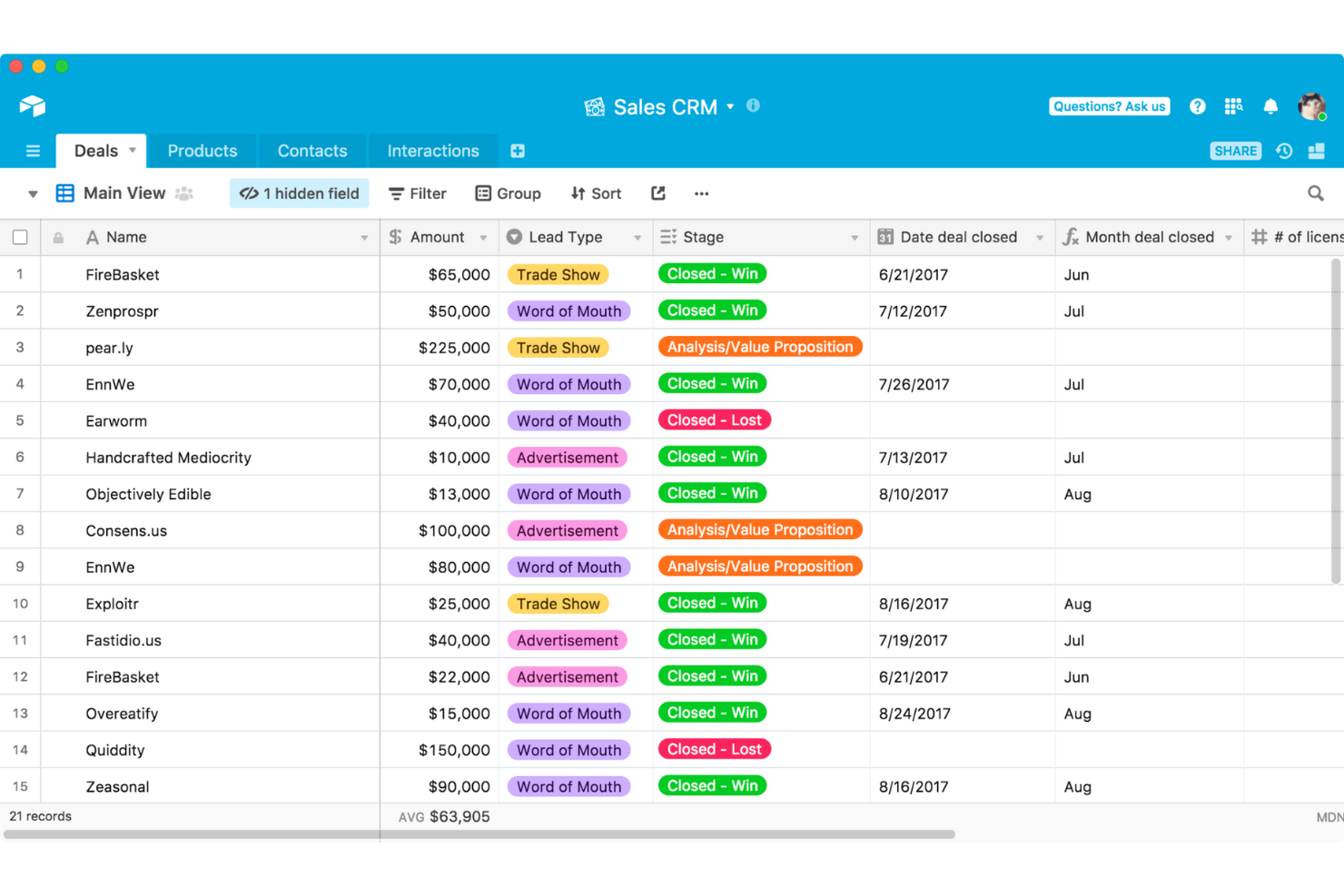
Airtable gives office managers and teams a flexible platform to organize projects, track resources, and centralize information, making it easy to customize workflows for everything from scheduling to asset management.
Who Is Airtable Best For?
Airtable is a great fit for small to mid-sized teams that need to build and manage custom office workflows without relying on a developer.
Why I Picked Airtable
Airtable earns its spot on my shortlist because of how far its no-code app builder goes for office management. I use Airtable's Interface Designer to build custom dashboards that surface only the data my team needs—whether that's a room booking tracker or a vendor contact directory. I also like that you can start from a pre-built template and reshape it entirely without writing a single line of code. The ability to switch between grid, calendar, and kanban views on the same dataset means my team isn't locked into one way of working.
Airtable Key Features
- Workflow automation: Set up trigger-based automations to handle recurring office tasks like sending notifications, updating records, or assigning work without manual input.
- Multiple data views: View the same base as a grid, calendar, gallery, or Gantt chart to match how different teams track and manage their work.
- Relational database structure: Link records across tables—like connecting a vendor list to a budget tracker—so your data stays connected and consistent.
- Pre-built templates: Start from ready-made templates for common office use cases, like event planning or asset tracking, and customize them to fit your team's needs.
Airtable Integrations
Integrations include Google Drive, Dropbox, Slack, Salesforce, Jira, Outlook Calendar, Box, Facebook, GitHub, and ChatGPT.
Pros and Cons
Pros:
- Can build custom solutions
- Intuitive visual interface
- Great blend of power and simplicity
Cons:
- Data limitations on free plan
- Can get complex for larger deployments
Annen programvare for kontoradministrasjon
Her er noen andre gode verktøy for kontoradministrasjon som ikke helt nådde opp på kortlisten min, men som kan være perfekte for dine spesifikke behov:
- Othership
For optimizing collaboration time
- Dropbox
For cloud document storage
- ProofHub
For managing team projects
- deskbird
For flexible work arrangements
- YAROOMS
For AI-powered meeting room bookings
- Clearooms
For user-friendly remote booking
- Dibsido
For all-in-one workplace management
- Smartway2
For hybrid workplace desk bookings
- PandaDoc
Admin software for managing contracts
- HubStar
For data-backed workplace management
- Expensify
For expense management
- Waldo by MOFFI
With AI-driven workspace scheduling
- Tango Analytics
For office space management
- Skedda
For interactive space booking
- 1Password
For password protection and tracking
- anny
For centralized workspace booking
- Floor Plan Mapper
For interactive seating maps
- Asana
Productivity software for team-based task management
- Basecamp
For traditional project management
- Slack
For a real-time business chat app


Relaterte anmeldelser av HR-programvare
Hvis du fortsatt ikke har funnet det du leter etter her, kan du se nærmere på disse andre relaterte verktøyene som vi har testet og evaluert:
- HR-programvare
- Lønnssystemer
- Rekrutteringsprogramvare
- Tjenester for registrert arbeidsgiver
- Systemer for søkersporing
- Programvare for personalstyring
How I Evaluate Office Management Software
When a People Ops team is juggling desk booking, PTO requests, and visitor check-ins across three offices, I evaluate tools on two levels: must-have functionality and what truly sets one apart.
Core Functionality (Table Stakes For This List)
When I'm selecting tools for my list, I rank each one on a scale from 0 (does not offer the functionality) to 5 (excels in this area) for each core functionality listed below. Then, I calculate the tool's total score as a percentage. Each tool needs to achieve a minimum total score of 75% to be considered for inclusion.
- Employee Directory & Records: I check whether the directory goes beyond a basic contact list to include custom fields, org charts, and role-based access so HR can find and update profiles without digging through spreadsheets.
- Onboarding & Offboarding Workflows: A good tool lets you build multi-step task sequences for new hires—like sending welcome packets, collecting tax forms, and provisioning badge access—without chasing people over email.
- Time, Attendance & PTO Tracking: I evaluate how each platform handles leave requests, approval chains, and accrual rules, especially for teams with multiple leave policies across different office locations.
- Desk, Room & Resource Booking: Whether your team needs to reserve hot desks or conference rooms, I look for visual floor plans, calendar sync, and conflict detection that prevent double-bookings on busy days.
- Visitor & Vendor Management: I look for digital check-in flows that notify hosts, capture signatures on NDAs, and log visitor data—replacing the paper sign-in sheets that most front desks still rely on.
- Document & Policy Management: Each tool should support organized storage with version control and acknowledgment tracking, so you can distribute an updated handbook and confirm every employee has reviewed it.
Once I have a list of tools that meet the criteria, I consider what sets each platform apart.
Differentiating Factors (What Sets Vendors Apart)
Here's how I compare and contrast different vendors:
Standout Features
Hybrid scheduling is a big one—I look for tools that let teams coordinate in-office days and visualize who's coming in, so workplace leads can plan capacity without constant back-and-forth. Analytics dashboards also matter because knowing which floors sit empty on Fridays helps you make smarter real estate decisions. A native mobile app rounds things out, giving employees a way to grab a desk or submit a PTO request from their phone instead of waiting until they're at a laptop.
Beyond Features
Integration depth matters—I check whether a platform connects natively with your HRIS, payroll, and collaboration tools like Slack or Microsoft Teams, since a disconnected office tool just creates more manual work. Security is equally important when handling employee data, so I look for SOC 2 certification, SSO support, and role-based permissions. Pricing clarity also shapes my evaluation. I favour vendors that publish per-employee or modular pricing so you can estimate costs before jumping on a sales call.
Funksjoner i verktøy for kontoradministrasjon
Programvare for kontoradministrasjon kan bidra til å effektivisere en rekke kontorfunksjoner, blant annet ved å holde prosjekter på rett spor og administrere dokumenter, arealer og selskapsressurser på en effektiv måte. Her er noen viktige funksjoner som skiller de beste plattformene for kontoradministrasjon fra andre produkter på markedet:
- Analyse av arealutnyttelse: Følg med på hvordan ulike områder på kontoret brukes, slik at du kan optimalisere planløsninger, redusere ubrukt areal og planlegge for fremtidig vekst. Denne funksjonen tilbyr visuelle oversikter eller rapporter som gjør det enkelt å se trender og ta kostnadsbesparende beslutninger.
- System for rombestilling: La teammedlemmer enkelt reservere møterom eller delte arbeidsområder. En intuitiv bestillingskalender forhindrer problemer med dobbeltbestillinger, reduserer konflikter og hjelper alle med å samordne timeplanene sine.
- Ressurssporing: Overvåk plasseringen, bruken og vedlikeholdsstatusen til verdifullt kontorutstyr. Med denne funksjonen mister du ikke dyre enheter eller verktøy, og du vet nøyaktig når det er tid for reparasjoner eller oppgraderinger.
- Flytteadministrasjon: Forenkle prosessen med å flytte team eller omorganisere kontorsoner. Du kan samordne ressurser, følge fremdriften og kommunisere endringer raskt, slik at selv store flytteprosesser blir mindre forstyrrende.
- Beleggstyring: Se sanntidsoppdateringer om hvem som er på kontoret, hvor de sitter og hvilke skrivebord eller rom som er ledige. Dette gir bedre kontroll over belegg og effektiv bruk av arealet, særlig ved hybride arbeidsordninger.
- Besøkshåndtering: Ta imot og følg opp besøkende med digitale innsjekkinger og automatiserte adgangskort. Dette bidrar ikke bare til å holde kontoret sikkert, men skaper også en smidig og imøtekommende opplevelse for gjestene.
- Vedlikeholdsplanlegging: Organiser og automatiser regelmessig vedlikehold av kontorlokaler og utstyr. Du unngår overraskelser i siste liten og holder kontoret i god drift med nyttige påminnelser og enkel sporing av forespørsler.
Vanlige AI-funksjoner i programvare for kontorarealstyring
I tillegg til standardfunksjonene i programvare for kontorarealstyring som er nevnt ovenfor, tar mange av disse løsningene i bruk AI med funksjoner som:
- Forutseende arealplanlegging: Analyser brukstrender og forutse fremtidige arealbehov, slik at du kan tilpasse planløsningene proaktivt og forhindre overfylte områder.
- Automatisk tildeling av skrivebord: Bruk AI til å koble ansatte med skrivebord eller rom basert på rollene, preferansene og timeplanene deres – og fjern det manuelle arbeidet med fleksibel plassdeling.
- Smart ressursfordeling: Fordel møterom, utstyr eller parkeringsplasser ved hjelp av AI for å balansere etterspørselen og minimere konflikter.
- Prognoser for belegg: Forutse kontoroppmøte og persontrafikk med AI, slik at du kan optimalisere strøm- og andre driftsressurser, planlegge rengjøring og unngå trengsel.
- AI-drevne vedlikeholdsvarsler: Oppdag mønstre i utstyrets ytelse eller bruken av lokalene for å forutse når noe trenger reparasjon – slik at du kan løse problemer før de forstyrrer arbeidsflyten.
Kostnader og priser for programvare for kontoradministrasjon
Når du velger programvare for kontoradministrasjon, er det viktig å forstå de ulike prisnivåene og hvilke funksjoner som er inkludert i hvert av dem. Programvareleverandører tilbyr vanligvis flere abonnementer for å imøtekomme behovene til virksomheter av ulik størrelse, fra små oppstartsbedrifter til store selskaper.
Nedenfor har jeg beskrevet de vanligste prisalternativene og hva du kan forvente av hvert abonnement. Denne tabellen hjelper deg med å sammenligne de tilgjengelige alternativene, slik at du kan avgjøre hvilket abonnement som oppfyller dine spesifikke krav.
Sammenligningstabell for abonnementer for programvare for kontoradministrasjon
| Abonnement | Gjennomsnittspris (månedlig) | Vanlige inkluderte funksjoner |
|---|---|---|
| Gratisabonnement | $0 | Grunnleggende oppgavebehandling, begrenset dokumentlagring, grunnleggende prosjektsporing og verktøy for teamsamarbeid for opptil 5 brukere |
| Grunnleggende abonnement | $10 - $15 per bruker | Alle funksjonene i gratisabonnementet, utvidet dokumentlagring, kalenderintegrasjon, automatisering av oppgaver, sporing av ressurser og støtte for opptil 10 brukere |
| Standardabonnement | $20 - $30 per bruker | Alle funksjonene i det grunnleggende abonnementet, avanserte prosjektstyringsverktøy, ressursbestilling, tilpassbare dashbord, rollebaserte tilgangskontroller og prioritert kundestøtte for opptil 50 brukere |
| Premiumabonnement | $40 - $50 per bruker | Alle funksjonene i standardabonnementet, ubegrenset antall brukere, avansert rapportering og analyse, arbeidsflytautomatisering, forbedrede sikkerhetsfunksjoner, integrasjon med tredjepartsapper og kundestøtte døgnet rundt, alle dager |
| Storbedriftsabonnement | Tilpasset prising | Alle funksjonene i premiumabonnementet, dedikert kundeansvarlig, tilpassede integrasjoner, avansert datastyring, prioritert innføring og opplæring samt skreddersydd kundestøtte for store organisasjoner |
Når du velger et abonnement, bør du tenke på størrelsen på teamet ditt, hvilke funksjoner du trenger, og hvilket nivå av kundestøtte du har behov for. Hvert abonnement bygger på det forrige og tilbyr mer avanserte funksjoner og større fleksibilitet etter hvert som behovene dine for kontoradministrasjon øker.
Når du snevrer inn utvalget for å finne den beste programvaren for behovene dine, anbefaler jeg at du har følgende prisfaktorer i bakhodet:
- Tilgjengelige gratisabonnementer: Et gratisalternativ gjør det mulig for små team å prøve produkter uten å binde seg
- Per bruker kontra fast pris: Priser per bruker skalerer godt for større team, mens faste priser passer bedre for mindre grupper
- Trinnbaserte abonnementer: Flere prisnivåer gjør det mulig å finne den rette balansen mellom funksjoner og kostnader
- Rabatt på årsabonnementer: Årskontrakter kan gi betydelige rabatter sammenlignet med månedlig fakturering
- Storbedrifts- eller tilpasset prising: Større organisasjoner kan ha behov for storbedrifts- eller tilpassede pristilbud for å skreddersy programvaren etter behovene sine
- Gratis prøveperioder: Prøveperioder gjør det mulig å vurdere ordentlig om et produkt vil dekke behovene dine eller ikke
Ofte stilte spørsmål
Her er noen av spørsmålene folk oftest stiller meg om programvare for kontoradministrasjon:
Finnes det ulike typer programvare for kontoradministrasjon?
Det finnes mange undernisjer i denne sektoren. Noen av hovedkategoriene er prosjektstyring, dokument- og fildeling, kommunikasjon, planlegging, ressursforvaltning, verktøy for bokføring og regnskap samt verktøy for arealforvaltning. Mer spesialiserte plattformer for kontoradministrasjon inkluderer ofte funksjoner som lagerstyring, kalendere, oppgavestyring og CRM-funksjonalitet.
Noen spesialiserer seg på bestemte funksjoner, som planlegging eller arealutnyttelse, mens andre integrerer en komplett pakke med funksjoner i én sentral løsning.
Hvordan kan jeg velge den beste programvaren for kontoradministrasjon for organisasjonen min?
Fokuser på kjernefunksjonaliteten du trenger, i tillegg til brukervennlighet, mobiltilgang, integrasjoner, priser og spesialfunksjoner som analyse. Prøv gratis prøveperioder for å teste produktene i praksis før du kjøper.
Hvordan kan jeg administrere kontorlokalene mine mer effektivt?
Det finnes mange måter å forbedre administrasjonen av kontorlokaler på:
\u003cul\u003e
\t\u003cli\u003eanalyser data om arealbruk\u003c/li\u003e
\t\u003cli\u003einnfør et \u003ca href=\u0022https://peoplemanagingpeople.com/tools/best-hot-desk-booking-software/\u0022\u003esystem for delte arbeidsplasser\u003c/a\u003e\u003c/li\u003e
\t\u003cli\u003ebruk reservasjonssystemer\u003c/li\u003e
\t\u003cli\u003edigitaliser dokumenter\u003c/li\u003e
\t\u003cli\u003eoptimaliser planløsninger\u003c/li\u003e
\t\u003cli\u003ese nærmere på fleksible arbeidsplassløsninger\u003c/li\u003e
\t\u003cli\u003estrategisk bruk av \u003ca href=\u0022https://peoplemanagingpeople.com/tools/best-office-space-management-software/\u0022\u003eprogramvare for kontorlokaleadministrasjon\u003c/a\u003e\u003c/li\u003e
\t\u003cli\u003esamle inn tilbakemeldinger fra ansatte.\u003c/li\u003e
\u003c/ul\u003e
Hvilke automatiseringer eller varsler bør jeg se etter i programvare for kontoradministrasjon?
De beste plattformene for kontoradministrasjon tilbyr kraftige funksjoner for å automatisere repetitive oppgaver og bygge effektive arbeidsflyter. Plattformer som støtter betingede utløsere, er nyttige fordi du da kan sette i gang handlinger som varsler, godkjenninger eller statussjekker – alt basert på forhåndsdefinerte regler.
Se etter arbeidsflyter som kan tilpasses for standardprosesser, fra introduksjon av nyansatte til godkjenning av kontrakter. Jeg setter også pris på systemer med intuitive visuelle byggere, som lar deg konfigurere arbeidsflyter uten behov for programmeringskunnskaper.
\u003c!– wp:heading {\u0022level\u0022:3} –\u003e
\u003c!– /wp:heading –\u003e \u003c!– wp:paragraph –\u003e
Viktige funksjoner du bør se etter, inkluderer:
\u003c!– /wp:paragraph –\u003e \u003c!– wp:list –\u003e
\u003cul class=\u0022wp-block-list\u0022\u003e
\t\u003cli style=\u0022list-style-type: none;\u0022\u003e
\u003cul class=\u0022wp-block-list\u0022\u003e\u003c!– wp:list-item –\u003e
\t\u003cli\u003eBetingede utløsere som automatisk setter i gang handlinger som varsler eller godkjenninger basert på angitte regler\u003c/li\u003e
\u003c/ul\u003e
\u003c/li\u003e
\u003c/ul\u003e
\u003c!– /wp:list-item –\u003e \u003c!– wp:list-item –\u003e
\u003cul class=\u0022wp-block-list\u0022\u003e
\t\u003cli style=\u0022list-style-type: none;\u0022\u003e
\u003cul class=\u0022wp-block-list\u0022\u003e
\t\u003cli\u003eTilpassbare godkjenningskjeder som sender innhold videre til de rette personene\u003c/li\u003e
\u003c/ul\u003e
\u003c/li\u003e
\u003c/ul\u003e
\u003c!– /wp:list-item –\u003e \u003c!– wp:list-item –\u003e
\u003cul class=\u0022wp-block-list\u0022\u003e
\t\u003cli style=\u0022list-style-type: none;\u0022\u003e
\u003cul class=\u0022wp-block-list\u0022\u003e
\t\u003cli\u003ePlanlagte og gjentakende handlinger for oppgaver som påminnelser eller statussjekker\u003c/li\u003e
\u003c/ul\u003e
\u003c/li\u003e
\u003c/ul\u003e
\u003c!– /wp:list-item –\u003e \u003c!– wp:list-item –\u003e
\u003cul class=\u0022wp-block-list\u0022\u003e
\t\u003cli style=\u0022list-style-type: none;\u0022\u003e
\u003cul class=\u0022wp-block-list\u0022\u003e
\t\u003cli\u003eMulighet til å opprette flertrinnsprosesser med logikk for godkjenninger, gjennomganger og revisjoner\u003c/li\u003e
\u003c/ul\u003e
\u003c/li\u003e
\u003c/ul\u003e
\u003c!– /wp:list-item –\u003e \u003c!– wp:list-item –\u003e
\u003cul class=\u0022wp-block-list\u0022\u003e
\t\u003cli style=\u0022list-style-type: none;\u0022\u003e
\u003cul class=\u0022wp-block-list\u0022\u003e
\t\u003cli\u003eEn enkel måte å bygge arbeidsflyter uten programmering gjennom visuelle dra-og-slipp-grensesnitt\u003c/li\u003e
\u003c/ul\u003e
\u003c/li\u003e
\u003c/ul\u003e
\u003c/ul\u003e
\u003c!– /wp:list –\u003e
Hvilke integrasjoner er viktige for verktøy for kontoradministrasjon?
Hvilke integrasjoner du trenger, avhenger av hvilken type verktøy for kontoradministrasjon du ser etter. Det er imidlertid alltid nyttig om systemene dine kan integreres med andre plattformer du bruker til regnskap, e-postmarkedsføring og kunderelasjonshåndtering (CRM). Vær også oppmerksom på hvilke systemer som tilbyr åpne API-er, siden disse lar deg opprette tilpassede forbindelser mellom det nye systemet ditt og annen programvare eller andre apper du bruker, for bedre fleksibilitet.
De beste verktøyene tilbyr mer enn bare synkronisering av kontakter og kalendere. De går mer i dybden og muliggjør flyt av data og handlinger mellom programvaren for kontoradministrasjon og tredjepartsverktøy for \u003ca href=\u0022https://peoplemanagingpeople.com/tools/best-business-management-software/\u0022\u003eforretningsadministrasjon\u003c/a\u003e.
Hva er forskjellen mellom hotellbooking og delte arbeidsplasser?
Hovedforskjellen mellom hotellbooking og delte arbeidsplasser er at hotellbooking krever at ansatte reserverer en arbeidsplass før de bruker den, mens delte arbeidsplasser lar ansatte bruke en ledig arbeidsplass uten reservasjon.
Andre programvareanmeldelser for forretningsdrift
Dagens avanserte programvareverktøy kan hjelpe deg med å forbedre effektiviteten i virksomheten på alle områder. Her er noen flere artikler du kanskje vil finne interessante i jakten på bedre virksomhetsstyring:
- Programvare for kapitalforvaltning
- Møtehåndteringsprogramvare for eksterne team
- Programvare for styremøter
- Dokumenthåndteringssystemer