

40 Best Board Meeting Software Reviewed In 2026

10 Best Board Meeting Software Shortlist


The best board meeting software helps you streamline agendas, store documents securely, and facilitate communication—so you can focus on productive discussions instead of administrative details.
Coordinating schedules, maintaining compliance, and keeping everyone aligned can be overwhelming without the right tools. The right platform centralizes meeting materials, automates agenda creation, and enables secure collaboration before, during, and after meetings.
Drawing on my experience testing and reviewing HR and business software, I’ve curated a list of the top board meeting solutions that are intuitive, secure, and designed for effective governance. In this guide, you’ll find platforms that simplify board management, improve transparency, and make running meetings smoother for everyone involved.
Why Trust Our Software Reviews
We’ve been testing and reviewing HR software systems since 2019. As HR experts ourselves, we know how critical and difficult it is to make the right decision when selecting software.
We invest in deep research to help our audience make better software purchasing decisions. We’ve tested more than 2,000 tools for different HR management use cases and written over 1,000 comprehensive software reviews. Learn how we stay transparent & our software review methodology.
Best Board Meeting Software Summary
This comparison chart summarizes basic details about each of my top board meeting software selections. You can view pricing details and the availability of free trials or demos side-by-side to help you find the best software for your budget and business needs.
| Tool | Best For | Trial Info | Price | ||
|---|---|---|---|---|---|
| 1 | Best for Microsoft 365 & Teams integration | Free trial available | Pricing upon request | Website | |
| 2 | Best for small teams | Free demo available | Pricing upon request | Website | |
| 3 | Best for strategic insights | Free demo available | Pricing upon request | Website | |
| 4 | Best for user-friendly interface | Free trial + free demo available | Pricing upon request | Website | |
| 5 | Best for remote collaboration | 14-day free trial available | From $20.99/user/month (billed annually) | Website | |
| 6 | Best for financial service industries | Free demo available | Pricing upon request | Website | |
| 7 | Best for meeting productivity | 30-day free trial | From $150/month/board | Website | |
| 8 | Best for video conferencing | Free plan available | From $1/host/month (billed annually) | Website | |
| 9 | Best for governance tools | Free demo available | Pricing upon request | Website | |
| 10 | Best for large enterprises | Not available | Pricing upon request | Website |
-

Remote People
Visit WebsiteThis is an aggregated rating for this tool including ratings from Crozdesk users and ratings from other sites.5 -
edays
Visit WebsiteThis is an aggregated rating for this tool including ratings from Crozdesk users and ratings from other sites.4.7 -
Checkr
Visit WebsiteThis is an aggregated rating for this tool including ratings from Crozdesk users and ratings from other sites.4.5





Best Board Meeting Software Reviews
Below are my detailed summaries of the best board meeting software that made it onto my shortlist. My reviews offer a detailed look at the key features, pros & cons, integrations, and ideal use cases of each tool to help you find the best one for you.


Persavent offers a board and meeting management solution specifically designed for Microsoft 365 users. It's ideal for organizations of all sizes, helping you manage documents and meetings efficiently. Key business functions include secure document distribution and agenda management.
Why I picked Persavent: This tool integrates seamlessly with Microsoft 365, leveraging SharePoint and Teams for secure collaboration. Its standout feature is the intuitive document management, which makes distributing and reviewing documents straightforward. You can also easily create agendas, ensuring your meetings run smoothly. The focus on Microsoft integration means your team can use familiar tools to enhance productivity.
Standout features & integrations:
Features include secure document access through SharePoint, easy agenda creation, and intuitive meeting material distribution that requires minimal training. You can also enjoy real-time document collaboration, enhancing your team's workflow.
Integrations include Microsoft Teams, SharePoint, Outlook, OneDrive, and Office 365.
Pros and Cons
Pros:
- Minimal training required
- Intuitive document management
- Easy Microsoft integration
Cons:
- Basic customization options
- Limited to Microsoft ecosystem


Zeck is a board meeting software designed for small teams looking to enhance their meeting efficiency. It focuses on transforming board meetings into interactive sessions with customizable updates accessible on mobile devices. Key business functions include secure collaboration and smart agenda management.
Why I picked Zeck: Zeck caters specifically to small teams by offering interactive updates and a collaborative workspace. Its digital voting and automated board minutes make meetings more efficient. The Pre-Vote feature allows for discussions in advance, saving time during meetings. These functionalities align well with the needs of small teams seeking streamlined decision-making.
Standout features & integrations:
Features include secure collaboration tools that help your team work together effectively. Smart agendas keep everyone focused on strategy, while dynamic linking of essential information ensures nothing gets missed. You can also benefit from engagement analytics to track how your team interacts with the software.
Integrations include various data sources, enhancing its functionality.
Pros and Cons
Pros:
- Pre-Vote feature for advance input
- Auto-generated board minutes
- Simplified meeting preparation
Cons:
- May not suit large organizations
- Requires adaptation to new workflows

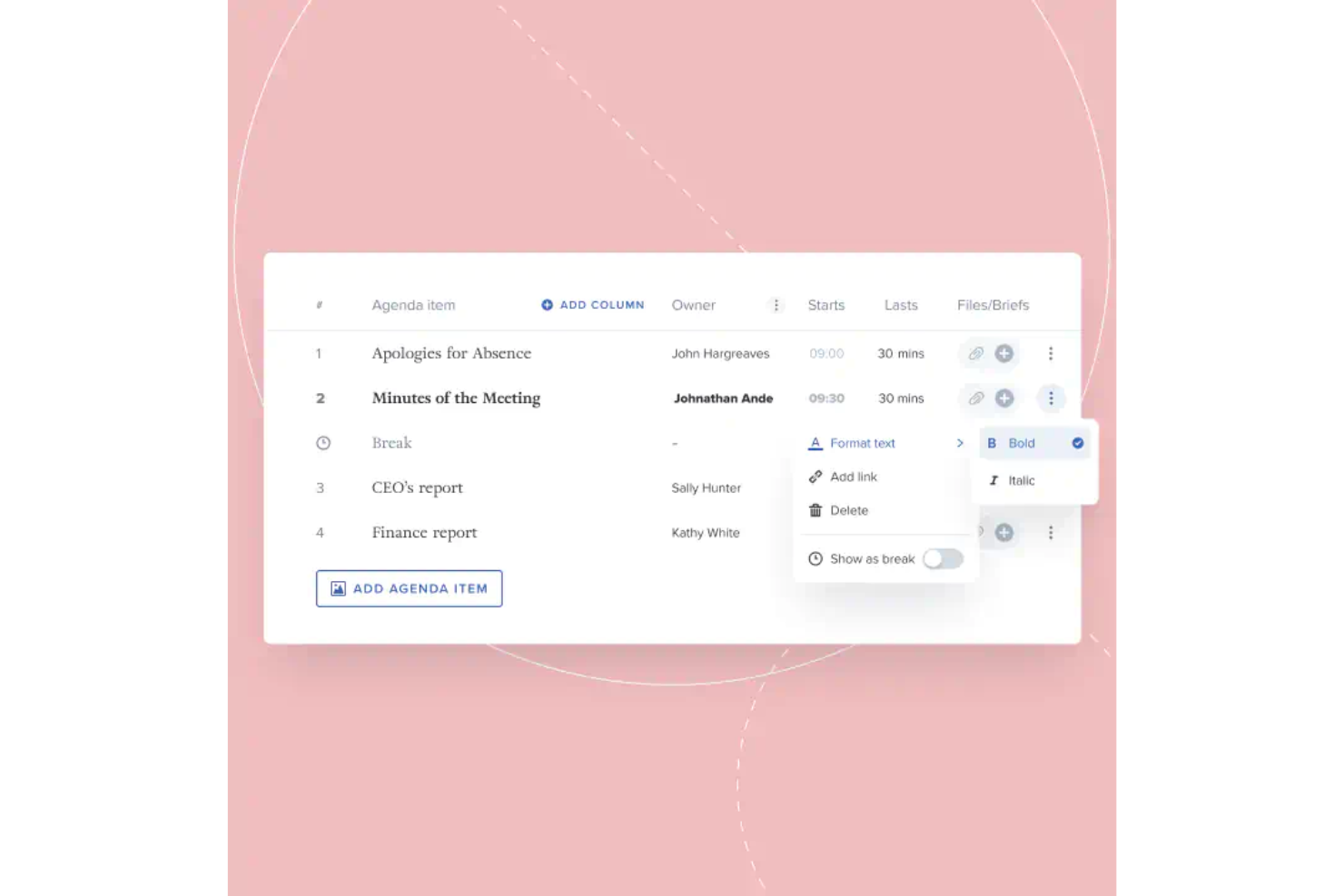
Board Intelligence is a board management software designed for governance professionals and executives across various sectors. It focuses on enhancing board effectiveness with features like agenda planning and AI-driven minute writing.
Why I picked Board Intelligence: The tool is tailored for strategic insights, offering AI-driven minute writing and comprehensive reporting tools. Its agenda planning feature ensures meetings are focused and effective.
The platform supports real-time document collaboration, allowing your team to work efficiently. With enterprise-level security, it caters to organizations seeking reliable governance solutions.
Standout features & integrations:
Features include secure document sharing, which keeps your board materials safe and accessible. Real-time collaboration lets your team work together seamlessly during meetings. The task management feature helps you keep track of action items and follow-ups.
Integrations include Microsoft Teams, SharePoint, OneDrive, Google Drive, Slack, and DocuSign.
Pros and Cons
Pros:
- Enterprise-level security
- Real-time document collaboration
- AI-driven minute writing
Cons:
- Requires stable internet connection
- Limited customization options


OnBoard is a board meeting software designed for organizations seeking an intuitive platform to manage meetings and documents. It caters to board members and administrators who need to organize agendas, collaborate, and ensure compliance efficiently.
Why I picked OnBoard: The tool offers a user-friendly interface that simplifies navigation and increases productivity. Its agenda creation and management features help your team stay organized and focused on key objectives.
Real-time collaboration tools enhance communication among board members, ensuring everyone is aligned. With secure document sharing, you can trust that your sensitive information remains protected.
Standout features & integrations:
Features include secure voting, which allows your board to make decisions efficiently and confidentially. The analytics feature provides insights into board activities, helping you measure engagement and effectiveness. You can also benefit from task management tools that ensure follow-ups and actions are completed on time.
Integrations include Microsoft Office 365, Google Workspace, Slack, Zoom, Dropbox, Box, DocuSign, Salesforce, Microsoft Teams, and OneDrive.
Pros and Cons
Pros:
- Enhances board communication
- Efficient agenda management
- Intuitive navigation aids productivity
Cons:
- Limited customization options
- May require initial training


Boardable is a board management software designed for organizations that need to enhance remote collaboration and streamline board meetings. It serves board members and administrators by providing tools for efficient communication and document sharing.
Why I picked Boardable: The tool is tailored for remote collaboration, offering features that keep your team connected and engaged. Its video conferencing integration allows for seamless virtual meetings
The agenda builder helps your team stay organized and focused on key topics. With document sharing and storage capabilities, you can ensure everyone has access to the necessary materials.
Standout features & integrations:
Features include a task manager that helps assign and track action items effectively. The polling feature allows your board to make decisions quickly and efficiently. You can also use the calendar sync to keep everyone updated on meeting schedules and deadlines.
Integrations include Zoom, Microsoft Teams, Slack, Google Workspace, Dropbox, Box, OneDrive, Salesforce, DocuSign, and Adobe Sign.
Pros and Cons
Pros:
- Comprehensive document sharing
- Effective agenda builder
- Seamless video conferencing integration
Cons:
- May need training for new users
- Limited advanced features

Diligent ESG is a software solution aimed at companies focused on environmental, social, and governance (ESG) factors. It's designed for businesses needing to track and report their ESG initiatives effectively.
Why I picked Diligent ESG: It specializes in ESG compliance, providing tools that make tracking and reporting straightforward. The software offers dashboards that visualize your ESG data, helping your team make informed decisions. Its compliance management feature ensures you meet industry standards with ease. The platform also supports real-time data updates, keeping your information current and accurate.
Standout features & integrations:
Features include customizable dashboards that help you visualize your ESG data in a way that suits your needs. The compliance management feature assists with meeting industry standards, ensuring your company remains compliant. You can also benefit from real-time data updates, which keep your information current and accurate.
Integrations include Microsoft 365, Salesforce, SAP, Oracle, Workday, Tableau, Power BI, Google Workspace, and Slack.
Pros and Cons
Pros:
- Easy compliance management
- Real-time data updates
- Customizable ESG dashboards
Cons:
- Complex setup process
- Limited customization for reports


BoardPro is a board management software aimed at organizations seeking to enhance meeting productivity and streamline board operations. It serves board members and administrators by providing tools for efficient agenda management and document handling.
Why I picked BoardPro: The tool focuses on boosting meeting productivity with features like automated agenda creation and distribution. It provides minute-taking tools that simplify the documentation process, saving your team time.
Further, the board pack feature ensures all materials are organized and accessible in one place. With its focus on efficiency, your board can run meetings smoothly and effectively.
Standout features & integrations:
Features include automated reminders that keep your team informed of upcoming tasks and deadlines. The decision register tracks and records board decisions, ensuring accountability. You can also use the task management tools to assign and monitor action items for follow-up.
Integrations include Microsoft Office 365, Google Workspace, Dropbox, Box, OneDrive, Slack, Zoom, Adobe Sign, Salesforce, and DocuSign.
Pros and Cons
Pros:
- Efficient board pack organization
- Simplifies minute-taking
- Automated agenda creation
Cons:
- Complexity for small teams
- May require initial training

Zoho Meeting is a web conferencing software designed for businesses of all sizes, focusing on video conferencing and webinars. It helps you host online meetings, share screens, and conduct webinars efficiently.
Why I picked Zoho Meeting: It offers a range of features that enhance video conferencing, making it ideal for teams needing reliable online meetings. Screen sharing and webinar tools allow for effective presentations and collaboration. The platform supports real-time chat and video, helping you communicate clearly with your team. Its user-friendly interface ensures that even those new to video conferencing can get started quickly.
Standout features & integrations:
Features include customizable registration forms for webinars, which help you gather the information you need from attendees. Polls and Q&A sessions keep your meetings interactive and engaging. The recording feature allows you to save and revisit your meetings at any time.
Integrations include Zoho CRM, Zoho Projects, Zoho Connect, Zoho Calendar, Eventbrite, Microsoft Teams, Zapier, Slack, and Google Workspace.
Pros and Cons
Pros:
- Real-time video chat
- Easy meeting recordings
- Interactive polls and Q&A
Cons:
- Basic analytics tools
- Occasional connectivity issues


Govenda is a board management software designed for organizations that prioritize effective governance and streamlined board processes. It serves board members and executives by providing tools for secure communication and document handling.
Why I picked Govenda: The tool offers specialized governance tools that support your organization's compliance and strategic planning needs. Its secure messaging feature ensures confidential communication among board members.
The document management system helps your team organize and access critical board materials effortlessly. With its focus on governance, your board can enhance decision-making and maintain transparency.
Standout features & integrations:
Features include agenda management that streamlines the preparation and distribution of meeting agendas. The voting feature allows your board to make decisions efficiently and record results accurately. You can also benefit from the analytics tools that provide insights into board activities and engagement.
Integrations include Microsoft Office 365, Google Workspace, Slack, Zoom, Dropbox, Box, Salesforce, DocuSign, Adobe Sign, and Microsoft Teams.
Pros and Cons
Pros:
- Enhances decision-making
- Efficient document management
- Secure messaging for confidentiality
Cons:
- May need training for new users
- Requires initial setup time

Boardvantage is a board management software designed for large enterprises looking to enhance their governance and meeting processes. It's tailored for executives and board members needing secure document sharing and efficient meeting management.
Why I picked Boardvantage: The tool offers enterprise-level security, ensuring your documents are safe and confidential. With its intuitive interface, your team can manage meetings without a steep learning curve.
The software supports complex workflows, making it ideal for large organizations with intricate governance needs. Its robust reporting tools help you keep track of meeting outcomes and follow-ups effectively.
Standout features & integrations:
Features include advanced security measures that protect sensitive board materials. The intuitive interface allows your team to navigate and manage meetings easily. Reporting tools provide insights into meeting outcomes and help you track follow-ups efficiently.
Integrations include Microsoft Office 365, SharePoint, OneDrive, Google Workspace, Box, Dropbox, Slack, Salesforce, SAP, and DocuSign.
Pros and Cons
Pros:
- Effective reporting tools
- Supports complex workflows
- Enterprise-level security
Cons:
- Can be resource-intensive
- Complexity may overwhelm small teams
Other Board Management Software
Here are a few more paperless board meeting software options that didn’t make the top list but are still worth taking a look at:
- Intelligence Bank Boards
For data governance
- BoardBook
For educational boards
- BoardEffect
For nonprofit boards
- Ideals Board
For document security
- Decisions
For agenda management
- CGS Boardworks
For intuitive navigation
- Diskus Board
For real-time updates
- BoardEye by Axar Digital
For paperless meetings
- BoardTrac
For secure communication
- Wrike
For project management
- Asana
Board meeting software for remote teams
- DocSend
Board meeting software for dynamic watermarking.
- Ideagen Huddle
Board meeting software with branded client portals
- ContractZen
Board meeting dataroom software
- Parabol
Free board meeting software
- Azeus Convene
Board meeting software in terms of enterprise-grade security.
- BoardPAC
For multilingual support
- Aprio
Board meeting software in terms of customer support.
- Boardbookit
Board management portal for white-gloved customer support
- BoardPaq
Board meeting software for iPad.
- Easy Board
For ease of use
- BoardCloud
For cloud storage
- iBabz
Board meeting accountability software
- iCompass
For local government
- Loomion
Board meeting software for small businesses
- Simbli by eBoard Solutions
Online board meeting software for educational institutions
- Sympose
Board meeting software for member management.
- PactCentral
Board meeting software for in-app messaging
- BoardSpot
For nonprofits and NGOs
- DiliTrust Governance
For legal departments


Board Meeting Software Selection Criteria
When selecting the best board meeting software to include in this list, I considered common buyer needs and pain points like document security and ease of collaboration. I also used the following framework to keep my evaluation structured and fair:
Core Functionality (25% of total score): To be considered for inclusion in this list, each solution had to fulfill these common use cases:
- Schedule and organize meetings
- Distribute and manage documents
- Facilitate secure communication
- Record meeting minutes
- Enable voting and decision-making
Additional Standout Features (25% of total score): To help further narrow down the competition, I also looked for unique features, such as:
- AI-driven insights
- Customizable dashboards
- Advanced security protocols
- Integration with third-party tools
- Real-time collaboration features
Usability (10% of total score): To get a sense of the usability of each system, I considered the following:
- Intuitive interface design
- Easy navigation
- Minimal learning curve
- Customizable settings
- Accessibility on multiple devices
Onboarding (10% of total score): To evaluate the onboarding experience for each platform, I considered the following:
- Availability of training videos
- Interactive product tours
- Access to templates
- Supportive webinars
- Helpful chatbots
Customer Support (10% of total score): To assess each software provider’s customer support services, I considered the following:
- 24/7 customer service availability
- Responsive support team
- Comprehensive help center
- Live chat options
- Availability of dedicated account managers
Value For Money (10% of total score): To evaluate the value for money of each platform, I considered the following:
- Competitive pricing
- Features offered at each price point
- Flexibility in pricing plans
- Discounts for non-profits
- Transparent pricing structure
Customer Reviews (10% of total score): To get a sense of overall customer satisfaction, I considered the following when reading customer reviews:
- Positive feedback on core features
- Satisfaction with customer support
- Ease of implementation
- Overall reliability and performance
- Willingness to recommend to others
How to Choose Board Meeting Software
It’s easy to get bogged down in long feature lists and complex pricing structures. To help you stay focused as you work through your unique software selection process, here’s a checklist of factors to keep in mind:
| Factor | What to Consider |
|---|---|
| Ease of Use | Is the interface intuitive for all users, including less tech-savvy board members? Look for drag-and-drop agendas, simple navigation, and mobile access. |
| Document Management | Can you securely upload, share, annotate, and archive board materials like agendas, reports, and minutes? Version control and offline access are helpful too. |
| Security & Compliance | Does the platform offer encryption, role-based permissions, audit trails, and compliance with standards like GDPR, SOC 2, or HIPAA? |
| Meeting Preparation Tools | Can you easily build agendas, assign pre-reads, and share supporting documents? Time-stamped agenda items and auto-reminders improve preparation. |
| Voting & E-Signatures | Are features like digital voting, resolutions, and e-signature collection built in? These streamline decision-making and approvals. |
| Collaboration Features | Does it support real-time annotations, private comments, and group messaging or discussions between meetings? |
| Integration Capabilities | Can the software integrate with your calendar, cloud storage, email, or existing governance tools? |
| Accessibility | Is the platform accessible on multiple devices (desktop, tablet, mobile) and usable offline? Consider multilingual support and ADA compliance if needed. |
| Support & Training | What level of onboarding, live support, or customer success resources are available—especially around high-stakes meetings? |
| Cost & Scalability | Is pricing per user, per meeting, or subscription-based? Make sure it fits your board size and can scale as your organization or committees grow. |
What Is Board Management Software?
Board meeting software is a digital tool designed to help organizations plan, conduct, and manage board meetings efficiently. These tools are commonly used by board members, executives, and administrators to facilitate communication, organize documents, and enhance decision-making processes. Features like agenda management, secure document sharing, and voting capabilities support efficient meeting preparation and execution. Overall, these tools offer a structured and secure way to manage board activities, improving collaboration and productivity.
Features
When selecting board meeting software, keep an eye out for the following key features:
- Document sharing: Enable secure distribution and access to meeting materials, ensuring all members have the necessary information.
- Voting options: Facilitates decision-making by allowing board members to cast votes electronically.
- Secure communication: Provides encrypted messaging and discussion channels to protect sensitive information.
- Meeting scheduling: Simplifies the process of organizing meetings with integrated calendar tools and reminders.
- Digital signatures: Allow for quick and legal approval of documents without the need for physical signatures.
- Real-time collaboration: Supports simultaneous editing and feedback, keeping all members on the same page.
- Approval workflows: Streamlines processes by setting up automated paths for document reviews and approvals.
- Reporting dashboards: Offers insights into board activities and decisions, aiding in strategic planning.
- Customizable user roles: Let administrators assign specific permissions and access levels to different users.
- Integration capabilities: Ensure compatibility with existing tools, such as email, calendars, and document storage, for seamless workflows.
Benefits
Implementing board meeting software provides several benefits for your team and your business. Here are a few you can look forward to:
- Enhanced collaboration: Real-time collaboration features enable your team to work together efficiently, regardless of their location.
- Improved decision-making: Voting options and approval workflows facilitate quick and effective decisions.
- Increased security: Secure communication and document sharing protect sensitive information from unauthorized access.
- Time savings: Meeting scheduling and digital signatures reduce administrative tasks, streamlining processes.
- Better organization: Document sharing and customizable user roles help keep all your materials and permissions well-organized.
- Insightful analytics: Reporting dashboards offer valuable insights into board activities and decisions, facilitating strategic planning.
Costs & Pricing
Selecting board meeting software requires an understanding of the various pricing models and plans available. Costs vary based on features, team size, add-ons, and more. The table below summarizes common plans, their average prices, and typical features included in board meeting software solutions:
Plan Comparison Table for Board Meeting Software
| Plan Type | Average Price | Common Features |
|---|---|---|
| Free Plan | $0 | Basic document sharing, limited meeting scheduling, and essential communication tools. |
| Personal Plan | $5-$25/user/month | Document sharing, meeting scheduling, secure communication, and voting options. |
| Business Plan | $30-$50/user/month | Advanced document management, real-time collaboration, digital signatures, and reporting dashboards. |
| Enterprise Plan | $60-$100/user/month | Customizable user roles, integration capabilities, enhanced security measures, and full compliance support. |
Board Meeting Software FAQs
Here are some answers to common questions about board meeting software:
Can board minutes be kept electronically?
Yes, board minutes can be kept electronically using board portals. These platforms offer secure options for note-taking, designed for managing meeting processes and documents. They ensure your data is protected with encryption and access controls, making them ideal for sensitive information.
Can a director attend a board meeting through video conferencing?
Yes, directors can attend board meetings via video conferencing or other audio-visual means, as permitted by regulations such as Section 173(2) of the Companies Act, 2013. This flexibility enables remote participation, allowing directors to join meetings from various locations.
How secure is board meeting software?
Board meeting software is generally designed with high security standards, including encryption and access controls. These measures protect sensitive documents and communications. It’s essential to select a solution that complies with the data protection regulations applicable to your organization.
Can board meeting software integrate with other tools?
Most board meeting software can integrate with various tools, including email, calendars, and document storage systems. These integrations help streamline workflows by connecting your board’s activities with existing processes, enhancing overall efficiency and productivity.
Can we take votes or sign documents digitally?
Yes, digital voting and e-signatures are standard features in most board software. You can set up secure, timestamped votes with clear tracking of who voted and when. E-signatures on resolutions or documents are typically legally binding and compliant with digital signature laws like eIDAS or the U.S. ESIGN Act. This makes it easier to finalize decisions between meetings or when board members are remote.
What Next:
If you're in the process of researching board meeting software, connect with a SoftwareSelect advisor for free recommendations.
You fill out a form and have a quick chat where they get into the specifics of your needs. Then you'll get a shortlist of software to review. They'll even support you through the entire buying process, including price negotiations.