

10 beste programvarer for overvåking av ansatte med åpen kildekode i 2026

Kortliste over programvare for medarbeiderovervåking med åpen kildekode


Programvare for medarbeiderovervåking med åpen kildekode gir teamet ditt tilgang til verktøy for å spore arbeidstid, aktiviteter og produktivitet, samtidig som du kan gjennomgå og tilpasse kildekoden. Det er vanskelig å finne løsninger med åpen kildekode for medarbeiderovervåking og produktivitet. De fleste overvåkingsverktøy i bedriftsklassen er proprietære fordi de krever vedlikehold med høy sikkerhet og konstante oppdateringer for å omgå personvernbegrensninger i operativsystemer.
Denne listen hjelper deg imidlertid med å sammenligne ledende løsninger med åpen kildekode, forstå de unike funksjonene deres og velge den som passer best til organisasjonens behov.
Why Trust Our Software Recommendations
Our team has been testing and reviewing software since 2012. As HR experts ourselves, we know how difficult—and important—it is to choose the right software.
For this guide, we evaluated tools using hands-on testing and independent research, scoring tools using our selection criteria. We also draw on insights from industry thought leaders and practicing HR experts.
Our reviews reflect our human editorial judgment, not a sales pitch.
Expert reviewers:
Sammenligningstabell for programvare for medarbeiderovervåking med åpen kildekode
Denne sammenligningstabellen oppsummerer prisopplysningene for mine beste utvalgte programmer for medarbeiderovervåking med åpen kildekode:
| Tool | Best For | Trial Info | Price | ||
|---|---|---|---|---|---|
| 1 | Best for cross-platform activity tracking | Free to use | Forever free | Website | |
| 2 | EmpMonitor dashboard shows an employee activity report. | 15-day free trial | From $9/user/month (billed annually) | Website | |
| 3 | Best for multi-user time tracking setups | Free plan available | Pricing upon request | Website | |
| 4 | Best with code editor integration | Free trial + free plan available | From $9/user/month | Website | |
| 5 | Best for self-hosted data control | Free plan available | Pricing upon request | Website | |
| 6 | Best for real-time screen viewing | Not available | From €250/year | Website | |
| 7 | Best for remote team management | Free trial + free-forever plan available | From $99 (one-time payment) | Website | |
| 8 | Best for tracking project-based work hours | 14-day free trial available | From $5.49/month (billed annually) | Website | |
| 9 | Best for privacy-focused monitoring | 30-day free trial | Pricing upon request | Website | |
| 10 | Best for unified payroll and HR | 30-day free trial | From $50/month (billed annually) | Website |
Anmeldelser av programvare for medarbeiderovervåking med åpen kildekode
Nedenfor finner du mine detaljerte sammendrag av programmene for medarbeiderovervåking med åpen kildekode som kom med på kortlisten. Anmeldelsene mine gir en detaljert gjennomgang av funksjonene, de beste bruksområdene og integrasjonene til hver programvare, slik at du kan finne den som passer best for deg.

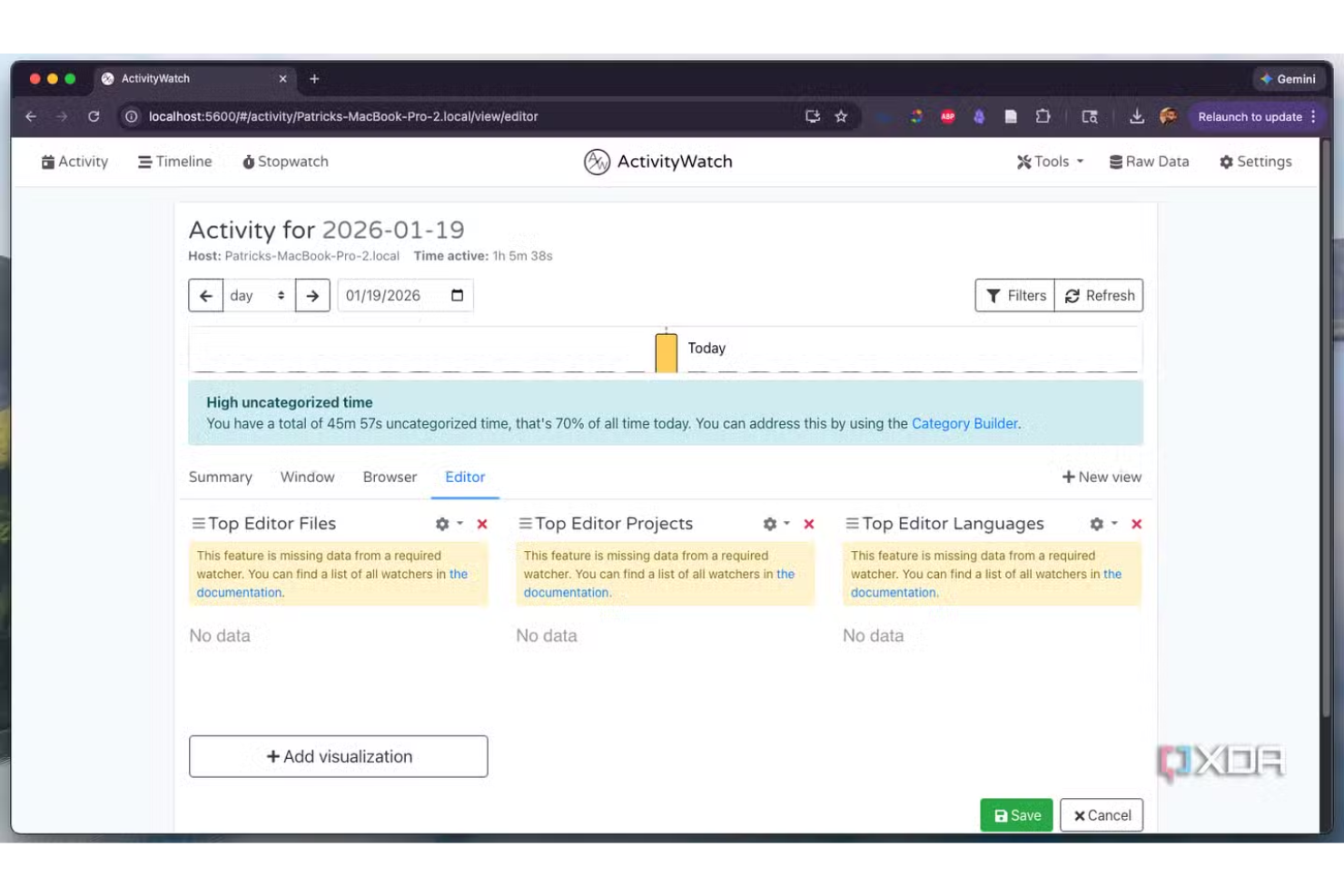
ActivityWatch is an open-source activity tracking tool built for teams and individuals who need detailed, cross-platform insights into computer usage. It appeals to organizations that want transparent, customizable monitoring without vendor lock-in or privacy trade-offs. If you’re looking for a solution that works across Windows, macOS, and Linux, ActivityWatch helps you track work habits and productivity with full data ownership.
Who Is ActivityWatch Best For?
ActivityWatch suits teams and individuals who need open-source, cross-platform activity tracking across Windows, macOS, and Linux environments.
Why I Picked ActivityWatch
I picked ActivityWatch because it’s one of the few open-source tools that truly delivers cross-platform activity tracking without compromise. The software runs natively on Windows, macOS, and Linux, so you can monitor mixed-device teams without juggling multiple solutions. I also appreciate that ActivityWatch gives users full control over their data, protecting against data leaks. For organizations that value transparency and flexibility in employee monitoring, these features make ActivityWatch a strong fit.
ActivityWatch Key Features
Some other features in ActivityWatch that stand out for open-source employee monitoring include:
- Modular watcher system: You can enable or disable specific modules to track different types of activity, such as app usage or web browsing.
- Timeline visualization: The dashboard displays a visual timeline of activities, making it easy to review work patterns and time allocation.
- Tagging and categorization: Users can tag and categorize activities for more granular reporting and analysis.
- Exportable data: Activity logs can be exported in multiple formats, supporting further analysis or compliance needs.
ActivityWatch Integrations
Integrations are not publicly available.
Pros and Cons
Pros:
- Modular watchers for flexible activity tracking
- Local data storage for privacy control
- Works on Windows, macOS, and Linux
Cons:
- Lacks a central dashboard for multiple users
- No built-in remote deployment tools

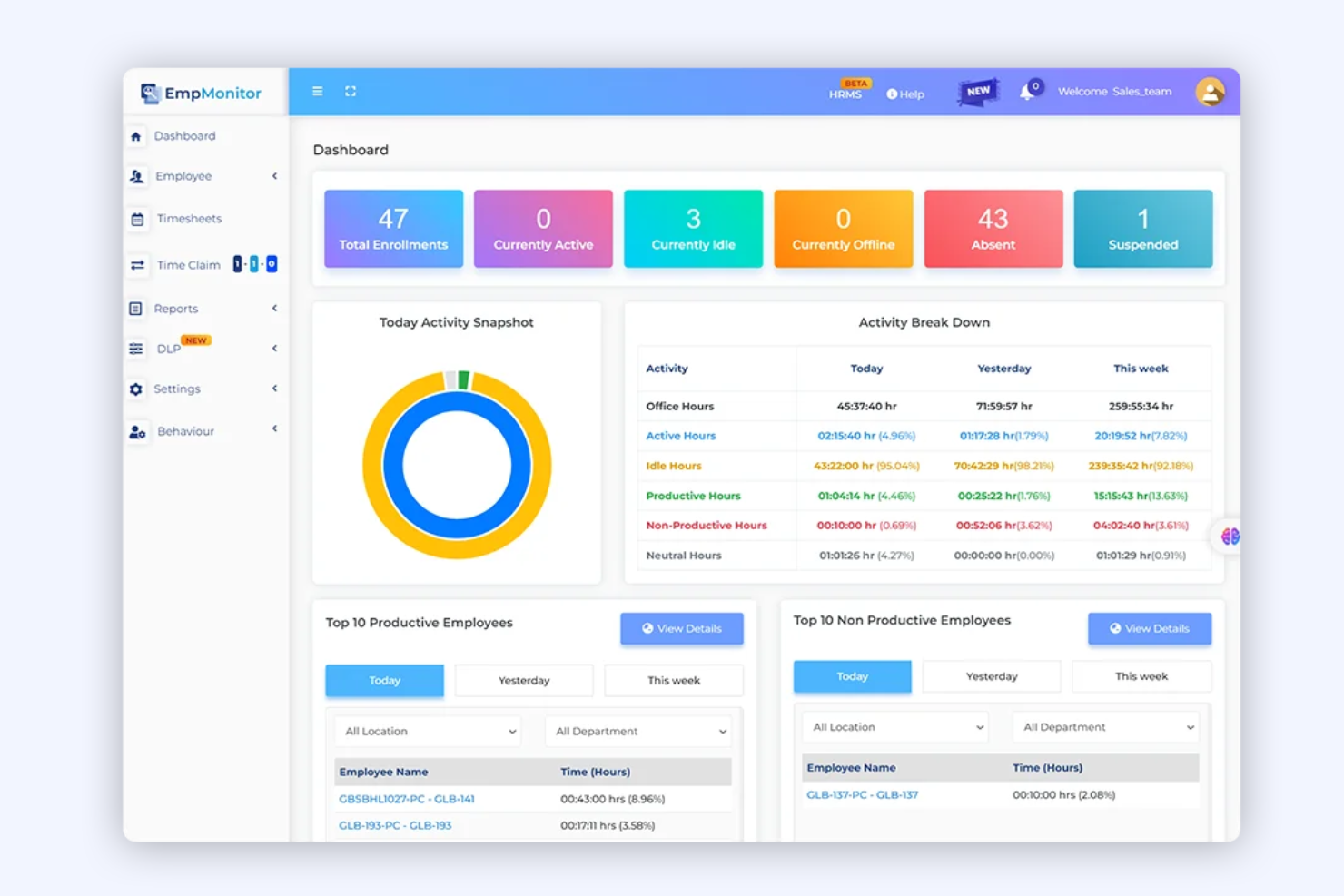
EmpMonitor is a monitoring platform designed for organizations that need detailed oversight of employee activity and behavior. It’s especially useful for IT, finance, and compliance-focused teams that want to track user actions, application usage, and data access. If you’re looking for a solution that helps you identify risky behavior and maintain visibility across distributed teams, EmpMonitor is worth considering.
Who Is EmpMonitor Best For?
EmpMonitor is a strong choice for IT and security teams in mid-sized to large organizations that need to monitor user activity for compliance and insider threat detection.
Why I Picked EmpMonitor
What drew me to EmpMonitor is its focus on insider threat detection, which is a growing concern for organizations handling sensitive data. The platform offers real-time user activity monitoring and detailed behavior analytics, making it easier to spot suspicious actions before they escalate. I also like that EmpMonitor provides automated alerts for policy violations and tracks file transfers, USB usage, and application activity. These features make it a strong fit for teams that need to proactively identify and respond to internal security risks.
EmpMonitor Key Features
Some other features in EmpMonitor that may interest you include:
- Keystroke logging: Captures and records all keystrokes made on monitored devices for detailed activity analysis.
- Screenshot capture: Takes periodic screenshots of user desktops to provide visual records of activity.
- Productivity analysis: Tracks time spent on applications and websites to help assess employee productivity patterns.
- Remote device management: Allows administrators to monitor and manage endpoints from a centralized dashboard, even for distributed teams.
EmpMonitor Integrations
Native integrations are not currently listed.
Pros and Cons
Pros:
- Detailed productivity and idle time reports
- Automated alerts for suspicious behavior
- Real-time monitoring of user activity logs
Cons:
- No native integrations with HR platforms
- Limited mobile monitoring features
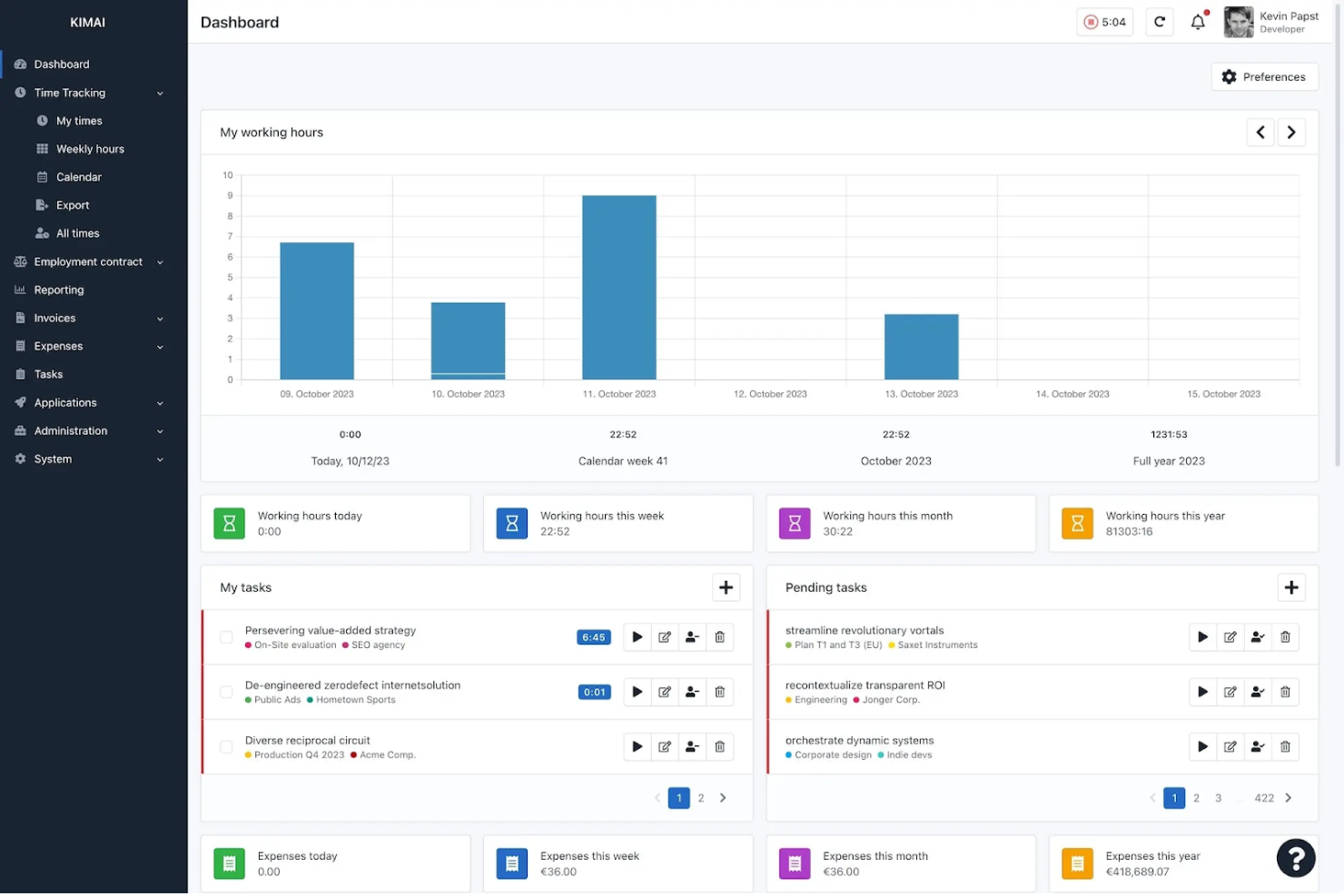
Kimai is an open-source time tracking software designed for teams that need to manage multiple users and projects. It’s a strong fit for consultancies, agencies, and organizations with complex time tracking needs across departments or clients. Kimai helps you centralize time data, making it easier to monitor productivity and allocate resources accurately.
Who Is Kimai Best For?
Kimai suits organizations and teams that need to track time for multiple users across various projects or clients.
Why I Picked Kimai
I picked Kimai because it’s built to handle multi-user time tracking setups, which is a common challenge for teams managing several projects or clients at once. The platform lets you assign users to different projects, track their hours individually, and generate detailed reports for each user or team. I also like that Kimai supports granular role-based permissions, so you can control who sees or edits time data. These tracking features make it a strong choice for organizations that need to monitor employee activity and project time in a flexible, open-source environment.
Kimai Key Features
Some other features in Kimai that are useful for open-source employee monitoring include:
- Timesheet exports: Export timesheet data in multiple formats for payroll or compliance needs.
- Absence tracking: Record and manage employee leave and absences within the platform.
- Tagging system: Add tags to time entries for easier filtering and reporting.
- API access: Connect Kimai to other systems or build custom integrations using its API.
Kimai Integrations
Kimai offers native integrations with CodeTimer Mobile, Kimai Mobile (Android), Kimai Mobile (iOS), Timai, CodeTimer Desktop, Eon Timer, and more.
Pros and Cons
Pros:
- Offers a plugin system for custom monitoring features
- Supports granular user permissions for audit trails
- Tracks time with detailed, exportable activity logs
Cons:
- No real-time user activity dashboards available
- Lacks built-in screenshot or keystroke capture
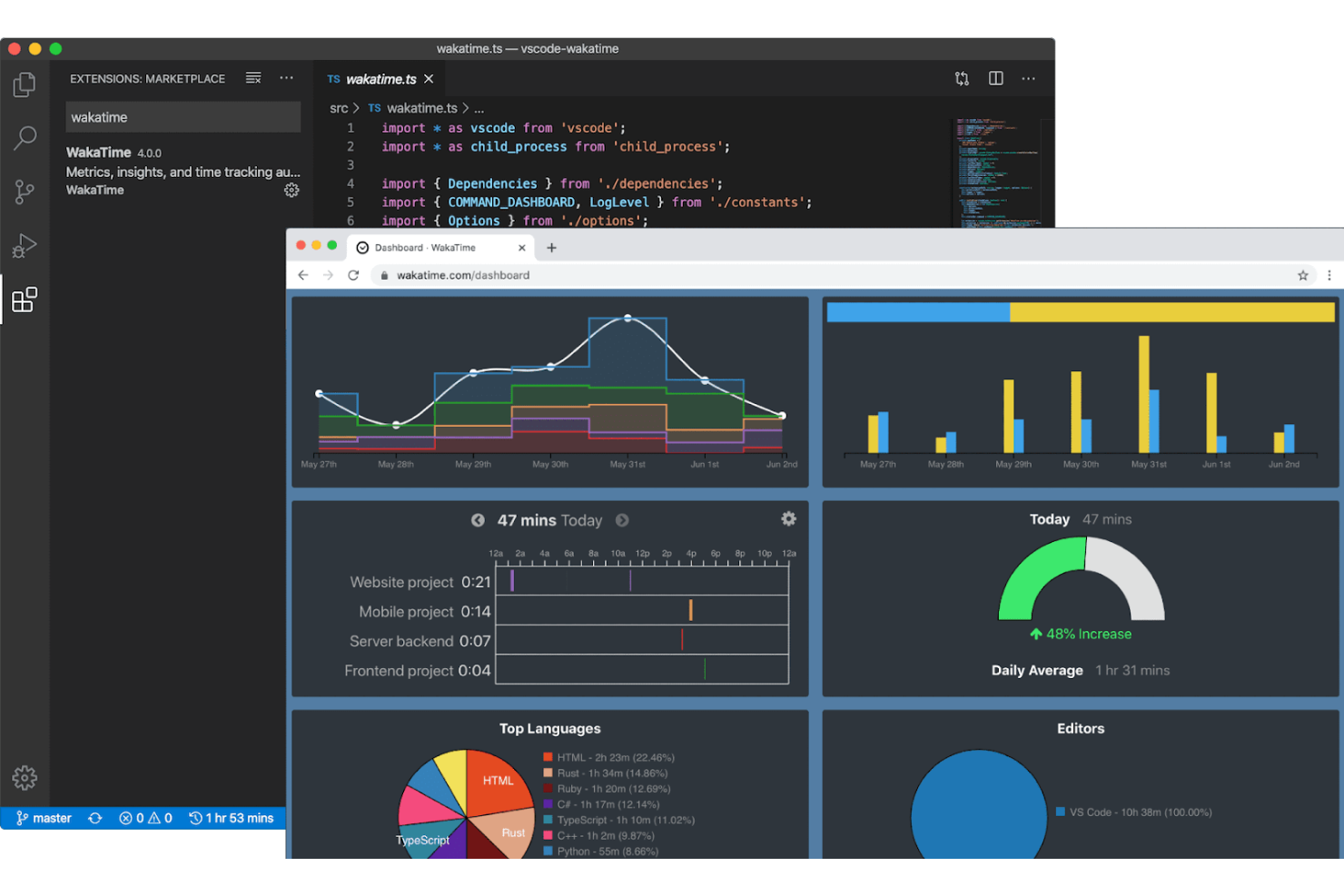
WakaTime offers open-source time tracking that integrates directly with popular code editors and IDEs. It’s a strong fit for engineering teams and technical leads who want to monitor coding activity without disrupting developer workflows. If you need detailed insights into programming time and project focus, WakaTime brings that visibility right into your development environment.
Who Is WakaTime Best For?
WakaTime suits software development teams and technical professionals who want automatic coding activity tracking within their preferred code editors.
Why I Picked WakaTime
I picked WakaTime because it’s one of the only open-source monitoring tools that integrates directly with code editors and IDEs, making it uniquely valuable for tracking developer productivity. WakaTime automatically logs coding time, file activity, and project focus without requiring manual input from users. This approach gives engineering managers and team leads a clear, real-time view of how coding hours are spent across projects. For organizations that want to monitor technical work without disrupting developer workflows, WakaTime’s plugin-based model stands out.
WakaTime Key Features
Some other features in WakaTime that support employee monitoring for technical teams include:
- Open-source client: Users can review, modify, or self-host the core time tracking client for added transparency and control.
- Detailed dashboard: View daily, weekly, and monthly coding stats broken down by project, language, and editor.
- Team activity summaries: Aggregate and compare coding activity across multiple users in a shared workspace.
- Plugin support for dozens of editors: Install plugins for Visual Studio Code, JetBrains IDEs, Sublime Text, Atom, and many other development environments.
WakaTime Integrations
Integrations include Visual Studio Code, JetBrains IDEs, Sublime Text, Atom, Vim, Emacs, Eclipse, NetBeans, Xcode, and more.
Pros and Cons
Pros:
- Minimal impact on developer workflow
- Supports dozens of popular code editors
- Tracks coding time automatically in editors
Cons:
- Lacks screenshot or screen recording features
- No monitoring for non-coding activities
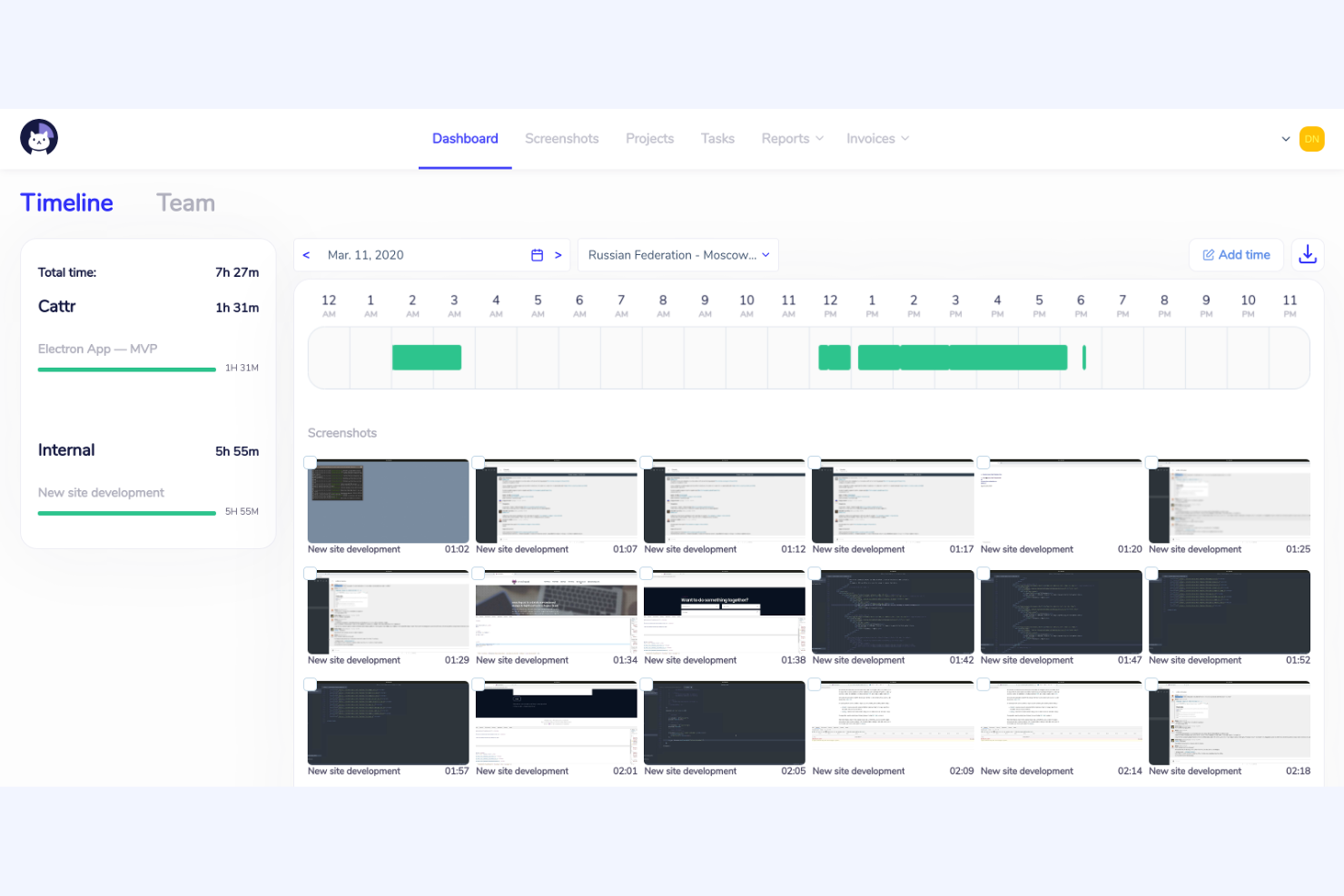
Cattr is an open-source employee monitoring platform designed for organizations that want full control over their data and deployment. It’s a strong fit for IT teams, agencies, and privacy-conscious businesses that need to track work hours and activity without relying on third-party cloud services. If you’re looking for a solution that you can host and customize to fit your own infrastructure, Cattr is worth considering.
Who Is Cattr Best For?
Cattr is a strong choice for IT teams and privacy-focused organizations that need a self-hosted, open-source employee monitoring solution.
Why I Picked Cattr
Cattr is built specifically for the on-premises/self-hosted community. While other tools offer cloud versions, Cattr’s primary identity is giving the user complete ownership of the monitoring data on their own hardware, ensuring privacy and compliance that proprietary cloud tools can't match
The open-source nature of Cattr also means you can audit the code and customize the tool to fit your organization’s unique needs. For teams that want to avoid third-party cloud storage and keep sensitive information in-house, Cattr offers a level of transparency and control that’s hard to match.
Cattr Key Features
Some other features in Cattr that may interest you include:
- Automated time tracking: Tracks work hours and activity automatically without manual input from users.
- Screenshot capture: Periodically takes screenshots to provide visual records of user activity.
- Project and task management: Lets you assign projects and tasks to users and track time spent on each.
- Multi-platform support: Offers desktop apps for Windows, macOS, and Linux to cover a wide range of devices.
Cattr Integrations
Native integrations are not currently listed. An API is available for custom integrations.
Pros and Cons
Pros:
- Active community for support and development
- Offers detailed activity and time reports
- Supports unlimited users without extra fees
Cons:
- Interface updates can lag behind competitors
- No built-in payroll or invoicing features

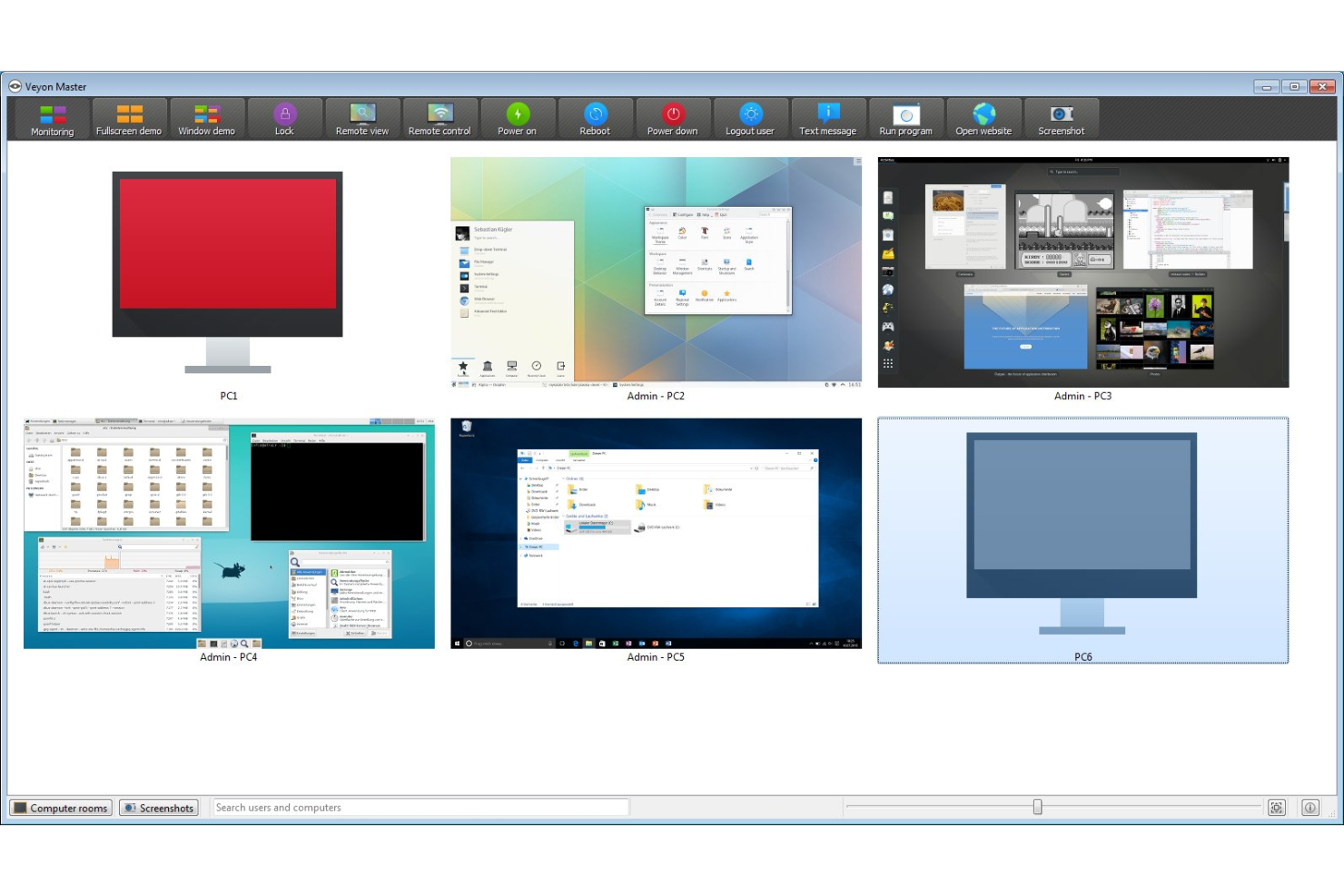
Veyon is an open-source platform designed for organizations that need to monitor and manage multiple employee computers from a central location. It’s especially useful for IT administrators, educators, and managers who want to observe user activity and provide remote support. If you’re looking for a solution that enables live oversight and centralized control in a networked environment, Veyon offers features tailored to those needs.
Who Is Veyon Best For?
Veyon is a strong fit for IT administrators and educators who need centralized, real-time oversight of multiple computers in networked environments.
Why I Picked Veyon
What drew me to Veyon is its ability to provide real-time screen viewing across multiple computers, which is essential for transparent employee monitoring in open-source environments. While primarily built for classrooms, Veyon can easily be deployed in a corporate structure, as well.
The live monitoring feature lets you instantly see what’s happening on any connected workstation, making it easy to spot issues or provide immediate support. I also appreciate that Veyon allows you to take screenshots and broadcast your own screen to others, which is especially useful for training or troubleshooting. These capabilities make Veyon a practical choice for organizations that need direct, real-time visibility into user activity.
Veyon Key Features
Some other features in Veyon that may interest you include:
- User session management: Remotely log off, restart, or shut down user sessions from the central dashboard.
- Access control: Set granular permissions to restrict or allow specific actions for different users or groups.
- Remote command execution: Run scripts or commands on multiple computers simultaneously for maintenance or updates.
- Location-based grouping: Organize monitored devices by physical or logical locations for easier management and oversight.
Veyon Integrations
Integration includes Microsoft Entra ID.
Pros and Cons
Pros:
- Broadcast mode for live demonstrations or training
- Controls for remote session management
- Real-time monitoring of multiple user screens
Cons:
- Limited reporting and export options
- No built-in activity or workforce analytics

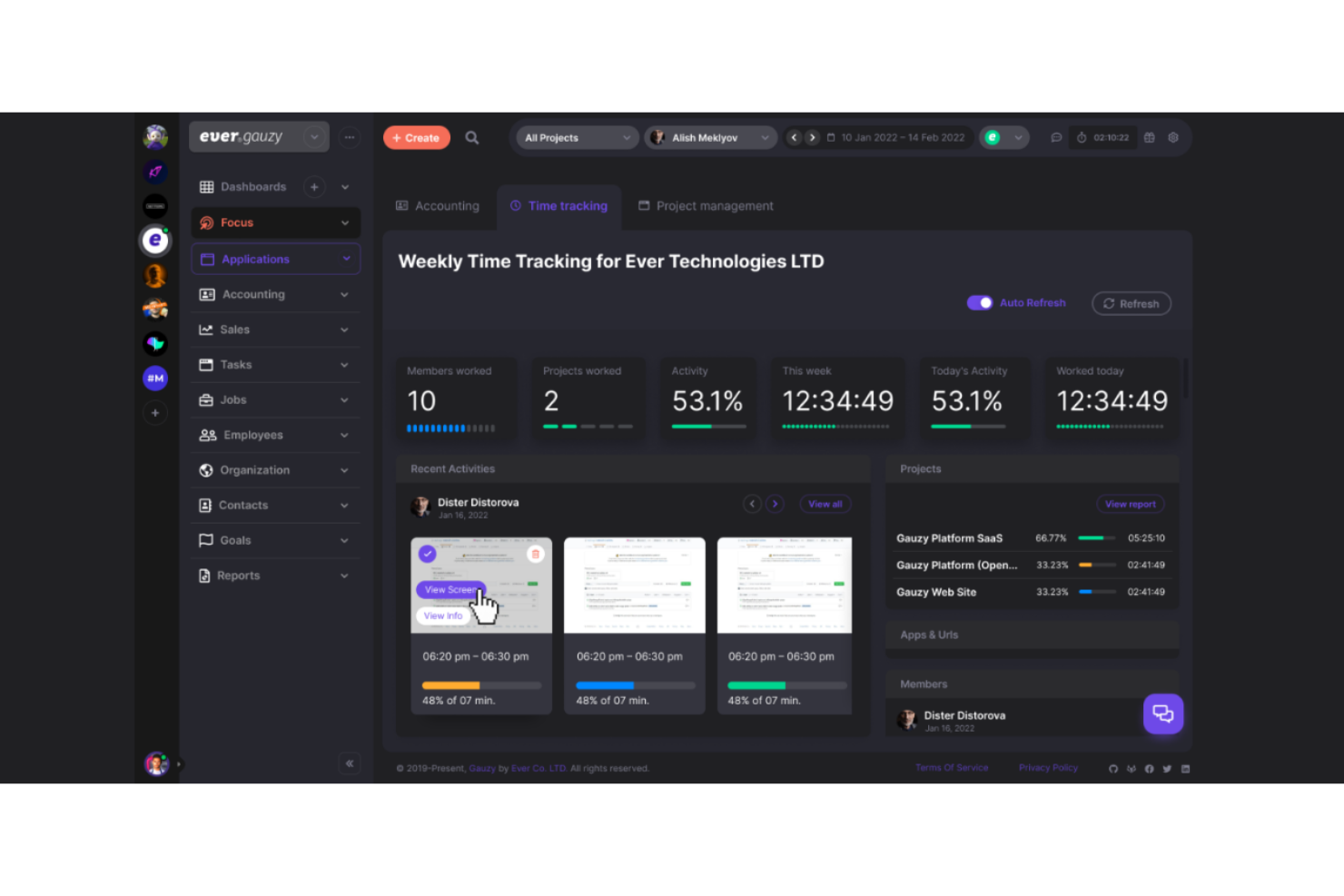
If you’re looking for open-source employee monitoring software with a strong focus on remote team management, Ever Gauzy Platform is worth a look. It’s designed for distributed teams that need to track productivity, manage projects, and handle HR tasks in one place. The platform stands out for its blend of time tracking, invoicing, and other advanced features.
Who Is Ever Gauzy Platform Best For?
Ever Gauzy Platform suits distributed companies and remote teams that need integrated monitoring, HR, and project management features in a single open-source platform.
Why I Picked Ever Gauzy Platform
What stands out to me about Ever Gauzy Platform is how it brings together employee time monitoring and remote team management in one open-source platform. I picked it because it goes beyond basic time tracking by including features like project and task management, invoicing, and HR modules for leave and payroll. These capabilities make it especially useful for organizations with distributed teams that need to coordinate work, monitor productivity, and handle HR processes remotely. The ability to manage so many aspects of remote work from a single dashboard is a real differentiator in the open-source space.
Ever Gauzy Platform Key Features
In addition to its remote team management focus, I also found several other features that support employee monitoring and oversight:
- Activity screenshots: The platform can capture periodic screenshots of employee desktops to provide visual records of work activity.
- Manual time entry: Users can log time manually for tasks that aren’t tracked automatically, supporting flexible work scenarios.
- Role-based permissions: Admins can assign granular access levels to users, ensuring sensitive data is only visible to the right people.
- Desktop and web apps: Employees can track time and activities from both desktop and browser-based applications for greater accessibility.
Ever Gauzy Platform Integrations
Native integrations are not currently listed.
Pros and Cons
Pros:
- Allows granular role-based access controls
- Supports multi-tenant and multi-organizations
- Offers built-in HR and payroll modules
Cons:
- Community support is still relatively small
- No built-in keystroke or app usage tracking
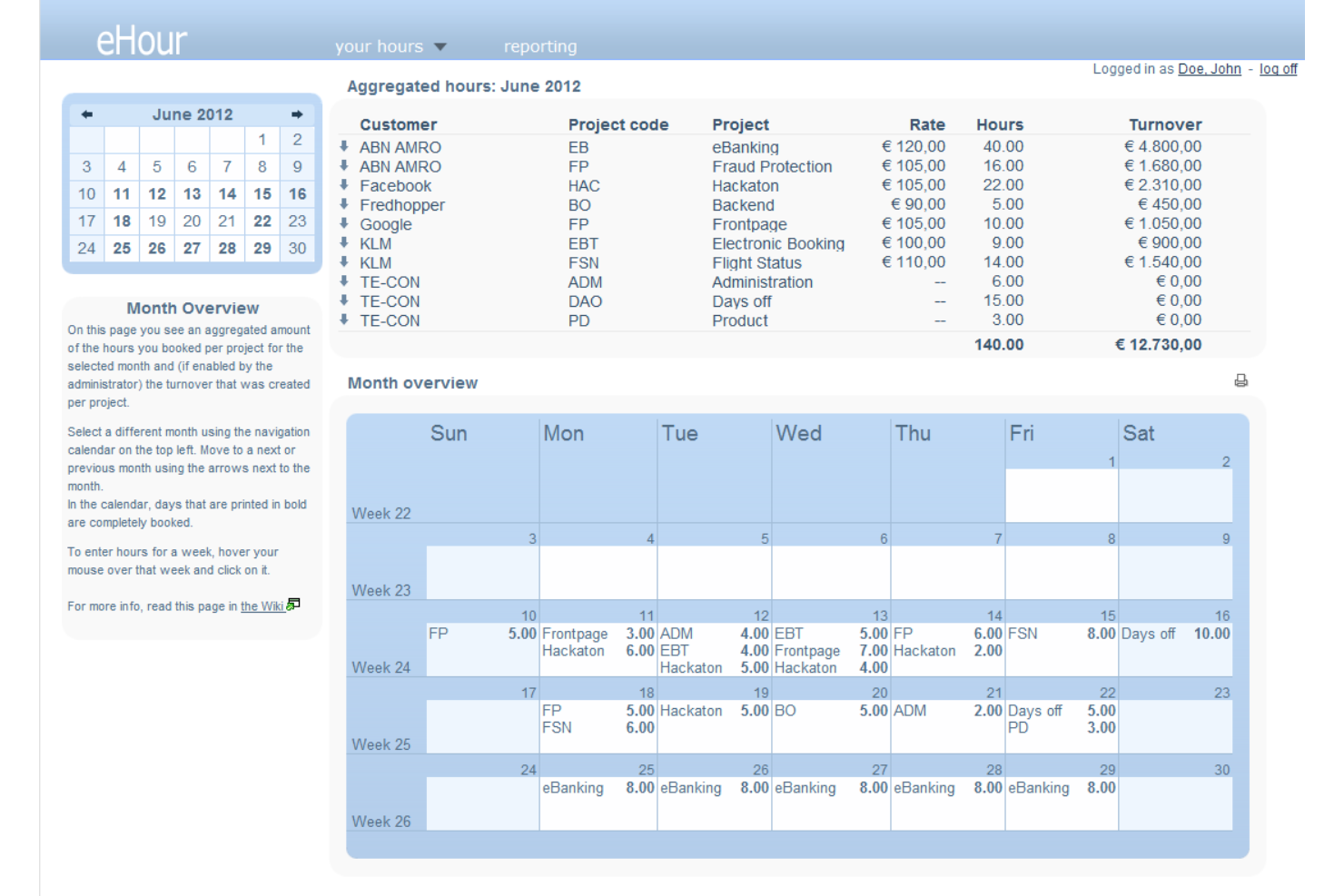
If your team manages multiple projects and needs precise work hour tracking, eHour offers a flexible, open-source solution. It’s designed for organizations that bill by project or need detailed reporting for client work. eHour helps you monitor project-based time allocation and supports transparent, accurate invoicing.
Who Is eHour Best For?
Project managers and consultancies that need to track billable hours across multiple client projects will find eHour especially useful.
Why I Picked eHour
I chose eHour because it’s purpose-built for tracking project-based work hours, which is a common need for teams managing multiple clients or deliverables. The tool lets you assign employees to specific projects and track their time with detailed granularity, making it easy to generate accurate reports for billing or internal analysis. I appreciate that eHour supports customizable project structures and roles, so you can adapt it to different workflows or client arrangements. Its open-source nature also means you can tailor the platform to fit unique project tracking requirements.
eHour Key Features
Some other features in eHour that stand out for employee monitoring include:
- Absence management: Track employee leave and absences alongside project hours for a complete view of availability.
- Overtime tracking: Monitor and record overtime hours to support compliance and compensation processes.
- Custom reporting: Build and export detailed reports based on projects, users, or time periods for audits or client transparency.
- User permissions: Set granular access controls for different roles, ensuring sensitive data is only visible to authorized users.
eHour Integrations
Integrations include Jortt, Jira, Power BI, and more.
Pros and Cons
Pros:
- Allows flexible approval workflows for timesheets
- Supports multiple users and projects
- Tracks time by project, client, and task
Cons:
- Lacks automated attendance or login monitoring
- No built-in user activity or idle tracking
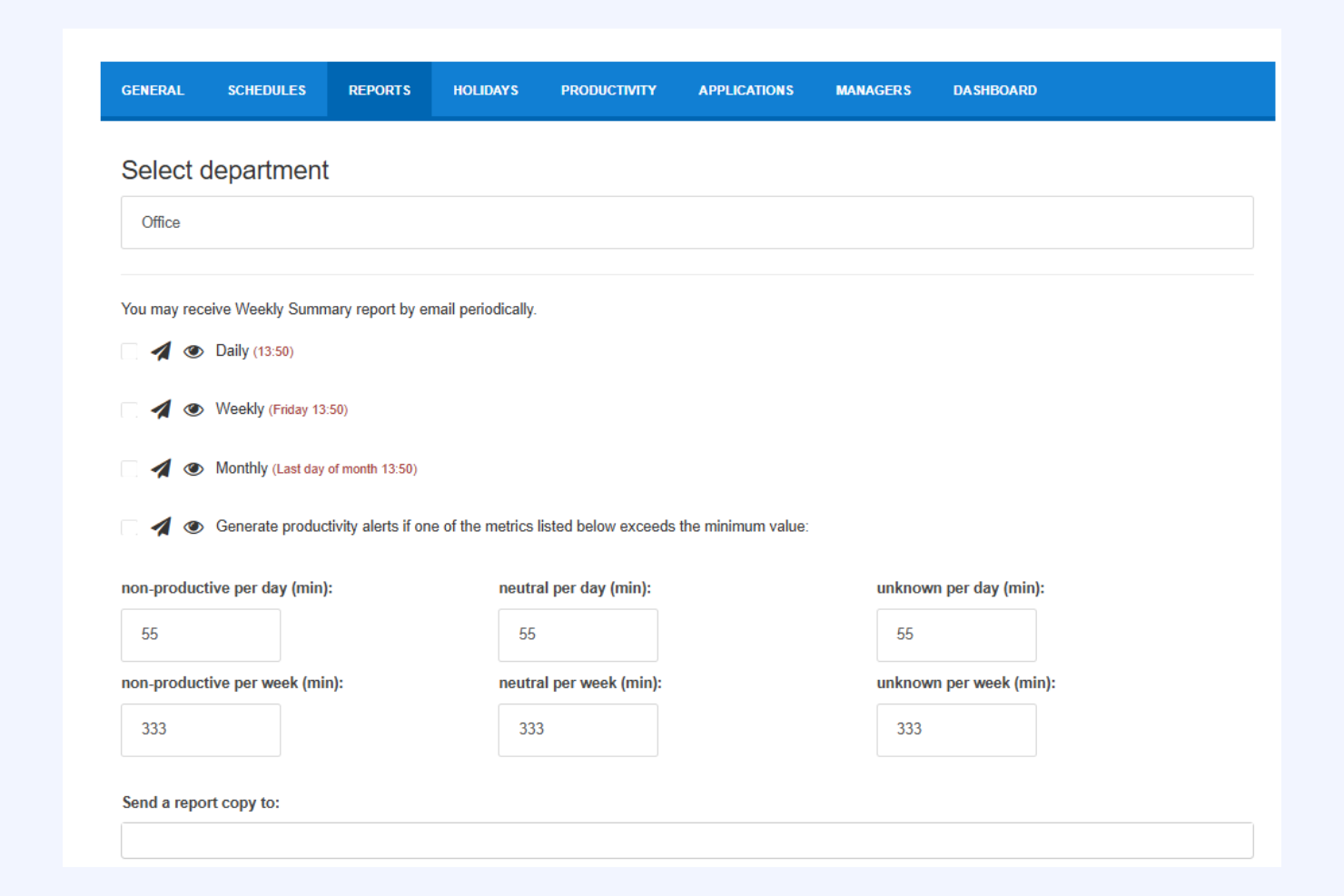
StaffCounter offers privacy-focused employee monitoring for organizations that want oversight without intrusive surveillance. It appeals to businesses and teams that need to balance productivity tracking with respect for user privacy. If you’re looking for monitoring software that emphasizes transparency and data protection, StaffCounter is designed with those priorities in mind.
Who Is StaffCounter Best For?
StaffCounter fits small to mid-sized businesses and organizations that need employee monitoring with strong privacy protections and transparent data handling.
Why I Picked StaffCounter
I chose StaffCounter because it puts privacy at the center of employee monitoring, which is a rare focus in this space. The tool offers features like anonymized data collection and customizable monitoring levels, so organizations can track productivity without overstepping boundaries. I also appreciate that StaffCounter provides clear audit trails and lets users see exactly what data is being collected. For teams that want to monitor work activity while respecting employee privacy, these features make StaffCounter a strong option.
StaffCounter Key Features
Some other features in StaffCounter that support privacy-focused monitoring include:
- Offline monitoring: StaffCounter can track activity even when the device is not connected to the internet, syncing data once a connection is restored.
- Encrypted data storage: All collected monitoring data is stored using encryption to help protect sensitive information.
- Automatic screenshots: The tool can capture periodic screenshots based on customizable intervals for additional context.
- Mobile device monitoring: StaffCounter offers monitoring capabilities for Android devices, extending oversight beyond desktops and laptops.
StaffCounter Integrations
Native integrations are not publicly listed.
Pros and Cons
Pros:
- Supports offline monitoring and data sync
- Provides encrypted data storage for security
- Offers anonymized monitoring for compliance
Cons:
- Lacks built-in alerts or anomaly detection
- No mobile device monitoring features available

TimeTrex
Best for unified payroll and HR
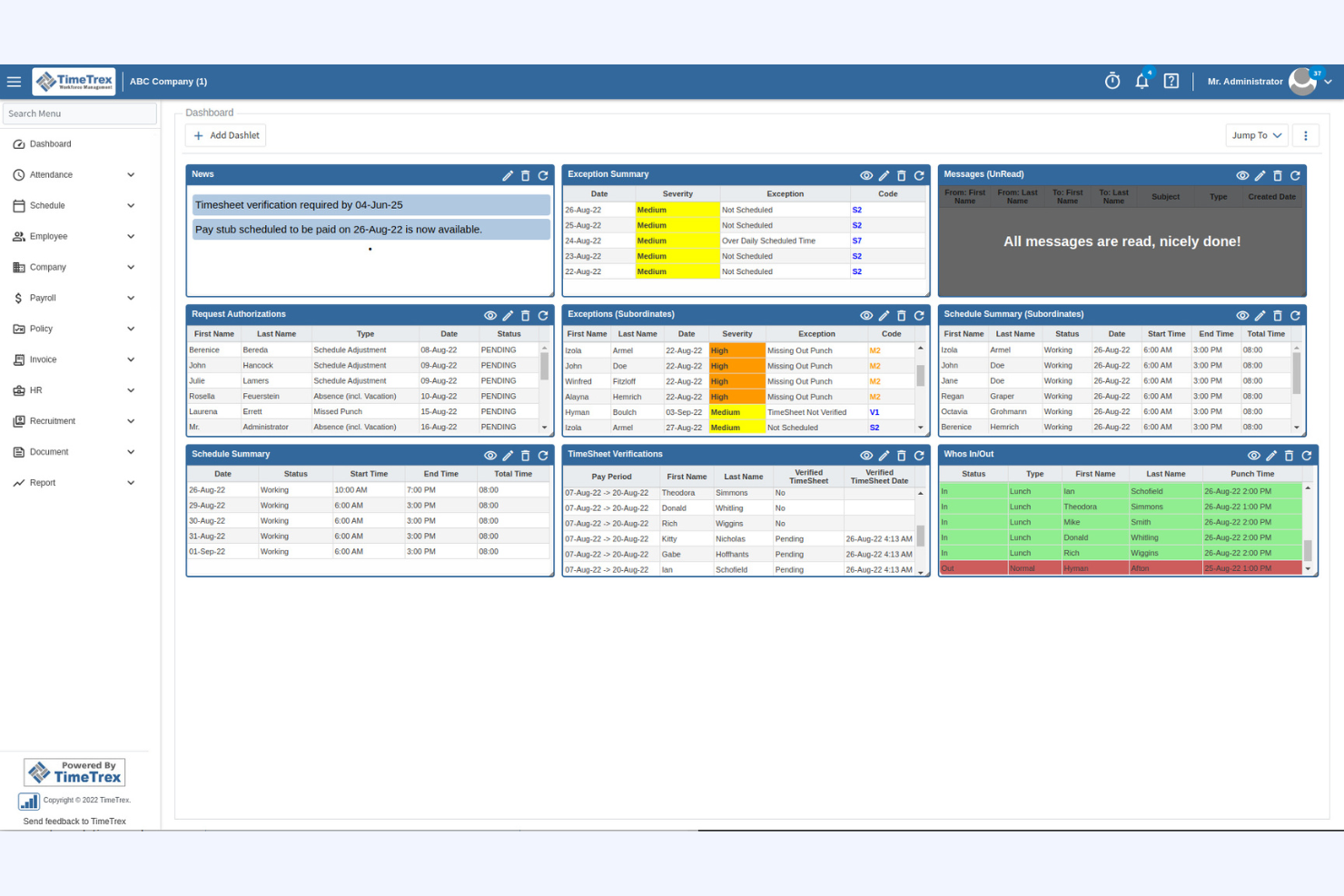
TimeTrex is an open-source platform that combines employee monitoring with HR and payroll management. This software suits organizations that want to track attendance, manage schedules, and handle payroll in one place. TimeTrex can help HR teams and business owners reduce manual processes and optimize oversight across workforce operations.
Who Is TimeTrex Best For?
TimeTrex is a good fit for small to mid-sized businesses that need integrated employee monitoring, scheduling, and payroll management in a single open-source solution.
Why I Picked TimeTrex
I chose TimeTrex because it stands out for organizations that want to unify employee monitoring with payroll and HR processes. Its open-source platform lets you track employee attendance, monitor employee work hours, and directly connect this data to payroll calculations. While TimeTrex doesn’t monitor screen activity, it includes other monitoring features like scheduling, time-off management, and compliance tracking. This combination makes it especially useful for teams that need both oversight and integrated workforce management without relying on multiple tools.
TimeTrex Key Features
Some other features in TimeTrex that may interest you include:
- Biometric time clock integration: Connects with biometric devices to verify employee work time and prevent buddy punching.
- Geolocation tracking: Records the physical location of employees when they clock in or out, supporting remote employees and field teams.
- Customizable reporting: Lets you generate detailed reports on attendance, overtime, and compliance for audits or internal reviews.
- Role-based access controls: Allows you to set permissions and restrict access to sensitive HR and payroll data based on user roles.
TimeTrex Integrations
Integrations include ADP, QuickBooks, Sage, Paychex, Surepay, Ceridian, Meditech, Insync, Millennium, and more.
Pros and Cons
Pros:
- Detailed audit trails for compliance needs
- Biometric and geolocation time tracking options
- Payroll, HR, and monitoring in one platform
Cons:
- Outdated user experience
- Lacks user activity monitoring features
New Product Updates from TimeTrex
TimeTrex Adds Quick Punch App With Offline and QR Support
TimeTrex adds a new Quick Punch app, offline punching, QR code scanning, punch images, configurable messages, and punch warnings or lockouts to improve employee clock-ins across browsers and local computers. For more information, visit TimeTrex’s official site.
 .
.
How I Evaluate Open Source Employee Monitoring Software
I evaluate against two layers: the baseline any tool must hit—like OSI-licensed code and self-hosted deployment—and differentiators that matter to HR teams that monitor remote workers.
Core Functionality (Table Stakes For This List)
When I'm selecting tools for my list, I rank each one on a scale from 0 (does not offer the functionality) to 5 (excels in this area) for each core functionality listed below. Then, I calculate the tool's total score into a percentage. Each tool needs to achieve a minimum total score of 65% to be considered for inclusion.
- Open Source Licensing: I check that the source code is publicly available under a recognized OSI-approved license like GPL, MIT, or Apache, so your team can freely modify and redistribute it.
- Activity & Time Tracking: Whether it's tracking idle time on remote shifts or logging hours across client projects, I look for automated tracking that goes beyond basic manual timesheets.
- App & Website Monitoring: Tools should log which applications and URLs employees use during work hours, ideally with the ability to categorize them as productive or unproductive.
- Screenshot or Screen Capture: I evaluate whether the tool offers configurable capture intervals and privacy controls like blurring, since HR teams often need to balance oversight with employee trust.
- Productivity Reporting & Dashboards: A manager reviewing team output across a hybrid workforce needs more than raw logs. I look for visual dashboards and exportable reports with clear productivity metrics.
- Self-Hosted Deployment: I look for documented deployment paths like Docker images or installation scripts, since the whole point of going open source here is keeping sensitive workforce data on your own infrastructure.
Once I have a list of tools that meet this criteria, I consider what sets each platform apart.
Differentiating Factors (What Sets Vendors Apart)
Here's how I compare and contrast different vendors:
Standout Features
Cross-platform agent support matters when your workforce spans Windows, macOS, and Linux devices. I check whether each tool covers all three without feature gaps between operating systems. Role-based access controls are equally important—HR directors, team leads, and compliance officers each need different views of monitoring data. I also look for DLP and insider threat alerts that let you define rules around risky behavior like unauthorized file transfers or system access outside work hours.
Beyond Features
Community health is a strong signal of long-term viability. I evaluate commit frequency, contributor count, and whether maintainers actively respond to issues—a stale repo means you're on your own when something breaks. Compliance and privacy safeguards also weigh heavily, especially for HR teams that need consent mechanisms, data retention policies, and audit trails to meet regional labor laws. Total cost of ownership rounds out my evaluation because "free" software still requires infrastructure, DevOps time for upgrades, and potentially paid enterprise support tiers.
Slik velger du programvare for medarbeiderovervåking med åpen kildekode
Det er lett å gå seg vill i lange funksjonslister og kompliserte prisstrukturer. For å hjelpe deg med å holde fokus mens du arbeider deg gjennom den unike prosessen for valg av programvare, har vi laget en sjekkliste over faktorer du bør ha i tankene:
| Faktor | Hva du bør vurdere |
|---|---|
| Skalerbarhet | Vil programvaren håndtere dagens og fremtidens antall ansatte? Se etter begrensninger på antall brukere og støtte for flere lokasjoner. |
| Integrasjoner | Kan den kobles direkte til HR-, lønns- eller IT-systemene dine? Lag en liste over integrasjonene du må ha, før du lager kortlisten. |
| Tilpasningsmuligheter | Kan du tilpasse arbeidsflyter, tillatelser og rapporter til retningslinjene dine? Vurder om du trenger tilgang på kodenivå eller administratorkontroller. |
| Brukervennlighet | Vil HR-teamet og lederne dine ta den raskt i bruk? Se etter tydelig navigasjon, minimalt opplæringsbehov og tilgjengelige grensesnitt. |
| Implementering og oppstart | Hvor mye tid og teknisk kompetanse krever oppsettet? Spør om verktøy for migrering, dokumentasjon og støtte fra leverandøren eller fellesskapet. |
| Kostnad | Hva er de faktiske kostnadene, inkludert drift, støtte og oppgraderinger? Sammenlign lisensvilkårene for programvare med åpen kildekode og eventuelle betalte tillegg. |
| Sikkerhetstiltak | Tilbyr verktøyet kryptering, revisjonslogger og tilgangskontroller? Vurder hvordan det beskytter sensitive medarbeiderdata og støtter krav til samsvar. |
| Tilgjengelig støtte | Hvilke supportkanaler finnes – fellesskap, leverandør eller tredjepart? Vurder hvor komfortabelt teamet ditt er med selvbetjening, sammenlignet med behovet for direkte hjelp. |
Hva er programvare for medarbeiderovervåking med åpen kildekode?
Programvare med åpen kildekode for ansattovervåking er programvare som sporer ansattes aktivitet, oppmøte og produktivitet, og der kildekoden er fritt tilgjengelig for alle som ønsker å bruke, endre eller distribuere den. Disse verktøyene hjelper HR-team og ledere med å føre tilsyn med arbeidsstyrken, samtidig som organisasjoner kan tilpasse funksjoner, arbeidsflyter og sikkerhetsinnstillinger etter sine unike behov og krav til etterlevelse.
Funksjoner
Når du velger programvare med åpen kildekode for ansattovervåking, bør du se etter følgende viktige funksjoner:
- Tidsregistrering: Registrerer når ansatte begynner og avslutter arbeidet, og registrerer arbeidede timer for lønn, etterlevelse og overvåking av produktivitet.
- Aktivitetslogging: Overvåker brukerhandlinger på enheter eller i applikasjoner, og gir en detaljert oversikt over oppgaver, besøkte nettsteder og programvarebruk.
- Oppmøtehåndtering: Registrerer tilstedeværelse, fravær og permisjonsforespørsler, slik at HR-team kan administrere arbeidsplaner og sikre nøyaktige oppmøteregistre.
- Rollebasert tilgangskontroll: Gjør det mulig for administratorer å angi tillatelser for ulike brukere, beskytte sensitive data og sikre at bare autoriserte brukere får tilgang.
- Automatisert rapportering: Genererer tilpassbare rapporter om ansattes aktivitet, oppmøte og produktivitet, og støtter datadrevne HR-beslutninger.
- Revisjonsspor: Opprettholder en sikker logg over endringer og handlinger i systemet, og støtter etterlevelse og interne undersøkelser.
- Tilpasset arbeidsflytautomatisering: Gjør det mulig for organisasjoner å utforme og automatisere HR-prosesser som introduksjon av nyansatte, godkjenninger og varsler.
- Dokumenthåndtering: Lagrer og organiserer HR-dokumenter som kontrakter, retningslinjer og medarbeidersamtaler på ett sentralisert sted.
- Integrasjonsmuligheter: Kobler seg til andre HR-, lønns- eller IT-systemer for å synkronisere ansattdata og effektivisere driften.
Fordeler
Implementering av et system med åpen kildekode for ansattovervåking gir flere fordeler for teammedlemmene og virksomheten din. Her er noen av fordelene du kan se frem til:
- Tilpasningsmuligheter: Tilpass arbeidsflyter, tillatelser og rapporter slik at de samsvarer med organisasjonens unike retningslinjer og krav til etterlevelse.
- Kostnadsbesparelser: Unngå dyre lisensavgifter og reduser de totale eierkostnadene ved å benytte fritt tilgjengelig kildekode.
- Åpenhet: Gjennomgå og revider programvarens kodebase for å sikre at den oppfyller standardene dine for sikkerhet, personvern og drift.
- Fleksible integrasjoner: Koble til eksisterende HR-, lønns- eller IT-systemer for å skape en enhetlig og effektiv arbeidsflyt.
- Støtte fra fellesskapet: Få tilgang til et globalt fellesskap for feilsøking, funksjonsforbedringer og løpende videreutvikling.
- Bedre kontroll over data: Behold eierskap til og kontroll over sensitive ansattdata ved å drifte programvaren på din egen infrastruktur.
- Skalerbarhet: Tilpass løsningen etter hvert som organisasjonen vokser, og legg til nye brukere eller funksjoner uten begrensningene som leverandører kan pålegge.
Kostnader og priser
Valg av programvare med åpen kildekode for ansattovervåking krever en forståelse av de ulike prismodellene og abonnementene som er tilgjengelige. Kostnadene varierer basert på funksjoner, teamstørrelse, tillegg og mer. Tabellen nedenfor oppsummerer vanlige abonnementer, gjennomsnittsprisene deres og typiske funksjoner som er inkludert i løsninger med åpen kildekode for ansattovervåking:
Sammenligningstabell for programvare med åpen kildekode for ansattovervåking
| Abonnementstype | Gjennomsnittspris | Vanlige funksjoner |
|---|---|---|
| Gratisabonnement | $0 | Grunnleggende tidsregistrering, oppmøtehåndtering, begrenset rapportering og støtte fra fellesskapet. |
| Bedriftsabonnement | $1–$50/bruker/måned | Alle funksjoner i privatabonnementet, avansert rapportering, arbeidsflytautomatisering, rollebasert tilgangskontroll og revisjonsspor. |
| Foretaksabonnement | $25–$149/bruker/måned | Alle funksjoner i bedriftsabonnementet, tilpassede integrasjoner, forbedret sikkerhet, prioritert støtte og verktøy for etterlevelse. |
Vanlige spørsmål
Her er noen svar på vanlige spørsmål om åpen kildekode-basert overvåkingsprogramvare for ansatte:
Hvor sikker er åpen kildekode-basert overvåkingsprogramvare for ansatte?
Sikkerheten avhenger av hvordan programvaren konfigureres og vedlikeholdes. Verktøy med åpen kildekode lar deg gjennomgå og endre koden, men du må sørge for regelmessige oppdateringer, strenge tilgangskontroller og sikker hosting for å beskytte sensitive ansattdata.
Kan åpen kildekode-basert overvåkingsprogramvare for ansatte integreres med eksisterende HR-systemer?
Ja, mange verktøy med åpen kildekode for overvåking av ansatte tilbyr integrasjonsmuligheter. Du kan ofte koble dem til HR-, lønns- eller IT-systemer ved hjelp av API-er eller programtillegg, men enkelte integrasjoner kan kreve teknisk oppsett eller spesialutvikling.
Hvilke tekniske ferdigheter trengs for å implementere åpen kildekode-basert overvåkingsprogramvare for ansatte?
Du trenger vanligvis grunnleggende IT-ferdigheter for installasjon, konfigurering og løpende vedlikehold. Mer avanserte tilpasninger eller integrasjoner kan kreve kunnskap om databaser, skripting eller serveradministrasjon.
Finnes det skjulte kostnader med åpen kildekode-basert overvåkingsprogramvare for ansatte?
Selv om selve programvaren vanligvis er gratis, kan du få kostnader til hosting, brukerstøtte, premiumtillegg eller ansettelse av teknisk personell for oppsett og vedlikehold. Gå alltid gjennom de totale eierkostnadene før du bestemmer deg.
Hvordan fungerer oppdateringer og brukerstøtte for åpen kildekode-basert overvåkingsprogramvare for ansatte?
Oppdateringer utgis vanligvis av fellesskapet eller prosjektets vedlikeholdere. Brukerstøtte kommer ofte fra brukerfora, dokumentasjon eller betalte tredjepartsleverandører. Du er ansvarlig for å installere oppdateringer og feilsøke problemer med mindre du kjøper brukerstøttetjenester.