

10 beste programvarer for mobil arbeidsstyring – gjennomgått i 2026

10 Beste programvare for administrasjon av mobil arbeidsstyrke


Sliter du med å administrere fjernarbeidende team og feltteam effektivt? Programvare for administrasjon av mobil arbeidsstyrke kan hjelpe.
Med GPS-sporing i sanntid, automatiserte timelister og sømløs utsending av jobber kan du minimere manuelle prosesser, eliminere lønnsfeil, øke produktiviteten og overholde arbeidslovgivningen.
Disse verktøyene er en viktig investering for mange organisasjoner. Bruk min kortliste over de beste løsningene for administrasjon av mobil arbeidsstyrke til å sammenligne funksjoner, priser, bruksområder og unike salgsargumenter.
Why Trust Our Software Recommendations
Our team has been testing and reviewing software since 2012. As HR experts ourselves, we know how difficult—and important—it is to choose the right software.
For this guide, we evaluated tools using hands-on testing and independent research, scoring tools using our selection criteria. We also draw on insights from industry thought leaders and practicing HR experts.
Our reviews reflect our human editorial judgment, not a sales pitch.
Expert reviewers:
Sammenligningstabell for programvare for administrasjon av mobil arbeidsstyrke
Denne sammenligningstabellen oppsummerer prisopplysningene for mine utvalgte favoritter innen programvare for administrasjon av mobil arbeidsstyrke:
| Tool | Best For | Trial Info | Price | ||
|---|---|---|---|---|---|
| 1 | Best for managing mobile teams across countries | Free demo available | From $5/user/month | Website | |
| 2 | Best as an AI for business | Free demo available | From $8/user/month | Website | |
| 3 | Best for flexible clock-in methods | Free 21-day trial + free demo available | From $2.93/user/month (billed annually) | Website | |
| 4 | Best for GPS tracking and geofencing | 30-day free trial + free demo available | From $50/user/month | Website | |
| 5 | Best for team communication | Free demo available | Pricing upon request | Website | |
| 6 | Best for HR analytics integration | Free demo + free plan available | From $5/employee/month (billed annually) | Website | |
| 7 | Best for AI-powered event staffing operations | Free demo available | From $49/month | Website | |
| 8 | Best for field service management | Free demo available | Pricing upon request | Website | |
| 9 | Best for workforce forecasting | Free demo available | Pricing upon request | Website | |
| 10 | Best for enterprise scalability | Free demo available | Pricing upon request | Website |
Anmeldelse av den beste programvaren for administrasjon av mobil arbeidsstyrke
Nedenfor finner du mine detaljerte sammendrag av den beste programvaren for administrasjon av mobil arbeidsstyrke som kom med på kortlisten min. Anmeldelsene mine gir en detaljert oversikt over de viktigste funksjonene, fordeler \u0026 ulemper, integrasjoner og ideelle bruksområder for hvert verktøy, slik at du kan finne det som passer best for deg.

Deel HR
Best for managing mobile teams across countries

Deel is a global HR platform designed to help businesses manage international hiring, onboarding, and payroll across over 150 countries. It provides end-to-end solutions for managing remote and mobile teams—particularly those working as contractors or employees outside the organization’s home country.
Why I Picked Deel: I chose Deel for its strong global compliance features, which are essential for companies managing distributed or mobile workforces. It simplifies contractor onboarding and international payroll, offering mobile access and support for multi-currency payments—features that benefit HR teams overseeing global operations. Deel’s Employer of Record (EOR) service also makes it possible to legally hire talent without setting up local entities, a major time-saver for scaling companies.
Standout features & integrations:
Features include automated tax form collection, digital contracts with e-signatures, expense tracking, and time off management.
Additionally, Deel's mobile app makes HR tasks like document uploads and time tracking accessible on the go.
Integrations include QuickBooks, Xero, BambooHR, ADP, Workday, Google Workspace, Salesforce, and more. An API is available for custom integration.
Pros and Cons
Pros:
- Ensures global compliance with local labor laws
- Comprehensive features for HR, IT, and payroll management
- Robust tool for managing teams and facilitating remote work
Cons:
- Complex to set up for small teams
- Limited customization options
New Product Updates from Deel HR

Deel Expands Stablecoin Wallet to 80+ Countries
Deel expands its Stablecoin Wallet to 80+ countries with dollar-backed balances and optional rewards. This gives eligible contractors more ways to hold and manage earnings inside Deel. For more information, visit Deel’s official site.
 .
.
Best as an AI for business
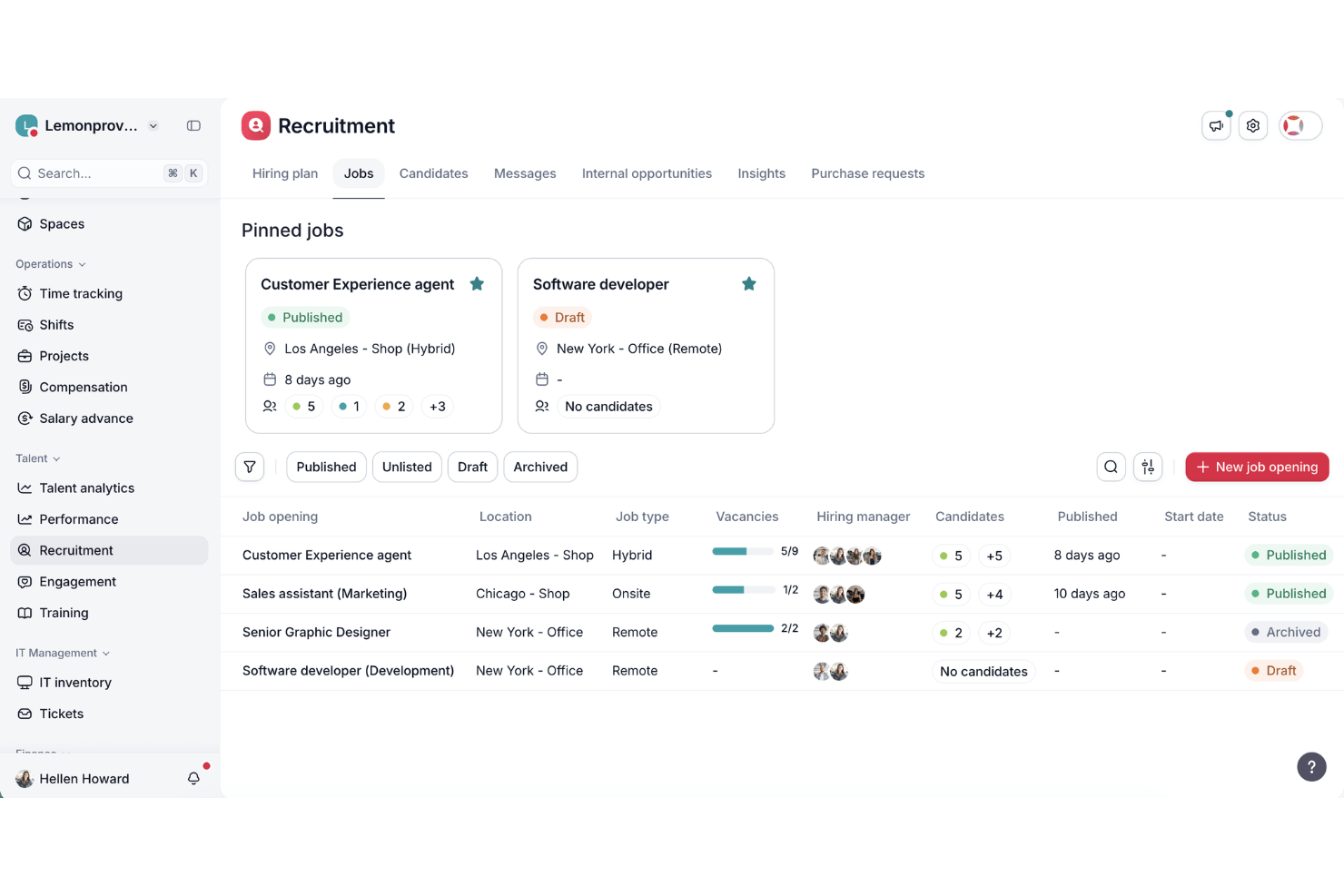
Factorial is an AI for business platform that covers mobile workforce management needs—including AI-assisted shift scheduling, GPS-based time tracking, absence management, and employee self-service—across a full HR operations suite.
Who Is Factorial Best For?
Factorial is a strong fit for SMBs managing a mix of desk-based and field-based employees who want AI-assisted HR operations—from shift scheduling to reporting—in one platform.
Why I Picked Factorial
I picked Factorial as one of the best because it approaches mobile workforce management as a genuinely AI-driven platform, not just an app with a scheduling feature bolted on. Factorial's AI agent, One, handles real-time report generation, answers employee policy questions, and assists with timetable planning across your entire operation. Pair that with AI-assisted shift scheduling and offline-capable GPS clock-in, and you get a platform that actively reduces daily HR admin for teams managing workers in the field.
Factorial Key Features
- Offline time tracking: Employees can clock in and out without an internet connection, with data stored locally and synced automatically once they're back online.
- Biometric and facial recognition clock-in: Factorial supports face recognition and fingerprint verification as clock-in methods, reducing buddy punching across field-based teams.
- Geofencing alerts: Managers can set virtual boundaries around job sites, with automated alerts triggered when employees clock in or out outside the designated area.
- Shift swap requests: Employees can request shift swaps directly through the mobile app, giving managers visibility and approval control without manual back-and-forth.
Factorial Integrations
Factorial offers native integrations with Slack, Microsoft Power BI, ZKTeco, and Suprema, plus payroll connectors such as Sage, DATEV LODAS, and Silae. It also supports a public REST API, webhooks, and Zapier.
Pros and Cons
Pros:
- Biometric verification limits buddy punching
- Offline clock-ins support disconnected job sites
- AI assists timetable planning and reporting
Cons:
- Geofencing lacks route history and dispatch
- No native team chat for field workers

Agendrix
Best for flexible clock-in methods

Agendrix is an employee scheduling and workforce management software built to support mobile teams, particularly in shift-based small and midsize businesses. It simplifies scheduling, time tracking, and HR tasks—delivering a unified platform accessible across desktop and mobile.
Why I Picked Agendrix: I chose Agendrix for its mobile-first design and strong scheduling functionality, which makes it ideal for teams working across locations or on the go. You can build and share schedules, track time and attendance, and manage shift changes all from a smartphone. The platform also offers flexible clock-in methods, including geolocation and biometric options, helping businesses with dispersed teams ensure accurate time tracking and accountability.
Standout Features & Integrations
Features include drag-and-drop schedule creation, shift swapping, mobile clock-ins with GPS, PTO tracking, and HR tools like onboarding and document management. Employees can use mobile apps to view schedules, request time off, and communicate with team members through built-in messaging tools. They also offer bilingual support and user interface in English and French.
Integrations include EmployerD, Nethris, Sage 50, Acomba, QuickBooks, Ceridian Powerpay, ADP Workforce Now, Payworks, Lightspeed, Azur, Easypay, BeLocum, Hopem, and Folks HR.
Pros and Cons
Pros:
- Built-in messaging and notifications
- Supports printable, email, and mobile schedule sharing
- Integrates with major Canadian payroll systems
Cons:
- Limited customization options for reports and analytics
- Certain integrations may require manual setup

TimeTrex
Best for GPS tracking and geofencing

TimeTrex speaks directly to teams juggling mobile, shift-based, or field-oriented workforces who need reliable time tracking, scheduling, and payroll tools on the go. If you manage staff across different locations — from retail floors and construction sites to remote or mobile crews — TimeTrex offers mobile-friendly attendance, scheduling, and payroll in one package.
Why I Picked TimeTrex
I like TimeTrex because its mobile time-tracking and GPS/geo-fencing features give clear visibility into where and when work happens, which is ideal if your team works on-site or at many locations. It also supports scheduling and shift assignments that employees can view and manage from their phones — helping mobile teams stay organized and avoid confusion. Finally, the built-in payroll integration ensures tracked hours feed directly into payroll, reducing mistakes and saving managers time.
TimeTrex Key Features
In addition to the features mentioned, I also found these valuable:
- Shift Scheduling with Leave Management: You can build and edit staff schedules, manage shift swaps and time-off requests, and let employees view their assignments in real time.
- Job Costing and Invoicing: Track labor and expenses by project or task, and generate invoices based on actual hours worked — useful if you bill clients for labor or track profitability per job.
- HR Management: Tools for recruitment, onboarding, performance management, and compliance tracking.
- Analytics & Reporting: Customizable reporting and real-time dashboards for data-driven decision-making.
TimeTrex Integrations
The platform offers an API for custom integrations, allowing you to connect TimeTrex with other software solutions as needed.
Pros and Cons
Pros:
- Allows employee self-service for time off, schedules, timesheets
- Supports mobile and biometric clock-in, handy for distributed workforces
- Time and attendance plus payroll in one package
Cons:
- Limited number of native integrations compared with leading HR platforms.
- Free plan lacks customer support and mobile app access.
New Product Updates from TimeTrex
TimeTrex Adds Quick Punch App With Offline and QR Support
TimeTrex adds a new Quick Punch app, offline punching, QR code scanning, punch images, configurable messages, and punch warnings or lockouts to improve employee clock-ins across browsers and local computers. For more information, visit TimeTrex’s official site.
 .
.
Best for team communication

Beekeeper is a communication platform designed for frontline workers and non-desk employees. It facilitates real-time messaging, collaboration, and content sharing to keep teams connected and informed.
I picked Beekeeper: This tool excels in team communication, offering features that enhance connectivity among dispersed teams. It includes real-time messaging and group chats, which help keep everyone in the loop.
You can also create and share content through streams, ensuring important updates reach all employees. These capabilities are essential for organizations with a large number of non-desk workers.
Standout features & integrations:
Features include a mobile-first design that ensures accessibility for all team members. The platform supports customizable communication streams, allowing you to tailor content delivery.
Additionally, Beekeeper offers analytics to track communication effectiveness and employee engagement.
Integrations include Microsoft Azure, Google Workspace, Salesforce, Microsoft Teams, Okta, BambooHR, Workday, ADP, Microsoft SharePoint, and Kronos.
Pros and Cons
Pros:
- Supports employee engagement
- Mobile-first design
- Customizable communication streams
- Real-time messaging capabilities
- Strong focus on non-desk workers
Cons:
- May need ongoing support
- Requires consistent content updates
- Limited advanced features
- Can be overwhelming for new users
- May require initial setup assistance
ChartHop
Best for HR analytics integration

ChartHop is a People Ops Platform designed for HR teams and people leaders, offering solutions in HRIS, compensation, and performance management. It helps organizations visualize HR data and improve workforce planning and engagement.
Why I picked ChartHop: This platform excels in HR analytics integration, making it ideal for data-driven decision-making. It features AI-powered dashboards and customizable data sheets that enhance operational efficiency.
The organizational charts and employee profiles provide a clear view of your team structure. These tools are invaluable for HR teams looking to improve planning and engagement.
Standout features & integrations:
Features include geographic mapping for visualizing employee locations, headcount planning to manage workforce growth, and performance management tools that help track employee progress.
The platform also offers compensation review capabilities, ensuring fair and competitive pay structures. Additionally, it supports employee engagement initiatives to boost morale and productivity.
Integrations include BambooHR, Greenhouse, Lever, Namely, Netsuite, Okta, Slack, Workday, ADP, Google Workspace, and Microsoft Azure.
Pros and Cons
Pros:
- Enhances team collaboration
- Customizable reporting options
- Supports strategic planning
- Useful for detailed HR analytics
- Strong data visualization tools
Cons:
- May need dedicated HR staff
- Requires consistent data input
- Complex setup process
- Limited mobile capabilities
- Steeper learning curve
New Product Updates from ChartHop
ChartHop Adds Role and Filter Controls for Ask ChartHop
AI Pro customers can now set access controls for Ask ChartHop in AI settings, restricting who can use the assistant by role or filter criteria. For more information, visit ChartHop's official site.
 .
.
Ubeya
Best for AI-powered event staffing operations

Ubeya is a mobile workforce management platform built for event staffing operations. It helps businesses manage hourly and on-site workers through tools for scheduling, attendance tracking, and payroll automation. With mobile access for both managers and staff, it simplifies daily operations and communication across teams.
Why I picked Ubeya: I picked Ubeya for its strong AI-powered scheduling and time tracking tools that make it easy to manage hourly event teams working across shifts and locations. You can create and adjust schedules, monitor attendance in real time, and ensure accurate payroll processing with minimal manual input.
I also liked how the platform includes built-in communication tools and compliance monitoring, which help you keep your operations aligned with labor laws while maintaining team coordination.
Standout features & integrations:
Features include shift scheduling, time and attendance tracking, payroll automation, compliance monitoring, and built-in communication tools. The AI-driven reporting and analytics help you track workforce performance and identify efficiency gaps.
Integrations include Google Calendar, Microsoft Outlook, Recruit CRM, HubSpot, WhatsApp Notifications, Google Sheets, QuickBooks, Slack, Microsoft Teams, ADP, Bullhorn, and Xero.
Pros and Cons
Pros:
- Strong compliance and audit features
- Automated payroll and reporting tools
- Mobile apps for staff and managers
Cons:
- Interface may take time to master
- Minimum monthly spend required

Skedulo
Best for field service management

Skedulo is a workforce management platform designed for companies with mobile and field-based teams. It optimizes scheduling, dispatching, and job management to enhance operational efficiency.
Why I picked Skedulo: The platform is built for field service management and delivers features designed for mobile workforce operations. It provides real-time scheduling and dispatching, ensuring your team is always in the right place at the right time.
The mobile app lets team members access job details and update their status on the go. Its capabilities are essential for businesses that depend on field operations.
Standout features & integrations:
Features include intelligent scheduling that optimizes resource allocation. The platform supports real-time communication between dispatchers and field workers, enhancing coordination.
Additionally, Skedulo offers analytics tools to track performance metrics and improve decision-making.
Integrations include Salesforce, Zendesk, Microsoft Dynamics, Google Calendar, Okta, ServiceNow, Workday, ADP, QuickBooks, and Xero.
Pros and Cons
Pros:
- Provides performance analytics
- Enhances team communication
- Effective real-time scheduling
- Supports field job management
- Strong focus on mobile teams
Cons:
- Steeper learning curve
- May need integration support
- Limited offline functionality
- Requires training for new users
- Complex initial setup

Legion
Best for workforce forecasting

Legion is a workforce management platform designed to optimize labor efficiency for businesses in retail, hospitality, and other service industries. It focuses on scheduling, labor forecasting, and compliance management to enhance workforce productivity.
Why I picked Legion: The platform excels in workforce forecasting, providing tools to predict labor needs accurately. It offers advanced scheduling algorithms that adapt to your business's unique demands.
You can also manage compliance effortlessly with built-in labor law adherence. These features help businesses optimize staffing and reduce labor costs.
Standout features & integrations:
Features include demand-driven scheduling that aligns workforce availability with business needs. The platform provides real-time analytics to track labor efficiency. Additionally, Legion offers employee self-service tools, empowering your team to manage their schedules and availability.
Integrations include ADP, Workday, SAP, Oracle, UKG, BambooHR, Salesforce, Kronos, Microsoft Dynamics, and QuickBooks.
Pros and Cons
Pros:
- Empowers employee self-service
- Provides real-time analytics
- Advanced scheduling capabilities
- Supports compliance management
- Effective labor forecasting tools
Cons:
- Can be resource-intensive
- Requires data input consistency
- Limited offline functionality
- May need initial training
- Complex setup process

IFS
Best for enterprise scalability

IFS is an enterprise software provider focused on mobile workforce management. It serves the aerospace, energy, and manufacturing industries and performs key business functions such as asset lifecycle management, workforce scheduling, and customer relationship management.
Why I picked IFS: The software is tailored for enterprise scalability, making it suitable for large organizations. It offers specialized asset and customer relationship management features to boost operational efficiency.
Its versatility makes it ideal for various industries with specific needs. Workforce scheduling tools further enhance their value for complex organizational structures.
Standout features & integrations:
Features include detailed asset lifecycle management to track and manage assets efficiently. Workforce scheduling offers flexibility for managing large teams and complex schedules. The customer relationship management tools help maintain strong client relationships and improve service delivery.
Integrations include SAP, Oracle, Microsoft Dynamics, IBM Maximo, Salesforce, AWS, Google Cloud, Azure, Infor, and Siemens.
Pros and Cons
Pros:
- Comprehensive asset management
- Enhances operational efficiency
- Supports sustainability initiatives
- Customizable for industry needs
- Effective in large-scale settings
Cons:
- May need ongoing technical support
- High resource requirements
- Limited pricing transparency
- Requires training for full use
- Complex initial setup
Annen programvare for administrasjon av mobil arbeidsstyrke
Her er noen flere alternativer innen programvare for administrasjon av mobil arbeidsstyrke som ikke kom med på kortlisten min, men som likevel er verdt å undersøke:
- SafetyCulture
For safety compliance checks
- Cognito iQ
For real-time insights
- AllWork
For gig economy workers
- Synerion
For time tracking features
- MyMobileWorkers
For logistics operations
- Connecteam
For small business teams
- Hubstaff
For remote work monitoring
- eduMe
For AI-powered training content
- Parim
For automated scheduling and tracking
- Commusoft
For plumbing and HVAC businesses


How I Evaluate Mobile Workforce Management Software
I split my evaluation into two layers: whether a tool can actually serve a crew of field technicians clocking in from job sites, then what separates it from the rest.
Core Functionality (Table Stakes For This List)
When I'm selecting tools for my list, I rank each one on a scale from 0 (does not offer the functionality) to 5 (excels in this area) for each core functionality listed below. Then, I calculate the tool's total score into a percentage. Each tool needs to achieve a minimum total score of 65% to be considered for inclusion.
- Mobile Employee App: I check whether the native iOS/Android app lets workers view schedules, request time off, and clock in from the field—not just access a clunky mobile browser version.
- GPS & Geofencing: Each tool's location features matter, especially geofenced job sites that flag when a technician clocks in from outside a designated work zone.
- Shift Scheduling & Dispatch: I look for drag-and-drop schedule builders, open shift claiming, and real-time dispatch updates that reach workers on their phones before they leave home.
- Time & Attendance Tracking: Accurate clock-in/out data with break and overtime capture is essential, along with approval workflows that feed clean timesheets into payroll.
- Workforce Communication: Tools should offer in-app messaging or push notifications so a warehouse manager can reach the night shift instantly instead of relying on personal texts.
- Compliance & Payroll Integration: I evaluate whether the platform enforces labor rules like mandatory rest periods and connects to payroll or HRIS systems for accurate, timely pay runs.
Once I have a list of tools that meet this criteria, I consider what sets each platform apart.
Differentiating Factors (What Sets Vendors Apart)
Here's how I compare and contrast different vendors:
Standout Features
Offline mode is a big one—field crews on remote construction sites or in underground facilities need to log hours even without a signal, so I look for apps that queue data locally and sync once connectivity returns. Biometric verification like selfie-based clock-ins also matters because it directly addresses buddy punching across dispersed teams. I evaluate job and task management features too, since assigning work orders with photo proof of completion turns a scheduling tool into a true field operations hub.
Beyond Features
Integration ecosystem is something I always evaluate—a platform that connects to your existing HRIS or payroll system, like ADP or BambooHR, saves hours of duplicate data entry every pay cycle. I also consider industry and workforce fit, since a tool built for healthcare shift workers may not serve a landscaping company with seasonal crews. Compliance and security round it out; I check for SOC 2 certification and role-based access controls, especially when the platform handles sensitive GPS and employee data.
Slik velger du programvare for administrasjon av mobil arbeidsstyrke
Det er lett å gå seg vill i lange funksjonslister og kompliserte prismodeller. For å hjelpe deg med å holde fokus mens du går gjennom den unike programvareutvelgelsesprosessen din, får du her en sjekkliste over faktorer du bør ha i tankene:
| Faktor | Hva du bør vurdere |
| Skalerbarhet | Forsikre deg om at programvaren kan vokse sammen med virksomheten din. Se etter løsninger som støtter flere brukere og funksjoner etter hvert som teamet ditt utvides. |
| Integrasjoner | Kontroller om programvaren integreres med de eksisterende verktøyene dine, som lønnssystemer, CRM-systemer og kommunikasjonsplattformer, for å effektivisere driften og unngå datasiloer. |
| Tilpasningsmuligheter | Se etter programvare som lar deg tilpasse arbeidsflyter og dashbord slik at de samsvarer med prosessene dine, og sørger for at løsningen dekker teamets spesifikke behov. |
| Brukervennlighet | Velg et brukervennlig grensesnitt som minimerer læringskurven for teamet ditt, slik at de raskt kan komme i gang uten omfattende opplæring. |
| Budsjett | Ta hensyn til de totale kostnadene, inkludert oppstartsgebyrer og løpende abonnementer. Sørg for at løsningen passer inn i den økonomiske planen din uten skjulte kostnader. |
| Sikkerhetstiltak | Kontroller at programvaren tilbyr robuste sikkerhetstiltak, som datakryptering og regelmessige oppdateringer, for å beskytte sensitiv informasjon. |
| Brukerstøtte | Vurder tilgjengeligheten og kvaliteten på kundestøtten. Se etter hjelp døgnet rundt og flere støttekanaler, slik at eventuelle problemer kan løses raskt. |
| Mobil tilgang | Forsikre deg om at programvaren gir en god opplevelse i mobilappen, slik at teamet ditt får tilgang til viktige funksjoner på farten og kan øke produktiviteten ute i feltet. |
Trender innen programvare for administrasjon av mobil arbeidsstyrke
I undersøkelsen min hentet jeg inn utallige produktoppdateringer, pressemeldinger og utgivelseslogger fra ulike leverandører av programvare for administrasjon av mobil arbeidsstyrke. Her er noen av de fremvoksende trendene jeg følger med på:
AI-drevet analyse
Leverandører tar i bruk AI for å tilby prediktiv analyse og innsikt som hjelper team med å ta datadrevne beslutninger og optimalisere bemanningen. Noen plattformer tilbyr for eksempel nå AI-drevet planlegging for å forutse bemanningsbehov.
Funksjoner for medarbeidernes trivsel
Flere verktøy legger til funksjoner for å følge opp medarbeidernes trivsel og engasjement. Dette omfatter verktøy for stressmestring og tilbakemeldingssløyfer som skal forbedre jobbtilfredshet og medarbeiderbevaring. Noen leverandører tilbyr oversikter som overvåker medarbeidernes oppfatning i sanntid.
Støtte for utvidet virkelighet (AR)
AR brukes til å forbedre opplæring og støtte ute i felt, noe som er nyttig for komplekse oppgaver der visuell veiledning kan øke nøyaktigheten og effektiviteten.
Miljøvennlige tiltak
Det er et økende fokus på bærekraft, og plattformene tilbyr funksjoner for å følge opp og redusere karbonavtrykk, for eksempel oversikter for overvåking av energiforbruk og utslipp.
Dette samsvarer med økende miljøbekymringer og hjelper virksomheter med å nå miljøvennlige mål.
Avansert samsvarsoppfølging
Ettersom regelverket utvikler seg, legger verktøyene til mer avanserte funksjoner. Dette sikrer at virksomheter holder seg oppdatert på lovpålagte krav og unngår straffer.
Noen programmer oppdaterer nå samsvarsprotokoller automatisk basert på regionale lover.
Hva er programvare for administrasjon av mobil arbeidsstyrke?
Programvare for administrasjon av mobil arbeidsstyrke hjelper virksomheter med å administrere medarbeidere som arbeider ute i felt eller eksternt.
Fagpersoner som ledere for feltservice, logistikkkoordinatorer og teamledere bruker disse verktøyene til å holde oversikt over oppgaver, tidsplaner og teamets resultater.
Funksjoner som tidsregistrering, kommunikasjon i sanntid og planlegging bidrar til å optimalisere bemanningen, forbedre kommunikasjonen og opprettholde samsvar med regelverket.
Samlet sett gir disse verktøyene verdifull innsikt og effektivisering for administrasjon av en mobil arbeidsstyrke.
Funksjoner
Disse verktøyene forsøker å løse de samme problemene på litt ulike måter, men det finnes noen viktige funksjoner du bør se etter.
Når du velger programvare for administrasjon av mobil arbeidsstyrke, bør du se etter følgende viktige funksjoner:
- Tidsregistrering: Registrerer nøyaktig medarbeidernes arbeidstid og fremmøte, noe som bidrar til å administrere lønn og produktivitet.
- Planlegging: Automatiserer oppretting og administrasjon av medarbeidernes arbeidsplaner og sikrer optimal bemanning.
- Kommunikasjon i sanntid: Tilrettelegger for direktemeldinger og oppdateringer mellom teammedlemmer, noe som forbedrer koordinering og effektivitet.
- GPS-sporing: Overvåker medarbeidernes posisjoner for å sikre ansvarlighet og optimalisere ruteplanleggingen.
- Samsvarsadministrasjon: Holder oversikt over arbeidslover og forskrifter, slik at virksomheter kan unngå straffer og overholde regelverket.
- Analyse og rapportering: Gir datadrevet innsikt i rapporter om arbeidsstyrkens resultater og produktivitet.
- Mobil tilgang: Gjør det mulig for medarbeidere å få tilgang til arbeidsplaner og jobbinformasjon fra mobile enheter, noe som gir større fleksibilitet.
- Selvbetjening for medarbeidere: Gir medarbeidere mulighet til å administrere egne arbeidsplaner og egen tilgjengelighet, og reduserer den administrative arbeidsmengden.
- Tilpassbare arbeidsflyter: Tilpasses spesifikke forretningsprosesser og sikrer at programvaren dekker organisasjonens unike behov.
Fordeler
Den riktige programvaren for administrasjon av mobil arbeidsstyrke gjør hverdagen enklere for alle og tilfører virksomheten reell verdi. Her er noen fordeler du kan se frem til:
- Forbedret produktivitet: Tidsregistrering og planlegging sørger for at teamet ditt arbeider effektivt og fokuserer på de riktige oppgavene.
- Bedre kommunikasjon: Funksjoner for kommunikasjon i sanntid holder teamet ditt tilkoblet og reduserer misforståelser og forsinkelser.
- Bedre etterlevelse: Verktøy for etterlevelsesstyring hjelper virksomheten din med å holde seg oppdatert på arbeidsmiljølovgivningen og unngå kostbare bøter.
- Økt fleksibilitet: Mobil tilgang gjør det mulig for teamet ditt å arbeide hvor som helst og tilpasse seg endrede arbeidsmiljøer.
- Større åpenhet: GPS-sporing og analyseverktøy gir innsikt i de ansattes aktiviteter, fremmer ansvarlighet og legger til rette for informerte beslutninger.
- Redusert administrativ arbeidsmengde: Selvbetjeningsfunksjoner for ansatte gir teamet ditt mulighet til å administrere arbeidstidene sine, slik at ledere får mer tid til andre oppgaver.
- Tilpassbare løsninger: Tilpassbare arbeidsflyter sørger for at programvaren dekker virksomhetens unike behov og forbedrer den samlede effektiviteten.
Kostnader og priser for programvare for mobil arbeidsstyring
Som med all programvare krever valg av et system for mobil arbeidsstyring en forståelse av de ulike prismodellene og tilgjengelige abonnementene.
Kostnadene varierer basert på funksjoner, teamstørrelse, tillegg og nivået på kundestøtten (viktig). Tabellen nedenfor oppsummerer vanlige abonnementer, gjennomsnittsprisene deres og typiske funksjoner som er inkludert i programvareløsninger for mobil arbeidsstyring:
Sammenligningstabell for abonnementer for programvare for mobil arbeidsstyring
| Abonnementstype | Gjennomsnittspris | Vanlige funksjoner |
| Gratisabonnement | $0/user/month | Grunnleggende planlegging, tidsregistrering og begrenset rapportering. |
| Personlig abonnement | $5-$25/user/month | Avansert planlegging, mobil tilgang og grunnleggende analyseverktøy. |
| Bedriftsabonnement | $30-$60/user/month | Kommunikasjon i sanntid, etterlevelsesstyring og tilpassbare arbeidsflyter. |
| Virksomhetsabonnement | $70-$120/user/month | Omfattende analyseverktøy, selvbetjening for ansatte samt dedikert kundestøtte og opplæring. |
Vanlige spørsmål om programvare for mobil arbeidsstyring
Her er noen svar på vanlige spørsmål om programvare for mobil arbeidsstyring: