

10 beste programvarer for tilstedeværelsessensorer i 2026

Beste programvare for beleggssensorer – kortliste


Programvare for beleggssensorer sporer automatisk hvordan mennesker bruker områder, slik at du får løpende innsikt som hjelper deg med å administrere bygninger smartere og holde tritt med endrede behov på arbeidsplassen. Hvis du leter etter den beste programvaren for beleggssensorer, ønsker du sannsynligvis å optimalisere bygningsløsninger, holde deg oppdatert på helseretningslinjer eller få dataene du trenger for å oppnå betydelige kostnadsbesparelser.
Valg av riktig løsning kan være avgjørende for om du klarer å tilby trygge, fleksible og effektive miljøer. Denne veiledningen sammenligner de mest pålitelige plattformene, slik at du trygt kan velge verktøy som passer målene dine og støtter teamene dine.
Hvorfor du kan stole på våre programvareanbefalinger
Teamet vårt har testet og anmeldt programvare siden 2012. Vi er selv HR-eksperter, så vi vet hvor vanskelig og hvor viktig det er å velge riktig programvare.
I denne guiden har vi vurdert verktøyene gjennom praktisk testing og uavhengig research og gitt dem poeng ut fra våre utvelgelseskriterier. Vi bygger også på innsikt fra ledende eksperter i bransjen og erfarne HR-eksperter.
Anmeldelsene våre bygger på vår egen redaksjonelle vurdering. De er ikke et salgsargument.
Ekspertanmeldere:
Sammenligningstabell for programvare for beleggssensorer
Denne sammenligningstabellen oppsummerer prisopplysningene for mine beste utvalg av programvare for beleggssensorer:
| Tool | Best For | Trial Info | Price | ||
|---|---|---|---|---|---|
| 1 | Best for detailed occupancy heatmaps | Free plan + free demo available | From $500/month | Website | |
| 2 | Best for real-time visualization | Free demo available | Pricing upon request | Website | |
| 3 | Best for video analytics with access control | Free demo available | Pricing upon request | Website | |
| 4 | Best for AI-powered crowd tracking | Not available | Pricing upon request | Website | |
| 5 | Best for rapid plug-and-play installation | Free demo available | From $229/unit | Website | |
| 6 | Best for privacy-first thermal detection | Not available | Pricing upon request | Website | |
| 7 | Best for multi-function sensors in one device | Free demo available | Pricing upon request | Website | |
| 8 | Best for using existing WiFi for coverage | Free demo available | Pricing upon request | Website | |
| 9 | Best for large real-time floor coverage | Free demo available | Pricing upon request | Website | |
| 10 | Best for seamless sensor integrations | Not available | Pricing upon request | Website |

Anmeldelser av den beste programvaren for beleggssensorer
Nedenfor finner du mine detaljerte sammendrag av den beste programvaren for beleggssensorer som kom med på kortlisten. Anmeldelsene mine gir en detaljert gjennomgang av funksjonene, de beste bruksområdene og integrasjonene for hver plattform, slik at du kan finne den som passer best for deg.

elia
Best for detailed occupancy heatmaps
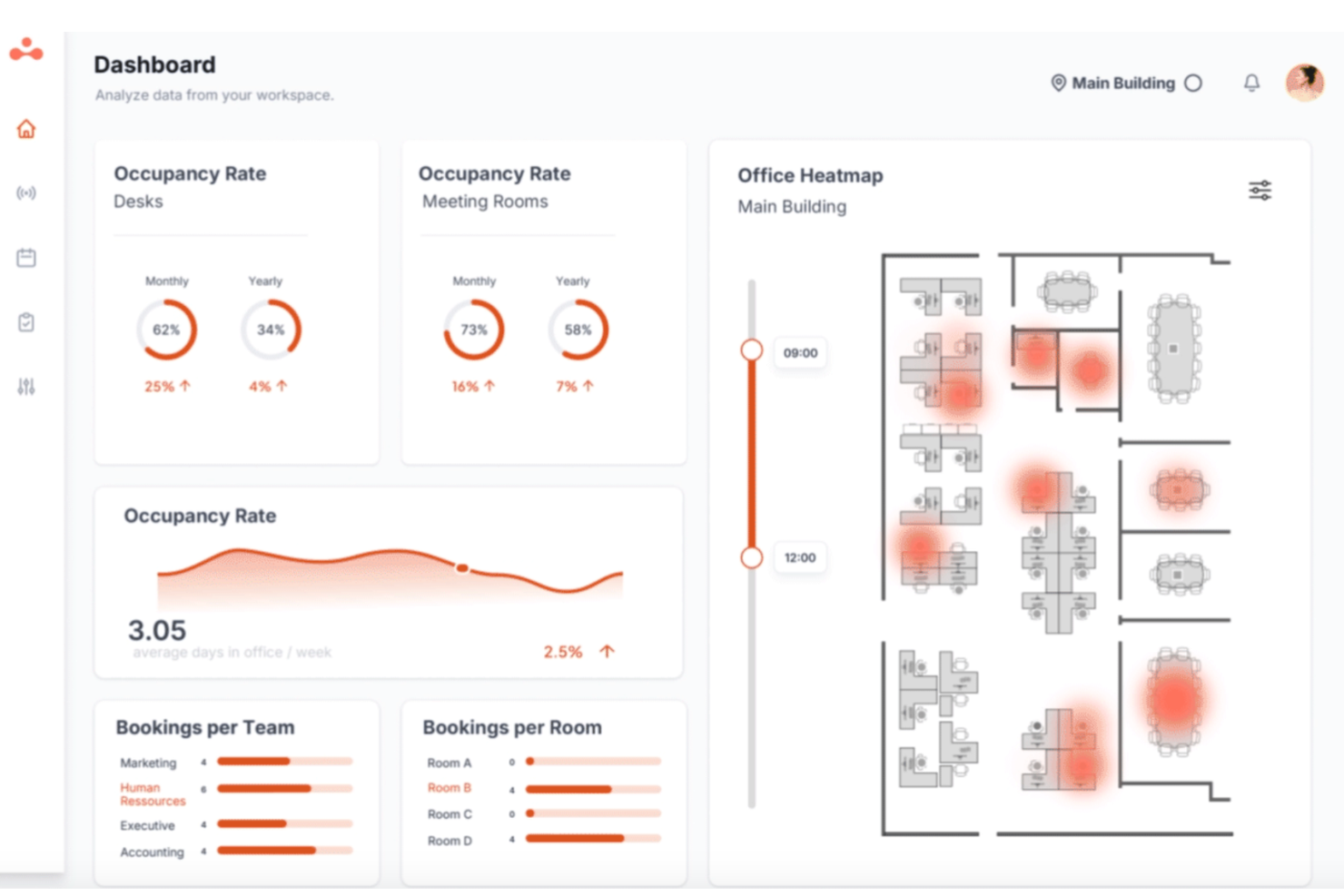
elia is a workplace operations platform with a dedicated occupancy management module that uses proprietary desk and room sensors to track space usage, collect anonymous occupancy data, and generate insights on employee usage patterns across your office.
Who Is elia Best For?
elia is a good fit for facilities managers and workplace teams in mid-to-large organizations that need to monitor and optimize physical office space across multiple locations.
Why I Picked elia
elia earns its spot on my shortlist because its heatmap visualizations go beyond simple color overlays. My team can view floor plan heatmaps filtered by time of day, day of week, or custom date ranges, which makes it easy to spot patterns like underused zones on Friday afternoons. I also like that heatmaps update from live sensor data, so the view reflects actual occupancy rather than booking data alone.
elia Key Features
- Room occupancy sensors: elia installs sensors on door frames to count entries and exits, giving you real-time occupancy data for meeting rooms and shared spaces.
- Multi-space sensor deployment: elia supports both desk and room sensors across floors and locations, so you can track occupancy at the individual workstation and full-room level simultaneously.
- Automated workplace reports: elia generates scheduled reports on space utilization trends, so your team gets consistent data without pulling it manually.
- Desk booking module: Employees can reserve desks directly in elia, with sensor data cross-referenced against bookings to track no-shows and actual usage.
elia Integrations
elia offers native integrations with Microsoft 365, Google Workspace, Slack, and specific tools within those ecosystems, including Google Calendar, Microsoft Teams, and Microsoft Outlook.
Pros and Cons
Pros:
- Covers both desk and room occupancy
- Battery-powered sensors need no wiring
- Anonymous sensor data protects employee privacy
Cons:
- Limited filtering options on floor maps
- Occupancy statistics could be more granular

Best for real-time visualization
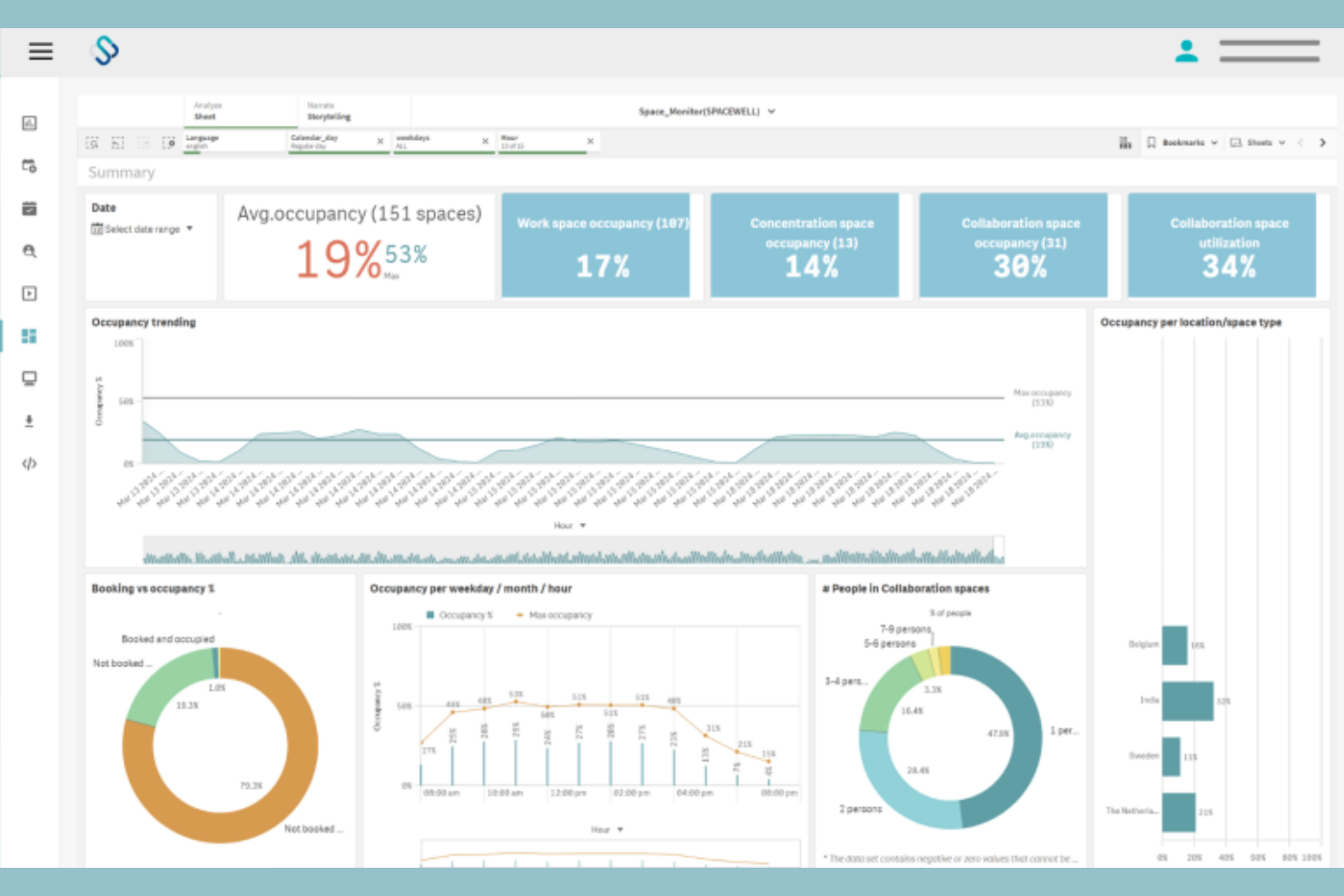
Spacewell is an occupancy monitoring platform that combines IoT-based motion and air quality sensors with interactive floor plan dashboards, space reservation, and building system integrations to track real-time occupancy across offices, campuses, and multi-site portfolios.
Who Is Spacewell Best For?
Spacewell suits facility managers and corporate real estate teams in mid-to-large organizations who need Live floor plan visibility to make day-to-day decisions about space allocation and workplace operations.
Why I Picked Spacewell
Spacewell earns its spot on my shortlist because of how it handles real-time visualization. I can overlay live sensor data directly onto CAD-compatible floor plans, so I'm not reading a table of numbers but actually seeing which zones are occupied right now. I also like the timelapse feature, which lets me replay past occupancy patterns across a floor to pinpoint exactly when and where crowding builds up during the day.
Spacewell Key Features
- Indoor air quality (IAQ) monitoring: Track CO2, VOCs, humidity, and temperature across your building using dedicated air quality sensors.
- AI-powered space release: Automatically release unoccupied booked spaces based on real-time sensor data using built-in AI automation.
- Dynamic zone grouping: Organize spaces into neighborhoods or zones to manage and analyze occupancy at a team or department level.
- Space simulation modeling: Model different space usage scenarios to evaluate layout changes or floor plan reconfigurations before making them.
Spacewell Integrations
Spacewell offers native integrations with Oracle, SAP, ServiceNow, Freshservice, Workday, Jira, and Microsoft 365. Google Workspace, AutoCAD, and more. An API is available for custom integrations.
Pros and Cons
Pros:
- Scales across global multi-site portfolios
- Interactive 2D and 3D floor plans
- Combined air quality and occupancy monitoring
Cons:
- Initial setup can be time-consuming
- Hardware sync issues cause delays

Avigilon
Best for video analytics with access control
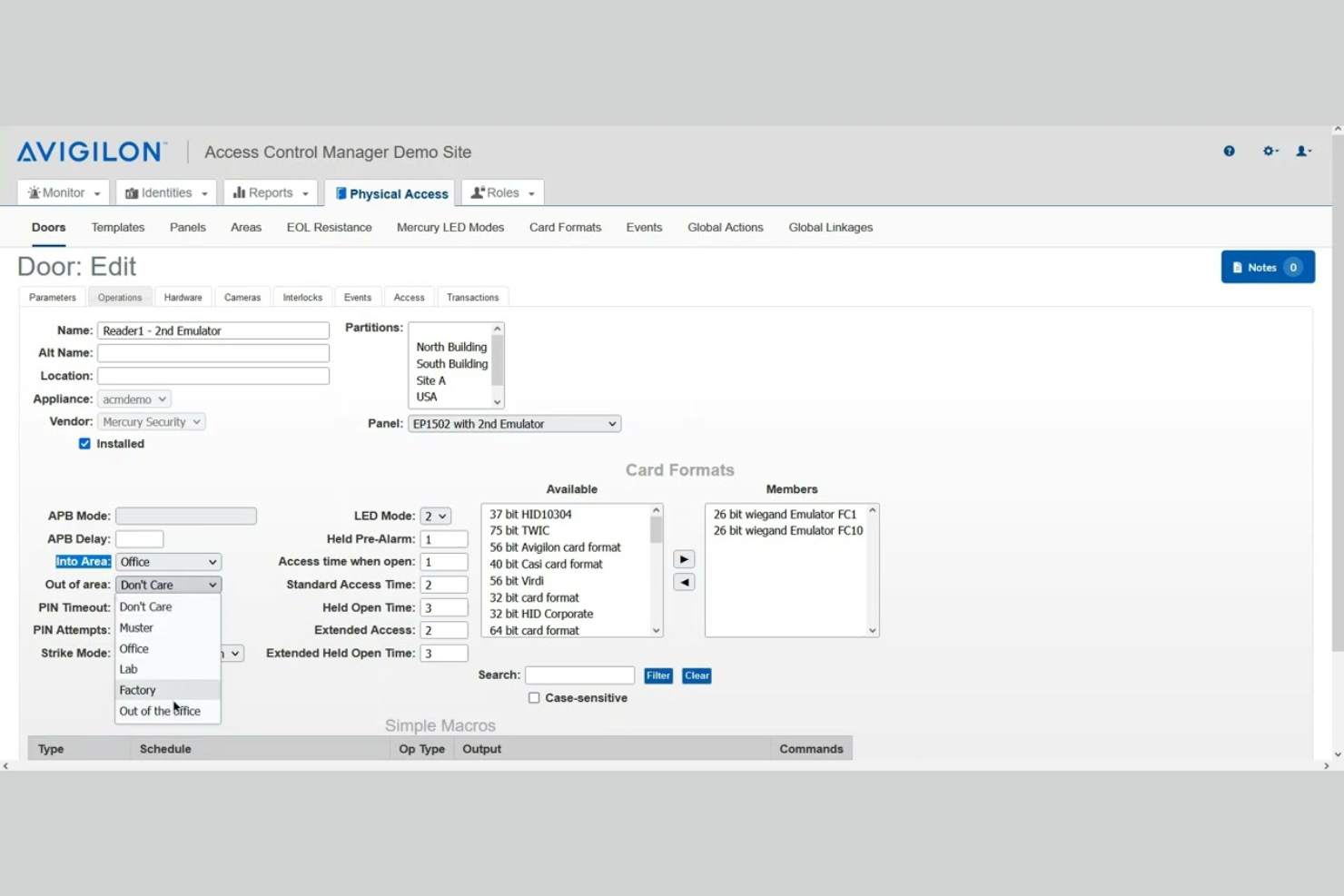
Avigilon is a video security and occupancy management platform that combines AI-powered video analytics, real-time people counting, heatmapping, and access control-based occupancy tracking across commercial facilities.
Who Is Avigilon Best For?
Avigilon suits organizations in security-sensitive industries—like retail, healthcare, and corporate campuses—that already use video surveillance and want to layer in occupancy intelligence.
Why I Picked Avigilon
I picked Avigilon as one of the best because it's one of the few platforms that genuinely unifies video analytics and access control into a single occupancy picture. I especially like the Smart Presence feature, which tracks people and vehicles moving through a space in real time, not just counting entries and exits. The Alta Access Muster Report is another feature I find genuinely useful, pulling live occupancy data during an evacuation to generate accurate personnel rosters on the spot.
Avigilon Key Features
- Occupancy dashboard: Displays real-time and historical occupancy counts across multiple zones and sites in a single view.
- Capacity threshold alerts: Send automated notifications when a monitored space reaches a predefined occupancy limit.
- Heatmapping: Visualizes foot traffic patterns across a floor plan to show which areas see the highest and lowest use over time.
- Video-based people counting: Uses overhead camera analytics to count entries and exits without requiring additional sensor hardware.
Avigilon Integrations
The Avigilon Alta App Marketplace features 40+ integrations with verified industry leaders in the technology space. These include Google Workspace, Microsoft Azure AD, Okta, Workday, Cisco Meraki, Milestone, Camio, Rhombus, and Slack. Alta Access also features an open API ecosystem for custom integrations and supports webhooks for real-time event data.
Pros and Cons
Pros:
- Combines video and access control data
- Built-in emergency muster reporting tool
- Counts both people and vehicles simultaneously
Cons:
- Heavy crowded lines drop accuracy
- Occupancy features locked to premium tiers

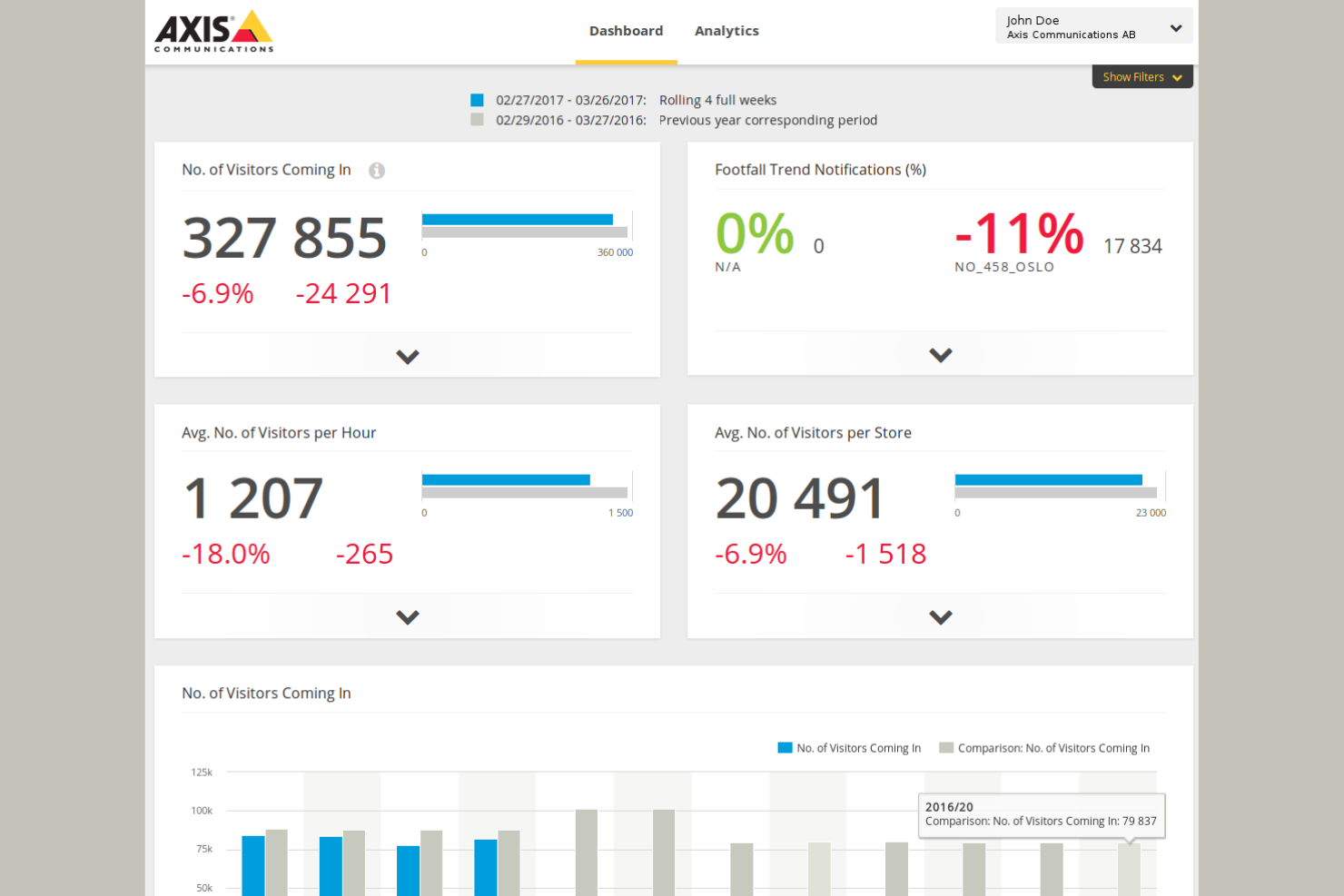
Built around network cameras and edge AI, Axis is an occupancy monitoring platform that covers people counting, crowd density analysis, and zone-based capacity tracking across retail, transit, and venue environments.
Who Is Axis Best For?
Axis is a natural fit for operations and security managers in high-footfall industries like retail, airports, and stadiums that already run camera infrastructure.
Why I Picked Axis
Axis earns its spot on my shortlist because it runs AI analytics directly on the camera hardware, which means occupancy data is processed at the edge without depending on a central server. I like that this approach keeps latency low even across multi-camera deployments covering large areas like airports or shopping centers. The AXIS Occupancy Estimator app also lets my team set live capacity thresholds per zone, with automated alerts when limits are crossed.
Axis Key Features
- People counting: Measures entries and exits using overhead cameras to maintain an accurate real-time occupancy count.
- Heat mapping: Visualizes foot traffic density across a floor plan to identify high-traffic zones over time.
- Queue detection: Monitors line formation and length at entry points or checkpoints in real time.
- Historical reporting: Logs occupancy data over time so you can analyze trends and plan staffing or space use.
Axis Integrations
Native integrations are not publicly listed.
Pros and Cons
Pros:
- Anonymized streams protect patron privacy
- Tracks both people and vehicles simultaneously
- Edge-based AI runs analytics on-camera
Cons:
- Premium hardware pricing limits smaller deployments
- Requires Axis-branded cameras to operate

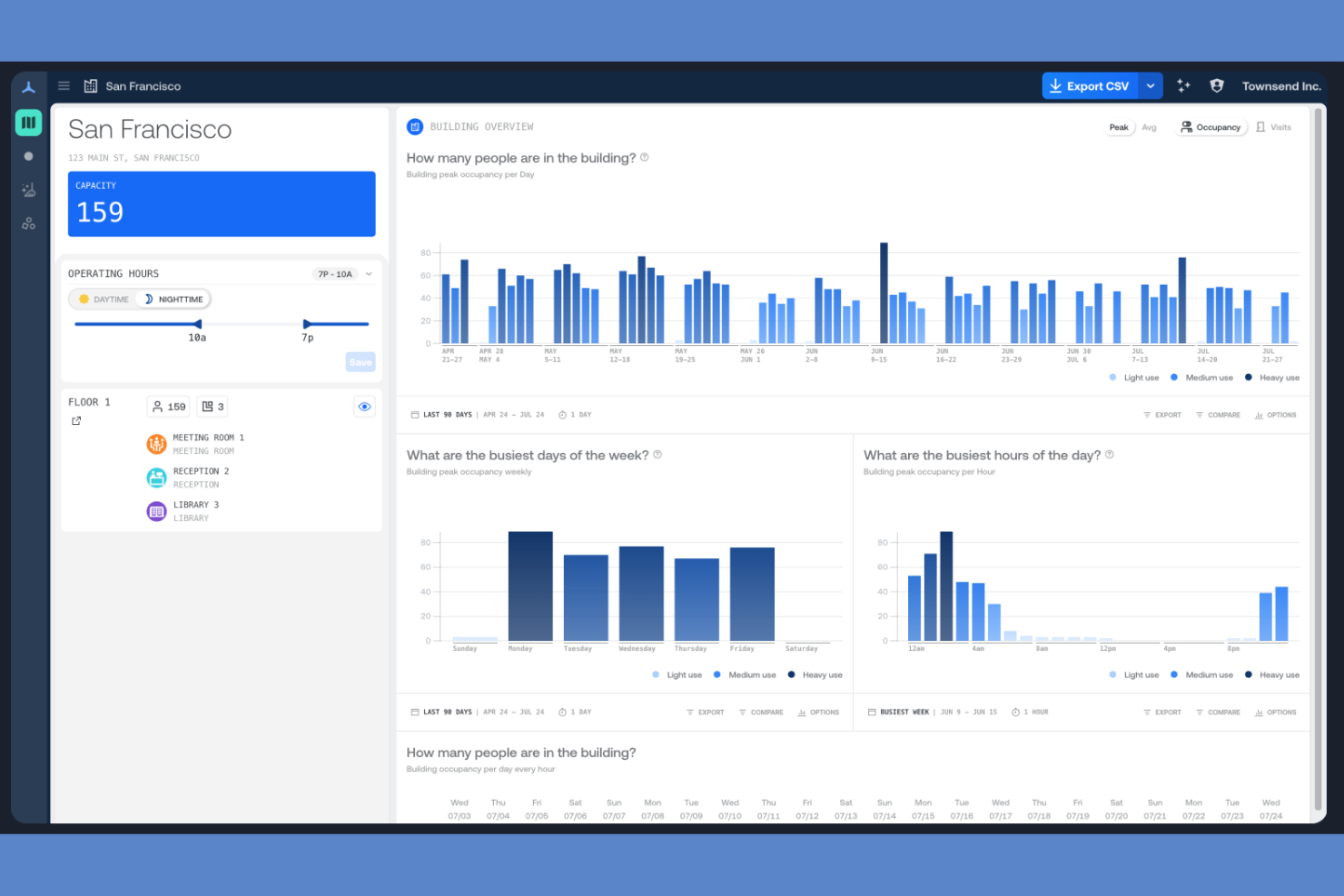
Density Waffle is a people-counting occupancy sensor platform built around its Waffle radar sensor, offering real-time and historical occupancy data for rooms, desks, phone booths, and open spaces via a self-installable, WiFi-connected device.
Who Is Density Waffle Best For?
Density Waffle is a people-counting occupancy sensor platform built around its Waffle radar sensor, offering real-time and historical occupancy data for tracking office space usage across rooms, desks, phone booths, and open spaces via a self-installable, WiFi-connected device.
Why I Picked Density Waffle
Density Waffle earns its spot on my shortlist because of how it approaches sensor installation. The Waffle sensor connects over dual-band WiFi with WPA2 and mounts in three different configurations: no ladder, no wiring, and no IT ticket required. I also like that it delivers occupancy data with under one second of latency, which means you're seeing counts update in real time across rooms, desks, and phone booths. The 140° field of view with an adjustable 18-foot range gives you real flexibility in how you cover a space.
Density Waffle Key Features
- Atlas Analytics dashboard: View occupancy and visit data broken down into 15-minute intervals, with building and floor-level views you can zoom in and out of.
- Utilization heatmaps: Visualize how employees use spaces across your floor plan to identify underused rooms and high-traffic areas.
- Live wayfinding: Display real-time space availability to help employees find open rooms, desks, or phone booths without guessing.
- Data export and API access: Export building and floor-level reports or pull real-time and historical count data directly into your existing tools via the Density API.
Density Waffle Integrations
Integrations are not publicly listed.
Pros and Cons
Pros:
- Sub-second latency for real-time counts
- Self-install setup takes about three minutes
- Radar-based counting captures no images
Cons:
- Limited to smaller enclosed space types
- Capped headcount at three or more

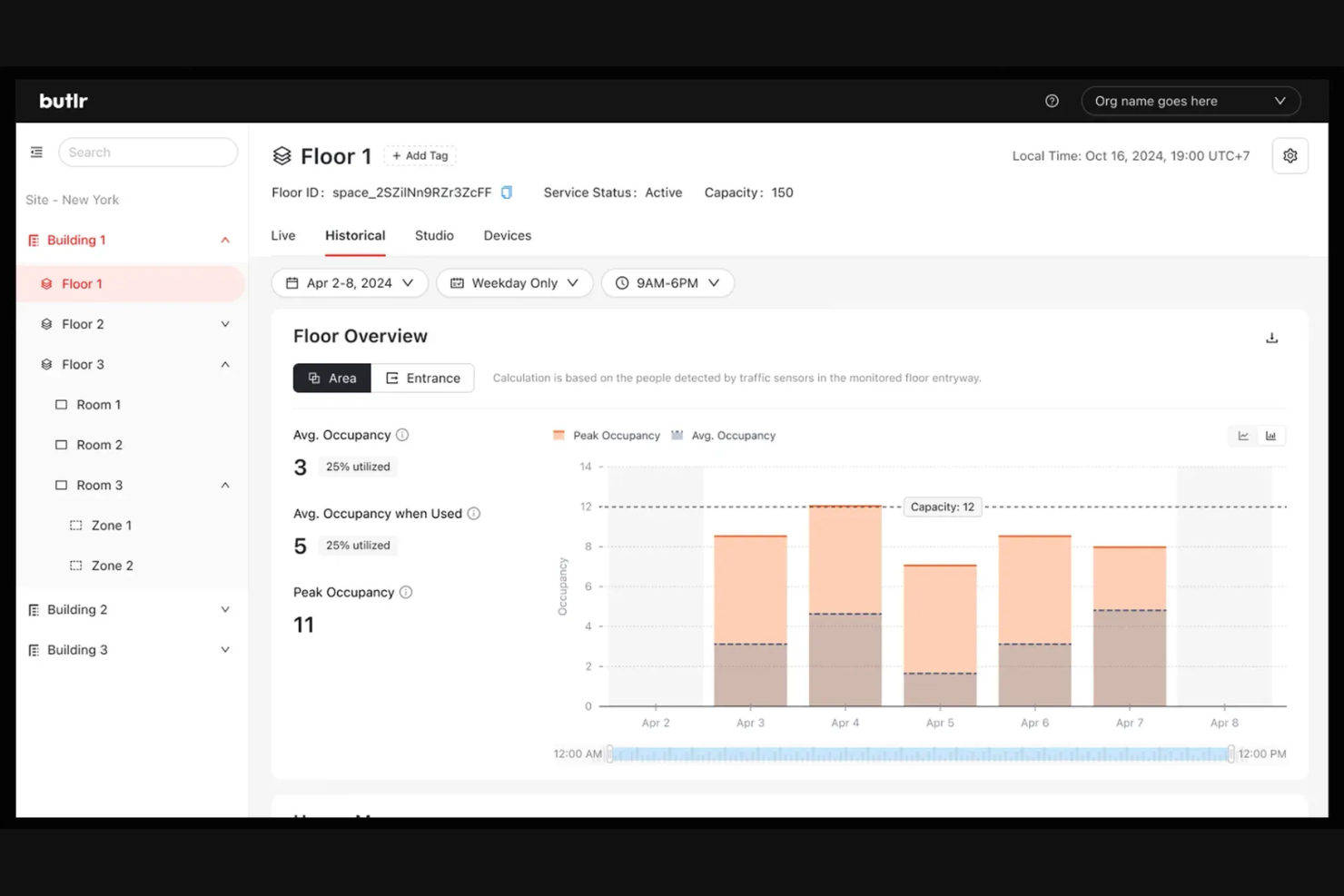
Butlr is a thermal occupancy sensor platform built around its Heatic 2+ wireless sensor, using body heat detection and AI to deliver anonymous presence, movement, and occupancy data across rooms, entryways, and open spaces.
Who Is Butlr Best For?
Butlr is a strong fit for enterprise facility teams in regulated or privacy-sensitive industries, such as healthcare, higher education, and senior living, where anonymous sensing is a hard requirement.
Why I Picked Butlr
I picked Butlr as one of the best because privacy protection is built into the hardware itself, not just the software layer. The Heatic 2+ sensor processes low-resolution, non-RGB thermal data, so there's no way it captures identifiable images regardless of how it's configured. I also like the two sensing modes: traffic mode counts entries and exits at doorways, while presence mode tracks occupancy, dwell time, and movement paths within a space, giving you granular data without any identity risk.
Butlr Key Features
- SOC 2 Type II certification: Butlr holds SOC 2 Type II certification, giving security-conscious enterprise buyers a verified standard to point to during procurement.
- Continual AI learning: The sensor adapts to its environment over time, improving detection accuracy without requiring manual recalibration.
- Multi-network connectivity: The Heatic 2+ connects via Wi-Fi, Ethernet, or cellular, giving you flexible deployment across building types without being locked into one network setup.
- Magnetic mounting: An integrated magnetic back lets you attach the sensor to steel surfaces without drilling, making repositioning fast when your floor plan changes.
Butlr Integrations
Butlr offers integrations with Slack, Hubstar, Akila, Envoy, Robin, Hologram, Willow, Cohesion, CBRE, InnerSpace, and more. An API is available for custom integrations.
Pros and Cons
Pros:
- Delivers 95% accuracy on real-time headcounts
- Multi-year battery runs without any cabling
- Thermal data captures zero identifiable images
Cons:
- Indoor-only use across rooms and open areas
- Pricing requires direct vendor contact to obtain

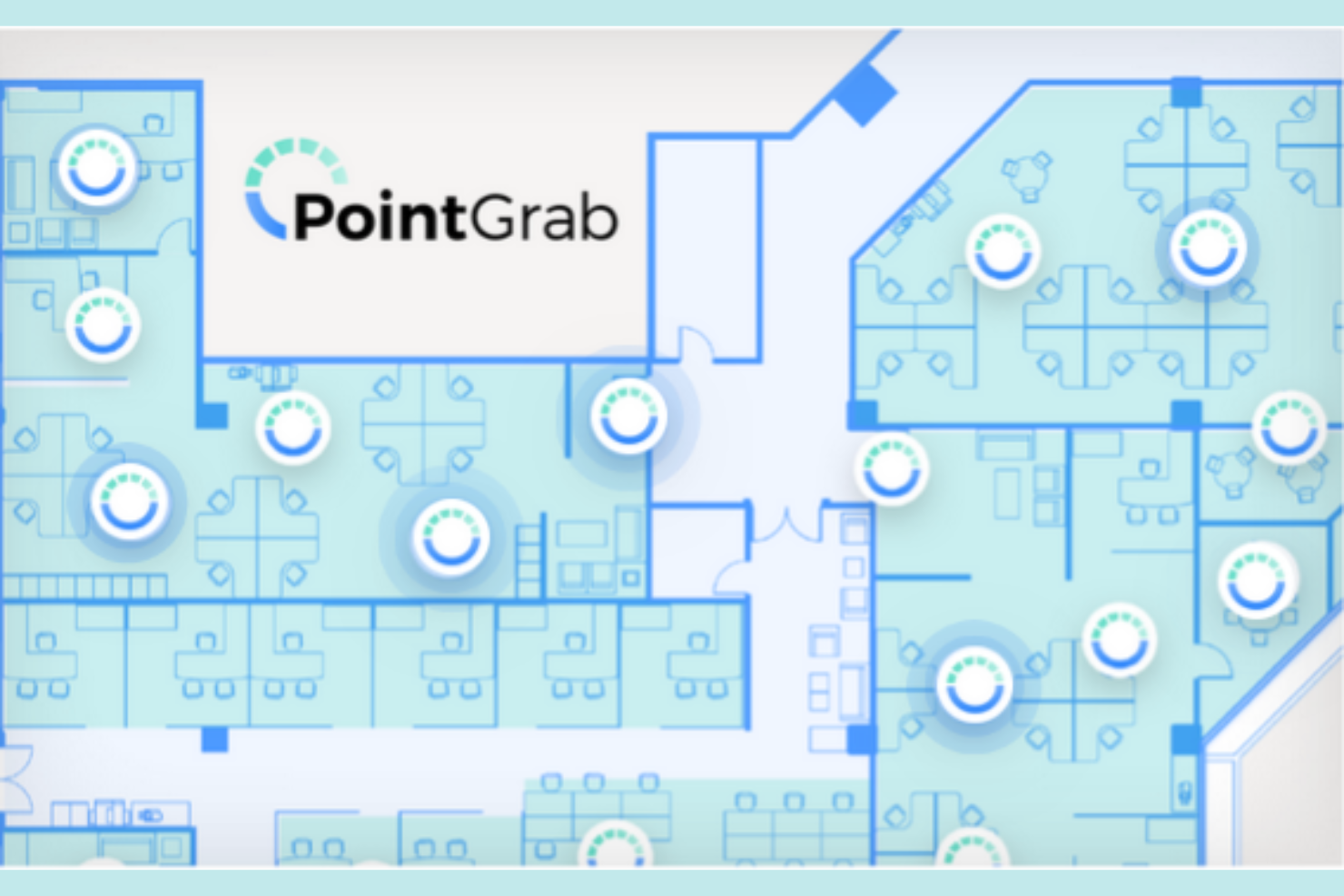
PointGrab is an AIoT occupancy sensor platform built around its CogniPoint sensors, which combine optical and PIR technology to capture occupancy counts, movement patterns, object detection, and virtual traffic line data from a single device.
Who Is PointGrab Best For?
PointGrab is a strong fit for corporate real estate and facility teams managing large office portfolios who want to minimize sensor hardware without sacrificing data depth.
Why I Picked PointGrab
I picked PointGrab as one of the best because the CogniPoint sensor consolidates four distinct data streams into a single ceiling-mounted device: occupancy counts, people in motion, object detection, and virtual traffic line counting. Most deployments require separate sensors for each of these functions, which drives up hardware costs and installation complexity. I also like the superset and subset data model in the Cloud Management Platform, where you can stitch feeds from multiple sensors into full-floor coverage or isolate a single zone for granular reporting.
PointGrab Key Features
- One-minute data intervals: The CogniPoint sensor delivers occupancy data refreshes every minute, giving you near-real-time visibility into space usage.
- Object detection: The sensor identifies physical objects like desks, chairs, and dividers to verify whether the built environment matches your floor plan.
- Wired and wireless sensor options: CogniPoint is available in both wired and wireless configurations, letting you choose the installation method that fits each space.
- Data export and REST API: Aggregated occupancy data is clean and ready to export, with a REST API available for pushing data into third-party applications.
PointGrab Integrations
PointGrab integrates with over 35 platforms and applications, including Eptura Engage, Condeco, Appspace, Mapiq, Johnson Controls, Flowscape, GoBright, HubStar, Planon, and Poppulo, with a REST API available for custom integrations.
Pros and Cons
Pros:
- Configurable areas of interest per sensor
- No identifiable images stored or transmitted
- Single sensor covers up to 3,000 sq ft
Cons:
- No outdoor or non-office deployment options
- Physical lenses trigger privacy concerns

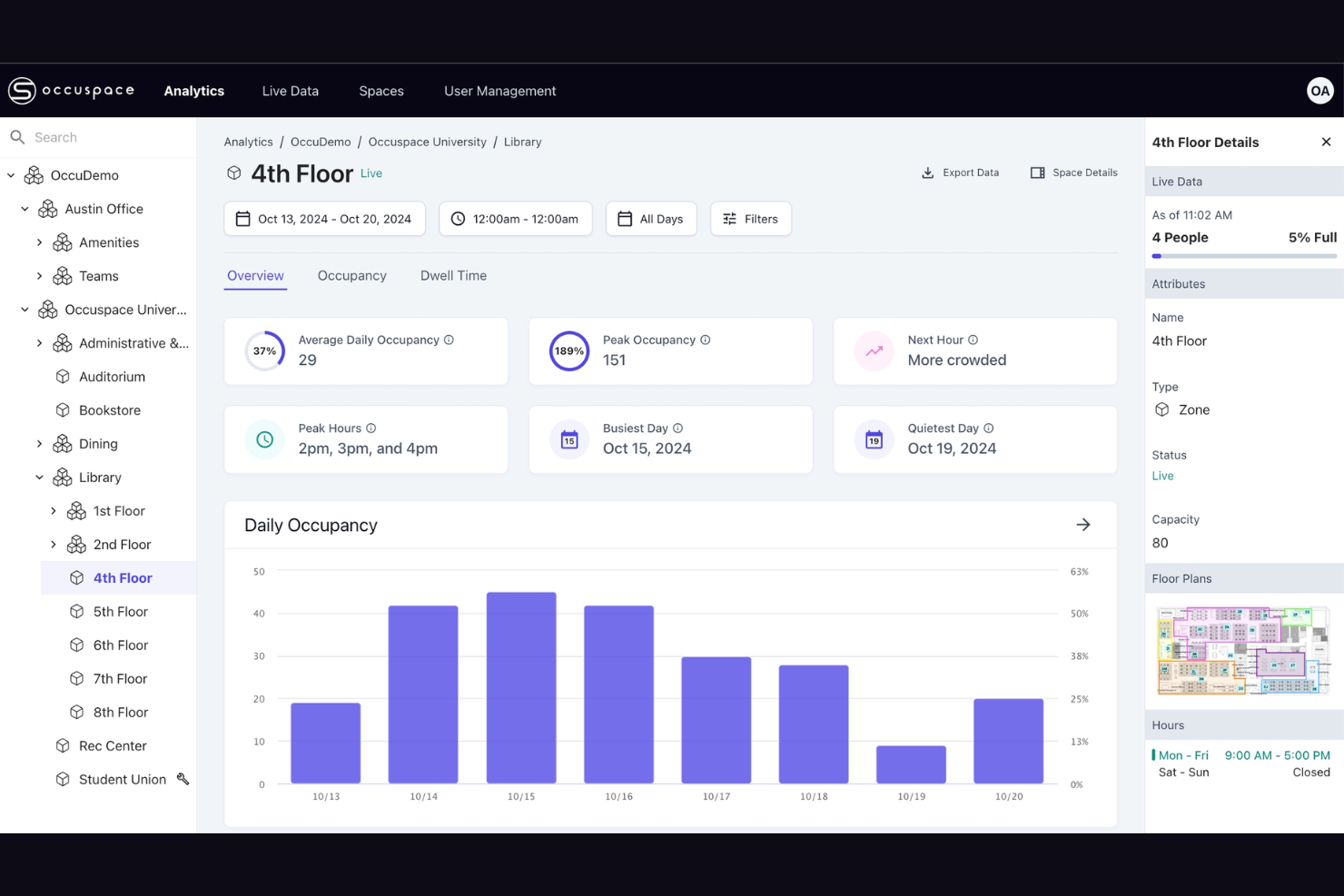
Occuspace is an AI-powered occupancy sensor platform that tracks real-time occupancy counts, foot traffic, dwell time, and space availability using wireless signal scanning from plug-in sensors or existing WiFi access points.
Who Is Occuspace Best For?
Occuspace is a natural fit for higher education and corporate campuses that already have WiFi infrastructure and want building-wide occupancy coverage without installing new sensor hardware in every room.
Why I Picked Occuspace
Occuspace earns its spot on my shortlist because its WAP Integration option turns your existing WiFi access points into occupancy sensors with zero installation required. I like that this makes building-wide coverage genuinely fast to deploy: one campus reportedly rolled out across 1 million square feet in a single day. For large, multi-building campuses where running new hardware to every room isn't practical, that's a real advantage over sensor-only platforms.
Occuspace Key Features
- Micro sensors: Purpose-built for smaller spaces like conference rooms and phone booths, using mmWave technology for precise detection.
- Digital signage display: Push live occupancy busyness data to on-site screens and kiosks so building guests can find available spaces in real time.
- Real-time notifications: Set capacity threshold alerts that trigger automated workflows for custodial, food service, or HVAC scheduling.
- Analytics dashboard: A web portal with portfolio-wide and individual space analysis, interactive charts, filterable data tables, and one-click CSV exports.
Occuspace Integrations
Native integrations are not publicly listed. A REST API is available for custom integrations with internal systems and third-party platforms.
Pros and Cons
Pros:
- Fully anonymous with no personal data collected
- Plug-in sensors need no wiring or batteries
- Leverages existing WiFi access points as sensors
Cons:
- Limited to indoor commercial and campus environments
- Micro sensors capped at small counts

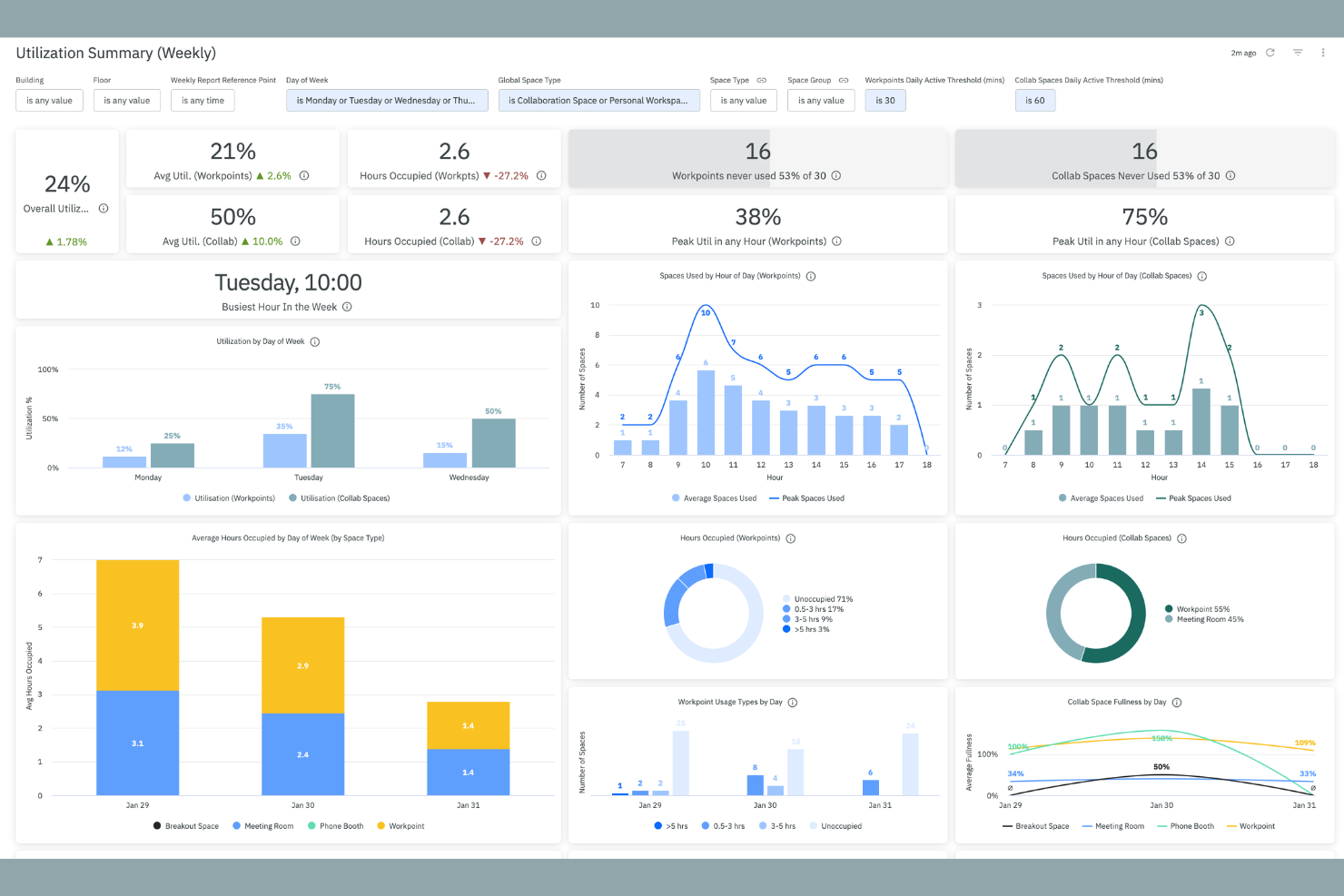
XY Sense is a hardware and software occupancy sensor platform that uses AI-powered area sensors to track real-time positional data, space utilization, and occupancy across large open floors.
Who Is XY Sense Best For?
XY Sense is a strong fit for global enterprise organizations, particularly those in banking, financial services, and pharmaceuticals, that need high-accuracy, real-time occupancy data across large open-plan floors.
Why I Picked XY Sense
I've included XY Sense in my top picks because each Area Pro sensor covers up to 3,000 sq ft at 99% accuracy, detecting people to within one foot with updates every two seconds. That combination of wide coverage and positional precision is what sets it apart for large open-plan floors, where most sensors either miss activity or require dense deployments. I also like that its Senselink daisy-chain wiring cuts cabling by 80%, making permanent, floor-wide installations far less disruptive to set up.
XY Sense Key Features
- AI-assisted insights platform: Access heatmaps, predictive analytics, live views, and daily detection replays from a single dashboard.
- Building automation triggers: Push sub-two-second occupancy data to HVAC, lighting, and room booking release systems.
- On-device processing: All sensor data is computed locally, capturing only anonymous X and Y coordinates with no images stored.
- PoE wired connectivity: Sensors run on Power over Ethernet with zero battery maintenance and enterprise-grade uptime guarantees.
XY Sense Integrations
XY Sense integrates with Serraview, Google Calendar, Microsoft 365, Smartspaces, HubStar, Habitap, KodeLabs, and more. Webhooks and an API are available for custom integrations.
Pros and Cons
Pros:
- Requires up to 50% fewer sensors than competitors
- Captures only anonymous XY coordinates, never images
- Sub-foot positional accuracy at 99% detection
Cons:
- Different sensor types complicate procurement
- Ceiling height requirements limit placement

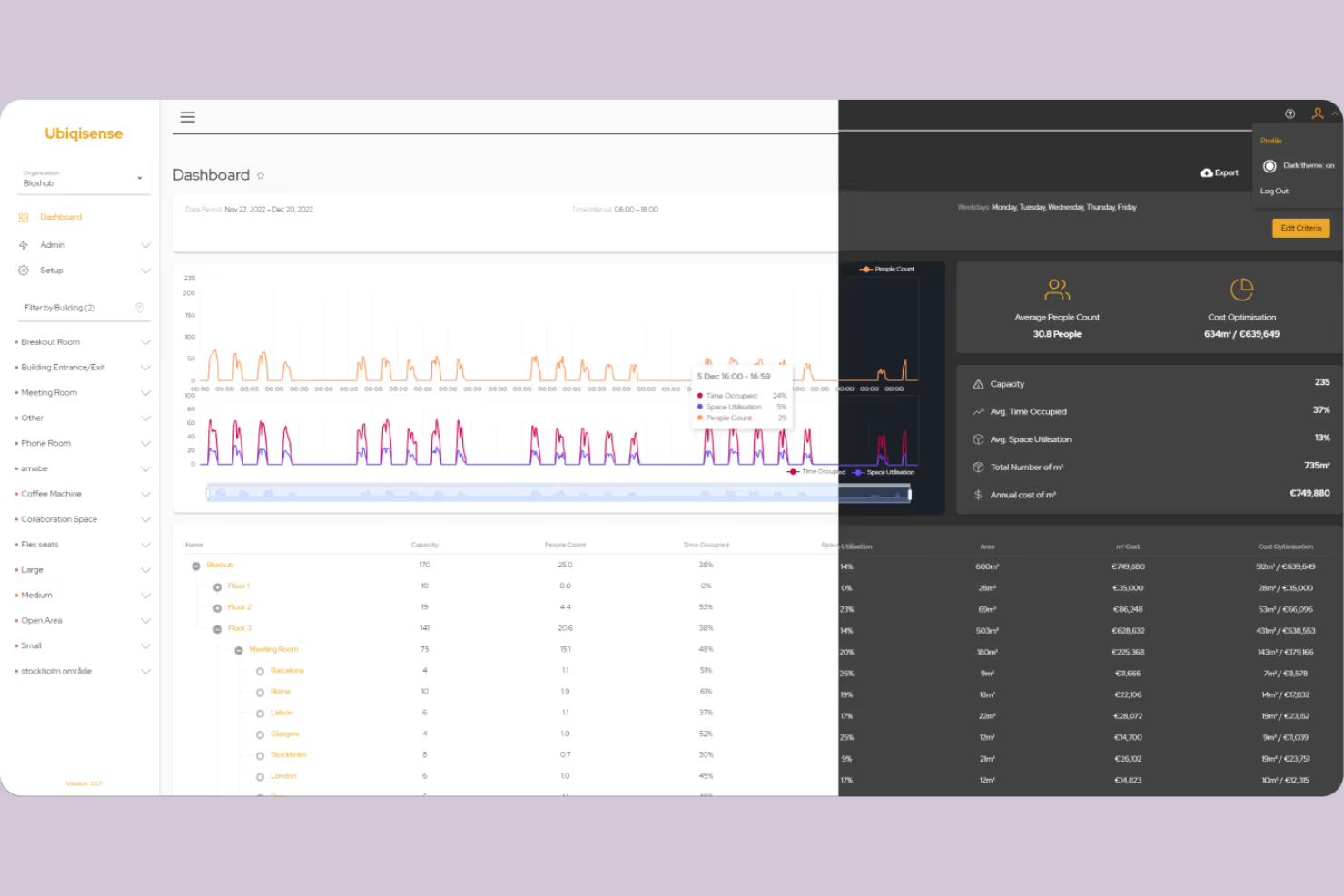
Ubiqisense is a sensor-agnostic occupancy intelligence platform that collects and processes real-time space utilization data across multiple sensor types, including people counters, IP cameras, and environmental sensors.
Who Is Ubiqisense Best For?
Ubiqisense is a strong fit for facility managers and workplace teams in mid-to-large enterprises that already have mixed sensor hardware deployed across their buildings.
Why I Picked Ubiqisense
I've included Ubiqisense in my top picks because it handles mixed sensor environments better than most tools in this space. I like that it pulls data from people counters, IP cameras, and environmental sensors into one unified platform without requiring you to rip out existing hardware. Its sensor-agnostic architecture means my team can onboard new sensor types through standard protocols like BACnet and MQTT without custom development work each time.
Ubiqisense Key Features
- Live occupancy monitoring: View real-time occupancy counts across floors, meeting rooms, open areas, and shared desks from a single dashboard.
- Historical data analysis: Access past occupancy and space utilization records to identify usage trends and patterns over time.
- Indoor air quality monitoring: Track CO2 levels, temperature, humidity, and atmospheric pressure through the UC-IAQ sensor module.
- Heatmap visualization: See which zones are overused or underused across your floor plan to inform workspace redesign decisions.
Ubiqisense Integrations
Ubiqisense integrates with Lotti, Areo, Mymesh, IoT Spot, Edge Next, Neowit, Proptech OS, Foot Analytics, and Flowscape Solutions. An API is available for custom integrations.
Pros and Cons
Pros:
- Sensors require only existing Wi-Fi infrastructure
- On-device processing preserves full privacy
- Over 95% occupancy counting accuracy
Cons:
- Limited third-party review site presence
- Physical walls block vision pathways
Annen programvare for beleggssensorer
Her er noen flere alternativer for programvare for beleggssensorer som ikke kom med på kortlisten min, men som likevel er verdt å se nærmere på:
- Cisco Spaces
For leveraging network infrastructure
- Kadence
For hybrid work coordination needs
- HubStar
For multinational workplace insights
- Matrix Booking
For integrating with space booking systems
- OpenSensors
For custom sensor hardware compatibility
- Terabee
For privacy-first sensor solutions
- Milesight
For wireless sensor deployments


How I Evaluate Occupancy Sensor Software
I split my evaluation into two layers: the core table stakes—like real-time sensor feeds and floor plan overlays—and the differentiators that matter for hybrid headcount tracking and RTO reporting.
Core Functionality (Table Stakes For This List)
When I'm selecting tools for my list, I rank each one on a scale from 0 (does not offer the functionality) to 5 (excels in this area) for each core functionality listed below. Then, I calculate the tool's total score into a percentage. Each tool needs to achieve a minimum total score of 65% to be considered for inclusion.
- Real-Time Occupancy Tracking: I check whether the platform delivers live presence data across desks, rooms, and floors—fast enough to trigger alerts when a zone hits capacity during peak hours.
- Sensor Hardware Integration: Support for multiple sensor types matters here, so I look for platforms that aggregate feeds from PIR, thermal, computer vision, or BLE devices.
- Space Utilization Analytics: Beyond raw headcounts, I evaluate whether dashboards surface trends like average peak-day occupancy by floor or week-over-week usage shifts across buildings.
- Floor Plan Visualization: Interactive floor plans with live occupancy overlays help facilities teams spot underused wings at a glance, so I look for heatmap and multi-building support.
- Desk & Room Booking Sync: I consider how each tool compares booked vs. actual usage—specifically whether it flags ghost bookings and auto-releases no-show reservations back into inventory.
- Workforce & HR System Integration: Connecting occupancy data to HRIS or badge systems lets HR teams correlate in-office attendance with hybrid work policies, so I evaluate connector depth.
Once I have a list of tools that meet the criteria, I consider what sets each platform apart.
Differentiating Factors (What Sets Vendors Apart)
Here's how I compare and contrast different vendors:
Standout Features
Predictive space analytics is a major differentiator. I look for AI-driven forecasting that projects occupancy trends weeks or months ahead—useful when facilities directors need to justify consolidating floors or renegotiating leases. Multi-sensor compatibility also matters. Platforms that support PIR, thermal, LiDAR, and camera-based hardware give you flexibility to mix devices across buildings without vendor lock-in. I also evaluate automated cleaning workflows that trigger maintenance based on actual room usage rather than fixed schedules.
Beyond Features
Hardware strategy is a big one. I evaluate whether a vendor sells proprietary sensors, partners with third parties, or is fully hardware-agnostic—because that directly affects installation complexity and long-term costs when you need to scale across buildings. Privacy and compliance also weigh heavily, especially for organizations using camera or Wi-Fi-based sensing where anonymized data collection and clear retention policies matter. I also consider implementation support, including pilot timelines and whether the vendor provides dedicated success resources to help workplace teams drive adoption.
Slik velger du programvare for beleggssensorer
Det er lett å gå seg vill i lange funksjonslister og kompliserte prisstrukturer. For å hjelpe deg med å holde fokus mens du går gjennom den unike prosessen med å velge programvare, har vi laget en sjekkliste over faktorer du bør ha i bakhodet:
| Faktor | Hva du bør vurdere |
|---|---|
| Skalerbarhet | Vil programvaren håndtere bygningens nåværende og fremtidige størrelse, antall rom og flere lokasjoner? Sjekk kapasitetsbegrensninger og prismodeller for store implementeringer. |
| Integrasjoner | Kan løsningen enkelt kobles til de eksisterende systemene dine for bygningsadministrasjon, sikkerhet og arbeidsplass? Bekreft innebygde integrasjoner og vurder API-alternativer. |
| Tilpasningsmuligheter | Kan instrumentpaneler, måleverdier og varsler tilpasses organisasjonens behov eller krav til samsvar? Sjekk om terskelverdier og rapporteringsalternativer kan tilpasses. |
| Brukervennlighet | Vil driftsledere og HR-ansatte lære å bruke det raskt? Se etter enkel navigering, rask tilgang til data og minimalt opplæringsbehov. |
| Implementering og innføring | Hvor lang tid tar oppsettet, og hvilke ressurser kreves? Spør om støtte ved innføring, behov for installasjon av sensorer og vanlig tid til gevinstrealisering for lignende organisasjoner. |
| Sikkerhetstiltak | Støtter leverandøren datakryptering, tilgangskontroller og regelmessige sikkerhetsrevisjoner? Vær spesielt oppmerksom på personvern når bevegelser til personer i lokalene spores. |
| Kostnad | Er prisopplysningene transparente med tanke på teamets størrelse og funksjonsbehov? Ta med maskinvare, lisenser og kundestøtte i beregningen – spør om ekstra gebyrer for analysefunksjoner eller sensorer. |
| Tilgjengelig kundestøtte | Er løpende hjelp tilgjengelig i tidssonen din og på språkene du foretrekker? Se på svartider, alternativer for direktestøtte og rutiner for eskalering utenom åpningstid. |
Hva er programvare for beleggssensorer?
Programvare for beleggssensorer er et system som samler inn, analyserer og visualiserer sanntidsdata fra bygningssensorer for å vise hvor mange personer som er til stede i bestemte områder. Denne programvaren hjelper organisasjoner med å forstå bruksmønstre for arealer, optimalisere fasiliteter og ivareta sikkerhet og samsvar ved å gi nøyaktig og handlingsrettet innsikt i personbelegg for kontorer, klasserom, møterom og andre delte miljøer.
Funksjoner
Her er de viktigste funksjonene all god programvare for beleggssensorer bør ha:
- Sanntidsovervåking av personbelegg: Overvåker kontinuerlig antallet personer i bestemte rom eller soner, slik at man raskt kan reagere på overbelastning eller sikkerhetshendelser.
- Analyse av historiske data: Samler og analyserer tidligere data om personbelegg for å identifisere trender, perioder med høy belastning og arealer som brukes lite, slik at langsiktig planlegging blir bedre.
- Automatiserte varsler: Sender varsler når personbelegget overskrider angitte terskler, og støtter dermed samsvar med sikkerhetsforskrifter eller interne retningslinjer.
- Tilpassbare oversikter: Lar brukerne tilpasse datavisualiseringer og rapportoppsett etter organisasjonens behov, slik at informasjonen blir enkel å tolke med et øyekast.
- Kompatibilitet med flere sensortyper: Integreres med en rekke sensortyper, som infrarøde sensorer, ultralydsensorer, videokameraer og adgangskortlesere, for bedre dekning og redundans.
- Sonebasert rapportering: Deler opp informasjon om personbelegg etter rom, etasjer eller angitte områder, slik at team kan ta målrettede beslutninger om utforming og ressursbruk.
- Integrasjon med fasilitetssystemer: Kobles til HVAC-, belysnings- eller sikkerhetssystemer for å justere forholdene automatisk basert på hvordan områdene brukes.
- Brukertilgang basert på roller: Lar ulike brukergrupper få tilgang bare til dataene og kontrollene som er tillatt for rollene deres, noe som forbedrer sikkerheten og den operative oversikten.
- Måling av besøkstrafikk og oppholdstid: Registrerer hvor mange personer som passerer gjennom eller oppholder seg i et område over tid, og gir dypere innsikt i bruksmønstre og trafikkflyt.
- Eksport- og API-funksjoner: Gjør det mulig for brukerne å hente rådata eller analyser inn i andre oversikter, rapporter eller forretningssystemer, og støtter dermed bredere analyser og rapportering av arbeidsplassen.
Vanlige KI-funksjoner i programvare for beleggssensorer
I tillegg til standardfunksjonene i programvare for beleggssensorer som er nevnt ovenfor, tar mange av disse løsningene i bruk kunstig intelligens med funksjoner som:
- Prognoser for fremtidig personbelegg: Bruker maskinlæringsalgoritmer til å analysere historiske bruksdata og forutsi fremtidige beleggsmønstre, slik at organisasjoner kan fordele ressurser proaktivt og optimalisere arealbruken.
- Avviksdeteksjon: Kunstig intelligens identifiserer uregelmessige beleggstrender eller uventede økninger og varsler team om mulige sikkerhetshendelser, systemfeil eller endringer i den normale bruken av bygningen.
- Automatisert planlegging av renhold: Kunstig intelligens fastsetter optimale rengjøringstidspunkter ved å vurdere beleggsmønstre, slik at renholdspersonell bare sendes ut når og der det trengs, for maksimal effektivitet.
- Optimalisering av personflyt: Analyserer sanntidsdata om bevegelser for å anbefale navigasjonsskilt eller endringer i adkomst, noe som reduserer trengsel og forbedrer personflyten gjennom delte områder.
- Anbefalinger for arealutnyttelse: Foreslår omorganisering av arbeidsområder eller identifiserer lite brukte områder ved kontinuerlig å evaluere beleggdata, og støtter dermed datadrevne beslutninger innen fasilitetsforvaltning.
Fordeler
Implementering av programvare for beleggssensorer gir flere fordeler for den samlede arbeidsplassopplevelsen og virksomheten. Her er noen av fordelene du kan se frem til:
- Datadrevet arealplanlegging: Få sanntidsinnsikt og historisk innsikt som gir grunnlag for beslutninger om romfordeling, endringer i utforming eller behov for utvidelse.
- Forbedret sikkerhet på arbeidsplassen: Overvåk personantallet og motta varsler for å sikre samsvar med bygningens kapasitetsgrenser og helsekrav.
- Optimalisering av ressurser: Automatiser tidsplaner for HVAC, belysning og renhold basert på faktisk bruk av arealene, noe som kan bidra til å redusere driftskostnadene.
- Bedre medarbeideropplevelse: Sørg for at medarbeiderne har tilgang til de riktige områdene til riktig tid, slik at trengsel reduseres og tilfredsheten øker.
- Økt åpenhet: Gi ledelsen tydelige oversikter og rapporter om hvordan fasilitetene brukes, slik at den strategiske planleggingen blir bedre.
- Sømløs systemintegrasjon: Koble data om personbelegg sammen med bredere verktøy for arbeidsplassadministrasjon for enhetlig drift av bygningen og smartere arbeidsflyter.
- Støtte for samsvar: Spor og arkiver data om personbelegg for å dokumentere etterlevelse av forskrifter eller organisatoriske retningslinjer ved behov.
Kostnader og priser
Valg av programvare for tilstedeværelsessensorer krever en forståelse av de ulike prismodellene og abonnementene som er tilgjengelige. Kostnadene varierer basert på funksjoner, teamstørrelse, tillegg og mer. Tabellen nedenfor oppsummerer vanlige abonnementer, gjennomsnittsprisene deres og typiske funksjoner som inngår i programvareløsninger for tilstedeværelsessensorer:
Sammenligningstabell for abonnementer for programvare for tilstedeværelsessensorer
| Abonnementstype | Gjennomsnittspris | Vanlige funksjoner |
|---|---|---|
| Gratisabonnement | $0 | Grunnleggende overvåking av tilstedeværelse, begrenset rapportering og støtte for et lite antall sensorer. |
| Personlig abonnement | $20-$80/måned | Sporing av tilstedeværelse på romnivå, standardiserte dashbord, rapporter som kan eksporteres og e-postvarsler. |
| Forretningsabonnement | $150-$600/måned | Avansert analyse, automatiserte varsler, sonebasert rapportering, integrasjonsalternativer og rollebasert tilgang. |
| Virksomhetsabonnement | $1,000-$3,000/måned | Administrasjon av flere lokasjoner, tilpassede dashbord, API-tilgang, prioritert brukerstøtte og dedikerte tjenester for innføring. |
Vanlige spørsmål
Her er noen svar på vanlige spørsmål om programvare for tilstedeværelsessensorer:
Hvor nøyaktig er programvare for tilstedeværelsessensorer?
Nøyaktigheten avhenger av sensortypene som brukes, og hvor godt de installeres og vedlikeholdes. De fleste moderne systemer har en nøyaktighet på over 90 % når de kombinerer flere sensordata og enhetene kalibreres regelmessig.
Kan programvare for tilstedeværelsessensorer integreres med bygningsstyringssystemet mitt?
Ja, de fleste løsninger tilbyr integrasjoner eller API-er for synkronisering med populære plattformer for bygningsstyring, HVAC og sikkerhet. Kontroller alltid at den valgte programvaren støtter de nødvendige integrasjonene før kjøp.
Hvilke personvernhensyn bør jeg ta i betraktning?
Programvare for tilstedeværelsessensorer sporer vanligvis anonyme data om bevegelse og tilstedeværelse, men du bør gjennomgå leverandørens personvernerklæringer, praksis for datalagring og samsvar med lokale forskrifter for å sikre at dette er i tråd med virksomhetens standarder.
Hvor lang tid tar det å implementere programvare for tilstedeværelsessensorer?
Implementeringstiden varierer etter bygningens størrelse og sensortype, men små utrullinger kan være klare på noen dager, mens store utrullinger på flere lokasjoner kan ta flere uker. Spør leverandørene om nødvendig konfigurering og støtte ved innføring.
Krever programvare for tilstedeværelsessensorer løpende vedlikehold?
Ja, regelmessig vedlikehold – som sensorkalibrering, fastvareoppdateringer og kontroll av tilkoblingsproblemer – er nødvendig for å sikre nøyaktige data om tilstedeværelse og pålitelig ytelse.