

10 beste wikiprogramvarer gjennomgått i 2026

Kortliste over beste wikiprogramvare


Det kan være krevende å håndtere kompleksiteten i HR-administrasjon. Du må balansere teamsamarbeid, kunnskapsdeling og det å holde alle oppdatert. Det er her wikiprogramvare kommer inn. Den bidrar til å samle informasjon på ett sted, slik at den blir tilgjengelig og enkel å oppdatere for teamet ditt.
Jeg har brukt tid på å teste og vurdere ulike programvarer for å gi deg en objektiv veiledning. Etter min erfaring kan det å finne riktig verktøy utgjøre en stor forskjell i arbeidsflyten din. I denne artikkelen går jeg gjennom mine beste anbefalinger, med fokus på funksjonene deres og hvordan de kan dekke dine spesifikke behov.
Les videre for å finne ut hvilken wikiprogramvare som kan passe perfekt for deg og teamet ditt.
Why Trust Our Software Recommendations
Our team has been testing and reviewing software since 2012. As HR experts ourselves, we know how difficult—and important—it is to choose the right software.
For this guide, we evaluated tools using hands-on testing and independent research, scoring tools using our selection criteria. We also draw on insights from industry thought leaders and practicing HR experts.
Our reviews reflect our human editorial judgment, not a sales pitch.
Expert reviewers:
Sammenligningstabell for wikiprogramvare
Denne sammenligningstabellen oppsummerer prisopplysningene for mine beste utvalgte løsninger for wikiprogramvare:
| Tool | Best For | Trial Info | Price | ||
|---|---|---|---|---|---|
| 1 | Best for knowledge bases | Free demo available | Pricing upon request | Website | |
| 2 | Best for remote teams | Free demo + 14-day free trial available | From $10/user/month (billed annually) | Website | |
| 3 | Best for real-time collaboration | Free plan available | From $6/user/month (billed annually) | Website | |
| 4 | Best for ease of use | Free demo + 15-day free trial available | From $0.99/user/month (billed annually) | Website | |
| 5 | Best for all-in-one workspace | Free plan + free demo available | From $10/user/month (billed annually) | Website | |
| 6 | Best for Slack integration | 30-day free trial | From $8/user/month (billed annually) | Website | |
| 7 | Best for integration options | Free plan available | From $5.78/user/month | Website | |
| 8 | Best for extensibility | Free plan + 30-day free trial available | From €2.50/user/month (billed annually) | Website | |
| 9 | Best for simple setup | Free to use | Free to use | Website | |
| 10 | Best for developer use | Free to use | Free to use | Website |
Vurdering av beste wikiprogramvare
Nedenfor finner du mine detaljerte sammendrag av den beste wikiprogramvaren som kom med på kortlisten min. Vurderingene mine gir en detaljert gjennomgang av de viktigste funksjonene, fordelene og ulempene, integrasjonene og ideelle bruksområdene for hvert verktøy, slik at du kan finne det beste alternativet for deg.

Best for knowledge bases
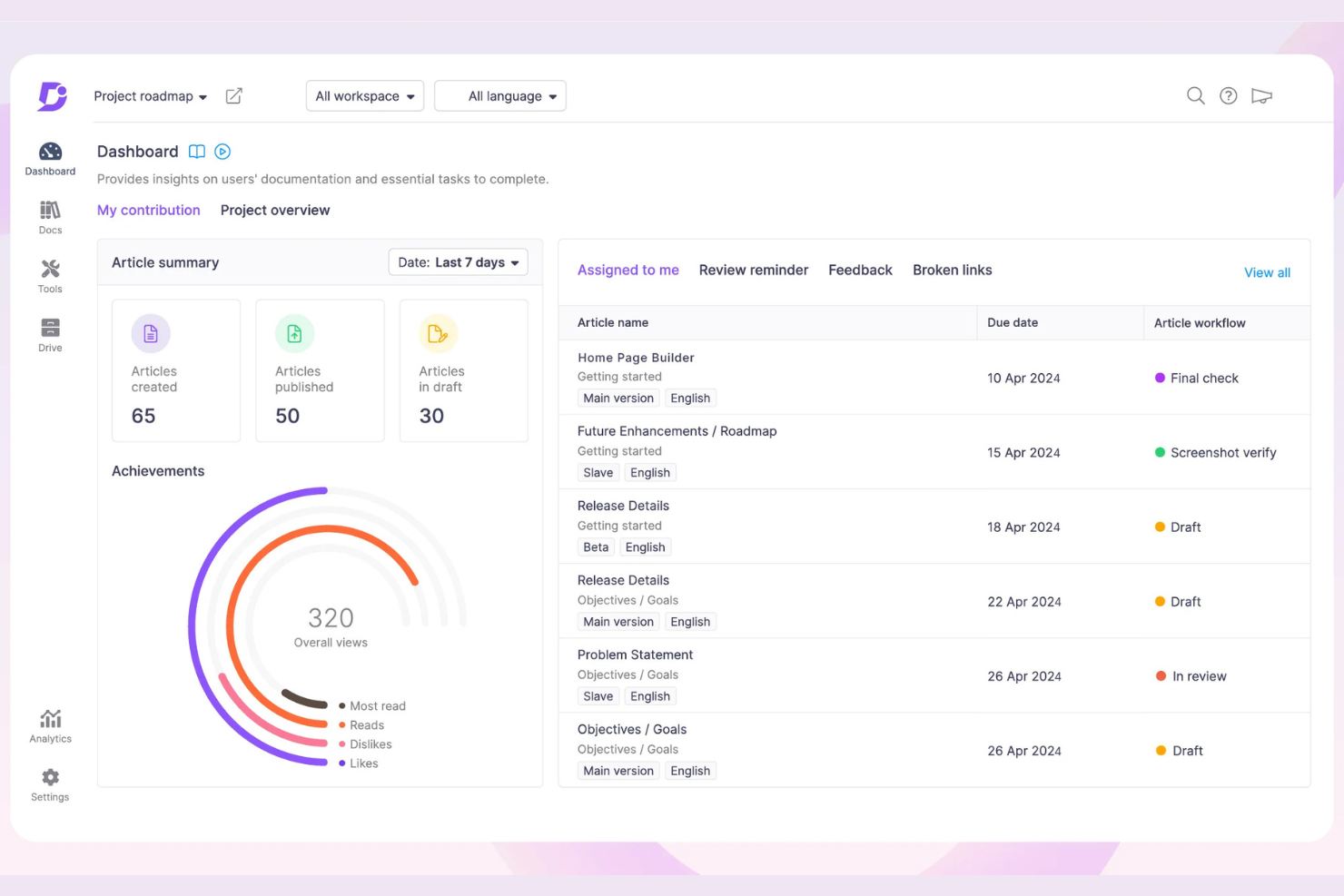
Document360 offers knowledge base software designed for creating and managing online documentation and help centers. It primarily serves businesses looking to improve their customer support and internal documentation with a centralized platform.
Why I picked Document360: Document360 excels as a knowledge base due to its intuitive interface and powerful search capabilities. The category manager allows you to organize content, which is essential for large documentation projects. The real-time collaboration feature ensures your team can work together without missing a beat. With analytics and version control, you can keep track of your documentation's performance and changes over time.
Standout Features and Integrations:
Features include a markdown editor that provides a familiar writing environment for your team. The built-in analytics help you understand how users interact with your content. Customizable branding options ensure your knowledge base aligns with your company's identity.
Integrations include Intercom, Freshdesk, Zendesk, Zapier, Microsoft Teams, Slack, and more.
Pros and Cons
Pros:
- Strong version control
- Real-time collaboration
- Intuitive category management
Cons:
- Some features need technical knowledge
- May be costly for small teams
New Product Updates from Document360

Document360 Adds Bulk Mirroring, Eddy AI Citations, and Unified SSO
Document360 adds bulk article mirroring, citations in Eddy AI chatbot responses, and a unified Enterprise SSO setup. These updates improve content reuse, answer verification, and access management. For more information, visit Document360’s official site.
 .
.
Slite
Best for remote teams
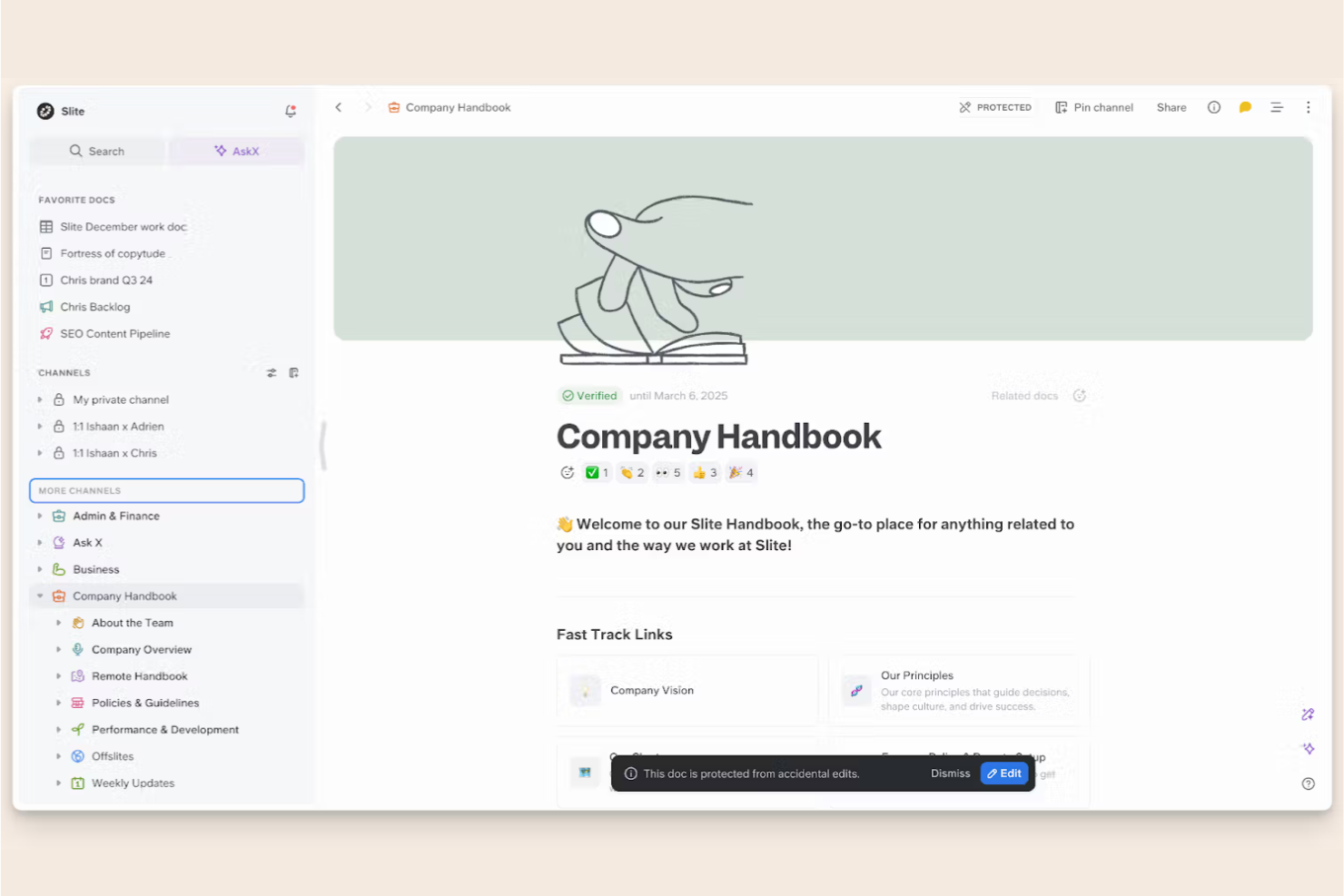
Slite is a collaborative documentation tool designed for remote teams to create, share, and organize knowledge. It serves distributed teams by providing a platform for real-time collaboration and structured documentation.
Why I picked Slite: Slite excels for remote teams by offering features that support asynchronous communication and collaboration. The collaborative editing allows your team to work together in real time, even when spread across different time zones. Additionally, the ability to create structured documentation helps maintain clarity and organization in your team's knowledge base.
Standout Features and Integrations:
Features include a powerful search function that makes finding information quick and easy. The meeting note templates help your team capture and organize discussions efficiently. Also, the document history feature ensures you can track changes and revert to previous versions if needed.
Integrations include Asana, Canva, GitHub, Google Drive, Jira, Figma, Trello, and more.
Pros and Cons
Pros:
- Real-time collaborative editing
- Structured documentation capabilities
- Supports asynchronous collaboration
Cons:
- Some features require technical knowledge
- Basic formatting options

Nuclino
Best for real-time collaboration
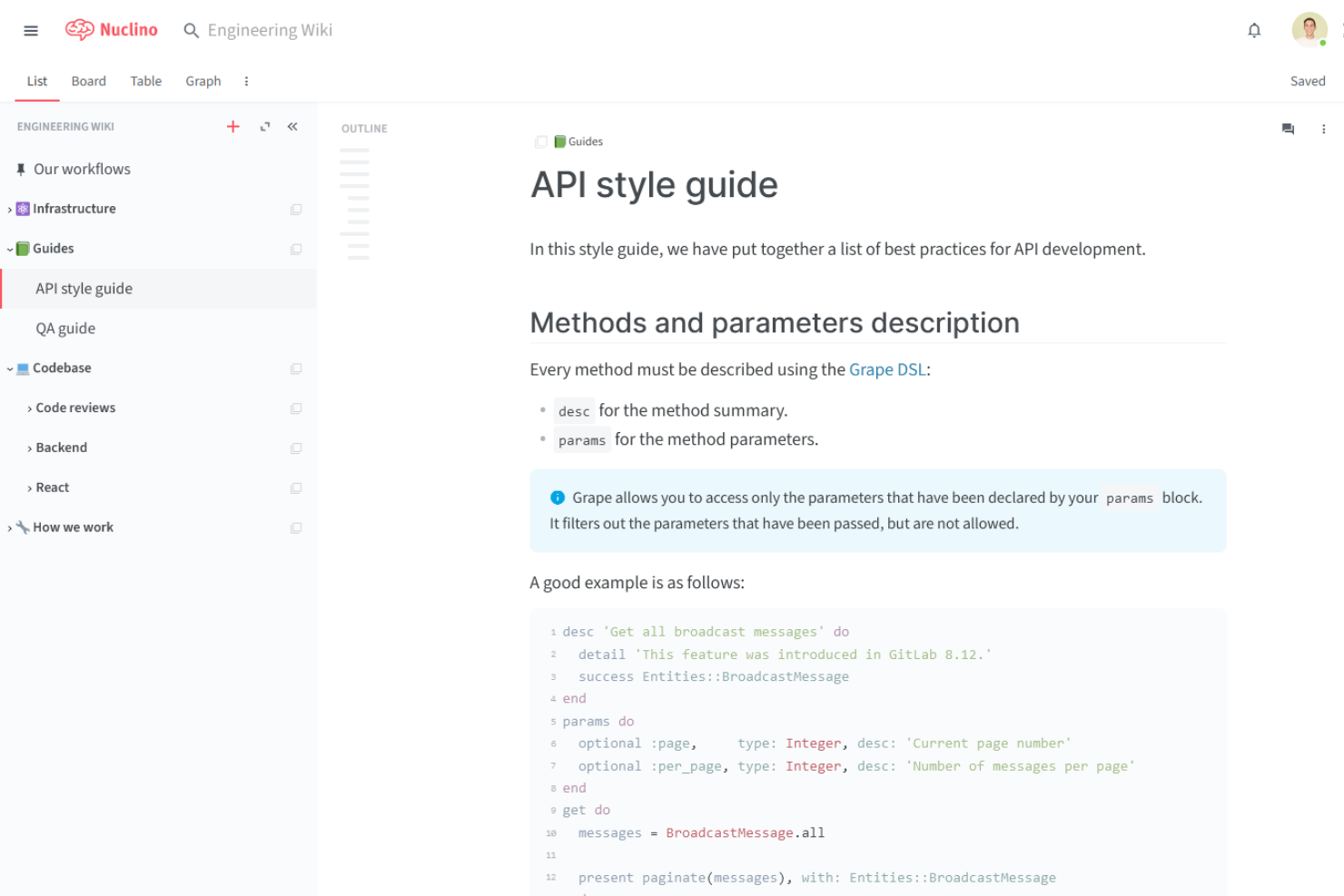
Nuclino is a collaborative knowledge management tool designed for teams seeking a centralized workspace for documentation and project management. It serves startups and small to medium-sized teams, offering real-time collaboration and content organization.
Why I picked Nuclino: Nuclino excels in real-time collaboration, making it perfect for teams needing instant updates and edits. The platform's visual linking feature helps your team create a network of related documents, helping improve navigation. With its instant search, you can quickly find the information you need.
Standout Features and Integrations:
Features include a simple and intuitive interface that makes onboarding easy for your team. The collaborative editing feature allows multiple users to work on content simultaneously. The mind map view helps you visualize connections between different pieces of information.
Integrations include Slack, Microsoft Teams, Discord, and more.
Pros and Cons
Pros:
- Instant search functionality
- Visual linking of documents
- Intuitive drag-and-drop interface
Cons:
- No built-in spreadsheet formulas
- Minimal font and styling options

Best for ease of use
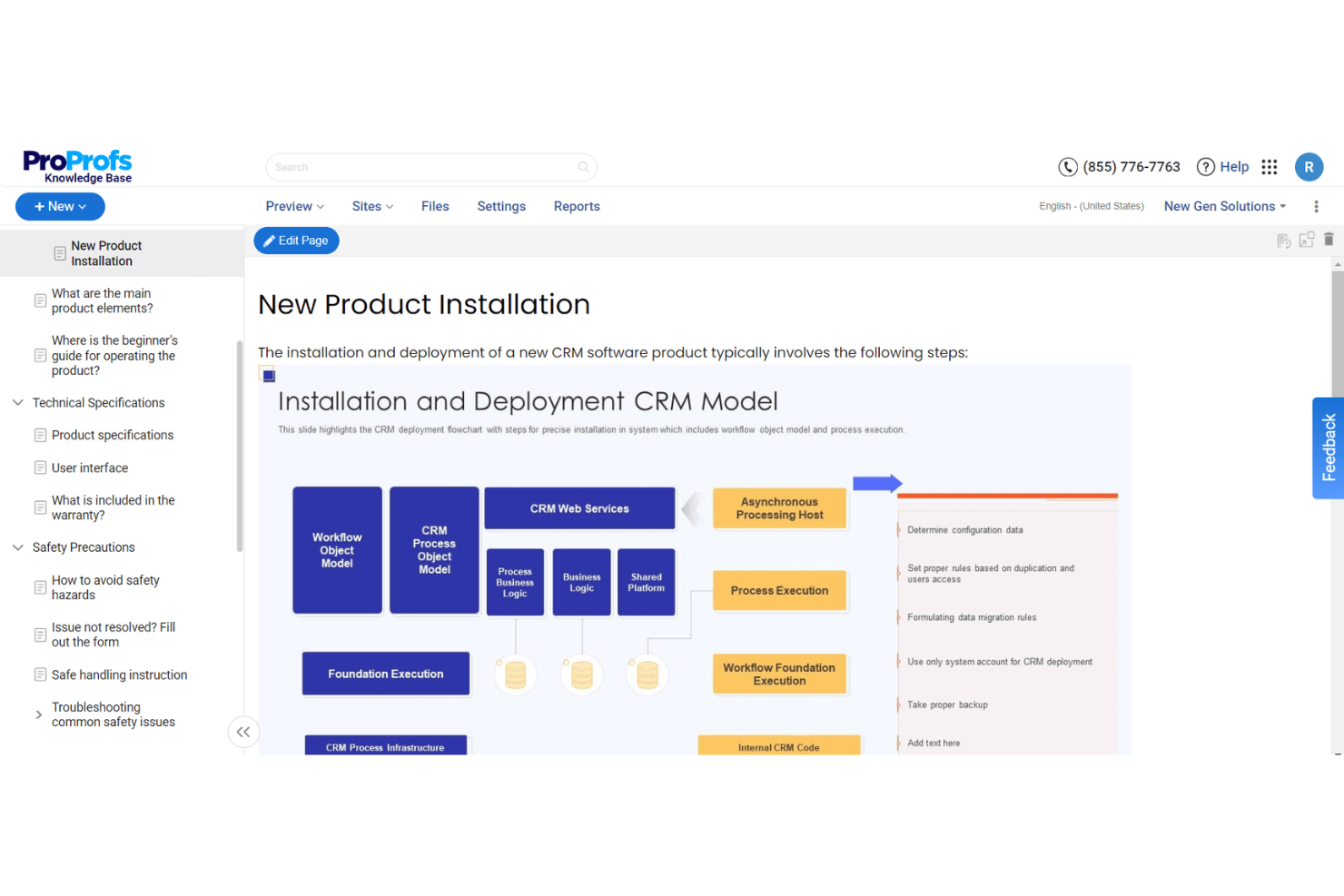
ProProfs Knowledge Base is a simple and effective tool for creating and managing online documentation and help centers. It's designed for businesses of all sizes that need a user-friendly platform to organize and share knowledge efficiently.
Why I picked ProProfs Knowledge Base: This tool is easy to use, making it accessible for teams without technical expertise. It offers a straightforward interface that lets you create and manage articles with ease.
Standout Features and Integrations:
Features include an intuitive format and text editor that allows your team to update content. The tool offers customizable templates, which help maintain consistency in your documentation. The analytics feature provides insights into user behavior, helping you improve your knowledge base over time.
Integrations include Jira, Salesforce, Slack, Google Analytics, and more.
Pros and Cons
Pros:
- Provides user behavior insights
- Customizable templates available
- No technical expertise required
Cons:
- High pricing for premium features
- Occasional software glitches/lag

Notion
Best for all-in-one workspace
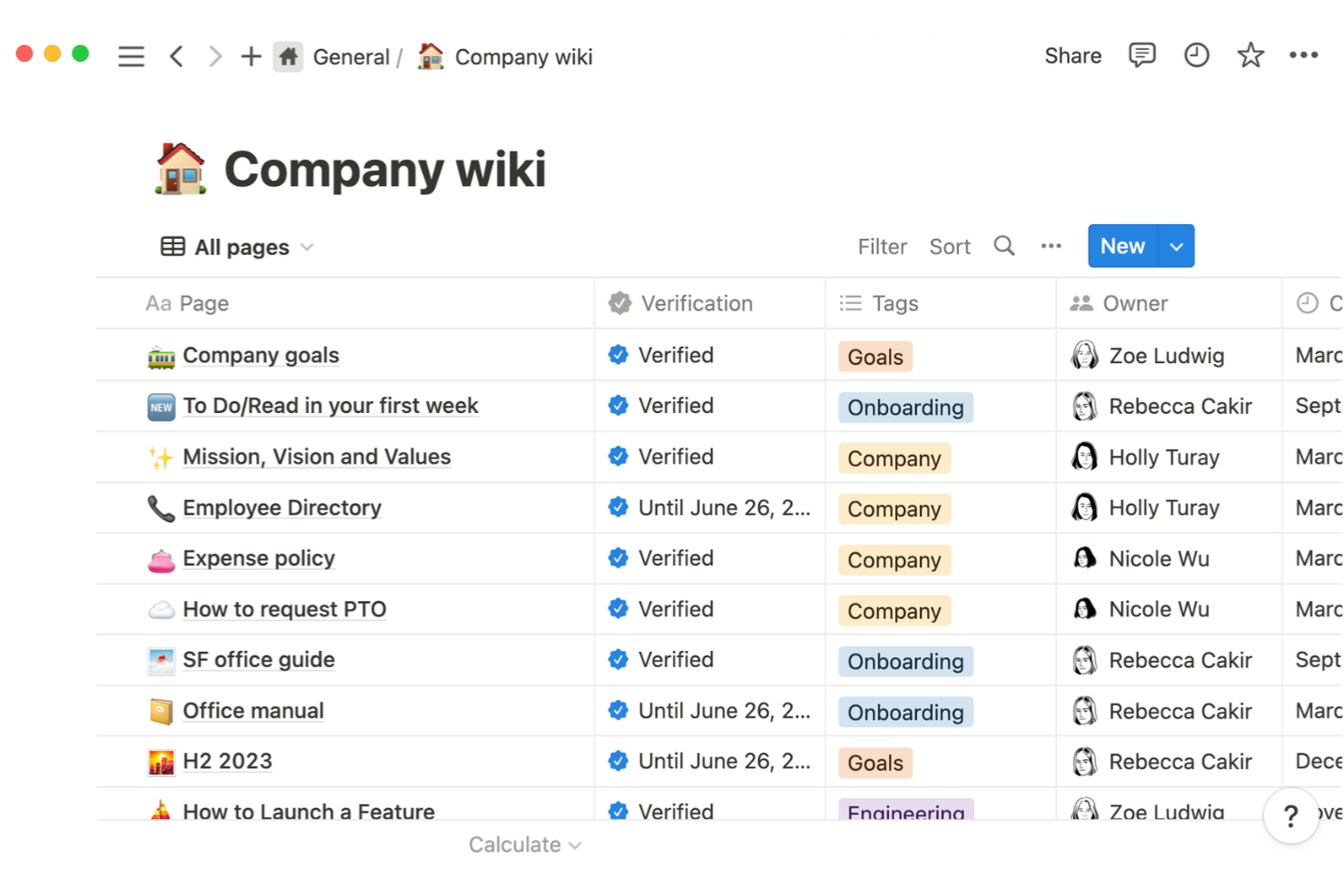
Notion is a versatile productivity tool that combines note-taking, task management, and team collaboration in a single platform. It's popular among remote teams, freelancers, and small businesses seeking an all-in-one workspace for organizing their work and projects.
Why I picked Notion: Notion is great for an all-in-one workspace because it combines multiple functions, such as notes, databases, and tasks, into one platform. The drag-and-drop interface makes it easy for your team to customize their workspace. With its flexible page structure, you can create wiki pages with simple or complex layouts. The ability to link pages and databases allows your team to maintain a well-organized system.
Standout Features and Integrations:
Features include a customizable dashboard that lets your team tailor their workspace to fit their needs. The templates feature helps you get started with pre-built setups for various use cases. With the kanban board view, your team can track progress and manage projects visually.
Integrations include Jira, Slack, GitHub, Asana, Panther, Zapier, and more.
Pros and Cons
Pros:
- Visual project management with Kanban
- Offers pre-built templates
- Highly customizable workspace
Cons:
- Navigation gets messy with many pages
- Offline mode is very limited
Tettra
Best for Slack integration
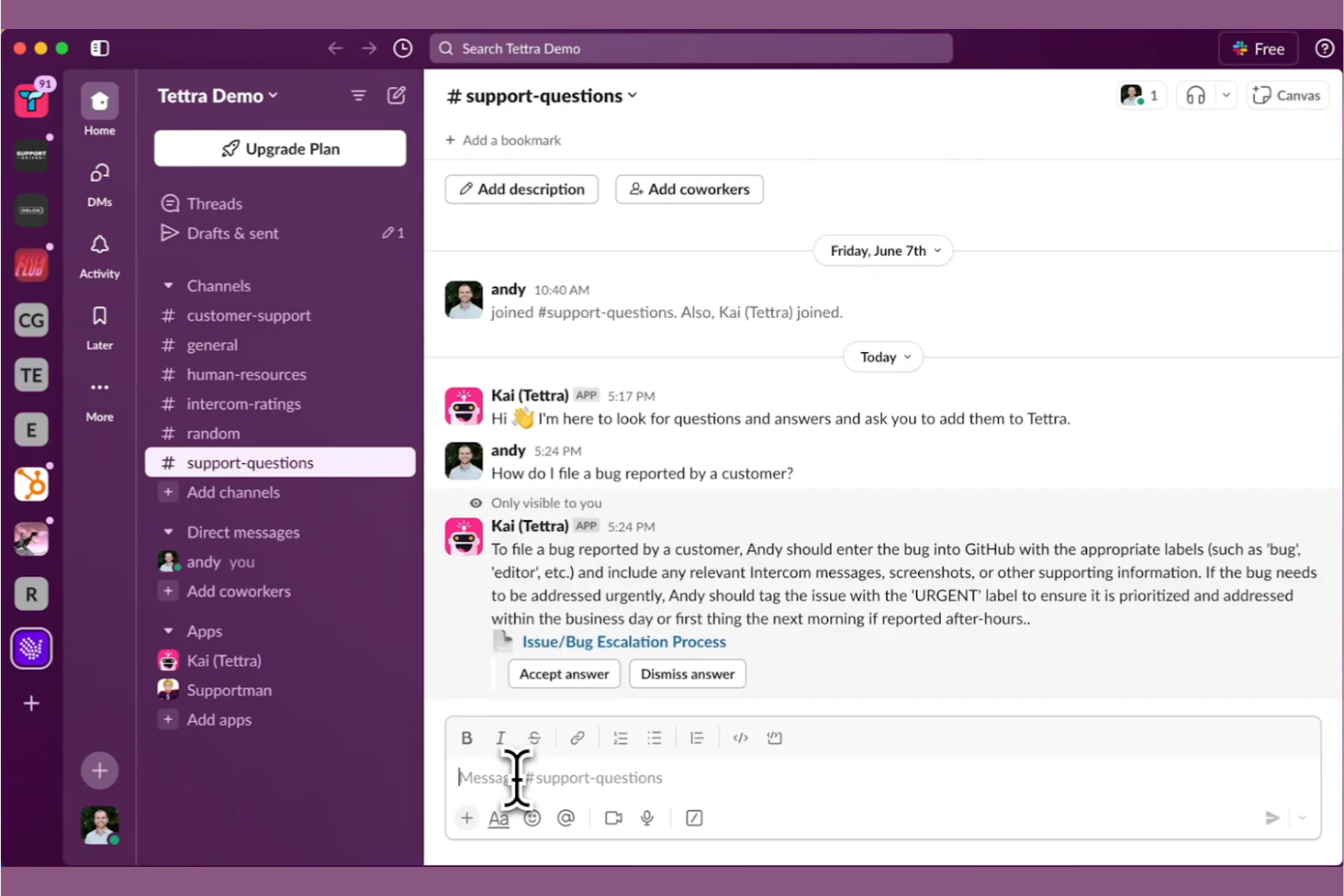
Tettra is a knowledge management tool designed to help teams organize and share information effectively. It caters to teams that rely on Slack for communication, offering an integrated experience for managing internal knowledge and documentation.
Why I picked Tettra: Tettra is highly effective for teams that use Slack, offering smooth integration that helps improve communication and information sharing. It allows you to create and update pages directly from Slack, ensuring your team has access to up-to-date information. The tool's question and answer feature encourages collaboration by letting team members ask for help and receive answers quickly. Tettra's intuitive interface makes it easy for your team to adopt and start using it immediately.
Standout Features and Integrations:
Features include a simple page editor that allows you to create and format content with ease. The verification feature helps keep your content accurate by reminding you to review and update pages regularly. Tettra's analytics provide insights into how your team is using the knowledge base, helping you make informed decisions.
Integrations include Slack, Google Workspace, GitHub, Zapier, and more.
Pros and Cons
Pros:
- Regular content verification reminders
- Efficient question and answer system
- Intuitive user interface
Cons:
- Relies heavily on Slack
- Basic formatting capabilities

Best for integration options
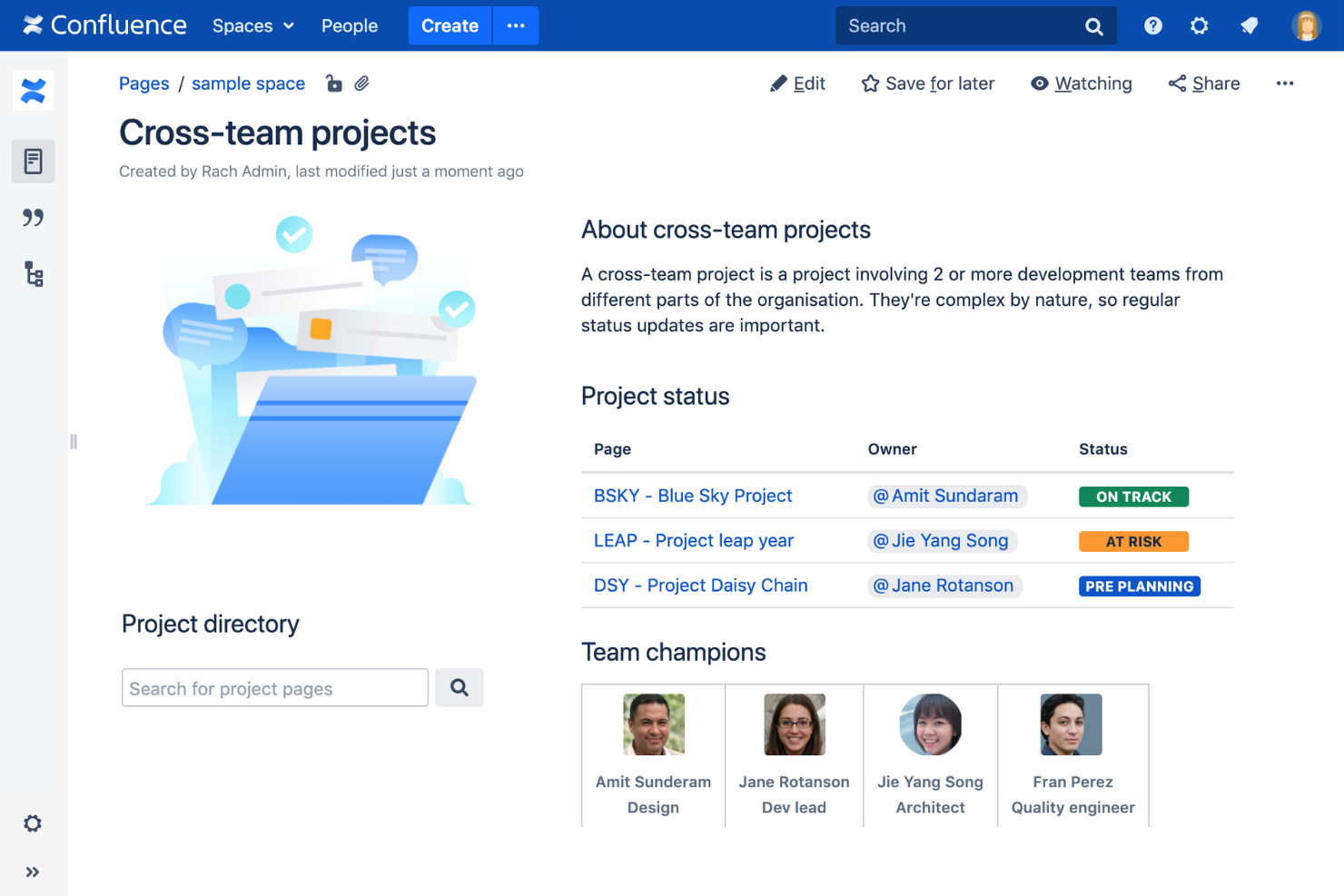
Confluence is a collaborative workspace designed for teams to create, share, and organize content. It's popular among businesses of all sizes, offering tools for project management, documentation, and team collaboration.
Why I picked Confluence: Confluence is known for its extensive integration options, making it a versatile choice for teams. It allows uninterrupted connectivity with other Atlassian products, which is ideal if you already use Jira or Trello. The software's page hierarchy and organization features help your team maintain structured documentation. With its collaborative editing, your team can work together in real time, ensuring everyone stays on the same page.
Standout Features and Integrations:
Features include flexible page layouts that let your team design content to fit your needs. The powerful search function helps you find information quickly, saving time. The task management features allow you to assign tasks and track progress within the same platform.
Integrations include Jira, Trello, Microsoft Teams, Google Drive, and more.
Pros and Cons
Pros:
- Flexible page layouts
- Supports collaborative editing
- Extensive integration options
Cons:
- High cost for smaller enterprise teams
- May need frequent updates

XWiki
Best for extensibility
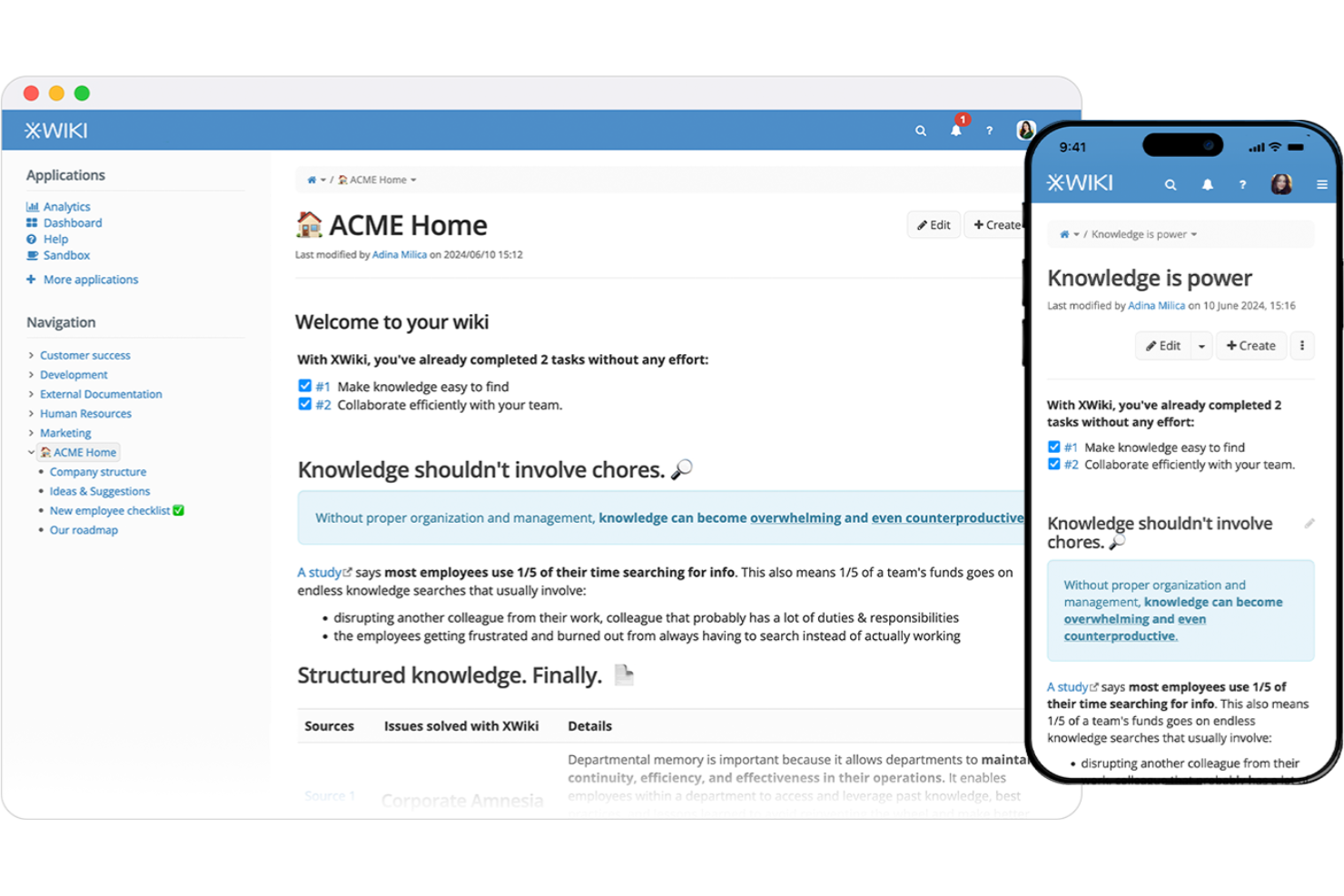
XWiki is an open-source enterprise wiki and knowledge management platform designed for teams seeking a customizable and extensible solution. It caters to organizations that require a flexible platform for collaboration, content management, and documentation.
Why I picked XWiki: XWiki is highly extensible, allowing you to tailor the platform to meet your specific needs. The scripting capabilities enable you to create custom apps and workflows, improving its functionality. Its modular architecture supports adding advanced features through extensions. The platform's flexibility makes it suitable for diverse use cases, from simple documentation to complex business processes.
Standout Features and Integrations:
Features include a powerful rights management system that allows you to control access and permissions effectively. The version control feature ensures you can track changes and maintain a history of your content. The built-in WYSIWYG editor makes content creation straightforward, even for non-technical users.
Integrations include Microsoft Office 365.
Pros and Cons
Pros:
- Strong version control system
- Flexible for various use cases
- Highly customizable and extensible
Cons:
- Some features need custom development
- May need frequent maintenance
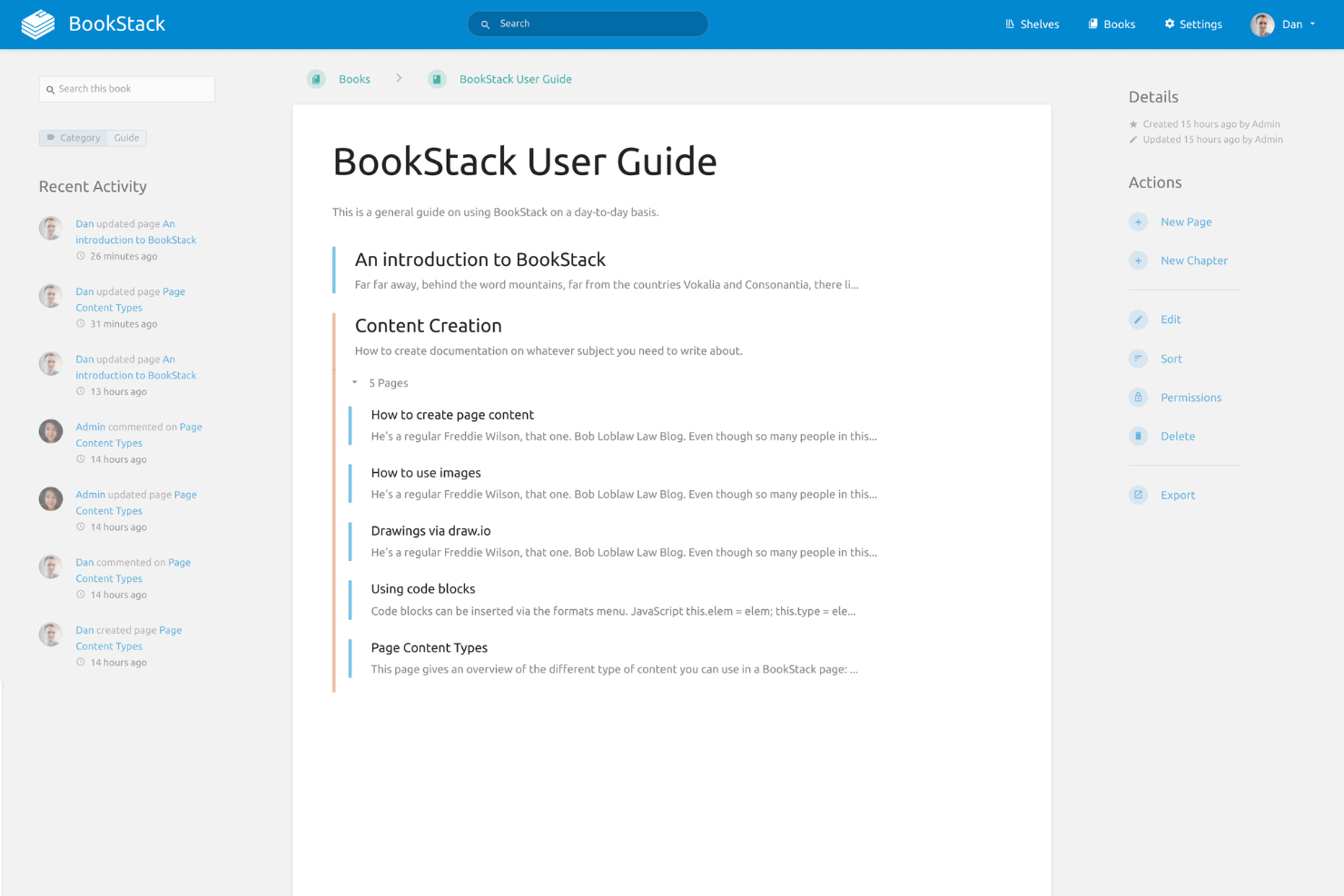
BookStack is an open-source wiki software designed to help teams organize and store information in a structured format. It targets small to medium-sized teams looking for an easy-to-use documentation tool that supports efficient content management.
Why I picked BookStack: BookStack is known for its self-hosted, simple setup process. The tool's book-like structure allows you to organize content in a familiar way, which simplifies navigation. With its intuitive editor, your team can quickly create and update documentation. The permission system ensures that you can control access and maintain data security.
Standout Features and Integrations:
Features include a visual editor that simplifies the content creation process for your team. The revision history allows you to track changes and revert to previous versions if necessary. In addition, the tool's search functionality helps you find information quickly.
Integrations include Discord, GitHub, Slack, and more.
Pros and Cons
Pros:
- Supports multiple languages
- Strong permission management
- Familiar book-like structure
Cons:
- Requires server hosting
- Limited scalability for large teams

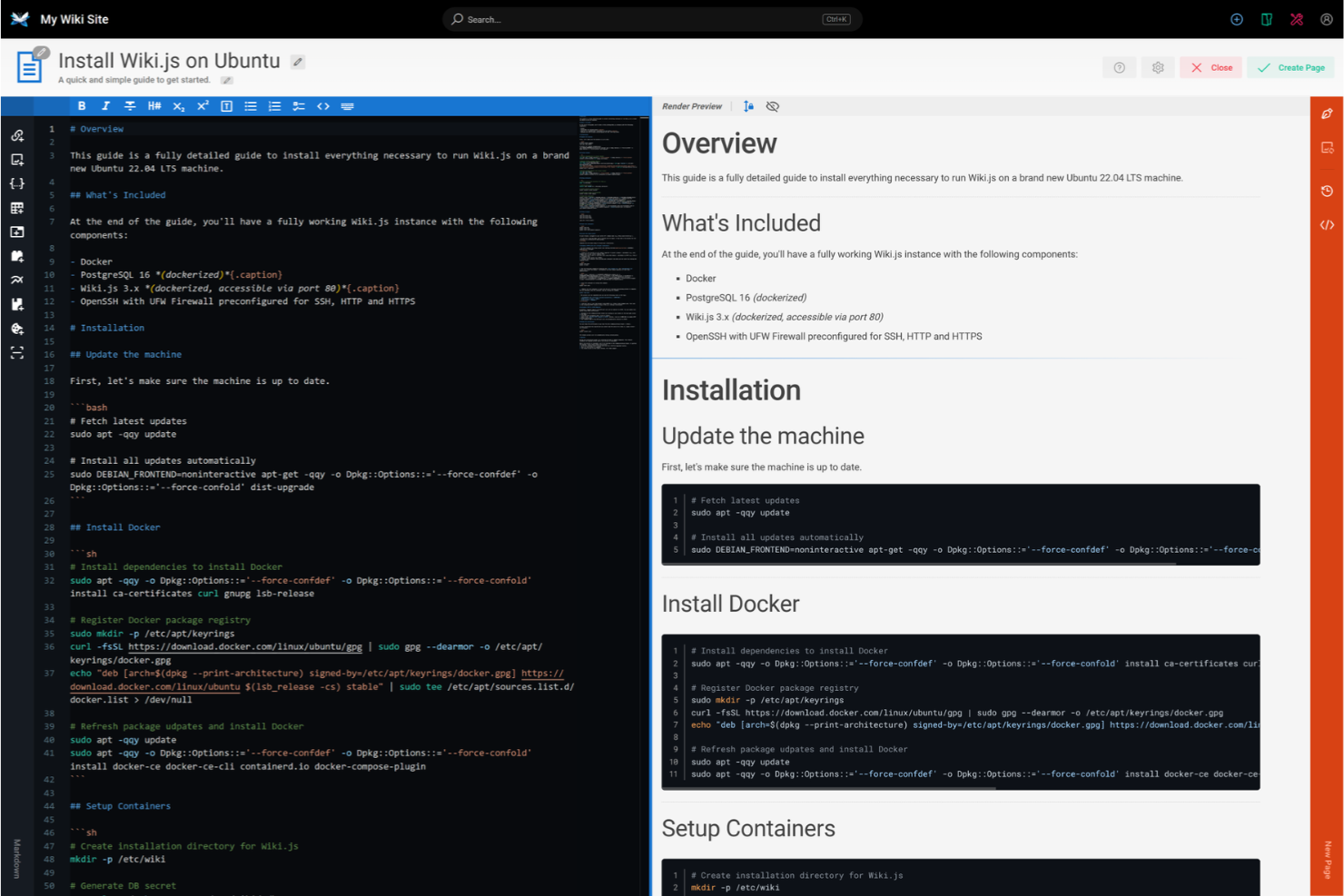
Wiki.js is an open-source, Node.js-based wiki application designed for developers and tech teams, offering a modern and intuitive interface. It supports multiple databases and provides a real-time collaborative environment for creating and managing content.
Why I picked Wiki.js: This software caters to developers with its support for multiple databases, such as PostgreSQL and MySQL. The real-time collaboration feature ensures your team can work together efficiently. Its markdown editor is familiar to developers, making content creation straightforward. The built-in authentication options provide security tailored to tech-savvy users.
Standout Features and Integrations:
Features include a powerful search function that helps your team find content quickly. It offers a customizable theme system, allowing you to tailor the look and feel to your preferences. The built-in localization support ensures you can manage content in multiple languages.
Integrations include Git, Amazon Web Services, Dropbox, Google Cloud, and more.
Pros and Cons
Pros:
- Built-in authentication options
- Familiar markdown editor
- Supports multiple databases
Cons:
- Documentation can be sparse
- Limited out-of-the-box features


How I Evaluate Wiki Software
I split my evaluation into two layers: baseline must-haves like searchable policy repositories and role-based permissions, and the differentiators that reveal which tool fits an HR team's workflow.
Core Functionality (Table Stakes For This List)
When I'm selecting tools for my list, I rank each one on a scale from 0 (does not offer the functionality) to 5 (excels in this area) for each core functionality listed below. Then, I calculate the tool's total score into a percentage. Each tool needs to achieve a minimum total score of 65% to be considered for inclusion.
- Structured Knowledge Repository: I look for nested pages, spaces, and categorization that let HR teams organize content the way they actually work—separating onboarding guides from benefits documentation, for example.
- Full-Text Search & Discoverability: A good wiki surfaces the right policy fast, so I evaluate whether search covers page content, attachments, tags, and metadata rather than just page titles.
- Role-Based Access & Permissions: HR wikis hold sensitive data like compensation bands and disciplinary procedures, so I check whether a tool supports granular, role-level restrictions at the page or section level.
- Collaborative Editing & Version History: I evaluate whether multiple HR team members can co-edit pages and roll back changes—especially useful when updating employee handbooks across review cycles.
- Rich Content & Media Support: Policy pages that include embedded videos, tables, and file attachments are far more useful than plain text, so I look for flexible content formatting options.
- HR & Productivity Integrations: The best wiki tools connect to tools HR teams already use, so I check for native integrations with HRIS platforms, Slack, Microsoft Teams, and SSO providers like Okta.
Once I have a list of tools that meet this criteria, I consider what sets each platform apart.
Differentiating Factors (What Sets Vendors Apart)
Here's how I compare and contrast different vendors:
Standout Features
I pay close attention to AI-powered content features, which can help HR teams draft policy language or surface answers to common employee questions directly from wiki content. Analytics and content insights also matter—knowing which pages employees search for most often helps identify documentation gaps before they become recurring support tickets. Approval workflows with read receipts round out my evaluation, since HR teams often need proof that employees have reviewed updated policies.
Beyond Features
Compliance and security certifications like SOC 2 and GDPR carry real weight here because HR wikis store sensitive employee records and policy documents. I also evaluate how pricing scales—some tools charge per editor but offer free viewer seats, which matters when the whole company needs to read policies but only HR updates them. Scalability is another factor I consider, particularly multi-language support for organizations with distributed or international workforces.
Slik velger du wikiprogramvare
Det er lett å gå seg vill i lange funksjonslister og kompliserte prismodeller. For å hjelpe deg med å holde fokus mens du går gjennom den unike prosessen med å velge programvare, får du her en sjekkliste over faktorer du bør ha i mente:
| Faktor | Hva du bør vurdere |
|---|---|
| Skalerbarhet | Vil programvaren vokse sammen med teamet ditt? Vurder om den kan håndtere et økende antall brukere og mer innhold uten ytelsesproblemer. Se etter løsninger som tilbyr skalerbar lagring og fleksible alternativer for brukeradministrasjon. |
| Integrasjoner | Kan den kobles til verktøyene du allerede bruker? Se etter innebygde integrasjoner med programvare som Slack, Google Workspace eller prosjektstyringsverktøy for å sikre smidige arbeidsflyter. |
| Tilpasningsmuligheter | Kan du tilpasse programvaren til behovene dine? Se etter alternativer som lar deg endre maler, oppsett og brukertillatelser slik at de passer til dine spesifikke prosesser og din visuelle profil. |
| Brukervennlighet | Er den brukervennlig for alle på teamet ditt? Vurder læringskurven og utformingen av grensesnittet, og sørg for at det er intuitivt for brukere uten teknisk bakgrunn. |
| Implementering og opplæring | Hvor lang tid vil det ta å komme i gang? Vurder tiden det tar å sette opp løsningen og støtten som tilbys under opplæringen, for eksempel veiledninger, guider og tilgjengelig kundestøtte. |
| Kostnad | Passer prisen inn i budsjettet ditt? Sammenlign prismodellene, inkludert brukerbaserte eller trinnvise abonnementer, og vurder eventuelle skjulte gebyrer eller rabatter på langsiktige avtaler. |
| Sikkerhetstiltak | Hvilke sikkerhetstiltak er på plass? Sørg for at programvaren inkluderer kryptering, regelmessige sikkerhetskopier og tilgangskontroller for å beskytte dataene dine. |
| Tilgjengelig kundestøtte | Kan du få hjelp når du trenger det? Undersøk om leverandøren tilbyr kundestøtte døgnet rundt, flere kontaktmåter og dedikerte kundeansvarlige som kan hjelpe med problemer. |
Hva er wiki-programvare?
Wiki-programvare (også kjent som en wikimotor eller en wikiapplikasjon) er et verktøy som gjør det mulig for team å opprette, organisere og dele informasjon i fellesskap på en sentralisert plattform. Disse verktøyene brukes vanligvis av fagfolk innen prosjektledelse, IT og HR for å forbedre kunnskapsdeling og dokumentasjonsprosesser. Funksjoner som innholdsredigering, brukertillatelser og søkemuligheter bidrar til å organisere informasjon, administrere tilgang og finne innhold raskt. Alt i alt forbedrer disse verktøyene teamsamarbeid og effektivitet ved å tilby én felles kilde til sannhet for informasjon.
Funksjoner
Når du velger wiki-programvare, bør du se etter følgende viktige funksjoner:
- Innholdsredigering: Gjør det mulig for brukere å opprette og oppdatere sider effektivt, slik at informasjonen er aktuell og relevant.
- Brukertillatelser: Administrer hvem som kan se, redigere eller slette innhold, og oppretthold sikkerhet og kontroll over informasjonen.
- Søkemuligheter: Hjelper brukere med å finne spesifikk informasjon i wikien raskt, noe som sparer tid og arbeid.
- Versjonshistorikk: Sporer endringer som er gjort i innholdet, slik at brukere kan gå tilbake til tidligere versjoner ved behov.
- Maler: Tilbyr forhåndsbygde oppsett for å standardisere innholdsoppretting og opprettholde konsistens på tvers av sider.
- Samarbeid i sanntid: Gjør det mulig for flere brukere å redigere og bidra samtidig, noe som bidrar til bedre samarbeid og produktivitet.
- Integrasjonsmuligheter: Gjør det mulig å koble til andre verktøy som Slack eller Google Workspace for å forbedre arbeidsflyter og effektivitet.
- Tilpasning: Gjør det mulig for brukere å tilpasse utseendet og funksjonaliteten etter spesifikke behov og merkevareprofil.
- Analyse: Gir innsikt i hvordan innhold brukes og åpnes, slik at team kan forbedre dokumentasjonen sin.
- Sikkerhetstiltak: Sikrer databeskyttelse gjennom kryptering og regelmessige sikkerhetskopier, noe som gir trygghet.
Fordeler
Implementering av wiki-programvare gir flere fordeler for teamet og virksomheten din. Her er noen av fordelene du kan se frem til:
- Bedre samarbeid: Redigering i sanntid og delt tilgang forbedrer teamarbeidet og hjelper teamet med å samarbeide mer effektivt.
- Sentralisert kunnskap: Én felles kilde til sannhet sikrer at alle har tilgang til den samme oppdaterte informasjonen, noe som reduserer forvirring.
- Tidsbesparelser: Raske søkemuligheter og enkel navigering hjelper teamet med å finne informasjonen de trenger, raskere.
- Bedre organisering: Maler og strukturert innholdsadministrasjon holder informasjonen ryddig og konsistent, slik at den blir enklere å administrere.
- Økt sikkerhet: Brukertillatelser og kryptering beskytter sensitive data og gir deg kontroll over hvem som får tilgang til hva.
- Bedre beslutningstaking: Analyse gir innsikt i bruken av innholdet, slik at du kan gjøre veloverveide forbedringer av dokumentasjonen.
- Tilpasningsevne: Tilpasningsmuligheter gjør det mulig å skreddersy programvaren etter spesifikke behov og arbeidsflyter.
Kostnader og priser
Valg av wiki-programvare krever en forståelse av de ulike prismodellene og abonnementene som er tilgjengelige. Kostnadene varierer basert på funksjoner, teamstørrelse, tillegg og mer. Tabellen nedenfor oppsummerer vanlige abonnementer, gjennomsnittsprisene deres og typiske funksjoner som er inkludert i wiki-programvareløsninger:
Sammenligningstabell for wiki-programvare
| Abonnementstype | Gjennomsnittspris | Vanlige funksjoner |
|---|---|---|
| Gratisabonnement | $0 | Grunnleggende innholdsoppretting, grunnleggende søk og begrenset lagringsplass. |
| Personlig abonnement | $6-$99/bruker/måned | Avansert innholdsredigering, personlig tilpasning og bedre søkemuligheter. |
| Bedriftsabonnement | $15-$159/bruker/måned | Verktøy for teamsamarbeid, integrasjonsmuligheter og analyse. |
| Virksomhetsabonnement | $16.66-$199/bruker/måned | Full tilpasning, avanserte sikkerhetsfunksjoner og dedikert brukerstøtte. |
Vanlige spørsmål om wiki-programvare
Hva er forskjellen mellom en wiki og et tradisjonelt CMS?
Hva er forskjellen mellom en wiki og et tradisjonelt CMS?
En wiki gjør det mulig for flere brukere å redigere innhold sammen, mens et tradisjonelt CMS vanligvis administreres av noen få administratorer. Wikier er utformet for enkel oppretting og oppdatering av innhold, noe som gjør dem ideelle for team som deler kunnskap og oppdaterer interne wikier. CMS-plattformer fokuserer derimot ofte på publisering og administrasjon av nettinnhold, med mer kontroll over design og layout.
Kan wiki-programvare brukes frakoblet?
Ja, enkelte wiki-programvareløsninger tilbyr funksjonalitet uten nettforbindelse, men dette avhenger av det aktuelle verktøyet. Frakoblet funksjonalitet gjør det mulig for teamet å få tilgang til og redigere dokumenter uten internettilkobling, og endringene synkroniseres når tilkoblingen er gjenopprettet. Dette er nyttig for team som arbeider i områder med begrenset tilkobling, eller for dem som reiser ofte.
Hvor sikker er wiki-programvaren?
Wiki-programvare kan være sikker hvis den har de riktige sikkerhetstiltakene, for eksempel kryptering og tilgangskontroller. Se etter løsninger som tilbyr regelmessige sikkerhetsoppdateringer og tilpassbare brukertillatelser. Implementering av sterke passord og tofaktorautentisering øker sikkerheten ytterligere og beskytter teamets sensitive informasjon.
Er det mulig å flytte innhold fra én wiki til en annen?
Ja, de fleste wiki-programmer tillater flytting av innhold, men prosessen kan variere. Kontroller om den nye programvaren støtter import fra formatet til den nåværende wikien. Noen verktøy tilbyr innebygde funksjoner for flytting, mens andre kan kreve manuell eksport og import. Ta høyde for mulig datatap, og test flytteprosessen før du gjennomfører den fullt ut.
Kan wiki-programvare integreres med andre verktøy?
Ja, wiki-programvare integreres ofte med ulike verktøy som Slack, Google Workspace og plattformer for prosjektstyring. Disse integrasjonene øker produktiviteten ved å gjøre det mulig å dele data og samarbeide. Kontroller programvarens integrasjonsalternativer for å sikre kompatibilitet med verktøyene teamet allerede bruker.