

De 10 beste programmene for kunnskapsbaser anmeldt i 2026

10 Kortliste over den beste programvaren for kunnskapsbaser


Den beste programvaren for kunnskapsbaser hjelper teamet ditt med å samle inn, organisere og dele informasjon uten problemer – slik at alle har tilgang til svarene de trenger, når de trenger dem.
Uten et sentralisert system går verdifull kunnskap ofte tapt i e-poster, chatter eller individuelle dokumenter, noe som fører til ineffektivitet og dobbeltarbeid. Den rette plattformen forbedrer samarbeidet, fremskynder opplæringen av nye medarbeidere og øker produktiviteten ved å gjøre organisasjonens kunnskap enkel å finne og vedlikeholde.
Med utgangspunkt i erfaringen min med å teste HR- og læringsstyringsverktøy har jeg vurdert og sammenlignet den beste programvaren for kunnskapsbaser som er tilgjengelig i dag. I denne veiledningen finner du de beste plattformene for å gjøre informasjon mer tilgjengelig, støtte teamsamarbeid og bygge en smartere og mer sammenkoblet arbeidsplass.
Why Trust Our Software Recommendations
Our team has been testing and reviewing software since 2012. As HR experts ourselves, we know how difficult—and important—it is to choose the right software.
For this guide, we evaluated tools using hands-on testing and independent research, scoring tools using our selection criteria. We also draw on insights from industry thought leaders and practicing HR experts.
Our reviews reflect our human editorial judgment, not a sales pitch.
Expert reviewers:
Sammenligningstabell: Programvare for kunnskapsbaser
Denne sammenligningstabellen oppsummerer prisopplysningene for mine beste utvalgte programmer for kunnskapsbaser.
| Tool | Best For | Trial Info | Price | ||
|---|---|---|---|---|---|
| 1 | Best for AI knowledge base content | Free demo available | Pricing upon request | Website | |
| 2 | Best for customizable portals | 14-day free trial | From $19/user/month (billed annually) | Website | |
| 3 | Best for HR knowledge with a freshness engine | Free demo available | Pricing upon request | Website | |
| 4 | Best for interactive knowledge bases | Free demo + 14-day free trial available | Pricing upon request | Website | |
| 5 | Best for removing information organization silos | Free demo + 30-day free trial available | From $3.97/user/month (billed annually) | Website | |
| 6 | Best for combining AI and self-service | 15-day free trial | Pricing upon request | Website | |
| 7 | Best for turning tickets into help articles | 21-day free trial + free demo available | From $12/agent/month (billed annually) | Website | |
| 8 | Best for pre-built templates | Free demo + 15-day free trial available | From $0.99/user/month (billed annually) | Website | |
| 9 | Best for AI-powered knowledge management | 14-day free trial | From $9/seat/month (billed annually) | Website | |
| 10 | Best for team collaboration | Free plan available | From $5.78/user/month | Website |


Anmeldelse av den beste programvaren for kunnskapsbaser
Nedenfor finner du mine detaljerte sammendrag av den beste interne programvaren for kunnskapsbaser som kom med på kortlisten min. Anmeldelsene mine gir en detaljert gjennomgang av de viktigste funksjonene, fordelene & ulempene, integrasjonene og ideelle bruksområdene for hvert verktøy, slik at du kan finne det som passer best for deg.

Best for AI knowledge base content
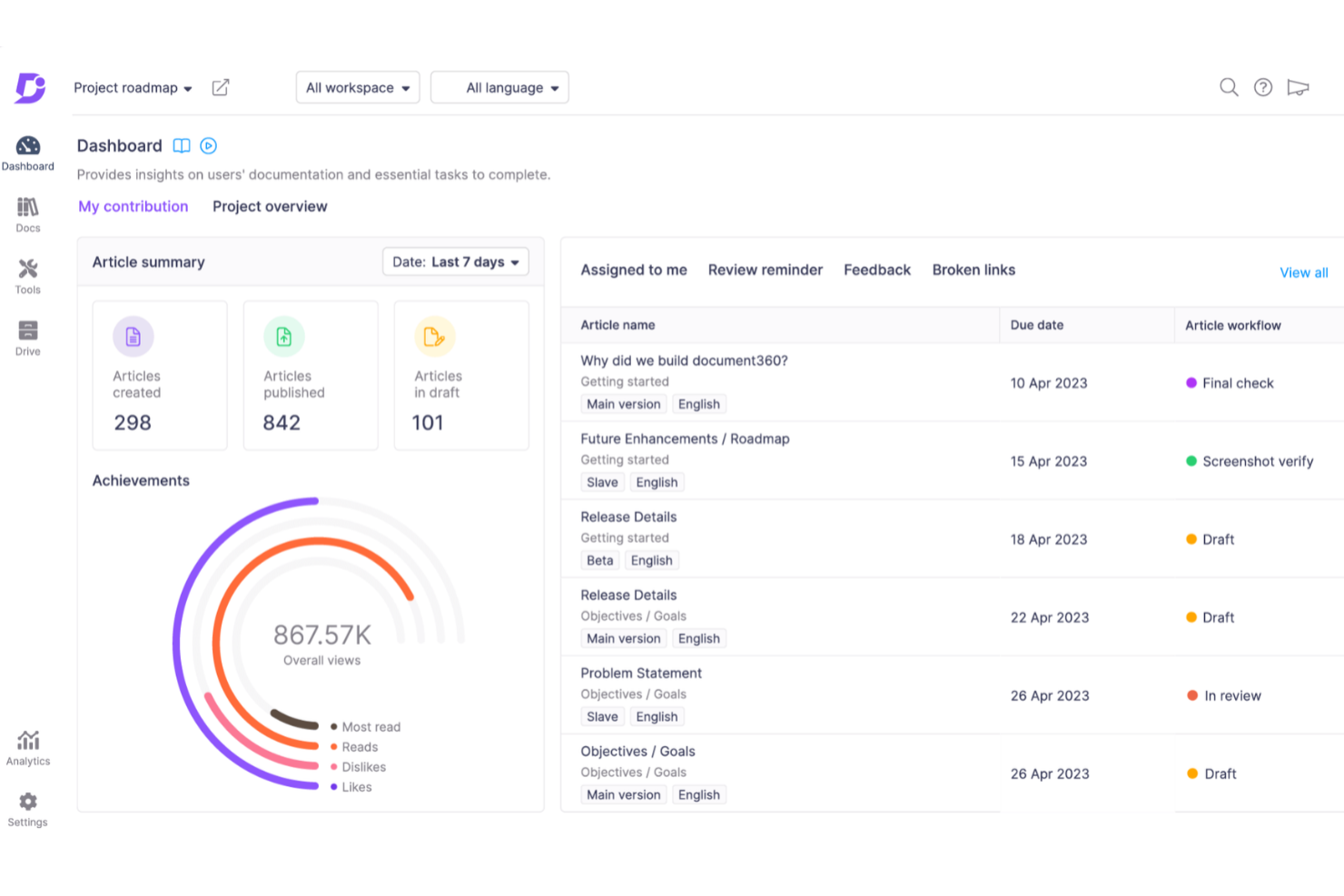
Document360 is a knowledge base platform designed for teams and businesses that need to create, organize, and share internal or external documentation with advanced content management and collaboration features.
Who Is Document360 Best For?
Document360 is a good fit for product and support teams at mid-size to enterprise companies that need a dedicated platform for building and maintaining customer-facing or internal knowledge bases.
Why I Picked Document360
I chose Document360 because its AI features extend into the content creation process. The AI Writing Agent—called Eddy AI—can take a product walkthrough video, an audio file, or even a plain text prompt and turn it into a fully structured, SEO-optimized knowledge base article, complete with screenshots, tags, and meta descriptions. I also like the duplicate content detection, which flags repeated paragraphs across articles so my team can keep the knowledge base clean without manually auditing every page. The AI glossary generator also auto-builds definitions for technical terms directly from your existing content.
Document360 Key Features
- Custom workflow automation: Set up multi-step review and approval workflows that automatically assign tasks, send notifications, and move articles from draft to published.
- Category manager: Organize content using a drag-and-drop category structure that supports up to six levels of categories and subcategories.
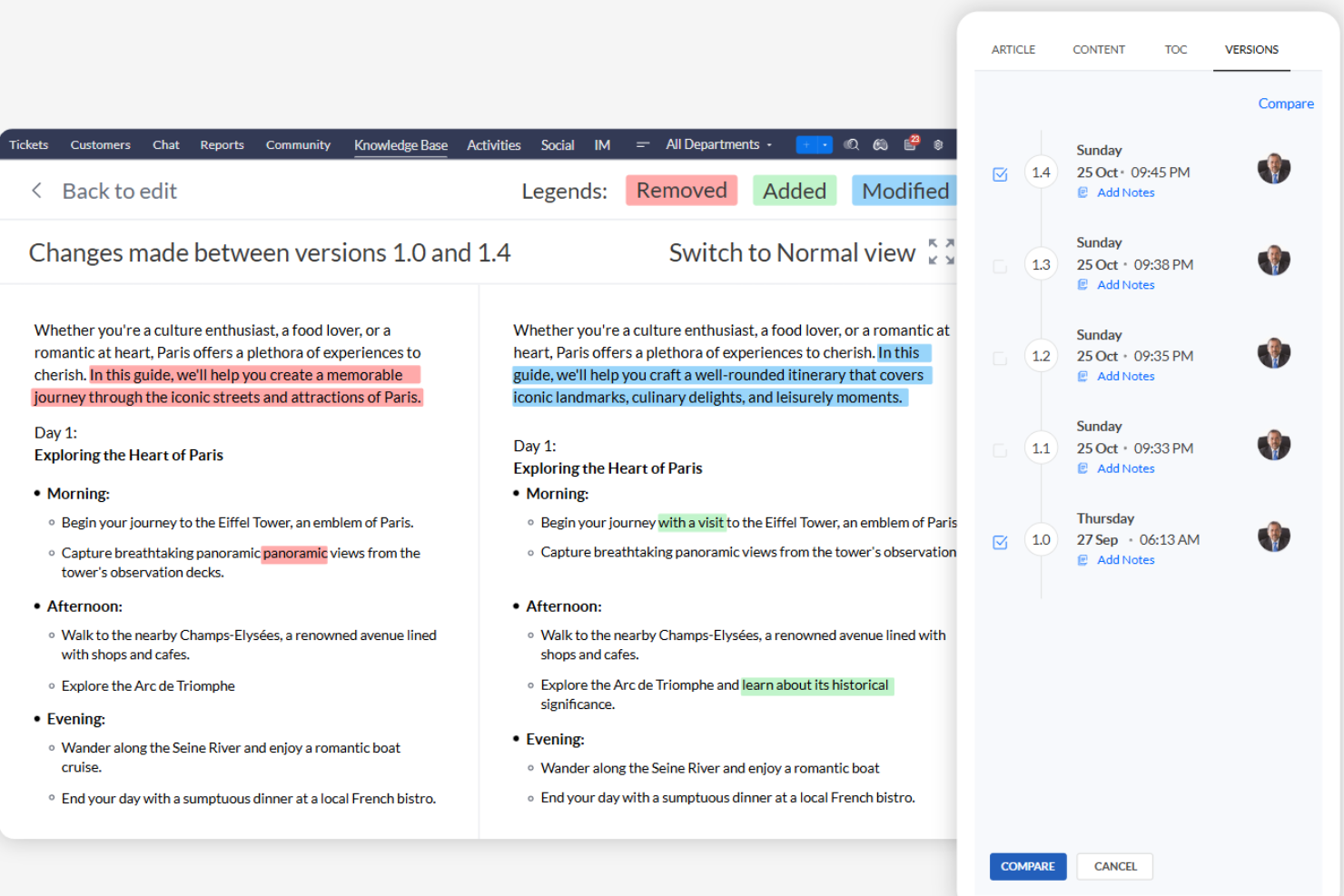
- Version history and rollback: View the full change history of any article and restore a previous version instantly without manual tracking.
- AI-powered auto translation: Localize your knowledge base into 50+ languages using context-aware AI translation directly within the platform.
Document360 Integrations
Integrations include Zendesk, Freshdesk, Intercom, Drift, Slack, Microsoft Teams, GitHub, Google Analytics, Crowdin, and Disqus.
Pros and Cons
Pros:
- Provides robust version control with audit trails
- Offers powerful reporting and analytics
- Smart file management features
Cons:
- Support for large media files needs improvement
- Most integrations are only available on higher-tier plans
New Product Updates from Document360

Document360 Adds Bulk Mirroring, Eddy AI Citations, and Unified SSO
Document360 adds bulk article mirroring, citations in Eddy AI chatbot responses, and a unified Enterprise SSO setup. These updates improve content reuse, answer verification, and access management. For more information, visit Document360’s official site.
 .
.
Best for customizable portals
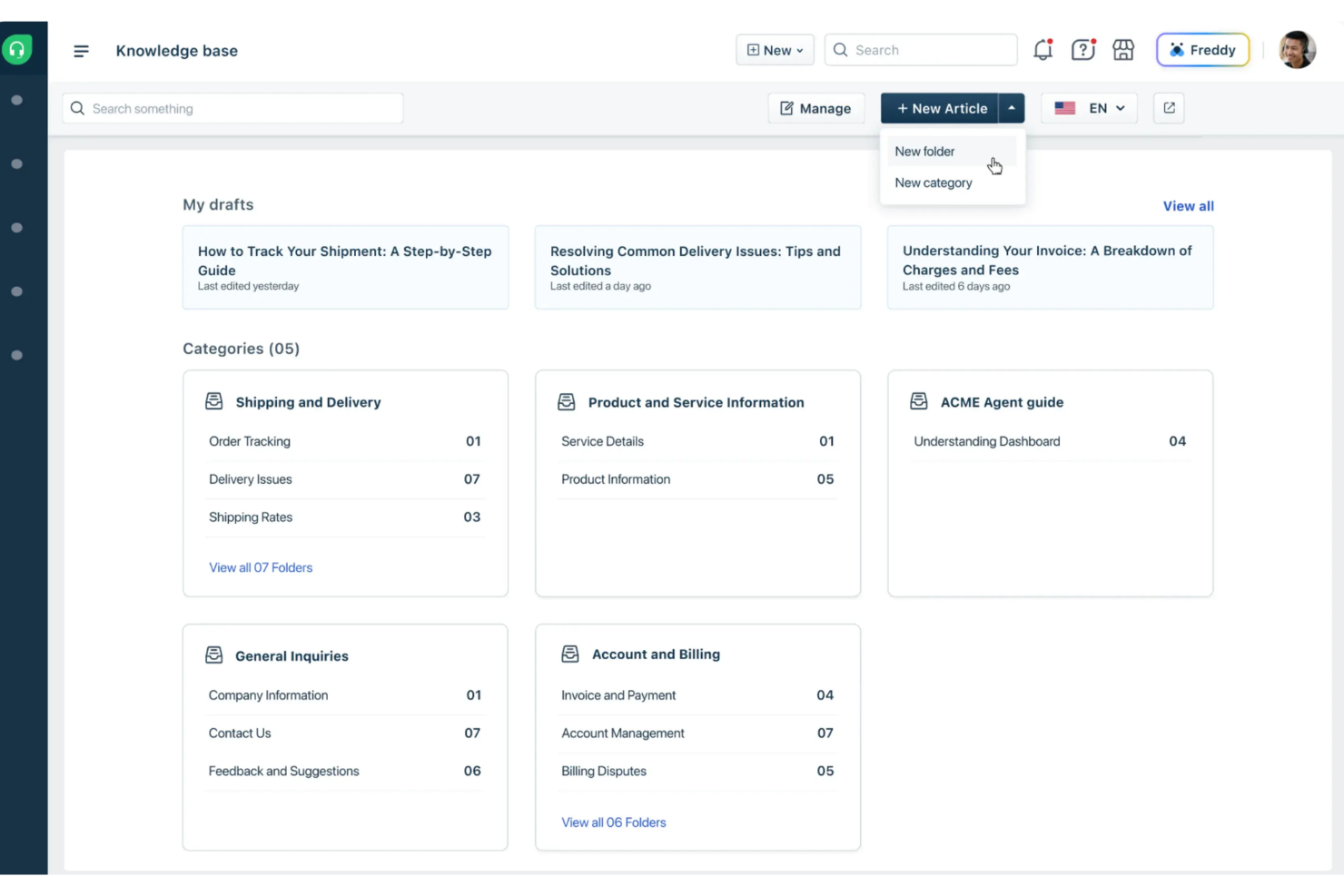
Freshdesk gives support teams and customer-facing businesses a way to build organized, searchable knowledge bases that help users find answers faster and reduce repetitive support requests.
Who Is Freshdesk Best For?
Freshdesk is a strong fit for small to mid-sized businesses that need a customer support platform with built-in knowledge base capabilities to power self-service.
Why I Picked Freshdesk
I picked Freshdesk as one of the best because of how far its portal customization goes beyond basic branding. Most knowledge base tools let you swap in a logo and pick a color scheme—Freshdesk gives you a developer-friendly code editor where you can customize all 17 portal pages individually, from the solutions home and article view to the login page and ticket submission form. I like that you can modify headers, footers, and page layouts using template tags, which means my team can build a portal that genuinely matches our brand rather than just applying a skin over a generic template. The multilingual knowledge base support adds another layer, letting us serve different customer segments through the same portal without duplicating the entire setup.
Freshdesk Key Features
- Article versioning: Track changes to knowledge base articles over time and restore previous versions when needed.
- SEO settings for articles: Add meta titles, descriptions, and tags to individual articles to improve search visibility.
- Feedback widget: Let readers vote on whether an article was helpful, giving your team data to prioritize content updates.
- Auto-suggest articles: Automatically surface relevant knowledge base articles to customers as they type a support ticket, reducing submission volume.
Freshdesk Integrations
Integrations include Slack, MS Teams, Shopify, Salesforce, Jira, Playvox, and connector apps for custom integrations via API.
Pros and Cons
Pros:
- Knowledge base articles support self-service answers for common customer questions
- Customizable support portals organize help content for different customer needs
- Automation rules reduce repetitive ticket routing and follow-up tasks
Cons:
- No built-in asset management compared to dedicated IT service tools
- Mobile app lacks some key support and management features
New Product Updates from Freshdesk
Freshdesk Adds Analytics Charts to Team Dashboards
Freshdesk now lets teams add existing Analytics report charts to custom team dashboards from the same configuration pane used for live widgets. For more information, visit Freshdesk's official site.

Haystack
Best for HR knowledge with a freshness engine
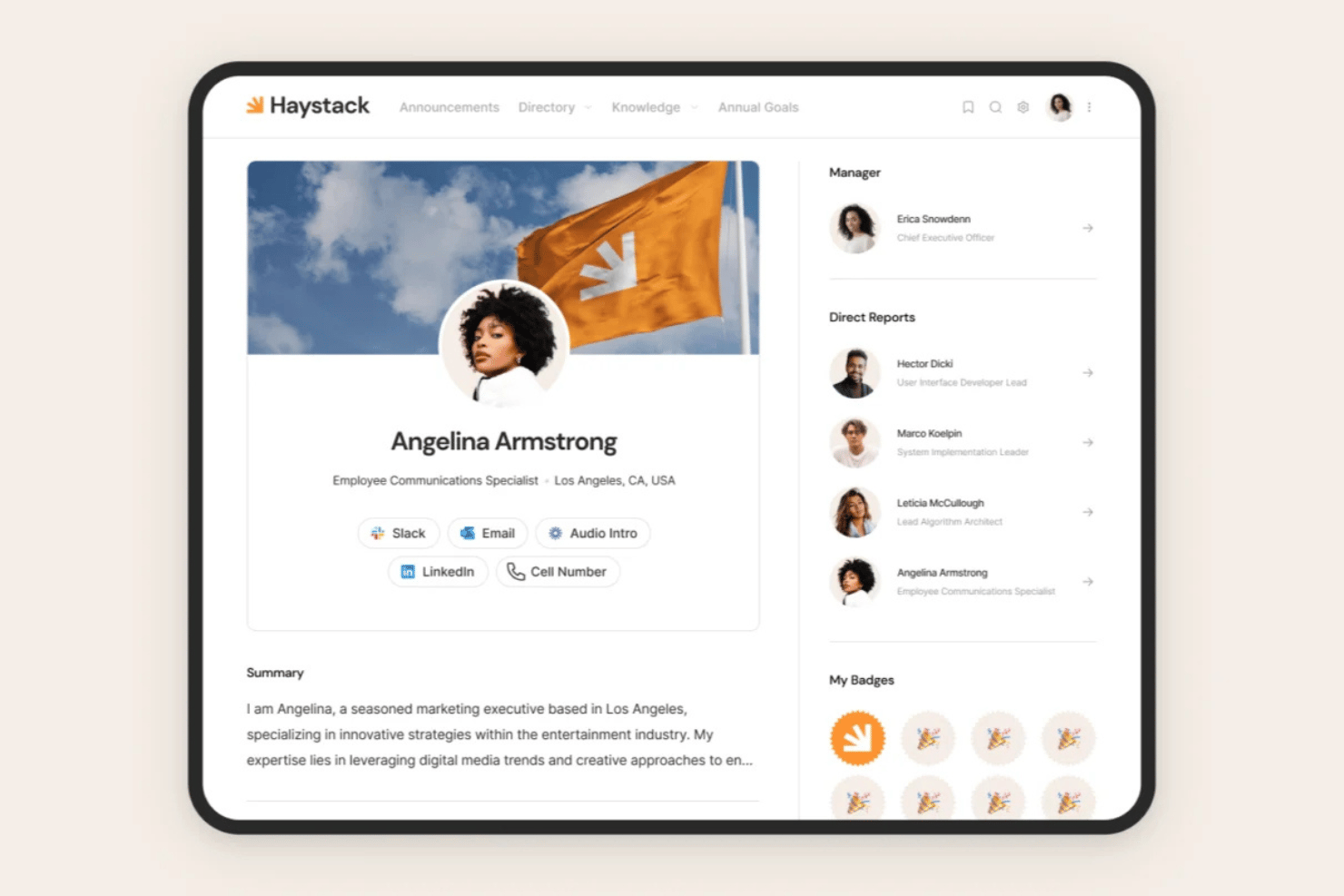
Haystack is an employee experience platform with a built-in knowledge base that centralizes HR policies, onboarding hubs, and company resources alongside a universal search engine, AI-powered Q&A, and a content freshness engine.
Who Is Haystack Best For?
Haystack is a strong fit for HR teams at mid-size to enterprise organizations that need a central home for policies, onboarding, and benefits content—especially those managing distributed or multilingual workforces.
Why I Picked Haystack
I picked Haystack as one of the best because its Freshness Engine solves a problem most HR knowledge bases ignore: content rot. Instead of waiting for someone to notice an outdated policy, Haystack automatically flags aging articles and prompts owners to review them before they go stale. I also like that Haystack AI lets employees ask plain-language questions and get instant answers pulled from verified HR content, which cuts down on repetitive policy questions to the HR team.
Haystack Key Features
- Universal search: Indexes content across Haystack and integrated platforms like Google Workspace, Microsoft 365, Slack, and Confluence, surfacing permissions-aware results in one search.
- Multilingual AI translation: Automatically translates knowledge content into dozens of languages, so distributed and multilingual teams access HR resources in their preferred language.
- Secure delivery controls: Applies employee-unique watermarking, custom legal disclaimers, and download restrictions to sensitive HR documents like compensation and disciplinary policies.
- Employee onboarding hubs: Dedicated structured hubs combine policies, org charts, a company glossary, and a Name Game into a single destination for new hire self-service.
Haystack Integrations
Haystack integrates with Workday, Google Workspace, Microsoft 365, Slack, Microsoft Teams, Confluence, Jira, Zoom, Box, and Dropbox. An API supports custom integrations.
Pros and Cons
Pros:
- Multilingual AI translates knowledge base articles
- Granular permissions for sensitive HR documents
- Freshness engine flags and resurfaces outdated HR content
Cons:
- Search sometimes returns irrelevant results
- No formal version history or rollback

Stonly
Best for interactive knowledge bases

Stonly gives teams in customer support, IT, and HR a way to build interactive, step-by-step knowledge bases that help users solve problems on their own and reduce repetitive questions.
Who Is Stonly Best For?
Stonly is a great fit for customer support and enablement teams that need to guide users through complex processes without relying on static documentation.
Why I Picked Stonly
Stonly earns its spot on my shortlist because it lets you build knowledge base content that actually adapts to the reader. Instead of one-size-fits-all articles, I like how Stonly uses branching, step-by-step guides so users follow a path based on their specific situation. I've used the decision-tree format to walk users through troubleshooting flows where a static FAQ would've fallen flat. The embeddable widget also means my team can surface the right guide directly inside a product or support portal, without sending users off to a separate help center.
Stonly Key Features
- AI-powered answer suggestions: Stonly surfaces relevant guide content automatically based on what a user types into the search bar.
- Multi-language support: Publish knowledge base content in multiple languages to support global or multilingual user bases.
- Guide analytics: Track how users move through each guide, including where they drop off or request additional help.
- Agent-facing knowledge base: Build a separate internal knowledge base that support agents can use to find answers and share guides during live interactions.
Stonly Integrations
Integrations include Zendesk, Salesforce, Freshdesk, and ServiceNow.
Pros and Cons
Pros:
- Interactive guides adapt instructions to each user’s situation.
- AI search pinpoints exact steps instead of full articles.
- Contextual help brings knowledge directly into web apps.
Cons:
- Guide building can feel complex for large conditional flows.
- AI answers and help desk integrations are limited to the enterprise plan.

Best for removing information organization silos

iSpring LMS gives HR teams and business leaders a centralized platform to organize, share, and manage company knowledge, making it easier to keep information accessible and up to date for everyone in the organization.
Who Is iSpring LMS Best For?
iSpring LMS is a strong fit for mid-sized to large organizations with multiple departments or teams that need a single, structured place to store and share knowledge.
Why I Picked iSpring LMS
iSpring LMS earns its spot on my shortlist because it directly tackles the problem of knowledge living in scattered places across an organization. I particularly like the built-in knowledge base feature, which keeps corporate guides, FAQs, and resources in one cloud-based hub with role-based access controls—so each employee only sees what's relevant to their position. I also find the department-based group structure genuinely useful: you can organize employees by team and assign targeted content to each group, so sales, HR, and operations aren't wading through each other's materials. The combination of structured learning tracks and a centralized knowledge hub is what sets it apart for me.
iSpring LMS Key Features
- AI-powered course authoring: Build scrollable courses with an AI assistant that generates text, quiz questions, images, and course translations directly inside the platform.
- Gamification: Reward learners with points, badges, and leaderboard rankings to track and celebrate progress.
- 360-degree review: Collect structured performance feedback from peers, managers, and direct reports to assess employee competencies across the organization.
- Mobile app with offline access: A free iOS and Android app lets learners complete training without an internet connection, syncing progress automatically when back online.
iSpring LMS Integrations
Integrations include Salesforce, MS Azure, MS Exchange, BambooHR, Udemy, Go1, LinkedIn Learning, and other popular course libraries.
Pros and Cons
Pros:
- Public and private portals enable customer or partner access
- A smart search engine makes locating the right assets quick and easy
- Learning tracks help organize product knowledge by role or audience
Cons:
- Limited visual customization
- No standalone knowledge base interface
New Product Updates from iSpring LMS

iSpring LMS Adds Multiple Observations to OJT Sessions
iSpring LMS now lets managers log multiple observations within one OJT session, grouping visits and auto-generating summary stats like averages, criterion results, and comparisons. For more information, visit iSpring LMS's official site.

Best for combining AI and self-service
Zoho Desk gives support teams and customer-facing businesses a way to build, organize, and share knowledge base content while connecting help articles with ticketing and self-service tools.
Who Is Zoho Desk Best For?
Zoho Desk is a strong fit for small to mid-sized customer support teams that need a knowledge base tightly integrated with their help desk and ticketing workflows.
Why I Picked Zoho Desk
I picked Zoho Desk as one of the best because of how well its AI assistant, Zia, works alongside the self-service portal. Zia surfaces relevant knowledge base articles to customers before they even submit a ticket, which cuts down on repeat support requests. I also like that agents get AI-suggested article recommendations mid-ticket, so they can respond faster or flag gaps in existing content. The self-service portal is fully customizable, letting my team build a branded help center that connects directly to the knowledge base.
Zoho Desk Key Features
- Multilingual help center: Publish and manage knowledge base articles in 50+ languages to support a global customer base.
- ASAP help widget: Embed a self-service widget directly into your website or app that blends knowledge base access with live agent support.
- Guided conversations: Build no-code chat flows that walk customers through troubleshooting steps using knowledge base content.
- Employee self-service portal: Create a separate internal knowledge base with articles and training materials for support reps.
Zoho Desk Integrations
Integrations include Zoho CRM, Jira, Slack, Salesforce, Trello, Microsoft Teams, HubSpot, Asana, Mailchimp, and Pipedrive.
Pros and Cons
Pros:
- AI assistance with Zia for proactive issue management.
- Customizable workflows and dashboards for tailored business needs.
- Strong integration with Zoho and third-party applications.
Cons:
- Occasional issues with feature performance under high traffic.
- Most Zia features are limited to the enterprise plan.

Desk365
Best for turning tickets into help articles

Desk365 gives support teams and growing businesses a way to build a searchable knowledge base that connects directly to their ticketing system, helping users find answers and reduce repetitive support requests.
Who Is Desk365 Best For?
Desk365 is a good fit for small to mid-sized support teams that want a help desk and knowledge base in one place without managing separate tools.
Why I Picked Desk365
I chose Desk365 because it connects ticket resolution to knowledge base creation. I love the AI-powered feature that auto-generates structured articles directly from ticket conversations—so when my team resolves a recurring issue, that fix doesn't just disappear into a closed ticket. It becomes a searchable article. Agents can also insert knowledge base articles directly into ticket replies without leaving the interface, which keeps responses consistent. The WYSIWYG editor supports images, GIFs, tables, and HTML, so articles are easy to format and useful to read.
Desk365 Key Features
- Article categorization and folders: Organize help content into nested categories and folders so readers can browse topics without relying on search.
- Multi-language support: Publish knowledge base articles in multiple languages to serve a diverse or global user base.
- Custom branding: Apply your own logo, colors, and domain to the knowledge base portal for a consistent brand experience.
- Article feedback and ratings: Let readers upvote or downvote articles so you can identify content that needs updating or expanding.
Desk365 Integrations
Integrations include Microsoft Teams, Microsoft 365 Copilot, and a Desk365 API for custom connections.
Pros and Cons
Pros:
- Strong WYSIWYG and markdown support
- Highly flexible content visibility settings
- AI auto-creates detailed knowledge base articles
Cons:
- Limited mobile accessibility
- Lacks deep analytics for article performance

Best for pre-built templates
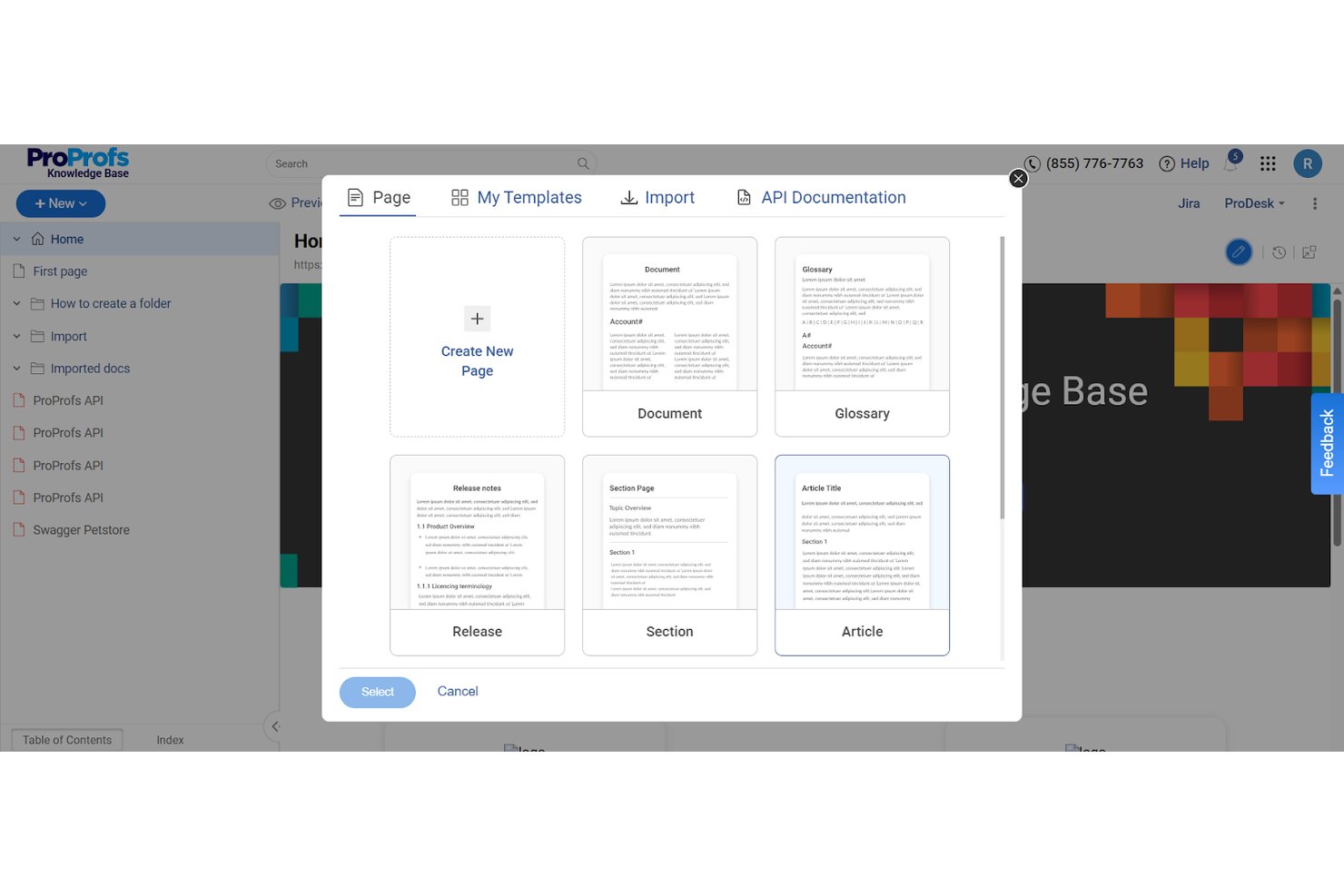
ProProfs Knowledge Base is an AI-powered knowledge management platform that lets teams build both public-facing help centers and private internal knowledge bases—complete with content authoring, AI search, access controls, and localization—from a single account.
Who Is ProProfs Knowledge Base Best For?
It's a strong fit for HR and people operations teams at mid-size to enterprise companies managing both internal employee documentation and customer-facing support content.
Why I Picked ProProfs Knowledge Base
I picked ProProfs Knowledge Base as one of the best because its pre-built template library covers HR-specific documents out of the box, including employee handbooks, onboarding guides, and training manuals. I especially like how the AI Writer can generate and populate those templates with minimal manual input. The approval workflows and version history make keeping policy documents audit-ready much more manageable in practice.
ProProfs Knowledge Base Key Features
- AI-powered search assistant: Surfaces instant answers from knowledge articles using natural language queries.
- Granular access controls: Assigns detailed permissions at the user, group, page, or folder level, including SSO and SCIM support.
- Content health analytics: Tracks search trends, identifies outdated articles, and reports broken links.
- Multi-language localization: Automatically translates HR knowledge bases into 60+ languages for global teams.
ProProfs Knowledge Base Integrations
ProProfs Knowledge Base offers native integrations with Freshdesk, Salesforce, Zendesk, Jira, Tidio, Slack, and more. An API is available for custom integrations.
Pros and Cons
Pros:
- Supports 60+ languages for global HR teams
- AI search surfaces answers without ticket submission
- Pre-built HR templates accelerate content creation
Cons:
- Analytics reporting less granular than competitors
- Limited portal design customization options available
Best for AI-powered knowledge management
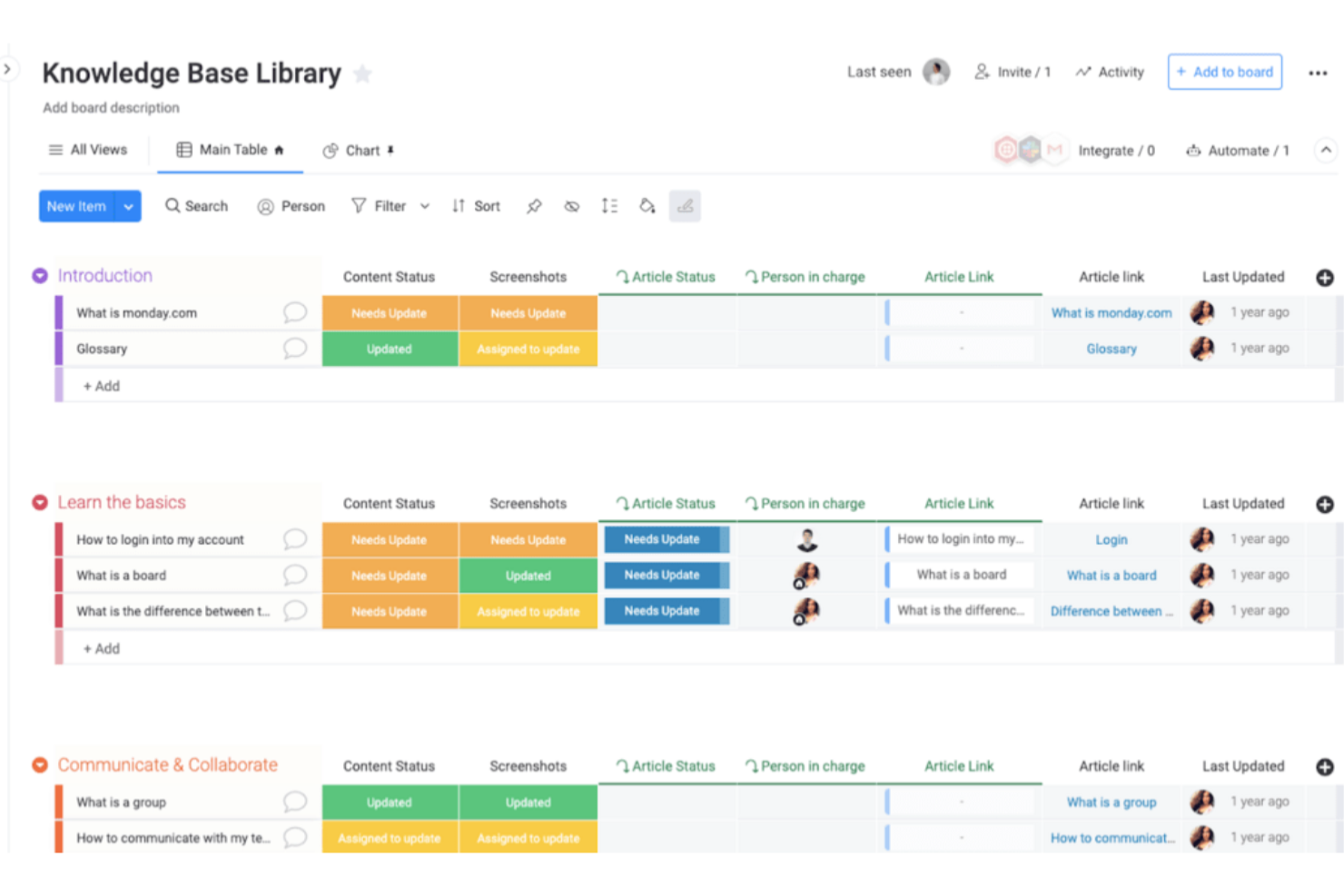
monday service is a knowledge base platform designed for teams and organizations that want to centralize information, streamline internal support, and help employees find answers and share expertise.
Who Is monday service Best For?
monday service is a strong fit for mid-sized to enterprise teams that need a centralized, AI-powered knowledge base built into a broader service and operations platform.
Why I Picked monday service
I picked monday service as one of the best because I love how its AI is woven directly into the knowledge management workflow rather than bolted on as an afterthought. The AI service agent connects to your knowledge base and past ticket history to resolve repetitive requests automatically—so when the same onboarding question comes in for the 50th time, my team doesn't have to answer it manually. I also rely on the personalized AI search, which pulls the most relevant results from across service tickets, documentation, and connected tools, giving users the context they need to act immediately. The AI digital workers monitor knowledge base content around the clock and flag outdated articles, which means my team isn't scrambling to audit docs manually every quarter.
monday service Key Features
- Customer portal: A self-service hub where employees or customers can submit requests, track ticket status, and browse knowledge base articles without contacting an agent.
- SLA column: A live timer that tracks time to resolution for each ticket, with automatic pausing outside working hours and visual indicators for breached or at-risk tickets.
- Ticket boards: Dedicated workspaces for managing incoming requests that keep all ticket communication, status updates, and context in one place.
- Incident management: A linked board that groups related tickets together to help teams identify, categorize, and resolve recurring or complex issues.
monday service Integrations
Integrations include Salesforce, QuickBooks, HubSpot, Zendesk, Active Directory, GitHub, GitLab, Slack, Gmail, and Microsoft Teams.
Pros and Cons
Pros:
- Ability to tailor workflows and dashboards
- Integration with various third-party applications
- Visual boards help users easily track project progress
Cons:
- Cost may be higher than other tools
- Lacks some advanced reporting features

Confluence
Best for team collaboration

Confluence is a knowledge base platform that helps teams in tech, finance, and other industries organize, document, and share information in one central hub, so teams can capture expertise and keep everyone aligned.
Who Is Confluence Best For?
Confluence is a great fit for mid-size to large tech and software teams that need a structured, searchable space to manage internal documentation and technical knowledge.
Why I Picked Confluence
Confluence earns its spot as one of the best on my shortlist because of how well it supports real-time team collaboration within a structured knowledge base. I love the live docs feature, which lets my whole team edit the same page simultaneously—no version conflicts, no waiting for someone to "check in" a file. The inline commenting and @mentions keep feedback tied directly to the content, so context never gets lost in a separate thread. Confluence Spaces also let teams organize knowledge by project, department, or goal, which keeps documentation structured as the team grows.
Confluence Key Features
- Page versioning: Track the full edit history of any page, compare versions side by side, and revert to a previous version when needed.
- Best practice templates: Access a library of pre-built templates for documents like product requirements, meeting notes, and project plans to speed up content creation.
- Confluence databases: Aggregate and display information from Jira and third-party apps in table, card, or board views within your knowledge base.
- Page insights: View engagement analytics on individual pages, including page views and user views, to see which content is being used.
Confluence Integrations
Integrations include Jira, Jira Service Management, Trello, Loom, Bitbucket, Rovo, Compass, Focus, Talent, and Jira Align.
Pros and Cons
Pros:
- Effective team communication
- Customizable templates
- Supports real-time editing
Cons:
- May require additional plugins
- Complexity in setup for new users
Annen programvare for kunnskapsbaser
Her er noen flere alternativer for programvare til kunnskapsbaser som ikke kom med på kortlisten min, men som likevel er verdt å se nærmere på:
- Knowmax
For AI-guided knowledge management
- Helprace
For feedback management
- Odoo
For open-source users
- Guru
For AI search
- Glean
For company-wide search unification
- Help Scout
For email integration
- ManageEngine
For large enterprises
- KnowledgeBase
For small businesses
- LiveAgent
For managing multiple knowledge bases
- Zendesk
For content performance insights
- Axero
For employee self-service
- Attio
For CRM integration
- Hub
For targeted content delivery
- Trupeer
For AI video search capabilities
- KnowledgeOwl
For compliance needs
- Bloomfire
For content sharing
- Groove HQ
For small teams
- Helpshift
For mobile support


How I Evaluate Knowledge Base Software
I evaluate knowledge base software in two layers: the baseline every tool must clear—like searchable policy libraries and employee portals—and the differentiators that fit specific HR teams.
Core Functionality (Table Stakes For This List)
When I'm selecting tools for my list, I rank each one on a scale from 0 (does not offer the functionality) to 5 (excels in this area) for each core functionality listed below. Then, I calculate the tool's total score into a percentage. Each tool needs to achieve a minimum total score of 65% to be considered for inclusion.
- Centralized Content Repository: I look for structured article libraries where HR teams can organize policies by topic, department, or region using folders, spaces, or categories.
- Search & Content Discovery: Employees searching "parental leave policy" should get an instant, accurate result. I evaluate search filters, tagging, and keyword handling.
- Role-Based Access Controls: I check whether you can restrict sensitive content like compensation bands or disciplinary procedures to specific roles or user groups.
- Content Authoring & Editing: A built-in editor with formatting, templates, and media embeds matters. Tools like Guru and Notion handle this differently, so I compare authoring depth.
- Version Control & Audit History: Policy updates happen often. I evaluate whether each tool tracks revisions, logs contributors, and lets you restore previous versions.
- Employee Self-Service Portal: The end goal is fewer "where do I find…" tickets. I look for a branded, searchable portal employees can access without pinging HR.
Once I have a list of tools that meet the criteria, I consider what sets each platform apart.
Differentiating Factors (What Sets Vendors Apart)
Here's how I compare and contrast different vendors:
Standout Features
AI-powered assistants are a major differentiator. I look for tools that surface direct answers to questions like "how many vacation days do I have left?" without making employees scan full articles. Analytics matter too; dashboards that flag unanswered searches help HR teams spot policy gaps they didn't know existed. I also evaluate HRIS integrations, since syncing employee data from platforms like BambooHR or Workday lets you personalize content visibility by role, department, or location.
Beyond Features
Compliance and security certifications carry real weight for HR teams handling employee PII and benefits data. I check for SOC 2 Type II and GDPR readiness at a minimum. Content migration is another factor I evaluate closely. Switching from a legacy SharePoint wiki to a new platform can stall a rollout if import tools are clunky or nonexistent. Governance capabilities also matter. Scheduled review reminders and approval workflows help ensure outdated policies don't linger, which is a common challenge when HR teams manage hundreds of articles.
Slik velger du programvare for kunnskapsbaser
Det er lett å gå seg vill i lange funksjonslister og komplekse prismodeller. For å hjelpe deg med å holde fokus mens du går gjennom den unike prosessen din for valg av programvare, får du her en sjekkliste over faktorer du bør ha i tankene:
| Faktor | Hva bør du vurdere? |
|---|---|
| Skalerbarhet | Vil programvaren vokse sammen med teamet ditt? Tenk på fremtidig ekspansjon og om verktøyet kan håndtere økte datamengder og flere brukere uten problemer. |
| Integrasjoner | Fungerer den sammen med de eksisterende verktøyene dine? Sørg for kompatibilitet med plattformer som Slack, CRM-systemer og andre apper du er avhengig av. |
| Tilpasningsmuligheter | Kan du tilpasse den etter behovene dine? Se etter alternativer for å justere oppsett, profilering og arbeidsflyter slik at de passer til de unike prosessene dine. |
| Brukervennlighet | Er den enkel å bruke for alle brukere? Et enkelt grensesnitt kan redusere opplæringstiden og oppmuntre teamet til å ta løsningen i bruk. Test brukervennligheten før du bestemmer deg. |
| Implementering og opplæring | Hvor raskt kan du komme i gang? Vurder tiden og ressursene som kreves for oppsettet, inkludert støtte for datamigrering og brukeropplæring. |
| Kostnad | Passer den inn i budsjettet ditt? Sammenlign prisplaner, inkludert skjulte gebyrer eller kostnader for ekstra funksjoner. Se etter en gratis prøveperiode for å teste verdien. |
| Sikkerhetstiltak | Er dataene dine beskyttet? Se etter kryptering, tilgangskontroller og samsvar med personvernforordninger som GDPR. |
| Tilgjengelig kundestøtte | Hvilken hjelp kan du forvente? Vurder leverandørens alternativer for kundestøtte, responstid og om de tilbyr hjelp døgnet rundt for ekstra trygghet. |
Hva er programvare for kunnskapsbaser?
Programvare for kunnskapsbaser er et verktøy som hjelper organisasjoner med å lagre, organisere og dele informasjon internt og eksternt. Det brukes vanligvis av kundestøtteteam, HR-avdelinger og IT-fagfolk for å gi rask tilgang til informasjon og forbedre effektiviteten. Søkemuligheter, alternativer for tilbakemeldinger fra brukere og støtte for multimedia gjør det enklere å organisere og hente frem informasjon. Disse verktøyene forbedrer samarbeidet og sørger for at alle har tilgang til informasjonen de trenger, når de trenger den.
Funksjoner
Når du velger programvare for kunnskapsbaser, bør du se etter følgende viktige funksjoner:
- Søkefunksjonalitet: Gjør det mulig for brukerne å raskt finne informasjonen de trenger ved å søke effektivt gjennom kunnskapsbasen.
- Innholdskategorisering: Bidrar til å organisere informasjon i oversiktlige og lett navigerbare seksjoner, slik at brukerne enkelt kan finne relevant innhold.
- Tilgangskontroller for brukere: Gjør det mulig for administratorer å angi tillatelser, slik at sensitiv informasjon bare er tilgjengelig for autoriserte brukere.
- Tilpassbare maler: Tilbyr forhåndsutformede oppsett som kan tilpasses merkevaren din, noe som gjør innholdsopprettingen raskere.
- Analyse og rapportering: Gir innsikt i hvordan brukerne samhandler med kunnskapsbasen, slik at teamene kan optimalisere innholdet for bedre engasjement.
- Interaktive veiledninger: Legger til rette for trinnvise instruksjoner som engasjerer brukerne og gjør komplekse prosesser enklere å følge.
- Innsamling av tilbakemeldinger: Gjør det mulig for brukerne å gi innspill direkte i kunnskapsbasen, slik at teamene kan hente inn innsikt og forbedre innholdet.
- Fellesskapsfora: Oppmuntrer til samhandling mellom brukere og bidrag til innholdet, noe som beriker kunnskapsbasen med innsikt fra fellesskapet.
- Flerspråklig støtte: Sørger for at innholdet er tilgjengelig for brukere på forskjellige språk, slik at kunnskapsbasen når ut til flere.
- Versjonskontroll for innhold: Følger endringer og oppdateringer i innholdet, slik at teamene kan håndtere revisjoner og opprettholde nøyaktigheten.
Fordeler
Implementering av programvare for kunnskapsbaser gir flere fordeler for teamet og virksomheten din. Her er noen av fordelene du kan se frem til:
- Bedre tilgang til informasjon: Med søkefunksjonalitet og innholdskategorisering kan brukerne raskt finne informasjonen de trenger, noe som reduserer tiden de bruker på å lete.
- Økt produktivitet: Ved å samle informasjon på ett sted og tilby tilgangskontroller for brukere kan teamene fokusere på oppgavene uten avbrytelser eller forvirring rundt dokumenttilgang.
- Ensartet støtteopplevelse: Interaktive veiledninger og innsamling av tilbakemeldinger sørger for at brukerne får nøyaktig og tydelig veiledning, noe som forbedrer den samlede kvaliteten på brukerstøtten.
- Bedre samarbeid: Fellesskapsfora og tilpassbare maler gjør det mulig for teammedlemmer og brukere å bidra og dele innsikt, noe som fremmer et samarbeidsorientert miljø.
- Bedre beslutningstaking: Analyse og rapportering gir innsikt i innholdets ytelse, slik at teamene kan ta informerte beslutninger for å optimalisere kunnskapsbasen.
- Skalerbarhet: Flerspråklig støtte sørger for at kunnskapsbasen kan imøtekomme ulike brukerbehov etter hvert som virksomheten vokser.
- Nøyaktig innhold: Versjonskontroll for innhold bidrar til å opprettholde oppdatert og nøyaktig informasjon, noe som reduserer feil og feilinformasjon.
Kostnader & priser
Å velge programvare for kunnskapsbaser krever en forståelse av de ulike prismodellene og abonnementene som er tilgjengelige. Kostnadene varierer basert på funksjoner, teamstørrelse, tillegg og mer. Tabellen nedenfor oppsummerer vanlige abonnementer, gjennomsnittsprisene deres og typiske funksjoner som er inkludert i programvareløsninger for kunnskapsbaser:
Sammenligningstabell for abonnementer for programvare for kunnskapsbaser
| Abonnementstype | Gjennomsnittspris | Vanlige funksjoner |
|---|---|---|
| Gratisabonnement | $0 | Grunnleggende søk, begrenset lagringsplass og støtte fra fellesskapet. |
| Personlig abonnement | $5-$25/bruker/måned | Avansert søk, tilpassbare maler og analyse. |
| Bedriftsabonnement | $30-$60/bruker/måned | Flerspråklig støtte, forbedret sikkerhet og integrasjonsalternativer. |
| Virksomhetsabonnement | $70-$150/bruker/måned | Egen kundeansvarlig, avansert analyse og fullstendige tilpasningsmuligheter. |
Vanlige spørsmål om programvare for kunnskapsbaser
Her er svar på vanlige spørsmål om programvare for kunnskapsbaser:
Kan programvare for kunnskapsbaser integreres med andre verktøy?
Ja, de fleste kunnskapsbaseplattformer kan integreres med verktøy som CRM-systemer, HRIS-systemer, brukerstøttesystemer og samarbeidsapper. Dette gjør det mulig for teamet ditt å hente inn data, automatisere arbeidsflyter og koble sammen informasjon mellom systemer for en smidigere arbeidshverdag.
Hvor sikre er dataene mine i programvare for kunnskapsbaser?
Datasikkerheten varierer fra leverandør til leverandør, men de fleste programvareløsninger for kunnskapsbaser tilbyr robuste sikkerhetsfunksjoner. Se etter løsninger som tilbyr kryptering, regelmessige sikkerhetskopier og detaljerte tilgangskontroller for intern bruk. Noen leverandører tilbyr også samsvar med standarder som GDPR eller HIPAA. Gå alltid gjennom sikkerhetsfunksjonene og selskapets retningslinjer for programvaren du vurderer, slik at du er sikker på at dataene dine forblir beskyttet.
Hvordan forbedrer en kunnskapsbase effektiviteten for ansatte og kunder?
En kunnskapsbase gir teamene og kundene dine umiddelbare svar og reduserer tiden som brukes på å lete etter informasjon. HR-, brukerstøtte- eller salgsteam kan løse forespørsler raskere, dele oppdateringer og redusere gjentakende spørsmål, slik at de får mer tid til arbeid som skaper større verdi.
Er det enkelt å oppdatere innhold i programvare for kunnskapsbaser?
Ja, de fleste plattformer tilbyr brukervennlige redigerings- og samarbeidsverktøy, slik at du raskt kan legge til, revidere eller organisere artikler. Versjonskontroll, maler og arbeidsflyter for godkjenning holder innholdet nøyaktig og oppdatert.
Hva er forskjellen mellom intern og ekstern programvare for kunnskapsbaser?
Interne kunnskapsbaser hjelper de ansatte med å finne prosesser, retningslinjer og bedriftsinformasjon. Eksterne kunnskapsbaser er offentlige og brukes av kunder til vanlige spørsmål og selvbetjent brukerstøtte.
Hvordan kan jeg oppmuntre de ansatte til å ta i bruk kunnskapsbasen vår?
Du kan øke bruken ved å involvere teamene i oppsettet, tilby opplæring og gjøre plattformen enkel å bruke. Fremhev raske gevinster og be om tilbakemeldinger, slik at de ansatte ser den reelle verdien av å bruke den hver dag.