

De 10 beste læringsstyringssystemene for virksomheter i 2026

10 Beste systemer for læringsadministrasjon for virksomheter


De beste systemene for læringsadministrasjon for virksomheter (LMS) hjelper deg med å levere, følge opp og skalere opplæringsprogrammer for ansatte—slik at du enkelt kan videreutvikle kompetansen i arbeidsstyrken og drive virksomheten fremover.
Når opplæring skal håndteres i stor skala, kan spredt materiell og manuell oppfølging føre til uensartede læringsopplevelser, lavt engasjement og manglende oppfyllelse av krav til etterlevelse. Et robust LMS samler kursinnhold på ett sted, automatiserer rapporteringen og gir innsikt i de ansattes fremgang—alt i én plattform.
Etter flere år med utforming og gjennomføring av opplæringsprogrammer for virksomheter har jeg evaluert de beste LMS-løsningene for virksomheter—løsninger som er kraftige, fleksible og utviklet for å støtte komplekse organisatoriske behov.
I denne veiledningen finner du de beste plattformene for å styrke kompetanseutvikling, opplæring i etterlevelse og kunnskapsdeling i hele teamet ditt.
Why Trust Our Software Recommendations
Our team has been testing and reviewing software since 2012. As HR experts ourselves, we know how difficult—and important—it is to choose the right software.
For this guide, we evaluated tools using hands-on testing and independent research, scoring tools using our selection criteria. We also draw on insights from industry thought leaders and practicing HR experts.
Our reviews reflect our human editorial judgment, not a sales pitch.
Expert reviewers:
Sammenligningstabell for systemer for læringsadministrasjon for virksomheter
Denne sammenligningstabellen oppsummerer prisdetaljene for mine beste anbefalinger av systemer for læringsadministrasjon for virksomheter:
| Tool | Best For | Trial Info | Price | ||
|---|---|---|---|---|---|
| 1 | Best with integrated workflow automation | Free demo available | Pricing upon request | Website | |
| 2 | Best for bespoke LMS solutions | Free demo available | Pricing upon request | Website | |
| 3 | Best for rapid rollout and multi-audience training | Free plan + free demo available | From $119/month (billed annually) | Website | |
| 4 | Best for gamification features | Free demo available | Pricing upon request | Website | |
| 5 | Best for flexible content formats | Free demo available | Pricing upon request | Website | |
| 6 | Best for powering the entire training cycle | Free trial available | From $6.91/user/month (billed annually) | Website | |
| 7 | Best for providing real-time analytics | Free demo available | Pricing upon request | Website | |
| 8 | Best for user experience and support | 14-day free trial | Pricing upon request | Website | |
| 9 | Best for AI-generated course creation assistance | Free demo available | Pricing upon request | Website | |
| 10 | Best for tracking and analyzing learner metrics | Free demo available | Pricing upon request | Website |


Anmeldelse av de beste systemene for læringsadministrasjon for virksomheter
Nedenfor finner du mine detaljerte sammendrag av de beste systemene for læringsadministrasjon for virksomheter som kom med på kortlisten min. Anmeldelsene mine gir en detaljert gjennomgang av de viktigste funksjonene, fordeler & ulemper, integrasjoner og ideelle bruksområder for hvert verktøy, slik at du kan finne det beste alternativet for deg.

Continu
Best with integrated workflow automation
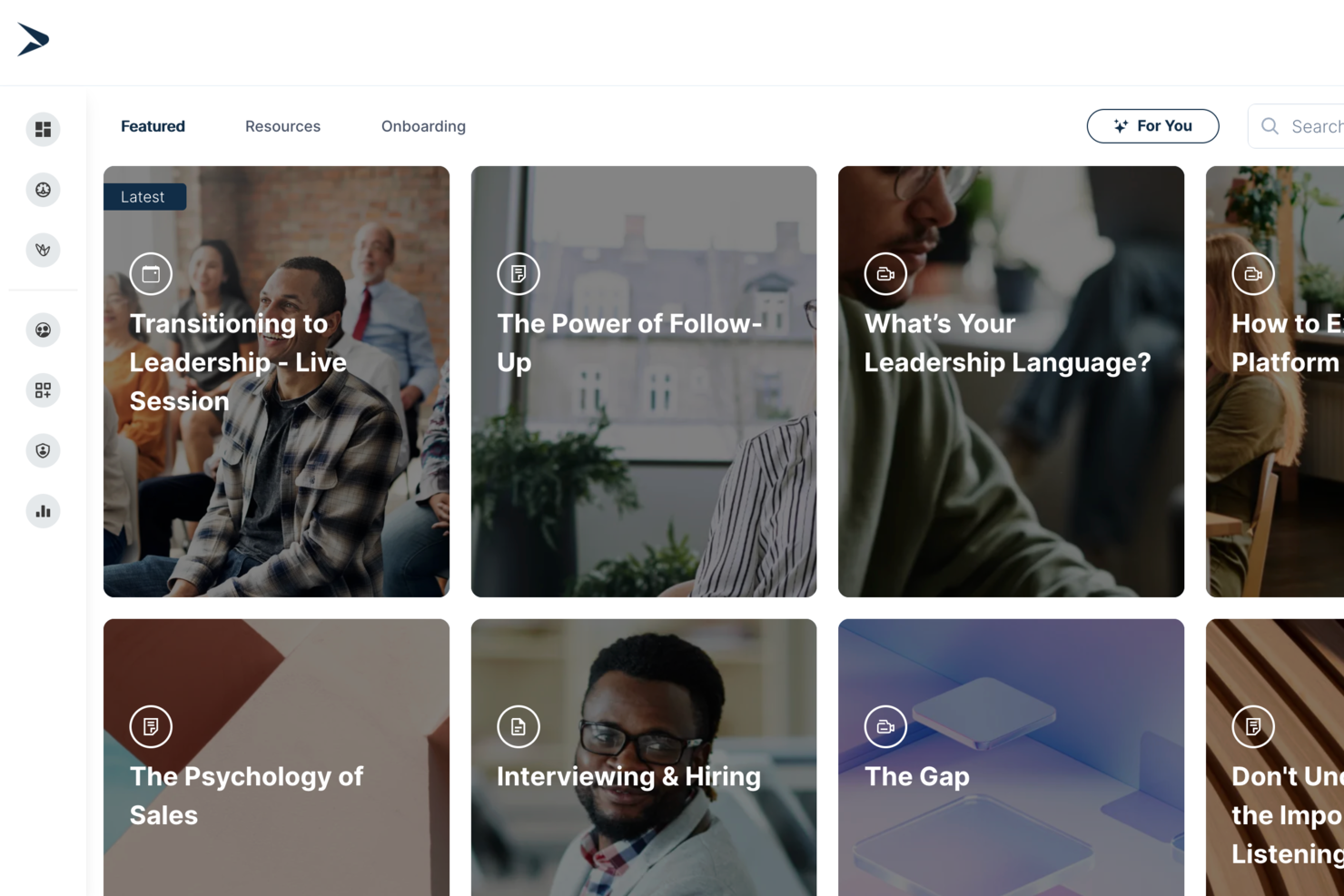
Continu is an enterprise learning management system that offers course authoring, workflow automations, advanced analytics, custom learning paths, and support for multilingual content.
Who Is Continu Best For?
Continu is a strong fit for mid-to-large enterprises that need to train and develop distributed teams across multiple departments or regions.
Why I Picked Continu
I picked Continu as one of the best because its workflow automation goes well beyond basic reminders. The rules engine lets you trigger assignments based on role, partner tier, region, or any CRM or HRIS attribute—so when a new hire joins or a partner moves up a tier, the right training fires automatically. I also like the escalation workflows, which notify managers when assignments go overdue without any manual follow-up from your team.
Continu Key Features
- Smart Segmentation: Set rules-based filters to automatically deliver targeted content to learners based on their role, region, or product line.
- Continu Insights: Build custom dashboards and use plain-English prompts to pull real-time reports from your learning data without SQL or analyst support.
- Badges and certifications: Award learners with digital badges or certificates upon completing courses or demonstrating specific competencies.
- SCORM/xAPI support: Import externally created eLearning files directly into Continu to run alongside natively authored content.
Continu Integrations
Continu offers native integrations with Salesforce, Workday, Okta, and Google Workspace. An API is available for custom integrations.
Pros and Cons
Pros:
- Responsive support and customer success teams
- Comprehensive reporting for enterprise compliance needs
- Robust automation for HR and learning workflows
Cons:
- No mobile app for offline course access
- Limited prebuilt course content library compared to peers
New Product Updates from Continu
Continu Adds Smarter Content Management
Continu adds Intelligent Tagging and Descriptions and richer content details to improve how learning content is organized and maintained. These updates reduce manual work and give teams more consistent, detailed content records. For more information, visit Continu’s official site.
 .
.

Synergy Learning is a notable enterprise learning management system provider, known for its ability to tailor solutions to meet the specific needs of sectors such as non-profit, healthcare, financial services, and government.
Why I picked Synergy Learning: As a certified partner of Moodle and Totara, Synergy Learning offers platforms like Moodle LMS and Totara Suite, which assist organizations in efficiently delivering, managing, and tracking educational and training programs. The emphasis on bespoke development and user experience design helps create an intuitive interface that boosts learner engagement. Managed hosting services guarantee consistent platform performance, while consultancy and training services aid organizations in maximizing the capabilities of their LMS.
Synergy Learning Standout Features and Integrations:
Standout features include their Spark LMS theme that offers a range of integrations, user-friendly design, and premium add-ons, allowing you to have a customized LMS experience. Synergy Learning also offers a flexible approach to learning content with learning content development services and digital conversion or expansion of existing learning content.
Integrations include HubSpot, Power BI, Google Apps, Microsoft Office 365, SAP, Oracle, Salesforce, Stripe, PayPal, and Zoom.
Pros and Cons
Pros:
- Client-focused approach ensures tailored solutions
- Offers managed hosting and consultancy services
- Highly customizable learning management systems
Cons:
- Customization options may require additional development
- May not be ideal for those looking for a quick-start solution

Best for rapid rollout and multi-audience training

TalentLMS is built for organizations that need to roll out training quickly across multiple audiences—employees, partners, and customers. It gives you branching environments, easy course creation, and flexible delivery options so you can offer different learning experiences while keeping everything centralized.
Why I Picked TalentLMS
I picked TalentLMS because it helps your team launch enterprise training programs in days instead of weeks. You can create courses using built-in tools or upload SCORM, xAPI, and cmi5 content, which gives you flexibility in how you build and manage learning.
Its branch management lets you run separate training portals for different groups, each with unique branding and permissions, while still overseeing everything from one account. I also like that you can automate enrollments and actions, which cuts down on admin work as your learner base grows. Plus, the mobile app with offline access ensures your distributed teams can complete training anywhere.
TalentLMS Key Features
Here are some key features worth highlighting:
- Branch Management: Create segmented training portals with custom branding and permissions.
- Gamification Tools: Use badges, points, and leaderboards to encourage learner engagement.
- Custom Reporting: Build reports that track progress, completion rates, and learning trends.
- Automations: Trigger enrollments, reminders, or actions based on user behavior.
TalentLMS Integrations
Integrations include Salesforce, Slack, Microsoft Teams, BambooHR, WordPress, Zoom, GoTo Webinar, Zendesk, and Google Workspace.
Pros and Cons
Pros:
- Branching lets you manage separate audiences from one platform
- Gamification supports engagement across large or distributed teams
- Fast setup helps enterprises deploy training programs quickly
Cons:
- Analytics lack deeper predictive insights
- Limited built-in authoring
New Product Updates from TalentLMS
TalentLMS Adds Learning Paths, AI Video, and Learner Experience Updates
TalentLMS introduced updates across learning management, content creation, and learner experience, including Learning Paths for Groups, AI video generation in TalentCraft, video bookmarking, and expanded administration tools. For more information, visit TalentLMS’s official site.
Absorb
Best for gamification features
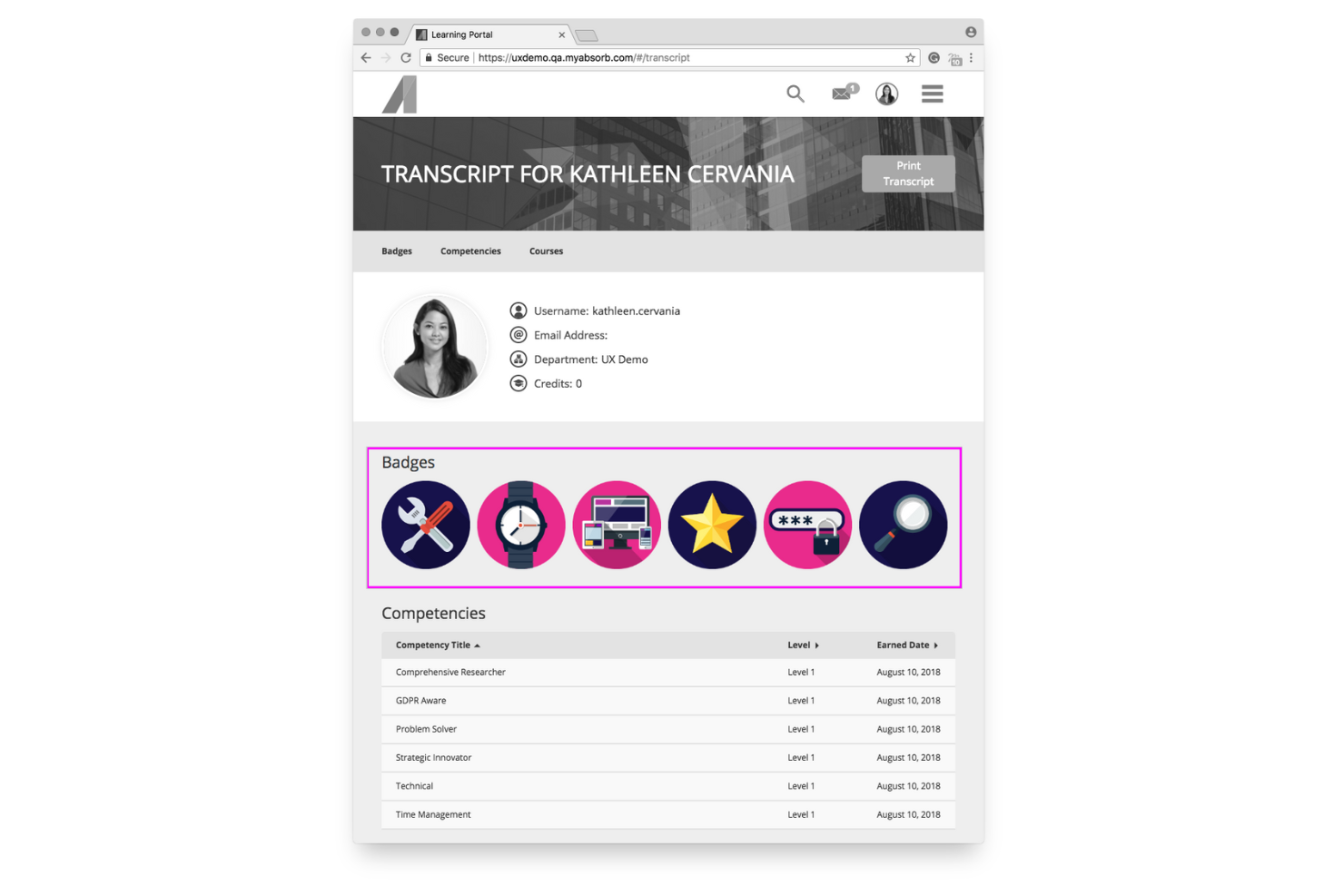
Absorb MS is built for organizations that want to motivate learners through structured goals and engaging course experiences. It works well for mid-sized and enterprise teams that need detailed progress tracking and a flexible learning environment that supports a wide range of training formats.
Why I Picked Absorb
I picked Absorb for its strong approach to learner engagement, especially if your team benefits from clear milestones and competitive motivation. Its gamification tools—like badges, points, and leaderboards—give employees immediate feedback and encourage consistent participation.
You can also create personalized learning paths that adapt to each employee’s role or skill level, ensuring training stays relevant, and I like that admins can manage user profiles, permissions, and enrollments from a single dashboard, reducing repetitive work.
Lastly, the platform’s built-in content tools also help you produce multimedia courses and quizzes without relying on external creation software.
Absorb Key Features
Here are some standout features worth highlighting:
- Adaptive Learning Paths: Create guided training sequences tailored to roles, goals, or certifications.
- Centralized User Management: Control permissions, profiles, and access levels from a unified admin panel.
- Content Authoring Tools: Build quizzes, modules, and multimedia courses directly inside the platform.
- Analytics & Reporting: Track learner progress, course completion, and knowledge gaps with exportable reports.
Absorb Integrations
Integrations include ADP, Box, Google Workspace, Microsoft 365, Salesforce, Shopify, Slack, Microsoft Teams, Twitter, and Zendesk.
Pros and Cons
Pros:
- Built-in tools for creating multimedia training content
- Gamification tools encourage consistent participation
- Supports large user volumes for enterprise-scale rollouts
Cons:
- Some advanced analytics require higher tiers or add-ons
- Limited customization for certain dashboard elements
New Product Updates from Absorb
Absorb Expands Instructor-Led Course Session Management
Absorb adds multi-class sessions, recurring classes, conflict indicators, and learner enrollment during setup for instructor-led courses. These updates give admins more control over scheduling and session management. For more information, visit Absorb’s official site.
 .
.
Best for flexible content formats

Mitratech Perform Learn is designed for organizations that want to deliver consistent, accessible employee training across locations. It’s a good fit for HR and L&D teams that need flexible learning formats, clear visibility into training progress, and hands-off enrollment for large or growing workforces.
Why I Picked Mitratech Perform
I picked Mitratech Perform because it gives your team a flexible way to deliver training through on-demand courses, live sessions, and social learning tools. For example, you can build your own courses or pull from their library, which helps you launch programs quickly without starting from scratch.
I also like that its reporting tools show you what employees have learned and where they’re falling behind, giving you clear next steps for improving your content, and their auto-enrollment feature is especially useful for larger teams—it enrolls employees based on rules you set, saving you the repetitive work of assigning courses manually.
Taken together, these features make it a strong choice for companies that want structured training without heavy administration.
Mitratech Perform Key Features
Here are some standout features worth highlighting:
- Real-Time Training Dashboards: Track learner progress, completion rates, and skills gaps at a glance.
- Built-In Course Authoring: Create custom training with your own videos, documents, and assessments.
- Gamified Learning Options: Add badges, points, and interactive elements to increase learner engagement.
- Role-Based Learning Paths: Assign courses automatically based on job role, department, or location.
Mitratech Perform Integrations
Integrations include ADP Workforce Now, Azure Active Directory, BambooHR, Google Workspace, Microsoft 365, Okta, OneLogin, Paylocity, Salesforce, and Zoom.
Pros and Cons
Pros:
- Uses can learn from anywhere with cloud-based delivery
- Has plenty of integrations
- Includes the ability to make custom courses
Cons:
- Pricing details are not transparent
- An integrated org chart feature would be nice

Best for powering the entire training cycle

iSpring LMS is built for companies that want to manage the full employee training cycle in one place, from onboarding to continuous skill development. It’s a strong fit for HR and L&D teams that need structured training paths, reliable tracking, and an easy way to deliver courses at scale.
Why I Picked iSpring LMS
I picked iSpring LMS because it automates many repetitive training tasks, so your team doesn’t have to manage them manually. For example, you can set rules that enroll employees in the right courses, send reminders, and track completions, ensuring that everything runs smoothly — even in a large organization.
I also like how it groups learners automatically based on location, role, or department, making it easier to assign relevant content. The platform supports full-cycle training management, from creating eLearning modules with the built-in authoring tool to monitoring progress with detailed performance data. And, with on-premise installation available, you can deploy the LMS on your servers for full control over data security, infrastructure, and compliance requirements.
These capabilities make it especially useful for organizations that train large or distributed teams.
iSpring LMS Key Features
Here are some standout features worth highlighting:
- Learning Tracks and Development Plans: Build step-by-step training paths that guide employees through required courses and ensure targeted training.
- Org Chart & Profiles: Visualize reporting lines and store employee training histories in one place.
- Corporate Newsfeed: Share updates or highlight important training programs to keep teams informed.
- Detailed Reporting: Track progress, completion rates, and knowledge gaps with targeted reports.
iSpring LMS Integrations
Integrations include Microsoft Teams, Zoom, Google Calendar, Apple Calendar, Outlook Calendar, Salesforce, Albato, and GoToMeeting.
Pros and Cons
Pros:
- Learning tracks help structure multi-step training programs
- Detailed completion reports highlight skill gaps clearly
- The on-premise installation option gives full control over the training infrastructure
Cons:
- Fewer native integrations than some competitors
- Limited gamification options
New Product Updates from iSpring LMS

iSpring LMS Adds Multiple Observations to OJT Sessions
iSpring LMS now lets managers log multiple observations within one OJT session, grouping visits and auto-generating summary stats like averages, criterion results, and comparisons. For more information, visit iSpring LMS's official site.

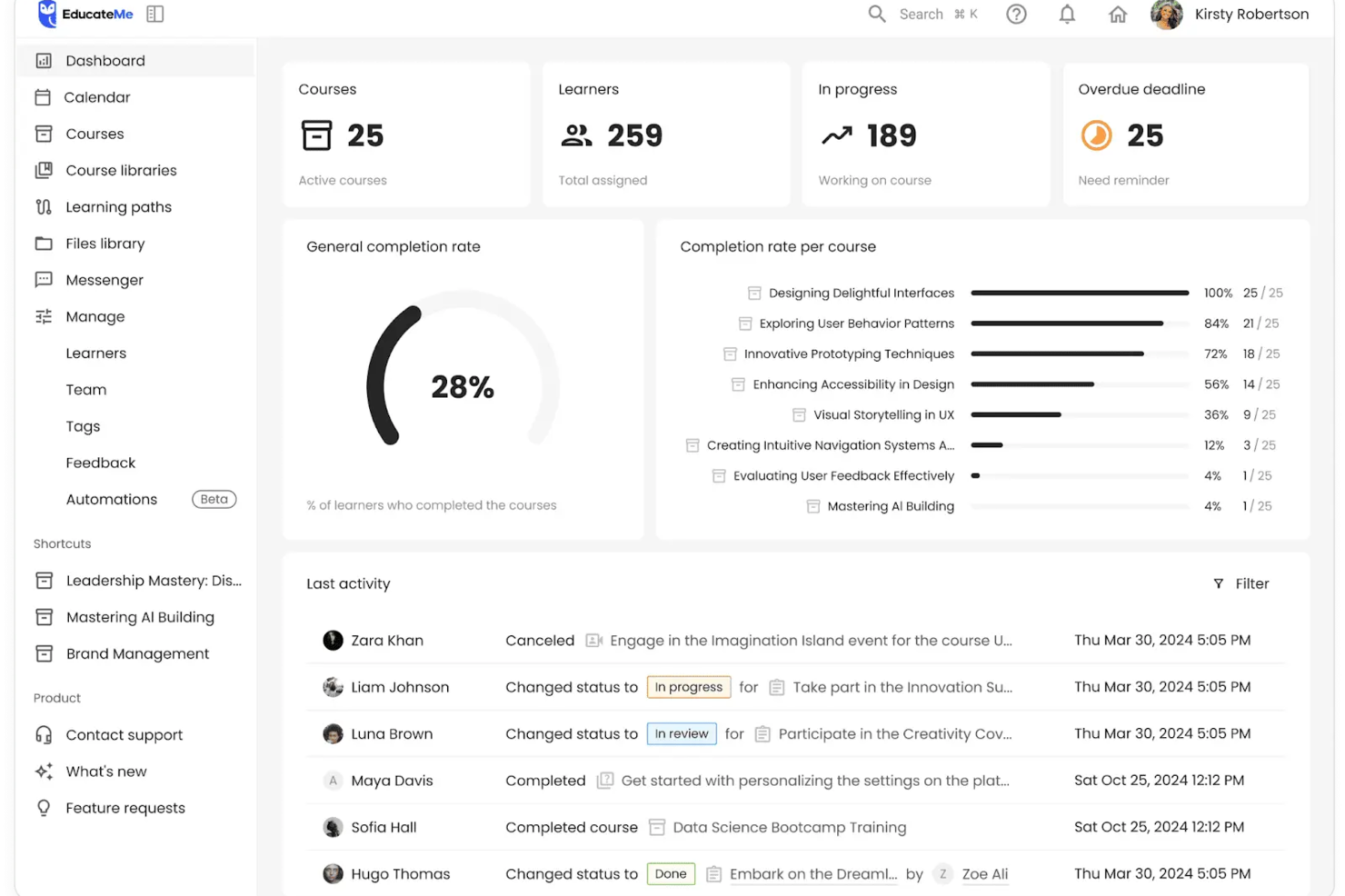
EducateMe offers a dynamic solution for organizations seeking to enhance their learning and development initiatives through an AI-driven platform. Tailored to meet the diverse needs of sectors such as corporations, academies, and training agencies, it addresses the challenges of employee training, onboarding, and compliance. By focusing on collaborative learning and integrating advanced analytics, EducateMe empowers your team to create and manage impactful educational experiences.
Why I Picked EducateMe
I chose EducateMe because it satisfies the need for data-driven decision-making for enterprises. Its reporting engine allows leaders and managers to see exactly where employees are struggling in real-time, rather than waiting for end-of-course assessments. This level of oversight is important for maintaining training ROI and operational efficiency. Additionally, it has a unique ability to integrate AI-driven roleplay coaching, providing interactive and personalized learning experiences.
EducateMe Key Features
In addition to its AI-driven roleplay coaching and analytics, I also found other features that enhance the platform's value for enterprises:
- Content Creation Tools: Enable your team to develop and customize courses, ensuring training materials align with organizational goals.
- White-Label Options: Allow you to brand the LMS platform to reflect your organization's identity, enhancing brand consistency.
- Collaborative Learning: Facilitates group interactions and discussions, promoting a culture of continuous learning and knowledge sharing.
- Automation: Lets you automate repetitive tasks like enrollments, reminders, and course assignments using a simple workflow builder.
EducateMe Integrations
Integrations include Google Workspace, Slack, Zoom, Salesforce, Figma, Calendly, and more. Additionally, EducateMe offers API access for custom integrations.
Pros and Cons
Pros:
- Built-in generative AI tools
- Clean and modern interface
- Real-time engagement dashboards
Cons:
- No native mobile app
- Limited gamification options
SkyPrep
Best for user experience and support

SkyPrep is built for companies that want a simple way to create and manage employee training without a steep learning curve. It’s best suited for teams that need to deliver courses quickly, keep learners engaged, and track progress in a clear, actionable way.
Why I Picked SkyPrep
I picked SkyPrep because it gives you practical tools to build training programs that people actually complete. You can create courses using videos, quizzes, and other interactive content your team can navigate without extra guidance.
I also like that you can set automated training paths so new hires or specific departments receive the right content at the right time. Its leaderboard and badge features keep learning engaging by adding light competition across your team, and the built-in progress tracking also helps you identify who needs support and which courses may require updates.
SkyPrep Key Features
Here are some standout features worth highlighting:
- Role-Based Automations: Assign courses automatically based on job role, location, or department.
- Custom Course Builder: Combine videos, documents, quizzes, and assessments in a single guided learning path.
- Advanced Progress Tracking: View course completion rates, quiz performance, and learner activity at a glance.
- Webinar Hosting Tools: Connect live sessions to your courses using integrated virtual meeting options.
SkyPrep Integrations
Integrations include Okta, SAML, OneLogin, ADP, Workday, Salesforce, HubSpot, Zoom, Webex, and G Suite.
Pros and Cons
Pros:
- Keeps your content as you upgrade plans
- Ecommerce tools to monetize courses
- Automated learning paths reduce manual admin work
Cons:
- Cannot save progress with certain types of documents
- No certificate auto generation
Tovuti
Best for AI-generated course creation assistance
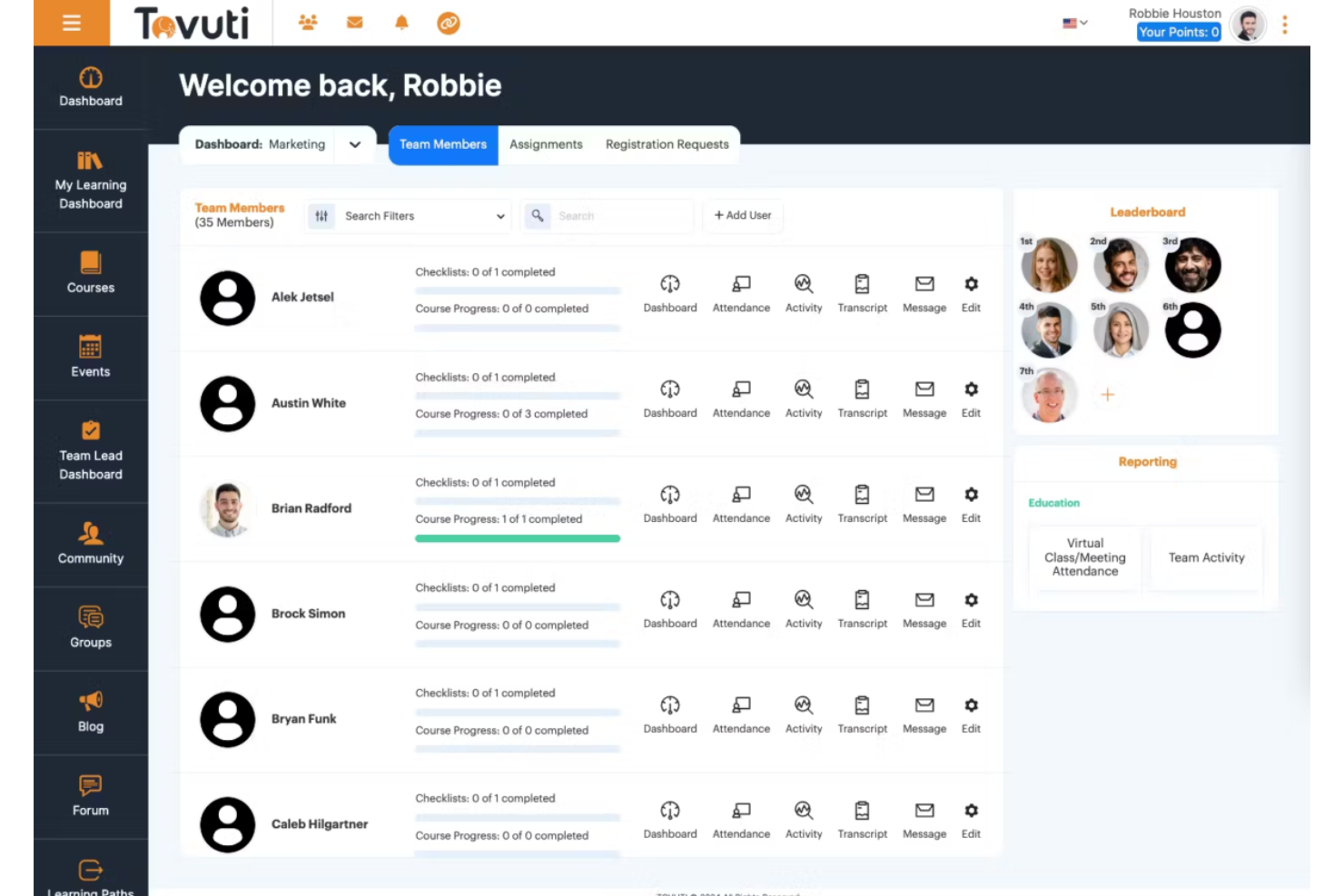
Tovuti is a comprehensive Learning Management System (LMS) designed to serve a wide range of educational and training needs for enterprises. As a robust online platform, Tovuti provides tools for creating, delivering, and managing educational content, making it an ideal solution for corporate training, educational institutions, and professional development programs.
Why I picked Tovuti: I particularly like Tovuti's AI assistant, Dizi, which allows users to create entire courses, quizzes, and lessons in just a few clicks, making it highly efficient for enterprise training and development needs. Additionally, Tovuti's extensive suite of LMS management tools, including user management, reporting, and analytics, ensures that enterprises can efficiently oversee their training programs. The platform's scalability and customization options further help large organizations with complex training needs.
Tovuti Standout Features and Integrations:
Standout features include its Learning Experience Platform (LXP), which provides a personalized learning journey for each user, fostering engagement and retention. It also offers an onboarding program to help users set up the platform, including step-by-step videos. Furthermore, Tovuti has over 30,000 pre-built courses, a mobile app for on-the-go learning, and various gamified and interactive tools.
Integrations include Salesforce, Zoom, Google Workspace, Microsoft Teams, LinkedIn Learning, PayPal, Stripe, Zapier, Slack, Shopify, HubSpot, Mailchimp, and BambooHR.
Pros and Cons
Pros:
- Good mobile learning experience
- Wide range of features include gamification and social learning
- Extensive customization options
Cons:
- Initial setup and implementation can be time consuming
- The backend of the system can be complex

Best for tracking and analyzing learner metrics

Kallidus Learn is an enterprise learning management system (LMS) that's designed to make the learning process more engaging and effective for employees. It's a cloud-based platform that offers a wide range of features, including course authoring, learning paths, and reporting tools. It's a comprehensive solution for businesses looking to streamline their training and development processes.
Why I picked Kallidus Learn: I chose Kallidus Learn for its comprehensive reporting and analysis features. Administrators can generate detailed reports on learner progress, course completion rates, and assessment results.The platform also offers customizable dashboards and visualizations, allowing administrators to track key metrics and identify trends or areas for improvement.
Kallidus Learn utilizes adaptive algorithms and data-driven insights to create personalized learning paths for individual users. This means that each employee's learning experience is tailored to their specific needs, skills, and learning preferences. Unlike many other LMS platforms that offer standardized courses, Kallidus Learn adapts the content and progression to suit the learner's unique.
Kallidus Learn Standout Features and Integrations:
Standout features include the learning paths feature, which enables you to create personalized learning journeys for your employees, boosting engagement and motivation. Kallidus Learn also provides a mobile app that allows users to download course materials and complete training modules offline, ensuring uninterrupted learning even when an internet connection is not available.
Kallidus Learn allows users to create and share their own content, such as articles, videos, and tutorials. This empowers subject matter experts within the organization to contribute their knowledge directly to the learning ecosystem. Most LMS competitors do not offer such a robust feature for user-generated content creation and sharing.
Integrations include LinkedIn, Slack, G Suite, Asana, Greenhouse, Jira, Okta, Workday, APD, and JazzHR
Pros and Cons
Pros:
- Support team is responsive and supportive
- Easy back end management
- Caters to all learning styles
Cons:
- Notifications are not customizable
- Course catalogue can be difficult to navigate
Andre systemer for læringsadministrasjon for virksomheter
Her er noen flere alternativer for systemer for læringsadministrasjon for virksomheter som ikke kom med på kortlisten min, men som likevel er verdt å undersøke:
- Docebo
AI-based learning management system with accessibility accomodations
- eloomi
All-in-one learning and development platform
- MedTrainer
For healthcare-specific training
- Litmos LMS
Scalable learning management system
- Moodle LMS
MS with a branded mobile app
- SAP Enterprise Learning
LMS for an advanced content authoring environment
- Cornerstone LMS
Unified learning management system
- Seismic Enablement Cloud
Learning management system for customer-facing teams
- CYPHER Learning
For expert guidance via Solution Architects
- Brainier LMS
Learning management system for mobile-friendly access
- Deel HR
For distributed global teams
- Connecteam
For creating mobile-friendly internal training courses
- Exec
For AI roleplays
- eFront
LMS for complex learning
- LearnUpon
LMS for driving employee engagement
- 360Learning
LMS for blended and collaborative learning
- WorkRamp
LMS for customer training
- D2L Wave
LMS platform for professional development
- Skillcast
LMS for mandatory compliance training


How I Evaluate Enterprise Learning Management Systems
I split my evaluation into core requirements every enterprise LMS must clear—compliance automation, user provisioning at scale, SCORM support—and the differentiators that determine the best fit.
Core Functionality (Table Stakes For This List)
When I'm selecting tools for my list, I rank each one on a scale from 0 (does not offer the functionality) to 5 (excels in this area) for each core functionality listed below. Then, I calculate the tool's total score into a percentage. Each tool needs to achieve a minimum total score of 65% to be considered for inclusion.
- Course Authoring & Content Management: I check whether the platform supports SCORM and xAPI imports alongside built-in authoring, so teams can mix third-party courseware with custom-built modules in one library.
- Learning Path & Curriculum Design: Each tool's ability to sequence courses into role-based paths with prerequisites matters—like onboarding tracks that branch by department or job level.
- Enterprise-Scale User Management: I evaluate how the platform handles bulk provisioning, delegated admin, and multi-tenant setups for organizations managing learners across dozens of business units.
- Compliance & Certification Tracking: Automated renewal reminders, expiry workflows, and audit-ready logs are what I look for, especially for teams managing recurring safety or regulatory training.
- Reporting & Learning Analytics: The platform should offer configurable dashboards and exportable reports that go beyond basic completion rates to show assessment performance and progress by group.
- HRIS & Enterprise System Integrations: Native connectors to major HCM platforms and SSO providers matter here, along with open APIs that let your team sync learner data without manual imports.
Once I have a list of tools that meet this criteria, I consider what sets each platform apart.
Differentiating Factors (What Sets Vendors Apart)
Here's how I compare and contrast different vendors:
Standout Features
Skills and competency mapping is a major differentiator. I look for platforms that connect course completions to role-based skill profiles, so L&D teams can pinpoint gaps and target upskilling precisely. AI-driven content recommendations also matter, especially when learners span dozens of departments and career tracks. For organizations with frontline or deskless workers, mobile apps with offline access make a real difference. I also evaluate extended enterprise portals that let you train partners or customers through separate, branded experiences.
Beyond Features
Enterprise LMS rollouts often span thousands of users, so I evaluate each vendor's implementation support—structured onboarding programs and migration services can make or break adoption. Security and data privacy certifications like SOC 2 Type II and ISO 27001 are equally important, especially when employee learning records flow between systems. I also consider pricing transparency, checking whether implementation, support, and content marketplace access are bundled or billed as extras that inflate the total cost of ownership over time.
Slik velger du systemer for læringsadministrasjon for virksomheter
Det er lett å gå seg vill i lange funksjonslister og komplekse prismodeller. For å hjelpe deg med å holde fokus mens du arbeider deg gjennom den unike programvareutvelgelsen din, får du her en sjekkliste over faktorer du bør ha i tankene:
| Faktor | Hva du bør vurdere |
|---|---|
| Skalerbarhet | Kan systemet vokse sammen med teamet ditt? Se etter løsninger som støtter et økende antall brukere og kurs uten en betydelig økning i kostnader eller kompleksitet. |
| Integrasjoner | Fungerer det med verktøyene du allerede bruker? Sørg for kompatibilitet med HR-systemer, kommunikasjonsplattformer og annen viktig programvare for å effektivisere arbeidsflyten. |
| Tilpasningsmuligheter | Kan du tilpasse systemet etter behovene dine? Vurder om plattformen tillater justeringer av merkevarebygging, kursinnhold og brukerroller slik at det samsvarer med organisasjonens mål. |
| Brukervennlighet | Er det intuitivt for brukere på alle ferdighetsnivåer? Ta hensyn til læringskurven for både administratorer og deltakere, og se etter brukervennlige grensesnitt. |
| Implementering og oppstart | Hvor raskt kan du komme i gang? Vurder tiden og ressursene som kreves for oppsettet, inkludert opplæring og støttemateriell fra leverandøren. |
| Kostnad | Hva er de totale eierkostnadene? Se utover den opprinnelige prisen og ta med mulige tillegg, vedlikeholdsgebyrer og fornyelseskostnader for å unngå uventede budsjettoverskridelser. |
| Sikkerhetstiltak | Er data og brukernes personvern beskyttet? Kontroller at løsningen følger bransjestandarder, for eksempel GDPR, og undersøk datakryptering og tilgangskontroller. |
| Etterlevelseskrav | Oppfyller systemet bransjespesifikke regler? Sørg for at det støtter nødvendig opplæring i etterlevelse og rapportering for din sektor. |
Hva er et læringsstyringssystem for virksomheter?
Et læringsstyringssystem for virksomheter er et verktøy som hjelper store selskaper med å levere, administrere og spore interne opplærings- og utdanningsprogrammer fra én enkelt plattform. Viktige funksjoner omfatter verktøy for oppretting og administrasjon av kurs, biblioteker med multimediainnhold, vurderingsverktøy og fremdriftsrapporter.
De brukes vanligvis av store selskaper, offentlige etater og utdanningsinstitusjoner for å effektivisere læringsprosessen for ansatte, studenter eller medlemmer.
Et læringsstyringssystem for virksomheter kan effektivisere alle deler av den interne opplæringsprosessen, fra levering av nettkurs til sporing av fremdrift, samtidig som det ivaretar brukernes ulike læringsbehov og mål for faglig utvikling.
Viktige funksjoner
Når du velger læringsstyringssystemer for virksomheter, bør du se etter følgende viktige funksjoner:
- Kursadministrasjon: Organiser, lever og spor et bredt utvalg av kurs og læringsmateriell i hele organisasjonen, slik at de ansatte enkelt kan få tilgang til opplæring når og hvor de trenger det.
- Bruker- og rolleadministrasjon: Opprett brukerprofiler, tildel læringsstier basert på roller eller avdelinger, og styr tilgangen slik at de rette personene får riktig opplæring – uten at du må holde styr på endeløse regneark.
- Vurderings- og testverktøy: Lag quizer, eksamener og kompetansekontroller for å måle læringsfremdriften og se hvilken kunnskap som faktisk sitter (og hvor det kan være behov for oppfriskningskurs).
- Rapportering og analyse: Generer detaljerte rapporter om kursgjennomføring, deltakernes fremdrift og engasjement, slik at du kan se hva som fungerer – eller oppdage når noen står fast uten å si fra.
- Innholdsintegrasjon: Ta enkelt i bruk SCORM, xAPI og andre standardiserte innholdsformater, slik at du kan bruke eksisterende materiell eller blande inn nytt, interaktivt innhold etter behov.
- Tilgjengelighet på mobile enheter: Gi teamet fleksibilitet til å få tilgang til læringsmoduler fra telefoner eller nettbrett, slik at introduksjon og kompetanseheving aldri blir bundet til en skrivepult.
- Administrasjon av etterlevelse: Spor obligatorisk opplæring, automatiser påminnelser om sertifiseringer og før grundige registre, slik at revisjoner går smidig – uten panikk rundt etterlevelse i siste liten.
- Samarbeidsverktøy: Legg til rette for diskusjonsfora, gruppearbeid og delte prosjekter for samarbeid i praksis, slik at teamet kan lære og knytte kontakter samtidig.
- Integrasjon med HR- og produktivitetsverktøy: Koble til andre plattformer (for eksempel HR-programvare eller produktivitetsapper), slik at opplæring blir en del av den sømløse arbeidsflyten i stedet for en isolert oppgave.
Vanlige AI-funksjoner i læringsstyringssystemer for virksomheter
I tillegg til standardfunksjonene i læringsstyringssystemer for virksomheter som er nevnt ovenfor, tar mange av disse løsningene i bruk AI med funksjoner som:
- Personlige læringsstier: Bruk kunstig intelligens til å anbefale tilpassede kurs og ressurser for hver enkelt elev, og juster innholdet basert på fremgang, mål og ferdighetshull – slik at alle ansatte i praksis får en opplæringsplan som føles skreddersydd.
- Automatisert innholdskuratering: La kunstig intelligens skanne og organisere enorme innholdsbiblioteker, presentere de mest relevante materialene og holde opplæringsressursene oppdaterte uten at du må lete etter dem manuelt.
- Smart vurderingsanalyse: Bruk kunstig intelligens til å gjennomgå svar på quizer og tester, og oppdage mønstre i feil eller styrker, slik at du kan gi målrettede tilbakemeldinger og forbedre læringsresultatene mer effektivt.
- Chatboter med naturlig språk: Tilby umiddelbar, kunstig intelligens-drevet støtte som hjelper elever med å finne svar, løse problemer eller bli veiledet gjennom moduler – ikke mer venting på menneskelig hjelp for hvert lille spørsmål.
- Prediktiv analyse: Kunstig intelligens analyserer data om engasjement og prestasjoner for å forutsi fremtidige opplæringsbehov eller identifisere ansatte som står i fare for å sakke akterut, slik at du kan handle før problemene vokser.
Fordeler
Implementering av et læringsstyringssystem for virksomheter gir flere fordeler for teamet og virksomheten din. Her er noen av fordelene du kan se frem til:
- Mer effektiv opplæring: Automatiserer levering og sporing av kurs, noe som sparer tid og ressurser for opplæringsteamet.
- Bedre etterlevelse: Sørger for at organisasjonen oppfyller bransjestandarder med funksjoner for sporing av etterlevelse.
- Personlige læringsopplevelser: Tilpassbare læringsstier ivaretar individuelle behov og øker elevenes engasjement og tilfredshet.
- Datadrevet innsikt: Rapportering og analyse gir handlingsrettet innsikt som kan brukes til å videreutvikle og forbedre opplæringsprogrammene.
- Fleksibilitet og tilgjengelighet: Mobil tilgang gjør det mulig for elever å bruke innhold når som helst, noe som gjør læringen mer praktisk.
- Økt engasjement: Interaktivt innhold holder elevene motiverte og involverte i opplæringen.
- Sentralisert administrasjon: Samler opplæringsmateriell og brukerdata på én plattform, noe som forenkler administrasjon og oppfølging.
Kostnader og priser
Valg av et læringsstyringssystem for virksomheter krever en forståelse av de ulike prismodellene og abonnementene som er tilgjengelige. Kostnadene varierer basert på funksjoner, teamstørrelse, tillegg og mer. Tabellen nedenfor oppsummerer vanlige abonnementer, gjennomsnittsprisene deres og typiske funksjoner som er inkludert i løsninger for læringsstyringssystemer for virksomheter:
Sammenligningstabell for læringsstyringssystemer for virksomheter
| Abonnementstype | Gjennomsnittspris | Vanlige funksjoner |
|---|---|---|
| Gratisabonnement | $0 | Begrenset oppretting av kurs, grunnleggende brukeradministrasjon og minimal rapportering. |
| Personlig abonnement | $5-$25/bruker/måned | Tilgang til standard kursbiblioteker, grunnleggende analyse og mobil tilgang. |
| Bedriftsabonnement | $25-$50/bruker/måned | Avansert rapportering, integrasjonsmuligheter, tilpassbare læringsstier og interaktivt innhold. |
| Virksomhetsabonnement | $50-$100/bruker/måned | Omfattende sporing av etterlevelse, personlig støtte, omfattende integrasjoner og fullstendige tilpasningsmuligheter. |
Vanlige spørsmål om læringsstyringssystemer for virksomheter
Her er noen svar på vanlige spørsmål om læringsstyringssystemer for virksomheter:
Hva er forskjellen mellom et LMS for virksomheter og et vanlig LMS?
LMS for virksomheter er utviklet for store organisasjoner med komplekse opplæringsbehov, flere avdelinger, global virksomhet og krav til skalerbarhet. Det tilbyr vanligvis avanserte integrasjoner (HRIS, CRM, ERP), støtte for flere leietakere, avansert rapportering og sporing av etterlevelse. Et vanlig LMS er mer grunnleggende og fokuserer på sentrale opplæringsfunksjoner som oppretting av kurs, brukeradministrasjon og sporing av fremdrift, vanligvis for små og mellomstore bedrifter.
Hvordan måles avkastningen på et LMS for virksomheter?
Avkastningen på et LMS for virksomheter måles vanligvis ved å evaluere opplæringens innvirkning på ansattes prestasjoner, produktivitet, oppbevaring og etterlevelsesgrad. Organisasjoner følger med på beregninger som reduserte opplæringskostnader, raskere introduksjon av nyansatte, bedre salgsresultater eller færre brudd på krav om etterlevelse. Avanserte LMS-plattformer tilbyr analyser som knytter læringsresultater til viktige KPI-er for virksomheten, noe som gjør det enklere å dokumentere konkret forretningsverdi. Over tid kan avkastningen også vurderes gjennom høyere medarbeiderengasjement og lavere gjennomtrekk som følge av bedre muligheter for karriereutvikling.
Hva er forskjellen mellom et ERP-system og et LMS?
Et system for ressursplanlegging for virksomheter (ERP) er en sentralisert plattform som administrerer kjerneprosesser i virksomheten, som økonomi, HR, forsyningskjede og drift. Et læringsstyringssystem (LMS) er derimot spesifikt utviklet for å levere, følge opp og administrere opplærings- og utviklingsprogrammer for ansatte. Mens ERP-systemer fokuserer på driftseffektivitet og ressursstyring, fokuserer LMS-plattformer på å forbedre de ansattes ferdigheter, etterlevelse og organisasjonens kunnskap. Noen ERP-systemer kan integreres med LMS-plattformer for å samordne opplæringsdata med den overordnede styringen av arbeidsstyrken.