

10 beste læringsstyringssystemer for bedrifter i 2026

10 De beste bedriftsbaserte læringsplattformene – kortliste


De beste læringsplattformene for bedrifter hjelper HR- og læringsansvarlige med å levere konsistent og skalerbar opplæring i hele organisasjonen – enten det gjelder introduksjon av nyansatte, etterlevelse av regelverk eller utvikling av medarbeidernes ferdigheter for langsiktig vekst.
Hvis du fortsatt er avhengig av regneark, e-postpåminnelser eller utdaterte verktøy for å administrere opplæring, sliter du sannsynligvis med ineffektivitet, lavt engasjement og begrenset innsikt i læringsresultatene. Eller kanskje du allerede har en LMS, men den er tungvint, vanskelig å tilpasse og gir ikke resultatene teamet ditt trenger.
I denne veiledningen deler jeg de beste læringsplattformene for bedrifter, basert på min praktiske erfaring med å administrere interne opplæringsprogrammer i 9 år og evaluere L&D-verktøy i over 3 år. Målet mitt er å hjelpe deg med å skille det viktige fra støyen og finne en løsning som virkelig dekker behovene dine innen læring og utvikling.
Hvorfor du kan stole på våre programvareanbefalinger
Teamet vårt har testet og anmeldt programvare siden 2012. Vi er selv HR-eksperter, så vi vet hvor vanskelig og hvor viktig det er å velge riktig programvare.
I denne guiden har vi vurdert verktøyene gjennom praktisk testing og uavhengig research og gitt dem poeng ut fra våre utvelgelseskriterier. Vi bygger også på innsikt fra ledende eksperter i bransjen og erfarne HR-eksperter.
Anmeldelsene våre bygger på vår egen redaksjonelle vurdering. De er ikke et salgsargument.
Ekspertanmeldere:
Sammenligningstabell for bedriftsbaserte LMS-systemer
Denne sammenligningstabellen oppsummerer prisdetaljene for mine utvalgte LMS-systemer for bedrifter:
| Tool | Best For | Trial Info | Price | ||
|---|---|---|---|---|---|
| 1 | Best AI-powered learning management system for global teams | Free demo available | From $5/employee/month | Website | |
| 2 | Best for customized LMS solutions | Free demo available | Pricing upon request | Website | |
| 3 | Best for role-based training delivery | Free plan + free demo available | From $119/month (billed annually) | Website | |
| 4 | Best for dynamic content creation workflows | Free demo available | Pricing upon request | Website | |
| 5 | Best for role-specific training for performance | Free trial available | From $3.97/user/month (billed annually) | Website | |
| 6 | Best for a holistic learning management software solution | Free demo available | Pricing upon request | Website | |
| 7 | Best cloud-based LMS with an auto-enrollment feature | Free demo available | Pricing upon request | Website | |
| 8 | Best corporate learning management system for ease of use | Free trial available | Pricing upon request | Website | |
| 9 | Best for AI-assisted course building at speed | Free plan available | From $8/user/month (billed annually) | Website | |
| 10 | Best for AI roleplay coaching | Free demo available | Pricing upon request | Website |


Anmeldelser av de beste læringsplattformene for bedrifter
Utforsk hver LMS i detalj for å finne den som passer best til opplæringsmålene dine. Jeg har fremhevet de viktigste bruksområdene, fremragende funksjoner og øyeblikksbilder av brukergrensesnittene for å hjelpe deg med å sammenligne verktøyene på et øyeblikk.

Deel HR
Best AI-powered learning management system for global teams

Deel HR gives global organizations a unified platform to manage employee learning, compliance, and HR processes, making it easier for distributed teams to deliver, track, and optimize corporate training across multiple countries and languages.
Who Is Deel HR Best For?
Deel HR is a strong fit for mid-size to enterprise companies managing internationally distributed workforces who need learning and HR tools that work across borders.
Why I Picked Deel HR
I've included Deel HR in my top picks because I love how its AI-powered LMS is built directly into the same platform your team already uses for HR, payroll, and onboarding. The AI course builder lets you generate a first draft of a training course in minutes—just describe the topic, and Deel HR scaffolds the content for you, which I find genuinely useful when you're rolling out compliance training across multiple countries at once. What I also appreciate is the automated course assignment logic: you set rules based on hire date, role, or department, and the right training reaches the right people without any manual follow-up. For global HR teams, that kind of automation across 150+ countries is where Deel HR really earns its place on this list.
Deel HR Key Features
- OpenSesame course library integration: Connect your OpenSesame account to access thousands of ready-made courses directly alongside your custom content in one place.
- Multi-format course builder: Build courses using a drag-and-drop editor that supports video, quizzes, PDFs, tasks, surveys, and PowerPoint files in a single course.
- Learning analytics dashboard: Track completion rates, active learning time, quiz pass/fail rates, and assessment scores across your entire workforce.
- Self-directed learning access: Let employees browse the learning library, enroll in courses independently, and track their own progress from their Deel home page.
Deel HR Integrations
Integrations include FaceUp, Snowflake, DefensX, Microsoft Finance, Kintsugi, ReFresh OS, Revo.ai, Keeper, Human Interest, and Everyminute.
Pros and Cons
Pros:
- Performance/career modules may require extra setup effort
- All-in-one suite may be more than needed for simple LMS only
- Provides dashboards for learning completion and skills gaps
- Combines learning, performance and career planning in one tool
- Automates training assignments based on hire date or role
New Product Updates from Deel HR

Deel Expands Stablecoin Wallet to 80+ Countries
Deel expands its Stablecoin Wallet to 80+ countries with dollar-backed balances and optional rewards. This gives eligible contractors more ways to hold and manage earnings inside Deel. For more information, visit Deel’s official site.
 .
.

Synergy Learning partners with organizations that need a tailored approach to corporate learning, helping HR teams and L&D professionals deliver engaging, scalable training experiences that fit unique business requirements.
Who Is Synergy Learning Best For?
Synergy Learning is a strong fit for mid-size to enterprise organizations that need a fully customized LMS built around their specific workflows, branding, and compliance requirements.
Why I Picked Synergy Learning
I've included Synergy Learning in my top picks because its level of customization goes well beyond what most off-the-shelf LMS platforms can deliver. Rather than fitting your organization into a fixed template, Synergy Learning works with you to design the platform around your specific workflows, branding, and learning goals. I particularly like the Spark LMS theme, which lets teams apply full custom branding without bespoke development. The bespoke development service also means you can build custom workflows and personalized learning pathways—something I've found especially useful when onboarding across multiple departments with different training requirements.
Synergy Learning Key Features
- Compliance training automation: Set up automated enrolment, reminders, and deadline alerts to keep learners on track with mandatory training requirements.
- Multi-tenancy support: Create separate learning environments for different departments, divisions, or subsidiaries within a single platform instance.
- Custom report builder: Schedule and automatically deliver tailored reports to decision-makers using Moodle Workplace's built-in tools.
- AI-assisted content creation: Generate text and images directly in the LMS editor, with learner-created content logged automatically for admin review.
Synergy Learning Integrations
Integrations include Moodle, Totara, and LearnUpon, and an API is available for custom connections.

Best for role-based training delivery

TalentLMS is a cloud-based learning management system built for businesses that need to deliver, track, and manage corporate training across different teams, departments, or locations.
Who Is TalentLMS Best For?
TalentLMS is suitable for mid-sized businesses and growing companies that need to train multiple employee groups with different learning needs.
Why I Picked TalentLMS
TalentLMS stands out for handling role-based training delivery at scale. I particularly like the Branches feature, which lets me create separate training environments for different departments or teams, each with its own branded portal, content, and user base, all managed from one central admin view. Custom roles and permissions let me give instructors, managers, and learners exactly the access they need without overlap. With group-based course assignments, rolling out targeted training to specific employee segments is straightforward.
TalentLMS Key Features
- SCORM and xAPI support: Import and run SCORM, xAPI, and cmi5 content packages directly within the platform.
- Automated course completion rules: Set conditions that automatically mark courses complete based on learner activity or assessment scores.
- Built-in assessment builder: Create tests, quizzes, and surveys directly in the platform without needing a third-party tool.
- Gamification: Add points, badges, leaderboards, and levels to training courses to drive learner engagement.
TalentLMS Integrations
Integrations include BambooHR, Salesforce, ADP Workforce Now, Zoom, Microsoft Teams, GoTo, Shopify, WooCommerce, LinkedIn Learning, and OpenSesame.
Pros and Cons
Pros:
- Automation rules reduce repetitive administrative training tasks significantly.
- User groups and branches support complex organizational hierarchies well.
- Clear course structure helps teams follow assigned learning paths easily.
Cons:
- Video hosting relies on external storage for larger media files.
- Visual course editor feels limited compared with modern drag-and-drop tools.
New Product Updates from TalentLMS
TalentLMS Adds Learning Paths, AI Video, and Learner Experience Updates
TalentLMS introduced updates across learning management, content creation, and learner experience, including Learning Paths for Groups, AI video generation in TalentCraft, video bookmarking, and expanded administration tools. For more information, visit TalentLMS’s official site.

Continu
Best for dynamic content creation workflows
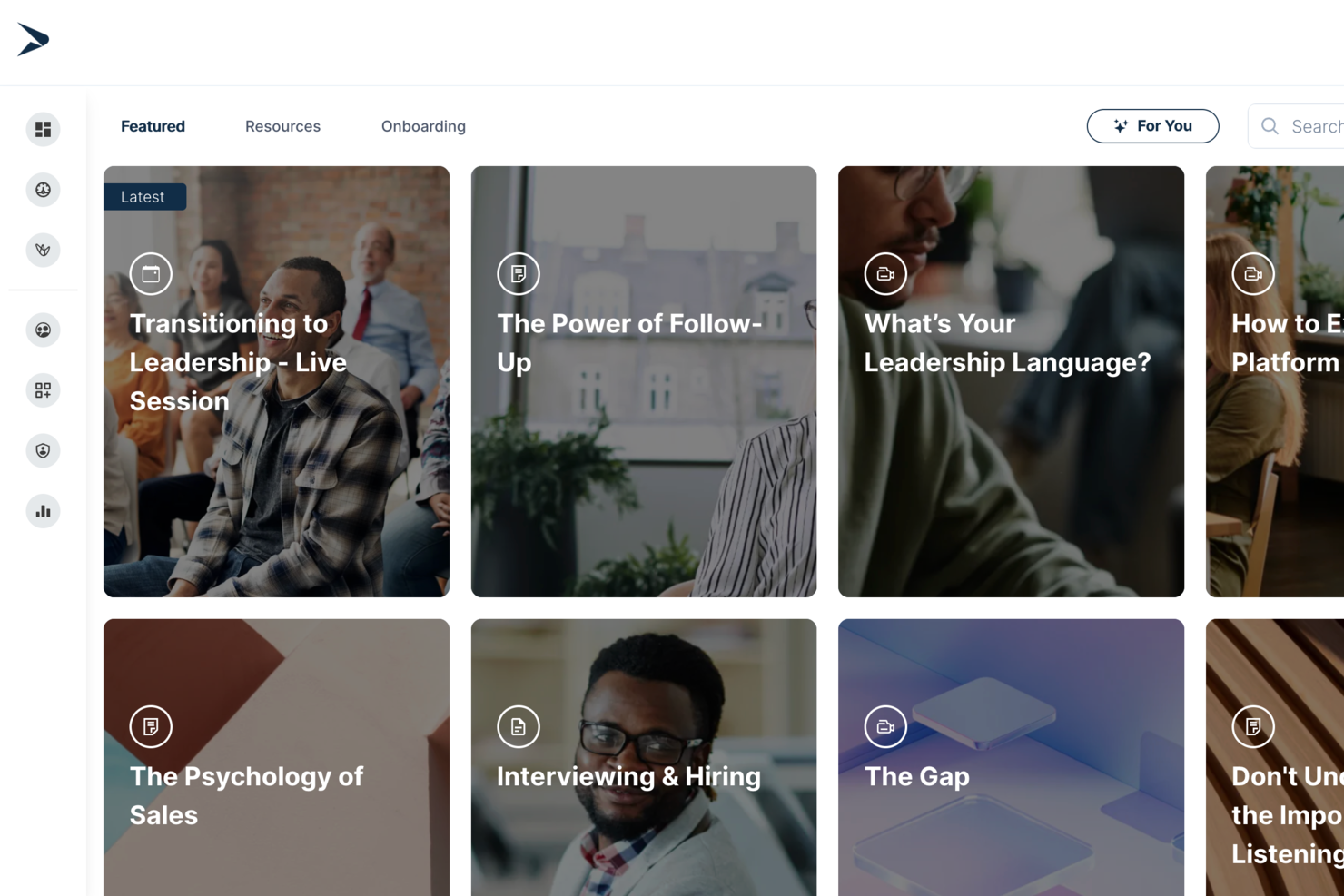
Continu is a corporate learning management system that lets teams author, organize, deliver, and track training content with interactive modules, analytics, onboarding workflows, and support for various learning formats.
Who Is Continu Best For?
Continu is a strong fit for mid-sized to enterprise companies that need a centralized platform to manage employee training, onboarding, and continuous learning programs.
Why I Picked Continu
I've included Continu in my top picks because its content authoring workflow is genuinely built for L&D teams who need to move fast. I love that subject matter experts can build, preview, and publish courses directly in the platform using a WYSIWYG editor without looping in designers. The AI-assisted authoring generates outlines, adjusts tone, and auto-tags content on publish. When a policy changes, you update once and it deploys across every Learning Track or Journey instantly.
Continu Key Features
- Smart Segmentation™: Set rules-based filters to automatically deliver the right training content to the right learners by role, region, or product line.
- Badges and certifications: Award learners digital credentials upon course or program completion to validate knowledge and track compliance.
- Workshops: Schedule and host in-person or virtual instructor-led training sessions directly within Continu, with support for Zoom, Microsoft Teams, and Google Meet.
- Learning Tracks: Group multiple content types into structured, course-style paths that learners move through in a defined sequence.
Continu Integrations
Continu offers native integrations with Workday, BambooHR, Rippling, UKG, Okta, Microsoft Teams, Slack, Zoom, SAP SuccessFactors, and Google Workspace. An API is available for custom integrations.
Pros and Cons
Pros:
- Seamless HRIS and collaboration tool integrations
- Real-time analytics dashboard for engagement insights
- Automated training assignment via smart segmentation
Cons:
- Fewer prebuilt content templates than some rivals
- Some advanced analytics require higher-tier plans
New Product Updates from Continu
Continu Adds Smarter Content Management
Continu adds Intelligent Tagging and Descriptions and richer content details to improve how learning content is organized and maintained. These updates reduce manual work and give teams more consistent, detailed content records. For more information, visit Continu’s official site.
 .
.
Best for role-specific training for performance
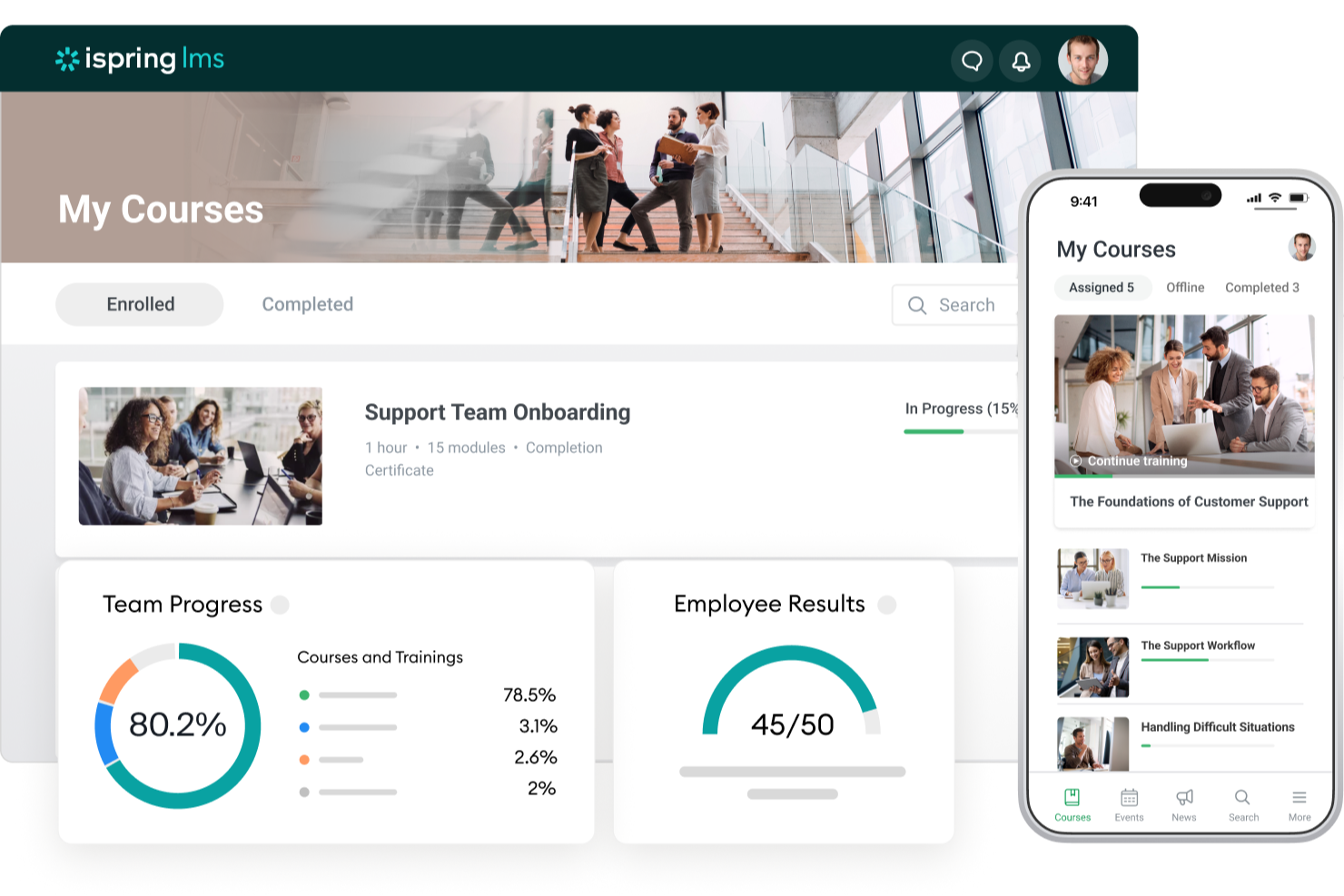
iSpring LMS gives HR teams and business leaders a platform to deliver, track, and manage corporate training programs tailored to different roles, making it easier to support compliance, onboarding, and ongoing employee development.
Who Is iSpring LMS Best For?
iSpring LMS is a strong fit for mid-sized to large organizations that need structured, role-based training programs across departments like sales, customer service, and operations.
Why I Picked iSpring LMS
iSpring LMS earns its spot on my shortlist because of how well it connects role-specific learning paths to actual performance outcomes. I like that you can assign training tracks based on job role, department, or position, so a new sales rep and a compliance officer aren't sitting through the same generic content. The built-in performance review tools let me tie learning progress directly to employee goals, which makes it easier to see whether training is actually moving the needle. I also use the detailed reporting to track completion rates and assessment scores by role, which gives me real data to bring into performance conversations.
iSpring LMS Key Features
- AI-powered course authoring: Build scrollable courses with AI-generated text, quiz questions, images, and translations directly inside the LMS—no technical skills needed.
- Gamification: Employees earn points and badges and track their progress on leaderboards to reinforce engagement during training.
- Knowledge base: Store corporate guides, FAQs, and resources in a centralized, cloud-based hub with role-based access controls.
- Mobile app: A native iOS and Android app lets learners complete training offline, with progress automatically synced when they reconnect.
iSpring LMS Integrations
Integrations include Salesforce, MS Azure, MS Exchange, BambooHR, Udemy, Go1, LinkedIn Learning, and other popular course libraries.
Pros and Cons
Pros:
- Strong reporting for tracking lesson-level engagement
- Learning paths enforce structured, sequential training progression
- Includes iSpring Suite for advanced course and quiz creation
Cons:
- Custom branding options cost extra on lower-tier plans
- Limited native integrations compared to larger enterprise LMS platforms
New Product Updates from iSpring LMS

iSpring LMS Adds Multiple Observations to OJT Sessions
iSpring LMS now lets managers log multiple observations within one OJT session, grouping visits and auto-generating summary stats like averages, criterion results, and comparisons. For more information, visit iSpring LMS's official site.
Absorb
Best for a holistic learning management software solution

Absorb LMS gives HR teams and corporate trainers a flexible platform to deliver, track, and manage employee learning, compliance, and development programs across industries and business sizes.
Who Is Absorb LMS Best For?
Absorb LMS is a strong fit for mid-size to enterprise organizations that need a scalable learning platform to support both employee training and extended enterprise use cases.
Why I Picked Absorb LMS
Absorb LMS earns its spot as one of the best on my shortlist because it covers the full learning lifecycle in a single platform—from AI-powered course creation to compliance tracking to extended enterprise training. What I like most is Absorb Create, which uses generative AI to build entire courses, complete with quizzes, narration, and videos, in minutes. That saves time when my team needs to roll out training across multiple departments on tight timelines. I also rely heavily on the reporting suite—pre-built templates for learner progress, course completions, and certifications mean I can schedule automated reports straight to department heads without any manual data pulls.
Absorb LMS Key Features
- Learner portal: A personalized, branded homepage where employees can browse, enroll in, and track their assigned and elective courses.
- Observation checklists: Managers can assess and verify hands-on skills by completing structured, in-person evaluation forms directly within the platform.
- eCommerce tools: Sell and distribute training content externally with built-in course catalog, payment processing, and enrollment management.
- Multilingual support: Deliver training in multiple languages to support global workforces and regional compliance requirements.
Absorb LMS Integrations
Integrations include Salesforce, ADP, BambooHR, Namely, Okta, Microsoft Teams, Zoom, LinkedIn Learning, SAP SuccessFactors, and Workday.
Pros and Cons
Pros:
- Automation reduces repetitive admin and learner management tasks
- Multi-portal setup keeps audiences separate but centrally managed
- Supports both internal and external training in one ecosystem
Cons:
- Pricing requires a custom quote and can be higher than basic LMS tools
- Custom reporting for niche metrics may require extra configuration
New Product Updates from Absorb
Absorb Expands Instructor-Led Course Session Management
Absorb adds multi-class sessions, recurring classes, conflict indicators, and learner enrollment during setup for instructor-led courses. These updates give admins more control over scheduling and session management. For more information, visit Absorb’s official site.
 .
.
Best cloud-based LMS with an auto-enrollment feature

Mitratech Perform is a cloud-based learning management system for HR teams and corporate trainers managing employee development, compliance, and ongoing training across growing organizations.
Who Is Mitratech Perform Best For?
Mitratech Perform is a strong fit for mid-sized to large organizations that need a scalable way to manage employee training, compliance, and performance development in one place.
Why I Picked Mitratech Perform
I picked Mitratech Perform as one of the best because of how its auto-enrollment feature removes one of the most tedious parts of running a corporate training program. Instead of manually assigning courses one by one, you can enroll your entire workforce and filter by role, department, or tenure. New hires get automatically enrolled from the moment of hire, so onboarding training starts without any manual intervention. I also like that completed courses and earned certifications sync directly to employee performance reviews, which links learning activity to the broader performance management picture — a capability most standalone LMS tools lack.
Mitratech Perform Key Features
- Quizzes and assessments: Build interactive quizzes using multiple-choice, short answer, and matching formats to test employee comprehension after completing a course.
- Course creation tools: Create and update multimedia course content; integrates with Microsoft Office, Canva, YouTube, Vimeo, and supports HTML-based formats.
- Upskilling program management: Assign self-directed courses to employees by role or department to support ongoing skill development outside of onboarding.
- Compliance reporting: Generate real-time reports on course completions, test scores, and training timelines to document compliance and track workforce-wide progress.
Mitratech Perform Integrations
No native integrations are listed.
Pros and Cons
Pros:
- Works internationally, across languages and regions
- Lets you monitor completion and compliance across large workforces
- Automatically assigns training based on role changes or additions
Cons:
- Deep customisation (branding, UI) may require additional configuration
SkyPrep
Best corporate learning management system for ease of use

SkyPrep is a cloud-based learning management system built for HR teams and business leaders who need to deliver, track, and manage employee training, compliance, and onboarding across a range of industries.
Who Is SkyPrep Best For?
SkyPrep is a strong fit for small to mid-sized businesses that need a straightforward LMS without a steep learning curve or lengthy implementation.
Why I Picked SkyPrep
I picked SkyPrep as one of the best corporate LMS options because it's quick to set up and straightforward to run day-to-day. I like that course auto-enrollment and automated alerts handle many administrative tasks that would otherwise fall on your HR team. The course builder lets you put together assessments, checklists, and knowledge checks without any technical background. Out-of-the-box reporting lets my team pull training completion data without first configuring reports.
SkyPrep Key Features
- Gamification: Add points, badges, and leaderboards to courses to keep learners engaged throughout their training.
- Multi-tenant LMS: Manage separate training platforms for different clients, brands, or branches from a single account.
- Custom branding: Personalize your platform with your company's logos, colors, certificates, and email templates.
- AI-powered content creation: Use built-in AI tools to simplify and speed up the process of building new training content.
SkyPrep Integrations
Integrations include ADP, Workday, BambooHR, Salesforce, HubSpot, Zoom, Microsoft Teams, Stripe, PayPal, and GoToMeeting.
GoSkills
Best for AI-assisted course building at speed
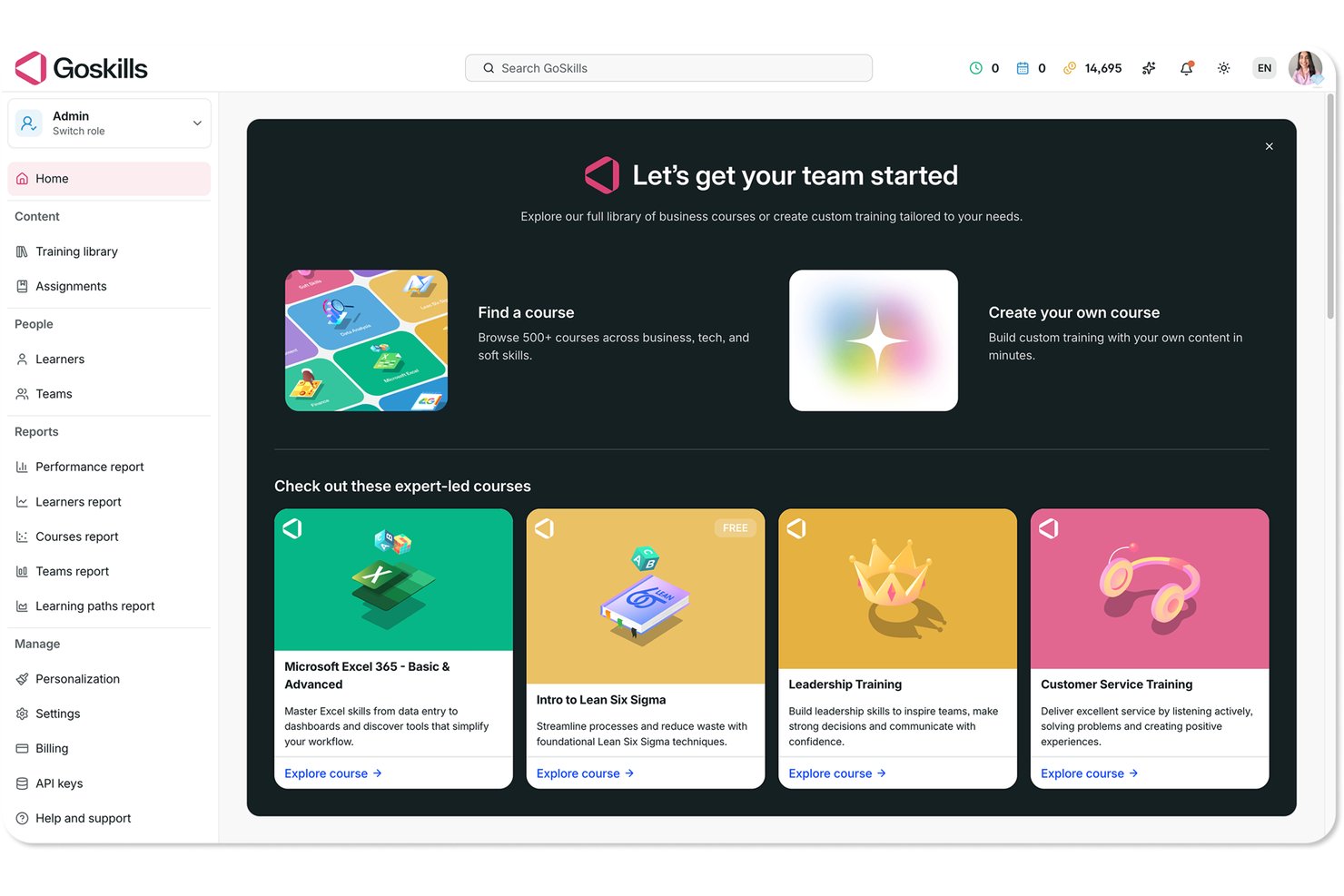
GoSkills is an LMS that lets organizations build custom courses, assign structured learning paths, and track learner progress—with an AI-powered course builder and a library of 500+ ready-made business courses.
Who Is GoSkills Best For?
GoSkills suits L&D managers at small and mid-sized teams who need to build and deploy custom training fast, without a steep learning curve.
Why I Picked GoSkills
I picked GoSkills as one of the best because the speed at which you can go from zero to a finished course is genuinely impressive. GoSkills Genie generates course overviews, syllabi, and full lesson content from a prompt, and you can also drop in a PDF or PowerPoint and have it converted into a structured course automatically. On top of that, built-in gamification tools like coins, streaks, and leaderboards keep learners engaged once the training goes live.
GoSkills Key Features
- Learning paths: Group existing courses into sequenced journeys with optional prerequisites, then assign them to individuals, teams, or your whole organization.
- Course refresher scheduling: Set recurring course assignments on configurable intervals—weekly, monthly, quarterly, or annually—with automated due-date reminders.
- SCIM 2.0 user provisioning: Automatically create and manage learner accounts by connecting GoSkills to your identity provider using the SCIM 2.0 protocol.
- Exportable reports: Download learner, course, team, and performance data as Excel spreadsheets for analysis outside the platform.
GoSkills Integrations
GoSkills offers native integrations with Okta, Microsoft, and Google, plus a Paychex marketplace integration. Its REST and SCIM APIs support custom connections, while SCIM 2.0 automates learner provisioning.
Pros and Cons
Pros:
- Learning paths pair assignments with progress tracking
- Short lessons fit into busy workdays
- Converts source materials into structured lessons
Cons:
- Course library misses niche or advanced topics
- Reports offer limited activity visibility

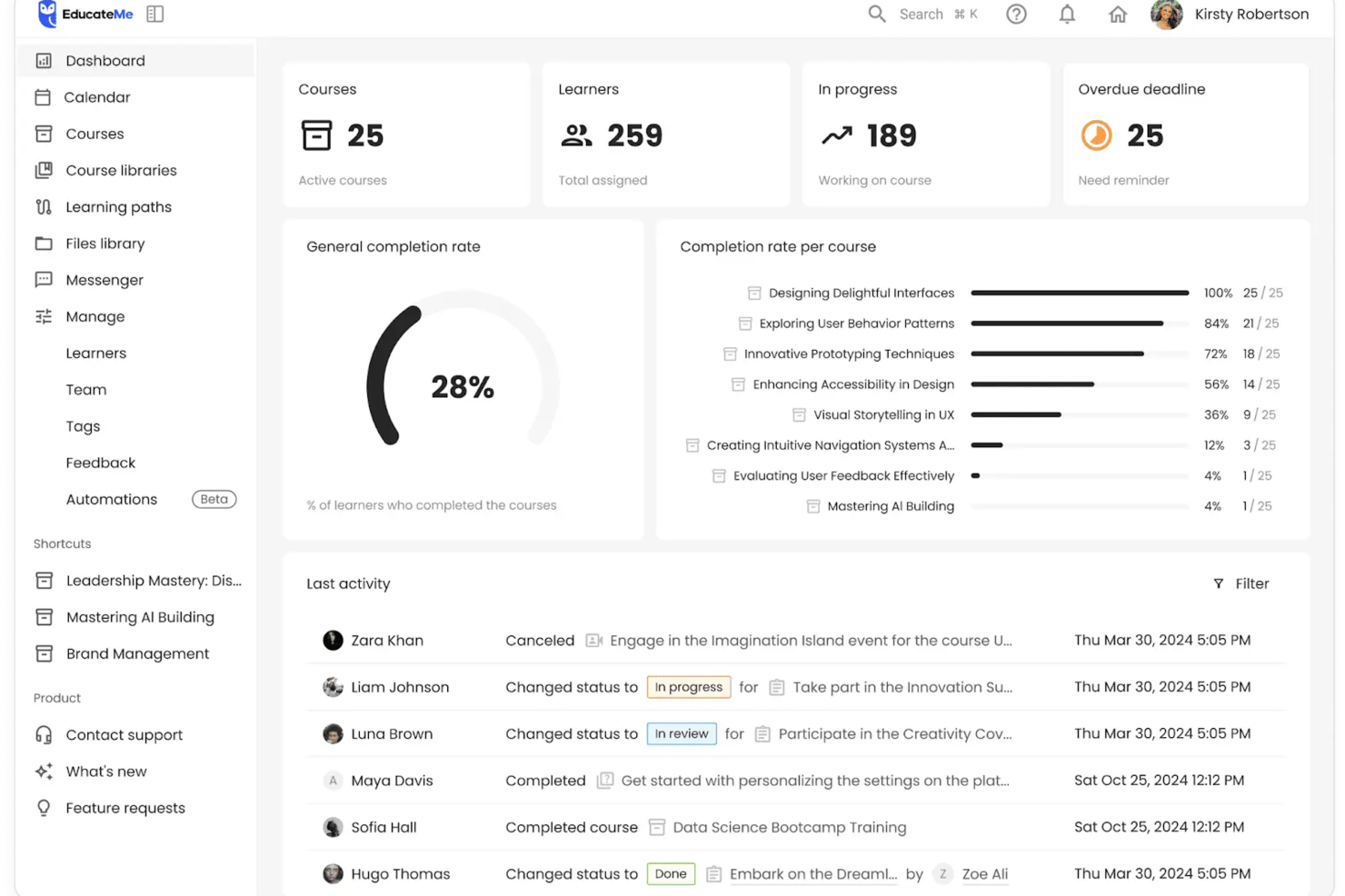
EducateMe LMS offers a transformative approach to corporate training by integrating AI-driven tools to enhance learning experiences. Tailored for businesses aiming to optimize employee development, it provides intuitive content creation and real-world practice simulations, addressing the need for engaging and effective training solutions. This platform is ideal for corporations seeking to streamline onboarding and compliance training while improving learner engagement and organizational efficiency.
Why I Picked EducateMe LMS
I picked EducateMe LMS because of its innovative AI roleplay coaching feature, which provides realistic practice environments crucial for effective corporate training. This tool's analytics capabilities allow your team to gain insights into learner performance, helping to identify and address skill gaps promptly. Additionally, the seamless integration with various platforms through its API reduces administrative workload, making it a strategic choice for organizations looking to enhance training efficiency.
EducateMe LMS Key Features
In addition to its unique AI-driven functionalities, I also found several other features that make EducateMe LMS a valuable tool for corporate learning management:
- Course Builder and Content Management: Create structured courses with quizzes, assignments, live sessions, embedded content, and SCORM file support, while organizing materials within centralized course libraries.
- AI Assistant and Roleplays: Generate or update lessons and activities using AI support, and enable simulated workplace scenarios with automated feedback for applied skill development.
- Learning Paths and Automation: Guide learners through step-by-step training journeys, configure automated enrollments and reminders, and manage certifications within structured workflows.
- Analytics, Customization, and Multi-Tenancy: Monitor engagement and completion through real-time dashboards, customize branded portals, and create separate training environments for departments or client groups.
EducateMe LMS Integrations
Integrations include Zoom, MS Teams, Google Calendar, Slack, Salesforce, and an API for custom integrations.
Pros and Cons
Pros:
- White-label branding with SSO
- Strong analytics for skill gaps
- AI roleplay coaching for practice
Cons:
- Limited advanced gamification features
- Lack of a dedicated mobile application
Andre LMS-systemer for bedrifter
Her er noen flere alternativer som ikke kom med på listen over de beste LMS-programvarene for bedrifter, men som likevel er verdt å vurdere:
- Tovuti
Corporate training LMS with an extensive, built-in course library
- WeSchool
Learning management system to simplify corporate training
- Kallidus Learn
For a combined learning, HR, and performance management platform
- Docebo
For maximizing user engagement
- EdCast
Talent experience platform for attracting, training, and retaining employees
- eloomi
For an all-in-one learning and people development platform
- Cornerstone OnDemand
For creating personalized learning experiences
- Bridge
For advanced course authoring
- SAP SuccessFactors
For building a continuous learning culture
- Constructor Tech
For fostering active learning across complex topics
- LMS365
Learning platform built into Microsoft Office 365 and Microsoft Teams
- Brainier LMS
For a customizable corporate training & learning platform
- Learn Amp
For a comprehensive LMS with tailored learning pathways
- Rippling
For HR-native compliance and onboarding training
- Qooper
A corporate learning, mentorship, and coaching platform
- Connecteam
For evaluation quizzes, recognition, and rewards
- ClearCo
For extensive course offerings
- Exec
For AI-powered personalized learning
- SAI360
For industry-specific compliance training and reporting
- ProProfs Training Maker
For corporate learning with an emphasis on OSHA training


Relaterte anmeldelser av HR-programvare
Hvis du fortsatt ikke har funnet det du leter etter her, kan du se nærmere på disse andre relaterte verktøyene som vi har testet og evaluert:
- HR-programvare
- Lønningsprogramvare
- Rekrutteringsprogramvare
- Tjenester for registrert arbeidsgiver
- Systemer for kandidatsporing
- Programvare for arbeidsstyring
How I Evaluate Corporate Learning Management Systems
I split my evaluation into baseline requirements—like course authoring, compliance tracking, and HRIS sync—and the differentiators that separate a great LMS from a good one.
Core Functionality (Table Stakes For This List)
When I'm selecting tools for my list, I rank each one on a scale from 0 (does not offer the functionality) to 5 (excels in this area) for each core functionality listed below. Then, I calculate the tool's total score into a percentage. Each tool needs to achieve a minimum total score of 75% to be considered for inclusion.
- Course Authoring & Content Management: I check whether you can build courses natively and import SCORM or xAPI packages—say, uploading a vendor-provided safety training module alongside an internally authored onboarding course.
- Learning Path & Curriculum Design: Each platform should let you sequence courses into structured programs tied to roles or teams, like a 90-day onboarding track for new managers that includes prerequisites.
- Progress Tracking & Reporting: I look for dashboards that give L&D managers real-time visibility into completions and scores, plus exportable reports they can hand to leadership during quarterly reviews.
- Compliance & Certification Management: Recurring training cycles, expiration tracking, and automated renewal reminders matter here—think annual data privacy certifications that auto-reassign when they lapse.
- Employee & Learner Management: The platform should handle role-based permissions and group segmentation, and I evaluate how well it syncs employee data with HRIS platforms to avoid manual user provisioning.
- Assessments & Knowledge Checks: Built-in quizzing with multiple question types is essential. I look at whether you can create randomized question banks for post-training evaluations that verify real comprehension.
Once I have a list of tools that meet the criteria, I consider what sets each platform apart.
Differentiating Factors (What Sets Vendors Apart)
Here's how I compare and contrast different vendors:
Standout Features
Skills and competency mapping is where I see the biggest variation between platforms. I look for tools that connect course completions to a skills taxonomy so HR teams can identify gaps and guide internal mobility decisions. Mobile and offline access also carries weight—organizations with frontline or field-based workers need learners to download modules and complete training without a Wi-Fi connection. AI-powered recommendations add depth by surfacing relevant courses based on a learner's role, progress, and development goals.
Beyond Features
HRIS integration depth matters here. I evaluate whether a platform connects natively with systems like Workday or BambooHR so employee records stay in sync without manual imports after every new hire. Compliance and security certifications are another key factor—organizations in regulated industries need SOC 2 or GDPR compliance and audit-ready reporting baked in. I also consider pricing transparency, checking whether per-user costs scale predictably as headcount grows and whether content libraries are included or sold separately.
Hva er en læringsplattform for bedrifter?
En læringsplattform for bedrifter (LMS) er et digitalt verktøy som virksomheter bruker til å opprette, levere, spore og administrere opplæringsprogrammer for medarbeidere.
HR-team og L&D-ansvarlige bruker LMS-plattformer til å forbedre introduksjonen av nyansatte, sikre etterlevelse av regelverk og videreutvikle medarbeidernes kompetanse mer effektivt. Ved å samle opplæringsinnhold og automatisere rapporteringen reduserer LMS-programvare manuelt administrativt arbeid, forbedrer kunnskapsbevaringen og gjør det mulig å skalere læringen i hele organisasjonen.
I tillegg til verktøy for oppretting og administrasjon av kurs støtter LMS-systemer for bedrifter også fleksibel læring på mobile enheter og inkluderer verktøy for vurdering etter opplæringen, slik at man kan måle hvor godt informasjonen er bevart.
Funksjoner i læringsplattformer for bedrifter
Når du velger læringsplattformer for bedrifter, bør du se etter følgende viktige funksjoner:
- Kursadministrasjon: Dette lar deg opprette, organisere og planlegge opplæringsmoduler uten problemer. Du kan tildele kurs, følge med på fullføringer og oppdatere innholdet etter hvert som opplæringsbehovene endrer seg.
- Brukeradministrasjon: Administrer enkelt deltakere, instruktører og grupper på én plattform. Du kan registrere nye ansatte, angi tillatelser og tilpasse læringsbaner basert på roller eller avdelinger.
- Vurderinger og quizer: Test kunnskapsbevaring og fremgang gjennom tilpassbare quizer og vurderinger. Automatisk retting sparer deg for tid, mens umiddelbar tilbakemelding hjelper deltakerne med å fokusere på forbedring.
- Fremdriftssporing og rapportering: Følg med på individuell prestasjon og teamets prestasjoner gjennom oversikter og rapporter. Oppdag raskt kompetansegap eller personer som presterer svært godt, slik at du kan tilpasse videre opplæring deretter.
- Integrasjonsmuligheter: Koble LMS-et ditt til HR-programvare, produktivitetsverktøy eller kommunikasjonsplattformer du allerede bruker. Dette effektiviserer introduksjon av nyansatte, medarbeidersamtaler og intern kommunikasjon.
- Spillifisering: Motiver ansatte med merker, topplister og belønningssystemer som er bygget inn i opplæringsmodulene. Vennlig konkurranse kan øke engasjementet og oppmuntre til kontinuerlig læring.
- Tilgjengelighet på mobil: Deltakere kan få tilgang til kurs når som helst og hvor som helst fra smarttelefoner eller nettbrett. Dette støtter fjernarbeid og læring akkurat når behovet oppstår – noe som er ideelt for ansatte med travle eller uvanlige arbeidstider.
- Innholdsbibliotek: Få tilgang til et utvalg innebygd innhold, maler og ressurser. Ferdiglagde materialer betyr at du bruker mindre tid på å lage opplæring fra grunnen av.
Vanlige AI-funksjoner i bedriftsbaserte læringsstyringssystemer
I tillegg til standardfunksjonene i bedriftsbaserte læringsstyringssystemer som er nevnt ovenfor, tar mange av disse løsningene i bruk AI med funksjoner som:
- Chatbotstøtte: AI-chatboter kan svare på spørsmål fra deltakere, gi påminnelser og tilby hjelp akkurat når den trengs – slik at du slipper rutinemessige støtteoppgaver og gjør læring mer tilgjengelig for alle.
- Personlige læringsanbefalinger: AI analyserer hver enkelt ansatts historikk og preferanser for å foreslå relevante kurs, slik at teamet ditt alltid har tilgang til kompetanseheving som faktisk passer.
- Automatisk innholdskuratering: LMS-et kan gå gjennom enorme mengder ressurser og håndplukke og oppdatere opplæringsmateriell basert på trender, kompetansegap eller individuell fremgang.
- Intelligent analyse av vurderinger: AI-drevne verktøy gir dypere innsikt i quizresultater og fremgang, og oppdager mønstre som hjelper deg med å forstå hvor ansatte har utfordringer, og hvor de utmerker seg.
- Prediktiv analyse: Forutse fremtidige opplæringsbehov ved å la systemet beregne kompetansegap og læringstrender basert på brukerdata – slik at du alltid ligger ett skritt foran i utviklingen av arbeidsstyrken.
Fordeler med et bedriftsbasert LMS
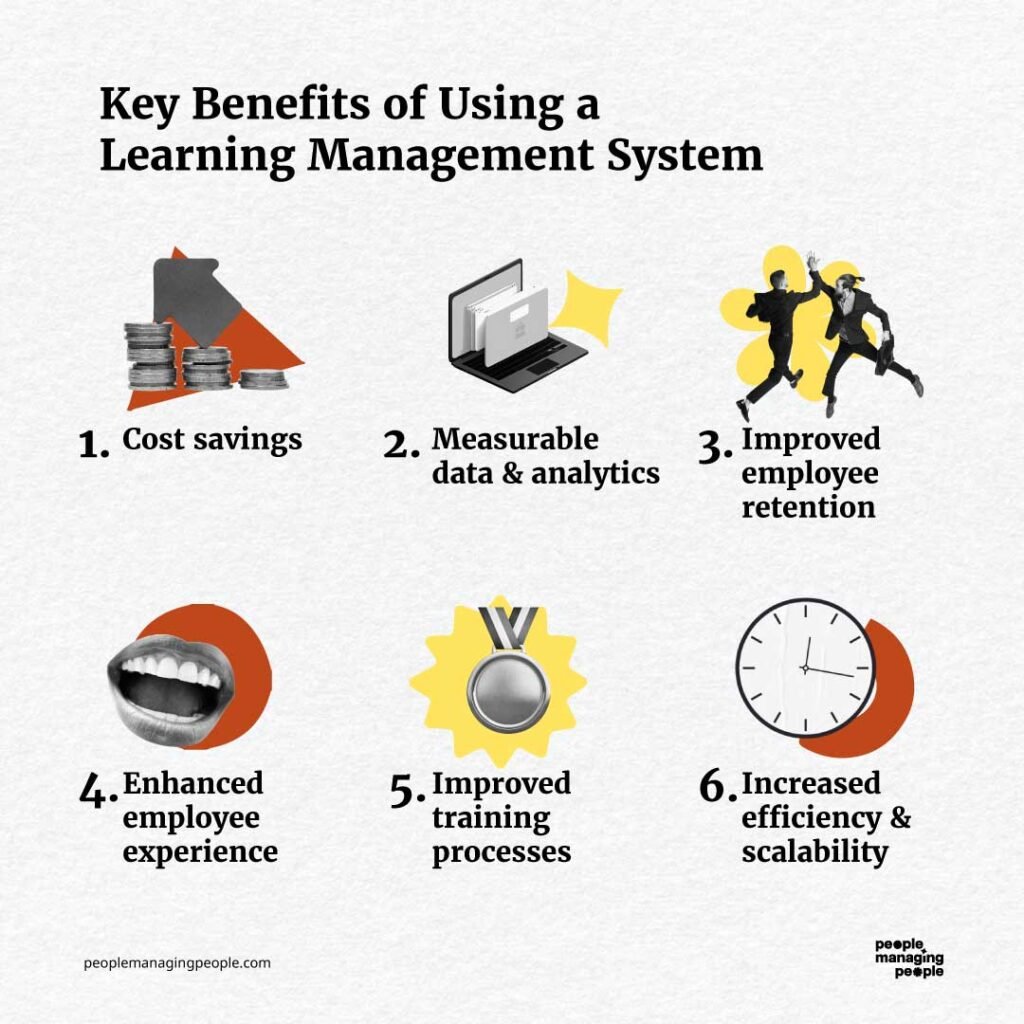
Bedriftsbaserte læringsstyringssystemer er effektive verktøy for å styrke medarbeiderutvikling og organisasjonens vekst. Alt i alt bidrar de til å effektivisere opplæringen, forbedre engasjementet og sikre etterlevelse, samtidig som de gir målbare resultater.
Her er flere fordeler du kan forvente ved å ta i bruk et bedriftsbasert LMS:
- Skalerbare læringsprogrammer: Ved å bruke et bedriftsbasert LMS kan organisasjoner tilby opplæring til en voksende arbeidsstyrke uten å øke den administrative arbeidsmengden, og sikre konsekvente læringsopplevelser på tvers av team.
- Økt medarbeiderengasjement: Interaktive funksjoner som spillifisering, quizer og multimedieinnhold holder ansatte motiverte og engasjerte i læringsreisen.
- Forbedret sporing av etterlevelse: For organisasjoner eller bransjer som krever spesifikk opplæring, sikrer automatisk sporing at ansatte fullfører obligatorisk opplæring i tide. Dette reduserer risikoen for regulatoriske sanksjoner, samtidig som bransjestandardene opprettholdes.
- Global tilgjengelighet: Mobilkompatibilitet og støtte for flere språk gjør det mulig for ansatte på ulike steder å få tilgang til opplæring, noe som fremmer inkludering og støtter en mangfoldig arbeidsstyrke.
- Kostnadseffektiv opplæring: Virtuell opplæring reduserer reiseutgifter, kostnader til lokaler og trykt materiell, og gjør faglig utvikling mer tilgjengelig og rimelig.
Dette er bare noen få av fordelene LMS-systemer tilbyr, men det finnes selvsagt flere! Hvis du trenger flere argumenter for å overbevise ledelsen om at et bedriftsbasert LMS virkelig er verdt investeringen, kan du også lese gjennom denne omfattende listen over LMS-funksjoner og -fordeler.
I praksis kan organisasjoner ved å investere i et LMS fremme en kultur for kontinuerlig læring og legge til rette for langsiktig suksess.
Kostnader og priser for et bedriftsbasert læringsstyringssystem
Læringsstyringssystemer for bedrifter tilbys vanligvis med trinnvise prismodeller for å imøtekomme ulike organisatoriske behov, fra små bedrifter til store virksomheter. Ved å forstå disse alternativene kan du velge en plan som samsvarer med budsjettet og opplæringsmålene dine.
Her er en oversikt over vanlige planer og prisalternativer, inkludert funksjonene som tilbys på hvert nivå.
Sammenligningstabell for læringsstyringssystemer for bedrifter
| Plan | Gjennomsnittspris | Vanlige funksjoner |
|---|---|---|
| Gratisalternativ | $0 | Grunnleggende kursadministrasjon, begrenset antall brukere, fremdriftssporing, begrenset rapportering og brukerstøtte i fellesskapet |
| Grunnleggende plan | $5–$15 per bruker/måned | Oppretting av kurs, brukeradministrasjon, sporing av samsvar, mobiltilgang og grunnleggende integrasjoner |
| Standardplan | $20–$50 per bruker/måned | Avansert rapportering, tilpassbare læringsstier, spillifisering og integrasjoner med HR-verktøy |
| Virksomhetsplan | Tilpasset prising | Ubegrenset antall brukere, profilering, API-tilgang, støtte for flere språk, egen kundeansvarlig og analyseverktøy |
Hver plan tilbyr ulike nivåer av funksjonalitet og skalerbarhet. Kjøpere bør vurdere organisasjonens størrelse, opplæringsbehov og budsjett når de velger riktig plan, for å sikre at de får best mulig verdi for investeringen.
Vanlige spørsmål om bedriftsbaserte læringsstyringssystemer
Her er noen svar på ofte stilte spørsmål du kanskje har om LMS-systemer for bedrifter og hvordan de fungerer:
Hvordan velger jeg riktig LMS for organisasjonens behov?
Begynn med å kartlegge læringsmålene og brukernes behov. Se etter LMS-plattformer som samsvarer med opplæringsmålene, de foretrukne leveringsformatene og rapporteringsbehovene dine. Test ulike plattformer med gratis prøveperioder eller demonstrasjoner, og involver sentrale interessenter samt et utvalg sluttbrukere for å samle inn tilbakemeldinger. Sjekk skalerbarheten og at kundestøtten er pålitelig, slik at LMS-et kan vokse sammen med virksomheten.
Hva er forskjellen mellom et LMS og et opplæringsadministrasjonssystem?
Et læringsstyringssystem (LMS) er utviklet for å levere, følge opp og administrere nettbasert læring og e-læringsinnhold for de ansatte. Det støtter funksjoner som oppretting av kurs, vurderinger, fremdriftssporing og rapportering for digitale læringsopplevelser.
Et opplæringsadministrasjonssystem (TMS) fokuserer derimot på å organisere og administrere instruktørledet opplæring, kurs og klasseromsarrangementer (både fysiske og virtuelle). Et TMS håndterer logistikk som planlegging, lokasjonsadministrasjon, påmeldinger og ressursfordeling.
Noen plattformer kombinerer funksjoner fra både LMS og TMS, men de har ulike hovedformål: LMS for levering av digital læring og TMS for administrasjon av logistikk knyttet til direktesendt opplæring.
Hvilke integrasjoner bør jeg se etter i et bedrifts-LMS?
Fokuser på LMS-integrasjoner som kobler sammen HRIS-, lønns- og prestasjonsstyringssystemene dine, slik at du kan knytte læring til bredere HR-prosesser. Prioriter enkel pålogging for enkel tilgang, samt integrasjoner med populære verktøy som Microsoft Teams, Slack, Google Workspace og apper for videokonferanser.
Sømløse integrasjoner sparer tid ved å synkronisere brukerdata, redusere manuelt arbeid for administratorer, automatisere arbeidsflyter og følge læringsfremdriften sammen med andre forretningsmåltall, slik at læringsopplevelsen blir god.
Hvordan kan jeg sikre høy brukeradopsjon av et nytt LMS?
Skap oppslutning tidlig ved å involvere ansatte og ledere i valg av plattform og pilottesting. Tilby grundig introduksjon med praktiske opplæringsøkter, hurtigveiledninger og lett tilgjengelige hjelpressurser.
Velg et LMS med et oversiktlig og brukervennlig grensesnitt og god mobiltilgang. Oppmuntre til regelmessig bruk ved å fremme støtte fra ledelsen, dele suksesshistorier og anerkjenne opplæringsmilepæler gjennom sertifikater eller interne belønninger.
Er det mulig å tilpasse opplæringsprogrammer med de fleste bedriftsbaserte LMS-plattformer?
Ja, nesten alle ledende LMS-plattformer for bedrifter lar deg tilpasse kurs og læringsstier fullt ut. Du kan laste opp egne presentasjoner, videoer og vurderinger, blande inn innhold fra tredjeparter og utforme spor som er spesifikke for roller eller avdelinger.
Mange systemer støtter merkevareprofilerte portaler og tilpasningsbare læringsmoduler, slik at du kan tilpasse plattformen til virksomhetens kultur og mål for kompetanseutvikling.
Hvordan kan jeg måle avkastningen på LMS-investeringen min?
Følg med på analyser som gjennomføringsgrad for opplæringen, testresultater, tid brukt på læring og resultatmålinger etter opplæringen. Bruk LMS-ets innebygde rapporteringsverktøy til å avdekke mangler, identifisere trender og sammenligne læringsresultater med organisatoriske mål, som kortere introduksjonstid, bedre etterlevelse eller høyere medarbeiderengasjement.
Du kan også gjennomføre undersøkelser blant deltakere og ledere for å samle inn tilbakemeldinger og måle kvalitative forbedringer sammen med virksomhetens nøkkelindikatorer.