

10 beste programvarer for personalhåndbøker i 2026

10 Liste over den beste programvaren for personalhåndbøker


Å opprette og administrere en personalhåndbok kan være en tidkrevende og stressende oppgave, særlig hvis du er avhengig av utdaterte metoder eller har problemer med å sikre etterlevelse i et team som vokser. Det kan imidlertid føles overveldende å finne riktig programvare for personalhåndbøker når så mange systemer hevder å tilby den perfekte løsningen.
Det er her denne veiledningen kommer inn. Jeg har satt sammen denne listen over den beste programvaren for personalhåndbøker for å hjelpe deg med å spare tid, forbedre kommunikasjonen av retningslinjer og sikre at organisasjonen din forblir i samsvar med regelverket – alt uten hodepinen med prøving og feiling. Disse verktøyene er utviklet for å forenkle opprettelsen av retningslinjer, automatisere oppdateringer og sørge for at de ansatte har informasjonen de trenger lett tilgjengelig.
Med utgangspunkt i min mangeårige erfaring med å administrere og distribuere dokumenter med virksomhetens retningslinjer vil jeg også dele praktiske tips som hjelper deg med å få mest mulig ut av denne programvaren. Enten du håndterer manuelle oppdateringer av retningslinjer eller har problemer med versjonskontroll, vil denne veiledningen gi deg kunnskapen du trenger for å overvinne disse utfordringene.
La oss nå se nærmere på de beste alternativene for å håndtere behovene dine knyttet til HR-retningslinjer.
Why Trust Our Software Recommendations
Our team has been testing and reviewing software since 2012. As HR experts ourselves, we know how difficult—and important—it is to choose the right software.
For this guide, we evaluated tools using hands-on testing and independent research, scoring tools using our selection criteria. We also draw on insights from industry thought leaders and practicing HR experts.
Our reviews reflect our human editorial judgment, not a sales pitch.
Expert reviewers:
Sammenligningstabell for programvare til personalhåndbøker
Denne sammenligningstabellen oppsummerer prisene for hvert av mine beste utvalg av programvare for personalhåndbøker:
| Tool | Best For | Trial Info | Price | ||
|---|---|---|---|---|---|
| 1 | Best handbook software for deskless or field-based workforces | 14-day free trial | From $29/month (billed annually) | Website | |
| 2 | Best for keeping employee handbooks compliant | Free demo available | Pricing upon request | Website | |
| 3 | Best for policy creation and compliance | No free trial available | From $161.93/month (billed annually) | Website | |
| 4 | Best for USA organizations in compliance heavy industries | Free demo available | From $100/month (unlimited users) | Website | |
| 5 | Best employee handbook software for remote team collaboration | Free demo + 14-day free trial available | From $10/user/month (billed annually) | Website | |
| 6 | Best employee handbook software with high-quality design features | Free plan available | From $7.99/user/month (billed annually) | Website | |
| 7 | Best employee handbook software with professional presentation features | Free plan available | From $12.25/user/month (billed annually) | Website | |
| 8 | Best employee handbook software for importing your existing policies | 7-day free trial | From $149/user/month | Website | |
| 9 | Best for creating digital and downloadable employee handbooks | 14-day free trial | From $1,300/year for 50 users | Website | |
| 10 | Best employee handbook software for on-the-go access | Free plan available | From $23.88/user/month (billed annually) | Website |
Anmeldelser av den beste programvaren for personalhåndbøker
\u003cspan style=\u0022font-weight: 400\u0022\u003eHer er mine detaljerte sammendrag av den beste \u003c/span\u003e\u003cspan style=\u0022font-weight: 400\u0022\u003eprogramvaren for personalhåndbøker\u003c/span\u003e\u003cspan style=\u0022font-weight: 400\u0022\u003e som kom med på min liste over de 10 beste, inkludert kommentarer om hvorfor jeg valgte dem. Hver anmeldelse gir en detaljert gjennomgang av de viktigste funksjonene, fordeler og ulemper, \u003c/span\u003e\u003cspan style=\u0022font-weight: 400\u0022\u003eintegrasjoner\u003c/span\u003e\u003cspan style=\u0022font-weight: 400\u0022\u003e og ideelle bruksområder for hvert system, slik at du kan finne det beste alternativet for deg.\u003c/span\u003e
Best handbook software for deskless or field-based workforces

Connecteam is an all-in-one employee management app that's specifically designed to manage daily operations, communications, and human resources tasks for desk-free teams.
Thanks to it's remote-first approach, their app also functions effectively as a digital employee handbook and portable knowledge base, giving your employees access to all the critical company information they need from anywhere.
Why I picked Connecteam: Their digital knowledge base structure is easy to use, with unlimited folders and subfolders to organize your information as you see fit. Connecteam also has a robust search feature to help employees quickly find the information they seek, and you can also attach files or links to specific documents within in-app chats or task assignments too.
From the HR administrator's perspective, Connecteam has simple file management permission controls, as well as document-specific analytics. That means your HR team can easily monitor which employees have read each specific document, and send reminders within the app to anyone who hasn't read it, for compliance purposes.
For this reason, I also think their software is a good match for field-based employees in industries with lots of health & safety and other compliance-related needs.
Connecteam Standout Features and Integrations:
Standout features within their knowledge management module include easy file organization, drag & drop editing, in-app document shortcuts, a document search feature, file-specific analytics, compliance monitoring features, data download limitations to prevent information leaks, and straightforward access controls.
Connecteam also offers time tracking, scheduling, task management, forms and checklists, and payroll integrations, which are essential for operations management. Plus, their app complies with GDPR, ISO 27001, SOC 2 certifications, and HIPAA, making them a reliable and secure choice for businesses across various industries.
Integrations include Paychex, Xero, Gusto, QuickBooks Payroll (online + desktop), Zapier, Google Calendar, API access, and others.
Pros and Cons
Pros:
- Built-in communication tools that enhance employee engagement and cohesion
- Offers numerous other features for well-rounded employee management
- Very user-friendly, even for non-tech users
Cons:
- No built-in payroll features
- Could use more software integrations
New Product Updates from Connecteam

Connecteam Expands Break and Timesheet Controls
Connecteam adds flexible break thresholds, personalized policies, auto-end options, a centralized exceptions report, and improved timesheet issue visibility to help teams manage breaks and timesheets more effectively. For more information, visit Connecteam’s official site.
 .
.
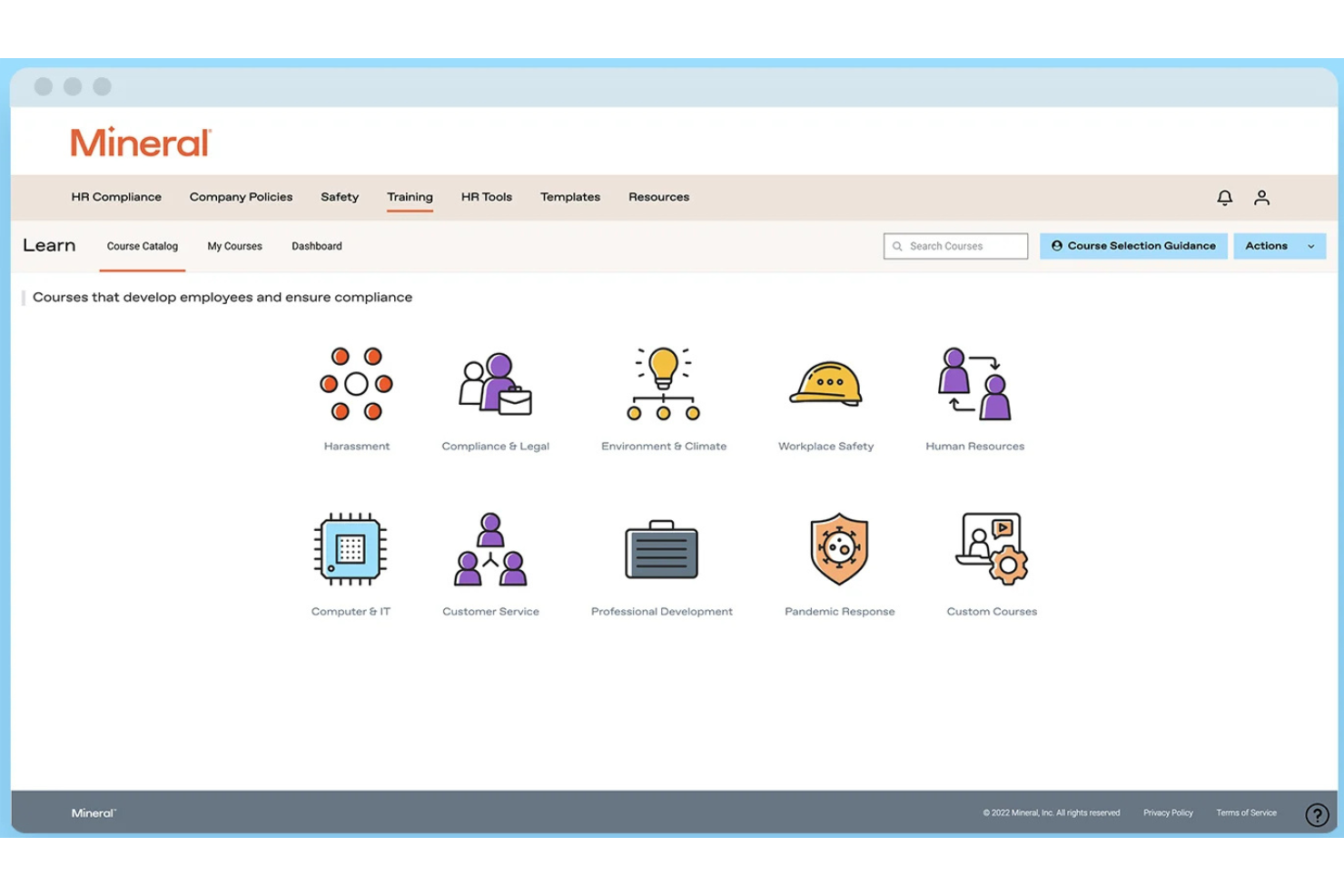
Mitratech Mineral is an HR compliance platform that helps organizations create, maintain, and update employee handbooks through a guided handbook builder, automated policy updates, compliance alerts, and access to HR expertise.
Who Is Mitratech Mineral Best For?
Mitratech Mineral is a strong fit for small and mid-sized businesses that need to build compliant employee handbooks without maintaining an in-house HR or legal compliance team.
Why I Picked Mitratech Mineral
I picked Mitratech Mineral because it simplifies the ongoing work of keeping employee handbooks compliant. Instead of manually tracking changing employment laws, the platform alerts users when policies need updating and provides attorney-reviewed language that can be added directly to the handbook. I also like that HR experts are available to answer more complex compliance questions, giving teams additional confidence when updating workplace policies.
Mitratech Mineral Key Features
- Guided handbook builder: Generate compliant employee handbooks through a questionnaire-based setup.
- Multi-state policy management: Create handbooks that support federal and multi-state employment requirements.
- Policy library: Access pre-written policy templates covering benefits, leave, workplace safety, and other HR topics.
- HR compliance library: Search employment law guidance, compliance resources, and HR best practices to support handbook updates.
Mitratech Mineral Integrations
Mitratech Mineral primarily operates through partnerships with payroll providers, insurance brokers, PEOs, and HCM platforms rather than a traditional integration marketplace. Documented partnerships include QuickBooks Payroll and ContinuumCloud. Public API and Zapier support are not currently documented.
Pros and Cons
Pros:
- Strong multi-state compliance
- Automatic policy updates
- Access to HR experts
Cons:
- Limited software integrations
- Handbook tools may cost extra

Best for policy creation and compliance
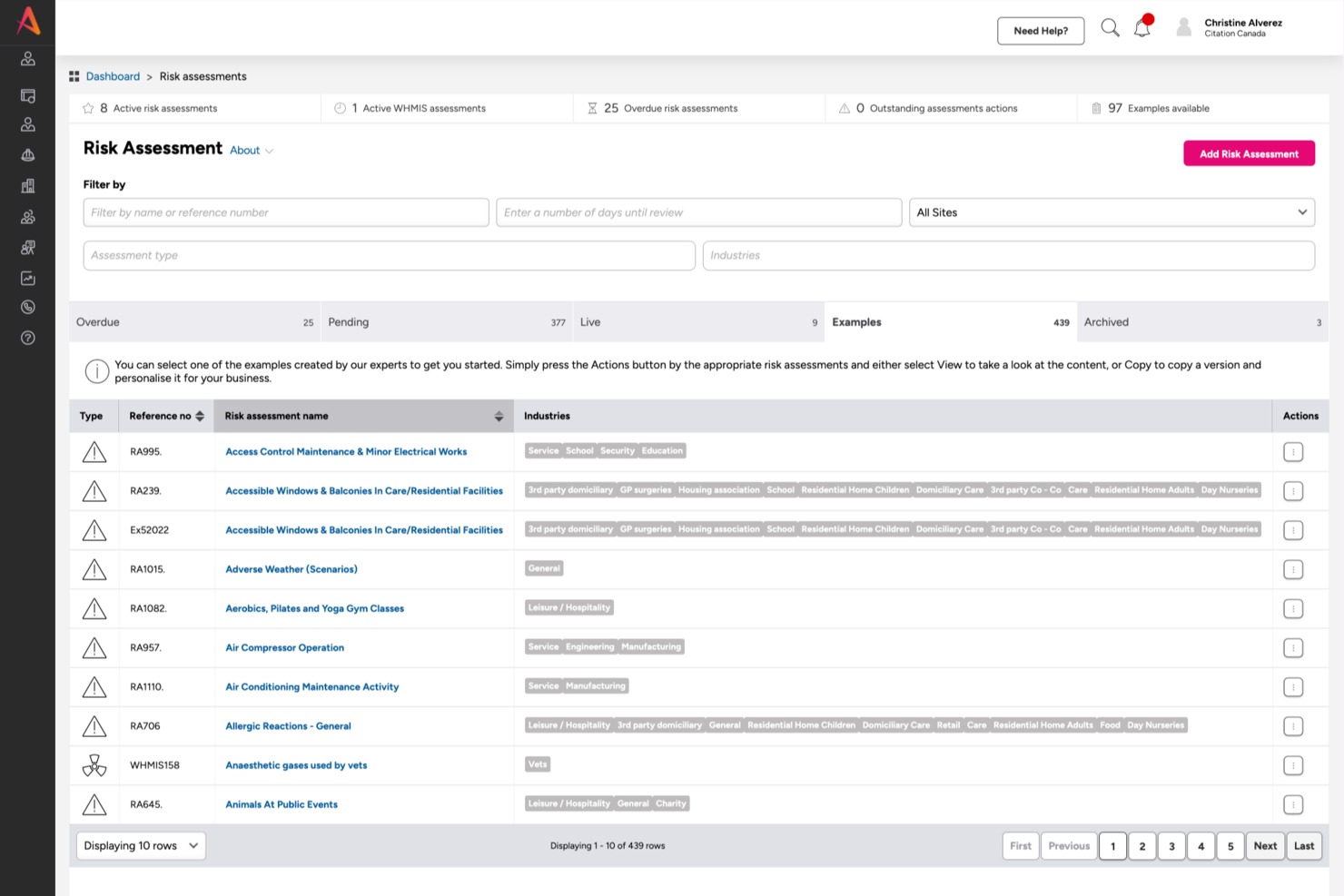
Citation Canada helps HR teams and business leaders in Canada create, update, and manage employee handbooks that stay compliant with evolving regulations, offering a centralized platform for policy management and distribution.
Who Is Citation Canada Best For?
Citation Canada is a strong fit for Canadian HR professionals and small to mid-sized businesses that need to stay on top of provincial and federal employment compliance.
Why I Picked Citation Canada
I picked Citation Canada as one of the best because of how much it takes the guesswork out of policy creation for Canadian HR teams. The platform gives you access to over 3,000 customizable HR policies, templates, and handbook documents—all built to reflect Canadian employment law across all 14 jurisdictions. I like that you can pull a policy, add your company branding in a few clicks, and move it straight into your Atlas document library. The Compliance Centre tracks legislative updates, flags upcoming changes with effective dates, and lets you add those dates directly to your calendar so nothing slips through.
Citation Canada Key Features
- Jurisdiction comparison tool: Compare employment standards side by side across all 14 Canadian federal and provincial jurisdictions to ensure your handbook policies are regionally accurate.
- Live HR advice line: Reach certified HR advisors by phone, via scheduled appointment, or through a callback during business hours for guidance on policy implementation and employee relations questions.
- Automated legislative alerts: Receive notifications when employment legislation changes so you can update affected handbook policies before new rules take effect.
- HR document library: Access thousands of downloadable HR documents, checklists, and templates that you can pull directly into your handbook build.
Citation Canada Integrations
Native integrations are not currently listed.
Pros and Cons
Pros:
- Easy access to compliance and policy resources
- Helps align HR and safety compliance content
- Strong policy creation with customizable manuals
Cons:
- Some customers find customization limited
- Limited global compliance content outside Canada

Best for USA organizations in compliance heavy industries

SixFifty Employee Handbook helps HR teams and legal professionals create, update, and manage compliant employee handbooks tailored to U.S. employment laws and changing state regulations.
Who Is SixFifty Employee Handbook Best For?
SixFifty Employee Handbook is a strong fit for U.S.-based companies in regulated industries where staying on top of state-specific employment law is a core compliance requirement.
Why I Picked SixFifty Employee Handbook
SixFifty Employee Handbook earns its spot on my shortlist because it's built specifically for U.S. compliance, which is a real differentiator for organizations in heavily regulated industries like healthcare, finance, or government contracting. I like that the platform uses attorney-drafted, state-specific policy language, so when my team builds a handbook for employees across multiple states, each version reflects the actual legal requirements for that jurisdiction. The automated policy update alerts are also a standout feature—when state employment laws change, I get notified and can push updates directly through the platform rather than manually tracking legislative changes.
SixFifty Employee Handbook Key Features
- Policy library: Choose from 100+ optional policies to add to your handbook beyond the required state-specific ones.
- Employee portal: Team members log in, review, and sign the handbook digitally, with signatures tracked for accountability.
- State addenda generation: Create state-specific addenda to supplement an existing handbook rather than rebuilding it from scratch.
- Company profile saving: Store your business details and employee locations so future document generation is faster.
SixFifty Employee Handbook Integrations
Native integrations are not currently listed.
Pros and Cons
Pros:
- Policy Comparison Chart highlights key differences between policies
- State Addenda tool generates a list of policy requirements if you expand your business into a new state
- Large volume of HR templates, including employee agreements and other legal documents
Cons:
- Software integration details are not transparent
- Designed for USA-based organizations only

Slite
Best employee handbook software for remote team collaboration
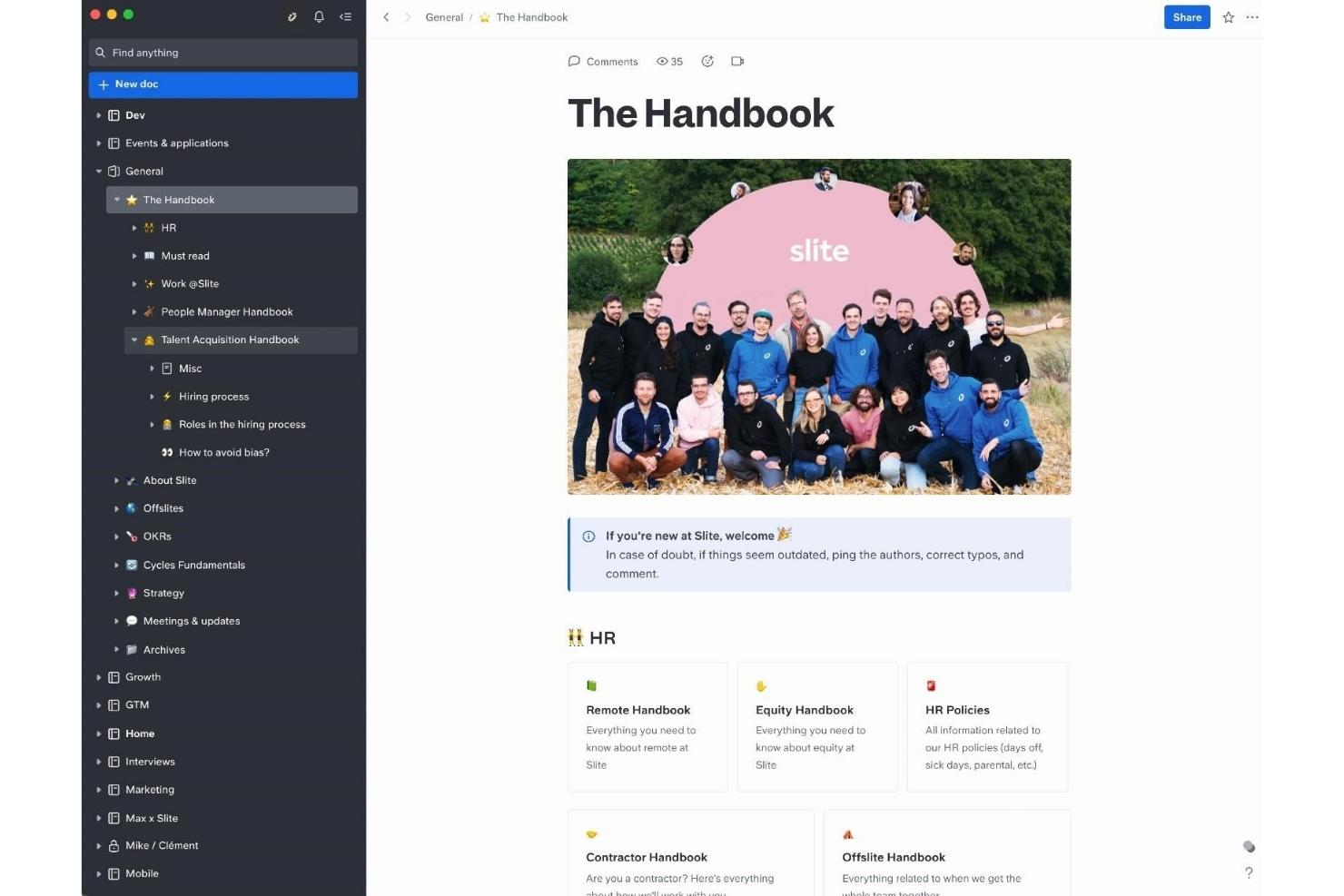
Slite is a collaborative documentation platform designed for HR teams and organizations that need to create, manage, and update employee handbooks and policies in a centralized, easy-to-navigate workspace.
Who Is Slite Best For?
Slite is a strong fit for remote-first and distributed teams that need a shared space to build and maintain internal documentation without relying on scattered files or email threads.
Why I Picked Slite
I picked Slite as one of the best because it helps distributed HR teams keep handbook content accurate and accessible. I like the doc verification feature—HR can mark policies as verified so remote employees always know they're reading the current version, not something outdated from two years ago. I also use the Slack integration regularly, which lets teammates query the handbook directly from Slack without opening a separate tab. Additionally, Slite's Ask feature lets employees type a question in plain language and get an answer pulled from verified handbook content, which reduces repetitive "where do I find the PTO policy?" messages HR teams receive.
Slite Key Features
- Collaborative editing: Multiple team members can write and edit handbook documents simultaneously in real time.
- Customizable templates: Pre-built HR and policy templates give you a structured starting point for building handbook content.
- Granular permissions: Set view or edit access at the document or channel level to control who can change sensitive policy content.
- Search across docs: A full-text search function lets employees find specific handbook sections or policy terms without manual browsing.
Slite Integrations
Integrations include Slack, Google Drive, Jira, Asana, Figma, Notion, Trello, Monday.com, Miro, and GitHub.
Pros and Cons
Pros:
- Taking notes is fluid and easy
- Large number of integrations
- Well organized and intuitive
Cons:
- Occasional software glitches
- Limited range of features
Best employee handbook software with high-quality design features

Adobe Express gives HR teams and business leaders an easy way to create visually engaging employee handbooks, helping organizations present policies and culture in a format that’s both professional and accessible.
Who Is Adobe Express Best For?
Adobe Express is a great fit for small to mid-sized businesses and HR teams who want to produce polished, on-brand employee handbooks without relying on a dedicated designer.
Why I Picked Adobe Express
Adobe Express earns its spot as one of the best on my shortlist because of how much design quality it puts in your hands without needing a graphic designer. I love the library of professionally designed handbook templates you can customize with your company's brand colors, logo, and fonts in just a few clicks. The brand kit feature is especially useful—it auto-applies your brand assets across the whole document, so every page looks consistent. I also use the resize tool to produce both a print-ready letter-size version and a compact pocketbook from the same design.
Adobe Express Key Features
- Drag-and-drop editor: Build and rearrange handbook pages using a visual editor that requires no design or coding skills.
- Photo and icon libraries: Access a built-in library of stock photos, icons, and graphics to visually support handbook content.
- Collaboration tools: Invite team members to review and edit handbook drafts in real time within the platform.
- PDF and link sharing: Export your finished handbook as a PDF or share it via a direct link for easy distribution.
Adobe Express Integrations
Integrations include Adobe Creative Cloud, Adobe Experience Manager Assets, Adobe Acrobat, Marketo Engage, Salesforce, Google Drive, Microsoft OneDrive, Dropbox, TikTok, Instagram, and Facebook.
Pros and Cons
Pros:
- Very customizable
- Huge range of templates
- Professional-level designs
Cons:
- Mobile app is slow
- Less intuitive than other tools
Visme
Best employee handbook software with professional presentation features
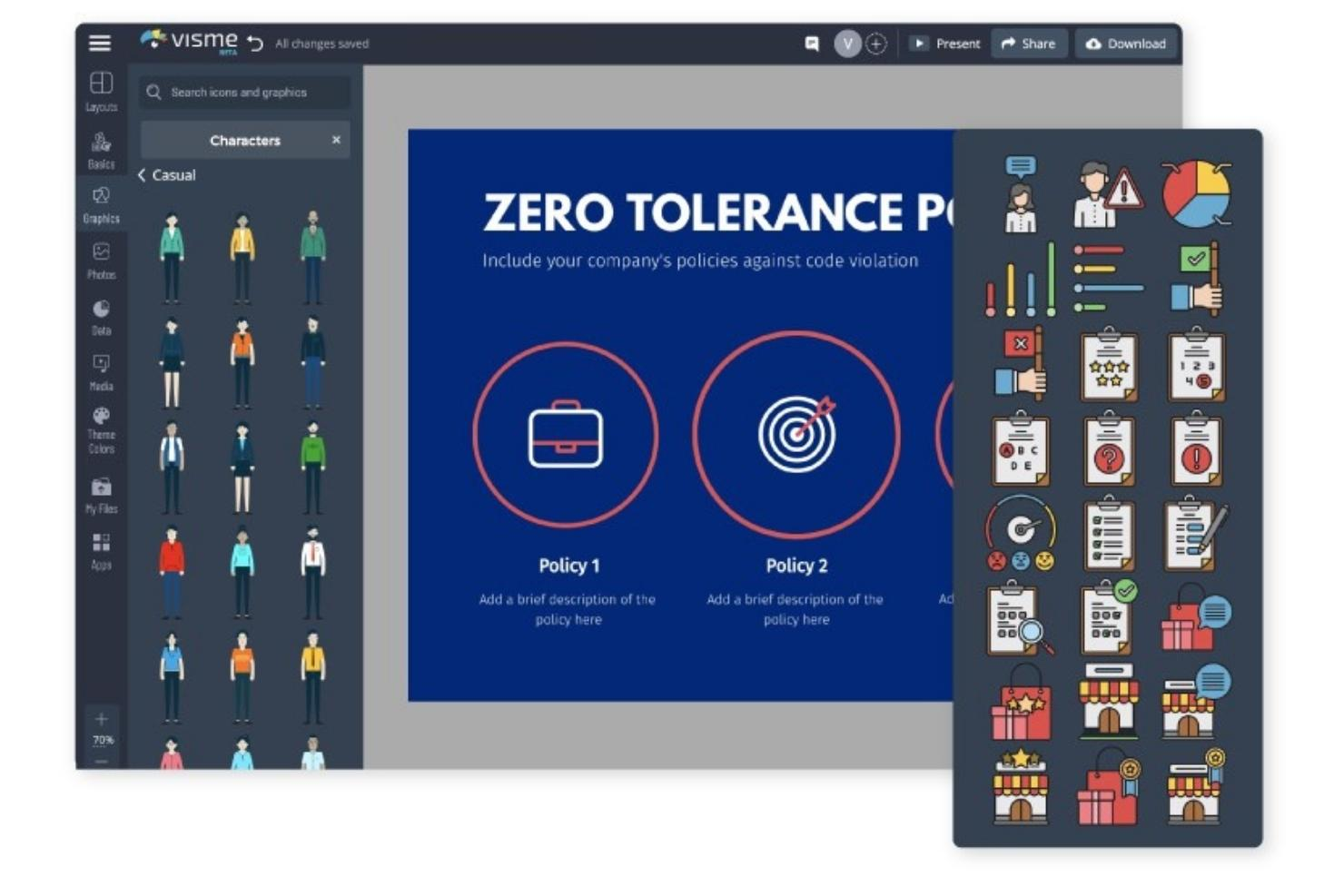
Visme is on a mission to help non-designers create quality employee handbooks with visual impact. Using the Visme builder, anyone can create a compelling and appealing document quickly and easily.
Why I picked Visme: Starting with a professionally-designed presentation template, creators can select the principal elements and adjust them as they need. All components may be customized to fit the organization in question. It’s easy to upload and add brand fonts, colors, images and logos.
The builder includes a selection of animated characters and icons that enrich the information and bring the handbook to life. Creators can visualize their company culture by customizing the characters in different poses alongside text boxes and data visualizations.
Visme Standout Features and Integrations
Features include flowcharts, a social scheduler, interactivity, and a professional presenter studio.
Integrations available natively include Dropbox, GIPHY, Google Drive, HubSpot, JotForm, Salesforce, Typeform, Unsplash, Vimeo, and YouTube.
Pros and Cons
Pros:
- Helpful video tutorials
- Extensive media library
- Excellent graphics
Cons:
- Expensive compared to alternatives
- Image editing is limited
AirMason
Best employee handbook software for importing your existing policies

AirMason is a digital employee handbook platform for HR teams and business leaders who want to create, update, and distribute engaging, compliant handbooks that employees can access and acknowledge online.
Who Is AirMason Best For?
AirMason suits HR teams at small to mid-sized companies that need a dedicated tool for building and managing polished, branded employee handbooks.
Why I Picked AirMason
I picked AirMason as one of the best because of how well it handles the transition from outdated Word docs and PDFs to a polished digital handbook. You can upload your existing handbook directly into the platform, and AirMason's in-house design team can reformat it into a branded, interactive document without you starting from scratch. I also like that once your policies are imported, version control and real-time editing mean you're always publishing the latest content—no more emailing updated PDFs or wondering which version employees actually read. The automated employment law monitoring then layers on top of that, flagging relevant state and federal changes so your imported policies stay current after launch.
AirMason Key Features
- Electronic signature collection: Employees e-sign directly within the digital handbook, with an optional setting that requires them to reach the end before signing.
- Auto-permissioning and distribution: Assign documents to specific employee groups based on criteria like location or department, so each person only sees what's relevant to them.
- AirAssist AI HR assistant: An AI chatbot trained on your company's own policies that answers employee questions in real time and escalates to your HR team when needed.
- Multimedia content embedding: Add videos, GIFs, and branded imagery directly into handbook pages to make documents more engaging for employees.
AirMason Integrations
Integrations include BambooHR, ADP, Workday, UKG, Gusto, Rippling, Okta, Google Workspace, and Microsoft Azure Active Directory.
Pros and Cons
Pros:
- Completely customizable
- Visually compelling
- Creates great employee engagement
Cons:
- No export-to-PDF option
- Limited frame design options
MyHub
Best for creating digital and downloadable employee handbooks

MyHub is a cloud-based intranet platform for HR teams and business leaders who need a centralized solution to create, manage, and share employee handbooks and essential workplace documents.
Who Is MyHub Best For?
MyHub is a strong fit for small to mid-sized businesses that need a straightforward way to build and distribute internal documentation without a dedicated IT team.
Why I Picked MyHub
I picked MyHub as one of the best because of how well it handles the full lifecycle of an employee handbook—from building it to keeping it current. I like that the drag-and-drop page builder lets HR teams structure handbook content into clearly defined, searchable sections, so employees can jump straight to the policy they need rather than scrolling through a single document. This lets my team update a specific section—say, a revised PTO policy—without touching the rest of the handbook. The file sharing module also lets you store downloadable versions directly on the intranet, so employees can grab a PDF copy whenever they need one.
MyHub Key Features
- Mandatory reads and alerts: Flag specific handbook pages or policy updates as mandatory reads so employees are required to acknowledge them before moving on.
- Automated forms: Build digital forms directly within the intranet to collect employee signatures or acknowledgments tied to handbook content.
- Template library: Access 60+ pre-built page templates to structure handbook sections quickly without starting from scratch.
- Usage metrics: Track which handbook pages employees are visiting and how often, so you can identify gaps in engagement with key policies.
MyHub Integrations
Integrations include Microsoft 365, Google Workspace, Canva, and popular single sign-on providers such as Okta and Azure Active Directory.
Pros and Cons
Pros:
- Platform is scalable for small to large organizations
- Allows customizations for company branding
- Offers customizable templates to fit different company needs
Cons:
- Limited third-party software integrations
- 50 user minimum may not work for smaller teams
ProProfs
Best employee handbook software for on-the-go access
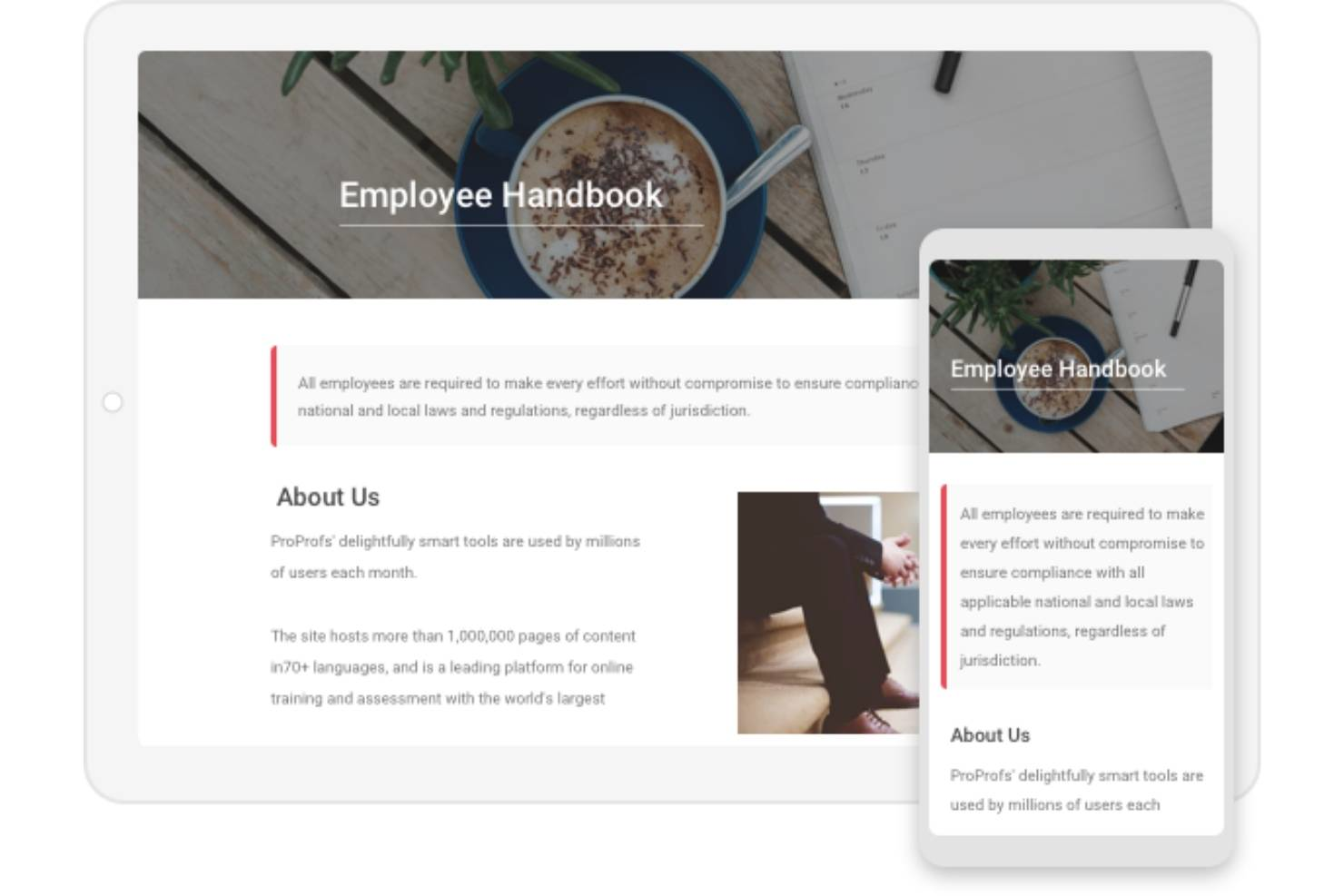
ProProfs helps HR teams and business leaders create, manage, and share digital employee handbooks that can be updated without technical expertise and are accessible across devices, helping keep policies current and employees informed.
Who Is ProProfs Best For?
ProProfs is a good fit for small to mid-sized businesses that need a straightforward way to build and distribute employee handbooks without a steep learning curve.
Why I Picked ProProfs
ProProfs earns its spot as one of the best on my shortlist because of how well it handles on-the-go access for distributed or deskless workforces. I like that employees can pull up the handbook from any device—phone, tablet, or desktop—without needing to download anything or log into a separate app. The web-based format means a new hire on a warehouse floor or a remote contractor traveling between sites can check a policy in seconds. I also appreciate the conditional access rules, which let me control exactly who sees what, so sensitive sections stay locked down even when the handbook is accessible from anywhere.
ProProfs Key Features
- Version control: Track content changes, compare article versions, and restore previous versions to keep handbook content accurate over time.
- Customizable templates: Choose from 25+ pre-designed page templates and apply your company's logo, fonts, and branding to the handbook.
- Role-based permissions: Assign admin, contributor, writer, or editor roles to control who can create, edit, or publish handbook content.
- Article workflow and approvals: Set custom workflow statuses and route handbook content through review and approval stages before publishing.
ProProfs Integrations
Native integrations are not currently listed.
Pros and Cons
Pros:
- Private and secure
- Designed for usage on the go
- Multi-device support
Cons:
- Limited design features
- Offers only one template
Andre verktøy for personalhåndbøker
Her er noen flere alternativer som ikke kom med på listen over den beste programvaren for personalhåndbøker:
- Confluence
Employee handbook software for existing Atlassian users
- Guru
Employee handbook software for creating digital, wiki-style handbooks
- SHRM Employee Handbook Builder
Employee handbook software with a drag-and-drop policy builder tool
- Waybook
For managing policies, training, and onboarding in one place
- Compass
For centralized document management
- Employee Manual Builder
Handbook software for incorporating state-specific policies
- Blissbook
Employee handbook software with built-in project management
- Handbooks.io
Handbook software for pre-loaded policies using HR-approved language
- Trupeer
For dual-format documentation
- Nuclino
Employee handbook software for real-time handbook collaboration


Relaterte anmeldelser av HR-programvare
Hvis du fortsatt ikke har funnet det du leter etter her, kan du se nærmere på disse andre relaterte verktøyene som vi har testet og vurdert:
- HR-programvare
- Lønnsprogramvare
- Rekrutteringsprogramvare
- Tjenester for registrert arbeidsgiver
- Systemer for sporing av søkere
- Programvare for arbeidsstyring
How I Evaluate Employee Handbook Software
I evaluate these tools in two layers: the baseline capabilities they must have—like legally backed policy libraries and e-signature tracking—and the differentiators that make one option a stronger fit than another.
Core Functionality (Table Stakes For This List)
When I'm selecting tools for my list, I rank each one on a scale from 0 (does not offer the functionality) to 5 (excels in this area) for each core functionality listed below. Then, I calculate the tool's total score into a percentage. Each tool needs to achieve a minimum total score of 65% to be considered for inclusion.
- Handbook Templates & Builder: I look for guided builders and pre-built templates that let you assemble a handbook around your company's size, industry, and structure.
- Policy Compliance Library: Each tool's policy library should include legally vetted content covering employment law topics like PTO, anti-harassment, and leave.
- E-Signature & Acknowledgment Tracking: I check whether the tool captures employee signatures with timestamps and audit trails you can pull during a compliance review.
- Version Control & Updates: When policies change, I evaluate how each tool handles revisions, tracks what changed, and triggers re-acknowledgment workflows.
- Digital Distribution & Access: Employees should be able to access the handbook on the web or mobile without jumping through hoops or requesting a PDF from HR.
- Multi-Jurisdiction Customization: For distributed teams, I look at whether the platform supports location-based policy variations across states or regions.
Once I have a list of tools that meet the criteria, I consider what sets each platform apart.
Differentiating Factors (What Sets Vendors Apart)
Here's how I compare and contrast different vendors:
Standout Features
I pay close attention to whether a platform offers AI-assisted policy drafting, which can cut hours off the initial handbook build. Access to attorney review is another big differentiator—some tools connect you with employment lawyers who vet your policies before publishing. Native HRIS and payroll integrations also matter, since auto-distributing handbooks to new hires during onboarding eliminates manual follow-up. Compliance dashboards that surface acknowledgment gaps round out what I look for.
Beyond Features
Legal backing matters—I evaluate whether a vendor's policy library is maintained by employment attorneys and how frequently updates reflect new legislation. The fit for your business size and industry is also worth examining, since a 20-person startup and a 500-employee hospitality company have very different handbook needs. Implementation support is another factor I weigh. Some platforms offer done-for-you handbook builds, while others are fully self-serve, and the right approach depends on your team's bandwidth.
Hva er programvare for personalhåndbøker?
Programvare for personalhåndbøker er et digitalt verktøy for å opprette, oppdatere og distribuere bedriftens håndbøker og retningslinjer til alle ansatte. Den erstatter utdaterte manuelle prosesser og sikrer effektiv og konsekvent kommunikasjon av bedriftens retningslinjer, prosedyrer og oppdateringer, med integrerte funksjoner for samsvarssporing som overvåker når informasjonen blir lest av de ansatte.
Programvare for personalhåndbøker gjør prosessen med å opprette nye retningslinjer eller oppdatere eksisterende retningslinjer mye raskere, noe som øker effektiviteten i HR-avdelingen. Den gir også en mer konsekvent og tilgjengelig måte å formidle bedriftsinformasjon til de ansatte på, og skaper en bedre opplevelse.
Avhengig av bransjen din er en annen stor fordel integrerte funksjoner for samsvarssporing og arkivering som dokumenterer at de ansatte har lest og bekreftet obligatorisk informasjon: en svært viktig funksjon for sikkerhetssensitive bransjer.
Funksjoner
Det trenger ikke å være komplisert å opprette, administrere og distribuere personalhåndbøker. Riktig programvare kan effektivisere hele prosessen og sikre samsvar, tilgjengelighet og konsekvens. Her er de viktigste funksjonene du bør se etter når du vurderer programvare for personalhåndbøker:
- Sentralisert dokumentadministrasjon: En sentralisert samling lagrer alle versjoner av håndboken på ett sted, slik at ansatte og HR-medarbeidere enkelt kan få tilgang til de nyeste retningslinjene.
- En håndbokbygger: Brukerne bør enkelt kunne opprette en personalhåndbok fra grunnen av ved hjelp av en innebygd veiviser.
- Tilpassbare maler: For å spare tid ved oppbygging av en håndbok fra grunnen av bør verktøyet tilby maler som kan tilpasses med bedriftens profilering og andre viktige detaljer.
- Redigering: Programvare for personalhåndbøker bør gjøre det mulig å oppdatere informasjon raskt og enkelt.
- Versjonskontroll for retningslinjer: Versjonskontroll hjelper deg med å spore endringer over tid og sikrer nøyaktighet og konsekvens i oppdateringene av retningslinjene.
- Samarbeidsverktøy: Disse verktøyene lar HR-team og interessenter samarbeide sømløst, slik at det blir enkelt å gjennomgå, redigere og godkjenne oppdateringer av håndboken.
- Deling: Det bør finnes flere måter å dele håndboken med de ansatte på, blant annet via sosiale medier.
- Varsler: Alle ansatte må motta varsler når håndboken oppdateres.
- Samsvarsoppdateringer: Innebygd samsvarssporing sikrer at håndboken holdes oppdatert i henhold til arbeidslover og forskrifter, og reduserer risikoen for juridiske problemer.
- Søkbart innhold: Søkefunksjonen gjør det mulig for de ansatte å finne spesifikk informasjon raskt, noe som forbedrer håndbokens brukervennlighet og reduserer gjentatte spørsmål til HR.
Hvis du finner programvare med disse funksjonene, blir det enklere å administrere personalhåndboken effektivt, samtidig som du sikrer at den er tilgjengelig, nøyaktig og i samsvar med gjeldende krav. Riktig verktøy kan gjøre en krevende oppgave om til en effektiv prosess og holde teamet informert og samkjørt.
Vanlige spørsmål
Her er noen svar på vanlige spørsmål om programvare for personalhåndbøker og hvordan den fungerer:
Hvorfor er programvare for personalhåndbøker viktig?
Å velge riktig programvare for personalhåndbøker er en viktig beslutning for enhver organisasjon. Det er avgjørende at alle medarbeidere er samkjørte, forstår bedriftens kjerneverdier og arbeider mot de samme målene.
En personalhåndbok er et viktig verktøy for å oppnå dette, fordi den samler all nødvendig informasjon i ett dokument som kan deles med alle interessenter. Men tradisjonelle håndbøker har begrensninger. Enten de er papirbaserte eller i PDF-format, blir de raskt utdaterte og blir ofte glemt og oversett.
Programvare for personalhåndbøker løser dette problemet ved å gjøre det mye enklere å opprette, oppdatere og dele bedriftens håndbøker.
Hva er de viktigste fordelene med en personalhåndbok?
En godt vedlikeholdt personalhåndbok gir mange fordeler, blant annet:
- Forbedret introduksjon: raskere og mer effektiv introduksjon og opplæring av alle nyansatte
- Én felles sannhetskilde: en delt kilde til bedriftsinformasjon som eliminerer forvirring
- Referanse: Alle ansatte bør ha rask tilgang til viktig informasjon når de trenger den
- Samsvar: bekreftelse av nøyaktige detaljer om viktige forhold som retningslinjer og standardiserte driftsprosedyrer
- Beskyttelse: En gjennomtenkt personalhåndbok reduserer risikoen for rettstvister som følge av feilinformerte ansatte
Hvilke deler eller viktige temaer bør en personalhåndbok inneholde?
En god personalhåndbok vil inneholde deler som dekker:
- Grunnleggende om ansettelsesforholdet
- Forventninger på arbeidsplassen
- Retningslinjer for atferd
- Like muligheter i arbeidslivet
- Godtgjørelse og utvikling
- Fordeler og frynsegoder
- Helseforsikring og medisinsk permisjon
- Retningslinjer for bekledning
- Retningslinjer for fjernarbeid
- Oppsigelse fra arbeidstakerens side og avslutning av arbeidsforholdet
- Arbeidstid, betalt fri og ferie
For å hjelpe deg i gang kan du se på artiklene våre med en liste over viktige HR-retningslinjer og -prosedyrer samt andre eksempler på HR-retningslinjer.
Andre ressurser
Hvis du syntes denne artikkelen var nyttig, kan det også hende du vil lese lignende artikler på nettstedet vårt, for eksempel Saken for en ny personalhåndbok (og hva den bør inneholde) og den ultimate veiledningen til personalhåndbøker (+ en gratis mal).
I tillegg anbefaler jeg at du også gjør deg kjent med disse beste praksisene for personalhåndbøker.
Hvis du trenger hjelp til å håndtere mer enn bare HR-retningslinjer (for eksempel retningslinjer for helse og sikkerhet eller sikre arbeidsprosedyrer), kan det hende at programvare for håndtering av retningslinjer passer bedre, siden den kan brukes mer omfattende.