
Det kan være krevende å navigere i kompleksiteten rundt HR og opplæring. Teamet ditt trenger løsninger som gjør læring tilgjengelig og effektiv. LMS-plattformer for utvidede virksomheter tilbyr en måte å lære opp ansatte, partnere og kunder på en effektiv måte.
Gjennom min erfaring med å teste og vurdere programvare har jeg funnet ut at riktig LMS kan avhjelpe mange av utfordringene dine. Det kan forenkle introduksjonen av nye medarbeidere, sikre etterlevelse av regelverk og forbedre ferdighetsutviklingen på tvers av ulike grupper.
I denne artikkelen deler jeg mine objektive og grundig undersøkte vurderinger av de beste tilgjengelige LMS-alternativene for utvidede virksomheter. Du får innsikt i funksjonene og fordelene deres, samt hvordan de kan dekke dine unike behov. La oss finne den løsningen som passer best for organisasjonen din.
Hvorfor du kan stole på våre programvareanbefalinger
6,700+
Reviews
20
Industry experts
16+
Evaluation factors
14
Years
Teamet vårt har testet og anmeldt programvare siden 2012. Vi er selv HR-eksperter, så vi vet hvor vanskelig og hvor viktig det er å velge riktig programvare.
I denne guiden har vi vurdert verktøyene gjennom praktisk testing og uavhengig research og gitt dem poeng ut fra våre utvelgelseskriterier. Vi bygger også på innsikt fra ledende eksperter i bransjen og erfarne HR-eksperter.
Anmeldelsene våre bygger på vår egen redaksjonelle vurdering. De er ikke et salgsargument.
Ekspertanmeldere:
- Phil GrayCOO
 Kim BehnkeHR Tech Editor & Analyst
 Josh BarkerPeople Ops Manager

Sammenligningstabell for LMS-plattformer for utvidede virksomheter
Tabellen nedenfor sammenligner prisopplysningene for mine beste utvalgte LMS-plattformer for utvidede virksomheter.
Sorted by: Default
| Tool | Starting Price | Website | |
|---|---|---|---|
Best for centralizing internal & external learning | 4.7 out of 5 | Pricing upon request Free demo available | Website |
Best for SCORM content compatibility | 4.6 out of 5 | $3.97/user/month Free trial available | Book Demo |
Best for scalable user management | 4.6 out of 5 | $119/month Free plan + free demo available | Book Demo |
Best for customizable certification tracking | 4.7 out of 5 | Pricing upon request 14-day free trial + demo available | Website |
Best for managing multiple learner portals | 4.6 out of 5 | Pricing upon request Free trial available | Website |
Best for white-label client academies | Not rated | Pricing upon request Free demo available | Website |
Best for collaborative course creation | 4.7 out of 5 | $8/user/month 30-day free trial + demo available | Website |
Best for partner training automation | 4.6 out of 5 | Pricing upon request Free demo available | Website |
Best with AI-powered content recommendations | 4.4 out of 5 | Pricing upon request Free demo available | Website |
Best for multi-language course delivery | 4.4 out of 5 | Pricing upon request Free demo available | Website |


Vurderinger av LMS-plattformer for utvidede virksomheter
Nedenfor finner du mine detaljerte sammendrag av LMS-plattformene for utvidede virksomheter som kom med på kortlisten min. Vurderingene mine gir et detaljert innblikk i funksjonene, de beste bruksområdene og integrasjonene til hver plattform, slik at du kan finne den beste løsningen for organisasjonen din.
 Best for centralizing internal & external learning
- Free demo available
- Pricing upon request
Visit WebsiteCustomer Rating:4.7/5
Continu dashboard displays content cards in a clean grid layout. Continu is a learning platform for organizations managing training across multiple audiences, including employees, partners, and customers. It supports branded learner portals, audience segmentation, learning paths, analytics, and integrations with HRIS and workplace tools.
Who Is Continu Best For?
Continu suits mid-sized to large organizations that need to connect learning management with HRIS platforms for unified employee data and training workflows.
Why I Picked Continu
What drew me to Continu for extended enterprise LMS is its strong focus on integrating learning with HRIS platforms. This integration lets organizations sync user data, automate enrollment, and track learning progress alongside other HR processes. I see this as especially valuable for businesses managing multiple audiences or subsidiaries, where unified data and workflows are essential. Continu also supports role-based access and audience segmentation, which helps deliver targeted training across different business units or external partners.
Continu Key Features
Some other features that make Continu useful for extended enterprise LMS needs include:
- Content authoring tools: Create interactive courses and learning paths directly within the platform.
- SCORM and xAPI support: Import, deliver, and track industry-standard e-learning content.
- Custom branding: Apply your organization’s logo, colors, and branding to learner portals.
- Advanced analytics: Access detailed reports on learner engagement, course completion, and compliance.
Continu Integrations
Integrations include Workday, BambooHR, Oracle, Salesforce, Slack, Zoom, Microsoft Teams, Google Calendar, LinkedIn Learning, and more.
Pros and Cons
Pros:
- Provides advanced analytics and compliance tracking
- Offers built-in content authoring and assessments
- Supports audience segmentation for external partners
Cons:
- Custom workflows and portals require admin effort to maintain
- Multi-audience setup requires careful segmentation planning
Learn more about Continu: Best for SCORM content compatibility
- Free trial available
- From $3.97/user/month (billed annually)
Visit WebsiteCustomer Rating:4.6/5
iSpring LMS dashboard shows course stats, users, assignments, and recent content. If you need an extended enterprise LMS that handles SCORM content without headaches, iSpring LMS is worth a look. It’s designed for organizations that rely on interactive e-learning modules and need reliable compatibility with industry-standard formats. iSpring LMS appeals to teams managing diverse training content and external audiences who expect smooth, consistent course delivery.
Who Is iSpring LMS Best For?
iSpring LMS suits organizations and training providers that need reliable SCORM content compatibility for delivering interactive e-learning to external partners or distributed teams.
Why I Picked iSpring LMS
What drew me to iSpring LMS for extended enterprise LMS is its strong SCORM content compatibility, which is essential for organizations managing a wide range of e-learning modules. The platform reliably imports, tracks, and reports on SCORM courses, so you can deliver interactive training to external audiences without worrying about format issues. I also appreciate that iSpring LMS supports automated enrollment and progress tracking for different user groups, making it easier to manage partner or customer training at scale. These features help ensure that your learning content works as intended, no matter how complex or interactive it is.
iSpring LMS Key Features
Some other features that make iSpring LMS useful for extended enterprise learning include:
- Role-based access controls: Assign different permissions to admins, instructors, and learners to manage access across multiple audiences.
- White-labeling options: Customize the platform’s branding to match your organization or client’s identity.
- Mobile learning app: Give external users access to courses and materials on iOS and Android devices.
- Certificate management: Automatically issue and track certificates for course completion or compliance requirements.
iSpring LMS Integrations
Integrations include Salesforce, BambooHR, OrangeHRM, Zoom, Microsoft Teams, Google Meet, Shopify, and more.
Pros and Cons
Pros:
- Detailed tracking of external user progress
- Automated certificate management for external learners
- SCORM, xAPI, and AICC content compatibility
Cons:
- No built-in authoring for complex simulations
- Reporting customization is somewhat restricted
Learn more about iSpring LMS: Best for scalable user management
- Free plan + free demo available
- From $119/month (billed annually)
Visit WebsiteCustomer Rating:4.6/5
TalentLMS dashboard shows training metrics with quick action shortcuts. TalentLMS offers a flexible platform for organizations that need to manage multiple audiences or business units from a single account. It’s a strong fit for companies with complex user hierarchies or those delivering training to both internal teams and external partners. The platform helps you organize, segment, and scale learning programs without losing control or visibility.
Who Is TalentLMS Best For?
TalentLMS suits mid-sized to large organizations that need to manage and segment multiple user groups or business units at scale.
TalentLMS Key Features
Some other features that make TalentLMS useful for extended enterprise LMS include:
- Multi-language support: Deliver training content in dozens of languages for global audiences.
- Custom reports: Generate detailed reports on learner progress, course completion, and engagement.
- Ecommerce tools: Sell courses directly through the platform with built-in payment processing.
- SCORM and xAPI compliance: Import and track industry-standard learning content for a wide range of training needs.
TalentLMS Integrations
Integrations include BambooHR, Salesforce, TalentHR, Sage People, Intercom, ADP Workforce Now, Zendesk Chat, Zoom, Microsoft Teams, and more.
Pros and Cons
Pros:
- Gamification boosts engagement for external users
- SCORM and xAPI support for diverse content
- Branches allow separate portals for each audience
Cons:
- Managing large external user groups can get complex
- Advanced analytics lack depth for enterprise use
Learn more about TalentLMS: Best for customizable certification tracking
- 14-day free trial + demo available
- Pricing upon request
Visit WebsiteCustomer Rating:4.7/5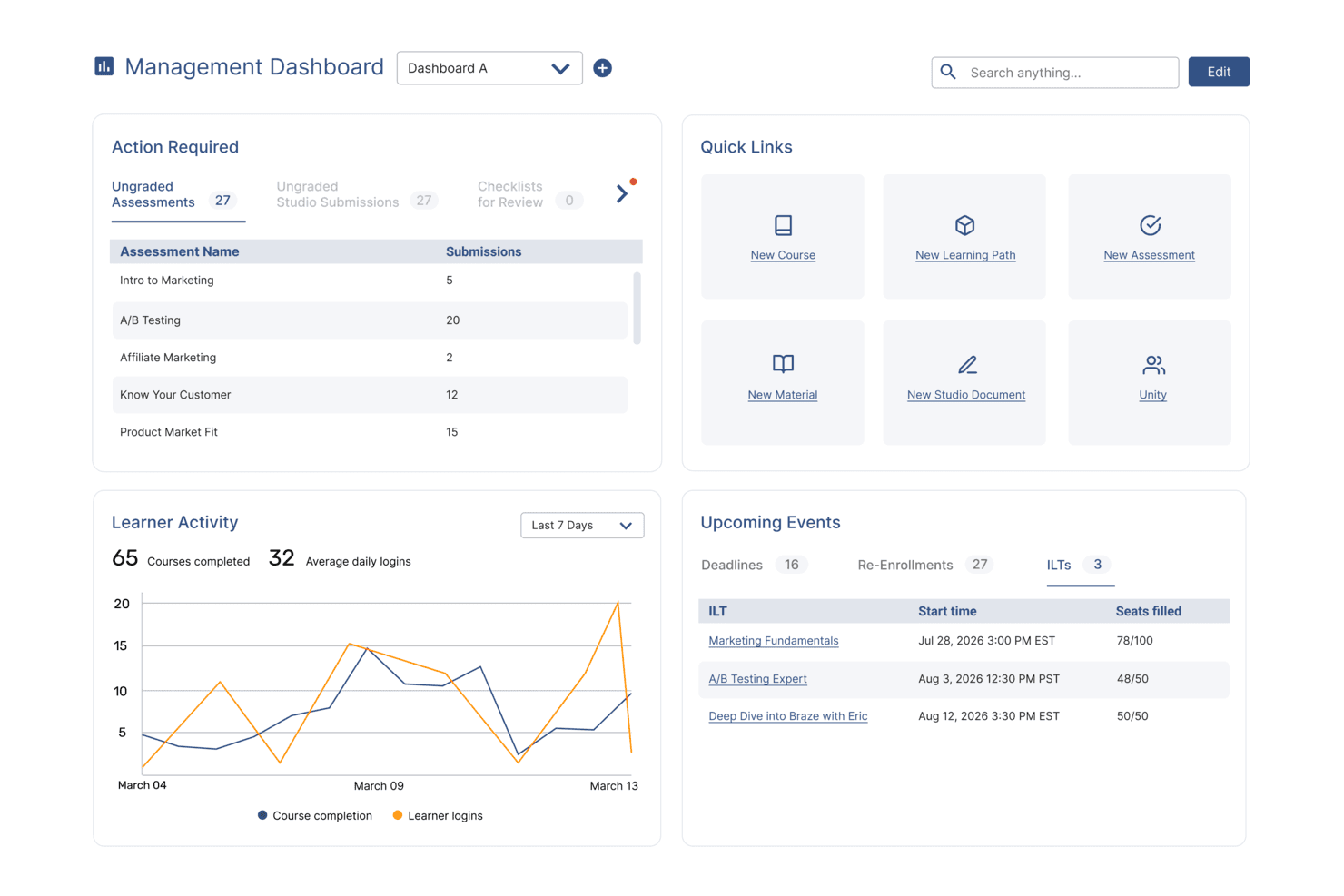
SkyPrep's management dashboard displays learner activity, upcoming events, and quick links. SkyPrep is a cloud-based extended enterprise LMS that lets you create branded portals, manage multiple audiences, deliver online courses, automate certifications, and track learner progress across external groups.
Who Is SkyPrep Best For?
SkyPrep is a good fit for mid-sized to enterprise organizations that need to train external audiences like partners, franchisees, resellers, or customers alongside internal teams.
Why I Picked SkyPrep
Certification tracking is where SkyPrep is genuinely strong, and it's a big reason I recommend it for extended enterprise use. You can design custom certificates with your own branding, set expiration dates, and configure automatic re-enrollment when a certification lapses—which is critical for compliance-heavy industries like healthcare or manufacturing. I also like that learners can download their certificates directly, so partners and external users can self-serve without needing to contact an admin.
SkyPrep Key Features
- Course builder: Create courses with assessments, checklists, and knowledge checks built directly into the course structure.
- Workflow automation: Set up auto-enrollment rules, automated alerts, and task triggers to reduce manual admin work.
- AI-powered content creation: Use built-in AI tools to speed up course development and support learner interaction.
- E-commerce support: Sell training courses directly through the platform using built-in e-commerce functionality.
SkyPrep Integrations
SkyPrep offers native integrations with Zoom, Microsoft Teams, HubSpot, Salesforce, and PayPal. It also provides an API for custom integrations.
Pros and Cons
Pros:
- Supports multiple branded portals for different learner groups
- Detailed analytics on learner engagement
- Supports granular role and permission controls
Cons:
- Advanced features may require higher-tier pricing
- Lacks advanced course versioning options
Learn more about SkyPrep: Best for managing multiple learner portals
- Free trial available
- Pricing upon request
Visit WebsiteCustomer Rating:4.6/5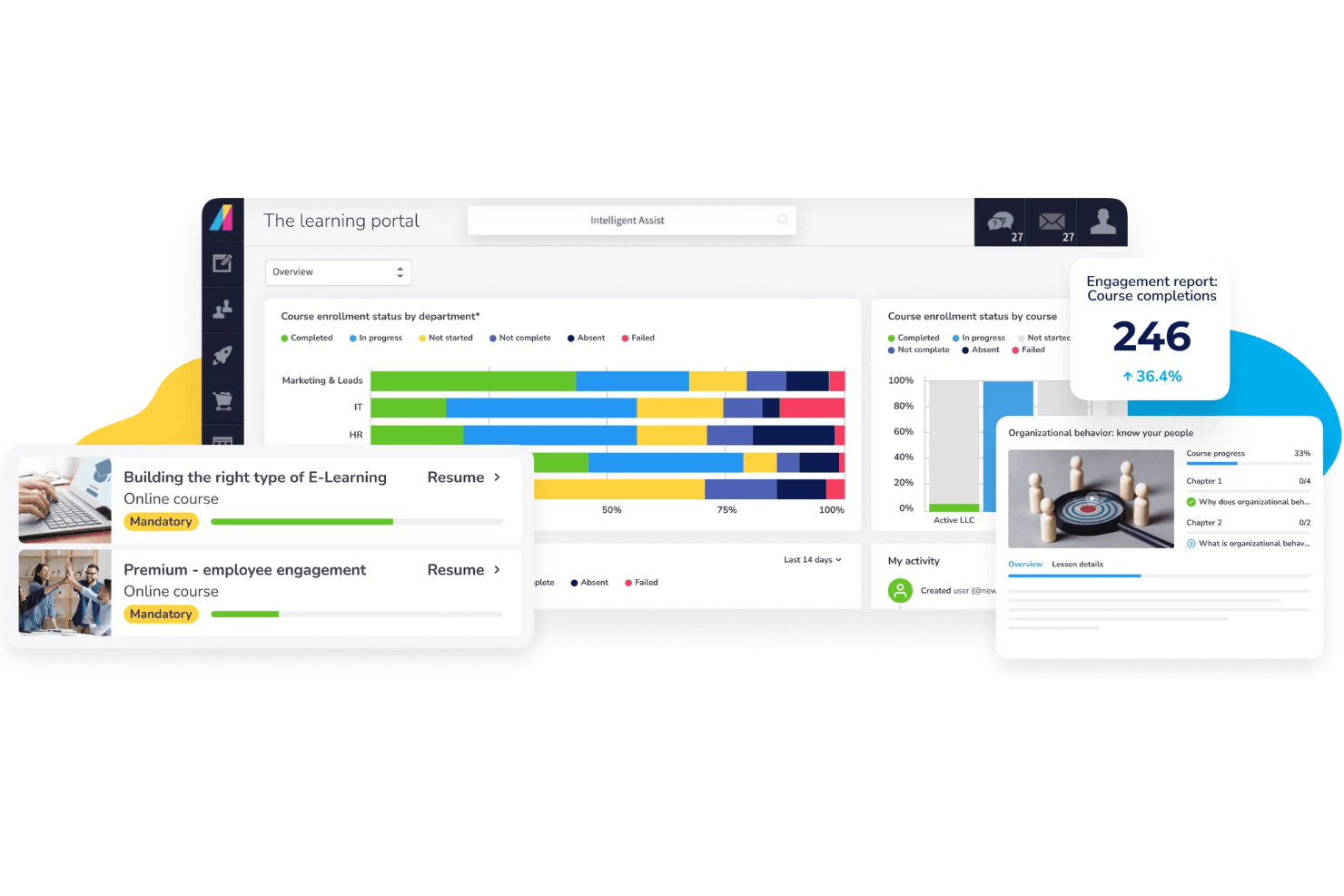
Absorb dashboard shows enrollment by department, engagement, and course progress. Absorb gives organizations a way to manage multiple external learner groups from a single platform. If you need to deliver tailored training to partners, customers, or franchisees, Absorb’s multi-portal setup helps you keep each audience’s experience distinct and secure. This platform suits businesses that want to centralize administration while offering branded, customized learning environments for different external audiences.
Who Is Absorb Best For?
Absorb is a strong choice for organizations that need to manage separate training portals for multiple external audiences, such as franchises, channel partners, or customer groups.
Why I Picked Absorb
I chose Absorb because its multi-portal management stands out for organizations training diverse external audiences. The platform lets you create and customize separate portals, each with its own branding, content, and user permissions, so you can deliver targeted learning experiences without overlap. I appreciate how administrators can manage all portals from a single dashboard, which simplifies oversight and reporting. This setup is especially useful for businesses that need to keep partner, customer, or franchisee training distinct and secure.
Absorb Key Features
Some other features that make Absorb useful for extended enterprise training include:
- Automated enrollment rules: Set up rules to automatically assign courses to users based on group, role, or portal.
- E-commerce capabilities: Sell courses directly through the platform with built-in payment processing and catalog management.
- Mobile learning app: Give learners access to training content on iOS and Android devices for flexible, on-the-go learning.
- Custom reporting tools: Build and schedule detailed reports to track learner progress, course completion, and portal activity.
Absorb Integrations
Integrations include Salesforce, ADP, BambooHR, Workday, SAP SuccessFactors, UKG Pro, Dayforce, HubSpot, Zoom, and more.
Pros and Cons
Pros:
- Includes automated enrollment and assignment rules
- Offers solid e-commerce for selling courses
- Supports unlimited branded portals for different audiences
Cons:
- Limited social learning and community features
- Initial portal setup can be time-consuming
Learn more about Absorb: Best for white-label client academies
- Free demo available
- Pricing upon request

EducateMe LMS is a cloud platform for white-label academies and cohort-based training programs. EducateMe LMS is a cloud-based learning management system that supports white-label academies, cohort-based training, and structured programs for external audiences. It allows organizations to deliver branded learning experiences to clients, partners, and distributed learner groups within a SaaS platform.
Who Is EducateMe LMS Best For?
EducateMe LMS works well for B2B training teams, L&D leaders, and customer education managers who need to train external audiences such as clients, partners, or resellers using branded learning portals.
Why I Picked EducateMe LMS
I picked EducateMe LMS because of its white-label capabilities and cohort-based structure. You can create branded learning portals with custom domains and tailored course libraries, making it suitable for external training programs. The platform also supports structured learning paths and progress tracking, which helps manage onboarding and partner enablement initiatives.
EducateMe LMS Key Features
- White-label academies: Create branded learning portals with custom domains and visual identity controls.
- Learning paths: Build structured course sequences that guide external learners through defined progression steps.
- Group-based permissions: Assign learners to groups and manage access across different training cohorts.
- Progress analytics: Track learner engagement and completion metrics across programs.
- Automation tools: Set automated enrollments and course reminders to reduce manual administration.
EducateMe LMS Integrations
Integrations include Zoom, Google Calendar, Outlook Calendar, Slack, Telegram, Stripe, Zapier, Google Forms, Google Docs, Google Sheets, Google Slides, Notion, Figma, and SSO providers such as Okta and Auth0. An API is available for custom integrations.
Pros and Cons
Pros:
- Cohort-based delivery supports partner enablement
- Structured learning paths for external audiences
- Strong white-label portal customization
Cons:
- Fewer advanced automation features than enterprise LMS platforms
- Limited publicly documented enterprise architecture details
Learn more about EducateMe LMS: Best for collaborative course creation
- 30-day free trial + demo available
- From $8/user/month
Visit WebsiteCustomer Rating:4.7/5
360Learning dashboard shows blended training reports and progress metrics. 360Learning is a learning platform built for organizations that want to create and update training collaboratively across teams or business units. It’s a strong fit for companies that need subject matter experts and stakeholders to co-author courses for partners, clients, or distributed workforces. The platform helps you speed up course creation and keep content relevant by making collaboration central to the process.
Who Is 360Learning Best For?
360Learning suits mid-sized to large organizations that need multiple teams or subject matter experts to collaborate on course creation for external audiences.
Why I Picked 360Learning
I picked 360Learning because it’s built around collaborative course creation, which is essential for extended enterprise training where content needs to reflect real-world expertise from across your organization. The platform lets multiple contributors co-author, review, and update courses in real time, so you can keep training materials accurate and relevant for partners, customers, or distributed teams. I also like that you can assign roles and permissions to manage who can edit or approve content, which helps maintain quality control as your course library grows. This collaborative approach makes it much easier to scale learning programs and adapt quickly to changing business needs.
360Learning Key Features
Some other features that make 360Learning useful for extended enterprise LMS include:
- Multi-language support: Deliver training content in multiple languages for global audiences.
- Custom branding: Apply your organization’s logos, colors, and themes to learning portals.
- Analytics dashboard: Track learner progress, engagement, and course completion with visual reports.
- Integrated assessments: Build quizzes and knowledge checks directly into courses for real-time feedback.
360Learning Integrations
Integrations include Workday, SAP SuccessFactors, Salesforce, Microsoft Teams, Zoom, Slack, Udemy, Coursera, BambooHR, Google Drive, and more.
Pros and Cons
Pros:
- Peer sharing keeps content updated
- Built-in tools for peer feedback and Q&A
- Collaborative authoring for distributed subject matter experts
Cons:
- Admin controls are limited for multi-tenant setups
- Course structuring is less flexible for complex programs
Learn more about 360Learning: Best for partner training automation
- Free demo available
- Pricing upon request
Visit WebsiteCustomer Rating:4.6/5
LearnUpon dashboard shows training status metrics with a visual breakdown by status. If you need to automate and scale partner training, LearnUpon offers a focused solution for extended enterprise LMS needs. This platform appeals to organizations that want to deliver consistent, trackable learning experiences to external partners, resellers, or distributors. Its automation features help reduce manual admin work and keep partner enablement programs running smoothly.
Who Is LearnUpon Best For?
LearnUpon is a strong fit for mid-sized to large organizations that need to automate and manage training for external partners, resellers, or distributors.
Why I Picked LearnUpon
I picked LearnUpon because its automation tools are purpose-built for partner training at scale. The platform lets you set up automated enrollment, reminders, and certification renewals, which helps keep partner learning programs on track with minimal manual effort. I also like that you can create separate portals for different partner groups, so each audience gets a tailored experience. These features make LearnUpon a practical choice for organizations that want to deliver consistent, measurable training to a wide network of external partners.
LearnUpon Key Features
Some other features that make LearnUpon useful for extended enterprise LMS needs include:
- Multi-portal management: Create and manage multiple branded portals for different audiences or business units from a single admin dashboard.
- SCORM and xAPI support: Deliver and track a wide range of e-learning content formats for compliance and partner enablement.
- Custom reporting: Build and schedule detailed reports to monitor partner engagement, course completion, and certification status.
- Single sign-on (SSO): Allow partners to access training securely using their existing credentials through SSO integrations.
LearnUpon Integrations
Integrations include Salesforce, HubSpot, BambooHR, ADP Workforce Now, Zoom, Microsoft Teams, LinkedIn Learning, Go1, Shopify, and more.
Pros and Cons
Pros:
- Built-in reporting tracks learner progress
- Mobile app allows offline partner learning access
- Offers granular user and group permissions
Cons:
- Course authoring tools are less flexible for complex content
- Some integrations require additional configuration steps
Learn more about LearnUpon: Best with AI-powered content recommendations
- Free demo available
- Pricing upon request
Visit WebsiteCustomer Rating:4.4/5
Docebo shows white-label settings with custom headers, footers, and branding controls. If you want an extended enterprise LMS that personalizes learning for each user, Docebo is worth a look. Its AI-powered content recommendations help large organizations deliver relevant training to partners, customers, and external audiences. This approach can reduce manual admin work and keep learners engaged with up-to-date, targeted resources.
Who Is Docebo Best For?
Docebo suits large organizations that want to automate and personalize partner or customer training using AI-driven content recommendations.
Why I Picked Docebo
I picked Docebo because its AI-powered content recommendations directly address the challenge of keeping external learners engaged with relevant material. The platform uses machine learning to suggest courses and resources based on each user’s activity and profile, which helps partners and customers find what they need without manual curation. I also appreciate that Docebo supports large-scale, multi-audience training with features like audience segmentation and automated learning paths. These capabilities make it a strong fit for organizations that want to deliver targeted, scalable training across their extended enterprise.
Docebo Key Features
Some other features that make Docebo useful for extended enterprise LMS needs include:
- Multi-domain management: Create and manage multiple branded portals for different audiences from a single platform.
- Certification management: Track, issue, and renew certifications for partners and external users.
- E-commerce module: Sell courses and manage transactions directly within the platform.
- White labeling: Customize the look and feel of each portal to match your organization’s or partner’s branding.
Docebo Integrations
Integrations include Salesforce, Microsoft Teams, HubSpot, ADP Workforce Now, BambooHR, Dropbox, Accredible, Okta, Zoom, Amazon S3, and more.
Pros and Cons
Pros:
- Tracks external user progress and certification
- Scales easily across global partner networks
- AI recommends content based on learner behavior
Cons:
- User management gets complex with large external groups
- Reporting across multiple portals is fragmented
Learn more about Docebo: Best for multi-language course delivery
- Free demo available
- Pricing upon request
Visit WebsiteCustomer Rating:4.4/5
CYPHER Learning dashboard shows course management, progress widgets, and news feeds. CYPHER Learning is designed for organizations that need to deliver training in multiple languages across global teams or partner networks. It appeals to businesses and educational providers looking to manage multilingual content and user experiences from a single platform. If you need to support diverse audiences with localized learning, CYPHER Learning addresses those challenges directly.
Who Is CYPHER Learning Best For?
CYPHER Learning fits organizations and training providers that need to deliver and manage courses in multiple languages for global or multilingual audiences.
Why I Picked CYPHER Learning
What stands out to me about CYPHER Learning is its deep commitment to multi-language course delivery, which is essential for extended enterprise LMS scenarios involving global audiences. The platform lets you create, manage, and deliver courses in dozens of languages, with built-in localization tools that help tailor content and navigation for each audience. I also appreciate that CYPHER Learning supports automated language detection and user interface translation, so learners can access training in their preferred language without manual setup. These features make it much easier to provide consistent, accessible learning experiences across regions and cultures.
CYPHER Learning Key Features
Some other features that make CYPHER Learning useful for extended enterprise LMS needs include:
- Customizable learning paths: Build structured learning journeys for different user groups or partner organizations.
- Ecommerce capabilities: Sell courses directly to external audiences with built-in payment processing.
- Advanced reporting tools: Track learner progress, engagement, and compliance across multiple audiences.
- Certification management: Issue, track, and manage certificates for course completion or compliance requirements.
CYPHER Learning Integrations
Integrations include Google Drive, Microsoft 365, OneDrive, Microsoft Teams, Salesforce, Workday, BambooHR, GoTo Meeting, PayPal, LinkedIn Learning, and more.
Pros and Cons
Pros:
- Scales easily across global external audiences
- AI-driven personalization improves learning paths
- Automates enrollment and lifecycle for external users
Cons:
- Mobile app performance can be slow
- Course creation tools are less advanced
Learn more about CYPHER Learning:
Andre LMS-plattformer for utvidede virksomheter
Her er noen flere LMS-alternativer for utvidede virksomheter som ikke kom med på kortlisten min, men som likevel er verdt å se nærmere på:
- 11CornerstoneBest for global compliance management
- 12WorkRampBest for customer enablement programs
- 13LitmosBest for rapid onboarding workflows
- 14Open LMS WORKBest for open-source customization
- 15BridgeBest for branded learning portal creation
- 16Abara LMSBest for branded learning portal creation
How I Evaluate Extended Enterprise LMS
I look at these tools through two lenses: the must-haves for multi-portal partner and customer training, and the differentiators that matter when scaling to thousands of external learners.
Core Functionality (Table Stakes For This List)
When I'm selecting tools for my list, I rank each one on a scale from 0 (does not offer the functionality) to 5 (excels in this area) for each core functionality listed below. Then, I calculate the tool's total score into a percentage. Each tool needs to achieve a minimum total score of 65% to be considered for inclusion.
- Multi-Tenant Portal Support: I evaluate whether each platform can spin up separate portals for distinct audiences, like one for reseller partners and another for end customers, with independent admin controls.
- External User Management: Managing thousands of non-employee learners is a different challenge than internal training, so I check for audience segmentation, bulk enrollment, and external SSO options.
- White-Label Branding: Each portal should look like it belongs to the partner or client it serves, so I look for custom domains, theme editors, and branded login experiences at the portal level.
- E-Commerce Capabilities: For teams selling courses to customers or certification programs to channel partners, I evaluate built-in shopping carts, payment gateway support, and catalog management features.
- Compliance & Certification Tracking: I look at how well the platform automates certificate issuance, tracks expiration dates, and triggers renewal workflows across distributed external learner populations.
- Reporting & Analytics: Stakeholders across partner and customer teams need different views of learner progress, so I check for segmented dashboards, per-portal reporting, and exportable data.
Once I have a list of tools that meet the criteria, I consider what sets each platform apart.
Differentiating Factors (What Sets Vendors Apart)
Here's how I compare and contrast different vendors:
Standout Features
External learners aren't a captive audience, so gamification features like badges, points, and leaderboards can make a real difference in course completion rates across partner networks. I also look at mobile and offline learning support, since field-based partners and franchisees often need to complete training without reliable internet access. Built-in content authoring tools matter too—teams that can quickly update product training or build certification courses without a separate tool save significant time when managing multiple portals.
Beyond Features
Integration with CRM and PRM systems matters a lot here—when partner learner data flows into Salesforce or HubSpot automatically, enablement teams get visibility without manual exports. Pricing flexibility is another big factor I evaluate, since external learner volumes fluctuate far more than internal headcounts. Per-active-user models tend to work better for seasonal partner networks than flat per-seat pricing. I also check for multi-language and multi-currency support, which becomes essential when you're training channel partners or customers across multiple regions.
Slik velger du en LMS-plattform for en utvidet virksomhet
Det er lett å gå seg vill i lange funksjonslister og komplekse prismodeller. For å hjelpe deg med å holde fokus mens du går gjennom den unike prosessen med å velge programvare, har jeg laget en sjekkliste over faktorer du bør ha i mente:
| Faktor | Hva du bør vurdere |
|---|---|
| FaktorSkalerbarhet | Hva du bør vurdereKan LMS-et håndtere vekst i eksterne brukere, innhold og portaler uten ytelsesproblemer eller betydelige kostnadsøkninger? |
| FaktorIntegrasjoner | Hva du bør vurdereKan LMS-et kobles direkte til HRIS-systemet, CRM-systemet, innholdsbibliotekene eller kommunikasjonsverktøyene dine? Kontroller at nødvendige integrasjoner finnes før du setter opp kortlisten. |
| FaktorTilpasningsmuligheter | Hva du bør vurdereKan du tilpasse merkevareprofilering, brukerroller og arbeidsflyter for ulike målgrupper eller forretningsenheter? Vurder om du trenger separate portaler eller egendefinerte domener. |
| FaktorBrukervennlighet | Hva du bør vurdereVil både administratorer og eksterne deltakere oppleve grensesnittet som intuitivt? Test navigering og tilgang til kurs fra begge perspektiver. |
| FaktorImplementering og introduksjon | Hva du bør vurdereHvor lang tid vil oppsettet ta, og hvilke ressurser kreves? Spør om støtte til migrering, opplæring og tilgjengelige tjenester for introduksjon. |
| FaktorKostnad | Hva du bør vurdereEr prisnivåene transparente og tilpasset antallet brukere og funksjonsbehovene dine? Vær oppmerksom på ekstra kostnader for integrasjoner, brukerstøtte eller flere portaler. |
| FaktorSikkerhetstiltak | Hva du bør vurdereTilbyr LMS-et datakryptering, kontroller for brukertilgang og samsvar med relevante standarder (for eksempel GDPR)? Vurder risikoen hvis du håndterer sensitive partner- eller kundedata. |
| FaktorTilgjengelig brukerstøtte | Hva du bør vurdereHvilke støttekanaler og svartider tilbys? Vurder om du trenger brukerstøtte døgnet rundt eller en egen kundeansvarlig for opplæringsprogrammene dine for eksterne brukere. |
Hva er et LMS for utvidet virksomhet?
Et LMS for utvidet virksomhet, eller et læringsstyringssystem for utvidet virksomhet, er en læringsløsning utviklet for å levere nettbasert opplæring til eksterne målgrupper som partnere, kunder og franchisetakere. Det hjelper organisasjoner med å administrere kundeopplæring, partneraktivering og andre opplæringstiltak utenfor interne team. Disse plattformene støtter flere målgrupper og merkevareprofilerte portaler i hele økosystemet ditt, noe som gjør det enklere å skalere læring og forbedre oppbevaringen. Virksomheter bruker dem til å heve kompetansen hos brukere, måle forretningspåvirkning og levere ensartede opplæringsopplevelser på tvers av det utvidede nettverket.
Funksjoner
Når du velger et LMS for utvidet virksomhet, bør du se etter følgende nøkkelfunksjoner:
- Administrasjon av flere portaler: Opprett og administrer separate læringsmiljøer for ulike eksterne målgrupper, hver med sin egen merkevareprofil og sitt eget innhold.
- Tilpasset merkevareprofilering: Bruk unike logoer, fargevalg og domenenavn for å gjenspeile identiteten til hver partner, kunde eller franchisegruppe.
- Rollebasert tilgangskontroll: Tildel tillatelser og tilgangsnivåer til ulike brukertyper, for eksempel deltakere, instruktører og administratorer, for å beskytte sensitiv informasjon.
- Støtte for flere språk: Lever opplæringsinnhold på flere språk for å nå globale målgrupper og sikre tilgjengelighet.
- Avansert rapportering og analyse: Følg med på deltakernes fremdrift, kursgjennomføring og engasjement på tvers av alle eksterne grupper med tilpassbare dashbord og rapporter som kan eksporteres.
- Integrerte vurderinger: Bygg quizer, tester og kunnskapssjekker direkte inn i kursene for å måle læringsutbytte og bekrefte fullføring.
- Funksjoner for e-handel: Selg kurs eller læringsløp direkte til eksterne brukere, med støtte for betalingsbehandling og administrasjon av påmeldinger.
- Integrasjon med innholdsbibliotek: Koble til eksterne innholdsleverandører eller importer SCORM/xAPI-pakker for å utvide opplæringstilbudet.
- Automatiserte varsler: Konfigurer e-postvarsler eller varsler i appen for å minne brukere på tidsfrister, nye kurs eller nødvendige handlinger.
- API-tilgang: Aktiver tilpassede integrasjoner med andre forretningssystemer, for eksempel HRIS-, CRM- eller analyseplattformer, for å forenkle dataflyt og brukeradministrasjon.
Vanlige AI-funksjoner i LMS-er for utvidet virksomhet
I tillegg til standardfunksjonene i LMS-er for utvidet virksomhet som er nevnt ovenfor, tar mange av disse løsningene i bruk AI-funksjoner som:
- Personlige læringsløp: AI analyserer brukeradferd og prestasjoner for å anbefale tilpassede kurs og ressurser basert på hver enkelt deltakers behov og mål.
- Automatisert innholdskuratering: AI skanner interne og eksterne innholdskilder for å foreslå relevant materiale for bestemte målgrupper eller opplæringsmål.
- Intelligent analyse av kompetansegap: AI identifiserer kunnskapshull ved å sammenligne deltakerdata med påkrevde kompetanser, slik at organisasjoner kan målrette opplæringen der behovet er størst.
- Prediktiv analyse: AI anslår deltakernes engasjement, gjennomføringsgrad for kurs og mulige frafallspunkter, slik at administratorer kan gripe inn proaktivt.
- Chatboter med naturlig språk: AI-drevne chatboter svarer på deltakernes spørsmål, veileder brukere gjennom plattformen og gir øyeblikkelig støtte uten menneskelig inngripen.
Fordeler
Implementering av et LMS for utvidet virksomhet gir flere fordeler for teamet og virksomheten din. Her er noen av fordelene du kan se frem til:
- Ensartet levering av opplæring: Standardiser læringsopplevelser og budskap på tvers av alle eksterne målgrupper ved hjelp av administrasjon av flere portaler og tilpasset merkevareprofilering.
- Skalerbar ekstern opplæring: Støtt et økende antall partnere, kunder eller franchisetakere med sentralisert administrasjon og automatisert brukeradministrasjon.
- Forbedret sporing av engasjement: Følg med på deltakernes fremdrift og resultater på tvers av ulike grupper med avanserte funksjoner for rapportering og analyse.
- Muligheter for inntektsgenerering: Selg kurs eller sertifiseringer direkte til eksterne brukere gjennom innebygde e-handelsfunksjoner.
- Forbedret merkevaretilstedeværelse: Utvid organisasjonens identitet til hver opplæringsportal med tilpassbare merkevare- og domeneløsninger.
- Global rekkevidde: Lever opplæring på flere språk og i flere formater for å møte behovene til internasjonale målgrupper.
- Datadrevet beslutningstaking: Bruk analyse og AI-drevet innsikt til å identifisere læringsgap og optimalisere opplæringsstrategier for bedre forretningsresultater.
Kostnader & priser
Valg av et LMS for utvidet virksomhet krever en forståelse av de ulike prismodellene og abonnementene som er tilgjengelige. Kostnadene varierer basert på funksjoner, teamstørrelse, tillegg og mer. Tabellen nedenfor oppsummerer vanlige abonnementer, gjennomsnittsprisene deres og typiske funksjoner som er inkludert i LMS-løsninger for utvidet virksomhet:
Sammenligningstabell for LMS for utvidet virksomhet
| Abonnementstype | Gjennomsnittspris | Vanlige funksjoner |
|---|---|---|
| AbonnementstypeGratisabonnement | Gjennomsnittspris$0 | Vanlige funksjonerGrunnleggende kurslevering, begrenset antall brukerplasser, enkel rapportering og brukerstøtte fra fellesskapet. |
| AbonnementstypePersonlig abonnement | Gjennomsnittspris$5–$15/bruker/måned | Vanlige funksjonerÉn portal, tilpasset merkevarebygging, grunnleggende vurderinger, e-postvarsler og standardanalyser. |
| AbonnementstypeForretningsabonnement | Gjennomsnittspris$15–$40/bruker/måned | Vanlige funksjonerFlere portaler, avansert rapportering, integrasjoner, støtte for flere språk og rollebasert tilgang. |
| AbonnementstypeVirksomhetsabonnement | Gjennomsnittspris$40–$80/bruker/måned | Vanlige funksjonerUbegrenset antall portaler, tilpassede SLA-er, API-tilgang, avansert sikkerhet, dedikert brukerstøtte og netthandel. |
Vanlige spørsmål om LMS for utvidet virksomhet
Her finner du svar på vanlige spørsmål om LMS for utvidet virksomhet:
Hvordan skiller et LMS for utvidet virksomhet seg fra et tradisjonelt LMS?
Et LMS for utvidet virksomhet er utviklet for å lære opp brukere utenfor organisasjonen din, for eksempel partnere eller kunder, mens et tradisjonelt LMS fokuserer på opplæring av interne ansatte. Plattformer for utvidet virksomhet tilbyr funksjoner som administrasjon av flere portaler, tilpasset merkevarebygging og administrasjon av eksterne brukere.
Kan jeg bruke et LMS for utvidet virksomhet til å lære opp flere målgrupper samtidig?
Ja, de fleste LMS-løsninger for utvidet virksomhet støtter flere målgrupper gjennom separate portaler eller brukergrupper. Dette lar deg levere tilpasset innhold, merkevarebygging og rapportering for hver eksterne gruppe, for eksempel distributører, franchisetakere eller kunder.
Hvilke sikkerhetshensyn bør jeg ta når jeg bruker et LMS for utvidet virksomhet?
Du bør se etter funksjoner som tilgangskontroller for brukere, datakryptering og samsvar med standarder som GDPR. Siden du lærer opp eksterne brukere, er det viktig å beskytte sensitiv forretningsinformasjon og sørge for at bare autoriserte brukere får tilgang til innholdet ditt.
Hvor lang tid tar det å implementere et LMS for utvidet virksomhet?
Tidsrammen for implementering varierer, men de fleste plattformer tilbyr støtte ved oppstart, migreringsverktøy og opplæringsressurser for å fremskynde prosessen. For komplekse oppsett med flere portaler eller integrasjoner kan du forvente flere uker til noen måneder før full utrulling.
Kan jeg tjene penger på opplæringsinnhold med et LMS for utvidet virksomhet?
Ja, mange LMS-plattformer for utvidet virksomhet har netthandelsfunksjoner som lar deg selge kurs, sertifiseringer eller læringsstier direkte til eksterne brukere. Se etter innebygd betalingsbehandling og verktøy for administrasjon av påmeldinger hvis inntektsgenerering er viktig.