

15 beste AI-plattformer for 2026 (gratis og betalte alternativer)

15 Kortliste over de beste AI-plattformene


AI-verktøy kan gjøre alt fra å ta seg av repetitive oppgaver til å hjelpe deg med å forstå dataene dine bedre, slik at du får mer tid til å fokusere på arbeidet som faktisk trenger oppmerksomheten din. Enten du jobber innen helsevesen, markedsføring eller næringsliv, finnes det svært mange AI-apper tilgjengelig for dagens yrkesaktive.
Etter å ha vurdert ulike AI-plattformer har jeg sett hvor mye det riktige verktøyet kan endre arbeidsflyten din fra dag til dag. Jeg har testet disse alternativene selv for å gi deg et balansert innblikk i hva de tilbyr, og hvor de utmerker seg – fra generativ AI og produktivitetsverktøy til oppsummering av møtenotater. Det finnes sannsynligvis et verktøy som passer til den spesifikke oppgaven du har i tankene.
Hvorfor du kan stole på våre programvareanbefalinger
Teamet vårt har testet og anmeldt programvare siden 2012. Vi er selv HR-eksperter, så vi vet hvor vanskelig og hvor viktig det er å velge riktig programvare.
I denne guiden har vi vurdert verktøyene gjennom praktisk testing og uavhengig research og gitt dem poeng ut fra våre utvelgelseskriterier. Vi bygger også på innsikt fra ledende eksperter i bransjen og erfarne HR-eksperter.
Anmeldelsene våre bygger på vår egen redaksjonelle vurdering. De er ikke et salgsargument.
Ekspertanmeldere:
Sammenligningstabell for AI-plattformer
Denne sammenligningstabellen oppsummerer prisopplysningene for mine beste utvalgte AI-plattformer:
| Tool | Best For | Trial Info | Price | ||
|---|---|---|---|---|---|
| 1 | Best for AI-assisted project risk detection | Free plan + 14-day trial available | From $9/user/month (billed annually) | Website | |
| 2 | Best for AI-Powered ITSM | 14-day free trial | From $19/user/month (billed annually) | Website | |
| 3 | Best for workflow process design with drag-and-drop | Free demo available | $40/user/month | Website | |
| 4 | Best for performance analytics backed by AI | Free demo available | Pricing upon request | Website | |
| 5 | Best for AI governance policy management | Free demo available | Pricing upon request | Website | |
| 6 | Best for unified data and AI model governance | Free edition available + 14-day free trial | From $0.15/DBU | Website | |
| 7 | Best for collaborative inbox management | 30-day free trial + free demo available | From $14/user/month (billed annually) | Website | |
| 8 | Best for no-code AI agent builder | 7-day free trial + free plan + free demo available | From $32/month (billed annually) | Website | |
| 9 | Best for enterprise knowledge integration | Free trial available | Pricing upon request | Website | |
| 10 | Best for AI-powered background screening | Free demo available | From $29.99/report | Website | |
| 11 | Best for governing AI across the full ML lifecycle | 14-day free trial | Pricing upon request | Website | |
| 12 | Best for AI deployment in regulated industries | Free demo available | Pricing upon request | Website | |
| 13 | Best for secure AI-driven board meeting management | Free demo available | Pricing upon request | Website | |
| 14 | Best for multi-model agent orchestration at scale | 30-day free trial | From $21/user/month | Website | |
| 15 | Best for enterprise-scale model fleet governance | 30-day free trial available | From $0.165 per 1M input tokens | Website |


Anmeldelser av de beste AI-plattformene
Nedenfor finner du mine detaljerte sammendrag av de beste AI-plattformene som kom med på kortlisten min. Anmeldelsene mine gir et detaljert innblikk i de viktigste funksjonene, fordelene og ulempene, integrasjonene og de ideelle bruksområdene for hvert verktøy, slik at du kan finne det beste alternativet for deg.

Best for AI-assisted project risk detection
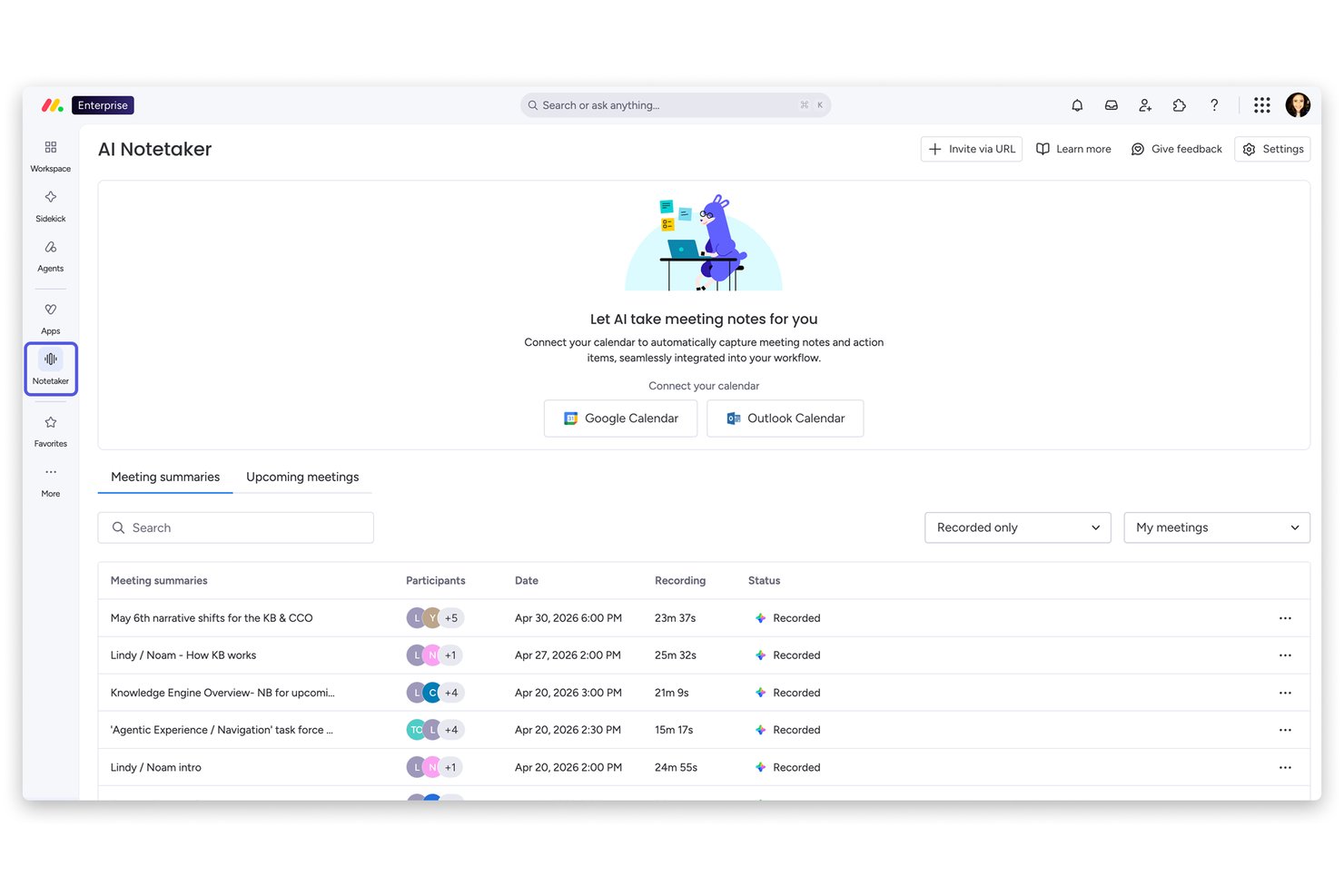
Monday AI Workspace is a general-purpose AI work platform that combines agentic AI, generative AI tools, and predictive analytics across project management, CRM, service, and dev workflows.
Who Is Monday AI Workspace Best For?
It's a strong fit for cross-functional teams and operations managers at mid-size to enterprise organizations running multiple projects simultaneously.
Why I Picked Monday AI Workspace
Monday AI Workspace earns its spot on my shortlist because of its portfolio-level AI Risk Insights feature. I like that it doesn't just scan one project at a time — it analyzes all linked boards daily, reviewing item names, update sections, and activity logs to surface risks before they become blockers. That kind of proactive, cross-project visibility is genuinely difficult to find in a general-purpose work platform.
Monday AI Workspace Key Features
- AI workflow builder: Automate project processes and tasks with no-code, AI-driven workflow assembly.
- AI meeting notetaker: Capture and summarize meeting discussions directly within your project boards.
- Sidekick AI assistant: Generate project-related content, answer queries, and provide context-aware suggestions in your workspace.
- Portfolio-level dashboards: Visualize and manage multiple projects with real-time, customizable dashboards for tracking progress and metrics.
Monday AI Workspace Integrations
Monday AI Workspace offers hundreds of integrations through its built-in integrations and marketplace, including tools like Slack, Salesforce, HubSpot, Google Workspace, Jira, GitHub, Microsoft Teams, Zoom, Zendesk, and Trello. It also supports Zapier and provides an API for custom integrations.
Pros and Cons
Pros:
- Generative AI covers multiple content creation tasks
- No-code workflow automation with AI assistance
- AI risk detection spans multiple projects simultaneously
Cons:
- Not purpose-built for dedicated HR workflows
- Setup complexity increases with advanced AI configurations
New Product Updates from monday AI Workspace
monday AI Workspace Adds Human Approval Routing
monday AI Workspace adds a human-in-the-loop approval block to AI Workflows, sending approval requests and routing workflow paths based on responses. For more information, visit monday AI Workspace's official site.

Best for AI-Powered ITSM
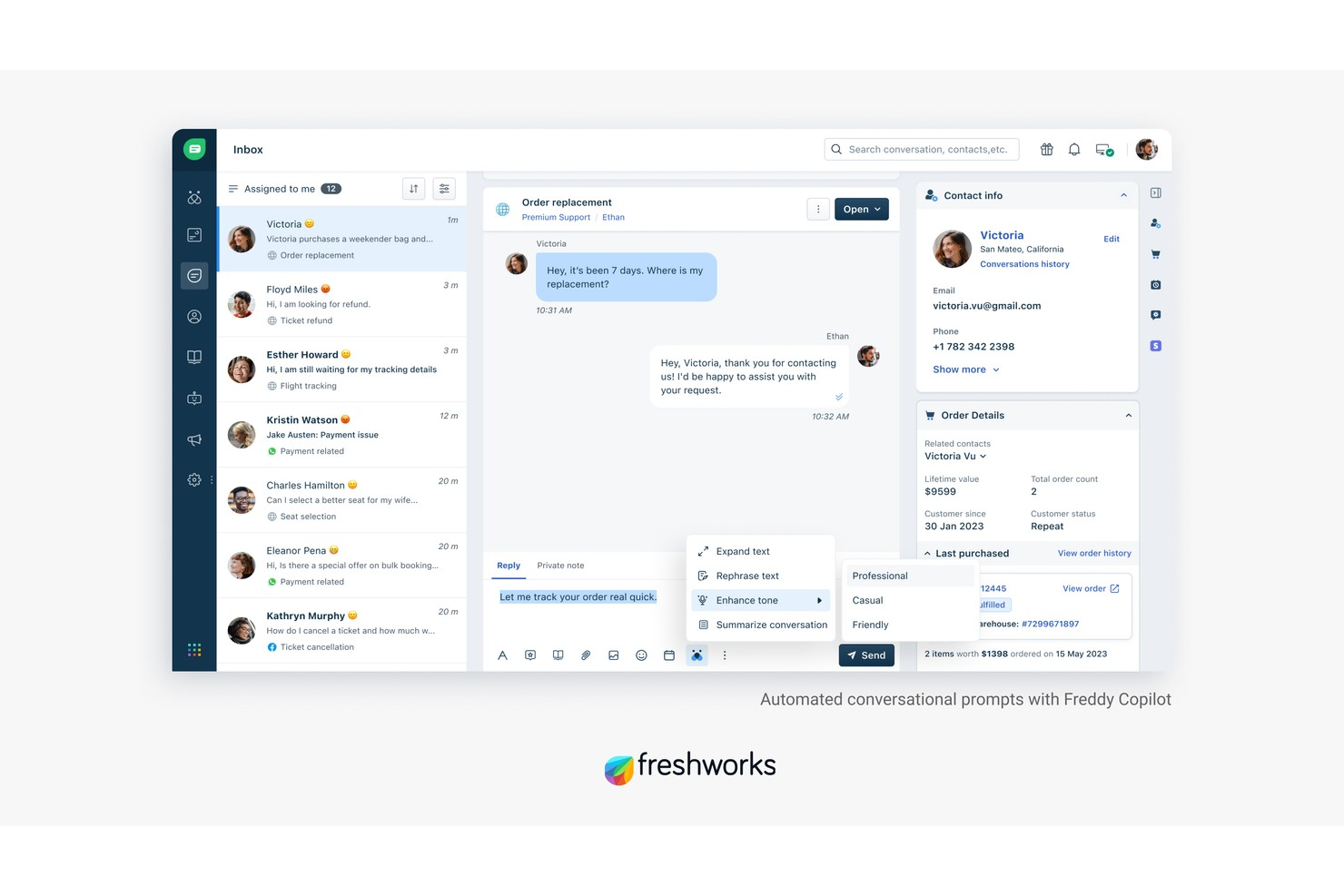
Freshservice is an AI-powered IT service management (ITSM) platform that handles incident management, asset tracking, workflow automation, and enterprise service management across IT, HR, finance, and operations teams.
Who Is Freshservice Best For?
Freshservice is a strong fit for mid-size to enterprise IT teams that need a structured, scalable service desk with built-in AI capabilities.
Why I Picked Freshservice
Freshservice is one of my top picks because I love how deeply automation is baked into its ITSM core. It handles intelligent ticket routing automatically, assigning tickets based on agent availability, workload, and skills. Meanwhile, no-code workflow automation covers everything from approvals to incident resolution without any custom dev work.
Freshservice Key Features
- Service catalog: Lets users browse and request IT services through a configurable self-service portal without contacting the help desk directly.
- Change management: Supports structured CAB approvals with built-in risk assessment and change advisory workflows.
- Freddy AI Copilot: An AI assistant that helps agents draft responses, summarize ticket history, and suggest solutions from within the ticket view.
- Problem management: Links recurring incidents to underlying problems and tracks root cause analysis through to resolution.
Freshservice Integrations
Freshservice offers 1,200+ marketplace integrations, including Microsoft Teams, Slack, Jira, Azure AD, and TeamViewer, along with connector apps for syncing data with external tools via a low-code UI. It's available on Zapier and provides an API for custom integrations.
Pros and Cons
Pros:
- Supports asset tracking from procurement
- Extends beyond IT to HR and facilities
- No-code workflow automator for ticket routing
Cons:
- Freddy AI lacks configuration flexibility
- Reporting customization options are restricted
New Product Updates from Freshservice
 Experience)
Freshservice Introduces a Reimagined IT Asset Management (ITAM) Experience
Freshservice introduces a reimagined IT Asset Management (ITAM) experience with continuous infrastructure discovery, dependency mapping, IPAM, and Software License Management. This update helps teams improve asset visibility and manage connected IT environments more effectively. For more information, visit Freshservice’s official site.
Best for workflow process design with drag-and-drop
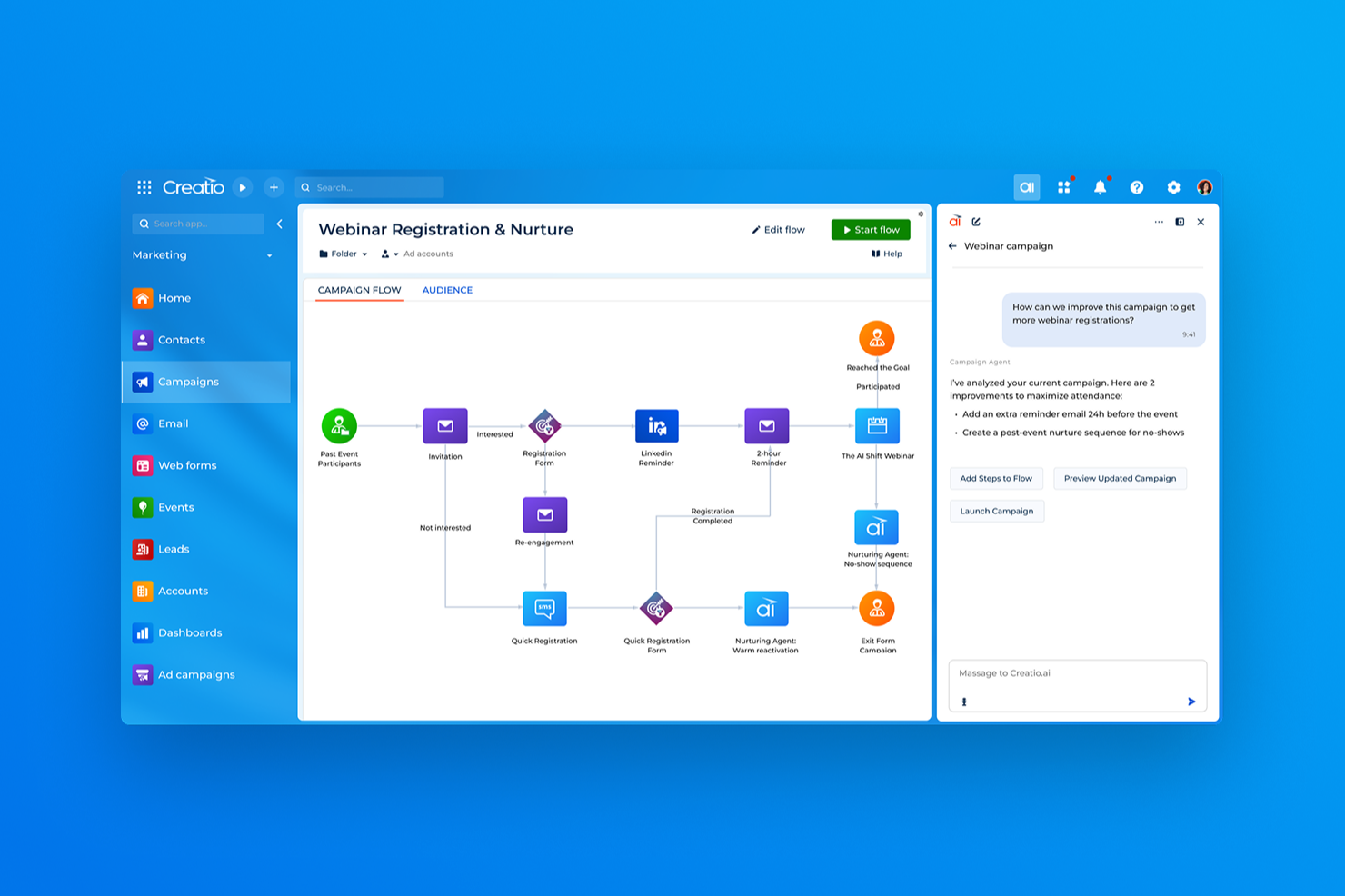
Creatio Studio is a no-code AI platform for building business applications, automating workflows, and designing AI agents using visual drag-and-drop tools and natural language prompts.
Who Is Creatio Studio Best For?
Creatio Studio is a strong fit for mid-size to enterprise organizations that want non-technical teams to build and automate business applications without relying on developers.
Why I Picked Creatio Studio
Creatio Studio earns its spot on my shortlist because its BPMN 2.0-driven Process Designer makes workflow design genuinely visual. I like that you can map multi-step approval flows, conditional branching, and parallel gateways by dragging elements onto a canvas. The Workflow Agent Designer extends this further, letting you wire AI agents directly into process logic without writing a line of code.
Creatio Studio Key Features
- Prompt Agent Designer: A visual tool for building AI agents by defining instructions, context, and goals using natural language prompts.
- Code Agent Designer: A code-based environment for building custom AI agents when more precise or complex logic is required.
- ML model builder: A drag-and-drop interface for creating machine learning models that power predictions and data-driven decisions inside your apps.
- Natural language app generation: A feature that lets you describe an application in plain text and have Creatio Studio generate its structure, UI, and logic automatically.
Creatio Studio Integrations
Creatio Studio connects with the rest of your tech stack through 700+ apps and ready-to-use templates available on the Creatio Marketplace, including marketplace connectors for SAP HANA, DocuSign, Sage Intacct, SharePoint Office 365, and Formstack. The platform provides built-in integration capabilities via .NET tools, REST, SOAP, OData, and open API, and it's available on Zapier.
Pros and Cons
Pros:
- Industry workflows span 19 vertical sectors
- Business analysts can build apps independently
- AI is embedded natively into data objects
Cons:
- Limited variety of ready-made templates
- Slower performance under high data loads
New Product Updates from Creatio AI Studio
Creatio Studio Expands AI App-Building Capabilities
Creatio Studio adds expanded AI coding agents, AI-generated pivot tables, and built-in analytics for generated apps. These updates let users build more UI, logic, and reporting components from natural-language prompts. For more information, visit Creatio Studio’s official site.

HiBob
Best for performance analytics backed by AI

HiBob is an HR platform designed to meet the needs of mid-sized companies, offering tools for employee management, engagement, and performance tracking. It caters to HR teams looking to streamline their processes with AI-driven insights and automation.
Why I picked HiBob: It provides tailored features for mid-sized companies, making it an ideal fit for growing teams. With AI-driven analytics, you can gain insights into employee performance and engagement. The platform offers customizable workflows that adapt to your company's specific needs. HiBob's focus on simplifying HR tasks helps your team save time and improve efficiency.
Standout Features & Integrations:
Features include customizable workflows that allow you to tailor processes to fit your company's needs. The platform also offers performance tracking to help you monitor and improve employee productivity. Additionally, HiBob provides engagement tools to keep your team connected and motivated.
Integrations include G Suite, Slack, Microsoft Teams, BambooHR, Greenhouse, Workable, Okta, OneLogin, Zoom, and LinkedIn.
Pros and Cons
Pros:
- AI-driven analytics
- Customizable workflows
- Tailored for mid-sized companies
Cons:
- Initial setup may require time
- Limited advanced features for large enterprises
Best for AI governance policy management
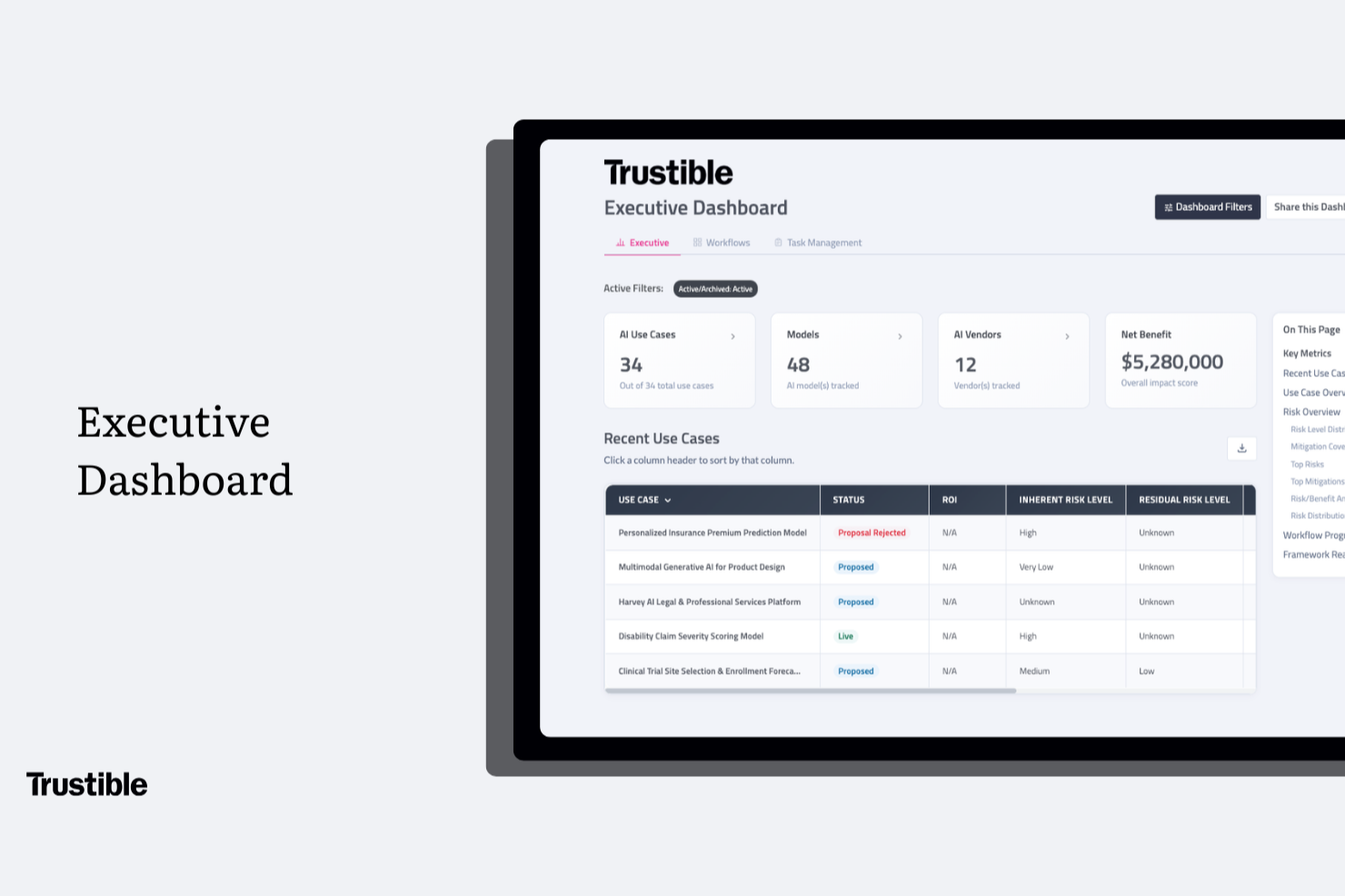
Trustible is well-suited for organizations in financial services, healthcare, insurance, and defense that face regulatory scrutiny over how they build, buy, and deploy AI.
Why I Picked Trustible
I picked Trustible as one of the best because of how it connects governance policies directly to operational workflows. Instead of managing policies in separate documents, Trustible maps them to intake reviews, risk tiers, and approval decisions happening across the platform in real time. I also like the AI-powered control gap analysis, which evaluates your internal policies against specific framework articles and surfaces exactly where coverage is missing.
Trustible Key Features
- Centralized AI inventory: Track every AI use case, model, agent, and vendor your organization uses in a single registry with ownership and governance status visible across the portfolio.
- Attributes-based risk scoring engine: Automatically scores each AI use case across five risk categories (Performance, Data Privacy, Cybersecurity, Ethical, and Legal) and assigns a governance tier.
- Audit-ready evidence packages: Exports timestamped governance records, assessment outcomes, and approval decisions in PDF or Excel format for regulatory review.
- Structured impact assessments: Triggers guided assessment workflows for high-risk use cases, walking reviewers through harm evaluation, regulatory obligations, and mitigation documentation.
Trustible Integrations
Native integrations are not clearly documented. Trustible integrates directly with MLOps tools to help connect developer workflows with risk management teams, but specific vendor names are not listed. The Enterprise tier adds enterprise customizations and integrations into existing systems, suggesting that integrations are configured during implementation rather than available as pre-built connectors. An API is not explicitly documented on the platform's website.
Pros and Cons
Pros:
- Automated risk-based intake triage routing
- Built for governance teams, not developers
- Maps controls across 10+ regulatory frameworks
Cons:
- Pricing requires contacting the sales team
- Limited third-party integration options available
Best for unified data and AI model governance
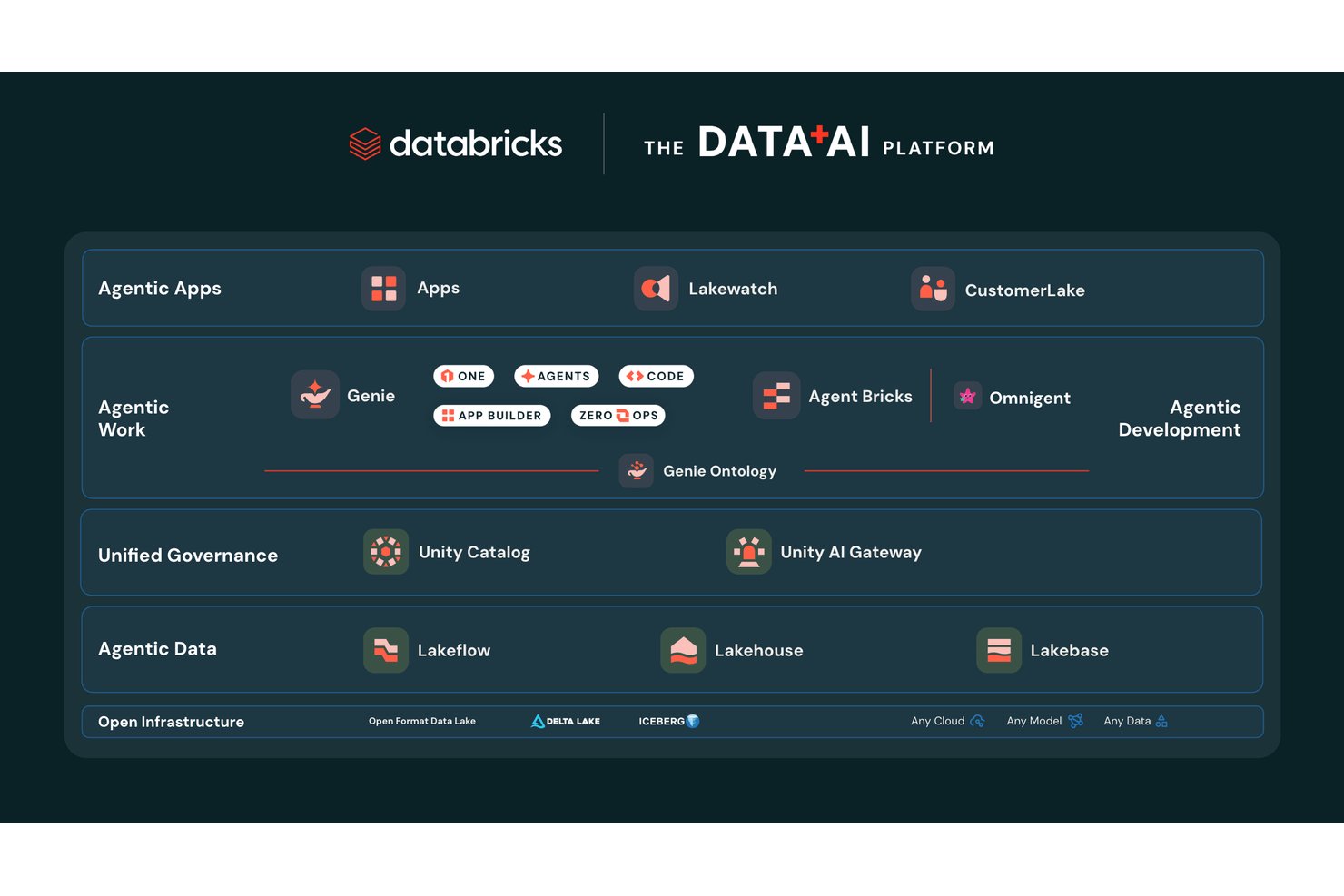
Databricks is a unified data and AI platform that combines model training, agent building, pipeline orchestration, and governance across cloud environments.
Who Is Databricks Best For?
Databricks is a strong fit for enterprise data science and engineering teams that need to build, govern, and scale AI models across complex, multi-cloud environments.
Why I Picked Databricks
Databricks earns its spot on my shortlist because no other platform matches its depth of unified governance across data, models, and AI agents simultaneously. I'm particularly impressed by Unity Catalog, which tracks column-level lineage from raw data all the way through model outputs, with automatic PII classification and audit logging built in. Unity Gateway layers on top to enforce rate limits, content filtering, and cost controls across every model your team touches, whether that's GPT-4, Claude, or a fine-tuned Llama.
Databricks Key Features
- Foundation Model APIs: Access state-of-the-art LLMs from OpenAI, Anthropic, Meta, Google, and open-source providers hosted directly on Databricks infrastructure with pay-per-token pricing.
- AI Playground: Test and compare models in a pre-deployment validation environment before committing them to production workflows.
- Managed MLflow: Track experiments, version models, and manage the full ML lifecycle using an enterprise-grade extension of open-source MLflow.
- Databricks Clean Rooms: Collaborate on data analysis with internal teams or external partners without exposing the underlying data to either party.
Databricks Integrations
Databricks offers native integrations with Salesforce, SAP, MySQL, PostgreSQL, Snowflake, Amazon Redshift, Google BigQuery, Tableau, Power BI, and dbt Cloud. It also supports MCP, Delta Sharing, REST APIs, and 6,000+ marketplace and partner connections for custom data and AI workflows.
Pros and Cons
Pros:
- No vendor lock-in with open model access
- Supports multi-agent AI and model orchestration
- Column-level governance for data and AI assets
Cons:
- Initial setup demands advanced technical expertise
- DBU-based billing complicates cost predictability

Missive
Best for collaborative inbox management
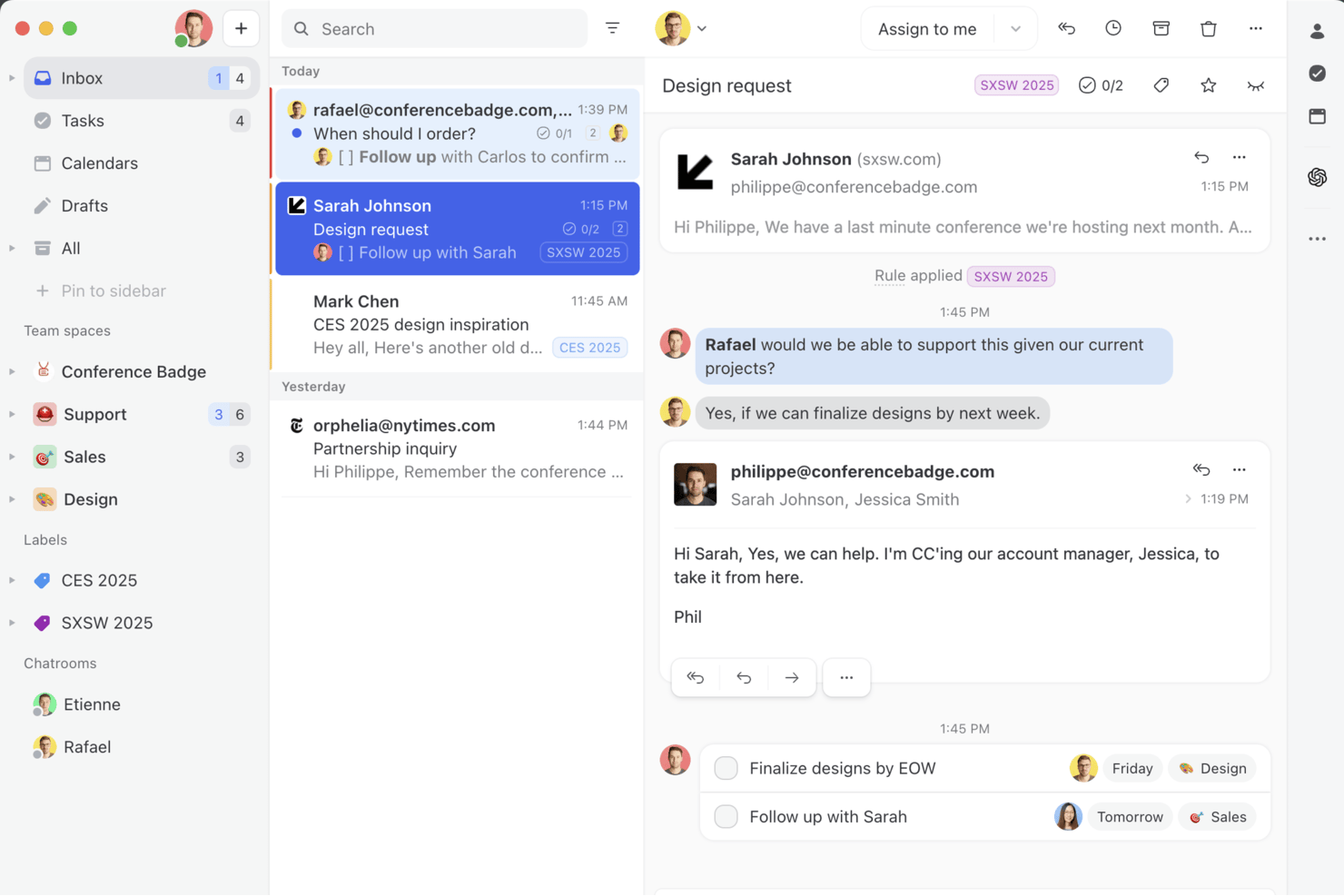
Missive is a collaborative inbox platform that unifies email, SMS, and social messaging channels into a shared team workspace, with an embedded AI assistant for drafting, summarizing, and triaging communications.
Who Is Missive Best For?
Missive suits customer-facing and operations teams that need a shared inbox where multiple people collaborate on incoming emails, messages, and support threads.
Why I Picked Missive
Missive earns its spot on my shortlist because its AI assistant is built directly into the shared inbox, not bolted on as an afterthought. I'm particularly impressed by how it drafts context-aware replies by reading the full conversation thread before generating anything, which cuts down on back-and-forth considerably. The AI-powered automation rules go beyond simple keyword triggers, detecting tone and intent to route and label incoming messages automatically.
Missive Key Features
- Multi-model AI support: Switch between OpenAI, Anthropic Claude, and Google Gemini models, or connect your own API key to control costs and model choice.
- Custom AI prompts: Save and reuse custom prompt templates for recurring tasks like tone adjustment, grammar fixes, or reply generation.
- Missive MCP Server: Connect external AI tools (like Claude or ChatGPT) to query conversations, check calendars, and draft replies—while keeping agent review required before sending.
- Pre-send AI checks: Review outgoing messages with AI before they're sent to catch errors or flag tone issues.
Missive Integrations
Missive offers integrations with OpenAI, Anthropic, Google Gemini, Notion, Linear, Stripe, Attio, and ClickUp. It also provides a REST API with webhooks for custom connections, supports Zapier, and includes its new MCP Server on Productive and Business plans (requires admin activation).
Pros and Cons
Pros:
- AI rules automate message triage and labeling
- Flexible multi-model AI assistant options
- Collaborative inbox with native AI-driven replies
Cons:
- No predictive insights or workforce modeling
- Lacks HR-specific automations and analytics
New Product Updates from Missive

Missive Adds Multi-Step Automations With Timed Rules
Missive adds time-based rule steps that let automations run through multiple stages on the same conversation. This helps teams build follow-ups and SLA escalations without creating separate rules. For more information, visit Missive’s official site.
 .
.
Chatbase
Best for no-code AI agent builder
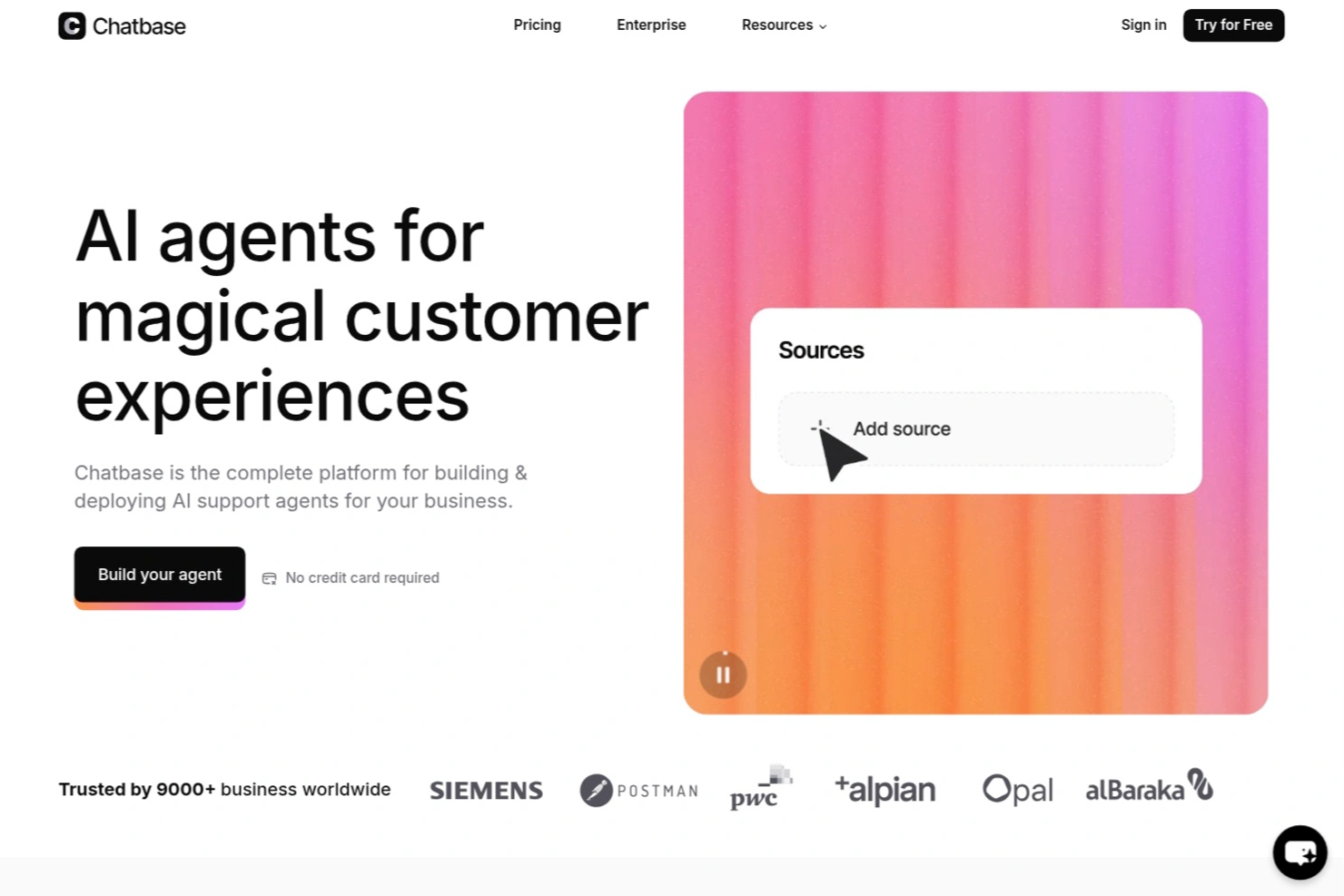
Chatbase is an AI agent platform where you can build, train, and deploy custom chatbots across your website, messaging apps, and business tools—without writing any code.
Who Is Chatbase Best For?
Chatbase is a good fit for small to mid-sized businesses that want to deploy AI-powered customer support or lead generation without a dedicated engineering team.
Why I Picked Chatbase
Chatbase is one of my top picks because I love how directly it connects your existing content to a deployable AI agent. You can upload PDFs, Word docs, or plain text files, and Chatbase trains a chatbot on that material—so when a customer asks a question, the answer comes directly from your documentation. I also like the website crawl feature, where Chatbase scrapes your URLs automatically, so your chatbot stays current without manual re-uploads every time your content changes.
Chatbase Key Features
- Multiple LLM support: Choose from models including GPT-4o, Claude, Gemini, and Llama to power your chatbot based on your performance or cost needs.
- AI Actions: Connect your chatbot to external systems so it can perform tasks like booking appointments, checking order status, or collecting lead information mid-conversation.
- Human handoff: Set escalation rules that automatically route conversations to a live agent when the chatbot reaches the limits of its knowledge.
- Conversation analytics: Review chat logs, user queries, and resolution rates to identify gaps in your training data and improve chatbot responses over time.
Based on the homepage and search results, I can now see the verified integrations. The homepage lists: Make, Zendesk, Notion, Slack, Stripe, Salesforce, Cal.com, Calendly, WhatsApp, Zapier, and Messenger. The blog content also confirms Shopify and Instagram as native integrations. Let me also verify the Instagram and other channel integrations mentioned.
Chatbase Integrations
Chatbase offers native integrations with Shopify, Zendesk, Salesforce, Stripe, Slack, WhatsApp, Messenger, Instagram, Notion, Cal.com, Calendly, and Make. It also connects with Zapier and provides an API for custom integrations.
Pros and Cons
Pros:
- Suggestions flag knowledge base gaps automatically
- AI Actions trigger tasks from chat
- Supports multiple AI model choices
Cons:
- Occasional hallucinations outside training data
- No visual flow builder for conversations
Coveo
Best for enterprise knowledge integration
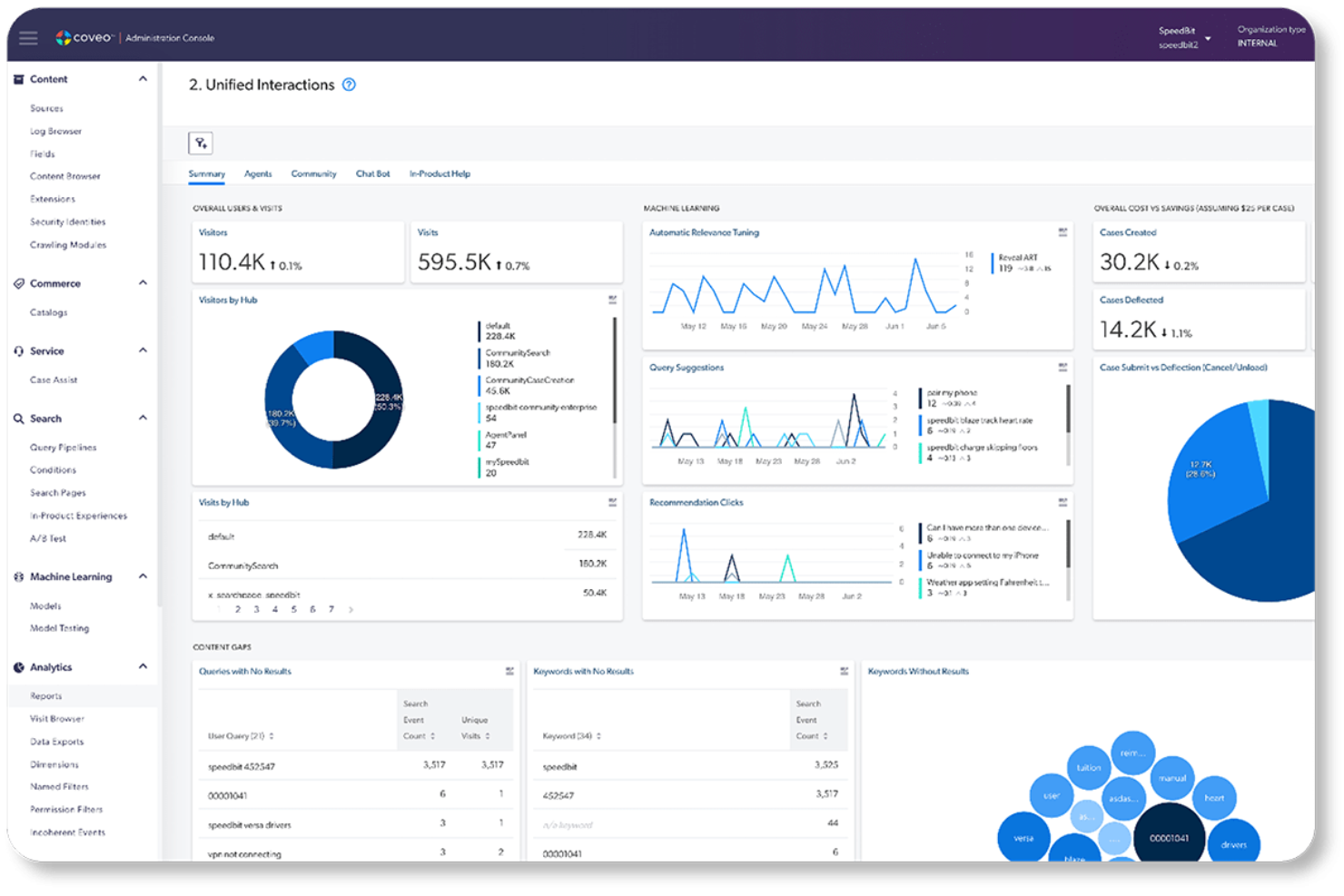
Coveo is an enterprise AI search and generative answering platform that indexes content across your existing systems and delivers AI-powered search, retrieval-grounded answers, and personalized recommendations through APIs and pre-built integrations.
Who Is Coveo Best For?
Coveo fits mid-market to enterprise teams that need AI-powered search and generative answers across complex, multi-system knowledge environments.
Why I Picked Coveo
I picked Coveo because no other platform on my list handles enterprise knowledge integration the way it does. Its unified hybrid index pulls content from 100+ sources, including Salesforce, SAP, and ServiceNow, and makes that knowledge retrievable through AI-generated answers with source citations. I'm particularly impressed by the Passage Retrieval API, which lets AI agents pull precise text chunks from the unified index in real time to ground responses in trusted content.
Coveo Key Features
- Dynamic navigation: Automatically adjusts facets and filters to help users refine search results.
- Personalized recommendations: Uses user behavior and intent to suggest relevant products or content.
- Role-based access controls: Applies permissions so users access only authorized content.
- Search analytics: Tracks search behavior and conversions through dashboards and attribution tools.
Coveo Integrations
Coveo offers 30+ connectors to hundreds of systems, including Salesforce, SAP, Shopify, AWS, Sitecore, Adobe, ServiceNow, Zendesk, and Agentforce. Its Answer API, Passage Retrieval API, and Headless toolkit support custom integrations and embedding search or retrieval in applications.
Pros and Cons
Pros:
- Document-level security restricts answers by permissions
- Gartner Magic Quadrant Leader for search
- Unified hybrid index across 100+ content sources
Cons:
- Unpredictable costs at enterprise scale
- No custom model training or deployment
Checkr
Best for AI-powered background screening
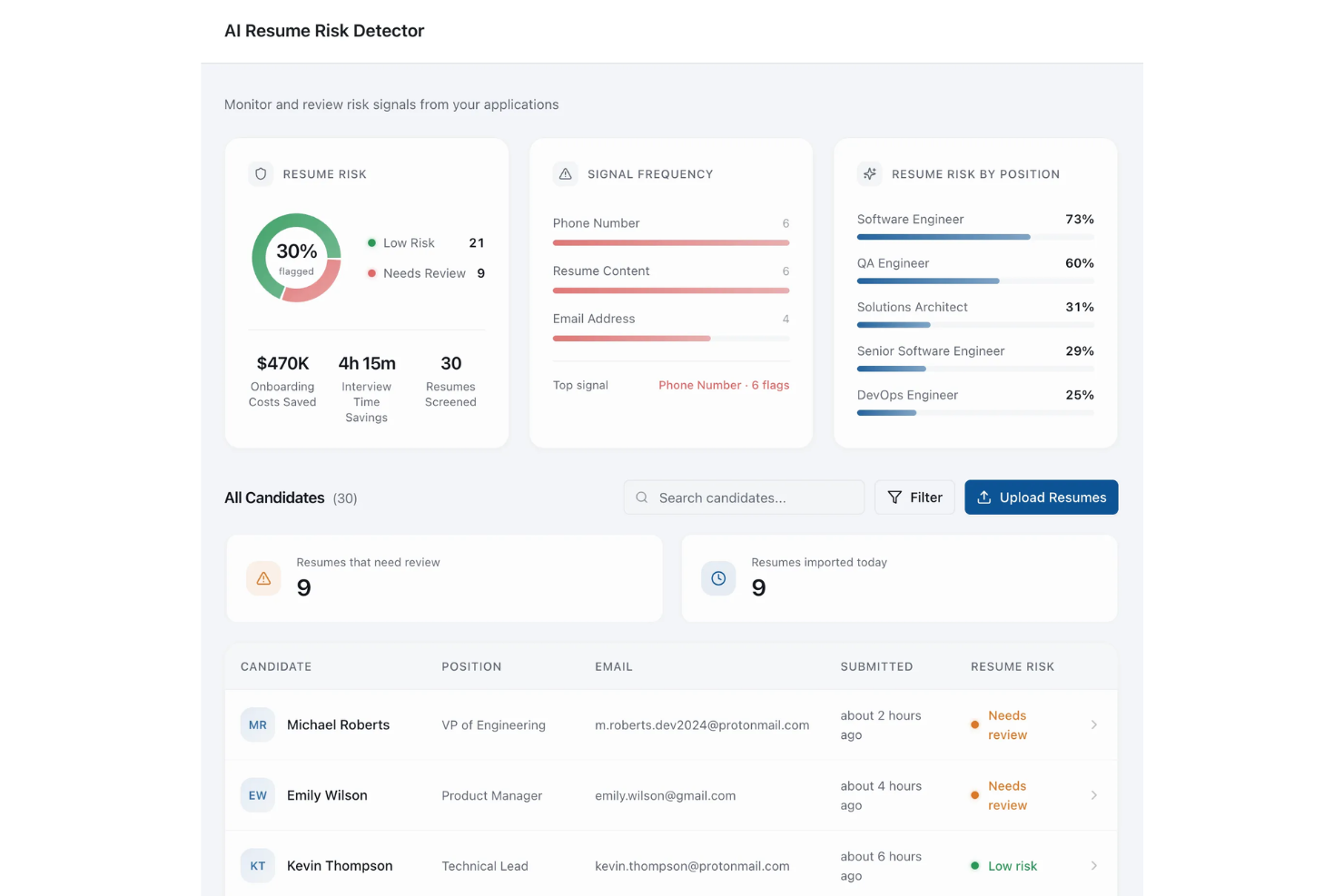
For organizations seeking an AI-driven platform to streamline hiring processes, Checkr presents a compelling solution. Designed with the needs of modern businesses in mind, Checkr leverages AI to enhance background screening, ensuring faster, more accurate, and compliant hiring decisions. Whether you are in retail, healthcare, or technology, Checkr's AI capabilities can help you transform complex data into actionable insights, addressing challenges like inefficient hiring and compliance uncertainties.
Why I Picked Checkr
I picked Checkr for its standout AI capabilities that redefine background screening. The platform's Charge Classifier automatically categorizes criminal charges, simplifying adjudication with custom rules. Additionally, the Name Matcher ensures accurate record matching by identifying and associating various name formats with the correct candidate. These features not only improve report accuracy but also address compliance and efficiency challenges, making Checkr an ideal AI platform for hiring needs.
Checkr Key Features
In addition to AI background screening, Checkr offers:
- Doc Inspector: Analyzes uploaded documents for authenticity, detecting alterations that might indicate forgery.
- Role Matcher: Verifies candidates' job titles against employer data, identifying discrepancies while ignoring minor errors.
- Real-Time Updates: Provides candidates with timely status updates on their background checks, enhancing communication.
- Compliance Tools: Provides tools that keep up with local compliance laws, enabling seamless hiring processes.
Checkr Integrations
Integrations include Workday, Greenhouse, BambooHR, Rippling, Lever, JazzHR, iCIMS, SmartRecruiters, Bullhorn, and Planning Center. Checkr also offers an API for custom integrations.
Pros and Cons
Pros:
- Fast background check results help speed up candidate hiring decisions
- Candidate-friendly interface simplifies completing background check requirements
- Automated background screening reduces manual verification and administrative work
Cons:
- Feature access and workflows sometimes unclear for new platform users
- Some background and employment checks may take longer than expected
New Product Updates from Checkr
Checkr Adds Post-Hire Drug & Alcohol Clearinghouse Screening
Checkr adds post-hire limited-query support to its Drug & Alcohol Clearinghouse screening, alongside existing pre-hire full queries. The update helps employers manage recurring FMCSA screening requirements for employed CDL drivers within the same platform. For more information, visit Checkr’s official site.
 .
.
Dataiku
Best for governing AI across the full ML lifecycle
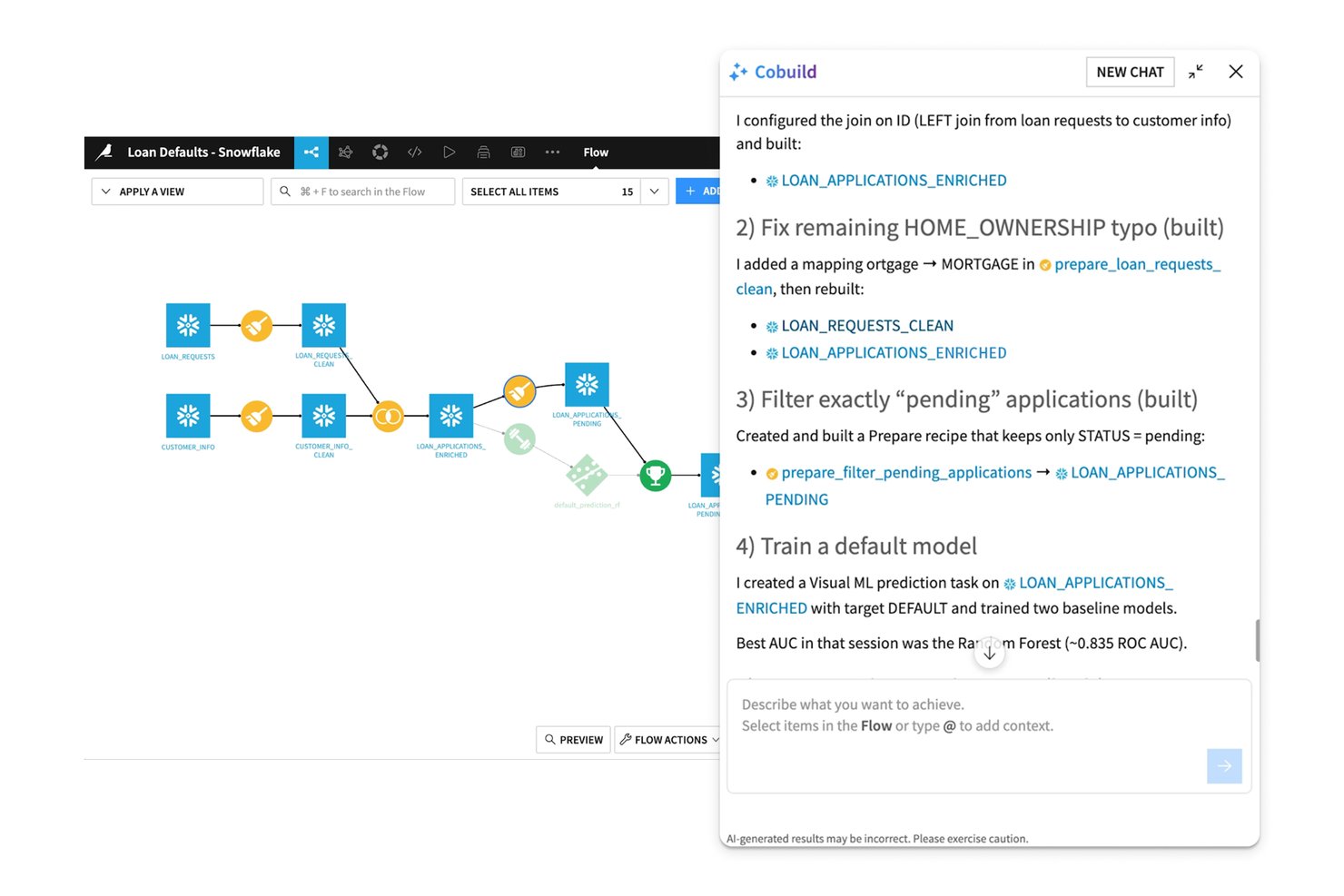
Dataiku is an enterprise AI platform that spans data preparation, ML development, AutoML, MLOps, multi-agent orchestration, and governed LLM access through a single unified environment.
Who Is Dataiku Best For?
Dataiku is a strong fit for enterprise data science and ML engineering teams that need a single governed environment to build, deploy, and monitor AI at scale.
Why I Picked Dataiku
Dataiku earns its spot on my shortlist because its governance capabilities are built into the platform's core, not added as an afterthought. I particularly like the AI Inventory and LLM Mesh combination: the AI Inventory tracks every model, agent, and dataset across teams, while LLM Mesh routes requests across providers like OpenAI, Anthropic, and Bedrock through a single governed gateway with cost controls and audit trails. That means a team running GenAI at scale can enforce compliance policies without slowing down deployment.
Dataiku Key Features
- AutoML and custom ML development: Build models using automated machine learning or full-code Python, R, and SQL environments within the same workspace.
- Dataiku Flow pipeline canvas: Design, version, and roll back data and model pipelines visually using a drag-and-drop recipe builder.
- Prompt Studios: A dedicated workspace for designing, testing, and iterating on LLM prompts before deploying them in production.
- Continuous model monitoring: Track drift, bias, and performance degradation post-deployment with automated alerting and retraining triggers.
Dataiku Integrations
Dataiku offers 20+ native SQL database integrations, including Snowflake, Databricks, Google BigQuery, Amazon Redshift, PostgreSQL, Oracle, and SAP HANA, plus Amazon S3, SharePoint, MongoDB, and Apache Iceberg. It connects to major LLM providers and supports custom integrations and CI/CD through its Python API.
Pros and Cons
Pros:
- Handles full ML and GenAI lifecycle
- AI Inventory and LLM Mesh enable compliance
- Governance tools built into platform core
Cons:
- Governance module not accessible during trial
- Collaboration features limited on lower tiers

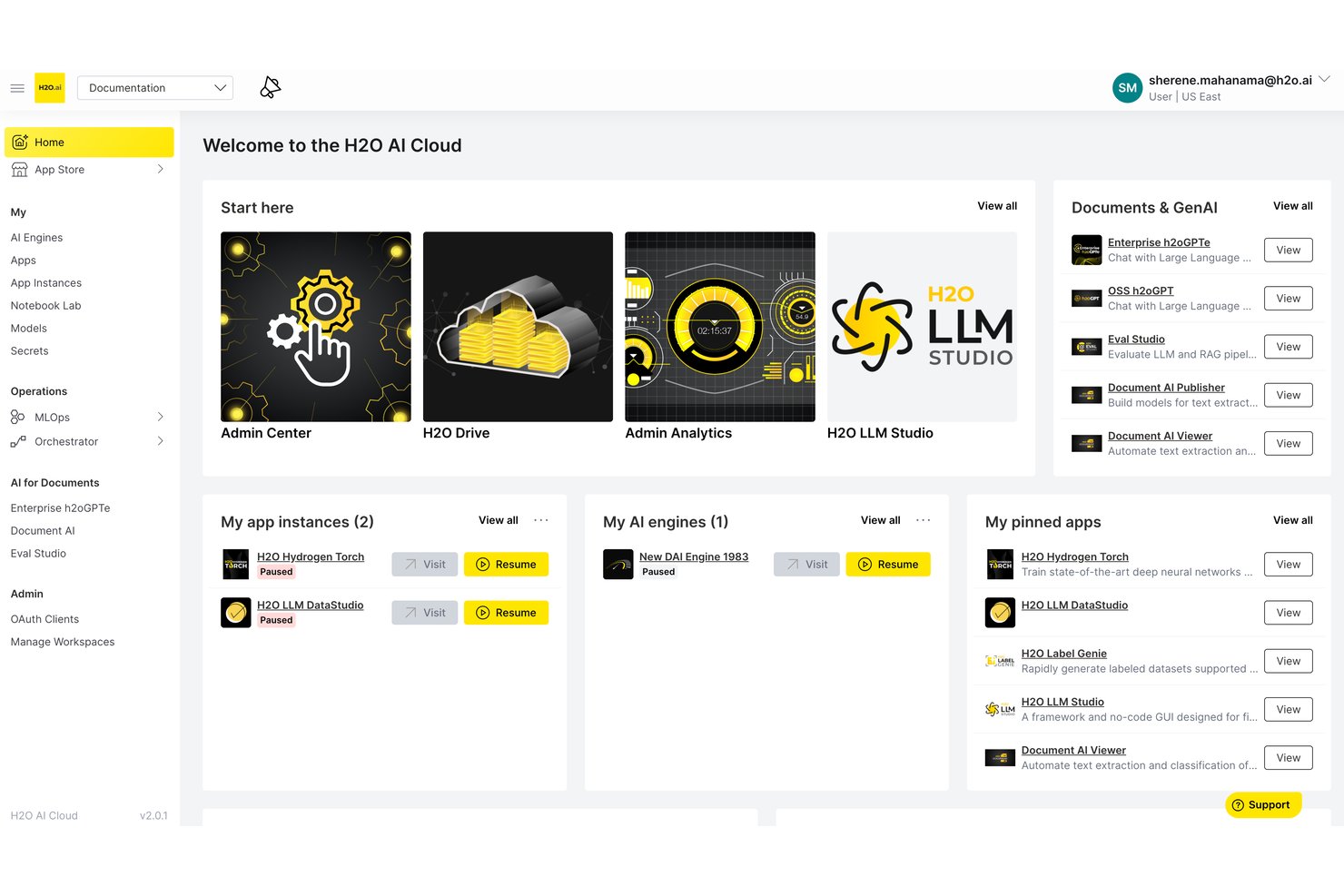
H2O.ai is an enterprise AI platform that brings together AutoML, generative AI, LLM fine-tuning, and agentic AI orchestration into a single architecture designed for air-gapped, on-premises, and cloud deployments.
Who Is H2O.ai Best For?
H2O.ai is a strong fit for enterprise data science and IT teams in regulated industries like finance, healthcare, and government that need air-gapped or on-premises AI deployment.
Why I Picked H2O.ai
H2O.ai earns its spot on my shortlist because no other platform I've evaluated matches its depth of compliance certifications for sensitive data environments: SOC 2 Type II, FedRAMP High, HIPAA, and IRAP PROTECTED. I picked it specifically for teams in finance, healthcare, and government that need fully air-gapped or on-premises AI deployment, where data cannot leave the organization's environment. Its Intelligent Model Routing and Model Risk Management tools make it practical for audit-ready, regulated AI workflows.
H2O.ai Key Features
- Driverless AI AutoML: An automated machine learning engine that handles feature engineering, model selection, validation, and documentation with GPU-accelerated algorithms.
- H2O LLM Studio: A no-code fine-tuning framework that lets your team train custom LLMs on private data using alignment methods like DPO and IPO.
- Intelligent model routing: Dynamically selects the best-fit LLM for each query based on cost, latency, and accuracy requirements across open-source and third-party models.
- H2O Wave: A low-code app development framework for building and deploying custom AI-powered applications within your organization's environment.
H2O.ai Integrations
H2O.ai supports 200+ documented integrations, including Microsoft SharePoint, Slack, Microsoft Teams, GitHub, AWS, Google Cloud Platform, Azure, Snowflake, Apache Spark, and LangGraph. REST APIs and Python, R, Java, and Scala clients support custom integrations.
Pros and Cons
Pros:
- Fine-tuning without vendor data training risk
- Best-in-class compliance for regulated deployments
- World-record agentic AI performance accuracy
Cons:
- Lacks HR-specific automation and analytics
- Enterprise-only focus excludes smaller teams

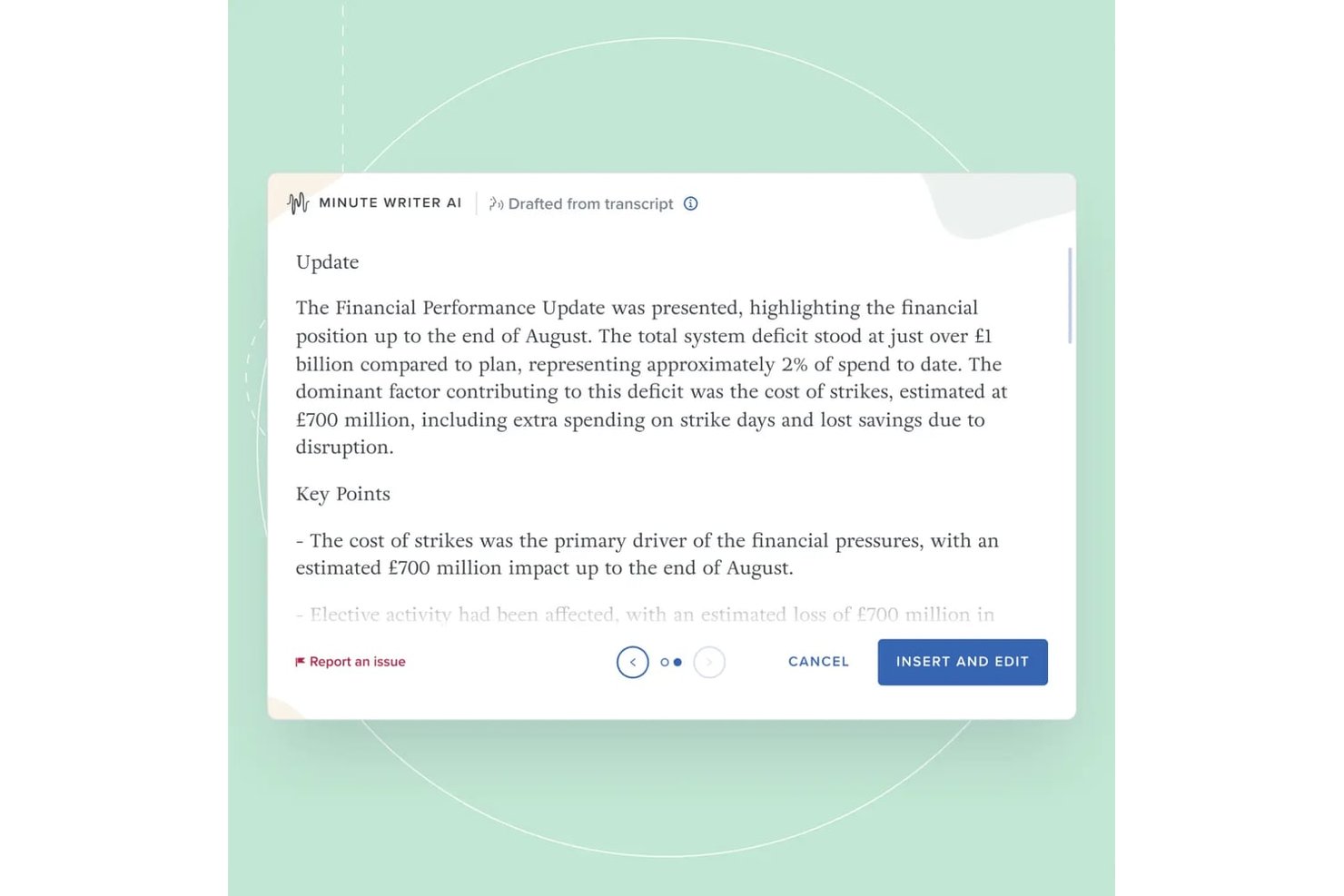
Board Intelligence is a board management AI platform that combines AI-powered report writing, minute generation, meeting preparation, agenda planning, and governance insights across the full board cycle.
Who Is Board Intelligence Best For?
Board Intelligence suits company secretaries, general counsel, and governance teams at mid-to-large enterprises managing complex board and committee cycles.
Why I Picked Board Intelligence
Board Intelligence earns its spot on my shortlist because its AI is purpose-built for governance, not adapted from generic tools. I particularly like Minute Writer AI, which produces structured minutes directly from board discussions, and IQ Insights, which surfaces governance-relevant themes across 130+ board domains before meetings start. What really sets it apart is the zero data retention policy, meaning sensitive board content never persists in the AI model.
Board Intelligence Key Features
- Agenda planner: Build board and committee meeting agendas aligned to key business priorities.
- Report briefer: Commission board papers using standardized briefs and approval workflows.
- Action tracker: Track and manage action items assigned during board meetings from one place.
- Board surveys: Run board effectiveness assessments using expert-designed survey templates.
Board Intelligence Integrations
Board Intelligence offers native integrations with Microsoft 365 (including Word), Microsoft Teams, Zoom, and supports single sign-on through enterprise SSO providers.
Pros and Cons
Pros:
- Advanced agenda builder for board meetings
- Automated minute writing saves administrative time
- Secure AI with zero data retention
Cons:
- Limited analytics outside board topics
- No API for custom integrations

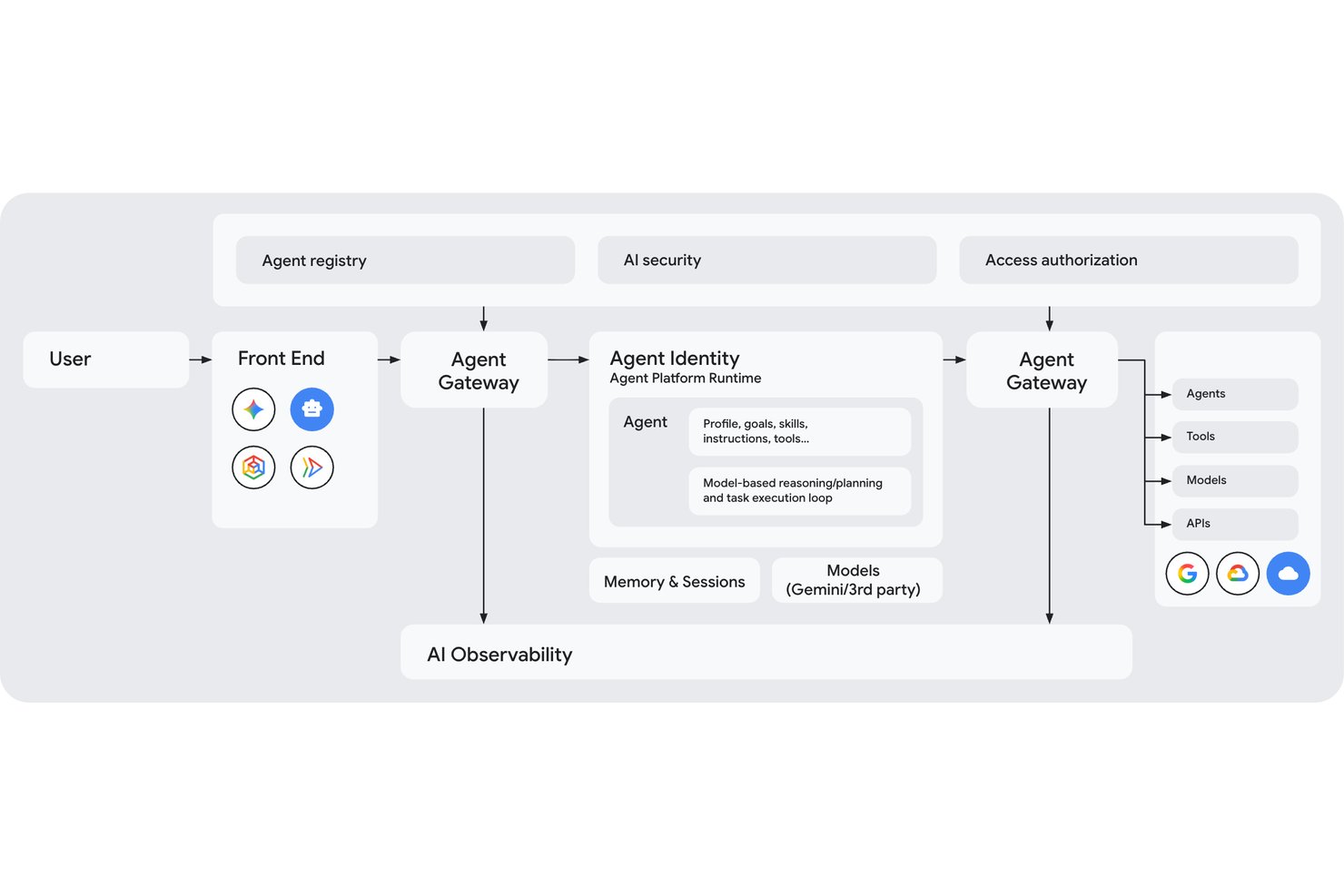
Gemini Enterprise Agent Platform is Google Cloud's enterprise AI platform that gives teams access to 200+ models, multi-agent orchestration, custom model training and fine-tuning, and a full governance suite for deploying and managing AI agents at scale.
Who Is Gemini Enterprise Agent Platform Best For?
It's a strong fit for enterprise engineering and data science teams that need to build, orchestrate, and govern complex multi-agent AI systems on Google Cloud infrastructure.
Why I Picked Gemini Enterprise Agent Platform
I picked Gemini Enterprise Agent Platform as one of the best because its graph-based multi-agent orchestration lets engineering teams coordinate networks of specialized sub-agents across complex, multi-day workflows in a way most platforms simply can't match. The Model Garden's 200+ models, spanning Gemini, Claude, Grok, and Llama, means teams can route each task to the right model based on cost, speed, or accuracy. On top of that, the Agent Identity system assigns every agent a cryptographic SPIFFE ID, giving security teams real auditability across every action taken.
Gemini Enterprise Agent Platform Key Features
- Agent Studio: A low-code, browser-based interface for designing, testing, and iterating on agents using natural language, code, images, or video without deep coding knowledge.
- RAG Engine: Connects your enterprise data sources to LLMs via Vector Search, grounding model outputs in proprietary knowledge to reduce hallucinations.
- Agent simulation: Generates synthetic conversations to test agents against defined success and safety criteria before any live deployment.
- Memory Bank: Retains long-term context across agent sessions, enabling personalized and consistent interactions over time.
Gemini Enterprise Agent Platform Integrations
Gemini Enterprise Agent Platform offers native integrations across Google Cloud and Google Workspace, including BigQuery, Cloud Storage, Google Sheets, Gmail, and Drive, plus Workday’s Sana Self-Service Agent. It supports Apigee, MCP, REST, gRPC, webhooks, and APIs for custom integrations.
Pros and Cons
Pros:
- Complex multi-agent orchestration for advanced workflows
- Enterprise-grade governance with SPIFFE Agent Identity
- Unmatched breadth of curated AI models
Cons:
- Documentation and product rebranding create confusion
- Pricing complexity and unpredictable costs reported

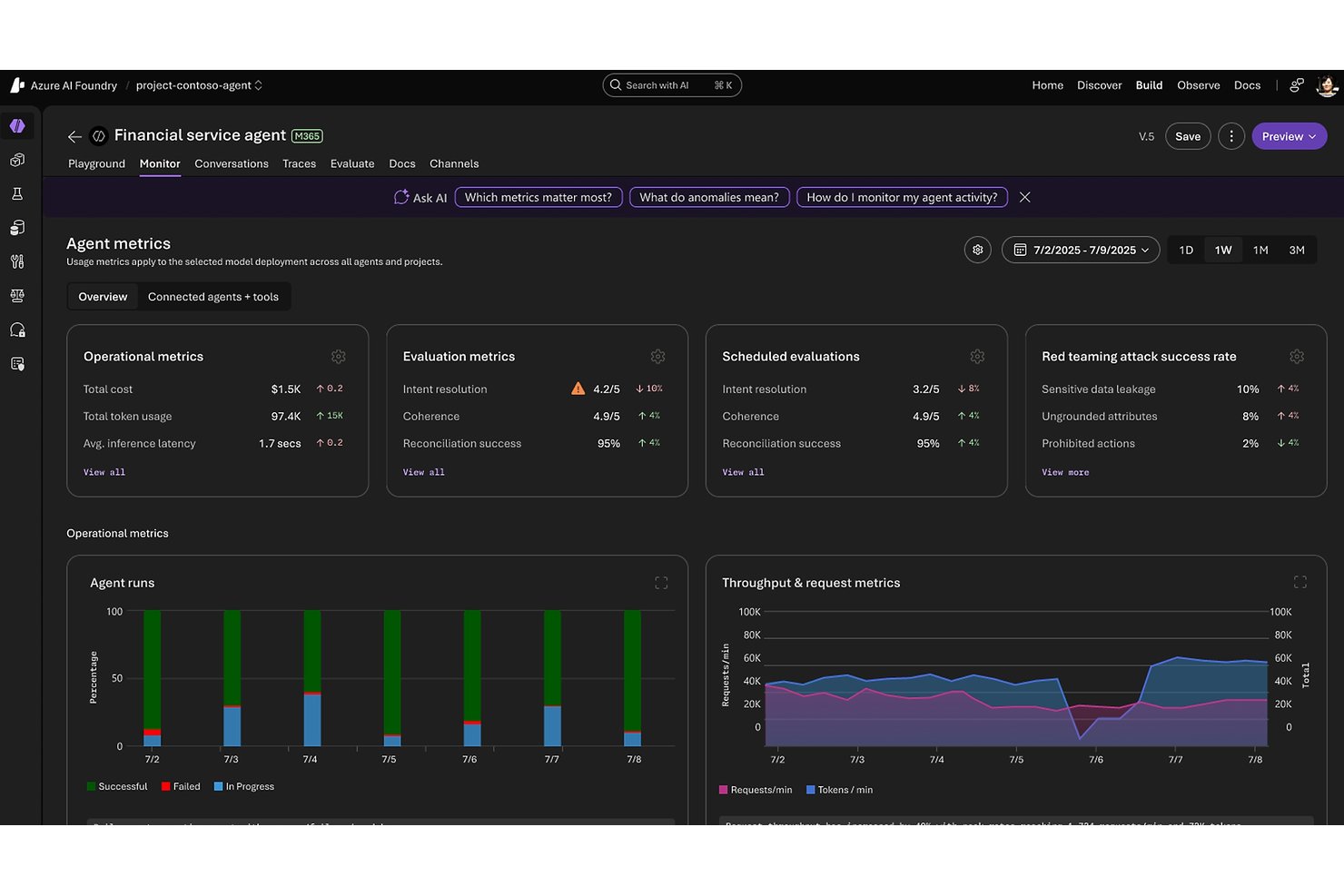
Microsoft Foundry is an enterprise AI platform from Microsoft that unifies model access, agent building, workflow automation, and governance across a catalog of 11,000+ models from providers like OpenAI, Anthropic, Meta, and Mistral.
Who Is Microsoft Foundry Best For?
Microsoft Foundry is best suited for large enterprises with existing Azure infrastructure that need centralized control over multiple AI models, teams, and workloads at scale.
Why I Picked Microsoft Foundry
Microsoft Foundry earns its spot on my shortlist because no other platform comes close to its fleet-level governance at enterprise scale. The Foundry Control Plane gives IT and AI infrastructure leads a centralized dashboard to track compliance posture, cost anomalies, and agent health across every project and team simultaneously. I'm also impressed by the AI Red Teaming Agent, which automatically probes deployments for vulnerabilities, and the Model Router, which cuts inference costs by roughly 50% by routing each query to the optimal model without any code changes.
Microsoft Foundry Key Features
- Foundry Agent Service: Build autonomous agents that can reason, plan, and execute multi-step tasks using tools, memory, and multi-agent orchestration patterns like sequential handoff and group chat.
- Foundry IQ: Connects agents to enterprise data sources—including Snowflake, S3, and OneLake—using dynamic reasoning rather than static vector lookups for next-generation RAG.
- Fine-tuning via portal, SDK, or REST: Customize Azure OpenAI and open-source base models on your own organizational data directly within the Foundry interface.
- Azure Logic Apps integration: Access 1,400+ pre-built connectors to automate workflows across third-party apps, databases, and enterprise systems without custom code.
Microsoft Foundry Integrations
Microsoft Foundry has native integrations across the Microsoft ecosystem, including Microsoft 365, Microsoft Fabric, Microsoft Copilot Studio, Power Automate, Microsoft Entra ID, Azure Machine Learning, and Azure AI Search. It also supports 1,400+ Azure Logic Apps connectors, REST APIs, SDKs, and MCP/OpenAPI connections for custom integrations.
Pros and Cons
Pros:
- Model Router reduces overall inference costs
- Enterprise-grade governance and compliance tools
- Centralized control over 11,000+ AI models
Cons:
- No native HR-specific features or connectors
- Requires existing Azure infrastructure investment
Andre AI-plattformer
Her er noen flere AI-plattformer som ikke kom med på kortlisten min, men som likevel er verdt å sjekke ut:
- Tidio
For customer interaction automation
- Leena AI
For AI automations for HR teams
- DataRobot
For AI automated machine learning
- Amazon Bedrock
For multi-model access on AWS infrastructure
- IBM watsonx.ai
For enterprise AI with built-in IP indemnity
- Palantir AIP
For AI agents grounded in enterprise ontology


How I Evaluate AI Platforms
I split my evaluation into baseline capabilities every platform must clear, and differentiators like how well a tool grounds AI outputs in proprietary data or manages agent workflows at scale.
Core Functionality (Table Stakes For This List)
When I'm selecting tools for my list, I rank each one on a scale from 0 (does not offer the functionality) to 5 (excels in this area) for each core functionality listed below. I then calculate the tool's total score into a percentage, using 75% as a benchmark to help assess its overall fit for the list.
- Conversational AI Interfaces: I evaluate whether the platform supports multi-turn, context-aware interactions—not just scripted responses—and whether those assistants can connect to enterprise data sources.
- Intelligent Workflow Automation: I look for AI-driven decision-making within workflows, not just rule-based triggers—think cross-functional processes where the platform can route, escalate, or adapt based on context.
- Predictive Analytics: I check whether forecasting goes beyond static dashboards—specifically, whether platforms offer scenario modeling or risk analysis that informs real decisions rather than just reporting on past performance.
- Generative AI and Language Models: I evaluate model flexibility, grounding options, and whether the platform supports retrieval-augmented generation (RAG) to ground outputs in your organization's own data and knowledge.
- Responsible AI and Governance: I look at audit trails, bias detection, and explainability controls—whether you can actually trace why a model made a decision, not just that it did.
Once I have a list of tools that meet the criteria, I consider what sets each platform apart.
Differentiating Factors (What Sets Vendors Apart)
Here's how I compare and contrast different vendors:
Standout Features
Enterprise knowledge grounding is where I see the biggest gaps between platforms. I look at whether a tool can connect to your organization's actual data—through RAG, semantic search, or knowledge graphs—and return outputs that reflect your context, not just general training. Closely related is AI model customization: fine-tuning and prompt management determine whether a platform adapts to your workflows or forces you to adapt to it. I also evaluate low-code AI development, since the best platforms let both technical and non-technical HR teams build and iterate without depending entirely on engineering resources.
Beyond Features
Pricing transparency matters more than most buyers expect. I look at whether token, compute, or usage-based costs are clearly documented—because AI workloads can scale fast, and opaque pricing creates real budget risk. I also pay close attention to security and regulatory readiness: specifically, whether a platform offers data residency options, enforces access controls, and maps to standards like SOC 2 or the EU AI Act—non-negotiables for HR teams handling sensitive workforce data.
Hva er det beste gratis AI-verktøyet?
Det beste gratis AI-verktøyet avhenger av den spesifikke oppgaven du trenger å automatisere, men ChatGPT, Claude, Gemini og Canva tilbyr de mest kapable gratisabonnementene for daglig drift av virksomheten. De fleste gratisnivåer gir deg tilgang til kjernemodeller og grunnleggende automatisering, selv om de vanligvis begrenser den daglige bruken og begrenser integrasjoner for virksomheter.
Slik fordeler de beste gratisalternativene seg etter bruksområde:
| Gratis AI-verktøy | Best egnet for | Viktige funksjoner |
|---|---|---|
| ChatGPT | Best totalt for tekst, skriving og idémyldring | Utarbeiding av tekst, enkel koding, nettsurfing og tilgang til egendefinerte GPT-er |
| Claude | Best for analyse av lange dokumenter og nyansert skriving | Oppsummerer lange filer, leser PDF-er og regneark og tilbyr naturlige skrivestiler |
| Canva | Best for raskt visuelt innhold og presentasjoner | Magic Write, presentasjonsmaler og grunnleggende visuell redigering |
| Microsoft Copilot | Best for undersøkelser basert på nettsøk | Søkeresultater med kildehenvisninger, bildegenerering og integrasjon med Edge-nettleseren |
| Gemini | Best for research i Google Workspace | Nettsøk i sanntid, integrasjon med Gmail og Dokumenter og multimodale inndata |
Når er ikke et gratis AI-verktøy tilstrekkelig?
Gratis AI-verktøy kommer til kort så snart du trenger personvern for data, automatiserte utløsere for arbeidsflyter eller spesifikke krav til bransjesamsvar. Her er begrensningene ved gratis AI-verktøy:
| Hvis du trenger … | Gratis KI-verktøy kommer til kort fordi … |
|---|---|
| Datasikkerhet og personvern | Gratis instruksjoner kan brukes til å trene offentlige modeller og mangler datalagring. |
| Automatisering av arbeidsflyt | Du må manuelt kopiere og lime inn instruksjoner mellom nettleserfaner. |
| Spesialiserte operasjoner | Generelle modeller mangler domenespesifikk samsvar eller rollespilllogikk. |
| Full integrasjon med teknologistakken | Gratis verktøy ligger isolert i et separat nettleservindu. |
På den annen side leverer betalte KI-plattformer private datamiljøer uten datalagring, håndfrie KI-agenter som kjører arbeidsflyter i flere trinn, og spesialutviklede motorer for spesialiserte oppgaver som bakgrunnssjekker, arbeidsstyrkeanalyse og lederopplæring. Det beste av alt er at de synkroniseres toveis via API-er med ditt eksisterende ATS, HRIS eller servicesenter.
Slik velger du KI-plattformer
For å velge riktig KI-plattform må du først definere det spesifikke operative problemet du trenger å løse, og deretter vurdere verktøyene basert på standarder for personvern, integrasjonsdybde med den eksisterende teknologistakken din og de faktiske totale kostnadene.
I stedet for å sette deg fast i lange funksjonslister eller leverandørenes markedsføringshype bør du fokusere utvelgelsesprosessen på disse sju kritiske faktorene:
| Faktor | Hva du bør vurdere |
| Skalerbarhet | Vil plattformen vokse med virksomheten din? Vurder om økosystemet støtter økende datamengder og antall brukere uten at ytelsen svekkes eller det kreves kostbare oppgraderinger. |
| Integrasjoner | Fungerer den med de eksisterende verktøyene dine? Kontroller kompatibiliteten med den nåværende teknologistakken din, for eksempel CRM- eller ERP-systemer, for å unngå avbrudd og ekstra integrasjonskostnader. |
| Tilpasningsmuligheter | Kan du tilpasse plattformen til behovene dine? Se etter fleksibilitet i innstillinger og arbeidsflyter som samsvarer med teamets spesifikke prosesser og mål. |
| Brukervennlighet | Er grensesnittet intuitivt for teamet ditt? Sørg for at det ikke krever omfattende opplæring, noe som kan forsinke innføringen og føre til frustrasjon blant brukerne. |
| Implementering og oppstart | Hvor raskt kan du komme i gang? Vurder tiden og ressursene som kreves for oppsettet, inkludert datamigrering og brukeropplæring, for å unngå langvarige forsinkelser. |
| Kostnad | Passer prisen inn i budsjettet ditt? Ta med alle kostnader, inkludert abonnementsavgifter, mulige tillegg og langsiktige økonomiske forpliktelser, for å sikre at løsningen er overkommelig. |
| Sikkerhetstiltak | Er dataene og driften din beskyttet? Se etter kryptering, samsvar med regelverk for databeskyttelse og robuste tilgangskontroller for å holde sensitiv informasjon trygg. |
Hva er KI-plattformer?
KI-plattformer er programvareløsninger som bruker kunstig intelligens til å automatisere oppgaver, analysere data og generere innsikt. De tilbyr den underliggende infrastrukturen – som maskinlæringsfunksjoner, naturlig språkbehandling og prediktiv analyse – som dataforskere, analytikere og tekniske team bruker til å bygge, tilpasse og skalere KI-drevne arbeidsflyter. Disse plattformene hjelper virksomheter med å effektivisere prosesser, forbedre beslutningstakingen og fremme innovasjon på tvers av driften.
KI-plattformer skiller seg fra KI-verktøy når det gjelder omfang:
- KI-plattformer tilbyr ende-til-ende-miljøer for å opprette og administrere KI-systemer.
- KI-verktøy er ferdiglagde applikasjoner som er utviklet for å utføre en spesifikk KI-drevet oppgave.
Hvis du ser etter individuelle KI-verktøy som hjelper med skriving, søk, design, produktivitet og mer, kan du utforske listen vår over KI-verktøy i en egen artikkel.
Funksjoner
Når du velger KI-plattformer, bør du se etter følgende viktige funksjoner:
- Maskinlæringsalgoritmer: Automatiserer dataanalyse og forbedrer beslutningstaking ved å identifisere mønstre og trender.
- Naturlig språkbehandling: Forstår og behandler menneskelig språk for å legge til rette for kommunikasjon og automatisere oppgaver.
- Prediktiv analyse: Forutsier fremtidige resultater basert på historiske data og hjelper deg med å ta informerte forretningsbeslutninger.
- Tilpassbare arbeidsflyter: Tilpasser prosesser etter teamets spesifikke behov, noe som øker effektiviteten og tilpasningsevnen.
- Databehandling i sanntid: Analyserer og reagerer på data etter hvert som de samles inn, og gir tidsriktig innsikt og raske svar.
- Integrasjonsmuligheter: Kobler til eksisterende verktøy og systemer for å sikre et helhetlig teknologimiljø.
- KI-drevet innsikt: Gir handlingsrettede anbefalinger og KI-generert innsikt basert på dataanalyse for å støtte strategisk planlegging.
- Automatisert beslutningstaking: Bruker KI-søk til automatisk å returnere data og opprette regelbasert logikk for å effektivisere rutinemessige beslutninger, slik at du får mer tid til komplekse oppgaver.
- Sikkerhetstiltak: Beskytter sensitiv informasjon og kommunikasjonskanaler med kryptering og tilgangskontroller for å opprettholde dataintegriteten.
- Skalerbarhet: Støtter økende datamengder og antall brukere uten at det går på bekostning av ytelsen eller krever omfattende oppgraderinger.
Fordeler
Implementering av KI-plattformer gir flere fordeler for teamet og virksomheten din. Her er noen av fordelene du kan se frem til:
- Økt effektivitet: Automatiser rutineoppgaver med KI, slik at du får mer tid til strategisk arbeid.
- Bedre beslutningstaking: Bruk prediktiv analyse til å ta informerte beslutninger basert på datadrevet innsikt.
- Bedre kommunikasjon: Legg til rette for tydeligere kommunikasjon med funksjoner for naturlig språkbehandling.
- Kostnadsbesparelser: Reduser driftskostnadene ved å automatisere prosesser og minimere manuelt arbeid.
- Skalerbarhet: Utvid virksomheten uten å bekymre deg for ytelsesproblemer, takket være skalerbare KI-løsninger.
- Økt innovasjon: Utnytt KI-drevet innsikt til å utforske nye muligheter og drive virksomhetens vekst.
Kostnader og priser
Valg av KI-plattformer krever en forståelse av de ulike prismodellene og abonnementene som er tilgjengelige. Kostnadene varierer basert på funksjoner, teamstørrelse, tillegg og mer. Tabellen nedenfor oppsummerer vanlige abonnementer, gjennomsnittsprisene deres og typiske funksjoner som er inkludert i KI-plattformløsninger:
Sammenligningstabell for KI-plattformer
| Abonnementstype | Gjennomsnittspris | Vanlige funksjoner |
| Gratisabonnement | $0 | Grunnleggende dataanalyse, begrensede KI-funksjoner og begrenset tilgang til integrasjoner. |
| Personlig abonnement | $5-$25/bruker/måned | Forbedrede KI-funksjoner, tilpassbare arbeidsflyter og tilgang til kundestøtte. |
| Bedriftsabonnement | $30-$100/bruker/måned | Avansert analyse, fullstendige integrasjonsmuligheter og prioritert kundestøtte |
| Virksomhetsabonnement | $100+/bruker/måned | Omfattende KI-verktøy, dedikert kontoadministrasjon og avanserte sikkerhetsfunksjoner. |
Vanlige spørsmål om AI-plattformer
Her er noen svar på vanlige spørsmål om AI-plattformer:
Hvilket AI-verktøy er bedre enn ChatGPT?
Selv om ChatGPT fungerer godt for enkeltstående samtalebaserte spørsmål, presterer dedikerte verktøy bedre innen bestemte forretningsprosesser. Claude gjør det for eksempel bedre enn ChatGPT ved analyse av lange dokumenter og naturlig skrivestil. Spesialbygde plattformer som monday AI Workspace, Freshservice og Tidio er bedre enn ChatGPT for automatiserte arbeidsflyter i virksomheten.
Ekspertens vurdering: Bruk ChatGPT til generell idémyldring og rask utarbeiding av daglige tekster. Bytt til Claude når kvaliteten på resultatet og dokumenthåndtering er viktigst, eller gå over til de dedikerte plattformene på kortlisten min når du trenger automatiserte arbeidsflyter, omfattende datavern eller domenespesifikk oppgaveutførelse.
Hvordan vurderer jeg skalerbarheten til en AI-plattform?
For å vurdere skalerbarhet bør du se på hvordan plattformen håndterer økte datamengder og flere brukere. Se etter funksjoner som distribuert databehandling og lastbalansering. Be leverandørene om kundehistorier eller eksempler på hvordan plattformen støtter virksomheter i vekst. Sørg for at det ikke blir nødvendig med kostbare oppgraderinger etter hvert som teamet utvides.
Kan AI-plattformer integreres med eksisterende programvare?
Ja, de fleste AI-plattformer tilbyr integrasjonsmuligheter med populær programvare som CRM- og ERP-systemer. Sjekk leverandørens liste over støttede integrasjoner. Det kan hende du må bruke API-er eller tredjepartsverktøy for tilpassede integrasjoner. Sørg for at plattformens integrasjonsprosess er tilpasset IT-infrastrukturen din for å unngå avbrudd.
Hva slags støtte bør jeg forvente fra en leverandør av AI-plattformer?
Forvent støtte via flere kanaler, inkludert e-post, chat og telefon. Se etter leverandører som tilbyr støtte døgnet rundt, særlig hvis teamet ditt arbeider på tvers av tidssoner. Vurder responstidene og kompetansen deres ved å lese kundeanmeldelser. Noen leverandører tilbyr dedikerte kundeansvarlige for personlig hjelp.
Hvordan kan jeg sikre datasikkerheten med en AI-plattform?
Kontroller at plattformen bruker kryptering og overholder personvernforordninger som GDPR. Se etter funksjoner som rollebasert tilgangskontroll. Spør leverandørene om sikkerhetsrevisjoner og sertifiseringer. Sørg for at de har rutiner for datainnbrudd og er åpne om sikkerhetspraksisen sin.