

De 10 beste programvarene for etterlevelse av oppdragstakerkrav, vurdert i 2026

Kortliste over den beste programvaren for samsvar med kontraktører


Det kan være krevende å håndtere samsvar for kontraktører. Du møter stadige utfordringer, fra å holde tritt med regelverket til å håndtere endeløst papirarbeid. Programvare for samsvar med kontraktører kan lette disse byrdene, hjelpe teamet ditt med å holde oversikt over kravene og unngå kostbare feil.
Basert på min erfaring kan det riktige verktøyet utgjøre en stor forskjell i den daglige driften. Jeg har testet ulike programvareløsninger uavhengig og forstår hva som fungerer best for HR-fagfolk som deg.
I denne artikkelen deler jeg mine beste anbefalinger for programvare for samsvar med kontraktører, med objektiv innsikt som hjelper deg med å ta informerte beslutninger. Gjør deg klar til å utforske løsninger som kan forenkle samsvarsprosessene dine og frigjøre tid.
Why Trust Our Software Recommendations
Our team has been testing and reviewing software since 2012. As HR experts ourselves, we know how difficult—and important—it is to choose the right software.
For this guide, we evaluated tools using hands-on testing and independent research, scoring tools using our selection criteria. We also draw on insights from industry thought leaders and practicing HR experts.
Our reviews reflect our human editorial judgment, not a sales pitch.
Expert reviewers:
Sammenligningstabell for programvare for samsvar med kontraktører
Denne sammenligningstabellen oppsummerer prisopplysningene for mine beste utvalgte programvareløsninger for samsvar med kontraktører:
| Tool | Best For | Trial Info | Price | ||
|---|---|---|---|---|---|
| 1 | Best for global contractor classification compliance | Free demo available | From $199/employee/month | Website | |
| 2 | Best for automated worker classification | Free demo available | From $5/user/month | Website | |
| 3 | Best for global contractor onboarding | Free demo available | Pricing upon request | Website | |
| 4 | Best for distributed teams paying contractors globally | Free demo available | Pricing upon request | Website | |
| 5 | Best for audit management | Free plan available | From $24/user/month (billed annually) | Website | |
| 6 | Best for construction tracking | Free 30-day trial + free demo available | From $32/user/month (billed annually) | Website | |
| 7 | Best for digital forms | Free demo available | Pricing available upon request | Website | |
| 8 | Best for chemical safety | Free demo available | Pricing upon request | Website | |
| 9 | Best for EHS compliance | Free demo available | Pricing upon request | Website | |
| 10 | Best for large enterprises | Free demo available | Pricing upon request | Website |


Anmeldelser av den beste programvaren for samsvar med kontraktører
Nedenfor finner du mine detaljerte sammendrag av den beste programvaren for samsvar med kontraktører som kom med på kortlisten. Anmeldelsene mine gir et detaljert innblikk i de viktigste funksjonene, fordelene og ulempene, integrasjonene og de ideelle bruksområdene for hvert verktøy, slik at du kan finne det beste alternativet for deg.

Best for global contractor classification compliance
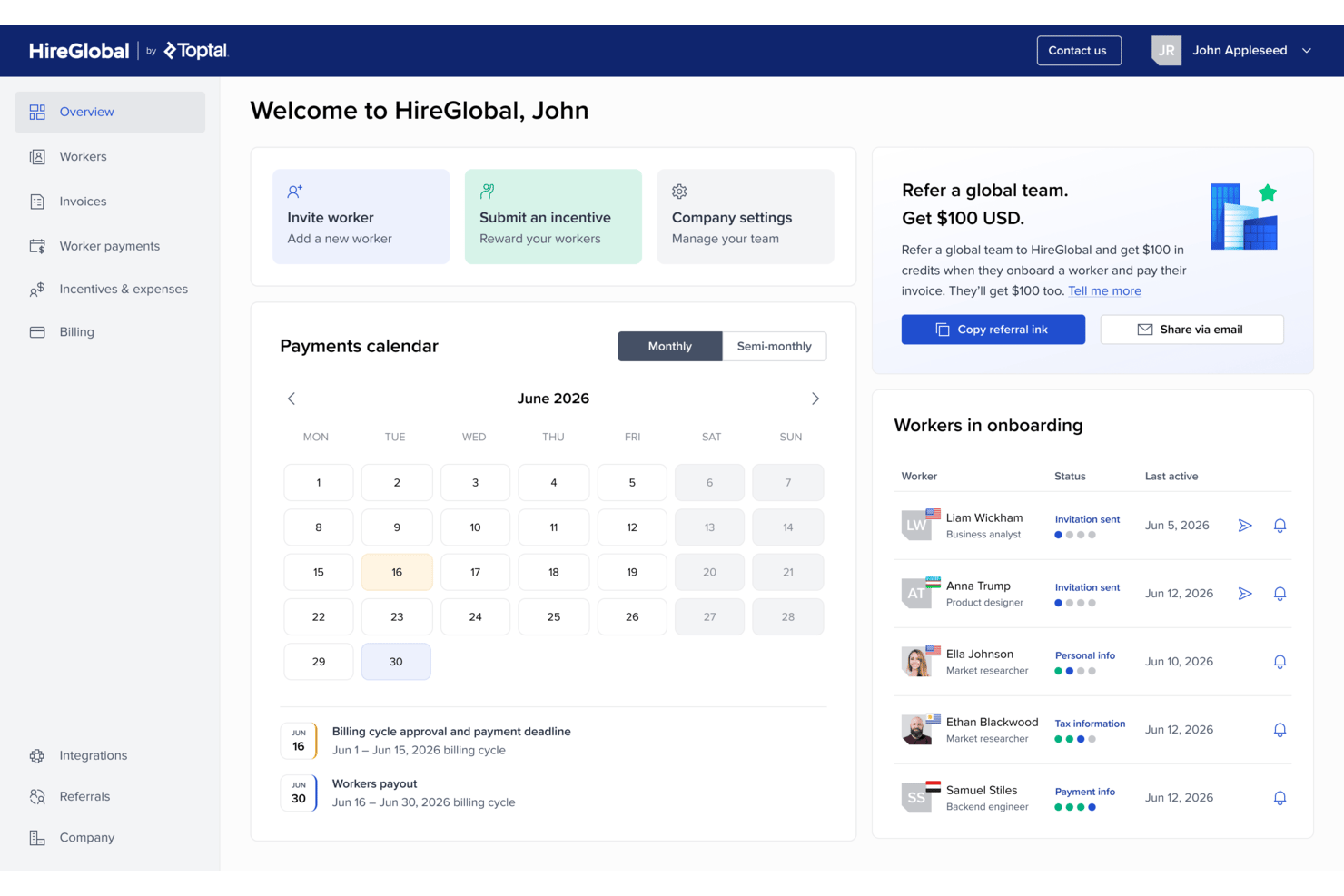
HireGlobal is Toptal's global hiring and payroll platform that lets you onboard, manage, and pay contractors and employees across 180+ countries through four service models: Contractor Management, Agent of Record, Virtual EOR, and Employer of Record.
Who Is HireGlobal Best For?
HireGlobal suits distributed teams that need to pay contractors across many countries quickly, without managing separate local agreements or currency conversions.
Why I Picked HireGlobal
I picked HireGlobal as one of the best because its Agent of Record and Virtual EOR models structurally absorb contractor classification liability rather than just flagging it. When you add a worker under the AOR model, HireGlobal takes on the contract, payments, and compliance obligations directly. The V-EOR plan goes further, adding $1M indemnification per worker, which gives distributed teams real coverage when paying contractors across 180+ countries in 50+ currencies.
HireGlobal Key Features
- Multi-currency contractor payments: Pay contractors across 180+ countries in 50+ currencies through a single invoice with no FX markups or withdrawal fees.
- Tiered hiring model selection: Choose from four per-worker plans—Contractor Management, AOR, V-EOR, and EOR—based on your team's risk tolerance and coverage needs.
- Tax form and KYC collection: HireGlobal handles W-9, W-8BEN, and KYC documentation during contractor onboarding so you don't manage it manually.
- Payment approval workflows: Review and approve contractor payments on custom billing cycles, with invoice history and expense and reimbursement reporting available per worker.
HireGlobal Integrations
HireGlobal integrates natively with TopTracker, Toptal's time tracking tool, for end-to-end time tracking, invoice approval, and payment processing within a single workflow.
Pros and Cons
Pros:
- Users praise fast payments and support
- Offers $1M V-EOR indemnification
- Supports payments across 180+ countries
Cons:
- Contractor tax filing remains undocumented
- No worker classification assessment tools

Deel HR
Best for automated worker classification

For businesses managing an international workforce, Deel provides the infrastructure to hire, onboard, and pay contractors and employees across multiple countries. The platform helps companies navigate local labor laws, tax regulations, and worker classification requirements without setting up their own legal entities. As a global workforce management solution, Deel can reduce the operational complexity that often comes with expanding into new markets.
Why I Picked Deel
I picked Deel because it simplifies global compliance in a way that feels practical for growing teams. Its automated worker classification and localized contract generation help you align with country-specific regulations without relying on manual legal processes. I also like that Deel supports compliant hiring in over 150 countries, which can make international expansion more accessible. If you are building a distributed team, Deel gives you the compliance framework needed to hire confidently across borders.
Deel Key Features
In addition to its standout compliance capabilities, Deel offers several other features that enhance its functionality as contractor compliance software.
- Automated Payroll Processing: Deel handles payroll across multiple currencies, ensuring timely and accurate payments to your international contractors.
- Localized Contract Generation: Create contracts that comply with local laws in over 150 countries, reducing the risk of non-compliance.
- Tax Document Management: Deel assists in generating the necessary tax documents, simplifying the complexities of international tax compliance.
- HR Management Tools: Manage benefits and other HR-related tasks within the platform, streamlining the administration of your global team.
Deel Integrations
Integrations include QuickBooks, Xero, NetSuite, BambooHR, Greenhouse, Ashby, Rippling, Gusto, HiBob, and SAP SuccessFactors, and an API is available for custom integrations.
Pros and Cons
Pros:
- Integrates with major HR systems
- Built-in compliance and contract management
- Global payroll across 150 countries
Cons:
- Limited directory customization options
- Reporting features lack advanced filtering
New Product Updates from Deel HR

Deel Expands Stablecoin Wallet to 80+ Countries
Deel expands its Stablecoin Wallet to 80+ countries with dollar-backed balances and optional rewards. This gives eligible contractors more ways to hold and manage earnings inside Deel. For more information, visit Deel’s official site.
 .
.
Best for global contractor onboarding
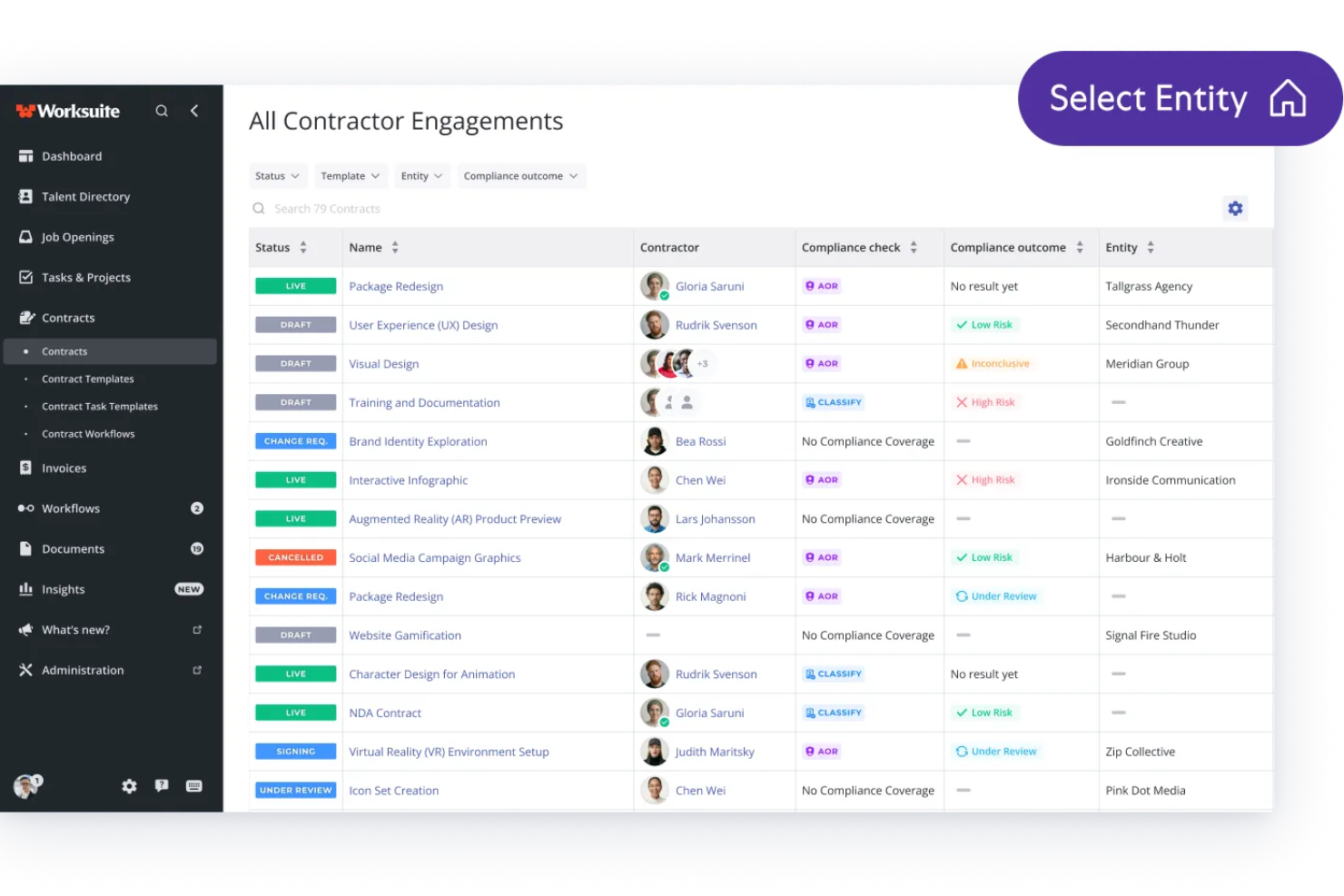
USP: Best for global contractor onboarding
Worksuite is a contractor management platform that handles worker classification, compliance document collection, contractor onboarding, and payments across global markets.
Who Is Worksuite Best For?
Worksuite is a strong fit for HR and procurement teams at mid-size to enterprise companies that engage large networks of independent contractors across multiple countries.
Why I Picked Worksuite
I picked Worksuite as one of the best because its onboarding workflows handle contractor intake across 190+ countries from one platform. I like that it automatically routes the right tax forms based on a contractor's location and collects ID verification and signed agreements in the same flow. Its Contractor of Record service also lets my team engage workers in new markets without needing to establish a local legal entity first.
Worksuite Key Features
- Worker classification assessment: Evaluates contractor vs. employee status using federal and local-level tests, then generates a documented decision record.
- Audit-ready defense files: Compiles each contractor's compliance records into a one-click exportable file for use in audits or legal review.
- Per-gig contractor insurance: Provides workers' compensation and general liability coverage for individual contractors through the platform.
- 1099-NEC filing: Automates year-end tax form preparation and delivery directly to contractors.
Worksuite Integrations
Worksuite offers native integrations with NetSuite, QuickBooks, Xero, Revolut, and Square for financial data syncing, Veriff, Checkr, and 1099policy for compliance and background verification, and Salesforce, HubSpot, monday.com, Airtable, Google Workspace, Slack, and Asana for project management and collaboration. It also connects with Zapier for access to 8,000+ apps, and a RESTful API is available for custom integrations.
Pros and Cons
Pros:
- Built for media and localization teams
- Automated reminders for expiring documents
- Covers 190+ countries for contractor payments
Cons:
- Approval workflow visibility is limited
- Onboarding steps feel redundant for freelancers

Best for distributed teams paying contractors globally
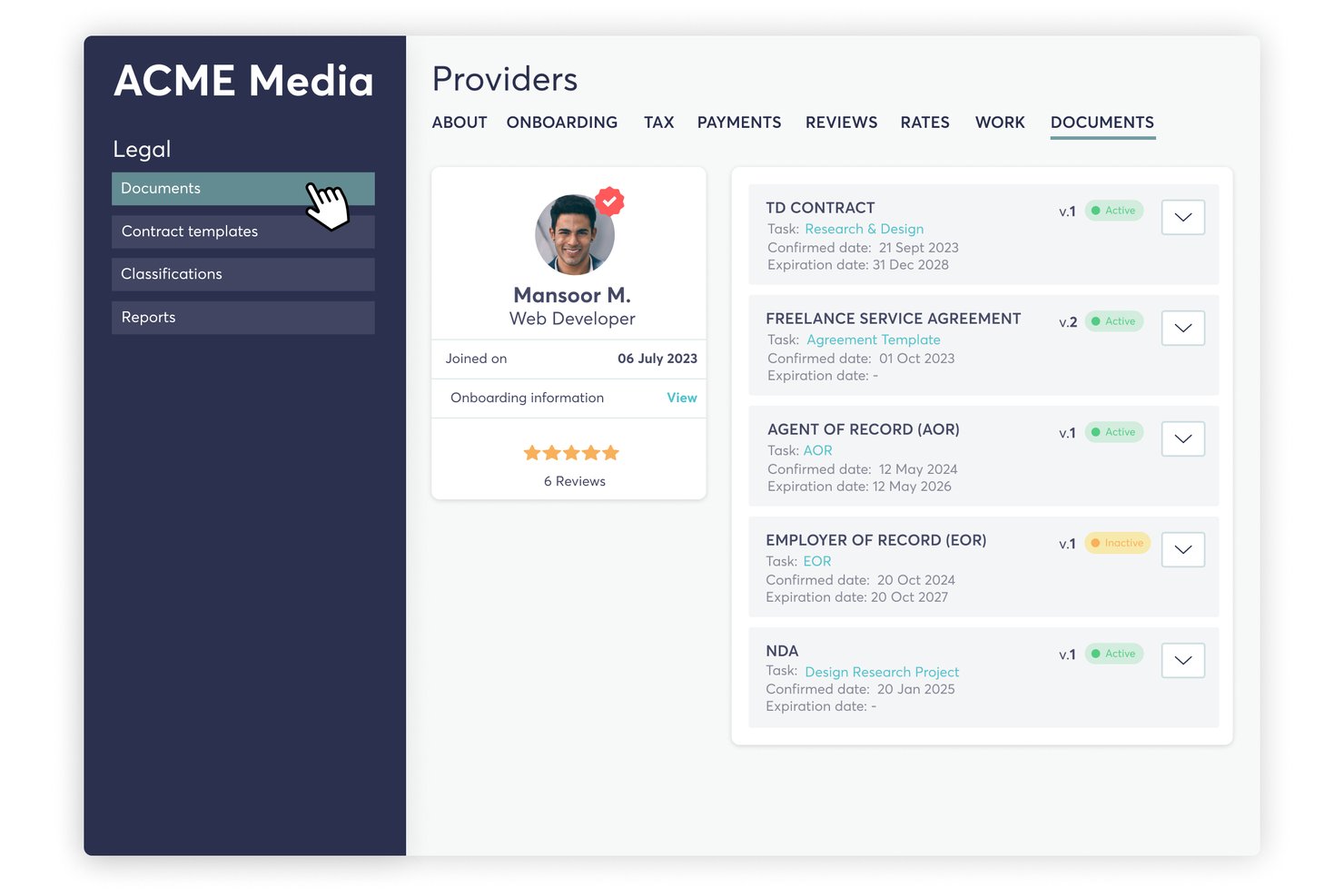
TalentDesk is a contractor and freelancer management platform that combines onboarding, contract management, worker classification checks, tax form collection, and global payment processing across 190+ countries.
Who Is TalentDesk Best For?
TalentDesk is a strong fit for HR ops teams at distributed companies where contractors make up a significant share of the workforce and global payments are a core operational need.
Why I Picked TalentDesk
TalentDesk earns its spot on my shortlist because it covers the full payment and compliance cycle for distributed contractor workforces in a way few platforms match. I particularly like how consolidated invoicing works in practice: your finance team sends one payment, and TalentDesk handles individual payouts across 190+ countries in 110+ currencies. The built-in AOR service adds misclassification indemnification and AML/KYC checks, so you're not just moving money globally—you're doing it with a compliance backstop already in place.
TalentDesk Key Features
- Expert classification questionnaire: An automated questionnaire assesses each contractor's relationship before work begins, flags risk levels, and provides guidance on reducing misclassification exposure.
- 1099 filing workflow: Managers can file 1099s in bulk or per contractor from inside the platform, with TIN validation, status tracking, and downloadable copies for both parties.
- Contractor self-service portal: Contractors submit worksheets, expenses, and invoices, add payment details, and access their 1099 copies directly through their own portal.
- Onboarding form builder: Unlimited customizable onboarding forms let you collect contracts, tax documents, and compliance materials before a contractor starts any work.
TalentDesk Integrations
TalentDesk integrates with Compliancely for TIN validation, Atlas for EOR, and Wise, Revolut, Payoneer, and WorldPay for payments. It also offers an Open API, webhooks, and Zapier.
Pros and Cons
Pros:
- AOR indemnification supports classification risk management
- Built-in 1099 filing with TIN validation
- Consolidated global payouts across 190+ countries
Cons:
- Country-specific contract templates aren't provided
- International tax form review remains limited

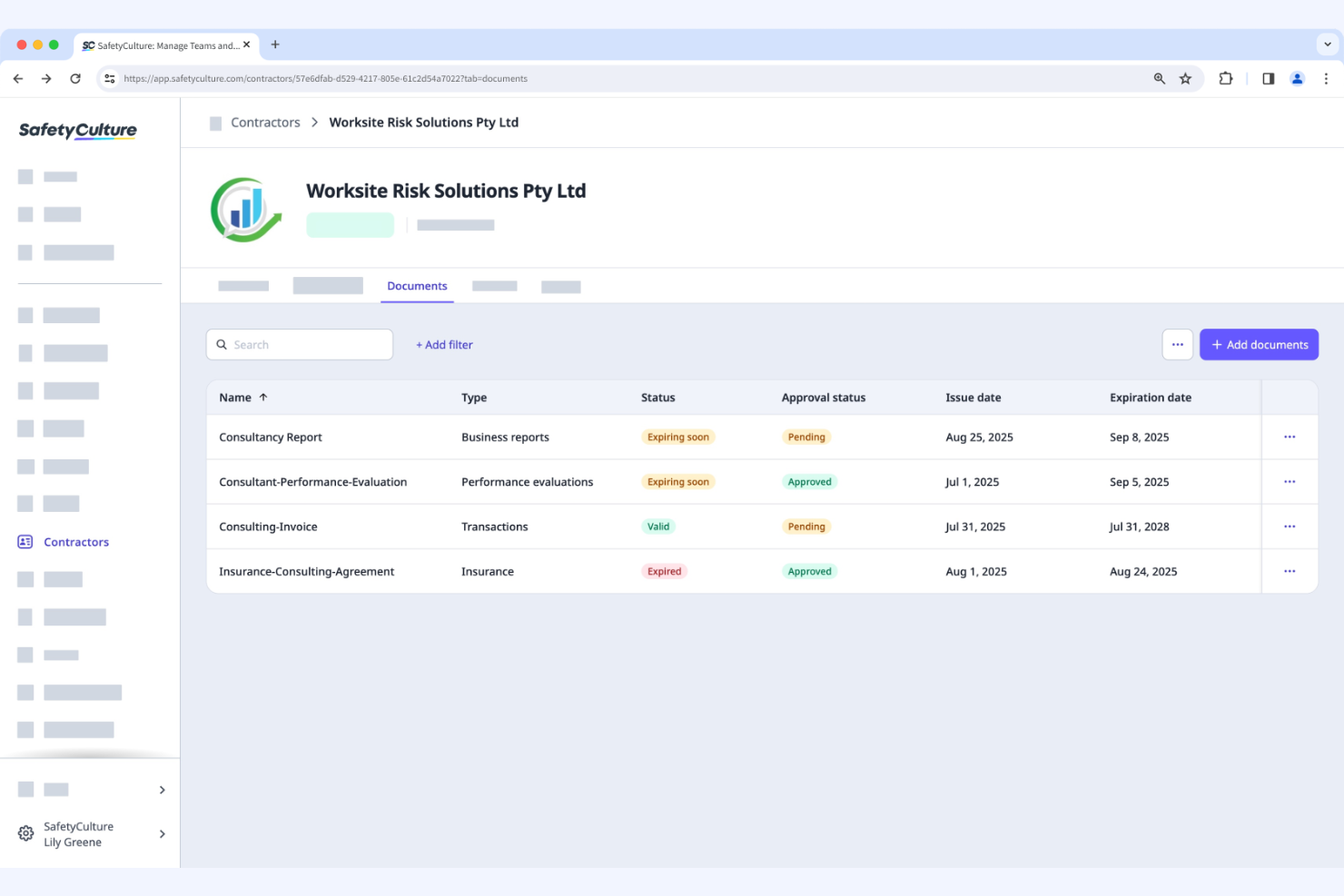
SafetyCulture is a quality management and safety software used by businesses to conduct audits and inspections. It helps teams manage safety protocols and maintain compliance with industry standards.
Why I picked SafetyCulture: This tool focuses on audit management, offering features such as digital inspections and checklists. Your team can conduct audits efficiently with customizable templates. Its real-time reporting feature provides immediate insights into safety compliance. These functionalities make it ideal for organizations that prioritize thorough and efficient audit processes.
Standout Features and Integrations:
Features include digital inspections, customizable checklists, and real-time reporting. These features help your team simplify safety audits and track compliance effectively. The platform also provides analytics to help you identify trends and improve safety measures.
Integrations include Google Workspace, Zapier, Power BI, Tableau, BambooHR, Atlassian Jira, and more.
Pros and Cons
Pros:
- Real-time safety insights
- Customizable inspection templates
- Efficient audit management
Cons:
- Built on a linear checklist model
- No native AI insights


PlanRadar is a construction management tool designed for project managers and construction teams. It helps manage project documentation, task tracking, and communication on construction sites.
Why I picked PlanRadar: This tool focuses on construction tracking, offering features such as task management and project documentation. The real-time communication feature allows your team to collaborate effectively on-site. It also offers digital blueprints, which simplify managing construction tasks. These functionalities make it ideal for construction teams looking to boost project tracking and communication.
Standout Features and Integrations:
Features include digital blueprint management, real-time communication, and task tracking. These features help your team stay organized and manage construction projects efficiently. The tool also provides a mobile app for on-site access to project details.
Integrations include Oracle, Sage, Salesforce, Google Drive, Dropbox, Microsoft OneDrive, and more.
Pros and Cons
Pros:
- Mobile app for site access
- Digital blueprint management
- Real-time project communication
Cons:
- Rigid permissions
- Annotation limits
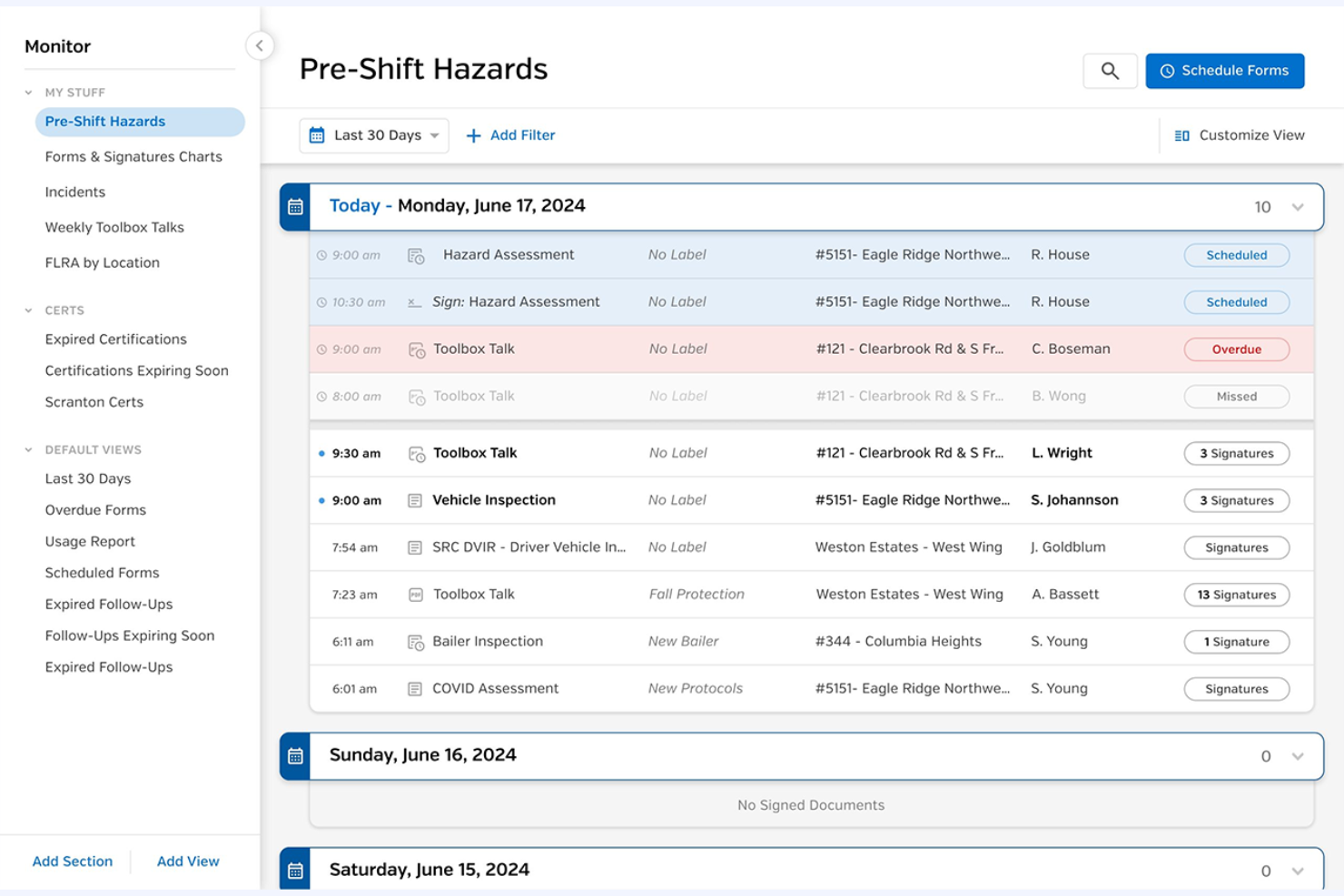
SiteDocs is a safety management software designed for general contractors, focusing on digital forms and compliance tracking. It helps manage contractor safety and offers real-time visibility into compliance protocols.
Why I picked SiteDocs: This tool excels in providing digital forms for compliance, making it suitable for teams that need efficient documentation and tracking. Its incident management feature allows you to handle safety reports smoothly. Hazard management helps your team identify and mitigate risks effectively. Its emphasis on digital forms makes it ideal for contractors looking to modernize their compliance processes.
Standout Features and Integrations:
Features include digital compliance forms, contractor and incident management, and hazard management. These features enable your team members to keep track of health and safety protocols efficiently. The tool also provides automation capabilities to reduce manual work.
Integrations include SAP, QuickBooks, Microsoft Dynamics, Salesforce, BambooHR, and more.
Pros and Cons
Pros:
- Reduces administrative costs
- Real-time compliance tracking
- Efficient incident reporting
Cons:
- Weak analytics
- Limited logic


EcoOnline is an EHS management tool designed to support businesses in managing chemical safety and compliance. It serves industries that handle hazardous materials and provides tools to maintain workplace safety and regulatory adherence.
Why I picked EcoOnline: This tool is tailored for chemical safety, offering features such as Safety Data Sheet (SDS) management and chemical inventory tracking. It helps your team maintain up-to-date safety documentation and maintain compliance with chemical regulations. The risk assessment feature allows for proactive management of potential hazards. These capabilities make it ideal for industries focused on chemical management and regulatory requirements.
Standout Features and Integrations:
Features include risk assessment tools, incident reporting, and learning management. These features help your team identify and mitigate potential hazards effectively. The platform also provides dashboards for monitoring safety metrics and tracking compliance performance.
Integrations include SAP, Oracle, Microsoft Dynamics, Xero, Salesforce, BambooHR, and more.
Pros and Cons
Pros:
- Detailed SDS management
- Effective risk assessment tools
- Focused on chemical safety
Cons:
- No custom-weighted scoring system
- Time-consuming hazard database maintenance
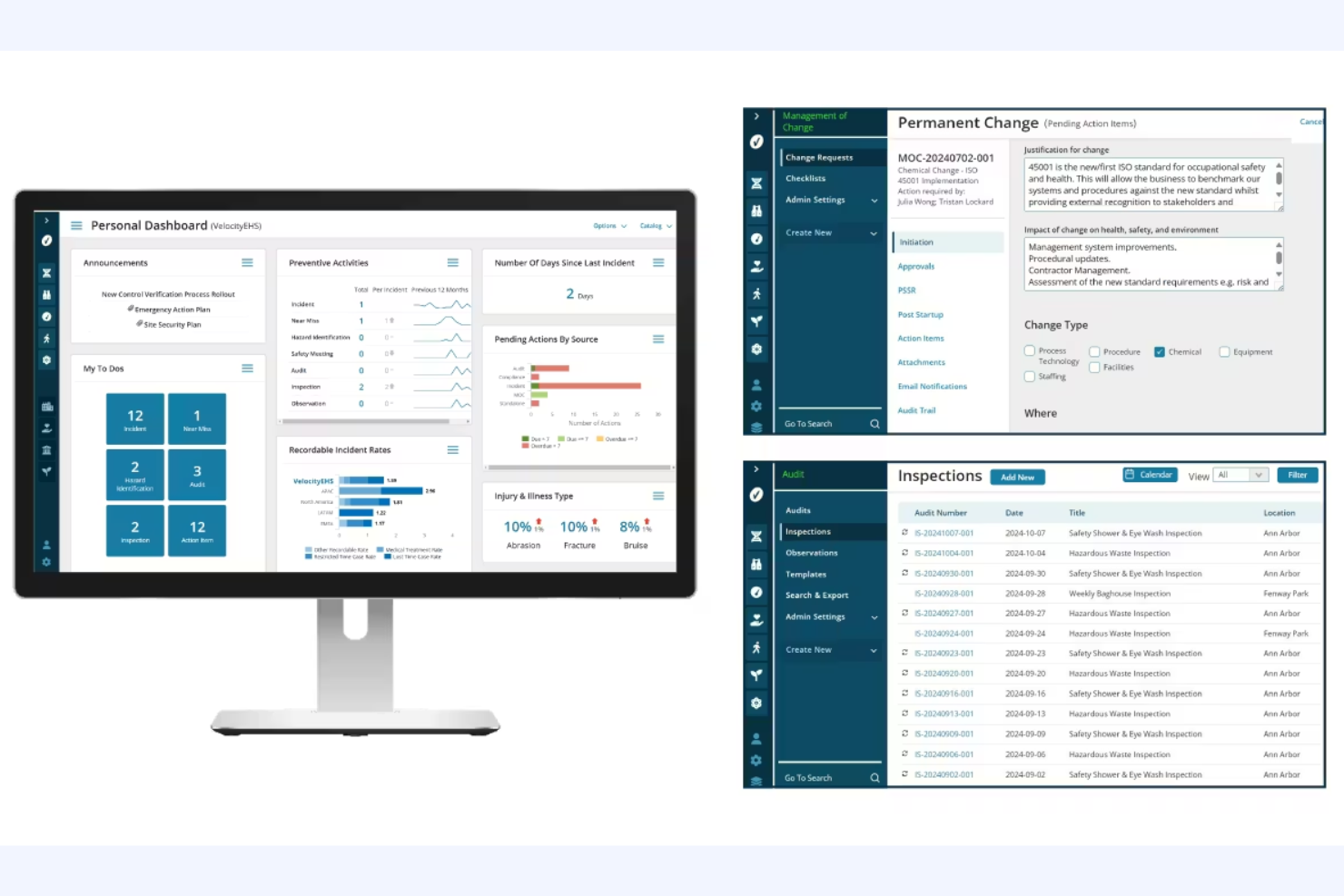
VelocityEHS Compliance Management is a contractor compliance software designed for organizations focused on environmental, health, and safety (EHS) management. It supports businesses in managing contractor safety and compliance tasks efficiently.
Why I picked VelocityEHS Compliance Management: This software is tailored for EHS compliance, offering features such as Permit to Work and Contractor Safety management. It includes advanced AI features to improve safety management processes, making it a fit for organizations that prioritize EHS compliance. The Certificate of Insurance management further differentiates it, providing an in-depth approach to compliance tracking. These functionalities make it ideal for teams needing a strategic platform for regulatory risk management.
Standout Features and Integrations:
Features include a compliance calendar, automated notifications, and task management. These features help you stay organized and maintain timely compliance. The tool also offers real-time insights for regulatory verification.
Integrations include SAP, Oracle, Microsoft Dynamics, Procore, QuickBooks, ADP, Sage Intacct, and more.
Pros and Cons
Pros:
- Strategic EHS platform
- Real-time regulatory insights
- Detailed compliance tracking
Cons:
- Mobile sync issues
- Rigid reporting

ISNetworld is a contractor management platform designed for large enterprises. It helps businesses manage contractor safety, compliance, and risk efficiently.
Why I picked ISNetworld: The tool caters to large enterprises with features such as contractor prequalification and performance monitoring. It offers a centralized platform for managing documentation and safety protocols, which is essential for large-scale operations. Its risk management tools help with contractor compliance management across multiple locations, and its ability to handle complex compliance requirements makes it suitable for big organizations in need of rigorous oversight.
Standout Features and Integrations:
Features include contractor performance monitoring, prequalification processes, and risk management tools. These features help you manage compliance at scale and promote contractor safety. The platform also provides a centralized document management system to keep everything organized.
Integrations include SAP, Microsoft Dynamics, Xero, Procore, and more.
Pros and Cons
Pros:
- Suitable for large-scale operations
- Centralized document management
- Handles complex compliance requirements
Cons:
- Review delays
- Repetitive data entry
Annen programvare for samsvar med kontraktører
Her er noen flere alternativer for programvare for samsvar med kontraktører som ikke kom med på kortlisten min, men som likevel er verdt å undersøke:
- Management Controls myTrack
For cost management
- Ncontracts Ncomply
For financial institutions
- B2Gnow
For government projects
- LCPtracker Pro
For payroll reporting
- Venminder
For vendor assessments
- Remote
For businesses prioritizing flat-rate pricing
- Quantivate Compliance Solution
For risk management
- VIVE
For vendor performance


How I Evaluate Contractor Compliance Software
I split my evaluation into two layers: baseline requirements like misclassification risk scoring and localized contracts, then differentiators that set the best tools apart.
Core Functionality (Table Stakes For This List)
When I'm selecting tools for my list, I rank each one on a scale from 0 (does not offer the functionality) to 5 (excels in this area) for each core functionality listed below. Then, I calculate the tool's total score into a percentage. Each tool needs to achieve a minimum total score of 65% to be considered for inclusion.
- Worker Misclassification Safeguards: I evaluate how each tool assesses classification risk—whether it uses jurisdiction-specific logic or just a generic checklist that won't hold up in an audit.
- Localized Contractor Agreements: Each platform should offer country-specific contract templates with e-signature, so your legal team isn't drafting bespoke agreements every time you onboard abroad.
- Tax Form Collection & Filing: I check whether the tool automates collection and validation of forms like W-9s or DAC7 declarations, not just stores uploaded documents passively.
- Global Contractor Payments: Multi-currency payouts with built-in invoicing and approval workflows matter here, especially when you're paying contractors across dozens of countries.
- Identity & Background Verification: I look for automated KYC and right-to-work checks built into the onboarding flow rather than a manual document upload step tacked on as an afterthought.
- Regulatory Monitoring & Audit Trail: The platform should track regulatory changes and maintain exportable audit logs, so you're prepared when labor authorities request documentation.
Once I have a list of tools that meet this criteria, I consider what sets each platform apart.
Differentiating Factors (What Sets Vendors Apart)
Here's how I compare and contrast different vendors:
Standout Features
Contractor-to-employee conversion workflows matter when an engagement outgrows its original scope. I look for tools that trigger EOR-based conversion without restarting compliance from scratch. Misclassification insurance is another factor I weigh, since it shifts financial liability off your organization if a classification is disputed. I also evaluate how platforms handle IP and invention assignment clauses, especially for product and engineering teams where ownership of work output needs airtight, country-specific protections.
Beyond Features
Global coverage depth is the first thing I check—some platforms list 150+ countries but rely on third-party partners with uneven localization. I look for vendors with in-house legal entities in their top markets. Pricing transparency also matters more than you'd expect here, since hidden FX markups and per-payment fees add up fast when you're paying dozens of contractors monthly. Finally, I evaluate integrations with HRIS and accounting tools like BambooHR or NetSuite, because contractor data that lives in a silo creates duplicate work for your people ops and finance teams.
Slik velger du programvare for samsvar med kontraktører
Det er lett å gå seg vill i lange funksjonslister og kompliserte prismodeller. For å hjelpe deg med å holde fokus mens du arbeider deg gjennom den unike prosessen med å velge programvare for håndtering av kontraktører, har vi laget en sjekkliste over faktorer du bør ha i bakhodet:
| Faktor | Hva du bør vurdere |
|---|---|
| Skalerbarhet | Kan programvaren vokse med virksomheten din? Ta hensyn til fremtidige behov, og kontroller at verktøyet kan håndtere økte datamengder og flere brukere uten ytelsesproblemer. |
| Integrasjoner | Kan den integreres med de eksisterende systemene dine? Kontroller kompatibiliteten med programvaren du bruker i dag, for eksempel lønns- og HR-systemer, for å unngå datasiloer og ekstra manuelt arbeid. |
| Tilpasningsmuligheter | Kan du tilpasse den til arbeidsflytene dine? Se etter fleksibilitet i innstillinger og konfigurasjoner, slik at de samsvarer med prosessene dine uten behov for spesialutvikling. |
| Brukervennlighet | Er den brukervennlig for teamet ditt? Vurder grensesnittet og navigasjonen. Unngå verktøy som krever omfattende opplæring eller har en bratt læringskurve. |
| Implementering og innføring | Hvor raskt kan du komme i gang? Ta hensyn til tiden og ressursene som kreves for oppsettet, og se etter leverandører som tilbyr omfattende støtte ved innføringen. |
| Kostnad | Passer prisen inn i budsjettet ditt? Sammenlign de totale eierkostnadene, inkludert abonnementer, oppstartsgebyrer og mulige skjulte kostnader. Se etter priser som er tilpasset de økonomiske rammene dine. |
| Sikkerhetstiltak | Oppfyller den sikkerhetsstandardene dine? Implementer datakryptering, tilgangskontroller for brukere og samsvar med relevante bestemmelser for å beskytte sensitiv informasjon. |
| Tilgjengelig kundestøtte | Er hjelp lett tilgjengelig når du trenger det? Undersøk leverandørens åpningstider og supportkanaler. Support døgnet rundt kan være avgjørende for å løse problemer raskt og minimere nedetid. |
Hva er programvare for samsvar med kontraktører?
Programvare for entreprenørenes etterlevelse er et verktøy som hjelper virksomheter med å administrere entreprenørenes overholdelse av juridiske krav og sikkerhetsforskrifter. Disse verktøyene brukes vanligvis av HR-medarbeidere, samsvarsansvarlige og prosjektledere for å opprettholde samsvar med regelverket og redusere risiko. Dokumenthåndtering, sporing av etterlevelse og automatiserte arbeidsflyter bidrar til å organisere kontrakter, overvåke status for etterlevelse og redusere manuelle oppgaver. Samlet sett gir disse verktøyene verdi ved å forenkle prosessene for etterlevelse og forbedre sikkerheten på arbeidsplassen og byggeplassen.
Funksjoner
Når du velger programvare for entreprenørenes etterlevelse, bør du se etter følgende nøkkelfunksjoner:
- Dokumenthåndtering: Hjelper med å organisere og lagre dokumenter knyttet til etterlevelse, slik at det er enkelt å få tilgang til og oppdatere dem ved behov.
- Sporing av etterlevelse: Overvåker entreprenørenes overholdelse av regelverket og varsler deg om eventuelle problemer eller manglende etterlevelse.
- Automatiserte arbeidsflyter: Reduserer manuelle oppgaver ved å automatisere prosesser som innsamling av dokumenter og kontroll av etterlevelse.
- Verktøy for risikovurdering: Identifiserer potensielle risikoer og gir strategier for å redusere dem, noe som forbedrer sikkerheten på arbeidsplassen.
- Rapportering i sanntid: Gir umiddelbar innsikt i statusen for etterlevelse, slik at du raskt kan ta informerte beslutninger.
- Tilpassbare maler: Lar deg tilpasse skjemaer og dokumenter etter dine spesifikke behov og arbeidsflyter knyttet til etterlevelse.
- Revisjonsspor: Opprettholder en detaljert oversikt over aktiviteter knyttet til etterlevelse, noe som gir åpenhet og ansvarlighet.
- Integrasjonsmuligheter: Sørger for smidig dataflyt mellom ulike systemer og reduserer behovet for manuell dataregistrering.
- Opplæringsadministrasjon: Hjelper med å administrere og spore entreprenørenes opplæring for å oppfylle nødvendige standarder for etterlevelse.
- Mobil tilgang: Gir tilgang til informasjon om etterlevelse når du er på farten, slik at du kan administrere oppgaver hvor som helst.
Fordeler
Implementering av programvare for entreprenørenes etterlevelse gir flere fordeler for teamet og virksomheten din. Her er noen av fordelene du kan se frem til:
- Bedre etterlevelse: Automatiserte arbeidsflyter og sporing av etterlevelse hjelper entreprenørene dine med å overholde juridiske krav og sikkerhetsforskrifter på en konsekvent måte.
- Tidsbesparelser: Automatiserte prosesser reduserer tiden som brukes på manuelle oppgaver, slik at teamet ditt kan fokusere på mer strategiske aktiviteter.
- Redusert risiko: Verktøy for risikovurdering bidrar til å identifisere og redusere potensielle problemer med etterlevelse, noe som styrker sikkerheten på arbeidsplassen.
- Bedre organisering: Dokumenthåndtering samler alle dokumenter knyttet til etterlevelse på ett sted, slik at de er enkle å få tilgang til og oppdatere.
- Økt åpenhet: Revisjonsspor gir en tydelig oversikt over aktiviteter knyttet til etterlevelse og fremmer ansvarlighet i teamet.
- Bedre beslutningstaking: Rapportering i sanntid gir umiddelbar innsikt i statusen for etterlevelse, slik at du raskt kan ta informerte beslutninger.
- Fleksibilitet og tilgjengelighet: Mobil tilgang og tilpassbare maler lar deg administrere oppgaver knyttet til etterlevelse hvor som helst og tilpasse prosessene etter behovene dine.
Kostnader og priser
Valg av programvare for entreprenørenes etterlevelse krever en forståelse av de ulike prismodellene og abonnementene som er tilgjengelige. Kostnadene varierer avhengig av funksjoner, teamstørrelse, tillegg og mer. Tabellen nedenfor oppsummerer vanlige abonnementer, gjennomsnittsprisene deres og de typiske funksjonene som er inkludert i programvareløsninger for entreprenørenes etterlevelse:
Sammenligningstabell for programvare for entreprenørenes etterlevelse
| Abonnementstype | Gjennomsnittspris | Vanlige funksjoner |
|---|---|---|
| Gratisabonnement | $0 | Grunnleggende sporing av etterlevelse, begrenset dokumenthåndtering og grunnleggende rapportering. |
| Personlig abonnement | $24-$40/bruker/måned | Oppgradert dokumenthåndtering, varsler om etterlevelse og tilpassbare maler. |
| Forretningsabonnement | $32-$85/bruker/måned | Avansert risikovurdering, rapportering i sanntid og integrasjonsmuligheter. |
| Virksomhetsabonnement | $107-$350/bruker/måned | Full tilpasning, dedikert kundestøtte og detaljert analyse. |
Vanlige spørsmål om programvare for å sikre at kontraktører oppfyller kravene
Her er noen svar på vanlige spørsmål om programvare for å sikre at kontraktører oppfyller kravene.
Hvordan vet jeg om virksomheten min trenger programvare for å sikre at kontraktører oppfyller kravene?
Hvis virksomheten din jevnlig samarbeider med kontraktører og har problemer med å administrere dokumentasjon på samsvar med kravene, kan slik programvare være nyttig. Den hjelper deg med å holde oversikt over regelverk og sikrer at alle kontraktører oppfyller nødvendige standarder. Hvis du for eksempel administrerer flere kontrakter og synes det er utfordrende å opprettholde samsvar med kravene, kan denne programvaren automatisere mange av disse prosessene og redusere den administrative belastningen på teamet ditt. Evaluer de nåværende prosessene for håndtering av samsvar med kravene for å se om automatisering og sporing kan forbedre effektiviteten og nøyaktigheten.
Kan programvare for å sikre at kontraktører oppfyller kravene integreres med de eksisterende systemene mine?
Ja, de fleste programvareløsninger for å sikre at kontraktører oppfyller kravene tilbyr integrasjonsmuligheter med populære systemer. Før du kjøper, bør du sjekke om programvaren kan integreres med de eksisterende verktøyene dine for HR, lønn eller prosjektstyring. Integrasjon er avgjørende for en jevn dataflyt og for å minimere manuell registrering av data. Hvis du for eksempel bruker QuickBooks til lønn, bør du kontrollere at programvaren kan synkroniseres med det, slik at kontraktørregistrene oppdateres automatisk. Gå gjennom integrasjonsalternativene fra hver leverandør for å sikre at de passer med den eksisterende teknologiplattformen din.
Er det vanskelig å implementere programvare for å sikre at kontraktører oppfyller kravene?
Nei, mange programvareløsninger er utviklet for enkel implementering. Hvor enkelt det er å implementere løsningen, kan imidlertid variere avhengig av hvor komplekse de eksisterende systemene dine er, og hvor fleksibel programvaren er. Se etter leverandører som tilbyr dedikert støtte ved innføringen, for eksempel opplæringsvideoer eller webinarer, for å gjøre overgangen enklere. Etter min erfaring kan en tydelig implementeringsplan og tidlig involvering av sentrale interessenter gjøre prosessen smidigere. Vurder hvilke ressurser leverandøren tilbyr for å støtte en vellykket utrulling.
Hva bør jeg se etter når det gjelder leverandørens supportalternativer?
Se etter supportalternativer fra leverandøren som inkluderer tilgjengelighet døgnet rundt, flere kontaktkanaler og en grundig kunnskapsbase. Pålitelig support kan utgjøre en stor forskjell hvis du støter på problemer eller trenger hjelp med programvaren. Hvis du for eksempel foretrekker direktechat fremfor telefonstøtte, bør du kontrollere at leverandøren tilbyr dette. Les anmeldelser og anbefalinger for å vurdere kvaliteten på supporten som tilbys. Tilgang til rask og kunnskapsrik support kan spare teamet ditt for tid og forhindre avbrudd.