


Uitgebreide softwarebeoordeling van eResource Scheduler voor 2026



eResource Scheduler is an employee scheduling software built for organizations that need to manage resource allocation across multiple projects and teams at once. I'd consider it if your scheduling needs go beyond simple shift coverage—specifically if you need to track utilization, availability, and project assignments in a single view. It's a stronger fit than tools like Deputy for project-driven environments where knowing who's assigned to what matters just as much as knowing when they're working.
eResource Scheduler Evaluation Summary

- From $5/user/month (billed annually)
- Free 14-day trial
Waarom u onze softwarebeoordelingen kunt vertrouwen
Ons team test en beoordeelt software sinds 2012. Als HR-experts weten we zelf hoe moeilijk — en belangrijk — het is om de juiste software te kiezen.
Voor deze gids hebben we tools geëvalueerd met behulp van praktijktests en onafhankelijk onderzoek, waarbij we tools beoordeelden aan de hand van onze selectiecriteria. We putten ook uit inzichten van vooraanstaande experts uit de branche en van praktiserende HR-professionals.
Onze reviews weerspiegelen ons menselijke redactionele oordeel, geen verkooppraatje.
Deskundige beoordelaars:
eResource Scheduler Overview
eResource Scheduler excels by allowing you to allocate multiple resources at once, simplifying your team’s scheduling process.
pros
-
You can easily allocate multiple resources at once, saving time.
-
It gives you a clear view of resource availability and project timelines.
-
Your team can customize reports to fit specific project needs.
cons
-
You might find the interface a bit outdated compared to newer tools.
-
It requires some initial setup time to tailor it to your needs.
-
Your team may need additional training to fully utilize all features.
-

Justworks
Visit WebsiteThis rating combines scores from multiple user review sites to reflect overall customer sentiment about the product.4.6 -
Prevue Assessments
Visit WebsiteThis rating combines scores from multiple user review sites to reflect overall customer sentiment about the product.4.6 -
Small Improvements
Visit WebsiteThis rating combines scores from multiple user review sites to reflect overall customer sentiment about the product.4.3





Core Features
Resource Allocation
You can allocate multiple resources at once, making it easy to handle complex project needs. This feature saves you time and ensures that all your resources are optimally utilized.
Availability Tracking
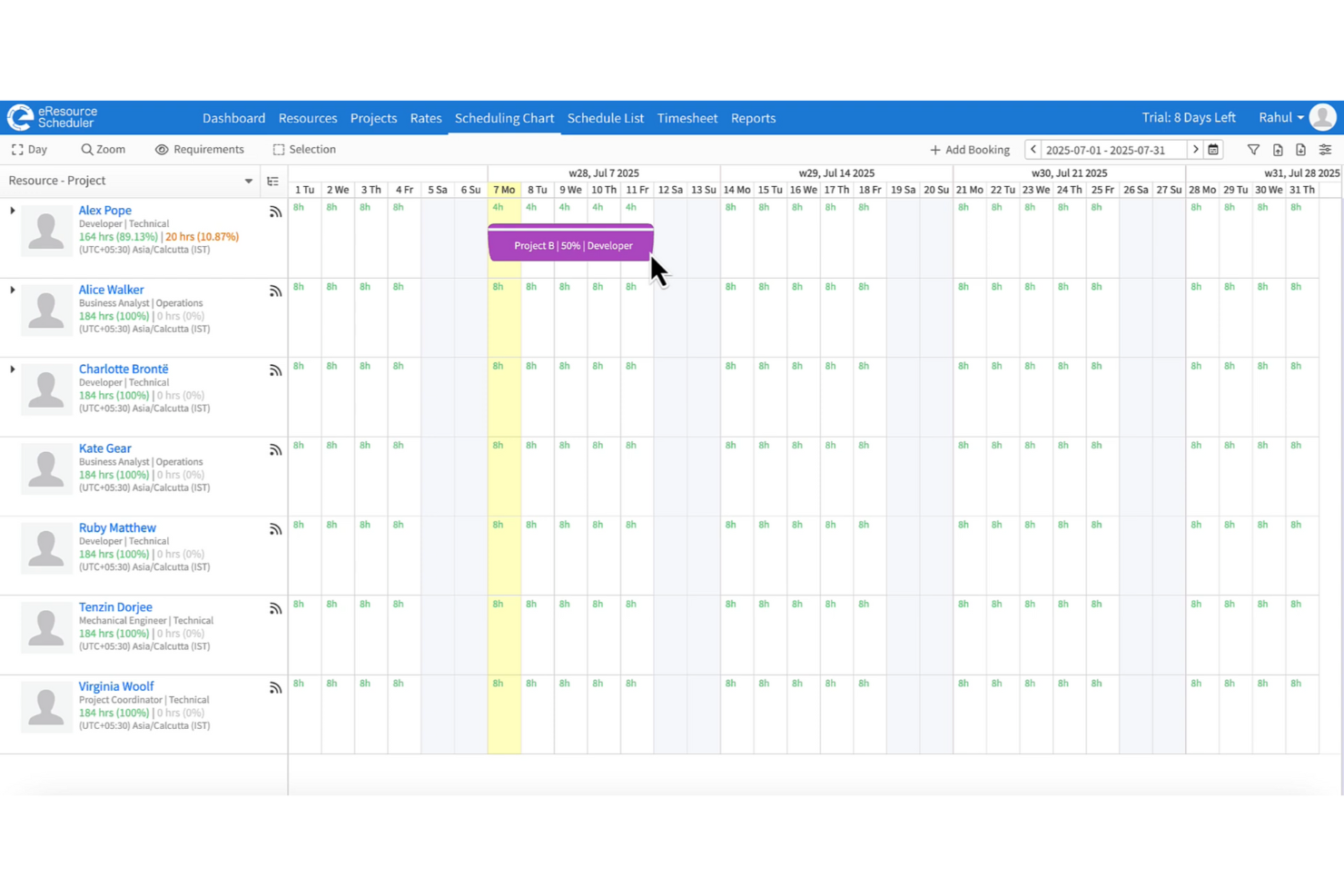
Your team can easily view who is available and when, which helps in planning and avoiding overbooking. This feature gives you a clear picture of your team's workload.
Project Timelines
You can monitor project timelines to ensure everything stays on track. This helps you manage deadlines effectively and avoid last-minute surprises.
Customizable Reports
Your team can create reports tailored to your specific project requirements. This feature allows you to track performance and make data-driven decisions.
Drag-and-Drop Interface
You can quickly adjust schedules with a simple drag-and-drop, making it user-friendly. This feature enhances your scheduling efficiency.
Conflict Management
You can identify and resolve scheduling conflicts promptly. This ensures that your projects run smoothly without resource overlap.
Ease of Use
eResource Scheduler is user-friendly, with a drag-and-drop interface that lets you quickly adjust schedules. Your team will appreciate its intuitive layout, which makes navigating the platform straightforward. While the initial setup might take time, the clear view of resources and project timelines simplifies your planning process. You can easily resolve scheduling conflicts, making it a practical choice for teams looking to streamline their resource management.

Integrations
Integrations include Slack, Trello, Jira, monday.com, Microsoft Outlook, Google Calendar, Apple Calendar, Asana, Basecamp, Microsoft Teams, Zoom, and Salesforce.
eResource Scheduler Specs
- API
- Approval Workflows
- Audit Trail
- Budgeting
- Calendar Management
- Compliance Tracking
- Custom Reports
- Customer Management
- Dashboard
- Data Export
- Data Import
- Data Visualization
- Document Management
- Expense Tracking
- External Integrations
- Forecasting
- Inventory Tracking
- Multi-Currency
- Multi-User
- Notifications
- Prioritization
- Process Reporting
- Project Management
- Resource Management
- Risk Assessment
- Roadmapping
- Scheduling
- Supplier Management
- Third-Party Plugins/Add-Ons
- Workflow Management
Alternatives to eResource Scheduler




eResource Scheduler FAQs
How does eResource Scheduler help in managing multiple projects?
Can I customize reports in eResource Scheduler?
Is eResource Scheduler suitable for non-technical teams?
How secure is the data in eResource Scheduler?
What kind of customer support does eResource Scheduler offer?
How does eResource Scheduler handle resource conflicts?
Can I track project timelines with eResource Scheduler?
Is eResource Scheduler scalable for growing teams?
Wat is de volgende stap?
Blijf op de hoogte van de nieuwste ontwikkelingen op het gebied van peoplemanagement en schrijf je in voor onze nieuwsbrief voor leiders en managers. Je ontvangt rechtstreeks in je inbox inzichten en aanbiedingen die zijn afgestemd op leiders en HR-professionals.