

Officevibe(Workleap) Employee Engagement Software Review for 2026
Officevibe stands out by fostering transparent communication and actionable insights, making it a top choice for boosting your team's engagement and trust.

We review tools independently, and commissions help fund our testing. See our transparency policy, our methodology, or suggest a tool.
Workleap is an employee engagement software built for teams that need pulse surveys, manager insights, and employee feedback tools without a bloated feature set getting in the way. I'd consider it if you want something more focused than Lattice, which wraps engagement inside a broader performance, compensation, and OKR platform, and what you actually need is a dedicated engagement layer your managers will use without a steep learning curve.
Workleap Evaluation Summary
4.4/5
- From $416.58/month (billed annually)
- Free demo available
Why Trust Our Software Recommendations
6,700+
Reviews
20
Industry experts
16+
Evaluation factors
14
Years
Our team has been testing and reviewing software since 2012. As HR experts ourselves, we know how difficult—and important—it is to choose the right software.
For this guide, we evaluated tools using hands-on testing and independent research, scoring tools using our selection criteria. We also draw on insights from industry thought leaders and practicing HR experts.
Our reviews reflect our human editorial judgment, not a sales pitch.
Expert reviewers:
- Phil GrayCOO
 Kim BehnkeHR Tech Editor & Analyst
 Josh BarkerPeople Ops Manager

Workleap Overview
Pros
- You can get real-time feedback from your team with ease.
- The software's analytics provide actionable insights that help you improve team dynamics.
- It's user-friendly, making it easy for your team to adopt and engage with.
Cons
- Some users find the customization options limited for specific team needs.
- The reporting features could be more comprehensive for deeper analysis.
- You might experience occasional delays with customer support responses.


How We Test & Score Our Tools
We’ve spent years building, refining, and improving our software testing and scoring system. The rubric is designed to capture the nuances of software selection and what makes a tool effective, focusing on critical aspects of the decision-making process.
Below, you can see exactly how our testing and scoring works across seven criteria. It allows us to provide an unbiased evaluation of the software based on core functionality, standout features, ease of use, onboarding, customer support, integrations, customer reviews, and value for money.
Core Functionality (25% of final score)
The starting point of our evaluation is always the core functionality of the tool. Does it have the basic features and functions that a user would expect to see? Are any of those core features locked to higher-tiered pricing plans? At its core, we expect a tool to stand up against the baseline capabilities of its competitors.
Standout Features (25% of final score)
Next, we evaluate uncommon standout features that go above and beyond the core functionality typically found in tools of its kind. A high score reflects specialized or unique features that make the product faster, more efficient, or offer additional value to the user.
We also evaluate how easy it is to integrate with other tools typically found in the tech stack to expand the functionality and utility of the software. Tools offering plentiful native integrations, 3rd party connections, and API access to build custom integrations score best.
Ease of Use (10% of final score)
We consider how quick and easy it is to execute the tasks defined in the core functionality using the tool. High scoring software is well designed, intuitive to use, offers mobile apps, provides templates, and makes relatively complex tasks seem simple.
Onboarding (10% of final score)
We know how important rapid team adoption is for a new platform, so we evaluate how easy it is to learn and use a tool with minimal training. We evaluate how quickly a team member can get set up and start using the tool with no experience. High scoring solutions indicate little or no support is required.
Customer Support (10% of final score)
We review how quick and easy it is to get unstuck and find help by phone, live chat, or knowledge base. Tools and companies that provide real-time support score best, while chatbots score worst.
Customer Reviews (10% of final score)
Beyond our own testing and evaluation, we consider the net promoter score from current and past customers. We review their likelihood, given the option, to choose the tool again for the core functionality. A high scoring software reflects a high net promoter score from current or past customers.
Value for Money (10% of final score)
Lastly, in consideration of all the other criteria, we review the average price of entry level plans against the core features and consider the value of the other evaluation criteria. Software that delivers more, for less, will score higher.
Core Features
Real-Time Feedback: You can gather instant feedback from your team, allowing you to address issues as they arise. This feature helps you maintain a pulse on employee morale.
Pulse Surveys: These quick and easy surveys let you measure engagement regularly. You can customize questions to fit your team's unique needs.
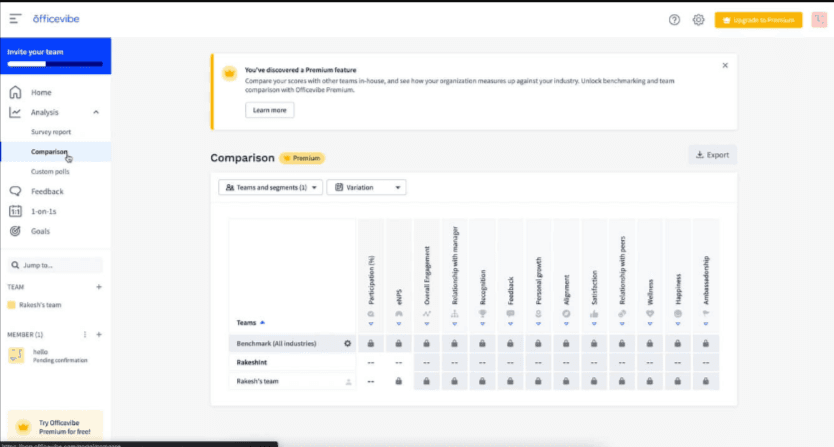
Analytics Dashboard: The dashboard provides clear insights into team dynamics and engagement levels. It helps you make informed decisions with visual data representations.
Actionable Insights: You receive specific recommendations on improving team engagement. This feature turns data into practical steps for your team.
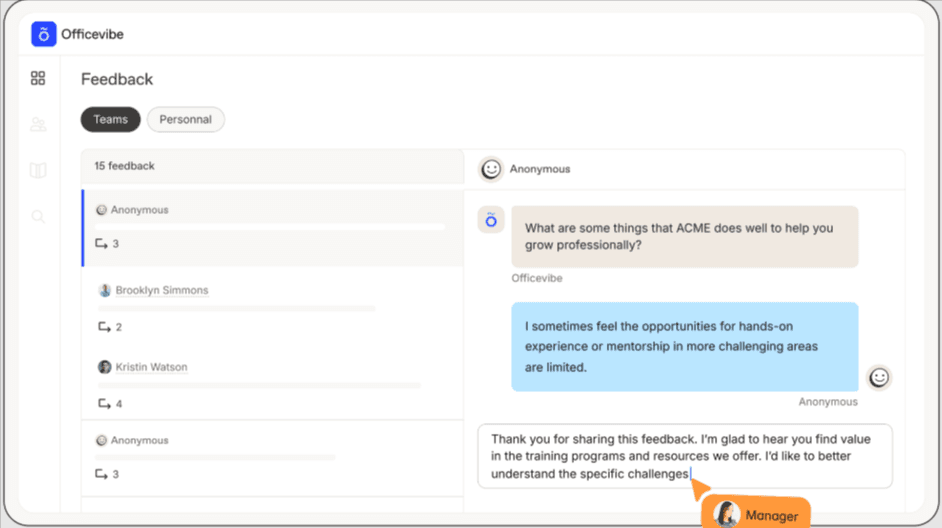
Anonymous Feedback: Team members can share their thoughts without fear, promoting honest communication. This builds trust within your team.
Goal Setting: You can align team objectives with company goals, enhancing focus and productivity. This feature supports your strategic planning efforts.
Ease of Use
Officevibe stands out for its intuitive design, making it easy for you and your team to navigate its features without a steep learning curve.
The straightforward interface ensures you can quickly access feedback and analytics, streamlining your engagement efforts.
Users appreciate how the platform simplifies collecting and analyzing employee sentiment, saving you time and effort. With clear visuals and simple navigation, Officevibe helps you focus on improving team dynamics rather than wrestling with complex software.
Workleap Specs
- 360 Degree Feedback: Yes
- API: Yes
- Cloud Deployment: No
- CRM Integration: No
- Data Export: No
- Data Import: No
- Data Visualization: Yes
- Database: No
- Employee Database: Yes
- Employee Engagement: Yes
- Employee Incentive Management: No
- Employee Training: Yes
- External Integrations: No
- Feedback Management: Yes
- Google Apps Integration: No
- Health Management: No
- Migration to Cloud: No
- Multi-Source Feedback: Yes
- Multi-User: Yes
- Performance Appraisal: Yes
- Process Reporting: No
- Resource Management: No
- Rewards & Recognition: Yes
- Social-Media Integration: No
- Software Integration: No
- Task Scheduling/Tracking: No
- Third-Party Plugins/Add-Ons: No
- Workflow Management: No
Alternatives to Workleap


How does Officevibe handle data security and compliance?
Officevibe prioritizes data security by employing industry-standard encryption and secure data storage practices. Your team's data is stored in compliance with GDPR and other relevant regulations, ensuring privacy and protection. Regular audits and updates keep the platform secure, so you can trust that your information is safe.
Can Officevibe support remote teams effectively?
Yes, Officevibe is well-suited for remote teams, offering real-time feedback and pulse surveys that help you keep track of team sentiment regardless of location. The platform's analytics provide insights into remote team dynamics, helping you address any engagement issues quickly. It's designed to foster communication and connection, even from a distance.
What kind of feedback can I collect with Officevibe?
Officevibe allows you to collect anonymous feedback through pulse surveys, custom polls, and real-time feedback tools. These features enable your team to share their thoughts openly, fostering a culture of transparency and trust. The platform provides actionable insights that help you address concerns and enhance engagement.
How customizable is Officevibe for my team's needs?
Officevibe offers a range of customization options, allowing you to tailor pulse surveys and feedback tools to your team's specific needs. While some users wish for more advanced customization, the existing options are generally sufficient for most mid-sized teams. You can adjust questions and feedback settings to align with your organizational goals. Be sure to check Officevibe pricing to see if customizations incur extra cost.
How does Officevibe help improve employee engagement?
Officevibe helps boost engagement by providing insights into team sentiment and morale. Its feedback tools and analytics enable you to identify and address issues promptly. By fostering open communication and offering actionable recommendations, Officevibe supports your efforts to create a more engaged and motivated team.
Can Officevibe support multilingual teams?
Yes, Officevibe supports multiple languages, making it a good fit for multilingual teams. This feature ensures that all team members can participate in surveys and feedback sessions in their preferred language. It helps you maintain inclusivity and ensures clear communication across diverse teams.
How often should I use Officevibe's pulse surveys?
You can use Officevibe's pulse surveys as frequently as needed to keep track of team sentiment. Many teams choose to run them weekly or bi-weekly to maintain a consistent understanding of engagement levels. Regularly using pulse surveys helps you stay informed and responsive to your team's needs.
What resources are available for new users of Officevibe?
Officevibe provides a range of resources for new users, including tutorials, FAQs, and a dedicated support team. These resources help you get started quickly and address any questions you might have.
The onboarding process is designed to be straightforward, ensuring you can begin using the platform efficiently. I couldn't find specific details on the company overview and history of Officevibe. If you have any other questions or need further assistance, please let me know!
Officevibe, now part of Workleap, is based in Montreal, Canada. It helps over 20,000 companies boost employee engagement with easy-to-use tools for feedback, recognition, and surveys.
Officevibe operates under Workleap Technologies, which also owns other HR tools like Pingboard and a performance management solution.
Known for its intuitive platform and focus on employee well-being, it’s trusted by companies like CSL Group, Rablab, and Sharethrough.
Officevibe Major Milestones
2013: Officevibe launched to help teams collect employee feedback and improve engagement.
2022: Officevibe becomes part of Workleap, expanding its product suite with performance and onboarding tools.
2023: Officevibe reaches over 20,000 global users, including managers and HR teams.
2024: Expanded integrations with tools like Slack, Teams, and major HRIS platforms.
What's Next?
To remain up to date on all the latest in people management, subscribe to our newsletter for leaders and managers. You'll receive insights and offerings tailored to leaders and HR professionals straight to your inbox.