

Navegar pelo mundo dos recursos humanos pode ser difícil, especialmente quando está a tentar aumentar o envolvimento dos colaboradores. Se considera que o Culture Amp não se adapta totalmente às necessidades específicas ou ao orçamento da sua equipa, não está sozinho. Muitos profissionais de recursos humanos procuram ferramentas que estejam mais alinhadas com os seus desafios específicos.
Com base na minha experiência, escolher o software certo pode fazer toda a diferença. Foi por isso que analisei e testei de forma independente vários concorrentes do Culture Amp. Vou apresentar-lhe as melhores opções e destacar as funcionalidades e vantagens que poderão adaptar-se melhor à sua equipa.
Continue a ler para descobrir informações imparciais sobre o melhor software de envolvimento dos colaboradores. Encontrará ferramentas poderosas que podem ajudá-lo a enfrentar os seus desafios de recursos humanos com confiança.
O que é o Culture Amp?
O Culture Amp é um software de envolvimento dos colaboradores concebido para ajudar as empresas a melhorar a cultura no local de trabalho. É normalmente utilizado por profissionais de recursos humanos e gestores que procuram melhorar o desempenho das equipas e a satisfação dos colaboradores. O software disponibiliza ferramentas de inquérito, recolha de feedback e capacidades de análise preditiva para ajudar a compreender as necessidades dos colaboradores e a tomar decisões fundamentadas. Em geral, o Culture Amp fornece informações valiosas para promover um ambiente de trabalho positivo.
Tabela de comparação das alternativas ao Culture Amp
Esta tabela de comparação resume os detalhes de preços das minhas principais alternativas ao Culture Amp.
Score legend (out of 5)
- Excellent4.5–5
- Good4–4.4
- Average3–3.9
- Below average2–2.9
- Poor1–1.9
Sorted by: Default
| Tool | Starting Price | Website | |||||||
|---|---|---|---|---|---|---|---|---|---|
Best for highly configurable review cycles | 2.8 out of 5 | 1 | 3 | 2 | 5 | 3 | 3 | $5/person/month Free demo available | Website |
Best for performance-led engagement at scale | 3.5 out of 5 | 3 | 4 | 4 | 2 | 4 | 4 | $8/user/month Free demo available | Book Demo |
Best for goal-linked appraisal conversations | Not rated | 1 | 3 | Not rated | 4 | 3 | 3 | Pricing upon request 30-day free trial + free demo available | Website |
Best for enforced anonymity in small teams | 2.7 out of 5 | 2 | 3 | 1 | 3 | 3 | 4 | $2/user/month Not available | Website |
Best for performance-linked engagement data | Not rated | Not rated | 3 | 2 | 4 | 3 | 4 | $3/user/month 30-day free trial | Website |
Best for unifying engagement and performance | 3.2 out of 5 | 3 | 4 | 4 | 1 | 4 | 3 | $5/user/month Free demo available | Book Demo |
Best for peer benchmarks in engagement surveys | 3.3 out of 5 | 4 | 4 | 3 | 2 | 3 | 4 | $10/user/month Free demo available | Website |
Best for linking feedback in employee journeys | 3.5 out of 5 | 3 | 4 | 4 | 2 | 4 | 4 | Pricing upon request Free plan + 30-day free trial + free demo available | Website |
Best for recognition from work activity | 3.7 out of 5 | 3 | 4 | 3 | 4 | 4 | 4 | $4,999/year Free demo available | Website |
Best for employee listening in Microsoft 365 | 3.7 out of 5 | 4 | 5 | 4 | 1 | 4 | 4 | $2.70/user/month Not available | Website |


Porque pode confiar nas nossas recomendações de software
6,700+
Reviews
20
Industry experts
16+
Evaluation factors
14
Years reviewing software
A nossa equipa testa e analisa software desde 2012. Como especialistas em RH, sabemos o quão difícil — e importante — é escolher o software certo.
Para este guia, avaliámos as ferramentas através de testes práticos e pesquisa independente, pontuando-as de acordo com os nossos critérios de seleção. Recorremos também a contributos de líderes de opinião do setor e de especialistas em RH no ativo.
As nossas análises refletem o juízo da nossa equipa editorial, e não um discurso de vendas.
Revisores especialistas:
- Phil GrayCOO
 Kim BehnkeHR Tech Editor & Analyst
 Josh BarkerPeople Ops Manager

Análises das melhores alternativas ao Culture Amp
Abaixo encontram-se os meus resumos detalhados das melhores alternativas ao Culture Amp que entraram na minha lista final. As minhas análises oferecem uma visão detalhada das principais funcionalidades, vantagens e desvantagens, integrações e casos de utilização ideais de cada ferramenta, para o ajudar a encontrar a melhor opção para si.
 Best for highly configurable review cycles
- Free demo available
- From $5/person/month (billed annually)
Visit WebsiteCustomer Rating:4.8/5
PerformYard centralizes reviews, feedback, and goal tracking in one dashboard. PerformYard is a performance management platform that brings reviews, goals, feedback, and engagement surveys into one system, which suits HR teams who want to replace Culture Amp's survey focus with year-round performance and people data.
Who Is PerformYard Best For?
PerformYard fits HR and people operations teams at mid-sized organizations that want to run tailored review cycles and goal tracking, with engagement surveys as a secondary need.
Why I Picked PerformYard
I picked PerformYard because its review cycles bend to how your organization works. You can build custom forms, set participant groups and timing, and run 360s, peer reviews, and quarterly check-ins in the same system. I like that goal progress flows into review forms, so managers score real results instead of memory. When you leave Culture Amp, engagement surveys and feedback history stay connected to those cycles.
PerformYard Key Features
- AI survey analysis: Summarizes open-ended survey responses into themes, sentiment, and recommended areas to follow up on.
- Engagement dashboard with cohorts: Breaks engagement scores down by seven factors and filters results by department, tenure, or location.
- Slack and Microsoft Teams recognition: Publishes public employee recognition to a chosen channel while saving it in PerformYard.
- Pulse survey scheduling: Lets admins set survey frequency, delivery timing, reminders, and question selection for anonymous pulses.
PerformYard Integrations
PerformYard offers native integrations with Workday, BambooHR, Rippling, ADP, Okta, Slack, and Microsoft Teams. It also provides a REST API for custom integrations across employee management, goals, reporting, reviews, and review cycles.
Pros and Cons
Pros:
- Users praise responsive onboarding support
- Goals, feedback, and reviews stay together
- Reviewers praise flexible review-cycle configuration
Cons:
- Anonymous pulse setup can require guidance
- Reporting offers fewer ready-made analytics
Learn more about PerformYard: Best for performance-led engagement at scale
- Free demo available
- From $8/user/month
Customer Rating:4.3/5
Betterworks lets users give anytime feedback via Slack, Teams, or Gmail. Betterworks Engage is an employee engagement survey tool that gives HR and people teams recurring pulses, AI comment analysis, industry benchmarks, and action plans, so you can turn feedback into follow-through.
Who Is Betterworks Best For?
Betterworks suits mid-size to large HR teams that already run goals and performance programs and want engagement surveys tied to that work.
Why I Picked Betterworks
I picked Betterworks because its engagement data connects to performance work, which Culture Amp alone doesn't do as directly. In Engage, I turn a weak survey result into a focus area, then pick from about 150 action-plan templates. With Betterworks Core, I can link that plan to a goal or milestone. AI topic analysis also sorts comments into sentiment-labeled themes.
Betterworks Key Features
- Anonymity thresholds: Admins set a minimum group size so small segments get hidden in results.
- Role-based report permissions: Custom roles and dimension limits control which groups each manager can see.
- Slack and Microsoft Teams pulses: Deliver pulse surveys to employees inside the tools they already use.
- Multi-channel survey delivery: Send surveys and polls by email, SMS, or kiosk.
Betterworks Integrations
Betterworks Engage offers integrations with Slack and Microsoft Teams for pulse survey delivery. It also supports SFTP CSV imports for employee data and SSO through Google Apps, OpenID, and SAML, including Okta, Ping Identity, OneLogin, and ADFS.
Pros and Cons
Pros:
- Action plans offer roughly 150 research-backed templates
- AI groups comments by topic and sentiment
- Employees can answer surveys without logging in
Cons:
- Comment analysis displays at most ten topics
- Linked goals stop syncing after creation
Learn more about Betterworks: Best for goal-linked appraisal conversations
- 30-day free trial + free demo available
- Pricing upon request
Visit WebsiteCustomer Rating:4.5/5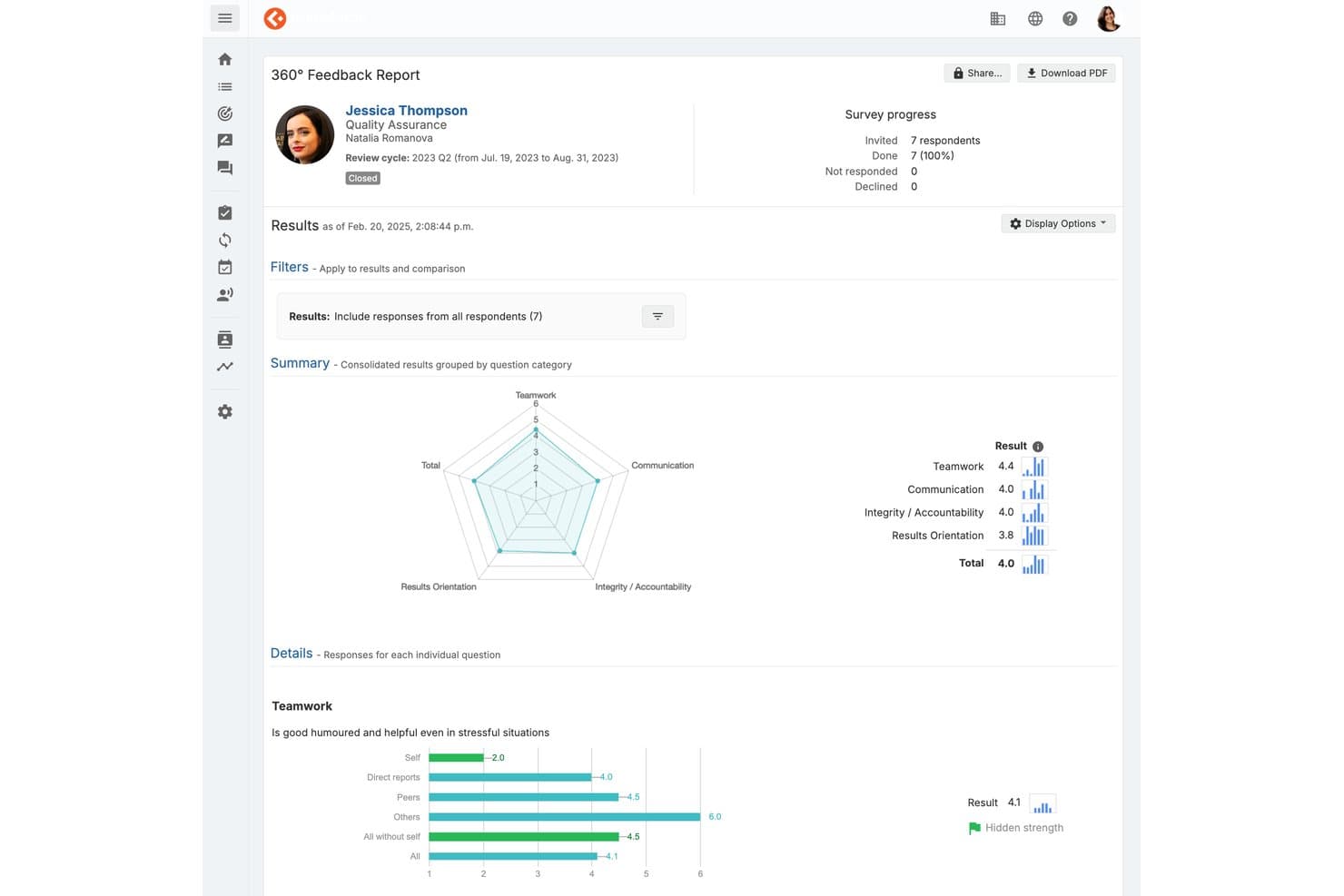
Primalogik 360° Feedback Report summarizing multi-rater results by category and question. Primalogik is a performance management platform that pairs 360-degree feedback, reviews, goals, and opinion surveys, which suits HR teams at small and mid-sized companies that want engagement pulses and appraisals in one system.
Who Is Primalogik Best For?
Primalogik suits HR teams at small and mid-sized companies with 25 or more employees who run formal appraisal cycles and want 360 feedback and surveys in one place.
Why I Picked Primalogik
I picked Primalogik because it ties goals directly into the appraisal conversation. Goals, their status, deadlines, and completion percentages pull automatically into the review form, so my team rates them without digging through a separate tool. I also like the check-ins and manager journal, which let me keep private notes and bring real examples into the review. If you're leaving Culture Amp for performance depth, this is a practical fit.
Primalogik Key Features
- 360-degree feedback: Collect multi-rater feedback with custom questionnaires, 3- to 10-point rating scales, and adjustable anonymity levels.
- Opinion surveys: Send custom rating, multiple-choice, and open-ended surveys to the whole organization or selected groups.
- AI summaries: Draft summaries of 360 reports and survey feedback that you review and edit before saving.
- Assessment-bias reporting: Compare managers' score ranges and median scores to spot differences in rating styles.
Primalogik Integrations
Primalogik offers native integrations with BambooHR, Google Workspace, Microsoft Entra ID, Okta, and Slack, plus Microsoft 365 user provisioning. It supports SCIM 2.0 for custom user provisioning.
Pros and Cons
Pros:
- Centralized 360 feedback reduces spreadsheet collation
- Flexible questionnaires support tailored review cycles
- Goals appear directly in appraisal forms
Cons:
- Review launches still require manual administration
- No external industry engagement benchmarks
Learn more about Primalogik: Best for enforced anonymity in small teams
- Not available
- From $2/user/month

FeedbackPulse lets users create surveys from ready-made templates. FeedbackPulse is a lightweight employee feedback platform that bundles pulse surveys, eNPS, 360 reviews, and peer recognition, giving lean People Ops teams an affordable Culture Amp alternative with action planning and benchmarks built in.
Who Is FeedbackPulse Best For?
FeedbackPulse suits People Ops managers at small companies of roughly 10 to 200 employees who need pulse surveys, reviews, and recognition in one affordable, self-serve tool.
Why I Picked FeedbackPulse
I picked FeedbackPulse because its anonymity rules are enforced, not promised. Results stay hidden until at least 3 people respond, and admins can't lower that threshold, even on department or location filters. In practice, that means I can run an eNPS survey in a 30-person company and employees know a small team's comments won't be exposed. I also like the Employee ID check-in for QR surveys, which gives frontline staff one response each.
FeedbackPulse Key Features
- Action planning: Assign follow-up goals to owners with due dates and track progress after each survey.
- eNPS benchmarks: Compare your eNPS against industry and company-size medians.
- eNPS heatmaps: Segment results by department, location, and manager to spot weak areas.
- 360 reviews: Run self, manager, peer, and upward reviews on monthly to annual cycles.
FeedbackPulse Integrations
FeedbackPulse offers integrations with Slack and Microsoft Teams, plus MCP connections for Claude and ChatGPT. Enterprise includes custom integrations, but a public API isn’t yet available.
Pros and Cons
Pros:
- Action plans assign owners and track progress
- Surveys, reviews, and recognition share one platform
- Enforced anonymity protects small-team responses
Cons:
- Engagement benchmarks cover eNPS only
- Independent user reviews remain scarce
Learn more about FeedbackPulse: Best for performance-linked engagement data
- 30-day free trial
- From $3/user/month (billed annually)
Visit WebsiteCustomer Rating:4.3/5
Small Improvements tracks performance review status by team, reviewee, and reviewer. Small Improvements is a performance management platform for small and midsize HR teams that ties reviews, 360 feedback, objectives, 1:1s, and pulse surveys together, so you can replace Culture Amp with a lighter, lower-cost option.
Who Is Small Improvements Best For?
Small Improvements fits People Ops managers at small and midsize companies who want reviews, goals, and pulse surveys in one affordable system.
Why I Picked Small Improvements
I picked Small Improvements because it ties engagement data to performance data, which Culture Amp keeps in separate workflows. In Pulse, I can group survey results by performance rating and compare eNPS across departments or managers. Reviewers also see feedback, objectives, and 1:1 notes inside the review, so a dip in sentiment connects to real conversations. I'd skip it if you need benchmarking.
Small Improvements Key Features
- AI review coach: Suggests improvements to reviewers by drawing on past feedback, objectives, and 1:1 notes.
- Leave risk prediction: Flags employees as low, medium, or high risk using performance, feedback, and turnover data.
- Calibration and review analytics: Compares rating averages and distributions across groups, such as department or tenure.
- Role-based permissions: Sets separate access for HR Admins, HR Assistants, Tech Admins, and managers.
Small Improvements Integrations
Small Improvements offers native integrations with BambooHR, Personio, Rippling, Workday, Slack, Google Workspace, Okta, OneLogin, Google Calendar, and Office 365. It also provides a REST API for custom integrations.
Pros and Cons
Pros:
- Reviewers praise intuitive workflows and responsive support
- Keeps reviews, objectives, and 1:1 notes together
- Connects engagement results with performance ratings
Cons:
- Survey comments lack built-in action planning
- No peer benchmarks for culture comparisons
Learn more about Small Improvements: Best for unifying engagement and performance
- Free demo available
- From $5/user/month (billed annually)
Customer Rating:4.6/5
ThriveSparrow encourages feedback and employee recognition. ThriveSparrow's Engage is an employee engagement platform for HR teams that want pulse, lifecycle, and eNPS surveys with AI sentiment analysis, industry benchmarks, and action plans, all at a lower per-employee price than Culture Amp.
Who Is ThriveSparrow Best For?
ThriveSparrow suits HR business partners and people leaders at growing mid-sized companies who want pulse, lifecycle, and eNPS surveys with AI action plans at a lower price.
Why I Picked ThriveSparrow
ThriveSparrow earns its spot on my shortlist because Engage ties survey results directly to action. After a pulse survey, I open the AI-suggested action plans, pick a framework, and assign checklist tasks to managers. Infer AI also summarizes key drivers, so I'm not digging through heatmaps to find where engagement is slipping. Its sentiment analysis groups comments into themes like "Address Immediately," which helps me prioritize follow-up.
ThriveSparrow Key Features
- Lifecycle surveys: Schedule 30-, 60-, and 90-day onboarding check-ins and exit surveys around employee milestones.
- QR code share: Give frontline and deskless employees anonymous survey access through a scannable code.
- External benchmarks: Compare results against 100+ industries and nine company-size ranges.
- PPT export: Turn survey summaries, trends, and strengths into presentation-ready PowerPoint decks.
ThriveSparrow Integrations
ThriveSparrow lists 50+ HRMS, payroll, and workplace integrations, including Google Workspace, Slack, Microsoft Teams, BambooHR, and Workday. It documents API export, but not a general-purpose API for custom integrations.
Pros and Cons
Pros:
- Readable dashboards surface teams needing attention
- AI themes connect feedback to action plans
- Easy pulse, eNPS, and lifecycle surveys
Cons:
- Reviews and goal tracking require separate products
- Benchmarks stay static across report filters
Learn more about ThriveSparrow: Best for peer benchmarks in engagement surveys
- Free demo available
- From $10/user/month (billed annually)
Visit WebsiteCustomer Rating:4.7/5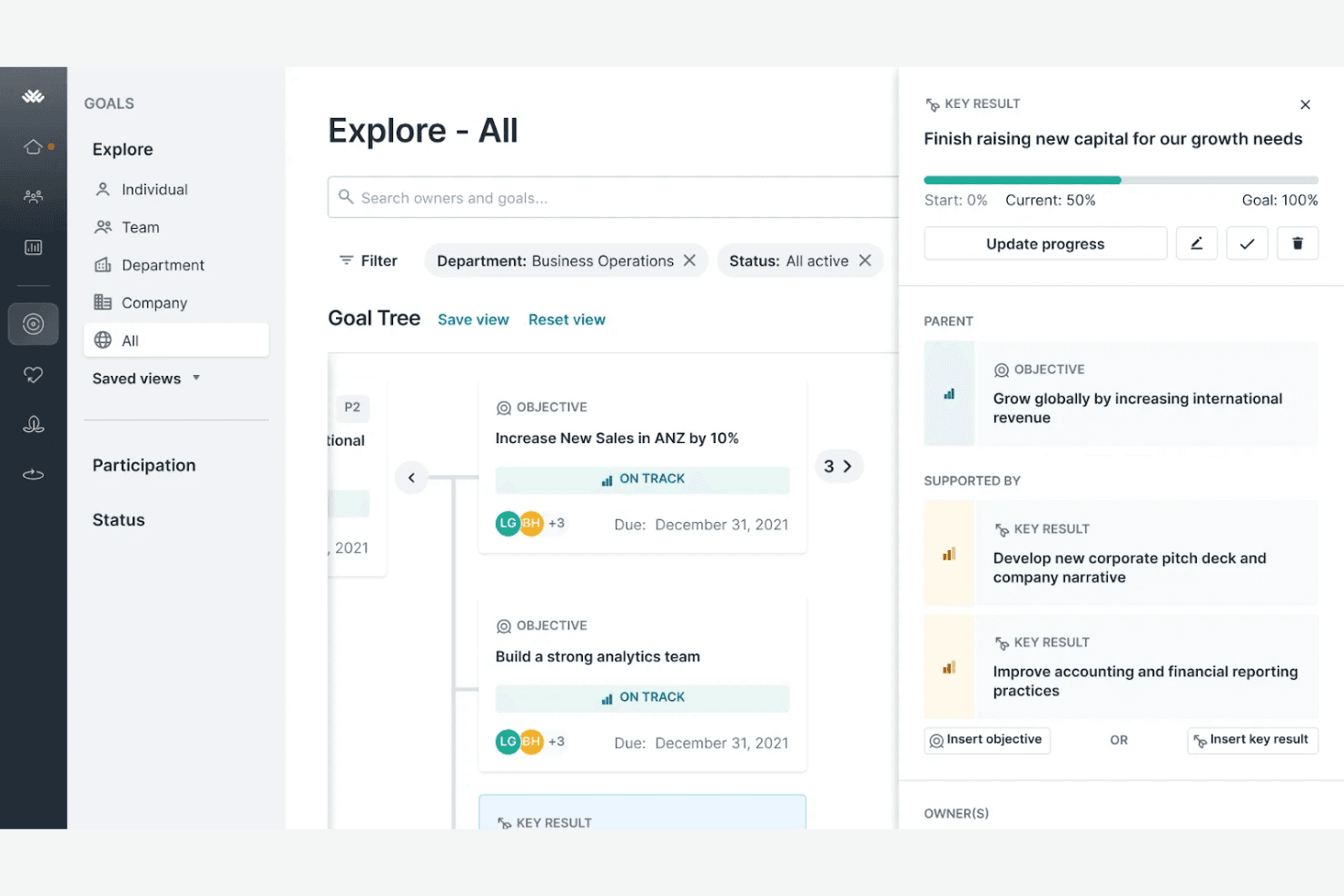
Lattice helps drive employee growth with feedback, goal alignment, and reviews. Lattice is a people platform whose Engagement product gives HR teams pulse surveys, eNPS, AI sentiment analysis, and action planning, with performance and goals available as add-ons if you want one system.
Who Is Lattice Best For?
Lattice suits HR business partners and people operations teams at mid-sized, growing companies that want to benchmark engagement results against peers and may add performance tools later.
Why I Picked Lattice
Lattice earns its spot on my shortlist because its benchmarks answer the question leadership always asks: how do we compare? I can set survey results against a Lattice benchmark, including Mercer-powered data, filtered by industry, region, and company size. The heatmap view then shows where we trail by department or manager. I also like that Lattice documents margin of error, so I know when a small team's score is too thin to act on.
Lattice Key Features
- AI sentiment analysis: Reads survey comments and labels them positive, neutral, or negative, then surfaces key drivers and trends.
- Action planning: Managers build action plans from survey themes, with suggested actions and progress views for owners.
- Onboarding and exit surveys: Send automated surveys at key moments using expert-built templates.
- HR AI Agent: Answers team questions and coaches managers in the flow of work.
Lattice Integrations
Lattice offers dozens of documented integrations, including BambooHR, Workday, Rippling, Slack, Microsoft Teams, and Jira. Its mostly read-only API supports custom integrations, which customers must build and maintain.
Pros and Cons
Pros:
- Reviewers value pulse surveys and sentiment summaries
- Heatmaps and margin-of-error guidance support careful comparisons
- Mercer-powered peer benchmarks clarify engagement gaps
Cons:
- Only one pulse survey can run at a time
- Custom questions lack benchmark comparisons
 Best for linking feedback in employee journeys
- Free plan + 30-day free trial + free demo available
- Pricing upon request
Visit WebsiteCustomer Rating:3.9/5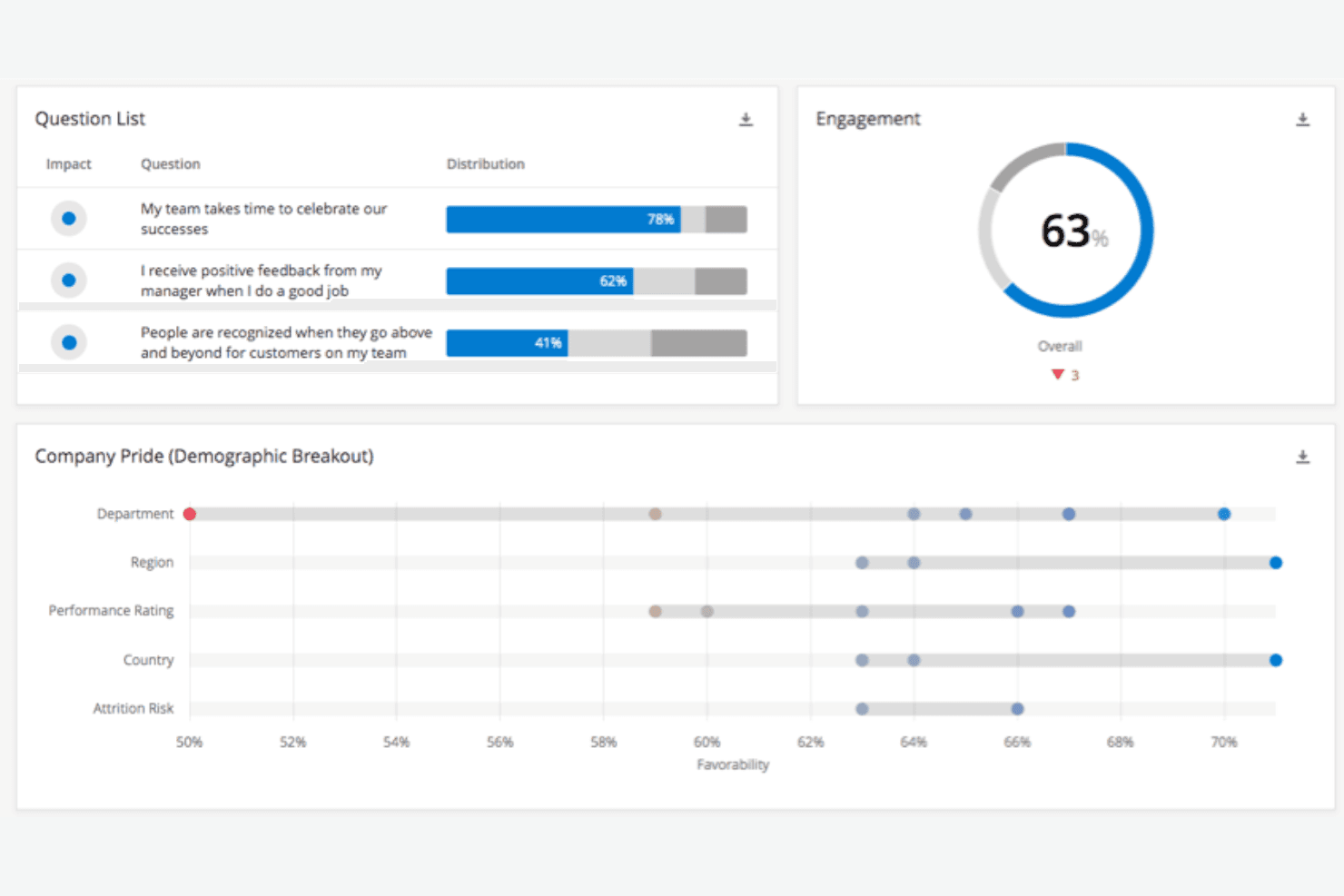
Qualtrics' dashboard delivers advanced analytics from your customizable surveys. Qualtrics Employee Experience is an enterprise listening platform that gives HR leaders engagement surveys, lifecycle feedback, AI-driven manager recommendations, and industry benchmarks, so you can spot attrition risks and act on them.
Who Is Qualtrics Best For?
Qualtrics suits large HR teams that want to connect engagement, onboarding, and exit feedback into one view of the employee journey.
Why I Picked Qualtrics
I picked Qualtrics because it ties feedback from different moments into one employee story, which Culture Amp's separate survey cycles don't do as directly. Lifecycle projects trigger surveys at Day 1, Week 1, and 30-, 60-, and 90-day milestones, plus exit. Employee Journey Analytics then combines that data to show how early experiences relate to engagement and attrition risk. I like that managers get AI-generated action recommendations they can add straight to action plans.
Qualtrics Key Features
- Pulse survey library: Choose from more than 290 science-backed questions or write your own custom queries.
- Custom benchmarks: Import or enter your own comparison, percentile, or dynamic benchmarks alongside GICS-based industry peers.
- 360 development feedback: Automate nominations, routing, and reminders using competency templates for leaders, managers, and individual contributors.
- Enhanced confidentiality: Set response thresholds and label fields by sensitivity to hide small groups in filters and breakouts.
Qualtrics Integrations
Qualtrics supports HRIS integrations through Merge with about 50 platforms, including Workday and BambooHR, plus LinkedIn Learning for 360 feedback. It also offers a REST API for custom integrations.
Pros and Cons
Pros:
- Turns survey findings into manager action plans
- Schedules recurring pulse surveys across teams
- Links onboarding, engagement, and exit feedback
Cons:
- Reviewers report limits in dashboard visualization options
- Doesn’t replace formal performance review cycles
Learn more about Qualtrics: Best for recognition from work activity
- Free demo available
- From $4,999/year (billed annually)
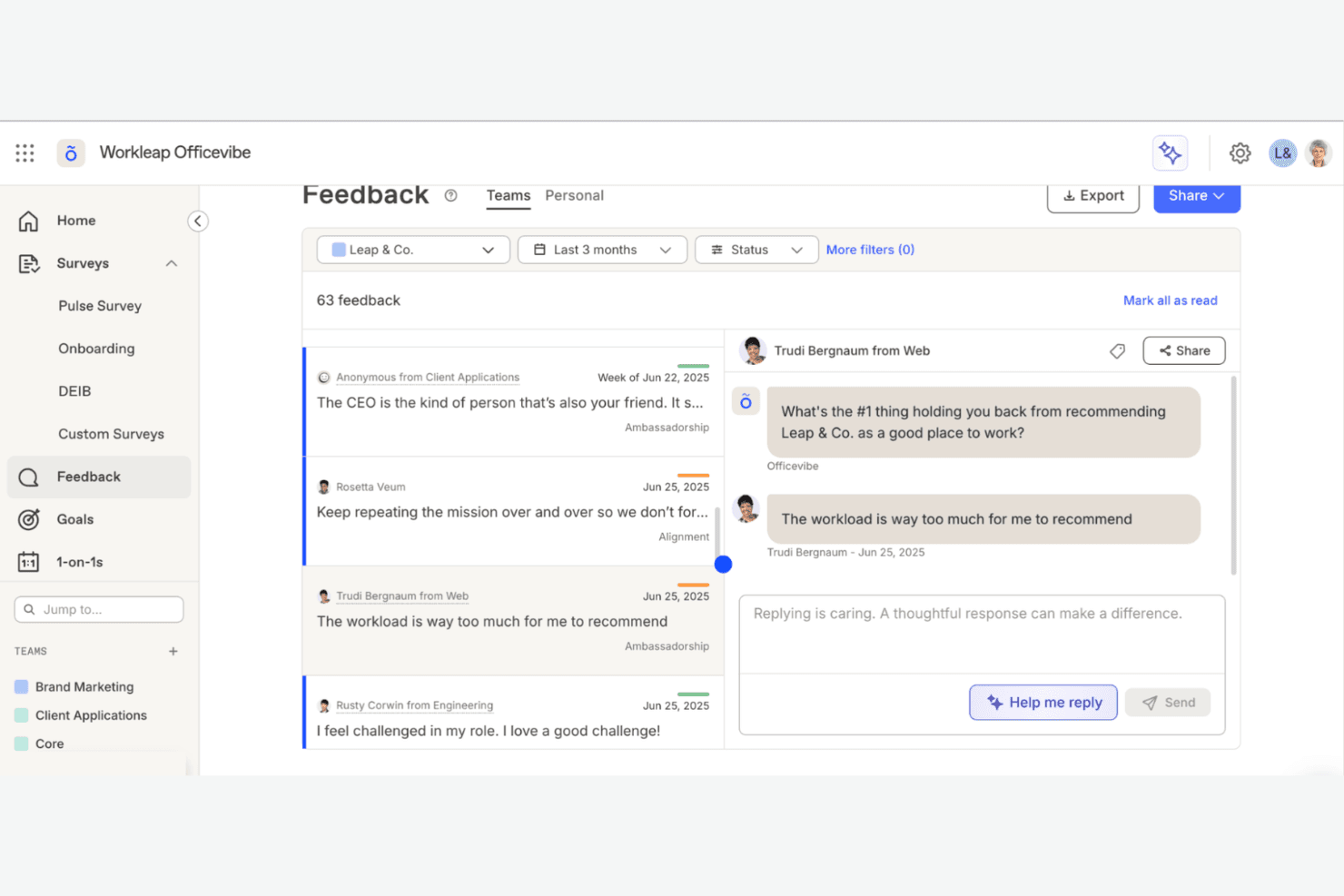
Officevibe helps boost engagement with anonymous feedback, surveys, and recognition. Workleap Officevibe is an AI-driven people management platform that pairs pulse surveys and team health insights with performance reviews, goals, and Good Vibes recognition, helping HR teams turn employee feedback into manager action.
Who Is Workleap Officevibe Best For?
Workleap Officevibe suits HR teams and people managers at mid-sized, multi-team companies who want pulse surveys, reviews, and manager guidance in one place.
Why I Picked Workleap Officevibe
I picked Workleap Officevibe because Culture Amp leaves recognition to a separate effort, while Good Vibes scans activity from Jira, Slack, meetings, and goals to flag work that deserves a shout-out. I like that it drafts the message in our company voice and ties it to values. Managers also get a weekly summary of quieter contributors they might miss. Recognition analytics then show where praise is missing.
Workleap Officevibe Key Features
- Pulse surveys with ten metrics: Run recurring surveys that report engagement scores, eNPS, and ten engagement metrics.
- Industry benchmarks: Compare engagement results with organizations filtered by industry, location, and size.
- 360 review cycles with calibration: Build custom review cycles with 360 feedback, upward reviews, and a 9-box grid.
- Smart reports: Send managers and executives summaries of engagement changes with suggested next steps.
Workleap Officevibe Integrations
Workleap supports integrations with 100+ vendors, including Slack, Microsoft Teams, Jira, Google Workspace, Workday, and BambooHR, through native connections or custom MCP. It also offers API access for custom integrations.
Pros and Cons
Pros:
- Reviews, calibration, and goals share one platform
- Pulse reports track engagement trends and eNPS
- Recognition suggestions surface quieter contributors’ work
Cons:
- Survey insights need stronger action follow-through
- Recurring survey questions can feel repetitive
Learn more about Workleap Officevibe: Best for employee listening in Microsoft 365
- Not available
- From CAD $2.70/user/month (billed annually)
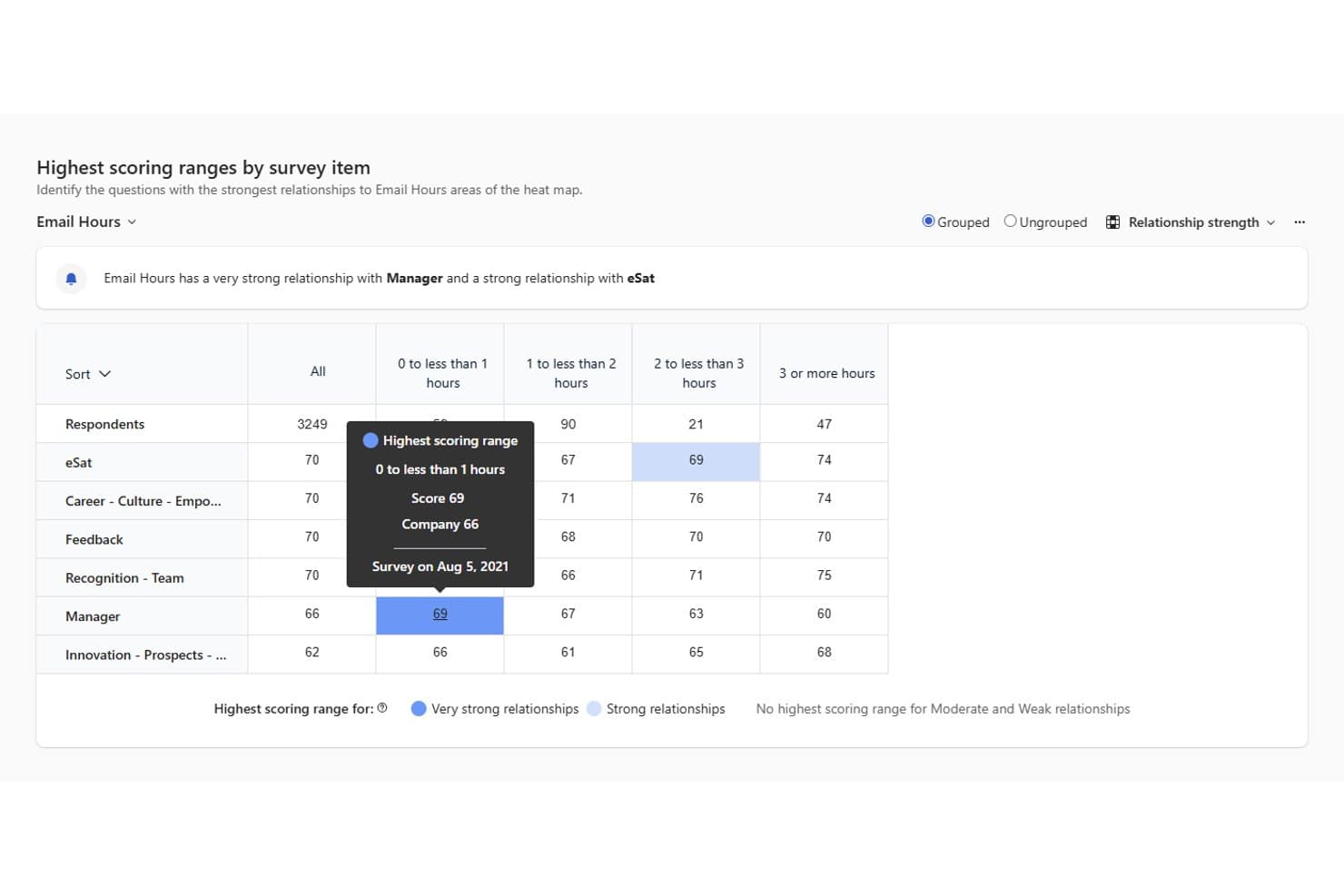
Viva Glint's Workplace Patterns report highlights the survey items most strongly linked to email hours. Microsoft Viva Glint is an engagement survey platform that gives mid-size and enterprise HR teams people-science-based templates, AI comment summaries, and manager action plans to turn employee feedback into follow-through.
Who Is Microsoft Viva Glint Best For?
Microsoft Viva Glint suits mid-size and enterprise talent and engagement leaders at Microsoft 365 organizations who want survey depth, manager follow-through, and peer benchmarks.
Why I Picked Microsoft Viva Glint
Microsoft Viva Glint earns its spot on my shortlist because it turns employee listening into something Microsoft 365 teams can act on. I like that Nudges prompt managers to share results and pick Focus Areas, which are recommended from team scores and benchmarks. Copilot in Viva Glint also summarizes thousands of comments, so my team can spot themes without reading every response. For Culture Amp users on Microsoft 365, that follow-through loop is the draw.
Microsoft Viva Glint Key Features
- Display logic: Show or hide survey questions based on earlier answers, using AND/OR conditions.
- Confidentiality thresholds: Set separate minimum response counts for rated items and comments.
- Heat maps and alerts: Spot statistically significant gaps across demographic groups and attributes.
- Lifecycle survey templates: Launch onboarding, exit, 360 feedback, and change management surveys.
Microsoft Viva Glint Integrations
Microsoft Viva Glint has native integrations with Microsoft Viva Insights and Microsoft Teams. It also supports employee-data imports through SFTP, including CSV and XLSX files, but no public API or named native HRIS connectors are documented.
Pros and Cons
Pros:
- AI summaries condense large comment sets
- Manager prompts support post-survey follow-through
- Survey reports reveal team-level trends
Cons:
- Manual action updates weaken cycle-to-cycle continuity
- No formal reviews or goal tracking
Learn more about Microsoft Viva Glint:
Outras alternativas ao Culture Amp
Eis algumas alternativas adicionais ao Culture Amp que não entraram na minha lista final, mas que vale a pena conhecer:
- 11LeapsomeBest for Culture Amp migration support
- 1215FiveBest for engagement without performance tools
- 13BambooHRBest for recognition within HR workflows
- 14NectarBest for global rewards and Workday payroll sync
- 15Quantum WorkplaceBest for retention planning with talent data
- 16CultureMonkeyBest for Culture Amp survey migration
- 17EletiveBest for manager-led survey follow-through
- 18TeamspectiveBest for linking feedback to leadership action
- 19GlintBest for industry and specialty benchmarks
- 20Workday Peakon Employee VoiceBest for spotting retention risks by segment
How I Evaluate Culture Amp Alternatives
I split my evaluation into three parts. Core functionality carries the most weight—I look for tools that run configurable engagement surveys and surface people analytics dashboards. Then I evaluate AI-powered insights and open text analytics, and consider pricing transparency and onboarding support.
Core Functionality (Table Stakes For This List)
When I'm selecting tools for my list, I score each one on a scale from 0 (does not offer the functionality) to 5 (excels in this area) for each core functionality listed below. I then convert the total into a percentage to help assess each tool's overall fit, with extra weight on any functionalities I’ve deemed essential.
- Engagement Surveys (Essential): I look for configurable questions, recurring pulse schedules, and anonymity controls so teams can gather candid feedback during change.
- People Analytics (Essential): I assess whether dashboards segment trends by team, tenure, or role and help HR identify engagement drivers and areas needing follow-up.
- Performance Management: I look for review cycles that connect goals to check-ins, so managers can track progress without piecing together past feedback.
- Action Planning: I evaluate whether teams can turn findings, such as workload concerns, into assigned follow-ups with owners and progress tracking.
- Benchmarking Data: I check whether comparisons use relevant peer groups by industry, organization size, or region to put engagement results in context.
- Role-Based Reporting: I look for access controls and scoped reports that give managers team feedback while helping employees follow their own goals and progress.
Once I have a list of tools that meet the criteria, I consider what sets each platform apart.
Differentiating Factors (What Sets Vendors Apart)
Here's how I compare and contrast different vendors:
Standout Features
I evaluate how each tool handles open text analytics—specifically whether its NLP can theme and categorize thousands of open-ended comments without manual tagging. That capability matters most after a large pulse survey when you need patterns fast. I also check for AI-powered insights that flag flight-risk signals or sentiment shifts before they show up in attrition data. Manager coaching nudges round out the picture; platforms like Lattice and 15Five prompt managers to act on feedback at the right moment rather than waiting for the next review cycle.
Beyond Features
I check whether vendors publish clear per-employee pricing tiers and disclose add-on costs for modules like performance or analytics. Hidden pricing makes it hard to forecast spend as headcount grows. I also evaluate HRIS integration depth—platforms with native connectors to Workday, BambooHR, or Rippling save weeks of manual data syncing during rollout. Anonymity controls matter too; I look for configurable response thresholds that protect respondents on small teams while still surfacing useful data.
Por que procurar uma alternativa ao Culture Amp?
É difícil avaliar o preço do Culture Amp para equipas mais pequenas e alguns utilizadores consideram que os seus relatórios, ferramentas de calibração e sincronização de dados são limitados à medida que as suas necessidades se tornam mais avançadas. Eis em que situações outra ferramenta poderá ser mais adequada:
- Tem uma equipa pequena e quer custos claros. O Culture Amp define o preço dos seus produtos Engage e Perform mediante orçamento e faz a faturação anual, sem preços publicados para compradores mais pequenos. Ferramentas como o FeedbackPulse são adequadas para equipas pequenas, com inquéritos recorrentes simples que combinam feedback de avaliação rápida, lealdade e de vários avaliadores.
- Analisa os dados dos seus inquéritos em profundidade. Alguns avaliadores consideram que os relatórios predefinidos são limitados para utilizadores avançados e querem análises mais robustas. Plataformas como a Qualtrics oferecem análises avançadas com uma vasta gama de referências, e a Lattice disponibiliza análises detalhadas do desempenho.
- Calibra as avaliações entre muitos responsáveis. Alguns utilizadores consideram que as necessidades de calibração avançada são limitadas em comparação com conjuntos de ferramentas especializados em desempenho. Opções como a Betterworks oferecem calibração estruturada para avaliações consistentes, e a PerformYard permite configurar ciclos de avaliação por função ou departamento.
- Os seus dados de RH têm de ser sincronizados sem limpeza. Alguns utilizadores relatam sincronização manual de dados, limpeza de importações e integrações que exigem manutenção administrativa contínua. Aplicações como a 15Five ligam-se ao BambooHR, ADP, Gusto, Workday e Slack.
O Culture Amp continua a ser a escolha certa se quiser inquéritos de envolvimento baseados em investigação, com planos de ação predefinidos, uma grande quantidade de dados de referência e resumos gerados por IA de comentários abertos. Para equipas de pessoas que dependem dos dados dos inquéritos para orientar a ação, isso pode
Principais funcionalidades do Culture Amp
Eis algumas das principais funcionalidades do Culture Amp para ajudar a comparar e contrastar o que as soluções alternativas oferecem:
- Inquéritos de envolvimento: Recolha informações para compreender os sentimentos dos colaboradores.
- Feedback contínuo: Facilita conversas contínuas entre colaboradores e responsáveis para melhorar o desempenho.
- Avaliações de desempenho: Ajudam a reunir feedback para avaliar o progresso dos colaboradores e as suas necessidades de desenvolvimento.
- Gestão de objetivos: Ajuda a sua equipa a criar planos alinhados com os objetivos da sua organização.
- Análise de pessoas: Utilize informações baseadas em dados para tomar decisões sobre a sua força de trabalho.
- Orientador de IA: Fornece orientação personalizada para melhorar o desempenho dos colaboradores.
- Informações sobre retenção: Identifique os fatores que impulsionam a rotatividade dos colaboradores, obtendo dados concretos para ajudar a reter talento.
- Inquéritos de diversidade, equidade e inclusão: Meça a diversidade, a equidade e a inclusão na sua organização para promover uma cultura inclusiva.
- Planos de crescimento personalizados: Alinhe o desenvolvimento profissional individual com os objetivos organizacionais.
- Recursos de liderança: Permitem à sua equipa aceder a guias e seminários online para apoiar o desenvolvimento da liderança e a cultura no local de trabalho.