

O software de gestão do local de trabalho híbrido fornece-lhe as ferramentas necessárias para coordenar horários flexíveis, reservar secretárias e gerir os recursos do escritório entre equipas remotas e presenciais. Se está à procura do melhor software de gestão do local de trabalho híbrido, provavelmente procura formas de apoiar a flexibilidade dos colaboradores, acompanhar quem está no escritório e tirar melhor partido do seu espaço de trabalho.
Neste guia, encontrará as minhas escolhas das melhores ferramentas para ajudar a sua organização a gerir o trabalho híbrido, com uma visão geral das principais funcionalidades para poder comparar soluções e encontrar a que melhor responde às suas necessidades.
Why Trust Our Software Recommendations
6,700+
Reviews
20
Industry experts
16+
Evaluation factors
14
Years
Our team has been testing and reviewing software since 2012. As HR experts ourselves, we know how difficult—and important—it is to choose the right software.
For this guide, we evaluated tools using hands-on testing and independent research, scoring tools using our selection criteria. We also draw on insights from industry thought leaders and practicing HR experts.
Our reviews reflect our human editorial judgment, not a sales pitch.
Expert reviewers:
- Phil GrayCOO
 Kim BehnkeHR Tech Editor & Analyst
 Josh BarkerPeople Ops Manager

Tabela comparativa de softwares de gestão do local de trabalho híbrido
Esta tabela comparativa resume os detalhes de preços das minhas principais escolhas de software de gestão do local de trabalho híbrido:
| Tool | Best For | Trial Info | Price | ||
|---|---|---|---|---|---|
| 1 | Best for department-based neighborhood seating | Free trial available | From $159/month | Website | |
| 2 | Best for automated workplace experience workflows | Free demo available | From $500/month | Website | |
| 3 | Best for security and compliance-driven workplaces | Free demo available | From $5/bookable resource/month (billed annually) | Website | |
| 4 | Best for AI-driven office analytics | Free demo available | Pricing upon request | Website | |
| 5 | Best for full Microsoft Teams integration with AI assistant | Free demo available | From $99/month | Website | |
| 6 | Best for ultra-simple room and desk management | 30-day free trial available | From $51/month | Website | |
| 7 | Best for fast onboarding and setup | Free plan available; 14-day free trial; free demo available | From €1.7/user/month (billed annually) | Website | |
| 8 | Best for Slack-based bookings | Free trial + free demo available | From $2.50/user/month (billed annually) | Website | |
| 9 | Best for planned team collaboration | Free demo available | Pricing upon request | Website | |
| 10 | Best for global coworking space access | 14-day free trial + free demo available | From $1.50/user/month (billed annually) | Website |


Avaliações dos melhores softwares de gestão do local de trabalho híbrido
Abaixo encontram-se os meus resumos detalhados dos melhores softwares de gestão do local de trabalho híbrido que entraram na minha lista restrita. As minhas avaliações oferecem uma análise detalhada das funcionalidades, dos melhores casos de utilização e das integrações de cada plataforma, para ajudar a encontrar a que melhor se adapta às suas necessidades.
 Best for department-based neighborhood seating
- Free trial available
- From $159/month
Visit WebsiteCustomer Rating:4.9/5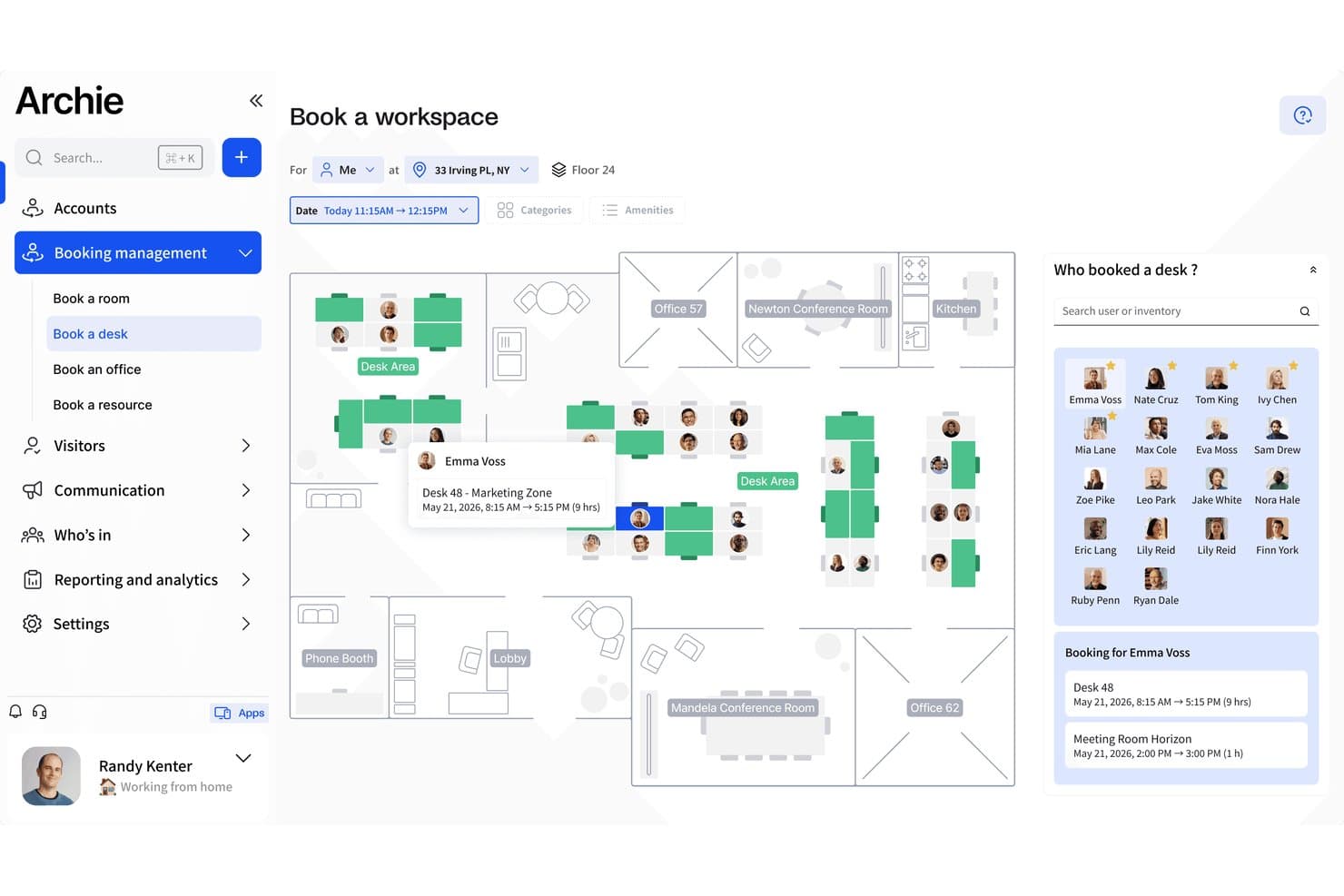
Archie lets users book desks and see who's in on an interactive floor map. Archie is a hybrid workplace management platform that combines desk and room booking, interactive floor plans, neighborhood zone configuration, team schedule coordination, and occupancy analytics.
Who Is Archie Best For?
Archie works well for facilities and workplace teams in mid-sized hybrid offices that want to organize seating by department using neighborhood zones.
Why I Picked Archie
I picked Archie as one of the best because its neighborhood zoning feature is genuinely useful for hybrid teams that need departments to sit together consistently. Admins can designate desk zones exclusively for specific teams, so when an engineer checks in, they're booking within their team's zone rather than scattering across the floor. I also like that the interactive floor plan updates in real time to prevent double bookings, so employees aren't guessing which desks are actually free.
Archie Key Features
- Recurring desk bookings: Users can set up repeating desk reservations so they don't have to rebook their preferred setup each week.
- Work-from status sharing: Employees can broadcast whether they're working from home, the office, or elsewhere so teammates can plan around each other.
- Desk amenity filters: Users can filter available desks by equipment or other criteria to find a seat that matches their specific needs.
- Schedulable occupancy reports: Admins can configure reports to generate and deliver automatically by email on a set schedule.
Archie Integrations
Archie offers 30+ integrations, including Microsoft Teams, Microsoft Outlook, Google Calendar, Slack, Kisi, DoorFlow, and IronWifi. It supports Zapier and an Open API with webhooks for custom connections.
Pros and Cons
Pros:
- Scheduled occupancy reports reveal peak office use
- Colleague visibility helps coordinate office days
- Team-specific neighborhoods keep departments together
Cons:
- Reporting filters can feel too limited
- Maps can load slowly in larger offices
Learn more about Archie: 2Best for automated workplace experience workflows
elia
- Free demo available
- From $500/month
Visit WebsiteCustomer Rating:4.7/5
elia offers a hybrid workplace management dashboard featuring desk and meeting room occupancy rates, office heatmaps, and team booking analytics. elia is a hybrid workplace management platform that brings together desk booking, room reservations, visitor management, occupancy tracking, and workplace automation tools for teams managing flexible office environments.
Who Is elia Best For?
elia is a good fit for facilities and workplace managers in mid-to-large organizations coordinating hybrid teams across multiple office locations.
Why I Picked elia
I picked elia as one of the best because its workplace automation module goes well beyond basic rule-setting. You can build workflows using customizable triggers, conditions, and actions, so something like automatically canceling a no-show desk booking and reassigning it, or sending visitor arrival alerts to the right host, runs without anyone touching it. I also like the execution logs feature, which gives you full visibility into when and how each automation ran, so you can troubleshoot or optimize without guessing.
elia Key Features
- Interactive floor plan booking: Book desks and rooms directly from a visual, real-time map of your office layout, showing live availability at a glance.
- Colleague presence dashboard: See which teammates are scheduled to come in on any given day, so employees can coordinate in-office time around the people they need to collaborate with.
- Occupancy analytics: Track real-time and historical workspace usage data to identify underutilized areas and make informed decisions about office capacity.
- Workplace request management: Submit and manage service requests (catering, IT, cleaning, maintenance) directly through the platform, with tasks routed to the right teams.
elia Integrations
elia offers native integrations with Microsoft 365, Google Workspace, Slack, and specific tools within those ecosystems, including Google Calendar, Microsoft Teams, and Microsoft Outlook.
Pros and Cons
Pros:
- Built-in visitor pre-registration and notifications
- Built-in IoT sensor occupancy tracking
- Flat-rate pricing regardless of user count
Cons:
- Limited status options beyond office or remote
- Mobile app less polished than desktop
Learn more about elia: Best for security and compliance-driven workplaces
- Free demo available
- From $5/bookable resource/month (billed annually)
Visit WebsiteCustomer Rating:4.8/5
Envoy manages visitor compliance and creates alerts for improved security. Envoy is a workplace management platform that covers visitor management, desk and room booking, employee scheduling, and physical access control across office locations.
Who Is Envoy Best For?
Envoy is a strong fit for companies in regulated industries like finance, healthcare, and government contracting, where visitor identity, access logs, and legal compliance are non-negotiable.
Why I Picked Envoy
I picked Envoy as one of the best because of how seriously it takes physical security and regulatory compliance as core platform functions, not afterthoughts. The check-in flow can prompt visitors for citizenship information for ITAR screening or require them to watch a safety video for OSHA compliance, and Envoy automatically stores that data in audit-ready records you can export on a schedule. I also like the Visual Compliance integration, which screens visitors against restricted party watchlists in real time.
Envoy Key Features
- Room scheduling: Book meeting rooms directly from Outlook, Google Calendar, or the Envoy app, with automatic release for no-shows.
- Delivery management: Log incoming packages and notify recipients automatically so deliveries don't pile up unattended.
- Capacity limits: Set and enforce location-level or floor-level occupancy caps to control how many people can be on-site at once.
- Desk booking: Let employees reserve hot desks in advance or find available seats on arrival using an interactive floor map.
Envoy Integrations
Envoy offers 100+ integrations through its app directory, including Slack, Microsoft Teams, Google Calendar, Microsoft Outlook, Okta, Salesforce, Brivo, Kisi, Avigilon Alta, and DocuSign. It also connects with Zapier and provides an API for custom integrations.
Pros and Cons
Pros:
- Emergency notifications reach staff on-site
- Real-time occupancy tracking across locations
- Visitor check-in includes compliance screening
Cons:
- Key features locked behind premium tiers
- Device-pairing dropouts require manual troubleshooting
 Best for AI-driven office analytics
- Free demo available
- Pricing upon request
Visit WebsiteCustomer Rating:4.5/5
Robin tracks office attendance, visitors, feedback, and rooms in real-time. Robin is an AI-driven workplace operations platform covering desk and room booking, space management, visitor management, and occupancy analytics for hybrid office environments.
Who Is Robin Best For?
Robin is a strong fit for IT, facilities, and workplace operations teams at mid-size to enterprise companies that need data-driven tools to manage a flexible, hybrid office day-to-day.
Why I Picked Robin
I picked Robin as one of the best because of how it uses AI to move beyond basic occupancy reporting. Its AI assistant for analytics lets you ask plain-language questions about space usage and get back actionable answers for key insights such as which floors are consistently underused or what real estate you could consolidate. I also like the CollabScore feature, which measures how effectively teams are actually working together in person by combining desk proximity, meeting, and occupancy data.
Robin Key Features
- Desk booking: Reserve desks in advance or on the spot, with AI-powered suggestions based on your team's in-office schedule.
- Meeting services: Submit and manage catering, AV support, and room setup requests from within the room booking workflow.
- Visitor management: Pre-register guests, handle check-ins, and maintain visit logs from a single visitor management module.
- In-office policies: Set and communicate hybrid attendance policies, and let employees track their own in-office progress against those requirements.
Robin Integrations
Robin offers native integrations across the Microsoft ecosystem, including Microsoft Teams, Outlook, Exchange, Entra ID, Intune, and Microsoft 365, as well as Google Calendar and Google Workspace. It also integrates with Slack, Zoom, Okta, OneLogin, Rippling, and access control systems like Avigilon, Brivo, and Kisi. An API is available for custom integrations.
Pros and Cons
Pros:
- Interactive office maps show live availability
- Abandoned meeting protection frees unused rooms
- Occupancy data informs real estate decisions
Cons:
- One-way issue reporting
- Limited move management and space planning
Learn more about Robin: Best for full Microsoft Teams integration with AI assistant
- Free demo available
- From $99/month
Visit WebsiteCustomer Rating:4.5/5
YAROOMS mobile app easily connects with Microsoft Teams for workspace booking. YAROOMS is a workplace management platform covering desk and room booking, hybrid work scheduling, visitor management, and workplace analytics, all operated through a native Microsoft Teams AI assistant called Yarvis.
Who Is YAROOMS Best For?
YAROOMS is a natural fit for mid-to-enterprise organizations already running Microsoft 365 that want workplace management built directly into their existing Teams environment.
Why I Picked YAROOMS
YAROOMS earns its spot on my shortlist because Yarvis, its AI assistant, lives natively inside Microsoft Teams, so employees can book a desk, find a free meeting room, or check a colleague's schedule without ever leaving the app they already use all day. I like that Yarvis handles natural-language requests, meaning someone can type "find me a room for three people Tuesday afternoon" and get bookable options back instantly. That level of Teams-native automation sets YAROOMS apart from tools that treat Microsoft 365 as just another calendar sync.
YAROOMS Key Features
- Hybrid work scheduling: Employees can set their weekly work location plan (office, home, or other) so teams can coordinate in-office days together.
- Interactive floor maps: Visual maps show real-time desk and space availability across floors, letting employees pick specific seats before arrival.
- Visitor management: Register visitors in advance, send automated arrival instructions, and log on-site guests for a full attendance record.
- Workplace analytics: Dashboards track space utilization, occupancy trends, and no-show rates across locations.
YAROOMS Integrations
YAROOMS offers native integrations across the Microsoft ecosystem, including Microsoft Teams, Microsoft 365, Outlook, and Azure AD, along with Google Calendar, Google Meet, Slack, Zoom, MappedIn, and SAML 2.0 for SSO. A REST API is also available for custom integrations.
Pros and Cons
Pros:
- Includes built-in workplace carbon dashboard
- Search function locates colleagues on floor plans
- Color-coded floor maps show live availability
Cons:
- Space limits per tier force unwanted upgrades
- Floorplan view is hard to use on iPhones
Learn more about YAROOMS: 6Best for ultra-simple room and desk management
Joan
- 30-day free trial available
- From $51/month
Visit WebsiteCustomer Rating:4.5/5
Joan’s floor plan displays real-time desk availability and booking status. Joan is a workplace management platform covering room booking, desk booking, parking, visitor management, digital signage, and analytics, with its own line of cable-free e-Paper scheduling displays that set it apart from software-only tools.
Who Is Joan Best For?
Joan is a strong fit for small to mid-sized businesses that want a no-fuss way to manage meeting rooms and desks without an IT-heavy setup or training.
Why I Picked Joan
Joan is one of my top picks because I love how fast you can go from sign-up to a fully working room and desk booking setup. The MyJoan portal lets admins configure the entire workplace environment in minutes, and automatic check-in releases no-show rooms without anyone having to intervene. I also like that employees can book directly from Joan's physical e-Paper displays outside a room, removing any dependency on a separate app or calendar.
Joan Key Features
- Asset reservation: Let employees book company assets like equipment and parking spots alongside their desk or room.
- Floorplan overview: Display a live office layout so employees can see real-time desk and room availability across the floor.
- Indoor climate monitoring: Track office temperature and humidity data directly through Joan devices from within the analytics dashboard.
- Announcements: Send targeted messages to only the employees scheduled to be in the office on a given day.
Joan Integrations
Joan offers native integrations across the Microsoft ecosystem, including Microsoft 365, Microsoft Teams, Outlook, Exchange, and Azure AD, along with Google Workspace, Google Calendar, Slack, Zoom, Cisco Webex, Okta, JumpCloud, and iCal. It also connects with Zapier and IFTTT, and has an API for custom integrations.
Pros and Cons
Pros:
- Desk bookings are deployed within one week
- Automatic no-show room release saves space
- Cable-free e-Paper displays need no wiring
Cons:
- Battery drains fast on mesh Wi-Fi networks
- E-ink touchscreen response feels laggy
Learn more about Joan: Best for fast onboarding and setup
- Free plan available; 14-day free trial; free demo available
- From €1.7/user/month (billed annually)
Visit WebsiteCustomer Rating:4.7/5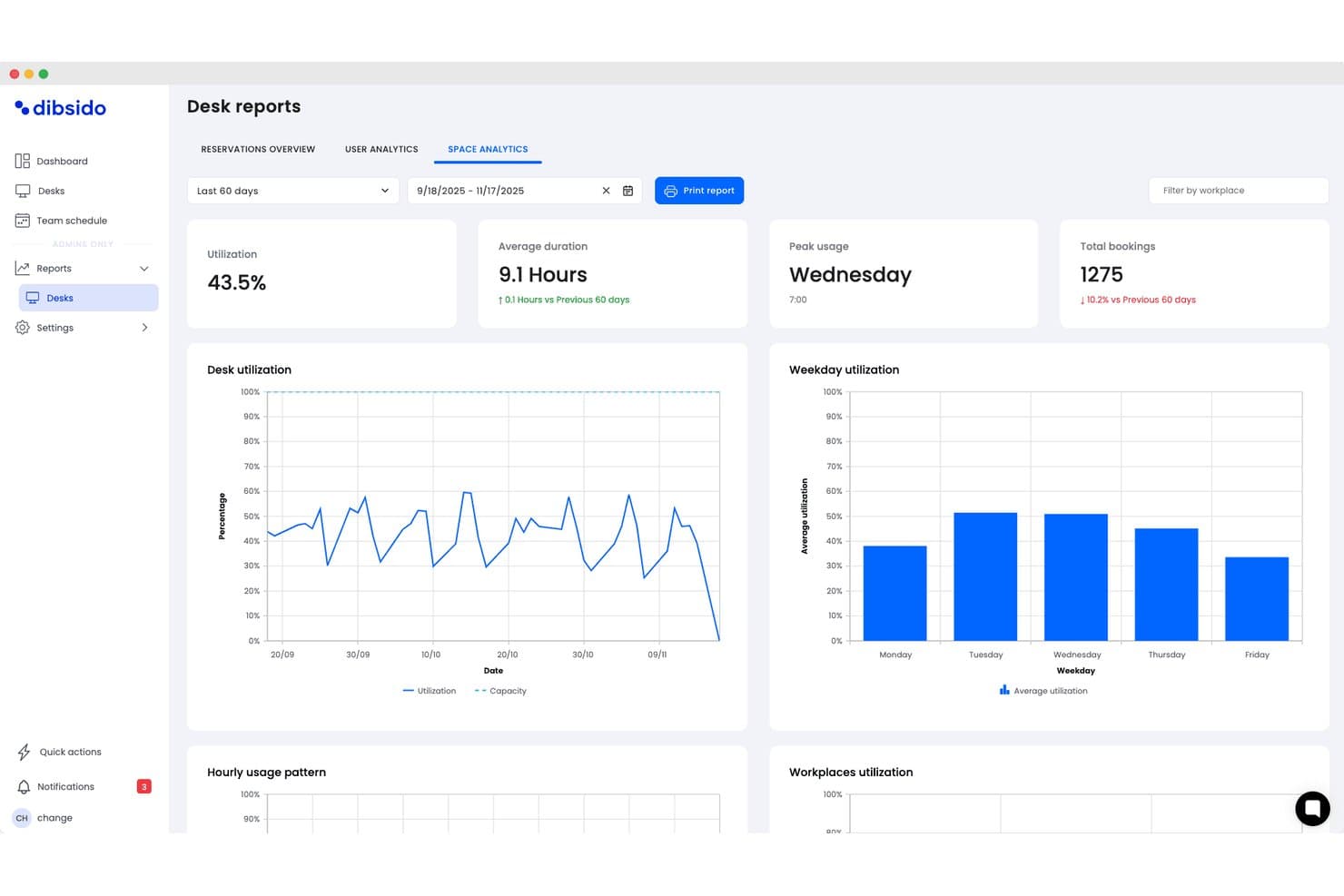
Dibsido offers a detailed desk reports dashboard with space analytics, showing utilization rates, average duration, peak usage days, and weekday utilization charts for hybrid workplace management. Dibsido is a hybrid workplace management software solution that provides tools for desk booking, meeting room scheduling, parking management, and interactive office maps with integrations for Microsoft, Google, and Slack.
Who Is Dibsido Best For?
Dibsido is a strong match for small to midsize organizations looking for quick and easy hybrid workplace management.
Why I Picked Dibsido
I picked Dibsido as one of the best because I can set up desk, meeting room, and parking bookings in minutes, even without training. In practice, my team uses their interactive floorplan to find and reserve spaces on day one.
Dibsido Key Features
- Microsoft Teams integration: Users can book desks and resources directly within their Microsoft Teams workspace.
- Parking spot management: Allocate, reserve, and manage parking spaces alongside desk and room bookings.
- Team schedule and visibility: View weekly attendance patterns showing who is in the office, working remotely, or on a custom status, complete with exportable attendance logs.
- Resource usage analytics: View usage data and trends to help optimize office layouts and resource planning.
Dibsido Integrations
Dibsido offers native integrations with Microsoft Teams and Slack, plus two-way calendar sync with Microsoft Outlook and Google Calendar. Enterprise SSO is supported through Microsoft Entra ID, Google Workspace, and SAML 2.0, with an API available for custom integrations.
Pros and Cons
Pros:
- Native mobile apps for iOS and Android
- Multilingual support for global hybrid teams
- Interactive floorplans for desk and parking selection
Cons:
- Fewer advanced facilities controls for enterprises
- Limited workflow automations compared to competitors
Learn more about Dibsido: Best for Slack-based bookings
- Free trial + free demo available
- From $2.50/user/month (billed annually)
Visit WebsiteCustomer Rating:5/5
Officely booking dashboard integrates directly inside Slack for easy desk booking. Officely is a hybrid office management tool that lives inside Slack and Microsoft Teams, handling desk booking, meeting room reservations, parking management, attendance tracking, and hybrid policy compliance.
Who Is Officely Best For?
Officely is a great fit for small to mid-sized companies that are already running on Slack or Microsoft Teams and want desk booking and attendance tracking without asking employees to adopt another standalone app.
Why I Picked Officely
I've included Officely in my top picks because no other tool embeds desk booking this deeply into Slack. Employees book a desk, check who's coming in, and get reminders without ever leaving Slack. I also like the neighborhood grouping feature, which lets teams cluster their bookings so people reliably sit near their colleagues on shared office days.
Officely Key Features
- Meeting room booking: Reserve meeting spaces directly inside Slack or Microsoft Teams, with live availability to prevent double bookings.
- Office usage analytics: Tracks daily attendance, capacity trends, and underused days in a single dashboard.
- Parking management: Lets employees reserve parking spaces alongside their desk bookings directly from Slack or Teams.
- Hybrid policy compliance tracking: Automatically logs attendance against your hybrid policy and surfaces compliance gaps by team.
Officely Integrations
Officely offers 30+ native integrations, primarily with HR systems and calendars, including Slack, Microsoft Teams, BambooHR, HiBob, Personio, Workday, Rippling, Deel, Google Calendar, and Microsoft Outlook. It also connects with Azure AD for identity management and SAP SuccessFactors for enterprise HR workflows.
Pros and Cons
Pros:
- Includes parking and meeting room reservations
- Real-time visibility into daily office attendance
- Zero onboarding needed inside Slack or Teams
Cons:
- Floor plan layouts are strictly 2D
- No built-in visitor management features
Learn more about Officely:

Eptura offers AI-powered booking capabilities to optimize resource and space utilization. Eptura Workplace is a hybrid workplace management platform with desk booking, conference room scheduling, space planning, move management, and occupancy data tools built for multi-site organizations.
Who Is Eptura Best For?
Eptura Workplace is a strong fit for facilities and real estate teams managing large, distributed office portfolios across multiple regions or countries.
Why I Picked Eptura
Eptura Workplace earns its spot on my shortlist because of how it handles portfolio visibility across a large, distributed real estate footprint. I'm particularly impressed by the real estate performance dashboards, which give you a live view of occupancy, utilization, and space usage across every location at once. The scenario planning tools let you model layout changes and right-size underused sites before committing to anything. For teams managing dozens of offices globally, that kind of data-backed decision-making is hard to replicate in a lighter-weight tool.
Eptura Key Features
- Desk booking: Reserve individual workstations in advance so employees can plan in-office days around their team's schedule.
- Conference room scheduling: Book and manage meeting rooms across all your locations from a single interface.
- Touchless visitor experience: Check in guests without front-desk assistance using a self-serve, digital visitor flow.
- Wayfinding: Help employees and visitors navigate office layouts using interactive maps displayed on in-office devices.
Eptura Integrations
Eptura offers more than 30 native integrations, including the Microsoft ecosystem, Zoom, Salesforce, Dropbox, Azure, AWS, Power BI, and Slack. It integrates with Zapier, and an API is also available for custom integrations.
Pros and Cons
Pros:
- Unifies desk booking, rooms, and visitors in one platform
- Interactive floor plans show real-time seat availability
- Space and move modules support global portfolio management
Cons:
- Outlook room reservations don't always sync back
- Built-in reporting and analytics lack customization depth
Learn more about Eptura: 10Best for global coworking space access
FLYDESK
- 14-day free trial + free demo available
- From $1.50/user/month (billed annually)
Visit WebsiteCustomer Rating:4.9/5
FLYDESK teammate dashboard tracks remote and office workspace status. FLYDESK is a hybrid workplace management platform that covers desk booking, workplace scheduling, leave management, and on-demand access to coworking spaces and serviced offices worldwide.
Who Is FLYDESK Best For?
FLYDESK is a strong fit for globally distributed companies whose employees work across multiple countries and need flexible access to local office spaces.
Why I Picked FLYDESK
FLYDESK earns its spot on my shortlist because no other tool in this category pairs internal desk booking with a live global coworking network. Through FLYDESK Space, employees can instantly book desks, meeting rooms, and private offices across thousands of locations from 200+ workspace partners worldwide. I also like that this is built directly into the same platform your team uses for daily scheduling, so a traveling employee can swap their home-office day for a local coworking space without switching tools or submitting a separate request.
FLYDESK Key Features
- Weekly scheduling: Set your work location for each day of the week, office, remote, or off, so teammates always know where everyone will be working.
- Leave management: Submit, approve, and track time-off requests directly within the platform alongside daily scheduling.
- Working hours tracker: Log and monitor employee working hours as an optional add-on tied to your company's HR policy settings.
- Interactive floor map: Navigate a visual, clickable map of your office to see desk availability and book specific spots by location.
FLYDESK Integrations
FLYDESK offers a small set of native integrations focused on collaboration and calendars, including Slack, Microsoft Teams, Google Calendar, Microsoft Outlook, and Microsoft Teams Calendar. It also connects with HRIS platforms like BambooHR and Payfit to sync leave data with payroll workflows. Zapier and API support are not publicly listed.
Pros and Cons
Pros:
- Employees adopt it with minimal training
- Combines scheduling, desks, and leave tracking
- Built-in global coworking space booking
Cons:
- Lacks native integrations with office badge or access control systems
- Workspace analytics are lightweight compared to dedicated space-planning tools
Learn more about FLYDESK:
Outros softwares de gestão do local de trabalho híbrido
Eis algumas opções adicionais de software de gestão do local de trabalho híbrido que não entraram na minha lista restrita, mas que ainda vale a pena conhecer:
- 11HybridHeroBest for managing large, multi-location workplaces
- 12MapticianBest for real-time space planning
- 13YoffixBest for Microsoft 365 customization
- 14SkeddaBest for setting custom rules for booking access
- 15deskbirdBest for integration with Microsoft Teams
- 16KadenceBest for AI-powered space planning features
- 17TacticBest in-app workplace requests handling
- 18OfficeSpaceBest all-in-one AI agent platform
- 19FlowscapeBest for 3D office visualization tools
How I Evaluate Hybrid Workplace Management Software
I evaluate in two layers: the core capabilities a tool must have—like desk booking and schedule coordination—and the differentiators that separate viable options from the best fit.
Core Functionality (Table Stakes For This List)
When I'm selecting tools for my list, I rank each one on a scale from 0 (does not offer the functionality) to 5 (excels in this area) for each core functionality listed below. Then, I calculate the tool's total score into a percentage. Each tool needs to achieve a minimum total score of 65% to be considered for inclusion.
- Desk & Room Booking: I look for interactive floor plans where employees can visually pick a desk or meeting room, not just select from a dropdown list.
- Hybrid Schedule Management: Teams need a way to set weekly in-office and remote days, so I check whether managers can view and approve schedules at the team level.
- Office Attendance Tracking: I evaluate how each tool captures check-ins—whether through QR codes, badge taps, or geolocation—and how real-time the occupancy data is.
- Space Utilization Analytics: Good reporting shows which floors and neighborhoods sit half-empty on Fridays so workplace leaders can right-size their real estate footprint.
- Team Coordination Tools: I look for features that let employees see when their teammates plan to be on-site, making it easy to cluster office days for collaboration.
- HRIS & Calendar Integrations: Syncing with Google Calendar, Outlook, Slack, and HRIS platforms like Workday or BambooHR keeps scheduling data accurate without manual upkeep.
Once I have a list of tools that meet the criteria, I consider what sets each platform apart.
Differentiating Factors (What Sets Vendors Apart)
Here's how I compare and contrast different vendors:
Standout Features
Visitor management is a feature I pay close attention to—pre-registration, badge printing, and host notifications make a real difference when clients arrive at a hybrid office. I also evaluate smart building integrations, like IoT sensor connections that adjust lighting or climate based on real-time occupancy. Interactive wayfinding rounds out the on-site experience, helping employees navigate large or multi-floor offices to find their booked desk or locate a colleague.
Beyond Features
I check whether a platform fits the buyer's scale—a 50-person startup and a 10,000-employee enterprise with offices on three continents have very different needs around multi-location support and user provisioning. Mobile experience matters too, since employees book desks and check in from their phones, not a desktop. Compliance is another area I evaluate closely; I look for SOC 2 Type II certification, GDPR readiness, and role-based permissions that keep sensitive occupancy and HR data locked down to the right people.
Como escolher um software de gestão do local de trabalho híbrido
É fácil ficar preso a longas listas de funcionalidades e estruturas de preços complexas. Para o ajudar a manter o foco enquanto percorre o seu processo único de seleção de software, eis uma lista de verificação dos fatores a ter em conta:
| Fator | O que considerar |
|---|---|
| FatorEscalabilidade | O que considerarO software consegue apoiar os seus planos de crescimento? Consegue lidar com um aumento do número de utilizadores, localizações ou volume de dados? Verifique a existência de planos escalonados ou limites de utilizadores. |
| FatorIntegrações | O que considerarA ferramenta liga-se aos seus sistemas de RH, calendário e mensagens existentes? Confirme a existência de integrações nativas com o Microsoft 365, o Google Workspace ou o Slack. |
| FatorPersonalização | O que considerarO sistema consegue adaptar-se às políticas de trabalho híbrido, aos fluxos de aprovação, ao zoneamento ou às restrições de reserva da sua empresa? Pergunte sobre regras personalizadas e níveis de configuração para administradores. |
| FatorFacilidade de utilização | O que considerarA interface é suficientemente simples para que todos os colaboradores a adotem rapidamente? Procure uma navegação clara, suporte para dispositivos móveis e fluxos de trabalho simples. |
| FatorImplementação e integração | O que considerarQue apoio receberá durante a implementação? Avalie a disponibilidade de recursos de integração, assistência na migração e formação específica para administradores e colaboradores. |
| FatorCusto | O que considerarDe que forma os modelos de preços se alinham com os seus padrões de utilização ou com o crescimento previsto? Tenha em conta custos ocultos, como funcionalidades premium, excedentes ou integrações necessárias. |
| FatorMedidas de segurança | O que considerarQue controlos existem para a privacidade dos dados, o SSO e a gestão de acessos? Certifique-se de que o fornecedor cumpre os requisitos de segurança e conformidade da sua organização. |
| FatorDisponibilidade do apoio | O que considerarTerá acesso a ajuda atempada se surgirem problemas? Analise os termos do SLA, os canais de apoio, o horário de funcionamento e os procedimentos de escalamento. |
O que é um software de gestão do local de trabalho híbrido?
Um software de gestão do local de trabalho híbrido é uma plataforma digital concebida para gerir ambientes de escritório flexíveis, coordenando reservas de secretárias, reservas de salas de reunião, acompanhamento da presença e horários de trabalho híbrido. Estas ferramentas ajudam as equipas de RH e de gestão do local de trabalho a otimizar a utilização do espaço, apoiar a colaboração dos funcionários no escritório e à distância e acompanhar a ocupação do edifício, de modo a cumprir objetivos de segurança ou conformidade.
Funcionalidades do software de gestão do local de trabalho híbrido
Ao selecionar um software de gestão do local de trabalho híbrido, tenha em atenção as seguintes funcionalidades principais:
- Reserva de secretárias: Permite aos funcionários reservar secretárias para dias ou horários específicos, ajudando a garantir a disponibilidade do espaço de trabalho e a reduzir conflitos em ambientes de escritório partilhados.
- Gestão de salas de reunião: Permite reservar, libertar e acompanhar salas de conferência, muitas vezes com funcionalidades para gerir equipamentos e horários, de modo a maximizar a utilização das salas.
- Análise da utilização do espaço: Fornece dados em tempo real e históricos sobre a forma como os espaços de trabalho e as áreas de reunião estão a ser utilizados, ajudando as equipas a otimizar disposições e políticas.
- Gestão de horários híbridos: Permite aos funcionários indicar os dias de trabalho remoto ou no escritório, proporcionando visibilidade entre equipas e reduzindo a sobrelotação do escritório.
- Gestão de visitantes: Regista as entradas e aprovações de convidados, imprime crachás e mantém um registo das visitas, apoiando a segurança e a conformidade com os protocolos de segurança.
- Integração com sistemas de calendário: Sincroniza reservas, horários e utilização das salas de reunião com plataformas como o Microsoft 365 ou o Google Workspace, para evitar reservas duplicadas e organizar o planeamento.
- Acesso através de aplicação móvel: Permite aos utilizadores reservar secretárias e salas ou gerir horários a partir dos seus smartphones, incentivando a utilização e a flexibilidade entre equipas híbridas.
- Integração com o controlo de acesso: Liga-se aos sistemas de segurança do edifício ou de cartões de acesso para autorizar a entrada apenas de funcionários e visitantes agendados ou registados.
- Zonamento e permissões: Permite aos administradores definir regras e permissões de reserva por departamento, equipa ou piso, garantindo que os espaços são utilizados conforme previsto.
- Conformidade com requisitos de saúde e capacidade: Disponibiliza ferramentas integradas para gerir níveis de ocupação seguros e aplicar orientações de saúde no escritório, como o distanciamento ou as verificações de higiene.
Funcionalidades comuns de IA do software de gestão do local de trabalho híbrido
Para além das funcionalidades padrão do software de gestão do local de trabalho híbrido apresentadas acima, muitas destas soluções estão a incorporar IA com funcionalidades como:
- Recomendações inteligentes para o espaço de trabalho: Utiliza IA para sugerir secretárias ou salas ideais com base nas preferências dos funcionários, nas políticas da empresa e nas tendências recentes de reservas, ajudando a maximizar a utilização do espaço e a satisfação dos funcionários.
- Planeamento preditivo da capacidade: Analisa padrões históricos de utilização para prever a procura futura de secretárias, salas de reunião ou outros recursos, permitindo ajustes proativos às disposições e políticas do escritório.
- Otimização automatizada dos horários híbridos: Recomenda dias de trabalho no escritório para equipas ou indivíduos, de modo a apoiar a colaboração entre equipas e reduzir a sobrelotação do escritório, utilizando informações de horários anteriores e das prioridades dos projetos.
- Deteção de anomalias na utilização do escritório: Monitoriza os dados de ocupação para alertar os administradores sobre padrões invulgares, como reservas duplicadas, sobrelotação ou espaços subutilizados, para que os problemas possam ser resolvidos proativamente.
- Assistentes de reserva em linguagem natural: Permitem aos utilizadores reservar espaços ou atualizar horários através de chatbots ou assistentes virtuais baseados em IA, simplificando a experiência e reduzindo as dificuldades para os funcionários.
Benefícios do software de gestão do local de trabalho híbrido
A implementação de um software de gestão do local de trabalho híbrido proporciona vários benefícios à sua equipa e à sua empresa. Eis alguns dos benefícios que pode esperar:
- Maior eficiência na utilização do espaço: A reserva automatizada e a análise de dados ajudam a reduzir o espaço de trabalho desperdiçado e garantem que todas as áreas são utilizadas de forma otimizada.
- Melhor coordenação da equipa: A visibilidade partilhada sobre horários, reservas e presença no escritório apoia a colaboração entre colaboradores presenciais e remotos.
- Redução da carga administrativa: As ferramentas de reserva autónoma e os fluxos de aprovação automatizados minimizam o agendamento manual e as tarefas administrativas dos responsáveis pelos recursos humanos e pela gestão do escritório.
- Melhor experiência dos colaboradores: Os sistemas de reserva simples, o acesso móvel e as recomendações baseadas em IA tornam a ida ao escritório mais conveniente e flexível.
- Melhor supervisão da conformidade e da segurança: As funcionalidades de acompanhamento da assiduidade, dos controlos de saúde e dos limites de lotação ajudam a manter a conformidade regulamentar e a promover a segurança no local de trabalho.
- Planeamento mais inteligente de recursos: A análise preditiva e os relatórios permitem aos gestores tomar decisões baseadas em dados sobre as necessidades de espaço e os investimentos no escritório.
- Gestão eficiente de visitantes: O registo de entrada simples, o acompanhamento e os controlos de segurança proporcionam uma experiência profissional e segura para visitantes e prestadores de serviços.
Custos e preços do software de gestão do local de trabalho híbrido
A escolha de software de gestão do local de trabalho híbrido requer uma compreensão dos vários modelos de preços e planos disponíveis. Os custos variam consoante as funcionalidades, a dimensão da equipa, os complementos, entre outros fatores. A tabela abaixo resume os planos comuns, os respetivos preços médios e as funcionalidades normalmente incluídas nas soluções de software de gestão do local de trabalho híbrido:
Tabela de comparação de planos para software de gestão do local de trabalho híbrido
| Tipo de plano | Preço médio | Funcionalidades comuns |
|---|---|---|
| Tipo de planoPlano gratuito | Preço médio$0 | Funcionalidades comunsReserva básica de secretárias, número limitado de utilizadores, suporte padrão e acesso às funcionalidades essenciais de agendamento. |
| Tipo de planoPlano pessoal | Preço médio$5-$15/utilizador/mês | Funcionalidades comunsReserva de secretárias e salas, suporte para uma única localização, acesso à aplicação móvel e ferramentas básicas de elaboração de relatórios. |
| Tipo de planoPlano empresarial | Preço médio$15-$30/utilizador/mês | Funcionalidades comunsGestão de várias localizações, gestão de visitantes, integrações com plataformas de calendário e controlos de administração. |
| Tipo de planoPlano para empresas | Preço médio$30-$50/utilizador/mês | Funcionalidades comunsFluxos de trabalho personalizados, análise avançada, suporte prioritário, segurança reforçada e integração inicial dedicada. |
Perguntas frequentes sobre software de gestão do local de trabalho híbrido
Eis algumas respostas a perguntas frequentes sobre software de gestão do local de trabalho híbrido:
Como é que as plataformas de gestão do local de trabalho híbrido ajudam no planeamento do espaço de escritório?
Estas plataformas utilizam dados de reservas e análises da utilização do espaço para mostrar como as secretárias e as salas de reunião estão efetivamente a ser utilizadas, ajudando-o a ajustar a disposição e as políticas de modo a corresponderem melhor às necessidades dos colaboradores.
O software de gestão do local de trabalho híbrido permite gerir várias localizações de escritório?
Sim, a maioria das soluções inclui funcionalidades para gerir vários espaços, permitindo-lhe definir regras específicas, monitorizar padrões de utilização e coordenar horários entre diferentes escritórios ou pisos.
Que integrações devo procurar num software de gestão do local de trabalho híbrido?
Procure integrações com sistemas de calendário, como o Microsoft 365 ou o Google Workspace, ferramentas de colaboração, como o Slack ou o Teams, e o seu sistema de gestão de recursos humanos ou de controlo de acessos, para que os dados fluam sem problemas entre as plataformas.
Existem preocupações relacionadas com a privacidade ou a segurança ao utilizar estes sistemas?
Sim, estas ferramentas tratam frequentemente dados sensíveis de colaboradores e visitantes. Certifique-se de que o fornecedor disponibiliza encriptação, controlos de acesso robustos, suporte para SSO e conformidade com as leis relevantes de privacidade de dados.
Como é que os utilizadores lidam normalmente com a integração inicial em novos sistemas de trabalho híbrido?
As boas plataformas disponibilizam recursos de integração inicial, como visitas interativas, formação em vídeo, modelos e apoio ao cliente ágil, para o ajudar a configurar tudo rapidamente e garantir que os colaboradores adotam a ferramenta.