

Gerir uma força de trabalho contingente pode ser uma verdadeira dor de cabeça. Tem de coordenar freelancers, prestadores de serviços e funcionários temporários, cada um com as suas próprias necessidades. O software de gestão de trabalhadores contingentes ajuda a manter tudo organizado e eficiente.
Na minha experiência, encontrar o software certo pode poupar-lhe tempo e reduzir os erros. Procura uma ferramenta adequada à dimensão e ao setor da sua equipa, e é aí que entro eu. Testei e analisei de forma independente uma variedade de soluções para lhe apresentar as melhores opções disponíveis.
Neste artigo, vou apresentar-lhe as melhores opções, com foco no que é mais importante para si e para a sua equipa. Vamos tornar a gestão da sua força de trabalho contingente um pouco menos stressante.
Why Trust Our Software Recommendations
6,700+
Reviews
20
Industry experts
16+
Evaluation factors
14
Years
Our team has been testing and reviewing software since 2012. As HR experts ourselves, we know how difficult—and important—it is to choose the right software.
For this guide, we evaluated tools using hands-on testing and independent research, scoring tools using our selection criteria. We also draw on insights from industry thought leaders and practicing HR experts.
Our reviews reflect our human editorial judgment, not a sales pitch.
Expert reviewers:
- Phil GrayCOO
 Kim BehnkeHR Tech Editor & Analyst
 Josh BarkerPeople Ops Manager

Tabela comparativa de software de gestão de trabalhadores contingentes
Utilize esta tabela comparativa para consultar os detalhes de preços das minhas principais escolhas de software de gestão de trabalhadores contingentes.
| Tool | Best For | Trial Info | Price | ||
|---|---|---|---|---|---|
| 1 | Best with custom workflow configuration | Free demo available | Pricing upon request | Website | |
| 2 | Best for contractor classification accuracy | Free demo available | From $5/user/month | Website | |
| 3 | Best for automated compliance workflows | Free demo available | Pricing upon request | Website | |
| 4 | Best for global contractor management at scale | Not available | Pricing upon request | Website | |
| 5 | Best for freelancer and contractor compliance ops | Free demo available | Pricing upon request | Website | |
| 6 | Best for international payroll | Free plan + free demo available | From $199/user/month | Website | |
| 7 | Best for AI-native procurement workflows | Free demo available | Pricing upon request | Website | |
| 8 | Best for AI-powered, large-scale recruitment | Not available | Pricing upon request | Website | |
| 9 | Best for HR and IT integration | Free demo available | Pricing upon request | Website | |
| 10 | Best for vendor management | Free demo available | Pricing upon request | Website |


Análises do melhor software de gestão de trabalhadores contingentes
Seguem-se os meus resumos detalhados do melhor software de gestão de trabalhadores contingentes que incluí na minha seleção. As minhas análises apresentam uma visão detalhada das principais funcionalidades, vantagens e desvantagens, integrações e casos de utilização ideais de cada ferramenta, para o ajudar a encontrar a melhor opção para si.
 Best with custom workflow configuration
- Free demo available
- Pricing upon request
Visit WebsiteCustomer Rating:4.4/5
Worksuite offers a searchable freelancer talent pool with profile cards showing contractor type, company, and contact details. Worksuite is a contractor management platform built for enterprises that need to onboard, manage, and pay large volumes of freelancers and independent contractors across multiple countries, entities, and currencies.
Who Is Worksuite Best For?
Worksuite is a strong fit for mid-size to large enterprises in media, publishing, and creative industries managing high volumes of contractors across multiple business units.
Why I Picked Worksuite
Worksuite earns its spot on my shortlist because its workflow builder is one of the most configurable I've seen in this space. I love that you can set up distinct onboarding sequences for each business unit or contractor type, layering in compliance gates, document collection, and approval checkpoints tailored to each entity. The built-in classification engine and AOR coverage sit directly inside those workflows, not as separate tools you have to manage elsewhere.
Worksuite Key Features
- Multi-currency payments: Pay contractors in over 120 currencies with consolidated invoicing and payment tracking.
- Direct sourcing and talent pools: Build private, searchable directories of pre-vetted freelancers and contractors.
- Project and milestone tracking: Assign, monitor, and manage work progress and deliverables for contractors.
- Dashboards and analytics: Access detailed business intelligence on spend, headcount, and compliance status across all entities.
Worksuite Integrations
Worksuite offers native integrations with NetSuite, QuickBooks, Xero, Salesforce, HubSpot, Monday.com, Airtable, Google Workspace, and Slack. It connects with Zapier and provides an API for custom integrations.
Pros and Cons
Pros:
- Built-in global contractor classification engine
- End-to-end freelance onboarding automation
- Workflow allows entity-specific customization
Cons:
- Advanced reporting requires upgraded module
- No supplier management or bidding features
Learn more about Worksuite: Best for contractor classification accuracy
- Free demo available
- From $5/user/month
Visit WebsiteCustomer Rating:4.8/5
Deel HR manages global contractors, EOR hiring, and payments in 150+ countries. Deel HR is a global contingent workforce management platform that centralizes contractor management, Contractor of Record (CoR), EOR hiring, compliant contract generation, and multi-currency payments across 150+ countries.
Who Is Deel HR Best For?
Deel HR is a strong fit for HR and legal teams managing international contractors who need built-in classification safeguards, localized contracts, and compliant global payments.
Why I Picked Deel HR
I picked Deel HR because contractor classification is where most global teams get exposed to legal risk. Deel actively monitors contractor relationships and flags potential misclassification issues based on local labor law. That’s not just contract templates — it’s ongoing oversight. Combined with localized agreements and Contractor of Record services, it gives companies real protection when engaging contingent workers internationally.
Deel HR Key Features
- Contractor self-service portal: Contractors can submit invoices, manage documents, and track payment status independently.
- Multi-currency payments: Pay contractors in 120+ currencies through multiple payout methods, including bank transfer and digital wallets.
- Misclassification monitoring: Built-in safeguards flag contractor classification risks based on country-specific regulations.
- Background checks: Run screening during onboarding directly inside the platform.
Deel HR Integrations
Deel HR integrates with tools like Workday, BambooHR, NetSuite, QuickBooks, Greenhouse, Ashby, Slack, Okta, and Rippling. It also provides a public API, webhooks, and Zapier connectivity for custom workflows.
Pros and Cons
Pros:
- Multiple payout options across global currencies
- Contractor of Record option shifts classification liability
- Covers 150+ countries with localized contracts and compliance
Cons:
- Reporting tools are less advanced than dedicated analytics platforms
- Costs increase as contractor volume scales
 Best for automated compliance workflows
- Free demo available
- Pricing upon request
Visit WebsiteCustomer Rating:4.7/5
Worksome tracks talent pool growth with dashboards showing new sign-ups and cumulative hires over time. Worksome is an AI-enabled external workforce management platform for sourcing, classifying, onboarding, and paying freelancers and contractors globally, with compliance contracting, worker classification, EOR/AOR services, and payments across 150+ countries.
Who is Worksome Best For?
Worksome is a strong fit for mid-size to enterprise companies that hire freelancers and contractors in multiple countries or regions.
Why I Picked Worksome
I've included Worksome in my top picks because of how much compliance automation it bakes directly into the hiring workflow. I like that worker classification happens instantly in the platform, with a built-in determination tool that flags how each contractor should be engaged across different countries, so my team isn't manually researching local labor laws before every hire. What really sets it apart is the misclassification indemnification: if a classification decision made through the tool is ever challenged, Worksome underwrites the associated costs. That's a level of accountability I haven't seen built into many other platforms.
Worksome Key Features
- Global contractor payments: Pay contractors in 150+ countries with consolidated billing and automated invoicing in local currencies.
- Talent pool management: Build, organize, and re-engage your own curated pool of pre-vetted freelancers and contractors.
- Custom approval workflows: Create multi-step approval flows for contractor engagements, spending limits, and hiring requests.
- EOR and AOR services: Engage contractors through Worksome as the employer or agent of record when direct engagement isn't possible.
Worksome Integrations
Worksome connects with Zapier and offers built-in connections to HRIS, accounting, and project management tools, including SAP SuccessFactors, Sage, Workday, Xero, QuickBooks, Google Sheets, and Google Docs. It also integrates with monday.com, Asana, Trello, and NetSuite. A public API is available for custom integrations.
Pros and Cons
Pros:
- Generates contracts automatically with digital signatures
- Supports contractor payments in more than 150 countries
- Built-in worker classification reduces misclassification risk
Cons:
- Must contact sales for pricing
- No dedicated mobile app
Learn more about Worksome: Best for global contractor management at scale
- Not available
- Pricing upon request
Visit WebsiteCustomer Rating:5/5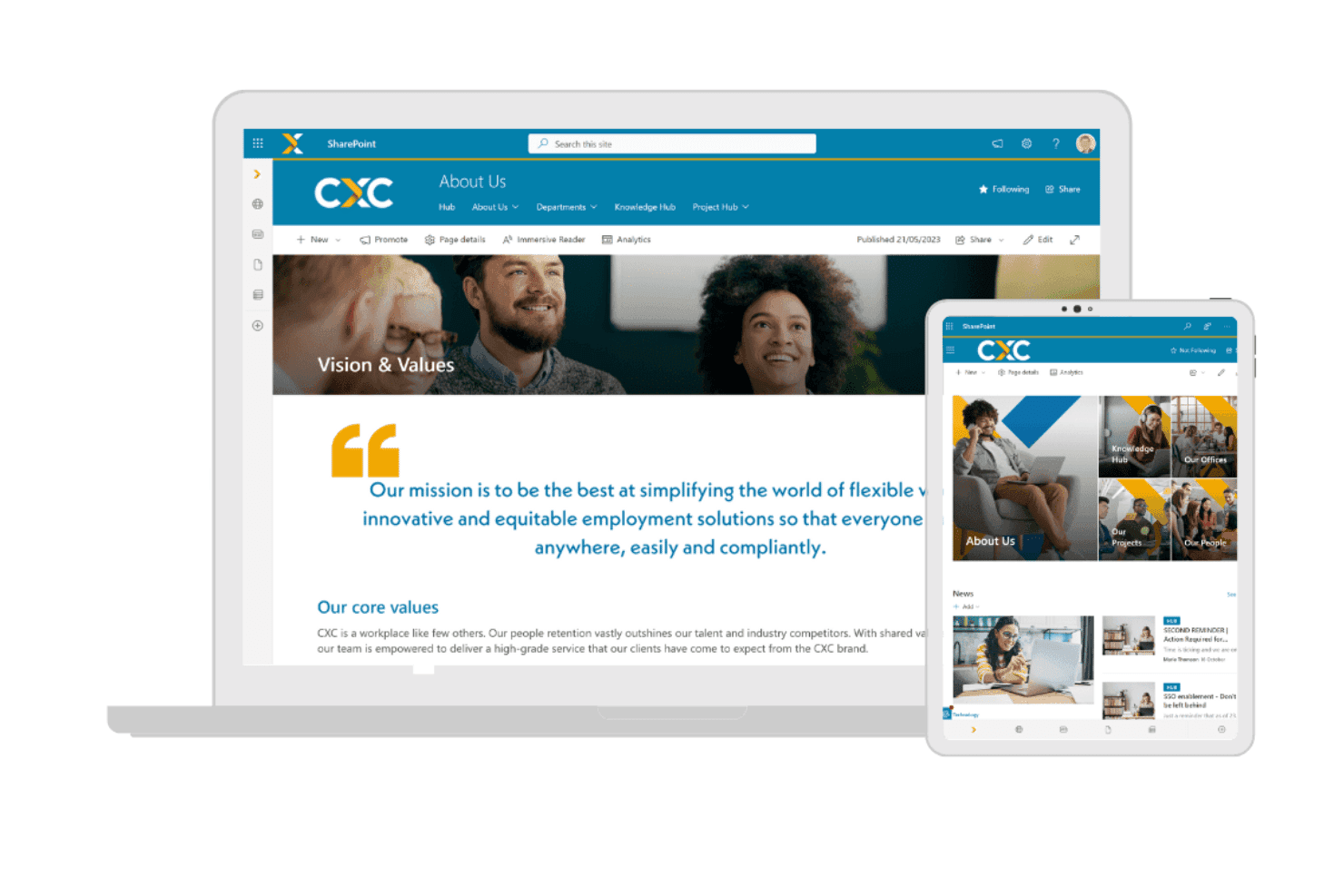
CXC Global provides a workforce portal for organizations managing contingent workers, with access to company resources and workforce information. CXC Global is a managed contingent workforce solution that combines employer of record, agent of record, vendor-neutral MSP, and global contractor payroll services across more than 100 countries.
Who Is CXC Global Best For?
CXC Global suits enterprise organizations running large-scale contingent programs across multiple countries, particularly those already using SAP Fieldglass or Beeline.
Why I Picked CXC Global
CXC Global earns its spot on my shortlist because no other provider combines vendor-neutral MSP with a purpose-built compliance engine at this geographic scale. I particularly like CXC Comply, which runs pre-engagement classification assessments in complex markets like the UK (IR35) and Germany before a contractor is ever hired. That kind of upfront risk management is what separates CXC from generic payroll providers when you're running programs across dozens of countries at once.
CXC Global Key Features
- Vendor-neutral MSP delivery: Lets you manage multi-country staffing suppliers through a single managed solution.
- Direct SAP Fieldglass and Beeline integration: Connects natively with leading VMS platforms for enterprise-grade procurement.
- Contractor payroll management: Handles global contractor payments, taxes, and invoicing across 100+ countries.
- Dedicated account management: Provides centralized program support from local HR and compliance experts.
CXC Global Integrations
CXC Global offers native integrations with SAP Fieldglass and Beeline, other integrations are not currently listed.
Pros and Cons
Pros:
- Vendor-neutral MSP reduces staffing supplier bias
- Pre-engagement IR35 classification assessments built in
- Operates compliantly across 100+ countries
Cons:
- No self-service SaaS platform available
- Not suited for small-scale contingent programs
Learn more about CXC Global: Best for freelancer and contractor compliance ops
- Free demo available
- Pricing upon request
Visit WebsiteCustomer Rating:4.6/5
TalentDesk centralizes provider contracts and compliance documents in one place. TalentDesk is a freelancer and contractor management platform that covers onboarding, worker classification, compliance checks, SOW-based project management, and global payments across a centralized workforce directory.
Who Is TalentDesk Best For?
TalentDesk is a strong fit for HR ops teams managing large pools of freelancers and independent contractors who need built-in compliance, onboarding, and payment tools in one place.
Why I Picked TalentDesk
I've included TalentDesk in my top picks because it handles freelancer and contractor compliance with a level of specificity I don't often see. It acts as Agent of Record in 30+ countries, meaning it signs contracts on your behalf, runs AML/KYC checks, and covers IR35 and 1099 classification automatically. I also like that W-9 collection and TIN validation can be made mandatory during onboarding, so compliance gaps don't slip through before work begins.
TalentDesk Key Features
- Consolidated vendor invoicing: Replaces multiple contractor invoices with one invoice issued on a weekly, bi-weekly, or monthly schedule across all vendors and projects.
- SOW project creation: Lets you build statements of work with milestones, task assignments, and rate settings directly within the platform.
- Insights Dashboard: Displays freelancer activity, project and task utilization, and platform usage across configurable date ranges.
- Zapier integration: Connects TalentDesk to 8,000+ apps—including Slack, Jira, HubSpot, and Google Sheets—without custom development.
TalentDesk Integrations
TalentDesk supports integrations with Xero and QuickBooks through bill-format exports, plus an Open API, webhooks, and CSV imports and exports. It also connects with Google Sheets, Slack, Jira, and HubSpot through Zapier.
Pros and Cons
Pros:
- Agencies manage their own worker teams
- Task-level budgets support spend control
- Built-in AOR and classification checks
Cons:
- Analytics omit time-to-fill reporting
- No supplier scorecards or SLA tracking
Learn more about TalentDesk: Best for international payroll
- Free plan + free demo available
- From $199/user/month
Visit WebsiteCustomer Rating:4.5/5
RemoFirst manages global hiring, payroll, and Employer of Record needs. RemoFirst is a global HR and payroll platform designed for hiring managers looking for top talent internationally. It provides Employer of Record services and manages payroll, making it ideal for companies expanding their full-time workforce across borders.
Why I picked RemoFirst: It offers payroll management in various currencies, which is important for businesses operating in multiple countries. RemoFirst's Employer of Record services simplify international hiring by handling compliance and legal matters. Its ability to onboard and pay independent contractors in more than 150 countries makes it a cost-effective option for global operations. The platform also provides health insurance and visa support, which are essential for managing international employees.
Standout Features and Integrations:
Features include quick onboarding of international employees and contractors, supporting compliance with local regulations. The platform offers secure payment processing for contractors, which is a key feature for managing international finances. Additionally, RemoFirst provides health coverage options through RemoHealth, supporting employee well-being.
Integrations include ADP and more.
Pros and Cons
Pros:
- Health benefits for employees
- Extensive payroll services
- Fast onboarding process
Cons:
- Onboarding can be slow
- Variable customer support quality
 Best for AI-native procurement workflows
- Free demo available
- Pricing upon request
Visit WebsiteCustomer Rating:4.2/5
Coupa supports procurement tasks and strengthens supplier oversight. Coupa is a cloud-based spend management platform designed for businesses looking to manage their procurement processes efficiently. Its main user base includes procurement professionals and finance teams who need to control spending and improve supplier relationships.
Why I picked Coupa: It offers procurement solutions that integrate well with existing financial ecosystems, which is important for effective spend management. Coupa's real-time spend visibility helps you make informed purchasing decisions. Its supplier management tools optimize communication and collaboration with vendors. The platform's user-friendly interface allows your team to navigate and manage procurement tasks with ease.
Standout Features and Integrations:
Features include real-time spend visibility, allowing you to track and manage expenses effectively. The platform provides supplier management tools that facilitate communication and collaboration. Additionally, Coupa offers an intuitive user interface, making it more accessible for your team.
Integrations include SAP, Oracle, Microsoft Dynamics 365, QuickBooks, and more.
Pros and Cons
Pros:
- Effective procurement tools
- Optimized supplier management
- Real-time spend visibility
Cons:
- Occasional system lag
- High implementation costs
Learn more about Coupa:

Avature optimizes applicant tracking and candidate relationship workflows. Avature is a talent management platform designed for recruitment professionals and HR teams. It offers solutions for applicant tracking, candidate relationship management, and high-volume recruiting, making it ideal for large organizations.
Why I picked Avature: The platform provides a unique combination of high configurability and AI-driven insights, which align with its strength in large-scale recruitment. Avature's Talent Acquisition Suite supports applicant tracking and candidate management, optimizing the recruitment process.
Additionally, its Talent Management Suite aids in onboarding and performance management, enhancing workforce integration. Its focus on user experience and unification capabilities sets it apart in managing large-scale recruitment needs.
Standout Features and Integrations:
Features include a highly configurable platform that allows you to tailor workflows and processes to fit your organization's needs. Avature's AI-driven insights provide valuable data analytics to improve recruitment strategies. The platform also offers broad support services, including account management and technical assistance.
Integrations include LinkedIn, Microsoft Teams, and more.
Pros and Cons
Pros:
- Extensive talent management tools
- AI-driven insights
- Highly configurable platform
Cons:
- Reporting limitations with complex data sets
- Complex implementation process
Learn more about Avature:

Rippling unifies HR processes with IT setup for efficient employee management. Rippling is a workforce management platform designed for businesses that need to manage both HR and IT tasks in one place. Its primary users are HR professionals and IT managers who require a unified approach to employee management and technology setup.
Why I picked Rippling: It offers a smooth integration of HR and IT functions, which is important for managing employee onboarding and offboarding efficiently. Rippling's platform allows you to automate employee device provisioning and software access, reducing manual tasks. Its centralized dashboard gives you a clear view of employee data across both HR and IT domains. Additionally, Rippling supports compliance management, helping your team adhere to relevant regulations.
Standout Features and Integrations:
Features include automation of device provisioning, which simplifies the process of setting up new employees. The platform provides a centralized dashboard for managing both HR and IT data efficiently. Rippling also offers compliance management tools, ensuring your team meets regulatory requirements.
Integrations include Slack, Microsoft 365, Google Workspace, Zoom, Salesforce, GitHub, and more.
Pros and Cons
Pros:
- Centralized data dashboard
- Automated device provisioning
- Unified HR and IT management
Cons:
- Complex initial implementation
- Add-on modules increase costs
Learn more about Rippling:

Beeline oversees contractor procurement and contingent workforce tasks. Beeline is a vendor management system designed for organizations and staffing agencies that need to manage their contingent labor workforce efficiently. It primarily serves large enterprises and helps optimize the procurement and management of temporary staff and contingent workers.
Why I picked Beeline: It offers a centralized platform for managing vendor relationships, which is essential for large-scale operations. Beeline's analytics tools provide insights into workforce spending and performance, helping you make informed decisions. Its customizable dashboards allow you to tailor data views to your specific needs. The platform also supports compliance management, helping your organization adhere to relevant regulations.
Standout Features and Integrations:
Features include advanced analytics that help you track workforce performance and spending. The platform's compliance management tools help your team meet regulatory requirements. Additionally, Beeline offers customizable dashboards that let you organize data in ways that suit your business needs.
Integrations include SAP, Oracle, Workday, and more.
Pros and Cons
Pros:
- Advanced analytics
- Strong compliance tools
- Centralized vendor management
Cons:
- Requires ongoing technical support
- Can be resource-intensive
Learn more about Beeline:
Outro software de gestão de trabalhadores contingentes
Eis algumas opções adicionais de software de gestão de trabalhadores contingentes que não foram incluídas na minha seleção, mas que ainda vale a pena consultar:
- 11SAP Fieldglass Contingent Workforce ManagementBest for enterprise solutions
- 12InstaworkBest for AI-driven worker matching
- 13VectorVMSBest for contingent workforce visibility
- 14Magnit GlobalBest for resource optimization
- 15Workforce.comBest for shift scheduling
- 16ADPBest for payroll and HR integration
- 17Impact Workforce OptimizationBest for managing diverse workforces
- 18WorkMarketBest for freelance management
How I Evaluate Contingent Workforce Management Software
I look at two layers: the baseline—vendor management, worker classification, and spend tracking—every platform must cover, and the differentiators that make certain tools right for specific programs.
Core Functionality (Table Stakes For This List)
When I'm selecting tools for my list, I rank each one on a scale from 0 (does not offer the functionality) to 5 (excels in this area) for each core functionality listed below. Then, I calculate the tool's total score into a percentage. Each tool needs to achieve a minimum total score of 65% to be considered for inclusion.
- Contingent Worker Lifecycle Management: I evaluate how each platform handles the full arc from requisition through offboarding—things like automated onboarding checklists, assignment extensions, and self-service portals for contractors.
- Vendor & Staffing Agency Management: Each tool should let you distribute requisitions across tiered suppliers, track SLAs, and score vendor performance so your VMO can manage dozens of agencies from one place.
- Worker Classification & Compliance: I check whether the platform provides structured classification workflows that flag co-employment risks and generate audit-ready documentation across different jurisdictions.
- Rate & Spend Management: Tools should give you control over bill rates, markups, and consolidated invoicing—especially when you're reconciling spend across multiple staffing suppliers and SOW engagements.
- Statement of Work Management: I look at how well each platform tracks SOW-based work, including milestone approvals, deliverable sign-offs, and project-based billing separate from time-and-materials engagements.
- Workforce Analytics & Reporting: Dashboards should surface real metrics like time-to-fill, cost-per-hire by supplier, headcount by engagement type, and tenure tracking—not just static, pre-built summaries.
Once I have a list of tools that meet this criteria, I consider what sets each platform apart.
Differentiating Factors (What Sets Vendors Apart)
Here's how I compare and contrast different vendors:
Standout Features
Direct sourcing is a big one—I look for platforms that let you build private talent pools from alumni, retirees, and past contractors so you're not always going back to staffing agencies. Total talent management matters too, especially when your leadership wants a single view of contingent and permanent headcount for workforce planning. For teams engaging contractors across borders, I also evaluate global payment and EOR support, which can simplify multi-currency invoicing and local tax compliance.
Beyond Features
Integration depth is one of the first things I check—your VMS needs to sync with your HRIS and procurement systems like Workday or SAP Ariba, or you'll end up with fragmented worker data. Implementation support also carries real weight here, since rolling out a contingent workforce program often involves change management across procurement, HR, and hiring managers. I also evaluate whether a vendor offers MSP partnerships or in-house program services, which can make or break adoption for teams standing up their first formal CW program.
Como escolher software de gestão de trabalhadores contingentes
É fácil ficar preso a longas listas de funcionalidades e estruturas de preços complexas. Para o ajudar a manter o foco enquanto percorre o seu processo único de seleção de software, eis uma lista de fatores a ter em conta:
| Fator | O que deve considerar |
| Escalabilidade | A ferramenta pode crescer com a sua equipa? Considere o crescimento futuro e se o software consegue lidar com um aumento do número de utilizadores ou de dados sem problemas. |
| Integrações | Funciona com os seus sistemas atuais? Verifique a compatibilidade com as ferramentas de RH, processamento salarial e outras ferramentas essenciais que já utiliza. |
| Personalização | Pode adaptá-la aos seus processos? Procure opções para ajustar fluxos de trabalho e campos de modo a corresponderem às suas necessidades específicas, sem precisar de um programador. |
| Facilidade de utilização | Com que rapidez pode a sua equipa começar a utilizá-la? Avalie a interface e a simplicidade da navegação. Peça uma demonstração para ver como funciona. |
| Implementação e integração | Que apoio é disponibilizado durante a configuração? Considere o tempo e os recursos necessários para implementar a ferramenta e formar a sua equipa de forma eficaz. |
| Custo | Os preços são claros e estão dentro do orçamento? Vá além do preço base para compreender o custo total, incluindo quaisquer complementos ou taxas ocultas. |
| Medidas de segurança | Como protege os seus dados? Certifique-se de que dispõe de encriptação robusta e de conformidade com regulamentos de proteção de dados, como o RGPD ou a CCPA. |
| Requisitos de conformidade | Suporta as necessidades regulamentares? Verifique se consegue lidar com os requisitos de conformidade específicos do setor, especialmente se operar em setores fortemente regulamentados. |
O que é o software de gestão de trabalhadores contingentes?
O software de gestão de trabalhadores contingentes é uma ferramenta concebida para ajudar as empresas a gerir trabalhadores temporários e contratados. Os profissionais de RH e os responsáveis de compras utilizam normalmente estas ferramentas para acompanhar, gerir e otimizar de forma eficiente a sua força de trabalho contingente. Funcionalidades como a gestão de fornecedores, o acompanhamento da conformidade e a análise da força de trabalho ajudam a organizar os dados, garantir o cumprimento dos regulamentos e melhorar a eficiência da força de trabalho. De um modo geral, estas ferramentas proporcionam valor ao simplificar a gestão de uma força de trabalho flexível e ao melhorar a eficiência operacional.
Funcionalidades
Ao selecionar um software de gestão de trabalhadores contingentes, tenha em atenção as seguintes funcionalidades essenciais:
- Gestão de fornecedores: Ajuda a organizar e avaliar as parcerias com fornecedores de pessoal, para verificar se está a obter os melhores talentos e serviços.
- Acompanhamento da conformidade: Verifica se o seu programa de força de trabalho contingente cumpre os regulamentos do setor e a legislação laboral, reduzindo os riscos.
- Análise da força de trabalho: Fornece informações sobre o desempenho e as despesas da força de trabalho, ajudando-o a tomar decisões informadas.
- Informações em tempo real: Disponibiliza informações atualizadas sobre as métricas da força de trabalho, permitindo ajustes rápidos às necessidades de pessoal.
- Fluxos de trabalho personalizáveis: Permitem adaptar processos e campos às necessidades específicas da sua organização, melhorando a eficiência operacional.
- Capacidades de integração: Permitem a compatibilidade com os sistemas de RH e processamento salarial existentes, facilitando o fluxo de dados e reduzindo a introdução manual de dados.
- Acompanhamento do tempo e da assiduidade: Mantém registos precisos das horas dos trabalhadores, ajudando no processamento salarial e na conformidade.
- Suporte à integração: Disponibiliza recursos como vídeos de formação e visitas guiadas ao produto para ajudar os novos utilizadores a familiarizarem-se rapidamente.
- Gestão de riscos: Identifica e reduz os potenciais riscos associados às operações com uma força de trabalho contingente, protegendo a sua organização.
- Gestão de custos: Ajuda a acompanhar e controlar os custos laborais, garantindo que a sua força de trabalho contingente se mantém dentro do orçamento.
Benefícios
A implementação de um software de gestão de trabalhadores contingentes proporciona vários benefícios à sua equipa e à sua empresa. Eis alguns dos benefícios que pode esperar:
- Melhoria da conformidade: Verifica se as operações da sua força de trabalho cumprem as normas legais, reduzindo o risco de multas e penalizações.
- Melhoria das relações com os fornecedores: Otimiza a supervisão do desempenho dos fornecedores para ajudar a confirmar que está a obter o melhor serviço e os melhores talentos disponíveis.
- Maior visibilidade: Fornece informações e análises em tempo real, permitindo-lhe tomar decisões informadas sobre a sua força de trabalho.
- Gestão eficiente dos custos: Ajuda a acompanhar e controlar as despesas laborais, mantendo o orçamento sob controlo.
- Integração simplificada: Disponibiliza ferramentas de recursos humanos, como vídeos de formação e visitas guiadas ao produto, para ajudar os novos utilizadores a começar de forma rápida e eficaz.
- Melhor gestão de riscos: Identifica potenciais riscos e ajuda a reduzi-los para proteger a sua organização.
- Processos personalizáveis: Permite adaptar os fluxos de trabalho às suas necessidades específicas, melhorando a eficiência operacional.
Custos e preços
A seleção de software de gestão da força de trabalho contingente requer uma compreensão dos vários modelos de preços e planos disponíveis. Os custos variam consoante as funcionalidades, o tamanho da equipa, os complementos e outros fatores. A tabela abaixo resume os planos comuns, os respetivos preços médios e as funcionalidades normalmente incluídas nas soluções de software de gestão da força de trabalho contingente:
Tabela de comparação de planos para software de gestão da força de trabalho contingente
| Tipo de plano | Preço médio | Funcionalidades comuns |
| Plano gratuito | $0 | Gestão básica de fornecedores, análises limitadas e acompanhamento básico da conformidade. |
| Plano pessoal | $300-$3000/ ano | Gestão de fornecedores, acompanhamento da conformidade, análises e ferramentas básicas de elaboração de relatórios. |
| Plano empresarial | $2400-$30000/ano | Análises avançadas, elaboração de relatórios personalizados, ferramentas completas de conformidade e integrações. |
| Plano empresarial avançado | $50000+/ano | Todas as funcionalidades, suporte premium, integrações personalizadas e um gestor de conta dedicado. |
Perguntas frequentes sobre software de gestão da força de trabalho contingente
Eis algumas respostas a perguntas comuns sobre software de gestão da força de trabalho contingente:
Qual é o principal objetivo do software de gestão da força de trabalho contingente?
O principal objetivo é ajudar as empresas a gerir eficazmente os seus trabalhadores temporários e contratados. Este software fornece ferramentas para supervisionar as relações com fornecedores, a faturação, a conformidade e as análises da força de trabalho. Ao utilizar este software, a sua equipa pode otimizar o pessoal, reduzir as tarefas administrativas e ajudar a garantir a conformidade com os regulamentos.
Como sei se a minha empresa precisa de software de gestão da força de trabalho contingente?
Se a sua empresa depender de um número significativo de trabalhadores temporários ou contratados, este software pode disponibilizar ferramentas valiosas de gestão e elaboração de relatórios de referência. Considere os desafios atuais relacionados com a gestão de fornecedores, as folhas de horas ou as requisições. Se estas forem áreas problemáticas, a implementação do software poderá ajudar a melhorar as suas operações.
O software de gestão da força de trabalho contingente pode integrar-se nos meus sistemas de RH existentes?
Sim, a maioria das plataformas foi concebida para se integrar com sistemas de RH populares, como SAP, Workday e ADP. Antes de efetuar a compra, verifique a compatibilidade do software com as suas ferramentas atuais. Isto permite um fluxo de dados contínuo e reduz a necessidade de introdução manual de dados, poupando tempo e esforço à sua equipa.
Existem versões do software de gestão da força de trabalho contingente específicas para determinados setores?
Alguns fornecedores disponibilizam soluções específicas para determinados setores, adaptadas a áreas como os cuidados de saúde, as TI ou a indústria transformadora. Estas versões respondem a requisitos específicos de classificação dos trabalhadores ou a desafios de contratação. Se o seu setor tiver necessidades específicas, procure software que responda a esses requisitos para tirar o máximo partido do seu investimento.