

O software de RH para a indústria transformadora refere-se a ferramentas digitais que ajudam fábricas e unidades industriais a gerir tarefas relacionadas com a força de trabalho, como a elaboração de horários, a conformidade, o processamento salarial e os registos dos trabalhadores. Se está à procura do melhor software de RH para a indústria transformadora, é provável que esteja a enfrentar desafios relacionados com a gestão de turnos, as regras sindicais ou o controlo do tempo de trabalho em vários locais.
A plataforma certa pode ajudar a sua equipa a lidar com necessidades laborais complexas, a manter a conformidade e a apoiar os trabalhadores no chão de fábrica. Neste guia, encontrará uma seleção criteriosa de software de RH concebido especificamente para a indústria transformadora, para que possa comparar as opções e escolher a solução mais adequada à sua operação.
Why Trust Our Software Recommendations
6,700+
Reviews
20
Industry experts
16+
Evaluation factors
14
Years
Our team has been testing and reviewing software since 2012. As HR experts ourselves, we know how difficult—and important—it is to choose the right software.
For this guide, we evaluated tools using hands-on testing and independent research, scoring tools using our selection criteria. We also draw on insights from industry thought leaders and practicing HR experts.
Our reviews reflect our human editorial judgment, not a sales pitch.
Expert reviewers:
- Phil GrayCOO
 Kim BehnkeHR Tech Editor & Analyst
 Josh BarkerPeople Ops Manager

Tabela comparativa de software de RH para a indústria transformadora
Esta tabela comparativa resume os detalhes de preços das minhas principais escolhas de software de RH para a indústria transformadora:
| Tool | Best For | Trial Info | Price | ||
|---|---|---|---|---|---|
| 1 | Best with a single database for automated HR tasks | Free demo available | Pricing upon request | Website | |
| 2 | Best for union workforce management | Free demo available | Pricing upon request | Website | |
| 3 | Best for cross-border workforce management | Free demo available | From $5/user/month | Website | |
| 4 | Best for small manufacturer HR automation | Free demo available | Pricing upon request | Website | |
| 5 | Best for compliance document management | Free plan + free demo available | From $2/user/month (billed annually) | Website | |
| 6 | Best as AI for business | Free trial + Free demo available | From $8/user/month | Website | |
| 7 | Best for customizable employee review templates | 14-day free trial | From $2.50/user/month (billed annually) | Website | |
| 8 | Best for biometric attendance integration | Free trial available | From $125/month (billed annually) | Website | |
| 9 | Best for employee self-service portals | Free demo available | Pricing upon request | Website | |
| 10 | Best for European workforce administration | Free demo available | Pricing upon request | Website |


Avaliações de software de RH para a indústria transformadora
Apresentamos abaixo os meus resumos detalhados do software de RH para a indústria transformadora que integrou a minha seleção. As minhas avaliações oferecem uma análise detalhada das funcionalidades, dos casos de utilização mais adequados e das integrações de cada plataforma, para o ajudar a encontrar a melhor opção para si.
 Best with a single database for automated HR tasks
- Free demo available
- Pricing upon request
Visit WebsiteCustomer Rating:4.3/5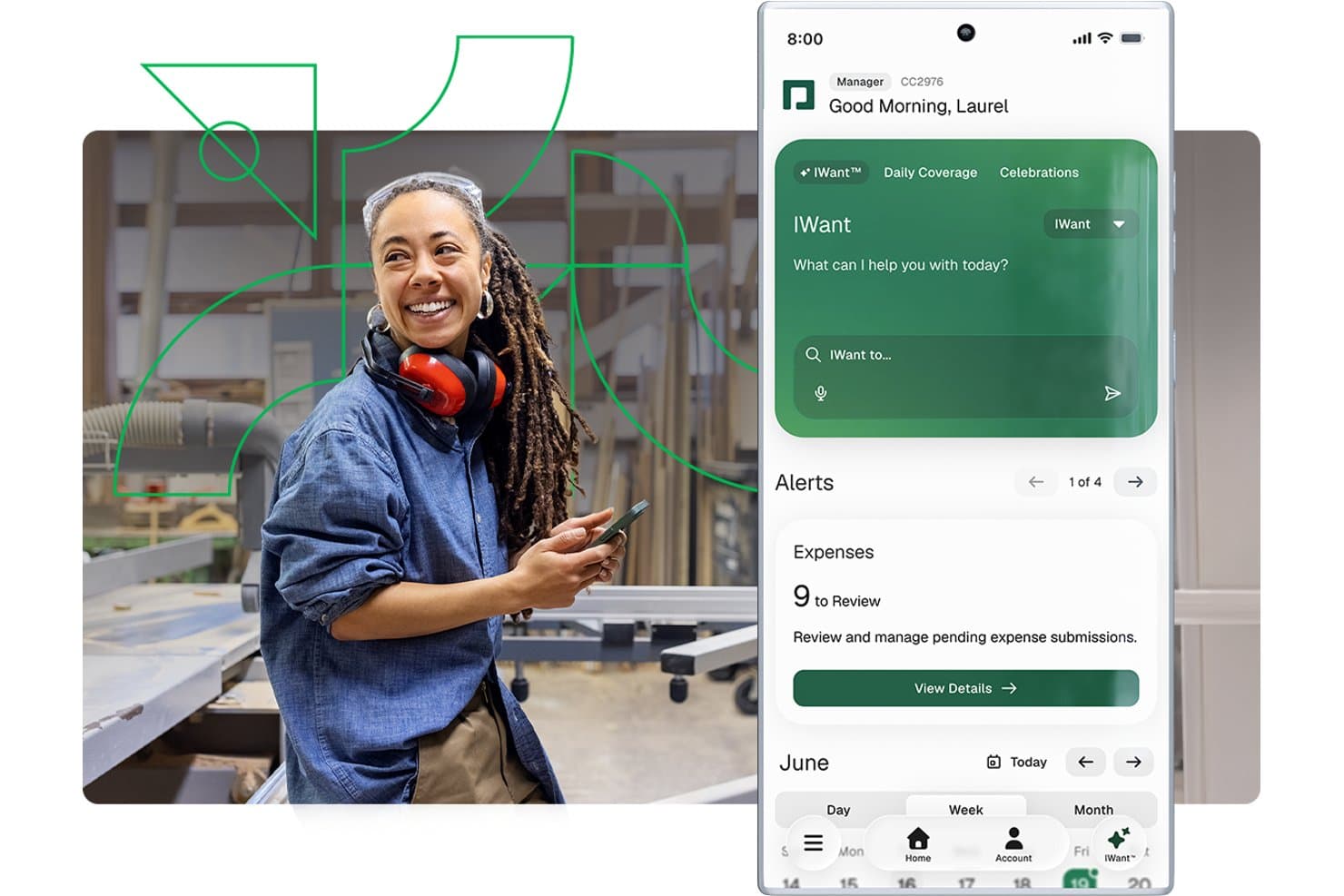
Paycom offers a mobile app with an AI assistant, expense review alerts, and scheduling tools tailored for managers in manufacturing environments. Paycom is a single-database HCM platform that brings payroll, time and labor tracking, compliance, certification management, recruiting, and employee records into one system for manufacturing teams.
Who Is Paycom Best For?
Paycom is a strong fit for mid-size US manufacturers with 50–5,000 employees that want payroll, HR, and compliance managed in one system.
Why I Picked Paycom
I picked Paycom as one of the best because its single-database design means payroll, time tracking, and certification records share the same data layer, with no syncing or duplicate entries. I particularly like Beti®, which prompts floor workers to review and approve their own paycheck data before processing, catching errors at the source. Certification management also flags expiring licenses 30 days out, so a machine operator's qualification never quietly lapses.
Paycom Key Features
- Manager on-the-Go mobile app: Lets plant and line supervisors approve timecards, punch edits, and requests from the shop floor.
- Proximity-based time clocks: Prevents buddy punching with physical or mobile clocks that confirm in-person employee presence.
- Certification expiration alerts: Automatically notifies managers 30 days before a worker’s license, permit, or training credential expires.
- OSHA safety training library: Offers a built-in learning system with courses on OSHA, HAZWOPER, and HAZCOM for manufacturing staff compliance.
Paycom Integrations
Paycom offers native integrations with NetSuite, PayBridge, Kronos Workforce Central, Indeed, and Google Calendar. An API is available for custom integrations.
Pros and Cons
Pros:
- Employees review and approve paychecks pre-processing
- OSHA and safety training included for compliance
- All HR and payroll in one database
Cons:
- Limited manufacturing ERP and MES connectivity
- No full EHS or accident reporting module
 Best for union workforce management
- Free demo available
- Pricing upon request
Visit WebsiteCustomer Rating:4.3/5
Paylocity supports workforce and payroll operations in manufacturing. Paylocity offers HR software tailored for manufacturers managing unionized workforces and complex labor agreements. This platform helps HR teams automate union rule compliance, track seniority, and manage shift bidding. If you need to coordinate union contracts and simplify workforce management, Paylocity brings specialized tools for these challenges.
Why I Picked Paylocity
Union workforce management in manufacturing brings unique challenges, which is why I picked Paylocity for this shortlist. The platform offers automated tracking of union rules, seniority, and contract terms, helping HR teams stay compliant with complex agreements. I appreciate that Paylocity supports shift bidding and grievance tracking, which are essential for manufacturers with unionized teams. These features make it a strong choice for organizations that need to manage union contracts and workforce logistics in one place.
Paylocity Key Features
Some other features in Paylocity that support manufacturing HR teams include:
- Time and Attendance Tracking: Capture employee hours and attendance data in real time for accurate payroll processing.
- Mobile App Access: Employees and managers can review schedules, request time off, and approve changes from any device.
- Onboarding Workflows: Automate new hire paperwork, training assignments, and document collection for faster onboarding.
- Performance Management Tools: Set goals, conduct reviews, and track employee progress within a centralized platform.
Paylocity Integrations
Integrations include AbsencePro, Checkr, Indeed, Toast, 15Five, Asana, Atlassian, SAP Concur, Greenhouse, Dropbox, and more.
Pros and Cons
Pros:
- Grievance tracking centralizes dispute documentation
- Shift bidding tools help manage seniority rules
- Union contract tracking supports complex agreements
Cons:
- Time-off approval workflows are not highly configurable
- No built-in equipment certification tracking
 Best for cross-border workforce management
- Free demo available
- From $5/user/month
Visit WebsiteCustomer Rating:4.8/5
Deel HR offers an HRIS dashboard with time-off tracking, new joiner stats, and employee management tools suited for manufacturing workforce oversight. Deel HR is a cloud-based HR platform that helps manufacturing companies manage employees and contractors across multiple countries. It centralizes global payroll, compliance, and worker data in one system
Who Is Deel HR Best For?
Deel HR is a strong fit for mid-size to large manufacturers operating across multiple countries who need a single system to manage international employees and contractors.
Why I Picked Deel HR
Deel stands out for how directly it addresses the operational challenge of employing people across borders. Manufacturing companies expanding into new regions often face delays and legal complexity when setting up local entities. Deel allows teams to hire and onboard workers quickly while staying aligned with local labor laws. The worker classification assessment also adds practical value for teams balancing contractor and employee relationships across jurisdictions. While it doesn’t cover manufacturing-specific workforce needs like shift scheduling or shop-floor labor tracking, it works well as the system of record for international hiring, payments, and compliance.
Deel HR Key Features
- Global payroll processing: Run payroll in 100+ currencies with automatic tax calculations and local deductions applied per country.
- Automated onboarding workflows: Set up country-specific onboarding checklists, contracts, and document collection for new hires.
- Time off and attendance tracking: Configure and manage leave policies by country or team, with approvals built into the platform.
- HR reporting and analytics: Pull workforce reports across locations, headcount, and employment types from a single dashboard.
Deel HR Integrations
Deel HR offers native integrations with Workday, Greenhouse, BambooHR, HiBob, NetSuite, QuickBooks, Xero, Okta, and Slack. It also provides an API for custom integrations.
Pros and Cons
Pros:
- Multi-country payroll in a single dashboard
- Strong compliance monitoring across regions
- EOR service available for 100+ countries
Cons:
- Limited manufacturing-specific integrations natively available
- Does not support plant-level workforce operations like shift scheduling
 Best for small manufacturer HR automation
- Free demo available
- Pricing upon request
Visit WebsiteCustomer Rating:4.5/5
HiBob strengthens HR workflows in small manufacturing teams. HiBob is designed for small manufacturers that want to automate HR tasks without adding complexity. The platform helps HR managers handle onboarding, time-off, and document management in one place, which is especially useful for teams with limited admin support. If you’re looking to reduce manual work and keep processes organized as your shop floor grows, HiBob is built for these needs.
Why I Picked HiBob
For small manufacturers, automating HR processes can free up valuable time and reduce errors. HiBob stands out for its workflow automation tools that let you set up custom onboarding checklists, automate document collection, and trigger reminders for compliance tasks. I like that you can tailor these workflows to fit the unique needs of a small factory, from managing certifications to tracking probation periods. This focus on automation makes HiBob a practical choice for manufacturers looking to streamline HR without a large HR team.
HiBob Key Features
Some other features that make HiBob useful for small manufacturers include:
- Time-Off Management: Track vacation, sick leave, and other absences with customizable policies.
- Org Chart Visualization: View and update your factory’s reporting structure in a visual format.
- Employee Directory: Access searchable profiles with contact details, roles, and shift assignments.
- Performance Reviews: Run structured review cycles and gather feedback from supervisors and peers.
HiBob Integrations
Integrations include ADP, Zendesk, Zapier, Deel, Jira, JobAdder, Entra ID, Paylocity, Remote, Slack, Xero, Zoom, and more.
Pros and Cons
Pros:
- Visual org charts for multi-site factories
- Custom workflows for safety and compliance tasks
- Automated onboarding for hourly and shift workers
Cons:
- No native support for union contract tracking
- No built-in time clock for shop floor
 Best for compliance document management
- Free plan + free demo available
- From $2/user/month (billed annually)
Visit WebsiteCustomer Rating:4.8/5
TalentHR enhances people operations and performance reviews. TalentHR gives manufacturing HR teams a way to centralize and control compliance documents without extra manual work. It’s especially useful for businesses that need to track certifications, licenses, and safety training across multiple roles or locations. If you’re looking to reduce risk and keep audit trails organized, TalentHR is built to handle these compliance demands.
Why I Picked TalentHR
Manufacturing teams often struggle to keep compliance documents organized and accessible, especially when dealing with certifications and safety records. TalentHR addresses this by letting you store, categorize, and set expiration reminders for all compliance-related files in one place. I appreciate that you can assign documents to specific roles or employees, making it easier to track who needs what training or certification. This focus on compliance document management makes TalentHR a strong fit for manufacturers who need to stay audit-ready and reduce paperwork headaches.
TalentHR Key Features
Some other features that make TalentHR practical for manufacturing HR teams include:
- Customizable Employee Profiles: Store job details, shift assignments, and emergency contacts for each worker.
- Time-Off Tracking: Manage vacation, sick leave, and other absences with approval workflows.
- Automated Notifications: Send alerts for expiring documents, upcoming reviews, or policy updates.
- Role-Based Access Controls: Limit sensitive HR data visibility based on user roles and permissions.
TalentHR Integrations
Integrations include Slack, Google Calendar, TalentLMS, WordPress, Google Workspace, Zapier, Make, and more. An API is also available for custom integrations.
Pros and Cons
Pros:
- Automated reminders for compliance renewals
- Role-based access for plant and office staff
- Document expiration alerts for safety certifications
Cons:
- Mobile app not available for on-floor supervisors
- No built-in time tracking for shifts
Learn more about TalentHR: Best as AI for business
- Free trial + Free demo available
- From $8/user/month
Visit WebsiteCustomer Rating:4.4/5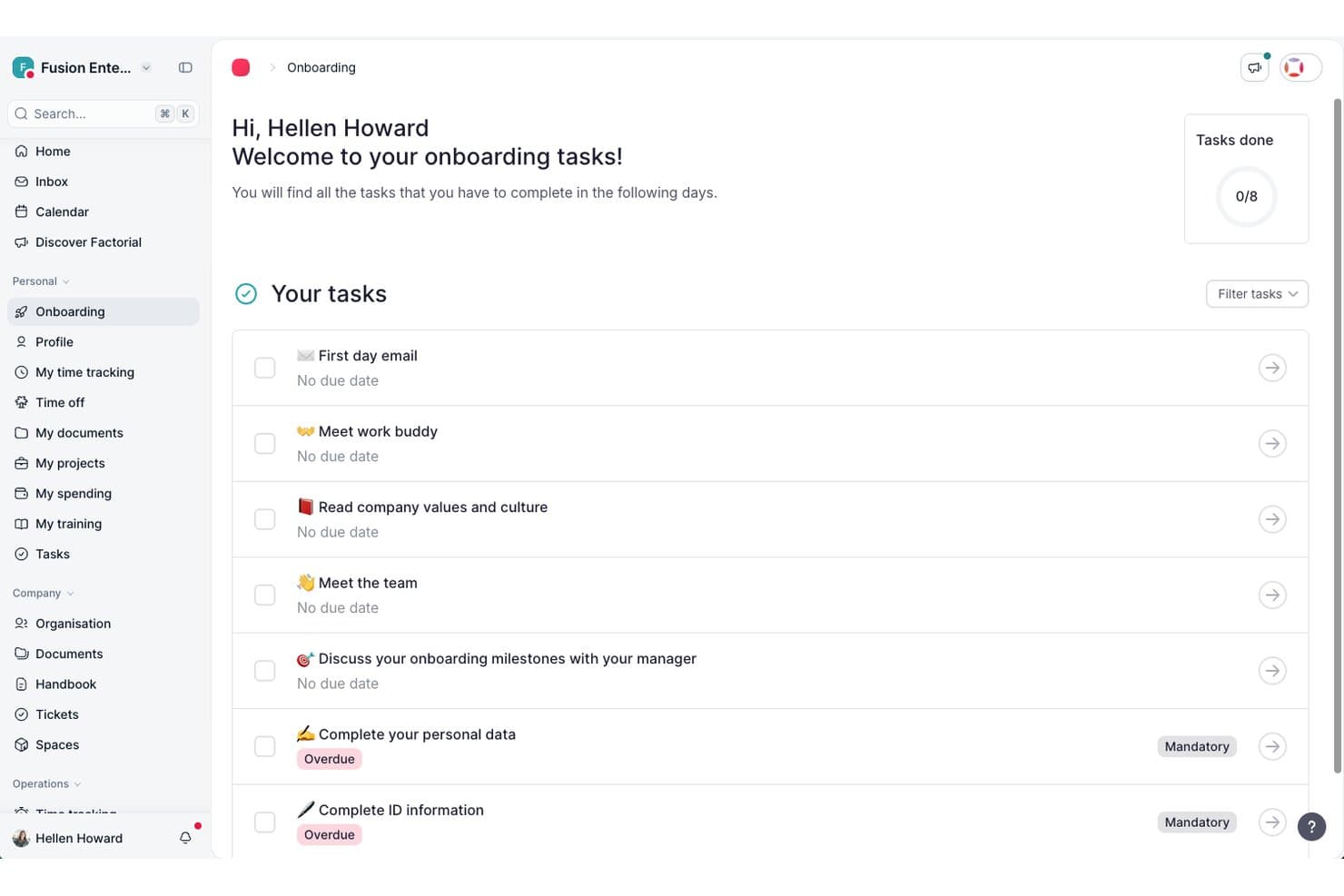
Factorial guides new hires through onboarding tasks in one place. Factorial is an AI-driven HR platform for manufacturing teams that covers time tracking, shift scheduling, employee recordkeeping, recruitment, and document management across distributed sites.
Who Is Factorial Best For?
Factorial suits HR generalists and administrators at small to mid-sized businesses who want a single AI-powered platform to handle everyday people operations across multiple locations.
Why I Picked Factorial
I've included Factorial in my top picks because its AI for business positioning translates into genuinely practical tools for manufacturing HR teams, particularly around scheduling and reporting. I like that its AI can turn plain-language questions into real-time reports, so you're not wrestling with manual exports when you need a quick read on hours worked across sites. It also handles automated shift planning and AI-powered CV parsing, which takes real pressure off HR generalists managing hourly workers and rotating schedules.
Factorial Key Features
- Multi-method clock-in: Employees can clock in using geolocation, geofencing, QR codes, or two-factor authentication directly from the mobile app.
- Document expiry flagging: Factorial centralizes legal documents and sends automated notifications when documents are approaching their expiry date.
- AI CV parsing: The recruitment module automatically screens and filters candidate CVs based on skills and qualifications you define.
- Time-off policy configuration: HR teams can create unlimited custom absence types and time-off policies tied to specific locations or contract types.
Factorial Integrations
Factorial lists marketplace integrations with ZKTeco, a3innuva Nómina, DATEV LODAS, Sage 200, Sage Despachos, Microsoft Power BI, and Okta. It offers a public API, webhooks, SDKs, API keys, and OAuth 2.0, plus Zapier connectivity to hundreds of tools.
Pros and Cons
Pros:
- AI turns questions into real-time workforce reports
- Mobile offline clock-ins support distributed shop-floor teams
- Reviewers praise centralized employee and document records
Cons:
- Complex overtime and pay differentials need manual checks
- Reviewers report limited rotating-shift schedule configuration
 Best for customizable employee review templates
- 14-day free trial
- From $2.50/user/month (billed annually)
Visit WebsiteCustomer Rating:2.5/5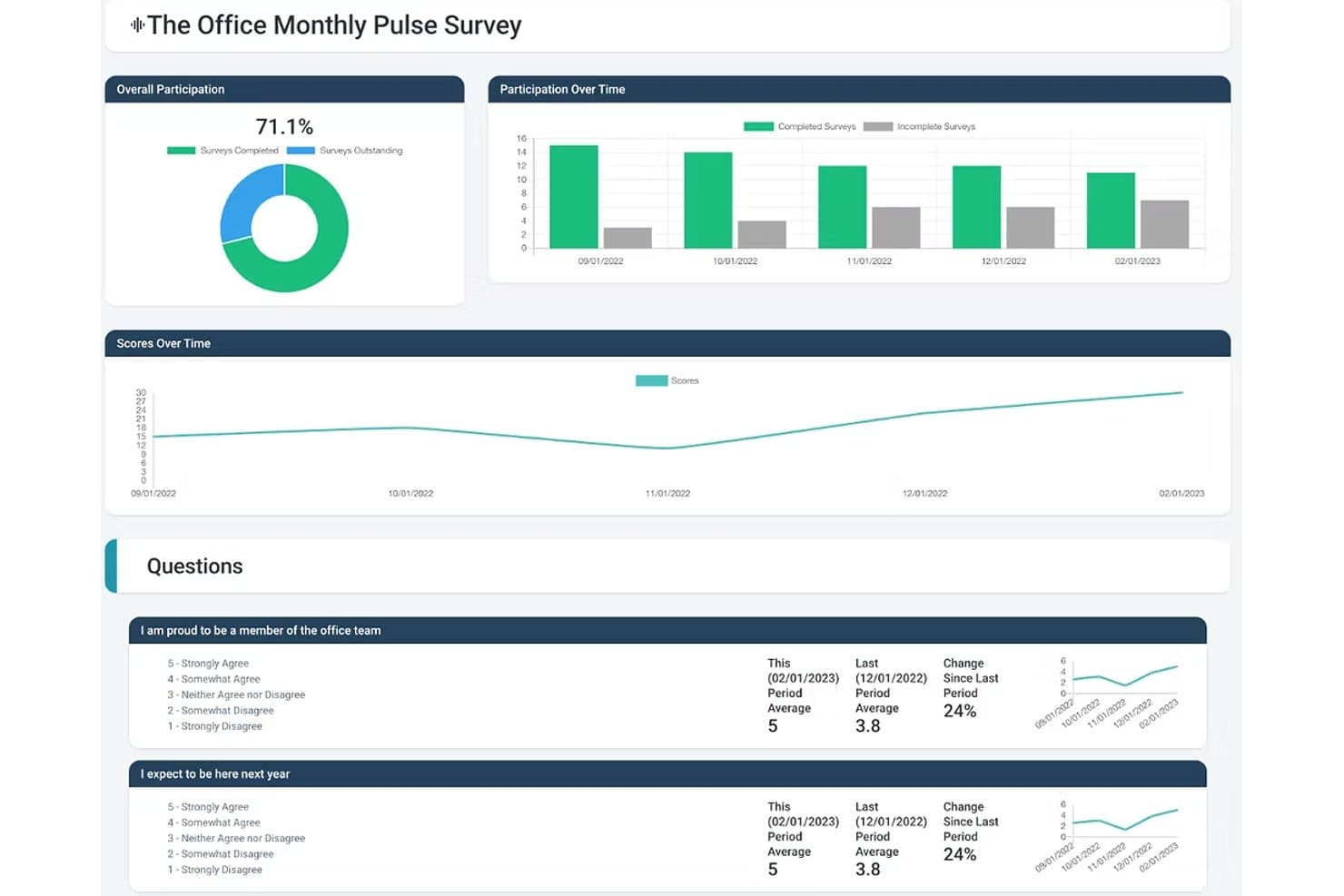
Express Evaluations helps manufacturing HR teams measure employee engagement with pulse surveys, participation tracking, and trend analytics. Express Evaluations is a performance management platform that lets HR teams build custom employee review templates, run 360-degree feedback cycles, track goals, and manage performance improvement plans.
Who Is Express Evaluations Best For?
It's a strong fit for HR teams at small to midsize organizations looking to replace paper-based or spreadsheet-driven performance reviews with a structured digital process.
Why I Picked Express Evaluations
I picked Express Evaluations because its custom template builder lets me create role-specific review forms for positions across the floor, from machine operators to shift supervisors. I can assign different rating scales and competency criteria per role, so a quality inspector isn't evaluated against the same criteria as a warehouse lead. Hire-date and anniversary-date scheduling also means I can automatically trigger reviews at the right point in each hourly worker's tenure, not just at year-end.
Express Evaluations Key Features
- Peer and 360-degree evaluations: Collect feedback from colleagues, direct reports, and managers for a well-rounded performance review.
- Automated notifications and reminders: Ensure timely completion of evaluations with built-in scheduling and automatic email reminders.
- Employee document vault: Securely store performance records, signed reviews, and supporting documents for compliance and auditing.
- Org chart and employee profiles: Visualize team structures and maintain profile information for every employee in one place.
Express Evaluations Integrations
Native integrations are not clearly documented. An API is available for custom integrations.
Pros and Cons
Pros:
- Quick setup with minimal HR configuration
- Review scheduling tied to hire anniversary dates
- Role-specific templates for varied job positions
Cons:
- Missing safety compliance and OSHA tools
- No shift scheduling or time tracking
Learn more about Express Evaluations: Best for biometric attendance integration
- Free trial available
- From $125/month (billed annually)
Visit WebsiteCustomer Rating:4.8/5
factoHR monitors workforce attendance and performance. factoHR stands out for manufacturers looking to connect HR processes with biometric attendance systems on the shop floor. This platform is a strong fit for businesses that need accurate, real-time tracking of employee shifts, overtime, and presence across multiple locations. If your team manages large workforces with complex attendance needs, factoHR brings together biometric hardware integration and HR management in one place.
Why I Picked factoHR
For manufacturers who need precise attendance tracking, factoHR’s biometric attendance integration addresses a common challenge on the factory floor. The platform connects directly with fingerprint and facial recognition devices, ensuring accurate, tamper-proof records of employee time and presence. I picked factoHR because it also supports shift scheduling and overtime calculation based on real attendance data, which is essential for managing large, shift-based teams. This focus on hardware integration and real-time attendance management makes it a practical choice for manufacturing environments.
factoHR Key Features
Some other features that make factoHR useful for manufacturing HR teams include:
- Payroll Processing: Calculates salaries, deductions, and statutory compliance based on attendance and shift data.
- Performance Management: Tracks employee goals, appraisals, and feedback cycles within the platform.
- Expense Management: Lets employees submit and track reimbursement claims digitally.
- Mobile App: Provides employees and managers with access to attendance, leave, and payroll information on the go.
factoHR Integrations
Native integrations are not currently listed.
Pros and Cons
Pros:
- Offers shift and overtime calculation tools
- Supports multi-location workforce management
- Connects directly with biometric attendance devices
Cons:
- Biometric device setup may require vendor assistance
- No built-in safety incident tracking
Learn more about factoHR: Best for employee self-service portals
- Free demo available
- Pricing upon request
Visit WebsiteCustomer Rating:4.7/5
HR Cloud tracks employee feedback and HR workflows. HR Cloud offers manufacturing teams a way to centralize HR tasks and empower employees with self-service access to their own information. This platform is especially useful for organizations with distributed or shift-based workforces that need to manage onboarding, time off, and document access without bottlenecks. If you’re looking to reduce HR admin workload and give employees more control over their data, HR Cloud’s self-service portals are designed for that need.
Why I Picked HR Cloud
Manufacturing organizations often need to give employees quick, secure access to their own HR information, and HR Cloud’s self-service portals address this directly. Employees can update personal details, request time off, and access important documents without waiting for HR intervention. I picked HR Cloud because it also lets teams manage onboarding tasks and track compliance documents through the same portal, which is especially helpful for high-turnover or shift-based environments. This focus on employee empowerment and process transparency makes it a strong fit for manufacturing HR needs.
HR Cloud Key Features
Some other features that manufacturing HR teams may find useful include:
- Asset Management: Tracks company equipment and assets assigned to employees.
- HR Document Storage: Centralizes storage and retrieval of HR policies, forms, and compliance documents.
- Employee Recognition Tools: Enable peer-to-peer recognition and digital badges for achievements.
- Custom Workflows: Lets you automate HR processes like approvals and notifications.
HR Cloud Integrations
Integrations include ADP, QuickBooks, UKG, Workday, SAP, Paycor, Paylocity, Dayforce, Slack, Microsoft Teams, and more.
Pros and Cons
Pros:
- Custom workflows automate HR approval processes
- Peer recognition tools boost workforce morale
- Asset management tracks equipment assignments
Cons:
- Limited safety training tracking features
- No built-in biometric attendance integration
Learn more about HR Cloud: 10Best for European workforce administration
Personio
- Free demo available
- Pricing upon request
Visit WebsiteCustomer Rating:4.3/5
Personio helps SMBs manage recruiting and onboarding. Personio is designed for manufacturers with operations across Europe who need HR software that supports multi-country compliance and workforce administration. It’s especially useful for HR teams managing diverse employment laws, time tracking, and payroll in different European countries. If your business needs a centralized platform for handling cross-border HR processes and documentation, Personio brings these capabilities together with a focus on European requirements.
Why I Picked Personio
Managing HR across multiple European countries brings unique challenges, especially for manufacturers with distributed teams. Personio is built to handle European workforce administration, offering features like localized payroll processing and compliance management for different countries. I picked Personio because it helps HR teams track time, absences, and employment contracts in line with local regulations. Its focus on supporting multi-country HR processes makes it a strong fit for manufacturers operating across Europe.
Personio Key Features
Some other features that make Personio useful for manufacturing HR teams include:
- Document Management: Centralizes storage and access for contracts, certificates, and HR documents.
- Automated Workflows: Lets you set up custom approval processes for hiring, onboarding, and leave requests.
- Employee Self-Service: Allows staff to update personal information, submit absences, and access payslips online.
- Recruiting Module: Manages job postings, candidate pipelines, and interview scheduling within the platform.
Personio Integrations
Integrations include Flip, 360Learning, Yoffix, eloomi, Jira, DocuSign, Power BI, Asana, and more.
Pros and Cons
Pros:
- Handles shift planning for distributed teams
- Offers automated document and contract management
- Supports multi-country payroll and compliance
Cons:
- Payroll features focus on European regulations only
- Limited manufacturing-specific analytics dashboards
Learn more about Personio:
Outro software de RH para a indústria transformadora
- 11CiphrBest for UK-based manufacturing teams
- 12BambooHRBest for onboarding hourly employees
- 13EPAY SystemsBest for labor cost tracking
- 14GNSABest for payroll in multi-site operations
- 15OneDirectoryBest for centralized plant team directories
- 16PaycorBest for shift scheduling in large plants
- 17Zoho PeopleBest for customizable workflow automation
- 18ADPBest for scalable workforce analytics
- 19Deltek Core HRBest for integrated project-based HR
How I Evaluate HR Software for Manufacturing
I split my evaluation into baseline criteria—like shift scheduling and OSHA compliance—and differentiators that separate the best options for plant managers and HR teams.
Core Functionality (Table Stakes For This List)
When I'm selecting tools for my list, I rank each one on a scale from 0 (does not offer the functionality) to 5 (excels in this area) for each core functionality listed below. Then, I calculate the tool's total score into a percentage. Each tool needs to achieve a minimum total score of 65% to be considered for inclusion.
- Shift Scheduling & Time Tracking: I look for rotating shift support, overtime logic, and time clock options like kiosk or biometric punch-in that work across multiple plant locations.
- Hourly Payroll Processing: Manufacturing payroll gets complicated fast with shift differentials and union pay rules, so I check how each tool handles those calculations.
- Safety & Compliance Management: I evaluate whether a platform tracks OSHA logs, incident reports, and corrective actions rather than just storing safety documents in a file folder.
- Certification & Training Tracking: Expired forklift certifications or lapsed safety training can shut down a line, so I look for expiration alerts and renewal workflows.
- High-Volume Recruiting & Onboarding: Hiring surges are common in manufacturing, and I check whether a tool supports bulk applicant workflows, mobile apply, and paperless onboarding.
- Core HRIS & Employee Records: The platform should maintain centralized records across production, warehouse, and office staff with self-service access for benefits and PTO.
Once I have a list of tools that meet the criteria, I consider what sets each platform apart.
Differentiating Factors (What Sets Vendors Apart)
Here's how I compare and contrast different vendors:
Standout Features
I check whether platforms offer multilingual self-service portals, since many plant floors employ workers who speak different languages and need to access pay stubs or request time off independently. Offline functionality matters too—shop floors often have poor connectivity, so time clocks and mobile apps that sync when a connection returns are a real advantage. I also look for labor cost forecasting that lets operations managers model headcount against upcoming production schedules.
Beyond Features
ERP integration is one of the first things I evaluate. A platform that connects with systems like SAP or Epicor means labor costs flow directly into production reporting without manual exports. Multi-site scalability also matters—I look for tools that let you configure different labor rules per location while keeping everything under one roof. Finally, I consider implementation support, especially whether the vendor has experience onboarding non-desk workers across shifts who may never sit down at a computer.
Como escolher software de RH para a indústria transformadora
É fácil perder-se em listas extensas de funcionalidades e estruturas de preços complexas. Para o ajudar a manter o foco enquanto percorre o seu processo único de seleção de software, eis uma lista de verificação dos fatores a ter em conta:
| Fator | O que deve considerar |
| Escalabilidade | O software conseguirá gerir alterações sazonais da força de trabalho, vários locais ou o crescimento futuro sem atualizações significativas? |
| Integrações | Liga-se nativamente aos seus sistemas de processamento salarial, ERP ou controlo de assiduidade, evitando a introdução manual de dados? |
| Possibilidade de personalização | Pode adaptar fluxos de trabalho, formulários e permissões aos seus processos e políticas de produção? |
| Facilidade de utilização | Os supervisores da linha da frente e os trabalhadores do chão de fábrica considerarão a interface clara e acessível, com formação mínima? |
| Implementação e integração inicial | Quanto tempo será necessário para começar a utilizar o sistema e que recursos ou apoio disponibiliza o fornecedor durante a implementação? |
| Custo | Todos os custos — configuração, licenças, apoio e atualizações — são claros e estão dentro do seu orçamento para o número de utilizadores de que necessita? |
| Medidas de segurança | O sistema disponibiliza acesso baseado em funções, registos de auditoria e encriptação de dados para proteger informações sensíveis dos trabalhadores? |
| Requisitos de conformidade | O software pode ajudá-lo a acompanhar certificações, formação em segurança e conformidade com a legislação laboral específica da indústria transformadora? |
O que é o software de RH para a indústria transformadora?
O software de RH para a indústria transformadora é uma plataforma baseada na nuvem que ajuda as empresas industriais a gerir os recursos humanos, incluindo registos dos trabalhadores, controlo do tempo de trabalho, conformidade e operações de RH. Estes sistemas de RH foram concebidos para a indústria transformadora, apoiando a força de trabalho industrial com ferramentas para o acompanhamento de candidatos, a verificação de antecedentes e a gestão de todo o ciclo de vida dos trabalhadores. Muitas soluções funcionam como soluções de RH completas, com software de processamento salarial e soluções de processamento salarial, incluindo o processamento salarial na indústria transformadora, reduzindo simultaneamente a dependência de ferramentas manuais, como folhas de cálculo. Também apoiam o envolvimento e a retenção dos trabalhadores e ajudam a atrair os melhores talentos, tanto para pequenas empresas como para grandes operações.
Funcionalidades do software de RH para a indústria transformadora
Ao selecionar software de RH para a indústria transformadora, esteja atento às seguintes funcionalidades essenciais:
- Registo de tempos e assiduidade: Monitoriza as horas dos colaboradores, os padrões de turnos e as horas extraordinárias, integrando-se frequentemente com relógios de ponto físicos ou sistemas de cartões para garantir um processamento salarial preciso e a conformidade.
- Portal de autosserviço para colaboradores: Permite aos trabalhadores atualizar informações pessoais, solicitar ausências (PTO) e consultar recibos de vencimento ou horários sem precisarem de contactar diretamente os recursos humanos.
- Gestão da integração e saída de colaboradores: Orienta os novos colaboradores no preenchimento da documentação necessária, na formação de segurança e nas tarefas de integração, ao mesmo tempo que gere os processos de saída dos colaboradores que deixam a empresa.
- Gestão documental: Armazena e organiza documentos de RH, como contratos, certificações e registos de segurança, num repositório digital seguro e pesquisável.
- Acompanhamento da conformidade: Ajuda as equipas de RH a monitorizar e documentar os requisitos regulamentares, incluindo a legislação laboral, as certificações de segurança e as renovações de formação específicas da indústria transformadora.
- Integração com o processamento salarial: Estabelece ligação com sistemas de processamento salarial para automatizar os cálculos de remunerações, as deduções e os pagamentos por depósito direto com base nas horas e na assiduidade registadas.
- Acompanhamento de ativos e equipamentos: Atribui e monitoriza equipamentos da empresa ou uniformes entregues aos colaboradores, ajudando a reduzir perdas e a manter a responsabilização.
- Automatização personalizada de fluxos de trabalho: Permite às equipas de RH conceber e automatizar processos de aprovação, notificações e atribuições de tarefas adaptados às operações da indústria transformadora.
- Gestão do desempenho e da formação: Acompanha as avaliações de desempenho dos colaboradores, o desenvolvimento de competências e as necessidades contínuas de formação, integrando-se frequentemente com um sistema de gestão da aprendizagem.
- Gestão de vários locais: Suporta as operações de RH em várias fábricas ou localizações, permitindo uma supervisão e elaboração de relatórios centralizadas para equipas distribuídas.
Benefícios do software de RH para a indústria transformadora
A implementação de software de RH para a indústria transformadora proporciona vários benefícios à sua equipa e à sua empresa. Eis alguns dos benefícios que pode esperar:
- Maior conformidade: O acompanhamento automatizado de certificações, formação de segurança e regulamentação laboral ajuda a reduzir os riscos de incumprimento e as dificuldades associadas às auditorias.
- Registo preciso de tempos e assiduidade: As ferramentas de acompanhamento integradas minimizam os erros no processamento salarial e garantem uma compensação justa para as equipas que trabalham por turnos.
- Integração simplificada: Os fluxos de trabalho digitais de integração aceleram o processamento de novos colaboradores e garantem que toda a documentação e formação necessárias são concluídas.
- Gestão documental centralizada: O armazenamento digital seguro facilita a organização, a consulta e a atualização dos registos dos colaboradores e dos documentos de RH.
- Maior visibilidade sobre a força de trabalho: Os painéis e relatórios em tempo real fornecem informações sobre a assiduidade, o desempenho e as tendências da força de trabalho em vários locais.
- Redução da carga administrativa: Os portais de autosserviço e a automatização dos fluxos de trabalho libertam as equipas de RH de tarefas repetitivas, permitindo-lhes concentrar-se mais em iniciativas estratégicas.
- Maior responsabilização pelos ativos: As funcionalidades de acompanhamento de equipamentos e ativos ajudam a monitorizar as atribuições e a reduzir a perda ou o extravio de bens da empresa.
Custos e preços do software de RH para a indústria transformadora
A seleção de software de RH para a indústria transformadora exige uma compreensão dos vários modelos de preços e planos disponíveis. Os custos variam consoante as funcionalidades, a dimensão da equipa, os complementos e outros fatores. A tabela abaixo resume os planos comuns, os respetivos preços médios e as funcionalidades normalmente incluídas nas soluções de software de RH para a indústria transformadora:
Tabela de comparação de planos de software de RH para a indústria transformadora
| Tipo de plano | Preço médio | Funcionalidades comuns |
| Plano gratuito | $0 | Registos básicos de colaboradores, acompanhamento limitado de tempos e armazenamento simples de documentos. |
| Plano pessoal | $5-$10/user/month | Autosserviço para colaboradores, ferramentas básicas de integração e acompanhamento normal da conformidade. |
| Plano empresarial | $15-$25/user/month | Registo avançado de tempos e assiduidade, integração com o processamento salarial, automatização de fluxos de trabalho e gestão de vários locais. |
| Plano empresarial avançado | $30-$50/user/month | Fluxos de trabalho personalizados, acompanhamento de ativos, análise avançada, apoio dedicado e medidas de segurança reforçadas. |
Perguntas frequentes sobre software de RH para o setor industrial
Eis algumas respostas a perguntas frequentes sobre software de RH para o setor industrial:
Como é que o software de RH para o setor industrial ajuda a garantir o cumprimento da legislação laboral?
O software de RH para o setor industrial ajuda a acompanhar certificações, formação em segurança e horas de trabalho, garantindo que a sua equipa cumpre os requisitos da legislação laboral. Muitos sistemas disponibilizam alertas automáticos para documentos prestes a expirar e geram relatórios para auditorias, facilitando o cumprimento das normas num ambiente regulamentado.
O software de RH para o setor industrial consegue gerir vários turnos e localizações?
Sim, a maioria dos softwares de RH para o setor industrial foi concebida para gerir horários de turnos complexos e suportar vários locais. Pode atribuir colaboradores a diferentes turnos, acompanhar a assiduidade em várias localizações e gerar relatórios consolidados para uma melhor supervisão da força de trabalho.
Que integrações devo procurar num software de RH para o setor industrial?
Procure integrações com sistemas de processamento salarial, plataformas ERP, relógios de ponto e ferramentas de planeamento. Estas ligações reduzem a introdução manual de dados, ajudam a manter registos precisos e garantem que os seus processos de RH funcionam sem problemas com os sistemas industriais existentes.
Quanto tempo demora a implementar um software de RH para o setor industrial?
Os prazos de implementação variam, mas a maioria das equipas pode esperar um processo que demora entre algumas semanas e vários meses. Entre os fatores relevantes estão as necessidades de migração de dados, os requisitos de formação e a complexidade dos seus fluxos de trabalho. Os fornecedores disponibilizam frequentemente apoio à integração para ajudar a começar.
O software de RH para o setor industrial é adequado para pequenos fabricantes?
Sim, muitas soluções de software de RH para o setor industrial disponibilizam planos escaláveis adequados a pequenos fabricantes. Pode começar com funcionalidades básicas e fazer uma atualização à medida que a sua empresa cresce, garantindo que paga apenas pelo que necessita.