
A monitorização da produtividade é um desafio comum para os profissionais de recursos humanos. Manter a sua equipa no caminho certo enquanto gere inúmeras tarefas pode parecer avassalador. O software de monitorização da produtividade oferece uma forma de gerir este caos, ajudando-o a concentrar-se no que realmente importa.
Explorei o mundo das ferramentas de monitorização da produtividade para lhe apresentar uma análise imparcial das melhores opções disponíveis. Na minha experiência, escolher o software certo pode transformar a forma como a sua equipa trabalha, tornando o seu trabalho mais fácil.
Neste artigo, vou guiá-lo pelas minhas principais escolhas, destacando funcionalidades e benefícios alinhados com as suas necessidades. Encontrará informações que o ajudarão a tomar uma decisão informada, garantindo que a sua equipa se mantém eficiente e produtiva.
Porque pode confiar nas nossas recomendações de software
6,700+
Reviews
20
Industry experts
16+
Evaluation factors
14
Years reviewing software
A nossa equipa testa e analisa software desde 2012. Como especialistas em RH, sabemos o quão difícil — e importante — é escolher o software certo.
Para este guia, avaliámos as ferramentas através de testes práticos e pesquisa independente, pontuando-as de acordo com os nossos critérios de seleção. Recorremos também a contributos de líderes de opinião do setor e de especialistas em RH no ativo.
As nossas análises refletem o juízo da nossa equipa editorial, e não um discurso de vendas.
Revisores especialistas:
- Phil GrayCOO
 Kim BehnkeHR Tech Editor & Analyst
 Josh BarkerPeople Ops Manager

Tabela comparativa de software de monitorização da produtividade
Esta tabela comparativa resume os detalhes de preços das minhas principais seleções de software de monitorização da produtividade:
Sorted by: Default
| Tool | Starting Price | Website | |
|---|---|---|---|
Best for refocusing teams on high-impact work | 4.5 out of 5 | $10/user/month Free plan + 14-day free trial available | Book Demo |
Best productivity tracking software for automated and simple time mapping | 4.8 out of 5 | $8/user/month Free trial + free demo available | Website |
Best for staff oversight and client billing | 4.7 out of 5 | $7/user/month Free trial available | Website |
Best for tracking mobile workforce activity | 4.5 out of 5 | $6.42/user/month Free trial available | Website |
Best for visual work verification | 4.5 out of 5 | Pricing upon request 14-day free trial + demo available | Website |
Best for advanced user behavior analytics | 4.5 out of 5 | Pricing upon request Free demo available | Website |
Best for detailed reporting | 4.6 out of 5 | $6/user/month Free plan + Free trial + Free demo available | Book Demo |
Best for real-time activity monitoring | Not rated | $6.67per user/month Free demo + 14-day free trial availbale | Website |
Best productivity tracking software for comprehensive insights on employee efficiency levels | 4.9 out of 5 | $7/seat/month Free 21-day trial + free plan for up to 3 users | Website |
Best productivity tracking software with activity monitoring | 4.8 out of 5 | $6.49/user/month Free trial available | Website |


Melhor software de monitorização da produtividade
Eis uma breve descrição de cada software de monitorização da produtividade, destacando o melhor caso de utilização de cada sistema, as suas funcionalidades notáveis e algumas vantagens & desvantagens. Incluí também capturas de ecrã para lhe dar uma visão geral da respetiva interface de utilizador.
 Best for refocusing teams on high-impact work
- Free plan + 14-day free trial available
- From $10/user/month (billed annually)
Customer Rating:4.5/5
ActivTrak monitors productivity data, showing when team members are actively working, and their app and website usage. ActivTrak is a productivity tracking platform that helps you understand how work happens across your organization. It captures digital activity data to show where time goes, how teams perform, and where efficiency can improve.
Why I picked ActivTrak: I picked ActivTrak because it helps you see what’s driving performance without crossing privacy boundaries. It tracks productive, unproductive, and offline work so you can spot gaps and improvement opportunities. You can benchmark individual and team productivity against organizational averages to see where focus or coaching is needed.
The platform also highlights low-value activities so teams can refocus on tasks that deliver results. With its performance insights and burnout prevention tools, you can balance workloads and keep your team’s energy steady.
Standout features & integrations:
Features include productivity performance tracking that breaks down time spent on different activity types, helping you pinpoint inefficiencies and improvement areas. Another useful tool is schedule optimization, which uses attendance data to ensure consistent coverage and prevent missed shifts, keeping operations running smoothly.
Integrations include Microsoft Outlook, Google Calendar, Salesforce, Microsoft Teams, Slack, ServiceNow, Zendesk, Zoom, Microsoft Viva, Lattice, Qualtrics, and Jira Software.
Pros and Cons
Pros:
- Detailed breakdown of productive vs. unproductive time
- Helps detect burnout before it impacts output
- Benchmarking makes performance comparisons easier
Cons:
- Limited customization of dashboard layouts
- No built-in payroll or HR tools
Learn more about ActivTrak: Best productivity tracking software for automated and simple time mapping
- Free trial + free demo available
- From $8/user/month (billed annually)
Visit WebsiteCustomer Rating:4.8/5
Insightful tracks several project-specific attributes that depict how much time your employees spend on different projects. Insightful lives up to its name, with the tool promising to deliver several project-related insights and employee productivity attributes. Many small businesses rely on Insightful for spiking productivity and tracking employee efficiency.
Why I picked Insightful: I like Insightful primarily because of the automated time mapping feature. By implementing automatic time data mapping, insightful delivers accurate project insights that eliminate human error. Insightful provides you with a comprehensive view of the time spent by your employees at distinct stages of a project. The tool also offers precise statistics to help you better justify your projects' budgets and billable hours.
Proof of work is another challenge for employers hiring freelancers or contractors who invoice against billable hours. Insightful implements a real-time monitoring method that gives a snapshot of employees' website and app usage. Additionally, you can personally label apps and websites that are productive for your project or organization.
Insightful Standout Features and Integrations
Features include automated screenshots, verified attendance, automated time entries mapping, attendance tracking, historical timekeeping, productivity labeling, and different logins for clients, managers, and employees.
Integrations include 5+ tools like Data Studio, IBM Cognos Analytics, Looker, Power BI, Slack, Tableau, and others.
Pros and Cons
Pros:
- Includes a REST-based API for custom integrations
- Screenshots depicting window changes
- User-friendly user interface
Cons:
- Can't delete users in some cases
- Occasional automation bugs
Learn more about Insightful: Best for staff oversight and client billing
- Free trial available
- From $7/user/month
Visit WebsiteCustomer Rating:4.7/5
Apploye is a workforce productivity tracking platform that combines time tracking, employee activity monitoring, project budgeting, and client invoicing in one tool.
Who Is Apploye Best For?
Apploye is a strong fit for operations managers and team leads who need to track remote staff hours, monitor activity, and bill clients directly from the same platform.
Why I Picked Apploye
I picked Apploye as one of the best because it handles staff oversight and client billing from a single platform, which I find genuinely rare at this price point. I like that you can track billable hours against specific projects, assign project-hourly or fixed-fee billing methods, and generate a client invoice directly from that tracked time. The activity monitoring layer, covering screenshots, app and URL usage, and live active views, gives managers real visibility into how remote staff are spending their hours.
Apploye Key Features
- Timesheet approval: Review and approve employee time entries on a daily, weekly, or custom basis before they feed into reports or payroll calculations.
- Attendance and shift management: Create shifts for individual or multiple employees, track clock-in and clock-out times, and view color-coded daily and yearly attendance summaries.
- Weekly targets and limits: Set expected weekly work hours as a target to compare against actuals, or apply a hard limit that stops tracking once a member reaches their threshold.
- Unusual activity detection: Flag suspicious patterns—including mouse jigglers, auto-clickers, and automation tools—and investigate flagged sessions alongside screenshots.
Apploye Integrations
Apploye offers native integrations with Trello, ClickUp, Asana, Jira, Zoho, Monday.com, and Deel. It also provides a REST API for custom integrations, while Slack, QuickBooks, PayPal, and Zapier are listed as coming soon.
Pros and Cons
Pros:
- Reviewers praise responsive, helpful support
- Live screenshots add context to activity reports
- Project-linked hours clarify client workloads
Cons:
- Manual entries can understate measured activity
- Mobile app omits screenshots and activity tracking
Learn more about Apploye: Best for tracking mobile workforce activity
- Free trial available
- From $6.42/user/month (billed annually)
Visit WebsiteCustomer Rating:4.5/5
DeskTime offers a detailed daily productivity dashboard showing arrival time, time at work, and effectiveness percentage. DeskTime is an automatic time and productivity tracking tool that monitors app, URL, and document usage across desktop and mobile devices, giving managers and employees visibility into how work hours are spent.
Built around automatic time tracking, DeskTime is a productivity monitoring platform that captures app and URL activity, project time, and team attendance data across desktop and mobile.
DeskTime is a productivity tracking platform that automatically logs app usage, website activity, and project time across devices, combining time tracking with scheduling and absence management in one place.
Who Is DeskTime Best For?
DeskTime is a good fit for managers and team leads in small to mid-sized businesses who need automatic, hands-off visibility into how their teams spend work time.
Why I Picked DeskTime
I picked DeskTime as one of the best for tracking mobile workforce activity because the mobile app doesn't strip out core functionality the way many desktop-first tools do. Whether your team is traveling to client sites, working from a job location, or clocking time away from a computer, the app supports both manual and automatic time tracking on iOS and Android, including offline time logging. That offline capability is key: hours recorded without a connection sync back automatically, so there are no gaps in your data. The mobile dashboard also gives managers real-time access to team member productivity levels, project progress, and offline time assignments, all from their phone.
DeskTime Key Features
- URL and app tracking: Automatically logs every website visited and application used during work hours, categorized as productive, unproductive, or neutral.
- Document title tracking: Captures the specific file or document names employees work on, giving you granular visibility beyond just which app is open.
- Productivity reports: Generates daily, weekly, and custom-range reports on individual and team productivity scores based on tracked activity data.
- Shift scheduling: Lets managers build and assign work schedules so that tracked time can be measured against expected hours worked.
DeskTime Integrations
DeskTime offers a small set of native integrations, including Google Calendar, Outlook Calendar, Trello, GitLab, Asana, and Jira, and it connects with Zapier. An API is also available for custom integrations.
Pros and Cons
Pros:
- Supports mobile tracking for remote workers
- Classifies app and URL productivity per team
- Tracks time automatically without manual input
Cons:
- Auto-start on desktop occasionally fails to trigger
- Mobile app lacks automatic URL tracking
Learn more about DeskTime: Best for visual work verification
- 14-day free trial + demo available
- Pricing upon request
Visit WebsiteCustomer Rating:4.5/5
Hubstaff offers a comprehensive dashboard for tracking time and productivity insights. Hubstaff is a versatile time tracking and productivity monitoring tool that caters to teams of any size, whether you're a solo entrepreneur or part of a large organization. Its primary goal is to enhance productivity by providing insights into how time is spent across various projects and tasks.
Why I picked Hubstaff: One of the key features that stands out to me is its activity monitoring capability. The software measures keyboard and mouse usage to determine activity levels, offering a quantifiable way to assess engagement during work hours. This data helps managers identify patterns, allocate resources effectively, and address potential productivity issues.
Another notable feature is Hubstaff's optional screenshot functionality. Managers can configure the software to take periodic screenshots of employees' screens, providing visual confirmation of work being performed. This feature can be customized to blur sensitive information, balancing oversight with privacy considerations.
Hubstaff Standout Features and Integrations
Features include time tracking, timesheets, attendance management, reporting, payroll, expenses and invoicing, GPS time tracking, project cost management, employee scheduling, overtime tracker, billing and invoicing, and workforce analytics.
Integrations include Jira, Slack, Asana, Trello, QuickBooks, Salesforce, GitHub, PayPal, FreshBooks, ClickUp, monday.com, and Zendesk.
Pros and Cons
Pros:
- Automated reports
- Productivity line charts
- Chrome extension
Cons:
- Occasional data mismatch between calculated time in employee and admin panels
- User interface navigation is a little tricky
Learn more about Hubstaff: Best for advanced user behavior analytics
- Free demo available
- Pricing upon request
Visit WebsiteCustomer Rating:4.5/5
Teramind monitors the performance and activities of individual employees. Teramind is a user behavior analytics software platform designed for businesses across various industries, with features focusing on cybersecurity, compliance management, and employee productivity.
Why I picked Teramind: Teramind's productivity tracking software gives you detailed insights into how your team spends their time at work. With behavior analysis, you can see patterns in user actions, helping to spot inefficiencies and refine workflows. The data telemetry feature collects user activity information without being intrusive, showing where time is well-spent or wasted.
Another useful feature is AI-driven predictive analytics, which spots potential productivity bottlenecks before they become serious issues. The software also helps with insider threat monitoring, alerting you to any suspicious activities to manage risks and keep your work environment secure. For hybrid teams, Teramind supports compliance management, ensuring all activities align with company policies.
Teramind Standout Features and Integrations
Features include keystroke logging, screen recording, file transfer tracking, email monitoring, instant message tracking, social media activity monitoring, print job tracking, clipboard monitoring, network activity monitoring, application usage tracking, and website usage tracking.
Integrations include Google Cloud BigQuery, Splunk Cloud Platform, Jira, Zendesk, Redmine, Microsoft Power BI, IBM Security QRadar, LogRhythm, ArcSight, McAfee Business Protection, Microsoft Entra ID, and ServiceNow.
Pros and Cons
Pros:
- Detailed user behavior analytics to detect anomalies
- Real-time alerts and automated responses to policy violations
- Supports both cloud-based and on-premises deployments
Cons:
- Minimum of 5 seats
- Limited support for mobile device monitoring
 Best for detailed reporting
- Free plan + Free trial + Free demo available
- From $6/user/month
Customer Rating:4.6/5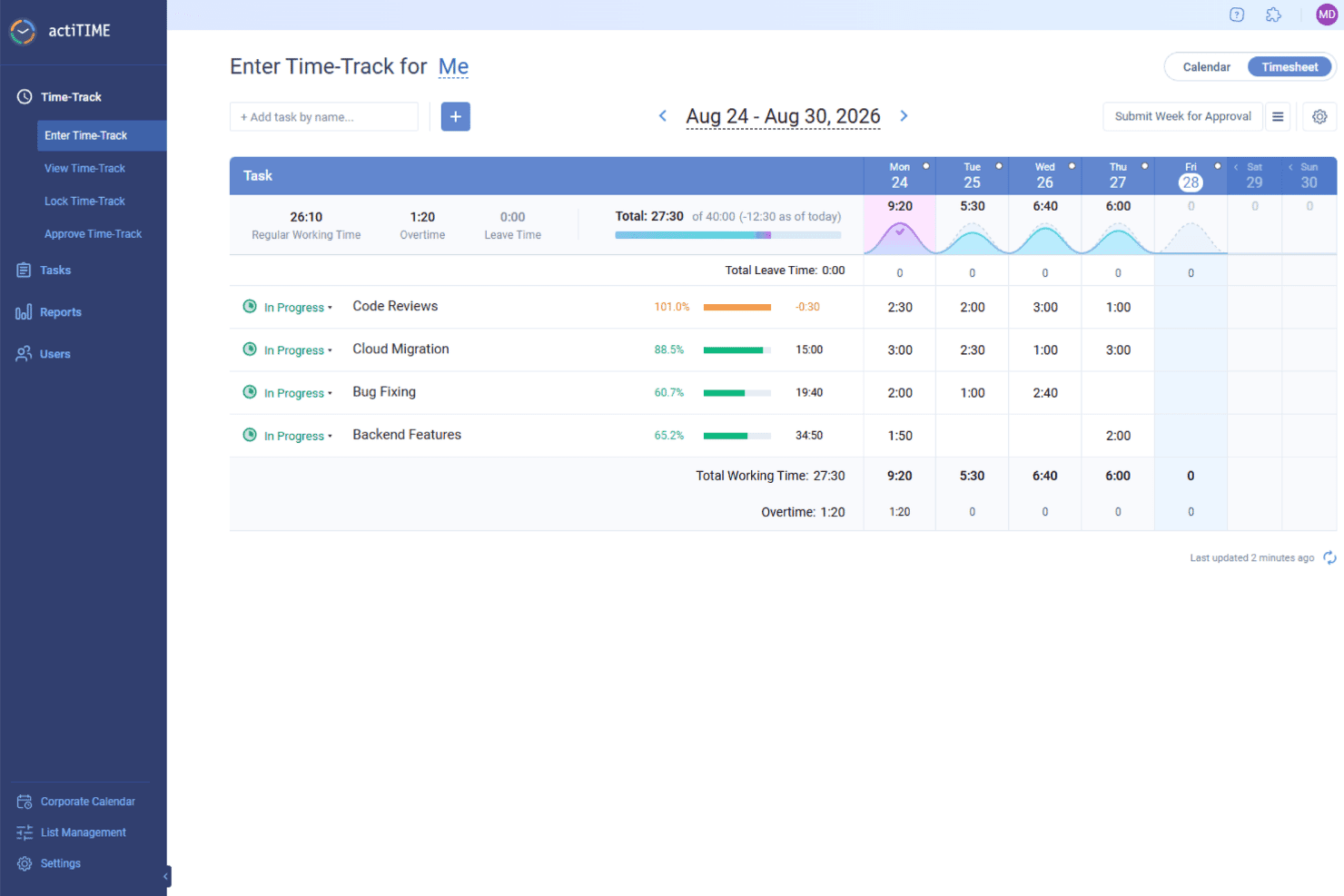
actiTIME helps hybrid teams track working hours, task progress, overtime, and productivity across the workweek. actiTIME is a time-tracking software that helps businesses manage projects, teams, and clients in one place. It enables your team to log work hours, track leave time, and monitor project progress.
Why I picked actiTIME: One reason I chose actiTIME is its comprehensive reporting capabilities. You can generate detailed reports on time distribution across clients and assignments, monitor individual and team productivity trends, and assess project costs. These insights allow you to identify profitable projects and make data-driven decisions to enhance efficiency.
Another notable feature is actiTIME's task and project management tools. You can set task estimates, deadlines, and statuses to keep your projects on track. The Kanban board view provides a clear picture of work progress, helping your team stay organized and focused. This structured approach to task management contributes to improved productivity and timely project completion.
actiTIME Standout Features and Integrations
Features include weekly timesheet, calendar view, overtime calculation, timesheet locking, timesheet approval, email notifications, custom workflows, data export, user permissions, workload management, task assignments, and custom fields.
Integrations include actiPLANS, QuickBooks, Zapier, GitHub, Salesforce, Jira, Trello, Outlook, Evernote, Todoist, Bamboo HR, and Google Calendar.
Pros and Cons
Pros:
- Mobile app facilitates time tracking on the go
- Detailed reporting capabilities for productivity analysis
- Comprehensive time and project tracking features
Cons:
- Initial setup and customization can be time-consuming
- Limited integration options compared to competitors
Learn more about actiTIME: Best for real-time activity monitoring
- Free demo + 14-day free trial availbale
- From $6.67per user/month (billed annually)

Controlio’s dashboard provides real-time visibility into employee activities, helping managers monitor productivity trends. Controlio is a cloud-based productivity tracking and employee monitoring tool designed to help organizations measure, analyze, and improve workforce performance. It captures activity data from desktops to provide detailed insights into productivity levels, app and web usage, and work habits across in-office, remote, and hybrid teams.
Why I picked Controlio: I picked Controlio because it provides real-time visibility into employee activities, helping you identify which tasks and applications contribute most to productivity. Its productivity scoring system automatically categorizes time spent on different apps and websites, allowing you to spot both productive and distracting behaviors. I also like that Controlio supports continuous screen recording and live session viewing, which makes it easier to verify work progress and maintain accountability.
For distributed teams, this combination of tracking, scoring, and surveillance offers a complete picture of how work happens day-to-day.
Controlio standout features and integrations:
Features include productivity scoring that rates users and departments based on time spent on productive and distracting activities, real-time surveillance for monitoring desktops live, and continuous screen recording that captures user screens for later review. The software also supports detailed behavior analytics, time distribution insights, and compliance with data protection standards like GDPR and HIPAA, ensuring responsible monitoring practices.
Integrations are not currently listed by Controllo.
Pros and Cons
Pros:
- Tracks productive and distracting activities
- Offers continuous screen recording
- Complies with GDPR and HIPAA
Cons:
- Limited search in recorded data
- Continuous video may raise privacy concerns
Learn more about Controlio: Best productivity tracking software for comprehensive insights on employee efficiency levels
- Free 21-day trial + free plan for up to 3 users
- From $7/seat/month
Visit WebsiteCustomer Rating:4.9/5
Traqq generates an insightful pie-chart collating data points of how your team spends their time online. Traqq enables businesses to retrospect and analyze internal processes. With Traqq, your teams unlock a new dimension in understanding various aspects of work productivity. As a result, you can conduct root cause analysis of low productivity times and quickly implement a workaround to boost efficiency.
Why I picked Traqq: I love how the developers at Traqq have created a simple yet comprehensive productivity tracking software. The activity levels generated on the Traqq dashboard have an interesting algorithm. The tool tracks your employees’ keyboard clicks and mouse movements. Consequently, the activity page populates your employees’ daily activity in different coloured blocks depicting sessions of low, average, and high activity levels.
Traqq detects and reports websites and apps on which your employees spend over 10 seconds. As a result, you can get a quick overview of what distracts your employees. Traqq also takes random screenshots at 10-minute intervals and uploads them to a secure online storage space.
Traqq Standout Features and Integrations
Features include application and URL tracking, activity level generation, desktop screenshots, desktop screen recording, idle time and attendance tracking, team management, analysis and reporting, and others.
Integration details are currently not available.
Pros and Cons
Pros:
- Automation of email reports (daily/weekly)
- Screenshot-taking can be paused
- Accurate employee tracking
Cons:
- No support for third-party integrations
- No support for foreign languages
Learn more about Traqq: 10Best productivity tracking software with activity monitoring
Monitask
- Free trial available
- From $6.49/user/month (billed annually)
Visit WebsiteCustomer Rating:4.8/5
Monitask's dashboard provides real-time visibility into employee activity, including hours worked and recent tasks. Monitask is a productivity tracking software that helps companies monitor and manage their employees' time and efforts. It offers features such as time tracking, online timesheets, computer monitoring, remote employee monitoring, and employee attendance tracking.
Why I picked Monitask: I chose Monitask because of its comprehensive activity monitoring and detailed productivity analysis features. Monitask's ability to track mouse clicks, keystrokes, and onscreen tasks, alongside its screenshot functionality, offers an in-depth view of employee activities throughout the workday. Additionally, Monitask's time-tracking capabilities ensure that every minute spent on work tasks is accounted for, providing accurate data for performance evaluations and project management
The platform also has a real-time dashboard and automatic report generation to simplify the process of monitoring employee performance and identifying areas for improvement. These features, combined with the ability to customize settings for different team members, make Monitask a versatile tool for enhancing productivity and optimizing business processes.
Monitask Standout Features and Integrations
Features include automatic time tracking, proof-of-work screenshots, website logging, productivity scores, project and task tracking, attendance tracking, summaries and custom reports, software usage tracking, GDPR Compliance, and more.
Integrations include Slack, Trello, Asana, Google Sheets, Jira, ClickUp, Microsoft Dynamics 365 CRM, Zapier, and more.
Pros and Cons
Pros:
- Reports on employee productivity
- Available for multiple operating systems
- Tracks time on different tasks
Cons:
- Navigating the platform can be confusing at first
- No mobile app available
Learn more about Monitask:
Outro software de monitorização da produtividade
Eis algumas outras opções que vale a pena mencionar e que não entraram na lista dos melhores softwares de monitorização da produtividade:
- 11We360.aiBest productivity tracking software for garnering real-time productivity analytics
- 12GuruBest for enterprise AI knowledge search
- 13EmailAnalyticsBest productivity tracking software for charting email trends and improving email response rates
- 14DeskTrackBest productivity tracking software for setting time-bound restrictions to applications
- 15HeightBest productivity tracking for project, task, and workflow management
- 16monday AI WorkspaceBest productivity tracking software for codeless automation of manual and repetitive tasks
- 17ClickUpBest productivity tracking software for automating sales processes and managing accounts
- 18WebWork Time Tracker Best for AI-powered productivity reports
- 19Peoplebox.aiBest productivity tracking software for implementing automated engagement surveys
- 20WrikeBest productivity tracking software for monitoring team progress and identifying potential roadblocks
- 21ProdoscoreBest for presenting work patterns
- 22IntelogosBest for AI-based employee insights
- 23Time DoctorBest productivity tracking software for business process outsourcing and organizations with offshore functions
- 24KeepactiveBest productivity tracking software with keystroke logging features
- 25Profit.coBest productivity tracking software for aligning with organization-wide objectives and key results (OKRs)
- 26HiveBest productivity tracking software for visualizing progress made towards pre-defined goals
- 27VeriatoBest productivity tracking software for tracking idle time of work-from-home employees and remote teams
- 28QbserveBest productivity tracking software for organizations using macOS
How I Evaluate Productivity Tracking Software
I split my evaluation into must-have capabilities—like automated activity capture and privacy controls—and the differentiators that separate a genuinely HR-ready tool from a basic time tracker.
Core Functionality (Table Stakes For This List)
When I'm selecting tools for my list, I rank each one on a scale from 0 (does not offer the functionality) to 5 (excels in this area) for each core functionality listed below. Then, I calculate the tool's total score into a percentage. Each tool needs to achieve a minimum total score of 65% to be considered for inclusion.
- Activity Tracking: I look for automated capture of app usage, website visits, and active versus idle time rather than tools that rely solely on manual employee input.
- Productivity Analytics & Dashboards: Each tool should surface visual trend data at the individual, team, and org level so HR leaders can spot workload shifts across pay periods.
- Time & Task Monitoring: I evaluate whether a tool can map hours to specific tasks or projects, which matters when HR needs to validate resource allocation during headcount planning.
- Workforce Insights & Benchmarking: Tools like ActivTrak and Teramind approach this differently, so I check whether insights go beyond raw numbers to flag burnout risk, collaboration gaps, or focus time trends.
- Privacy & Compliance Controls: I look for configurable anonymization, consent workflows, and audit trails that let HR teams adapt monitoring policies to regional data protection requirements.
- HR & Workflow Integrations: The tool should connect with HRIS, payroll, or project management platforms your team already uses rather than operating as a standalone data silo.
Once I have a list of tools that meet the criteria, I consider what sets each platform apart.
Differentiating Factors (What Sets Vendors Apart)
Here's how I compare and contrast different vendors:
Standout Features
Wellbeing detection matters a lot here. I check whether a tool can flag patterns like excessive overtime or shrinking focus time—signals that help HR step in before burnout hits. AI-powered recommendations add another layer, surfacing coaching prompts or workload rebalancing suggestions managers can act on. I also evaluate goal and OKR alignment, since tying tracked activity back to team objectives shifts the conversation from "hours logged" to outcomes delivered during performance reviews.
Beyond Features
Employee trust is a major consideration. I look at whether a vendor offers employee-facing dashboards so workers can view their own data—this shifts the tool from surveillance to shared accountability. Compliance and data residency also matter, especially for teams operating across multiple regions where data hosting location and certifications like SOC 2 or ISO 27001 affect rollout timelines. I also evaluate how well a platform fits into an existing HR tech stack, checking for native connections to tools like BambooHR, Workday, or Slack.
Como escolher um software de monitorização da produtividade
É fácil ficar perdido em listas extensas de funcionalidades e estruturas de preços complexas. Para o ajudar a manter-se concentrado enquanto percorre o seu processo específico de seleção de software, eis uma lista de fatores a ter em conta:
| Fator | O que ter em conta |
|---|---|
| FatorEscalabilidade | O que ter em contaO software pode crescer com a sua equipa? Considere as necessidades futuras e se a ferramenta consegue lidar com um aumento de utilizadores ou dados sem problemas. |
| FatorIntegrações | O que ter em contaEstabelece ligação com as ferramentas que já utiliza? Procure uma integração perfeita com os seus sistemas existentes para evitar interrupções no fluxo de trabalho. |
| FatorPersonalização | O que ter em contaPode adaptar o software aos seus processos? Procure opções para ajustar definições, vistas e relatórios de acordo com as suas necessidades específicas. |
| FatorFacilidade de utilização | O que ter em contaA sua equipa irá adotá-lo rapidamente? Considere a curva de aprendizagem e o grau de intuitividade da interface para os utilizadores do dia a dia. |
| FatorImplementação e integração inicial | O que ter em contaQuão simples é o processo de configuração? Avalie o tempo e os recursos necessários para a implementação, a formação e a preparação da sua equipa. |
| FatorCusto | O que ter em contaEstá dentro do seu orçamento? Compare os planos de preços, as taxas ocultas e se as funcionalidades correspondem ao preço. Considere os custos a longo prazo à medida que a sua equipa cresce. |
| FatorMedidas de segurança | O que ter em contaComo protege os seus dados? Certifique-se de que a ferramenta cumpre normas de segurança, como encriptação e controlos de acesso, para manter as informações seguras. |
| FatorDisponibilidade do suporte | O que ter em contaPode obter ajuda quando necessário? Verifique se existe suporte 24 horas por dia, 7 dias por semana, conversação em direto ou gestores de conta dedicados para ajudar a sua equipa. |
O que é o software de acompanhamento da produtividade?
O software de acompanhamento da produtividade é uma ferramenta que ajuda a monitorizar e gerir o tempo dedicado a tarefas e projetos. Profissionais como gestores, trabalhadores remotos e freelancers utilizam estas ferramentas para aumentar a eficiência e acompanhar o progresso. As funcionalidades de controlo do tempo, gestão de tarefas e elaboração de relatórios ajudam a manter a organização e a identificar padrões de produtividade. No geral, estas ferramentas oferecem informações valiosas sobre os hábitos de trabalho e ajudam a otimizar as rotinas diárias.
Funcionalidades
Ao selecionar um software de acompanhamento da produtividade, esteja atento às seguintes funcionalidades principais:
- Controlo do tempo: Permite aos utilizadores registar as horas dedicadas às tarefas, ajudando a analisar a produtividade e a gerir o tempo de forma eficaz.
- Gestão de tarefas: Organiza tarefas e projetos num único local, facilitando a definição de prioridades e o acompanhamento do progresso.
- Relatórios e análises: Fornece informações sobre os padrões de trabalho e as tendências de produtividade, contribuindo para a tomada de decisões baseada em dados.
- Integrações: Estabelece ligação com outras ferramentas e plataformas para garantir um fluxo de trabalho contínuo entre diferentes sistemas.
- Painéis personalizáveis: Oferece vistas e relatórios adaptados às preferências e necessidades individuais ou da equipa.
- Disponibilidade de aplicação móvel: Permite aos utilizadores acompanhar e gerir tarefas em qualquer lugar, aumentando a flexibilidade e a acessibilidade.
- Alertas e lembretes automáticos: Mantém os utilizadores informados sobre prazos e tarefas importantes, reduzindo o risco de esquecimentos.
- Gestão de utilizadores: Permite aos administradores controlar o acesso e monitorizar a atividade, garantindo operações seguras e eficientes.
- Informações baseadas em IA: Utiliza inteligência artificial para fornecer recomendações personalizadas e sugestões de produtividade.
- Medidas de segurança: Garante que os dados estão protegidos através de encriptação e controlos de acesso, preservando a privacidade e a segurança.
Benefícios
A implementação de um software de acompanhamento da produtividade proporciona vários benefícios à sua equipa e à sua empresa. Eis alguns dos que pode esperar:
- Melhor gestão do tempo: Ao acompanhar as horas dedicadas às tarefas, as equipas podem identificar atividades que consomem demasiado tempo e otimizar os horários.
- Maior concentração: As funcionalidades de gestão de tarefas ajudam a definir prioridades, reduzindo as distrações e aumentando a concentração.
- Decisões baseadas em dados: Os relatórios e as análises fornecem informações que apoiam a tomada de decisões fundamentadas e o planeamento estratégico.
- Maior responsabilização: Os alertas e lembretes automáticos garantem o cumprimento dos prazos, responsabilizando os membros da equipa.
- Melhor colaboração: As integrações com outras ferramentas promovem um fluxo de trabalho conectado, melhorando a coordenação e a comunicação da equipa.
- Flexibilidade e acessibilidade: A disponibilidade de uma aplicação móvel permite aos membros da equipa gerir tarefas a partir de qualquer lugar, adaptando-se a modelos de trabalho remoto ou híbrido.
- Operações seguras: As medidas de segurança protegem informações sensíveis, garantindo a privacidade e o cumprimento dos regulamentos relativos aos dados.
Custos e preços
Selecionar software de acompanhamento da produtividade requer uma compreensão dos vários modelos de preços e planos disponíveis. Os custos variam consoante as funcionalidades, a dimensão da equipa, os complementos, entre outros fatores. A tabela abaixo resume os planos comuns, os seus preços médios e as funcionalidades normalmente incluídas nas soluções de software de acompanhamento da produtividade:
Tabela de comparação de planos de software de acompanhamento da produtividade
| Tipo de plano | Preço médio | Funcionalidades comuns |
|---|---|---|
| Tipo de planoPlano gratuito | Preço médio$0 | Funcionalidades comunsAcompanhamento básico do tempo, gestão de tarefas e relatórios limitados. |
| Tipo de planoPlano pessoal | Preço médio$5-$15/utilizador/mês | Funcionalidades comunsAcompanhamento avançado do tempo, painéis personalizáveis e acesso à aplicação móvel. |
| Tipo de planoPlano empresarial | Preço médio$20-$50/utilizador/mês | Funcionalidades comunsFerramentas de colaboração para equipas, integrações com outro software e segurança reforçada. |
| Tipo de planoPlano empresarial de grande dimensão | Preço médio$60+/utilizador/mês | Funcionalidades comunsFuncionalidades personalizáveis, suporte dedicado e análise abrangente. |
Perguntas frequentes
O software de acompanhamento da produtividade pode invadir a privacidade?
Sim, o software de acompanhamento da produtividade pode suscitar preocupações relacionadas com a privacidade se não for utilizado de forma responsável. É importante escolher ferramentas que permitam personalizar as definições de privacidade e comunicar claramente com a sua equipa sobre os dados que estão a ser acompanhados. Procure software que disponibilize políticas transparentes de utilização dos dados e ofereça opções para os utilizadores controlarem os seus próprios dados. Garantir que a sua equipa compreende e consente no processo de acompanhamento pode ajudar a reduzir os problemas de privacidade.
O software de acompanhamento da produtividade é adequado para equipas remotas?
Sim, o software de acompanhamento da produtividade é particularmente útil para equipas remotas. Ajuda a gerir tarefas e a acompanhar o tempo sem a necessidade de presença física, permitindo uma melhor coordenação e responsabilização. Com funcionalidades como o acompanhamento do tempo e a gestão de tarefas, as equipas remotas podem manter-se organizadas e ligadas. Muitas ferramentas disponibilizam aplicações móveis e acesso baseado na nuvem, facilitando o registo das atividades por parte dos trabalhadores remotos e a colaboração com os membros da equipa a partir de qualquer lugar.