

O software empresarial com IA utiliza inteligência artificial para automatizar, analisar e melhorar os processos empresariais diários—para que possa tomar decisões mais rápidas e baseadas em dados, além de descobrir novas eficiências. Se está à procura de ferramentas que cumpram realmente a sua promessa de IA, conhece o desafio: separar as soluções reais das tendências exageradamente promovidas.
Neste guia, encontrará opções avaliadas por especialistas que ajudam as equipas de RH e empresariais a gerar valor, melhorar a experiência e manter-se na vanguarda em 2026.
Why Trust Our Software Recommendations
6,700+
Reviews
20
Industry experts
16+
Evaluation factors
14
Years
Our team has been testing and reviewing software since 2012. As HR experts ourselves, we know how difficult—and important—it is to choose the right software.
For this guide, we evaluated tools using hands-on testing and independent research, scoring tools using our selection criteria. We also draw on insights from industry thought leaders and practicing HR experts.
Our reviews reflect our human editorial judgment, not a sales pitch.
Expert reviewers:
- Phil GrayCOO
 Kim BehnkeHR Tech Editor & Analyst
 Josh BarkerPeople Ops Manager

Tabela comparativa de software empresarial com IA
Esta tabela comparativa resume os detalhes de preços das minhas principais seleções de software empresarial com IA:
| Tool | Best For | Trial Info | Price | ||
|---|---|---|---|---|---|
| 1 | Best as AI for business | Free trial + Free demo available | From $8/user/month | Website | |
| 2 | Best for continuous employee performance insights | Free demo available | From $8/user/month (billed annually) | Website | |
| 3 | Best for unifying core HR processes | 30-day free trial + free demo available | Pricing upon request | Website | |
| 4 | Best for talent sourcing from diverse pools | 14-day free trial + demo available | From $179/user/month | Website | |
| 5 | Best for structured video interview assessments | Free demo available | Pricing upon request | Website | |
| 6 | Best for workforce analytics reporting | 30-day free trial + free demo | Pricing upon request | Website | |
| 7 | Best for personalized talent recommendations | Free demo available | Pricing upon request | Website | |
| 8 | Best for conversational hiring experiences | Free demo available | Pricing upon request | Website | |
| 9 | Best for automated employee support answers | Free demo | Pricing upon request | Website | |
| 10 | Best for autonomous employee query resolution | Free demo available | Pricing upon request | Website |


Avaliações do melhor software empresarial com IA
Seguem-se os meus resumos detalhados do melhor software empresarial com IA que integrou a minha seleção. As minhas avaliações analisam detalhadamente as funcionalidades, capacidades e integrações de cada plataforma, para ajudar a encontrar a melhor opção para si.
 Best as AI for business
- Free trial + Free demo available
- From $8/user/month
Visit WebsiteCustomer Rating:4.4/5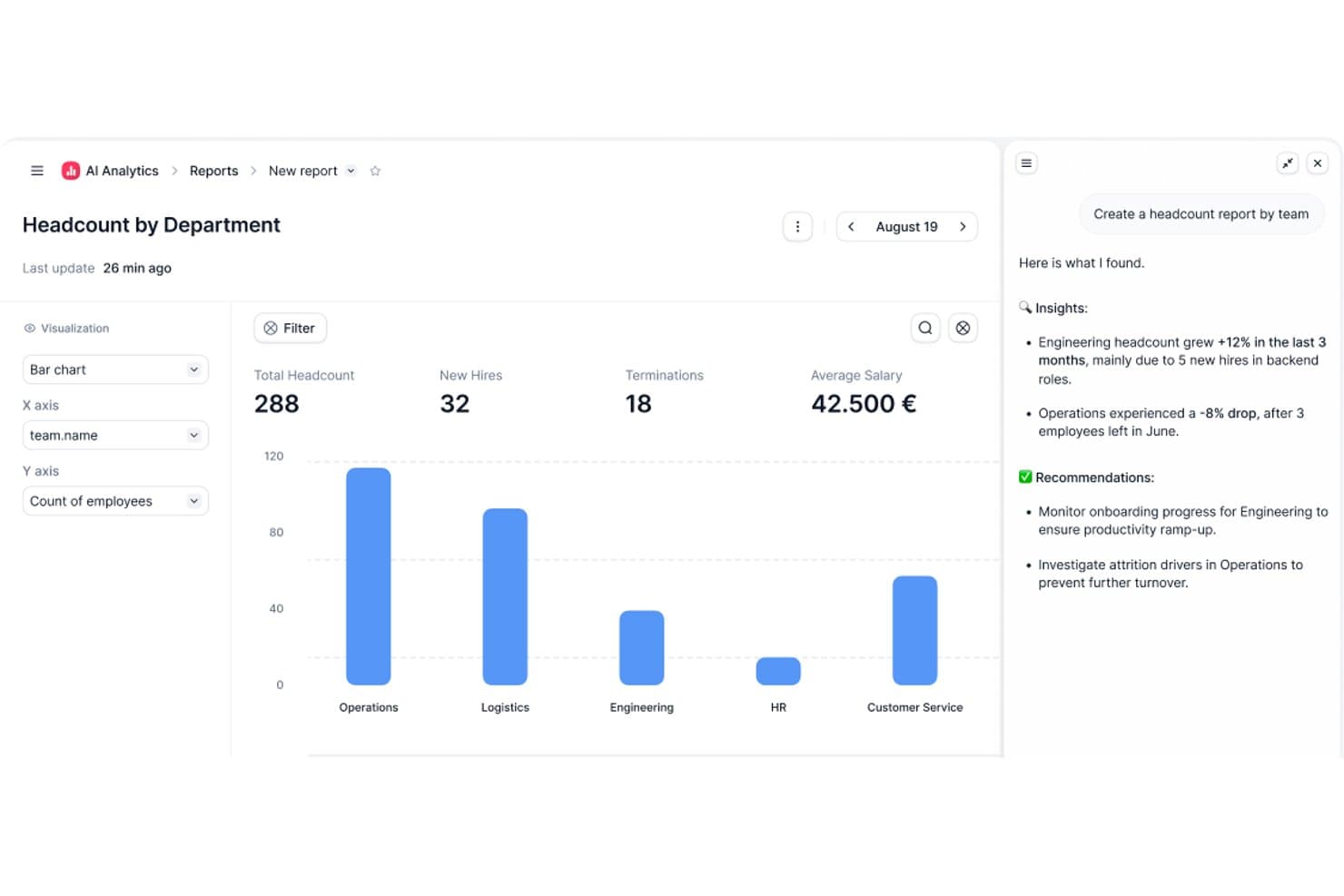
Factorial's AI Analytics generates headcount reports with insights and recommendations. Factorial is an AI for business platform that brings HR, finance, and IT operations together, with its One AI agent helping teams plan schedules, generate reports, answer policy questions, and automate workflows across departments.
Who Is Factorial Best For?
Factorial suits mid-sized teams that want a single platform to handle HR, finance, and IT operations without juggling separate tools for each department.
Why I Picked Factorial
I've included Factorial in my top picks because it brings HR, finance, and IT operations into one platform through its One AI agent, which is purpose-built for daily business tasks. I like how One can draft schedules, pull live reports, and answer employee policy questions in plain language, so your team isn't bouncing between tools to get answers. It can even flag payroll anomalies before a payroll run, which is the kind of proactive support that cuts real administrative load.
Factorial Key Features
- One AI agent: A built-in AI agent that works across HR, finance, and IT using your company's own data to answer questions and take actions.
- Receipt OCR extraction: AI-powered optical character recognition pulls data from uploaded receipts to auto-fill expense details.
- 360-degree performance reviews: Collects structured feedback from employees, managers, and peers within a single review cycle.
- IT inventory and MDM: Tracks devices from order to assignment and supports zero-touch provisioning, remote wipe, and device security policies.
Factorial Integrations
Factorial offers marketplace integrations with Microsoft Power BI, Okta, Slack, Microsoft Business Central, Sage, DATEV, and SAP Business One, plus Zapier. Its REST API, webhooks, SDKs, and MCP connections extend One to ChatGPT and Claude.
Pros and Cons
Pros:
- Centralized HR records reduce scattered files
- Answers employee policy questions in plain language
- One connects HR, finance, and IT workflows
Cons:
- Country-specific workflows can need manual workarounds
- Tailored turnover reporting can be difficult
 Best for continuous employee performance insights
- Free demo available
- From $8/user/month (billed annually)
Visit WebsiteCustomer Rating:4.7/5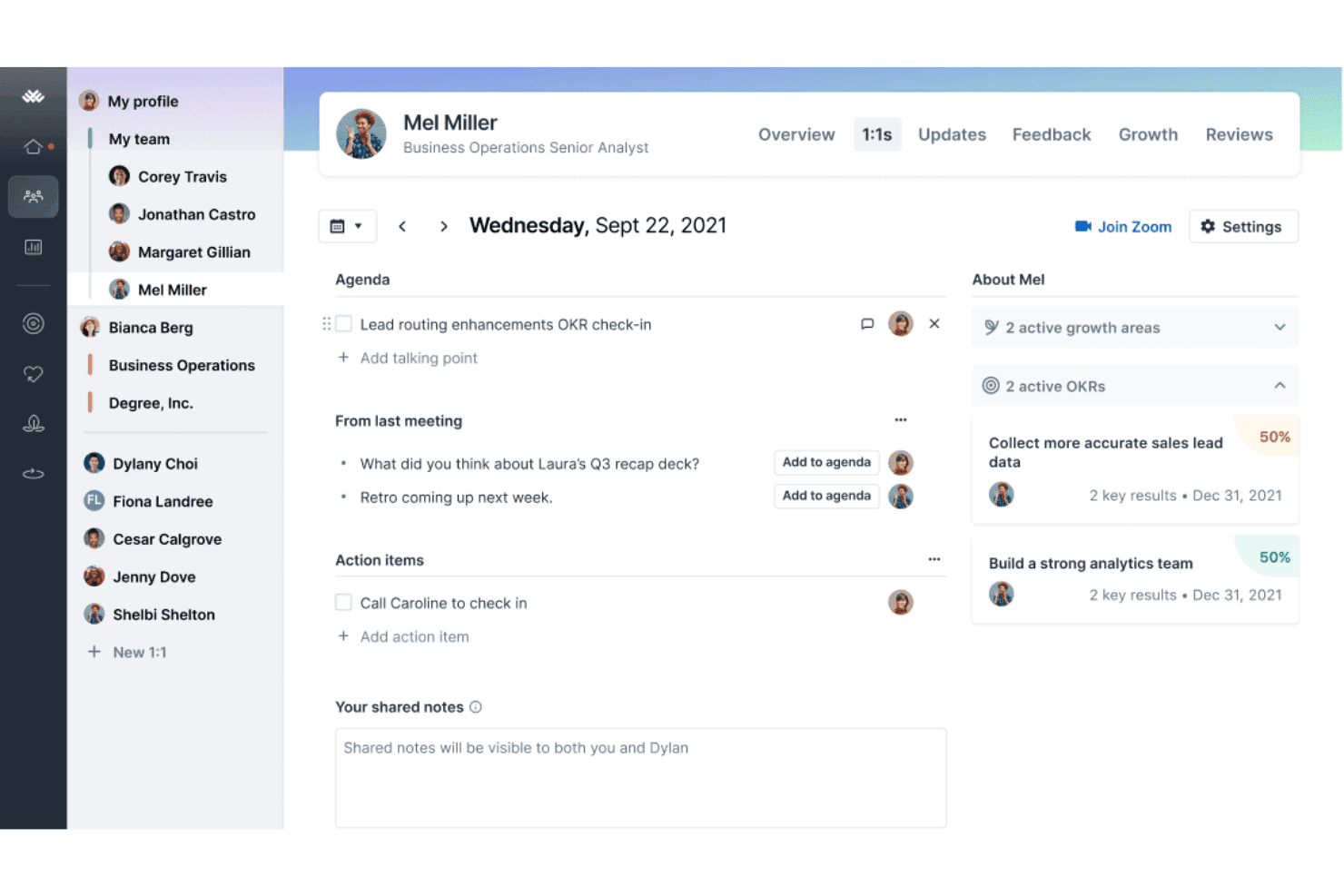
Lattice offers a 1:1 meeting interface with agenda tracking, action items, shared notes, and OKR progress visibility for managers and employees. Lattice is a people management platform that combines performance reviews, goal tracking, employee engagement surveys, compensation management, and an AI agent that surfaces workforce insights and coaches managers.
Who Is Lattice Best For?
Lattice is a strong fit for mid-sized to enterprise HR teams that need a structured, ongoing approach to performance management and employee development.
Why I Picked Lattice
I picked Lattice because it treats performance as an ongoing conversation, not a once-a-year event. The Habits framework, which bundles 1:1s, Weekly Updates, and Feedback into the daily workflow, keeps a continuous stream of performance data flowing between managers and their teams. The AI Agent then acts on that data to coach managers in real time, and Lattice MCP connects talent data directly to Claude and ChatGPT for AI-assisted review drafting and trend analysis.
Lattice Key Features
- Pulse surveys: Run short, recurring surveys to quickly gauge employee engagement and sentiment.
- Calibration tools: Facilitate fairer performance reviews with calibration sessions across teams and departments.
- Compensation management: Manage salary reviews, comp bands, cycle approvals, and analytics in one system.
- Integration ecosystem: Connect with HRIS, Slack, Microsoft Teams, Jira, and major SSO providers for unified workflows.
Lattice Integrations
Lattice offers 25+ native integrations, including ADP, BambooHR, Gusto, HiBob, Personio, Workday, Rippling, Slack, Microsoft Teams, Jira, and Salesforce. An API is available for custom integrations.
Pros and Cons
Pros:
- Succession planning with data-driven suggestions
- AI-generated summaries for review cycles
- Continuous feedback and performance monitoring
Cons:
- Predictive analytics are limited in scope
- No external candidate matching or ATS
 Best for unifying core HR processes
- 30-day free trial + free demo available
- Pricing upon request
Visit WebsiteCustomer Rating:4.3/5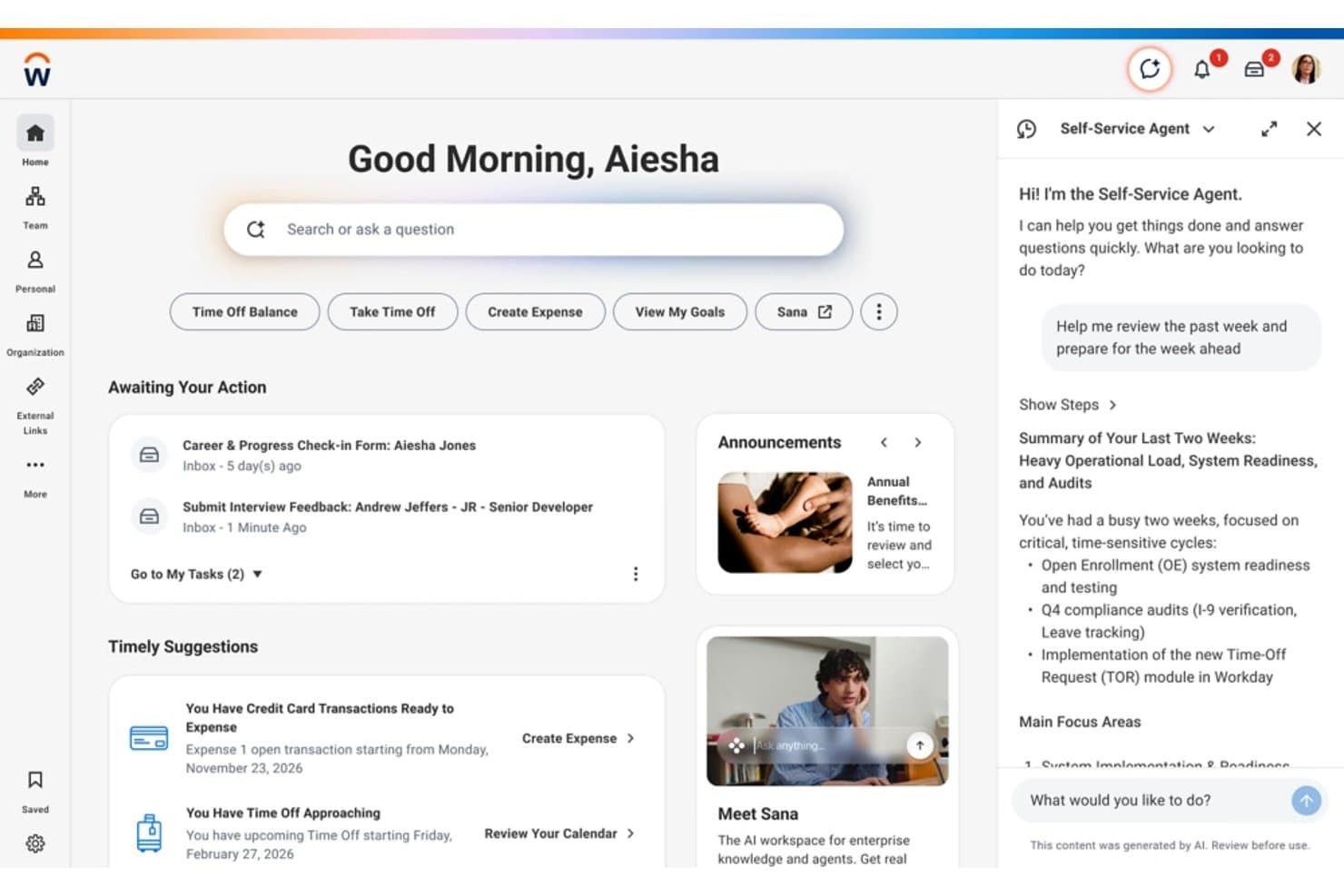
Workday offers an AI-powered Self-Service Agent that summarizes recent work activity and helps employees prepare for the week ahead directly from the home dashboard. Workday is an enterprise cloud HCM platform that brings together core HR, payroll, talent management, workforce planning, and AI-driven analytics in a single unified system.
Who Is Workday Best For?
Workday is built for large enterprises with complex, multi-country HR operations that need a single system to manage their entire workforce.
Why I Picked Workday
Workday earns its spot on my shortlist because every HR function- payroll, talent, and workforce planning runs on a single data model rather than stitched-together modules. I like that the Illuminate AI agents (Recruiter Agent, Payroll Agent, Succession Agent) act directly within that unified data layer, so a change in recruiting instantly surfaces in workforce planning. Workday Skills Cloud also ties hiring, internal mobility, and succession into one connected skills map, which I rarely see done this cleanly in a single platform.
Workday Key Features
- Workday Assistant: Conversational AI that answers HR queries and helps users complete tasks using natural language.
- Prism analytics: Unified analytics tool that blends internal and external people data for deep workforce insights.
- AI-powered time tracking: Automated, AI-driven time and attendance capture across global locations and job types.
- Compliance controls: Built-in governance, audit trails, and bias detection in AI models to support data privacy and regulatory needs.
Workday Integrations
Workday offers native integrations with Slack, LinkedIn Learning, SAP Fieldglass, ADP SmartCompliance, Cornerstone LMS, UiPath, and Dokmee ECM. An API is available for custom integrations.
Pros and Cons
Pros:
- AI-driven skills management and talent pathways
- Generative AI assistant for policies and HR data
- All-in-one AI workforce analytics and planning
Cons:
- GenAI features require additional enablement
- Long implementation cycles for large organizations
Learn more about Workday: Best for talent sourcing from diverse pools
- 14-day free trial + demo available
- From $179/user/month
Visit WebsiteCustomer Rating:4.6/5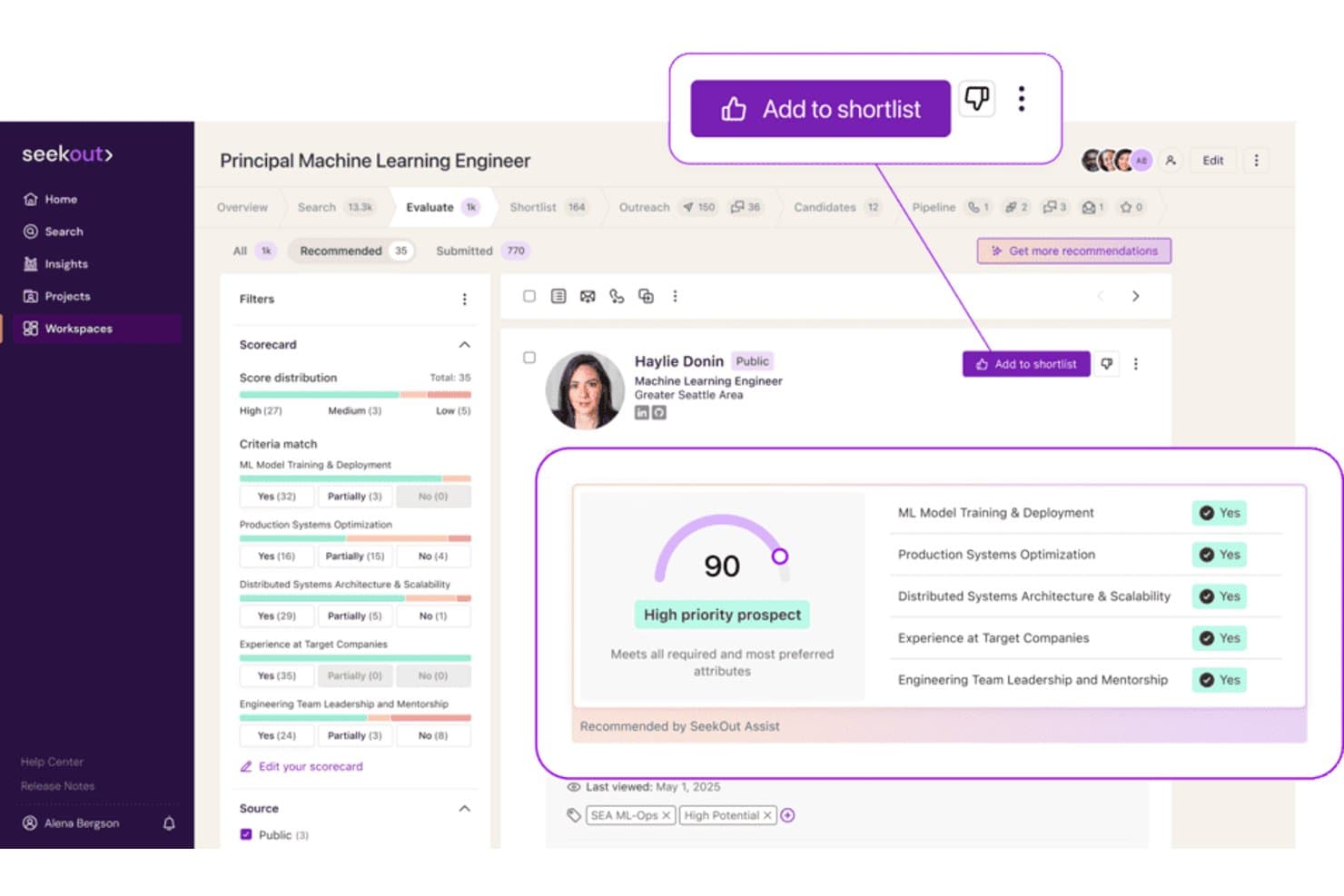
SeekOut offers an AI-powered candidate evaluation scorecard that scores prospects and highlights criteria matches for recruiter shortlisting. SeekOut is an AI recruiting platform that combines external talent sourcing, inbound applicant evaluation, ATS rediscovery, diversity-focused search filters, and candidate outreach into a single talent intelligence tool.
Who Is SeekOut Best For?
SeekOut is a strong fit for enterprise talent acquisition teams that need to source technical or underrepresented candidates at scale.
Why I Picked SeekOut
SeekOut earns its spot on my shortlist because of how far its diversity sourcing filters go beyond anything else I've seen. I can filter candidates by gender, ethnicity, veteran status, and disability indicators without relying on self-reported data. On top of that, SeekOut parses GitHub activity and patent records to surface technical candidates who simply don't appear in a LinkedIn-only search.
SeekOut Key Features
- AI-powered inbound evaluation: Instantly rates and shortlists applicants based on custom criteria set by your team.
- Talent pool insights: Provides labour market intelligence, compensation benchmarks, and skills gap data for targeted recruiting.
- ATS rediscovery: Finds past silver medalist candidates and unearths overlooked applicants already in your applicant tracking system.
- AI-integrated outreach campaigns: Builds and sends multi-stage, personalized candidate emails directly from the platform.
SeekOut Integrations
SeekOut offers native integrations with Ashby, Avature, Beamery, Bullhorn, Gem, Greenhouse, iCIMS, Jobvite, Lever, Phenom, SAP SuccessFactors, SmartRecruiters, Talemetry, and Workday. An API is available for building custom integrations.
Pros and Cons
Pros:
- AI search across technical GitHub and patent records
- Large external talent and candidate data pool
- Advanced diversity-focused talent sourcing filters
Cons:
- Limited workflow automations beyond recruiting functions
- No internal workforce analytics or metrics
 Best for structured video interview assessments
- Free demo available
- Pricing upon request
Visit WebsiteCustomer Rating:4.5/5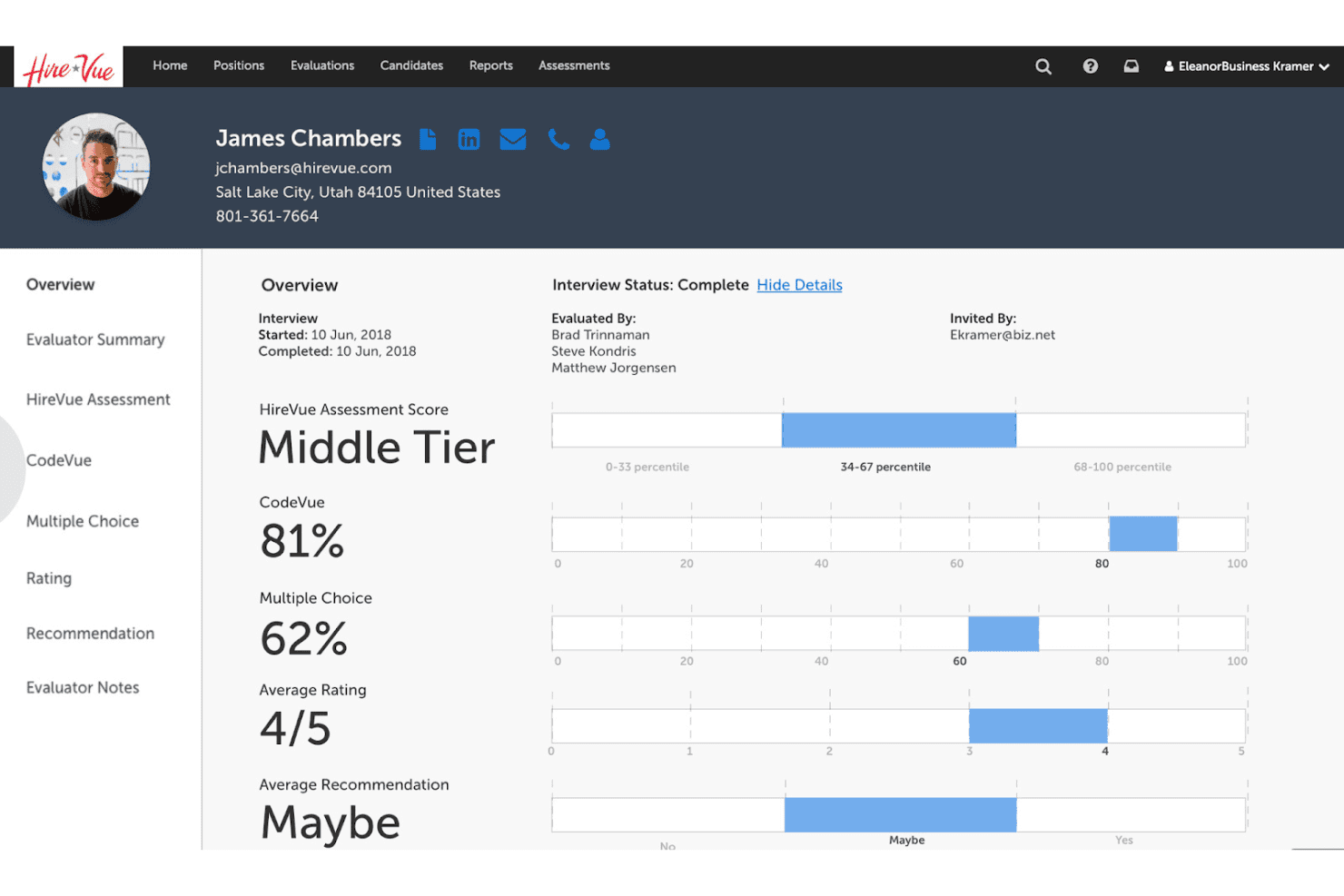
HireVue displays a candidate overview dashboard showing assessment scores, CodeVue results, multiple choice percentages, ratings, and evaluator recommendations in one unified profile view. HireVue is an AI-powered hiring platform that combines on-demand and live video interviewing, structured assessments, and conversational AI to support candidate screening and talent acquisition workflows.
Who Is HireVue Best For?
HireVue is a strong fit for enterprise talent acquisition teams managing high-volume hiring across multiple roles or locations.
Why I Picked HireVue
I've included HireVue in my top picks because its structured interview format is genuinely differentiated from standard video tools. Where most platforms just record responses, HireVue applies IO psychology-backed AI scoring against defined competencies, so every candidate is evaluated on the same criteria. I also use the virtual job tryout feature to assess role-specific skills before a single live interview takes place, which tightens early-stage screening considerably.
HireVue Key Features
- Conversational AI chatbot: Engages candidates 24/7 with automated pre-screening and Q&A.
- Live video interviewing: Supports multi-interviewer live panels and integrates with leading ATS platforms.
- Game-based assessments: Offers interactive cognitive and behavioural games tailored to role requirements.
- Self-scheduling tool: Lets candidates select interview times and syncs with recruiter calendars automatically.
HireVue Integrations
HireVue offers native integrations with Workday, SAP SuccessFactors, Oracle and Taleo, SmartRecruiters, iCIMS, Avature, Greenhouse, PageUp, Cornerstone, and Eightfold. An API is also available for custom integrations.
Pros and Cons
Pros:
- Automated candidate engagement with conversational AI
- Virtual job tryouts for real-world skills
- AI-driven scoring for objective candidate assessment
Cons:
- No natural language query support
- Analytics limited to pre-hire stage
Learn more about HireVue: Best for workforce analytics reporting
- 30-day free trial + free demo
- Pricing upon request
Visit WebsiteCustomer Rating:4.4/5
Visier offers an AI-powered sidebar assistant ('Ask Vee') that provides instant headcount breakdowns by gender and department with natural language insights. Visier is an AI-powered people analytics platform that unifies workforce data from multiple HR systems to deliver predictive insights, natural-language data queries via its Vee AI assistant, and executive-level reporting dashboards.
Who Is Visier Best For?
Visier is a strong fit for enterprise HR and people analytics teams at large organizations with complex, multi-system workforce data environments.
Why I Picked Visier
I picked Visier as one of the best because no other platform I've seen handles workforce analytics reporting at this depth. Vee, its generative AI assistant, lets my team query live people data in plain language, turning complex HR datasets into instant, visualized answers. Then Vee Boards surface those insights as executive-ready views, connecting headcount movements and compensation changes directly to P&L impact.
Visier Key Features
- Data unification and harmonization: Consolidates and structures HR, payroll, and operational data into a single, standardized platform.
- Automated benchmark analytics: Provides access to proprietary workforce benchmarks for comparing against industry peers.
- Role-based data permissions: Lets admins control access to sensitive datasets using granular, customizable user roles.
- Out-of-the-box analytics modules: Offers pre-built analyses for workforce planning, turnover, DEI, and talent mobility.
Visier Integrations
Visier offers native integrations with Workday, SAP SuccessFactors, Oracle HCM, ADP, UKG, Google Workspace, and Microsoft. An API is available for custom integrations, and Visier supports data connectors for Amazon S3, Amazon Redshift, Google BigQuery, and Microsoft SQL Server.
Pros and Cons
Pros:
- Conversational AI for natural-language queries
- Provides predictive analytics for HR outcomes
- Connects fragmented workforce data sources
Cons:
- Limited workflow automation beyond analytics
- Long implementation timeline for new clients
Learn more about Visier: Best for personalized talent recommendations
- Free demo available
- Pricing upon request
Visit WebsiteCustomer Rating:4.2/5
Eightfold AI offers a role comparison page that lets users compare skills and proficiency levels across multiple approved software engineer roles side by side. Eightfold AI is an AI-native talent intelligence platform that combines candidate matching, internal mobility, workforce analytics, and skills-based recruiting across the full talent lifecycle.
Who Is Eightfold AI Best For?
Eightfold AI is a strong fit for enterprise HR and talent acquisition teams at large organizations managing high-volume, complex hiring across multiple roles or regions.
Why I Picked Eightfold AI
Eightfold AI earns its spot on my shortlist because its matching engine infers skills not explicitly listed on a resume. A Java developer who's never written "Spring Boot" on their CV can still surface as a strong match based on their career trajectory. I also like the Employee Copilot, which delivers personalized career path recommendations and internal job matches tied to each person's actual skill profile, not just their job title.
Eightfold AI Key Features
- Recruiter Copilot: Automates scheduling, sends reminders, and helps draft job descriptions for open roles.
- Talent marketplace: Connects employees with internal growth opportunities based on mapped skills and interests.
- Resource management: Uses AI to staff projects and allocate team members according to real skill profiles.
- Diversity analytics and bias mitigation: Monitors candidate representation and includes candidate masking for equitable hiring.
Eightfold AI Integrations
Eightfold AI offers native integrations with Workday, SAP SuccessFactors, Oracle HCM Cloud, Greenhouse, iCIMS, Lever, ADP, SmartRecruiters, Taleo, Microsoft Outlook, and Jira. An API is available for custom integrations.
Pros and Cons
Pros:
- DEI analytics with candidate masking and audits
- Supports enterprise-scale talent mobility programs
- AI infers skills not on resumes
Cons:
- Initial configuration can be resource intensive
- Limited AI automation beyond recruiting workflows
Learn more about Eightfold AI: Best for conversational hiring experiences
- Free demo available
- Pricing upon request

Paradox offers an AI-powered interview scheduling interface that allows recruiters to set up multi-round in-person interviews with configurable type, duration, location, and interviewer details. Paradox is a conversational AI recruiting platform built around Olivia, an AI assistant that automates candidate screening, interview scheduling, and onboarding through chat and SMS in 100+ languages.
Who Is Paradox Best For?
Paradox is a strong fit for enterprise and franchise organizations in high-volume hiring industries like retail, hospitality, and healthcare.
Why I Picked Paradox
Paradox earns its spot as one of the best on my shortlist because Olivia's conversational apply feature lets candidates apply through a text exchange on their phone, no login or form required. I especially like how the automated scheduling syncs directly with recruiter calendars, removing the back-and-forth entirely. In practice, that means a candidate can go from first contact to a confirmed interview in under five minutes.
Paradox Key Features
- Conversational career sites: Let candidates search and learn about roles using chat interactions instead of static listings.
- Conversational CRM: Manage and nurture talent pipelines through automated candidate engagement.
- Event automation: Handle registration, reminders, and candidate screening for hiring events with AI-driven workflows.
- Survey collection: Gather real-time feedback from candidates and interviewers through SMS or chat-based surveys.
Paradox Integrations
Paradox offers native integrations with Workday, SAP SuccessFactors, Indeed, and iCIMS. An API is available for custom integrations.
Pros and Cons
Pros:
- Automates high-volume hiring workflows end-to-end
- SMS and chat support in 100+ languages
- Conversational AI screens and qualifies candidates
Cons:
- Analytics limited to recruiting data only
- No internal mobility or employee experience features
Learn more about Paradox:

Moveworks offers an AI-powered enterprise setup dashboard where admins can configure knowledge sources, search capabilities, and bot profile settings across Slack and Microsoft Teams. Moveworks is an agentic AI platform that delivers a conversational AI assistant for enterprise HR, IT, and Finance teams, combining workflow automation, enterprise search, and knowledge management across business applications.
Who Is Moveworks Best For?
Moveworks is a strong fit for large enterprises with distributed workforces where HR and IT teams need to handle high volumes of employee requests at scale.
Why I Picked Moveworks
I've included Moveworks in my top picks because its agentic Reasoning Engine doesn't just answer employee questions; it completes the underlying task, whether that's booking time off, generating an employee verification letter, or updating a legal name in the system. I particularly like the Knowledge Studio, which surfaces the right HR policy content without employees digging through a knowledge base. It runs natively inside Slack and Teams in over 100 languages.
Moveworks Key Features
- Agent Studio: Build and customize low-code AI workflows for HR use cases.
- Enterprise search: Query data and documents across connected HR systems using natural language.
- Multi-system integrations: Connects with platforms like Workday, ServiceNow, and Jira for unified support.
- Compliance controls: Includes FedRAMP, SOC 2, HIPAA, and GDPR certifications for data privacy and security.
Moveworks Integrations
Moveworks offers native integrations with ServiceNow, Workday, Jira, Freshservice, Slack, and Microsoft Teams. An API is available for custom integrations.
Pros and Cons
Pros:
- Automatically translates support tickets
- Handles over 100 languages natively
- Completes HR tasks directly from chat
Cons:
- Limited talent matching and recruiting tools
- No predictive people analytics features
Learn more about Moveworks:

Leena AI offers a comprehensive employee onboarding dashboard with activity tracking, document management, and journey flow visualization. Leena AI is an agentic AI platform that automates employee query resolution across HR, IT, and finance through a conversational assistant that connects with HRIS, ITSM, payroll, and benefits systems.
Who Is Leena AI Best For?
Leena AI is a strong fit for HR operations teams at mid-to-large enterprises managing high volumes of employee queries across HR, IT, and finance.
Why I Picked Leena AI
Leena AI earns its spot on my shortlist because of how far it pushes autonomous employee query resolution. Harrison, its HR AI colleague, doesn't just answer questions. It executes transactions: filing leave requests, pulling payslips, or enrolling employees in benefits without any human handoff. I especially like AOPs (Agent Operating Procedures), which let you define exactly how Harrison handles multi-step workflows, including built-in guardrails that require manager approval before any irreversible action runs.
Leena AI Key Features
- Multilingual conversational assistant: Interacts in 100+ languages to address global workforce needs.
- Pre-built enterprise integrations: Connects with HRIS, ITSM, payroll, ATS, and messaging platforms out of the box.
- Multi-channel deployment: Offers access via web, mobile, Microsoft Teams, Slack, WhatsApp, and phone.
- Role-based access controls: Lets administrators set permissions and policies for data, actions, and information visibility.
Leena AI Integrations
Leena AI offers over 200 native integrations, including Workday, SAP SuccessFactors, Oracle Fusion, ServiceNow, Jira, Microsoft Teams, Slack, ADP, and Salesforce, with an API available for custom integrations.
Pros and Cons
Pros:
- Configurable workflow automation using AOPs
- Built-in compliance approvals
- Handles high query volume across departments
Cons:
- No native AI-driven candidate matching
- Predictive analytics capabilities are limited
Learn more about Leena AI:
Outro software empresarial com IA
Eis algumas opções adicionais de software empresarial com IA que não integraram a minha seleção, mas que ainda vale a pena conhecer:
- 11Phenom Best for talent experience optimization
- 12BeameryBest for relationship-based talent engagement
- 13SAP SuccessFactors HCMBest for global workforce management compliance
- 14RipplingBest for unified HR and IT administration
- 15BambooHRBest for intuitive onboarding workflows
- 16PaylocityBest for customizable payroll automation
- 17GustoBest for benefits administration simplicity
- 18Deel HRBest for international payroll compliance
- 19HiBobBest for modern employee engagement features
- 20UKGBest for flexible workforce scheduling solutions
How I Evaluate AI Business Software
Every tool on this list has to show that its AI does more than surface-level automation—I want to see it actually improving decisions around hiring, retention, or workforce planning. I split my evaluation into core functionality every platform needs and the differentiating factors that separate good from great.
Core Functionality (Table Stakes For This List)
When I'm selecting tools for my list, I rank each one on a scale from 0 (does not offer the functionality) to 5 (excels in this area) for each core functionality listed below. Then, I calculate the tool's total score as a percentage. Each tool needs to achieve a minimum total score of 65% to be considered for inclusion.
- AI Workflow Automation: I evaluate whether the tool automates multi-step HR processes like onboarding sequences, approval chains, and case routing with adaptive logic.
- Predictive People Analytics: The platform should surface forward-looking models—like attrition risk scores or engagement trends—not just backward-looking dashboards.
- Generative AI Assistant: I check whether the assistant handles real employee questions about leave policies or benefits and can draft content like job descriptions.
- AI Talent Matching: Tools should go beyond keyword matching to rank candidates by inferred skills and support internal mobility, not just external sourcing.
- Natural Language Data Queries: HR users should be able to ask plain-language questions like "show me turnover by department" and get visual, exportable results.
- AI Governance & Compliance: I look for bias detection, explainability features, and audit logs that help your team trust and defend AI-driven decisions.
Once I have a list of tools that meet the criteria, I consider what sets each platform apart.
Differentiating Factors (What Sets Vendors Apart)
Here's how I compare and contrast different vendors:
Standout Features
Autonomous AI agents are a major differentiator—I look for platforms where an agent can handle multi-step tasks like scheduling interviews and sending follow-ups without manual prompting. Custom model training matters too, especially when your team needs outputs tuned to your internal job architecture or competency frameworks. I also evaluate cross-app workflow automation, since most HR teams run separate systems for recruiting, payroll, and performance—and the best tools connect those handoffs automatically.
Beyond Features
Data privacy and model governance are top of mind when I evaluate these platforms—I check whether employee data stays isolated in your tenant or gets fed into shared training models. Compliance certifications like SOC 2 Type II and ISO 27001 also carry weight, especially for HR teams handling sensitive personal records. Integration depth rounds out the picture. A tool that connects natively to your HRIS, payroll system, and Slack means less manual data entry and faster adoption across your team.
Como escolher software empresarial com IA
É fácil ficar preso a longas listas de funcionalidades e estruturas de preços complexas. Para o ajudar a manter o foco enquanto percorre o seu processo específico de seleção de software, apresentamos uma lista de verificação dos fatores a ter em conta:
| Fator | O que considerar |
|---|---|
| FatorEscalabilidade | O que considerarO software suportará o crescimento do número de utilizadores e dos dados nos próximos dois a três anos? |
| FatorIntegrações | O que considerarEstabelece ligação ao seu HRIS, sistema de processamento salarial, ATS e plataformas de comunicação principais? |
| FatorPossibilidade de personalização | O que considerarOs fluxos de trabalho, o idioma e as funções dos utilizadores podem ser adaptados à estrutura da sua equipa? |
| FatorFacilidade de utilização | O que considerarOs utilizadores de RH e empresariais não técnicos conseguem adotá-lo com confiança sem apoio contínuo de TI? |
| FatorImplementação e integração inicial | O que considerarQuanto tempo demorará a configuração? Existe apoio prático ou a sua equipa terá de configurar tudo autonomamente? |
| FatorCusto | O que considerarQuão previsíveis são os custos contínuos? Há custos por utilizador, consulta ou fluxo de trabalho a ter em conta? |
| FatorMedidas de segurança | O que considerarA privacidade dos dados, a encriptação e os controlos de acesso dos utilizadores são suficientemente robustos para os dados da sua força de trabalho? |
| FatorRequisitos de conformidade | O que considerarO fornecedor suporta as normas necessárias—como o RGPD ou a HIPAA—especialmente se operar a nível global? |
O que é software empresarial com IA?
O software empresarial com IA consiste em plataformas digitais que utilizam inteligência artificial para automatizar, analisar e melhorar processos de RH, operações e administração. Estas ferramentas ajudam as equipas a gerir tarefas repetitivas, obter informações úteis e responder a perguntas ou pedidos em linguagem natural—tornando as decisões baseadas em dados mais rápidas e acessíveis aos profissionais de RH.
Funcionalidades
Ao selecionar software empresarial com IA, procure as seguintes funcionalidades principais:
- Automação de fluxos de trabalho com IA: Utiliza aprendizagem automática para tratar tarefas repetitivas de RH, como integração de novos colaboradores, gestão de documentos ou encaminhamento de aprovações, sem intervenção manual.
- Análise preditiva: Revela tendências futuras nas métricas da força de trabalho, como rotatividade, envolvimento ou desempenho, utilizando modelação avançada de dados, o que ajuda as organizações a tirar melhor partido das ferramentas de estratégia de IA.
- Assistente de IA generativa: Disponibiliza um chatbot conversacional ou copiloto que responde a perguntas de RH e dos colaboradores, redige documentos ou ajuda na interpretação de políticas.
- Correspondência de talentos: Avalia os perfis dos candidatos e faz a correspondência com ofertas de emprego ou oportunidades internas com base nas competências, experiência e adequação.
- Consultas de dados em linguagem natural: Permite aos utilizadores fazer perguntas ou solicitar relatórios em linguagem corrente, sem exigir competências técnicas ou programação.
- Governação e conformidade da IA: Monitoriza e protege contra preconceitos, assegura a privacidade e mantém registos de auditoria para apoiar uma utilização responsável e explicável da IA.
- Capacidades de integração: Liga-se a ferramentas essenciais de RH, processamento salarial, produtividade e comunicação, criando um fluxo de trabalho unificado e evitando silos de dados.
- Formação de modelos personalizados: Permite às organizações ajustar modelos de IA utilizando os seus próprios dados, garantindo que os resultados refletem a terminologia e os processos específicos da empresa.
- Painéis fáceis de utilizar: Apresenta visualmente as principais métricas e análises, para que as equipas de RH possam compreender os dados e agir rapidamente.
- Geração automática de documentos: Produz contratos, políticas e comunicações com um esforço mínimo, reduzindo a redação manual e a carga de trabalho administrativo.
Benefícios
A implementação de software empresarial com IA proporciona vários benefícios para a sua equipa e para a sua empresa. Eis alguns dos benefícios que pode esperar:
- Poupança de tempo: Automatiza tarefas repetitivas de RH, como a integração de novos colaboradores, a gestão de casos e as aprovações, permitindo que a sua equipa se concentre em trabalho de maior impacto.
- Decisões mais sólidas: Apresenta análises preditivas e informações acionáveis, ajudando-o a identificar tendências na rotatividade, no envolvimento e no desempenho antes que se agravem.
- Melhoria da experiência dos colaboradores: Oferece suporte rápido e personalizado através de assistentes de IA generativa e interfaces de linguagem natural para questões sobre políticas, processamento salarial ou PTO.
- Melhores resultados na gestão de talentos: Acelera e melhora a correspondência entre candidatos e oportunidades, bem como a mobilidade interna, através de funcionalidades de correspondência de competências e funções baseadas em IA.
- Conformidade reforçada: Monitoriza a existência de preconceitos, regista decisões baseadas em IA e fornece explicabilidade, para que os seus processos se mantenham transparentes e preparados para auditorias.
- Flexibilidade de recursos: Adapta-se ao crescimento da sua equipa, às alterações dos fluxos de trabalho ou à introdução de novas tecnologias através de modelos personalizáveis e de fortes capacidades de integração.
- Relatórios baseados em dados: Transforma consultas em linguagem corrente em relatórios e gráficos acionáveis, tornando as informações complexas claras para as equipas de RH e para a liderança.
Custos e preços
A seleção de software empresarial com IA exige uma compreensão dos vários modelos de preços e planos disponíveis. Os custos variam consoante as funcionalidades, o tamanho da equipa, os complementos, entre outros fatores. A tabela abaixo resume os planos comuns, os seus preços médios e as funcionalidades normalmente incluídas nas soluções de software empresarial com IA:
Tabela de comparação de planos de software empresarial com IA
| Tipo de plano | Preço médio | Funcionalidades comuns |
|---|---|---|
| Tipo de planoPlano gratuito | Preço médio$0 | Funcionalidades comunsAutomação básica de fluxos de trabalho, análises limitadas, assistente de IA com utilização restrita e apoio da comunidade. |
| Tipo de planoPlano pessoal | Preço médio$5-$25/utilizador/mês | Funcionalidades comunsAnálises padrão, consultas baseadas em IA, integrações básicas e personalização da utilização individual. |
| Tipo de planoPlano empresarial | Preço médio$20-$70/utilizador/mês | Funcionalidades comunsAutomação avançada, análise preditiva, acesso a toda a equipa, segurança reforçada e apoio prioritário. |
| Tipo de planoPlano empresarial avançado | Preço médio$60-$150/utilizador/mês | Funcionalidades comunsIntegrações personalizadas, conformidade avançada, formação de modelos personalizados, integração dedicada e controlos de administrador. |
Perguntas frequentes sobre software empresarial de IA
Eis algumas respostas a perguntas comuns sobre software empresarial de IA:
Como é que o software empresarial de IA apoia a privacidade dos dados e a conformidade?
O software empresarial de IA inclui frequentemente encriptação de dados, registos de auditoria e controlos de acesso baseados em funções, ajudando-o a cumprir as normas de privacidade dos dados e os requisitos de conformidade. Muitas soluções de IA oferecem certificações como SOC 2 e suporte para o RGPD, juntamente com opções de localização de dados para equipas globais, para que os proprietários de pequenas empresas possam gerir o risco durante as operações empresariais com segurança de elevada qualidade e proteger a experiência do cliente.
Os utilizadores sem conhecimentos técnicos conseguem configurar e utilizar facilmente software empresarial de IA?
Sim, a maioria das ferramentas de IA sem código foi concebida com painéis intuitivos e interfaces de linguagem natural, para que os utilizadores de RH e das empresas não necessitem de conhecimentos técnicos para configurar fluxos de trabalho complexos, executar relatórios ou interagir com funcionalidades de IA. Isto ajuda as equipas pequenas a gerir os seus processos empresariais diários e as necessidades de gestão de projetos sem precisarem de um programador, tornando-a uma das melhores ferramentas de IA para uma configuração rápida.
Qual é a diferença entre automação e IA no software empresarial?
A automação executa ações com base em lógica, enquanto a inteligência artificial interpreta dados e prevê resultados. Por exemplo, a IA generativa ajuda na criação de conteúdos, no resumo de notas e na tomada de decisões, em vez de se limitar a executar tarefas repetitivas, como atualizar folhas de cálculo ou enviar mensagens de seguimento. Isto torna-a ideal para gerar novas ideias de marketing e manter uma voz de marca consistente.
O software empresarial de IA funcionará com os meus sistemas de RH existentes?
Sim, as soluções líderes disponibilizam normalmente integrações nativas ou APIs, para que possa sincronizar dados e automatizar fluxos de trabalho entre o seu HRIS, a folha de pagamentos e as ferramentas de comunicação. Isto liga todo o seu ecossistema de software para apoiar uma melhor análise de dados e fornecer informações práticas em todo o espaço de trabalho da sua equipa. Foi concebido para apoiar as suas equipas de vendas, organizar documentos partilhados e tratar os pedidos recebidos de apoio ao cliente.
Até que ponto são previsíveis os custos das subscrições à medida que a utilização aumenta?
O preço é geralmente calculado por utilizador ou com base na utilização, aumentando de acordo com o tamanho da equipa. É essencial verificar se são aplicadas taxas por excedente à medida que aumentam as suas necessidades de dados ou automação. Verifique se disponibilizam um plano gratuito ou preços claros por escalão, para garantir que o software continua a ser escalável para prever o crescimento. Isto aplica-se quer utilize modelos pré-concebidos para SEO e redes sociais, quer precise de transcrever ficheiros de áudio para texto.