

O software gratuito de envolvimento dos colaboradores dá-lhe acesso a ferramentas para melhorar a satisfação, a comunicação e o reconhecimento dos colaboradores sem custos iniciais — através de um plano gratuito ou de um período experimental gratuito. Se procura formas de ligar melhor a sua equipa, apoiar o desempenho ou promover uma cultura de trabalho positiva, escolher software gratuito de envolvimento dos colaboradores é um excelente ponto de partida. A ferramenta certa permite-lhe testar funcionalidades como inquéritos de feedback e programas de reconhecimento entre colegas antes de assumir qualquer compromisso financeiro. Nesta lista, encontrará as principais plataformas gratuitas e baseadas em períodos experimentais, para poder comparar qual funciona melhor para as necessidades específicas da sua equipa.
Why Trust Our Software Recommendations
6,700+
Reviews
20
Industry experts
16+
Evaluation factors
14
Years
Our team has been testing and reviewing software since 2012. As HR experts ourselves, we know how difficult—and important—it is to choose the right software.
For this guide, we evaluated tools using hands-on testing and independent research, scoring tools using our selection criteria. We also draw on insights from industry thought leaders and practicing HR experts.
Our reviews reflect our human editorial judgment, not a sales pitch.
Expert reviewers:
- Phil GrayCOO
 Kim BehnkeHR Tech Editor & Analyst
 Josh BarkerPeople Ops Manager

Tabela comparativa de software gratuito de envolvimento dos colaboradores
Esta tabela comparativa destaca os detalhes de preços das minhas principais escolhas de software gratuito de envolvimento dos colaboradores.
| Tool | Best For | Trial Info | Price | ||
|---|---|---|---|---|---|
| 1 | Best for engagement analytics dashboards | Free plan + free trial + free demo available | From $4/user/month (billed annually) | Website | |
| 2 | Best for points-based employee rewards | Free plan available | From $2.50/user/month (billed annually) | Website | |
| 3 | Best for mobile-first feedback and communication | Free plan available | From $29/month (billed annually) | Website | |
| 4 | Best for Microsoft Teams and Outlook integration | Free plan + 30-day free trial + free demo available | From $7/user/month (billed annually) | Website | |
| 5 | Best for conversational survey experiences | Free plan available | From $19/user/month (billed annually) | Website | |
| 6 | Best for regular pulse surveys | 30-day free trial + free demo available | From $2/user/month (billed annually) | Website | |
| 7 | Best for surveys with real-time analytics | Free demo available | Pricing upon request | Website | |
| 8 | Best for AI-driven survey question generation | Free plan + 14-day free trial + free demo available | From $3/user/month (billed annually) | Website | |
| 9 | Best for public peer recognition via Slack | 14-day free trial + free plan + free demo available | From $1/user/month (billed annually) | Website | |
| 10 | Best with multilingual surveys for global teams | Free trial available | From $2/user/month (billed annually) | Website |


Análises de software gratuito de envolvimento dos colaboradores
Apresento abaixo os meus resumos detalhados do software gratuito de envolvimento dos colaboradores que integrou a minha lista de seleção. As minhas análises oferecem uma visão detalhada das funcionalidades, dos preços e dos melhores casos de utilização de cada plataforma, para o ajudar a encontrar a melhor opção para si.
 Best for engagement analytics dashboards
- Free plan + free trial + free demo available
- From $4/user/month (billed annually)
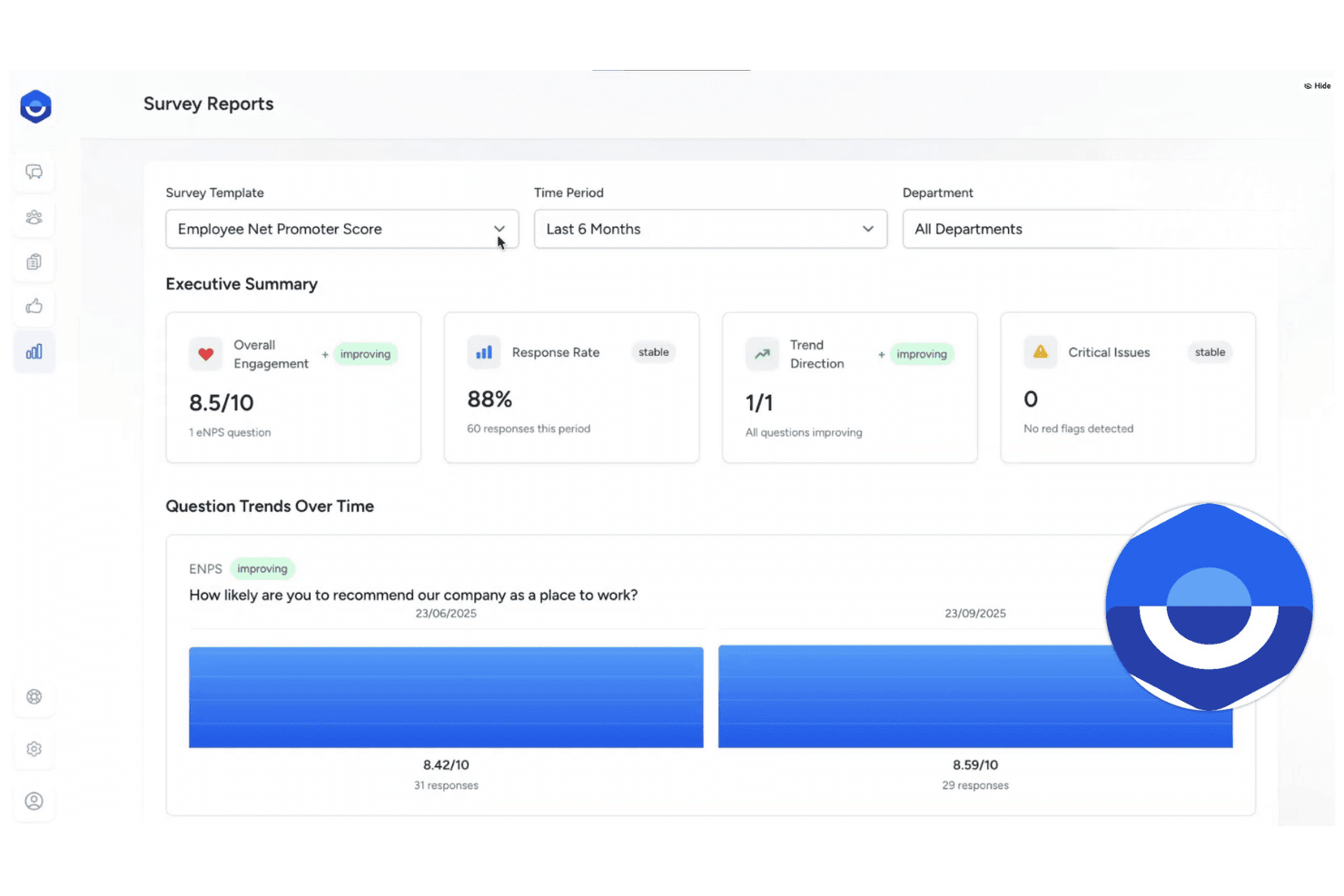
FeedbackPulse offers an Employee Net Promoter Score survey report with engagement metrics, response rates, and question trends over time. FeedbackPulse is an employee engagement platform that combines pulse surveys, eNPS tracking, anonymous feedback collection, peer recognition, and engagement analytics dashboards in a single tool.
Who Is FeedbackPulse Best For?
FeedbackPulse is a good fit for small to mid-sized teams where a People lead or HR generalist owns engagement without a large dedicated HR function behind them.
Why I Picked FeedbackPulse
FeedbackPulse earns its spot on my shortlist because the analytics dashboards go deeper than what I typically see in free-tier engagement tools. I can filter trend lines by department, tenure, and location, and the AI analysis layer identifies which specific survey statements are most strongly linked to overall engagement scores. The built-in eNPS benchmarks span 18 industry categories and 65 countries, so I'm not reading my numbers in a vacuum.
FeedbackPulse Key Features
- Kudos recognition wall: Teammates can post public kudos and shoutouts to a shared recognition feed.
- Configurable anonymity thresholds: Survey results stay hidden until a minimum number of responses are received, protecting respondent identities.
- Lifecycle survey templates: Built-in surveys for onboarding, exit, and milestone events help teams gather targeted feedback across the employee journey.
- Slack integration: Sends surveys, reminders, and notifications directly into Slack so teams can respond within their daily workflow.
FeedbackPulse Integrations
FeedbackPulse offers native integrations with Slack, Google, and Microsoft for single sign-on and survey delivery. An API is available for custom integrations.
What's Free?
FeedbackPulse offers a free-forever plan for teams of up to 10 people, which includes pulse surveys, eNPS surveys, kudos recognition, anonymous feedback, and basic dashboards. The free plan is capped at five active and scheduled surveys combined, and advanced analytics, performance reviews, and 360 feedback are reserved for paid tiers.
Pros and Cons
Pros:
- Built-in AI summaries of open-text responses
- Combines surveys, reviews, and recognition
- Peer review visibility controls protect fairness
Cons:
- Limited third-party native integrations available
- No mobile app currently offered
Learn more about FeedbackPulse: Best for points-based employee rewards
- Free plan available
- From $2.50/user/month (billed annually)
Visit WebsiteCustomer Rating:4.6/5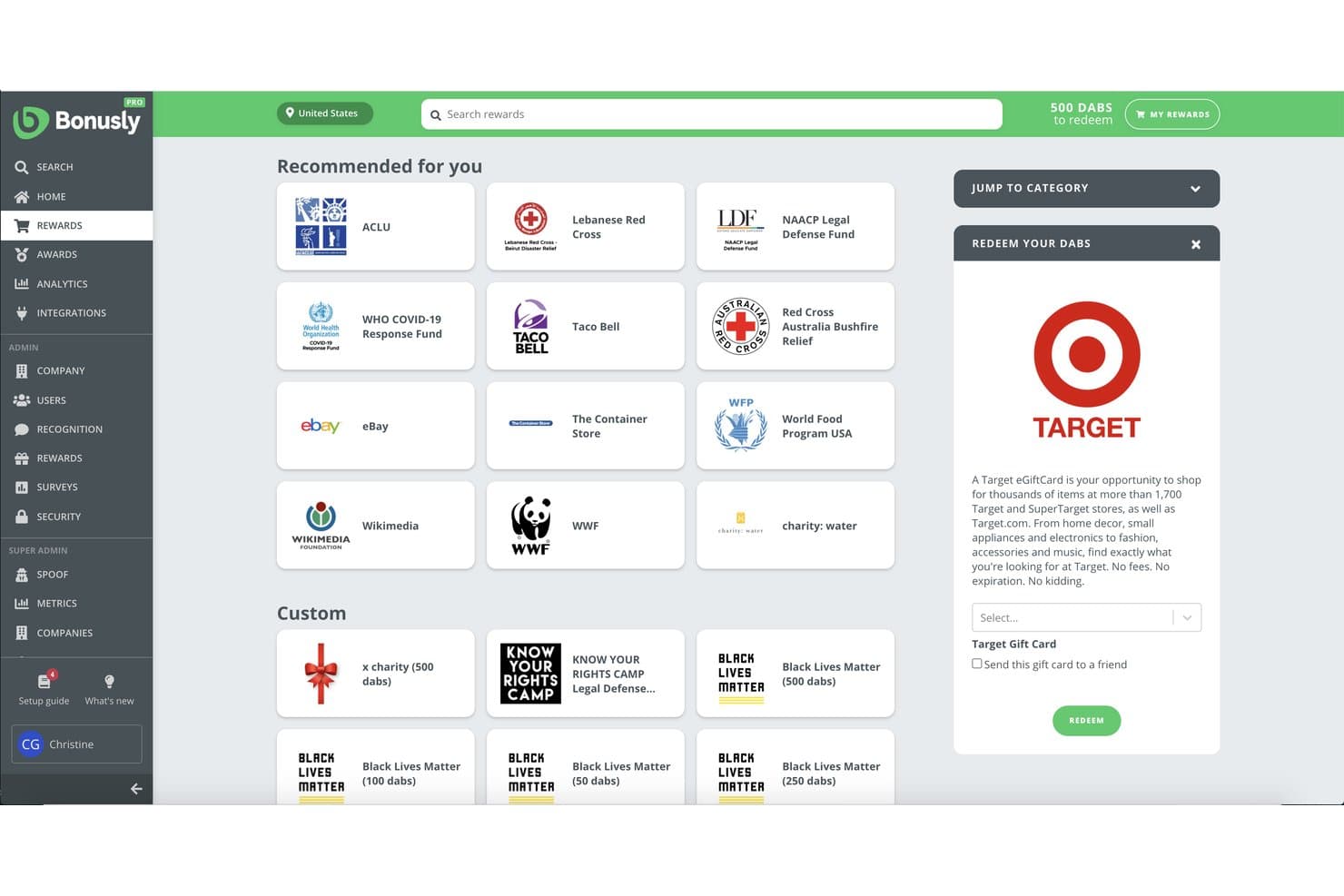
Bonusly offers a rewards redemption marketplace where employees can redeem points (DABs) for gift cards, charitable donations, and custom rewards. Bonusly is a peer recognition and rewards platform that lets employees give points-based shoutouts, redeem a global rewards catalog, and gives managers tools for check-ins, milestone celebrations, and people analytics.
Who Is Bonusly Best For?
Bonusly is a strong fit for people ops and HR teams at SMBs that want to build a culture of peer recognition and make rewards a regular part of daily work.
Why I Picked Bonusly
I picked Bonusly as one of the best because its points-based recognition system is genuinely different from a simple shoutout feed. Each employee gets a monthly allowance of points to give to peers, and those points redeem against a real global rewards catalog covering gift cards, cash, and custom company swag. Automated milestone recognition for birthdays, work anniversaries, and team wins means the recognition habit runs consistently, even when no one remembers to trigger it manually.
Bonusly Key Features
- People analytics dashboard: Visualize engagement, recognition patterns, and participation over time across teams and departments.
- Automated milestone celebrations: Schedule automatic shoutouts for birthdays, work anniversaries, and major wins.
- HRIS and SSO integrations: Sync employee profiles and access controls with major HR systems and identity providers.
- In-app check-ins and 1:1s: Run lightweight feedback loops and recurring conversations between managers and team members within the platform.
Bonusly Integrations
Bonusly offers native integrations with Slack, Microsoft Teams, Google Chat, BambooHR, Workday, Rippling, ADP, and more. An API is available for custom integrations.
What's Free?
Bonusly has a free-forever plan that includes core peer recognition features and works with Slack and Microsoft Teams. It has no user cap, but advanced features like in-depth analytics, check-ins, 1:1s, and manager tools are locked behind paid tiers.
Pros and Cons
Pros:
- Automated milestone recognition runs without manual prompting
- Global rewards catalog with real redemption options
- Points-based recognition drives consistent peer participation
Cons:
- Unspent recognition points expire instead of carrying forward
- Survey tools absent from the free plan
Learn more about Bonusly: Best for mobile-first feedback and communication
- Free plan available
- From $29/month (billed annually)
Visit WebsiteCustomer Rating:4.6/5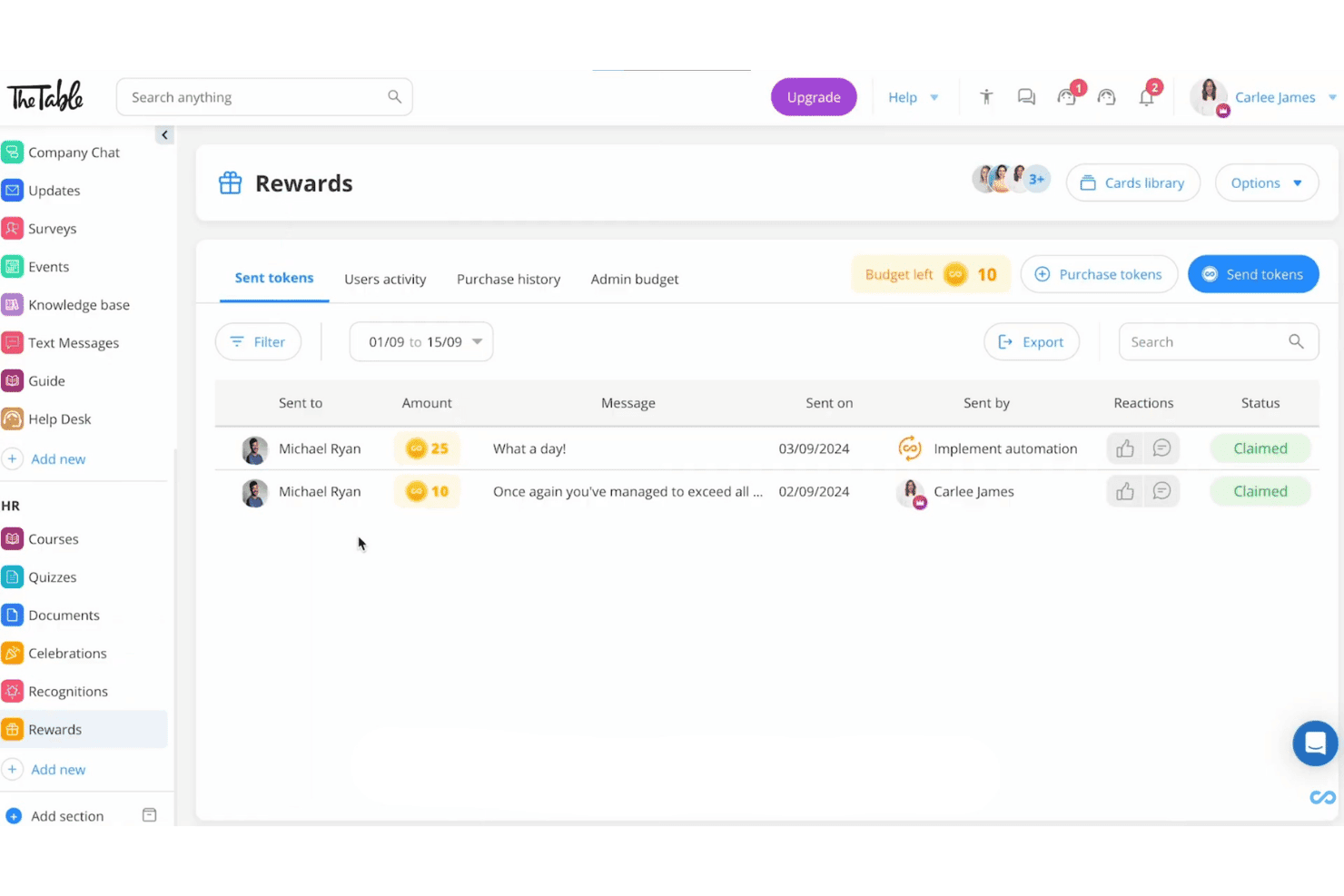
Connecteam's rewards feature offers sent tokens, amounts, messages, and claim statuses for team members in a clean dashboard view. Connecteam is a mobile-first employee management app that combines internal communication, recognition and rewards, pulse surveys, and training tools in a single platform built for deskless and distributed teams.
Who Is Connecteam Best For?
Connecteam is a strong fit for small businesses in industries like retail, hospitality, construction, and field services that manage hourly or frontline workers.
Why I Picked Connecteam
I picked Connecteam because it's one of the few free engagement tools built from the ground up for mobile, not just adapted for it. The Updates feed lets managers push company-wide announcements directly to employees' phones, with real-time reactions and comments from the team. I also like that Surveys, including anonymous ones, are fully functional on mobile, which matters most when your workforce is never at a desk.
Connecteam Key Features
- Recognition and rewards: Celebrate milestones or performance with digital badges, points, and customizable rewards directly from the app.
- Suggestion box: Allow employees to submit ideas or concerns anonymously anytime within the mobile platform.
- Engagement timeline: Track and visualize company events, birthdays, and work anniversaries for team visibility.
- Custom document storage: Upload, organize, and share internal HR or company documents for easy mobile access.
Connecteam Integrations
Connecteam offers native integrations with Gusto, QuickBooks Online, Xero, Paychex, ADP, and BambooHR. It also connects with Zapier and provides an API for custom integrations.
What's Free?
Connecteam offers a free-forever Small Business Plan for teams of up to 10 users, with full access to its Operations, Communications, and HR and Skills hubs, including surveys, recognition, and the Updates feed. Once your team exceeds 10 users, you'll need to move to a paid plan.
Pros and Cons
Pros:
- Recognition features included without paid upgrade
- Anonymous survey responses available on free tier
- Built for mobile-first deskless workforces
Cons:
- Engagement analytics lack depth versus competitors
- Free plan capped at 10 users
Learn more about Connecteam: Best for Microsoft Teams and Outlook integration
- Free plan + 30-day free trial + free demo available
- From $7/user/month (billed annually)
Visit WebsiteCustomer Rating:4.7/5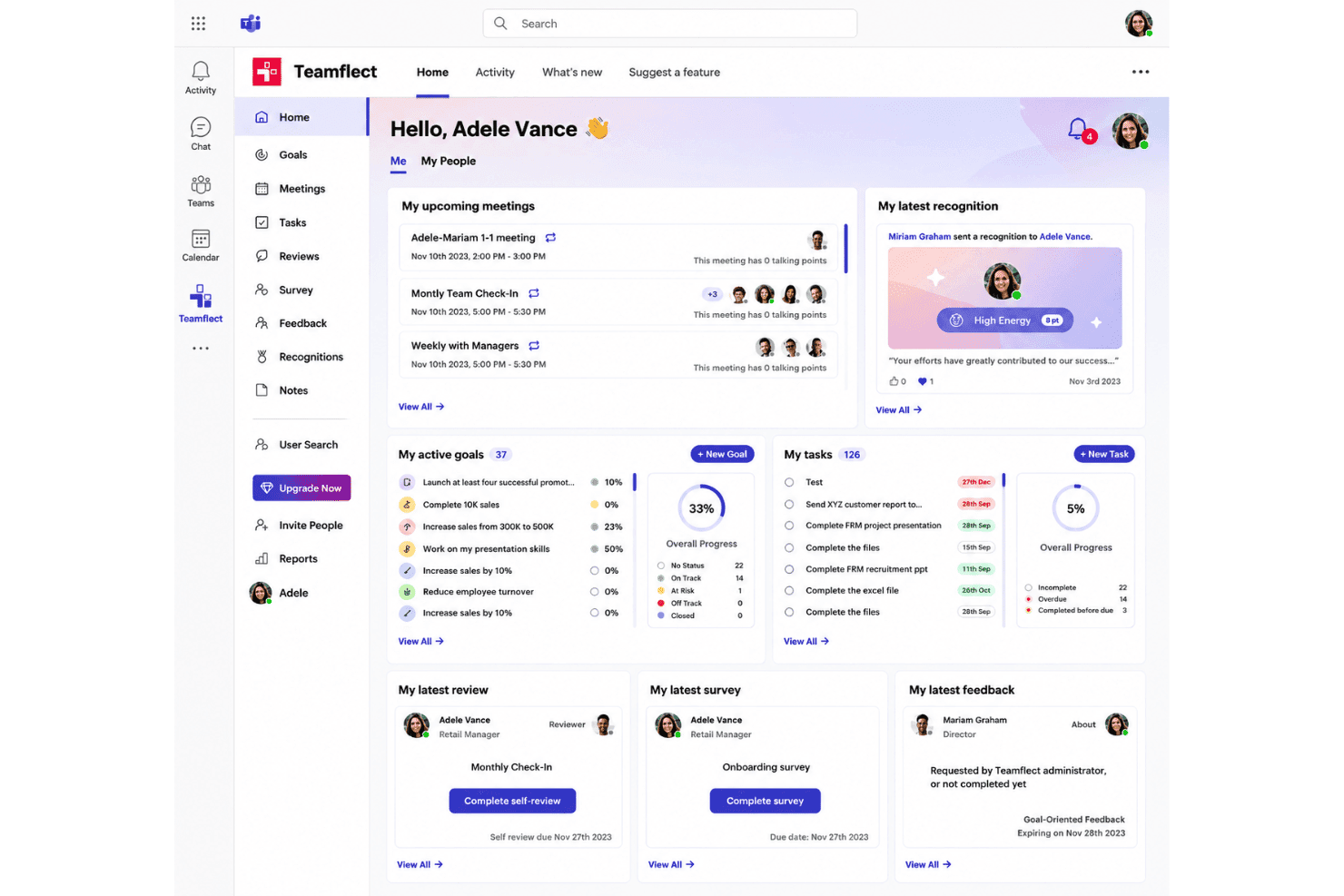
Teamflect centralizes employee goals, tasks, meetings, recognition, surveys, and performance reviews in one dashboard. Teamflect is a free employee engagement and performance management platform that combines pulse surveys, peer recognition, anonymous feedback, OKR tracking, and 1-on-1 meeting tools in one place.
Who Is Teamflect Best For?
Teamflect is a strong fit for small HR teams and people ops managers at SMBs already standardized on Microsoft 365.
Why I Picked Teamflect
Teamflect earns its spot on my shortlist because the entire engagement experience runs natively inside Microsoft Teams. I can send pulse surveys, give recognition badges, and collect anonymous feedback without anyone leaving their Teams workspace. The Outlook calendar sync for 1-on-1 meetings is a particularly nice touch, automatically pulling scheduled check-ins into structured agendas with shared talking points and collaborative notes.
Teamflect Key Features
- Recognition points and rewards catalog: Employees earn points for recognition which can be redeemed for gift cards, prepaid Visas, or charity donations.
- Custom pulse and engagement surveys: HR teams can deploy recurring and customizable surveys to collect structured feedback from employees.
- Anonymous suggestion box: Employees can safely submit ideas or concerns through a dedicated, confidential channel.
- Power BI integration: Connect engagement and performance data to custom dashboards for deeper analytics and reporting.
Teamflect Integrations
Teamflect has native integrations across the Microsoft ecosystem, including Microsoft Teams, Outlook, Microsoft Planner, To-Do, Power BI, and Entra ID. It also provides integrations with HRIS tools like BambooHR, HiBob, and offers an API for custom integrations.
What's Free?
Teamflect offers a free-forever Starter plan capped at 10 users. It includes surveys, pulse surveys, anonymous feedback, recognition, 1-on-1 meetings, OKR tracking, and Microsoft Teams and Outlook integration, but usage analytics, data export, HRIS integrations, and API access are gated behind paid plans.
Pros and Cons
Pros:
- Structured 1-on-1 meeting agendas in free plan
- Anonymous feedback channel on free tier
- Surveys, recognition, and OKRs all included free
Cons:
- Requires active Microsoft Teams ecosystem to function
- Enforces per-user monthly billing after user threshold
Learn more about Teamflect: Best for conversational survey experiences
- Free plan available
- From $19/user/month (billed annually)
Visit WebsiteCustomer Rating:4.4/5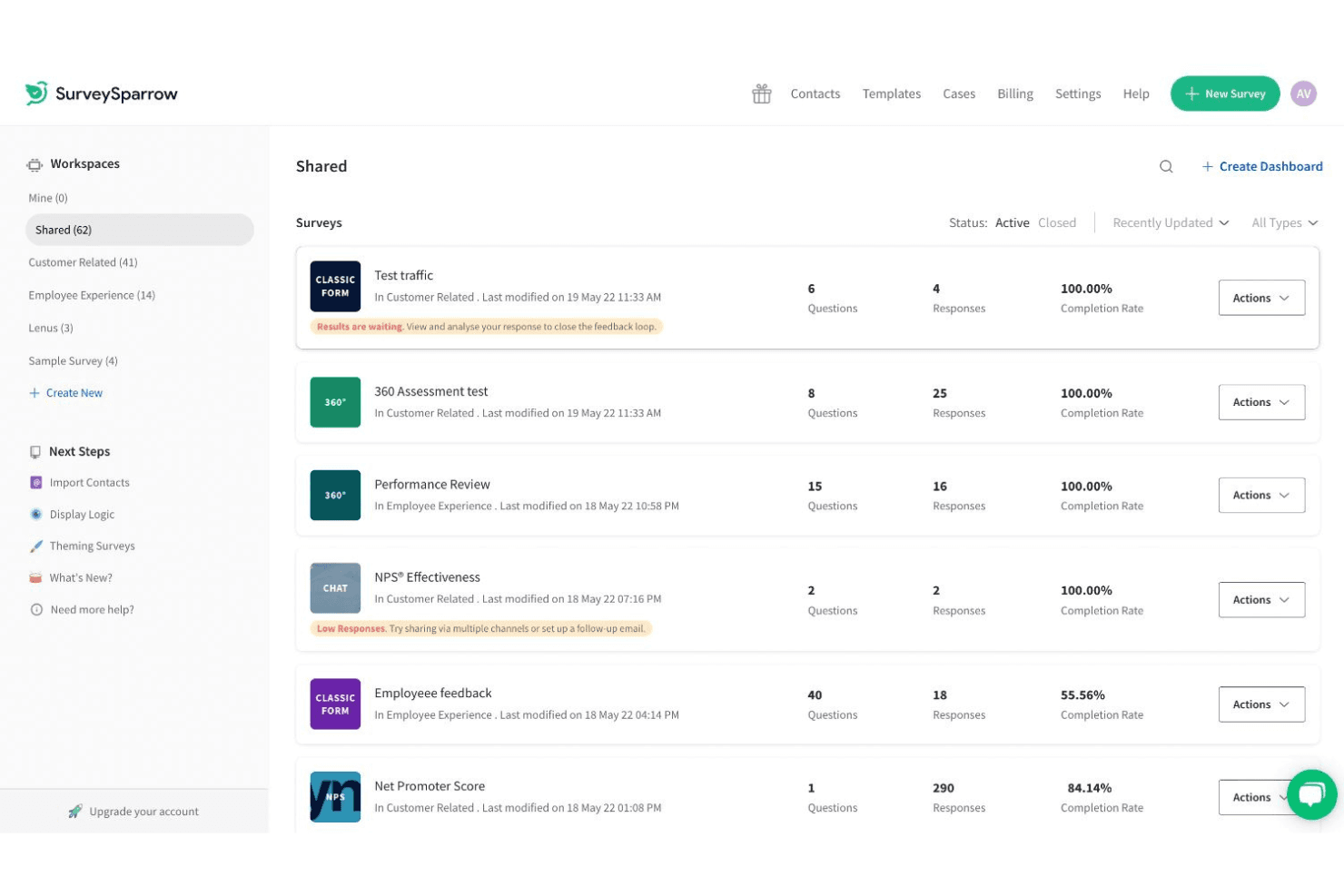
SurveySparrow offers a shared workspace dashboard listing multiple surveys with response counts, question totals, and completion rates. SurveySparrow is a feedback and survey platform that delivers employee pulse surveys, eNPS, and recurring engagement surveys through a chat-like, conversational interface with built-in analytics and workflow automation.
Who Is SurveySparrow Best For?
SurveySparrow suits HR teams at small to mid-sized organizations that prioritize high survey response rates and want to run recurring pulse or eNPS programs without heavy setup.
Why I Picked SurveySparrow
I've included SurveySparrow in my top picks because its chat-like survey format genuinely changes how employees respond to pulse surveys. Instead of a static form, respondents move through questions one at a time in a conversational flow, which SurveySparrow says drives up to 40% higher completion rates. I also like the recurring survey automation, where I can configure a quarterly engagement pulse once and let it run without revisiting it.
SurveySparrow Key Features
- Executive dashboard: Visualize participation, sentiment trends, and survey results with customizable charts and widgets.
- Ticket management: Convert survey responses into actionable tickets that can be assigned, tracked, and prioritized.
- Multi-language surveys: Distribute surveys in over 130 languages with auto-translation to support global teams.
- Slack integration: Share surveys and collect responses directly within Slack for higher engagement.
SurveySparrow Integrations
SurveySparrow offers native integrations with Slack, HubSpot, Salesforce, Intercom, Zendesk, Google Sheets, Microsoft Teams, and Power BI. It also connects with Zapier and provides an API for custom integrations.
What's Free?
SurveySparrow offers a free-forever plan that includes up to 3 active surveys, 10 questions per survey, and 75 responses per quarter. It's a meaningful starting point for small teams testing the platform, but the response cap is quite restrictive for ongoing employee engagement programs.
Pros and Cons
Pros:
- Recurring survey scheduling runs on autopilot
- eNPS tracking built into the free plan
- Conversational survey format lifts response rates
Cons:
- No peer recognition or rewards features
- Free plan response cap limits ongoing programs
Learn more about SurveySparrow: Best for regular pulse surveys
- 30-day free trial + free demo available
- From $2/user/month (billed annually)
Visit WebsiteCustomer Rating:4.6/5
Tap My Back offers a Pulse Surveys Analytics dashboard that visualizes employee mood data through scatter plots and bar charts, tracking 200 total mood submissions. Tap My Back is an employee engagement platform that combines pulse surveys, peer recognition, mood tracking, 360° feedback, and eNPS measurement in one tool.
Who Is Tap My Back Best For?
It's a good fit for HR teams at small to mid-sized companies that want a structured way to run regular employee check-ins alongside recognition.
Why I Picked Tap My Back
I've included Tap My Back in my top picks because its pulse survey setup is genuinely built for consistency. The automated weekly or bi-weekly cadence pairs with smart question rotation, so employees aren't seeing the same prompts on repeat, which keeps response quality up over time. I also like the mood check-in feature, which surfaces early burnout signals so my team can act before engagement visibly drops.
Tap My Back Key Features
- Peer-to-peer recognition feed: Publicly celebrates individual and team achievements within a social-like interface.
- Customizable badge system: Lets you design and assign unique badges for workplace milestones or behaviors.
- 360° feedback: Enables multi-source feedback collection from peers, managers, and direct reports.
- Integration with Slack and Microsoft Teams: Connects recognition and surveys directly to your team’s daily workflow.
Tap My Back Integrations
Tap My Back offers native integrations with Slack, Microsoft Teams, Google Workspace, and Chrome. An API is available for custom integrations.
What's Free?
Tap My Back doesn't offer a free-forever plan. All paid plans come with a 30-day free trial, and no credit card is required to get started.
Pros and Cons
Pros:
- eNPS measurement built into the core platform
- Combines recognition and mood check-ins natively
- Automated pulse cadence with rotating questions
Cons:
- Recognition rewards limited to badges only
- Reporting lacks advanced segmentation options
Learn more about Tap My Back: Best for surveys with real-time analytics
- Free demo available
- Pricing upon request
Visit WebsiteCustomer Rating:4.2/5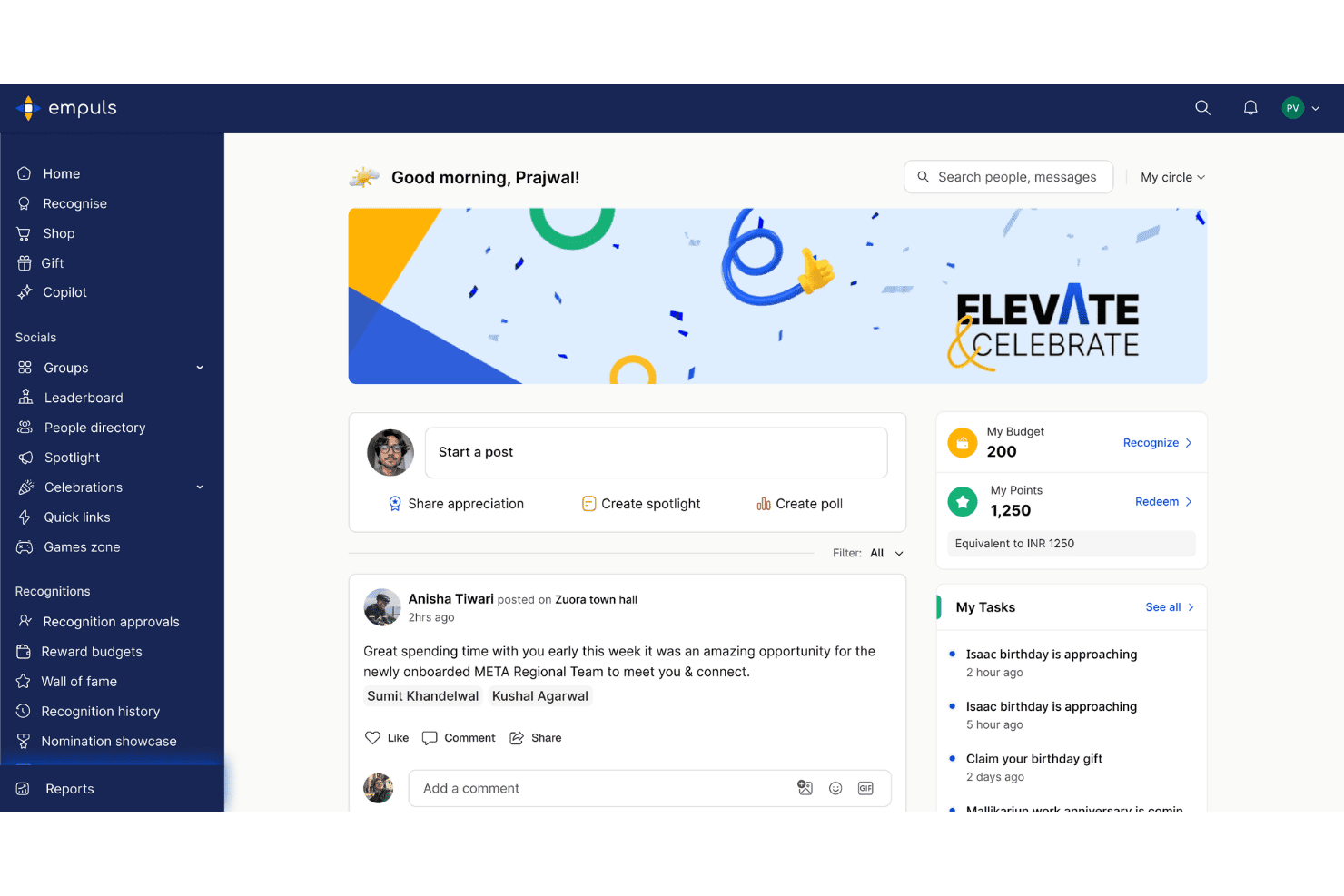
Empuls offers a social recognition feed, reward points dashboard, and task reminders within a unified employee engagement platform. Empuls is a modular employee engagement platform that combines peer recognition, rewards, pulse surveys, anonymous feedback, and a social intranet for distributed teams.
Who Is Empuls Best For?
Empuls is a strong fit for HR and people ops teams at mid-size to large organizations managing distributed or global workforces.
Why I Picked Empuls
I picked Empuls as one of the best because its Employee Listening module covers eNPS, lifecycle surveys, and 360° feedback, all feeding into real-time dashboards with AI-driven sentiment analysis. What I find especially useful is that the AI agent translates shifting sentiment signals into specific action recommendations, so you're not left interpreting raw scores on your own.
Empuls Key Features
- Social intranet: Empuls includes a company feed, groups, polls, and town halls within a moderated platform for cross-team employee engagement.
- Rewards marketplace: The platform offers a global rewards catalog with gift cards, experiences, and merchandise across 150+ countries.
- Automated nudges: AI-powered notifications prompt participation in surveys, recognitions, and campaigns directly in employees’ work tools.
- Multi-channel integrations: Empuls connects natively with Slack, Microsoft Teams, Outlook, Google Workspace, and HRIS systems to deliver engagement activities where employees work.
Empuls Integrations
Empuls offers native integrations with Slack, Microsoft Teams, Outlook, Google Workspace, Zoom, Workday, SAP SuccessFactors, Personio, and has an API for custom integrations.
What's Free?
Empuls offers a free trial with no credit card required, giving your team access to the platform before committing to a paid plan. There's no free-forever tier, so you'll need to move to a paid plan after the trial period ends.
Pros and Cons
Pros:
- Peer recognition tied to company values
- Built-in eNPS with lifecycle survey tracking
- AI-driven sentiment analysis on survey results
Cons:
- Excludes pulse surveys from entry-level tier
- Non-changeable point conversion value set at sign-up
Learn more about Empuls: Best for AI-driven survey question generation
- Free plan + 14-day free trial + free demo available
- From $3/user/month (billed annually)
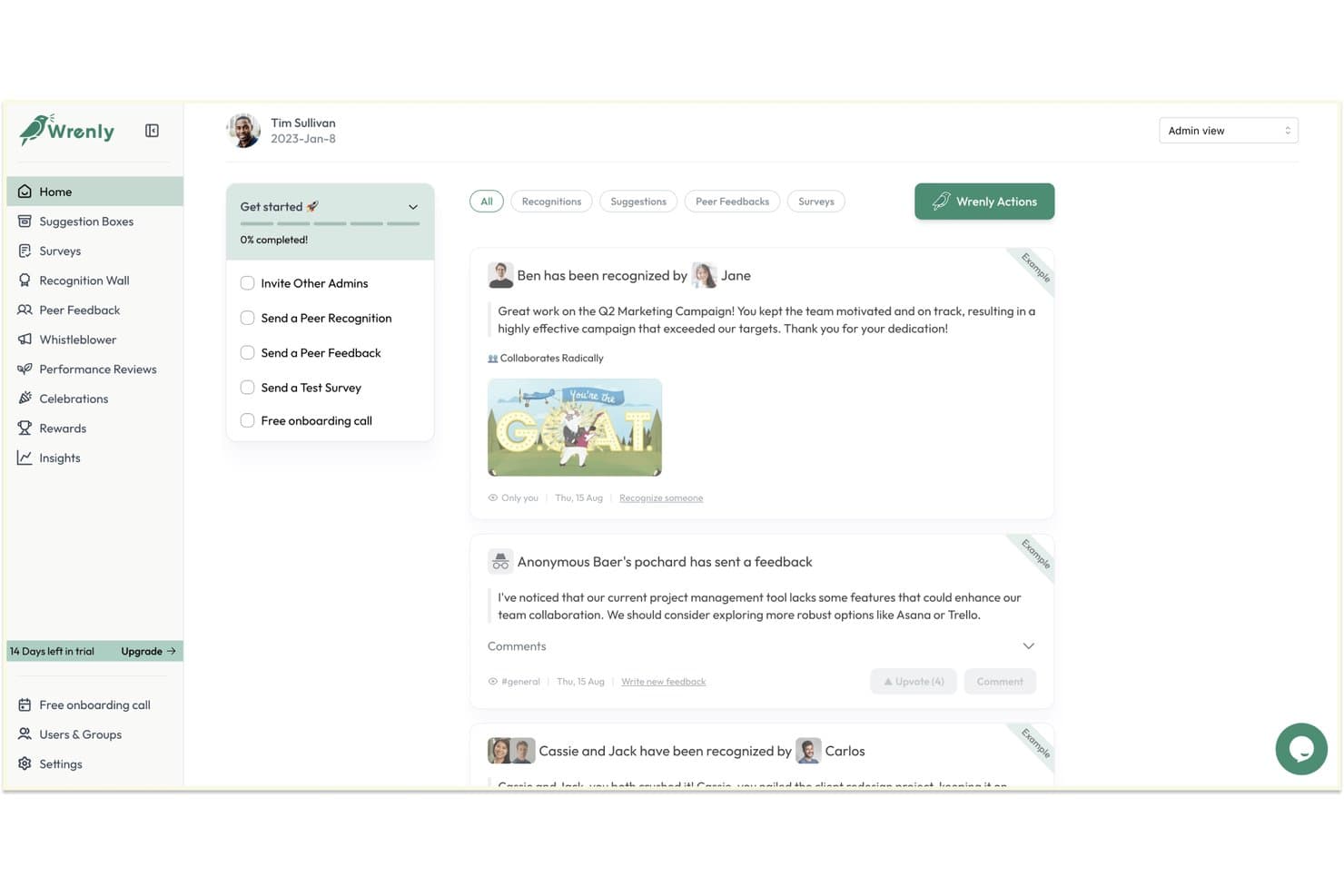
Wrenly offers an employee recognition and feedback dashboard with peer recognitions, anonymous feedback, and a guided onboarding checklist. Wrenly is a free employee engagement platform that combines peer recognition, anonymous suggestion boxes, engagement surveys, and AI-driven insights inside Slack and Microsoft Teams.
Who Is Wrenly Best For?
Wrenly is a strong fit for small and mid-sized teams where a single HR generalist or people ops manager owns recognition, feedback, and engagement without a dedicated tool for each.
Why I Picked Wrenly
Wrenly earns its spot on my shortlist because the AI survey builder generates questions based on what you're actually trying to measure, whether that's onboarding friction or manager effectiveness, rather than handing you a blank template. I also like how the AI automatically categorizes and groups open-text responses, surfacing a synthesized culture score instead of leaving me to comb through raw comments. The whistleblower portal is a genuinely uncommon addition that most free engagement tools skip entirely.
Wrenly Key Features
- Peer recognition feed: Share public kudos and rewards to teammates directly in Slack or Teams.
- Suggestion boxes: Collect continuous, anonymous input from employees through digital suggestion forms.
- Engagement dashboards: Review participation rates, sentiment scores, and historical survey data in one place.
- Basic admin controls: Assign a platform admin to manage access, surveys, and recognition settings for your team.
Wrenly Integrations
Wrenly offers native integrations with Slack, Microsoft Teams, Workday, and Google Workspace, and more.
What's Free?
Wrenly offers a free-forever plan that includes up to 10 peer recognitions per month, basic anonymous feedback, and one admin seat. Paid modules (Engage, Recognize, and Perform) each start at $3–$5/user/month and unlock unlimited features, additional admins, analytics, and data exports.
Pros and Cons
Pros:
- Covers recognition, surveys, and reviews in one free app
- Anonymous suggestion box includes a whistleblower portal
- AI groups and themes open-text survey responses automatically
Cons:
- Free plan limits surveys, feedback, and recognitions per month
- Analytics fall short of dedicated engagement platforms
Learn more about Wrenly: Best for public peer recognition via Slack
- 14-day free trial + free plan + free demo available
- From $1/user/month (billed annually)
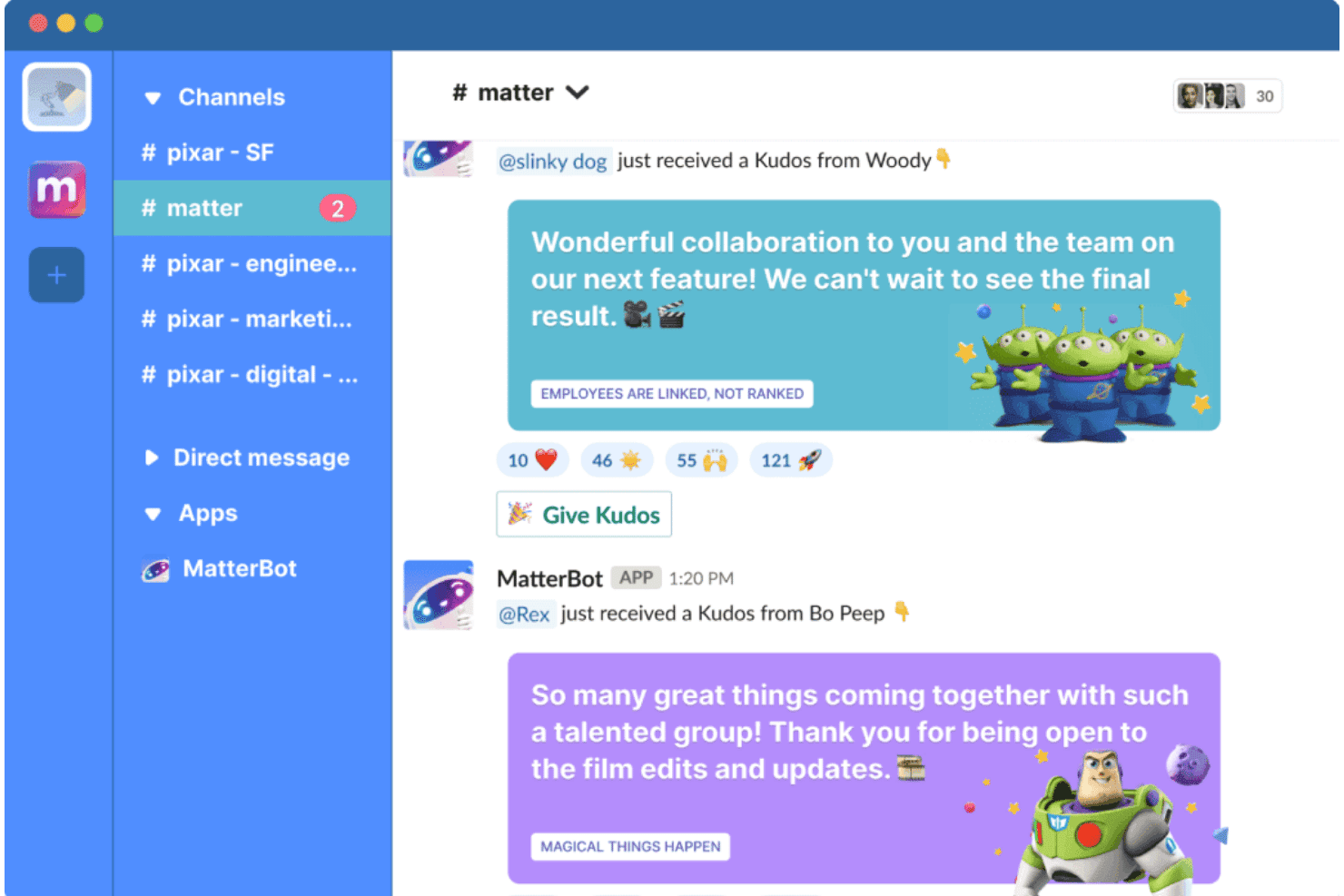
Matter integrates with Mattermost to enable peer-to-peer Kudos recognition directly within team channels. Matter is a recognition-first employee engagement platform built natively for Slack and Microsoft Teams, combining peer kudos, coins-based rewards, pulse surveys, and automated milestone celebrations.
Who Is Matter Best For?
Matter is a great fit for people operations teams at small and mid-sized companies that run primarily on Slack and want to build a recognition culture without a dedicated HR tech budget.
Why I Picked Matter
I picked Matter as one of the best because of how naturally it embeds public peer recognition into Slack. Its Feedback Friday feature automatically prompts employees each week to recognize a colleague in a shared channel, keeping recognition habits consistent without HR having to chase it. The company values kudos cards tie those shoutouts to specific behaviors your team has defined, making each post in #general visible and values-aligned.
Matter Key Features
- Matter coins and rewards catalog: Employees can exchange recognition coins for eGift cards, swag, or charitable donations across 200+ countries.
- Customizable survey templates: Offers a library of survey templates for pulse, onboarding, and eNPS surveys within Slack or Teams.
- Automated celebrations: Tracks and announces birthdays and work anniversaries directly in team channels for added visibility.
- Real-time engagement dashboards: Managers get dashboards to track recognition activity, survey participation, and engagement trends by team.
Matter Integrations
Matter offers native integrations with Slack and Microsoft Teams. An API is available for custom integrations.
What's Free?
Matter offers a free-forever plan that includes kudos recognition, a kudos template library, and Feedback Friday. The free plan is designed for small teams and has no user cap, but it doesn't include celebrations, analytics, custom kudos tied to company values, or rewards, which are gated behind paid tiers.
Pros and Cons
Pros:
- Free plan has no user seat cap
- Kudos cards tied to specific company values
- Feedback Friday builds consistent weekly recognition habits
Cons:
- Rewards redemption gated behind paid plans
- Analytics unavailable on the free tier
Learn more about Matter: Best with multilingual surveys for global teams
- Free trial available
- From $2/user/month (billed annually)
Visit WebsiteCustomer Rating:4.5/5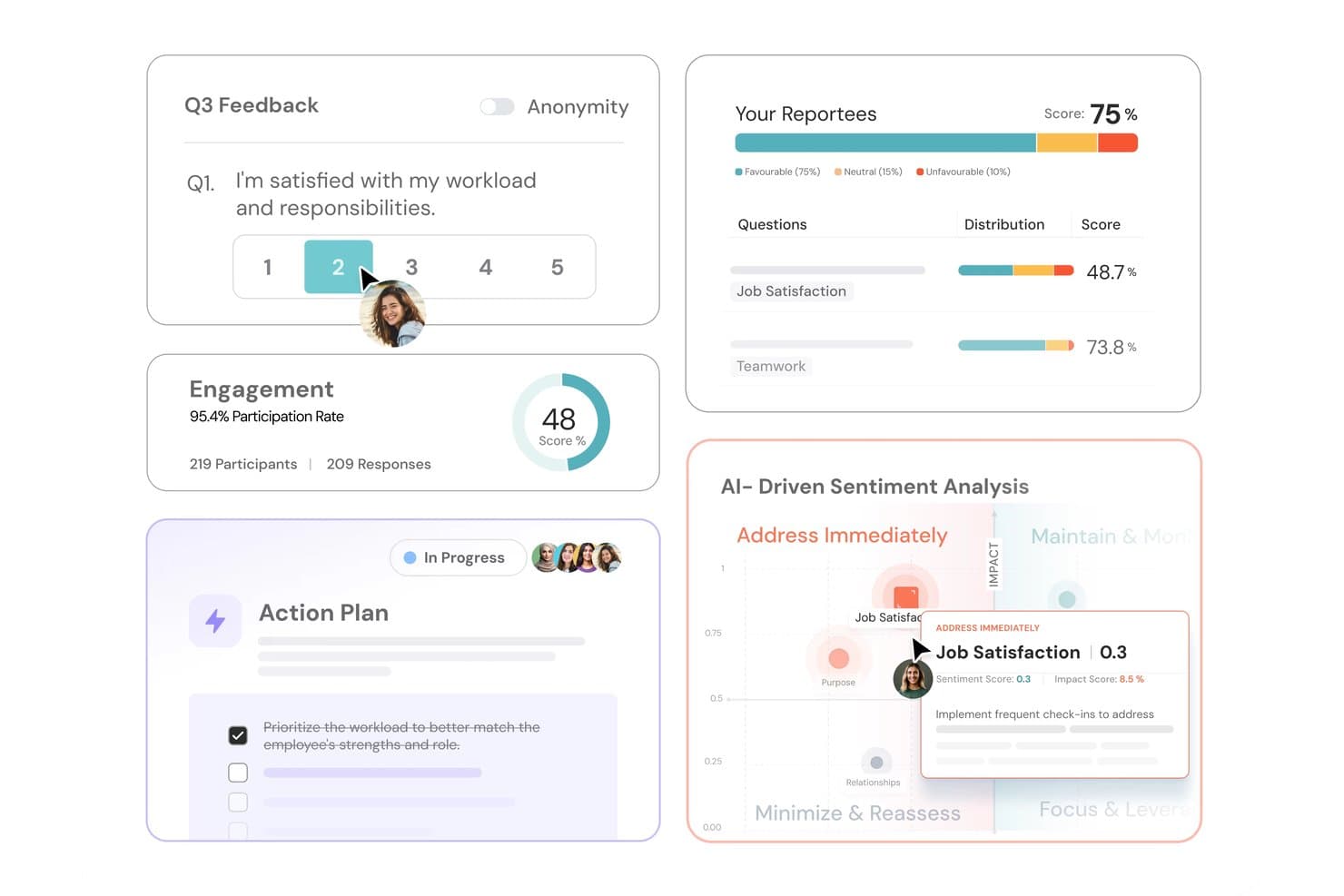
ThriveSparrow tracks employee feedback, engagement scores, action plans, and AI-driven sentiment analysis. ThriveSparrow is an AI-native employee engagement platform that combines pulse surveys, eNPS tracking, peer recognition, rewards, and engagement analytics in one place.
Who Is ThriveSparrow Best For?
ThriveSparrow suits HR teams at SMBs managing distributed or international workforces who need to run structured engagement programs across multiple languages and regions.
Why I Picked ThriveSparrow
ThriveSparrow earns its spot on my shortlist because of how it handles multilingual survey delivery. I can send pulse surveys and eNPS questionnaires in over 100 languages, and open-text responses are translated back instantly, so I'm not losing nuance in what employees are actually saying. I also like that Infer AI scans those translated responses for early signals of disengagement or burnout, giving me a read on regional team health that goes beyond just participation rates.
ThriveSparrow Key Features
- Kudos rewards marketplace: Lets employees redeem points for gift cards from a catalog of 800+ options.
- AI action plans: Automatically generates trackable follow-up steps based on survey results.
- Heatmap dashboards: Visualizes engagement and performance trends by team, department, or manager.
- Jira integration for OKRs: Syncs goals and objectives directly with Jira for streamlined progress tracking.
ThriveSparrow Integrations
ThriveSparrow offers native integrations with Slack, Microsoft Teams, Google Workspace, SAP, HiBob, and Jira.
What's Free?
ThriveSparrow offers a 14-day free trial, not a free-forever plan. The trial gives you access to the platform's core features, but you'll need to move to a paid plan (starting at $3/user/month, billed annually) to continue using it after the trial period ends.
Pros and Cons
Pros:
- Points-based rewards catalog drives recognition habits
- AI detects disengagement in survey responses
- Surveys available in over 100 languages
Cons:
- Reporting features take time to configure
- No free-forever plan for long-term use
Learn more about ThriveSparrow:
Outro software gratuito de envolvimento dos colaboradores
Eis algumas opções adicionais de software gratuito de envolvimento dos colaboradores que não integraram a minha lista de seleção, mas que vale a pena consultar:
- 11GeekbotBest for automated team sentiment check-ins
- 12LeapsomeBest for unified goal and feedback cycles
- 13QuestionPro Employee ExperienceBest for survey question customization options
- 14OpenCultureBest for anonymous culture feedback via Slack
How I Evaluate Free Employee Engagement Software
First, I define what counts as free. For employee engagement software, that means a free-forever plan—a time-limited trial can't sustain the ongoing pulse surveys and recognition habits these tools are built around. From there, I evaluate each platform across two layers: core functionality every tool must cover, and the differentiators that set the best options apart.
Core Functionality (Table Stakes for This List)
In addition to my free offer requirements, I also use a scoring system to select tools for my list. Here's how it works:
I rank each one on a scale from 0 (does not offer the functionality) to 5 (excels in this area) for each core functionality listed below. Then, I calculate the tool's total score into a percentage. Each tool needs to achieve a minimum total score of 75% to be considered for inclusion.
- Employee Surveys: I look for pulse and engagement survey options with at least basic customization, like editing questions or adjusting frequency for recurring check-ins.
- Recognition Tools: Whether it's peer shoutouts tied to company values or kudos in a shared feed, I check that teams can celebrate wins without needing a paid upgrade.
- Anonymous Feedback: Employees need a safe way to raise concerns. I evaluate whether the platform supports anonymous survey responses and, ideally, two-way anonymous replies.
- Engagement Analytics: Dashboards should show more than raw response counts. I look for participation breakdowns and score trends that help HR spot patterns across teams.
- Action Planning: Survey data is only useful if you can act on it. I check for follow-up features like comment threads, task assignments, or basic action item tracking tied to results.
- Work Tool Integrations: Platforms that connect to Slack or Microsoft Teams for survey delivery and recognition tend to drive higher participation, so I confirm which integrations the free plan includes.
Once I have a list of tools that meet the criteria, I consider what sets each platform apart.
Differentiating Factors (What Sets Vendors Apart)
Here's how I compare and contrast different vendors:
Standout Features
Pulse surveys stand out when they're short, recurring, and easy to schedule—so HR can track sentiment shifts on topics like workload or morale without creating survey fatigue. I also look for a peer recognition feed that works like a social timeline, where shoutouts are visible across the team in real time. eNPS tracking is another differentiator I value, since it gives you a single benchmark score to measure employee loyalty trends over time without building custom surveys from scratch.
Beyond Features
Free plan limits matter a lot here. I check whether the cap on users or survey responses can realistically support your team size, and whether historical data stays accessible if you eventually upgrade. Data privacy is equally important—I look for clear anonymization thresholds and compliance certifications that give employees confidence their feedback can't be traced. Since free-tier users rarely get a dedicated support contact, I also evaluate self-service resources like template libraries, knowledge bases, and community forums that help HR generalists launch credible surveys on their own.
Como escolher software gratuito de envolvimento dos colaboradores
É fácil ficar atolado em longas listas de funcionalidades e estruturas de preços complexas. Para o ajudar a manter o foco enquanto percorre o seu processo específico de seleção de software, eis uma lista de verificação dos fatores a ter em conta:
| Fator | O que deve considerar |
|---|---|
| FatorEscalabilidade | O que deve considerarOs limites de utilizadores gratuitos ou de inquéritos darão suporte à sua equipa à medida que esta cresce, ou atingirá rapidamente um limite e terá de procurar uma nova solução? |
| FatorIntegrações | O que deve considerarA ferramenta liga-se às suas principais aplicações de trabalho (Slack, Teams, Google Workspace) sem restrições, ou as integrações essenciais estão sujeitas a pagamento ou indisponíveis? |
| FatorPersonalização | O que deve considerarPode adaptar os calendários dos inquéritos e os programas de reconhecimento para refletirem a sua cultura, ou está limitado a modelos genéricos e fixos no plano gratuito? |
| FatorFacilidade de utilização | O que deve considerarA plataforma é suficientemente intuitiva para que os recursos humanos e os colaboradores a possam utilizar sem formação ou intervenção informática? Procure uma configuração orientada ou processos de integração claros. |
| FatorImplementação e integração | O que deve considerarCom que rapidez pode lançar o seu primeiro inquérito ou publicação de reconhecimento? O processo adapta-se à capacidade da equipa de recursos humanos, ou exigirá ajuda externa ou várias horas de trabalho? |
| FatorMedidas de segurança | O que deve considerarA plataforma oferece fortes proteções de privacidade para o feedback anónimo e os dados dos inquéritos, com limites claros e certificações em que possa confiar? |
| FatorCusto | O que deve considerarA ferramenta é verdadeiramente gratuita para sempre, ou perderá dados ou funcionalidades essenciais se ultrapassar o escalão gratuito? Tenha cuidado com armadilhas como períodos experimentais “gratuitos” que expiram. |
| FatorDisponibilidade de suporte | O que deve considerarOs recursos de ajuda, os tutoriais e os fóruns de utilizadores são suficientemente completos para lhe dar suporte sem apoio ao cliente pago ou assistência técnica em direto? |
O que é software gratuito de envolvimento dos colaboradores?
O software gratuito de envolvimento dos colaboradores é uma plataforma digital que ajuda as equipas de RH a realizar inquéritos, recolher feedback anónimo e apoiar o reconhecimento, a gestão do desempenho e a comunicação através de um plano gratuito permanente. Estas ferramentas podem apoiar os OKRs ao longo do ciclo de vida dos colaboradores, ajudando a melhorar o envolvimento e a retenção dos colaboradores, enquanto acompanham o sentimento e reforçam uma cultura positiva. Plataformas como a Achievers são exemplos da categoria mais abrangente de software de envolvimento dos colaboradores.
Funcionalidades do software gratuito de envolvimento dos colaboradores
Vamos analisar as funcionalidades normalmente encontradas no software de envolvimento dos colaboradores e quais são geralmente incluídas nos planos gratuitos e nos planos pagos.
Funcionalidades normalmente gratuitas do software de envolvimento dos colaboradores
- Inquéritos rápidos: Questionários curtos e recorrentes que fornecem feedback em tempo real sobre o moral, a carga de trabalho e a satisfação dos colaboradores no local de trabalho.
- Reconhecimento básico entre pares: Elogios ou agradecimentos públicos, por vezes utilizando uma gamificação simples para incentivar a participação e reconhecer os contributos.
- Feedback anónimo: Um canal para os colaboradores partilharem feedback, preocupações ou ideias de forma confidencial, ajudando os RH a identificar problemas com honestidade.
- Painéis de controlo simples do envolvimento: Resumos visuais da participação, das taxas de resposta aos inquéritos e do acompanhamento do sentimento para monitorizar as tendências de envolvimento.
- Integrações básicas: Ligações a ferramentas como o Slack ou o email que permitem às equipas enviar inquéritos e partilhar reconhecimento diretamente nos fluxos de trabalho existentes.
- Modelos de inquérito pré-criados: Questionários prontos a utilizar para temas comuns relacionados com o envolvimento, permitindo aos RH lançar inquéritos sem terem de os criar de raiz.
- Análise das respostas: Relatórios agregados que apresentam as pontuações e tendências gerais sem segmentação ou filtragem avançadas.
- Definições de notificações: Controlos que permitem aos utilizadores receber alertas sobre novos inquéritos, reconhecimento ou atividade de feedback.
Funcionalidades normalmente pagas do software de envolvimento dos colaboradores
- Personalização avançada de inquéritos: Controlo total sobre a formulação das perguntas, a lógica condicional e o agendamento, além de vários tipos de inquéritos para diferentes objetivos de envolvimento.
- Sistemas de recompensas e pontos: Reconhecimento por parte de colegas e gestores associado à acumulação de pontos e a catálogos de presentes, acrescentando incentivos ao feedback positivo.
- Análise ao nível dos gestores: Relatórios detalhados que dividem os dados de envolvimento por equipa, departamento ou localização para permitir ações direcionadas.
- Ferramentas de planeamento de ações: Funcionalidades que ajudam os gestores e os RH a atribuir ações, acompanhar o progresso e fazer o acompanhamento diretamente na plataforma.
- Ferramentas de gestão do desempenho: Ligações a software de gestão do desempenho para associar os dados de envolvimento aos objetivos, às avaliações e ao desenvolvimento dos colaboradores.
- Integrações de aprendizagem: Ligações a um sistema de gestão da aprendizagem para apoiar a formação e o desenvolvimento com base nas necessidades dos colaboradores.
- Comparação de referências e análise de tendências: Compare as suas métricas com referências do setor ou geográficas e consulte tendências históricas para obter informações mais aprofundadas.
- Mensagens anónimas bidirecionais: Possibilidade de responder a feedback anónimo e manter diálogos confidenciais contínuos entre os RH e os colaboradores.
- Integrações com sistemas de informação de RH e SSO: Ligações diretas aos sistemas de RH para sincronizar os dados dos colaboradores e permitir o início de sessão único seguro, facilitando o acesso.
- Suporte prioritário e formação: Acesso a equipas de suporte dedicadas, sessões de integração e orientações sobre boas práticas que não estão disponíveis na maioria dos planos gratuitos.
Benefícios do software gratuito de envolvimento dos colaboradores
A implementação de software gratuito de envolvimento dos colaboradores proporciona vários benefícios para a sua equipa e para a sua empresa. Eis alguns dos benefícios que pode esperar:
- Feedback contínuo dos colaboradores: Inquéritos regulares, canais anónimos e feedback de 360 graus permitem acompanhar o moral e recolher opiniões de várias perspetivas antes que as preocupações se agravem.
- Cultura de reconhecimento acessível: Os elogios públicos e o reconhecimento integrados ajudam a promover a valorização e o apoio entre colegas sem custos adicionais para o orçamento de RH.
- Implementação rápida: Os planos gratuitos, com integração autónoma e modelos, permitem à sua equipa lançar programas de envolvimento com pouca ou nenhuma intervenção das TI.
- Métricas de envolvimento acessíveis: Painéis, relatórios e mapas de calor simples proporcionam visibilidade sobre o sentimento da equipa e as tendências de participação desde o primeiro dia.
- Integrações flexíveis no local de trabalho: As ligações ao Slack, Teams ou e-mail ajudam-no a contactar os colaboradores através dos canais onde já comunicam e colaboram.
- Sem compromisso a longo prazo: Os planos gratuitos para sempre permitem experimentar novas ferramentas e processos sem riscos, com a opção de expandir quando as necessidades da empresa mudarem.
- Suporte para equipas pequenas: Os limites de utilizadores dos planos gratuitos são frequentemente adequados para pequenas empresas que pretendem criar hábitos de envolvimento com um orçamento limitado.
Custos e preços do software de envolvimento dos colaboradores
Compreendo que chegou a este artigo à procura das melhores opções de software de envolvimento dos colaboradores disponíveis gratuitamente. No entanto, uma vez que os planos gratuitos oferecem apenas funcionalidades limitadas, é bastante provável que precise de aumentar o seu plano no futuro.
A tabela abaixo resume os planos comuns, os seus preços médios e as funcionalidades normalmente incluídas no software de envolvimento dos colaboradores:
Tabela de comparação de planos de software de envolvimento dos colaboradores
| Tipo de plano | Preço médio | Funcionalidades comuns |
|---|---|---|
| Tipo de planoPlano gratuito | Preço médio$0 | Funcionalidades comunsInquéritos de pulso básicos, reconhecimento entre colegas, feedback anónimo, modelos pré-criados, análises simples e integrações limitadas. |
| Tipo de planoPlano pessoal | Preço médio$5-$10/utilizador/mês | Funcionalidades comunsMais tipos de inquéritos, alguma personalização, planeamento básico de ações, relatórios limitados e integrações padrão. |
| Tipo de planoPlano empresarial | Preço médio$10-$25/utilizador/mês | Funcionalidades comunsLógica avançada de inquéritos, acompanhamento do eNPS, análises para gestores, ferramentas de planeamento de ações e a maioria das integrações. |
| Tipo de planoPlano empresarial avançado | Preço médio$25-$50/utilizador/mês | Funcionalidades comunsMarca personalizada, acesso completo à API, segurança avançada, HRIS e SSO, avaliação comparativa, suporte prioritário e funcionalidades de conformidade. |
Perguntas frequentes sobre software gratuito de envolvimento dos colaboradores
Eis algumas respostas a perguntas comuns sobre software gratuito de envolvimento dos colaboradores:
Quais são as principais limitações do software gratuito de envolvimento dos colaboradores?
A maioria dos planos gratuitos limita o número de utilizadores, inquéritos ou respostas que pode recolher por mês. As análises avançadas, as integrações e as opções de personalização são frequentemente restringidas ou disponibilizadas apenas nos escalões pagos.
Posso exportar dados de uma ferramenta gratuita de envolvimento dos colaboradores?
Sim, a maioria das plataformas permite exportações básicas de dados, como respostas a inquéritos ou relatórios resumidos, embora algumas possam limitar os formatos de exportação ou os dados históricos na versão gratuita.
O feedback dos colaboradores é realmente anónimo nos planos gratuitos?
Sim, a maioria dos softwares torna as respostas anónimas nos escalões gratuitos, mas verifique se existem limites mínimos claros de respostas para evitar a identificação acidental em equipas pequenas.
As ferramentas gratuitas de envolvimento dos colaboradores integram-se com o Slack ou o Teams?
Algumas sim, mas as integrações nos planos gratuitos podem limitar-se a notificações básicas ou à distribuição de inquéritos. As ligações de fluxo de trabalho mais avançadas exigem normalmente um plano pago.
Como escolho o software gratuito de envolvimento dos colaboradores adequado para a minha equipa?
Avalie o tamanho da sua equipa, as funcionalidades pretendidas, as necessidades de privacidade e as integrações mais importantes. Teste a facilidade de utilização e analise os recursos de suporte disponíveis antes de tomar uma decisão.