


Granskning av Officevibe (Workleap) – programvara för medarbetarengagemang för 2026



Workleap is an employee engagement software built for teams that need pulse surveys, manager insights, and employee feedback tools without a bloated feature set getting in the way. I'd consider it if you want something more focused than Lattice, which wraps engagement inside a broader performance, compensation, and OKR platform, and what you actually need is a dedicated engagement layer your managers will use without a steep learning curve.
Workleap Evaluation Summary
- From $4,999/year
- Free demo available
Varför du kan lita på våra programvarurecensioner
Vårt team har testat och recenserat programvara sedan 2012. Som HR-experter själva vet vi hur svårt — och viktigt — det är att välja rätt programvara.
För den här guiden utvärderade vi verktyg genom praktisk testning och oberoende research, och betygsatte verktygen enligt våra urvalskriterier. Vi drar även nytta av insikter från branschens tankeledare och praktiserande HR-experter.
Våra recensioner speglar vårt mänskliga redaktionella omdöme, inte ett säljbudskap.
Expertgranskare:
Workleap Overview
pros
-
You can get real-time feedback from your team with ease.
-
The software's analytics provide actionable insights that help you improve team dynamics.
-
It's user-friendly, making it easy for your team to adopt and engage with.
cons
-
Some users find the customization options limited for specific team needs.
-
The reporting features could be more comprehensive for deeper analysis.
-
You might experience occasional delays with customer support responses.
-

Justworks
Visit WebsiteThis rating combines scores from multiple user review sites to reflect overall customer sentiment about the product.4.6 -
Prevue Assessments
Visit WebsiteThis rating combines scores from multiple user review sites to reflect overall customer sentiment about the product.4.6 -
Small Improvements
Visit WebsiteThis rating combines scores from multiple user review sites to reflect overall customer sentiment about the product.4.3





How We Test & Score Our Tools
We’ve spent years building, refining, and improving our software testing and scoring system. The rubric is designed to capture the nuances of software selection and what makes a tool effective, focusing on critical aspects of the decision-making process.
Below, you can see exactly how our testing and scoring works across seven criteria. It allows us to provide an unbiased evaluation of the software based on core functionality, standout features, ease of use, onboarding, customer support, integrations, customer reviews, and value for money.
Core Functionality (25% of final score)
The starting point of our evaluation is always the core functionality of the tool. Does it have the basic features and functions that a user would expect to see? Are any of those core features locked to higher-tiered pricing plans? At its core, we expect a tool to stand up against the baseline capabilities of its competitors.
Standout Features (25% of final score)
Next, we evaluate uncommon standout features that go above and beyond the core functionality typically found in tools of its kind. A high score reflects specialized or unique features that make the product faster, more efficient, or offer additional value to the user.
We also evaluate how easy it is to integrate with other tools typically found in the tech stack to expand the functionality and utility of the software. Tools offering plentiful native integrations, 3rd party connections, and API access to build custom integrations score best.
Ease of Use (10% of final score)
We consider how quick and easy it is to execute the tasks defined in the core functionality using the tool. High scoring software is well designed, intuitive to use, offers mobile apps, provides templates, and makes relatively complex tasks seem simple.
Onboarding (10% of final score)
We know how important rapid team adoption is for a new platform, so we evaluate how easy it is to learn and use a tool with minimal training. We evaluate how quickly a team member can get set up and start using the tool with no experience. High scoring solutions indicate little or no support is required.
Customer Support (10% of final score)
We review how quick and easy it is to get unstuck and find help by phone, live chat, or knowledge base. Tools and companies that provide real-time support score best, while chatbots score worst.
Customer Reviews (10% of final score)
Beyond our own testing and evaluation, we consider the net promoter score from current and past customers. We review their likelihood, given the option, to choose the tool again for the core functionality. A high scoring software reflects a high net promoter score from current or past customers.
Value for Money (10% of final score)
Lastly, in consideration of all the other criteria, we review the average price of entry level plans against the core features and consider the value of the other evaluation criteria. Software that delivers more, for less, will score higher.
Core Features
Real-Time Feedback: You can gather instant feedback from your team, allowing you to address issues as they arise. This feature helps you maintain a pulse on employee morale.
Pulse Surveys: These quick and easy surveys let you measure engagement regularly. You can customize questions to fit your team's unique needs.
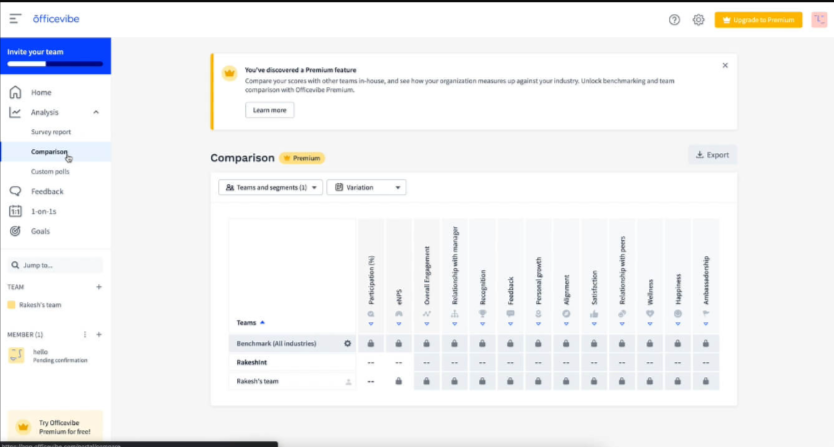
Analytics Dashboard: The dashboard provides clear insights into team dynamics and engagement levels. It helps you make informed decisions with visual data representations.
Actionable Insights: You receive specific recommendations on improving team engagement. This feature turns data into practical steps for your team.
Anonymous Feedback: Team members can share their thoughts without fear, promoting honest communication. This builds trust within your team.
Goal Setting: You can align team objectives with company goals, enhancing focus and productivity. This feature supports your strategic planning efforts.

Ease of Use
Officevibe stands out for its intuitive design, making it easy for you and your team to navigate its features without a steep learning curve.
The straightforward interface ensures you can quickly access feedback and analytics, streamlining your engagement efforts.
Users appreciate how the platform simplifies collecting and analyzing employee sentiment, saving you time and effort. With clear visuals and simple navigation, Officevibe helps you focus on improving team dynamics rather than wrestling with complex software.
Workleap Specs
- 360 Degree Feedback
- API
- Cloud Deployment
- CRM Integration
- Data Export
- Data Import
- Data Visualization
- Database
- Employee Database
- Employee Engagement
- Employee Incentive Management
- Employee Training
- External Integrations
- Feedback Management
- Google Apps Integration
- Health Management
- Migration to Cloud
- Multi-Source Feedback
- Multi-User
- Performance Appraisal
- Process Reporting
- Resource Management
- Rewards & Recognition
- Social-Media Integration
- Software Integration
- Task Scheduling/Tracking
- Third-Party Plugins/Add-Ons
- Workflow Management




Vanliga frågor om Officevibe
Hur hanterar Officevibe datasäkerhet och efterlevnad?
Officevibe prioriterar datasäkerhet genom att använda branschstandardiserad kryptering och säkra metoder för datalagring. Ditt teams data lagras i enlighet med GDPR och andra relevanta bestämmelser, vilket säkerställer integritet och skydd. Regelbundna granskningar och uppdateringar håller plattformen säker, så att du kan lita på att din information är trygg.
Kan Officevibe stödja distansteam på ett effektivt sätt?
Ja, Officevibe passar bra för distansteam och erbjuder feedback i realtid samt pulsmätningar som hjälper dig att följa teamets uppfattningar oavsett var medlemmarna befinner sig. Plattformens analyser ger insikter i distansteamets dynamik och hjälper dig att snabbt hantera eventuella problem med engagemanget. Den är utformad för att främja kommunikation och samhörighet, även på avstånd.
Vilken typ av feedback kan jag samla in med Officevibe?
Officevibe låter dig samla in anonym feedback genom pulsmätningar, anpassade omröstningar och feedbackverktyg i realtid. Dessa funktioner gör det möjligt för teamet att öppet dela sina tankar och främjar en kultur av transparens och förtroende. Plattformen ger handlingsbara insikter som hjälper dig att hantera problem och öka engagemanget.
Hur anpassningsbart är Officevibe efter mitt teams behov?
Officevibe erbjuder flera anpassningsalternativ, så att du kan skräddarsy pulsmätningar och feedbackverktyg efter teamets specifika behov. Även om vissa användare önskar mer avancerade anpassningsmöjligheter är de befintliga alternativen i allmänhet tillräckliga för de flesta medelstora team. Du kan justera frågor och feedbackinställningar så att de stämmer överens med organisationens mål. Läs mer om Officevibes priser för att se om anpassningar medför extra kostnader.
Hur hjälper Officevibe till att förbättra medarbetarnas engagemang?
Officevibe bidrar till ökat engagemang genom att ge insikter i teamets uppfattningar och arbetsmoral. Feedbackverktygen och analyserna gör det möjligt för dig att snabbt identifiera och hantera problem. Genom att främja öppen kommunikation och erbjuda handlingsbara rekommendationer stöder Officevibe dina ansträngningar att skapa ett mer engagerat och motiverat team.
Kan Officevibe stödja flerspråkiga team?
Ja, Officevibe stöder flera språk, vilket gör det till ett bra val för flerspråkiga team. Funktionen säkerställer att alla teammedlemmar kan delta i enkäter och feedbacksessioner på det språk de föredrar. Den hjälper dig att upprätthålla inkludering och säkerställer tydlig kommunikation mellan team med olika bakgrund.
Hur ofta bör jag använda Officevibes pulsmätningar?
Du kan använda Officevibes pulsmätningar så ofta som behövs för att följa teamets uppfattningar. Många team väljer att genomföra dem varje vecka eller varannan vecka för att upprätthålla en konsekvent förståelse av engagemangsnivåerna. Regelbunden användning av pulsmätningar hjälper dig att hålla dig informerad och reagera på teamets behov.
Vilka resurser finns tillgängliga för nya Officevibe-användare?
Officevibe erbjuder en rad resurser för nya användare, bland annat handledningar, vanliga frågor och ett särskilt supportteam. Dessa resurser hjälper dig att snabbt komma igång och få svar på eventuella frågor.
Introduktionsprocessen är utformad för att vara enkel, så att du effektivt kan börja använda plattformen. Jag kunde inte hitta specifika uppgifter om Officevibes företagsöversikt och historik. Om du har några andra frågor eller behöver ytterligare hjälp är du välkommen att höra av dig!
Officevibe företagsöversikt & historik
Officevibe, som nu är en del av Workleap, har sitt säte i Montreal, Kanada. Företaget hjälper över 20 000 företag att öka medarbetarnas engagemang med lättanvända verktyg för återkoppling, erkännande och undersökningar.
Officevibe verkar under Workleap Technologies, som även äger andra HR-verktyg som Pingboard och en lösning för prestationshantering.
Företaget är känt för sin intuitiva plattform och sitt fokus på medarbetarnas välbefinnande och har förtroende från företag som CSL Group, Rablab och Sharethrough.
Officevibes viktigaste milstolpar
2013: Officevibe lanserades för att hjälpa team att samla in medarbetarnas återkoppling och förbättra engagemanget.
2022: Officevibe blir en del av Workleap, vilket utökar produktutbudet med verktyg för prestationshantering och introduktion.
2023: Officevibe når över 20 000 användare globalt, inklusive chefer och HR-team.
2024: Utökade integrationer med verktyg som Slack och Teams samt större HRIS-plattformar.
Vad händer härnäst?
För att hålla dig uppdaterad om allt det senaste inom personalhantering kan du prenumerera på vårt nyhetsbrev för ledare och chefer. Du får insikter och erbjudanden som är anpassade för ledare och HR-personal, direkt i din inkorg.