

10 Best AI Interview Software Reviewed in 2026

10 Best AI Interview Software Shortlist


Finding the right candidates can be tough, so AI interview software is here to help. These tools use advanced algorithms to evaluate candidates, saving your team time and reducing bias. They can analyze tone, word choice, and even facial expressions in live interviews to give you a clearer picture of each applicant.
In my experience, AI features in these tools are transforming the hiring process. You can rely on my independent reviews to guide you through the best options available. I'll highlight the AI capabilities that set each software apart, so that you can make an informed choice.
Join me as we explore the top AI interview software options, focusing on what matters most to your hiring needs.
Why Trust Our Software Recommendations
Our team has been testing and reviewing software since 2012. As HR experts ourselves, we know how difficult—and important—it is to choose the right software.
For this guide, we evaluated tools using hands-on testing and independent research, scoring tools using our selection criteria. We also draw on insights from industry thought leaders and practicing HR experts.
Our reviews reflect our human editorial judgment, not a sales pitch.
Expert reviewers:
AI Interview Software Comparison Table
This comparison table summarizes pricing details for my top AI interview software selections:
| Tool | Best For | Trial Info | Price | ||
|---|---|---|---|---|---|
| 1 | Best for branded candidate experiences | Free demo available | Pricing upon request | Website | |
| 2 | Best for high-volume Enterprise hiring | Free demo available | Price upon request | Website | |
| 3 | Best for end-to-end agentic recruiting automation | Free demo available | Pricing upon request | Website | |
| 4 | Best with AI-driven candidate profile enrichment | 14-day free trial + free demo available | From $15/user/month (billed annually) | Website | |
| 5 | Best for structured candidate screening | Free demo available | Pricing upon request | Website | |
| 6 | Best for SMS-powered AI phone screening | Free demo available | From $300/month (billed annually) | Website | |
| 7 | Best for customizable talent evaluation flows | Free trial + free demo available | From $749/month (billed annually) | Website | |
| 8 | Best for interview analytics | Free plan available | From $100/user/month | Website | |
| 9 | Best for collaborative hiring | Free demo available | Pricing upon request | Website | |
| 10 | Best for global scalability | Free demo available | Pricing upon request | Website |

Best AI Interview Software Review
Below are my detailed summaries of the best AI interview software that made it onto my shortlist. My reviews offer a detailed look at the key features, pros & cons, integrations, and ideal use cases of each tool to help you find the best fit.

Best for branded candidate experiences
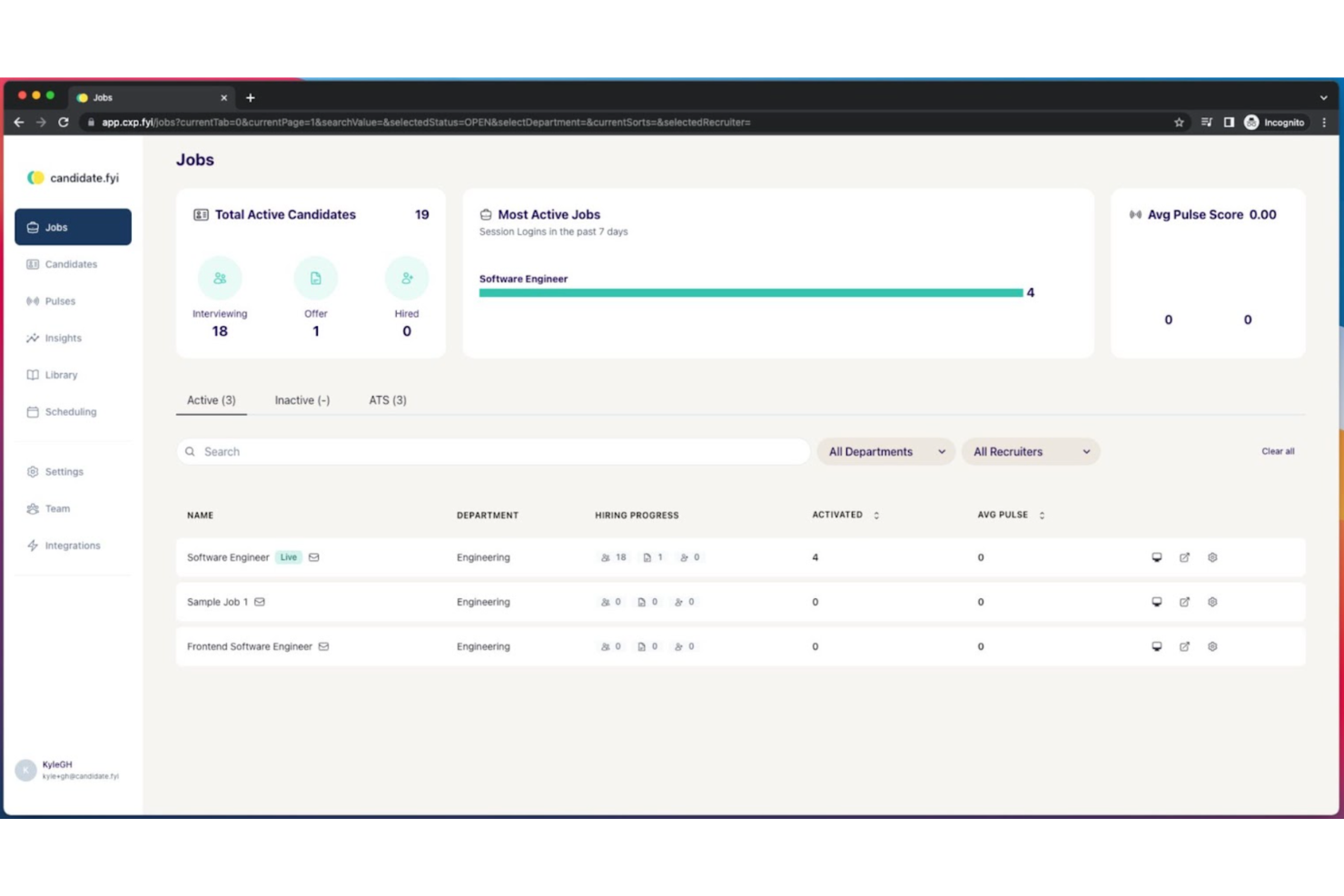
Candidate.fyi helps enterprise recruiting teams reduce manual interview scheduling, coordination delays, and candidate communication gaps. The platform combines AI-powered scheduling, automated reminders, interview intelligence, and branded candidate portals to create a smoother hiring experience for candidates, recruiters, and hiring teams.
Who Is candidate.fyi Best For?
candidate.fyi is a strong fit for enterprise recruiting and talent acquisition teams that manage high volumes of interviews across multiple interviewers, roles, and hiring stages.
Why I Picked Candidate.fyi
I picked candidate.fyi because it gives enterprise recruiting teams more control over the candidate-facing experience. Its branded candidate portal lets you apply your company’s visual identity, tone of voice, and templates across interview confirmations, prep materials, reminders, and schedule updates. This makes it a strong fit for teams that want every candidate touchpoint to feel consistent and on-brand. I also like that it supports multi-brand setups, which is useful for larger companies managing multiple hiring entities or employer brands. Its experience intelligence layer adds another layer of visibility by tracking candidate engagement signals and flagging at-risk candidates before they lose momentum.
Candidate.fyi Key Features
- AI interview scheduling: Automatically books individual, panel, and multi-stage interview loops based on calendar availability, interview rules, and team preferences.
- Automated candidate communication: Sends confirmations, reminders, prep materials, and schedule updates so candidates know what to expect at each stage.
- Interview intelligence: Captures interview notes, summaries, and structured feedback to help hiring teams review candidate signals faster.
- Feedback coverage tracking: Monitors feedback completion and timeliness so recruiters can spot missing interviewer input before decisions stall.
Candidate.fyi Integrations
Integrations include Workday, Greenhouse, Lever, iCIMS, SmartRecruiters, UKG Pro Recruiting, Google Calendar, Outlook, Zoom, and Slack.
Pros and Cons
Pros:
- Heavy automation may require careful workflow setup and oversight
- Tracks feedback completion to reduce stalled hiring decisions
- Best suited for enterprise teams, not simple hiring workflows
Cons:
- Automates complex panels, loops, and multi-stage interview scheduling
- Branded portals keep candidates informed with prep and updates
Best for high-volume Enterprise hiring
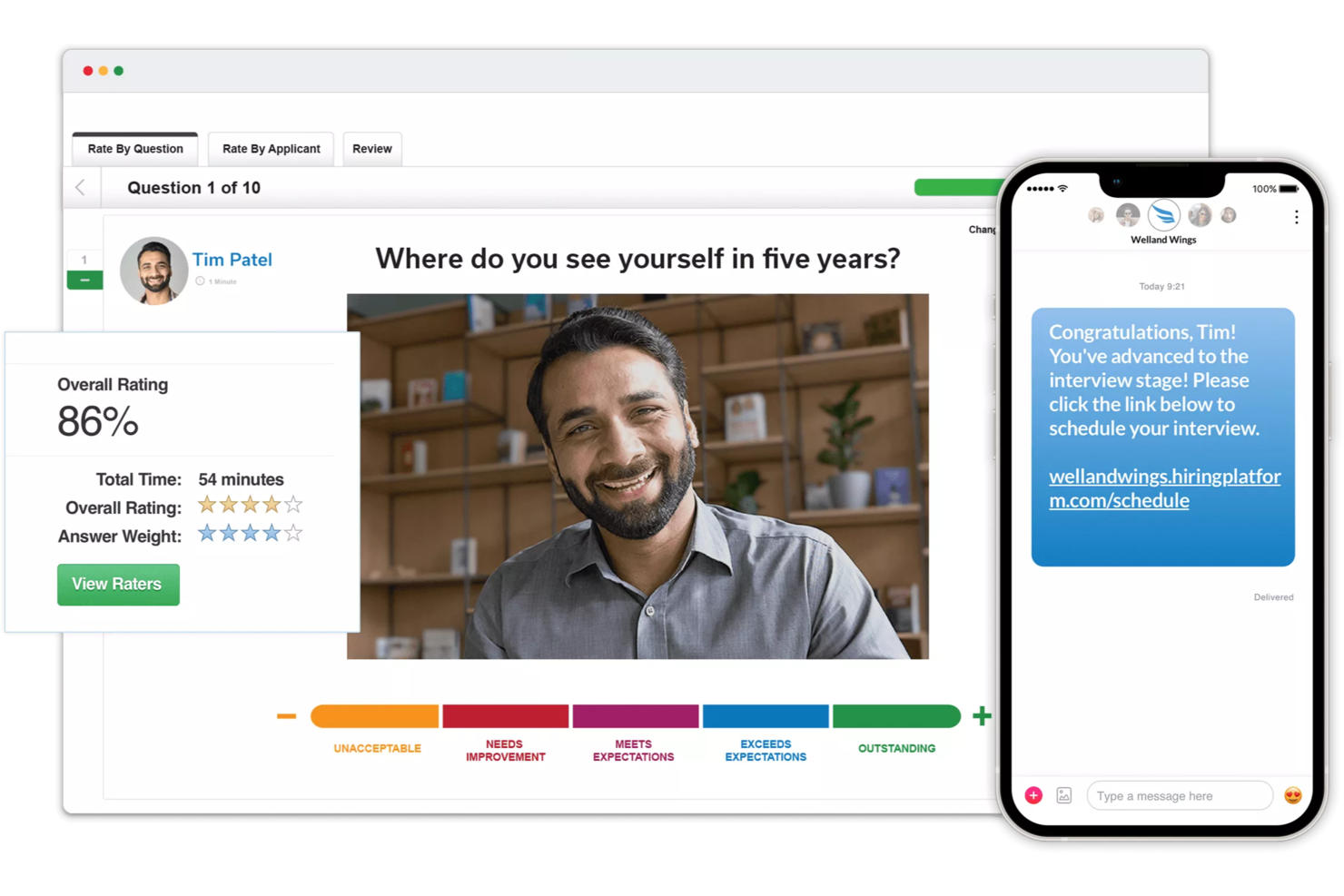
VidCruiter is an AI interview software platform for employers that brings together AI-powered video interviewing, automated candidate assessments, customizable workflows, and digital interview management tools.
Who Is VidCruiter Best For?
VidCruiter is a strong fit for mid-to-large organizations with high-volume hiring needs and structured interview processes across multiple teams or locations.
Why I Picked VidCruiter
I've included VidCruiter in my top picks because its scheduling automation genuinely removes the back-and-forth that bogs down high-volume Enterprise hiring teams. Interviewers connect their calendars once, and VidCruiter surfaces only the timeslots that meet your pre-configured availability rules, no manual coordination needed. I especially like the self-serve rescheduling feature, which lets candidates reschedule through an embedded link rather than emailing a recruiter, and the automatic SMS and email reminders that keep both sides accountable without any follow-up work.
VidCruiter Key Features
- AI interview notes and summaries: VidCruiter automatically transcribes candidate responses and generates AI-powered summaries of completed interviews, so evaluators can review key points without rewatching recordings in full.
- Structured interview scorecards: Built-in digital scorecards let interviewers rate each candidate's responses against predefined, job-specific competency criteria directly within the platform during the interview.
- Live and pre-recorded video interviewing: VidCruiter supports both one-way pre-recorded video interviews and live structured video interviews, giving teams flexibility in how they screen candidates at different hiring stages.
- Interview compliance tools: VidCruiter tracks and enforces interview process adherence across your hiring team, flagging deviations from structured workflows to support legal defensibility and fair hiring practices.
VidCruiter Integrations
VidCruiter offers native integrations with Greenhouse, iCIMS, Workday, SAP SuccessFactors, UKG, and Oracle. It also supports API access for custom integrations.
Pros and Cons
Pros:
- Digital reference checking with automated workflows
- Built-in interviewer training and calibration tools
- Custom video introductions for branded experiences
Cons:
- Interview recording access subject to plan level
- Limited transparency on AI evaluation features
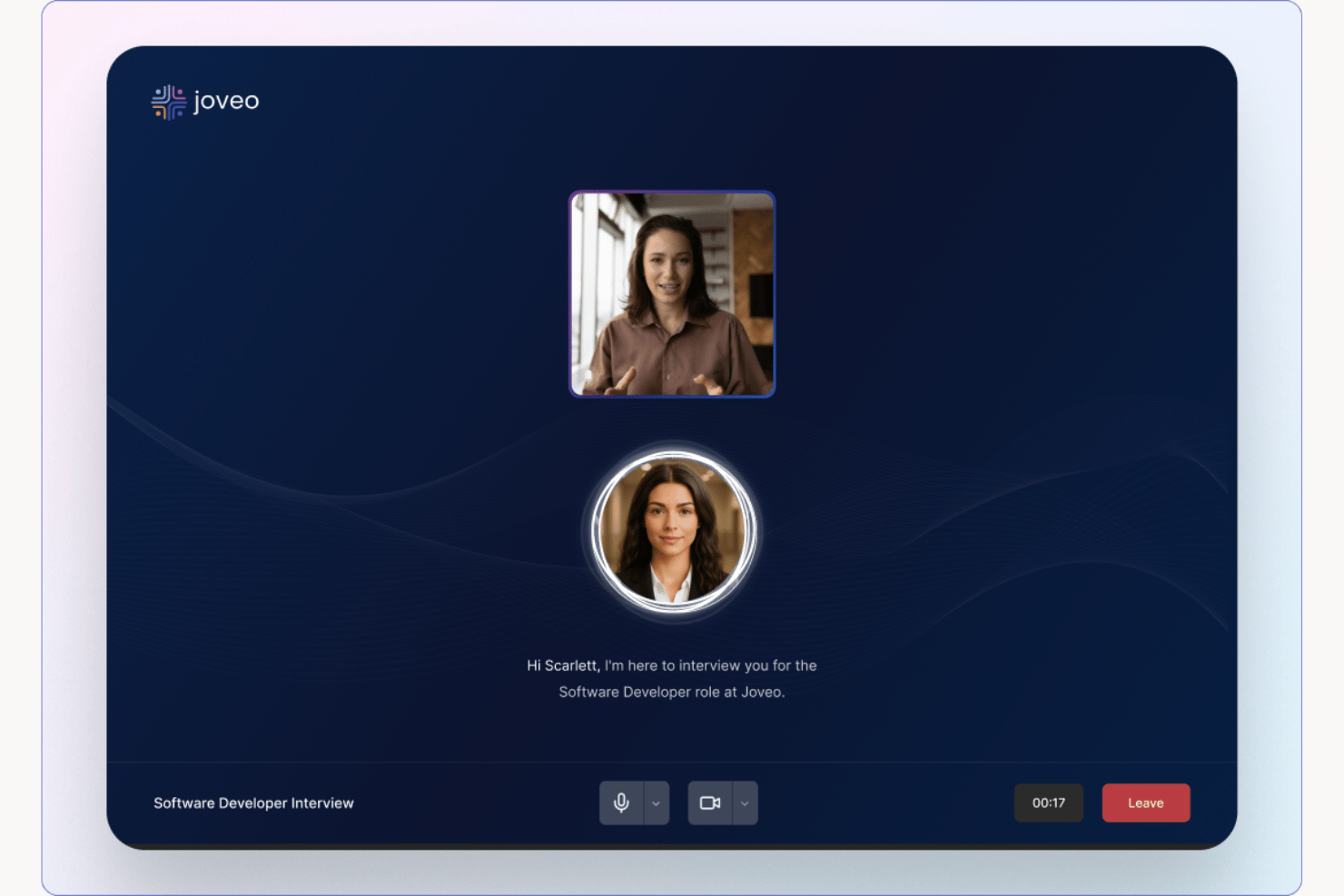
Joveo is an agentic recruiting platform that combines AI-powered interviewing, programmatic job advertising, conversational candidate screening, automated scoring, and ATS-integrated analytics into a single end-to-end hiring suite.
Who Is Joveo Best For?
Joveo is a strong fit for enterprise TA teams, RPOs, and staffing firms that need to screen and interview candidates at high volume across multiple roles simultaneously.
Why I Picked Joveo
Joveo earns its spot on my shortlist because it's the only tool I've tested where the AI interviewer genuinely adapts mid-conversation. When a candidate's answer is vague, the AI probes further with a contextually relevant follow-up, not a scripted question. I also like that scoring, transcripts, and hiring recommendations sync directly to the ATS the moment an interview ends, so nothing sits in a separate tool waiting to be manually transferred.
Joveo Key Features
- Programmatic job advertising: Automates job ad placements and optimizes spend across multiple sources from a single dashboard.
- AI-powered career sites: Lets teams build branded, personalized career sites and landing pages with rapid deployment.
- Omnichannel candidate engagement: Delivers interview invitations and updates through web, phone, and WhatsApp to reach diverse candidate pools.
- ATS write-back: Sends interview scores, summaries, and transcripts directly into major applicant tracking systems automatically.
Joveo Integrations
Joveo offers native integrations with more than 100 applicant tracking systems, including iCIMS, Greenhouse, Workday, Bullhorn, SAP SuccessFactors, Oracle Recruiting Cloud, and Cornerstone. An API is available for custom integrations.
Pros and Cons
Pros:
- End-to-end automation from sourcing to scoring
- Handles high-volume screening across roles
- AI adapts follow-up questions mid-interview
Cons:
- Onboarding requires significant configuration
- Reporting dashboards lack depth for enterprise

Manatal
Best with AI-driven candidate profile enrichment
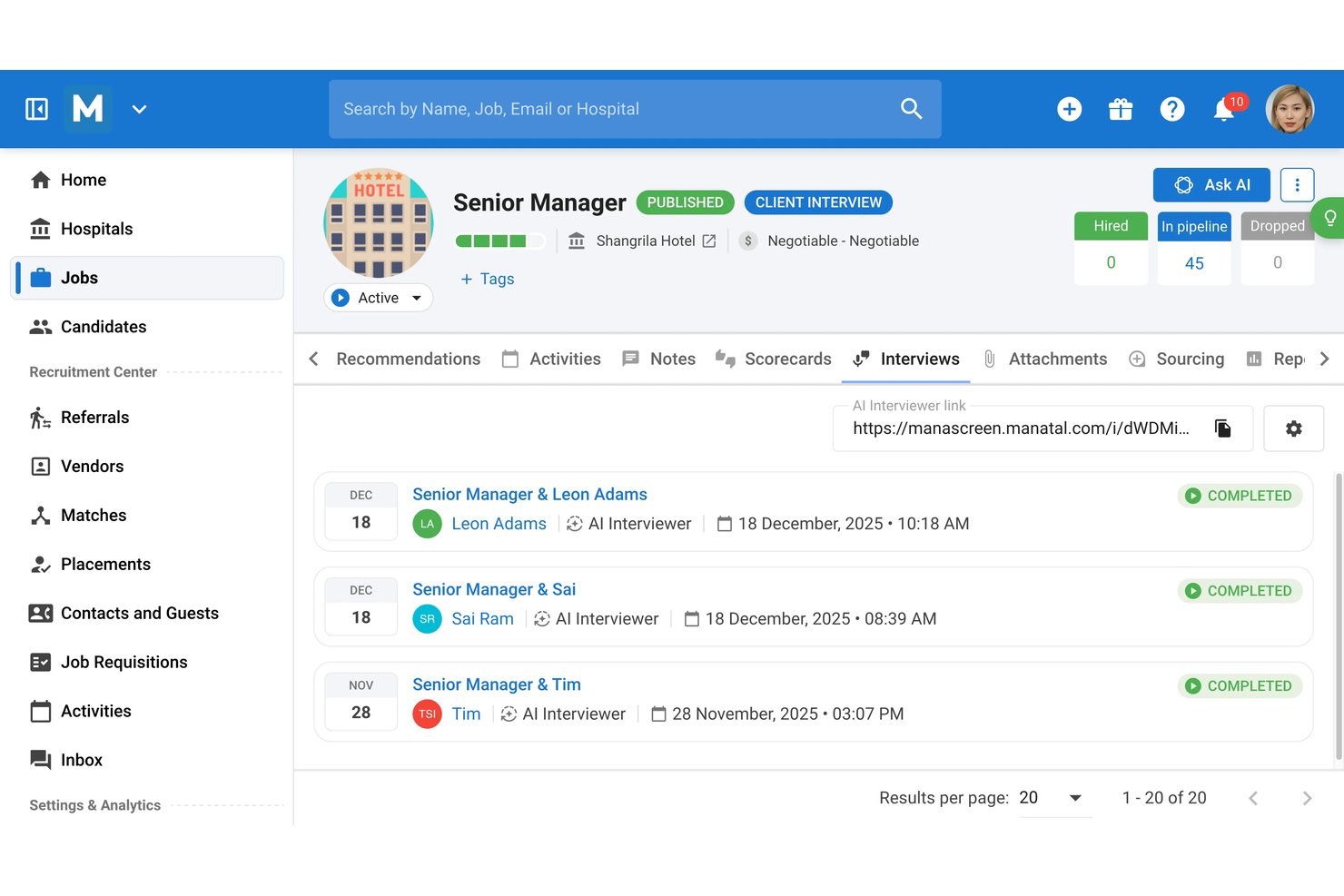
Manatal is an AI-native ATS with a built-in AI Interviewer that autonomously conducts asynchronous video screenings, transcribes responses, and scores candidates against structured, role-specific criteria.
Who Is Manatal Best For?
Manatal suits recruitment agencies and in-house talent teams that handle high-volume hiring across multiple regions or job boards simultaneously.
Why I Picked Manatal
Manatal earns its spot on my shortlist because the AI-driven profile enrichment pulls data from 20+ platforms like LinkedIn and GitHub before a single interview question is asked. That means the AI Interviewer can auto-generate role-specific questions built around a richer, more complete picture of each candidate. I also like how the platform delivers automated assessment summaries with strengths, weaknesses, and fit scores tied to structured rubrics.
Manatal Key Features
- AI Note-Taker: Automatically transcribes and summarizes live calls or interviews for easy reference.
- Workflow automation: Handles repetitive candidate communications and status updates based on user-defined triggers.
- Open API and Zapier integration: Allows seamless data flow to HRIS, payroll, and productivity platforms.
- Multilingual interviewing: Conducts and analyzes interviews in languages like English, French, German, Spanish, Italian, and Portuguese.
Manatal Integrations
Manatal offers native integrations with Gmail, Outlook, Microsoft 365, Microsoft Teams, LinkedIn Recruiter, and GitHub. It also supports Zapier and provides an API for custom integrations.
Pros and Cons
Pros:
- AI Interviewer runs async screenings autonomously
- Automated scoring uses role-specific rubrics
- AI enriches profiles from 20+ social sources
Cons:
- Analytics dashboards lack depth for enterprise
- Limited bias audit documentation versus rivals
New Product Updates from Manatal

Manatal Adds Candidate Login and Employee Portal to Career Pages
Manatal has added Candidate Login, Internal Employee Portal, and internal job visibility controls for Career Pages. These features help teams simplify applications, support employee mobility, and manage internal hiring workflows. For more information, visit Manatal’s official site.
 .
.
Humanly
Best for structured candidate screening

Humanly stands out to me for how it brings structured candidate screening into real candidate conversations. I like that you can set up custom question sets for interviews and let Humanly run and score them consistently across every applicant.
Teams who want unbiased, scalable screening without a ton of handholding tend to rely on Humanly’s automated processes. The interview transcripts and structured scoring make comparing batches of candidates way easier, which I appreciate when working with high-volume hiring.
Humanly’s Best For
- Recruiters who need consistent, unbiased candidate screening
- High-volume hiring teams focused on structured interviews
Humanly’s Not Great For
- Small organizations running mostly informal interviews
- Teams needing deep, technical skill assessments
What sets Humanly apart
Humanly is all about bringing logic and fairness to screening interviews by following a question and scoring system you set up in advance. Unlike conversational bots like Paradox or chat-focused tools, Humanly expects you to define criteria up front and then let the system scale it across every candidate conversation.
In practice, this works best when you want standardized candidate experiences and reliable data for comparing applicants batch by batch.
Tradeoffs with Humanly
Humanly optimizes for consistency and structure, but you lose flexibility to improvise or dig deeper in the moment. That makes truly open-ended, rapport-driven interviews harder to pull off.
Pros and Cons
Pros:
- Works well for high-volume hiring
- Makes interview setup automatic
- Lets you screen all applicants quickly
Cons:
- Takes time to customize questions
- AI summaries can miss context

Puck
Best for SMS-powered AI phone screening
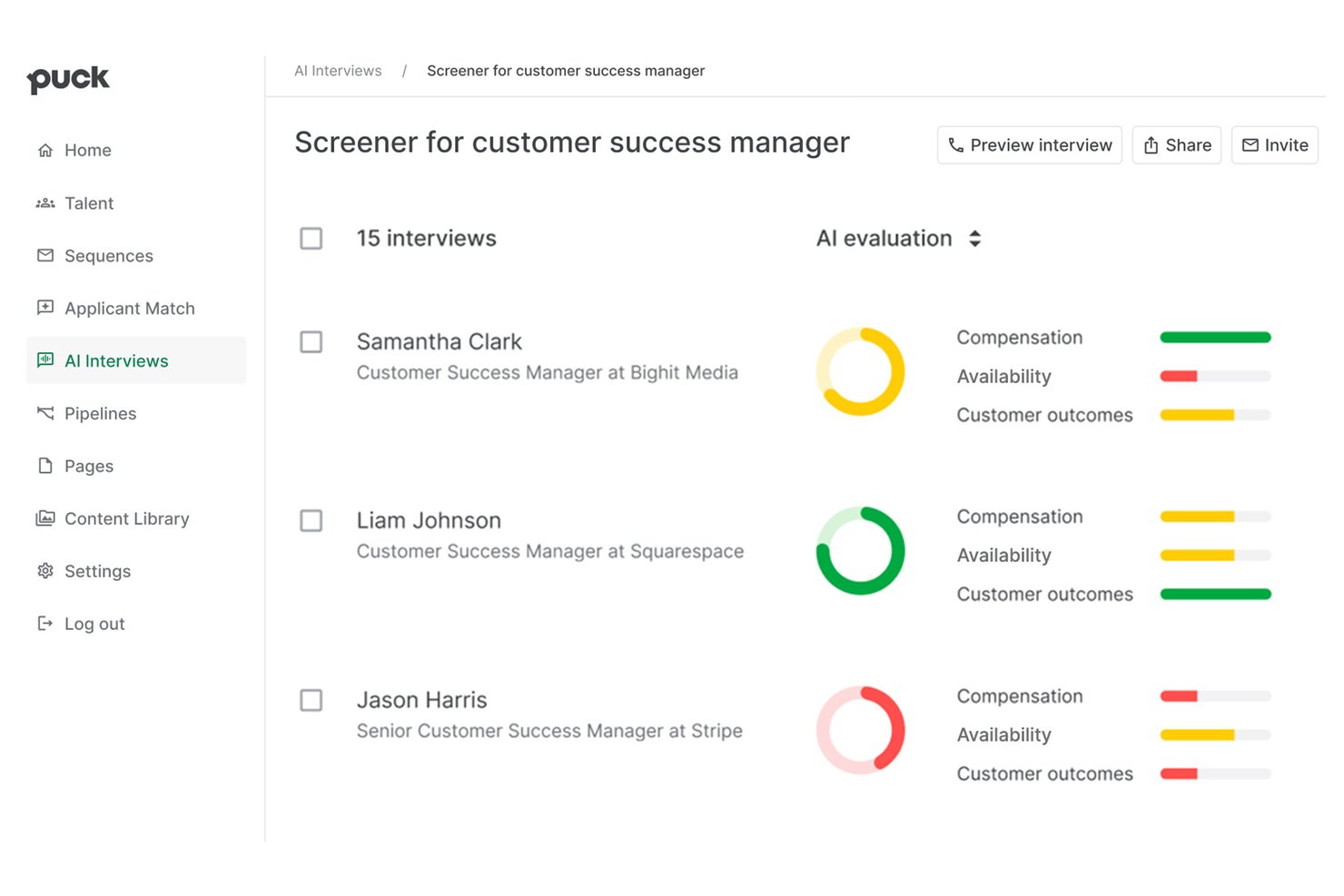
Puck's AI Recruiter is an AI interview platform that conducts asynchronous, conversational, phone-based candidate screenings via SMS or email invite, with automated scoring, transcription, and support for 33+ languages.
Who Is Puck Best For?
Recruiting teams at startups, staffing agencies, and high-volume employers hiring for hourly or frontline roles will get the most out of this tool.
Why I Picked Puck
Puck's AI Recruiter earns its spot on my shortlist because of how it handles screening through SMS-initiated phone conversations rather than video. Candidates get a text, tap a link, and complete a real two-way AI conversation on their own schedule, with no app, no camera, and no calendar invite required. I also like that the AI adapts its questions based on what candidates actually say, and flags potential fraud by surfacing inconsistencies across the conversation.
Puck Key Features
- Multilingual interview support: Candidates can complete phone interviews in over 33 languages.
- ATS integrations: Connects natively with Greenhouse, Lever, Ashby, Workday, iCIMS, and more.
- Automated transcription and scoring: Every interview is transcribed and scored using AI against structured, auditable rubrics.
- Fraud detection engine: Identifies inconsistencies in responses to flag potential application or identity fraud.
Puck Integrations
Puck's AI Recruiter offers native integrations with Greenhouse, Lever, Ashby, Pinpoint, Workday, and iCIMS. Puck also offers its own Lightweight ATS that incorporates the AI Recruiter.
Pros and Cons
Pros:
- AI dynamically adapts follow-up questions mid-interview
- Conducts interviews in 33+ languages natively
- No app download required from candidates
Cons:
- Not built for structured competency-based assessments
- No video interview format supported

Screenz
Best for customizable talent evaluation flows
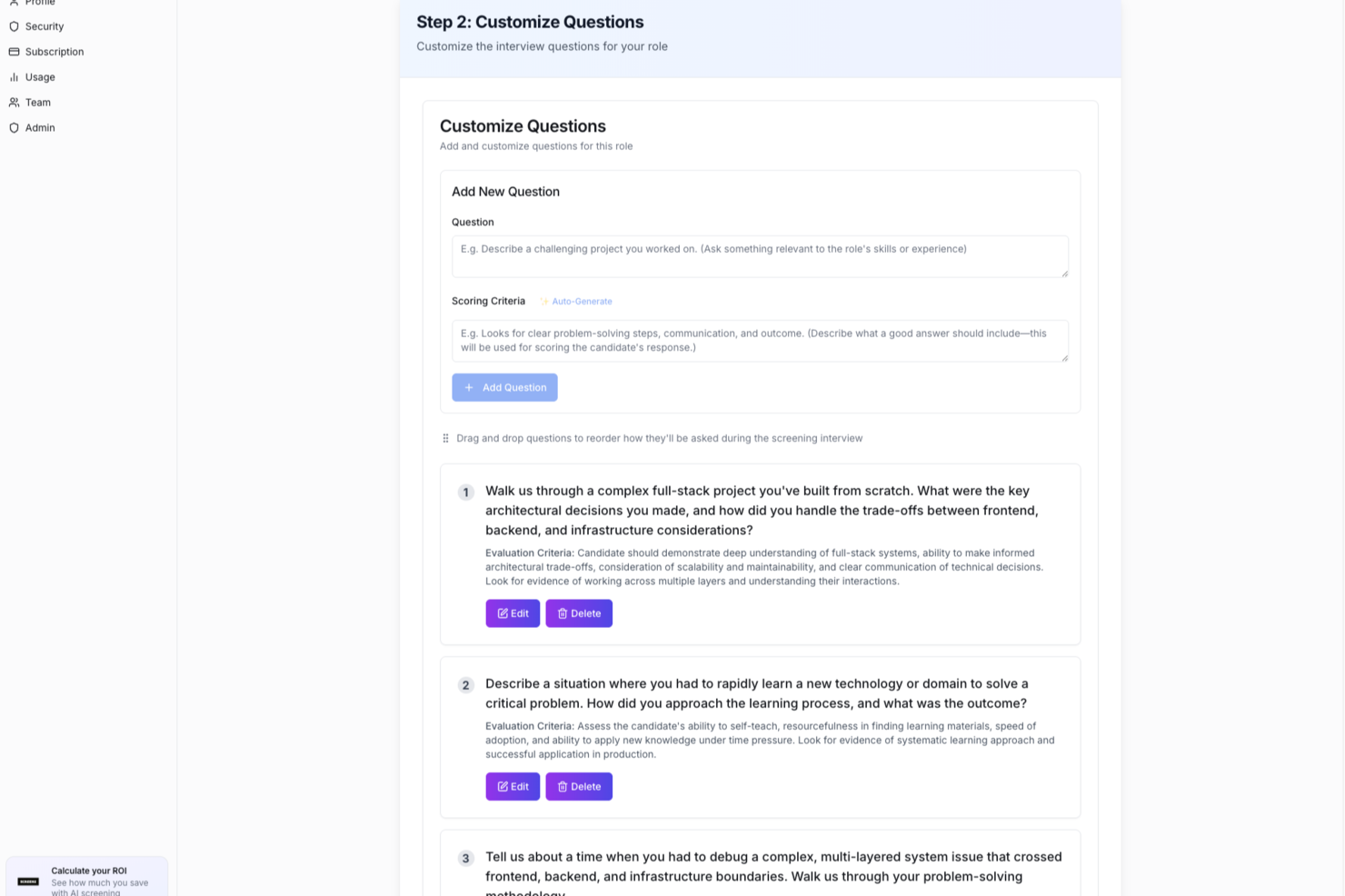
Screenz is an AI interview platform that conducts adaptive, role-specific candidate interviews, scores applicants against defined criteria, and delivers ranked shortlists with transcripts and built-in integrity detection.
Who Is Screenz Best For?
Screenz is a good fit for talent acquisition teams at mid-to-large organizations that screen high volumes of candidates across multiple roles simultaneously.
Why I Picked Screenz
I've included Screenz in my top picks because the level of control it gives you over how evaluations are structured is genuinely unusual for an AI interview tool. You define the role criteria, and Screenz builds the question set around them, then scores every candidate's answers against those exact benchmarks. What I especially like is the adaptive follow-up layer: the AI probes deeper when an answer is thin, so you're not left with surface-level responses to make decisions on. The integrity detection layer adds another dimension, flagging suspicious patterns so your shortlist reflects real candidate capability.
Screenz Key Features
- Ranked candidate shortlists: Screenz automatically ranks candidates by score after each interview round, with full transcripts attached to each profile.
- Intelligence loop: The AI learns from your actual hiring decisions over time, refining how it scores and ranks future candidates for similar roles.
- Post-hire check-ins: Screenz sends automated check-ins after a hire is made to capture retention signals and feed that data back into future evaluations.
- Asynchronous interview delivery: Candidates complete interviews on their own schedule, without requiring a recruiter to be present or available in real time.
Screenz Integrations
Screenz offers 64+ ATS integrations, including Greenhouse, Workday, iCIMS, Lever, BambooHR, SAP SuccessFactors, UKG Pro, Bullhorn, JazzHR, and Workable. These connect via API, so interview scores, transcripts, and rankings flow directly back into your existing ATS as notes without changing your workflow.
Pros and Cons
Pros:
- Supports 33 languages for candidate interviews
- Post-hire check-ins track retention signals
- Built-in AI-generated cheat detection scoring
Cons:
- No live two-way interview capability
- Entry pricing may exclude smaller teams

Metaview
Best for interview analytics

Metaview makes my list because it specializes in giving you detailed, actionable analytics from your interview process. When I tested conversation intelligence features, I saw how you can uncover hidden trends in both candidate responses and interviewer behavior.
I really appreciate how Metaview auto-generates insight-rich transcripts and highlights recurring themes that would be tough to catch manually. This is especially useful for teams who want data-backed feedback to improve interviews, hiring quality, and candidate experience.
Metaview’s Best For
- Talent teams that want detailed interview analytics
- Organizations looking to improve interviewer performance with data
Metaview’s Not Great For
- Small companies with simple or low interview volume
- Teams wanting in-depth candidate skill assessment tools
What sets Metaview apart
Metaview approaches the interview process like a real data exercise, not just a meeting to transcribe. Unlike Google Meet or Zoom’s native recording tools, it pulls interviewer and candidate behavior into clear focus, generating reports that tell you how interviews are progressing over time. This tends to work best for teams that want to drive interview quality using trends and moment-by-moment feedback, instead of relying on surface-level notes or gut instinct.
Tradeoffs with Metaview
Metaview optimizes for interview analytics, but by focusing on what happens in real conversations, it doesn’t handle skills assessment or testing workflows, so hiring teams need a separate tool for technical screens.
Pros and Cons
Pros:
- Easier coaching and feedback
- Consistent interviewing process
- Auto transcription saves time
Cons:
- Few export options
- Needs manual transcript review

Lever
Best for collaborative hiring

Lever stands out to me when hiring is truly a team sport. I picked it because it does more than automate interview scheduling and scorecards—it centers collaboration right inside the platform. What I appreciate is how Lever lets interviewers, recruiters, and hiring managers share candidate feedback directly and transparently, without endless back-and-forth emails.
If hiring decisions are high-stakes and you want everyone to feel ownership, you’ll find Lever makes it easy to keep every stakeholder in sync as interviews progress.
Lever's Best For
- Collaborative hiring across multiple departments and stakeholders
- Organizations prioritizing feedback and visibility during interviews
Lever's Not Great For
- Solo recruiters or very small hiring teams
- Companies needing advanced AI-based chat or video interviewing
What sets Lever apart
Lever takes a conversation-first approach to hiring and treats everyone involved as part of the process, not just the recruiters. Instead of siloed feedback or disconnected interview documentation like you get with older applicant tracking systems, Lever surfaces each person's input in one place. It feels closer to working in Slack than the rigid structure of Taleo or iCIMS.
Tradeoffs with Lever
Lever optimizes for shared input and collaborative decision-making, but this can mean you lose some depth in specialized AI interview features or automation compared to tools focused solely on candidate assessments.
Pros and Cons
Pros:
- Tracks candidate progress
- Easy data access
- Customizable workflows
Cons:
- Complicated permissions setup
- Some automation errors on updates
HireVue
Best for global scalability

HireVue lands on my shortlist for its ability to serve enterprise teams hiring across multiple countries and regions. I see global HR leads rely on it for structured, AI-driven video interviews at volume, including language support and custom role-based assessments.
I like how HireVue handles local compliance and candidate experience in dozens of markets. The scalability and breadth of assessment options make it a strong choice when you need to standardize hiring worldwide.
HireVue’s Best For
- Enterprise and multinational HR teams hiring at scale
- Organizations that need AI-driven, standardized global interviews
HireVue’s Not Great For
- Small businesses with low interview volume
- Teams wanting simple, non-video interview workflows
What sets HireVue apart
HireVue expects you to run high-volume, standardized interviews across different regions without needing separate tools per country. Instead of taking an applicant-by-applicant approach like Spark Hire or Interviewer.AI, it builds in structured, automated interviewing and diverse assessment types to meet compliance needs at scale. I find this fits best when teams want predictable, repeatable steps for every candidate.
Tradeoffs with HireVue
HireVue optimizes for scale and process standardization, which limits customization of interview formats or workflows. If your team values highly personalized or varied interview experiences, you lose some of that flexibility.
Pros and Cons
Pros:
- Strong data protection
- Available in multiple languages
- Supports large-scale hiring processes
Cons:
- No free trial available
- Needs clearer AI scoring
Other AI Interview Software
Here are some additional AI interview software options that didn’t make it onto my shortlist, but are still worth checking out:
- TestGorilla
For pre-employment testing
- BrightHire
For real-time feedback
- Sapia.ai
For conversational AI
- Knockri
For AI-informed diversity hiring
- Ribbon
For smooth integrations
- Veton
For automated prescreening of candidates
- Jobma
For video interview flexibility
- Skima.ai
For personalized assessments
- Braintrust
For freelance hiring
- Interviewer.AI
For data-driven insights
- Employinc
For enterprise solutions


How I Evaluate AI Interview Software
I only include tools where AI goes beyond keyword matching—it should conduct, score, or analyze interviews to save real recruiter hours. I split my evaluation into two layers: the core functionality a tool needs to qualify and the differentiating factors that set one vendor apart.
Core Functionality (Table Stakes For This List)
When I'm selecting tools for my list, I rank each one on a scale from 0 (does not offer the functionality) to 5 (excels in this area) for each core functionality listed below. Then, I calculate the tool's total score into a percentage. Each tool needs to achieve a minimum total score of 65% to be considered for inclusion.
- AI-Powered Candidate Scoring: I look for tools that go beyond simple keyword matching to score candidates across multiple dimensions like competency fit and communication skills.
- Video Interview Support: Whether it's async screens for early-stage filtering or live panels for final rounds, I check that the platform handles video as a core medium.
- Automated Transcription & Analysis: I evaluate whether the tool transcribes responses and applies NLP to surface patterns, such as flagging strong problem-solving language in answers.
- Conversational AI Interviewer: Tools that generate adaptive follow-up questions based on a candidate's actual response stand out over those limited to static question sets.
- Bias Mitigation Controls: I check for features like anonymized scoring, standardized rubrics, and documented audit trails that help hiring teams stay fair and compliant.
- ATS Integration: A tool should sync interview data with platforms like Greenhouse, Workday, or iCIMS so recruiters aren't copying scores between systems manually.
Once I have a list of tools that meet this criteria, I consider what sets each platform apart.
Differentiating Factors (What Sets Vendors Apart)
Here's how I compare and contrast different vendors:
Standout Features
Multilingual AI support matters when you're hiring across regions—I check whether a tool can conduct and analyze interviews in multiple languages without losing scoring accuracy. Candidate experience is another area I evaluate closely, from branded portals to practice modes that help reduce drop-off. Fraud detection features like deepfake identification and ID verification are increasingly important for remote hiring. I also look for predictive analytics that tie interview scores to outcomes like retention, giving hiring teams data they can act on.
Beyond Features
Compliance is a big differentiator in this space. I look at whether a vendor has completed third-party bias audits and aligns with evolving AI hiring laws across jurisdictions. Scalability also matters—a tool that handles 50 interviews a month may buckle during a seasonal hiring surge of thousands. I evaluate pricing transparency too, checking whether vendors offer clear per-interview or per-seat models and provide pilots so your team can validate ROI before committing to an annual contract.
How to Choose AI Interview Software
It’s easy to get bogged down in long feature lists and complex pricing structures. To help you stay focused as you work through your unique software selection process, here’s a checklist of factors to keep in mind:
| Factor | What to Consider |
|---|---|
| Scalability | Can the software grow with your team? Consider if it supports the number of users and interviews you conduct now and in the future. |
| Integrations | Does it integrate with your existing systems like ATS or HRIS? Check for compatibility with tools you already use to avoid data silos. |
| Customizability | Can you tailor the software to fit your processes? Look for options to customize workflows, templates, and user roles to match your needs. |
| Ease of use | Is it user-friendly for your team and candidates? Evaluate the interface and navigation. A steep learning curve can slow down adoption. |
| Implementation and onboarding | How quickly can you get started? Consider the time and resources needed for setup. Look for support like training videos and dedicated onboarding teams. |
| Cost | Does the pricing fit your budget? Compare costs across vendors, considering all features and support provided. Be wary of hidden fees or inflexible plans. |
| Security safeguards | Are your data and candidates' information safe? Ensure the software complies with data protection regulations and offers encryption and access controls. |
| Support availability | Will you get help when you need it? Check for 24/7 support, multiple contact methods, and response times to ensure you’re covered in case of issues. |
What Is AI Interview Software?
AI interview software is a tool that automates and enhances the hiring process by using artificial intelligence to evaluate candidates. HR professionals and recruiters typically use these tools to improve efficiency and reduce bias in interviews. Features like automated scheduling, candidate assessment, and real-time feedback help with identifying top talent and ensuring fair evaluations. Overall, these tools provide value by saving time and improving the quality of hiring decisions.
Features
When selecting AI interview software, keep an eye out for the following key features:
- Automated scheduling: Simplifies the interview process by automatically arranging interviews, saving time for HR teams.
- Candidate assessment: Uses AI to evaluate candidates' skills and fit, providing unbiased and data-driven insights.
- Real-time feedback: Offers instant feedback during interviews, helping interviewers make informed decisions quickly.
- Bias detection: Identifies and reduces unconscious bias in candidate evaluations, promoting fair hiring practices.
- Interview transcription: Records and transcribes interviews, allowing for easy review and analysis of candidate responses.
- Customizable templates: Provides ready-to-use interview templates that can be tailored to suit specific job roles and requirements.
- Advanced analytics: Delivers detailed insights into interview performance and candidate engagement, supporting data-driven hiring strategies.
- Automated note-taking: Captures key points during interviews, ensuring important details are not missed.
- Language support: Allows for conducting interviews in multiple languages, accommodating a diverse candidate pool.
- Interactive AI interviews: Engage candidates with AI-driven questions, providing a dynamic and interactive interview experience.
Benefits
Implementing AI interview software provides several benefits for your team and your business. Here are a few you can look forward to:
- Time-saving: Automates scheduling and assessments, freeing up your team's time for more strategic tasks.
- Improved decision-making: Provides data-driven insights and feedback, helping you make informed hiring decisions.
- Bias reduction: Identifies unconscious biases in candidate evaluations, promoting a fair and equitable hiring process.
- Enhanced candidate experience: Offers real-time feedback and interactive interviews, keeping candidates engaged and informed.
- Consistency: Ensures uniformity in the interview process with customizable templates and structured guides.
- Scalability: Adapts to the needs of growing teams, supporting an increasing number of interviews and users.
- Diverse hiring: Supports multiple languages and inclusive features, broadening your talent pool and accommodating diverse candidates.
Costs & Pricing
Selecting AI interview software requires an understanding of the various pricing models and plans available. Costs vary based on features, team size, add-ons, and more. The table below summarizes common plans, their average prices, and typical features included in AI interview software solutions:
Plan Comparison Table for AI Interview Software
| Plan Type | Average Price | Common Features |
|---|---|---|
| Free Plan | $0 | Basic candidate assessments, limited scheduling, and basic reporting. |
| Basic Plan | $50-$300/month | Automated scheduling, AI-driven feedback, and customizable interview templates. |
| Professional Plan | $70-$599/month | Advanced analytics, real-time interview coaching, and enhanced candidate engagement tools. |
| Enterprise Plan | $1499+/month | Full integration capabilities, advanced security features, and dedicated account management support. |
AI Interview Software FAQs
Here are some answers to common questions about AI interview software:
How can AI interview software improve hiring quality?
AI interview software helps hiring teams evaluate candidates beyond what’s on a résumé. By analyzing job interview responses, it measures communication, problem-solving, and technical skills objectively. This data-driven approach improves hiring quality by reducing human bias and ensuring every candidate is assessed consistently. It also enhances the candidate experience by providing fair, measurable insights that guide better hiring decisions.
Can AI interview software integrate with our existing HR tools?
Yes, most AI interview software integrates with popular HR systems like your ATS, HRIS, or communication platforms. These integrations keep your data in sync and make it easier to manage the entire interview process in one place. Hiring teams can move candidates through interview prep, scheduling, and follow-up without juggling multiple tools—saving time while maintaining accuracy across systems.
How can you tell if the AI is actually reducing bias?
To ensure your AI interview assistant is fair, ask vendors how they test for bias. Reliable software providers conduct regular audits to review performance across different groups and roles, from technical interviews to product management positions. It’s also important that hiring teams can review or override AI recommendations when needed—keeping the balance between technology and human judgment to support equitable hiring.
How much do you really get to see about how the AI scores candidates?
Transparency varies by platform. Some AI interview software tools show what influenced a candidate’s score—such as specific interview questions, tone, or response time—while others may offer limited visibility. Before choosing a tool, ask how transparent their scoring system is and whether you can access detailed reports. Visibility into the scoring process builds trust and helps hiring teams explain decisions clearly during the interview follow-up stage.
Is candidate data safe with AI interview software?
Yes, leading AI interview platforms follow strict data protection standards like GDPR. They use encryption, access controls, and compliance checks to keep candidate information secure throughout the interview process. Before you commit, review each vendor’s privacy policy to ensure their data practices align with your organization’s security requirements.
What kind of ongoing help should you expect from the vendor?
Support doesn’t stop once you purchase AI interview software. A reliable vendor provides regular updates, training for hiring teams, and quick responses when technical issues arise. Ongoing guidance helps your team refine interview skills, adjust interview questions, and stay current with new AI features that make your hiring process more effective.