

10 Best Contractor Compliance Software Reviewed in 2026

Best Contractor Compliance Software Shortlist


Managing contractor compliance can be a headache. You face constant challenges, from keeping up with regulations to managing endless paperwork. Contractor compliance software can ease these burdens, helping your team stay on top of requirements and avoid costly mistakes.
In my experience, finding the right tool can make all the difference in your day-to-day operations. I've independently tested various software and understand what works best for HR professionals like you.
In this article, I'll share my top picks for contractor compliance software, offering unbiased insights to help you make informed decisions. Get ready to explore solutions that can simplify your compliance processes and free up your time.
Why Trust Our Software Recommendations
Our team has been testing and reviewing software since 2012. As HR experts ourselves, we know how difficult—and important—it is to choose the right software.
For this guide, we evaluated tools using hands-on testing and independent research, scoring tools using our selection criteria. We also draw on insights from industry thought leaders and practicing HR experts.
Our reviews reflect our human editorial judgment, not a sales pitch.
Expert reviewers:
Contractor Compliance Software Comparison Table
This comparison table summarizes pricing details for my top contractor compliance software selections:
| Tool | Best For | Trial Info | Price | ||
|---|---|---|---|---|---|
| 1 | Best for global contractor classification compliance | Free demo available | From $199/employee/month | Website | |
| 2 | Best for global contractor onboarding | Free demo available | Pricing upon request | Website | |
| 3 | Best for distributed teams paying contractors globally | Free demo available | Pricing upon request | Website | |
| 4 | Best for audit management | Free plan available | From $24/user/month (billed annually) | Website | |
| 5 | Best for construction tracking | Free 30-day trial + free demo available | From $32/user/month (billed annually) | Website | |
| 6 | Best for digital forms | Free demo available | Pricing available upon request | Website | |
| 7 | Best for chemical safety | Free demo available | Pricing upon request | Website | |
| 8 | Best for EHS compliance | Free demo available | Pricing upon request | Website | |
| 9 | Best for large enterprises | Free demo available | Pricing upon request | Website | |
| 10 | Best for cost management | Free demo available | Pricing upon request | Website |


Best Contractor Compliance Software Reviews
Below are my detailed summaries of the best contractor compliance software that made it onto my shortlist. My reviews offer a detailed look at the key features, pros and cons, integrations, and ideal use cases of each tool to help you find the best one for you.

Best for global contractor classification compliance
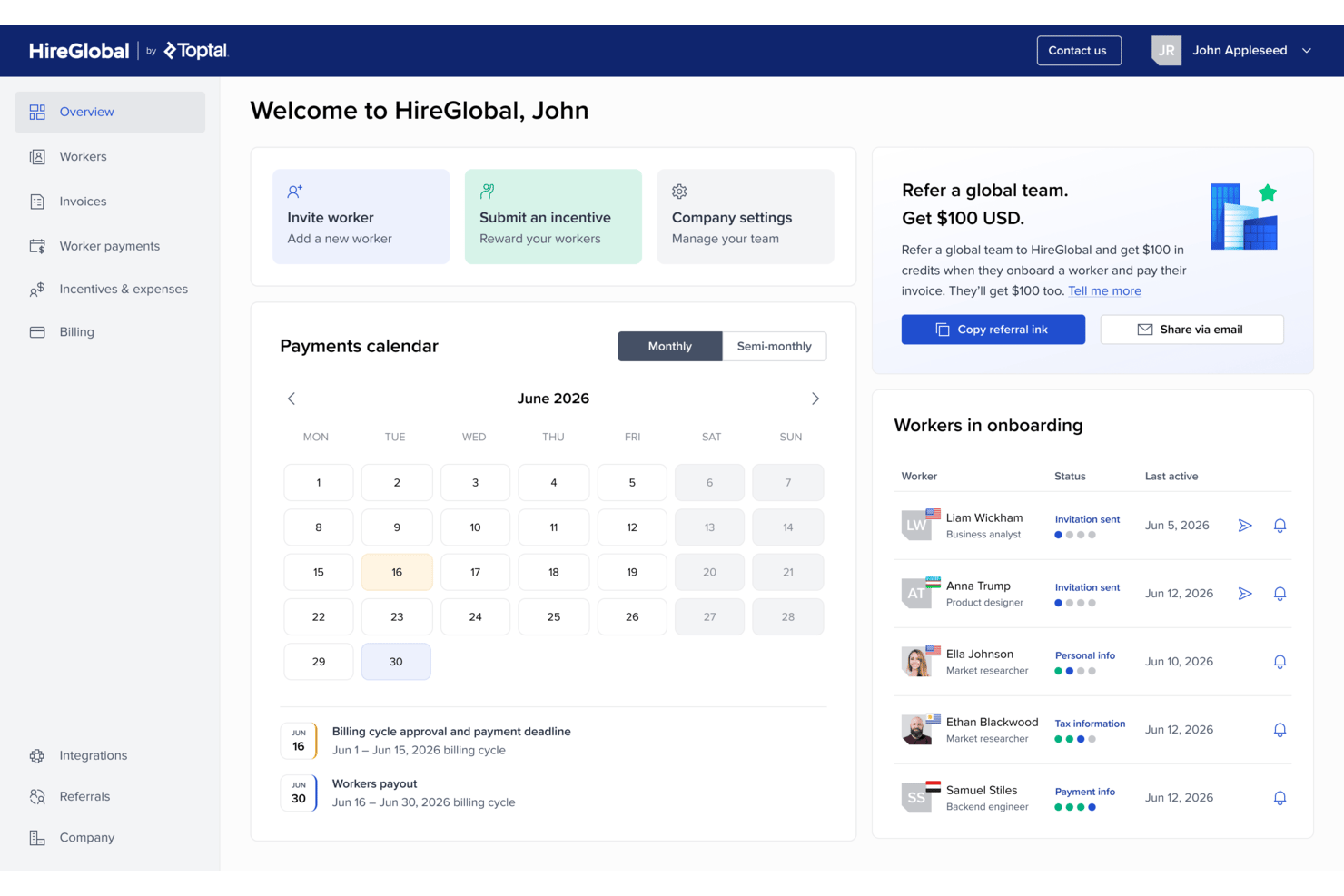
HireGlobal is Toptal's global hiring and payroll platform that lets you onboard, manage, and pay contractors and employees across 180+ countries through four service models: Contractor Management, Agent of Record, Virtual EOR, and Employer of Record.
Who Is HireGlobal Best For?
HireGlobal suits distributed teams that need to pay contractors across many countries quickly, without managing separate local agreements or currency conversions.
Why I Picked HireGlobal
I picked HireGlobal as one of the best because its Agent of Record and Virtual EOR models structurally absorb contractor classification liability rather than just flagging it. When you add a worker under the AOR model, HireGlobal takes on the contract, payments, and compliance obligations directly. The V-EOR plan goes further, adding $1M indemnification per worker, which gives distributed teams real coverage when paying contractors across 180+ countries in 50+ currencies.
HireGlobal Key Features
- Multi-currency contractor payments: Pay contractors across 180+ countries in 50+ currencies through a single invoice with no FX markups or withdrawal fees.
- Tiered hiring model selection: Choose from four per-worker plans—Contractor Management, AOR, V-EOR, and EOR—based on your team's risk tolerance and coverage needs.
- Tax form and KYC collection: HireGlobal handles W-9, W-8BEN, and KYC documentation during contractor onboarding so you don't manage it manually.
- Payment approval workflows: Review and approve contractor payments on custom billing cycles, with invoice history and expense and reimbursement reporting available per worker.
HireGlobal Integrations
HireGlobal integrates natively with TopTracker, Toptal's time tracking tool, for end-to-end time tracking, invoice approval, and payment processing within a single workflow.
Pros and Cons
Pros:
- Users praise fast payments and support
- Offers $1M V-EOR indemnification
- Supports payments across 180+ countries
Cons:
- Contractor tax filing remains undocumented
- No worker classification assessment tools

Best for global contractor onboarding
USP: Best for global contractor onboarding
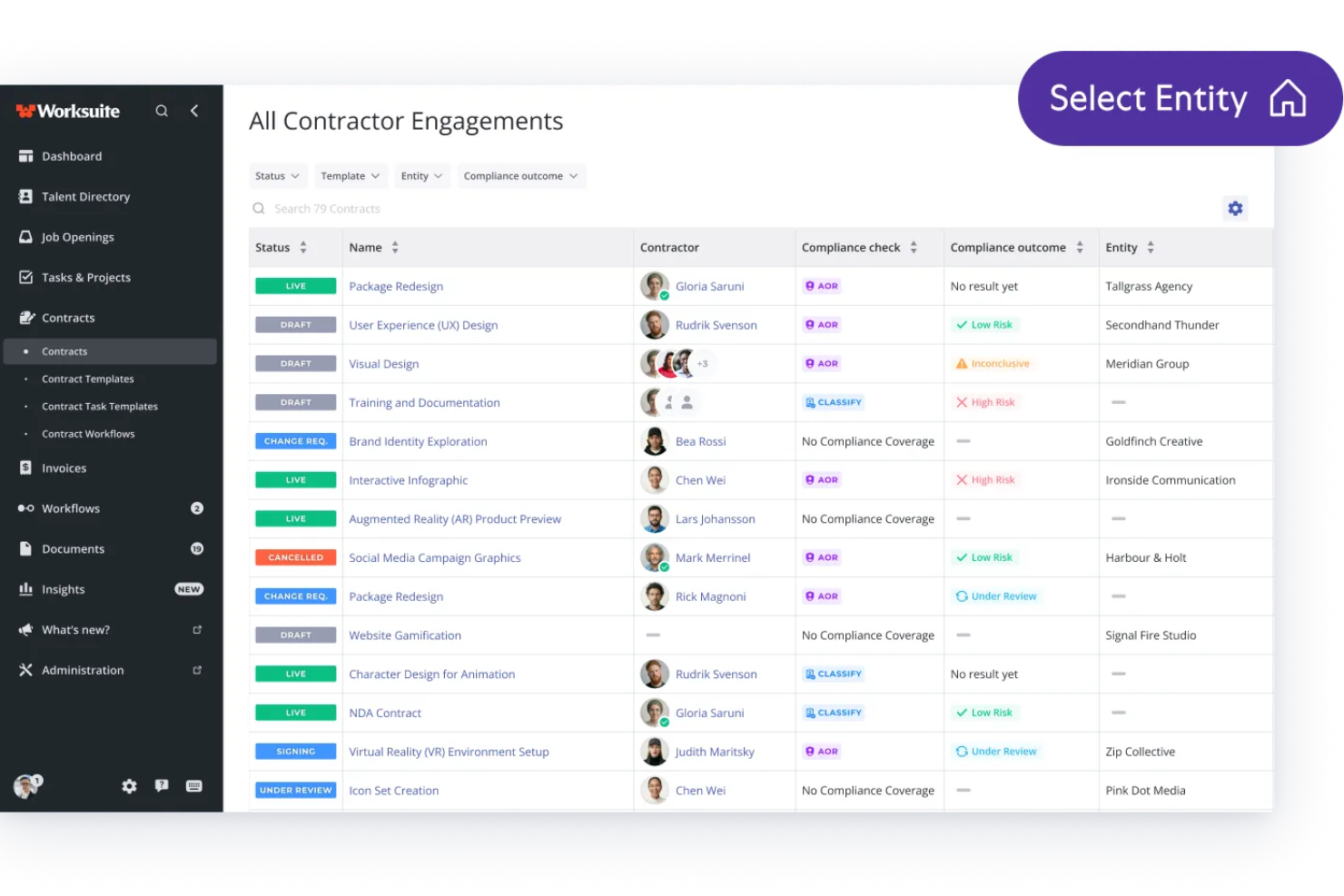
Worksuite is a contractor management platform that handles worker classification, compliance document collection, contractor onboarding, and payments across global markets.
Who Is Worksuite Best For?
Worksuite is a strong fit for HR and procurement teams at mid-size to enterprise companies that engage large networks of independent contractors across multiple countries.
Why I Picked Worksuite
I picked Worksuite as one of the best because its onboarding workflows handle contractor intake across 190+ countries from one platform. I like that it automatically routes the right tax forms based on a contractor's location and collects ID verification and signed agreements in the same flow. Its Contractor of Record service also lets my team engage workers in new markets without needing to establish a local legal entity first.
Worksuite Key Features
- Worker classification assessment: Evaluates contractor vs. employee status using federal and local-level tests, then generates a documented decision record.
- Audit-ready defense files: Compiles each contractor's compliance records into a one-click exportable file for use in audits or legal review.
- Per-gig contractor insurance: Provides workers' compensation and general liability coverage for individual contractors through the platform.
- 1099-NEC filing: Automates year-end tax form preparation and delivery directly to contractors.
Worksuite Integrations
Worksuite offers native integrations with NetSuite, QuickBooks, Xero, Revolut, and Square for financial data syncing, Veriff, Checkr, and 1099policy for compliance and background verification, and Salesforce, HubSpot, monday.com, Airtable, Google Workspace, Slack, and Asana for project management and collaboration. It also connects with Zapier for access to 8,000+ apps, and a RESTful API is available for custom integrations.
Pros and Cons
Pros:
- Built for media and localization teams
- Automated reminders for expiring documents
- Covers 190+ countries for contractor payments
Cons:
- Approval workflow visibility is limited
- Onboarding steps feel redundant for freelancers

Best for distributed teams paying contractors globally
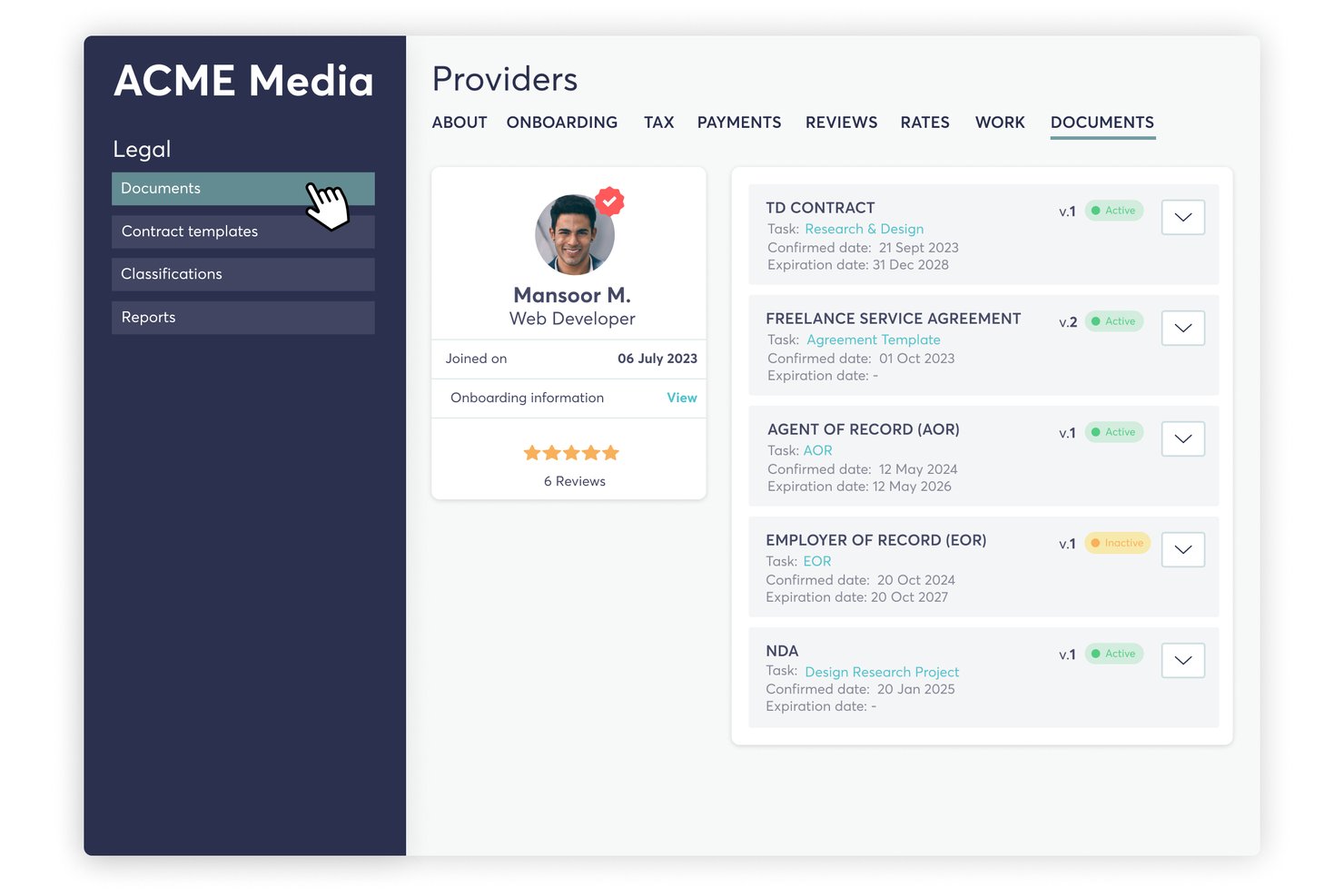
TalentDesk is a contractor and freelancer management platform that combines onboarding, contract management, worker classification checks, tax form collection, and global payment processing across 190+ countries.
Who Is TalentDesk Best For?
TalentDesk is a strong fit for HR ops teams at distributed companies where contractors make up a significant share of the workforce and global payments are a core operational need.
Why I Picked TalentDesk
TalentDesk earns its spot on my shortlist because it covers the full payment and compliance cycle for distributed contractor workforces in a way few platforms match. I particularly like how consolidated invoicing works in practice: your finance team sends one payment, and TalentDesk handles individual payouts across 190+ countries in 110+ currencies. The built-in AOR service adds misclassification indemnification and AML/KYC checks, so you're not just moving money globally—you're doing it with a compliance backstop already in place.
TalentDesk Key Features
- Expert classification questionnaire: An automated questionnaire assesses each contractor's relationship before work begins, flags risk levels, and provides guidance on reducing misclassification exposure.
- 1099 filing workflow: Managers can file 1099s in bulk or per contractor from inside the platform, with TIN validation, status tracking, and downloadable copies for both parties.
- Contractor self-service portal: Contractors submit worksheets, expenses, and invoices, add payment details, and access their 1099 copies directly through their own portal.
- Onboarding form builder: Unlimited customizable onboarding forms let you collect contracts, tax documents, and compliance materials before a contractor starts any work.
TalentDesk Integrations
TalentDesk integrates with Compliancely for TIN validation, Atlas for EOR, and Wise, Revolut, Payoneer, and WorldPay for payments. It also offers an Open API, webhooks, and Zapier.
Pros and Cons
Pros:
- AOR indemnification supports classification risk management
- Built-in 1099 filing with TIN validation
- Consolidated global payouts across 190+ countries
Cons:
- Country-specific contract templates aren't provided
- International tax form review remains limited

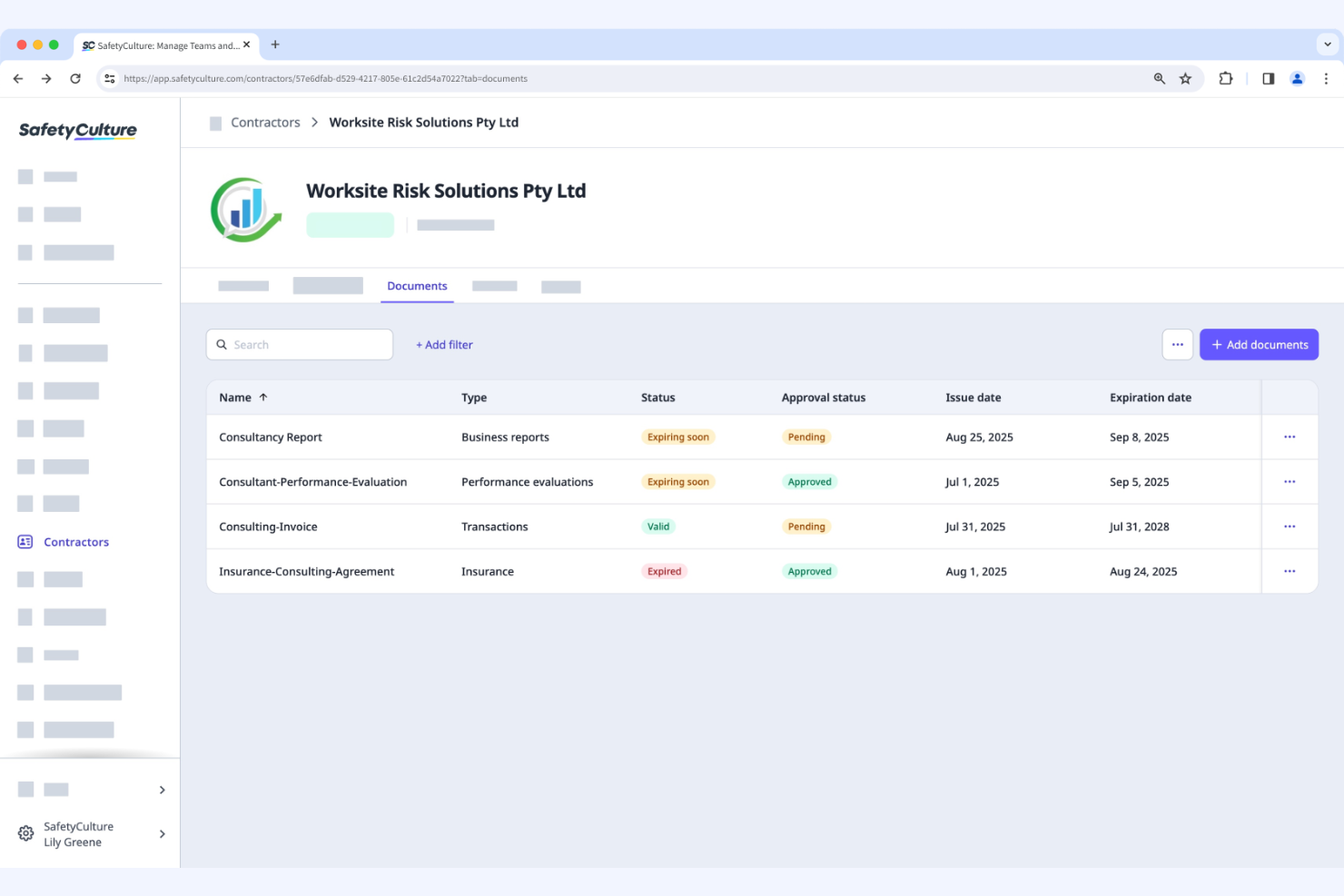
SafetyCulture is a quality management and safety software used by businesses to conduct audits and inspections. It helps teams manage safety protocols and maintain compliance with industry standards.
Why I picked SafetyCulture: This tool focuses on audit management, offering features such as digital inspections and checklists. Your team can conduct audits efficiently with customizable templates. Its real-time reporting feature provides immediate insights into safety compliance. These functionalities make it ideal for organizations that prioritize thorough and efficient audit processes.
Standout Features and Integrations:
Features include digital inspections, customizable checklists, and real-time reporting. These features help your team simplify safety audits and track compliance effectively. The platform also provides analytics to help you identify trends and improve safety measures.
Integrations include Google Workspace, Zapier, Power BI, Tableau, BambooHR, Atlassian Jira, and more.
Pros and Cons
Pros:
- Real-time safety insights
- Customizable inspection templates
- Efficient audit management
Cons:
- Built on a linear checklist model
- No native AI insights


PlanRadar is a construction management tool designed for project managers and construction teams. It helps manage project documentation, task tracking, and communication on construction sites.
Why I picked PlanRadar: This tool focuses on construction tracking, offering features such as task management and project documentation. The real-time communication feature allows your team to collaborate effectively on-site. It also offers digital blueprints, which simplify managing construction tasks. These functionalities make it ideal for construction teams looking to boost project tracking and communication.
Standout Features and Integrations:
Features include digital blueprint management, real-time communication, and task tracking. These features help your team stay organized and manage construction projects efficiently. The tool also provides a mobile app for on-site access to project details.
Integrations include Oracle, Sage, Salesforce, Google Drive, Dropbox, Microsoft OneDrive, and more.
Pros and Cons
Pros:
- Mobile app for site access
- Digital blueprint management
- Real-time project communication
Cons:
- Rigid permissions
- Annotation limits
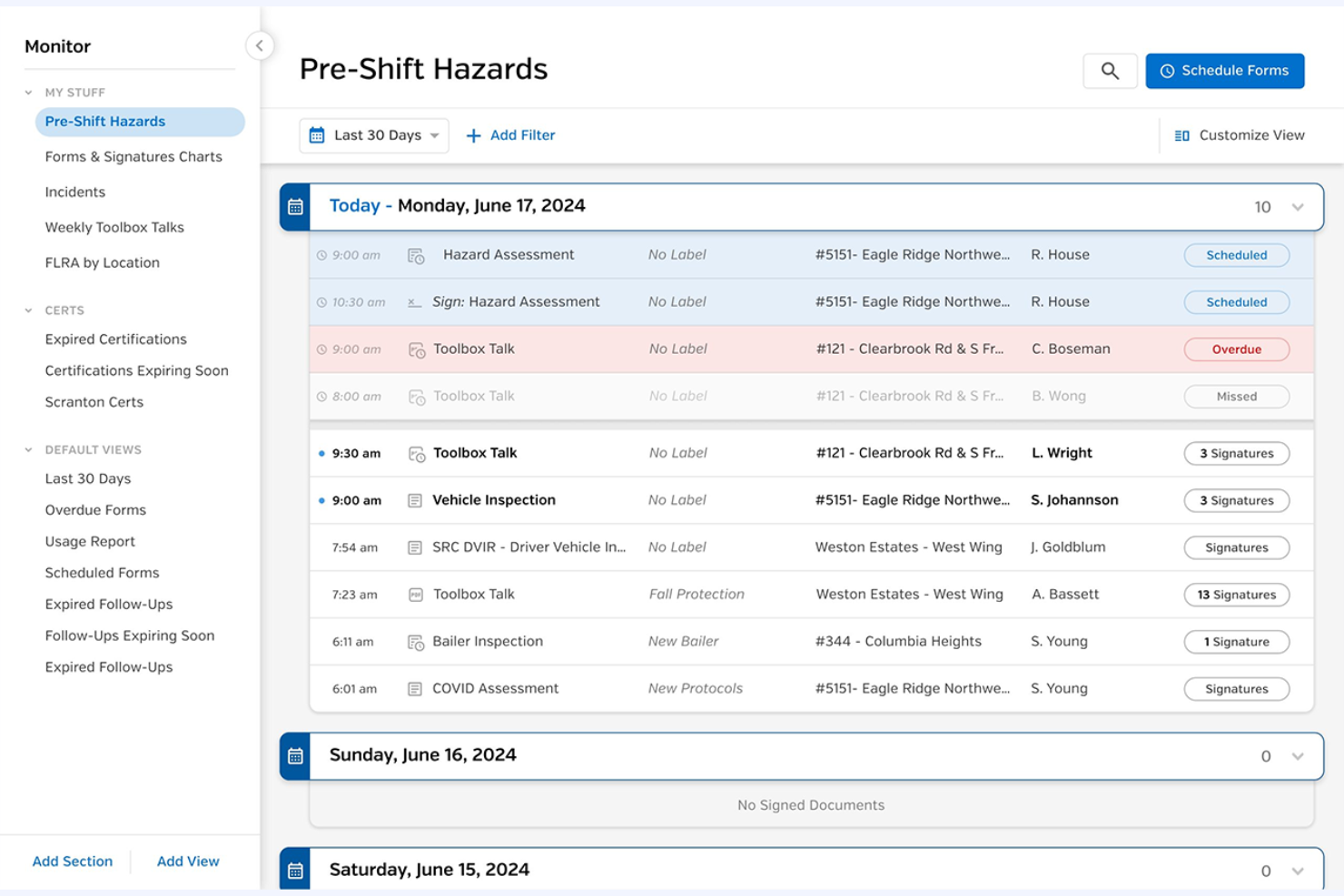
SiteDocs is a safety management software designed for general contractors, focusing on digital forms and compliance tracking. It helps manage contractor safety and offers real-time visibility into compliance protocols.
Why I picked SiteDocs: This tool excels in providing digital forms for compliance, making it suitable for teams that need efficient documentation and tracking. Its incident management feature allows you to handle safety reports smoothly. Hazard management helps your team identify and mitigate risks effectively. Its emphasis on digital forms makes it ideal for contractors looking to modernize their compliance processes.
Standout Features and Integrations:
Features include digital compliance forms, contractor and incident management, and hazard management. These features enable your team members to keep track of health and safety protocols efficiently. The tool also provides automation capabilities to reduce manual work.
Integrations include SAP, QuickBooks, Microsoft Dynamics, Salesforce, BambooHR, and more.
Pros and Cons
Pros:
- Reduces administrative costs
- Real-time compliance tracking
- Efficient incident reporting
Cons:
- Weak analytics
- Limited logic


EcoOnline is an EHS management tool designed to support businesses in managing chemical safety and compliance. It serves industries that handle hazardous materials and provides tools to maintain workplace safety and regulatory adherence.
Why I picked EcoOnline: This tool is tailored for chemical safety, offering features such as Safety Data Sheet (SDS) management and chemical inventory tracking. It helps your team maintain up-to-date safety documentation and maintain compliance with chemical regulations. The risk assessment feature allows for proactive management of potential hazards. These capabilities make it ideal for industries focused on chemical management and regulatory requirements.
Standout Features and Integrations:
Features include risk assessment tools, incident reporting, and learning management. These features help your team identify and mitigate potential hazards effectively. The platform also provides dashboards for monitoring safety metrics and tracking compliance performance.
Integrations include SAP, Oracle, Microsoft Dynamics, Xero, Salesforce, BambooHR, and more.
Pros and Cons
Pros:
- Detailed SDS management
- Effective risk assessment tools
- Focused on chemical safety
Cons:
- No custom-weighted scoring system
- Time-consuming hazard database maintenance

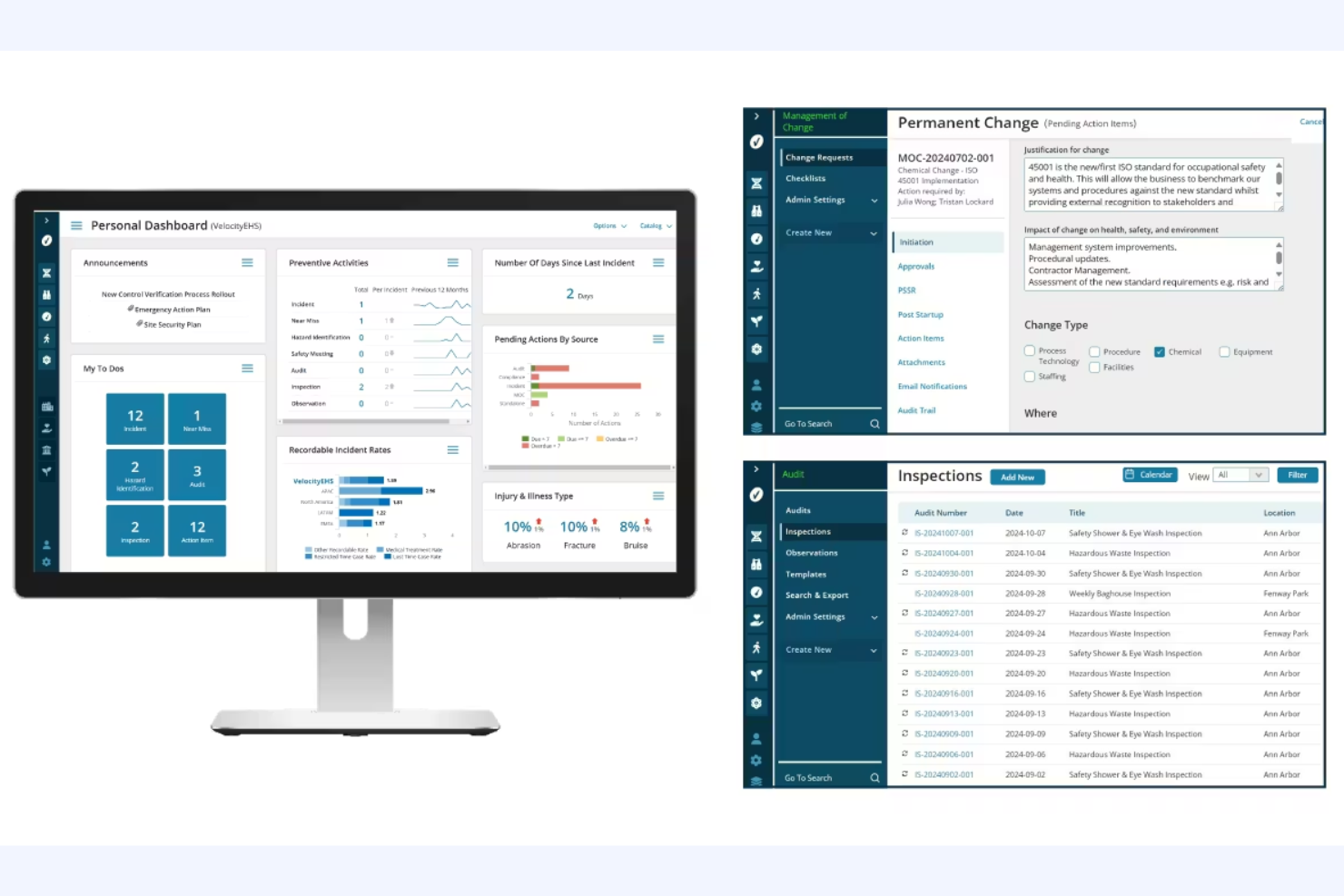
VelocityEHS Compliance Management is a contractor compliance software designed for organizations focused on environmental, health, and safety (EHS) management. It supports businesses in managing contractor safety and compliance tasks efficiently.
Why I picked VelocityEHS Compliance Management: This software is tailored for EHS compliance, offering features such as Permit to Work and Contractor Safety management. It includes advanced AI features to improve safety management processes, making it a fit for organizations that prioritize EHS compliance. The Certificate of Insurance management further differentiates it, providing an in-depth approach to compliance tracking. These functionalities make it ideal for teams needing a strategic platform for regulatory risk management.
Standout Features and Integrations:
Features include a compliance calendar, automated notifications, and task management. These features help you stay organized and maintain timely compliance. The tool also offers real-time insights for regulatory verification.
Integrations include SAP, Oracle, Microsoft Dynamics, Procore, QuickBooks, ADP, Sage Intacct, and more.
Pros and Cons
Pros:
- Strategic EHS platform
- Real-time regulatory insights
- Detailed compliance tracking
Cons:
- Mobile sync issues
- Rigid reporting


ISNetworld is a contractor management platform designed for large enterprises. It helps businesses manage contractor safety, compliance, and risk efficiently.
Why I picked ISNetworld: The tool caters to large enterprises with features such as contractor prequalification and performance monitoring. It offers a centralized platform for managing documentation and safety protocols, which is essential for large-scale operations. Its risk management tools help with contractor compliance management across multiple locations, and its ability to handle complex compliance requirements makes it suitable for big organizations in need of rigorous oversight.
Standout Features and Integrations:
Features include contractor performance monitoring, prequalification processes, and risk management tools. These features help you manage compliance at scale and promote contractor safety. The platform also provides a centralized document management system to keep everything organized.
Integrations include SAP, Microsoft Dynamics, Xero, Procore, and more.
Pros and Cons
Pros:
- Suitable for large-scale operations
- Centralized document management
- Handles complex compliance requirements
Cons:
- Review delays
- Repetitive data entry
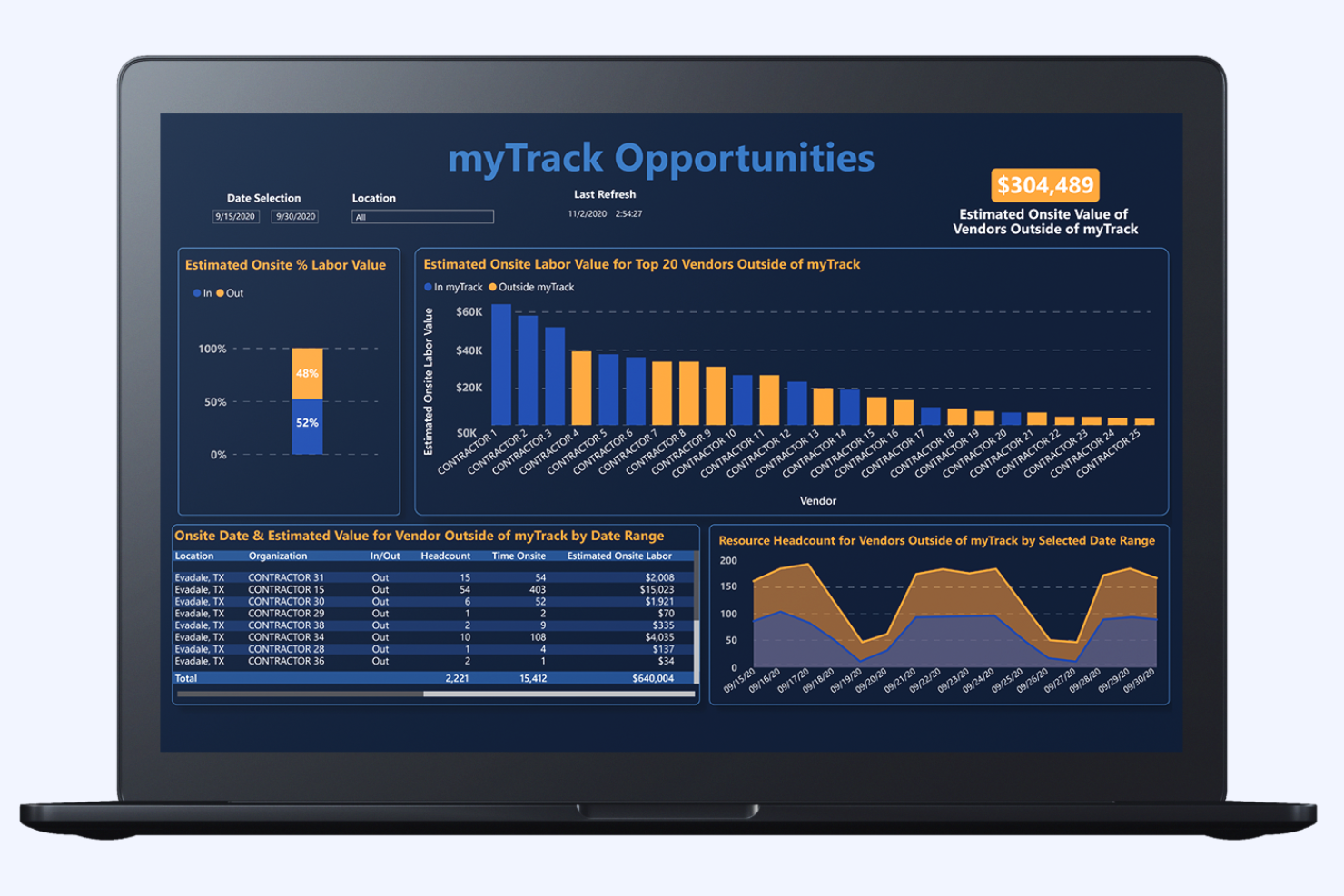
Management Controls myTrack offers a contractor management solution primarily used for cost management and project controls. It assists large enterprises in managing contractor costs and optimizing project expenditures.
Why I picked Management Controls myTrack: This tool focuses on cost management, providing detailed project controls that help your team monitor and manage expenses. Its real-time data insights allow you to track project costs effectively. An automated reporting feature allows your team to access accurate financial data whenever needed. These capabilities make it ideal for organizations looking to maintain tight control over project budgets.
Standout Features and Integrations:
Features include real-time data insights, automated reporting, and detailed project controls. These features help you manage expenses efficiently and maintain accurate financial tracking. The tool also offers customizable dashboards to visualize cost data.
Integrations include SAP, Oracle, Microsoft Dynamics, QuickBooks, Sage, and more.
Pros and Cons
Pros:
- Automated financial reporting
- Real-time expense tracking
- Focused on cost management
Cons:
- Audit trail density
- Hardware dependency
Other Contractor Compliance Software
Here are some additional contractor compliance software options that didn’t make it onto my shortlist but are still worth checking out:
- Ncontracts Ncomply
For financial institutions
- B2Gnow
For government projects
- LCPtracker Pro
For payroll reporting
- Deel HR
For automated worker classification
- Venminder
For vendor assessments
- Remote
For businesses prioritizing flat-rate pricing
- Quantivate Compliance Solution
For risk management
- VIVE
For vendor performance


How I Evaluate Contractor Compliance Software
I split my evaluation into two layers: baseline requirements like misclassification risk scoring and localized contracts, then differentiators that set the best tools apart.
Core Functionality (Table Stakes For This List)
When I'm selecting tools for my list, I rank each one on a scale from 0 (does not offer the functionality) to 5 (excels in this area) for each core functionality listed below. Then, I calculate the tool's total score into a percentage. Each tool needs to achieve a minimum total score of 65% to be considered for inclusion.
- Worker Misclassification Safeguards: I evaluate how each tool assesses classification risk—whether it uses jurisdiction-specific logic or just a generic checklist that won't hold up in an audit.
- Localized Contractor Agreements: Each platform should offer country-specific contract templates with e-signature, so your legal team isn't drafting bespoke agreements every time you onboard abroad.
- Tax Form Collection & Filing: I check whether the tool automates collection and validation of forms like W-9s or DAC7 declarations, not just stores uploaded documents passively.
- Global Contractor Payments: Multi-currency payouts with built-in invoicing and approval workflows matter here, especially when you're paying contractors across dozens of countries.
- Identity & Background Verification: I look for automated KYC and right-to-work checks built into the onboarding flow rather than a manual document upload step tacked on as an afterthought.
- Regulatory Monitoring & Audit Trail: The platform should track regulatory changes and maintain exportable audit logs, so you're prepared when labor authorities request documentation.
Once I have a list of tools that meet this criteria, I consider what sets each platform apart.
Differentiating Factors (What Sets Vendors Apart)
Here's how I compare and contrast different vendors:
Standout Features
Contractor-to-employee conversion workflows matter when an engagement outgrows its original scope. I look for tools that trigger EOR-based conversion without restarting compliance from scratch. Misclassification insurance is another factor I weigh, since it shifts financial liability off your organization if a classification is disputed. I also evaluate how platforms handle IP and invention assignment clauses, especially for product and engineering teams where ownership of work output needs airtight, country-specific protections.
Beyond Features
Global coverage depth is the first thing I check—some platforms list 150+ countries but rely on third-party partners with uneven localization. I look for vendors with in-house legal entities in their top markets. Pricing transparency also matters more than you'd expect here, since hidden FX markups and per-payment fees add up fast when you're paying dozens of contractors monthly. Finally, I evaluate integrations with HRIS and accounting tools like BambooHR or NetSuite, because contractor data that lives in a silo creates duplicate work for your people ops and finance teams.
How To Choose Contractor Compliance Software
It’s easy to get bogged down in long feature lists and complex pricing structures. To help you stay focused as you work through your unique contractor management software selection process, here’s a checklist of factors to keep in mind:
| Factor | What To Consider |
|---|---|
| Scalability | Can the software grow with your business? Consider future needs and verify that the tool can handle increased data and users without performance issues. |
| Integrations | Does it integrate with your existing systems? Check compatibility with current software, such as payroll and HR systems, to avoid data silos and extra manual work. |
| Customizability | Can you tailor it to fit your workflows? Look for flexibility in settings and configurations to match your processes without needing custom development. |
| Ease of use | Is it user-friendly for your team? Assess the interface and navigation. Avoid tools that require extensive training or have a steep learning curve. |
| Implementation and onboarding | How quickly can you get up and running? Consider the time and resources needed for setup, and look for vendors that offer full-featured onboarding support. |
| Cost | Does the pricing fit your budget? Compare the total cost of ownership, including subscriptions, setup fees, and potential hidden costs. Look for pricing that aligns with your financial constraints. |
| Security safeguards | Does it meet your security standards? Implement data encryption, user access controls, and compliance with relevant regulations to protect sensitive information. |
| Support availability | Is help readily available when you need it? Check the vendor’s support hours and channels. 24/7 support can be key for resolving issues quickly and minimizing downtime. |
What Is Contractor Compliance Software?
Contractor compliance software is a tool that helps businesses manage contractor adherence to legal and safety regulations. These tools are generally used by HR professionals, compliance officers, and project managers to maintain regulatory compliance and reduce risks. Document management, compliance tracking, and automated workflows help with organizing contracts, monitoring compliance status, and reducing manual tasks. Overall, these tools offer value by simplifying compliance processes and improving workplace and jobsite safety.
Features
When selecting contractor compliance software, keep an eye out for the following key features:
- Document management: Helps organize and store compliance documents, making it easy to access and update them when needed.
- Compliance tracking: Monitors contractor adherence to regulations and alerts you to any issues or lapses in compliance.
- Automated workflows: Reduce manual tasks by automating processes such as document collection and compliance verification.
- Risk assessment tools: Identify potential risks and provide strategies to mitigate them, improving workplace safety.
- Real-time reporting: Offers immediate insights into compliance status, helping you make informed decisions quickly.
- Customizable templates: Allow you to tailor forms and documents to fit your specific compliance needs and workflows.
- Audit trails: Keep a detailed record of compliance activities, providing transparency and accountability.
- Integration capabilities: Maintains smooth data flow between different systems, reducing the need for manual data entry.
- Training management: Helps manage and track contractor training to meet necessary compliance standards.
- Mobile access: Provides on-the-go access to compliance information, allowing you to manage tasks from anywhere.
Benefits
Implementing contractor compliance software provides several benefits for your team and your business. Here are a few you can look forward to:
- Improved compliance: Automated workflows and compliance tracking help your contractors consistently meet legal and safety regulations.
- Time savings: Automated processes reduce the time spent on manual tasks, allowing your team to focus on more strategic activities.
- Reduced risk: Risk assessment tools help identify and mitigate potential compliance issues, boosting workplace safety.
- Better organization: Document management keeps all compliance documents in one place, making them easy to access and update.
- Increased transparency: Audit trails provide a clear record of compliance activities, promoting accountability within your team.
- Improved decision-making: Real-time reporting offers immediate insights into compliance status, helping you make informed decisions quickly.
- Flexibility and accessibility: Mobile access and customizable templates allow you to manage compliance tasks from anywhere and tailor processes to fit your needs.
Costs and Pricing
Selecting contractor compliance software requires an understanding of the various pricing models and plans available. Costs vary based on features, team size, add-ons, and more. The table below summarizes common plans, their average prices, and the typical features included in contractor compliance software solutions:
Plan Comparison Table for Contractor Compliance Software
| Plan Type | Average Price | Common Features |
|---|---|---|
| Free Plan | $0 | Basic compliance tracking, limited document management, and basic reporting. |
| Personal Plan | $24-$40/user/month | Upgraded document management, compliance alerts, and customizable templates. |
| Business Plan | $32-$85/user/month | Advanced risk assessment, real-time reporting, and integration capabilities. |
| Enterprise Plan | $107-$350/user/month | Full customization, dedicated support, and detailed analytics. |
Contractor Compliance Software FAQs
Here are some answers to common questions about contractor compliance software.
How do I know if my business needs contractor compliance software?
If your business regularly works with contractors and struggles to manage compliance documentation, then contractor compliance software could be beneficial. It helps keep track of regulations and helps all contractors meet necessary standards. For example, if you’re managing multiple contracts and find it challenging to maintain compliance, this software can automate many of those processes, reducing the administrative burden on your team. Evaluate your current compliance management processes to see if automation and tracking could improve efficiency and accuracy.
Can contractor compliance software integrate with my existing systems?
Yes, most contractor compliance software solutions offer integration capabilities with popular systems. Before purchasing, check if the software integrates with your current HR, payroll, or project management tools. Integration is essential for smooth data flow and minimizing manual data entry. For instance, if you’re using QuickBooks for payroll, verify that the software can sync with it to automatically update contractor records. Review the integration options provided by each vendor to make sure they align with your existing tech stack.
Is contractor compliance software difficult to implement?
No, many software solutions are designed for straightforward implementation. However, the ease of implementation can vary based on the complexity of your existing systems and the software’s flexibility. Look for vendors that offer dedicated onboarding support, such as training videos or webinars, to ease the transition. In my experience, having a clear implementation plan and involving key stakeholders early can make the process smoother. Assess the resources available from the vendor to support a successful rollout.
What should I look for in vendor support options?
Look for vendor support options that include 24/7 availability, multiple contact channels, and an in-depth knowledge base. Reliable support can make a big difference if you encounter issues or need assistance with the software. For example, if you prefer live chat over phone support, make sure the vendor offers it. Check reviews and testimonials to gauge the quality of support provided. Having access to prompt and knowledgeable support can save your team time and prevent disruptions.