

10 Best Whistleblowing Software Solutions for 2026

10 Best Whistleblowing Software Shortlist


Whistleblowing software is a digital platform that enables employees and stakeholders to report misconduct, ethical concerns, or compliance issues securely and—often—anonymously. If you’re searching for the best whistleblowing software, you’re likely focused on protecting your organization, meeting regulatory requirements, and building a culture of trust. With regulations evolving and workplace expectations shifting, choosing the right tool can feel overwhelming. This list will help you compare top solutions, understand their unique features, and find the best fit for your compliance and reporting needs.
Why Trust Our Software Reviews
Our team has been testing and reviewing software since 2012. As HR experts ourselves, we know how difficult—and important—it is to choose the right software.
For this guide, we evaluated tools using hands-on testing and independent research, scoring tools using our selection criteria. We also draw on insights from industry thought leaders and and practicing HR experts.
Our reviews reflect our human editorial judgment, not a sales pitch.
Expert reviewers:
Best Whistleblowing Software Summary
This comparison chart summarizes pricing details for my top whistleblowing software selections to help you find the best one for your budget and business needs.
| Tool | Best For | Trial Info | Price | ||
|---|---|---|---|---|---|
| 1 | Best for educational institution reporting | Free demo available | Pricing upon request | Website | |
| 2 | Best for customizable reporting workflows | Free trial available | From €99/month (billed annually) | Website | |
| 3 | Best with advanced case management tools | Free demo available | Pricing upon request | Website | |
| 4 | Best for multinational compliance needs | Free demo available | Pricing upon request | Website | |
| 5 | Best for anonymous multi-channel intake | Free demo available | Pricing upon request | Website | |
| 6 | Best with multilingual support options | Free demo available | Pricing upon request | Website | |
| 7 | Best for open-source deployment flexibility | Free demo available | Free, open-source | Website | |
| 8 | Best for hotline and web-based submissions | Free demo available | Pricing upon request | Website | |
| 9 | Best for rapid implementation timelines | 30-day free trial + free demo available | From $86/month (billed annually) | Website | |
| 10 | Best for integration with risk management systems | Free demo available | Pricing upon request | Website |
Best Whistleblowing Software Reviews
Below are my detailed summaries of the whistleblowing software that made it onto my shortlist. My reviews offer a detailed look at the features, best use cases, and integrations of each platform to help you find the best one for you.

FaceUp
Best for educational institution reporting
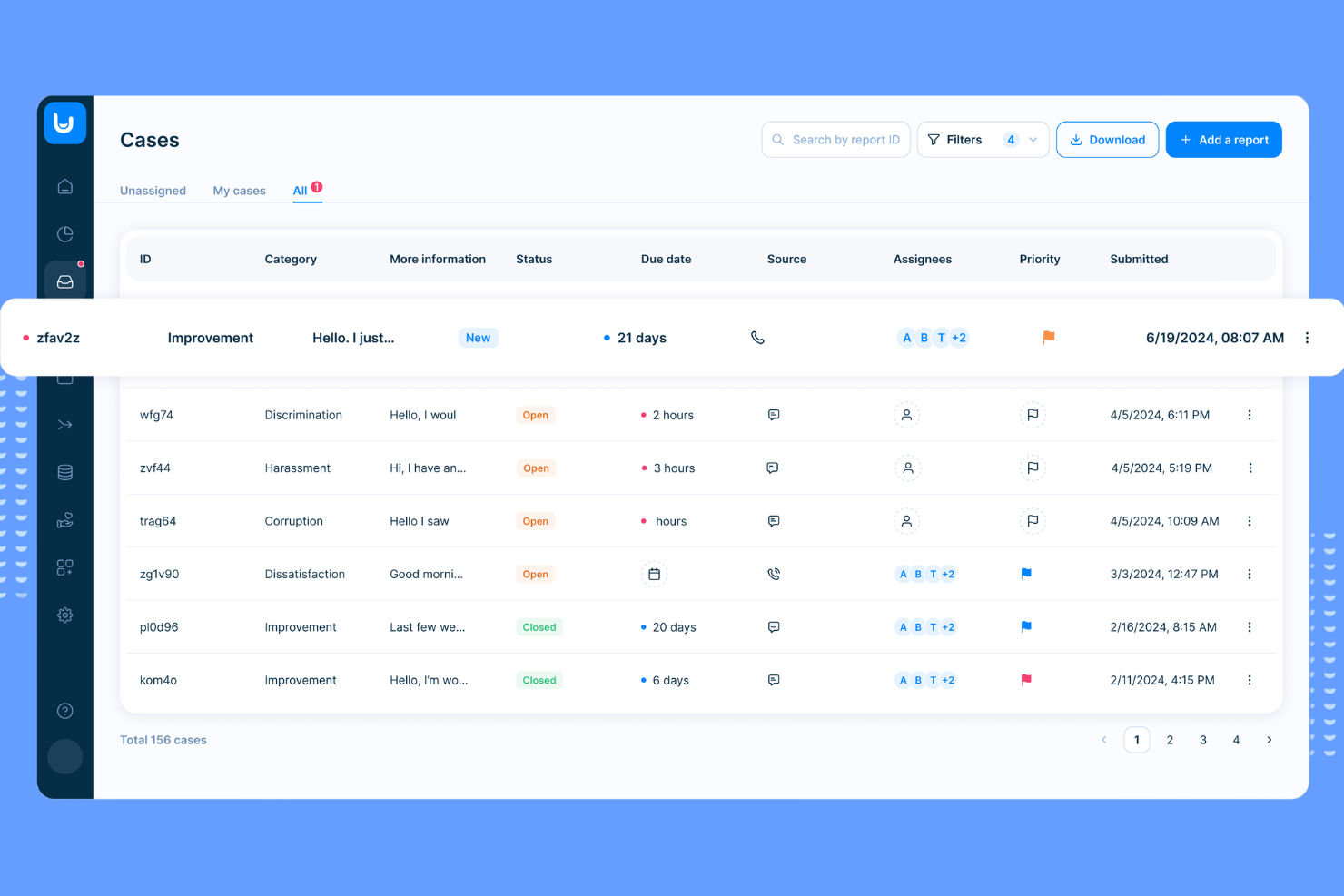
FaceUp is designed with the needs of schools and educational institutions in mind, offering a reporting platform tailored for students, teachers, and administrators. It addresses sensitive issues like bullying, harassment, and safety concerns by providing a confidential and accessible way to report incidents. The platform’s focus on education-specific workflows and communication tools helps schools respond quickly and appropriately to reports.
Why I Picked FaceUp
FaceUp stands out for educational institutions that need a reporting tool built specifically for school environments. The platform offers anonymous reporting channels designed for students, staff, and parents, making it easier to surface issues like bullying or misconduct. I like that FaceUp includes customizable forms and workflows tailored to school policies, so administrators can manage cases in a way that fits their unique needs. Its focus on education means features like in-app guidance and resources are relevant to the challenges schools face every day.
FaceUp Key Features
Some other features that make FaceUp useful for schools and organizations include:
- Mobile App Access: Allows users to submit reports and communicate directly from their smartphones.
- Document Uploads: Lets reporters attach files, images, or evidence to support their submissions.
- Automated Case Notifications: Sends alerts to designated staff when a new report is filed or updated.
- Role-Based Permissions: Controls access to sensitive information based on user roles within the institution.
FaceUp Integrations
Integrations include Slack, BambooHR, Deel, Rippling, Vanta, JOBka, Power BI, UKG Pro, Jira, and more.
Pros and Cons
Pros:
- Multilingual support for diverse school populations
- Bulk messaging to entire school communities
- Mobile app supports student and parent reporting
Cons:
- Lacks advanced investigation management tools
- No public-facing transparency or case status portal

Best for customizable reporting workflows
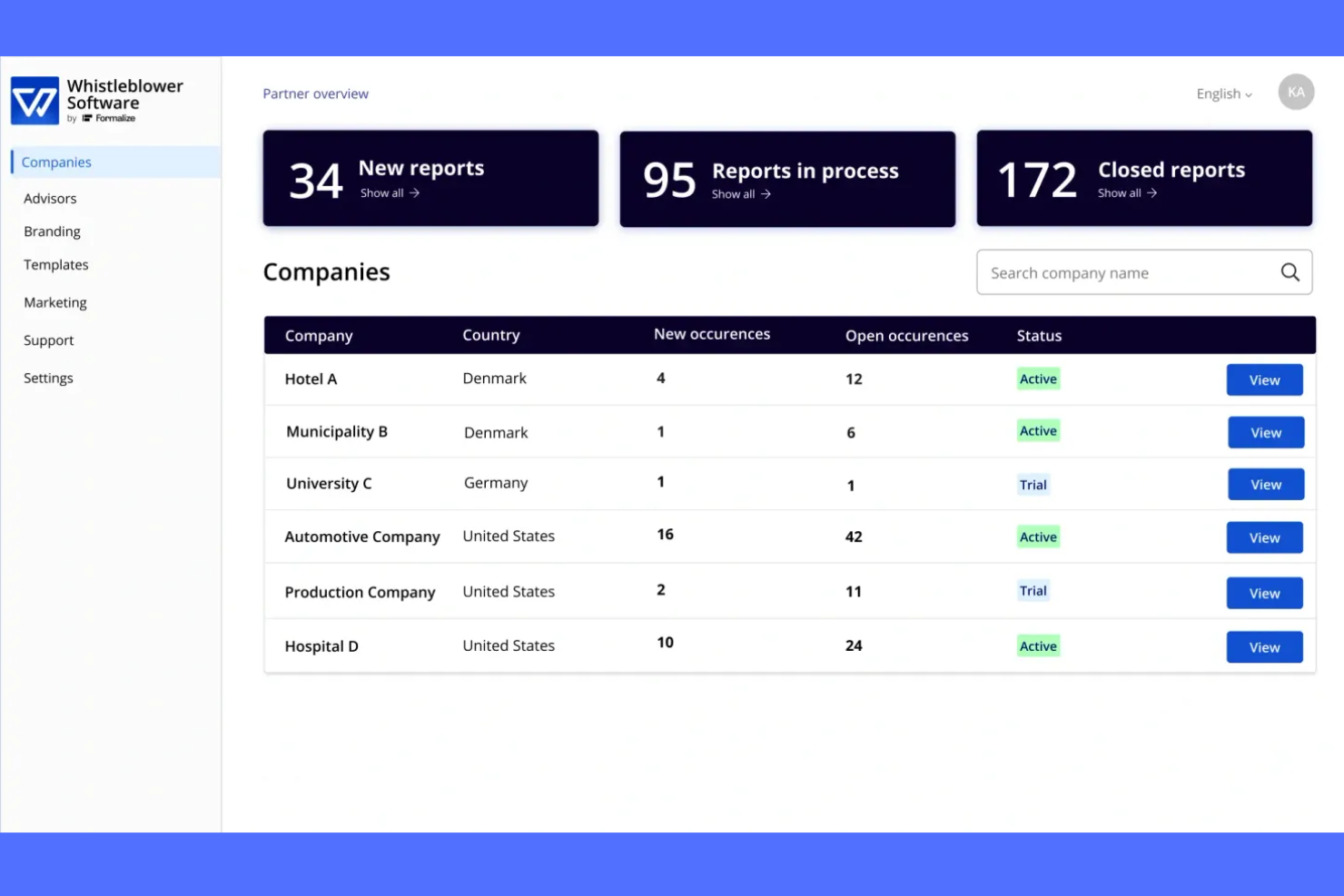
If you need a whistleblowing platform that adapts to your organization’s unique reporting needs, Whistleblower Software offers flexible workflow customization. This tool is a strong fit for compliance teams and HR professionals in organizations with complex or evolving reporting structures. Its configurable forms and process automation help you manage sensitive reports while meeting internal and regulatory requirements.
Why I Picked Whistleblower Software
I chose Whistleblower Software because its customizable reporting workflows address the need for flexibility in handling sensitive disclosures. The platform lets you design reporting forms and processes that match your organization’s structure and compliance requirements. I appreciate how you can set up automated routing and escalation rules, so reports reach the right people without manual intervention. This level of customization is especially useful for organizations with unique policies or multi-level review processes.
Whistleblower Software Key Features
Some other features that make Whistleblower Software stand out include:
- Anonymous Two-Way Messaging: Communicate securely with reporters while protecting their identity throughout the process.
- Multi-Language Support: Offer reporting and communication in multiple languages to accommodate diverse teams.
- Case Management Dashboard: Track, organize, and manage all reports and investigations from a centralized interface.
- Document Uploads: Allow users to attach supporting files and evidence directly to their reports for more thorough case documentation.
Whistleblower Software Integrations
Native integrations are not currently listed.
Pros and Cons
Pros:
- GDPR-compliant data handling and storage
- Multi-language support for global organizations
- Anonymous two-way communication with reporters
Cons:
- Custom branding options are restricted to higher tiers
- Limited public documentation on advanced features

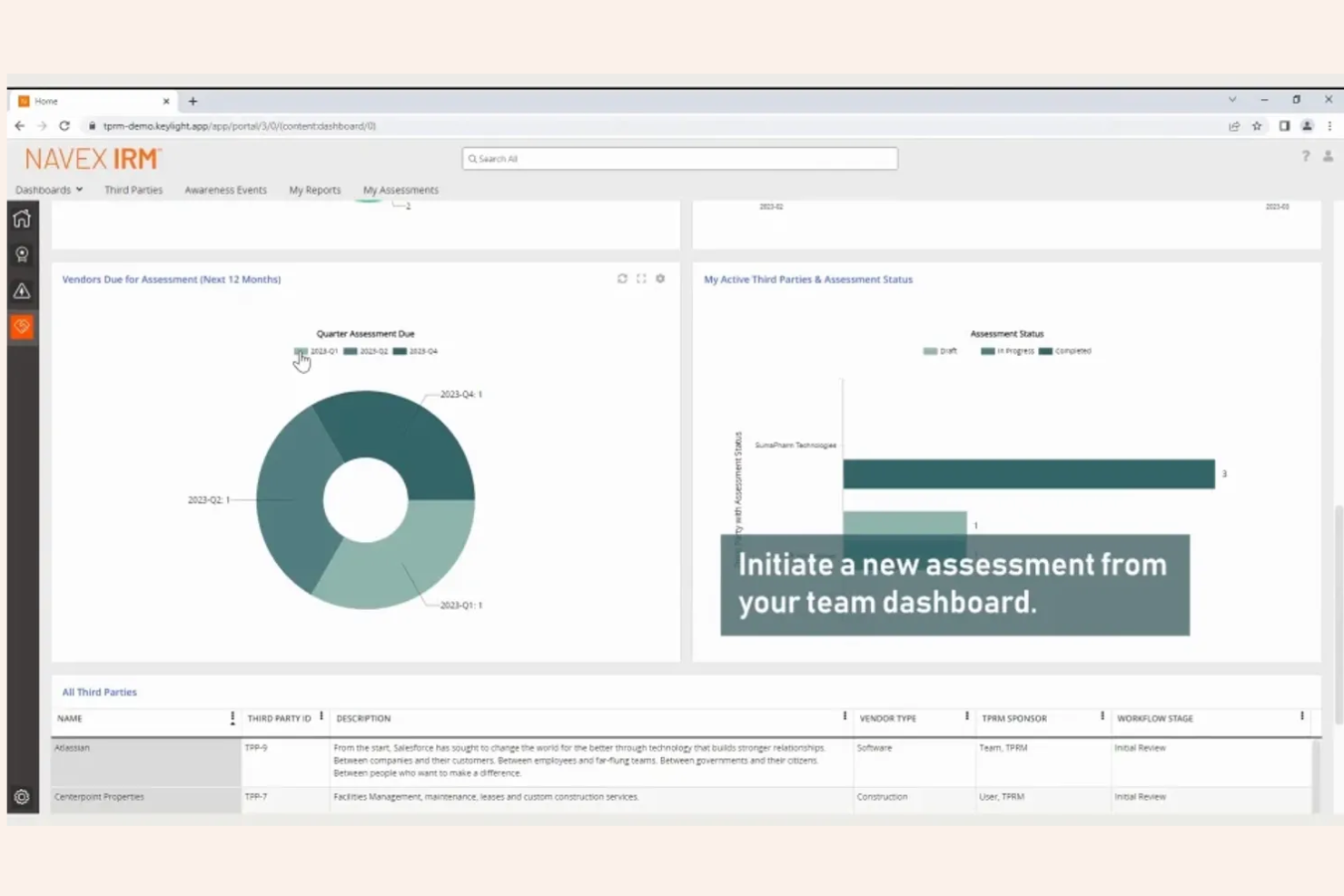
NAVEX is designed for organizations that need advanced case management and detailed oversight of whistleblowing reports. This platform is especially useful for compliance teams and legal departments in highly regulated industries. Its investigative tools and reporting features help you manage complex cases from intake through resolution while maintaining a clear audit trail.
Why I Picked NAVEX
What sets NAVEX apart is its advanced case management tools, which are essential for organizations handling sensitive or high-volume whistleblowing reports. The platform offers detailed case tracking, allowing you to assign tasks, set deadlines, and monitor progress throughout the investigation process. I appreciate the built-in audit trails and documentation features, which help ensure compliance and transparency at every stage. These capabilities make NAVEX a strong choice for teams that need to manage complex investigations with accuracy and accountability.
NAVEX Key Features
Some other features that make NAVEX a strong option include:
- Anonymous Reporting Channels: Enable employees to submit concerns without revealing their identity.
- Multi-Language Support: Allow users to access reporting tools and resources in several languages.
- Automated Alerts and Notifications: Send real-time updates to relevant stakeholders as cases progress.
- Customizable Intake Forms: Tailor reporting forms to collect the specific information your organization needs.
NAVEX Integrations
Native integrations are not currently listed.
Pros and Cons
Pros:
- Configurable access controls for sensitive cases
- Detailed audit trails for every case action
- Advanced case assignment and escalation options
Cons:
- Initial setup process can be time-consuming
- Reporting dashboard customization is limited
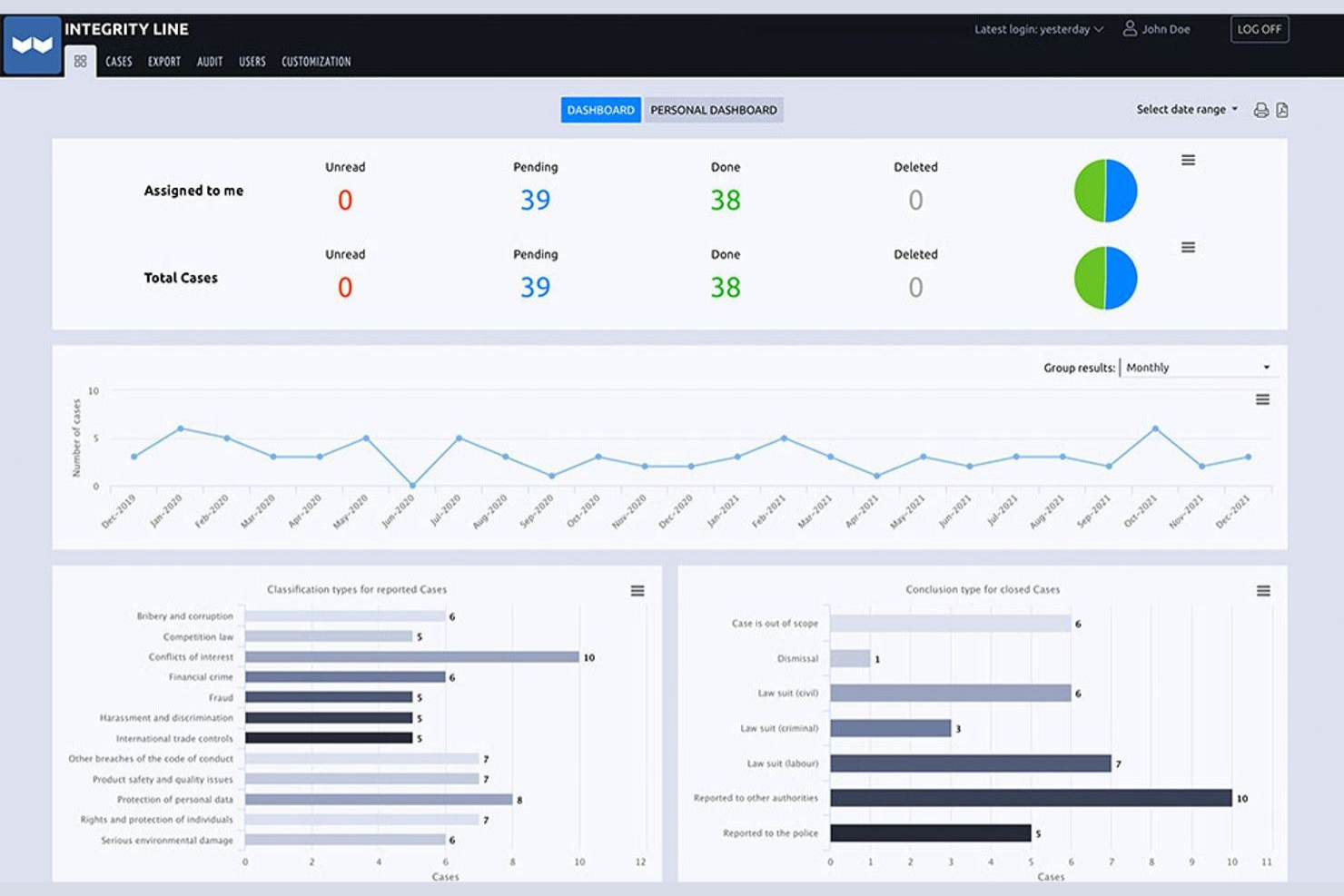
EQS is built for organizations that need to meet complex compliance requirements across multiple countries. This platform is especially relevant for multinational companies and compliance teams navigating varied legal frameworks and languages. Its global approach helps you manage whistleblowing reports securely while staying aligned with local and international regulations.
Why I Picked EQS
EQS stands out for organizations that operate across borders and need to comply with a range of international whistleblowing regulations. I picked EQS because it offers multi-language support and localization features, which help ensure accessibility and compliance in different regions. The platform also provides configurable workflows that let you adapt reporting and case management processes to meet local legal requirements. These capabilities make EQS a strong fit for multinational companies that need to manage whistleblowing reports in a consistent yet flexible way.
EQS Key Features
Some other features that make EQS appealing for compliance teams include:
- Anonymous Two-Way Communication: Lets reporters and investigators exchange messages without revealing identities.
- Automated Case Assignment: Routes new reports to the appropriate team members based on predefined rules.
- Document Management: Stores and organizes all case-related files securely within the platform.
- Customizable Reporting Channels: Offers web, phone, and mail intake options tailored to your organization’s needs.
EQS Integrations
Native integrations are not currently listed.
Pros and Cons
Pros:
- Secure document management for case files
- EU Whistleblower Directive requirements
- Anonymous two-way communication for reporters Meets
Cons:
- Reporting dashboard offers few visualization options
- Limited workflow automation compared to peers
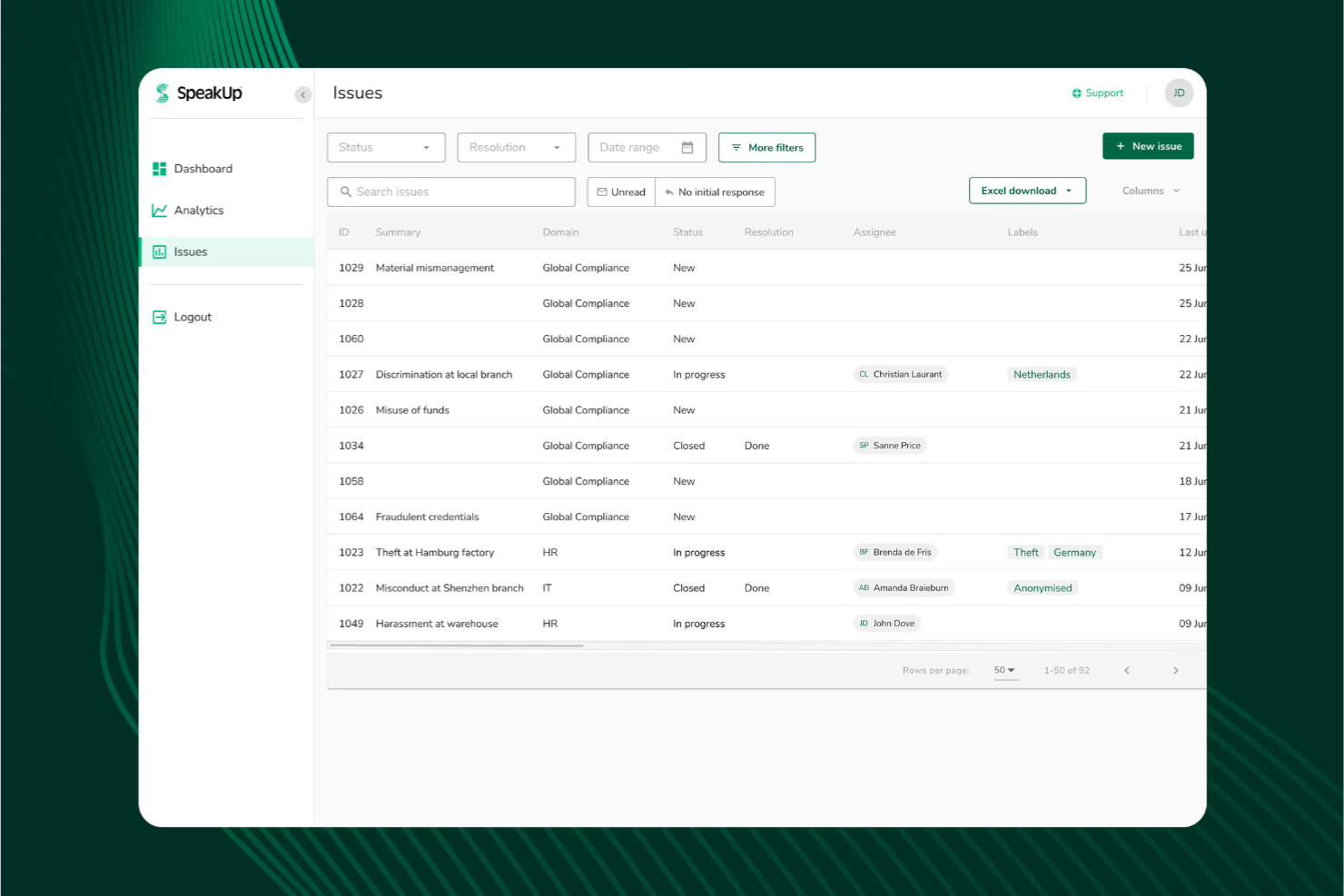
SpeakUp is designed for organizations that want to offer truly anonymous reporting across multiple channels. This platform is a strong fit for HR teams, compliance officers, and ethics committees that need to capture concerns via web, phone, or mobile app without revealing the reporter’s identity. Its flexible intake options help you reach employees and stakeholders wherever they are, supporting a culture of openness and trust.
Why I Picked SpeakUp
What drew me to SpeakUp is its focus on providing truly anonymous, multi-channel intake for whistleblowing reports. The platform lets users submit concerns through web forms, a dedicated mobile app, and a 24/7 phone hotline, all while protecting their identity. I appreciate that SpeakUp supports secure, two-way communication between reporters and investigators without compromising anonymity. These features make it a strong choice for organizations that want to lower barriers to reporting and ensure everyone feels safe speaking up.
SpeakUp Key Features
Some other features that make SpeakUp a strong option for compliance teams include:
- Case Management Dashboard: Lets you track, assign, and manage reports from intake through resolution.
- Automated Acknowledgement Messages: Send instant confirmation to reporters when a new case is submitted.
- Role-Based Access Controls: Restricts access to sensitive case information based on user roles.
- Customizable Intake Forms: Allows you to tailor reporting forms to fit your organization’s policies and requirements.
SpeakUp Integrations
Native integrations are not currently listed.
Pros and Cons
Pros:
- Intake forms can be tailored by organization
- Automated case acknowledgment for every submission
- Anonymous reporting available via web, app, and phone
Cons:
- No built-in translation for multilingual submissions
- No dedicated analytics or trend reporting tools

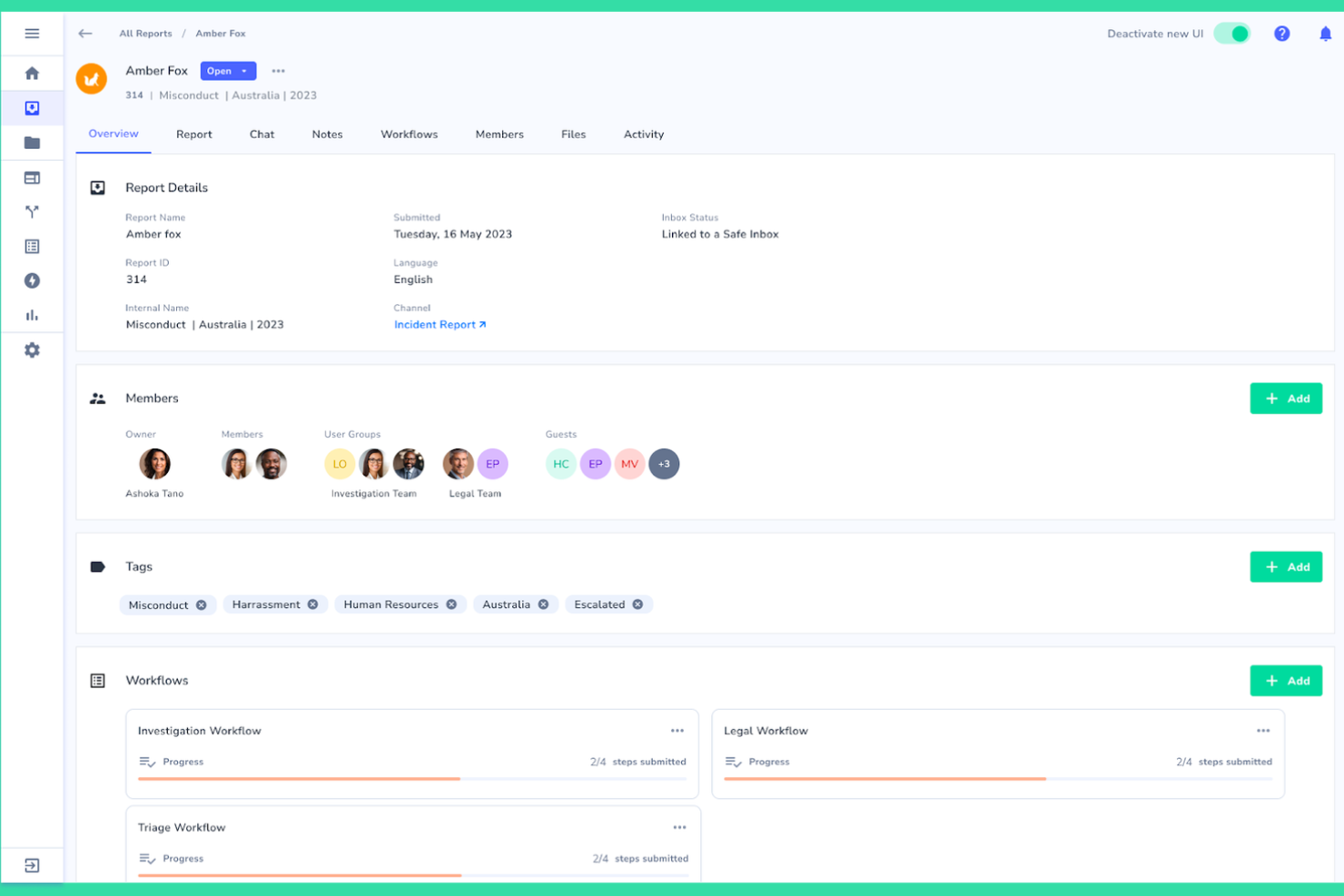
Whispli stands out for organizations that need to support whistleblowing across multiple languages and regions. This platform is especially useful for global HR teams, compliance leaders, and ethics officers who want to ensure every employee can report concerns in their preferred language. Its multilingual intake and communication features help break down language barriers, making it easier to foster a culture of trust and transparency worldwide.
Why I Picked Whispli
What makes Whispli a strong choice for whistleblowing software is its commitment to multilingual support. The platform allows users to submit reports and communicate with case managers in over 30 languages, which is essential for organizations with a global workforce. I appreciate that Whispli includes built-in translation tools, so both reporters and investigators can interact in their preferred language without confusion. This focus on language accessibility helps organizations remove barriers to reporting and ensures everyone’s voice can be heard, no matter where they’re located.
Whispli Key Features
Some other features that make Whispli appealing for compliance teams include:
- Anonymous Two-Way Messaging: Enables secure, ongoing conversations between reporters and case managers without revealing identities.
- Customizable Intake Forms: Lets you tailor reporting forms to match your organization’s specific policies and requirements.
- Case Management Dashboard: Centralizes all reports, case notes, and actions for easy tracking and follow-up.
- Automated Workflow Triggers: Allows you to set up rules that automatically assign cases or send notifications based on report details.
Whispli Integrations
Native integrations are not currently listed.
Pros and Cons
Pros:
- Detailed audit trails for every case action
- Automated workflows for case assignment
- Customizable intake forms for different policies
Cons:
- Limited public documentation for end users
- No built-in hotline or phone intake option
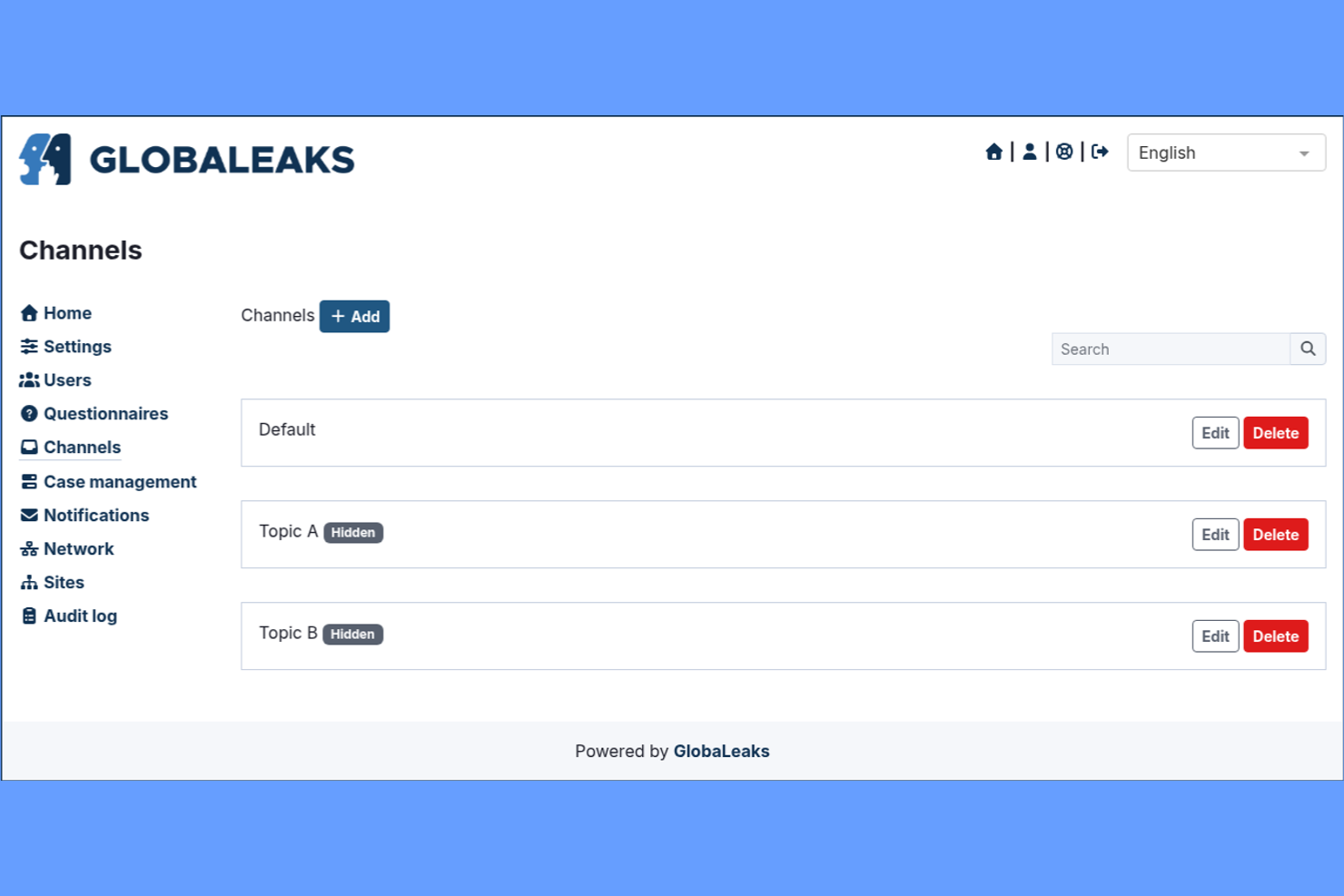
GlobaLeaks offers an open-source whistleblowing platform that gives organizations full control over deployment and data. It’s a strong fit for IT teams, NGOs, and public sector groups that need to customize workflows or meet strict data residency requirements. The tool’s flexibility helps organizations build secure, anonymous reporting channels tailored to their unique compliance and privacy needs.
Why I Picked GlobaLeaks
What sets GlobaLeaks apart is its open-source architecture, which gives organizations unmatched flexibility in how they deploy and manage their whistleblowing platform. I picked GlobaLeaks because it allows IT teams to self-host, customize workflows, and adapt security settings to meet strict internal or regulatory requirements. The platform supports anonymous submissions and encrypted communication, which are essential for protecting whistleblowers’ identities. This level of control makes GlobaLeaks especially appealing for organizations with unique compliance, privacy, or localization needs.
GlobaLeaks Key Features
Some other features that make GlobaLeaks appealing for organizations include:
- Multi-language Support: Lets users submit and manage reports in several different languages.
- Customizable Submission Forms: Allows administrators to design forms that fit specific reporting needs.
- Automated Data Retention Policies: Enable organizations to set rules for how long data is stored before deletion.
- Audit Logging: Tracks all access and actions within the platform for compliance and review purposes.
GlobaLeaks Integrations
Native integrations are not currently listed.
Pros and Cons
Pros:
- Anonymous reporting with strong encryption options
- Self-hosting supports strict data residency needs
- Fully open-source for complete deployment control
Cons:
- Limited reporting and analytics features
- No dedicated customer support or onboarding
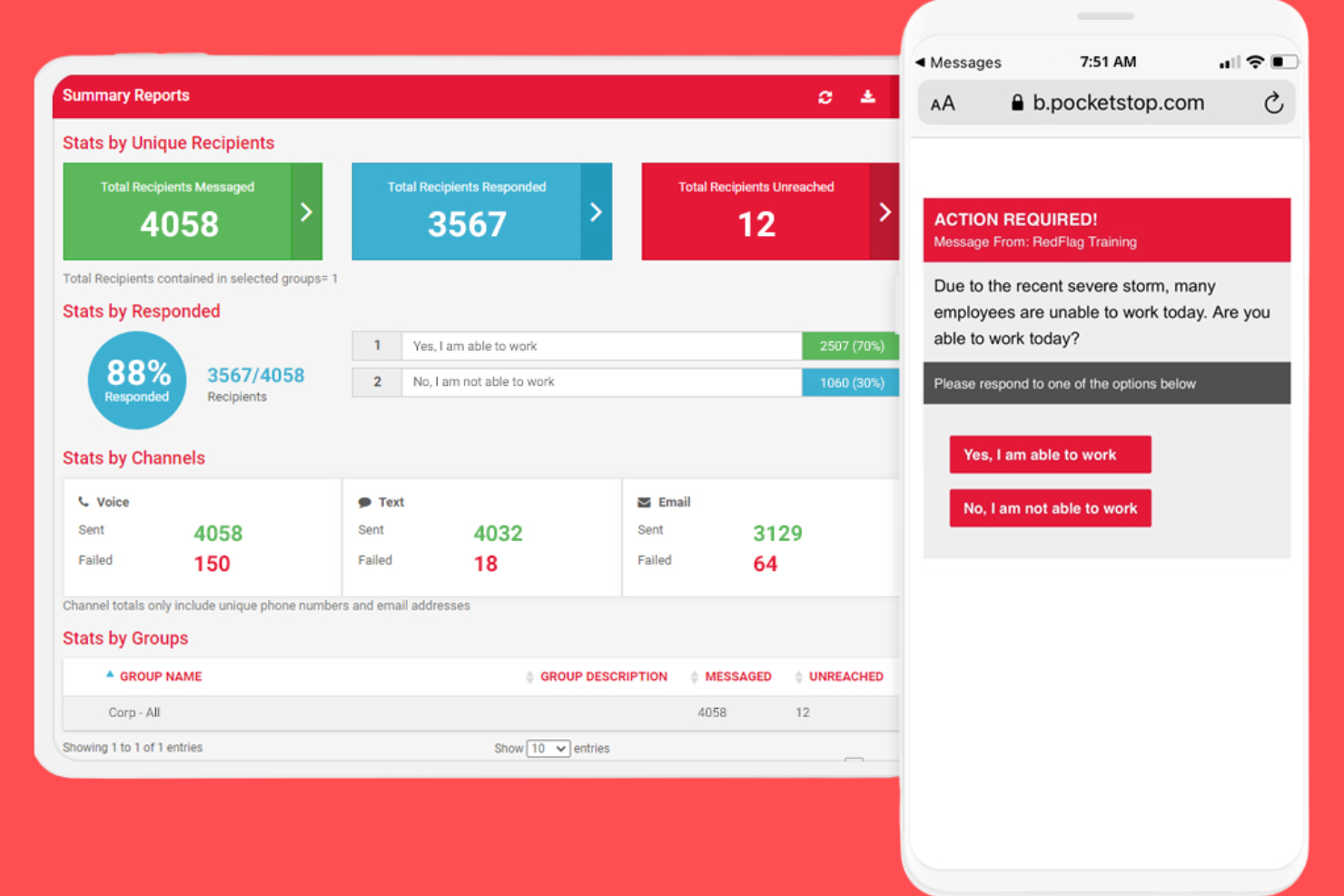
Red Flag Reporting offers a whistleblowing platform that combines a 24/7 hotline with secure web-based reporting. This solution is a strong fit for organizations that want to give employees and third parties multiple, accessible ways to report concerns. It’s especially useful for HR teams and compliance officers who need to manage reports from both phone and online channels in one place.
Why I Picked Red Flag Reporting
What drew me to Red Flag Reporting is its focus on providing both hotline and web-based submission options for whistleblowers. This dual-channel approach means employees and third parties can choose the reporting method that feels safest and most convenient for them. The platform supports anonymous reporting through both channels, which helps organizations encourage more open communication. I appreciate that Red Flag Reporting also offers 24/7 access, making it easier for users to report concerns at any time.
Red Flag Reporting Key Features
Some other features that make Red Flag Reporting stand out include:
- Case Management Portal: Lets administrators track, review, and manage all submitted reports in a secure online environment.
- Customizable Intake Forms: Allows organizations to tailor reporting forms to capture the information most relevant to their needs.
- Multilingual Support: Offers reporting and support in multiple languages to accommodate diverse workforces.
- Automated Acknowledgment Notifications: Send confirmation messages to reporters when a submission is received.
Red Flag Reporting Integrations
Native integrations are not currently listed.
Pros and Cons
Pros:
- Automated notifications sent to designated contacts
- Anonymous reporting available for all channels
- 24/7 hotline staffed by live operators
Cons:
- Case management features are basic in scope
- No mobile app for on-the-go submissions
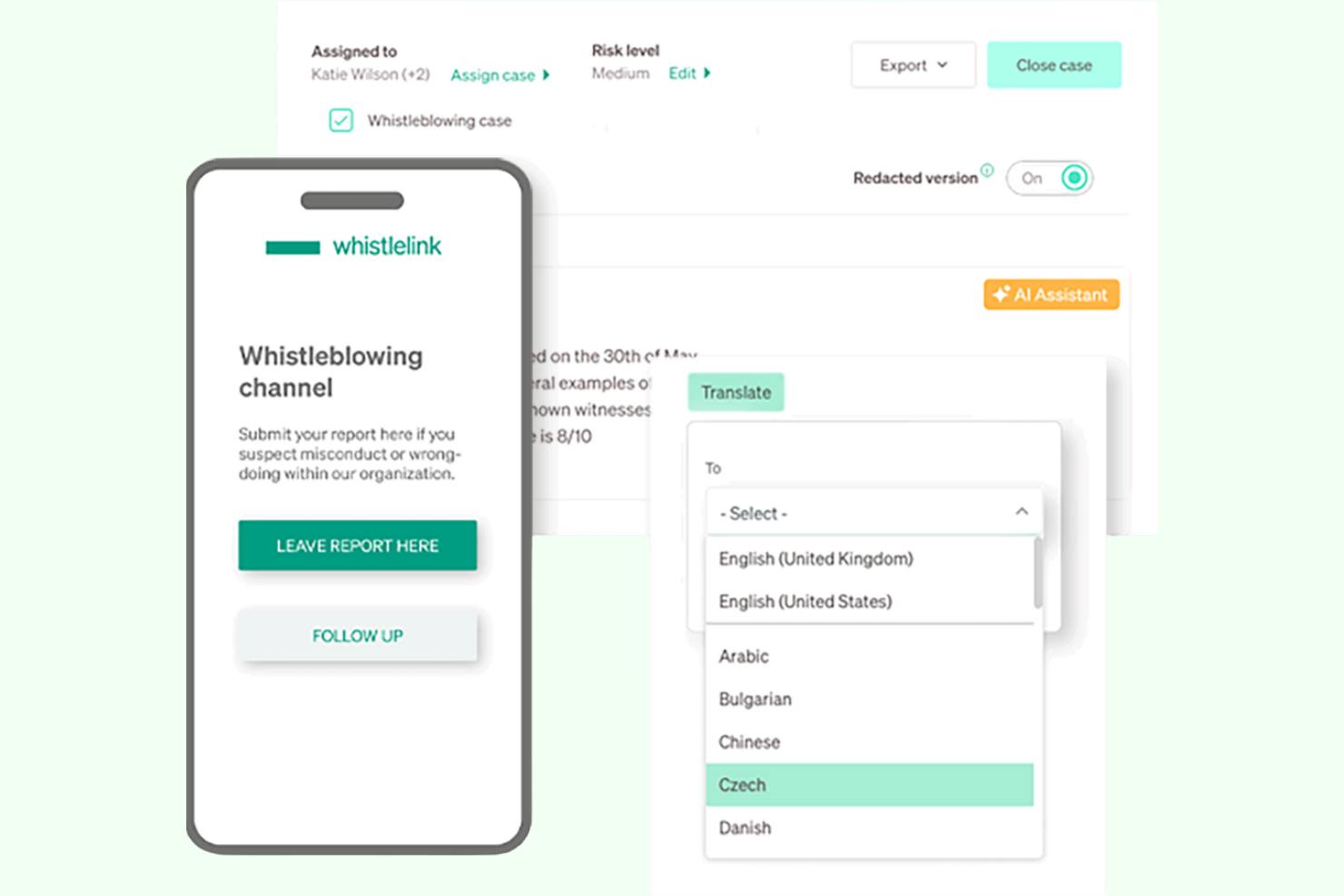
Whistlelink is designed for organizations that need to launch a whistleblowing channel quickly without a complex setup. It’s a strong choice for HR teams, compliance managers, and small to midsize businesses looking to meet regulatory requirements on tight timelines. The platform’s pre-configured workflows and simple onboarding help you get up and running in days, not weeks.
Why I Picked Whistlelink
What stands out about Whistlelink is how quickly you can get a whistleblowing channel live, even if you have limited technical resources. The platform offers pre-built templates and automated onboarding, so you can meet compliance requirements without a lengthy setup process. I picked Whistlelink because it lets you configure reporting workflows and launch your portal in just a few clicks. This makes it a practical option for organizations that need to respond to new regulations or internal policies on short notice.
Whistlelink Key Features
I also found several other features that help Whistlelink support secure and compliant reporting:
- Anonymous Two-Way Messaging: Enables ongoing, confidential communication between case managers and whistleblowers.
- Multi-Language Support: Lets users submit reports and access the portal in multiple languages.
- Role-Based Access Controls: Allows you to assign permissions and restrict access to sensitive case information.
- Automated Case Status Updates: Notifies relevant parties when there are changes or updates to a case.
Whistlelink Integrations
Native integrations are not currently listed.
Pros and Cons
Pros:
- Automated case status notifications for transparency
- Anonymous two-way messaging for follow-up
- Rapid deployment with minimal IT involvement
Cons:
- Custom branding options are restricted
- Limited advanced analytics or dashboarding

Mitratech
Best for integration with risk management systems
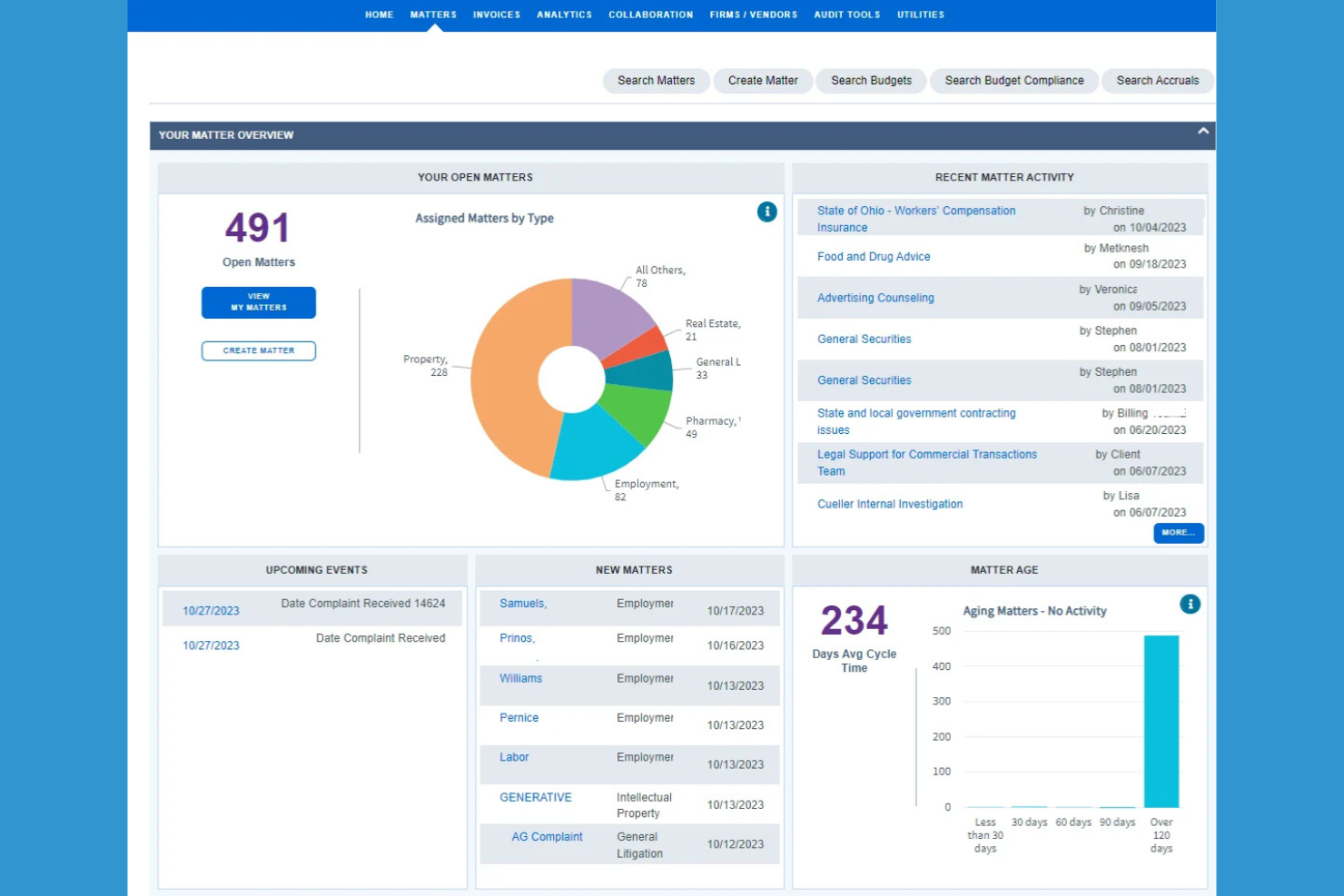
Mitratech’s ethics hotline solution is designed for organizations that want to connect whistleblowing channels directly with risk and compliance management systems. It’s especially useful for compliance teams and risk officers in regulated industries who need to centralize incident reporting and follow-up. The platform helps businesses manage reports, investigations, and risk data in one integrated environment.
Why I Picked Mitratech
Mitratech stands out for organizations that need whistleblowing software tightly connected to their risk management and compliance processes. I picked Mitratech because it lets you route reports directly into case management and risk assessment workflows, which helps compliance teams act quickly and consistently. The platform’s centralized dashboard brings together incident data, investigation status, and risk metrics in one place. This integration supports a more holistic approach to managing ethics concerns and regulatory obligations.
Mitratech Key Features
In addition to its integration with risk management systems, Mitratech offers several other features worth noting:
- Anonymous Reporting Channels: Lets employees and third parties submit concerns without revealing their identity.
- Multilingual Hotline Support: Provides reporting options in multiple languages for global teams.
- Automated Case Assignment: Routes incoming reports to the appropriate investigator or department based on predefined rules.
- Document Management: Stores and organizes evidence, correspondence, and case files within the platform.
Mitratech Integrations
Integrations include Mitratech TeamConnect, Mitratech CaseCloud, Mitratech PolicyHub, Mitratech Alyne, and more.
Pros and Cons
Pros:
- Automated case routing based on report type
- Supports multilingual reporting for global organizations
- Integrates directly with enterprise risk platforms
Cons:
- Some features require additional Mitratech modules
- Limited transparency on update release schedules
Other Whistleblowing Software
Here are some additional whistleblowing software options that didn’t make it onto my shortlist, but are still worth checking out:


How I Evaluate Whistleblowing Software
I evaluate tools in two layers: acceptance criteria—things like anonymous intake channels, encrypted two-way messaging, and regulatory compliance—and the differentiators that make one the right fit.
Core Functionality (Table Stakes For This List)
When I'm selecting tools for my list, I rank each one on a scale from 0 (does not offer the functionality) to 5 (excels in this area) for each core functionality listed below. Then, I calculate the tool's total score into a percentage. Each tool needs to achieve a minimum total score of 65% to be considered for inclusion.
- Anonymous Reporting Channels: I check how many intake methods are available—web forms, phone hotlines, mobile apps, QR codes—and whether each one fully protects reporter identity.
- Secure Two-Way Communication: Reporters often need to clarify details or share evidence after submitting. I look for encrypted, anonymous messaging that keeps the dialogue open.
- Case Management Workflow: Triage, assignment, investigation steps, and resolution tracking all need to live in one place. I evaluate how well each tool handles a case from intake to close.
- Regulatory Compliance Support: Tools should map to frameworks like the EU Whistleblower Directive, SOX, and GDPR with data residency and retention controls built in.
- Audit Trail & Reporting: I look for tamper-proof activity logs and configurable reporting dashboards that give compliance teams and leadership clear visibility into case outcomes.
- Role-Based Access & Confidentiality: Sensitive reports sometimes involve senior leaders. I evaluate whether the tool can route around conflicts of interest and restrict case visibility by role.
Once I have a list of tools that meet the criteria, I consider what sets each platform apart.
Differentiating Factors (What Sets Vendors Apart)
Here's how I compare and contrast different vendors:
Standout Features
Multilingual reporting matters when your workforce spans multiple countries—reporters are far more likely to come forward when they can submit in their own language. I also evaluate AI-powered triage that auto-categorizes and routes cases by severity, which makes a real difference when case volume is high. An investigator collaboration workspace with evidence lockers and interview templates helps teams manage formal investigations without juggling separate tools.
Beyond Features
Security certifications like ISO 27001 and SOC 2 Type II tell me a vendor takes data protection seriously—essential when you're handling sensitive misconduct reports. I also evaluate how well each tool connects to existing HRIS platforms and SSO providers, since a disconnected system creates friction for case handlers. Pricing transparency matters too; I look for clear per-employee or flat-rate models that include hotline staffing and translation rather than hiding them behind add-on fees.
How to Choose Whistleblowing Software
It’s easy to get bogged down in long feature lists and complex pricing structures. To help you stay focused as you work through your unique software selection process, here’s a checklist of factors to keep in mind:
| Factor | What to Consider |
|---|---|
| Scalability | Will the software handle your current and future reporting volume? Consider growth, mergers, or new locations. |
| Integrations | Does the tool connect natively with your HRIS, case management, or compliance platforms? Avoid manual data entry. |
| Customizability | Can you tailor workflows, intake forms, and notifications to match your policies and reporting structure? |
| Ease of use | Will both employees and admins find the interface clear and accessible? Test with a small group before rollout. |
| Implementation and onboarding | How long does setup take, and what resources are required? Look for clear timelines, migration support, and training. |
| Cost | Are pricing tiers transparent and predictable? Watch for extra fees for users, cases, or advanced features. |
| Security safeguards | Does the vendor offer encryption, access controls, and audit logs? Ask about certifications and data residency. |
| Compliance requirements | Does the software support your specific regulatory obligations (e.g., EU Whistleblower Directive, SOX)? Confirm with legal or compliance teams. |
What Is Whistleblowing Software?
Whistleblowing software is a digital whistleblowing system that enables employees and stakeholders to submit whistleblower reports about misconduct, unethical behavior, or compliance violations securely and often anonymously. These compliance solutions support a broader whistleblowing program and help organizations maintain a safe and transparent work environment. They include features like a secure reporting system, incident management, and protection measures such as whistleblower protection and end-to-end encryption to safeguard personal data and ensure data privacy. Many platforms are user-friendly, offer a strong user experience, and may include AI-powered tools to streamline investigations and reduce third-party risk. Used by HR, legal, and compliance teams, these tools strengthen a company’s compliance program and provide a reliable whistleblowing solution for managing sensitive reports responsibly.
Features of Whistleblowing Software
When selecting whistleblowing software, keep an eye out for the following key features:
- Anonymous reporting: Allows individuals to submit concerns or reports without revealing their identity, encouraging more people to come forward.
- Case management: Provides tools for tracking, assigning, and resolving reported cases, ensuring nothing falls through the cracks.
- Role-based access controls: Restrict access to sensitive information based on user roles, protecting confidentiality and data integrity.
- Two-way communication: Enables secure, ongoing dialogue between the reporter and investigators while maintaining anonymity if needed.
- Audit trails: Automatically log all actions taken within the system, supporting transparency and compliance during investigations.
- Multi-language support: Offers interfaces and reporting forms in multiple languages to accommodate diverse workforces.
- Automated notifications: Send alerts and updates to relevant parties when a case is submitted, updated, or closed.
- Document upload and storage: Let users attach evidence or supporting files to reports, centralizing all case-related materials.
- Customizable intake forms: Allow organizations to tailor reporting forms to capture the specific information they need for investigations.
- Compliance reporting: Generates reports and documentation to help organizations meet regulatory requirements and demonstrate due diligence.
Benefits of Whistleblowing Software
Implementing whistleblowing software provides several benefits for your team and your business. Here are a few you can look forward to:
- Increased reporting confidence: Anonymous channels and secure data handling encourage employees to report concerns without fear of retaliation.
- Faster case resolution: Centralized case management and automated notifications help teams track, assign, and resolve reports efficiently.
- Regulatory compliance support: Built-in compliance reporting and audit trails make it easier to meet legal obligations and demonstrate due diligence.
- Improved data security: Role-based access controls and encryption protect sensitive information throughout the reporting and investigation process.
- Improved organizational transparency: Audit logs and clear workflows promote accountability and foster a culture of openness.
- Global workforce accessibility: Multi-language support and customizable forms ensure all employees can report issues, regardless of location or language.
- Consistent process enforcement: Customizable workflows and intake forms standardize how reports are handled, reducing the risk of errors or bias.
Costs and Pricing of Whistleblowing Software
Selecting whistleblowing software requires an understanding of the various pricing models and plans available. Costs vary based on features, team size, add-ons, and more. The table below summarizes common plans, their average prices, and typical features included in whistleblowing software solutions:
Plan Comparison Table for Whistleblowing Software
| Plan Type | Average Price | Common Features |
|---|---|---|
| Free Plan | $0 | Basic anonymous reporting, limited case management, email notifications, and basic data storage. |
| Personal Plan | $10–$25/user/month | Anonymous reporting, case tracking, role-based access, basic compliance tools, and email support. |
| Business Plan | $30–$60/user/month | Advanced case management, customizable workflows, audit trails, multi-language support, and analytics. |
| Enterprise Plan | $70–$150/user/month | All business features, custom integrations, advanced security, dedicated support, and compliance reporting. |
Whistleblowing Software FAQs
Here are some answers to common questions about whistleblowing software:
How do organizations ensure anonymity for whistleblowers?
Organizations use encrypted reporting channels and remove identifying information from submissions. Many platforms also allow two-way anonymous communication, so follow-up questions can be asked without revealing the reporter’s identity.
Can whistleblowing software help meet legal compliance requirements?
Yes, most whistleblowing software includes features designed to support compliance with regulations like the EU Whistleblower Directive or SOX. These features include audit trails, secure data storage, and automated compliance reporting.
What types of incidents can be reported through whistleblowing software?
Whistleblowing software can be used to report a wide range of issues, including fraud, harassment, discrimination, safety violations, and ethical concerns. Organizations can customize intake forms to capture the specific types of incidents relevant to their policies.
How long does it take to implement whistleblowing software?
Implementation timelines vary, but many solutions can be set up within a few days to a few weeks. Factors include data migration needs, integration complexity, and the availability of onboarding resources like training and templates.
Is whistleblowing software suitable for small organizations?
Yes, many vendors offer plans and features tailored to small organizations, including free or low-cost options. These solutions typically provide core reporting and case management features without requiring extensive IT resources.