



Paycom vs. Paycor: Detailed Comparison and Expert Reviews for 2026



The right payroll software can do more than process paychecks—it can reduce administrative work, improve the employee experience, and help your business stay compliant as it grows.
Paycom and Paycor are both popular choices, but they take different approaches to workforce management. Payroll software like Paycom stands out for its all-in-one platform and self-service tools, while Paycor is known for flexible payroll options and strong HR integrations.
In this article, you’ll get a side-by-side look at how these two solutions compare, so you can confidently choose the right fit for your team’s needs and your business goals.
Paycom vs. Paycor: An Overview
Paycom
Paycor
Why Trust Our Software Reviews
Our team has been testing and reviewing software since 2012. As HR experts ourselves, we know how difficult—and important—it is to choose the right software.
For this guide, we evaluated tools using hands-on testing and independent research, scoring tools using our selection criteria. We also draw on insights from industry thought leaders and practicing HR experts.
Our reviews reflect our human editorial judgment, not a sales pitch.
Expert reviewers:
Paycom vs. Paycor Pricing Comparison
| Paycom | Paycor | |
|---|---|---|
| Free Trial | Not available | Free demo available |
| Pricing | Pricing upon request | Pricing upon request |
Paycom vs. Paycor Pricing & Hidden Costs
Paycom and Paycor both use quote-based pricing models, which means you’ll need to contact their sales teams for a custom quote based on your company’s size and needs. Paycom typically charges a per-employee, per-month fee and may include setup or implementation costs. Paycor also uses a per-employee, per-month structure, but offers bundled packages that can include HR, payroll, and additional features. With both vendors, you might encounter extra charges for services like year-end tax filings, benefits administration, or advanced reporting, so it’s important to ask about these potential add-ons.
To select the right vendor, start jotting down your must-have features and estimating your employee headcount over the next year or two. Ask each provider for a detailed breakdown of what’s included in their base price and what counts as an extra.
Paycom vs. Paycor Feature Comparison
Both Paycom and Paycor are full-service human capital management (HCM) platforms, meaning they overlap heavily in core functionality. Each offers payroll processing, tax filing, time tracking, onboarding, benefits administration, and broader tools common to HR software. They also provide employee self-service and mobile access. These shared capabilities make them comparable end-to-end workforce management solutions for small to mid-sized businesses.
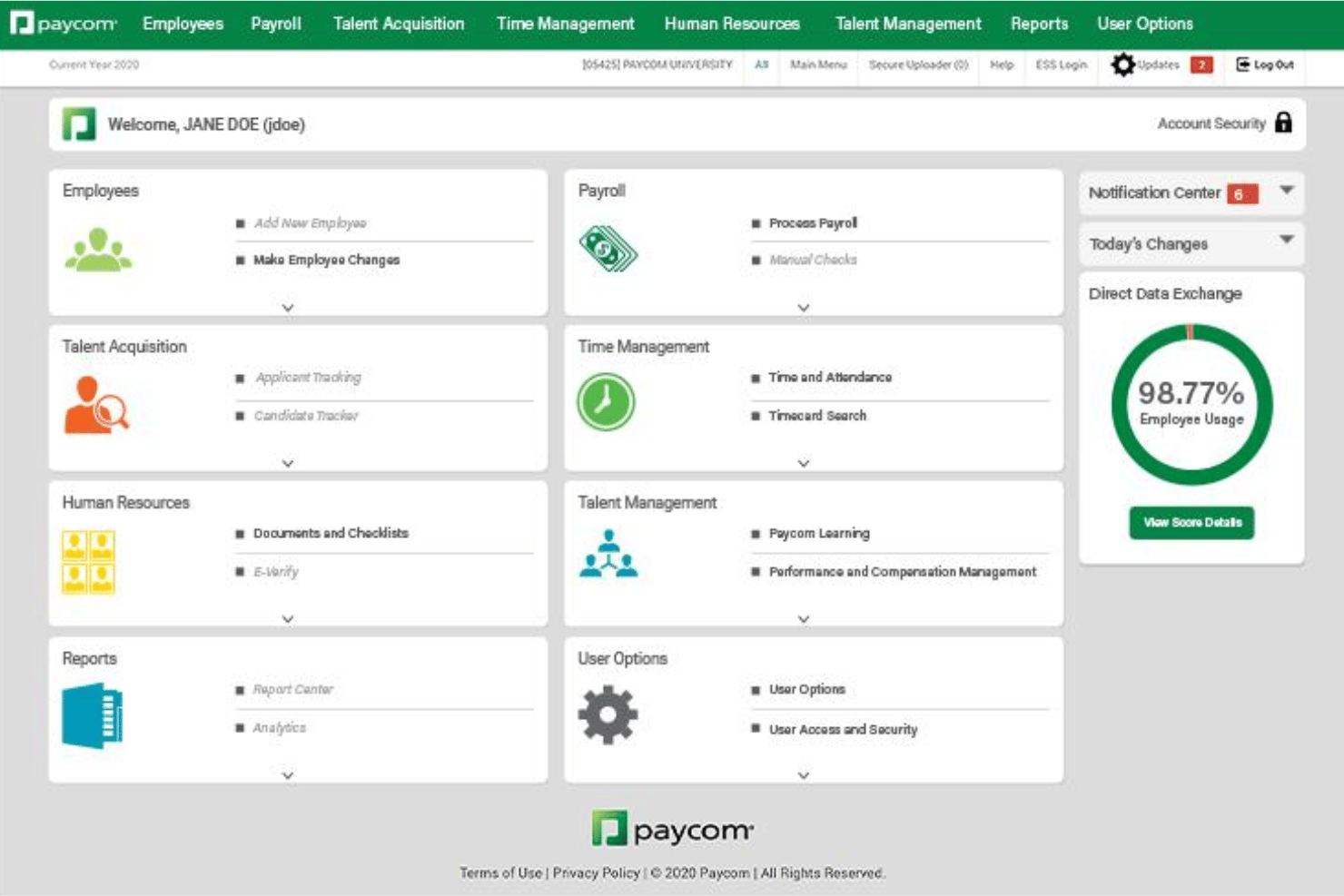
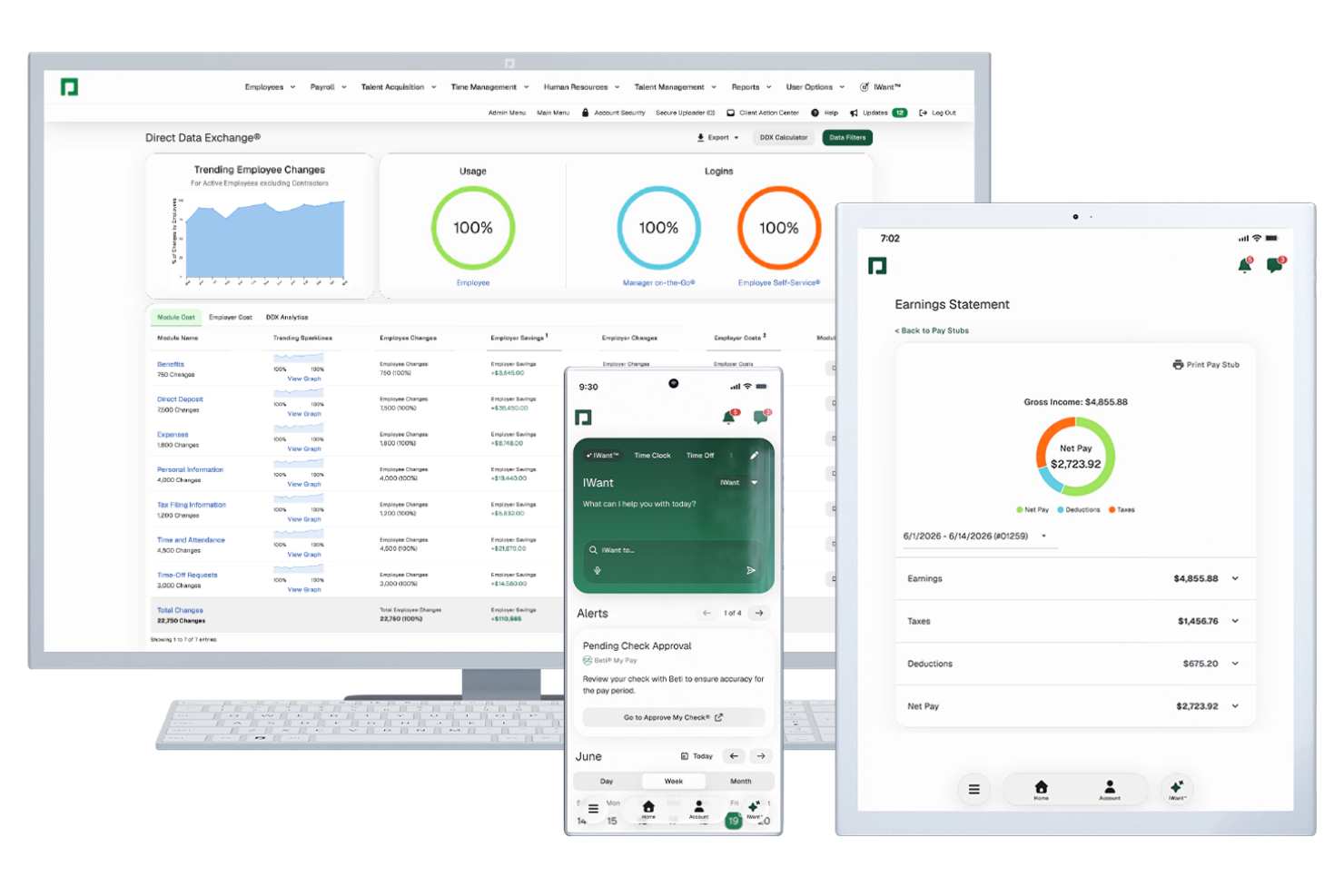
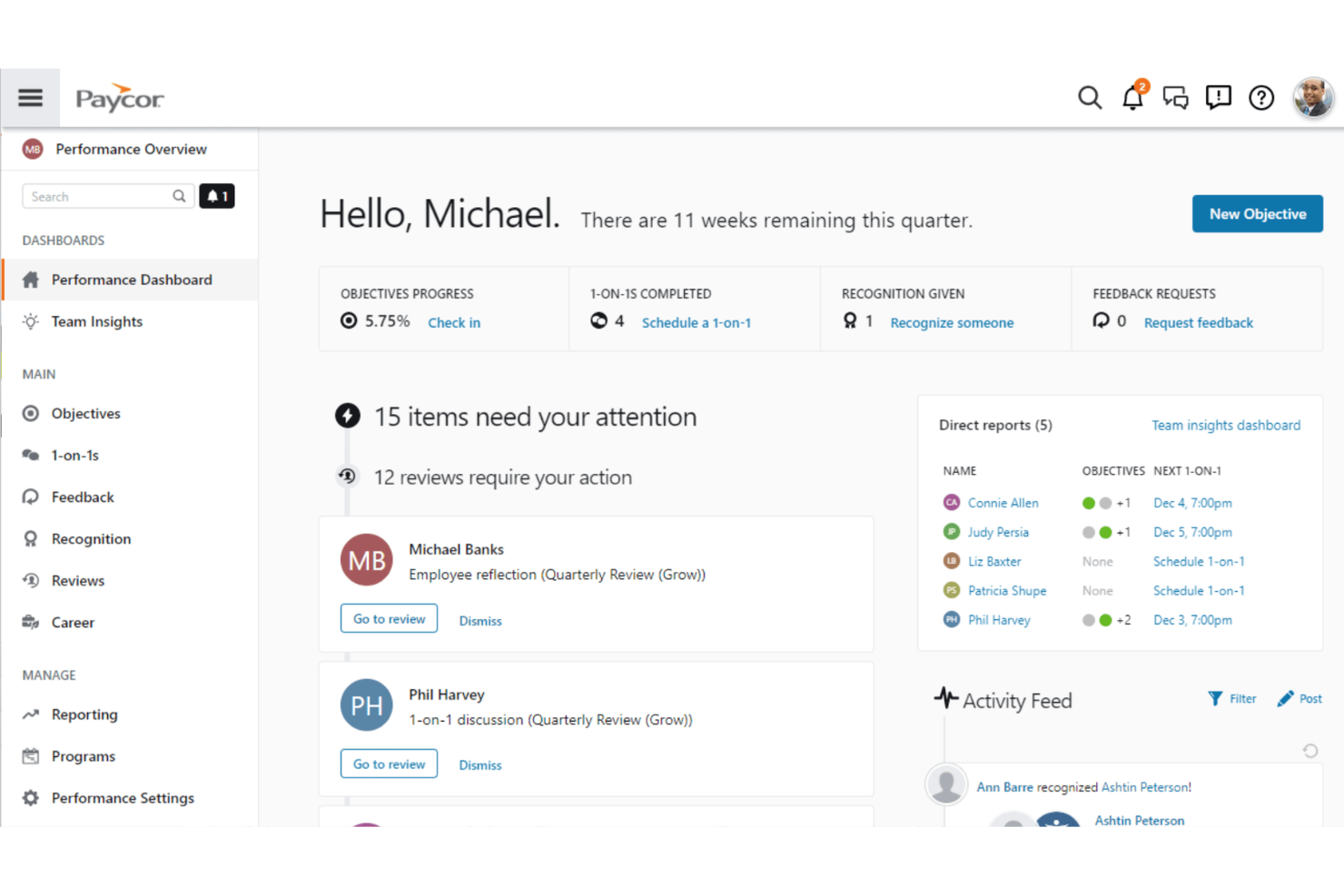
Where they diverge is in how those features are delivered. Paycom’s standout strength is its single-database, unified platform with heavy employee self-service, allowing employees to manage payroll changes and HR tasks directly, reducing admin work and data duplication. Paycor, on the other hand, stands out for its modular, integration-friendly approach and advanced reporting/talent tools, including customizable real-time analytics dashboards and stronger recruiting and talent development features.
| Paycom | Paycor | |
|---|---|---|
| 2-Factor Authentication | ||
| 360 Degree Feedback | ||
| API | ||
| Application Tracking | ||
| Attendance Tracking | ||
| Batch Permissions & Access | ||
| Compliance Tracking | ||
| Dashboard | ||
| Data Export | ||
| Data Import | ||
| Data Visualization | ||
| Employee Database | ||
| Employee Engagement | ||
| Employee Incentive Management | ||
| Employee Onboarding | ||
| Employee Training | ||
| Expense Tracking | ||
| External Integrations | ||
| Feedback Management | ||
| Multi-User | ||
| Notifications | ||
| Payroll | ||
| Performance Appraisal | ||
| Scheduling | ||
| Time Management | ||
| Timesheets | ||
| Travel Management | ||
| Vacation & Absence Calendar |
Paycom vs. Paycor Integrations
| Integration | Paycom | Paycor |
| QuickBooks | ❌ | ✅ |
| ADP | ❌ | ❌ |
| NetSuite | ❌ | ✅ |
| Salesforce | ❌ | ❌ |
| Microsoft Teams | ❌ | ❌ |
| Slack | ❌ | ❌ |
| Indeed | ❌ | ✅ |
| Oracle | ❌ | ✅ |
| API | ❌ | ✅ |
| Zapier | ❌ | ✅ |
Paycor offers a broader and more accessible integration ecosystem, with native connections to widely used tools like QuickBooks, NetSuite, and Indeed, plus a large marketplace of third-party apps. Paycom takes a fundamentally different approach to integrations. Rather than relying on a large ecosystem of third-party connections, it operates as an all-in-one platform built on a single-database architecture, allowing payroll, HR, time tracking, benefits, and employee management data to flow through one system.
Paycom does not offer a public API, which can limit flexibility for organizations that depend on connecting multiple external applications. As a result, Paycor is the stronger choice for businesses that prioritize prebuilt integrations and a more connected software ecosystem.
Paycom vs. Paycor Security, Compliance & Reliability
| Factor | Paycom | Paycor |
| Data Encryption | Uses strong encryption protocols (including 256-bit encryption) to protect data in transit and at rest. | End-to-end encryption across endpoints, including disk- and file-level protection. |
| Regulatory Compliance | Maintains multiple certifications and audits including, but not limited to, ISO 27001, SOC 1, SOC 2, and SOC 3, supporting regulatory and financial reporting compliance. | SOC 1 & SOC 2 compliant; supports GDPR, FinCEN, and broader regulatory standards. |
| Access Controls | Role-based access controls, MFA, SSO, and activity monitoring. | Granular permissions, MFA, SSO, and adaptive authentication methods. |
| Uptime & Reliability | Tier IV data centers (highest certification), redundant infrastructure, 24/7 monitoring. | 99.9% uptime, cloud-native architecture, continuous backups and redundancy. |
| Audit Trails | Detailed audit logging, monitoring, and reporting of user activity. | Tracks system activity with logs and monitoring for compliance and threat detection. |
Both Paycom and Paycor deliver enterprise-grade security, with strong encryption, multi-factor authentication, and comprehensive compliance certifications. Paycom stands out for its Tier IV data centers and tightly controlled infrastructure, which emphasize reliability and in-house data management, while Paycor differentiates itself with advanced threat detection, machine learning-based risk monitoring, and a highly scalable cloud architecture.
Paycom vs. Paycor Ease of Use
| Factor | Paycom | Paycor |
| User Interface | Features a modern dashboard but may feel complex for new users. | Offers a clean, intuitive interface that’s easy to navigate. |
| Onboarding | Provides guided onboarding, company-wide training, consultations, and migration. | Streamlines onboarding with step-by-step checklists and helpful prompts. |
| Setup Process | Setup is thorough but can be time-consuming for larger teams. | Setup is straightforward and designed for quick implementation. |
| Customer Support | Offers support during business hours. | Delivers responsive support with dedicated specialists for onboarding. |
| Mobile Access | Includes a robust mobile app for employees and managers. | Mobile app is user-friendly and highly rated for payroll tasks. |
Paycom and Paycor offer modern, user-friendly experiences, but they differ in how quickly teams can get comfortable with the platform. Paycor is generally easier to navigate out of the box, with a cleaner interface, guided workflows, and a more streamlined setup process that appeals to smaller teams or those wanting a faster rollout. Paycom also provides hands-on implementation support, including system configuration, data migration, and a dedicated specialist for ongoing support, which can help ease the learning curve despite the platform’s greater complexity.
Paycom vs Paycor: Pros & Cons
Paycom
- Employees can update their own payroll and HR data directly.
- Detailed compliance tools support complex regulatory needs.
- Payroll processing errors are automatically flagged before submission.
- Payroll is native in select countries, and not global.
- Pricing is generally unsuitable for low-headcount companies.
- Limited out of the box external integrations.
Paycor
- Paycor automates payroll processes and ensures compliance, saving your team time and reducing errors.
- The platform offers powerful reporting tools that give you detailed insights into workforce data.
- Paycor provides structured onboarding and talent management tools to support your team's growth.
- Paycor doesn't offer a free trial, limiting your ability to test the software firsthand.
- Its customization options, especially in reporting, are less flexible compared to some competitors.
- Advanced features require higher-tier plans, which might not fit all budgets.
Best Use Cases for Paycom and Paycor
Paycom
- Healthcare Organizations Paycom’s compliance tools and shift management features help manage certifications, varying pay rates, and large employee volumes.
- Franchises Multi-location payroll and consolidated reporting features reduce administrative work for companies operating across several sites.
- HR Departments in Corporations Unified HR and payroll in a single database streamline everything from onboarding to talent management and reporting.
- Manufacturing Companies Automated overtime calculations, shift differentials, and union deduction support make payroll for complex workforces easier to manage.
- Fast-Growing Tech Firms Seamless scalability and employee self-service tools support rapid onboarding and changes without endless admin burden.
- Construction Businesses Job costing and labor tracking features match the demands of managing crews in the field with variable pay structures.
Paycor
- Healthcare Teams Paycor simplifies workforce management with its compliance-focused payroll and scheduling tools, essential for healthcare settings.
- Retail Businesses Retailers benefit from Paycor’s robust reporting, which provides insights into employee performance and sales metrics.
- Manufacturing Companies Manufacturers can streamline operations with Paycor’s automated payroll and time-tracking features, reducing administrative workload.
- Small Businesses Small businesses appreciate Paycor’s user-friendly interface and comprehensive HR solutions that fit limited budgets.
- HR Departments HR teams find Paycor’s talent management tools essential for improving employee engagement and retention.
- Growing Companies For companies in growth phases, Paycor’s structured onboarding tools help efficiently integrate new hires into your team.
Who Should Use Paycom, and Who Should Use Paycor?
Paycom is best for mid-sized businesses that want a fully unified, all-in-one human resources and payroll system with strong automation and standardized processes. Its single-database approach makes it ideal for companies that value data consistency and employee self-service, but it may require more time and training to fully adopt. Businesses with dedicated HR teams and more complex operational needs will get the most value from its depth.
Paycor is a better fit for small businesses and mid-sized organizations that prioritize ease of use, flexibility, and faster implementation. Its intuitive interface, modules, and strong onboarding support make it easier for growing teams to adopt without heavy internal resources. Companies looking for a scalable platform that can evolve with them over time will likely find Paycor more approachable.
Differences Between Paycom and Paycor
| Paycom | Paycor | |
|---|---|---|
| Automation | Offers advanced automation for payroll, compliance, and reporting. | Focuses on automated payroll runs and easy time tracking. |
| Integrations | No direct integrations. | Wide range of direct integrations, including Zapier and QuickBooks. |
| Platform Approach | All-in-one HR and payroll platform with deep customization. | Modular system with flexible add-ons for payroll and HR. |
| Reporting & Analytics | Robust, highly customizable reporting tools.. | Strong analytics with user-friendly dashboards and visual insights. |
| User Interface | A feature-rich dashboard that can feel complex for new users. | Clean, intuitive interface designed for quick adoption. |
| Visit PaycomOpens new window | Read Paycor ReviewOpens new window |
Similarities Between Paycom and Paycor
| Benefits Administration | Each platform supports healthcare benefits enrollment, management, and reporting. |
|---|---|
| Compliance Support | Each offers tools for federal, state, and local payroll tax compliance, with automated updates for new laws. |
| Employee Self-Service | Both provide employee portals for pay stubs, tax forms, and benefits, empowering staff to manage their info. |
| Mobile Access | Each offers a mobile app for employees and managers to handle payroll, time tracking, and approvals on the go. |
| Payroll Processing | Both cover payroll management, with the ability to automate payroll calculations, tax withholdings, and direct deposits. |
| Visit PaycomOpens new window Read Paycor ReviewOpens new window | |