

Pinpoint vs. Lever: Comparison & Expert Reviews For 2026



A new role opens up, candidates start piling in, and suddenly it’s hard to keep interviews, feedback, and next steps organized. When your process starts feeling scattered, choosing the right applicant tracking system becomes a real priority.
This Pinpoint vs. Lever guide breaks down what each platform offers, so you can quickly figure out which one fits your hiring workflow best.
Pinpoint vs. Lever: An Overview
Pinpoint
Lever
Why Trust Our Software Recommendations
Our team has been testing and reviewing software since 2012. As HR experts ourselves, we know how difficult—and important—it is to choose the right software.
For this guide, we evaluated tools using hands-on testing and independent research, scoring tools using our selection criteria. We also draw on insights from industry thought leaders and practicing HR experts.
Our reviews reflect our human editorial judgment, not a sales pitch.
Expert reviewers:
Pinpoint vs. Lever Pricing Comparison
| Pinpoint | Lever | |
|---|---|---|
| Free Trial | Free demo available | Free demo available |
| Pricing | Pricing upon request | Pricing upon request |
Pinpoint vs. Lever Pricing & Hidden Costs
Both Pinpoint and Lever use quote-based pricing, so you’ll need to request a custom plan based on your team and hiring needs.
Pinpoint starts with a short call to understand your hiring process before providing a quote, while Lever highlights plans that can include ATS and CRM tools, automation, reporting, and integrations, depending on what you choose.
Pinpoint vs. Lever Feature Comparison
Lever’s core platform covers applicant tracking and recruitment analytics, with its AI Interview Companion standing out for helping teams capture interview notes and summaries faster. Pinpoint’s core features include job requisition management and reporting, with its AI chatbot standing out for improving how candidates engage with your hiring process.
Based on these features from both platforms, I can say that Lever leans into faster interview workflows and analytics, while Pinpoint leans into structured approvals and end-to-end hiring management.
| Pinpoint | Lever | |
|---|---|---|
| API | ||
| Application Tracking | ||
| Dashboard | ||
| Data Export | ||
| Data Import | ||
| Data Visualization | ||
| Employee Database | ||
| Employee Onboarding | ||
| External Integrations | ||
| Feedback Management | ||
| Multi-User | ||
| Notifications | ||
| Scheduling |
Pinpoint vs. Lever Integrations
| Integration | Pinpoint | Lever |
| ✅ | ✅ | |
| Slack | ✅ | ✅ |
| Google Workspace | ✅ | ✅ |
| Microsoft Teams | ✅ | ✅ |
| Greenhouse | ✅ | ❌ |
| DocuSign | ✅ | ✅ |
| ADP | ✅ | ✅ |
| SAP SuccessFactors | ✅ | ✅ |
| API | ✅ | ✅ |
| Zapier | ✅ | ✅ |
Pinpoint and Lever both integrate with tools like LinkedIn, Slack, and Google Workspace, plus other common apps for hiring and HR workflows. Both also support API and Zapier for added flexibility.
Pinpoint vs. Lever Security, Compliance & Reliability
| Factor | Pinpoint | Lever |
| Data Privacy | Pinpoint supports GDPR-aligned privacy practices and is ISO 27001 and SOC 2 Type II certified for data security. | Lever follows SOC 2 Type II and ISO 27001-aligned practices to help protect customer and candidate data. |
| Encryption | Pinpoint uses TLS 1.2/1.3 for data in transit and encrypts data at rest with LUKS and AES-256. | Lever uses TLS 1.2 (HTTPS) for data in transit and AES-256 encryption for data at rest. |
| Regulatory Compliance | Pinpoint stays compliant with major regulations like GDPR and CCPA. | Lever supports GDPR compliance with recruiting-focused guidance and privacy controls. |
| Uptime Reliability | Pinpoint guarantees 99.5% uptime backed by a Service Level Agreement (SLA). | Lever commits to 99.9% uptime and applies service credits if it falls short, with uptime tracked on its status page. |
| Access Controls | Pinpoint offers customizable role-based access controls for user management. | Lever provides detailed access control settings to manage user permissions. |
Pinpoint lists GDPR-aligned privacy practices, ISO 27001 and SOC 2 Type II certification, encrypted data in transit and at rest, compliance with GDPR and CCPA, a 99.5% uptime SLA, and role-based access controls.
Lever lists SOC 2 Type II and ISO 27001-aligned practices, encrypted data in transit and at rest, GDPR compliance support with guidance and privacy controls, a 99.9% uptime commitment with service credits if it falls short, and access control settings for managing user permissions.
Pinpoint vs. Lever Ease of Use
| Factor | Pinpoint | Lever |
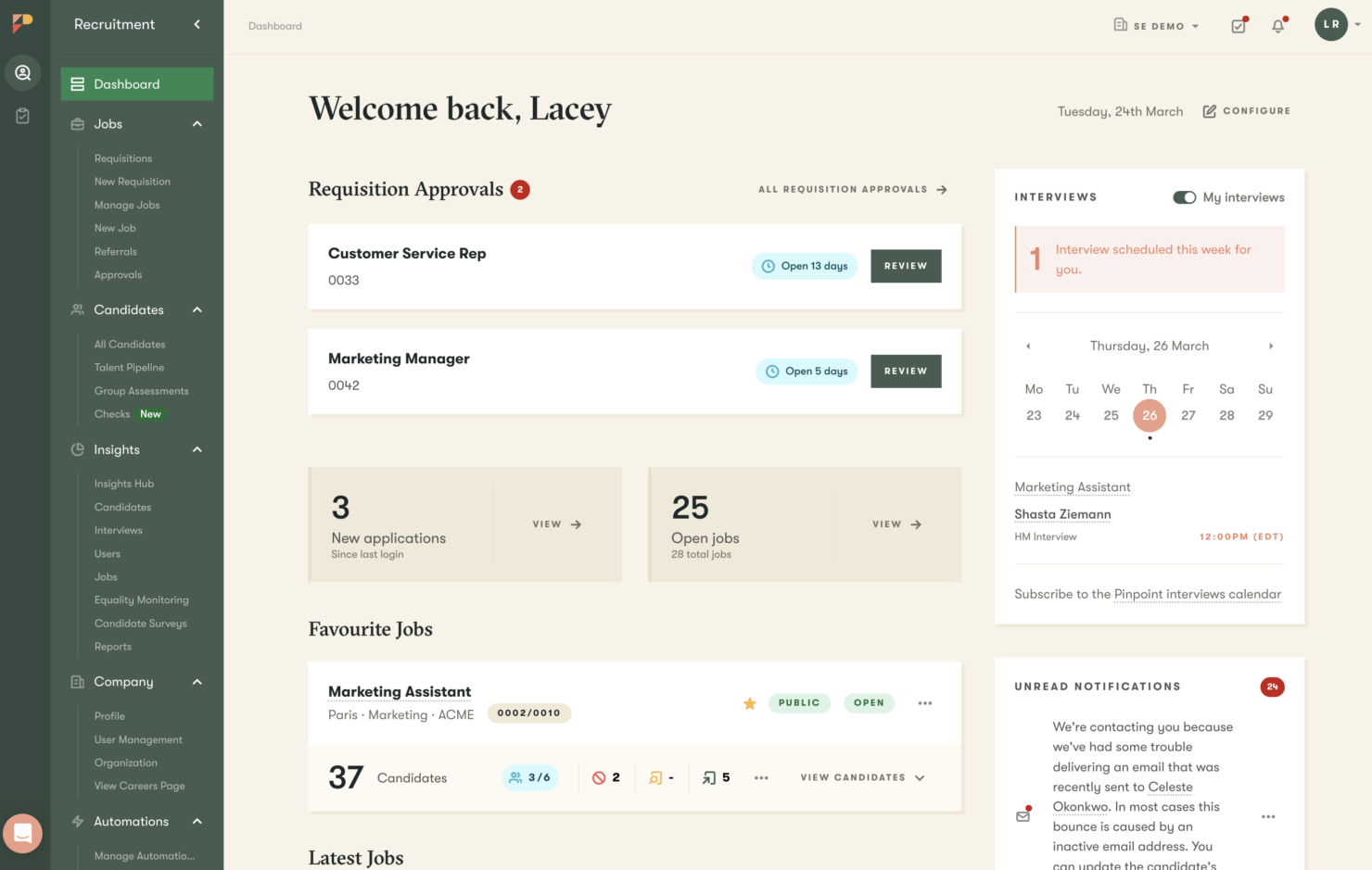
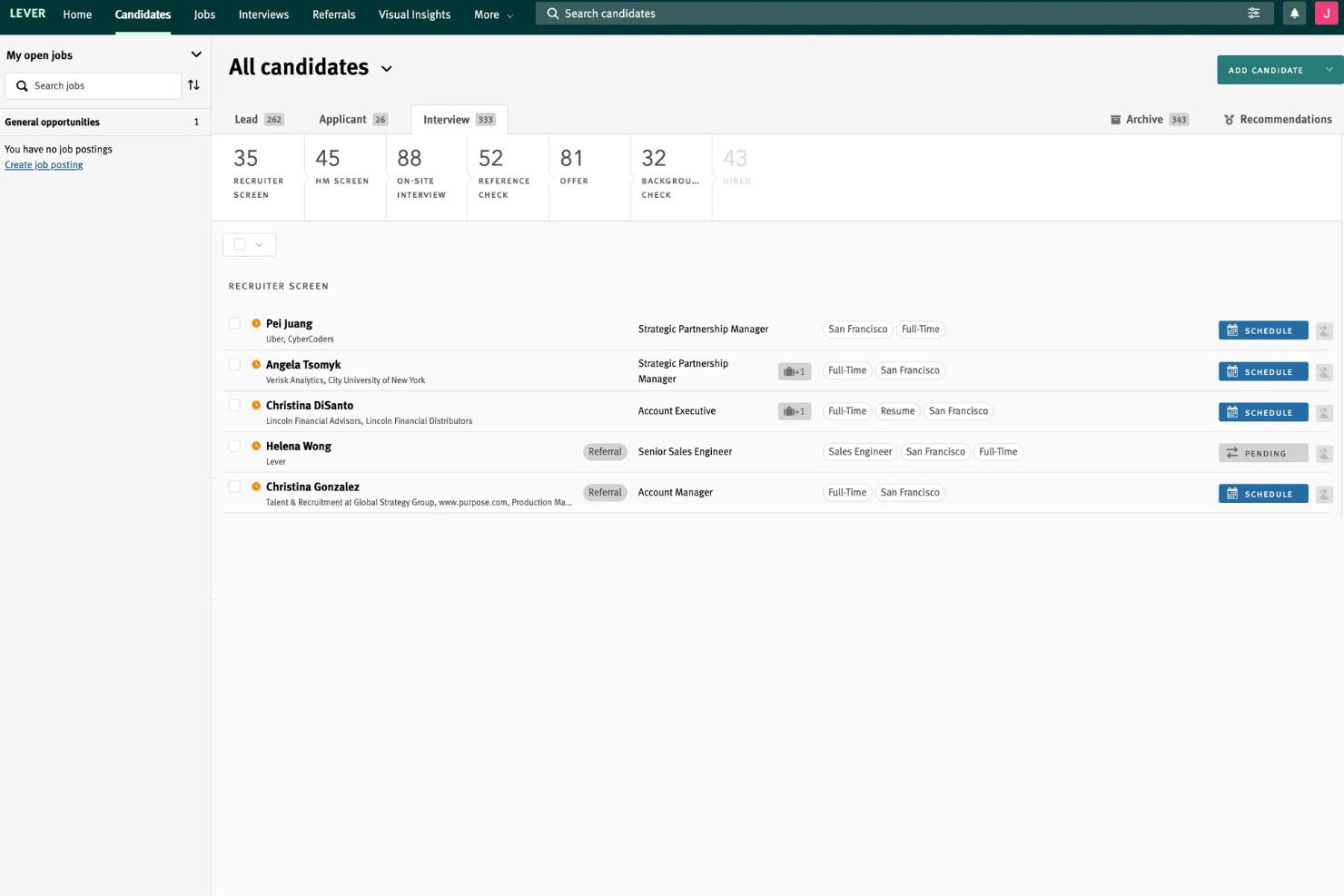
| User Interface | Pinpoint has a clean layout that makes it easy to move from job setup to candidate tracking and feedback. | Lever offers a sleek interface with drag-and-drop functionality for easy candidate tracking. |
| Onboarding Experience | Pinpoint offers guided onboarding support plus self-serve guides, videos, and walkthroughs. | Lever supports onboarding with a Help Center and a self-guided implementation program. |
| Setup | Pinpoint offers a straightforward setup with minimal configuration needed. | Lever provides customizable setup options to tailor the platform to your needs. |
| Support | Pinpoint offers clear support options and a well-organized Help Center. | Lever’s Help Center is easy to navigate, with search, organized topics, and a request form for support. |
| Customization | Pinpoint allows for limited customization to maintain simplicity. | Lever provides extensive customization options to fit diverse workflows. |
Pinpoint and Lever both highlight ease of use through a clean interface built for candidate tracking, along with onboarding support and help resources. Both also call out setup flexibility, support through their Help Centers, and customization options that let you adjust the platform to match how your team works.
Pinpoint vs Lever: Pros & Cons
Pinpoint
- Flexible, AI-powered ATS that's easy to navigate for recruiters, hiring managers, and candidates, even when multiple hiring streams are running in parallel.
- AI is built into your hiring workflow to help your team screen faster, evaluate more consistently, and keep candidates engaged.
- Hands-on Customer Success support from day one, plus a comprehensive Help Center with guides, videos, and walkthroughs.
- Because of the platform's depth, you'll only get the most of it if you have a clear sense of how you want to hire.
- Payroll, benefits, or performance management requires a separate HRIS since Pinpoint is a focused ATS.
- Pricing isn't listed publicly, so you'll need to request a quote to get a number for your specific situation.
Lever
- Tracks candidate progress with clear, visual pipelines
- Collaborative hiring tools let teams share feedback easily
- Reporting dashboard covers both sourcing and diversity metrics
- Limited flexibility to customize some workflow stages
- Pricing may be too high for small companies
- Advanced automation tools require higher subscription tiers
Best Use Cases for Pinpoint and Lever
Pinpoint
- Mid-Size and Enterprise Teams You're past the point of managing hiring in spreadsheets and email, and you need a platform that can keep pace with a growing, structured talent acquisition function and scaling team.
- Contingent and Contract Hiring You hire contractors or contingent workers and need workflows that support different compliance and classification needs.
- Dedicated In-House TA Teams You have a proper talent acquisition function in place and need a platform that supports the whole team, from recruiters and hiring managers through to HR leads and department heads, across every open role at once.
- Hiring Across Multiple Brands You manage multiple employer brands and want separate career experiences while keeping hiring connected under one system.
- Global Hiring You recruit across countries or time zones and need consistent coordination with room for regional flexibility.
- High Volume Hiring You need to process lots of applicants quickly using workflows, filtering, and automation to keep the pipeline moving
Lever
- High-Growth Tech Startups Customizable workflows and collaborative pipelines support rapid scaling and busy hiring teams.
- Global Enterprises Advanced compliance features, security controls, and multilingual capabilities help manage recruiting across regions.
- Recruiting Agencies Centralized pipelines for multiple clients and reporting dashboards make agency management easier.
- Healthcare Organizations Detailed tracking, approvals, and credential management fit regulatory hiring environments.
- Talent Acquisition Teams Collaboration, automated communication, and analytics empower larger internal recruiting teams to deliver results.
- DEI-Focused Departments Built-in diversity analytics and candidate data reporting assist teams focused on equitable hiring practices.
Who Should Use Pinpoint, and Who Should Use Lever?
Pinpoint is a strong fit for you if your hiring process involves role approvals and internal alignment, because features like Job Requisition Management and reporting are built to keep your hiring stages organized and consistent across teams.
But if your recruiting team requires more AI-powered interviewing features, then lean on Lever, because its AI Interview Companion and recruitment analytics can help you capture interview feedback faster and keep a closer eye on pipeline performance as candidates move through stages.
Differences Between Pinpoint and Lever
| Pinpoint | Lever | |
|---|---|---|
| Feature Depth | Organizes features into stages like Plan, Attract, Hire, Select, and Retain. | Organizes features around solution areas and add-ons (like analytics, career sites, and texting). |
| Hiring Approvals | Built for teams that need structured approvals using Job Requisition Management. | Less focused on approval-heavy workflows and more on recruiter execution once hiring is in motion. |
| Hiring Model | Supports different hiring workflows across teams. | Directly positions high-volume hiring as a focused solution area. |
| Interview Assistance | Supports interview scheduling and structured evaluation tools. | Stands out with its AI Interview Companion for faster interview note capture and summaries. |
| User Engagement | Highlights candidate-facing support, like its AI chatbot. | Highlights direct outreach options like candidate texting and recruitment marketing features. |
| Visit PinpointOpens new window | Read Lever ReviewOpens new window |
Similarities Between Pinpoint and Lever
| Collaboration | Both support shared hiring workflows where recruiters and hiring managers can coordinate, leave feedback, and stay aligned. |
|---|---|
| Compliance & Security | Both highlight privacy and security protections like encryption and compliance support to help safeguard candidate and customer data. |
| Core Functionality | Both platforms help you manage candidates through stages, track progress, and keep hiring workflows organized in one system. |
| Integrations | Both connect with common tools like LinkedIn, Slack, and Google Workspace, plus other apps used across recruiting and HR workflows. |
| Reporting | Both include reporting tools that help you monitor hiring progress and performance across roles. |
| Visit PinpointOpens new window Read Lever ReviewOpens new window | |