

Bordro özelliklerine sahip muhasebe yazılımı, temel finansal yönetim araçlarını entegre çalışan ücret işleme özellikleriyle bir araya getirir. Böylece defterlerinizi yönetebilir, bordro çalıştırabilir ve bordro giderleri ile yükümlülüklerini tek bir sistemde kaydedebilirsiniz. Rakamları doğru tutmanın, zamandan tasarruf etmenin ve mevzuata uyumlu kalmanın yollarını arıyorsanız doğru çözümü bulmak çok önemlidir.
Bu rehberde, küçük ekiplerden karmaşık işletmelere kadar farklı ölçeklerdeki işletmeler için bordro özelliklerine sahip muhasebe yazılımlarını karşılaştırıyorum. Entegre bordro ve muhasebe, bordrodan genel muhasebeye otomasyon, vergi desteği ve farklı işletme büyüklükleri için hangi seçeneklerin en uygun olduğunu göreceksiniz.
Why Trust Our Software Recommendations
6,700+
Reviews
20
Industry experts
16+
Evaluation factors
14
Years
Our team has been testing and reviewing software since 2012. As HR experts ourselves, we know how difficult—and important—it is to choose the right software.
For this guide, we evaluated tools using hands-on testing and independent research, scoring tools using our selection criteria. We also draw on insights from industry thought leaders and practicing HR experts.
Our reviews reflect our human editorial judgment, not a sales pitch.
Expert reviewers:
- Phil GrayCOO
 Kim BehnkeHR Tech Editor & Analyst
 Josh BarkerPeople Ops Manager

Bordro Özelliklerine Sahip Muhasebe Yazılımları Karşılaştırma Tablosu
Score legend (out of 5)
- Excellent4.5–5
- Good4–4.4
- Average3–3.9
- Below average2–2.9
- Poor1–1.9
Sorted by: Default
| Tool | Starting Price | Website | |||||||
|---|---|---|---|---|---|---|---|---|---|
Best for billing clients by tracked time | 3.5 out of 5 | 4 | 3 | 3 | 5 | 3 | 3 | $23/month 30-day free trial available | Website |
Best for multi-entity financial control | 3.5 out of 5 | 5 | 3 | 4 | 3 | 3 | 3 | Pricing upon request Not available | Website |
Best for ERP access without per-seat fees | 4.0 out of 5 | 4 | 4 | 4 | 5 | 3 | 4 | $2,185/month Free demo available | Website |
Best for multi-company financial oversight | 3.8 out of 5 | 5 | 3 | 4 | 5 | 2 | 4 | $31.10/user/month Free plan + free trial + free demo available | Website |
Best for Australian PAYG and STP workflows | 3.7 out of 5 | 4 | 3 | 4 | 4 | 4 | 3 | $315/year 14-day free trial available | Website |
Best for accountants accessing client books | 4.2 out of 5 | 5 | 4 | 4 | 4 | 4 | 4 | Pricing upon request Free demo available | Website |
Best for small firms with detailed inventory | 3.3 out of 5 | 3 | 3 | 3 | 4 | 3 | 4 | Pricing upon request 30-day free trial | Website |
Best for U.S. and Canadian tax-area mapping | 3.3 out of 5 | 4 | 3 | 4 | 3 | 3 | 3 | Pricing upon request Free demo available | Website |
Best for multi-state construction payroll | 3.5 out of 5 | 4 | 3 | 4 | 3 | 3 | 4 | Pricing upon request Free demo available | Website |
Best for businesses choosing from 800+ apps | 3.5 out of 5 | 4 | 3 | 3 | 4 | 3 | 4 | $38/month Free plan + 30-day trial available | Book Demo |
Best for microbusiness bookkeeping and 1099s | 3.3 out of 5 | 5 | 2 | 2 | 5 | 2 | 4 | $20/month Free plan + 14-day trial + demo available | Website |


Bordro Özelliklerine Sahip Muhasebe Yazılımları İncelemeleri
\u003cspan data-slate-fragment=\u0022JTVCJTdCJTIyY2hpbGRyZW4lMjIlM0ElNUIlN0IlMjJ0ZXh0JTIyJTNBJTIyQmVsb3clMjBhcmUlMjBteSUyMGRldGFpbGVkJTIwc3VtbWFyaWVzJTIwb2YlMjB0aGUlMjBiZXN0JTIwYWNjb3VudGluZyUyMHNvZnR3YXJlJTIwd2l0aCUyMHBheXJvbGwlMjBmZWF0dXJlcyUyMHRoYXQlMjBtYWRlJTIwaXQlMjBvbnRvJTIwbXklMjBzaG9ydGxpc3QuJTIwTXklMjByZXZpZXdzJTIwb2ZmZXIlMjBhJTIwZGV0YWlsZWQlMjBsb29rJTIwYXQlMjB0aGUlMjBmZWF0dXJlcyUyQyUyMHByaWNpbmclMkMlMjBhbmQlMjBiZXN0JTIwdXNlJTIwY2FzZXMlMjBvZiUyMGVhY2glMjBzb2Z0d2FyZSUyMHRvJTIwaGVscCUyMHlvdSUyMGZpbmQlMjB0aGUlMjBiZXN0JTIwb25lJTIwZm9yJTIweW91LiUyMiU3RCU1RCUyQyUyMnR5cGUlMjIlM0ElMjJwJTIyJTJDJTIyaWQlMjIlM0ElMjJpdHhWV3JWUE9pJTIyJTdEJTVE\u0022\u003eAşağıda kısa listeme giren, bordro özelliklerine sahip en iyi muhasebe yazılımlarına ilişkin ayrıntılı özetlerimi bulabilirsiniz. İncelemelerim, size en uygun seçeneği bulmanıza yardımcı olmak için her yazılımın özelliklerine, fiyatlandırmasına ve en iyi kullanım alanlarına ayrıntılı bir bakış sunuyor.\u003c/span\u003e
 Best for billing clients by tracked time
- 30-day free trial available
- From $23/month
Visit WebsiteCustomer Rating:4.5/5
FreshBooks displays upcoming payroll dates and processed payment history. FreshBooks is small business accounting software that combines double-entry bookkeeping, invoicing, expense tracking, time tracking, and payroll processing powered by Gusto.
Who Is FreshBooks Best For?
FreshBooks is a natural fit for service-based small businesses that bill clients for time and need invoicing, bookkeeping, and payroll in one place.
Why I Picked FreshBooks
FreshBooks earns its spot on my shortlist because of how naturally it connects time tracking to client invoicing. I love that you can log billable hours directly inside a project, then add those tracked hours to an invoice with one click, so nothing slips through the cracks when it's time to bill. FreshBooks Payroll, powered by Gusto, then posts those payroll runs directly to your chart of accounts, keeping your books current without manual journal entries.
FreshBooks Key Features
- Double-entry bookkeeping: Records every transaction with matching debit and credit entries, keeping your chart of accounts and financial statements accurate.
- Bank reconciliation: Matches imported bank transactions against your records so you can spot discrepancies and close your books with confidence.
- Recurring invoices: Automatically sends invoices on a set schedule so repeat clients are billed without manual follow-up each cycle.
- Payroll tax filing: Calculates, files, and remits federal and state payroll taxes automatically, and generates forms including W-2s, 1099s, and Form 941.
FreshBooks Integrations
FreshBooks has 100+ marketplace integrations, including Zemma for recording benefits payments as expenses, plus native Gusto payroll connectivity. Its JSON API supports OAuth 2.0, webhooks, and a NodeJS SDK for custom integrations.
Pros and Cons
Pros:
- Payroll entries feed the chart of accounts
- Recurring invoices and reminders reduce follow-up
- Billable hours flow directly into invoices
Cons:
- Advanced reporting may frustrate complex bookkeeping
- Tracked hours don’t automatically populate payroll
Learn more about FreshBooks: Best for multi-entity financial control
- Not available
- Pricing upon request
Visit WebsiteCustomer Rating:4.6/5
Microsoft Dynamics GP calculates gross wages, taxes, and tips payroll. Microsoft Dynamics GP is an ERP-based accounting and payroll solution for small and mid-sized organizations that covers general ledger, accounts payable and receivable, invoicing, U.S. and Canadian payroll processing, and multi-entity financial management.
Who Is Microsoft Dynamics GP Best For?
Finance directors and controllers at small to mid-sized organizations who manage multiple entities and need a mature GL, intercompany processing, and built-in U.S. or Canadian payroll in one system will get the most out of Dynamics GP.
Why I Picked Microsoft Dynamics GP
Microsoft Dynamics GP earns its spot on my shortlist because its intercompany processing lets a finance team post transactions across multiple legal entities and generate consolidated financial statements without manually stitching spreadsheets together. I also like that the GL retains account and transaction history for an unlimited number of years, which matters when auditors come asking. On the payroll side, U.S. Payroll supports multi-state tax setup natively, so employees working across two states aren't a workaround—they're a standard configuration.
Microsoft Dynamics GP Key Features
- Analytical accounting: Tracks financial data across dimensions like region or profit center without adding accounts to the chart of accounts.
- Budgeting tools: Manages budgets across fiscal years, currencies, and GL accounts, with Excel import/export and budget-versus-actual reporting.
- Position control: Manages labor budgets and staffing by job function and headcount, with rules applied across HR and payroll.
- Bank reconciliation: Reconciles checkbook records with bank records through an automated process that supports multiple currencies.
Microsoft Dynamics GP Integrations
Microsoft Dynamics GP has documented native integrations across the Microsoft ecosystem, including Microsoft 365, Excel, SharePoint, SQL Server Reporting Services, and Microsoft Dynamics CRM. Web services and XML APIs support custom integrations.
Pros and Cons
Pros:
- Multi-state payroll posts directly to the ledger
- Unlimited ledger history aids audit reviews
- Intercompany postings support consolidated statements
Cons:
- Dated interface; support ends December 2029
- Several tax forms require separate filing tools
Learn more about Microsoft Dynamics GP: Best for ERP access without per-seat fees
- Free demo available
- From $2,185/month
Visit WebsiteCustomer Rating:4.4/5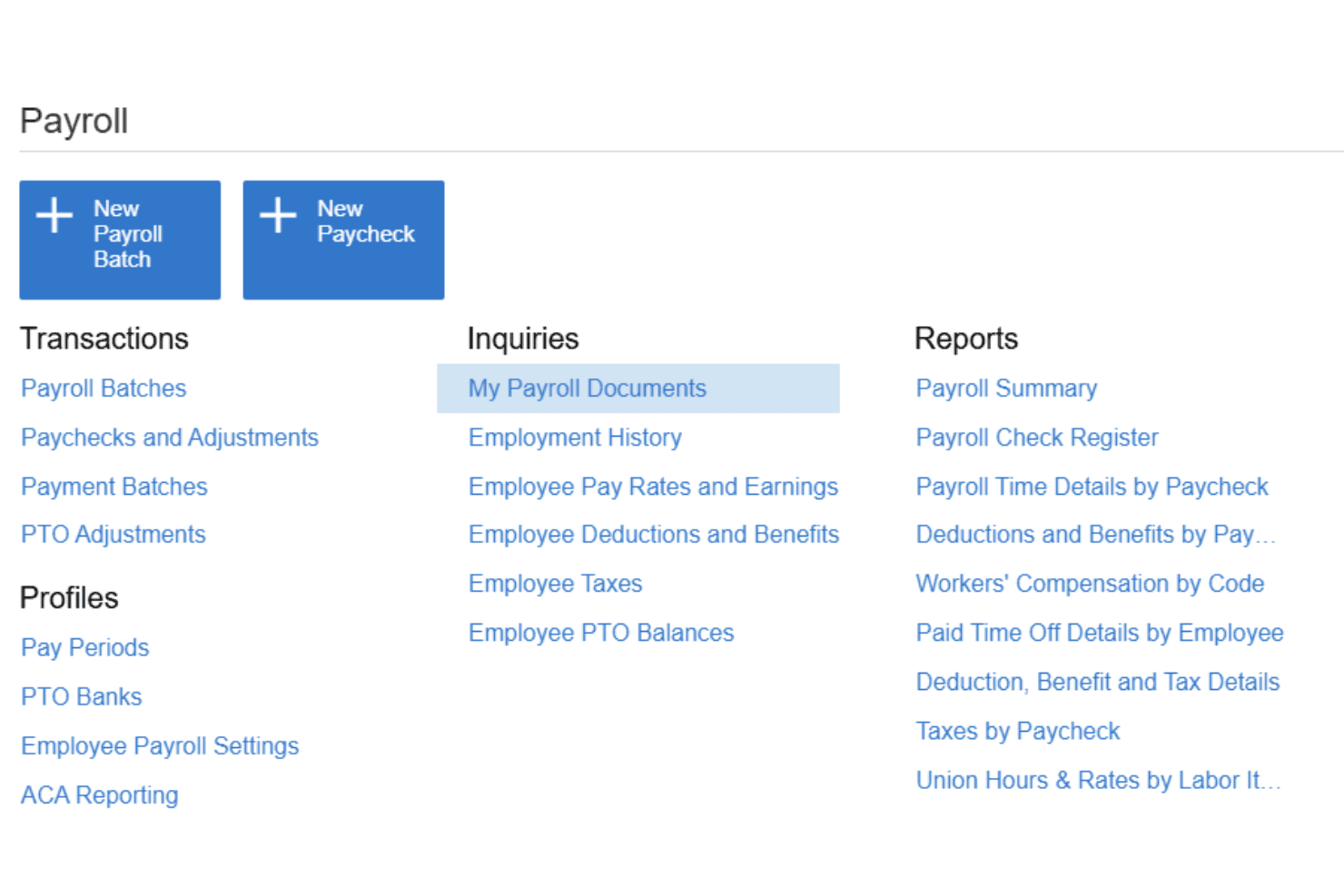
Acumatica centralizes payroll tasks like batches, paychecks, and PTO management. Acumatica is a cloud ERP platform that integrates general ledger, accounts payable and receivable, payroll processing, time tracking, and project costing in a single system.
Who Is Acumatica Best For?
Acumatica is a strong fit for mid-market companies in construction, manufacturing, or distribution that need financials, payroll, and operations in one platform without paying per user.
Why I Picked Acumatica
I picked Acumatica as one of the best because it's the only platform on this list that prices by consumption rather than by user seat, so your entire finance and operations team can access the system without ballooning your costs as headcount grows. I love that payroll, GL, AP, AR, and project costing all live natively in one platform: approved time entries flow directly into payroll batches, and labor costs can be allocated by project, task, cost code, or union without any manual rekeying. It's a genuinely strong fit for mid-market companies in construction, manufacturing, or distribution that need financials and payroll tightly connected.
Acumatica Key Features
- Multi-entity accounting: Manage accounting and reporting across multiple entities from a single platform, with consolidated financials and intercompany transactions.
- Labor cost allocation: Assign labor costs to specific projects, tasks, cost codes, departments, unions, or shifts directly from payroll data.
- Employee self-service portal: Employees can view paystubs, access tax forms, and manage direct-deposit details through a mobile self-service tool.
- Configurable overtime rules: Set daily and weekly overtime calculations using state, project, or union parameters to match your specific workforce requirements.
Acumatica Integrations
Acumatica offers marketplace integrations with Workforce Go Payroll, People & Time and Inova Payroll HCM for Acumatica, plus documented integrations with ADP and Workforce Go. It provides REST and SOAP APIs for custom connections.
Pros and Cons
Pros:
- Multi-entity accounting with financial drill-downs
- Flexible pay groups and overtime rules
- Connected payroll and project-cost allocation
Cons:
- Native reporting can require extra configuration
- Payroll may fall short beyond basic needs
Learn more about Acumatica: 4Best for multi-company financial oversight
Odoo
- Free plan + free trial + free demo available
- From $31.10/user/month (billed annually)
Visit WebsiteCustomer Rating:4.2/5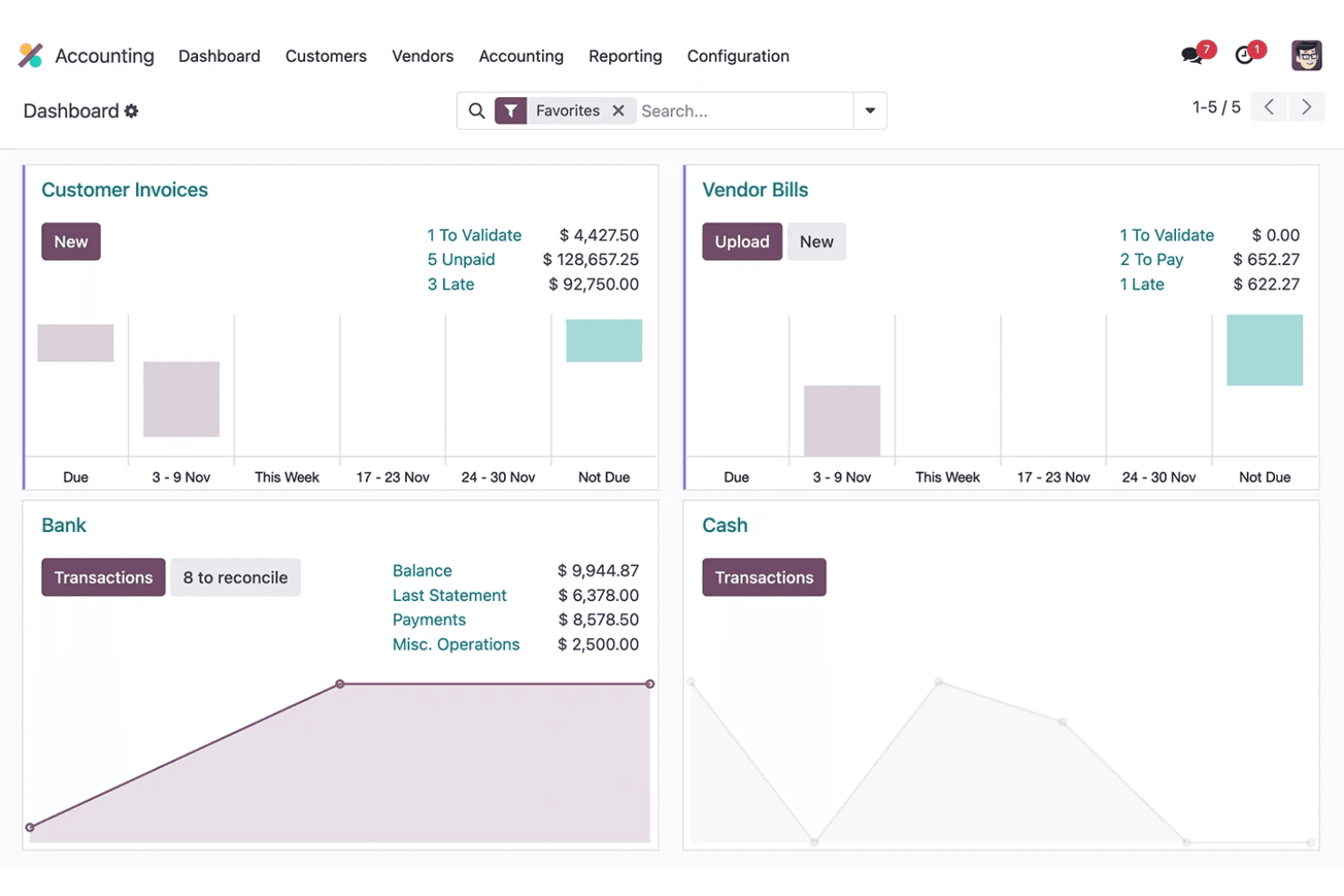
Odoo's accounting dashboard tracks invoices, vendor bills, and bank balance. Odoo is a modular business suite that includes accounting, payroll, invoicing, and expense management alongside a broad range of connected apps spanning sales, inventory, HR, and project management.
Who Is Odoo Best For?
Odoo is a strong fit for growing businesses managing multiple entities, where consolidating accounting, payroll, and operations across companies in one platform matters most.
Why I Picked Odoo
Odoo earns its spot on my shortlist because of how well it handles multi-company accounting in a single platform. I love that you can run consolidated financial reports across entities and manage intercompany transactions without switching systems. Its analytic accounting lets you slice costs by project, department, or contract, which is genuinely useful when you're overseeing finances across subsidiaries with different structures.
Odoo Key Features
- Payroll localization: Applies preconfigured tax rules, salary structures, and compliance settings for 24 countries, with new localizations added regularly.
- Work entry management: Pulls attendance, timesheet, and planning data into payroll to calculate worked time before generating payslips.
- Budget tracking: Monitors actual spending against budgets for both general and analytic accounts in real time.
- Automated payment follow-ups: Sends overdue invoice reminders to customers by email, SMS, postal letter, or scheduled task.
Odoo Integrations
Odoo offers five documented native payment integrations—Stripe, Authorize.net, PayPal, Adyen, and Alipay—and an AvaTax integration for sales-tax calculations. Its RESTful, XML-RPC, and JSON-2 APIs support custom connections on Custom plans.
Pros and Cons
Pros:
- Attendance and timesheets feed pay runs
- Payroll entries post into accounting ledgers
- Consolidated multi-company books and reporting
Cons:
- Overtime calculations can require manual work
- U.S. payroll tax forms need third-party filing
Learn more about Odoo: 5Best for Australian PAYG and STP workflows
MYOB
- 14-day free trial available
- From $315/year (billed annually)
Visit WebsiteCustomer Rating:3.8/5
MYOB summarizes payroll totals and actions after each pay run. MYOB Business is Australian accounting software that covers bookkeeping, invoicing, expense tracking, GST and BAS lodgement, and integrated payroll with Single Touch Payroll reporting to the ATO.
Who Is MYOB Best For?
MYOB Business is a strong fit for Australian small business owners and their accountants who need GST, BAS, and Single Touch Payroll built into one place.
Why I Picked MYOB
MYOB Business earns its spot on my shortlist because it's built specifically for the Australian tax environment, handling PAYG calculations and Single Touch Payroll reporting to the ATO as part of every pay run. I like that the MYOB Team app lets hourly employees clock in and out from their phones, with approved hours flowing directly into payroll without manual re-entry. BAS lodgement is also handled inside the same platform, so GST tracking and ATO reporting stay connected to your books from day one.
MYOB Key Features
- Single Touch Payroll reporting: Sends employees' year-to-date payroll figures directly to the ATO after each pay run, with status tracking inside the platform.
- GST and BAS lodgement: Tracks GST automatically and lets you prepare and lodge your BAS directly with the ATO without leaving your accounting software.
- Job cost tracking: Assigns pay-run amounts and timesheet hours to specific jobs, so you can track wage expenses by project from quote through to invoice.
- Role-based user permissions: Restricts access to payroll, purchases, sales, banking, and contacts by user role, with read-only options for non-administrator accounts.
MYOB Integrations
MYOB offers marketplace integrations with more than 350 apps, including Square, Shopify by Amaka, Tanda, and Deputy. It also provides an API for custom integrations.
Pros and Cons
Pros:
- Payroll costs track against individual jobs
- Approved employee clock-ins feed payroll
- ATO-linked STP reporting follows each pay run
Cons:
- Users report support delays and reporting limits
- Some awards need manual interpretation checks
Learn more about MYOB: Best for accountants accessing client books
- Free demo available
- Pricing upon request
Visit WebsiteCustomer Rating:4/5
NetSuite centralizes payroll processing, KPIs, and variance tracking. NetSuite is a cloud-based ERP and accounting platform that combines general ledger management, accounts payable and receivable, payroll processing, and tax filing in a single system.
Who Is NetSuite Best For?
NetSuite is a strong fit for accounting professionals who need direct access to client books, with the SuiteAccountants program offering free licenses specifically for that workflow.
Why I Picked NetSuite
NetSuite earns its spot on my shortlist because of the SuiteAccountants program, which gives accounting professionals a free license to access client books directly—something most payroll-adjacent platforms simply don't offer. I also like how payroll data posts to the general ledger in real time, so there's no manual reconciliation step between a pay run and the books. The multi-state tax calculation setting handles employees who work across state lines within a single pay period, which is a genuinely tricky scenario that many tools handle poorly.
NetSuite Key Features
- Gross-to-net payroll calculation: Calculates employee pay after taxes, benefit deductions, and variable compensation like bonuses and commissions are applied.
- Employee self-service portal: Lets employees view up to five previous paychecks, access W-4 and digital W-2 forms, and update their direct deposit account details.
- 100+ standard payroll and financial reports: Includes pre-built dashboards, payroll trend comparisons, and drill-down from consolidated financial summaries to individual transactions.
- Benefits enrollment via SimplyInsured: Employees can search, compare, and enroll in health insurance plans directly, with deductions automatically synced to payroll.
NetSuite Integrations
NetSuite offers marketplace integrations including SimplyInsured, Deel, ServiceTitan, and Pipefy, plus an API for custom integrations. SimplyInsured syncs benefits deductions with NetSuite Payroll and the general ledger.
Pros and Cons
Pros:
- Reports drill from summaries to transactions
- Centralized financial and operational records improve visibility
- Payroll posts directly to the general ledger
Cons:
- Implementation can require months and internal expertise
- Users report local-tax filing errors and disputes
Learn more about NetSuite: Best for small firms with detailed inventory
- 30-day free trial
- Pricing upon request
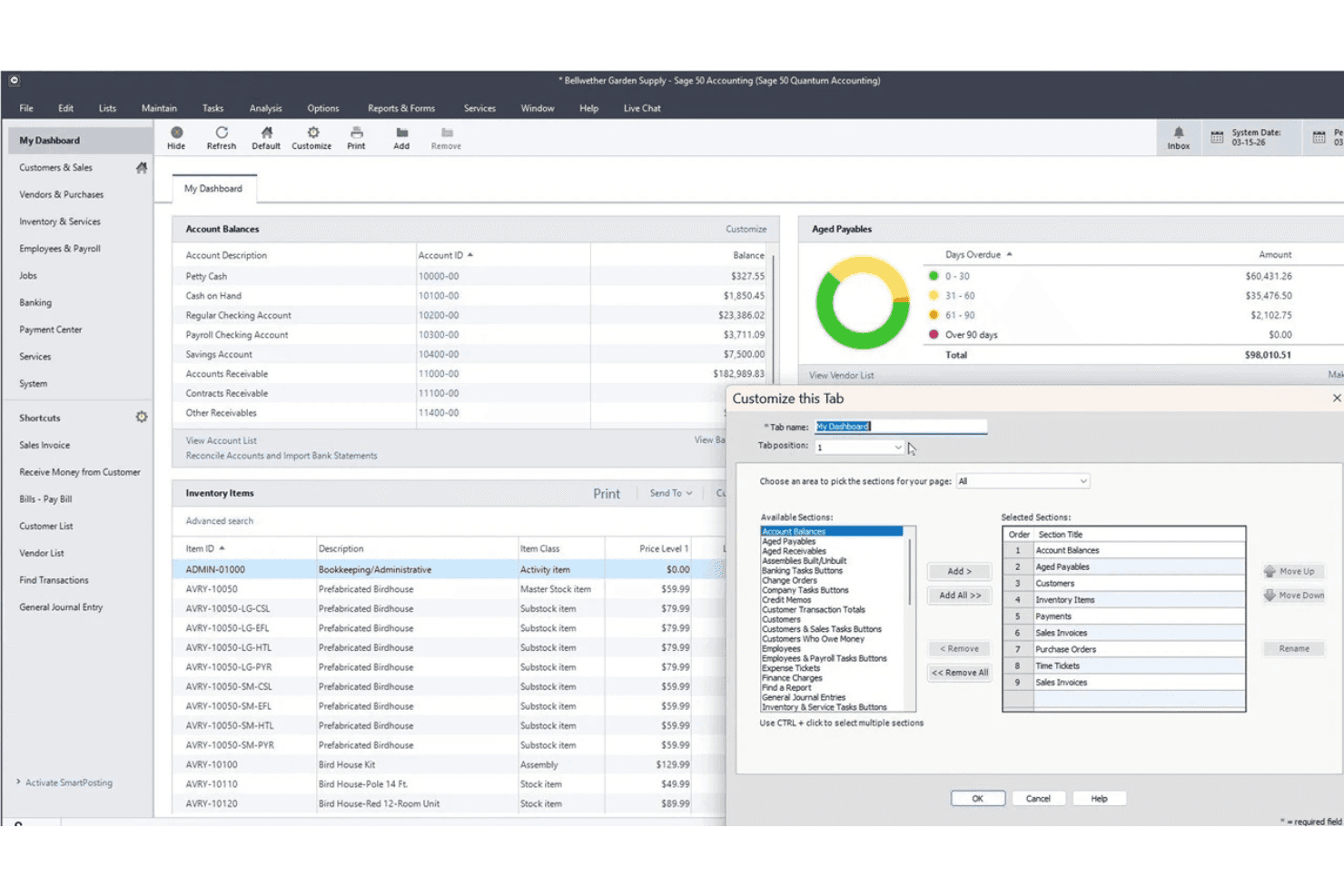
Sage 50 Accounting lets users customize dashboard tabs and sections. Sage 50 Accounting is a small-business accounting platform that combines bookkeeping, invoicing, inventory management, job costing, and an integrated do-it-yourself payroll module in one system.
Who Is Sage 50 Accounting Best For?
Sage 50 Accounting is a strong fit for small businesses that need detailed inventory tracking alongside their core accounting and payroll workflows.
Why I Picked Sage 50 Accounting
Sage 50 Accounting earns its spot on my shortlist because it treats inventory as a first-class accounting function, not an afterthought. I love that you can track stock levels, build assemblies, and apply FIFO or LIFO costing alongside your payroll and job costing, all in one system. The serialized inventory tracking at the Premium tier is especially useful if you're running a business where individual unit histories matter, like equipment sales or component-level manufacturing.
Sage 50 Accounting Key Features
- Integrated do-it-yourself payroll module: Run payroll, set up vacation and sick time, and generate W-2s and tax forms from within the platform using a subscription add-on priced by employee count.
- AI Document Capture: Upload or email invoices so Sage 50 reads and extracts line items for approval, archiving processed documents by company or folder.
- Automated bank reconciliation: Download bank transactions, match them to existing records, and identify unreconciled differences without manual data entry.
- Role-based user permissions: Assign access rights by user role across your team, available on the Quantum plan for businesses managing multiple users.
Sage 50 Accounting Integrations
Sage 50 Accounting integrates with Microsoft 365, AutoEntry, Sage HR, Timeslips, Stripe, and PayPal. An API and total integration count aren't documented.
Pros and Cons
Pros:
- Payroll works for small-team pay runs
- Useful financial reports for business decisions
- Detailed inventory and job-cost visibility
Cons:
- Remote access can slow with larger files
- Posted payroll corrections can be difficult
Learn more about Sage 50 Accounting: Best for U.S. and Canadian tax-area mapping
- Free demo available
- Pricing upon request
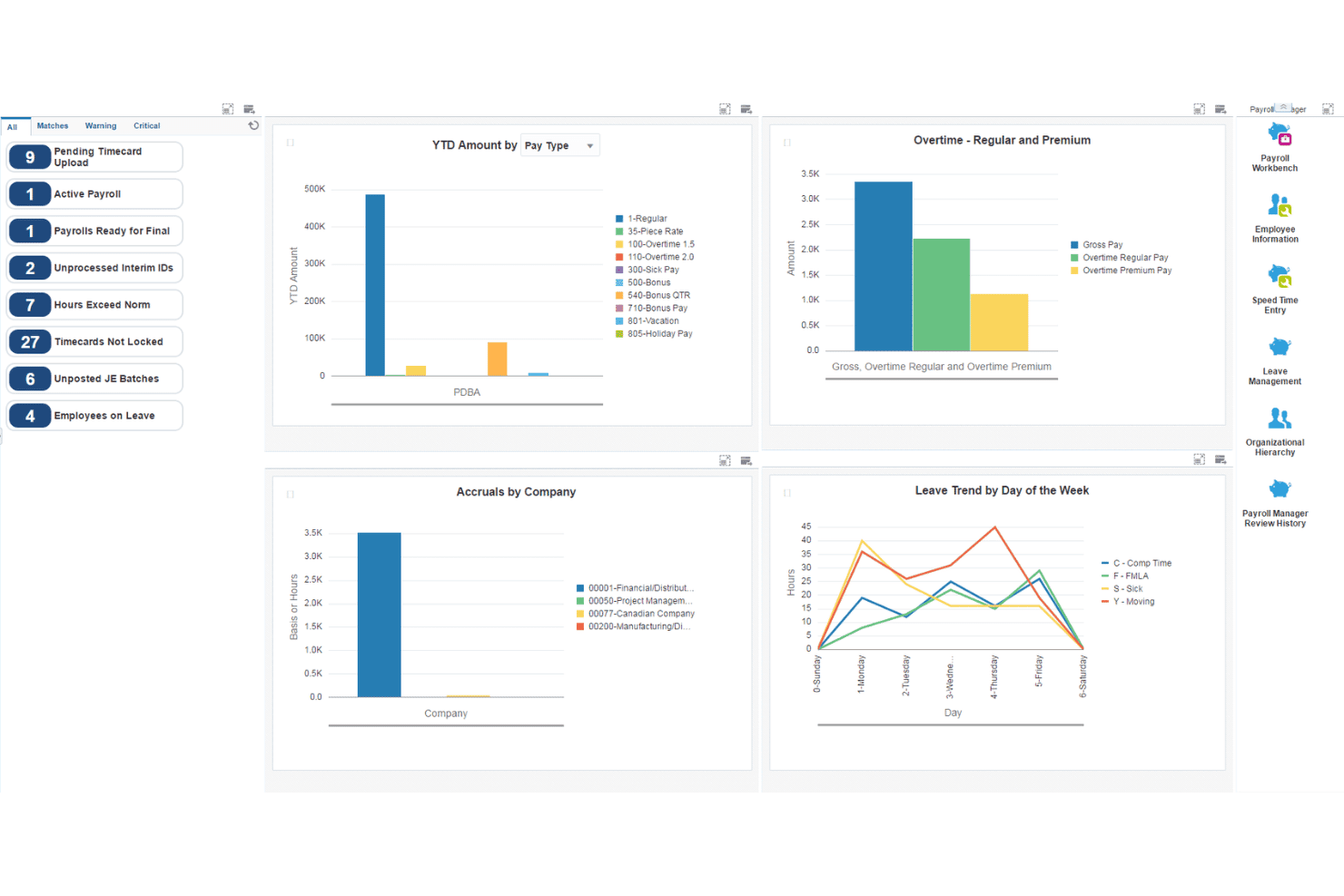
JD Edwards EnterpriseOne centralizes payroll data in one manager dashboard. JD Edwards EnterpriseOne is an Oracle enterprise ERP suite that covers financial management, payroll processing, accounts payable and receivable, time tracking, and expense management within a single integrated platform.
Who Is JD Edwards EnterpriseOne Best For?
JD Edwards EnterpriseOne suits mid-size to large enterprises where finance directors and controllers need deeply integrated GL, payroll, and financial reporting in a single ERP.
Why I Picked JD Edwards EnterpriseOne
JD Edwards EnterpriseOne earns its spot on my shortlist because of how it handles U.S. and Canadian tax-area mapping through Vertex GeoCoder, which assigns tax-area codes directly from employee and business-unit addresses across more than 66,000 locations. I like that this feeds into native payroll tax calculation, so when you're running payroll across multiple states or provinces, the system already knows which tax authorities apply. The GL, payroll, AP, and Time and Labor modules all post to the same ledger, which means finance teams aren't reconciling across separate systems.
JD Edwards EnterpriseOne Key Features
- General Ledger integration: Consolidates financial data from payroll, AP, and AR into a single ledger in real time for unified reporting.
- Time and Labor module: Captures employee timecards manually, automatically, or via batch upload, then sends time data directly to payroll processing.
- Benefits administration: Manages eligibility rules, pre- and post-tax deductions, and employer cost portions, with benefit deductions calculated and applied through payroll.
- Employee Self-Service: Lets employees review pay stubs, submit timecards, request leave, and update W-4 information through a self-service interface.
JD Edwards EnterpriseOne Integrations
Documented integrations include Vertex Quantum for Payroll Tax, ADP Tax Filing Service, Oracle Talent Management Cloud, Oracle Database Cloud Service, and Oracle Mobile Cloud Service. It supports custom connections through web services, business events, and composite applications.
Pros and Cons
Pros:
- Job-coded timecards allocate labor costs
- Real-time ledger consolidation supports reporting
- Connected payroll, accounting, and invoicing workflows
Cons:
- Reporting often needs custom work
- Payroll voucher posting requires separate GL run
Learn more about JD Edwards EnterpriseOne: Best for multi-state construction payroll
- Free demo available
- Pricing upon request

Trimble Viewpoint Vista tracks payroll accumulations by earnings, deductions, and liabilities. Trimble Viewpoint Vista is a construction ERP platform that combines job-cost accounting, payroll processing, accounts payable and receivable, and field management into a single system built for the construction industry.
Who Is Trimble Viewpoint Vista Best For?
Vista is a strong fit for mid-to-large construction firms that need payroll, job costing, and financial management in one integrated system.
Why I Picked Trimble Viewpoint Vista
Vista earns its spot on my shortlist because it's one of the few platforms that handles multi-state construction payroll natively, calculating taxes by state when workers cross state lines within a single pay period. I also like how payroll costs post directly to job costing during the ledger update, so project financials stay accurate without any manual reconciliation. Certified payroll reports are built in too, which matters a lot on prevailing-wage jobs.
Trimble Viewpoint Vista Key Features
- Employee self-service portal: Employees can view paystubs, update withholding and direct-deposit details, request time off, and manage benefits from a mobile device.
- PDF invoice conversion: Vista converts PDF invoices into validated invoice entries, reducing manual data entry in accounts payable.
- Multi-company payroll processing: Vista processes payroll across multiple companies, supporting scenarios where employees are set up in one payroll company but work across several job cost companies.
- Record-level data security: Administrators can restrict access to specific companies, jobs, contracts, and employee records, with security changes logged to an auditable report.
Trimble Viewpoint Vista Integrations
Trimble Viewpoint Vista integrates with Aatrix for payroll regulatory reporting and Kaster through the Trimble Marketplace for subcontractor certified payroll. Its bidirectional REST API supports custom integrations for eligible cloud-hosted Vista instances.
Pros and Cons
Pros:
- Invoice approvals support month-end processing
- Multi-state payroll handles cross-state work
- Payroll costs flow into job costing
Cons:
- Standard reports often need custom work
- Payroll changes can require reprocessing
Learn more about Trimble Viewpoint Vista: Best for businesses choosing from 800+ apps
- Free plan + 30-day trial available
- From $38/month
Visit WebsiteCustomer Rating:4/5
QuickBooks Online lets users create and send itemized invoices with tax. QuickBooks Online is a cloud-based accounting platform that combines general ledger management, invoicing, expense tracking, and payroll processing for small and growing businesses.
Who Is QuickBooks Online Best For?
QuickBooks Online is a strong fit for small business owners who want accounting, invoicing, and payroll connected to a broad ecosystem of 800+ integrations.
Why I Picked QuickBooks Online
QuickBooks Online earns its spot on my shortlist because of its massive app ecosystem, with 800+ integrations that let you connect payroll, invoicing, and bookkeeping to nearly any tool your business already runs. I particularly like how payroll expenses map directly to your chart of accounts, so your P&L reflects actual labor costs without manual journal entries. The automatic payroll tax calculations for federal and state filings also save real time, especially when paired with QuickBooks Workforce for employee self-service pay stub access.
QuickBooks Online Key Features
- Bill approval workflows: Route vendor bills through up to seven approvers and five approval layers before payment is released.
- Recurring invoice scheduling: Set invoices to send automatically on a schedule, with up to three automatic payment reminders per invoice.
- Project profitability tracking: Assign income and expenses to individual projects and monitor profit margins in real time.
- Payroll report generation: Run reports covering payroll tax liability, wage summaries, deductions, and vacation and sick leave, with Excel export available.
QuickBooks Online Integrations
QuickBooks Online supports 800+ integrations, including native QuickBooks Workforce, QuickBooks Time, QuickBooks Payments, and Shopify connections, plus marketplace integrations such as Gusto and Buildertrend. Its GraphQL API supports custom integrations.
Pros and Cons
Pros:
- Payroll records connect with bookkeeping
- Invoice status and online payment tracking
- Bank feeds support reconciliation and reporting
Cons:
- Concurrent multi-state withholding isn’t supported
- Payroll corrections can require difficult support
Learn more about QuickBooks Online: Best for microbusiness bookkeeping and 1099s
- Free plan + 14-day trial + demo available
- From $20/month
Visit WebsiteCustomer Rating:4.3/5 Learn more about Zoho Books:
Bordro Özelliklerine Sahip Diğer Muhasebe Yazılımları
\u003cspan data-slate-fragment=\u0022JTVCJTdCJTIyY2hpbGRyZW4lMjIlM0ElNUIlN0IlMjJ0ZXh0JTIyJTNBJTIySGVyZSUyMGFyZSUyMHNvbWUlMjBhZGRpdGlvbmFsJTIwYWNjb3VudGluZyUyMHNvZnR3YXJlJTIwd2l0aCUyMHBheXJvbGwlMjBmZWF0dXJlcyUyMG9wdGlvbnMlMjB0aGF0JTIwZGlkbiVFMiU4MCU5OXQlMjBtYWtlJTIwaXQlMjBvbnRvJTIwbXklMjBzaG9ydGxpc3QlMkMlMjBidXQlMjBhcmUlMjBzdGlsbCUyMHdvcnRoJTIwY2hlY2tpbmclMjBvdXQlM0ElMjIlN0QlNUQlMkMlMjJ0eXBlJTIyJTNBJTIycCUyMiUyQyUyMmlkJTIyJTNBJTIyenhxQUd1WmtrWCUyMiU3RCU1RA==\u0022\u003eKısa listeme giremeyen ancak yine de göz atmaya değer bazı ek bordro özelliklerine sahip muhasebe yazılımı seçeneklerini burada bulabilirsiniz:\u003c/span\u003e
- 12GustoBest for payroll without a dedicated HR team
- 13XeroBest for payroll migration with expert review
- 14Sage 50Best for Canadian payroll forms and books
- 15AccountEdgeBest for payroll without per-employee fees
- 16Sage 100Best for contractor payroll and service calls
- 17Deskera ERPBest for finance planning across operations
Related Reviews
How I Evaluate Accounting Software With Payroll Features
I give the most weight to tools that run payroll and post pay entries to the ledger, while maintaining books and producing financial reports. Next, I compare mobile time clocks and job costing, such as assigning labor costs by project. Finally, I consider onboarding help, payroll support, and pricing as headcount grows.
Core Functionality (Table Stakes For This List)
When I'm selecting tools for my list, I score each one on a scale from 0 (does not offer the functionality) to 5 (excels in this area) for each core functionality listed below. I then convert the total into a percentage to help assess each tool's overall fit, with extra weight on any functionalities I’ve deemed essential.
- General Ledger (Essential): I look for double-entry bookkeeping, configurable accounts, journal entries, and financial statements that help finance reconcile payroll costs.
- Integrated Payroll (Essential): I assess whether the system calculates gross-to-net pay and syncs payroll entries with accounting records across pay schedules and employee types.
- Invoicing & Receivables: I check whether teams can send invoices, track payment status, and manage recurring customer billing in the same system.
- Expenses & Payables: I look for categorized expenses, vendor bill tracking, and payment records that help teams reconcile operating costs.
- Payroll Tax Filing: I evaluate how the tool calculates payroll taxes and supports filing or remittance across the organization’s applicable jurisdictions.
- Employee Payments: I check for practical pay options, such as direct deposit and check printing, across regular and off-cycle payroll runs.
Once I have a list of tools that meet the criteria, I consider what sets each platform apart.
Differentiating Factors (What Sets Vendors Apart)
Here's how I compare and contrast different vendors:
Standout Features
I look for job costing and class tracking that lets you allocate labor costs by project, department, or location—essential when finance needs to see exactly how much a product launch or regional office costs in wages. Mobile time clocks matter too, since field or shift-based teams need to submit hours from their phones and have that data flow straight into payroll. I also evaluate each tool's employee self-service portal, checking whether staff can pull pay stubs, update tax forms, and request time off without creating extra work for HR.
Beyond Features
I evaluate whether a vendor guarantees accuracy on tax filings, since a single missed deadline or miscalculated remittance can trigger penalties that fall on your team to resolve. Scalability matters just as much—I check how pricing shifts as headcount grows and whether you can add locations or pay groups without migrating data to a new plan. I also look at onboarding support, because payroll setup means moving sensitive wage histories and banking details, and vendors that assign a dedicated setup specialist reduce compliance risk during that transition.
Bordro Özelliklerine Sahip Muhasebe Yazılımı Nasıl Seçilir?
Doğru bordro özelliklerine sahip muhasebe yazılımı, her platformun kendine özgü uyumluluk, otomasyon ve İK görevleri karışımını nasıl ele aldığına bağlıdır. Bir platform seçmeden önce bordro ve muhasebenin ne ölçüde bağlantılı olması gerektiğine karar verin. Hepsi bir arada sistem mutabakat çalışmalarını azaltabilirken, bordro eklentisine sahip muhasebe yazılımı daha fazla esneklik sunabilir. Halihazırda bir bordro sağlayıcınız varsa, bordro giderleri ve yükümlülükleri genel muhasebe defterinize doğru şekilde aktarıldığı sürece güvenilir bir entegrasyon yeterli olabilir.
| Önceliğiniz... | Şunları arayın... |
|---|---|
| Önceliğiniz...Doğru bordro vergisi bildirimleri | Şunları arayın...Otomatik vergi hesaplamaları, bildirim desteği ve mevzuat uyarlamaları |
| Önceliğiniz...Bordrodan muhasebeye sorunsuz senkronizasyon | Şunları arayın...Yerel, otomatik genel muhasebe yevmiye kaydı eşlemesi |
| Önceliğiniz...Saatlik ve maaşlı çalışanları yönetmek | Şunları arayın...Esnek zaman takibi ve karma bordro çalıştırma |
| Önceliğiniz...Birden fazla yargı bölgesinde bordro işlemleri | Şunları arayın...Çalışanlarınızın bulunduğu her eyalet ve yerel bölge için vergi desteği |
| Önceliğiniz...Eski sisteminizden kolay geçiş | Şunları arayın...Destekli bordro verisi aktarımı ve yılbaşından bugüne veri içe aktarma |
Kısa Listenizi Nasıl Değerlendirmelisiniz?
- Yıl sonu vergi desteğini doğrulayın: Yazılımın hangi W-2 ve 1099 formlarını oluşturduğunu veya dosyaladığını doğrulayın. Ayrıca hangi yargı bölgelerini desteklediğini ve yıl sonu dosyalama işlemlerinin ek ücrete tabi olup olmadığını kontrol edin.
- Simüle edilmiş bir maaş bordrosu dönemi denemesi gerçekleştirin: Tipik ödeme planlarınızı, kazançlarınızı, kesintilerinizi ve yüklenicilerinizi içeren bir test maaş bordrosu dönemi oluşturun. Ardından ortaya çıkan giderlerin ve yükümlülüklerin büyük deftere nasıl kaydedildiğini kontrol edin.
- Bir veri taşıma senaryosu için destek talebi gönderin: Yıl ortasında bugüne kadarki maaş bordrosu verilerini içe aktarmanız gerektiğini açıklayın ve yanıtın kapsamlılığını ve zaman çizelgesini takip edin.
- Vergi dosyalama sorumluluğunu netleştirin: Satıcının sizin adınıza maaş bordrosu vergilerini hesaplayıp hesaplamadığını, dosyalayıp dosyalamadığını ve ödeyip ödemediğini doğrulayın. Ayrıca satıcının hangi yargı bölgelerini kapsadığını ve hataları veya gecikmiş dosyalamaları kimin yönettiğini kontrol edin.
- Kontrol ile kolaylık arasında tercih yapın: Bağlantılı maaş bordrosuna sahip, yüksek düzeyde özelleştirilebilir muhasebe araçları mı yoksa temel defter tutma özelliklerine sahip, maaş bordrosu odaklı bir sistem mi istediğinize karar verin.
Maaş Bordrosu Özelliklerine Sahip Muhasebe Yazılımı Nedir?
Maaş bordrosu özelliklerine sahip muhasebe yazılımı, temel finansal araçları yerleşik veya entegre maaş bordrosu işlemleriyle birleştirir. Örneğin bu araçlar büyük defter muhasebesi, borç ve alacak hesapları, faturalama ve finansal raporlamayı içerebilir. Bu platformlar, ayrı araçlar arasında verileri manuel olarak aktarmadan çalışan ücretlerini hesaplamanıza, kesintileri ve vergileri yönetmenize, ayrıca maaş bordrosu giderlerini ve yükümlülüklerini muhasebe sisteminize kaydetmenize olanak tanır.
Bağımsız maaş bordrosu yazılımlarının aksine bu platformlar, maaş bordrosu faaliyetlerini doğrudan finansal kayıtlarınıza bağlar. Yazılıma bağlı olarak tamamlanan maaş bordrosu dönemleri otomatik olarak yevmiye kayıtları oluşturabilir, gider ve yükümlülük hesaplarını güncelleyebilir, iş gücü maliyetlerini departmanlara veya projelere dağıtabilir ve maaş bordrosu verilerini finansal raporlara aktarabilir.
Özellikler
Maaş bordrosu özelliklerine sahip muhasebe yazılımını seçerken aşağıdaki temel özelliklere dikkat edin:
- Entegre maaş bordrosu işlemleri: Maaş bordrosunu çalıştırın, brütten nete ücreti hesaplayın ve çalışan ücretlerini, kesintilerini ve maaş bordrosu yükümlülüklerini muhasebe kayıtlarınıza bağlayın.
- Maaş bordrosu vergisi yönetimi: Geçerli maaş bordrosu vergilerini hesaplayıp kesin; platforma ve plana bağlı olarak vergi ödemeleri, dosyalamaları ve W-2 ile 1099 gibi yıl sonu formları için seçeneklerden yararlanın.
- Büyük defter senkronizasyonu: Maaş bordrosu işlemlerini doğru hesap planına otomatik olarak eşleyerek ücret giderlerinin ve vergi yükümlülüklerinin her zaman güncel olmasını sağlayın.
- Çalışan kayıtları yönetimi: Ücret oranlarını, vergi kesintilerini, yan hak kesintilerini ve istihdam bilgilerini her çalışanın profilinde saklayın.
- Yüklenici ve 1099 ödemeleri: Yüklenicilere çalışanlarla birlikte ödeme yapın ve aynı sistem içinde yıl sonu 1099-NEC dosyalamasını kolaylaştırın.
- Çalışma süresi ve ücretli izin takibi: Çalışılan saatleri ve ücretli izinleri kaydedin ve doğru maaş ödemeleri için bu verileri doğrudan maaş bordrosu dönemlerine aktarın.
- Doğrudan para yatırma ve ödeme seçenekleri: Çalışanlara ve yüklenicilere doğrudan para yatırma, ödeme kartları veya basılı çekler gibi esnek ödeme seçenekleri sunun.
- Çalışanların kendi işlemlerini yapabildiği portallar: Çalışanların insan kaynakları müdahalesi olmadan maaş bordrolarına erişmesine, vergi formlarını görüntülemesine, izin talep etmesine ve kişisel bilgilerini yönetmesine olanak tanıyın.
- Özel raporlama ve analiz: Daha iyi iş kararları almak için iş gücü maliyetlerini, fazla mesaiyi ve yan hak kullanımını öne çıkaran maaş bordrosu ve finansal raporlar oluşturun.
- Güvenlik ve izin kontrolleri: Kullanıcı erişim düzeylerini belirleyin, onayları zorunlu kılın ve maaş bordrosu ile finansal verileri korumak için denetim izleri oluşturun.
Avantajlar
Maaş bordrosu özelliklerine sahip muhasebe yazılımını uygulamak, ekibiniz ve işletmeniz için çeşitli avantajlar sağlar. Yararlanabileceğiniz avantajlardan bazıları şunlardır:
- Manuel veri girişinin azalması: Maaş bordrosu ile büyük defter arasındaki otomatik senkronizasyon, yinelenen veri girişlerini ortadan kaldırır ve maliyetli hataların önlenmesine yardımcı olur.
- Geliştirilmiş bordro vergisi uyumluluğu: Otomatik hesaplamalar ve uyumluluk araçları, bordro vergilerinin ve yıl sonu raporlamasının geçerli federal, eyalet ve yerel gerekliliklerle uyumlu tutulmasına yardımcı olabilir.
- Daha hızlı bordro dönemleri: Entegre zaman takibi ve doğrudan ödeme özellikleri, ücret hesaplamasından maaş çeklerinin teslimine kadar her maaş ödeme işlemini hızlandırır.
- Çalışanlar için daha fazla şeffaflık: Self servis portalları, çalışanların İK darboğazları olmadan maaş bordrolarını, vergi formlarını ve izin bakiyelerini görüntülemesine olanak tanır.
- Daha doğru finansal raporlama: Gerçek zamanlı bordrodan GL'ye kayıt aktarımı, ücret, vergi ve yan hak verilerinin işletme raporlarına her zaman yansıtılmasını sağlar.
- Yüklenici ve çok eyaletli bordro için kolaylık: Yüklenicileri ve birden fazla vergi yetki alanını destekleyen platformlar, farklı çalışan türlerine farklı konumlarda ödeme yapılmasıyla ilgili manuel işleri azaltabilir. Uluslararası olarak büyüyen işletmeler ayrıca Meksika'da global bordro rehberimizi inceleyebilir.
- Gelişmiş güvenlik ve kontrol: Role dayalı izinler ve denetim izleri, hassas bordro ve finansal verileri yetkisiz erişime karşı korur.
Maliyetler & Fiyatlandırma
Bordro özelliklerine sahip muhasebe yazılımı seçmek, mevcut çeşitli fiyatlandırma modellerinin ve planların anlaşılmasını gerektirir. Maliyetler, bordronun dahil edilmesine, ek özellik olarak sunulmasına veya daha büyük bir ERP paketinin parçası olarak satın alınmasına bağlı olarak büyük ölçüde değişir. Küçük işletmelere yönelik ürünler genellikle aylık bir muhasebe aboneliğini temel bordro ücreti ve çalışan başına ücretlerle birleştirirken kurumsal platformlar genellikle modüllere, kullanıcılara, şirket büyüklüğüne ve uygulama ihtiyaçlarına göre özel fiyatlandırma kullanır. Aşağıdaki tabloda en yaygın fiyatlandırma modelleri özetlenmektedir:
Bordro Özelliklerine Sahip Muhasebe Yazılımları için Yaygın Fiyatlandırma Modelleri
| Plan Türü | Ortalama Fiyat | Yaygın Özellikler |
|---|---|---|
| Plan TürüÜcretsiz muhasebe | Ortalama Fiyat$0 temel plan; bordro genellikle ek ücrete tabidir | Yaygın ÖzelliklerTemel defter tutma, faturalama, finansal raporlar ve isteğe bağlı ücretli bordro |
| Plan TürüMuhasebe + bordro eklentisi | Ortalama FiyatAylık muhasebe ücreti + temel bordro ücreti ve/veya çalışan başına ücret | Yaygın ÖzelliklerEntegre muhasebe, bordro işlemleri, doğrudan ödeme ve bordrodan GL'ye kayıt aktarımı |
| Plan TürüKullanıcı başına veya modüler yazılım | Ortalama FiyatKullanıcılara ve seçilen modüllere göre aylık veya yıllık ücretler | Yaygın ÖzelliklerEk İK, envanter, proje veya operasyon araçlarıyla birlikte muhasebe ve bordro modülleri |
| Plan TürüKurumsal ERP | Ortalama FiyatÖzel teklif | Yaygın ÖzelliklerGelişmiş finansal yönetim, bordro, çoklu işletme desteği, izinler, entegrasyonlar ve uygulama hizmetleri |
Bordro Özelliklerine Sahip Muhasebe Yazılımı Hakkında SSS
Bordro özelliklerine sahip muhasebe yazılımları hakkında sık sorulan bazı soruların yanıtları aşağıdadır:
Bordro içeren muhasebe yazılımlarıyla hem çalışanlara hem de yüklenicilere ödeme yapabilir miyim?
Bordro özelliklerine sahip birçok muhasebe platformu hem W-2 çalışanlarını hem de 1099 yüklenicilerini destekler, ancak yüklenici ödemeleri ve vergi formu özellikleri ürüne ve plana göre değişir. Her iki çalışan türünü de kullanıyorsanız yazılımın yüklenici ödemelerini destekleyip desteklemediğini ve gerekli W-2 ile 1099-NEC formlarını oluşturup gönderebildiğini kontrol edin.
Bu sistemlerde bordro vergisi beyannamesi verme işlemi nasıl çalışır?
Bordro vergisi desteği platforma ve plana göre değişir. Bazı sistemler kesintileri hesaplar, ancak beyanname verme ve ödemeleri size bırakır; tam hizmet sunan bordro ürünleri ise federal, eyalet ve yerel bordro vergilerini sizin adınıza hesaplayabilir, beyannamesini verebilir ve ödeyebilir. Bir sistem seçmeden önce hangi yetki bölgelerinin ve yıl sonu formlarının desteklendiğini kontrol edin.
Bordro verilerini önceki bir sağlayıcıdan aktarırken ne tür destek sunulur?
Çoğu sağlayıcı işe alıştırma desteği sunar; bazıları, yılbaşından bugüne kadarki bordro bilgilerini içe aktarmanıza ve sorunsuz bir geçiş sağlamanıza yardımcı olmak üzere özel geçiş uzmanları görevlendirir.
Çalışanlar maaş bordrolarına ve vergi formlarına kendileri erişebilir mi?
Evet, çalışanların kendi hizmetlerini kullanabildiği portallar yaygındır. Bu portallar, personelin İK birimine başvurmadan maaş bordrolarını almasına, vergi belgelerini görüntülemesine ve kişisel bilgilerini güncellemesine olanak tanır.
Gelişmiş zaman takibi dahil mi, yoksa üçüncü taraf araçlara mı ihtiyacım var?
Bazı çözümler yerleşik zaman takibi sunarken, diğerleri zaman saati uygulamalarıyla sorunsuz entegrasyonlar sağlar; her iki durumda da çalışma saatlerinin bordro işlemleri için doğru olmasına yardımcı olurlar.