

Günümüzün hızlı tempolu çalışma ortamında ekibinizin bağlılığını ve bilgi sahibi olmasını sağlamak zor olabilir. Geleneksel eğitim yöntemleri çoğu zaman yetersiz kalır ve motivasyon ile bilgi eksikliklerine yol açar. İşte mikroöğrenme yazılımı burada devreye girerek kısa, odaklanmış öğrenme deneyimleri sunar.
Karşılaştığınız İK zorluklarını biliyorum—etkili eğitimi zaman kısıtlamalarıyla dengelemek hiç de kolay değil. Deneyimlerime göre mikroöğrenme yazılımının avantajları, esnek ve erişilebilir öğrenme çözümleri sunarak bu boşluğu doldurmaya yardımcı olabilir.
Bu makalede, mevcut en iyi mikroöğrenme yazılımları için tarafsız ve kapsamlı araştırmalara dayanan seçimlerimi paylaşacağım. Özellikleri, artıları ve eksileri ile farklı ekip ihtiyaçlarına uygunlukları hakkında bilgiler edineceksiniz. Ekibiniz için en uygun seçeneği birlikte bulalım.
Why Trust Our Software Recommendations
6,700+
Reviews
20
Industry experts
16+
Evaluation factors
14
Years
Our team has been testing and reviewing software since 2012. As HR experts ourselves, we know how difficult—and important—it is to choose the right software.
For this guide, we evaluated tools using hands-on testing and independent research, scoring tools using our selection criteria. We also draw on insights from industry thought leaders and practicing HR experts.
Our reviews reflect our human editorial judgment, not a sales pitch.
Expert reviewers:
- Phil GrayCOO
 Kim BehnkeHR Tech Editor & Analyst
 Josh BarkerPeople Ops Manager

Mikroöğrenme Yazılımı Karşılaştırma Tablosu
Bu karşılaştırma tablosu, en iyi mikroöğrenme yazılımı seçimlerimin fiyatlandırma ayrıntılarını özetlemektedir:
Sorted by: Default
| Tool | Starting Price | Website | |
|---|---|---|---|
Best for customizable learning paths | 4.6 out of 5 | $119/month Free plan + free demo available | Book Demo |
Best with robust HR and webinar integrations | 4.7 out of 5 | Pricing upon request 14-day free trial + demo available | Website |
Best for monetizing course content | 4.6 out of 5 | Pricing upon request Free trial available | Website |
Best for rapid course creation | 4.6 out of 5 | $3.97/user/month Free trial available | Book Demo |
Best for collaborative learning | 4.7 out of 5 | $8/user/month 30-day free trial + demo available | Website |
Best for in-app guidance | 4.6 out of 5 | Pricing upon request Free trial available | Website |
Best for Salesforce integration | 4.7 out of 5 | Pricing upon request Free demo available | Website |
Best for AI-driven learning paths | 4.4 out of 5 | Pricing upon request Free demo available | Website |
Best for employee engagement | 4.5 out of 5 | Pricing upon request Not available | Website |
Best for enterprise-level solutions | 4.2 out of 5 | Pricing upon request 14-day free trial | Website |


En İyi Mikroöğrenme Yazılımı İncelemesi
Kısa listeme giren en iyi mikroöğrenme yazılımlarının ayrıntılı özetlerini aşağıda bulabilirsiniz. İncelemelerim, sizin için en iyi seçeneği bulmanıza yardımcı olmak amacıyla her aracın temel özelliklerine, artılarına & eksilerine, entegrasyonlarına ve ideal kullanım alanlarına ayrıntılı bir bakış sunuyor.
 Best for customizable learning paths
- Free plan + free demo available
- From $119/month (billed annually)
Visit WebsiteCustomer Rating:4.6/5
TalentLMS uses configurable gamification settings, including points and badges, to help reinforce short learning activities and boost engagement during PMP microlearning. For professionals seeking a PMP microlearning software solution, TalentLMS offers a compelling option by simplifying the complexities of project management training. It provides a flexible, cloud-based platform designed to facilitate learning through short, focused courses, appealing to industries where continuous professional development is key. By addressing challenges such as time constraints and the need for ongoing skill updates, TalentLMS helps project managers and teams stay informed and efficient.
Why I Picked TalentLMS
I picked TalentLMS for its unique ability to cater to the microlearning needs of PMP candidates through its AI-driven course creation and a vast library of over 1,000 short courses. These features are particularly beneficial for those looking to break down complex project management concepts into digestible lessons. Additionally, TalentLMS's seamless integration with communication tools like Zoom and Microsoft Teams supports interactive, live training sessions, making it easier for teams to collaborate and learn in real-time.
TalentLMS Key Features
In addition to its standout microlearning capabilities, TalentLMS offers several features that enhance its usability for PMP training:
- TalentLibrary: Access over 1,000 curated courses on essential skills, ensuring a comprehensive learning experience.
- Mobile App Access: Enable learners to access courses anytime, anywhere, which is ideal for remote or on-the-go professionals.
- Customizable Learning Paths: Create personalized training journeys tailored to individual or team needs, improving engagement and outcomes.
- Reporting and Analytics: Utilize detailed insights into learning progress and effectiveness, essential for tracking PMP preparation.
TalentLMS Integrations
Integrations include Salesforce, BambooHR, Zoom, Microsoft Teams, GoToMeeting, Slack, Shopify, PayPal, Stripe, and Google Calendar.
Pros and Cons
Pros:
- Large ready-made course library
- Mobile-friendly, self-paced access
- Strong microlearning course structure
Cons:
- Interface depth has learning curve
- Advanced reporting can feel limited
Learn more about TalentLMS: Best with robust HR and webinar integrations
- 14-day free trial + demo available
- Pricing upon request
Visit WebsiteCustomer Rating:4.7/5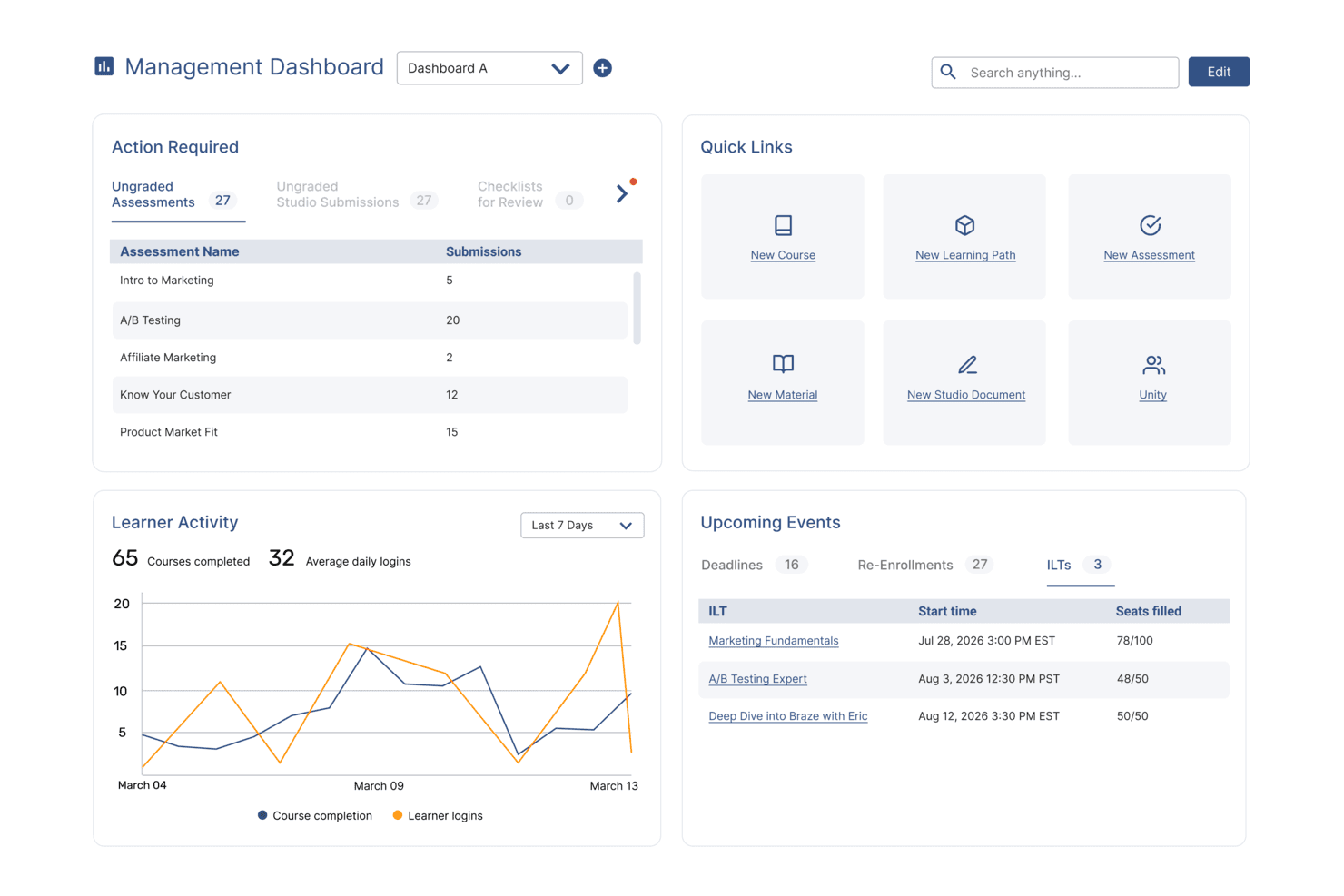
SkyPrep's management dashboard displays learner activity, upcoming events, and quick links. SkyPrep is a corporate LMS that supports microlearning delivery through mobile-friendly course authoring, gamification, compliance training, learning paths, and HR and webinar platform integrations.
Who Is SkyPrep Best For?
SkyPrep is a strong fit for HR and L&D teams at mid-sized organizations that run training across existing HR platforms like ADP Workforce Now or BambooHR.
Why I Picked SkyPrep
SkyPrep earns its spot on my shortlist because of how cleanly it connects microlearning delivery to existing HR systems. I like that learner rosters sync automatically from ADP Workforce Now or BambooHR, so new hires are enrolled in onboarding modules without any manual setup. I also use SkyPrep's Zoom and Microsoft Teams integrations to attach live webinar sessions directly to learning paths, keeping blended training in one trackable place.
SkyPrep Key Features
- SkyPrep Studio authoring: Build interactive microlearning courses using video, text, quizzes, and checklists within the platform.
- Gamification tools: Add points, badges, and leaderboards to increase engagement and motivation.
- Custom branding: White-label portals with your organization’s logo, custom colors, and personalized certificates.
- SOC II security compliance: Protect data and maintain regulatory standards with enterprise-grade security features.
SkyPrep Integrations
SkyPrep offers native integrations with ADP Workforce Now, BambooHR, Google Drive, Dropbox Business, Zoom, Microsoft Teams, Salesforce, Box, Microsoft Office 365, and connects with Zapier. An API is available for custom integrations.
Pros and Cons
Pros:
- White labeling allows custom branding
- Built-in webinar support for blended training
- HRIS sync automates learner enrollment
Cons:
- Analytics and reporting lack advanced filters
- No adaptive spaced repetition engine
Learn more about SkyPrep: Best for monetizing course content
- Free trial available
- Pricing upon request
Visit WebsiteCustomer Rating:4.6/5
Absorb course management dashboard showing category filtering and course organization tools for managing manufacturing training programs. Absorb offers a flexible learning management system designed for organizations that need to deliver targeted, bite-sized training. It’s a strong fit for HR teams, training managers, and professional development leaders who want to support certification, compliance, and ongoing skills growth. The platform helps you create, manage, and track microlearning content that fits the fast-paced needs of project management professionals.
Who Is Absorb Best For?
Absorb is a strong choice for HR teams and training managers in mid-sized to large organizations that need to deliver and track professional microlearning and certification programs.
Why I Picked Absorb
For organizations that want to monetize their microlearning content, Absorb stands out with its built-in ecommerce capabilities. I picked it because you can set up a branded course storefront, manage payments, and offer self-service purchasing for learners. The platform supports multiple payment gateways and lets you bundle courses or offer discounts, which is especially useful for training providers or businesses selling PMP prep modules. This makes it easy to reach a wider audience and generate revenue directly from your microlearning programs.
Absorb Key Features
Some other features that make Absorb a strong option for pmp microlearning include:
- Microlearning module builder: Create and organize short, focused learning units that support just-in-time training for project management professionals.
- Mobile learning support: Learners can access courses and complete modules from any device, making it easy to fit training into busy schedules.
- Automated certification tracking: Monitor learner progress and automatically issue certificates for completed PMP-related courses or compliance requirements.
- Customizable reporting dashboards: Generate detailed reports on learner engagement, course completion, and assessment results to track the effectiveness of your microlearning programs.
Absorb Integrations
Integrations include ADP, BambooHR, Namely, Workday, SAP SuccessFactors, UKG Pro, Dayforce, Salesforce, HubSpot, and Zoom.
Pros and Cons
Pros:
- Built-in ecommerce for selling courses online
- Customizable reporting dashboards for tracking progress
- Automated certification tracking for compliance needs
Cons:
- Course authoring tools lack advanced interactivity
- Limited gamification features for engagement
Learn more about Absorb: Best for rapid course creation
- Free trial available
- From $3.97/user/month (billed annually)
Visit WebsiteCustomer Rating:4.6/5
iSpring LMS allows for fast course creation with little to no technical skills required. iSpring LMS is a learning management system designed to support the creation and delivery of training content, including short-form and modular learning formats. It provides tools for building courses, managing users, and tracking learner progress within a centralized platform.
Why I picked iSpring LMS: The platform includes tools for creating and delivering structured training content, including smaller learning modules. It supports course creation through built-in authoring tools and allows administrators to organize content into learning paths. Training progress can be monitored through reporting and tracking features.
Standout features & integrations:
Features include a mobile app for accessing training content on the go, customizable learning paths for organizing courses, and assessment tools for evaluating learner progress. The platform also supports multiple content formats and includes course authoring functionality, including AI-assisted content generation where available.
Integrations include Salesforce, Zoom, Microsoft Teams, LinkedIn Learning, Slack, and other third-party platforms.
Pros and Cons
Pros:
- Supports multiple content formats
- Includes PowerPoint-based content integration
- Great rapid course creation tools
Cons:
- Limited AI integration
- Minimal advanced customizations
Learn more about iSpring LMS: Best for collaborative learning
- 30-day free trial + demo available
- From $8/user/month
Visit WebsiteCustomer Rating:4.7/5
360Learning helps drive collaborative learning and peer-driven training. 360Learning is a collaborative learning platform designed to foster teamwork and knowledge sharing in organizations. It serves companies aiming to empower employees through peer learning and collaborative course creation.
Why I picked 360Learning: The platform emphasizes collaborative learning, allowing your team to create and share courses. You can leverage social learning features to engage employees in discussions and feedback. The tool facilitates peer reviews, helping ensure content quality and relevance. 360Learning's intuitive interface makes it easy for your team to contribute and learn from one another.
Standout features & integrations:
Features include customizable learning paths to suit different roles, gamification elements to promote motivation, and analytics to track learner engagement. The platform also offers a variety of interactive elements, including achievements, group challenges, user mentions, reactions, and more.
Integrations include Slack, Salesforce, Microsoft Teams, Google Workspace, Zoom, LinkedIn Learning, BambooHR, Workday, SAP SuccessFactors, and more.
Pros and Cons
Pros:
- Facilitates co-authoring courses
- Supports social learning interactions
- Encourages peer learning and collaboration
Cons:
- Initial setup can be time-consuming
- Requires active user participation
Learn more about 360Learning:

Whatfix guides users with in-app training to facilitate enterprise software use. Whatfix is a digital adoption platform designed to provide in-app guidance and support for enterprise software users. It targets businesses aiming to improve software usage efficiency and employee productivity through contextual training.
Why I picked Whatfix: The platform excels in delivering in-app guidance, helping your team navigate complex software. It offers interactive walkthroughs that simplify user onboarding and training. You can create self-help widgets and task lists to support users in real time. Whatfix's analytics provide insights into how users interact with software, enabling you to optimize training content.
Standout features & integrations:
Features include customizable task lists that help users complete workflows efficiently, self-help widgets for on-demand assistance, and specialized AI agents to help create content, such as quizzes and flashcards, and support end users. These features ensure your team gets the support they need when they need it.
Integrations include Salesforce, SAP SuccessFactors, SurveyMonkey, Workday, Slack, Confluence, Amplitude, Google Analytics, and more.
Pros and Cons
Pros:
- Detailed user interaction analytics
- Customizable guidance features
- Real-time user support options
Cons:
- Requires ongoing content updates
- Initial setup may be complex
Learn more about Whatfix: Best for Salesforce integration
- Free demo available
- Pricing upon request
Visit WebsiteCustomer Rating:4.7/5
Spekit offers in-app guidance to elevate Salesforce user efficiency. Spekit is a digital adoption platform that provides in-app guidance and training for Salesforce users. It is designed for teams looking to facilitate software adoption and support user efficiency through contextual learning.
Why I picked Spekit: This tool excels in Salesforce integration, offering in-app guidance directly within the platform. You can create bite-sized learning content that appears contextually to help users when they need it. The platform also provides analytics to track content usage and effectiveness, helping you refine your training materials.
Standout features & integrations:
Features include customizable content creation for tailored learning experiences and real-time updates to keep information current. These features help your team stay informed and efficient in their tasks.
Integrations include Salesforce, Slack, Microsoft Teams, Chrome, Outlook, LinkedIn, Zoom, Confluence, Jira, and Google Workspace.
Pros and Cons
Pros:
- Lightweight interface for quick launch
- Real-time content updates
- Strong Salesforce integration
Cons:
- Limited advanced customization
- Pop-up features may be distracting to some users
Learn more about Spekit: Best for AI-driven learning paths
- Free demo available
- Pricing upon request
Visit WebsiteCustomer Rating:4.4/5
Docebo supports enterprise training with AI-driven, engaging learning. Docebo is a learning management system (LMS) designed for businesses seeking to augment their training programs with AI-powered solutions. It caters to enterprises looking to improve employee engagement and knowledge retention.
Why I picked Docebo: The platform offers AI-driven learning paths that adapt to your team's unique needs, providing personalized learning experiences. Key features include content curation, which helps in organizing and managing learning materials efficiently. Docebo's AI capabilities allow for personalized course recommendations, ensuring your team gets the most relevant content. Additionally, the platform's analytics provide insights into learner performance and engagement.
Standout features & integrations:
Features include gamified learning experiences that aim to boost engagement, e-commerce capabilities for selling courses, and community features that foster learner interaction. These features ensure a dynamic learning environment for your team.
Integrations include Salesforce, Zoom, Slack, Microsoft Teams, Google Analytics, Shopify, PayPal, Stripe, LinkedIn, Zendesk, and more.
Pros and Cons
Pros:
- Customizable learning experiences
- Flexible learning paths
- AI-driven content recommendations
Cons:
- Limited offline access
- Complex initial setup
Learn more about Docebo:

eloomi focuses on training, performance, and feedback to enhance employee growth. eloomi is a learning and development platform aimed at supporting employee engagement and performance. It caters to organizations looking to streamline training, performance management, and feedback processes.
Why I picked eloomi: The platform is designed to boost employee engagement with interactive and personalized learning experiences. eloomi also provides tools for goal setting, performance reviews, and continuous feedback, fostering a culture of growth. Its user-friendly interface makes it easy for your team to access and navigate training materials.
Standout features & integrations:
Features include customizable learning paths that adapt to your team's needs, scaffolding for purposeful one-on-one conversations, and comprehensive analytics to track progress and engagement. The platform also supports multilingual content, making it suitable for global teams.
Integrations include Microsoft Teams, Sesame, Proliant, SAP SuccessFactors, BambooHR, Workday, Google Workspace, Okta, and more.
Pros and Cons
Pros:
- Tailored learning paths available
- Comprehensive performance review tools
- Helps develop routines for consistency
Cons:
- Pricing details are not transparent
- Limited offline functionality
Learn more about eloomi: Best for enterprise-level solutions
- 14-day free trial
- Pricing upon request
Visit WebsiteCustomer Rating:4.2/5
Litmos LMS supports efficient enterprise training management across industries. Litmos LMS is a cloud-based learning management system designed for large enterprises seeking comprehensive training solutions. It supports a wide range of industries by offering tools to manage and deliver high-quality training programs efficiently.
Why I picked Litmos LMS: The platform is tailored for enterprise use, providing scalability to support large teams and diverse training needs. It offers a wide variety of content formats, allowing your team to learn in ways that suit them best. Litmos LMS includes built-in reporting tools to track training effectiveness and compliance. The platform also supports blended learning, combining independent training with instructor-led sessions for a well-rounded approach.
Standout features & integrations:
Features include customizable branding to align with your organization's identity, gamification elements to support learner engagement, and mobile access for training on the go. The platform also supports automated notifications to keep your team informed of training updates.
Integrations include Salesforce, Zoom, Microsoft Teams, Google Workspace, SAP SuccessFactors, Okta, BambooHR, Dropbox, Shopify, and more.
Pros and Cons
Pros:
- Includes customizable branding options
- Supports blended learning approaches
- Scalable for large enterprises
Cons:
- Requires ongoing management
- Complex initial setup
Learn more about Litmos LMS:
Diğer Mikroöğrenme Yazılımları
Kısa listeme giremeyen ancak yine de göz atmaya değer bazı ek mikroöğrenme yazılımı seçenekleri şunlardır:
- 11SC TrainingBest for mobile-first training
- 12HSIBest for compliance training
- 13AxonifyBest for frontline employee training
- 14Coursebox AIBest for AI content generation
- 15Tovuti LMSBest for customizable dashboards
- 16LeapsomeBest for performance management
- 177tapsBest for quick-to-launch microlearning content
- 18QstreamBest for spaced repetition techniques
How I Evaluate Microlearning Software
I look at microlearning tools across two layers: core requirements like mobile delivery and spaced repetition that every tool must meet, and differentiators like AI authoring or HRIS integrations.
Core Functionality (Table Stakes For This List)
When I'm selecting tools for my list, I rank each one on a scale from 0 (does not offer the functionality) to 5 (excels in this area) for each core functionality listed below. Then, I calculate the tool's total score into a percentage. Each tool needs to achieve a minimum total score of 65% to be considered for inclusion.
- Bite-Sized Content Authoring: I evaluate how well each tool lets you build short, focused lessons using video, quizzes, images, and text—like a 3-minute safety refresher for warehouse staff.
- Mobile-First Delivery: Whether a platform offers native iOS/Android apps with offline access matters, especially for frontline teams who learn on personal devices between shifts.
- Gamification & Engagement Mechanics: I look for points, badges, leaderboards, and streaks that motivate repeat participation—features that keep learners coming back daily.
- Spaced Repetition & Retention Tools: I check whether a platform reinforces knowledge over time, such as automatically resurfacing missed quiz questions to help reps retain product specs.
- Learner Analytics & Reporting: I look at whether admins can track completion rates, quiz scores, and engagement trends at both the individual and team level with exportable data.
- Content Library & Tech Integrations: Pre-built course libraries accelerate launch, so I evaluate catalog depth along with HRIS, LMS, and SSO connectors that fit into your existing stack.
Once I have a list of tools that meet this criteria, I consider what sets each platform apart.
Differentiating Factors (What Sets Vendors Apart)
Here's how I compare and contrast different vendors:
Standout Features
AI-powered authoring is a major differentiator. I evaluate whether a tool can turn an existing policy doc into a quiz-based microlesson without manual rebuilding. Personalized learning paths matter too—platforms that adapt content sequencing based on quiz performance or role help L&D managers avoid one-size-fits-all training. I also look for delivery through Slack or Microsoft Teams, since pushing a two-minute refresher where employees already work drives higher completion than redirecting them to a separate portal.
Beyond Features
Pricing structure matters a lot here. I check whether a vendor charges per-learner or uses tiered plans, since seasonal or frontline-heavy workforces can balloon costs fast. Compliance certifications like SOC 2 and GDPR readiness are worth evaluating, especially for HR teams in regulated industries handling sensitive employee data. I also consider deployment speed—platforms with pre-built course libraries and drag-and-drop authoring let a small HR team launch onboarding content within days rather than months.
Mikroöğrenme Yazılımı Nasıl Seçilir?
Uzun özellik listeleri ve karmaşık fiyatlandırma yapılarına kendinizi kaptırmanız kolaydır. Benzersiz yazılım seçim sürecinizi yürütürken odağınızı korumanıza yardımcı olmak için göz önünde bulundurmanız gereken faktörleri içeren bir kontrol listesi hazırladım:
| Faktör | Dikkat Edilmesi Gerekenler |
| Ölçeklenebilirlik | Yazılım ekibinizle birlikte büyüyebilir mi? Performans sorunları yaşamadan artan kullanıcı ve içerik sayısını karşılayıp karşılayamayacağını değerlendirin. Gelecekteki genişlemeyi ve yazılımın daha büyük veya daha karmaşık operasyonları destekleyip destekleyemeyeceğini düşünün. |
| Entegrasyonlar | Yazılım mevcut araçlarınıza bağlanabiliyor mu? Sorunsuz bir iş akışı sağlamak için Salesforce, Slack veya İK sisteminiz gibi platformlarla entegre olup olmadığını kontrol edin. Entegrasyon eksikliği veri silolarına ve verimsizliklere yol açabilir. |
| Özelleştirilebilirlik | Yazılımı ihtiyaçlarınıza göre uyarlayabilir misiniz? Markalama, iş akışları ve içerik sunumunu ayarlama seçeneklerini arayın. Özelleştirme esnekliği, yazılımın kuruluşunuzun benzersiz süreçlerine ve kültürüne daha iyi uyum sağlamasına yardımcı olabilir. |
| Kullanım kolaylığı | Yazılım sezgisel mi? Arayüzü ve kullanıcı deneyimini değerlendirin. Karmaşık sistemler düşük benimseme oranlarına yol açabilir. Kullanıcı geri bildirimlerini dikkate alın ve anlaşılır gezinme ile minimum eğitim gereksinimi sunan bir platform arayın. |
| Uygulama ve işe alıştırma | Ne kadar hızlı kullanmaya başlayabilirsiniz? Yazılımı uygulamak için gereken kaynakları ve süreyi değerlendirin. Eğitim materyallerinin, kurulum sırasında desteğin ve ekibinizin yeni aracı kullanmaya ne kadar kolay geçiş yapabileceğinin durumunu göz önünde bulundurun. |
| Maliyet | Toplam sahip olma maliyeti nedir? Yükseltmeler için gizli ücretler veya ek maliyetler de dahil olmak üzere fiyatlandırma planlarını karşılaştırın. Çözümün gerekli özellikleri ve desteği sunarken bütçenize uygun olduğundan emin olun. |
| Güvenlik önlemleri | Yazılım verilerinizi nasıl koruyor? Şifreleme, kullanıcı kimlik doğrulaması ve GDPR gibi düzenlemelere uyumluluk gibi güvenlik önlemlerini doğrulayın. Hassas bilgileri korumak ve güveni sürdürmek için güçlü güvenlik özellikleri şarttır. |
| Destek kullanılabilirliği | Hangi destek seçenekleri sunuluyor? 7/24 desteğin kullanılabilirliğini, yanıt sürelerini ve sohbet, e-posta veya telefon gibi kanalları değerlendirin. Sorunlar ortaya çıktığında güvenilir destek kritik önem taşıyabilir ve operasyonlarınızda minimum kesinti yaşanmasını sağlayabilir. |
Mikro Öğrenme Yazılımı Nedir?
Mikro öğrenme yazılımı, kısa ve odaklanmış öğrenme deneyimleri sunmak için tasarlanmış bir araçtır. Bu araçlar genellikle öğrenmeyi ve bilgilerin akılda tutulmasını geliştirmek için İK profesyonelleri, eğitmenler ve eğitimciler tarafından kullanılır. Mobil erişim, analizler ve etkileşimli içerik gibi özellikler öğrencilerin ilgisini çekmeye, ilerlemeyi takip etmeye ve öğrenme yollarını kişiselleştirmeye yardımcı olur. Genel olarak bu araçlar, yoğun çalışan profesyoneller için eğitimi daha verimli ve erişilebilir hale getirir.
Özellikler
Mikro öğrenme yazılımı seçerken aşağıdaki temel özelliklere dikkat edin:
- Kısa içerik sunumu: Kolayca anlaşılabilen ve yoğun programlara uyum sağlayan kısa, odaklanmış öğrenme modülleri sunar.
- Mobil erişim: Öğrencilerin eğitim modüllerine hareket halindeyken erişmesini sağlayarak esneklik ve kolaylık sunar.
- Etkileşimli içerik: Bilgilerin akılda tutulmasını ve motivasyonu artırmak için testler, oyunlaştırma ve çoklu ortam öğeleri aracılığıyla kullanıcıların ilgisini çeker.
- Analiz ve raporlama: Eğitim etkinliğini geliştirmeye yönelik içgörüler sunarak öğrencilerin ilerlemesini ve performansını takip eder.
- Özelleştirilebilir öğrenme yolları: İçeriğin bireysel öğrenme ihtiyaçlarına ve hedeflerine göre uyarlanmasını sağlar.
- Entegrasyon özellikleri: Sorunsuz veri akışı ve iş akışı verimliliği sağlamak için CRM veya İK sistemleri gibi mevcut araçlarla bağlantı kurulmasına olanak tanır.
- Gerçek zamanlı güncellemeler: Öğrencilerin her zaman en güncel ve ilgili bilgilere erişmesini sağlar.
- Güvenlik önlemleri: Şifreleme ve GDPR gibi düzenlemelere uyumluluk yoluyla hassas verileri korur.
- Geri bildirim ve iletişim araçları: Sürekli gelişimi desteklemek için öğrenciler ve eğitmenler arasında devam eden iletişimi kolaylaştırır.
Faydalar
Mikro öğrenme yazılımını uygulamak ekibiniz ve işletmeniz için çeşitli faydalar sağlar. Yararlanabileceğiniz birkaç fayda şunlardır:
- Artan etkileşim: Etkileşimli içerik ve oyunlaştırma öğeleri, öğrencilerin motivasyonunu ve katılımını korumaya yardımcı olur.
- Gelişmiş bilgiyi akılda tutma: Kısa içerik sunumu, öğrencilerin bilgileri özümsemesini ve hatırlamasını kolaylaştırır.
- Esneklik: Mobil erişim, ekibinizin kendi hızında öğrenmesine, eğitimi programlarına uydurmasına ve dikkat sürelerine uygun şekilde ilerlemesine olanak tanır.
- Kişiselleştirilmiş öğrenme: Özelleştirilebilir öğrenme yolları, eğitimi bireysel öğrenme stillerine ve hedeflerine göre uyarlar.
- Verimli takip: Analizler ve raporlama, öğrencilerin ilerlemesine ilişkin içgörüler sunar ve iyileştirilmesi gereken alanları öne çıkarır.
- Maliyet etkinliği: İşten uzak kalınan süreyi en aza indirerek ve entegrasyonlar yoluyla mevcut araçlardan yararlanarak eğitim maliyetlerini azaltır.
- Gelişmiş uyumluluk: Gerçek zamanlı güncellemeler ve güvenlik önlemleri, ekibinizin düzenlemeler hakkında bilgi sahibi olmasını ve bunlara uyum sağlamasını güvence altına alır.
Maliyetler ve Fiyatlandırma
Mikro öğrenme yazılımı seçmek, mevcut çeşitli fiyatlandırma modellerinin ve planların anlaşılmasını gerektirir. Maliyetler özelliklere, ekip büyüklüğüne, eklentilere ve daha fazlasına göre değişir. Aşağıdaki tablo, mikro öğrenme yazılımı çözümlerinde yaygın olarak sunulan planları, ortalama fiyatlarını ve genel olarak içerdikleri özellikleri özetlemektedir:
Mikro Öğrenme Yazılımı için Plan Karşılaştırma Tablosu
| Plan Türü | Ortalama Fiyat | Yaygın Özellikler |
| Ücretsiz Plan | $0/user/month | Temel içerik erişimi, sınırlı analizler ve topluluk desteği. |
| Bireysel Plan | $5-$25/user/month | Mobil erişim, etkileşimli içerik, özelleştirilebilir öğrenme yolları, çok dilli içerik ve temel raporlama. |
| İşletme Planı | $25-$50/user/month | Gelişmiş analizler, entegrasyon özellikleri, kişiselleştirilmiş öğrenme ve öncelikli destek. |
| Kurumsal Plan | $50-$100+/user/month | Tam özelleştirme, özel hesap yöneticisi, geliştirilmiş güvenlik önlemleri ve genişletilmiş yapay zekâ araçları. |