

Ekibinizin öğrenme ve gelişim sürecini yolunda tutmak zorlayıcı olabilir. İşe alıştırma, eğitim güncellemeleri ve devam eden gereklilikler arasında işlerin birikmesi kolaydır. SaaS öğrenme yönetim sistemi, eğitimi düzenlemek ve her şeyin sorunsuz ilerlemesini sağlamak için size basit bir yöntem sunarak omuzlarınızdaki yükün bir kısmını alır.
Deneyimlerime göre doğru SaaS tabanlı yazılım, eğitim yönetiminizi tamamen değiştirebilir. Kapsamlı araştırmalara dayanan tarafsız incelemeler sunarak mevcut en iyi LMS çözümü seçenekleri konusunda size rehberlik edeceğim. İster kullanım kolaylığı ister belirli özellikler arıyor olun, hangi sistemlerin ihtiyaçlarınıza uygun olduğunu keşfedeceksiniz.
Bu liste yazısının sonunda, en iyi SaaS öğrenme yönetim sistemleri ve bunların ekibinize nasıl fayda sağlayabileceği hakkında net bir fikre sahip olacaksınız.
Why Trust Our Software Recommendations
6,700+
Reviews
20
Industry experts
16+
Evaluation factors
14
Years
Our team has been testing and reviewing software since 2012. As HR experts ourselves, we know how difficult—and important—it is to choose the right software.
For this guide, we evaluated tools using hands-on testing and independent research, scoring tools using our selection criteria. We also draw on insights from industry thought leaders and practicing HR experts.
Our reviews reflect our human editorial judgment, not a sales pitch.
Expert reviewers:
- Phil GrayCOO
 Kim BehnkeHR Tech Editor & Analyst
 Josh BarkerPeople Ops Manager

SaaS Öğrenme Yönetim Sistemleri Karşılaştırma Tablosu
Bu karşılaştırma tablosu, en iyi SaaS öğrenme yönetim sistemi seçimlerimin fiyatlandırma ayrıntılarını özetlemektedir:
Sorted by: Default
| Tool | Starting Price | Website | |
|---|---|---|---|
Best for workflow integrations | 4.7 out of 5 | Pricing upon request Free demo available | Website |
Best for intuitive course building | 4.7 out of 5 | Pricing upon request 14-day free trial + demo available | Website |
Best for advanced e-signature verification | 4.6 out of 5 | Pricing upon request Free trial available | Website |
Best for full-cycle employee training | 4.6 out of 5 | $3.97/user/month Free trial available | Book Demo |
Best for ease of use | 4.6 out of 5 | $119/month Free plan + free demo available | Book Demo |
Best for collaborative learning | 4.7 out of 5 | $8/user/month 30-day free trial + demo available | Website |
Best for multi-portal management | 4.6 out of 5 | Pricing upon request Free demo available | Website |
Best for customer training | 4.5 out of 5 | Pricing upon request Free demo available | Website |
Best for AI-driven e-learning | 4.4 out of 5 | Pricing upon request Free demo available | Website |
Best for regulated industry compliance | 4.7 out of 5 | $525/month Free demo + free trial available | Website |


En İyi SaaS Öğrenme Yönetim Sistemleri İncelemesi
Aşağıda, kısa listeme giren en iyi SaaS öğrenme yönetim sistemlerine ilişkin ayrıntılı özetlerimi bulabilirsiniz. İncelemelerim, sizin için en iyisini bulmanıza yardımcı olmak amacıyla her aracın temel özelliklerine, artılarına ve eksilerine, entegrasyonlarına ve ideal kullanım alanlarına ayrıntılı bir bakış sunuyor.
 Best for workflow integrations
- Free demo available
- Pricing upon request
Visit WebsiteCustomer Rating:4.7/5
Continu dashboard showcasing AI-powered learning and workforce training programs. Continu is a cloud-based SaaS learning management system designed for teams who want to create, deliver, and track training with interactive modules, branded content, and advanced analytics.
Who Is Continu Best For?
Continu is a strong fit for mid-size to enterprise companies that need a scalable learning platform to train employees, onboard new hires, and upskill teams across departments.
Why I Picked Continu
I've included Continu in my top picks because its integration depth is genuinely hard to replicate. What I find especially useful is the Slack and Microsoft Teams integration: learners get training assignments and completion reminders directly in their chat apps, so training happens inside the tools people already use. The Workday and BambooHR connections also mean new hires are automatically provisioned and assigned the right learning paths on day one, with no manual admin work required.
Continu Key Features
- Content authoring tools: Build courses, workshops, and certifications directly in Continu using AI-assisted authoring with support for SCORM/xAPI file imports.
- Learning tracks and journeys: Organize content into structured course-style paths or sequential programs that guide learners through multi-step training programs.
- Smart Segmentation™: Set rules-based filters to automatically deliver targeted content to learners based on role, region, or product line.
- Badges and certifications: Award learners with digital badges and certificates upon completing courses or demonstrating skill proficiency.
Continu Integrations
Continu offers native integrations with Slack, Microsoft Teams, Workday, BambooHR, Google Workspace, Salesforce, Okta, OneLogin, and Zoom, and provides an API for custom integrations.
Pros and Cons
Pros:
- Granular reporting by team and department
- Centralized content management and storage
- Embedded live and on-demand training options
Cons:
- Reporting exports require manual formatting
- Course authoring tools lack advanced visuals
Learn more about Continu: Best for intuitive course building
- 14-day free trial + demo available
- Pricing upon request
Visit WebsiteCustomer Rating:4.7/5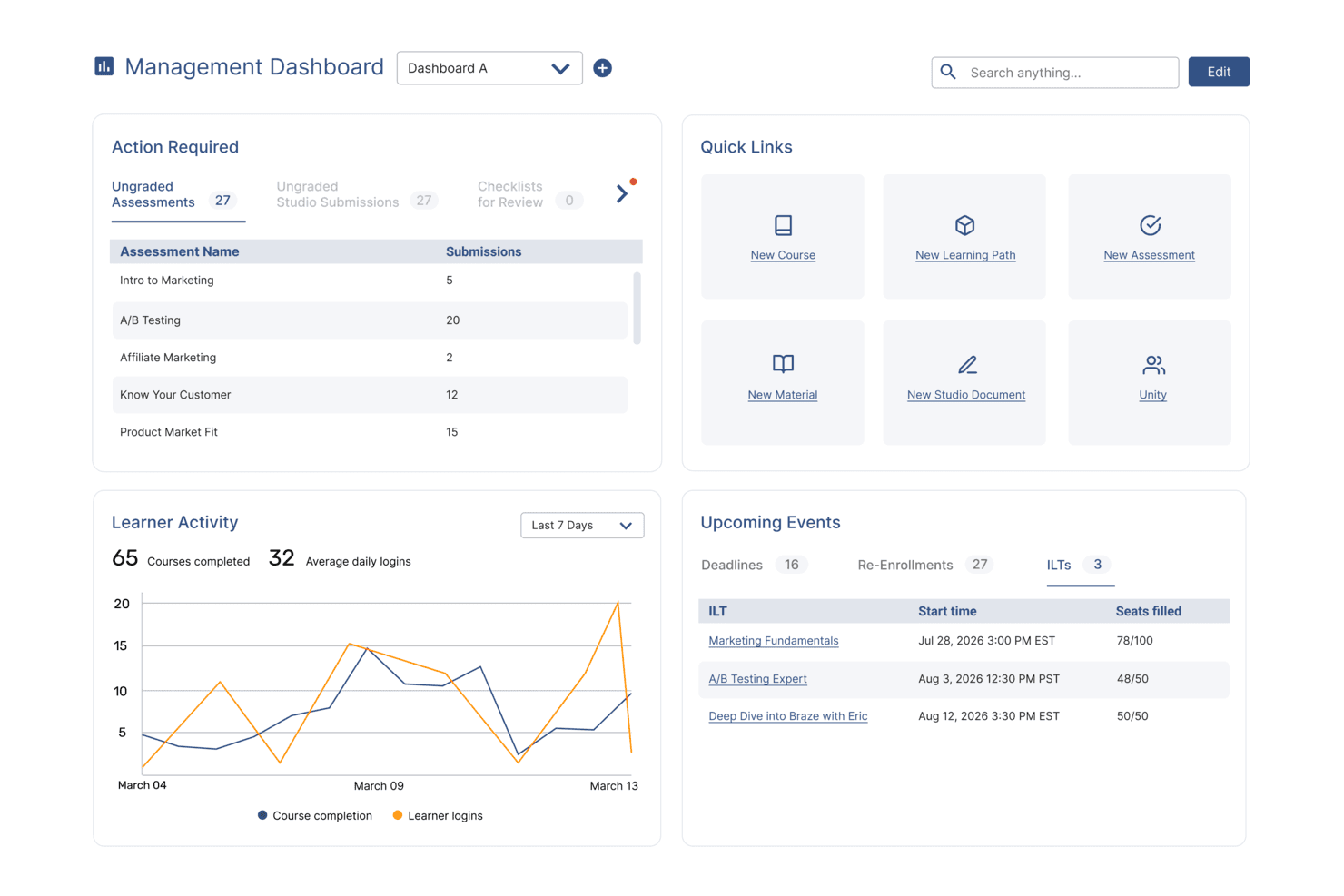
SkyPrep's management dashboard displays learner activity, upcoming events, and quick links. SkyPrep LMS is a learning management system tailored for organizations seeking an intuitive platform for course creation and delivery. It is designed to facilitate training by simplifying the process of building, managing, and tracking courses.
Why I picked SkyPrep LMS: This tool is known for its intuitive course-building capabilities. The drag-and-drop interface allows for quick setup and customization of courses, making it easy for your team to create engaging content. Its reporting features provide insights into learner progress and course effectiveness. SkyPrep LMS's ease of use ensures that even nontechnical users can navigate and manage training programs.
Standout Features and Integrations:
Features include a drag-and-drop interface and workflow automation. The platform offers out-of-the-box reporting features that give insights into learner progress and course effectiveness. You can also create quizzes and assessments to evaluate learner understanding.
Integrations include Zoom, Microsoft Teams, Google Workspace, Salesforce, Slack, LinkedIn Learning, PayPal, Stripe, Shopify, Mailchimp, and more.
Pros and Cons
Pros:
- Supports quiz and assessment creation
- Intuitive drag-and-drop interface
- Easy course creation process
Cons:
- Basic analytics features and somewhat slow reporting
- Limited customization
Learn more about SkyPrep: Best for advanced e-signature verification
- Free trial available
- Pricing upon request
Visit WebsiteCustomer Rating:4.6/5
Absorb dashboard showing course management and category filtering tools within its cloud-based SaaS platform. Absorb is a cloud-based learning management system for organizations that need course creation, learner tracking, e-commerce for training, and integration with HR and business tools.
Who Is Absorb Best For?
Absorb suits HR teams and learning leaders at mid-sized to large organizations that need scalable training and compliance management.
Why I Picked Absorb
Absorb earns its spot as one of the best on my shortlist because I can collect advanced e-signatures directly within course modules for compliance and policy training. I like that my team can set up signature requirements for specific lessons and track signed documents in audit-ready reports. In practice, that means I can verify learner acknowledgment on critical content without leaving the platform.
Absorb Key Features
- Mobile learning app: Learners can access courses and materials from any device using the dedicated mobile app.
- SCORM and xAPI support: Import and deliver industry-standard e-learning content packages for flexible course design.
- Blended learning management: Combine self-paced online modules with instructor-led sessions and track participation.
- Multi-language interface: Offer training in multiple languages with built-in localization options for global teams.
Absorb Integrations
Absorb offers 40+ native integrations, including ADP, Workday, Salesforce, and connectors for HRIS and CRM systems. An API is available for custom integrations.
Pros and Cons
Pros:
- Enables blended learning with virtual classroom support
- Includes robust reporting and analytics tools
- Provides 24/7 in-house customer support
Cons:
- Advanced automation features can be complex to configure
- Custom branding options require higher-tier plans
Learn more about Absorb: Best for full-cycle employee training
- Free trial available
- From $3.97/user/month (billed annually)
Visit WebsiteCustomer Rating:4.6/5
iSpring LMS dashboard showing course progress, team performance metrics, and mobile learning access in a unified interface. iSpring LMS is a learning management system designed for businesses and organizations to create, manage, and deliver online training programs. It provides tools for organizing courses, tracking learner progress, managing users, and supporting employee development within a centralized platform.
Why I picked iSpring: This platform supports training delivery through its structured course management capabilities and intuitive interface. It allows administrators to assign employee training, monitor completion, and generate reports to track performance. Its built-in course authoring capabilities, including AI-assisted content creation, help organizations develop and distribute learning materials efficiently.
Standout Features and Integrations:
Features include course management tools for organizing and assigning training programs, reporting and analytics for tracking learner progress, and user management capabilities for handling roles and permissions. The platform also supports AI-assisted course authoring, engagement mechanics, a customizable knowledge base, development planning tools, and on-the-job training capabilities.
Integrations include Zoom, Microsoft Teams, Salesforce, Google Analytics, LinkedIn Learning, Slack, Canvas, Moodle, Blackboard, and other third-party platforms.
Pros and Cons
Pros:
- Supports multimedia content and assessments
- Built-in reporting and learner tracking tools
- Easy-to-use interface for managing training programs
Cons:
- Analytics features are relatively basic compared to competitors
- Limited customization options for advanced use cases
Learn more about iSpring LMS: Best for ease of use
- Free plan + free demo available
- From $119/month (billed annually)
Visit WebsiteCustomer Rating:4.6/5
TalentLMS supports straightforward course creation and reporting. TalentLMS is a cloud-based learning management system designed for businesses and educational institutions seeking a user-friendly platform to deliver training. It supports course creation, management, and reporting to help you design learning experiences.
Why I picked TalentLMS: This tool is known for its ease of use, making it accessible for teams without technical expertise. The platform offers intuitive course creation tools that simplify the process for your team, with uncomplicated reporting features to provide insights into learner progress and engagement. TalentLMS focuses on simplicity so you can implement and manage training programs efficiently.
Standout Features and Integrations:
Features include AI-powered course creation and automation tools that assist you in designing engaging content. Blended learning, learning paths, and gamification elements support the training process. The platform also offers a mobile app, enabling your team to access training materials on the go.
Integrations include Salesforce, Zoom, Slack, Microsoft Teams, Zapier, Shopify, LinkedIn Learning, Google Calendar, Stripe, BambooHR, and more.
Pros and Cons
Pros:
- Mobile app available
- Intuitive course creation tools
- Easy to set up
Cons:
- Basic gamification features
- Limited customization options
Learn more about TalentLMS: Best for collaborative learning
- 30-day free trial + demo available
- From $8/user/month
Visit WebsiteCustomer Rating:4.7/5
360Learning promotes collaborative skill-building via shared course creation. 360Learning is an all-in-one collaborative learning management system designed for teams and organizations focused on peer learning and skill development. It facilitates course creation, sharing, and feedback to help grow collective knowledge within a company.
Why I picked 360Learning: This tool is centered around collaborative learning, making it ideal for teams that value peer-to-peer interaction. The co-authoring feature allows multiple team members to contribute to course content, fostering a sense of ownership and participation, and feedback loops enable learners to provide input on courses, ensuring continuous improvement. The platform's emphasis on social learning aligns with organizations aiming to build a culture of shared knowledge.
Standout Features and Integrations:
Features include co-authoring and feedback loops, which provide a way for learners to share insights and improve course content. The platform also supports mobile learning, allowing your team to access materials on the go.
Integrations include Salesforce, Slack, Microsoft Teams, Zoom, Google Drive, LinkedIn Learning, Okta, Loom, BambooHR, and more.
Pros and Cons
Pros:
- Supports mobile learning
- Co-authoring feature available
- Encourages peer-to-peer learning
Cons:
- Limited offline access
- Some users may find the interface complex
Learn more about 360Learning: Best for multi-portal management
- Free demo available
- Pricing upon request
Visit WebsiteCustomer Rating:4.6/5
LearnUpon supports multi-portal training delivery for diverse learner groups. LearnUpon is a learning management system tailored for organizations that require multi-portal management to deliver training across different audiences. It serves businesses, universities, and training providers by simplifying the delivery and management of courses.
Why I picked LearnUpon: This platform is designed for managing multiple training portals, making it ideal for organizations with diverse training needs. It offers customizable branding for each portal, so you can maintain a distinct identity. Automated notifications keep your team informed about training updates, while detailed reporting provides insights into learner progress. These features make LearnUpon a versatile choice for businesses looking to manage multiple training initiatives under one system.
Standout Features and Integrations:
Features include customizable branding for each portal, AI-powered course creation tools, and gamification elements to support motivation. Detailed reporting provides valuable insights into learner engagement and progress.
Integrations include Salesforce, Zoom, Microsoft Teams, LinkedIn Learning, Shopify, Okta, Google Workspace, Slack, Stripe, HubSpot, and more.
Pros and Cons
Pros:
- Automated notifications feature
- Customizable branding options
- Supports multiple training portals
Cons:
- Pricing details are not transparent
- Limited mobile functionality
Learn more about LearnUpon:

Skilljar delivers customer training for onboarding, education, and engagement. Skilljar is a learning management system tailored for businesses aiming to provide effective customer training. It focuses on onboarding, educating, and engaging customers through detailed training materials.
Why I picked Skilljar: This tool is ideal for businesses that prioritize customer education, offering features that facilitate the onboarding process. The analytics dashboard provides insights into learner engagement, helping you track customer progress. Skilljar's course authoring tool allows you to create tailored content that meets specific training needs, and its emphasis on customer training ensures that your users gain the knowledge they need to succeed with your products.
Standout Features and Integrations:
Features include an analytics dashboard that gives you insights into learner engagement and progress. Automation tools help you design content that meets your training objectives, and certification management allows you to offer credentials to users who complete courses, boosting their motivation and engagement.
Integrations include Salesforce, Zapier, Marketo, Google Analytics, Slack, Zoom, Intercom, Mailchimp, Zendesk, Shopify, and more.
Pros and Cons
Pros:
- Supports certification management
- Customizable course authoring
- Focuses on customer education
Cons:
- Basic reporting features
- Limited customization
Learn more about Skilljar: Best for AI-driven e-learning
- Free demo available
- Pricing upon request
Visit WebsiteCustomer Rating:4.4/5
Docebo provides AI-driven content creation and delivery for corporate training. Docebo is an AI-driven learning management system aimed at businesses seeking to boost their e-learning capabilities. It supports corporate training with tools for content creation, management, and delivery.
Why I picked Docebo: This tool leverages AI to support e-learning experiences, providing personalized content recommendations and insights. The social learning feature encourages collaboration among your team, making training more interactive. Gamification elements help engage learners and improve retention through interactive challenges. These features are particularly beneficial for companies looking to innovate their training processes.
Standout Features and Integrations:
Features include social learning, which fosters collaboration among team members. Research-baked prebuilt templates are designed to keep learners engaged and growing new skills, and AI-driven analytics provide insights into learner behavior and content effectiveness.
Integrations include Salesforce, Zoom, Slack, Google Analytics, Shopify, LinkedIn, Microsoft Teams, PayPal, Stripe, Adobe Connect, and more.
Pros and Cons
Pros:
- Offers gamification features
- Supports social learning
- AI-driven content recommendations
Cons:
- May involve a learning curve
- Initial setup can be complex
Learn more about Docebo: 10Best for regulated industry compliance
GyrusAim
- Free demo + free trial available
- From $525/month (up to 100 users)
Visit WebsiteCustomer Rating:4.7/5
GyrusAim delivers compliance training for a range of industries. GyrusAim is a learning management system designed for compliance training across industries such as government, finance, manufacturing, and life sciences. It focuses on meeting regulatory requirements through assessments, certifications, and detailed reporting.
Why I picked GyrusAim: This tool excels in compliance training, providing features that ensure adherence to industry regulations. Its advanced reporting capabilities offer detailed analytics on training effectiveness, making it easier for your team to track compliance. Additionally, the system supports multilingual training, which is beneficial for global organizations. GyrusAim's ability to integrate various training methods with automation enhances its appeal for regulated industries.
Standout Features and Integrations:
Features include advanced reporting, a content library, and customizable learning paths. It supports over 15 languages, allowing your team to conduct training in multiple languages. The blended learning approach combines different training methods, offering flexibility and efficiency.
Integrations are not publicly listed.
Pros and Cons
Pros:
- Detailed reporting features
- Offers multilingual training
- Strong compliance capabilities
Cons:
- Slight learning curve
- Limited customization options
Learn more about GyrusAim:
Diğer SaaS Öğrenme Yönetim Sistemleri
Kısa listeme giremeyen ancak yine de göz atmaya değer bazı ek SaaS öğrenme yönetim sistemi seçenekleri şunlardır:
- 11Paradiso LMSBest for gamified learning
- 12BlackboardBest for global educational institutions
- 13Cornerstone LMSBest for enterprise-level learning
- 14SC TrainingBest for safety training
- 15EducateMeBest for personalized learning paths
- 16MoodleCloudBest for open-source flexibility
- 17LatitudeLearning LMSBest for partner training
- 18ConnecteamBest for remote and deskless teams
- 19EducateMe LMSBest for cohort-based SaaS training programs
- 20RipplingBest for integrated HR and learning
- 21LearnWorldsBest for interactive video courses
- 22Adobe Learning ManagerBest for content-rich training
- 23CYPHER LearningBest for AI-powered learning paths
- 24GoSkillsBest for small business training
- 25SchooxBest for AI-powered frontline worker training
- 26Canvas LMSBest for higher education institutions
How I Evaluate SaaS Learning Management Systems
I evaluate every SaaS LMS on two layers: the baseline features that qualify a platform—SCORM support, compliance tracking, HRIS integrations—and the differentiators that separate good from great.
Core Functionality (Table Stakes For This List)
When I'm selecting tools for my list, I rank each one on a scale from 0 (does not offer the functionality) to 5 (excels in this area) for each core functionality listed below. Then, I calculate the tool's total score into a percentage. Each tool needs to achieve a minimum total score of 75% to be considered for inclusion.
- Course Authoring & Content Management: I check whether you can build quizzes and upload SCORM/xAPI packages in one place, or if you're stuck importing everything from a third-party tool.
- Course Assignment & Learning Paths: I look for rule-based assignment by role or department and sequential learning paths, like a 90-day onboarding curriculum that auto-enrolls new hires.
- Progress Tracking & Reporting: Dashboards that show completion rates, assessment scores, and exportable reports matter here—especially for presenting training ROI to leadership.
- Compliance & Certification Management: I evaluate how each platform handles certificate expiration tracking and recertification reminders for recurring requirements like safety or data privacy training.
- Cloud-Based Multi-User Access: Every platform I consider needs to be fully cloud-hosted with distinct roles for admins, instructors, and learners accessible across desktop and mobile.
- HRIS & Workforce Tool Integrations: I look at native connectors to major HRIS and SSO providers so employee records sync automatically without manual CSV uploads every pay cycle.
Once I have a list of tools that meet this criteria, I consider what sets each platform apart.
Differentiating Factors (What Sets Vendors Apart)
Here's how I compare and contrast different vendors:
Standout Features
AI-powered personalization is a major differentiator. Platforms that recommend courses based on a learner's role and skill gaps save L&D teams hours of manual curation. I also evaluate skills and competency management, where the LMS maps content to a skills taxonomy so you can tie training directly to career pathing and internal mobility goals. For organizations with frontline or deskless workers, mobile learning with offline access matters—it lets warehouse or retail staff complete modules without a reliable connection.
Beyond Features
Pricing transparency matters. I evaluate whether a vendor charges per user, per active user, or offers flat-rate licensing, since a 50-person team and a 5,000-person org need very different models. Compliance and data security certifications like SOC 2 and GDPR readiness are especially important for teams handling sensitive employee records. I also consider implementation support, including whether the vendor provides pre-built content libraries that let you launch onboarding or compliance programs without building every course from scratch.
SaaS Öğrenme Yönetim Sistemi Nasıl Seçilir?
Uzun özellik listeleri ve karmaşık fiyatlandırma yapıları arasında kaybolmak kolaydır. Benzersiz yazılım seçim süreciniz üzerinde çalışırken odaklanmanızı korumanıza yardımcı olmak için aklınızda bulundurmanız gereken faktörleri içeren bir kontrol listesi hazırladım:
| Faktör | Dikkat Edilmesi Gerekenler |
|---|---|
| FaktörÖlçeklenebilirlik | Dikkat Edilmesi GerekenlerSistem ekibinizle birlikte büyüyebilir mi? Performans kaybı yaşamadan gelecekte ihtiyaç duyacağınız kullanıcı sayısını destekleyip desteklemediğini kontrol edin. |
| FaktörEntegrasyonlar | Dikkat Edilmesi GerekenlerMevcut araçlarınıza bağlanabiliyor mu? İK sistemleri, CRM veya iletişim platformları gibi yazılımlarla API entegrasyonları sunan çözümleri arayın. |
| FaktörÖzelleştirilebilirlik | Dikkat Edilmesi GerekenlerSistemi ihtiyaçlarınıza göre uyarlayabilir misiniz? Öğrenme platformunun görünümünü, tarzını ve iş akışlarını markanıza ve süreçlerinize uyacak şekilde ayarlayıp ayarlayamayacağınızı değerlendirin. |
| FaktörKullanım Kolaylığı | Dikkat Edilmesi GerekenlerArayüz tüm kullanıcılar için sezgisel mi? Minimum düzeyde eğitim gerektiğinden ve kullanıcıların zorlanmadan gezinebildiğinden emin olun. |
| FaktörUygulama ve İşe Alıştırma | Dikkat Edilmesi GerekenlerNe kadar hızlı başlayabilirsiniz? Kolay kurulum, net talimatlar ve ekibinizi hızlı bir şekilde çalışır duruma getirmenize yardımcı olacak destek sunan bir sistem arayın. |
| FaktörMaliyet | Dikkat Edilmesi GerekenlerFiyatlandırma bütçenize uygun mu? Gizli ücretler veya eklentiler ve ek kullanıcılar için alınan ücretler de dahil olmak üzere toplam maliyetleri değerlendirin. |
| FaktörGüvenlik Önlemleri | Dikkat Edilmesi GerekenlerVerileriniz ve kullanıcılarınız korunuyor mu? Sistemin veri koruma yasalarına uyduğunu, şifreleme ve güvenli erişim denetimleri sunduğunu doğrulayın. |
| FaktörDestek Kullanılabilirliği | Dikkat Edilmesi Gerekenlerİhtiyacınız olduğunda yardım alabilecek misiniz? Sağlayıcının 7/24 destek, canlı sohbet ve sürekli yardım için özel hesap yöneticileri sunup sunmadığını kontrol edin. |
SaaS Öğrenme Yönetim Sistemi Nedir?
SaaS öğrenme yönetim sistemi, eğitimleri ve öğretim kurslarını sunmak, izlemek ve yönetmek için tasarlanmış bulut tabanlı bir platformdur. Bu araçlar genellikle İK profesyonelleri, eğitimciler ve kurumsal eğitmenler tarafından öğrenme deneyimlerini geliştirmek ve beceri gelişimini iyileştirmek amacıyla kullanılır.
Kurs oluşturma, öğrenen takibi ve raporlama gibi özellikler; öğrenme programlarını yönetmeye, uyumluluğu sağlamaya ve ilerlemeyi ölçmeye yardımcı olur. Genel olarak bu araçlar, eğitim içeriğini büyük ölçekte sunmak ve yönetmek için verimli bir yol sağlar.
Özellikler
Her iyi SaaS öğrenme yönetim sistemi yazılımının sahip olması gereken temel özellikler şunlardır:
- Kurs oluşturma: Eğitim içeriğini tasarlamanıza ve düzenlemenize olanak tanıyarak yapılandırılmış öğrenme deneyimlerini kolayca sunmanızı sağlar.
- Öğrenen takibi: İlerlemeyi ve tamamlama oranlarını izleyerek eğitim programlarınızın etkililiğini değerlendirmenize yardımcı olur.
- Raporlama ve analiz: Öğrenenlerin katılımı ve sonuçları hakkında veri içgörüleri ve ölçümler sunarak veriye dayalı kararlar almanızı sağlar.
- Mobil erişim: Öğrenenlere kurslara hareket hâlindeyken erişme esnekliği sunarak katılımı ve kolaylığı artırır.
- Oyunlaştırma: Öğrenenleri motive etmek ve katılımlarını sağlamak için puanlar ve rozetler gibi oyun benzeri unsurları kullanır.
- Özelleştirilebilir markalama: Eğitim platformunun görünümünü kuruluşunuzun kimliğiyle uyumlu olacak şekilde düzenlemenize olanak tanır.
- Entegrasyonlar: İş akışlarını ve veri paylaşımını desteklemek için CRM ve İK sistemleri gibi diğer araçlara bağlanır.
- Sertifika yönetimi: Kursların tamamlanması için sertifikaları takip eder ve düzenler; uyumluluğu ve tanınmayı güvence altına alır.
- Sosyal öğrenme: Öğrenme deneyimini geliştirerek akranlar arası etkileşimi ve iş birliğini kolaylaştırır.
- Güvenlik önlemleri: Şifreleme ve erişim denetimleriyle kullanıcı verilerini koruyarak veri koruma standartlarına uyumluluğu güvence altına alır.
Avantajlar
Bir SaaS öğrenme yönetim sistemi uygulamak, ekibiniz ve işletmeniz için çeşitli avantajlar sağlar. Yararlanabileceğiniz avantajlardan bazıları şunlardır:
- Geliştirilmiş erişilebilirlik: Öğrenenler, mobil ve bulut tabanlı özellikler sayesinde kurslara her yerden erişebilir; bu da esnekliği ve katılımı artırır.
- Artırılmış katılım: Oyunlaştırma ve sosyal öğrenme özellikleri, öğrenenlerin motivasyonunu korumaya ve eğitimlerine aktif olarak katılmalarına yardımcı olur.
- Zaman tasarrufu: Takip ve raporlama gibi görevlerin otomatikleştirilmesi, idari iş yükünü azaltarak ekibinizin stratejik faaliyetlere ve beceri geliştirmeye odaklanmasını sağlar.
- Ölçeklenebilirlik: Sistem kuruluşunuzla birlikte büyüyebilir ve ihtiyaçlarınız genişledikçe daha fazla kullanıcı ile kursu destekleyebilir.
- Maliyet verimliliği: Bulut tabanlı platformlar, fiziksel altyapı ve kurum içi BT ekipleri tarafından gerçekleştirilen bakım ihtiyacını azaltarak uygun maliyetli eğitim çözümleri sunar.
- Özelleştirme: Platformun markanıza ve kurs ihtiyaçlarınıza uygun hâle getirilmesi, kuruluşunuzun hedefleriyle uyumlu ve tutarlı bir öğrenme deneyimi sağlar.
- Uyumluluk güvencesi: Sertifika yönetimi, uyumluluk eğitimlerini takip eder ve öğrenenlerin sektör veya şirket standartlarını karşılamasını sağlar.
Maliyetler ve Fiyatlandırma
Bir SaaS öğrenme yönetim sistemi seçmek, mevcut çeşitli fiyatlandırma modellerinin ve planların anlaşılmasını gerektirir. Maliyetler özelliklere, ekip büyüklüğüne, eklentilere ve daha fazlasına göre değişir. Aşağıdaki tablo, SaaS öğrenme yönetim sistemi çözümlerinde yaygın planları, ortalama fiyatlarını ve genellikle sunulan özellikleri özetlemektedir.
SaaS Öğrenme Yönetim Sistemleri için Plan Karşılaştırma Tablosu
| Plan Türü | Ortalama Fiyat | Yaygın Özellikler |
|---|---|---|
| Plan TürüÜcretsiz Plan | Ortalama Fiyat$0 | Yaygın ÖzelliklerTemel kurslara erişim, sınırlı kullanıcı desteği ve minimum depolama alanı. |
| Plan TürüKişisel Plan | Ortalama Fiyat$5-$25/kullanıcı/ay | Yaygın ÖzelliklerÖzelleştirilebilir içerik, ilerleme takibi ve temel analizler. |
| Plan Türüİşletme Planı | Ortalama Fiyat$30-$80/kullanıcı/ay | Yaygın ÖzelliklerGelişmiş raporlama, diğer araçlarla entegrasyonlar ve kullanıcı yönetimi. |
| Plan TürüKurumsal Plan | Ortalama Fiyat$100-$200/kullanıcı/ay | Yaygın ÖzelliklerÖzel markalama, tahsis edilmiş destek ve kapsamlı güvenlik özellikleri. |
SSS
SaaS öğrenme yönetim sistemleri hakkında sık sorulan soruların bazı yanıtları:
SaaS öğrenme yönetim sisteminin kurulumu ne kadar sürer?
Kurulum süresi, hâlihazırda ne kadar içeriğiniz olduğuna ve eğitim programlarınızın karmaşıklığına bağlı olarak değişir. Çoğu platform, başlamanıza yardımcı olmak için hızlı işe alıştırma araçları, şablonlar ve yönlendirmeli kurulum seçenekleri sunar. Özel iş akışlarına sahip daha büyük ekiplerin her şeyi yapılandırmak için biraz daha fazla zamana ihtiyacı olabilir; bu durumda, potansiyel LMS sağlayıcınızla görüşmeyi düşünebilirsiniz.
Verileri yeni bir SaaS LMS'ye nasıl aktarabilirim?
Genellikle mevcut sisteminizden veri dışa aktararak başlarsınız. Çoğu SaaS LMS sağlayıcısı, bu verileri yeni sisteme aktarmak için geçiş araçları veya hizmetleri sunar. Sorunsuz bir geçiş sağlamak için sağlayıcınızın destek ekibine danışmanız iyi bir fikirdir. Öncesinde verilerinizi yedeklediğinizden emin olun ve geçiş sürecini önce küçük bir veri grubuyla test edin.
Bir SaaS LMS'yi markama uyacak şekilde özelleştirebilir miyim?
Evet, çoğu SaaS LMS platformu özelleştirme seçenekleri sunar. Genellikle renkler, logolar ve yazı tipleri dâhil olmak üzere görünümü ve tarzı şirketinizin marka kimliğiyle uyumlu olacak şekilde ayarlayabilirsiniz. Bazı sistemler ayrıca kullanıcı panolarının, öğrenme modüllerinin ve kurs şablonlarının özelleştirilmesine olanak tanır. Sunulan özelleştirme seçeneklerinin kapsamını ve bunlarla ilişkili maliyetleri öğrenmek için sağlayıcınıza danışın.
SaaS LMS için ne tür teknik destek sunuluyor?
SaaS çözümlerinin şirket içi ve kendi sunucunuzda barındırılan seçeneklere kıyasla avantajı, bakım ve yükseltmeleri yönetmek için mutlaka özel bir BT ekibine ihtiyaç duymamanızdır. Çoğu SaaS LMS sağlayıcısı, çevrimiçi yardım merkezleri, canlı sohbet ve e-posta desteği dâhil olmak üzere çeşitli destek düzeyleri sunar.
Planınıza bağlı olarak telefon desteğine veya özel bir hesap yöneticisine de erişiminiz olabilir. Ekibinizin ihtiyaçlarını değerlendirmeniz ve gereksinimlerinize uygun düzeyde destek sunan bir sağlayıcı seçmeniz önemlidir.