

Günümüzde işletmelerin çalışma ortamları hızla değişiyor ve ekiplerin artan iş yüklerini yönetirken kararları net bir şekilde alması bekleniyor. Yapay zekâ araçları rutin görevleri otomatikleştirerek, veri doğruluğunu artırarak ve kuruluşunuzun daha verimli çalışmasına yardımcı olan içgörüler sunarak bu süreci destekleyebilir.
Yıllardır çeşitli işlevlerde kullanılan yazılımları test edip inceliyor, karmaşıklık eklemek yerine iş akışlarını gerçekten iyileştiren araçları belirlemeye odaklanıyorum.
Bu makalede, işletmeler için en iyi yapay zekâ araçlarını ve bunların temel yeteneklerinin ayrıntılı bir incelemesini bulabilirsiniz. Bu sayede hedeflerinizle uyumlu olan ve ekibinizin çalışmalarını etkili bir şekilde destekleyebilecek seçenekleri belirleyebilirsiniz.
Why Trust Our Software Recommendations
6,700+
Reviews
20
Industry experts
16+
Evaluation factors
14
Years
Our team has been testing and reviewing software since 2012. As HR experts ourselves, we know how difficult—and important—it is to choose the right software.
For this guide, we evaluated tools using hands-on testing and independent research, scoring tools using our selection criteria. We also draw on insights from industry thought leaders and practicing HR experts.
Our reviews reflect our human editorial judgment, not a sales pitch.
Expert reviewers:
- Phil GrayCOO
 Kim BehnkeHR Tech Editor & Analyst
 Josh BarkerPeople Ops Manager

Karşılaştırma Tablosu: İşletmeler için Yapay Zekâ Araçları
Bu karşılaştırma tablosu, işletmeler için en iyi yapay zekâ araçları seçimlerimin fiyatlandırma ayrıntılarını özetlemektedir:
Score legend (out of 5)
- Excellent4.5–5
- Good4–4.4
- Average3–3.9
- Below average2–2.9
- Poor1–1.9
Sorted by: Default
| Tool | Starting Price | Website | |||||||
|---|---|---|---|---|---|---|---|---|---|
Best for expert-trained AI HR insights | 3.2 out of 5 | 3 | 3 | 3 | 4 | 4 | 2 | $5/user/month Free demo available | Website |
Best for customizable workflows | 3.7 out of 5 | 3 | 4 | 4 | 4 | 4 | 3 | $9/user/month Free plan + 14-day trial available | Book Demo |
Best for AI across daily business operations | 3.0 out of 5 | 3 | 3 | 3 | 3 | 4 | 2 | $8/user/month Free trial + Free demo available | Website |
Best with multilingual support for global teams | 3.2 out of 5 | 2 | 4 | 3 | 4 | 3 | 3 | $32/month 7-day free trial + demo available | Website |
Best for behavior-led commerce discovery | 3.7 out of 5 | 4 | 4 | 3 | 4 | 4 | 3 | Pricing upon request Free trial available | Website |
Best for advanced AI reasoning and business analysis | 4.0 out of 5 | 3 | 4 | 4 | 5 | 5 | 3 | $20/month Free plan available | Website |
Best for agents acting within Salesforce CRM | 4.0 out of 5 | 3 | 4 | 4 | 4 | 5 | 4 | $5/user/month Free trial available | Website |
Best for cross-system operational AI agents | 4.0 out of 5 | 3 | 5 | 4 | 4 | 5 | 3 | Pricing upon request Free demo available | Website |
Best for customizable task management | 4.0 out of 5 | 3 | 5 | 4 | 4 | 5 | 3 | $12/user/month Free plan + trial + demo available | Website |
Best for AI across mixed business apps | 4.0 out of 5 | 3 | 5 | 4 | 4 | 5 | 3 | $21/user/month 30-day free trial + free demo available | Website |


İşletmeler için En İyi Yapay Zekâ Araçları İncelemeleri
Aşağıda, kısa listeme giren işletmeler için en iyi yapay zekâ araçlarına ilişkin ayrıntılı özetlerimi bulabilirsiniz. İncelemelerim, sizin için en iyi aracı bulmanıza yardımcı olmak amacıyla her bir aracın temel özelliklerine, artılarına ve eksilerine, entegrasyonlarına ve ideal kullanım alanlarına ayrıntılı bir bakış sunmaktadır.
 Best for expert-trained AI HR insights
- Free demo available
- From $5/user/month
Visit WebsiteCustomer Rating:4.8/5
Deel AI can answer global HR and team-specific questions directly from your workforce data. Businesses managing teams across different regions often need instant clarity on HR, payroll, and compliance questions, and Deel AI steps in as a built-in expert that helps you keep work moving without long searches or delays. You get an always-available assistant trained by legal and HR specialists in 150+ countries, giving you actionable insights drawn directly from your organization’s own data. If your team handles global operations, distributed workers, or recurring HR inquiries, Deel AI helps you find answers quickly so you can focus on higher-value work.
Why I Picked Deel
I picked Deel because it brings practical, expert-trained intelligence into everyday business workflows, making it more than a typical help bot. Its contextual AI shows insights based on the exact page you’re viewing — whether that’s payroll, people data, or compliance details — so you don’t have to switch tools or dig for information. I also appreciate how it responds to HR, legal, and policy questions using a Knowledge Hub built by experts across 150+ countries, giving teams guidance they would usually wait hours or days to access. For businesses scaling globally or managing distributed teams, this creates a dependable AI layer that supports fast, informed decisions.
Deel Key Features
In addition to the AI-powered global guidance I mentioned above, I also found several other noteworthy aspects of Deel:
- Deel Global Payroll: This feature enables businesses to manage payroll across multiple countries, supporting over 120 currencies and ensuring timely payments.
- Contractor Management: Allows seamless hiring and management of international contractors, complete with automated invoicing and payment processing.
- Employer of Record (EOR) Services: Deel acts as the legal employer for international employees, handling all local employment responsibilities.
- Immigration Support: Provides guidance and assistance for obtaining visas and work permits, streamlining the process for international hires.
Deel Integrations
Integrations include popular platforms such as QuickBooks, Xero, BambooHR, Greenhouse, Hibob, Workday, Lever, NetSuite, Salesforce, and SAP SuccessFactors. Additionally, Deel supports custom integrations through an available API.
Pros and Cons
Pros:
- AI answers talent and workforce questions using expert-sourced data
- Surfaces org insights and summaries directly from your team data
- Delivers guidance across 150+ country employment contexts
Cons:
- Heavy dependence on proprietary Knowledge Hub for accuracy
- AI guidance may require human review for complex legal scenarios
 Best for customizable workflows
- Free plan + 14-day trial available
- From $9/user/month (billed annually)
Visit WebsiteCustomer Rating:4.6/5
monday AI Workspace offers an AI Notetaker feature that automatically captures meeting summaries, recordings, and action items from connected calendars. monday AI Workspace is an AI work management platform that combines project planning, workflow automation, AI agents, and cross-functional collaboration tools across work management, CRM, service, and development use cases.
Who Is monday AI Workspace Best For?
It's a strong fit for mid-sized and enterprise teams managing work across multiple departments who need one platform to replace several disconnected tools.
Why I Picked monday AI Workspace
monday AI Workspace earns its spot on my shortlist because of how far you can push its workflow customization without writing a single line of code. I use the AI Workflow Builder to create multi-step automations with logic-based triggers, and monday agents can execute tasks autonomously within those workflows. What sets it apart is the ability to connect external AI models like Claude or ChatGPT directly to boards, so the automation isn't just rule-based, it's genuinely intelligent.
monday AI Workspace Key Features
- Custom board views: Switch between timeline, Kanban, Gantt, and calendar views to visualize project data the way you prefer.
- AI-powered project insights: Get automated summaries and recommendations for project risk, dependencies, and milestones based on workspace data.
- Role-based permissions: Assign granular access to boards, workflows, and automations for specific team members or departments.
- Native integrations library: Connect with 200+ external apps including Slack, Salesforce, Google Drive, and Jira for seamless workflow connectivity.
monday AI Workspace Integrations
monday AI Workspace offers hundreds of native integrations, including Slack, Google Workspace, Microsoft 365, Salesforce, Jira, GitHub, Zoom, Dropbox, HubSpot, and Zendesk. It also supports Zapier and provides an API for custom integrations.
Pros and Cons
Pros:
- Supports multiple project views and boards
- AI agents handle multi-step tasks autonomously
- Highly customizable no-code workflow automation
Cons:
- Can feel overwhelming for smaller teams
- AI features locked to higher-tier plans
Learn more about monday AI Workspace: Best for AI across daily business operations
- Free trial + Free demo available
- From $8/user/month
Visit WebsiteCustomer Rating:4.4/5
Factorial surfaces AI insights and next steps during 1:1 meetings. Factorial is an AI-powered business platform that unifies HR, finance, and IT operations—handling everything from timetable planning and report creation to answering employee policy questions through its built-in AI agent, One.
Who Is Factorial Best For?
Factorial is a strong fit for SMBs that want one platform to handle HR, finance, and IT—without stitching together multiple tools.
Why I Picked Factorial
Factorial earns its spot on my shortlist because its AI agent, One, genuinely spans the full scope of daily operations: it screens CVs, flags payroll anomalies before a run completes, and pulls answers directly from your company handbook. I especially like that One connects HR, finance, and IT in a single context, so my team isn't switching between platforms to get things done. It's one of the few tools where AI works across recruiting, expenses, and IT tickets all at once.
Factorial Key Features
- Expense OCR: Reads receipt details and supports multi-step expense approvals.
- Time tracking: Records hours with geolocation or QR tracking and supports overtime compensation.
- Performance reviews: Runs 360 reviews and tracks employee competencies.
- Device management: Uses multi-OS MDM to enforce security policies and remotely lock or wipe devices.
Factorial Integrations
Factorial offers 80+ third-party integrations, including Slack, Power BI, Okta, Jira, Outlook, Dynamics 365, HubSpot, and Zapier. It also provides an open API for custom integrations.
Pros and Cons
Pros:
- Screens CVs and calls candidates automatically
- Flags payroll anomalies before a run completes
- One AI agent spans HR, finance, and IT
Cons:
- Reporting is weaker than dedicated analytics tools
- Support hours limited to European and Latin American time zones
 Best with multilingual support for global teams
- 7-day free trial + demo available
- From $32/month (billed annually)
Visit WebsiteCustomer Rating:4.4/5
Chatbase homepage showcasing its AI agent platform for building and deploying customer support agents, with enterprise client logos and a no-credit-card free trial. Chatbase is an AI chatbot platform designed for businesses that want to automate customer interactions, support, and lead generation with customizable, no-code chatbots that integrate into existing workflows.
Who Is Chatbase Best For?
Chatbase suits business teams and customer support functions looking to automate conversations and integrate AI chatbots into their digital channels.
Why I Picked Chatbase
I picked Chatbase as one of the best because I’ve seen how its multilingual support lets my team deploy chatbots that handle conversations in dozens of languages without extra setup. I like that I can upload documents in multiple languages and the chatbot responds accurately in the user’s preferred language. My team uses this to support global customers and internal teams across regions, making it easy to maintain consistent communication standards.
Chatbase Key Features
- No-code chatbot builder: Build and customize chatbots for your website without writing any code.
- Custom data source uploads: Import PDFs, text files, or website links to train your chatbot on business-specific content.
- Widget and API deployment: Add chatbots to your site with a widget or integrate via API for more advanced use cases.
- Conversation analytics: Track user interactions and chatbot performance with built-in analytics dashboards.
Chatbase Integrations
Chatbase offers native integrations with Slack, WhatsApp, Facebook Messenger, Telegram, and Zapier. An API is available for custom integrations with your business systems.
Pros and Cons
Pros:
- Includes analytics dashboard for conversation insights
- Enables chatbot training with custom data sources
- Provides API access for custom business workflows
Cons:
- Limited prebuilt templates for industry-specific bots
- Lacks advanced natural language understanding features
Learn more about Chatbase: Best for behavior-led commerce discovery
- Free trial available
- Pricing upon request
Visit WebsiteCustomer Rating:4.7/5
Coveo unifies search analytics across agents, community, and chat bot channels. Coveo is an enterprise AI search and discovery platform that combines hybrid search, behavioral AI, and generative answering across commerce, customer service, and workplace use cases.
Who Is Coveo Best For?
Coveo is built for mid-to-large enterprises in B2B and B2C commerce, customer service, or IT that need AI-powered search across complex, multi-source content environments.
Why I Picked Coveo
Coveo earns its spot on my shortlist because of how it handles behavior-led commerce discovery at scale. Its intent-aware product ranking learns from real session data to surface the right products at the right moment, without manual merchandising rules doing all the heavy lifting. I'm also impressed by the Conversational Product Discovery feature, which lets shoppers describe what they need in natural language and get contextually matched results straight from the search box.
Coveo Key Features
- Permission-aware unified index: Applies document-level access controls across connected enterprise content.
- Relevance Generative Answering: Generates answers grounded in indexed content for service and workplace use.
- Search analytics: Tracks queries, clicks, content gaps, and conversions in dashboards.
- Enterprise connectors: Connects to business systems through native connectors, APIs, and custom integrations.
Coveo Integrations
Coveo documents native commerce integrations with SAP, Salesforce, and Shopify. Its 45+ connectors support more than 100 systems, and APIs and custom connectors are available.
Pros and Cons
Pros:
- Handles multi-source enterprise search out of the box
- Generative answers pull from your actual indexed content
- Behavior-driven ranking adapts without manual rules
Cons:
- Time to value stretches to nearly two years
- Setup and administration demand significant technical expertise
Learn more about Coveo: Best for advanced AI reasoning and business analysis
- Free plan available
- From $20/month
Visit WebsiteCustomer Rating:4.4/5
Claude lets users upload 30+ files for AI-powered sales forecasting. Claude is an AI assistant developed by Anthropic that handles complex reasoning, writing, research, coding, and data analysis tasks through a conversational interface.
Who Is Claude Best For?
Claude is a strong fit for business analysts, researchers, and knowledge workers who need to work through complex, multi-step problems with nuance and depth.
Why I Picked Claude
Claude earns its spot on my shortlist because its reasoning capabilities go deeper than most AI tools I've tested for business analysis. I particularly like how it handles multi-step analytical tasks, like synthesizing research across long documents or stress-testing a business argument before it reaches a stakeholder. Its extended context window means I can feed it dense reports, contracts, or datasets without losing coherence mid-analysis.
Claude Key Features
- Artifact creation: Claude generates self-contained outputs like documents, code files, and structured reports you can export and use directly.
- Claude.ai Projects: Organize conversations, uploaded files, and context into persistent project workspaces that retain memory across sessions.
- Vision and file analysis: Upload images, PDFs, and documents for Claude to read, extract data from, and summarize.
- API access: Connect Claude to your existing tools and workflows via Anthropic's API for custom business integrations.
Claude Integrations
Native integrations are not clearly documented. Claude offers an API for custom integrations.
Pros and Cons
Pros:
- Polished drafts need less editing
- Nuanced analysis surfaces business risks
- Long-document synthesis preserves context
Cons:
- Confident errors still need verification
- Usage caps interrupt extended analysis
Learn more about Claude: Best for agents acting within Salesforce CRM
- Free trial available
- From $5/user/month
Visit WebsiteCustomer Rating:4.3/5
Salesforce Agentforce surfaces AI-driven quality insights to reduce escalations. Salesforce Agentforce is an AI agent platform built into Salesforce CRM that lets you deploy autonomous agents across sales, service, marketing, and commerce workflows.
Who Is Salesforce Agentforce Best For?
Agentforce is a strong fit for enterprise teams already running their sales, service, or HR workflows inside Salesforce CRM.
Why I Picked Salesforce Agentforce
Agentforce earns its spot on my shortlist because it's built directly into Salesforce CRM, meaning your agents aren't just reading customer data—they're acting on it. I love how you can deploy autonomous agents that close service cases, qualify leads, or update opportunity stages without leaving the CRM environment. The Atlas Reasoning Engine lets agents make multi-step decisions using your actual Salesforce records, flows, and prompts as context.
Salesforce Agentforce Key Features
- Agent Builder: A low-code interface that lets you create, configure, and customize AI agents using natural language instructions and point-and-click tools.
- Einstein Trust Layer: A built-in security framework that masks sensitive data, enforces access controls, and logs all AI interactions for auditability.
- Prompt Builder: A template editor for creating and managing reusable prompt instructions that agents follow when generating responses or taking action.
- Pre-built agent templates: Ready-made agent configurations for common business roles—like HR assistant or onboarding coordinator—that you can deploy and tailor without starting from scratch.
Salesforce Agentforce Integrations
Agentforce offers native integrations across Salesforce products, including Sales Cloud, Service Cloud, and Data Cloud, plus Slack. Salesforce APIs and MuleSoft support custom integrations.
Pros and Cons
Pros:
- Trust Layer masks and audits interactions
- Atlas grounds decisions in CRM context
- Agents can update Salesforce records directly
Cons:
- Poor CRM data can impair accuracy
- Setup requires admin work and testing
Learn more about Salesforce Agentforce: Best for cross-system operational AI agents
- Free demo available
- Pricing upon request
Visit WebsiteCustomer Rating:5/5
Glean's Work AI platform unifies search, agents, and data in one stack. Glean is an enterprise AI platform that connects to your existing business tools to deliver a unified search experience, AI-powered answers, and deployable AI agents across your tech stack.
Who Is Glean Best For?
Glean is a strong fit for large enterprises that need AI agents to work across multiple business systems without rebuilding their existing tech stack.
Why I Picked Glean
Glean earns its spot on my shortlist because it's built specifically to let AI agents operate across your entire business tech stack, not just within a single app. I'm particularly impressed by Glean's Knowledge Graph, which maps relationships between people, content, and tools so agents can retrieve and act on the right information in context. Its agent actions layer lets you deploy AI that can execute tasks across systems like Salesforce, ServiceNow, and Slack without rebuilding existing workflows.
Glean Key Features
- Permissions-aware search: Glean respects each user's existing access controls, so search results and AI answers only surface content the individual is authorized to see.
- AI assistant chat interface: Users can ask questions in natural language and get direct answers synthesized from content across all connected business tools.
- Pre-built connector library: Glean offers 100+ native integrations with workplace apps like Google Drive, Confluence, Jira, and Workday to index content without custom development.
- AI app builder: Teams can create and deploy custom AI assistants tailored to specific business functions, workflows, or departments using a no-code builder.
Glean Integrations
Glean offers 100+ native integrations, including Google Drive, Confluence, Jira, and Workday. It connects business content across your existing tools while respecting each user’s access permissions.
Pros and Cons
Pros:
- Agents automate multistep internal support tasks
- Search cuts time spent locating workplace knowledge
- Permission-aware answers respect existing access controls
Cons:
- Custom action failures can lack clear diagnostics
- Search sometimes misses relevant results
Learn more about Glean: Best for customizable task management
- Free plan + trial + demo available
- From $12/user/month

ClickUp lets users instantly create AI-generated tasks directly from chat messages. ClickUp is a project and work management platform that combines AI-assisted task creation, customizable workflows, goal tracking, docs, and team collaboration tools in one workspace.
Who Is ClickUp Best For?
ClickUp suits teams that need to tailor their workflows from the ground up, especially those juggling multiple projects across different functions.
Why I Picked ClickUp
I picked ClickUp as one of the best because its AI-assisted task creation lets you generate tasks, subtasks, and action items directly from a prompt, cutting the setup work that usually slows teams down. I also love how custom fields and views let you shape workflows around the way your team actually operates, whether that's a sprint board, a Gantt chart, or a flat list. ClickUp Brain, its built-in AI layer, can summarize threads, draft updates, and surface task context without leaving the workspace.
ClickUp Key Features
- AI-powered writing assistant: ClickUp Brain can draft emails, project briefs, and status updates directly within your workspace.
- Automations builder: Create rule-based automations to trigger actions like status changes, assignments, or notifications without writing code.
- Time tracking: Log time directly on tasks and generate reports to monitor how hours are spent across projects and teams.
- Dashboards: Build custom dashboards that pull real-time data from tasks, workloads, and goals into a single view.
ClickUp Integrations
ClickUp connects to 1,000+ tools, with native integrations including HubSpot, Google Drive, Microsoft Teams, Outlook, and Google Calendar. Its public API and webhooks support custom integrations and data synchronization.
Pros and Cons
Pros:
- Custom fields adapt workflows to team needs
- Summarizes threads alongside task context
- Generates tasks and subtasks from prompts
Cons:
- Prompt-generated tasks need manual scope checks
- AI targets project workflows over general analysis
Learn more about ClickUp: Best for AI across mixed business apps
- 30-day free trial + free demo available
- From $21/user/month
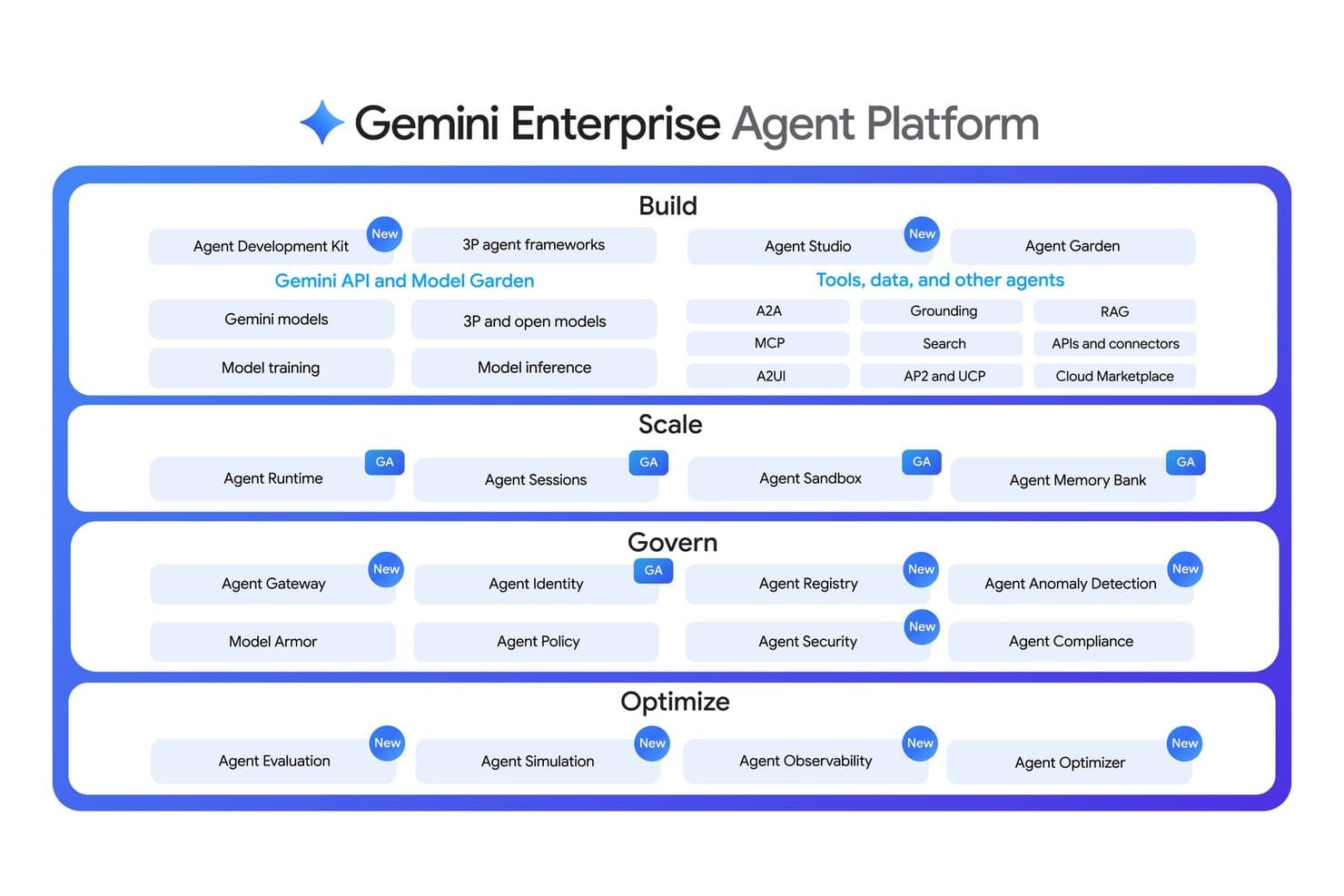
Gemini Enterprise organizes agent tools across Build, Scale, Govern, and Optimize layers. Gemini Enterprise is Google's AI platform for business that combines a universal work agent, no-code workflow automation, connected-source search, and a built-in agent gallery spanning over 100 integrations with tools like Slack, Jira, HubSpot, and Microsoft 365.
Who Is Gemini Enterprise Best For?
Gemini Enterprise is a strong fit for teams already working across Google and Microsoft apps who want one AI layer to search, automate, and generate across all of them.
Why I Picked Gemini Enterprise
Gemini Enterprise earns its spot on my shortlist because it's the only AI layer I've seen that sits across both Google and Microsoft 365 environments without forcing you to choose sides. I love that Gemini Notebook lets teams ground answers in uploaded or connected sources and share those notebooks as a searchable knowledge base, so institutional knowledge actually stays findable. Workflow Builder takes it further, letting you build no-code agents that automate multi-step tasks across apps like Slack, Jira, and HubSpot using triggers, conditional logic, and scheduled runs.
Gemini Enterprise Key Features
- Connected-source search: Searches across linked Google, Microsoft 365, and third-party sources simultaneously, using your existing permissions to filter what you can access.
- Canvas workspace: Lets you generate, co-edit, and format documents and slide presentations directly inside the chat interface.
- Data Insights Agent: Accepts natural-language questions and surfaces answers from connected data sources like BigQuery without requiring SQL knowledge.
- Model Armor screening: Automatically scans every prompt and response for prompt injection, jailbreaking attempts, and sensitive data exposure across all editions.
Gemini Enterprise Integrations
Gemini Enterprise offers 100+ native integrations, including Google Drive, Gmail, Google Calendar, Microsoft 365, Slack, Jira, HubSpot, ServiceNow, and BigQuery. REST and RPC APIs, custom connectors, and the Agent-to-Agent protocol support additional connections.
Pros and Cons
Pros:
- Workflows pair AI actions with human approvals
- Deep Research produces useful, source-grounded plans
- Connected search surfaces buried team knowledge
Cons:
- Pooled usage quotas can limit heavy users
- Custom agents can miss requested steps
Learn more about Gemini Enterprise:
İşletmeler için Diğer Yapay Zekâ Araçları
İşte kısa listeme giremeyen ancak yine de göz atmaya değer bazı ek işletme yapay zekâ aracı seçenekleri:
- 11ChatGPT BusinessBest for delegating shared team work to AI
- 12WrikeBest for AI task prioritization
- 13TrustibleBest for automated AI policy monitoring
- 14NotionBest for AI-enhanced note-taking
- 15Microsoft 365 CopilotBest for adding AI with Microsoft 365 controls
- 16Apollo.ioBest for taking B2B leads through outreach
- 17ClariBest for AI sales forecasting
- 18Dialpad AIBest for AI call analysis
- 19HubSpot BreezeBest for shared CRM context across teams
- 20Perplexity Enterprise ProBest for pairing company files with market data
How I Evaluate AI Tools for Business
To make this list, I look for tools that handle real business operations, like drafting emails and summarizing reports. From there, I evaluate three things. Core functionality carries the most weight, like connecting business systems and tailoring AI outputs. Then I look at cross-system data unification and the vendor’s onboarding support.
Core Functionality (Table Stakes For This List)
When I'm selecting tools for my list, I score each one on a scale from 0 (does not offer the functionality) to 5 (excels in this area) for each core functionality listed below. I then convert the total into a percentage to help assess each tool's overall fit, with extra weight on any functionalities I’ve deemed essential.
- AI-Powered Automation (Essential): I look for AI that adapts to incoming information, such as sorting support requests, routing approvals, or drafting follow-up tasks.
- Natural Language Processing (Essential): I assess how well a tool drafts emails, summarizes reports, and responds to questions with the right context and tone.
- Data-Driven Insights: I check whether it surfaces useful patterns, forecasts, or recommendations from business data, such as changes in sales or workload.
- Workflow Integration: I look for connectors or APIs that put AI into existing systems, such as a CRM, project tool, or shared document platform.
- Customizable AI Outputs: I evaluate whether teams can tailor tone, format, prompts, or reference materials to match company needs and internal guidance.
- Multi-Function AI: I consider whether AI supports distinct tasks, such as content creation, analytics, communication, and workflow automation.
Once I have a list of tools that meet the criteria, I consider what sets each platform apart.
Differentiating Factors (What Sets Vendors Apart)
Here's how I compare and contrast different vendors:
Standout Features
I look for scenario modeling simulations that let HR leaders preview the impact of workforce changes—like a hiring freeze or restructuring—before making a final call. Cross-system data unification also matters; I check whether the tool pulls from your HRIS, ATS, and payroll into one AI-ready layer. Tools with role-based AI permissions stand out because they let you control who sees sensitive predictions, like attrition risk scores. I also evaluate embedded change management support, such as in-app guides that help teams actually adopt new AI workflows.
Beyond Features
I also evaluate how transparent a vendor is about its AI decision-making, especially for hiring or attrition predictions where bias can carry legal and ethical weight. Audit trails and the ability to override recommendations matter here. Data privacy is just as important—I check for compliance with regulations like GDPR and the EU AI Act, along with clear documentation on how employee data is stored and used. Finally, I look at integration depth across the full employee lifecycle, not just one module, since tools that only connect to your ATS but ignore payroll or performance data create blind spots.
İşletmeler için Yapay Zekâ Araçları Nasıl Seçilir?
Uzun özellik listeleri ve karmaşık fiyatlandırma yapıları arasında kaybolmak kolaydır. Kendinize özgü yazılım seçim sürecinizi yürütürken odağınızı korumanıza yardımcı olmak için göz önünde bulundurmanız gereken faktörlerin bir kontrol listesi aşağıda yer alıyor:
| Faktör | Göz önünde bulundurulması gerekenler |
| Ölçeklenebilirlik | Araç işletmenizle birlikte büyüyebilir mi? Daha fazla kullanıcı veya veri hacmi gibi gelecekteki ihtiyaçları ve aracın performans sorunları yaşamadan bunları karşılayıp karşılayamayacağını değerlendirin. |
| Entegrasyonlar | Mevcut sistemlerinizle çalışıyor mu? Veri silolarını önlemek ve sorunsuz operasyonlar sağlamak için mevcut yazılımlarla uyumluluk arayın. |
| Özelleştirilebilirlik | Aracı iş akışlarınıza göre uyarlayabilir misiniz? Kapsamlı teknik uzmanlık gerektirmeden süreçlerinize uyacak şekilde ayarlamalar yapmanıza izin verip vermediğini kontrol edin. |
| Kullanım kolaylığı | Ekibiniz için kullanıcı dostu mu? Öğrenme eğrisini ve ekibinizin asgari eğitimle aracı etkili bir şekilde kullanıp kullanamayacağını değerlendirin. |
| Uygulama ve kullanıma alma | Ne kadar hızlı başlayabilirsiniz? Kurulum süresini, gereken kaynakları ve kullanıma alma aşamasında sağlanan desteği değerlendirin. |
| Maliyet | Bütçenize uygun mu? Gizli ücretler de dâhil olmak üzere fiyatlandırma yapısını karşılaştırın ve işletmenize kattığı değerle uyumlu olduğundan emin olun. |
| Güvenlik önlemleri | Verileriniz korunuyor mu? Hassas bilgileri güvende tutmak için aracın şifreleme ve erişim denetimleri gibi veri korumaya yönelik sektör standartlarına uyduğundan emin olun. |
| Destek bulunabilirliği | İhtiyaç duyulduğunda yardıma ne kadar kolay ulaşılabiliyor? Sunulan destek kanallarını, yanıt süresini ve acil sorunlar için 7/24 yardım sunulup sunulmadığını değerlendirin. |
İşletmeler için Yapay Zekâ Araçları Nedir?
İşletmelere yönelik yapay zekâ araçları; süreçleri otomatikleştirmek, verileri analiz etmek ve karar alma süreçlerini geliştirmek için yapay zekâdan yararlanan yazılım çözümleridir. Bu araçlar genellikle pazarlama, satış ve müşteri hizmetleri gibi rollerdeki profesyoneller tarafından kullanılır ve verimliliği ve içgörüleri artırarak değer sağlar.
“Yapay zekâ araçları” tek bir kategoriyi ifade etmek yerine, her biri belirli görevler, ekipler veya işletme hedefleri için tasarlanmış birçok türü kapsar.
Bu araçlar; öngörücü analiz motorları, konuşmaya dayalı aracılar, otomasyon platformları, karar destek sistemleri, yaratıcı içerik üretim modelleri, öneri sistemleri ve daha fazlası şeklinde olabilir. Yaygın uygulamalara yerleştirilmiş basit yapay zekâ asistanlarından, tüm iş akışlarını yöneten kurumsal düzeydeki platformlara kadar karmaşıklıkları önemli ölçüde değişir.
Yapay zekâ artık pazarlama, satış, insan kaynakları, finans, ürün geliştirme, müşteri desteği, operasyonlar, siber güvenlik ve yönetici stratejisi de dâhil olmak üzere modern iş gücünün neredeyse her alanında yer alıyor. Farklı işlevler, farklı yapay zekâ türlerine dayanır:
- Pazarlama ekipleri içerik üretimi, müşteri segmentasyonu ve kampanya optimizasyonu için yapay zekâ kullanır.
- Satış ekipleri potansiyel müşteri puanlama, tahmin ve kişiselleştirme için yapay zekâdan yararlanır.
- Müşteri hizmetleri ekipleri sohbet robotları, otomatikleştirilmiş talep yönlendirme ve duygu analizi kullanır.
- İnsan kaynakları yetenek bulma, beceri haritalama ve iş gücü analitiği için yapay zekâ kullanır.
- Finans anormallik tespiti, tahmin ve otomatik raporlamaya dayanır.
- Operasyonlar yapay zekâyı tedarik zinciri modelleme, talep planlama ve kalite kontrol süreçlerine entegre eder.
Temel yetenekler arasında doğal dil işleme (NLP), makine öğrenimi, bilgisayarlı görü, öngörücü modelleme ve iş akışı otomasyonu bulunabilir. Genel olarak yapay zekâ araçları üretkenliği artırır, veriye dayalı stratejileri destekler ve ekiplerin daha yüksek değerli işlere odaklanmasını sağlar. Ancak yapay zekâ çözümleri dünyası geniş ve sürekli geliştiği için, farklı türleri ve bunların belirli işletme ihtiyaçlarıyla nasıl eşleştiğini anlamak, yapay zekâ öğrenimi ve benimsenmesinin temel dayanaklarından biridir.
Özellikler
Her başarılı işletmelere yönelik yapay zekâ yazılım aracının sahip olması gereken temel özellikler şunlardır:
- Öngörücü analiz: Mevcut ve geçmiş verileri analiz ederek gelecekteki eğilimlere ilişkin içgörüler sunar ve bilinçli kararlar almanıza yardımcı olur.
- Doğal dil işleme: Yazılımın insan dilini anlamasını ve buna yanıt vermesini sağlayarak müşteri etkileşimlerini ve desteğini geliştirir.
- Otomatikleştirilmiş iş akışları: Tekrarlayan görevleri otomatikleştirir, zamandan tasarruf sağlar ve ekibinizin stratejik faaliyetlere odaklanmasına olanak tanır.
- Gerçek zamanlı veri işleme: Anında içgörüler ve güncellemeler sunarak harekete geçmeniz için en güncel bilgilere sahip olmanızı sağlar.
- Makine öğrenimi yetenekleri: Aracın verilerden öğrenmesine ve zaman içinde performansını geliştirmesine olanak tanıyarak doğruluğu ve verimliliği artırır.
- Özelleştirilebilir yapay zekâ modelleri: Esneklik sağlayarak yapay zekâyı belirli işletme ihtiyaçlarınıza ve hedeflerinize uyacak şekilde özelleştirmenize olanak tanır.
- Entegrasyon yetenekleri: Aracın mevcut sistemlerinize bağlanabilmesini sağlayarak sorunsuz veri akışını ve iş birliğini kolaylaştırır.
- Yapay zekâ destekli içgörüler: Veri analizine dayalı uygulanabilir öneriler sunarak daha iyi karar alma süreçlerini destekler.
- Güvenlik önlemleri: Şifreleme ve erişim denetimleriyle hassas verileri koruyarak sektör standartlarına uyumluluğu sağlar.
Faydalar
İşletmelere yönelik yapay zekâ araçlarını uygulamak, ekibiniz ve işletmeniz için çeşitli faydalar sağlar. Yararlanabileceğiniz faydalardan bazıları şunlardır:
- Gelişmiş karar alma: Yapay zekâ destekli içgörüler ve öngörücü analiz, eğilimleri ve verileri analiz ederek daha bilinçli kararlar almanıza yardımcı olur.
- Artan verimlilik: Otomatikleştirilmiş iş akışları ve görev yönetimi, manuel çalışmayı azaltarak ekibinizin yüksek değerli faaliyetlere odaklanmasına olanak tanır.
- Geliştirilmiş müşteri etkileşimleri: Doğal dil işleme, müşterilerle daha iyi iletişim kurulmasını sağlayarak deneyimlerini ve memnuniyetlerini artırır.
- Maliyet tasarrufu: Tekrarlayan görevleri otomatikleştirmek ve kaynakları optimize etmek, zaman içinde operasyonel maliyetlerin azalmasını sağlar.
- Ölçeklenebilirlik: Özelleştirilebilir yapay zekâ modelleri ve entegrasyon yetenekleri, araçların işletmenizin ihtiyaçlarıyla birlikte büyümesini ve genişlemeyi desteklemesini sağlar.
- Veriye dayalı stratejiler: Gerçek zamanlı veri işleme ve makine öğrenimi yetenekleri güncel bilgiler sunarak stratejik girişimlerin şekillendirilmesine yardımcı olur.
- Güvenlik uyumluluğu: Gelişmiş güvenlik önlemleri hassas bilgileri koruyarak sektör düzenlemelerine ve standartlarına uyumluluğu sağlar.
Maliyetler ve Fiyatlandırma
Yapay zekâ iş araçları hem maliyet hem de işlevsellik açısından büyük farklılık gösterir. Bu nedenle işletmeler için mevcut yapay zekâ araçlarının türleri ile çeşitli fiyatlandırma modelleri ve planları hakkında daha ayrıntılı bir anlayış gerekebilir. Genel olarak maliyetler; özelliklere, ekip büyüklüğüne, eklentilere ve daha fazlasına bağlı olarak değişir. Aşağıdaki tablo, işletme çözümlerine yönelik yapay zekâ araçlarında yaygın planları, ortalama fiyatlarını ve genellikle sunulan özellikleri özetlemektedir:
İşletmeler İçin Yapay Zekâ Araçları Plan Karşılaştırma Tablosu
| Plan Türü | Ortalama Fiyat | Yaygın Özellikler |
| Ücretsiz Plan | $0 | Sınırlı otomasyon, temel kullanım kotaları ve minimum özelleştirme ile temel işlevler. Özellikleri test eden bireyler veya herhangi bir taahhütte bulunmadan yapay zekâ yeteneklerini keşfeden küçük ekipler için idealdir. |
| Kişisel Plan | $5-$100/kullanıcı/ay | Genişletilmiş otomasyon seçenekleri, daha yüksek kullanım limitleri, daha kapsamlı analizler ve daha geniş bir yapay zekâ modeli grubuna erişim. Standart entegrasyonlar, orta düzeyde özelleştirme ve daha hızlı destek yanıt süreleri içerir. |
| İşletme Planı | $30-$500/kullanıcı/ay | Tahmine dayalı analiz, iş akışı düzenleme, çoklu araç entegrasyonları ve role dayalı erişim denetimleri gibi gelişmiş yapay zekâ yetenekleri. Daha yüksek performanslı modeller, iş birliği özellikleri, daha kapsamlı raporlama ve daha güçlü güvenlik seçenekleri sunar. |
| Kurumsal Plan | $100-$2000+/kullanıcı/ay | Tam ölçekli özelleştirme, üst düzey model erişimi, özel altyapı seçenekleri, gelişmiş yönetişim ve kurumsal düzeyde uyumluluk. SLA'ler, özel destek ekipleri, gelişmiş veri denetimleri ve büyük ya da sıkı düzenlemelere tabi kuruluşlar için karmaşık teknoloji yığınlarıyla entegrasyon içerir. |
Sık Sorulan Sorular
İşletmeler için yapay zekâ araçları hakkında sık sorulan bazı soruların yanıtlarını burada bulabilirsiniz:
Yapay zekâ araçları veri gizliliğini nasıl etkiler?
Evet, yapay zekâ araçları veri gizliliğini etkileyebilir; bu nedenle güvenlik önlemlerini değerlendirmek çok önemlidir. Şifreleme, erişim denetimleri ve GDPR gibi veri koruma düzenlemelerine uyumluluk sunan araçları tercih edin. Ekibinizin aracın verileri nasıl yönettiğini ve hangi güvenlik önlemlerinin uygulandığını anladığından emin olun. Veri işleme uygulamaları konusunda şeffaf olan ve açık gizlilik politikaları sunan tedarikçileri seçin.
Yapay zekâ araçları mevcut yazılımlarla entegre olabilir mi?
Evet, çoğu yapay zekâ aracı mevcut yazılım sistemleriyle entegre olacak şekilde tasarlanmıştır. Aracın CRM veya ERP sistemleri gibi mevcut platformlarınızla uyumluluğunu kontrol edin. Entegrasyon, veri akışını iyileştirir ve uygulamalar arasında tutarlı bilgiler sağlar. Sorunsuz bağlantı için aracın API’ler veya önceden oluşturulmuş bağlayıcılar sunup sunmadığını doğrulayın.
Yapay zekâ araçlarının ölçeklenebilirliği konusunda neleri dikkate almalıyım?
Yapay zekâ aracının işletmenizin ihtiyaçlarıyla birlikte büyüyüp büyüyemeyeceğini değerlendirin. Artan veri hacmini, kullanıcı sayısını ve karmaşık süreçleri destekleyen özellikleri arayın. Tedarikçinin ölçeklenebilir fiyatlandırma planları sunup sunmadığını ve aracın yeteneklerini genişletmenin ne kadar kolay olduğunu değerlendirin. Ölçeklenebilirlik, uzun vadeli kullanılabilirlik ve değer sağlar.
Yapay zekâ araçlarının yatırım getirisini nasıl ölçerim?
Yatırım getirisini maliyet tasarruflarını, artan verimliliği ve iyileşen karar alma süreçlerini değerlendirerek ölçün. Görevlerde tasarruf edilen süre, gelir artışı ve müşteri memnuniyetindeki iyileşmeler gibi metrikleri takip edin. İşletmeniz açısından değerini belirlemek için bu faydaları aracın maliyetleriyle karşılaştırın. Yatırım getirisinin devam ettiğinden emin olmak için performans verilerini düzenli olarak inceleyin.
Yapay zekâ araçlarını uygulamak zor mudur?
Hayır, birçok yapay zekâ aracı kolay uygulanabilecek şekilde tasarlanmıştır. Eğitim materyalleri ve müşteri hizmetleri gibi tedarikçi tarafından sağlanan işe alıştırma desteğini değerlendirin. Bazı araçlar, ekibinizin çalışmaya başlamasına yardımcı olmak için adım adım kılavuzlar ve etkileşimli tanıtımlar sunar. Kurulum için gereken teknik uzmanlığı göz önünde bulundurun ve ekibinizin beceri düzeyine uygun bir araç seçin.