

Üretim ekipleri konferans salonlarında eğitim almaz. Üretim sahalarında, vardiyalar arasında ve güvenlik, kalite ve uyumluluğun isteğe bağlı olmadığı, düzenlemelere tabi ortamlarda eğitim alırlar. Üretimde iş gücü gelişimini yönetiyorsanız yalnızca yeni işe alınanları oryantasyondan geçirmiyorsunuz; sertifikaları takip ediyor, güvenlik eğitimlerini belgeliyor, denetimlere hazırlanıyor ve her operatörün kendi hattındaki ekipmanı çalıştırmak için yetkin olduğundan emin oluyorsunuz.
Elektronik tablolar ve kâğıt üzerindeki imza onayları böyle bir ortamda hızla yetersiz kalır. Üretim için tasarlanmış bir öğrenme yönetim sistemi (LMS), eğitimi merkezileştirmenize, sertifika takibini otomatikleştirmenize, role dayalı öğrenme atamanıza ve tesisler genelinde denetime hazır kayıtları korumanıza yardımcı olur. Doğru sistem yalnızca kursları sunmaz; uyumluluğu destekler, riski azaltır ve üretim sahasındaki iş gücünün yetkinliğini güçlendirir.
Üretimdeki kullanım senaryolarını göz önünde bulundurarak önde gelen LMS platformlarını inceledim ve değerlendirdim; uyumluluk takibine, ön saflardaki çalışanların erişimine, beceri yönetimine ve tesisler genelinde ölçeklenebilirliğe odaklandım. Aşağıda etkili eğitim vermenize, uyumluluğu korumanıza ve üretimin kesintisiz ilerlemesini sağlamanıza yardımcı olacak en iyi seçenekleri bulabilirsiniz.
Why Trust Our Software Recommendations
6,700+
Reviews
20
Industry experts
16+
Evaluation factors
14
Years
Our team has been testing and reviewing software since 2012. As HR experts ourselves, we know how difficult—and important—it is to choose the right software.
For this guide, we evaluated tools using hands-on testing and independent research, scoring tools using our selection criteria. We also draw on insights from industry thought leaders and practicing HR experts.
Our reviews reflect our human editorial judgment, not a sales pitch.
Expert reviewers:
- Phil GrayCOO
 Kim BehnkeHR Tech Editor & Analyst
 Josh BarkerPeople Ops Manager

Üretim için LMS Karşılaştırma Tablosu
Bu karşılaştırma tablosu, üretim için en iyi LMS seçimlerimdeki fiyatlandırma ayrıntılarını özetlemektedir:
Sorted by: Default
| Tool | Starting Price | Website | |
|---|---|---|---|
Best for custom-branded LMS solutions & workflows | Not rated | Pricing upon request Free demo available | Website |
Best for safety and compliance training | 4.7 out of 5 | Pricing upon request 14-day free trial + demo available | Website |
Best for structured manufacturing training | 4.6 out of 5 | $3.97/user/month Free trial available | Book Demo |
Best for modular training content creation | Not rated | Pricing upon request Free demo available | Website |
Best for small teams | 4.6 out of 5 | $119/month Free plan + free demo available | Book Demo |
Best with analytics for workforce training | 4.7 out of 5 | Pricing upon request Free demo available | Website |
Best with mobile access to courses | 4.6 out of 5 | Pricing upon request Free trial available | Website |
Best for quick safety training deployment | 4.6 out of 5 | $1/user/month + $50/month Free demo available | Website |
Best for AI integration | 4.4 out of 5 | Pricing upon request Free demo available | Website |
Best with automated learning workflow tools | 4.2 out of 5 | $1,250/month Free demo available | Website |


Üretim için En İyi LMS İncelemeleri
Aşağıda, kısa listeme giren üretim için en iyi LMS seçeneklerine ilişkin ayrıntılı özetlerimi bulabilirsiniz. İncelemelerim, size en uygun seçeneği bulmanıza yardımcı olmak için her aracın temel özelliklerine, artılarına ve eksilerine, entegrasyonlarına ve ideal kullanım senaryolarına ayrıntılı bir bakış sunmaktadır.
 Best for custom-branded LMS solutions & workflows
- Free demo available
- Pricing upon request

Synergy Learning offers a learner dashboard with current course progress, overdue alerts, featured courses, activity bookmarks, and a 100% completion tracker for global teams training. Synergy Learning is a Moodle and Totara implementation partner that builds custom-branded LMS platforms with tailored compliance tracking, skills management, and multi-site training deployment for organisations with complex, regulated learning needs.
Who Is Synergy Learning Best For?
Mid-to-large manufacturers with complex training requirements that need a fully tailored LMS rather than an off-the-shelf product.
Why I Picked Synergy Learning
I picked Synergy Learning because its custom-branded approach genuinely sets it apart from off-the-shelf LMS options. Their exclusive Spark theme lets manufacturing teams deploy a fully branded platform, while Totara Perform supports role-based competency tracking and skills gap analysis tied to specific job functions on the production floor. Their bespoke development model means compliance workflows and automated enrolments can be built to match a plant's exact training structure.
Synergy Learning Key Features
- Multi-site role-based deployment: Assign, track, and report on training across multiple plants, shifts, and departments with granular user group controls.
- Course version control: Track updates and manage different iterations of training courses and SOPs for audit readiness.
- Offline-ready mobile app: Deliver training to frontline and non-desk workers with offline access in the Moodle and Totara mobile apps.
- Custom API and platform integrations: Connect with HRIS, ERP, and data visualization tools using available APIs and integration services.
Synergy Learning Integrations
Synergy Learning offers integrations with Tableau, Intelliboard, PayPal, LinkedIn Learning, and Workato. An API is available for custom integrations.
Pros and Cons
Pros:
- Deep Moodle and Totara platform expertise
- Custom branding across multi-site plant deployments
- Tailored compliance workflows for regulated industries
Cons:
- Longer implementation timelines than pre-built platforms
- No off-the-shelf manufacturing content library
Learn more about Synergy Learning: Best for safety and compliance training
- 14-day free trial + demo available
- Pricing upon request
Visit WebsiteCustomer Rating:4.7/5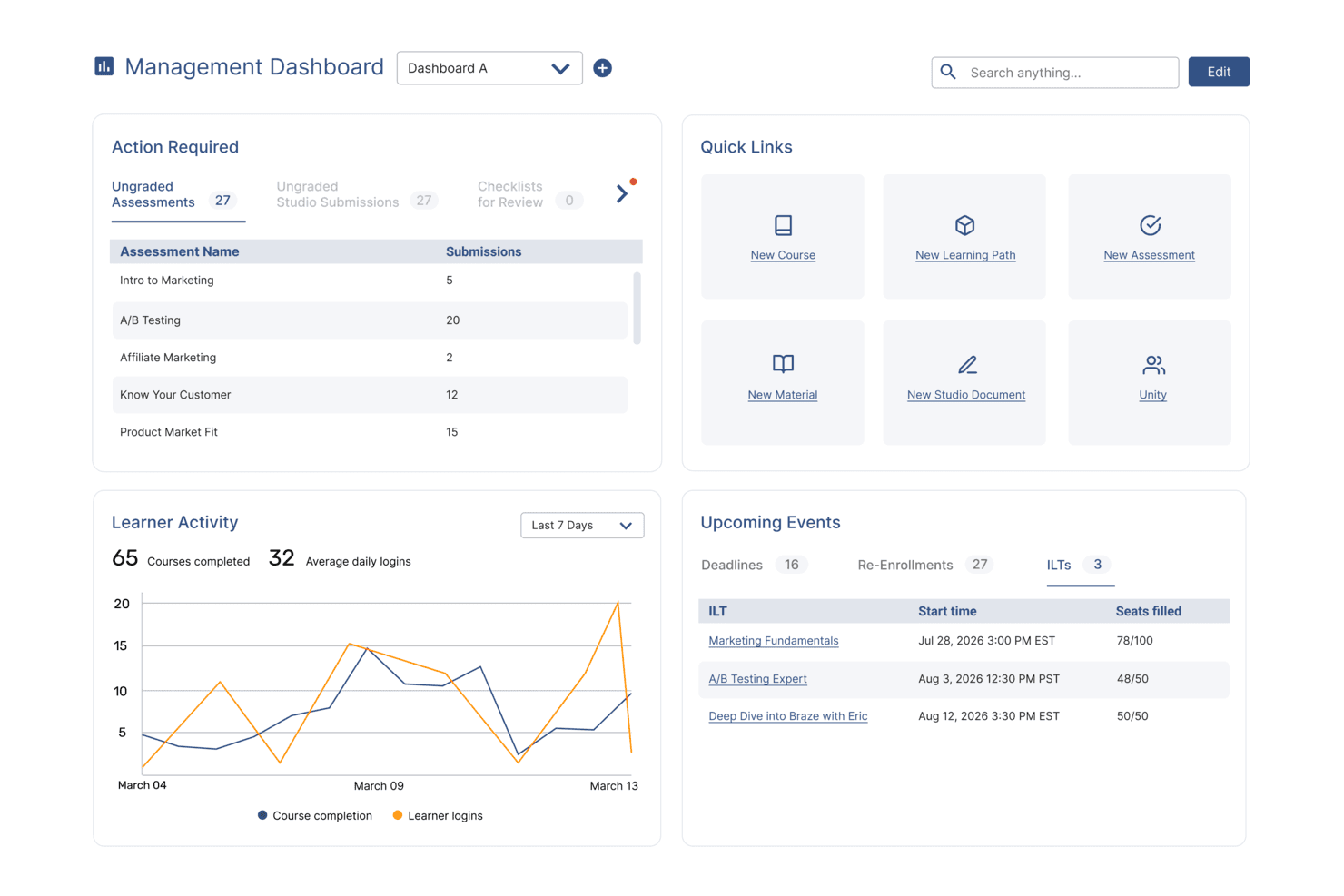
SkyPrep's management dashboard displays learner activity, upcoming events, and quick links. SkyPrep LMS is crafted to address the specific training challenges in manufacturing by offering a platform that improves learner engagement and training efficiency. Its intuitive interface and emphasis on user management support the development of detailed training programs, reducing training time and boosting knowledge retention. By tackling issues like compliance and skill development, SkyPrep provides a solution for organizations aiming to improve workforce training.
Why I Picked SkyPrep
I picked SkyPrep for its focus on improving learner engagement and training efficiency, important for the manufacturing sector. The platform's integration with HR and HCM systems like ADP and Workday ensures smooth user management and consistent employee data, vital for compliance and efficiency in manufacturing. Additionally, SkyPrep's compatibility with webinar tools such as Zoom and Microsoft Teams supports effective remote training sessions, making it ideal for organizations with distributed teams.
SkyPrep Key Features
In addition to its integration capabilities, SkyPrep offers several features improving its suitability for the manufacturing industry:
- Course Creation: Design and deploy custom training modules suited to your specific manufacturing processes and standards.
- Reporting and Analytics: Gain detailed insights into learner progress and training effectiveness, enabling data-driven decisions to improve training programs.
- Customization: Provides flexibility in branding and course delivery to match your organization's unique requirements and training objectives.
- Compliance & Certification Tracking: Track certifications, expirations, and mandatory training with automated reminders to help your teams stay compliant and audit-ready.
SkyPrep Integrations
Integrations include ADP, Workday, BambooHR, Salesforce, HubSpot, Zoom, Microsoft Teams, Slack, Stripe, PayPal, and more.
Pros and Cons
Pros:
- SCORM 1.2 support ensures content compatibility
- Custom email notifications improve communication
- Reporting provides detailed learning insights
Cons:
- Pricing not publicly available
- Security features are relatively basic
Learn more about SkyPrep: Best for structured manufacturing training
- Free trial available
- From $3.97/user/month (billed annually)
Visit WebsiteCustomer Rating:4.6/5
iSpring LMS dashboard showing course modules, team progress, and mobile app. iSpring LMS is a cloud-based learning management system designed to support the delivery and management of corporate training programs. It enables organizations to assign courses, track learner progress, and manage training activities across distributed teams.
Who Is iSpring LMS Best For?
iSpring LMS is suitable for organizations that require structured training programs, including onboarding, compliance, and ongoing employee development.
Why I Picked iSpring LMS
I selected this platform for its structured approach to training management and ease of deployment. It provides tools for organizing courses, assigning training paths, monitoring completion through a centralized system, and creating learning content with built-in authoring tools. This makes it suitable for teams that need to manage and track learning activities without complex setup requirements.
iSpring LMS Key Features
- Automated learning tracks: Create structured training programs with sequential modules and automated enrollment based on user roles or groups.
- Reporting tools: Monitor learner progress, completion rates, and assessment results through built-in dashboards.
- Mobile learning: Access training content via mobile devices, including offline support.
- Built-in authoring: Create training content directly within the platform using built-in content creation tools.
iSpring LMS Integrations
iSpring LMS integrates with tools such as Zoom, Microsoft Teams, Salesforce, HRIS platforms, eLearning content libraries, and other third-party software. It also provides API access and supports integration via connectors like Zapier.
Pros and Cons
Pros:
- Structured course and training management tools
- Built-in reporting for tracking learner progress
- Supports mobile access, including offline learning
Cons:
- Limited customization for complex training environments
- Reporting depth may not meet advanced analytics needs
Learn more about iSpring LMS: Best for modular training content creation
- Free demo available
- Pricing upon request

EducateMe LMS is a cloud platform for structured, cohort-based training with progress tracking tools. EducateMe LMS is a cloud-based learning management system that supports structured training programs, cohort-based learning, and collaborative course delivery. While not built exclusively for manufacturing, it can support frontline and operational training through customizable course structures and progress tracking tools.
Who Is EducateMe LMS Best For?
EducateMe LMS works well for manufacturing companies that need to deliver structured training to frontline workers, technical teams, or multi-site operations without relying on disconnected systems.
Why I Picked EducateMe LMS
I picked EducateMe LMS because of its modular course structure. You can build training programs using reusable content blocks and organize them into role-based learning paths. That flexibility is helpful when creating separate programs for machine operators, maintenance teams, or safety training groups. The platform also supports live sessions and progress tracking, which makes it easier to manage compliance-focused learning initiatives.
EducateMe LMS Key Features
- Modular course builder: Create structured training programs using reusable content blocks and flexible course organization.
- Cohort-based learning management: Organize learners into scheduled groups that move through training together.
- Live session support: Integrate live training sessions through Zoom and manage attendance within the platform.
- Progress analytics: Track learner completion, engagement, and performance metrics.
- Role-based permissions: Control access for instructors, administrators, and learners.
EducateMe LMS Integrations
Integrations include Zoom, Google Calendar, Outlook Calendar, Slack, Telegram, Stripe, Zapier, Google Forms, Google Docs, Google Sheets, Google Slides, Notion, Figma, and SSO providers such as Okta and Auth0. An API is available for custom integrations.
Pros and Cons
Pros:
- Zoom integration supports live instructor-led sessions
- Cohort-based delivery works for multi-site teams
- Modular course builder supports structured training programs
Cons:
- Limited enterprise-grade automation compared to large LMS platforms
- Not built specifically for manufacturing compliance workflows
Learn more about EducateMe LMS: Best for small teams
- Free plan + free demo available
- From $119/month (billed annually)
Visit WebsiteCustomer Rating:4.6/5
TalentLMS offers employee development for SMBs. TalentLMS is a cloud-based learning management system tailored for small to medium-sized businesses. It helps teams manage training programs and employee development.
Why I picked TalentLMS: I picked TalentLMS because it works well for manufacturing companies that need to standardize training across multiple plants without building a large internal L&D function. The platform makes it easy to assign safety modules, equipment training, and certification requirements by role or location. Its simple admin controls allow HR or operations managers to roll out compliance training quickly across shifts and sites. For manufacturers that need reliable tracking without heavy system complexity, TalentLMS provides a practical balance of structure and usability.
Standout features and integrations:
Features include customizable learning paths to guide users through courses, gamification elements to boost engagement, and mobile learning options for on-the-go access. Your team can enjoy a personalized learning experience, making training more effective. The platform also supports video conferencing for live sessions.
Integrations include Zoom, Microsoft Teams, Slack, Google Workspace, Shopify, Salesforce, LinkedIn Learning, BambooHR, Mailchimp, Zapier, and more.
Pros and Cons
Pros:
- Includes gamification features
- Customizable learning paths
- Easy course creation
Cons:
- Compliance reporting may require manual configuration for strict regulatory audits
- Limited built-in skills matrix for machine-level competency tracking
Learn more about TalentLMS: Best with analytics for workforce training
- Free demo available
- Pricing upon request
Visit WebsiteCustomer Rating:4.7/5
Continu dashboard showcasing AI-powered learning and workforce training programs. Continu is a corporate learning management system designed for manufacturing teams that need custom course creation, adaptive learning paths, content management, analytics, and system integrations.
Who Is Continu Best For?
Continu is a good fit for mid-to-large manufacturing organizations that need to train frontline workers, technical staff, and distributed teams at scale.
Why I Picked Continu
Continu is one of my top picks because I love how its analytics dashboard gives you a real-time view of training completion rates, assessment scores, and content engagement across your workforce. In a manufacturing context, I can track which teams or shifts are falling behind on compliance training and act on that data immediately. The reporting tools also let me break down performance by department or location, which is useful when managing training across multiple plant sites.
Continu Key Features
- Badges and certifications: Issue digital badges and certificates automatically when learners complete courses or meet competency requirements.
- Compliance auditing: Identify which users haven't completed mandatory training, giving you a clear view of compliance gaps across teams or facilities.
- Smart Segmentation: Set rules-based filters to automatically deliver the right training content to the right learner groups based on role, region, or department.
- SCORM/xAPI support: Import externally created eLearning files so you can incorporate existing training content into Continu without rebuilding it from scratch.
Continu Integrations
Continu offers native integrations with Zoom, Slack, Okta, Google Workspace, and Microsoft Teams, and provides an API for custom integrations.
Pros and Cons
Pros:
- Flexible rules for automated enrollments
- Mobile training access for production floor teams
- Direct integrations with Okta and Microsoft Teams
Cons:
- Admin navigation can be non-intuitive for new users
- Limited native integrations for manufacturing ERPs
Learn more about Continu: Best with mobile access to courses
- Free trial available
- Pricing upon request
Visit WebsiteCustomer Rating:4.6/5
Absorb course management dashboard showing category filtering and course organization tools for managing manufacturing training programs. Absorb is a learning management system designed to help manufacturers deliver training across diverse teams and locations. It supports complex compliance needs and skills development for both frontline and office-based employees. Manufacturing organizations looking to centralize training, automate certification tracking, and adapt learning to different roles may find Absorb especially useful.
Who Is Absorb Best For?
Absorb is a good fit for manufacturing organizations that need to deliver and track training for both deskless and office-based employees across multiple locations.
Why I Picked Absorb
For manufacturing teams with a large deskless workforce, mobile access is essential for delivering training where and when it’s needed. I picked Absorb because it offers a dedicated mobile app that allows employees to complete courses, access resources, and track progress directly from their smartphones or tablets. The platform also supports offline learning, so workers can download training materials and complete them even without an internet connection. This flexibility helps manufacturing organizations reach frontline staff who may not have regular access to computers.
Absorb Key Features
Some other features in Absorb that support manufacturing training needs include:
- Automated training assignments: Assign courses automatically based on job role, location, or department to ensure the right employees receive the right training.
- Customizable learning paths: Build structured learning journeys that guide employees through required courses and certifications.
- Compliance tracking dashboard: Monitor training completion and certification status in real time to help meet regulatory requirements.
- SCORM and xAPI support: Upload and deliver industry-standard e-learning content for consistent training experiences across your organization.
Absorb Integrations
Integrations include ADP, Workday, UKG, SAP SuccessFactors, NetSuite ERP, Salesforce, Microsoft Teams, Zoom, LinkedIn Learning, and Skillsoft.
Pros and Cons
Pros:
- Enables multilingual content for global manufacturing teams
- Provides automated recertification and reminder workflows
- Integrates with major ERP and HRIS systems
Cons:
- Course authoring tools are less advanced than peers
- Limited offline access for remote factory locations
Learn more about Absorb: Best for quick safety training deployment
- Free demo available
- From $1/user/month + $50/month
Visit WebsiteCustomer Rating:4.6/5
ProProfs Training Maker offers an intuitive SMB training platform. ProProfs Training Maker is an intuitive learning management system designed for businesses seeking straightforward training solutions. It caters to small to medium-sized companies looking to deliver effective courses without technical hassles.
Why I picked ProProfs Training Maker: I picked ProProfs Training Maker because it’s a straightforward way to deploy safety and SOP training without heavy configuration. Manufacturing teams can quickly create quizzes, compliance modules, and short-form assessments to reinforce policies and procedures. It works well for organizations that need to digitize toolbox talks, policy acknowledgments, or basic compliance tracking. For smaller manufacturing operations that want to move away from paper-based training records, it offers a fast and accessible solution.
Standout features and integrations:
Features include a built-in quiz maker to test knowledge, course templates for quick setup, and the ability to create certification programs. The program features customizable branding, which allows you to align training with your company's identity. The platform also supports mobile learning, enabling access to courses on-the-go.
Integrations include Salesforce, Mailchimp, Zendesk, Dropbox, Google Analytics, Freshdesk, SugarCRM, WordPress, Shopify, Google Workspace, and more.
Pros and Cons
Pros:
- Mobile learning access
- Supports multimedia content
- Simple drag-and-drop editor
Cons:
- Basic analytics may not satisfy audit-heavy environments
- Not ideal for large, multi-site manufacturing deployments
Learn more about ProProfs Training Maker:

Docebo offers training to improve company culture and compliance. Docebo is an LMS platform designed for the manufacturing industry, catering to businesses seeking innovative training solutions. It serves companies looking to enhance learning cultures, improve compliance, and optimize onboarding processes.
Why I picked Docebo: Docebo integrates generative AI capabilities, offering a unique approach to learning management for manufacturing teams. You can automate compliance training and certification renewals, simplifying administrative tasks. The platform supports various training formats, including webinars and SCORM, making it versatile for different learning needs. Its advanced reporting tools provide insights into program effectiveness, aligning with its AI integration focus.
Standout features and integrations:
Features include support for over 50 languages, mobile learning capabilities, and access to over 20,000 courses. This program includes automated compliance training, reducing manual workload. The AI-powered platform also offers e-signature functionality for secure compliance processes.
Integrations include Salesforce, Slack, Zoom, Microsoft Teams, Shopify, Okta, Google Workspace, LinkedIn Learning, BambooHR, Adobe Connect, and more.
Pros and Cons
Pros:
- Automates compliance tasks
- Supports multiple training formats
- AI-driven learning solutions
Cons:
- Initial setup may be complex
- Lack of pricing transparency
Learn more about Docebo: 10Best with automated learning workflow tools
Bridge
- Free demo available
- From $1,250/month (billed annually)
Visit WebsiteCustomer Rating:4.2/5
Bride LMS offers accelerated training with mobile access and audit, OSHA, ISO, and LOTO compliance. Bridge is an LMS and skills platform that combines AI-driven course recommendations, automated compliance training delivery, configurable learning paths, and performance management in one system built for mid-market teams.
Who Is Bridge Best For?
Bridge is a good fit for mid-market manufacturing companies that need to manage compliance training, skills development, and performance conversations in one place.
Why I Picked Bridge
Bridge is one of my top picks because I love how it automates the learning workflow from start to finish. Its AI-driven skills taxonomy automatically maps skills to every job title and tags courses accordingly, so manufacturing L&D teams aren't manually building course assignments from scratch. From there, Bridge fires off personalized course recommendations based on each worker's identified skill gaps, and built-in compliance reminders and notifications keep training completion on track without manual follow-up.
Bridge Key Features
- Mobile-first course delivery: Access and complete training from any mobile device, making it usable for manufacturing workers on the shop floor without a desktop.
- Pre-built manufacturing content library: Includes 75+ ready-to-use courses covering OSHA safety orientation, LEAN, Six Sigma, Kaizen, and other process improvement topics.
- One-click course translation: Automatically translate course content into multiple languages to support multilingual manufacturing teams.
- Configurable learning paths: Build structured, role-based training sequences that guide workers through onboarding, compliance, or upskilling in a set order.
Bridge Integrations
Bridge integrates with HRIS platforms, content providers, SSO authenticators, and asset management tools. Verified native integrations include LinkedIn Learning, OpenSesame, Beekeeper, Slack, Dropbox, YouTube, Vimeo, Kaltura, Panopto, and Credly, along with BambooHR, Salesforce, and Tableau. Bridge can connect to 1,000+ external applications through pre-built connectors, and its open API lets you build custom integrations. Webhooks and LTI support are also available for event-based integrations and launching third-party content inside Bridge. It's also available on Zapier.
Pros and Cons
Pros:
- Manager 1:1 agendas are built into LMS
- AI-powered skills mapping per role
- Links learning data to performance reviews
Cons:
- Native content authoring has limited formatting
- Reporting needs manual workarounds for detail
Learn more about Bridge:
Üretim için Diğer Öğrenme Yönetim Sistemleri
İşte kısa listeme giremeyen ancak yine de göz atmaya değer bazı ek üretim LMS seçenekleri:
- 11Paradiso LMSBest for multilingual support
- 12Infor Best for scalability
- 13LearnUpon LMSBest for rapid plant-wide LMS rollout
- 14WorkRampBest for structured production onboarding
- 15Tovuti LMSBest for simulation-based and scenario training
- 16LitmosBest for global reach
- 17WebanywhereBest for custom branding
- 18Tooling U-SMEBest for industry-specific courses
- 19ComplianceQuestBest for QMS platform with built-in LMS capabilities
- 20MoodleBest for open-source flexibility
- 21360LearningBest for collaborative learning
- 22EdAppBest for microlearning modules
Related Reviews
How I Evaluate LMS for Manufacturing
I split my evaluation into two layers: the baseline capabilities a platform must have—like compliance tracking and shopfloor-friendly delivery—and the differentiators that set the best options apart.
Core Functionality (Table Stakes For This List)
When I'm selecting tools for my list, I rank each one on a scale from 0 (does not offer the functionality) to 5 (excels in this area) for each core functionality listed below. Then, I calculate the tool's total score into a percentage. Each tool needs to achieve a minimum total score of 55% to be considered for inclusion.
- Compliance & Certification Tracking: I check whether the platform automates recertification alerts and generates audit-ready reports for frameworks like OSHA, ISO, and FDA GMP.
- Skills & Competency Management: Role-based skills matrices matter here—I look for gap analysis tools that map operator competencies across production lines and job functions.
- SOP & On-the-Job Training: I evaluate how each platform handles version-controlled SOPs and whether supervisors can sign off on practical assessments at the workstation.
- Shopfloor-Friendly Delivery: Frontline workers rarely sit at desks, so I look for kiosk login, offline access, and multilingual support designed for shared devices on the floor.
- Manufacturing Content Library: I consider whether the platform includes prebuilt courses on topics like lockout/tagout, lean manufacturing, or machine safety—not just generic compliance.
- ERP/MES/HRIS Integrations: Connecting training records to systems like SAP, Oracle, or UKG is a real operational need, so I evaluate prebuilt connectors and API flexibility.
Once I have a list of tools that meet the criteria, I consider what sets each platform apart.
Differentiating Factors (What Sets Vendors Apart)
Here's how I compare and contrast different vendors:
Standout Features
AI-powered content authoring stands out when a platform can convert existing SOPs and machine manuals into microlearning modules without building courses from scratch. I also look for connected worker workflows that embed training directly into live production tasks, so operators learn in context at the workstation. Advanced analytics matter here too—I evaluate whether dashboards correlate training completion with plant KPIs like scrap rate, downtime, and incident frequency.
Beyond Features
Regulatory validation support is a major differentiator. I check whether vendors provide documented IQ/OQ/PQ validation packages for FDA-regulated environments like pharma or food manufacturing. Pricing structure also matters, especially how licensing handles high-turnover frontline workers like seasonal hires and temps who cycle through plants. Deployment flexibility is worth evaluating too, since some facilities need on-premise or hybrid hosting due to IT constraints or limited bandwidth on the production floor.
Üretim için LMS Nasıl Seçilir?
Uzun özellik listeleri ve karmaşık fiyatlandırma yapılarına kapılmak kolaydır. Kendinize özgü yazılım seçimi sürecinizde ilerlerken odaklanmanızı korumanıza yardımcı olmak için göz önünde bulundurmanız gereken faktörleri içeren bir kontrol listesi hazırladım:
| Faktör | Nelere Dikkat Edilmeli? |
|---|---|
| FaktörÖlçeklenebilirlik | Nelere Dikkat Edilmeli?LMS şirketinizle birlikte büyüyecek mi? Performans sorunları yaşamadan daha fazla kullanıcıyı ve içeriği işleyip işleyemeyeceğini kontrol edin. |
| FaktörEntegrasyonlar | Nelere Dikkat Edilmeli?Mevcut araçlarınıza bağlanabiliyor mu? İnsan kaynakları yazılımınızla, CRM'nizle veya diğer önemli sistemlerinizle entegre olduğundan emin olun. |
| FaktörÖzelleştirilebilirlik | Nelere Dikkat Edilmeli?LMS'yi ihtiyaçlarınıza göre uyarlayabilir misiniz? Panoları, raporları ve kullanıcı arayüzlerini iş akışınıza uygun şekilde değiştirme seçeneklerini arayın. |
| FaktörKullanım Kolaylığı | Nelere Dikkat Edilmeli?Tüm ekip üyeleri için kullanıcı dostu mu? Öğrenme eğrisini ve ekibinizin sistemi kolayca kullanıp kullanamayacağını değerlendirin. |
| FaktörUygulama ve Oryantasyon | Nelere Dikkat Edilmeli?Ne kadar hızlı kullanmaya başlayabilirsiniz? Sorunsuz bir kurulum sağlamak için eğitim videoları veya destek ekipleri gibi oryantasyon amacıyla sunulan kaynakları değerlendirin. |
| FaktörMaliyet | Nelere Dikkat Edilmeli?Fiyatlandırma bütçenize uygun mu? LMS'nin maliyetini özellikleri ve bütçe kısıtlamalarınızla karşılaştırın. Gizli ücretlere veya uzun vadeli sözleşmelere dikkat edin. |
| FaktörGüvenlik Önlemleri | Nelere Dikkat Edilmeli?Verileriniz ve kullanıcı bilgileriniz güvende mi? Veri koruma düzenlemelerine uygunluğu, şifreleme olanaklarını ve düzenli güvenlik güncellemelerini kontrol edin. |
Üretim için LMS Nedir?
Üretim için LMS, çalışanları eğitmek ve geliştirmek üzere tasarlanmış özel bir öğrenme yönetim sistemidir. Bu araçlar genellikle İK uzmanları, eğitim yöneticileri ve ekip liderleri tarafından iş gücü becerilerini geliştirmek ve sektör standartlarına uyumu sağlamak için kullanılır. Her LMS üretim için uygun değildir. Üretim ortamları; sertifika takibi, güvenlik uyumluluğu belgeleri, vardiya tabanlı erişim, çok dilli eğitim ve denetime hazır raporlama gerektirir.
Aşağıdaki araçlar bu ihtiyaçları ne ölçüde destekledikleri açısından farklılık gösterir. Eğitim modülleri, uyumluluk takibi ve raporlama özellikleri, çalışan gelişiminin yönetilmesine ve güvenlik protokollerinin sürdürülmesine yardımcı olur. Genel olarak bu araçlar, üretim operasyonlarında verimlilik ve bakım kalitesini artırmaya yönelik yapılandırılmış iyileştirmeler ve yönergeler sunar.
Özellikler
Üretim için bir LMS seçerken aşağıdaki temel özelliklere dikkat edin:
- Eğitim modülleri: Çalışanların becerilerini ve bilgilerini geliştirmek için yapılandırılmış öğrenme içeriği sunar.
- Uyumluluk takibi: Sektör düzenlemelerine ve güvenlik standartlarına uyumu izler.
- Raporlama özellikleri: Öğrenenlerin ilerlemesi ve eğitimin etkililiği hakkında içgörüler sunar.
- Özel markalama: Tutarlı bir görünüm için platformun görünümünü şirketinizin kimliğiyle uyumlu hâle getirir.
- Mobil öğrenme: Eğitim materyallerine hareket hâlindeyken erişim sağlayarak uzaktan çalışanlar için esnekliği artırır.
- Etkileşimli içerik: Bilginin kalıcılığını artırmak için sınavlar, videolar, simülasyonlar ve oyunlaştırılmış unsurlar aracılığıyla öğrenenlerin ilgisini çeker.
- Entegrasyon desteği: Sorunsuz operasyonlar için İK yazılımları ve CRM araçları gibi mevcut sistemlerle bağlantı kurar.
- Sertifika yönetimi: Sürekli uyumluluğu sağlamak için çalışan sertifikalarını izler ve yönetir.
- Yetkinlik tabanlı öğrenme: Eğitim yollarını, iş gücü içindeki belirli beceri eksikliklerini giderecek şekilde uyarlar.
- Analiz araçları: Sürekli iyileştirme için kullanıcı etkileşimleri ve öğrenme çıktıları hakkında ayrıntılı veriler sunar.
Avantajlar
Üretim için bir LMS uygulamak, ekibiniz ve işletmeniz için çeşitli avantajlar sağlar. Faydalanabileceğiniz birkaç avantaj şunlardır:
- Geliştirilmiş uyumluluk: Uyumluluk takibi özellikleri, ekibinizin sektör düzenlemelerinden haberdar olmasını sağlar.
- Artan üretkenlik: Yapılandırılmış eğitim modülleri ekibinizin iş gücü becerilerini geliştirir ve verimliliğin artmasını sağlar.
- Maliyet tasarrufu: İçeriğin çevrim içi sunulması, yüz yüze oturum ihtiyacını azaltarak eğitim giderlerini düşürür.
- Artan etkileşim: Etkileşimli içerik, öğrenmeyi çalışanlar için daha ilgi çekici ve etkili hâle getirir.
- Tutarlı eğitim: Merkezi içerik sunumu, farklı konumlarda eğitimlerin aynı standartta gerçekleştirilmesini sağlar.
- Daha iyi karar verme: Analiz araçları, eğitimin etkililiği hakkında içgörüler sunar ve işletmeniz için bilinçli iyileştirmeler yapmanıza yardımcı olur.
- Ölçeklenebilirlik: Ölçeklenebilir LMS özellikleri, işletmeniz büyüdükçe eğitim programlarınızı kolayca genişletmenize olanak tanır.
Maliyetler ve Fiyatlandırma
Üretim için en iyi LMS'yi seçmek, mevcut çeşitli fiyatlandırma modellerinin ve planların anlaşılmasını gerektirir. Maliyetler özelliklere, ekip büyüklüğüne, eklentilere ve diğer unsurlara göre değişir. Aşağıdaki tablo, üretim sektörü için oluşturulmuş LMS çözümlerindeki yaygın planları, ortalama fiyatlarını ve genellikle sunulan özellikleri özetlemektedir:
Üretim için LMS Plan Karşılaştırma Tablosu
| Plan Türü | Ortalama Fiyat | Yaygın Özellikler |
|---|---|---|
| Plan TürüÜcretsiz Plan | Ortalama Fiyat$0 | Yaygın ÖzelliklerSınırlı kurs erişimi, temel analizler ve topluluk desteği. |
| Plan TürüKişisel Plan | Ortalama Fiyat$5-$25/kullanıcı/ay | Yaygın ÖzelliklerÖzel markalama, mobil erişim ve etkileşimli içerik. |
| Plan Türüİşletme Planı | Ortalama Fiyat$30-$50/kullanıcı/ay | Yaygın ÖzelliklerGelişmiş raporlama, uyumluluk takibi ve entegrasyon desteği. |
| Plan TürüKurumsal Plan | Ortalama Fiyat$60-$100/kullanıcı/ay | Yaygın ÖzelliklerTam özelleştirilebilirlik, özel hesap yöneticisi ve kapsamlı API erişimi. |
Üretim için LMS SSS
Üretim için LMS hakkında sık sorulan soruların bazı yanıtları:
Genel bir LMS ile üretim için LMS arasındaki fark nedir?
Genel bir LMS eğitim içeriği sunabilir, ancak üretim için LMS; güvenlik ve uyumluluk modülleri, belirli roller için beceri eşleştirmesi, uygulamalı çalışmalar için harmanlanmış öğrenme ve denetimler için ayrıntılı izlenebilirlik gibi üretim sahasının gerçekleri temel alınarak tasarlanır. Yalnızca ofis tabanlı öğrenme yerine üretim hatlarını, vardiyalı çalışmayı ve mevzuat gerekliliklerini desteklemek üzere tasarlanmıştır.
Üretim şirketimin LMS için hazır olduğunu nasıl anlarım?
Eğitimler elektronik tablolar, paylaşılan sürücüler veya kâğıt kaynaklar arasında dağınıksa genellikle hazırsınızdır. LMS’nin işletmeniz için faydalı olabileceğinin bir başka işareti de uyumluluğu kanıtlamakta veya kimin hangi konuda sertifikalı olduğunu takip etmekte zorlanmanızdır. Denetimler stresli geçiyorsa, amirler aynı şeyleri tekrar tekrar açıklıyorsa veya kalite sorunları tutarsız eğitime kadar izlenebiliyorsa, bir LMS her şeyi merkezileştirebilir ve size net kayıtlar sunabilir.
LMS güvenlik ve mevzuata uyumluluğa yardımcı olabilir mi?
Evet—üreticilerin LMS kullanmaya başlamasının başlıca nedenlerinden biri budur. Zorunlu güvenlik kursları atayabilir, tamamlanma durumlarını role veya tesise göre takip edebilir, sertifikalar için sona erme tarihleri belirleyebilir ve birkaç tıklamayla denetime hazır raporlar alabilirsiniz. Bazı sistemler ayrıca elektronik imzaları ve değerlendirme puanlamasını destekler; bu da eğitim etkinliğini düzenleyicilere ve müşterilere göstermeye yardımcı olur.
Üretim sahasında LMS'yi uygulamaya almak ne kadar zor?
Başlangıç noktanıza bağlıdır, ancak küçük adımlarla başlayarak benimsenmeyi kolaylaştırabilirsiniz: bir tesis veya departmanla pilot uygulama yapın, temel bir güvenlik ve işe alıştırma kursları setini standartlaştırın ve uzun dersler yerine kısa, odaklı modüller sunun. Ön safta çalışanların özel bir bilgisayara ihtiyaç duymadan eğitimi tamamlayabilmesi için mobil erişim veya kiosk desteği sunan çözümleri arayın.