

iSpring Learn kullanıyor ancak bazı sınırlamalarla karşılaşıyorsanız yalnız değilsiniz. Esneklik eksikliği, yetersiz kalan raporlama veya ekibinizin büyüyen ihtiyaçlarına ayak uyduramayan özellikler bunun nedeni olabilir
İşe alıştırma sürecini kolaylaştırmak, uzaktan çalışanların etkileşimini korumak ve eğitimlerin gelişen iş hedefleriyle uyumlu olmasını sağlamak gibi gerçek dünyadaki öğrenme ve gelişim zorlukları açısından onlarca LMS platformunu inceledim.
Bu makalede, iSpring Learn için en iyi alternatifleri ele alacağım. Daha fazla özelleştirme, daha güçlü raporlama araçları veya daha sorunsuz entegrasyonlar arıyorsanız bu platformlar, geniş ölçekte etkili öğrenme deneyimleri sunmanıza yardımcı olmak için tasarlanmıştır.
iSpring Learn nedir?
iSpring Learn, iSpring Suite'in bir parçası olan bir öğrenme yönetim sistemidir (LMS). Ekiplerin çevrim içi eğitim programlarını kurum içinde oluşturmasına ve yönetmesine yardımcı olmak için tasarlanmıştır.
Etkili bir şekilde kurs sunmak ve öğrencilerin ilerlemesini takip etmek isteyen İK profesyonelleri, eğitimciler ve eğitmenler tarafından yaygın olarak kullanılır. Kurs oluşturma, içerik yönetimi ve raporlama özellikleri, eğitim sürecini basitleştirmeye ve kullanıcı etkileşimini artırmaya yardımcı olur.
Genel olarak iSpring Learn, etkili öğrenme deneyimleri geliştirmek ve sunmak için kullanıcı dostu bir platform sağlar.
Why Trust Our Software Recommendations
6,700+
Reviews
20
Industry experts
16+
Evaluation factors
14
Years
Our team has been testing and reviewing software since 2012. As HR experts ourselves, we know how difficult—and important—it is to choose the right software.
For this guide, we evaluated tools using hands-on testing and independent research, scoring tools using our selection criteria. We also draw on insights from industry thought leaders and practicing HR experts.
Our reviews reflect our human editorial judgment, not a sales pitch.
Expert reviewers:
- Phil GrayCOO
 Kim BehnkeHR Tech Editor & Analyst
 Josh BarkerPeople Ops Manager

iSpring Learn Alternatifleri Karşılaştırma Tablosu
Bu karşılaştırma tablosu, en iyi iSpring Learn alternatiflerim için fiyatlandırmayı, ücretsiz denemeleri ve demo kullanılabilirliğini öne çıkarır.
Score legend (out of 5)
- Excellent4.5–5
- Good4–4.4
- Average3–3.9
- Below average2–2.9
- Poor1–1.9
Sorted by: Default
| Tool | Starting Price | Website | |||||||
|---|---|---|---|---|---|---|---|---|---|
Best for intuitive interface | 3.7 out of 5 | 4 | 4 | 4 | 3 | 4 | 3 | Pricing upon request 14-day free trial + demo available | Website |
Best for rapid course setup | 3.7 out of 5 | 3 | 4 | 4 | 4 | 4 | 3 | $119/month Free plan + free demo available | Book Demo |
Best for custom learning workflows | 3.7 out of 5 | 3 | 3 | 4 | 4 | 4 | 4 | Pricing upon request Free demo available | Website |
Best for AI-driven learning | 4.5 out of 5 | 4 | 4 | 5 | 5 | 5 | 4 | Pricing upon request Free trial available | Website |
Best for collaborative learning | 3.7 out of 5 | 4 | 3 | 4 | 4 | 4 | 3 | $8/user/month 30-day free trial + demo available | Website |
Best for enrollment-history migration | 4.2 out of 5 | 4 | 4 | 4 | 5 | 4 | 4 | Pricing upon request Free demo available | Website |
Best for live virtual sessions | 4.2 out of 5 | 4 | 4 | 5 | 4 | 4 | 4 | $7,500/year Not available | Website |
Best for global enterprise organizations | 3.8 out of 5 | 4 | 4 | 4 | 4 | 4 | 3 | Pricing upon request Free demo available | Website |
Best for soft skills development | 3.8 out of 5 | 4 | 4 | 4 | 3 | 4 | 4 | Pricing upon request Not available | Website |
Best for curated course libraries | 3.7 out of 5 | 3 | 4 | 4 | 4 | 4 | 3 | $20/user/month 30-day free trial + free demo available | Website |


En İyi iSpring Learn Alternatifleri İncelemeleri
Kısa listeme giren en iyi iSpring Learn alternatifleriyle ilgili ayrıntılı özetlerim aşağıda yer alıyor. İncelemelerim, sizin için en iyi LMS platformunu bulmanıza yardımcı olmak amacıyla her aracın temel özelliklerine, artılarına ve eksilerine, entegrasyonlarına ve ideal kullanım alanlarına ayrıntılı bir bakış sunuyor.
 Best for intuitive interface
- 14-day free trial + demo available
- Pricing upon request
Visit WebsiteCustomer Rating:4.7/5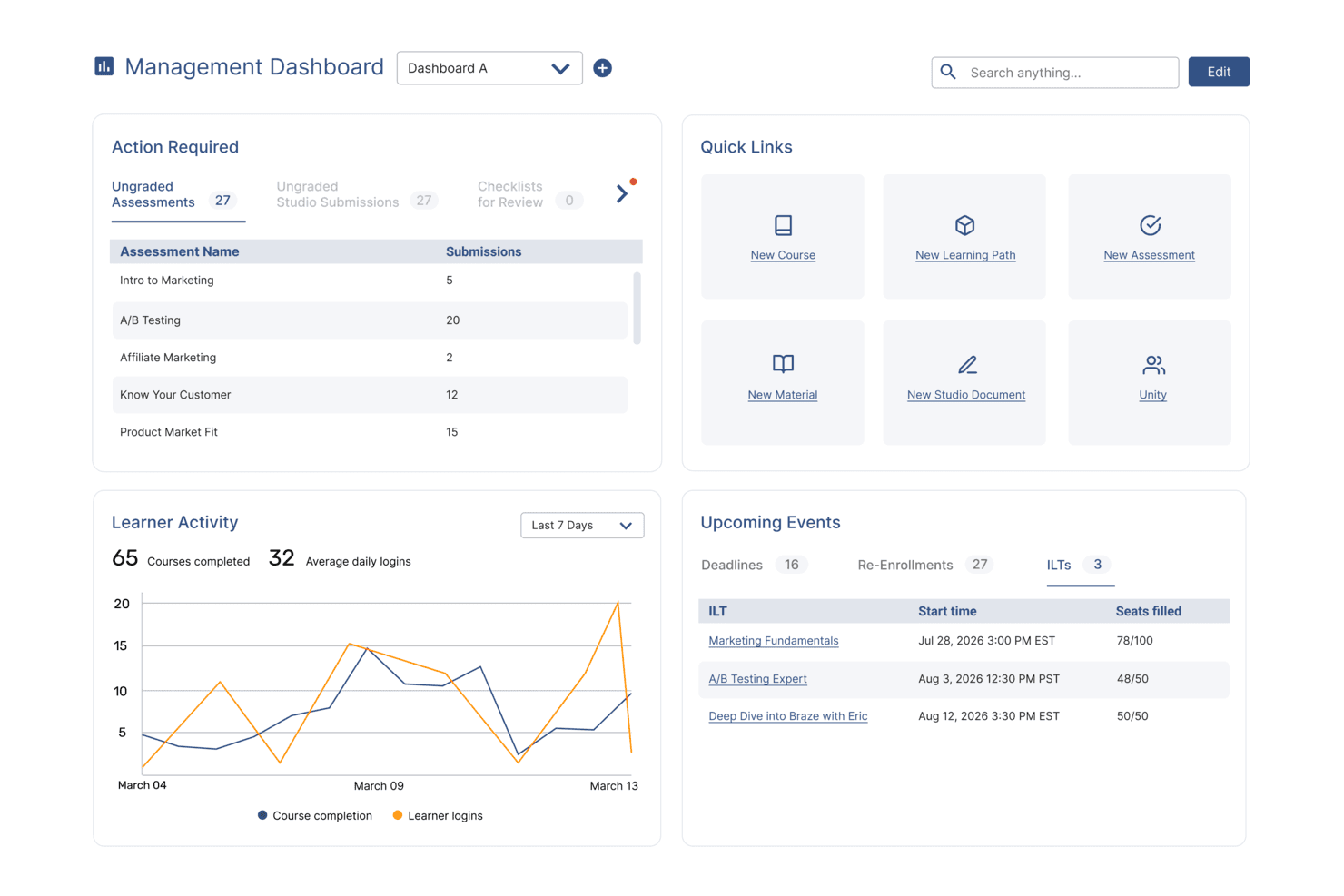
SkyPrep's management dashboard displays learner activity, upcoming events, and quick links. SkyPrep is an LMS built for organizations that need to train employees, customers, and partners without a steep learning curve, offering course authoring, learning paths, automated enrollments, and compliance tracking in one place.
Who Is SkyPrep Best For?
SkyPrep is a strong fit for training coordinators and L&D managers who need to get a multi-audience training program up and running without a long setup process.
Why I Picked SkyPrep
I picked SkyPrep as one of the best because the interface genuinely lives up to its reputation. Admins can build structured courses using Studio Docs, a drag-and-drop authoring tool with eight question formats, interactive elements, and AI-generated voiceovers, without needing any technical background. I also appreciate that learner dashboards, certificates, and even skills and competency frameworks are all configurable from the same environment, so there's no context-switching mid-setup.
SkyPrep Key Features
- Enrollment automation: Set rule-based auto-enrollments that trigger when users match profile attributes or course completion conditions.
- HR system integrations: Connect with HiBob, BambooHR, ADP, Workday, and UKG to sync employee records and auto-provision learner accounts.
- Recurring training and certification renewals: Configure validity periods and early re-enrollment windows to keep certifications current automatically.
- Multi-tenant learning environments: Run separate branded portals for different client groups, business units, or partner audiences from one account.
SkyPrep Integrations
SkyPrep offers native integrations with BambooHR, Workday, UKG, Microsoft Entra ID, Okta, Salesforce, HubSpot, Zoom, and Microsoft Teams. It also supports custom integrations through its API and connects with Zapier.
Pros and Cons
Pros:
- Certificates and renewal tracking support compliance
- Quick course setup and learning-path creation
- Clear interface eases the switch from iSpring
Cons:
- Reminder settings are hard to verify
- Reports can be clunky to assemble
Learn more about SkyPrep: Best for rapid course setup
- Free plan + free demo available
- From $119/month (billed annually)
Visit WebsiteCustomer Rating:4.6/5
TalentLMS speeds up onboarding with simple course creation tools. TalentLMS is a cloud-based learning management system built for teams that need to create, deliver, and track training for employees, customers, or partners without relying on technical support or lengthy implementation.
Who Is TalentLMS Best For?
TalentLMS is a strong fit for HR and L&D teams that need to get training up and running fast—without leaning on IT or developers to do it.
Why I Picked TalentLMS
TalentLMS earns its spot on my shortlist because getting a course live doesn't require a project plan. I appreciate how TalentCraft lets you generate a full course from a prompt or an uploaded document, automatically producing sections, text, images, and even AI-generated video without touching a separate authoring tool. Combined with learning paths that sequence courses automatically, your team can go from zero to a structured onboarding or compliance program in days, not months.
TalentLMS Key Features
- SCORM, xAPI, and cmi5 import: Upload and deliver course packages in all three major e-learning standards, with completion, scores, and learner activity tracked automatically.
- Gamification: Motivate learners with customizable badges, points, levels, rewards, and leaderboards built directly into the platform.
- White-labeling: Apply your logo, brand colors, and custom domain, and remove TalentLMS branding entirely on Pro and Enterprise plans.
- Skills tracking: Organize courses around specific skills and monitor each learner's progress against individual and business goals.
TalentLMS Integrations
TalentLMS offers 40+ integrations, including native connections with BambooHR, ADP Workforce Now, Salesforce, Zoom, Microsoft Teams, Okta, Shopify, and OpenSesame. It also provides a REST API for custom integrations and supports Zapier.
Pros and Cons
Pros:
- Mobile accessibility
- AI course creator
- Extensive course library
Cons:
- Basic reporting features only
- Limited customization options
Learn more about TalentLMS: Best for custom learning workflows
- Free demo available
- Pricing upon request
Visit WebsiteCustomer Rating:4.7/5
Continu organizes learning content into featured cards for easy browsing. Continu is an enterprise learning platform that lets L&D and HR teams build, automate, and measure training for employees, partners, and customers from a single system—with AI-assisted authoring, white-label portals, and deep workflow automation built in.
Who Is Continu Best For?
Continu is a strong fit for mid-market to enterprise L&D and HR teams that need to train employees, partners, and customers from a single platform.
Why I Picked Continu
I picked Continu as one of the best because it handles custom learning workflows better than almost anything else I've seen. I love how Learning Journeys let you sequence multi-step programs with milestones and prerequisites, so onboarding or compliance paths actually follow a logical order rather than dumping content on learners at once. Layer in hire-date-triggered automations that assign training, set due dates, and notify managers without any manual work, and you get a system that runs itself.
Continu Key Features
- AI-assisted content authoring: Generate course outlines, adjust tone, expand sections, and create quizzes using built-in AI tools directly in the native editor.
- White-label Extend portals: Build separate branded portals with their own domains, user populations, and content libraries for partners, customers, or external teams.
- eSignatures: Require learners to electronically acknowledge policies and compliance documents as part of a course or learning path.
- Continu Insights dashboards: View real-time completion, engagement, and certification data with configurable dashboards, scheduled reports, and audit-ready compliance tracking.
Continu Integrations
Continu has native integrations with Workday, BambooHR, Oracle, LinkedIn Learning, Go1, OpenSesame, Udemy for Business, Slack, Microsoft Teams, and Zoom. Its REST API and real-time event webhooks support custom integrations.
Pros and Cons
Pros:
- Create branded academies for partner education
- Automate hire-date training and manager notifications
- Sequence journeys with milestones and prerequisites
Cons:
- Manually maintained groups can misdirect assignments
- Completion records sometimes fail to register
Learn more about Continu: Best for AI-driven learning
- Free trial available
- Pricing upon request
Visit WebsiteCustomer Rating:4.6/5
Absorb LMS displays a personalized admin dashboard with profile and activity stream. Absorb LMS is an AI-powered learning management system built for organizations that need to train employees, customers, and partners from a single platform—with strong compliance tracking, multi-audience portals, and automated enrollment tools.
Who Is Absorb Best For?
Absorb LMS is a strong fit for mid-to-large organizations that need to train multiple audiences—employees, customers, and partners—from one platform with AI-powered course creation built in.
Why I Picked Absorb
I picked Absorb as one of the best because its AI-driven learning runs deeper than a simple course generator. Aura Create builds full block-based courses from a prompt, while Absorb Intelligence personalizes search results and surfaces recommendations based on each learner's history. I also appreciate Absorb Skills, which maps skill gaps to specific courses and auto-tags content, so training assignments stay tied to real development needs rather than guesswork.
Absorb Key Features
- Multi-audience portals: Supports separate branded portals for employees, customers, and partners, all managed from a single admin instance.
- eCommerce for course sales: Includes a built-in shopping cart supporting 70+ payment gateways, bulk enrollment keys, coupon codes, and multi-currency pricing.
- HRIS-driven automated enrollment: Syncs with HRIS platforms like Workday, BambooHR, and ADP to trigger course assignments based on employee profile changes.
- Compliance tracking and e-signatures: Tracks training completions and collects electronic signatures with username and PIN verification for audit-ready compliance records.
Absorb Integrations
Absorb offers integrations with Workday, BambooHR, ADP, SAP SuccessFactors, UKG Pro, Dayforce, Salesforce, HubSpot, Zoom, and Go1. RESTful APIs and webhooks support custom integrations.
Pros and Cons
Pros:
- Automated enrollment supports compliance assignments
- Separate branded portals serve external learners
- Prompt-based course generation speeds authoring
Cons:
- Admin workflows involve many clicks and settings
- Complex cross-course reports require manual combining
Learn more about Absorb: Best for collaborative learning
- 30-day free trial + demo available
- From $8/user/month
Visit WebsiteCustomer Rating:4.7/5
360Learning lets users volunteer to teach peer-identified learning needs. 360Learning is an AI-powered LMS built around collaborative course creation, making it a strong fit for L&D teams that want subject-matter experts across the organization to build and share training—not just a central authoring team.
Who Is 360Learning Best For?
360Learning is a strong fit for L&D teams that want employees and subject-matter experts to actively contribute to course creation, rather than relying solely on a central training team.
Why I Picked 360Learning
I've included 360Learning in my top picks because it's the only LMS on this list built specifically around collaborative course creation, where subject-matter experts across your org can author and update training, not just a central L&D team. I particularly like the AI Course Generation feature, which lets authors draft a full course from internal documents like a PDF or PPTX, then refine the outline before publishing. Pair that with built-in peer forums and co-authoring, and you get a training culture where knowledge actually flows between colleagues.
360Learning Key Features
- Automated enrollment: Enroll learners automatically based on audience criteria, including group membership, custom fields, and certificate expiry status.
- Blended learning paths: Combine self-paced courses, SCORM/xAPI content, and instructor-led sessions into linear or non-linear learning paths with relative due dates.
- Scheduled custom reports: Filter, save, and schedule learning reports for email delivery, covering progress, scores, time spent, and certificate expiry dates.
- HCM/HRIS sync: Sync learner data and group structures directly from HR systems like Workday and SAP SuccessFactors to keep user management current.
360Learning Integrations
360Learning offers 50+ documented integrations, including Workday, SAP SuccessFactors, Microsoft Teams, Zoom, Go1, Udemy, LinkedIn Learning, Google Drive, and SharePoint. It also supports API and webhook connections for custom integrations.
Pros and Cons
Pros:
- Peer forums encourage colleague-to-colleague learning
- AI drafts courses from internal documents
- Subject-matter experts co-create and update courses
Cons:
- SCORM 1.2 progress tracking is coarse
- Imported courses allow only one file
Learn more about 360Learning: Best for enrollment-history migration
- Free demo available
- Pricing upon request
Visit WebsiteCustomer Rating:4.6/5
LearnUpon lets users track enrolled courses and badge progress from one dashboard. LearnUpon is an AI-powered LMS built for L&D teams that need to manage employee onboarding, compliance training, and skills development from a single platform.
Who Is LearnUpon Best For?
LearnUpon is a strong fit for L&D teams managing structured employee training across onboarding, compliance, and skills development at scale.
Why I Picked LearnUpon
I picked LearnUpon as one of the best iSpring Learn alternatives because of how fast you can go from raw source material to a published course. Its AI-powered Create+ feature turns existing documents, presentations, and other files into structured, interactive courses without starting from scratch. I also appreciate how Learning Journeys auto-enroll employees by role or department and branch based on their progress, so onboarding and compliance paths essentially run themselves once configured.
LearnUpon Key Features
- Dynamic rules: Automatically assign users to groups and enroll them in courses based on email domain, account creation date, or custom user data.
- Certificate expiry and re-enrollment: Configure certificates with expiry dates and trigger automatic re-enrollment a set number of days before they lapse.
- Content marketplace integrations: Access more than 100,000 courses via Go1 and over 60,000 via OpenSesame directly within the platform.
- Skills-based learning: Assign skill proficiency levels to learner profiles through Learning Journeys and surface skill gaps using skills insights.
LearnUpon Integrations
LearnUpon offers native integrations with BambooHR, SAP SuccessFactors, ADP Workforce Now, Salesforce, Go1, OpenSesame, Zoom, Microsoft Teams, and LinkedIn Learning. It also supports an API, webhooks, and Zapier for custom connectivity.
Pros and Cons
Pros:
- Scheduled reports track course completion
- Role-based journeys automate onboarding assignments
- AI-generated courses speed source-material conversion
Cons:
- Combined reports require exports and reconciliation
- Native authoring offers limited interactivity
Learn more about LearnUpon: Best for live virtual sessions
- Not available
- From $7,500/year (billed annually)
Visit WebsiteCustomer Rating:4.7/5
Tovuti tracks course progress, checklists, and leaderboards in one dashboard. Tovuti is a cloud-based LMS built for teams that need to create, deliver, and track training across employees, customers, and partners—with strong compliance tools, white-label portals, and AI-assisted course authoring baked in.
Who Is Tovuti Best For?
Tovuti is a strong fit for L&D and training teams that need to run live virtual sessions alongside self-paced courses—all from one platform.
Why I Picked Tovuti
Tovuti earns its spot on my shortlist because of how well it handles live virtual sessions alongside self-paced courses. I love that the built-in virtual classroom supports breakout rooms, shared notes, and a whiteboard, so live cohort training doesn't feel like a bolted-on afterthought. Tovuti also tracks attendance for virtual sessions, including for guests who aren't registered platform users, which makes compliance reporting after a live training much cleaner.
Tovuti Key Features
- AI course builder (Dizi): Generates lessons, quizzes, and full courses from text prompts using Tovuti's built-in AI authoring tool.
- White-label portals: Create separately branded websites and learner portals for different audiences, each with its own domain and styling.
- Gamification with points, badges, and leaderboards: Award learners points for completed actions and display top earners across company-wide leaderboards.
- HRIS integrations: Connects natively with ADP, BambooHR, and Workday to sync employee data and automate training assignments.
Tovuti Integrations
Tovuti has native integrations with ADP, BambooHR, Workday, Salesforce, OpenSesame, and BizLibrary. It also supports a documented open API and Zapier for additional connections.
Pros and Cons
Pros:
- Interactive courses combine lessons, quizzes, and media
- One platform supports distinct branded learner portals
- Live virtual classrooms track guest attendance
Cons:
- Group assignments can be hard to verify
- Some reports omit learners who haven’t started
Learn more about Tovuti: Best for global enterprise organizations
- Free demo available
- Pricing upon request
Visit WebsiteCustomer Rating:4.4/5
Docebo lets users filter and sort enrolled courses by status and deadline. Docebo Learn is an enterprise LMS that lets HR, L&D, and customer education teams create, deliver, and track learning programs for employees, partners, and customers—with AI-assisted course creation, automated enrollment, and white-labeling built in.
Who Is Docebo Best For?
Docebo Learn is a strong fit for large organizations running learning programs across multiple audiences—employees, customers, and partners—often across multiple regions or brands.
Why I Picked Docebo
I picked Docebo as one of the best because it's built specifically for organizations running learning programs at global scale, across employees, customers, and partners simultaneously. I love how the extended enterprise feature lets you spin up separate branded domains for each audience, so a customer education portal and an internal compliance program can coexist without bleeding into each other. The white-label app takes that further, letting you replace all Docebo branding with your own, which I find essential when training external audiences who shouldn't see your LMS vendor's name.
Docebo Key Features
- AI-assisted course authoring: Creator lets admins build lessons from scratch or generate structured lessons with screens, media, and assessments using the Authoring agent.
- Certification expiration and renewal rules: Admins can set fixed annual expiration dates or interval-based renewal windows so compliance certifications auto-expire and prompt re-enrollment.
- Custom report scheduling: Reports covering courses, users, and training materials can be exported as CSV or Excel and automatically delivered to up to 25 email recipients on a set schedule.
- Offline mobile learning: The Go.Learn app lets learners download supported courses for offline use and syncs their progress automatically when the device reconnects.
Docebo Integrations
Docebo offers 400+ secure integrations, including marketplace integrations with Salesforce, Microsoft Teams, BambooHR, ADP Workforce Now, HubSpot, and Adobe Connect. Its API library and webhooks support custom connections.
Pros and Cons
Pros:
- Offline mobile courses support on-the-go learners
- Automated enrollment reduces manual course assignments
- Audience-specific portals support customer and employee training
Cons:
- Advanced visual changes can require HTML/CSS skills
- Reports can miss manager-level overdue visibility
Learn more about Docebo:

eloomi lets users track learning progress and browse courses easily. eloomi is an all-in-one learning and development platform that brings course authoring, skills mapping, performance management, and employee communication together for HR and L&D teams who want to manage the full development lifecycle in one place.
Who Is eloomi Best For?
eloomi is a strong fit for HR and L&D teams that want to tie employee learning directly to skills development and performance conversations in one platform.
Why I Picked eloomi
I picked eloomi as one of the best iSpring Learn alternatives because of how it handles soft skills development as a structured, data-driven process rather than an afterthought. It maps employee skills against a Lightcast-curated taxonomy of 30,000+ skills, surfaces gaps, and automatically recommends relevant courses based on each person's profile. I also appreciate that skills progress ties directly into performance conversations, so managers can connect learning to 1-on-1s and 360 feedback in one place.
eloomi Key Features
- AI course creator: Build courses from an AI-generated outline, with AI assistance for content editing and automatic translation into multiple languages.
- Compliance training dashboards: Track completion status, pass rates, and assessment attempts across your organization, with exportable reports for documentation.
- Instructor-led and blended learning: Schedule and deliver live sessions, webinars, and customizable events alongside self-paced online courses.
- 40+ HR/HCM integrations: Sync employee data and automate user provisioning through native connections with systems like BambooHR, Workday, and Personio.
eloomi Integrations
eloomi offers 40+ native HR/HCM integrations, including Workday, BambooHR, Personio, SAP SuccessFactors, UKG Pro, and Ceridian Dayforce, plus Microsoft Teams and LinkedIn Learning. It provides a REST API for custom integrations and supports SAML 2.0 and OAuth 2.0 SSO.
Pros and Cons
Pros:
- Compliance dashboards track pass rates
- AI drafts and translates course content
- Skills mapping connects learning to performance
Cons:
- Rule-based assignments resist learner exceptions
- Reporting customization can feel limited
Learn more about eloomi: Best for curated course libraries
- 30-day free trial + free demo available
- From $20/user/month (billed annually)
Visit WebsiteCustomer Rating:4.2/5
Skillsoft surfaces personalized learning courses on its homepage. Skillsoft Percipio is an AI-native enterprise learning platform that gives L&D teams access to a vast content library, skills benchmarking, and assigned learning paths—making it a strong fit for organizations looking to build workforce capability at scale.
Who Is Skillsoft Best For?
Skillsoft Percipio is a strong fit for enterprise L&D teams that need a large, ready-made content library alongside tools to assign, track, and report on learning at scale.
Why I Picked Skillsoft
I picked Skillsoft as one of the best ispring learn alternatives because its curated course library is genuinely hard to replicate elsewhere, with over 200,000 assets spanning six premium catalogs that cover business, technology, leadership, and compliance topics. I love that you can assign learning directly from that library or blend Skillsoft content with your own uploads inside Aspire Journeys, so teams get structured, role-relevant paths without you having to build everything from scratch. The built-in Skill Benchmark Assessments add another layer by showing learners exactly where their gaps are and surfacing targeted recommendations from the library.
Skillsoft Key Features
- AI conversation simulator: CAISY lets learners practice real work conversations with adaptive feedback and role-model demonstrations before attempting the real thing.
- LMS integrations: Native connections to Workday Learn, SAP SuccessFactors, Cornerstone OnDemand, Moodle, and four other platforms let you surface Skillsoft content inside your existing system.
- Professional accreditation support: Learners can earn credits toward PMI, NASBA, HRCI, SHRM, and IIBA certifications directly through eligible courses on the platform.
- Custom content hosting: Enterprise plan users can upload and publish their own SCORM, AICC, and HTML-based courses alongside Skillsoft library content.
Skillsoft Integrations
Skillsoft Percipio offers native integrations with Workday Learn, SAP SuccessFactors, Cornerstone OnDemand, Oracle, SumTotal, Saba, 360Learning, and Moodle. API availability for custom integrations isn’t documented.
Pros and Cons
Pros:
- Custom paths mix internal and curated content
- Skill benchmarks guide targeted development
- Broad business and technology course library
Cons:
- Admin reporting feels clunky and dated
- Search returns irrelevant or duplicate courses
Learn more about Skillsoft:
Diğer iSpring Learn Alternatifleri
İşte kısa listeme girmeyen ancak yine de göz atmaya değer bazı ek iSpring Suite alternatifleri:
- 11MoodleBest for academic course delivery
- 12Litmos LMSBest for tracking training compliance
- 13KallidusBest for tailored industry solutions
- 14Learn AmpBest for all-in-one employee development
- 15LearnDashBest for WordPress integration
- 16BridgeBest for performance management
- 17WeSchoolBest for remote learning tools
- 18Cornerstone LMSBest for compliance training courses
- 19Synergy LearningBest for tailored e-learning solutions
- 20Workleap LMSBest for employee skill development
Related Reviews
How I Evaluate iSpring Learn Alternatives
I split my evaluation into two layers: the baseline features—like SCORM authoring and certification tracking—every tool must have, and the differentiators that set one LMS apart from another.
Core Functionality (Table Stakes For This List)
When I'm selecting tools for my list, I rank each one on a scale from 0 (does not offer the functionality) to 5 (excels in this area) for each core functionality listed below. Then, I calculate the tool's total score into a percentage. Each tool needs to achieve a minimum total score of 65% to be considered for inclusion.
- Course Authoring & Content Creation: I check whether a platform lets you build courses natively—things like drag-and-drop editors, quiz builders, and SCORM/xAPI imports from tools like Articulate or Adobe Captivate.
- Learner Organization & Management: Grouping learners by department, role, or location matters when you're rolling out different training tracks for, say, warehouse staff vs. office teams.
- Progress Tracking & Reporting: Each tool should surface clear dashboards showing completions, scores, and overdue assignments so L&D managers can report training status to leadership without manual exports.
- Automated Enrollment & Reminders: I look for rule-based triggers—like auto-enrolling new hires in onboarding courses or sending recertification reminders 30 days before a deadline—that reduce admin busywork.
- Compliance & Certification Tracking: For teams managing safety, data privacy, or industry-regulated training, I evaluate whether the platform issues certificates, tracks expiration dates, and keeps audit-ready records.
- HRIS & SSO Integrations: Syncing employee data from systems like BambooHR or Workday and supporting single sign-on through providers like Okta or Azure AD keeps learner records accurate and access simple.
Once I have a list of tools that meet this criteria, I consider what sets each platform apart.
Differentiating Factors (What Sets Vendors Apart)
Here's how I compare and contrast different vendors:
Standout Features
AI-powered course creation is a major differentiator—platforms like Docebo and TalentLMS use generative AI to draft quizzes and outlines from uploaded documents, which saves L&D teams hours of manual work. I also evaluate mobile and offline learning support, especially for organizations training deskless or field workers who need to complete courses without reliable internet. Multi-tenant portals matter when you manage training across multiple brands, franchises, or external partners from a single LMS instance.
Beyond Features
Pricing structure plays a big role—per-user pricing works for smaller teams, but active-user models from vendors like Absorb LMS or TalentLMS can save money when not everyone logs in each month. I also evaluate whether a platform includes access to off-the-shelf content libraries through providers like Go1 or OpenSesame, since buying compliance and soft skills courses separately adds up fast. For teams in regulated industries, security certifications like SOC 2 and GDPR compliance are factors I always check before recommending a platform.
Neden iSpring Learn alternatifi aramalısınız?
iSpring Learn bir e-öğrenme platformu için iyi bir seçenek olsa da bazı kullanıcıların alternatif çözümler aramasının çeşitli nedenleri vardır. Örneğin aşağıdaki nedenlerden dolayı bir iSpring Learn alternatifi arıyor olabilirsiniz…
- Daha fazla özelleştirme seçeneğine ihtiyacınız vardır
- Ekibiniz gelişmiş raporlama özelliklerine ihtiyaç duyuyordur
- Daha iyi mobil erişim arıyorsunuzdur
- Belirli araçlarla entegrasyona ihtiyacınız vardır
- Kuruluşunuz ölçeklenebilir çözümlere ihtiyaç duyuyordur
- Çok dilli desteğe ihtiyaç duyuyorsunuzdur
Bunlardan herhangi biri size uyuyorsa doğru yere geldiniz. Bu listede, iSpring Learn ile ilgili bu zorluklarla karşılaşan ve alternatif çözümler arayan ekiplere daha uygun çeşitli LMS seçenekleri yer alıyor.
iSpring Learn Temel Özellikleri
iSpring Learn'ün temel özelliklerinden bazıları, alternatif çözümlerin sunduklarını karşılaştırmanıza yardımcı olmak için aşağıda verilmiştir:
- İçerik yönetimi: Farklı dosya türlerini yüklemeyi ve sürükle ve bırak araçlarıyla materyalleri düzenlemeyi içerir; böylece eğitim materyallerinizi kolayca yönetebilirsiniz.
- Kullanıcı yönetimi: Kullanıcıları ve grupları yönetin, roller belirleyin ve kullanıcıları davet ederek işe alım sürecini kolaylaştırın.
- Eğitim yönetimi: Öğrenenlere rehberlik etmek için adım adım gezinme ve tamamlanma bildirimleri seçenekleriyle kurslar ve değerlendirmeler oluşturun.
- Raporlama: Eğitim etkinliğini artırmak için ayrıntılı istatistiklerle kullanıcıların ilerlemesini ve katılımını takip edin.
- Özelleştirme: Platformunuz genelinde tutarlılık sağlamak için ÖYS tasarımını kurumsal markanıza uyacak şekilde özelleştirin.
- Entegrasyon: İşlevselliği artırmak ve süreçleri kolaylaştırmak için kurumsal ekosisteminizdeki diğer araçlarla sorunsuz şekilde entegre edin (örneğin, çalışanlar için İK yazılımınızla veya müşterilere yönelik eğitimler için bir CRM ile entegre edin).
- Performans değerlendirmesi: Görevler atayın ve geri bildirim sağlayarak ekibinizin becerilerini geliştirmesine yardımcı olun.
Etkinlik takvimi: Eğitim faaliyetlerini merkezileştirin, hatırlatıcılar gönderin ve kullanıcıları program değişikliklerinden haberdar edin.