

Ücretsiz bir bordro uygulaması, işletmelerin peşin yatırım yapmadan bordroyu yönetmesine olanak tanıyan, ücretsiz bir plan veya deneme sürümü sunan bordro yazılımıdır. Bu araçlar bordro görevlerini kolaylaştırmak, ücretleri hesaplamayı, kesintileri yönetmeyi ve mevzuata uygun kalmayı kolaylaştırmak için tasarlanmıştır. Birçok seçenek kullanıcı dostu bir arayüze ve zahmetsiz bir kuruluma odaklanarak küçük işletmelerin idari yükü azaltırken çalışanlarına doğru ödeme yapmasına yardımcı olur. Bu rehber, seçenekleri daha anlaşılır hâle getirerek en iyi ücretsiz bordro uygulamalarını karşılaştırmanıza, işletmenize uygun ve bordro stresini üzerinizden alan bir çözüm bulmanıza yardımcı olur.
Why Trust Our Software Recommendations
6,700+
Reviews
20
Industry experts
16+
Evaluation factors
14
Years
Our team has been testing and reviewing software since 2012. As HR experts ourselves, we know how difficult—and important—it is to choose the right software.
For this guide, we evaluated tools using hands-on testing and independent research, scoring tools using our selection criteria. We also draw on insights from industry thought leaders and practicing HR experts.
Our reviews reflect our human editorial judgment, not a sales pitch.
Expert reviewers:
- Phil GrayCOO
 Kim BehnkeHR Tech Editor & Analyst
 Josh BarkerPeople Ops Manager

Ücretsiz Bordro Uygulamaları Karşılaştırma Tablosu
Aşağıdaki tabloda en iyi ücretsiz bordro uygulaması seçimlerimin fiyatlandırma ayrıntılarını karşılaştırın.
Score legend (out of 5)
- Excellent4.5–5
- Good4–4.4
- Average3–3.9
- Below average2–2.9
- Poor1–1.9
Sorted by: Default
| Tool | Starting Price | Website | |||||||
|---|---|---|---|---|---|---|---|---|---|
Best for multi-jurisdiction payroll | 3.8 out of 5 | 4 | 4 | 4 | 5 | 2 | 4 | Pricing upon request Free demo available | Website |
Best for businesses already using Square POS | 3.5 out of 5 | 4 | 3 | 4 | 5 | 1 | 4 | $35/month + $6/person/month Free demo available | Website |
Best for accountants managing client accounts | 3.7 out of 5 | 4 | 4 | 4 | 5 | 1 | 4 | Pricing upon request Free demo available | Website |
Best for previewing payroll before paying | 3.8 out of 5 | 4 | 4 | 5 | 5 | 1 | 4 | $49/month + $6/user/month Free demo + free plan available | Website |
Best for payroll without headcount limits | 3.5 out of 5 | 4 | 4 | 4 | 3 | 5 | 1 | Free to use Free plan available | Website |
Best for mixed W-2 and 1099 pay | 4.2 out of 5 | 4 | 4 | 4 | 4 | 5 | 4 | Pricing upon request Free plan available | Website |
Best for testing payroll before you pay | 3.7 out of 5 | 4 | 4 | 4 | 4 | 3 | 3 | $39/month 14-day free trial + free demo available | Website |
Best for checking state tax rules before setup | 3.3 out of 5 | 3 | 4 | 4 | 3 | 2 | 4 | $50/month Not available | Website |
Best for partner accountants' free firm payroll | 4.2 out of 5 | 4 | 5 | 5 | 5 | 2 | 4 | $49/month + $6/user/month 30-day free trial available | Website |
Best for accountants with six-plus clients | 4.3 out of 5 | 4 | 4 | 5 | 5 | 3 | 5 | $17/month 30-day free trial + demo available | Website |


En İyi Ücretsiz Bordro Uygulaması İncelemeleri
Aşağıda, kısa listeme giren ücretsiz bordro uygulamalarının ayrıntılı özetlerini bulabilirsiniz. İncelemelerim, size en uygun olanı bulmanıza yardımcı olmak için her yazılımın özelliklerine, fiyatlandırmasına ve en uygun kullanım alanlarına ayrıntılı bir bakış sunar.
 Best for multi-jurisdiction payroll
- Free demo available
- Pricing upon request
Visit WebsiteCustomer Rating:4.7/5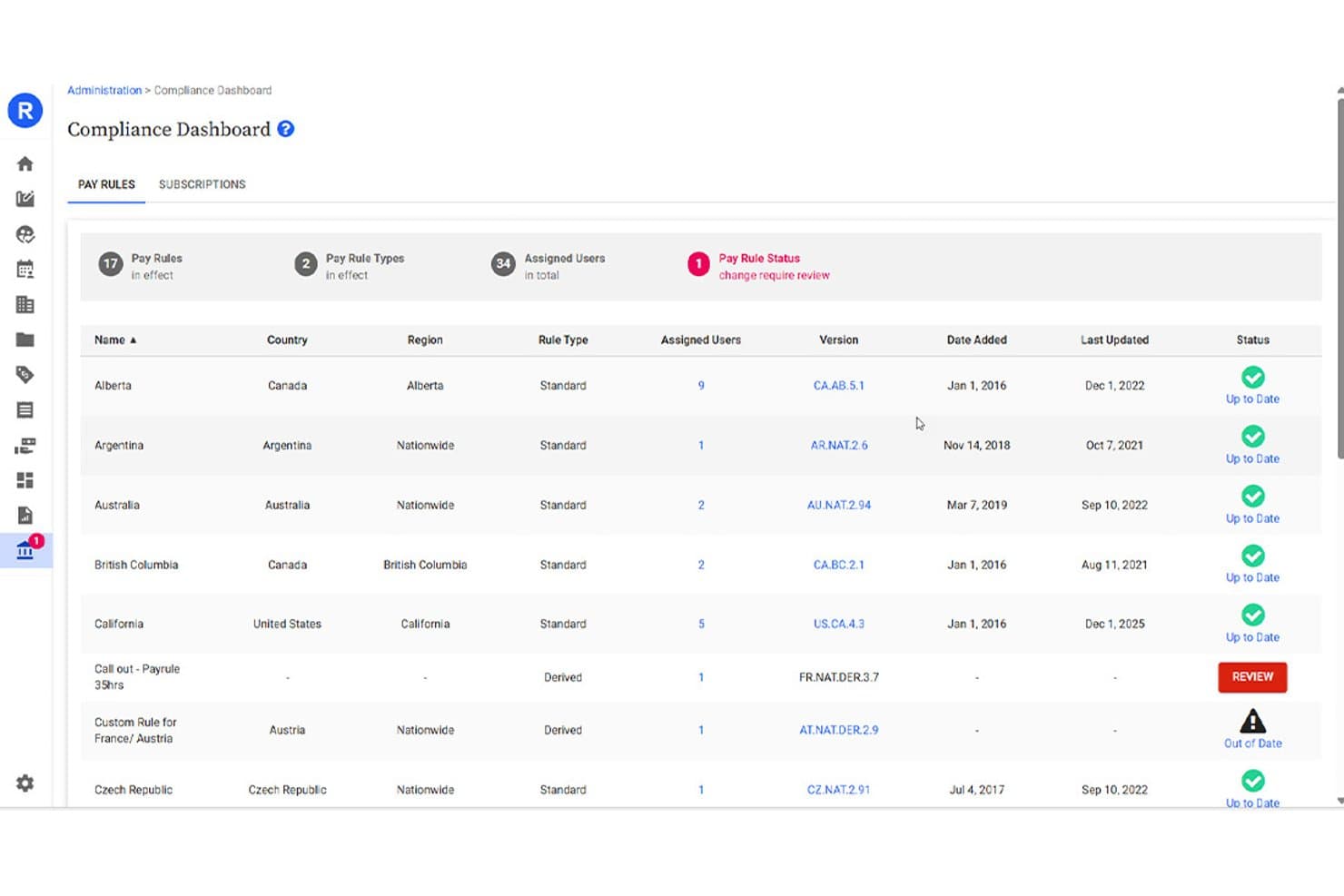
ADP Run tracks pay rule compliance status across multiple countries. ADP Run is small-business payroll and HR software with payroll processing, tax filing, direct deposit, and employee self-service; it advertises up to six months of free payroll rather than a standing free plan.
Who Is ADP Run Best For?
ADP Run suits small-business owners who want payroll automation and accountant access to payroll reports and general-ledger data.
Why I Picked ADP Run
I picked ADP Run as “Best for multi-jurisdiction payroll” because it handles employees working across multiple state or local jurisdictions in one pay period. It calculates, files, deposits, and reconciles payroll taxes, which helps when staff work across locations. Its offer of up to six months of free payroll is promotional, not a standing free plan.
ADP Run Key Features
- Electronic onboarding: New hires can enter personal information, direct-deposit details, and Form W-4 before their first day.
- Pay stub PDFs: Generate PDF pay stubs, paychecks, and direct-deposit vouchers for printing.
- AI timesheet import: Import employee hours from an existing timesheet file.
- Bill pay and client invoicing: Pay bills and invoice clients from the payroll platform.
ADP Run Integrations
ADP Run offers native general-ledger exports to QuickBooks, Xero, Wave, and Creative Solutions. An API is available for custom integrations.
What's Free?
ADP Run doesn’t offer a free-forever plan; it advertises up to six months of free payroll as a promotion. A free demo is available, and promotional terms may apply.
Pros and Cons
Pros:
- Employees access pay stubs and tax forms
- Payroll previews help catch errors before submission
- Automates multi-state tax calculations and filings
Cons:
- Timecard errors disrupt payroll workflows
- Local-jurisdiction handling can fall short
Learn more about ADP Run: Best for businesses already using Square POS
- Free demo available
- From $35/month + $6/person/month
Visit WebsiteCustomer Rating:4.2/5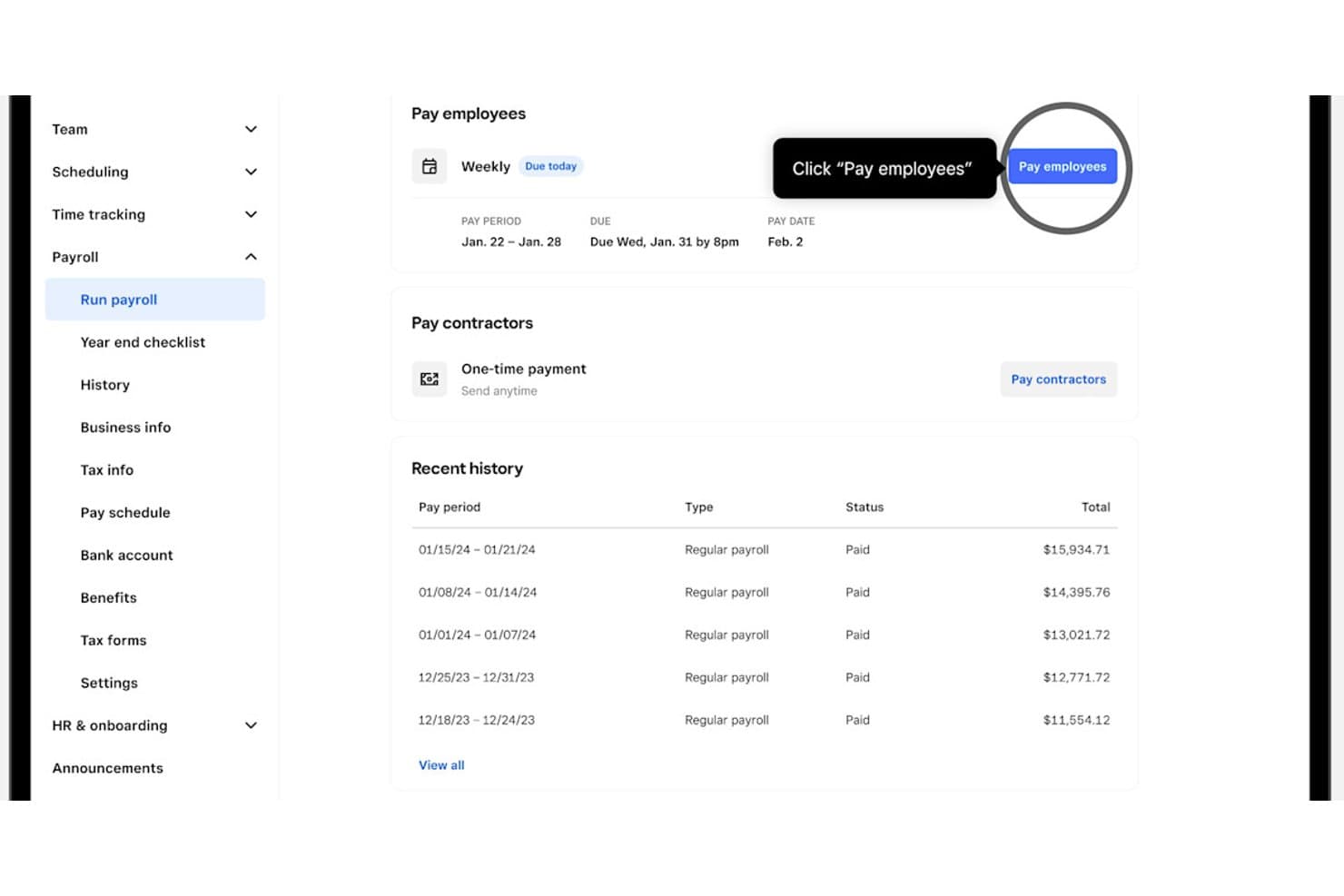
Square Payroll lets users run weekly payroll with one click. Square Payroll is a paid payroll platform, not a free payroll app, with employee and contractor payments, tax calculations and filings, timecard imports, and digital pay stubs.
Who Is Square Payroll Best For?
Small businesses with hourly staff can turn tracked hours and tips into payroll, with tax filings handled through the full-service plan.
Why I Picked Square Payroll
I picked Square Payroll for “Best for businesses already using Square POS”: it imports timecards and tips into payroll. Full-service payroll also calculates overtime and handles federal and state tax filings. It has no free Payroll plan, and the trial terms aren’t specified.
Square Payroll Key Features
- Flexible pay types: Pay employees hourly, by salary, or with custom amounts.
- Employee dashboard: Let team members view and download pay stubs and update personal details.
- Payment options: Pay by check, direct deposit, or Cash App.
- QuickBooks Online sync: Send payroll data to QuickBooks Online automatically or manually.
Square Payroll Integrations
Square Payroll has documented native integrations with Square POS, Square Team App, Cash App, and QuickBooks Online. Its total integration count and payroll-specific API availability aren’t stated.
What’s Free?
Square Payroll has no free-forever plan; paid plans start at $6 per person per month. It advertises a free trial and demo, but doesn’t specify the trial terms.
Pros and Cons
Pros:
- Employees can download detailed digital pay stubs
- Tips and overtime enter payroll calculations
- Users praise automated tax filing
Cons:
- Free-trial terms remain unclear
- No free-forever payroll plan
Learn more about Square Payroll: Best for accountants managing client accounts
- Free demo available
- Pricing upon request
Visit WebsiteCustomer Rating:4.2/5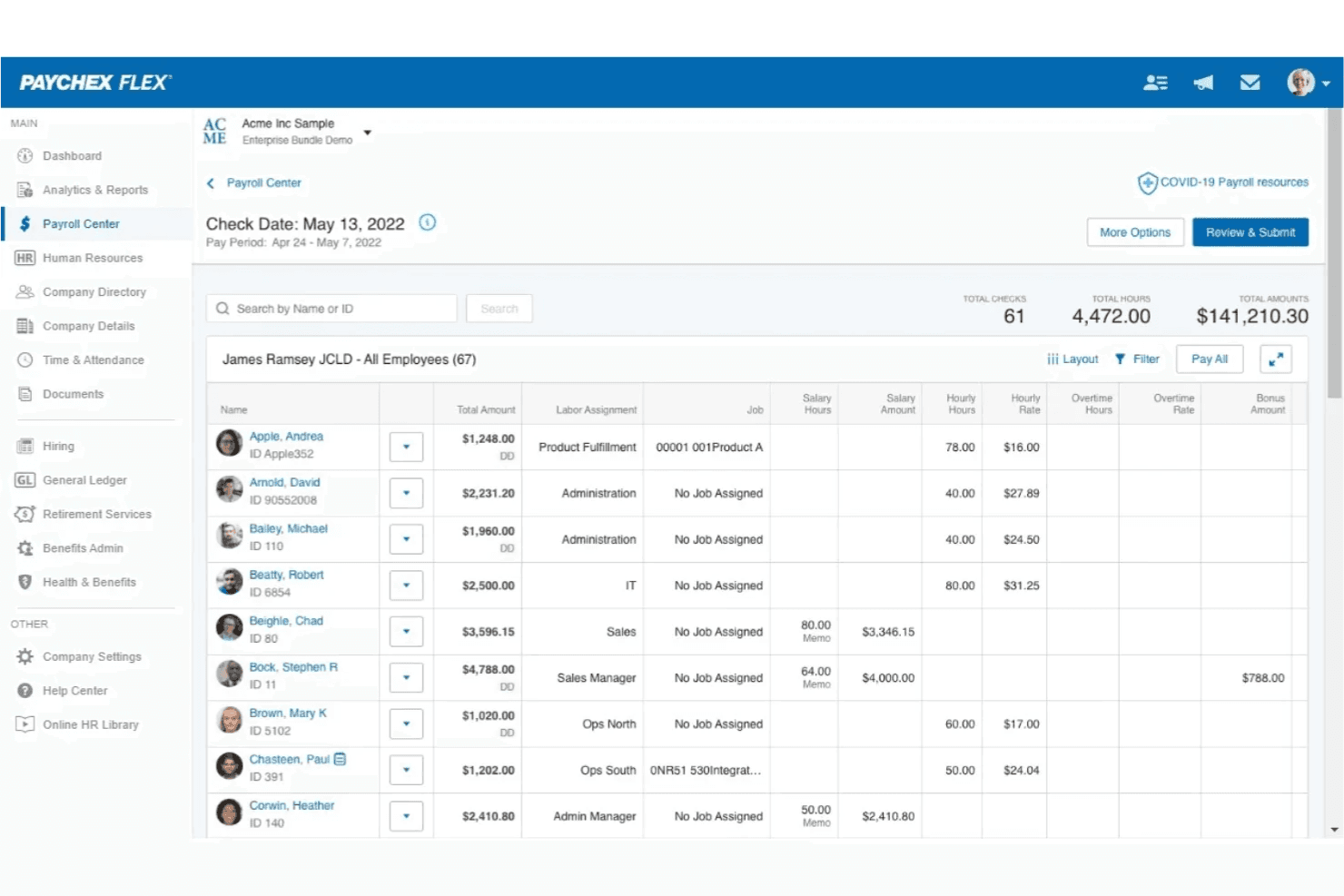
Paychex Flex lets users review employee payroll details before submission. Paychex is a quote-based payroll and HR platform, not a free payroll app, with automated wage and tax calculations, tax filing, employee pay-stub access, and payroll reporting.
Who Is Paychex Best For?
Accountants managing client accounts can use Paychex Partner Pro to access shared payroll and HR data through a centralized dashboard.
Why I Picked Paychex
I picked Paychex, best for accountants managing client accounts, because Partner Pro provides a centralized dashboard for shared client payroll and HR data, plus reporting. That helps accountants review payroll across multiple businesses. Paychex Flex automates wage and tax calculations, but it has no ongoing free plan, and its free mobile app requires an account.
Paychex Key Features
- Pay options: Pay employees by direct deposit, paper check, pay card, or tip disbursement.
- Year-end tax forms: Employees can access available W-2 and 1099 forms as digital documents.
- Digital onboarding: Assign new hires tasks for employment documents and onboarding activities.
- Mobile time clock: Employees can clock in and out with location tracking.
Paychex Integrations
Paychex lists marketplace integrations with Intuit QuickBooks, Sage Intacct, and Xero. It also offers a REST API for custom integrations.
What's Free?
Paychex doesn’t offer a free-forever payroll plan, but you can request a free demo. Its free mobile app requires a Paychex account and isn’t a standalone payroll app.
Pros and Cons
Pros:
- Accountants can oversee multiple client payrolls
- Employees access pay stubs independently
- Automated tax calculations reduce manual payroll effort
Cons:
- Users report tax filing errors and penalties
- No ongoing free payroll access
 Best for previewing payroll before paying
- Free demo + free plan available
- From $49/month + $6/user/month
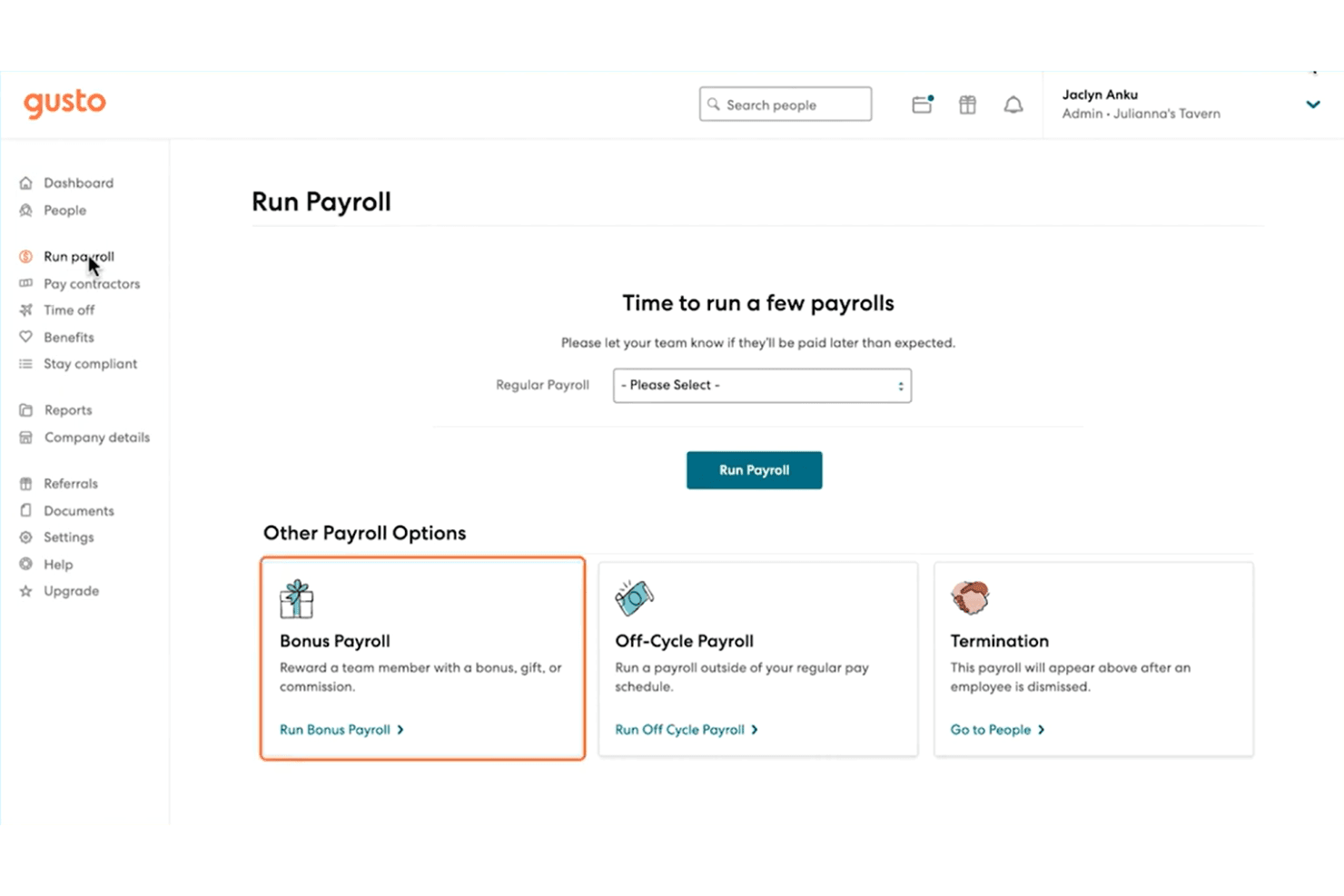
Gusto lets users run regular, bonus, or off-cycle payrolls easily. Gusto is a payroll app with free setup and platform exploration, followed by paid payroll processing for calculating wages and taxes, filing payroll forms, paying employees and contractors, and generating pay stubs and reports.
Who Is Gusto Best For?
Gusto suits small-business HR teams managing recurring payroll, tax filings, and employee records in one platform.
Why I Picked Gusto
I picked Gusto as Best for previewing payroll before paying: I can set up an account without a credit card and explore reporting and time-tracking features. Payroll approvals let me review a run before submission. Free access ends when payroll is processed, so it doesn’t cover ongoing payroll.
Gusto Key Features
- Payroll tax filing: Calculates and files payroll taxes and forms, including W-2s and 1099s.
- Pay calculations: Handles salary, tips, commissions, overtime, deductions, taxes, and reimbursements.
- Employee self-service: Employees can access pay stubs, W-2s, and paycheck details through their accounts.
- Accounting integrations: Syncs payroll details with QuickBooks Online or Xero.
Gusto Integrations
Gusto’s integrations directory lists 154 entries, including QuickBooks, Xero, and FreshBooks; payroll details can sync to QuickBooks Online and Xero. Gusto also offers an API for custom integrations.
What’s Free?
Gusto lets you set up an account and explore the platform without a credit card, but it isn’t a free-forever payroll plan. Free access ends when you process payroll, which requires payment.
Pros and Cons
Pros:
- Reviewers praise straightforward employee setup
- Review payroll before submitting runs
- Preview reports before running payroll
Cons:
- Reviewers report tax notices despite automation
- Free access excludes payroll processing
Learn more about Gusto:

HR.my breaks down salary, deductions, and net pay clearly. HR.my is a free payroll app with salary adjustments, payroll across four pay cycles, automatically generated payslips, Excel exports, and tools for attendance, leave, and expense claims.
Who Is HR.my Best For?
HR.my suits small-business owners who want no-cost payroll and day-to-day HR administration, with documented statutory contribution calculations for Malaysia.
Why I Picked HR.my
I picked HR.my as “Best for payroll without headcount limits” because its free-forever plan supports unlimited employees. I can run weekly, bi-weekly, semi-monthly, or monthly payroll and publish automatically generated payslips. For Malaysian teams, it also calculates statutory contributions, though employers still handle filings and wage payments.
HR.my Key Features
- Online time clock: Employees can clock in and out, with attendance records tracking overtime, undertime, and tardiness.
- Field check-in: Employees can record attendance with selfie and geolocation options.
- Leave approvals: Managers can review leave requests and check balances and schedules.
- Expense claims: Employees can submit claims with receipts for manager review.
HR.my Integrations
Native integrations are not clearly documented, and API availability isn’t stated.
What’s Free?
HR.my offers a free-forever plan with payroll for unlimited employees. Employers still handle statutory filings and wage payments, and native integrations aren’t clearly documented.
Pros and Cons
Pros:
- Reviewers praise time clock tracking
- Multiple payroll cycles and payslips
- Unlimited employee capacity
Cons:
- Reviewers report navigation and support frustrations
- No documented tax filing or remittance
Learn more about HR.my:
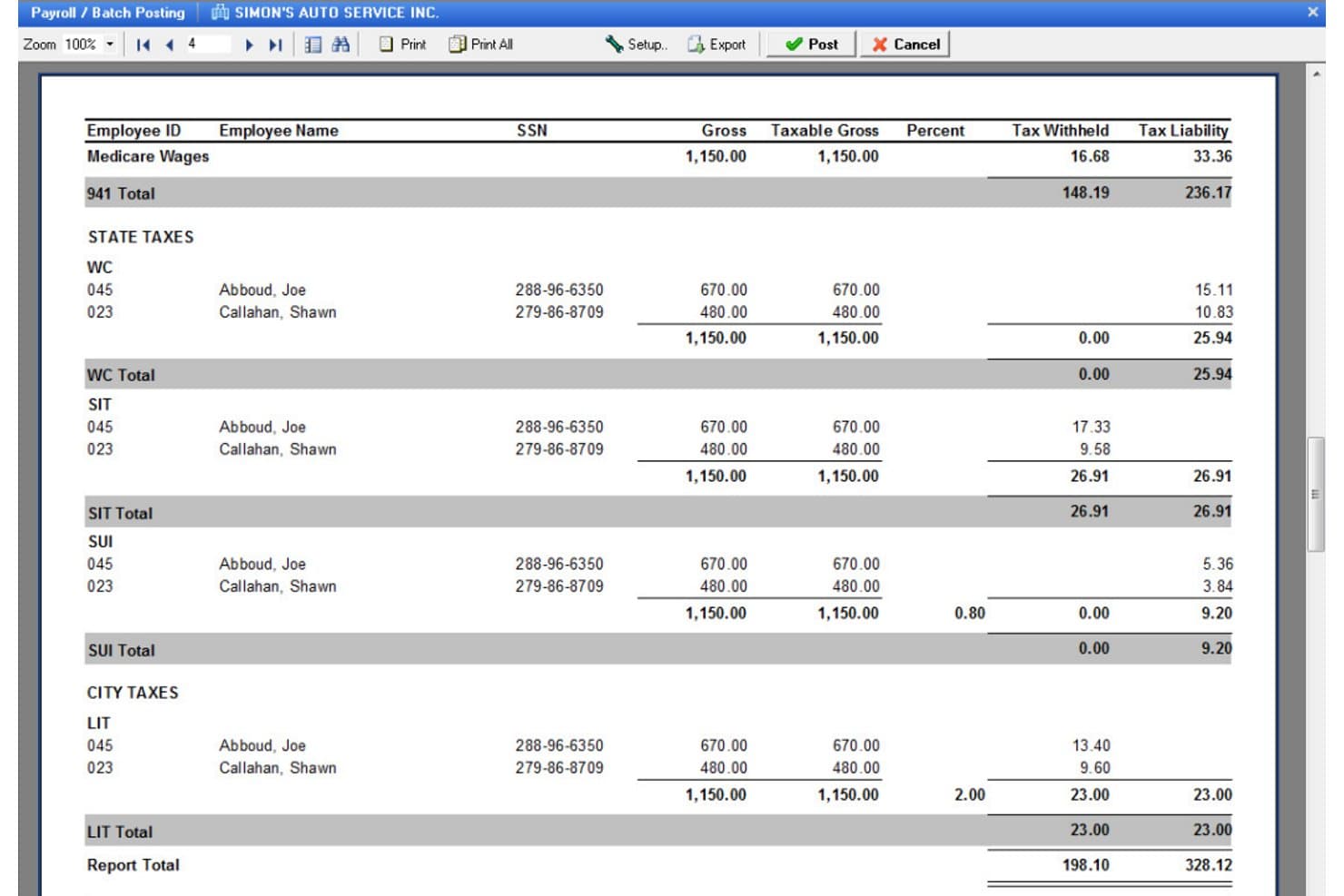
Payroll4Free breaks down state, city, and federal tax liabilities by employee. Payroll4Free is a free payroll app for small businesses that processes payroll, calculates taxes, generates pay stubs and reports, tracks paid time off, and supports employee and contractor payments by check or direct deposit.
Who Is Payroll4Free Best For?
Payroll4Free suits small businesses that want to run payroll in-house and handle tax filings themselves.
Why I Picked Payroll4Free
I picked Payroll4Free as Best for mixed W-2 and 1099 pay because it handles both worker types in one payroll system. I like that it calculates taxes on hourly or salary wages and supports payment by check or direct deposit through your bank. Tax calculations are included in the free basic service, but Payroll4Free’s tax filing service costs extra.
Payroll4Free Key Features
- PTO tracking: Tracks vacation, sick, and paid time off accruals using configured rules.
- Employee portal: Lets employees view pay information, reprint pay stubs and W-2s, and update personal details.
- Payroll reports: Provides reports for taxes, deductions, benefits, payroll journals, and accrued time.
- Payroll item setup: Supports configurable deductions, benefits, and contributions, including garnishments based on net pay.
Payroll4Free Integrations
Native integrations are not clearly documented; a third-party comparison reports QuickBooks data export, but the vendor doesn’t confirm a native integration. An API isn’t documented.
What's Free?
Payroll4Free offers a free-forever plan for businesses that pay nine or fewer employees monthly, with ads in the software. Tax calculations are included, but tax filing and direct deposit services cost extra.
Pros and Cons
Pros:
- Check printing and bank direct deposit
- Tax calculations reduce routine payroll arithmetic
- Handles W-2 employees and 1099 contractors
Cons:
- Reviewers report delayed support responses
- Tax filing still needs employer oversight
Learn more about Payroll4Free: Best for testing payroll before you pay
- 14-day free trial + free demo available
- From $39/month
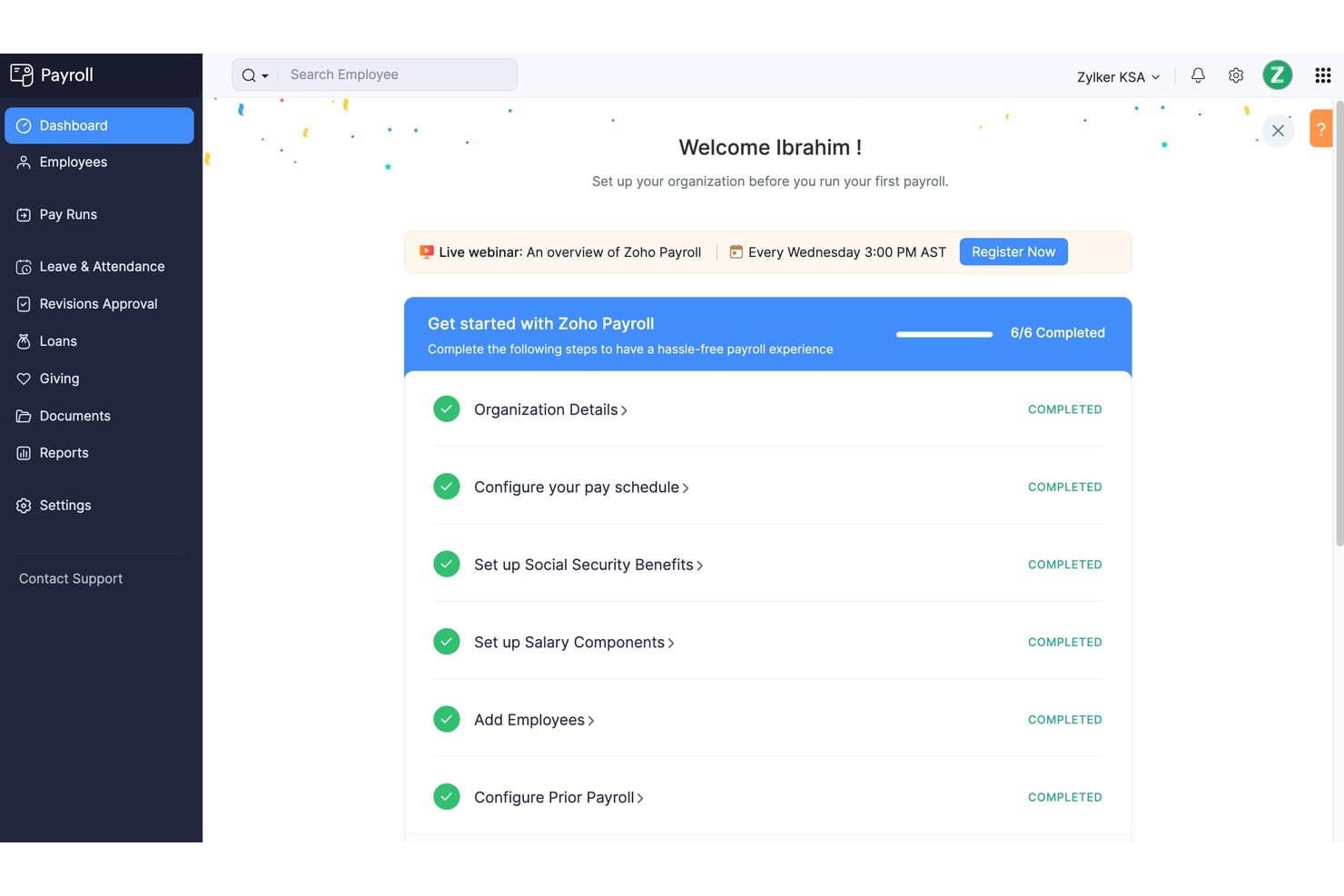
Zoho Payroll guides users through a six-step setup checklist. Zoho Payroll is a U.S.-focused payroll app with a 14-day free trial, covering employee pay calculations, tax withholding and filing, direct deposits, pay stubs, and payroll reports.
Who Is Zoho Payroll Best For?
It suits small U.S. employers managing hourly or salaried employee payroll, especially teams that want payroll entries posted to Zoho Books.
Why I Picked Zoho Payroll
I choose Zoho Payroll for the “Best for testing payroll before you pay” use case: its 14-day trial includes all features and requires no credit card. I can test employee setup and gross-to-net calculations, then review itemized pay stubs and payroll reports. There’s no free plan, and trial data is lost when access ends unless exported or converted to a paid plan.
Zoho Payroll Key Features
- Benefits management: Configure health insurance, retirement plans, garnishments, and payroll deductions.
- Paid time off: Set vacation and sick leave policies and track employee balances.
- Zoho Books integration: Post approved payroll journal entries and map payroll categories to accounts.
- Expense reimbursements: Pay employee business expense reimbursements alongside salaries through Zoho Expense.
Zoho Payroll Integrations
Zoho Payroll has two documented native integrations: Zoho Books, which posts payroll journal entries, and Zoho Expense, which supports paying employee expense reimbursements alongside salaries.
What's Free?
Zoho Payroll offers a 14-day free trial with all features and no credit card required, but it has no free-forever plan. Trial data is lost when access ends unless you export it or switch to a paid plan.
Pros and Cons
Pros:
- Employees can access itemized pay stubs
- Automated wage, tax, and deduction calculations
- Full payroll access during the trial
Cons:
- No ongoing free payroll plan
- Trial access ends after 14 days
Learn more about Zoho Payroll: Best for checking state tax rules before setup
- Not available
- From $50/month
Visit WebsiteCustomer Rating:4.4/5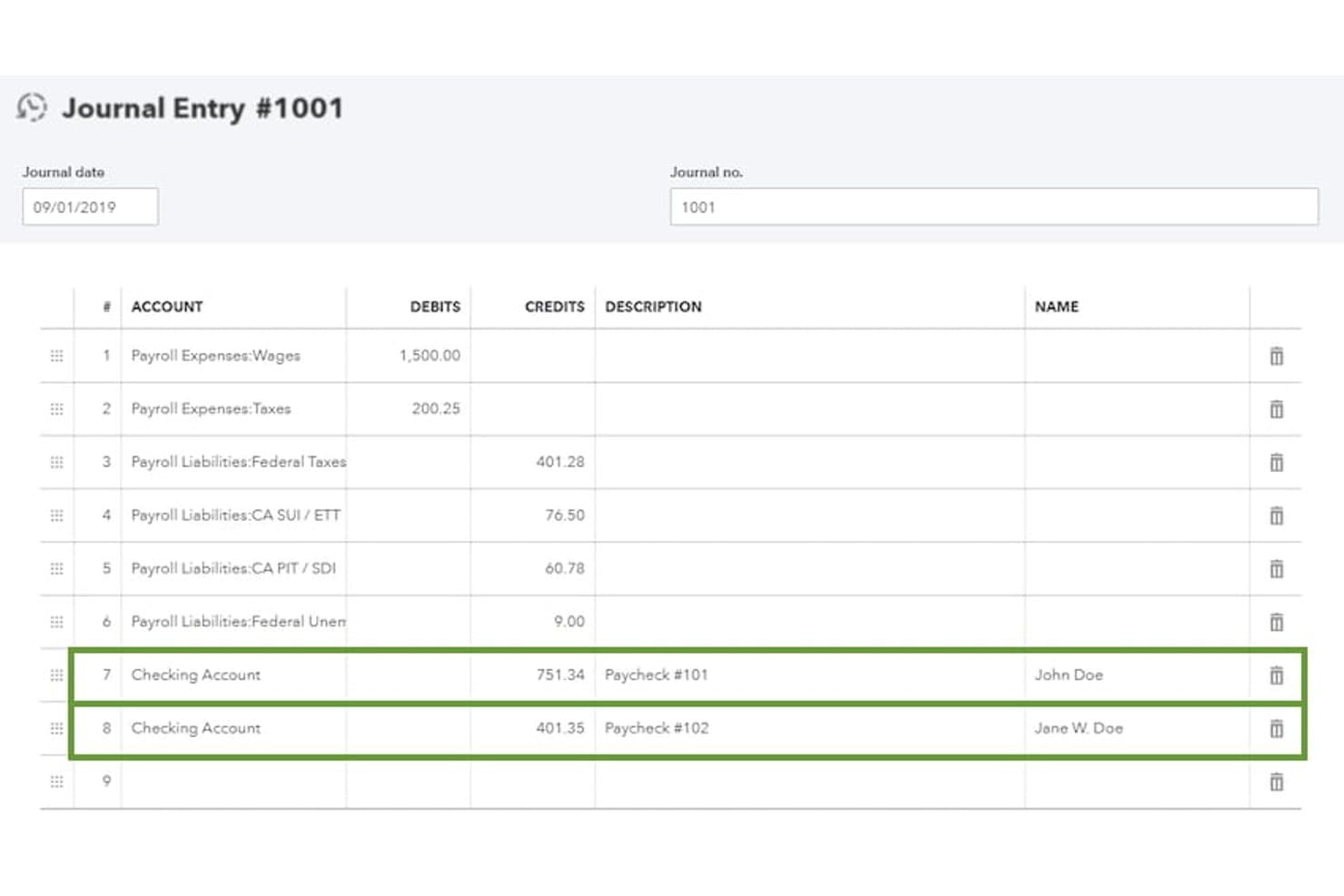
QuickBooks Payroll lets users manually enter payroll checks via journal entries. QuickBooks Payroll is a payroll platform with free paycheck estimates, a payroll glossary, and a tax map; payroll processing, tax filing, direct deposit, and reporting require a paid plan.
Who Is QuickBooks Payroll Best For?
Small-business owners can use QuickBooks Payroll’s tax map to review state requirements before configuring paid payroll.
Why I Picked QuickBooks Payroll
I picked QuickBooks Payroll for its free tax map, which makes it best for checking state tax rules before setup. I use it to review state payroll information and agency contacts, then estimate employee pay with the free calculator. These tools can inform planning, but actual payroll processing requires a paid plan.
QuickBooks Payroll Key Features
- Employee portal: Paid-plan employees can view pay stubs, W-2s, and year-to-date pay.
- Direct deposit: Paid plans offer next-day deposits, with same-day options on higher tiers.
- Payroll reports: Paid plans include reports on payments, taxes, deductions, and payroll summaries.
- Auto payroll: Paid plans can run payroll automatically for salaried employees on direct deposit after review and approval.
QuickBooks Payroll Integrations
QuickBooks Workforce syncs payroll, time-tracking, and accounting data with QuickBooks Online, and supports payroll transaction exports to QuickBooks Desktop and Quicken. An integration count and API availability aren’t stated.
What's Free?
QuickBooks Payroll has no free-forever payroll plan, but it offers a 30-day free trial and a free demo. Its tax map and paycheck estimator are free; payroll processing, tax filing, and direct deposit require a paid plan.
Pros and Cons
Pros:
- Paid payroll earns praise for tax filing
- Paycheck estimator handles overtime and bonuses
- Free tax map helps check state rules
Cons:
- Trial excludes per-employee fees and auto-renews
- Free tools cannot process or pay payroll
Learn more about QuickBooks Payroll: Best for partner accountants' free firm payroll
- 30-day free trial available
- From $49/month + $6/user/month
Visit WebsiteCustomer Rating:5/5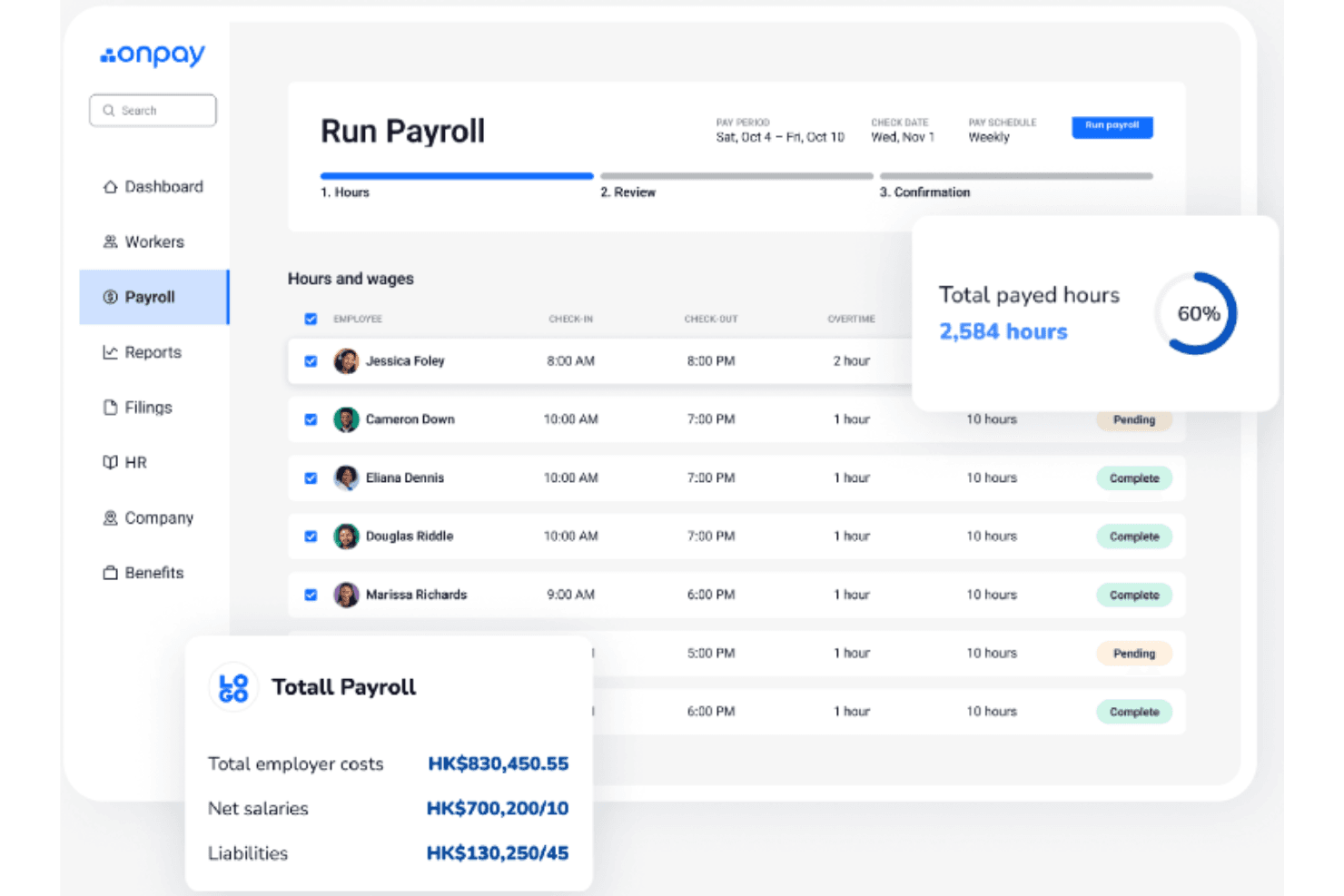
OnPay lets users run payroll and track hours and wages weekly. OnPay is a cloud-based payroll app with a one-month free trial that calculates pay and taxes, files payroll taxes, and supports W-2 employees, 1099 contractors, multi-state payroll, employee self-service, and reporting.
Who Is OnPay Best For?
OnPay suits partner accountants seeking free firm payroll, provided they have at least one client on its Partner Dashboard.
Why I Picked OnPay
I picked OnPay as “Best for partner accountants' free firm payroll” because partners with at least one client on the Partner Dashboard get payroll for their own firm at no charge. I like its dedicated accountant permissions and customizable chart-of-accounts mapping for managing client payroll records. Outside that partner offer, OnPay provides a free first month, not a general free plan.
OnPay Key Features
- W-2 and 1099 payroll: Pay employees and contractors in the same payroll.
- Multi-state tax filing: Calculate, withhold, file, and pay federal, state, and local payroll taxes.
- Employee self-service: Workers can access pay stubs and tax forms through an online portal and mobile app.
- Payroll reports: Filter payroll summaries and export them as PDF or XLSX files.
OnPay Integrations
OnPay has native integrations with QuickBooks Online, QuickBooks Desktop, and Xero, plus connections to QuickBooks Time, Deputy, and When I Work for time data. An API is available for custom integrations.
What's Free?
OnPay offers a free first-month trial, not a general free-forever plan. Partner accountants with at least one client on the Partner Dashboard can get payroll for their own firm at no charge.
Pros and Cons
Pros:
- Reviewers praise helpful onboarding support
- Employees retain access to pay stubs and tax forms
- Partner accountants receive conditional firm payroll
Cons:
- Some users report unresolved tax-filing issues
- No ongoing free plan for businesses
 Best for accountants with six-plus clients
- 30-day free trial + demo available
- From $17/month
Visit WebsiteCustomer Rating:5/5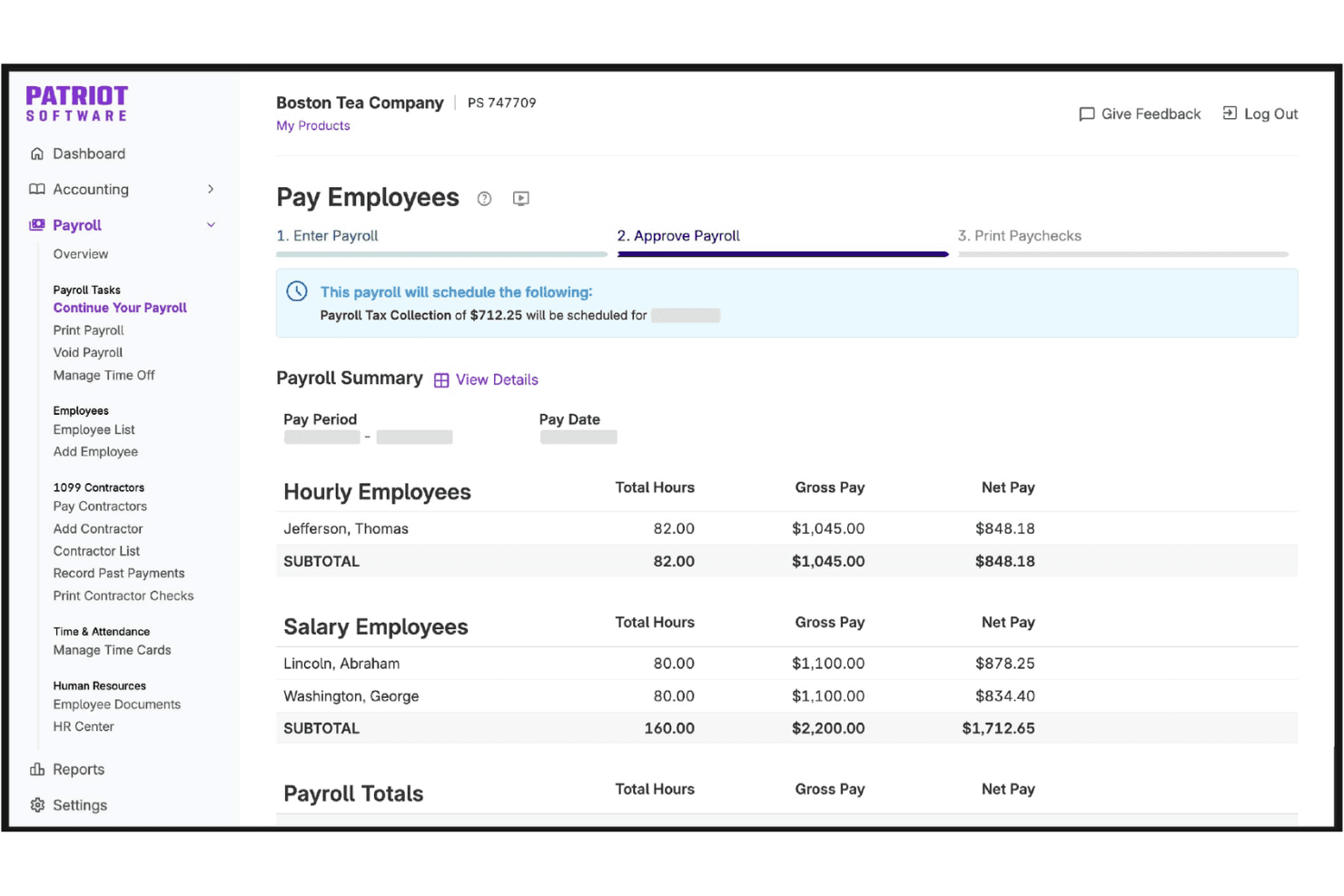
Patriot Payroll displays a payroll summary before final approval. Patriot Payroll is small-business payroll software with a 30-day free trial rather than an ongoing free plan, covering wage and tax calculations, employee and contractor payments, pay stubs, reports, and optional full-service tax filing.
Who Is Patriot Payroll Best For?
Patriot Payroll suits accountants with six-plus clients who need multi-client payroll management and partner discounts.
Why I Picked Patriot Payroll
I rate Patriot Payroll as a free payroll app pick, especially as Best for accountants with six-plus clients: partner firms with six active clients can use payroll software for their own firm free and manage client payroll through a partner dashboard. The standard product offers a 30-day trial, not an ongoing free plan.
Patriot Payroll Key Features
- Employee self-service portal: Employees can access pay stubs, W-2s, pay history, and direct-deposit settings.
- Direct deposit and checks: Pay employees and contractors by direct deposit or handwritten or printed check.
- Flexible pay items: Add overtime, bonuses, commissions, tips, deductions, and multiple pay rates.
- Payroll reports: Filter payroll details and export reports as PDFs or CSV files.
Patriot Payroll Integrations
Patriot Payroll connects with Patriot Accounting, QuickBooks Online, and QuickBooks Desktop for accounting workflows; QuickBooks Online sync covers W-2 employee payroll, not contractors. Marketplace integrations include SimplyInsured, Vestwell, and ERGO NEXT; no API availability or total integration count is stated.
What’s Free?
Patriot Payroll offers a 30-day free trial, not a free-forever plan. Accounting partners with six active clients can use payroll software for their own firm at no cost and manage client payroll through a partner dashboard.
Pros and Cons
Pros:
- Reviewers praise responsive support
- Approval previews show detailed payroll calculations
- Accountant partner dashboard supports client payroll
Cons:
- Reviewers report setup can take time
- Free access ends after 30 days
Learn more about Patriot Payroll:
Diğer Ücretsiz Bordro Uygulamaları
İşte kısa listeme girmeyen ancak yine de göz atmaya değer bazı ek ücretsiz bordro uygulaması seçenekleri:
- 11Deel PayrollBest for unifying payroll across worker types
- 12PaylocityBest for one-run multi-state payroll
- 13Paychex FlexBest for accountants hosting client payroll
- 14HomebaseBest for tracking labor against POS sales
- 15TimeTrexBest for tax estimates and California pay stubs
- 16PaycorBest for mid-year provider transitions
- 17RipplingBest for eligible US VC startup free access
- 18MicrokeeperBest for Australian award and EBA shift pay
How I Evaluate Free Payroll Apps
First, I define what counts as free. A payroll app needs a free-forever plan, not just a trial, though employee or feature limits may apply. From there, I evaluate three areas: core functionality, which carries the most weight, like calculating wages, taxes, and deductions and generating pay stubs; standout features, like time tracking; and how the free plan scales as teams grow.
Core Functionality (Table Stakes For This List)
In addition to my free plan requirements, I use a scoring system to select tools for my list. I score each one on a scale from 0 (does not offer the functionality) to 5 (excels in this area) for each core functionality listed below, based on what's available on the free plan. I then convert the total into a percentage to help assess each tool's overall fit, with extra weight on any functionalities I've deemed essential.
- Pay Calculations (Essential): I check whether the free plan calculates take-home pay, taxes, and deductions for common cases like hourly shifts and salaried roles.
- Pay Stubs: Stubs should clearly show earnings and deductions for each pay period, with digital or printable access for employees.
- Employee Self-Service: I look for employee logins that provide access to current and past pay stubs and related payroll documents.
- Wage Payments: I assess whether the free plan supports a practical way to pay employees or contractors, such as direct deposit.
- Payroll Reporting: Check for summaries of payroll runs, earnings, and deductions that help HR review records or share them with bookkeepers.
Once I have a list of tools that meet the criteria, I consider what sets each platform apart.
Differentiating Factors (What Sets Vendors Apart)
Here's how I compare and contrast different vendors:
Standout Features
I check whether a free plan generates year-end tax forms like W-2s and 1099s, since handling that in-house saves you from buying separate filing software. Built-in time tracking also matters—tools that convert timesheet hours directly into payroll runs cut out manual data entry and reduce errors for hourly teams. I also evaluate multi-state payroll support, which is essential if you have remote employees spread across different tax jurisdictions.
Beyond Features
I check whether a free plan actually files taxes or just calculates withholdings—some tools, like Payroll4Free, handle the math but leave you to submit forms yourself, which adds compliance risk if you don't have dedicated HR or accounting staff. I also look at team size caps, since exceeding a free tier's headcount limit mid-year can force an unplanned migration. That's where data portability matters: I evaluate whether a tool lets you export full payroll history so a future switch doesn't mean starting from scratch.
Ücretsiz Bordro Uygulaması Nasıl Seçilir?
Uzun özellik listeleri ve karmaşık fiyatlandırma yapıları arasında kaybolmak kolaydır. Kendinize özgü yazılım seçim sürecinizi yürütürken odaklanmanıza yardımcı olmak için göz önünde bulundurmanız gereken faktörleri içeren bir kontrol listesi hazırladık:
| Faktör | Dikkat Edilmesi Gerekenler |
| Ölçeklenebilirlik | Uygulama, büyüdükçe ekibinizi destekleyecek mi? Kullanıcı veya çalışan sınırlarını ve yükseltme seçeneklerini kontrol edin. |
| Entegrasyonlar | Muhasebe, İK veya zaman takip araçlarınıza bağlanıyor mu? Yalnızca CSV dışa aktarımlarını değil, yerel entegrasyonları da doğrulayın. |
| Özelleştirilebilirlik | Ücret ödeme takvimlerini, kesinti türlerini veya raporlama biçimlerini süreçlerinize uyacak şekilde ayarlayabilir misiniz? |
| Kullanım kolaylığı | Arayüz hem yöneticiler hem de çalışanlar için anlaşılır ve basit mi? Gerçek bordro senaryolarıyla test edin. |
| Uygulama ve işe alıştırma | Kurulumu ne kadar hızlı tamamlayabilirsiniz? Rehberli kurulum, veri içe aktarma seçenekleri ve işe alıştırma desteği sunan çözümleri tercih edin. |
| Maliyet | Vergi beyannameleri, doğrudan ödeme veya destek için gizli ücretler var mı? Fiyatlandırmanın tamamını inceleyin. |
| Güvenlik önlemleri | Uygulama, hassas bordro verilerini korumak için şifreleme, kullanıcı izinleri ve denetim izleri sunuyor mu? |
| Mevzuata uygunluk gereklilikleri | Uygulama, yerel, eyalet ve federal bordro düzenlemelerindeki güncel değişiklikleri takip etmenizi sağlayacak mı? |
Ücretsiz Bordro Uygulaması Nedir?
Ücretsiz bir bordro uygulaması, abonelik ücreti ödemeden çalışan ücretlerini hesaplamanıza, vergi kesintilerini yönetmenize ve bordro raporları oluşturmanıza olanak tanıyan yazılımdır. Bu araçlar, küçük işletmelerin veya ekiplerin bordro görevlerini otomatikleştirmesine, vergi düzenlemelerine uymasına ve tüm bunları ücretsiz olarak ücret bordroları oluşturmasına veya doğrudan ödeme yapmasına yardımcı olur.
Ücretsiz Bordro Uygulamasının Özellikleri
Bordro uygulaması çözümlerinde yaygın olarak bulunan özellikleri ve bunlardan hangilerinin genellikle ücretsiz ya da ücretli planlara dahil edildiğini inceleyelim.
Genellikle Ücretsiz Bordro Uygulaması Özellikleri
- Bordro hesaplamaları: Çalışılan saatlere veya maaşa göre her çalışan için brüt ücreti, kesintileri ve net ücreti otomatik olarak hesaplar.
- Ücret bordrosu oluşturma: Çalışanların kazançlarını ve kesintilerini incelemesi için dijital veya yazdırılabilir ücret bordroları oluşturur.
- Temel vergi hesaplamaları: Her ödeme dönemi için standart federal, eyalet ve yerel bordro vergilerini hesaplar.
- Doğrudan para yatırma desteği: Çek yazdırmadan çalışanlara doğrudan banka hesaplarına ödeme yapmanızı sağlar.
- Çalışanların kendi kendine hizmeti: Çalışanların güvenli bir portal üzerinden ücret bordrolarını, vergi formlarını ve kişisel bilgilerini görüntülemesini sağlar.
- Temel raporlama: Kayıt tutma ve uyumluluk amacıyla bordro özetleri ve vergi yükümlülüğü raporları gibi standart bordro raporları sağlar.
- Manuel çek yazdırma: Doğrudan para yatırma yöntemini kullanmayan çalışanlar için fiziksel maaş çekleri yazdırmanızı sağlar.
- Çalışan yönetimi: İletişim bilgileri, iş unvanları ve ücret oranları gibi temel çalışan bilgilerini saklar.
Genellikle Ücretli Bordro Uygulaması Özellikleri
- Otomatik vergi beyannamesi gönderme: Federal, eyalet ve yerel bordro vergilerinin sizin adınıza beyan edilmesini yöneterek manuel işi ve hata riskini azaltır.
- Yıl sonu vergi formları: Çalışanlar ve yükleniciler için W-2'leri, 1099'ları ve yıl sonunda gerekli diğer vergi belgelerini oluşturur ve gönderir.
- Çok eyaletli bordro desteği: Birden fazla eyalette veya yetki bölgesinde çalışan çalışanlar için bordroyu ve vergi uyumluluğunu yönetir.
- Özelleştirilebilir ödeme takvimleri: İşletmenizin ihtiyaçlarına uygun birden fazla ödeme sıklığı ve özel ödeme dönemi oluşturmanızı sağlar.
- Gelişmiş entegrasyonlar: İş akışlarını kolaylaştırmak için bordro verilerini muhasebe, insan kaynakları ve zaman takibi sistemlerine bağlar.
- Ücret haczi işlemleri: Nafaka veya vergi haczi gibi ücret hacizlerini otomatik olarak hesaplar ve işler.
- Gelişmiş raporlama ve analiz: Bordro eğilimlerini, maliyetleri ve uyumluluk ölçütlerini izlemek için özelleştirilebilir raporlar ve analizler sunar.
- Özel müşteri desteği: Telefon, sohbet veya özel hesap yöneticileri dahil olmak üzere öncelikli ya da canlı destek kanallarına erişim sağlar.
- Mobil bordro işlemleri: Mobil bir uygulama veya cihaz üzerinden bordro yürütmenize ve çalışan verilerini yönetmenize olanak tanır.
- Uyumluluk güncellemeleri: En güncel federal, eyalet ve yerel düzenlemeleri yansıtmak için vergi tablolarını ve uyumluluk kurallarını otomatik olarak günceller.
Ücretsiz Bordro Uygulamasının Avantajları
Ücretsiz bir bordro uygulamasını kullanıma almak ekibiniz ve işletmeniz için çeşitli avantajlar sağlar. Yararlanabileceğiniz avantajlardan bazıları şunlardır:
- Maliyet tasarrufu: Abonelik ücretlerini ortadan kaldırarak genel giderlerinizi artırmadan bordroyu yönetmenizi sağlar.
- Otomatik hesaplamalar: Her ödeme döneminde ücretleri, kesintileri ve vergileri otomatik olarak hesaplayarak manuel hataları azaltır.
- Daha hızlı bordro işlemleri: Doğrudan para yatırma ve toplu işlem gibi özelliklerle ödeme işlemlerini hızlandırır.
- Çalışanları güçlendirme: Çalışanların kendi kendine hizmet portalları üzerinden ücret bordrolarına ve vergi formlarına erişmesini sağlar.
- Düzenlemelere uyumluluk: Temel vergi hesaplamaları ve raporlama gereklilikleriyle uyumlu kalmanıza yardımcı olur.
- Kolay işe alıştırma: Sınırlı bordro deneyiminiz olsa bile hızlıca başlamanız için yönlendirmeli kurulum ve şablonlar sunar.
- Küçük ekipler için ölçeklenebilirlik: Hemen yükseltme yapmanızı veya ücretli planlara geçmenizi gerektirmeden küçük işletmeleri ya da büyüyen ekipleri destekler.
Bordro Uygulamasının Maliyetleri ve Fiyatlandırması
Bu makaleye ücretsiz olarak sunulan en iyi bordro uygulaması seçeneklerini arayarak geldiğinizi biliyorum. Ancak ücretsiz planlar yalnızca sınırlı özellikler sunduğundan, gelecekte planınızı yükseltmeniz gerekme ihtimali oldukça yüksektir.
Aşağıdaki tablo, bordro uygulaması çözümlerinde yaygın planları, bunların ortalama fiyatlarını ve genellikle dahil edilen özellikleri özetlemektedir:
Bordro Uygulaması için Plan Karşılaştırma Tablosu
| Plan Türü | Ortalama Fiyat | Yaygın Özellikler |
| Ücretsiz Plan | $0 | Temel bordro hesaplamaları, maaş bordrosu oluşturma, doğrudan para yatırma desteği, temel vergi hesaplamaları ve çalışanların kendi işlemlerini yapabilmesi. |
| Bireysel Plan | $5-$15/kullanıcı/ay | Tüm ücretsiz özelliklerin yanı sıra otomatik vergi beyannamesi gönderimi, yıl sonu vergi formları ve sınırlı entegrasyonlar. |
| İşletme Planı | $20-$40/kullanıcı/ay | Tüm bireysel özelliklerin yanı sıra birden fazla eyalette bordro işlemleri, gelişmiş raporlama, özel ödeme takvimleri ve öncelikli destek. |
| Kurumsal Plan | $40-$70/kullanıcı/ay | Tüm işletme özelliklerinin yanı sıra özel hesap yönetimi, gelişmiş uyumluluk araçları, özel entegrasyonlar ve geliştirilmiş güvenlik. |
Ücretsiz Bordro Uygulaması SSS
Ücretsiz bordro uygulaması hakkında sık sorulan soruların bazı yanıtları:
Ücretsiz bordro uygulamalarını kullanmak güvenli mi?
Evet, çoğu ücretsiz bordro uygulaması bordro verilerinizi korumak için şifreleme ve güvenlik protokollerini kullanır. Hassas bilgileri girmeden önce her zaman sağlayıcının gizlilik politikasını ve güvenlik sertifikalarını inceleyin.
Ücretsiz bir bordro uygulamasıyla birden fazla çalışan için bordro işlemi yapabilir miyim?
Evet, birçok ücretsiz bordro uygulaması birden fazla çalışan için bordro işlemi yapmanıza olanak tanır, ancak bazıları ekleyebileceğiniz kullanıcı veya çalışan sayısını sınırlayabilir. Herhangi bir kısıtlama olup olmadığını doğrulamak için her uygulamanın koşullarını kontrol edin.
Ücretsiz bordro uygulamaları vergi beyannamelerini otomatik olarak gönderir mi?
Hayır, çoğu ücretsiz bordro uygulaması yalnızca vergileri hesaplar ancak beyannameleri otomatik olarak göndermez. Genellikle vergi beyannamelerini kendiniz vermeniz veya otomatik gönderim için ücretli bir plana geçmeniz gerekir.
Ücretsiz bir bordro uygulamasının kapasitesini aşarsam ne olur?
Ekibiniz büyürse veya ihtiyaçlarınız daha karmaşık hale gelirse, genellikle birden fazla eyalette bordro işlemleri, otomatik vergi beyannamesi gönderimi veya entegrasyonlar gibi gelişmiş özellikler için ücretli bir plana geçebilirsiniz.
Ücretsiz bir bordro uygulamasını muhasebe yazılımımla entegre edebilir miyim?
Bazı ücretsiz bordro uygulamaları temel entegrasyonlar veya CSV dışa aktarımları sunar, ancak tam muhasebe entegrasyonları genellikle ücretli planlarla sınırlıdır. Bir çözüm seçmeden önce entegrasyon seçeneklerini inceleyin.