

Managing payroll can be a headache for any HR team. Whether it’s dealing with tax compliance, integration with other management systems, or just trying to find a tool that fits your business size, you face challenges daily. Maybe Onpay isn't meeting your needs, and you're exploring alternatives.
In my experience, finding the right payroll software is key to easing these frustrations. I’ve independently tested and reviewed various solutions to bring you the best Onpay competitors.
You’ll discover tools that might better align with your specific needs and offer payroll features or support that can make a real difference. This guide will help you make an informed decision for your team.
What is Onpay?
Onpay is a payroll software solution designed to simplify payroll processing and tax filing for small to mid-sized businesses. It's typically used by HR professionals who need efficient, user-friendly solutions to manage payroll and compliance.
Features like automated tax filing, employee self-service, and integration with accounting tools help reduce administrative burdens and ensure accuracy. Overall, Onpay offers value by making payroll management easier for your team.
OnPay Competitors Comparison Table
This comparison table outlines pricing and free trial options for my top OnPay competitors to help you find a solution that fits your budget and business needs.
| Tool | Best For | Trial Info | Price | ||
|---|---|---|---|---|---|
| 1 | Best for workforce scheduling needs | 30-day free trial + free demo available | From $80/month | Website | |
| 2 | Best for payroll-to-ledger syncing | Free demo available | Pricing upon request | Website | |
| 3 | Best for restaurant payroll with Square POS | Free demo available | From $35/month + $6/person/month | Website | |
| 4 | Best for benefits administration | Free demo available | From $49/month + $6/user/month | Website | |
| 5 | Best for integrated HR and IT solutions | Free demo available | Pricing upon request | Website | |
| 6 | Best for global payroll management | Free demo available | From $29/user/month | Website | |
| 7 | Best for advanced payroll processing | Free demo available | Pricing upon request | Website | |
| 8 | Best for global payroll automation | Free demo available | From $499/employee/month | Website | |
| 9 | Best for customizable payroll solutions | Free demo available | Pricing upon request | Website | |
| 10 | Best for small business payroll | Free demo available | Pricing upon request | Website |


Why Trust Our Software Recommendations
6,700+
Reviews
20
Industry experts
16+
Evaluation factors
14
Years
Our team has been testing and reviewing software since 2012. As HR experts ourselves, we know how difficult—and important—it is to choose the right software.
For this guide, we evaluated tools using hands-on testing and independent research, scoring tools using our selection criteria. We also draw on insights from industry thought leaders and practicing HR experts.
Our reviews reflect our human editorial judgment, not a sales pitch.
Expert reviewers:
- Phil GrayCOO
 Kim BehnkeHR Tech Editor & Analyst
 Josh BarkerPeople Ops Manager

Best Onpay Competitors Reviews
Below are my detailed summaries of the best Onpay competitors that made it onto my shortlist. My reviews offer a detailed look at the key features, pros & cons, integrations, and ideal use cases of each tool to help you find the best one for you.
 Best for workforce scheduling needs
- 30-day free trial + free demo available
- From $80/month
Visit WebsiteCustomer Rating:4.5/5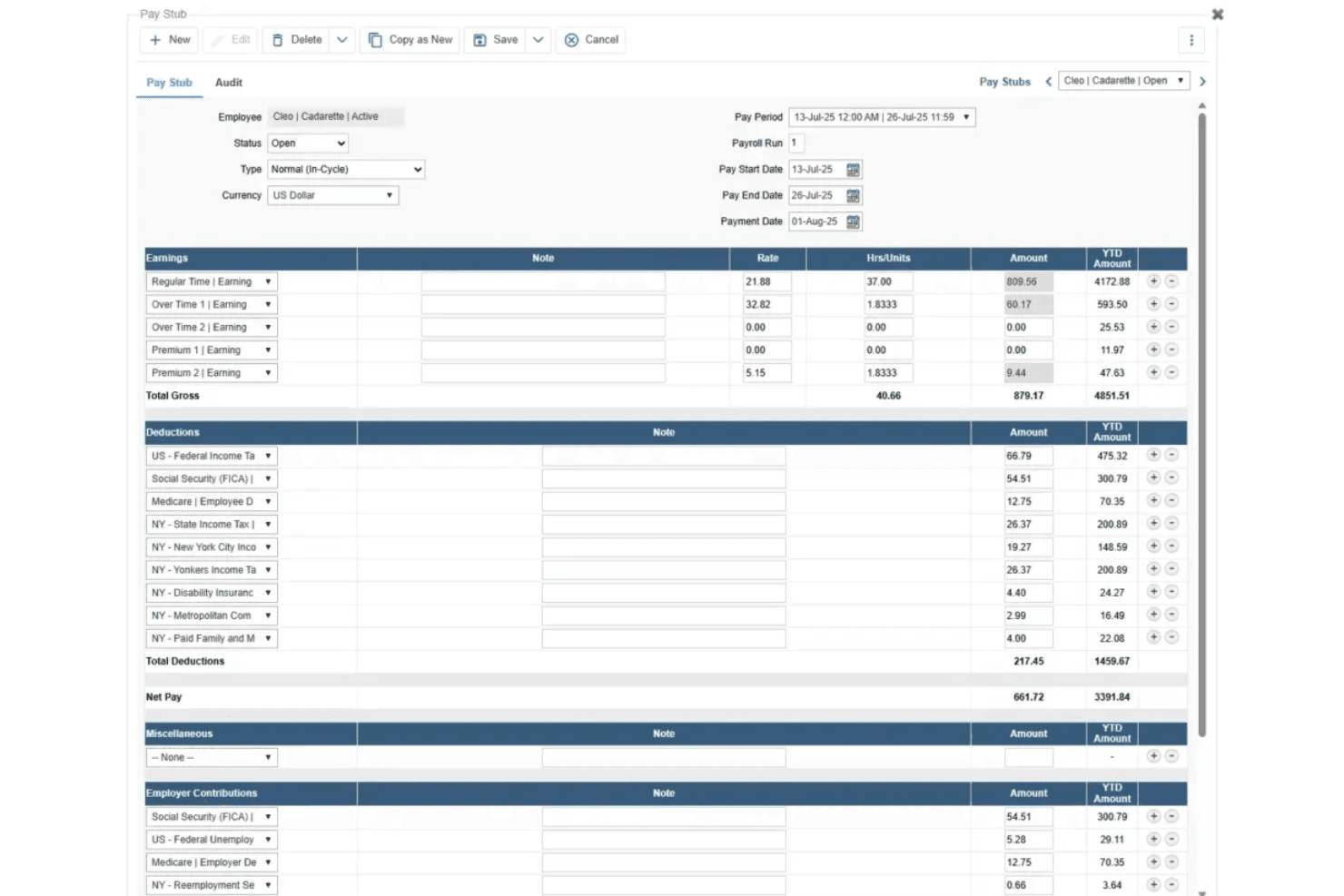
TimeTrex generates detailed pay stubs with earnings, deductions, and net pay. TimeTrex is a workforce management platform that combines time tracking, scheduling, and payroll in one system—making it a practical option for small business owners and payroll administrators who want attendance data and pay runs connected without toggling between tools.
Who Is TimeTrex Best For?
TimeTrex suits small business owners and payroll administrators who need time tracking and payroll connected in a single platform.
Why I Picked TimeTrex
I picked TimeTrex as one of the best because it's built around workforce scheduling in a way most payroll tools simply aren't. Its AI-assisted shift planning connects directly to time tracking and payroll, so a schedule change flows through to attendance records and pay calculations without manual re-entry. I also appreciate the native multi-week rotating schedule builder, which lets managers handle complex shift patterns, then see those hours feed straight into the payroll run.
TimeTrex Key Features
- Biometric facial recognition: Verifies employee identity at clock-in and clock-out using facial recognition through the time-clock tool.
- Multi-state payroll tax calculations: Calculates federal, state, and local tax withholding based on each employee's work and residence locations, including tax reciprocity handling.
- Employee self-service portal: Lets employees enter personal details, W-4 withholding information, and direct-deposit data, and view electronic pay stubs and tax forms.
- Customizable payroll deduction rules: Configures deduction formulas for benefits, insurance, garnishments, and leave accruals, with eligibility conditions assignable per employee.
TimeTrex Integrations
TimeTrex offers integrations with ADP, Intuit QuickBooks, Sage, Paychex, and Ceridian. It also provides a REST API for custom connections, plus CSV imports and scheduled report exports.
Pros and Cons
Pros:
- Reviewers praise helpful, knowledgeable customer support
- Time tracking and timesheets support payroll prep
- Connected attendance data reduces payroll reentry
Cons:
- Some reviewers describe setup as cumbersome
- Customers remain responsible for timely tax filings
Learn more about TimeTrex: Best for payroll-to-ledger syncing
- Free demo available
- Pricing upon request
Visit WebsiteCustomer Rating:4.5/5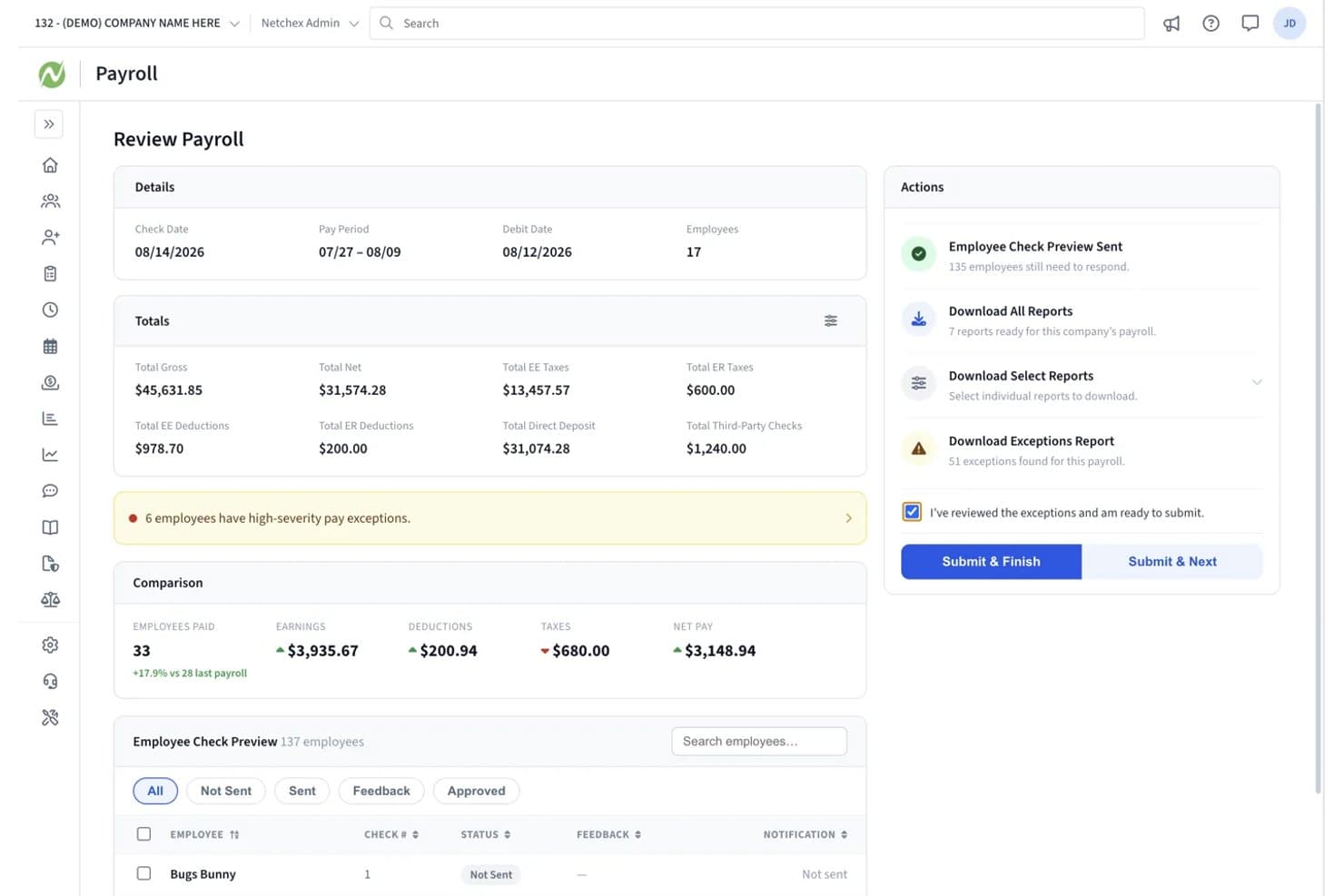
Netchex lets users review payroll totals and exceptions before submitting. Netchex is a payroll and HR platform built for U.S. businesses that need to automate payroll runs, tax filing, and employee payments while keeping HR, time tracking, and benefits administration in one place.
Who Is Netchex Best For?
Netchex is a strong fit for U.S.-based payroll administrators and accountants who need payroll data to sync automatically to their general ledger after every run.
Why I Picked Netchex
I've included Netchex in my top picks because of how cleanly it handles the payroll-to-general-ledger handoff. After each payroll run, journal entries sync automatically to QuickBooks Online, with earnings, taxes, deductions, and employer contributions mapped to the right GL accounts by department or location. Netchex also connects to 23 accounting platforms and can build a custom GL file format in under a day, so your books stay current without manual exports.
Netchex Key Features
- Paperless onboarding: New hires complete all documents online via a text or email link, with HR-managed checklists and automated reminders to track progress.
- Garnishment management: Netchex handles garnishment calculations, deductions, remittance, and reporting directly within payroll.
- ACA compliance tracking: The benefits platform tracks eligibility for full-time, part-time, and seasonal workers and files Forms 1094-C and 1095-C.
- Multi-state tax support: The payroll engine manages withholding, SUI assignments, and tax tables across all 50 U.S. states.
Netchex Integrations
Netchex documents 23 accounting-platform integrations, including QuickBooks Online, plus native Indeed and Employee Navigator integrations. Its API supports custom connections to employee, payroll, benefits, and time-and-attendance data.
Pros and Cons
Pros:
- Responsive support helps resolve questions
- Handles multiple rates and schedules
- Payroll runs save time
Cons:
- Slow loads and timeouts disrupt payroll work
- Users report state-tax deduction errors
Learn more about Netchex: Best for restaurant payroll with Square POS
- Free demo available
- From $35/month + $6/person/month
Visit WebsiteCustomer Rating:4.2/5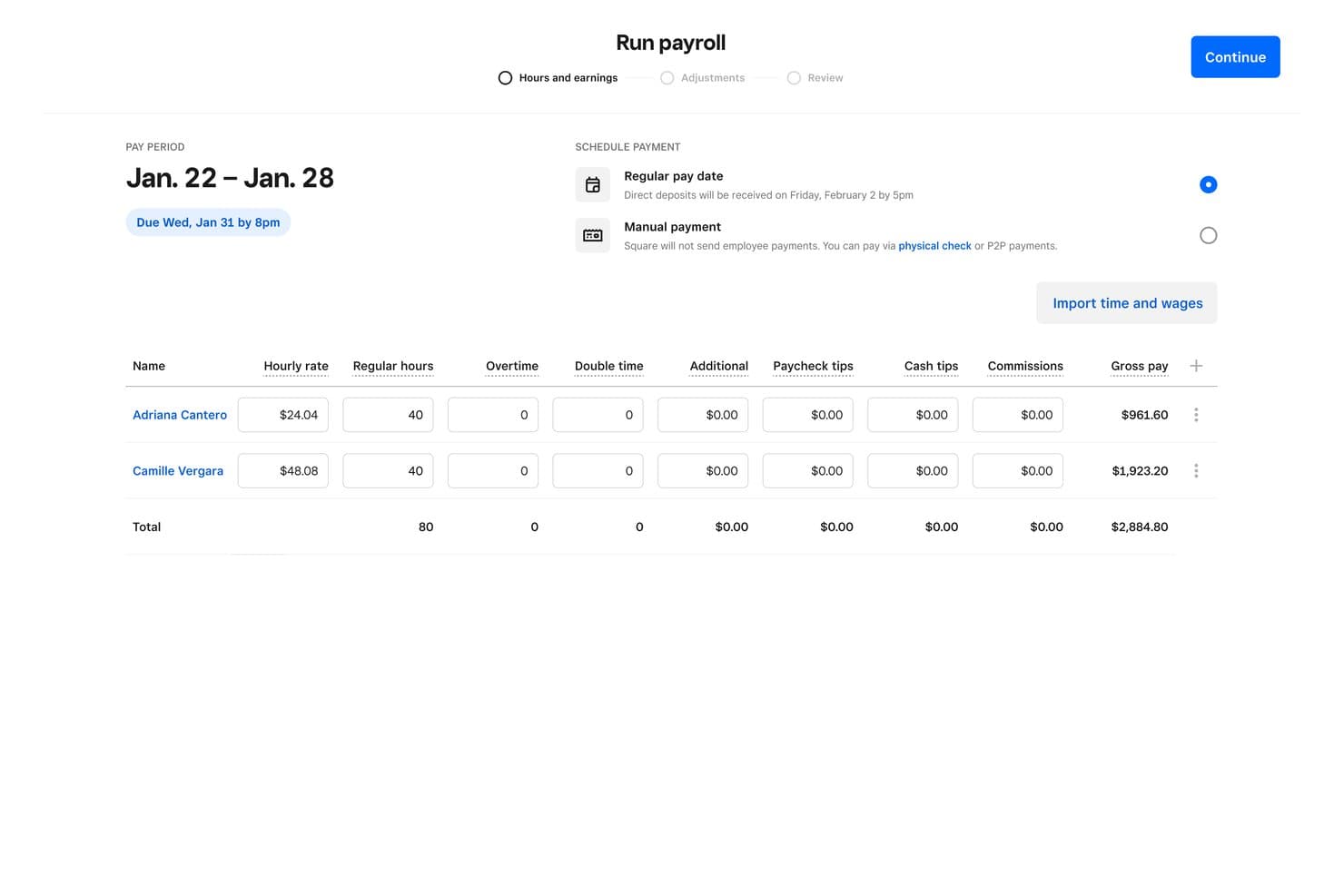
Square Payroll lets users review hours and gross pay before submitting payroll. Square Payroll is a payroll solution built for small businesses that run on Square's ecosystem, letting you automate tax filings, pay employees and contractors, and sync timecards and tips directly from Square POS.
Who Is Square Payroll Best For?
Square Payroll is a natural fit for small businesses in hospitality and retail that already use Square POS and need payroll to sync seamlessly with their timecards, tips, and hourly workflows.
Why I Picked Square Payroll
I picked Square Payroll because it's the only payroll solution I know of that pulls timecards, tips, and commission data directly from Square POS, so restaurant payroll practically runs itself. When auto payroll is enabled, it imports that shift data at 5 p.m. PT on the scheduled due date and processes without manual input. I also like that Square Payroll tracks and imports direct tips, which saves a real step for hospitality businesses paying tipped employees across multiple roles and rates.
Square Payroll Key Features
- Automatic tax filing: Square Payroll calculates, files, and remits federal and state payroll taxes automatically, and backs this with a penalty guarantee if an error is Square's fault.
- Multiple pay schedules: You can run payroll on weekly, bi-weekly, semi-monthly, or monthly schedules, with support for off-cycle payments when needed.
- Contractor payments: The contractor-only plan lets you pay 1099 contractors by check, direct deposit, or Cash App for $6 per person paid monthly, with no base fee.
- QuickBooks Online integration: Square Payroll syncs payroll data automatically with QuickBooks Online, keeping your books aligned without manual data entry.
Square Payroll Integrations
Square Payroll offers native integrations with Square POS, Square Team App, QuickBooks Online, Vestwell, SimplyInsured, and NEXT. Its documented connectivity is narrower than OnPay’s, with no documented Xero integration or open payroll API.
Pros and Cons
Pros:
- Employee self-service cuts employer data entry
- Tax filing automation earns reviewer praise
- Tipped-shift payroll reduces restaurant data entry
Cons:
- Support experiences vary across reviewers
- Historical payroll records require manual upload
Learn more about Square Payroll: Best for benefits administration
- Free demo available
- From $49/month + $6/user/month
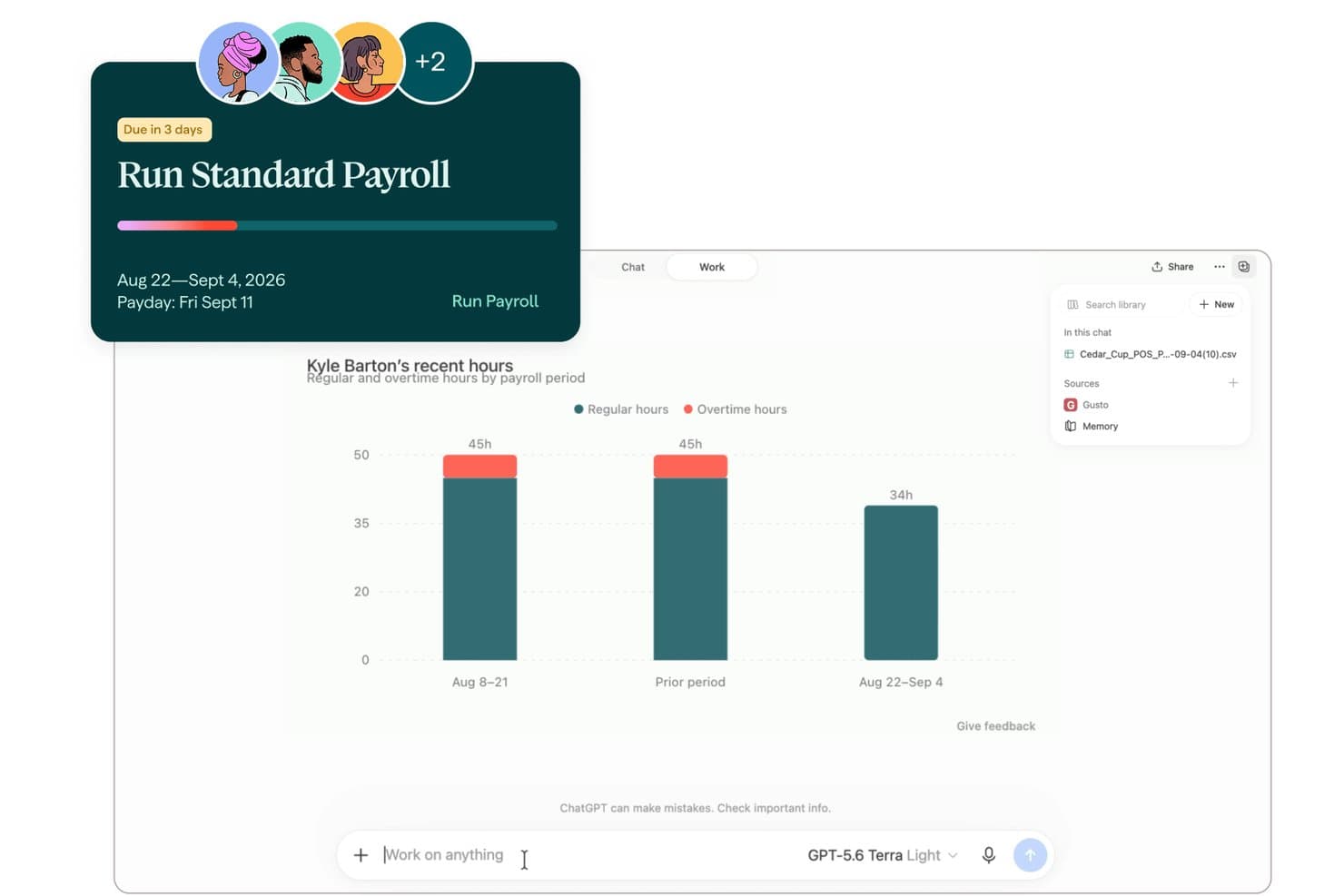
Gusto lets users run payroll and review employee hours by period. Gusto is a payroll platform built for small businesses that bundles automated payroll, tax filing, and employee benefits into one place—making it a strong fit for teams that want to manage pay, health insurance, and retirement contributions without juggling separate tools.
Who Is Gusto Best For?
Gusto is a strong fit for small businesses that want payroll, health insurance, and retirement benefits managed in one place without coordinating multiple vendors.
Why I Picked Gusto
I picked Gusto as one of the best because benefits administration is where it genuinely stands apart. I love that health insurance premiums and 401(k) contributions sync automatically with payroll, so there's no manual reconciliation between separate systems. Gusto also lets you offer HSAs, FSAs, dependent care FSAs, and commuter benefits all from one place, which is rare at this price point for small businesses.
Gusto Key Features
- Payroll on AutoPilot: Schedule payroll to run automatically on your chosen pay cycle, with a 24-hour window to review or cancel before it processes.
- Multi-state payroll support: Run payroll across all 50 states, with state tax registration assistance available through Business Compliance or a one-time Middesk registration service.
- Payroll activity log: Track every payroll change with a detailed log that records who made the change, when, and what action was taken—including edits, approvals, and reversals.
- Contractor payments: Pay domestic contractors through the same payroll platform, with international contractor payments to 120+ countries available as an add-on.
Gusto Integrations
Gusto’s directory displays 153 marketplace integrations, including QuickBooks Online, QuickBooks Desktop, Xero, Expensify, Homebase, Clover, and Checkr. Its RESTful API, OAuth2 authentication, webhooks, and React SDK support custom integrations.
Pros and Cons
Pros:
- Employees access pay records independently
- AutoPilot schedules routine employee payroll
- Benefits deductions sync with payroll
Cons:
- Tax filing follow-through draws complaints
- Support delays frustrate users
Learn more about Gusto: Best for integrated HR and IT solutions
- Free demo available
- Pricing upon request
Visit WebsiteCustomer Rating:4.9/5
Rippling unifies HR, IT, and finance to handle payroll and compliance efficiently Rippling is an all-in-one platform that combines HR, IT, and finance functions, making it ideal for medium to large enterprises with complex needs. It helps businesses manage payroll, employee data, and compliance from a single system.
Why it's a good Onpay alternative: Rippling offers integrated HR and IT solutions, which set it apart from Onpay. Its advanced automation helps you manage payroll and IT tasks efficiently. Rippling supports employee data management and device onboarding, useful for businesses with growing and distributed teams. This integrated approach offers scalability and efficiency not found in Onpay.
Standout Features & Integrations:
Features include automated onboarding and offboarding processes, device management to track and manage company hardware, and compliance tracking to ensure adherence to regulations. These features enhance your ability to manage HR and IT tasks smoothly.
Integrations include QuickBooks, Xero, Slack, Microsoft 365, Google Workspace, Zoom, Dropbox, Salesforce, Okta, and BambooHR.
Pros and Cons
Pros:
- Scalable for growing teams
- Automates administrative tasks
- Integrates HR and IT functions
Cons:
- Complex learning curve
- High costs for add-ons
 Best for global payroll management
- Free demo available
- From $29/user/month
Visit WebsiteCustomer Rating:4.9/5
Deel manages global payroll, compliance, and HR for distributed teams Deel is a global platform that provides payroll, compliance, and HR solutions for businesses managing international teams. It mainly serves companies looking to efficiently hire and manage remote employees.
Why it's a good Onpay alternative: Deel offers a comprehensive suite of tools for global payroll management. Features like compliance management, international hiring support, and HR services help businesses handle complex international payroll needs. Unlike Onpay, Deel specializes in managing payroll across multiple countries, providing access to local legal experts. This makes it ideal for companies expanding their global workforce.
Standout Features & Integrations:
Features include automated payroll processing for international teams, compliance tracking to ensure adherence to local regulations, and a centralized platform for managing employee contracts and payments. These features help you manage global payroll with ease and accuracy.
Integrations include QuickBooks, Xero, NetSuite, BambooHR, Greenhouse, Lever, Workable, SAP SuccessFactors, Gusto, and Slack.
Pros and Cons
Pros:
- Simplifies compliance management
- Access to local legal experts
- Supports international payroll
Cons:
- Limited customization options
- Complex for small businesses
Learn more about Deel Payroll: Best for advanced payroll processing
- Free demo available
- Pricing upon request
Visit WebsiteCustomer Rating:4.3/5
Paylocity delivers cloud-based HR and payroll solutions for mid-sized teams Paylocity is a cloud-based platform designed for businesses seeking comprehensive HR and payroll solutions. It serves mid-sized companies and helps manage payroll, benefits, and employee engagement.
Why it's a good Onpay alternative: Paylocity offers advanced payroll processing capabilities that cater to more complex business needs. It features custom reporting tools and real-time analytics that help you gain insights into payroll metrics. Paylocity’s employee self-service portal enhances user engagement, making it easier for teams to manage their own information. These features provide a level of depth and customization not typically found in Onpay.
Standout Features & Integrations:
Features include customizable dashboards that allow you to tailor the platform to your needs, automated compliance updates to keep your business aligned with regulations, and a mobile app that lets employees access their information on the go. These features enhance your team's ability to manage HR tasks efficiently.
Integrations include QuickBooks, Xero, Slack, Microsoft Teams, Google Workspace, Salesforce, BambooHR, ADP, Kronos, and NetSuite.
Pros and Cons
Pros:
- Strong employee engagement features
- Real-time analytics
- Advanced payroll customization
Cons:
- Higher cost for small businesses
- Steeper learning curve
 Best for global payroll automation
- Free demo available
- From $499/employee/month
Visit WebsiteCustomer Rating:4.4/5
Papaya Global tracks employer costs by country, category, and cost center. Papaya Global is a global payroll and workforce management platform built for teams managing employees across multiple countries, consolidating payroll processing, compliance, and payments into a single system.
Who Is Papaya Global Best For?
Papaya Global is a strong fit for HR and payroll teams managing employees across multiple countries who need a single platform to consolidate payroll, compliance, and payments.
Why I Picked Papaya Global
I picked Papaya Global as one of the best because it's the only tool on this list built specifically to consolidate payroll across 180+ countries into a single platform, handling local statutory rules, withholdings, and payments without requiring separate vendors per country. I particularly like its payroll calendar, which shows country-specific deadlines in one view and cuts payroll reruns in half. Its AI Validation Agent also flags gross-to-net mismatches before a payroll run, so errors don't slip through to disbursement.
Papaya Global Key Features
- Multi-country payroll operating models: Choose between in-house, managed, or hybrid payroll operations on a country-by-country basis, with the ability to switch models as your needs change.
- Employer of Record (EOR) coverage: Papaya acts as the legal employer in 180+ countries, taking on local contracts, statutory payments, benefits, and employment liability.
- Papaya Personal employee app: Workers access payslips, employment contracts, benefits information, and banking details through a mobile app available on iOS, Android, and web.
- ERP-ready journal entry automation: Workforce OS automatically generates journal entries mapped to your chart of accounts and syncs them to systems like NetSuite after payroll approval.
Papaya Global Integrations
Papaya Global offers documented integrations with Workday HCM, SAP SuccessFactors, NetSuite, BambooHR, and PrismHR. It also provides a REST API for custom integrations and supports data from HRIS, ERP, VMS, and time-and-attendance systems.
Pros and Cons
Pros:
- Employees access payslips and documents
- Users praise localized compliance guidance
- Consolidates payroll across many countries
Cons:
- Costs can outweigh value for smaller teams
- Payroll reruns and reports can be delayed
Learn more about Papaya Global: Best for customizable payroll solutions
- Free demo available
- Pricing upon request
Visit WebsiteCustomer Rating:4.2/5
Paychex Flex simplifies payroll, HR, and benefits management for diverse teams Paychex Flex is a cloud-based payroll and HR platform designed for businesses of all sizes looking to manage payroll, HR, and benefits. It serves companies seeking flexible and scalable solutions for their payroll needs.
Why it's a good Onpay alternative: Paychex Flex offers customizable payroll solutions that cater to diverse business requirements. Its comprehensive payroll processing and tax administration features help you manage payroll efficiently. Paychex Flex also provides employee self-service options to enhance user engagement. These features make it suitable for businesses that need adaptability and a wide range of payroll functions.
Standout Features & Integrations:
Features include time and attendance tracking to ensure accurate payroll calculations, benefits administration to manage employee benefits with ease, and HR analytics to provide insights into workforce data. These features help your team optimize HR and payroll operations.
Integrations include QuickBooks, Xero, Sage, BambooHR, NetSuite, Salesforce, Microsoft Dynamics, Kronos, TSheets, and Google Workspace.
Pros and Cons
Pros:
- Comprehensive tax administration
- Scalable for growing businesses
- Flexible payroll options
Cons:
- Higher cost for smaller businesses
- Complex initial setup
Learn more about Paychex Flex: Best for small business payroll
- Free demo available
- Pricing upon request
Visit WebsiteCustomer Rating:5/5
RUN Powered by ADP handles payroll, tax filing, and compliance for small teams RUN Powered by ADP is a payroll and HR solution tailored for small businesses seeking efficient and reliable payroll management. It helps manage payroll, tax filing, and compliance with ease.
Why it's a good Onpay alternative: RUN Powered by ADP offers tailored payroll services specifically for small businesses. Its payroll processing and tax filing features are designed to be user-friendly, ensuring you can handle payroll with minimal hassle. The platform also provides compliance support to keep your business aligned with regulations. These features make it a great fit for small businesses looking for a straightforward payroll solution.
Standout Features & Integrations:
Features include payroll tax calculations to ensure accuracy in tax filings, employee access to pay stubs and tax forms, and compliance alerts to keep you informed of changes in regulations. These features help you maintain control over payroll and compliance tasks.
Integrations include QuickBooks, Xero, ZipRecruiter, Slack, Microsoft Teams, Wave, Clover, Deputy, Homebase, and TSheets.
Pros and Cons
Pros:
- Strong compliance support
- Reliable payroll processing
- Easy for small businesses
Cons:
- Basic plan lacks customization
- Limited advanced features
Learn more about RUN Powered by ADP:
Other Onpay Competitors
Here are some additional Onpay competitors that didn’t make it onto my shortlist, but are still worth checking out:
- 11Patriot PayrollBest for small business affordability
- 12DayforceBest for continuous payroll processing
- 13HomebaseBest for team scheduling and communication
- 14PrimePayBest for compliance-focused payroll
- 15Wave PayrollBest for payroll that syncs with Wave invoicing
- 16QuickBooks WorkforceBest for ADP and Gusto payroll migration
How I Evaluate OnPay Competitors
I split my evaluation into three parts. First, core functionality: a tool needs to run payroll automatically and file taxes across all jurisdictions—this carries the most weight. Second, I look for standout features like transparent flat pricing or a tax penalty guarantee. Third, I consider support, onboarding, and pricing value.
Core Functionality (Table Stakes For This List)
When I'm selecting tools for my list, I score each one on a scale from 0 (does not offer the functionality) to 5 (excels in this area) for each core functionality listed below. I then convert the total into a percentage to help assess each tool's overall fit, with extra weight on any functionalities I’ve deemed essential.
- Payroll Processing (Essential): I look for recurring payroll that calculates wages and deductions for hourly and salaried staff, handles direct deposits, and supports off-cycle payments.
- Tax Filing (Essential): I assess whether the tool calculates, files, and remits payroll taxes across applicable jurisdictions, including year-end forms and penalty protections.
- Employee Self-Service: I check whether employees can access pay stubs and tax forms, update personal or banking details, and view records on mobile.
- Benefits Administration: I look for benefit setup and deduction management, plus carrier connections that keep enrollment and payroll deductions in sync.
- Multi-State Payroll: For teams spread across locations, I evaluate payroll processing, tax setup, and compliance support across multiple states.
- New Hire Reporting: I check whether the platform submits new-hire reports to the right agencies and provides confirmation as part of hiring workflows.
Once I have a list of tools that meet the criteria, I consider what sets each platform apart.
Differentiating Factors (What Sets Vendors Apart)
Here's how I compare and contrast different vendors:
Standout Features
I look for a tax penalty guarantee, where the provider covers penalties caused by their filing errors. This matters most for small teams without in-house tax expertise. I also evaluate pricing transparency—a flat base fee plus per-employee cost with no hidden charges for multi-state filing or year-end forms. Finally, I check whether each platform assigns a dedicated support specialist rather than routing you through a generic queue, since that speeds up onboarding and resolves payroll issues faster.
Beyond Features
I check how each platform handles migration—whether it offers guided historical data imports or hands-on setup help, since switching mid-year from a legacy system can delay your first payroll run. Integration depth matters too; a QuickBooks or Xero sync that actually keeps deduction categories aligned saves your bookkeeper hours of reconciliation each pay period. I also evaluate support accessibility, looking for extended hours and a named contact rather than a ticket queue, because payroll questions rarely wait until Monday.
Why Look For An Onpay Alternative?
While Onpay is a good choice of payroll software, there are a number of reasons why some users seek out alternative solutions. You might be looking for an Onpay alternative because…
- You need support for international payroll
- Your team requires more advanced reporting
- You want better integration with existing tools
- You need more customization options
- Your business is outgrowing its capabilities
- You require enhanced compliance management
If any of these sound like you, you’ve come to the right place. My list contains several payroll software options that are better suited for teams facing these challenges with Onpay and looking for alternative solutions.
Onpay Key Features
Here are some of the key features of Onpay, to help you contrast and compare what alternative solutions offer:
- Full-Service Payroll: Manages unlimited pay runs, tax filings, and payments for W-2 and 1099 workers.
- Direct Deposit: Automates employee payments, making it easier for you to ensure timely disbursement.
- Hiring and Onboarding: Simplifies the recruitment and employee onboarding process, allowing your team to comply easily with new hire regulations.
- Health Insurance Management: Assists with employee healthcare benefits, providing your team with necessary coverage options.
- Built-in Reporting: Provides payroll insights through reports that can help you analyze payroll data effectively.
- PTO Management: Tracks paid time off for employees, ensuring your team can manage leave requests and accruals.
- 401(k) Retirement Plans: Supports retirement savings options, allowing your team to plan for the future.
- Mobile Friendly: Accessible on mobile devices, enabling you to manage payroll on the go.
- Employee Self-Service: Empowers employees to manage their information, reducing administrative burdens.
- Workers’ Compensation: Manages workers' comp insurance, ensuring compliance and protection for your team.