


Intuit Enterprise Suite mod Microsoft Dynamics 365 Business Central: Sammenligning og anmeldelser for 2026


HR and operations teams often feel the impact when finance, payroll, inventory, reporting, and approvals don’t work well together. As the organization grows, disconnected workflows can make it harder to manage day-to-day admin work, track performance, and keep teams aligned.
Intuit Enterprise Suite and Microsoft Dynamics 365 Business Central are both business management software options for growing organizations. Intuit Enterprise Suite focuses on connected finance, payroll, payments, reporting, and administrative operations through the Intuit ecosystem, while Business Central supports broader business processes across finance, sales, service, projects, inventory, and operations.
In this comparison, I’ll break down their features, pricing, pros and cons, security, ease of use, and ideal use cases to help you decide which platform fits your organization best.
Intuit Enterprise Suite vs. Microsoft Dynamics 365 Business Central: An Overview
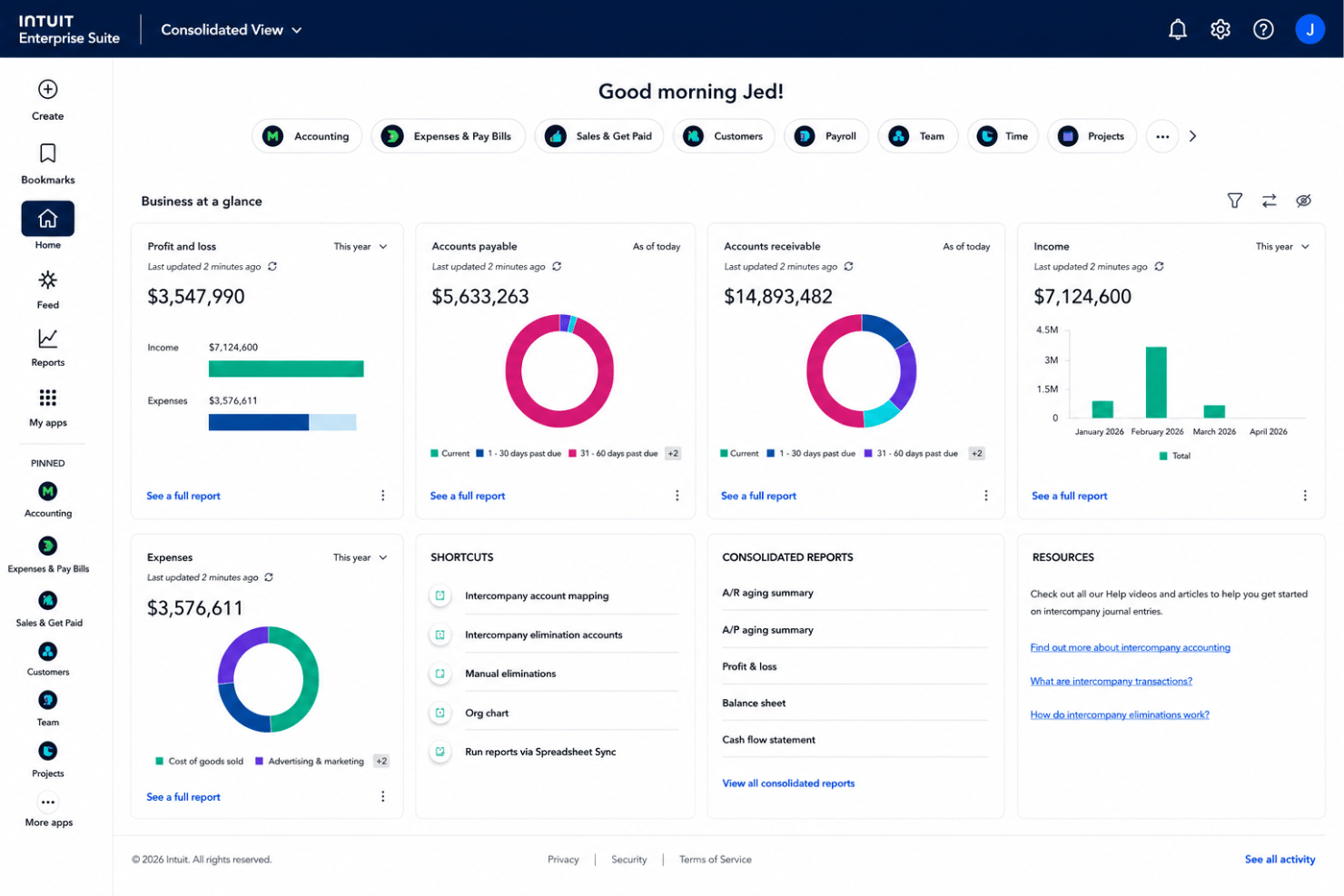
Intuit Enterprise Suite
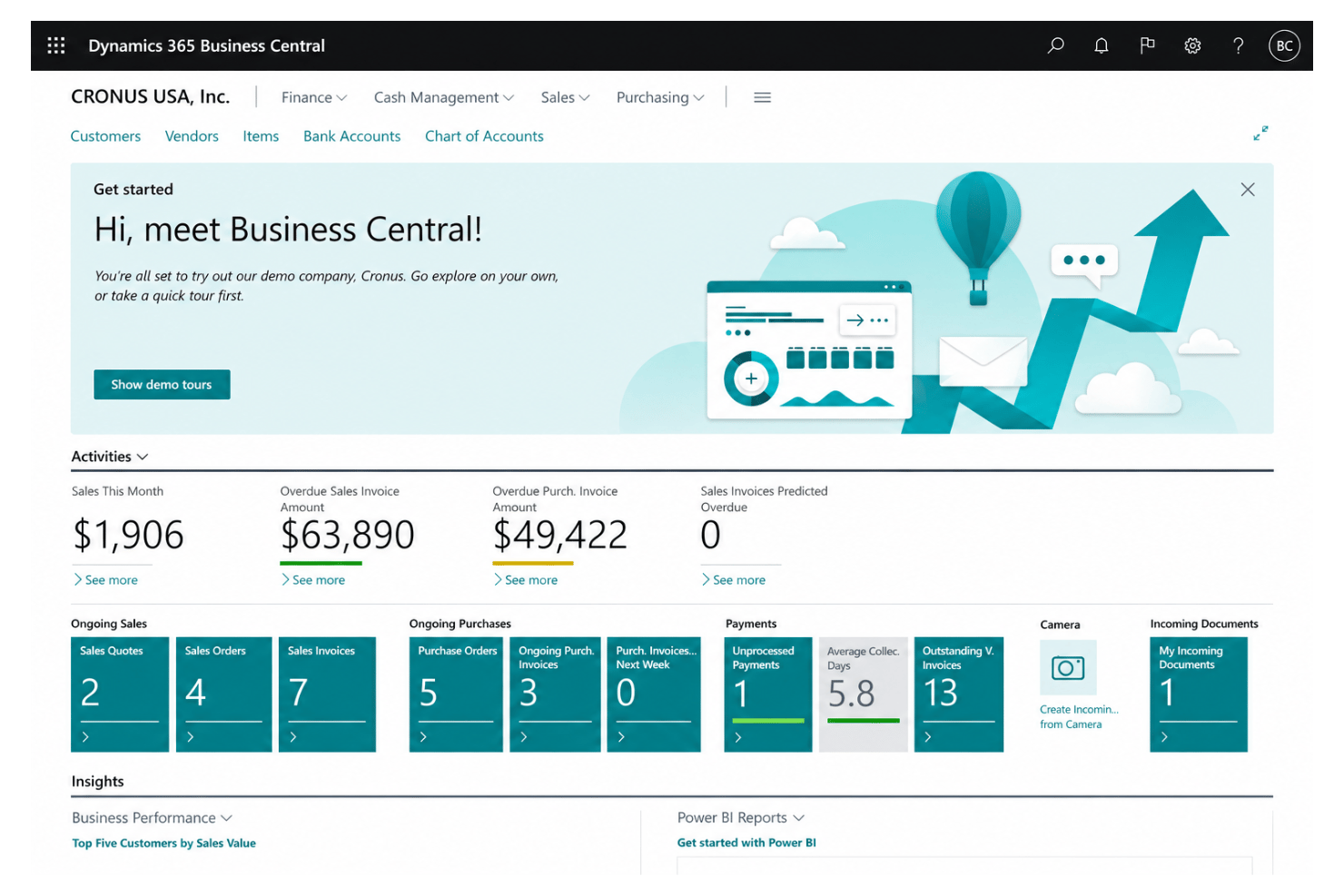
Microsoft Dynamics 365 Business Central

Why Trust Our Software Recommendations
Our team has been testing and reviewing software since 2012. As HR experts ourselves, we know how difficult—and important—it is to choose the right software.
For this guide, we evaluated tools using hands-on testing and independent research, scoring tools using our selection criteria. We also draw on insights from industry thought leaders and practicing HR experts.
Our reviews reflect our human editorial judgment, not a sales pitch.
Expert reviewers:
Intuit Enterprise Suite vs. Microsoft Dynamics 365 Business Central Pricing Comparison
| Intuit Enterprise Suite | Microsoft Dynamics 365 Business Central | |
|---|---|---|
| Free Trial | Free demo available | Free plan available |
| Pricing | Pricing upon request | From $80/user/month (billed annually) |
Priser og skjulte omkostninger ved Intuit Enterprise Suite sammenlignet med Microsoft Dynamics 365 Business Central
Intuit Enterprise Suite anvender brugerdefinerede, tilbudsbaserede priser, så omkostningerne afhænger af organisationens størrelse, de valgte funktioner, antallet af brugere, juridiske enheder, implementeringsbehov, integrationer og supportkrav. Microsoft Dynamics 365 Business Central anvender en mere struktureret abonnementsmodel med separate abonnementer baseret på brugeradgang og det nødvendige funktionsniveau, herunder bredere funktioner til virksomhedsstyring og muligheder for brugere med begrænset adgang.
Hvad angår skjulte omkostninger, kan begge platforme kræve et ekstra budget til implementering, datamigrering, oplæring, tilpassede arbejdsgange, tredjepartsintegrationer, premiumsupport og løbende systemkonfiguration. Business Central kan være lettere at estimere på forhånd, fordi abonnementsstrukturen er offentligt tilgængelig, mens Intuit Enterprise Suite kræver et skræddersyet tilbud. For at sammenligne begge løsninger korrekt bør teams bede om en fuld omkostningsoversigt, der omfatter opsætning, support, integrationer, tilføjelser og langsigtede behov for administration.
Intuit Enterprise Suite vs. Microsoft Dynamics 365 Business Central Feature Comparison
<div class="slate-p slate-selectable" data-slate-node="element" data-block-id="eGdf2p4upz" data-slate-fragment="JTVCJTdCJTIyY2hpbGRyZW4lMjIlM0ElNUIlN0IlMjJ0ZXh0JTIyJTNBJTIySW50dWl0JTIwRW50ZXJwcmlzZSUyMFN1aXRlJTIwYW5kJTIwTWljcm9zb2Z0JTIwRHluYW1pY3MlMjAzNjUlMjBCdXNpbmVzcyUyMENlbnRyYWwlMjBib3RoJTIwc3VwcG9ydCUyMGZpbmFuY2lhbCUyMG1hbmFnZW1lbnQlMkMlMjByZXBvcnRpbmclMkMlMjBhdXRvbWF0aW9uJTJDJTIwYW5kJTIwb3BlcmF0aW9uYWwlMjB2aXNpYmlsaXR5LiUyMEludHVpdCUyMEVudGVycHJpc2UlMjBTdWl0ZSUyMGZvY3VzZXMlMjBvbiUyMGNvbm5lY3RlZCUyMGZpbmFuY2UlMjBhbmQlMjBhZG1pbmlzdHJhdGl2ZSUyMG9wZXJhdGlvbnMlMkMlMjB3aXRoJTIwdG9vbHMlMjBmb3IlMjBwYXlyb2xsJTJDJTIwcGF5bWVudHMlMkMlMjBiaWxsJTIwcGF5JTJDJTIwbXVsdGktZW50aXR5JTIwbWFuYWdlbWVudCUyQyUyMHdvcmtmbG93JTIwYXV0b21hdGlvbiUyQyUyMEFJLXBvd2VyZWQlMjBpbnNpZ2h0cyUyQyUyMGFuZCUyMHJlcG9ydGluZyUyMHRocm91Z2glMjB0aGUlMjBJbnR1aXQlMjBlY29zeXN0ZW0uJTIyJTdEJTVEJTJDJTIydHlwZSUyMiUzQSUyMnAlMjIlMkMlMjJpZCUyMiUzQSUyMmxtU2Q1ZWpERmwlMjIlN0QlMkMlN0IlMjJjaGlsZHJlbiUyMiUzQSU1QiU3QiUyMnRleHQlMjIlM0ElMjJCeSUyMGNvbnRyYXN0JTJDJTIwQnVzaW5lc3MlMjBDZW50cmFsJTIwY292ZXJzJTIwYSUyMGJyb2FkZXIlMjBzZXQlMjBvZiUyMGJ1c2luZXNzJTIwZnVuY3Rpb25zJTJDJTIwaW5jbHVkaW5nJTIwZmluYW5jZSUyQyUyMHNhbGVzJTJDJTIwc2VydmljZSUyQyUyMGludmVudG9yeSUyQyUyMHN1cHBseSUyMGNoYWluJTJDJTIwcHJvamVjdHMlMkMlMjBwdXJjaGFzaW5nJTJDJTIwdmVuZG9yJTIwbWFuYWdlbWVudCUyQyUyMGFuZCUyMHJlcG9ydGluZy4lMjBJdCUyMGFsc28lMjBpbmNsdWRlcyUyMEFJLXBvd2VyZWQlMjBjYXNoJTIwZmxvdyUyMGZvcmVjYXN0aW5nJTJDJTIwcm9sZS1iYXNlZCUyMHBlcnNvbmFsaXphdGlvbiUyQyUyMGFuZCUyME1pY3Jvc29mdCUyMGVjb3N5c3RlbSUyMGNvbm5lY3Rpdml0eS4lMjBPdmVyYWxsJTJDJTIwSW50dWl0JTIwRW50ZXJwcmlzZSUyMFN1aXRlJTIwZml0cyUyMHRlYW1zJTIwdGhhdCUyMHdhbnQlMjBmaW5hbmNlJTJDJTIwcGF5cm9sbCUyQyUyMHBheW1lbnRzJTJDJTIwYW5kJTIwYWRtaW4lMjB3b3JrZmxvd3MlMjBjb25uZWN0ZWQlMkMlMjB3aGlsZSUyMEJ1c2luZXNzJTIwQ2VudHJhbCUyMGZpdHMlMjB0ZWFtcyUyMH thatJTIwbmVlZCUyMGJyb2FkZXIlMjBvcGVyYXRpb25hbCUyMGNvdmVyYWdlLiUyMiU3RCU1RCUyQyUyMnR5cGUlMjIlM0ElMjJwJTIyJTJDJTIyaWQlMjIlM0ElMjJlR2RmMnA0dXB6JTIyJTdEJTJDJTdEJTVC
| Intuit Enterprise Suite | Microsoft Dynamics 365 Business Central | |
|---|---|---|
| API | ||
| Accounts Payable | ||
| Accounts Receivable | ||
| Budgeting | ||
| Calendar Management | ||
| Customer Management | ||
| Dashboard | ||
| Data Export | ||
| Data Import | ||
| Data Visualization | ||
| Expense Tracking | ||
| External Integrations | ||
| Forecasting | ||
| Inventory Tracking | ||
| Multi-User | ||
| Notifications | ||
| Payroll | ||
| Project Management | ||
| Scheduling | ||
| Supplier Management | ||
| Third-Party Plugins/Add-Ons |
Integrationer i Intuit Enterprise Suite og Microsoft Dynamics 365 Business Central
| Integration | Intuit Enterprise Suite | Microsoft Dynamics 365 Business Central |
|---|---|---|
| Shopify | ✅ | ✅ |
| BILL/Bill Pay | ✅ | ✅* |
| PayPal | ✅ | ✅ |
| Stripe | ✅ | ✅* |
| Salesforce | ✅ | ✅* |
| Square | ✅ | ✅* |
| Amazon Marketplace | ✅ | ✅* |
| HubSpot | ✅ | ✅* |
| Knowify | ✅ | ❌ |
| Wix | ✅ | ✅* |
| API | ✅ | ✅ |
| Zapier | ❌ | ✅ |
*Tilgængelig via en tredjepartsforbindelse, en Microsoft AppSource-app, en API/iPaaS-forbindelse eller Zapier i stedet for en tydeligt indbygget integration udviklet af Microsoft.
Både Intuit Enterprise Suite og Microsoft Dynamics 365 Business Central tilbyder bred understøttelse af integrationer. Intuit Enterprise Suite udnytter Intuit-økosystemet og forbinder økonomi, lønadministration, betalinger og administrative arbejdsgange med relaterede forretningsværktøjer. Business Central tilbyder derimod større udvidelsesmuligheder gennem Microsoft AppSource, API'er, partnerforbindelser og Microsoft 365-værktøjer. Overordnet passer Intuit Enterprise Suite til teams med Intuit-baserede arbejdsgange, mens Business Central giver Microsoft-baserede teams større fleksibilitet til at forbinde specialiserede systemer.
Intuit Enterprise Suite vs. Microsoft Dynamics 365 Business Central – sikkerhed, compliance & pålidelighed
| Faktor | Intuit Enterprise Suite | Microsoft Dynamics 365 Business Central |
|---|---|---|
| Datakryptering | Krypterer data under overførsel og i hvile for at beskytte finansielle data, løndata og driftsdata. | Krypterer kundedata i hvile og under overførsel på tværs af Microsofts skybaserede miljøer. |
| Lovgivningsmæssig compliance | Understøtter SOC-rapporter, ISO 27001-certificerede praksisser, PCI DSS for relevante betalingstjenester og VPAT-dokumentation. | Understøtter Microsofts skybaserede complianceprogrammer, herunder ISO 27001, SOC-rapporter og globale privatlivsstandarder. |
| Adgangskontroller | Omfatter rollebaserede adgangskontroller til følsomme finansielle data, løndata og administrative data. | Anvender Microsoft Entra ID, rollebaseret adgang, betinget adgang og MFA-muligheder. |
| Oppetid & tilgængelighed | Tilbyder ressourcer til virksomhedssikkerhed, men en specifik SLA for IES-oppetid er ikke offentligt angivet. | Giver økonomisk dækket oppetid for betalte produktionsmiljøer med redundans og høj tilgængelighed. |
| Revision & aktivitetssporing | Understøtter revisionsbehov gennem tilladelser, finansielle kontroller og transaktionsindsigt. | Tilbyder revisionslogning, aktivitetssporing og Microsoft-administreret sikkerhedsovervågning. |
Begge platforme tilbyder stærk sikkerhed for finansielle data, løndata og driftsdata. Intuit Enterprise Suite dækker centrale kontroller som kryptering, rollebaseret adgang, SOC-rapporter, ISO 27001-certificerede praksisser og PCI DSS for relevante betalingstjenester. Business Central tilbyder mere detaljeret offentlig dokumentation om Microsoft Entra ID, MFA, revisionslogning, redundans og oppetid, hvilket gør det til et stærkere valg for hold, der har brug for Microsoft-understøttet sikkerhed og dyb compliance.
Intuit Enterprise Suite vs. Microsoft Dynamics 365 Business Central – brugervenlighed
| Faktor | Intuit Enterprise Suite | Microsoft Dynamics 365 Business Central |
|---|---|---|
| Brugergrænseflade | Anvender en velkendt Intuit-lignende grænseflade og arbejdsgange, især for hold, der kommer fra QuickBooks. | Anvender et rollebaseret arbejdsområde, der kan tilpasses efter bruger, rolle og opgave. |
| Onboarding | Tilbyder guidet opsætning, migreringssupport, en dedikeret kundesuccesansvarlig og skræddersyede træningsplaner. | Tilbyder Microsoft-dokumentation, læringsforløb, assisteret opsætning og implementeringssupport fra partnere. |
| Læringskurve | Er lettere at tage i brug for hold, der allerede kender Intuits produkter, selvom onboarding stadig er nødvendig. | Kan kræve mere træning, fordi det dækker økonomi, salg, service, lager, projekter og drift. |
| Supportressourcer | Tilbyder vejledning fra kundesuccesafdelingen, træningsplaner, produktsupport og valgfri førsteklasses supportniveauer. | Tilbyder Microsoft Learn-ressourcer, dokumentation, hjælpesider, tekniske supportforløb og partnersupport. |
| Tilpasning | Understøtter konfigurerbare arbejdsgange, rapporter, integrationer, tilladelser og forretningsprocesser. | Tilbyder dybere personalisering gennem rollecentre, sidelayouts, instrumentpaneler, rapporter og Microsoft 365-integrationer. |
Set ud fra brugervenlighed vil Intuit Enterprise Suite sandsynligvis føles mere velkendt for hold, der allerede bruger Intuit- eller QuickBooks-lignende arbejdsgange, især med guidet onboarding og support fra kundesuccesafdelingen. Business Central giver derimod hold større mulighed for at tilpasse roller, layouts, rapportering og Microsoft 365-forbundne arbejdsgange, men det kan tage mere tid at opsætte og lære. Samlet set er Intuit Enterprise Suite lettere at tage i brug for hold med fokus på økonomi, løn, betalinger og administrativt arbejde, mens Business Central er bedre for hold, der har brug for bredere driftsdækning på tværs af økonomi, salg, service, lager og projekter.
Intuit Enterprise Suite vs Microsoft Dynamics 365 Business Central: Pros & Cons
Intuit Enterprise Suite
- Multi-entity management simplifies financial operations across growing organizations.
- AI-powered automation helps reduce manual financial, administrative, and operational tasks.
- Advanced reporting and real-time business insights improve decision-making.
- May offer more functionality than smaller businesses with basic accounting needs.
- Organizations migrating from simpler accounting software may face a learning curve.
- Advanced customization and complex implementations require additional planning and configuration.
Microsoft Dynamics 365 Business Central
- Unified financial, sales, and project data in one dashboard
- Strong workflow automation for repetitive business processes
- Built-in reporting with live data, not static snapshots
- Limited out-of-the-box HR and payroll functionality
- Advanced analytics require costly Power BI licenses
- Customization and setup can be costly for smaller teams
Best Use Cases for Intuit Enterprise Suite and Microsoft Dynamics 365 Business Central
Intuit Enterprise Suite
- Multi-Entity Organizations Manage multiple legal entities, automate intercompany transactions, and consolidate financial reporting from a single system.
- Professional Services Firms Track projects, manage financial performance, and automate accounting workflows while improving visibility across teams.
- Technology & SaaS Companies Support growing operations with AI-powered reporting, forecasting, and financial controls as the business scales.
- Construction & Project-Based Businesses Manage project accounting, budgeting, and financial reporting with workflows designed for project-driven organizations.
- Manufacturing, Wholesale & Distribution Monitor financial performance across products, locations, and business units while improving operational visibility.
- Growing Mid-Market Businesses Organizations expanding across multiple entities or locations can benefit from enterprise-level financial management without the complexity of a traditional ERP.
Microsoft Dynamics 365 Business Central
- Manufacturing Firms It handles production orders, planning, and inventory tracking with native manufacturing features.
- Distributors Robust inventory, order management, and supply chain tools help multi-site distributors control and analyze stock movements in real time.
- Project-Based Teams Built-in project tracking, budgeting, and time entry give project managers a unified dashboard for financial and resource control.
- Finance Departments Detailed financial reporting, audit trails, and automated reconciliation support busy finance teams aiming for speed and accuracy.
- Multi-Entity Companies Centralized dashboards and role-based access make it easy to manage the finances and operations of multiple legal entities in one platform.
- Businesses on Microsoft 365 Native connections with Teams, Excel, and Outlook mean your staff can work in the apps they already know to move data and requests seamlessly.
Hvem bør bruge Intuit Enterprise Suite, og hvem bør bruge Microsoft Dynamics 365 Business Central?
Intuit Enterprise Suite passer godt til virksomheder i vækst, der ønsker sammenhængende arbejdsgange inden for økonomi, løn, betalinger, rapportering og administration i Intuit-økosystemet. Det fungerer især godt for hold, der allerede kender QuickBooks-lignende arbejdsgange, og som har brug for større indsigt, automatisering og understøttelse af flere juridiske enheder uden at tage en mere omfattende ERP-opsætning i brug.
Microsoft Dynamics 365 Business Central er derimod bedre til mellemstore virksomheder, der har brug for bredere kontrol på tværs af økonomi, salg, lager, projekter, indkøb og drift. Det er en stærk mulighed for producenter, distributører, projektbaserede hold, økonomiafdelinger, virksomheder med flere juridiske enheder og virksomheder, der allerede bruger Microsoft 365 og ønsker større tilpasningsmuligheder, automatisering og dybde i rapporteringen.
Differences Between Intuit Enterprise Suite and Microsoft Dynamics 365 Business Central
| Intuit Enterprise Suite | Microsoft Dynamics 365 Business Central | |
|---|---|---|
| AI & Automation Focus | Uses Intuit AI Agents for finance, payments, project management, data cleanup, and administrative automation. | Uses Copilot, AI agents, and workflow automation across finance, sales, payables, orders, inventory, and operations. |
| Customization Depth | Offers configurable workflows, reports, permissions, integrations, and business processes. | Offers deeper customization through role centers, apps, extensions, Power Automate, Power BI, and Microsoft Marketplace. |
| Ecosystem Focus | Built around the Intuit ecosystem, including finance, payroll, payments, bill pay, reporting, and administrative workflows. | Built around the Microsoft ecosystem, with strong ties to Microsoft 365, Teams, Excel, Power BI, and Power Automate. |
| Global Readiness | Supports growing and multi-entity businesses, but public global localization details are less extensive. | Supports global operations with multi-currency, multiple languages, consolidations, intercompany transactions, and localization support. |
| Operational Scope | Focuses more on financial management, payroll, payments, reporting, and admin operations for growing businesses. | Covers a broader range of business functions, including finance, sales, service, inventory, supply chain, projects, purchasing, and operations. |
| Visit Intuit Enterprise SuiteOpens new window | Read Microsoft Dynamics 365 Business Central ReviewOpens new window |
Similarities Between Intuit Enterprise Suite and Microsoft Dynamics 365 Business Central
| Audit & Compliance Support | Both support audit and compliance needs through permissions, transaction visibility, and security controls. |
|---|---|
| Cloud Access | Both are cloud-based business management software options that help teams access business data online. |
| Financial Management | Both support core finance work, including accounting, reporting, payables, receivables, and business performance visibility. |
| Reporting & Insights | Both help teams track business performance through dashboards, reports, and data-driven insights. |
| Role-Based Access | Both include roles and permissions to help control access to sensitive financial, administrative, and operational data. |
| Visit Intuit Enterprise SuiteOpens new window Read Microsoft Dynamics 365 Business Central ReviewOpens new window | |