

Buddy Punch Time Clock Software Review for 2026
Buddy Punch gives your team simple time tracking, GPS, and scheduling tools—ideal for businesses needing clear attendance records and easier payroll across locations.

We review tools independently, and commissions help fund our testing. See our transparency policy, our methodology, or suggest a tool.
Buddy Punch offers time clock software that helps you track hours and keep teams on the same page. It’s ideal for field workers, office workers, and on-site workers, where managers need clear visibility. The value? You get reliable time data you can trust, without handholding or hassle.
In this review, I’ll review Buddy Punch’s features, pros and cons, best and worst use cases, pricing, and how it stacks up. If you’re chasing clean timesheets and fewer payroll headaches, this will help you pick what works for your team and your day.
Buddy Punch Evaluation Summary

4.8/5
- From $5.99/user/month
- Free trial available
Why Trust Our Software Recommendations
6,700+
Reviews
20
Industry experts
16+
Evaluation factors
14
Years
Our team has been testing and reviewing software since 2012. As HR experts ourselves, we know how difficult—and important—it is to choose the right software.
For this guide, we evaluated tools using hands-on testing and independent research, scoring tools using our selection criteria. We also draw on insights from industry thought leaders and practicing HR experts.
Our reviews reflect our human editorial judgment, not a sales pitch.
Expert reviewers:
- Phil GrayCOO
 Kim BehnkeHR Tech Editor & Analyst
 Josh BarkerPeople Ops Manager

Buddy Punch Overview
Buddy Punch is a dependable, straightforward time tracking tool that helps teams stay organized and accountable without extra hassle. It’s easy to use and great for managing attendance, scheduling, and time-off across different locations. While it’s not the most advanced option for analytics or deep customization, it delivers reliable tracking and solid functionality for teams that just want something simple that works.
Pros
- It’s easy for your team to learn and use every day without training.
- GPS, geofencing, and photo punches make it simple to stop time theft and hold people accountable.
- Scheduling, time-off, and attendance tools all work smoothly together so you can manage shifts fast.
Cons
- Reports can feel basic if you want deep analytics or advanced custom filters.
- Less ideal for large enterprises with complex time keeping policies.
- Customizing alerts and permissions can take some trial and error to get right.


How We Test & Score Our Tools
We’ve spent years building, refining, and improving our software testing and scoring system. The rubric is designed to capture the nuances of software selection and what makes a tool effective, focusing on critical aspects of the decision-making process.
Below, you can see exactly how our testing and scoring works across seven criteria. It allows us to provide an unbiased evaluation of the software based on core functionality, standout features, ease of use, onboarding, customer support, integrations, customer reviews, and value for money.
Core Functionality (25% of final score)
The starting point of our evaluation is always the core functionality of the tool. Does it have the basic features and functions that a user would expect to see? Are any of those core features locked to higher-tiered pricing plans? At its core, we expect a tool to stand up against the baseline capabilities of its competitors.
Standout Features (25% of final score)
Next, we evaluate uncommon standout features that go above and beyond the core functionality typically found in tools of its kind. A high score reflects specialized or unique features that make the product faster, more efficient, or offer additional value to the user.
We also evaluate how easy it is to integrate with other tools typically found in the tech stack to expand the functionality and utility of the software. Tools offering plentiful native integrations, 3rd party connections, and API access to build custom integrations score best.
Ease of Use (10% of final score)
We consider how quick and easy it is to execute the tasks defined in the core functionality using the tool. High scoring software is well designed, intuitive to use, offers mobile apps, provides templates, and makes relatively complex tasks seem simple.
Onboarding (10% of final score)
We know how important rapid team adoption is for a new platform, so we evaluate how easy it is to learn and use a tool with minimal training. We evaluate how quickly a team member can get set up and start using the tool with no experience. High scoring solutions indicate little or no support is required.
Customer Support (10% of final score)
We review how quick and easy it is to get unstuck and find help by phone, live chat, or knowledge base. Tools and companies that provide real-time support score best, while chatbots score worst.
Customer Reviews (10% of final score)
Beyond our own testing and evaluation, we consider the net promoter score from current and past customers. We review their likelihood, given the option, to choose the tool again for the core functionality. A high scoring software reflects a high net promoter score from current or past customers.
Value for Money (10% of final score)
Lastly, in consideration of all the other criteria, we review the average price of entry level plans against the core features and consider the value of the other evaluation criteria. Software that delivers more, for less, will score higher.
Core Features
Time Tracking
Employees can clock in and out from any device using PINs, QR codes, or facial recognition, giving you flexible options for every work setup. It automatically calculates hours and overtime so your timesheets are always accurate.
Scheduling
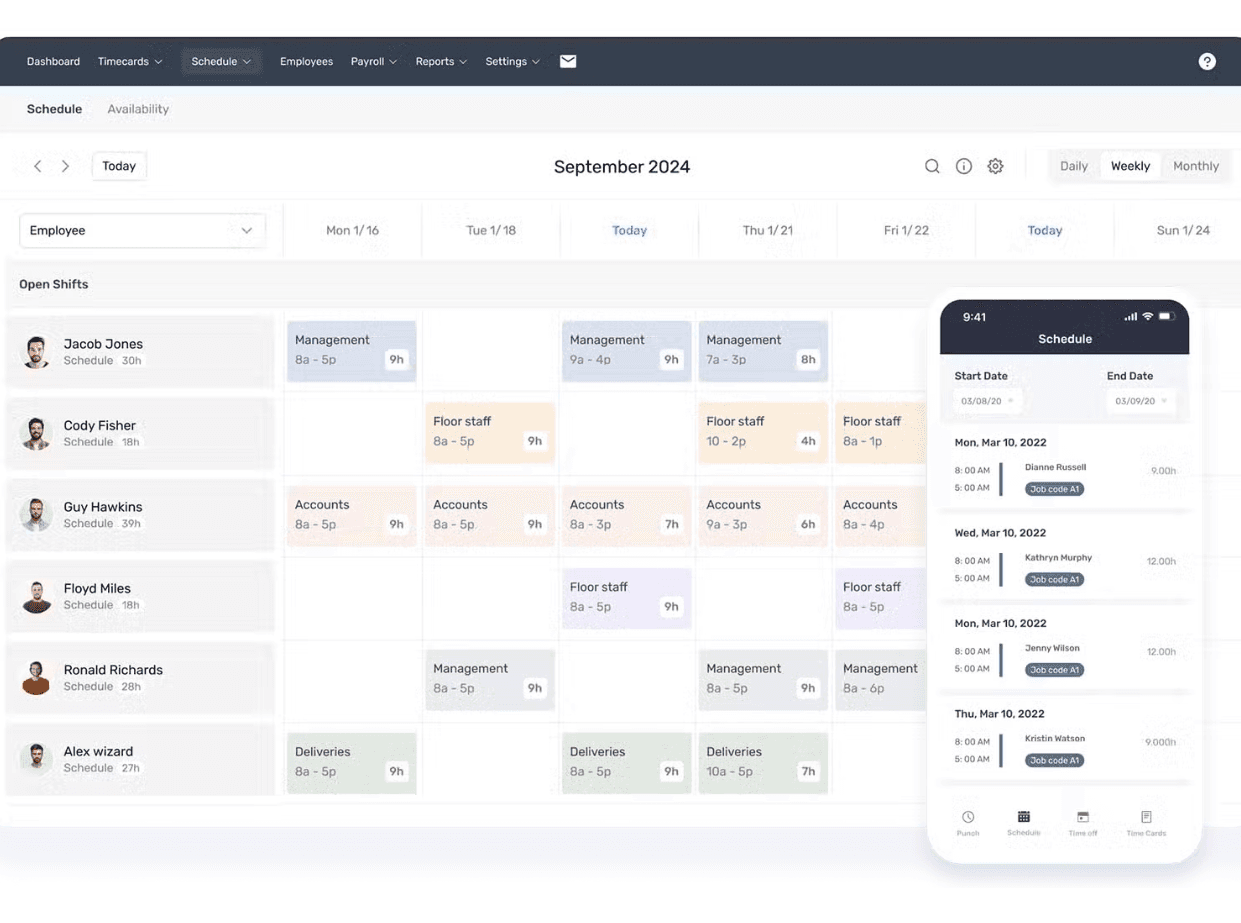
Build and share schedules fast with a drag-and-drop editor that shows everyone’s availability. Your team gets instant alerts for shift changes, keeping everyone on track.
GPS Tracking
Buddy Punch records employee locations on every punch so you always know where work is happening. You can also set geofences to stop off-site clock-ins and cut down on time theft.
PTO Tracking
Create your own time-off policies and set accrual rules that update automatically. Managers approve requests in a click, and paid time off syncs straight into timesheets.
Attendance Management
See who’s in, late, or missing right from your dashboard. You can get real-time alerts when someone forgets to punch or leaves early.
Reporting
Pull clean reports on hours, overtime, and labor costs in seconds. You can export them to Excel or PDF for quick payroll processing and recordkeeping.

Ease of Use
Buddy Punch is refreshingly simple to learn and quick to navigate, even if you’re not tech-savvy. The clean dashboard and mobile-friendly layout make it easy for your team to clock in, request time off, or check schedules without confusion. Admins can customize settings fast, and everything—from adding users to running reports—feels intuitive and straightforward.
Integrations
Buddy Punch integrates natively with QuickBooks Online, QuickBooks Desktop, ADP Workforce Now, Paychex, Gusto, Rippling, Paycor, Paylocity, Deluxe Payroll, and Workday.
It also offers a public API and connects with third-party tools through Zapier.

Buddy Punch Specs
- 360 Degree Feedback: Yes
- API: Yes
- Attendance Tracking: Yes
- Batch Permissions & Access: Yes
- Budgeting: Yes
- Calendar Management: Yes
- Dashboard: Yes
- Data Export: Yes
- Data Import: Yes
- Data Visualization: Yes
- Employee Database: Yes
- Employee Engagement: Yes
- Employee Onboarding: Yes
- External Integrations: Yes
- Feedback Management: Yes
- Forecasting: Yes
- Multi-User: Yes
- Notifications: Yes
- Project Management: Yes
- Scheduling: Yes
- Timesheets: Yes
- Travel Management: Yes
- Vacation & Absence Calendar: Yes


