


OfficeSpace Bewertung: Vorteile, Nachteile, Funktionen & Preise


OfficeSpace is a workplace and office space management platform that helps teams organize, book, and optimize their workplaces. It’s a great fit for HR and workplace managers in hybrid offices, corporate environments, and fast-growing teams juggling space, seating, and collaboration needs. With OfficeSpace, you get a clear, easy way to manage your workspace so your people can focus on doing great work together.
In this review, you’ll get a full look at OfficeSpace’s features, pros and cons, pricing, and best and worst use cases. If you’re looking to create a more efficient, flexible, and people-first workplace, this guide is for you.
OfficeSpace Evaluation Summary
- Pricing upon request
- Free demo available
Warum Sie unseren Software-Bewertungen vertrauen können
Unser Team testet und bewertet Software seit 2012. Als HR-Experten wissen wir selbst, wie schwierig – und wichtig – es ist, die richtige Software auszuwählen.
Für diesen Leitfaden haben wir Tools mithilfe von praktischen Tests und unabhängiger Recherche bewertet und dabei unsere Bewertungskriterien angewendet. Zudem greifen wir auf Erkenntnisse von Branchenvordenkern und praktizierenden HR-Experten zurück.
Unsere Bewertungen spiegeln unser menschliches redaktionelles Urteilsvermögen wider, keine Verkaufsstrategie.
Expertenprüfer:
OfficeSpace Overview
OfficeSpace is a solid contender in the office management space — it shines at helping hybrid and mid-sized to large workplaces bring order to their seating, bookings, and space planning. It beats many rivals in usability, support, and polished visual tools, though it can feel tricky when setups get very complex or when you need deep customization. Overall, it’s best suited for organizations that want an out-of-the-box, scalable solution rather than building everything themselves.
pros
-
You get clear, visual floor plans and maps so your team can see where desks and rooms are.
-
Wayfinding features help staff and visitors find rooms, desks, or people easily.
-
Scenario planning and move management let you test layout options before committing.
cons
-
The mobile app can feel limited compared to the desktop version.
-
May offer more features than necessary for super small business needs
-
You can’t always customize dashboards or workflows for very niche needs.
-

Justworks
Visit WebsiteThis rating combines scores from multiple user review sites to reflect overall customer sentiment about the product.4.6 -
Small Improvements
Visit WebsiteThis rating combines scores from multiple user review sites to reflect overall customer sentiment about the product.4.3 -
HiBob
Visit WebsiteThis rating combines scores from multiple user review sites to reflect overall customer sentiment about the product.4.5





Wie wir unsere Tools testen und bewerten
Wir haben jahrelang unser System zur Überprüfung und Bewertung von Software aufgebaut, verfeinert und verbessert. Das Bewertungsschema ist darauf ausgelegt, die Nuancen der Softwareauswahl und die Wirksamkeit eines Tools abzubilden, wobei der Fokus auf wesentlichen Aspekten des Entscheidungsprozesses liegt. Unten sehen Sie genau, wie unsere Tests und Bewertungen anhand von sieben Kriterien funktionieren. Damit können wir eine unvoreingenommene Bewertung der Software hinsichtlich zentraler Funktionen, herausragender Merkmale, Benutzerfreundlichkeit, Onboarding, Kundensupport, Integrationen, Kundenrezensionen und Preis-Leistungs-Verhältnis bieten.
Kernfunktionen (25% der Endnote)
Der Ausgangspunkt unserer Beurteilung ist immer die Kernfunktionalität des Tools. Verfügt es über die grundlegenden Funktionen, die ein Benutzer erwarten würde? Sind einige dieser Funktionen in teureren Tarifen eingeschlossen? Im Kern erwarten wir, dass ein Tool den grundlegenden Fähigkeiten seiner Mitbewerber standhält.
Herausragende Funktionen (25% der Endnote)
Danach bewerten wir außergewöhnliche Funktionen, die über das Übliche hinausgehen, das normalerweise in ähnlicher Software zu finden ist. Eine hohe Punktzahl spiegelt spezialisierte oder einzigartige Funktionen wider, die das Produkt schneller, effizienter oder für den Benutzer wertvoller machen. Wir bewerten auch, wie einfach es ist, sich mit anderen im technischen Ökosystem üblichen Tools zu integrieren, um die Funktionalität und Nützlichkeit der Software zu erweitern. Tools mit vielen nativen Integrationen, Drittanbieter-Anbindungen und API-Zugängen für individuelle Integrationen erhalten die beste Bewertung.
Benutzerfreundlichkeit (10% der Endnote)
Wir betrachten, wie schnell und einfach die Aufgaben im Bereich der Kernfunktionen mit dem Tool erledigt werden können. Hoch bewertete Software ist gut designt, intuitiv zu bedienen, bietet mobile Apps, Vorlagen und macht komplexe Aufgaben einfach.
Onboarding (10% der Endnote)
Uns ist bewusst, wie wichtig eine schnelle Einführung eines neuen Systems im Team ist. Deshalb bewerten wir, wie leicht ein Tool mit minimalem Training erlernt und genutzt werden kann. Wir prüfen, wie schnell ein Teammitglied ohne Vorerfahrung mit dem Tool starten kann. Lösungen mit hoher Bewertung erfordern wenig bis keine Unterstützung.
Kundensupport (10% der Endnote)
Wir überprüfen, wie schnell und einfach Hilfe telefonisch, per Live-Chat oder Wissensdatenbank erhalten werden kann. Tools und Unternehmen, die Echtzeit-Support bieten, schneiden am besten ab – Chatbots am schlechtesten.
Kundenrezensionen (10% der Endnote)
Zusätzlich zu unseren eigenen Tests berücksichtigen wir den Net Promoter Score aktueller und ehemaliger Kunden. Wir prüfen, wie wahrscheinlich sie, falls es zur Wahl käme, das Tool für die Kernfunktionen erneut wählen würden. Eine hohe Bewertung der Software spiegelt einen hohen Net Promoter Score wider.
Preis-Leistungs-Verhältnis (10% der Endnote)
Abschließend berücksichtigen wir unter Einbeziehung aller anderen Kriterien den durchschnittlichen Preis der Einstiegstarife im Vergleich zu den Kernfunktionen und zum Wert der anderen Bewertungskriterien. Software, die mehr für weniger bietet, erhält höhere Bewertungen.
Core Features
Wayfinding
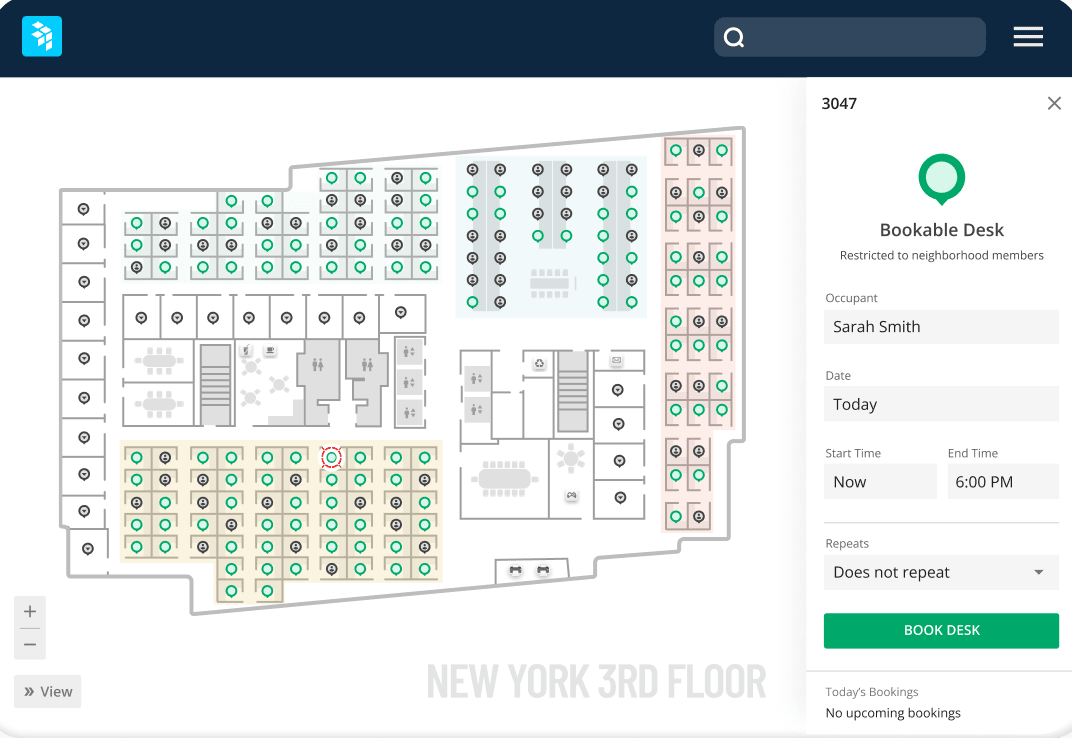
OfficeSpace offers indoor navigation to assist employees and visitors in finding their way around the office. This feature is accessible through a directory, where users can locate various 'Space Types' that can be assigned custom colours for easy identification on the floor plan. This function is particularly useful in large or complex buildings.
Space Management
OfficeSpace allows companies to manage their office space and facilities. It provides tools for space allocation, move management, desk booking, and more.
Desk and Meeting Room Booking
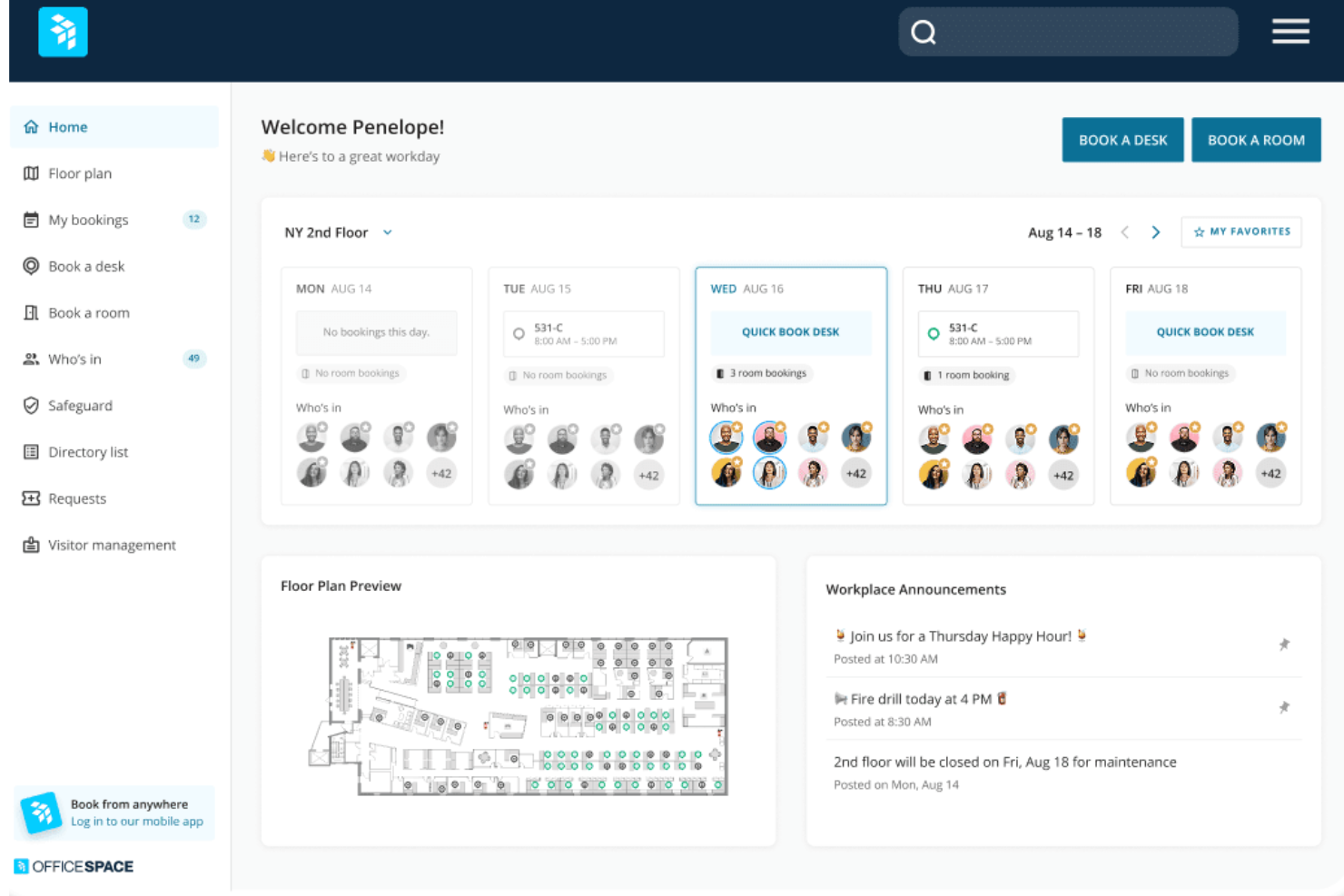
Employees can easily reserve desks or workspaces through OfficeSpace. The software shows real-time desk and room availability, so those “hot spots” are easily bookable for rotating meetings or scoring the best window seat. You can even see who is in the office that day, so you can swing by their desk.
Visitor Management
OfficeSpace enables contactless visitor check-in and screening. It prints visitor badges, notifies hosts when guests arrive, and is able to track and log visitors. OfficeSpace also allows you to easily book desks for guests and coworkers.
Maintenance Management
Companies can manage work orders and maintenance requests with OfficeSpace. It allows these tasks to be assigned to team members.
Reporting and Analytics
You can access easy-to-read reports on occupancy, bookings, and space trends. It gives you the data you need to make smarter real estate decisions.
Ease of Use
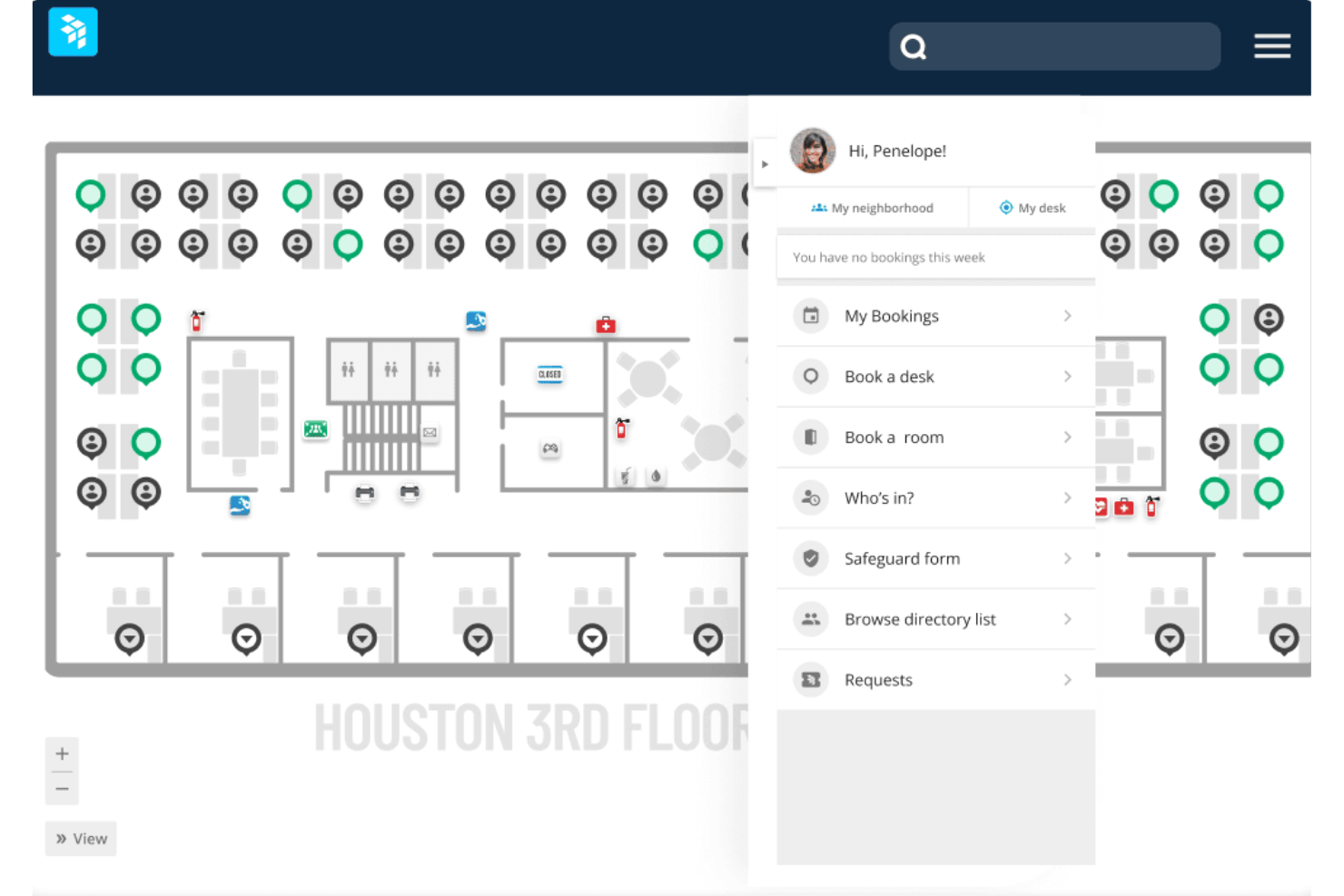
I find OfficeSpace has an intuitive interface and is relatively easy to use compared to some other office management systems. Core functions like desk booking, visitor check-in, and space allocation are straightforward for end users and administrators. The mobile app also provides a simple way for employees to access key features.
New Product Updates from OfficeSpace

OfficeSpace Adds Work Order Status and Cost Reports
OfficeSpace adds Work Order Status and Work Order Cost reports under the Reports menu. The new reports give facilities and operations teams built-in visibility into maintenance activity and spending for easier performance tracking. Highlights include:
- Work Order Status Report: Provides visibility into maintenance activity and work order status.
- Work Order Cost Report: Helps teams review maintenance costs directly within OfficeSpace.
- Built-In Reporting: Reduces reliance on manual spreadsheets for work order analysis.
Visit OfficeSpace’s official site for more details.
 for more details.
OfficeSpace Adds a Three-Level Space Types Hierarchy
OfficeSpace replaces its flat space type structure with a three-level hierarchy of Function → Category → Space Type. The new taxonomy helps organizations standardize space classification while supporting more consistent reporting, visualization, and space management. Highlights include:
- Three-Level Space Hierarchy: Organize spaces using standardized Functions with customizable Categories and Space Types.
- Improved Space Classification: Classify office, collaboration, amenity, technical, and other space types using a structured taxonomy.
- Enhanced Reporting: Analyze and filter workplace data by Function and Category across Insights Hub and other reporting tools.
- Floor Plan Visualization: Color floor plans by Function or Space Type for clearer space allocation and utilization insights.
Visit OfficeSpace's official site for more details.

OfficeSpace Adds Early Booking Access for Desk Reservations
OfficeSpace adds Early Booking Access for bookable desks, enabling admins to configure advance booking windows for different employee groups. The feature helps organizations prioritize desk reservations while keeping desks available for broader employee access as booking windows open. Highlights include:
- Group-Based Booking Windows: Set different advance booking windows for employee groups based on existing restrictions and custom employee fields.
- Multiple Restriction Tiers: Apply up to 10 booking tiers per desk, with the longest booking window automatically applied when employees belong to multiple groups.
- Bulk Configuration: Update Early Booking Access settings across multiple desks using the bulk editor.
Visit OfficeSpace's official site for more details.****
OfficeSpace Specs
- Access Management
- API
- Appointment Scheduling
- Batch Permissions & Access
- Calendar Management
- Chat
- Click-to-Dial
- Contact Management
- Custom Data Forms
- Custom Reports
- Customer Management
- Dashboard
- Dashboards
- Data Export
- Data Import
- Data Visualization
- Email Integration
- External Integrations
- Forecasting
- Google Apps Integration
- Lead Management
- Map Visualization
- Marketing Automation
- Mobile App
- Multi-User
- Notifications
- Resource Management
- Scheduling
- Self-service Portal
- Workflow Management
Alternatives to OfficeSpace




OfficeSpace FAQs
How quickly can your team get up and running with OfficeSpace?
Is there a mobile app for OfficeSpace?
Can OfficeSpace handle hybrid work schedules?
How secure is OfficeSpace for sensitive workplace data?
Does OfficeSpace support global or multi-location teams?
How does OfficeSpace’s AI help your team?
What kind of support does OfficeSpace provide after implementation?
Wie geht es weiter?
Um immer auf dem neuesten Stand im Personalmanagement zu bleiben, abonnieren Sie unseren Newsletter für Führungskräfte und Manager. Sie erhalten Einblicke und Angebote, die direkt auf Führungskräfte und Personalverantwortliche zugeschnitten sind, direkt in Ihr Postfach.