

Un empleador registrado en EE. UU. es un tercero que emplea legalmente a trabajadores y gestiona las nóminas, las retenciones fiscales y la administración laboral. Este modelo permite a las empresas contratar sin establecer primero una entidad en EE. UU., aunque los requisitos estatales, las prestaciones y las transiciones de los empleados aún requieren una consideración minuciosa.
Esta comparación evalúa a los proveedores según el cumplimiento normativo en EE. UU., la administración de nóminas y prestaciones, la asistencia, los precios y las opciones para pasar a una PEO o a su propia entidad.
Por qué confiar en nuestras reseñas de software
6,700+
Reviews
20
Industry experts
16+
Evaluation factors
14
Years
Nuestro equipo lleva probando y evaluando software desde 2012. Como expertos en RR. HH., sabemos lo difícil —y lo importante— que es elegir el software adecuado.
Para esta guía, evaluamos las herramientas mediante pruebas prácticas e investigación independiente, puntuando las herramientas según nuestros criterios de selección. También nos basamos en la experiencia de líderes de opinión del sector y de profesionales de RR. HH. en activo.
Nuestras reseñas reflejan nuestro criterio editorial humano, no un discurso de ventas.
Revisores expertos:
- Phil GrayCOO
 Kim BehnkeEditora y analista de HR Tech
 Josh BarkerGerente de People Ops

Tabla comparativa: empleadores registrados en EE. UU.
Compara los precios y las especificaciones, uno al lado del otro, de los empleadores registrados en EE. UU. que han entrado en mi lista de selección.
| Tool | Best For | Trial Info | Price | ||
|---|---|---|---|---|---|
| 1 | Best for hiring without payroll pre-funding | Free demo available | From $579/employee/month | Website | |
| 2 | Best for no-minimum, flat-fee global hiring | Free demo available | From $199/employee/month | Website | |
| 3 | Best for a same-platform move to PEO | Free demo available | From $699/employee/month | Website | |
| 4 | Best for contractor-to-employee-to-entity moves | Not available | From $599/employee/month | Website | |
| 5 | Best for contractor-to-employee transitions | Free demo available | From $399/employee/month | Website | |
| 6 | Best for tying hiring to app and device access | Free demo available | Pricing upon request | Website | |
| 7 | Best for moving from no US entity to PEO | Free demo available | From $599/employee/month | Website | |
| 8 | Best for US hiring via its own legal entity | Free demo available | From $549/employee/month | Website | |
| 9 | Best for 50-state compliance intelligence | Free demo available | From $599/employee/month | Website | |
| 10 | Best for termination liability coverage | Free demo available | From $499/employee/month | Website |


Opiniones sobre empleadores registrados en EE. UU.
A continuación encontrarás mis resúmenes detallados de los mejores empleadores registrados en EE. UU. que han entrado en mi lista de selección. Mis reseñas abarcan los precios de cada servicio de EOR, la asistencia para el cumplimiento normativo en EE. UU. y las opciones de transición de empleados para ayudarte a encontrar la opción adecuada.
 Best for hiring without payroll pre-funding
- Free demo available
- From $579/employee/month
Visit WebsiteCustomer Rating:4.9/5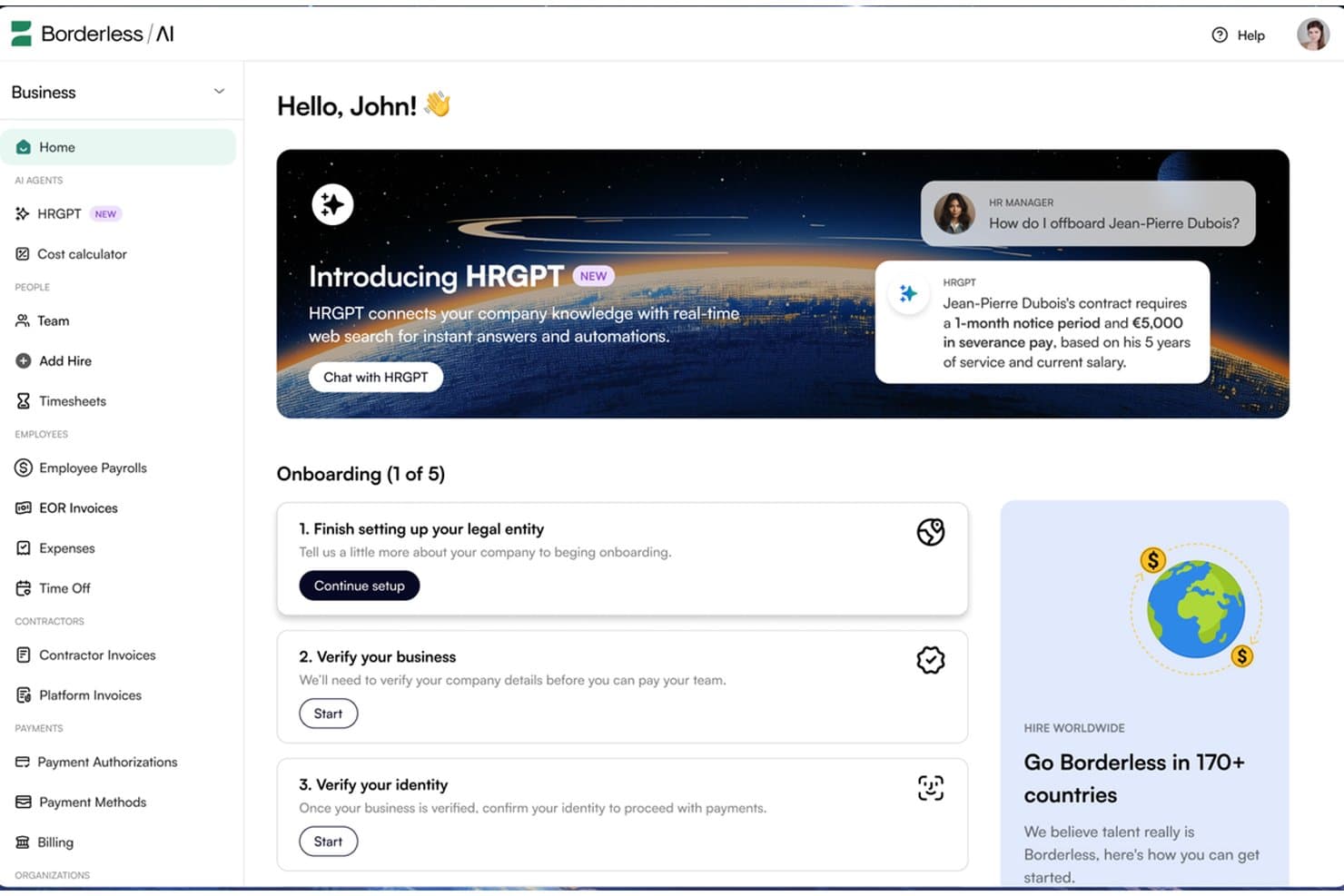
Borderless AI's HRGPT agent automates HR tasks like offboarding in real time. Borderless AI is an employer of record platform that uses AI-driven contract generation, multi-state payroll processing, and compliance monitoring to support hiring across more than 170 countries. It offers US employment services through owned entities and does not require payroll pre-funding.
Who Is Borderless AI Best For?
Borderless AI is a strong fit for startups and lean HR teams that need to hire US-based employees quickly without providing payroll funding far in advance.
Why I Picked Borderless AI
I included Borderless AI for its payroll funding arrangement, which allows businesses to run US payroll without pre-funding it 30 days in advance. This can help startups manage cash flow while expanding their teams. Its AI-generated, state-specific at-will contracts support onboarding in as little as 24 hours. The platform also handles federal and state tax withholding, filings, and state leave programs such as California's SDI and Colorado's FAMLI without requiring businesses to establish their own entities.
Borderless AI Key Features
- AI contract generator: Produces state-specific at-will employment agreements in minutes, with IP assignment and confidentiality clauses included.
- Contractor and EOR dashboard: Manage contractors and full-time employees through a single platform, with guidance for contractor-to-employee conversions.
- AI HR agents: HRGPT answers HR and labor law questions, while Alberni handles entity, legal, and contract operations. Both are included at no additional cost across all plans.
- SOC 2 Type II compliance: The platform uses AES-256 encryption at rest, TLS 1.3 in transit, role-based access controls, and audit trails for AI agent actions.
Borderless AI Integrations
Borderless AI offers a native ADP Workforce Now integration and a marketplace integration through Paychex Marketplace. It also lists integrations with Workday, BambooHR, and Greenhouse, alongside an API for custom connections.
Pros and Cons
Pros:
- Reviewers praise responsive support and timely payments
- Onboarding can begin within 24 hours
- Does not require payroll pre-funding
Cons:
- Contractor administration uses a separate management product
- AI-generated contracts still require legal review
Learn more about Borderless AI: Best for no-minimum, flat-fee global hiring
- Free demo available
- From $199/employee/month
Visit WebsiteCustomer Rating:4.9/5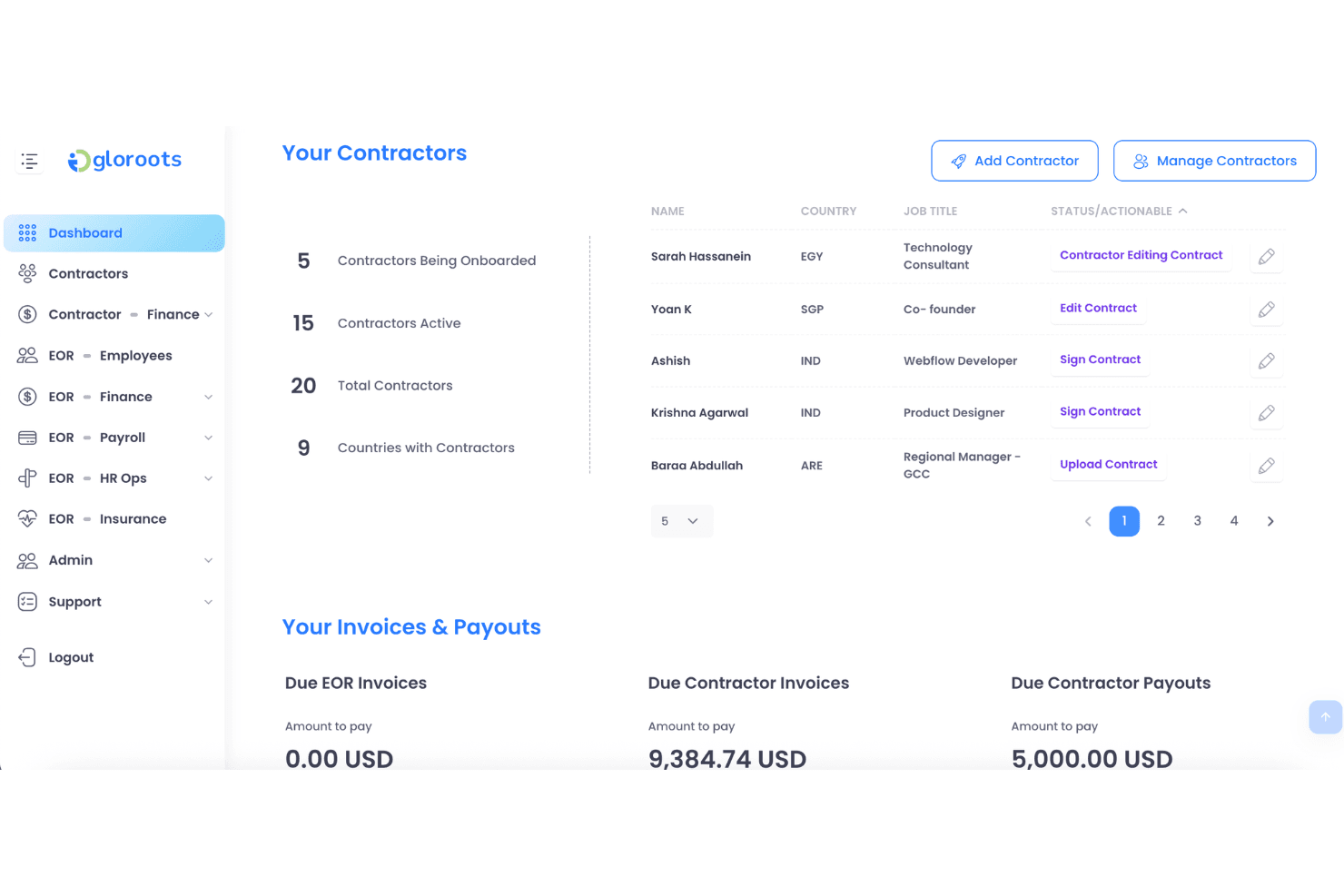
Gloroots lets users manage contractors and track invoices in one dashboard. Gloroots is a global employer of record platform that handles US payroll, benefits administration, contract generation, and multi-state compliance across all 50 states without requiring businesses to establish a local entity.
Who Is Gloroots Best For?
Gloroots is a strong fit for startups and small teams hiring their first international employees without minimum headcount requirements or long-term contracts.
Why I Picked Gloroots
I picked Gloroots for its published starting price of $199 per employee per month, with no minimum headcount requirement or long-term contract. I particularly like that it issues W-2s under its own EIN, handles FICA, FUTA, and SUI remittances, and supports state-specific final-pay deadlines, including California's same-day requirement. For businesses hiring their first US employees, Gloroots also offers ACA-compliant benefits and 401(k) administration, helping smaller teams manage employment requirements without moving to a higher service tier.
Gloroots Key Features
- State-tailored employment agreements: Generates employment contracts tailored to state requirements, including California AB5 provisions and New York wage notice rules, with IP assignment clauses included.
- Contractor of Record product: Allows businesses to engage contractors through Gloroots as the legal contracting entity, with misclassification liability protection at $99 per contractor per month.
- Equity vesting tax tracking: Tracks employee vesting schedules to support the calculation and withholding of applicable taxes when equity vests.
- Misclassification risk checker: A built-in eight-question tool that assesses worker classification risks before hiring decisions are made.
Gloroots Integrations
Native integrations are not clearly documented. Gloroots offers an API for custom integrations, while its USA EOR page states that it connects with major HRIS and payroll systems without naming specific platforms.
Pros and Cons
Pros:
- State-specific contracts address local requirements
- Payroll includes W-2s and tax remittances
- Reviewers praise responsive onboarding support
Cons:
- EOR service does not establish a client-owned US entity
- Contractor classification protection requires Contractor of Record
Learn more about Gloroots:
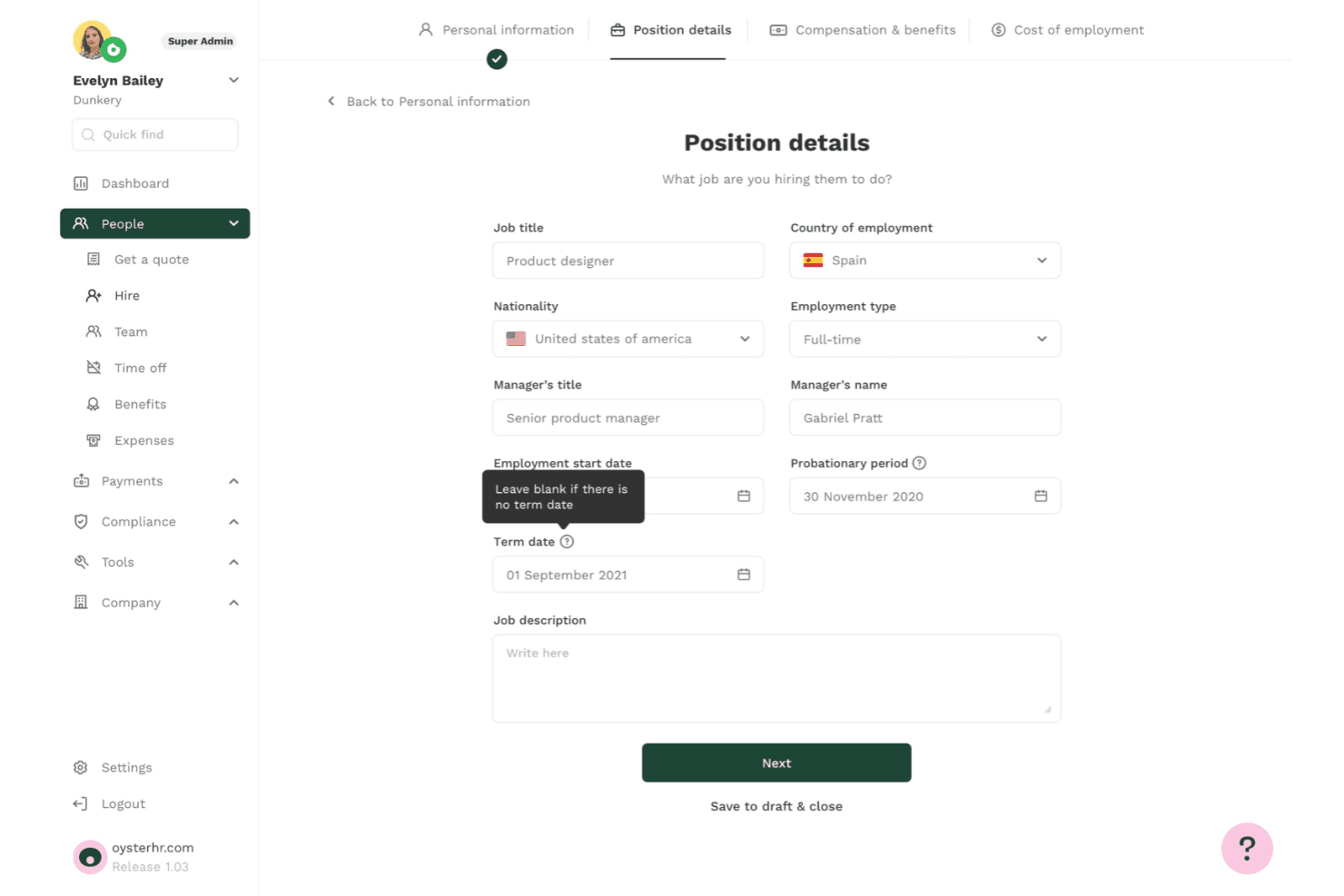
Oyster lets users define job titles, employment type, and term dates when hiring. Oyster is an employer of record platform covering all 50 US states. It handles compliant hiring, automated payroll, benefits administration, contract generation, and contractor conversions without requiring businesses to establish a local entity.
Who Is Oyster Best For?
Oyster is a strong fit for companies considering a US PEO that want to begin with EOR services and transition to co-employment on the same platform as they grow.
Why I Picked Oyster
I included Oyster for its combination of US EOR and PEO services, allowing businesses to start hiring across all 50 states without a legal entity and later transition to co-employment on the same platform. Its contract generation process includes state-specific at-will clauses and IP agreements, helping businesses prepare employment documentation more efficiently. Oyster also offers a 401(k) arrangement with a stated 3% employer contribution for US hires, providing an additional retirement benefit.
Oyster Key Features
- Four-tier health plan selection: Choose from Essential, Competitive I, Competitive II, or Best-In-Class ACA-compliant health plans, with options covering dental, vision, mental health, and maternity care.
- Contractor misclassification risk tool: Oyster Shell assesses contractor misclassification risks and includes up to $500,000 in aggregate protection coverage.
- State-specific payroll compliance: Payroll applies federal and state withholding, FICA, wage and hour rules, and final-pay requirements across all 50 states, including states with stricter regulations, such as California and New York.
- Equity management with Carta integration: Manage equity through the platform with built-in tax guidance and synchronize equity data through its Carta integration.
Oyster Integrations
Oyster offers integrations with Xero, QuickBooks, BambooHR, HiBob, Greenhouse, Ashby, Slack, Carta, Concur, and Zapier. It also provides an API for custom payroll, time-off, and expense data connections.
Pros and Cons
Pros:
- State-specific contracts support hiring across all 50 states
- Offers a stated 3% employer 401(k) contribution
- Reviewers praise clear onboarding timelines
Cons:
- Timesheets do not automatically sync with payroll
- Platform lacks native applicant tracking
Learn more about Oyster: Best for contractor-to-employee-to-entity moves
- Not available
- From $599/employee/month
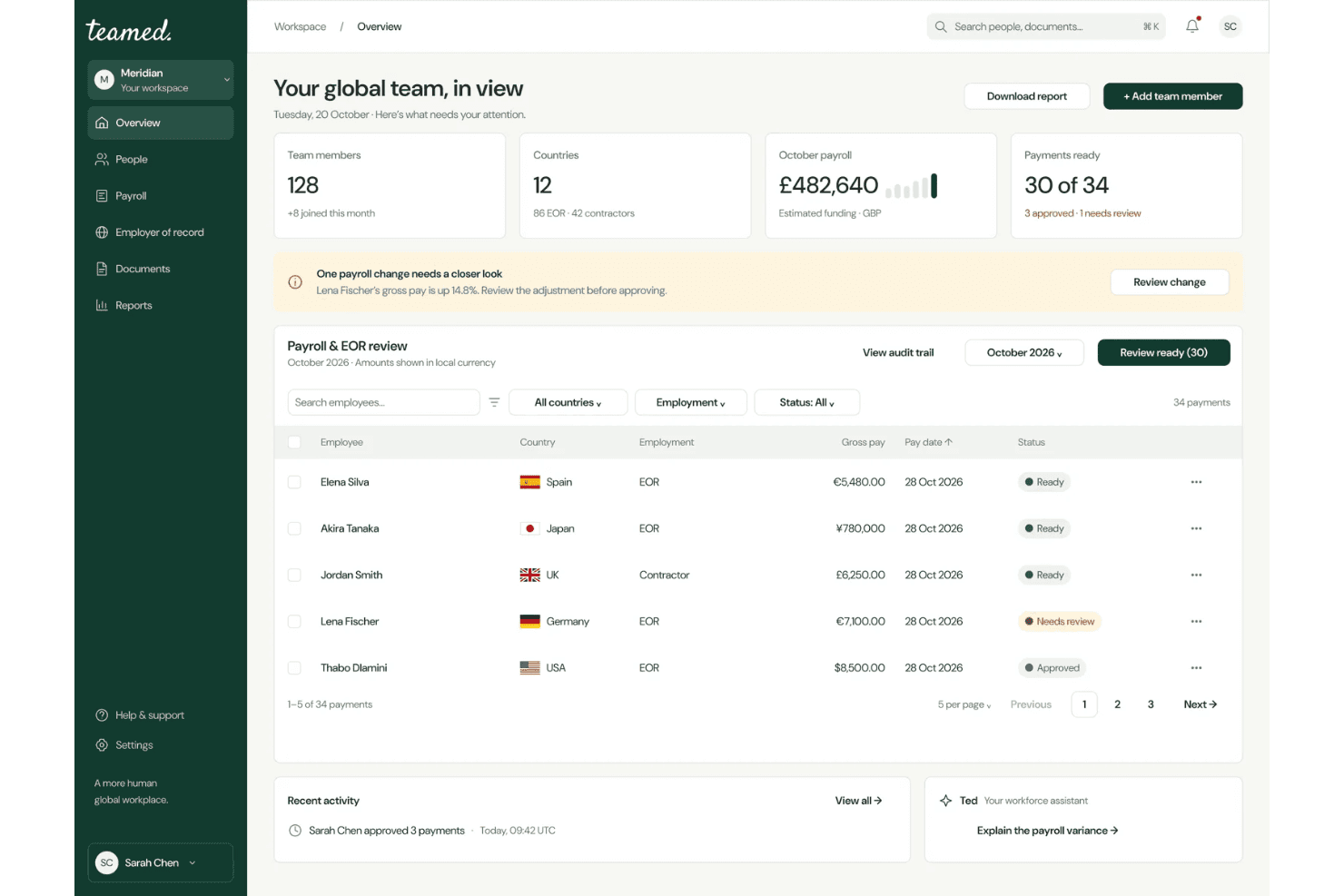
Teamed centralizes global payroll and EOR management in one dashboard. Teamed is an employer of record platform that supports US hiring across all 50 states through its own legal entity. It handles payroll, tax filings, benefits administration, and contractor-to-employee conversions through a centralized dashboard.
Who Is Teamed Best For?
Teamed is a strong fit for companies that need to move workers through the full employment lifecycle, from contractor to EOR employee and eventually to employment under their own US entity, without switching platforms.
Why I Picked Teamed
I picked Teamed for its support for moving workers through different employment arrangements, from contractor to EOR employee and eventually to employment under a company's own US entity. Contractor-to-employee conversions are managed through a single dashboard. When you're ready to establish a local entity, Teamed's GEMO service supports the setup of a US C-Corp or LLC and the migration of employees. Its built-in crossover calculator also helps businesses estimate when establishing an entity may become more cost-effective than continuing with EOR services.
Teamed Key Features
- 50-state hiring guides: State-specific compliance guides cover taxes, worker classification, paid leave, termination rules, and wage requirements across all 50 states.
- Payroll variance alerts: Automated alerts identify payroll discrepancies before processing closes, giving teams an opportunity to address errors.
- Contractor misclassification protection: Guard and Protect add-ons provide misclassification liability coverage, with Guard offering up to $10,000 per case at $130 per contractor per month.
- Named country specialist support: Every account receives a dedicated specialist, with a claimed 15-minute initial response time and 24/5 availability without ticket queues.
Teamed Integrations
Teamed lists 19 integrations, including Personio, BambooHR, HiBob, Workday, Greenhouse, Okta, Xero, QuickBooks, and Zapier. Only Personio has publicly available synchronization documentation. Teamed does not provide a public API, and its integration team configures other connections during onboarding.
Pros and Cons
Pros:
- Named specialists provide direct support
- Contractor-to-entity transitions can avoid repeated onboarding
- Owned US entity supports hiring across all 50 states
Cons:
- EOR service does not establish a client-owned entity
- Entity migration requires a separate GEMO engagement
Learn more about Teamed: Best for contractor-to-employee transitions
- Free demo available
- From $399/employee/month
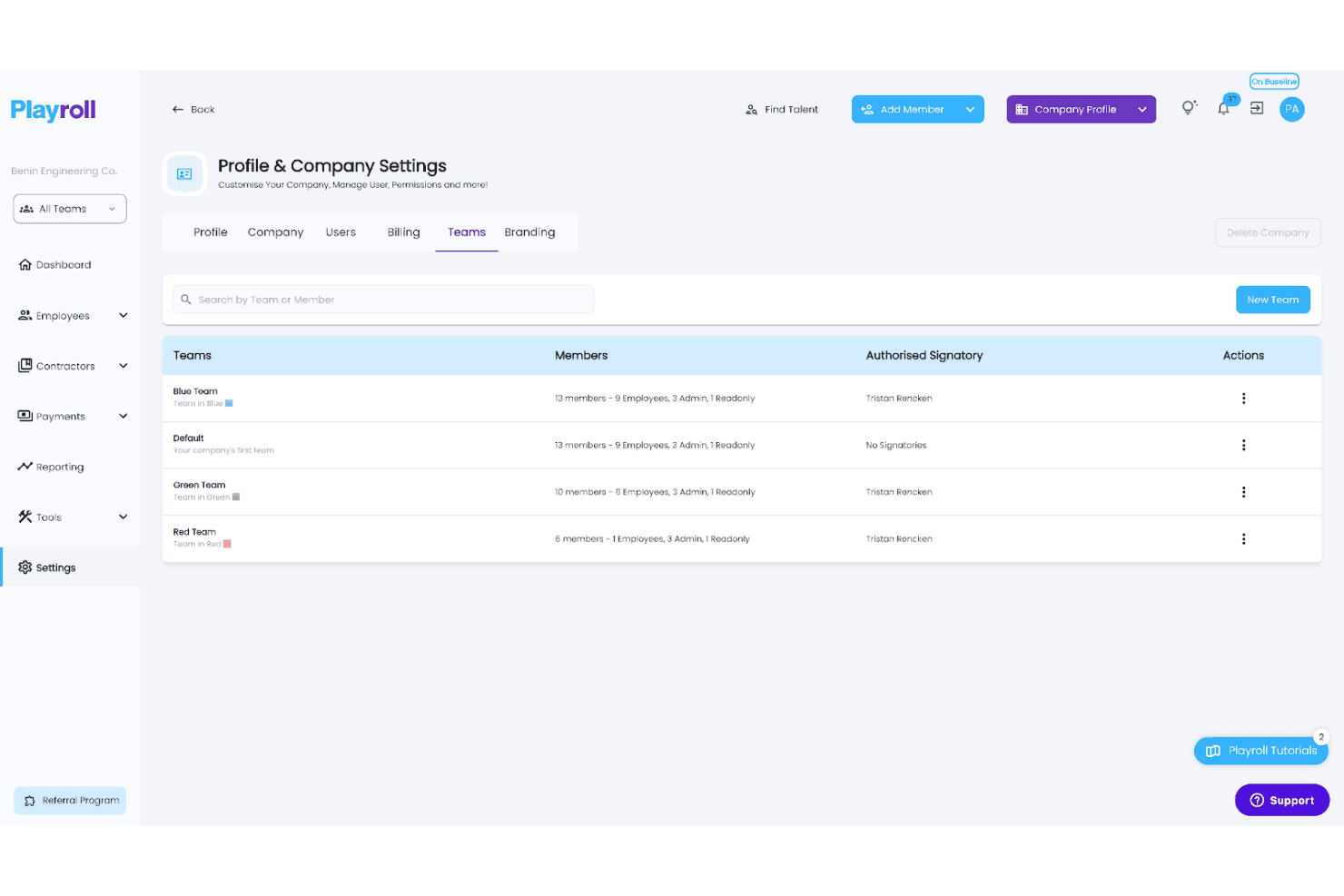
Playroll lets users organize employees into color-coded teams with assigned signatories. Playroll is a global employer of record platform that supports US and international hiring without requiring businesses to establish local entities. Its services include automated payroll, tax filings, benefits administration, and contractor-to-employee conversions across more than 180 countries.
Who Is Playroll Best For?
Playroll is a strong fit for companies looking to convert existing contractors into full-time employees, particularly those hiring across multiple countries.
Why I Picked Playroll
I picked Playroll for its structured contractor-to-employee conversion service. When you're ready to transition a contractor to full-time employment, Playroll guides you through a four-step process that includes a free misclassification audit, a documented transition plan, and onboarding through its EOR service. This process covers at-will employment agreements with FLSA classification requirements included. I also like that each converted employee receives a dedicated Employee Success Manager at no additional cost.
Playroll Key Features
- Automated biweekly payroll: Playroll processes US payroll biweekly, handling federal, state, and local tax withholding, FUTA and SUTA payments, and W-2 issuance across all 50 states.
- At-will contract generation: Generate US employment agreements in approximately five minutes, with FLSA classification, EEOC language, and optional arbitration clauses included.
- Multi-state compliance monitoring: Playroll tracks changes to federal and state employment laws, including minimum wage updates and paid leave requirements, and applies relevant changes to payroll.
- Dedicated Employee Success Manager: Every employee hired through Playroll receives an assigned Employee Success Manager at no additional cost.
Playroll Integrations
Playroll offers three documented integrations: BambooHR, HiBob, and Expensify. It also supports custom integrations through its API.
Pros and Cons
Pros:
- State-specific hiring guides cover all 50 states
- Offers free contractor misclassification audits
- Provides dedicated Employee Success Managers
Cons:
- Employee hiring depends on country-specific onboarding requirements
- EOR service does not include candidate recruitment
Learn more about Playroll: Best for tying hiring to app and device access
- Free demo available
- Pricing upon request
Visit WebsiteCustomer Rating:4.9/5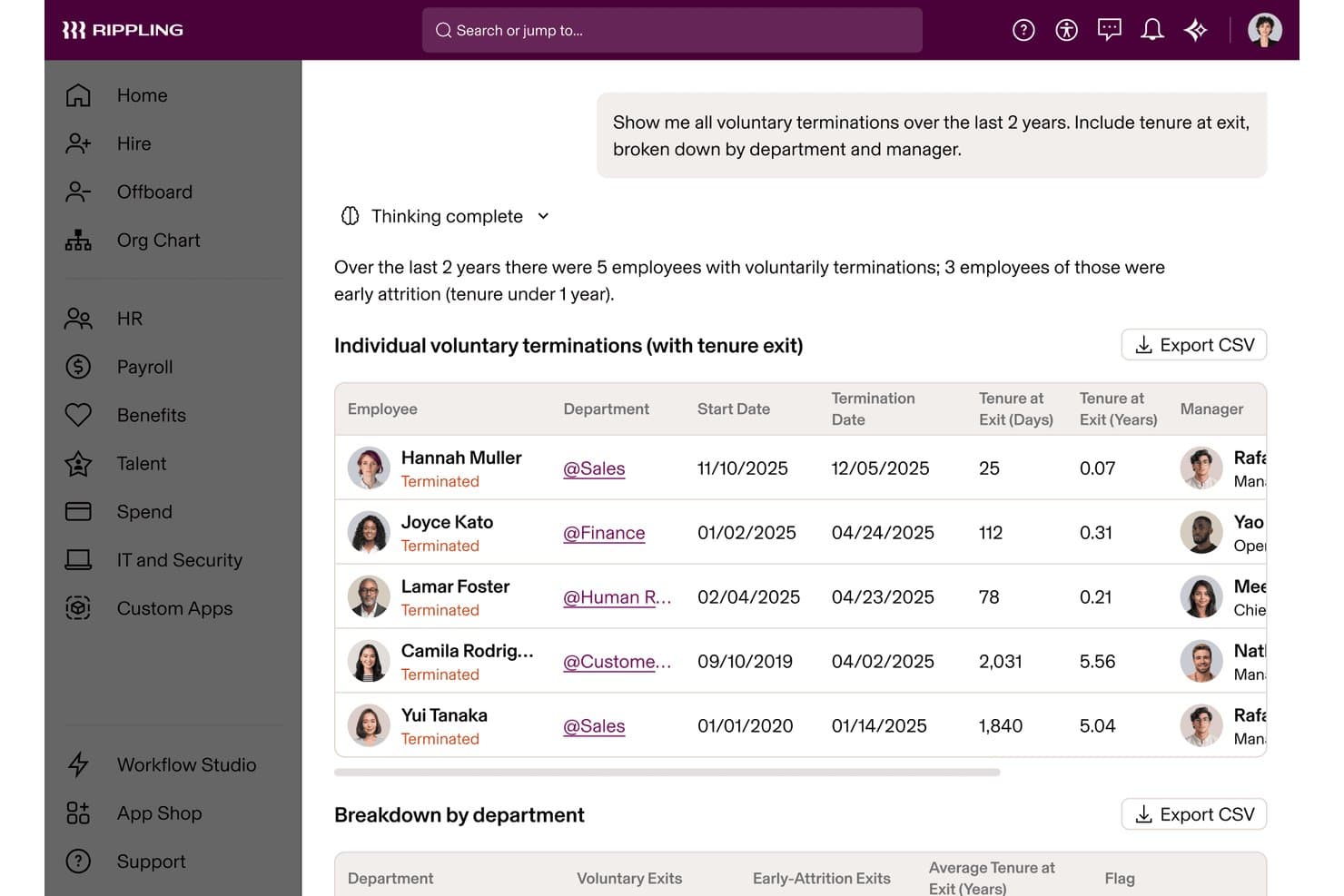
Rippling's AI surfaces voluntary termination trends by tenure and department. Rippling is an employer of record platform registered in all 50 US states. It handles payroll processing, tax filing, benefits administration, compliance monitoring, and employee onboarding alongside native IT provisioning for app and device access.
Who Is Rippling Best For?
Rippling is a strong fit for tech-forward companies that need to connect employee onboarding directly with app permissions and device provisioning from day one.
Why I Picked Rippling
I picked Rippling for its ability to connect employee onboarding directly with IT provisioning. When you hire someone through Rippling's EOR service, you can manage app access and device enrollment through the same workflow. This helps new hires in states where you have no legal entity receive configured laptops and access to Slack, Zoom, and Google Workspace on their first day. I also like its Misclassification Risk Analyzer, which flags potentially problematic contractor arrangements before they become legal issues.
Rippling Key Features
- Compliance 360 alerting: Real-time alerts flag minimum wage changes, overtime rules, sick leave updates, and pay schedule requirements across all 50 states.
- Multi-entity flexibility: Move workers between contractor, EOR, PEO, and own-entity arrangements without repeating onboarding or duplicating employee records.
- Automated payroll tax filing: Rippling calculates and remits federal, state, and local payroll taxes, including FICA, state unemployment taxes, and local withholding.
- Contractor-to-employee conversion: A dedicated workflow helps businesses move contractors to full-time employee status, with a Misclassification Risk Analyzer included in the process.
Rippling Integrations
Rippling offers more than 600 ready-made integrations, including Greenhouse, Slack, Microsoft 365, Salesforce, Zoom, NetSuite, QuickBooks Online, Fidelity, and Vanguard. Its developer platform and API also support custom integrations.
Pros and Cons
Pros:
- More than 600 ready-made software integrations
- Compliance 360 flags state wage and leave changes
- IT provisioning is built into employee onboarding
Cons:
- Employee IT provisioning requires Rippling's IT tools
- Some international EOR hires use partner entities
 Best for moving from no US entity to PEO
- Free demo available
- From $599/employee/month
Visit WebsiteCustomer Rating:4.9/5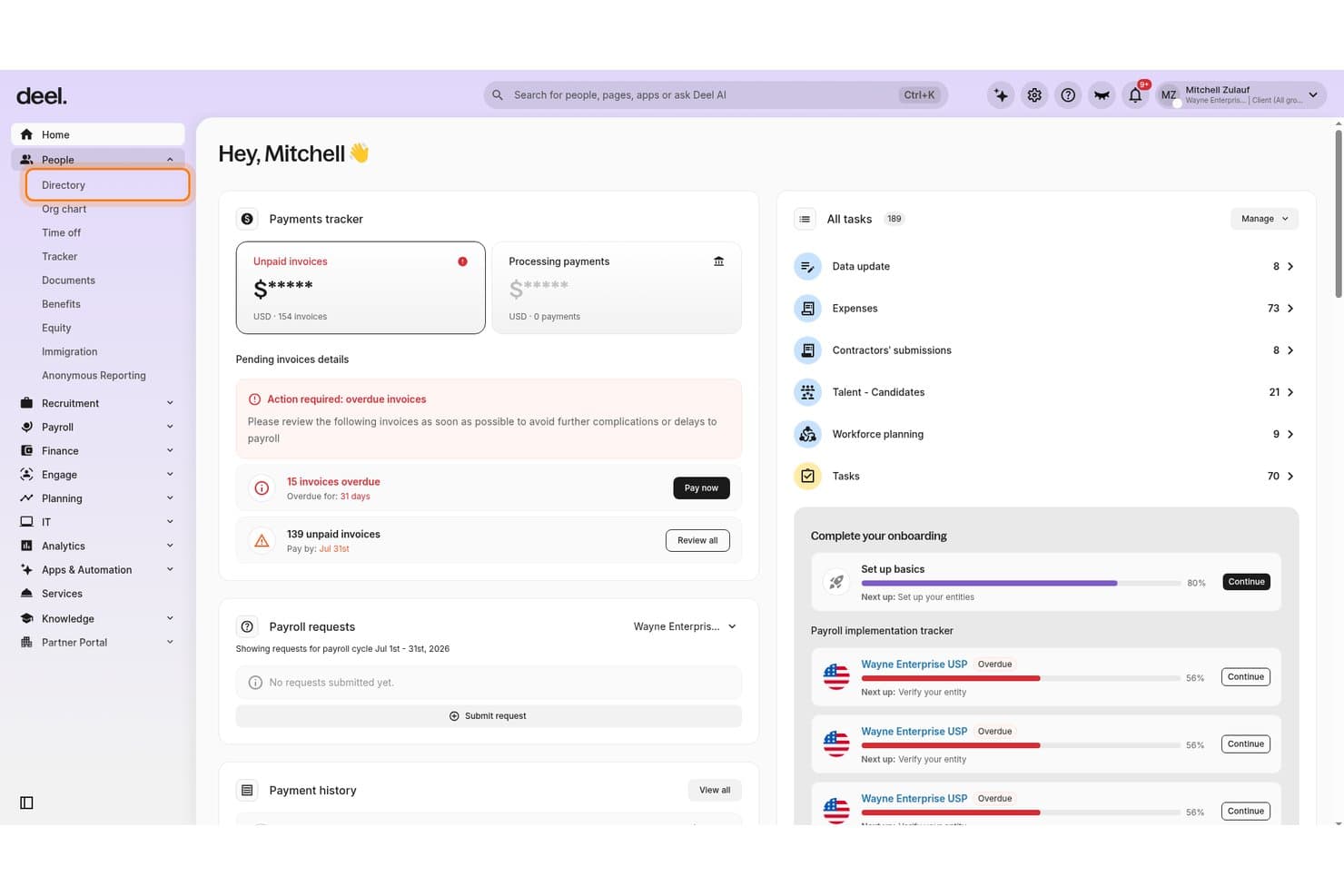
Deel Hire centralizes payments, tasks, and onboarding in one dashboard. Deel Hire is a US employer of record solution that manages employment contracts, multi-state payroll, tax filings, benefits administration, and compliance monitoring across all 50 states without requiring businesses to establish their own US legal entity.
Who Is Deel Hire Best For?
Deel Hire is a strong fit for companies without a US legal entity that want a clear path from EOR employment to co-employment through a PEO once they establish their own entity.
Why I Picked Deel Hire
I picked Deel Hire for its built-in path to PEO co-employment once a company establishes its own entity. Its "Change Worker Type" workflow allows businesses to convert contractors to EOR employees in as little as 24 hours, with pre-filled contract data carried over automatically. When you're ready to transition to a PEO, Deel's help center provides a structured migration guide covering employment continuity, PTO handling, and benefits re-enrollment under your own entity.
Deel Hire Key Features
- Continuous compliance monitoring: Deel's Compliance Monitor tracks wage rules and tax law changes across all 50 states and sends alerts before those changes affect payroll.
- AI Worker Classifier: An AI-powered tool that reviews worker classifications and flags potential misclassification risks before they become legal issues.
- Automated multi-state tax filing: Deel handles federal, state, and local tax withholding and files Form 941 and applicable state returns on your behalf.
- Offboarding Assistant: A structured termination workflow that identifies legal obligations, calculates offboarding costs, and drafts required documentation for review by Deel's legal team.
Deel Hire Integrations
Deel Hire offers integrations with Greenhouse, Ashby, BambooHR, HiBob, Personio, QuickBooks, Xero, NetSuite, and Employee Navigator. Its API supports custom connections for hiring, payroll, HRIS, accounting, employee lifecycle changes, and device management.
Pros and Cons
Pros:
- PEO migration guide covers employment continuity
- Offboarding Assistant estimates termination costs
- Change Worker Type reuses contractor contract data
Cons:
- Benefits re-enrollment is required during migration
- PEO transition requires a US legal entity
Learn more about Deel Hire: Best for US hiring via its own legal entity
- Free demo available
- From $549/employee/month
Visit WebsiteCustomer Rating:4.8/5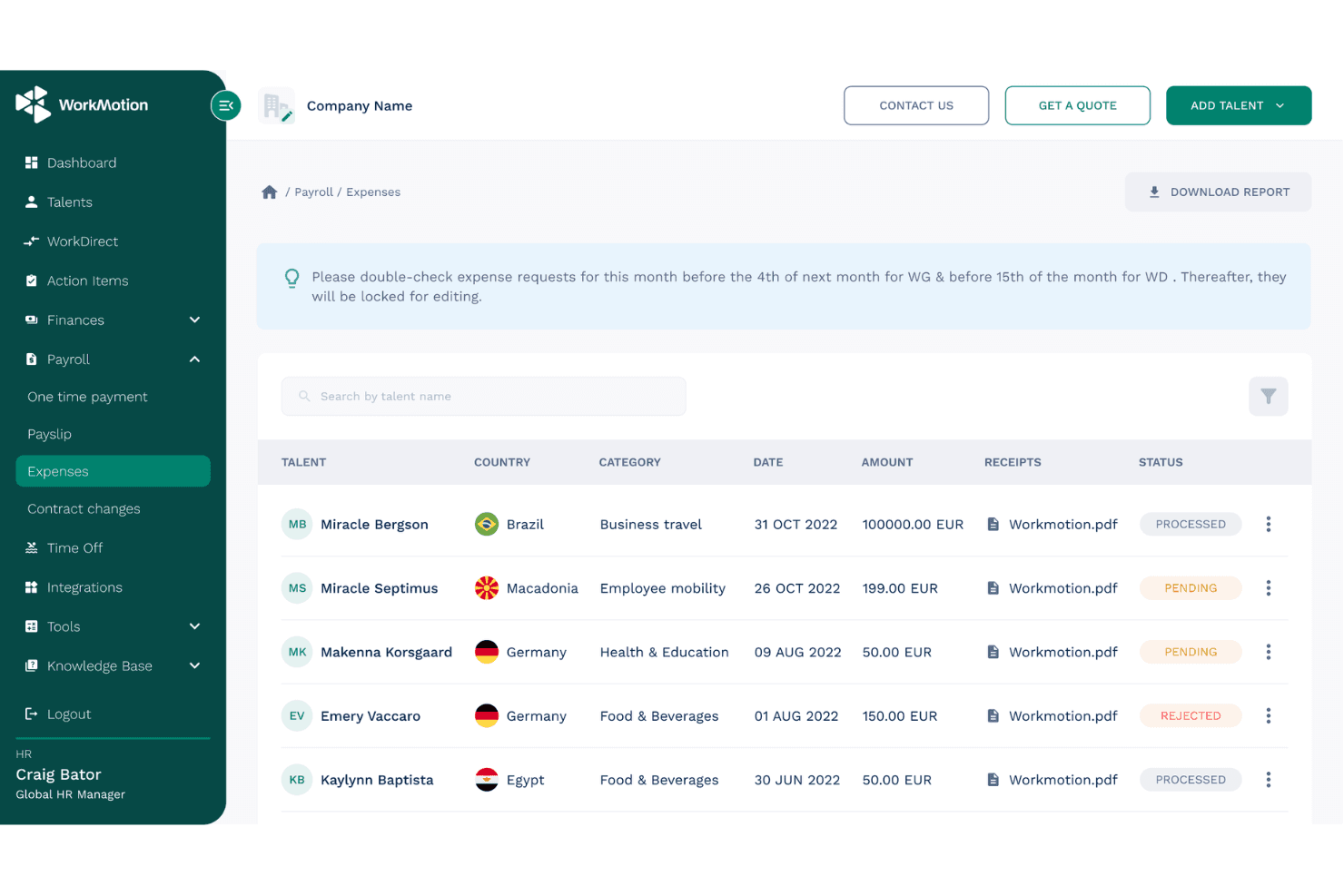
WorkMotion lets users track and manage employee expense requests globally. WorkMotion is a global employer of record platform that enables companies to hire and manage employees across more than 160 countries. It handles payroll, multi-state compliance, benefits administration, and contract generation without requiring businesses to establish local legal entities.
Who Is WorkMotion Best For?
WorkMotion is a strong fit for globally distributed companies that want to hire US employees without establishing their own US legal entity.
Why I Picked WorkMotion
I picked WorkMotion for its use of its own US legal entity rather than relying on third-party partners, providing a more direct employment arrangement. Its services cover multi-state payroll tax remittance, including federal income tax, Social Security, Medicare, FUTA, and state unemployment taxes. WorkMotion also updates state-specific employment contracts to reflect changes in local regulations, helping businesses manage hiring requirements across all 50 states through one platform.
WorkMotion Key Features
- Wanda AI assistant: Ask country-specific labor law and HR questions through the platform or Slack, with responses based on WorkMotion's internal HR data.
- Employment cost calculator: Estimate per-employee hiring costs by country using salary and bonus inputs, with a breakdown of salary, allowances, and social contributions.
- Expense management: Employees submit expenses through the platform, which applies country-specific tax rules and flags taxable amounts for HR review and approval.
- HR system integrations: Connect WorkMotion with BambooHR, Workday, HiBob, Personio, and ADP Workforce Now to automate data exchange with your existing HR systems.
WorkMotion Integrations
WorkMotion integrates with BambooHR, Workday, HiBob, Personio, ADP Workforce Now, and UKG Pro for HR data exchange. An API is also available for custom integrations.
Pros and Cons
Pros:
- Reviewers praise payroll timeliness and support
- Multi-state contracts are updated to reflect changing laws
- Own US entity supports direct employment accountability
Cons:
- EOR does not transfer legal employment to the client
- Candidate sourcing requires its Direct Hiring service
Learn more about WorkMotion: 9Best for 50-state compliance intelligence
G-P
- Free demo available
- From $599/employee/month
Visit WebsiteCustomer Rating:4.5/5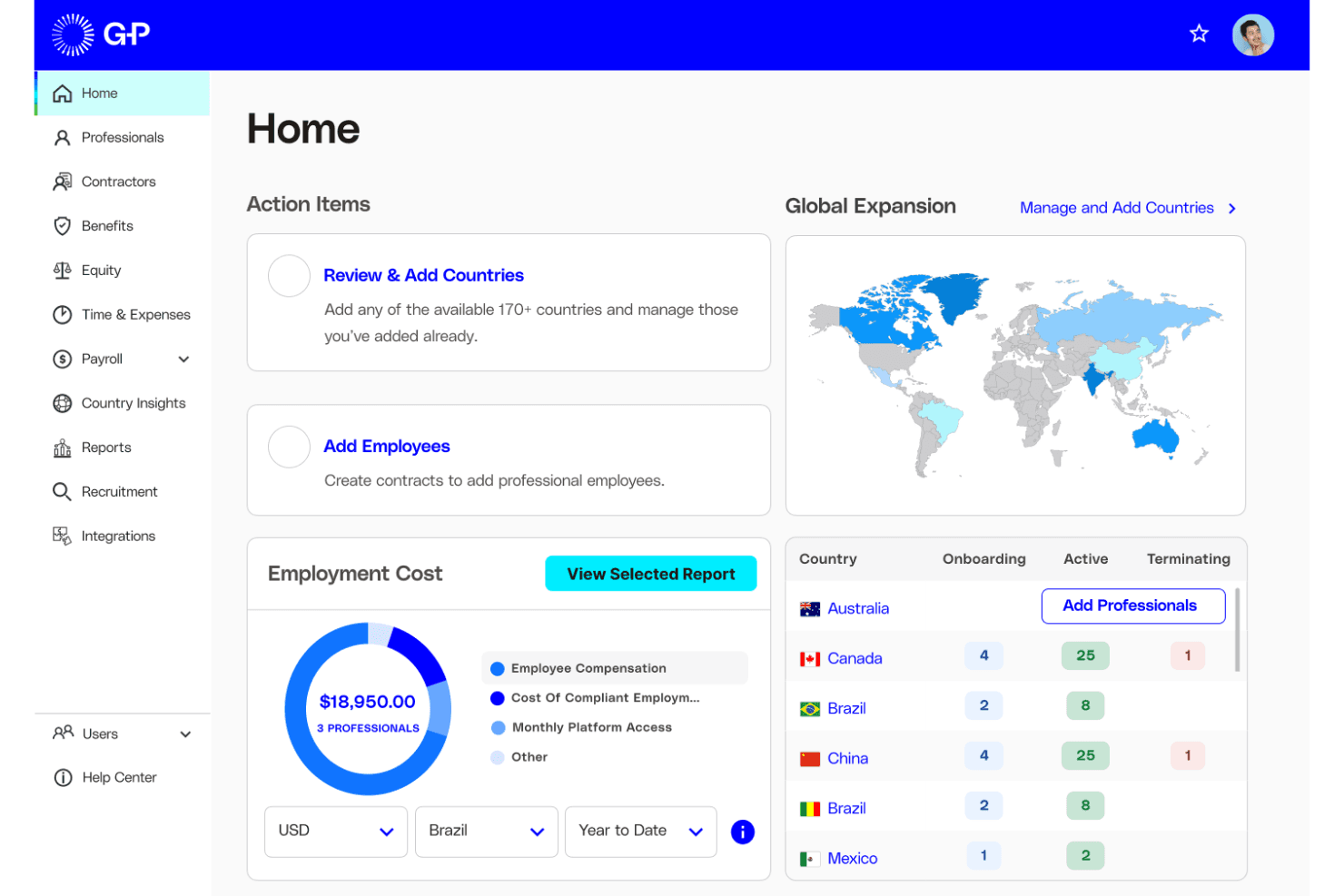
G-P helps users manage global hiring costs and workforce across countries. G-P is an employer of record platform with a wholly owned US legal entity that handles multi-state payroll, tax filings, benefits administration, and AI-powered compliance monitoring across all 50 states.
Who Is G-P Best For?
G-P is a strong fit for mid-market and enterprise HR teams managing multi-state hiring across the US without establishing a local entity.
Why I Picked G-P
I picked G-P for its approach to 50-state compliance tracking through its AI assistant, Gia. Gia draws on more than 100,000 vetted articles and 1,500 government sources to help identify regulatory changes across all 50 states. I also like its Classification Engine, which assesses whether workers should be classified as employees or contractors. This is particularly useful for companies hiring across multiple states with different classification requirements.
G-P Key Features
- Multi-currency payroll processing: G-P processes payroll in more than 150 currencies, handling federal, state, and local tax withholding, FUTA, SUTA, and applicable state filings.
- ACA-compliant benefits administration: Manage medical, dental, vision, 401(k), FMLA, and state paid leave enrollment through a single dashboard, with COBRA support during offboarding.
- Automated termination and offboarding: G-P manages final pay according to state deadlines, ADEA-reviewed severance agreements, and COBRA continuation notices.
- HRIS integrations: Native connections with Workday, SAP SuccessFactors, BambooHR, UKG Pro, HiBob, and Personio help synchronize employee data across existing HR systems.
G-P Integrations
G-P integrates with Workday, SAP SuccessFactors, BambooHR, UKG Pro, UKG Ready, HiBob, Personio, ADP Workforce Now, Paylocity, and Microsoft Entra ID. Its API also supports custom integrations.
Pros and Cons
Pros:
- Benefits administration includes 401(k) and COBRA support
- Owned US entity supports nationwide hiring
- Gia helps identify compliance requirements across all 50 states
Cons:
- Background screening is not included in standard EOR
- Visa assistance is not part of core EOR services
Learn more about G-P: Best for termination liability coverage
- Free demo available
- From $499/employee/month
Visit WebsiteCustomer Rating:4.4/5
Papaya Global tracks employer costs by country, category, and cost center. Papaya Global is an employer of record platform that offers EOR, PEO, ASO, and payroll-only services across more than 180 countries. Its US-specific services cover all 50 states and include automated tax filings, benefits administration, and contractual termination liability coverage.
Who Is Papaya Global Best For?
Papaya Global is a strong fit for midsize and enterprise companies managing multi-state or global workforces that need contractual termination liability coverage alongside payroll and benefits administration.
Why I Picked Papaya Global
I included Papaya Global for its contractual termination liability guarantee, which distinguishes its offering from many other EOR providers. When a termination becomes complicated, Papaya provides contractual protections intended to limit certain legal defense costs and financial exposure, subject to its terms. It also supports upfront severance calculations to help businesses plan termination expenses and avoid payment delays. I like that the platform combines all-50-state coverage with compliance monitoring across more than 10,000 federal, state, and local tax jurisdictions, which is particularly useful for businesses operating across states with different final-pay requirements.
Papaya Global Key Features
- Multi-model US employment support: Choose from EOR, PEO, ASO, or payroll-only service models to match your business structure across all 50 states.
- Automated tax filings: Papaya automates tax filings across more than 10,000 federal, state, and local jurisdictions, with a claimed 99.9% filing accuracy rate.
- Benefits enrollment and administration: Enroll US employees in healthcare, dental, life insurance, and 401(k) plans through partner providers, with compliance support throughout the process.
- Global equity management: A dedicated equity team administers equity plans for EOR workers, applying relevant local tax requirements across supported countries.
Papaya Global Integrations
Papaya Global offers documented integrations with Workday, HiBob, BambooHR, SAP SuccessFactors, Eqip, and OneData. It also provides API access for custom data flows and supports importing pre-payroll data from HRIS, ERP, and Excel files.
Pros and Cons
Pros:
- Reviewers praise responsive account managers
- Automates tax filings across more than 10,000 jurisdictions
- Offers contractual termination liability coverage
Cons:
- Termination liability coverage has contractual exclusions
- Some employment services depend on local partners
Learn more about Papaya Global:
Otros empleadores registrados en EE. UU.
Estas son algunas opciones adicionales que no entraron en mi lista de selección, pero que aún merece la pena consultar:
- 11Payoneer Workforce ManagementBest for $199-per-employee starting pricing
- 12RemoteBest for EOR-to-US PEO without switching
- 13TriNetBest for US firms with an entity seeking PEO
- 14RivermateBest for 24/7 help and a named manager
- 15MultiplierBest for hiring one with no minimum headcount
- 16Safeguard GlobalBest for US hiring and global expansion
- 17InsperityBest for mid-size teams wanting Workday PEO
- 18Remote PeopleBest for moving hiring in-house as you grow
- 19CompunnelBest for linking recruiting with employment
How I Evaluate Employers of Record in the USA
I split my evaluation into three parts. First, core functionality—which carries the most weight—means the provider must own US legal entities and run compliant payroll across states. Then I look for standout features like contractor-to-EOR conversion workflows. Finally, I consider support quality and pricing transparency.
Core Functionality (Table Stakes for This List)
When I'm selecting tools for my list, I score each one on a scale from 0 (does not offer the functionality) to 5 (excels in this area) for each core functionality listed below. I then convert the total into a percentage to help assess each tool's overall fit, with extra weight on any functionalities I've deemed essential.
- Legal Entity & Compliance (Essential): I check whether the provider owns US entities across states or relies on third parties, and how it tracks evolving federal and state labor laws.
- Payroll Processing (Essential): I evaluate how the platform handles multi-state tax withholding, filings, and remittances, especially for employees working across state lines.
- Benefits Administration: I look for access to health insurance, retirement plans, and statutory leave options that are competitive enough to attract US-based talent.
- Contract Generation & Management: State-specific employment agreements matter here, so I check whether contracts auto-adjust for jurisdiction and manage onboarding documents.
- Multi-State Employment Support: I evaluate how well the provider handles compliance differences between states with distinct wage, leave, and reporting requirements.
- Termination & Offboarding Support: Final pay timing varies by state, so I look at how the provider manages compliant terminations, last-check calculations, and required documentation.
Once I have a list of tools that meet the criteria, I consider what sets each platform apart.
Differentiating Factors (What Sets Vendors Apart)
Here's how I compare and contrast different vendors:
Standout Features
I look for contractor-to-EOR conversion workflows that let you move a 1099 worker to W-2 status without gaps in pay or coverage—essential when reclassification risk is on the line. PEO/EOR hybrid flexibility matters just as much, because a team that outgrows EOR needs a clean path to direct employment. I also evaluate real-time compliance alerts, since state wage and leave laws shift often and late updates can mean penalties.
Beyond Features
I check whether pricing is a flat per-employee fee or a percentage of payroll, since percentage models make costs hard to predict as salaries rise. Customer support structure matters just as much—during a time-sensitive termination in a state with same-day final-pay rules, having a dedicated US employment law advisor beats waiting on a generic support ticket. I also evaluate native integrations with common HRIS and ATS platforms, because re-keying employee data between systems during onboarding creates errors and slows down hiring.
Cómo elegir un empleador registrado en EE. UU.
Elige un empleador registrado en EE. UU. confirmando su cobertura estatal, sus responsabilidades de nómina y su proceso de baja o transición.
| Si tu prioridad es… | Busca… |
|---|---|
| Si tu prioridad es…Cumplimiento normativo en cada estado | Busca…Una lista escrita de los estados en los que la entidad del proveedor emplea a trabajadores |
| Si tu prioridad es…Nóminas y pagos finales precisos | Busca…Una asignación clara de las responsabilidades relativas a retenciones, declaraciones y pagos finales |
| Si tu prioridad es…Costes previsibles | Busca…Un desglose detallado que incluya los cargos por el servicio, las prestaciones, la configuración y la rescisión |
| Si tu prioridad es…Un futuro cambio al empleo directo | Busca…Pasos de transferencia por escrito, requisitos para los empleados y tarifas para pasar a una PEO o a tu propia entidad |
Cómo evaluar tu lista de selección
- Confirma las entidades empleadoras: Solicita un documento en el que figure la entidad jurídica que emplearía a tu trabajador en cada estado previsto.
- Asignar las responsabilidades de nómina: Solicita un calendario de nómina de muestra y una matriz de responsabilidades que abarque las retenciones, las declaraciones fiscales y las remesas.
- Revisar el coste total: Solicita un desglose detallado de las tarifas que separe los honorarios del servicio, los costes de las prestaciones, los cargos de configuración y las tarifas de rescisión.
- Probar la asistencia para la desvinculación: Envía un ticket con una fecha y un estado de rescisión hipotéticos y, a continuación, solicita instrucciones por escrito sobre el pago final y los documentos necesarios.
- Elegir el modelo operativo: Compara un acuerdo de empleador registrado propiedad del proveedor con un cambio planificado a una PEO o a tu propia entidad; utiliza la cláusula de transferencia escrita para decidir qué opción se adapta a tus planes de contratación.
¿Qué son los empleadores registrados en EE. UU.?
Un empleador registrado en EE. UU. es un tercero que emplea legalmente a un trabajador y gestiona la nómina, las retenciones fiscales y la administración laboral. Este acuerdo permite a tu organización contratar trabajadores sin establecer primero una entidad estadounidense. El proveedor se encarga de las responsabilidades laborales, mientras que tu organización dirige las tareas diarias del trabajador. Las normativas estatales, las prestaciones y los planes para trasladar a los trabajadores a tu propia entidad siguen requiriendo una atención minuciosa.
Características
Estas son las principales características que busco en un empleador registrado en EE. UU.:
- Empleo legal y cumplimiento normativo: El proveedor emplea a los trabajadores mediante un acuerdo laboral legal establecido y gestiona los requisitos federales, estatales y locales aplicables. Esto permite a las empresas contratar sin establecer primero su propia entidad estadounidense.
- Administración de nóminas e impuestos: El proveedor calcula los salarios, retiene los impuestos sobre la nómina, presenta las declaraciones obligatorias y remite los impuestos a las autoridades pertinentes. Comprueba cómo gestiona los calendarios de nómina, las correcciones y a los empleados que trabajan en distintos estados.
- Administración de prestaciones: El proveedor gestiona las prestaciones aplicables, como el seguro médico y los planes de jubilación, y explica las opciones y los costes disponibles. Esto ayuda a las empresas a comprender los requisitos de elegibilidad de los empleados y las aportaciones del empleador.
- Contratos laborales e incorporación: El proveedor prepara contratos laborales adecuados para cada estado y recopila los formularios obligatorios y la información de los empleados. Un flujo de incorporación estructurado ayuda a los empleados a completar la documentación antes de sus fechas de inicio.
- Asistencia para varios estados: El proveedor aplica las normas laborales en función del lugar donde los empleados realizan su trabajo, incluidos los requisitos estatales específicos sobre salarios y permisos. Esto es especialmente importante para los empleados remotos que trabajan en distintos estados o se trasladan.
- Gestión de permisos y ausencias: El proveedor realiza un seguimiento de las ausencias autorizadas y los días libres remunerados de acuerdo con las políticas y normativas aplicables. Confirma cómo se gestionan las solicitudes, los saldos y los ajustes de nómina.
- Rescisión y desvinculación: El proveedor coordina la documentación de la rescisión, los cálculos salariales finales y las notificaciones obligatorias según la ubicación del empleado. Confirma quién determina los plazos para el pago final y se comunica con los empleados que dejan la empresa.
- Registros de nómina y empleo: La plataforma almacena recibos de nómina, formularios fiscales, contratos laborales y registros relacionados para los usuarios autorizados. Estos registros ayudan a los equipos de recursos humanos a responder a las consultas de los empleados y prepararse para las auditorías.
Ventajas
Según mi experiencia, los servicios de EOR en EE. UU. ofrecen varias ventajas prácticas, entre ellas:
- Contratación sin entidad propia: El acuerdo laboral estadounidense de un EOR permite a las empresas contratar empleados sin establecer primero su propia entidad legal en EE. UU.
- Administración de nóminas: El cálculo de salarios, las retenciones fiscales, las declaraciones y las remesas gestionados por el proveedor reducen la carga administrativa de los equipos internos de nóminas.
- Cumplimiento normativo estatal: La asistencia para varios estados ayuda a las empresas a aplicar los requisitos específicos de cada ubicación sobre salarios, permisos y declaraciones a medida que amplían su plantilla.
- Acceso a prestaciones: La administración de prestaciones permite a los empleados elegibles acceder a opciones como seguros médicos y planes de jubilación.
- Incorporación estructurada: Los contratos laborales adecuados para cada estado y la recopilación de documentos ayudan a los empleados a completar la documentación obligatoria antes de sus fechas de inicio.
- Gestión de bajas compatible: La coordinación de la finalización de la relación laboral, los cálculos del pago final y las notificaciones obligatorias ayudan a las empresas a seguir los procedimientos aplicables específicos de cada estado.
Precios
Los precios de los servicios EOR varían según el proveedor, el nivel de servicio y la ubicación del empleado. La mayoría de los proveedores cobra una tarifa mensual por empleado, mientras que los salarios, las prestaciones, los impuestos laborales y otros costes se facturan por separado. Aunque los planes EOR gratuitos son poco habituales, muchos proveedores ofrecen demostraciones o consultas. La siguiente tabla compara los rangos de precios iniciales habituales y los servicios que puede esperar en cada nivel.
Tabla comparativa de planes para empleadores registrados en EE. UU.
| Tipo de plan | Precio orientativo | Características habituales |
|---|---|---|
| Tipo de planPruebas gratuitas y demostraciones | Precio orientativoGratis | Características habitualesDemostraciones del producto, consultas iniciales, recorridos por la plataforma y estimaciones de los costes de contratación |
| Tipo de planServicios EOR de menor coste | Precio orientativo$199–$399 por empleado/mes | Características habitualesContratos laborales, gestión de nóminas, retención de impuestos, asistencia básica para el cumplimiento normativo e incorporación de empleados |
| Tipo de planServicios EOR de coste medio | Precio orientativo$400–$699 por empleado/mes | Características habitualesGestión de nóminas en varios estados, administración de prestaciones, supervisión del cumplimiento normativo, incorporación de empleados y asistencia para la gestión de bajas |
| Tipo de planServicios EOR de mayor coste/personalizados | Precio orientativo$700+ por empleado/mes o precios personalizados | Características habitualesAcuerdos laborales personalizados, gestión de cuentas dedicada, asistencia avanzada para el cumplimiento normativo y soluciones de plantilla adaptadas |
Preguntas frecuentes
Estas son las respuestas a las preguntas frecuentes sobre los empleadores registrados en Estados Unidos:
¿Puede un EOR estadounidense contratar empleados en todos los estados?
No necesariamente. La cobertura de un EOR depende de los estados en los que pueda contratar legalmente a trabajadores y gestionar las nóminas. La cobertura también puede variar según la ubicación y el puesto del empleado, así como las disposiciones relativas a la entidad o las licencias del proveedor. Antes de firmar un acuerdo, solicite confirmación por escrito de la cobertura para cada estado en el que trabajarán los empleados, incluidos los traslados previstos. Pregunte qué entidad legal aparecerá en los contratos de empleo y los recibos de salarios. Vuelva a confirmar la cobertura antes de que un empleado se traslade, ya que un cambio de ubicación puede afectar a las retenciones fiscales, los registros, las prestaciones y las leyes laborales aplicables
¿Quién es responsable si un EOR comete un error en la nómina o en el cumplimiento normativo?
La responsabilidad depende del contrato, la naturaleza del error y la legislación aplicable. Un acuerdo con un EOR no elimina todas las obligaciones del cliente. Por lo general, el proveedor gestiona las declaraciones de nómina y la administración laboral acordadas, mientras que su organización sigue dirigiendo el trabajo diario y proporcionando información exacta sobre los empleados y su remuneración. El contrato debe especificar quién corrige las declaraciones, financia los salarios o impuestos pendientes, notifica a los empleados y paga las sanciones o los intereses aplicables. Solicite plazos claros para la escalada y pruebas de las remesas fiscales. En el caso de problemas importantes, consulte cuanto antes a su asesor jurídico o fiscal, en lugar de asumir que la tarifa del servicio del EOR cubre todas las pérdidas resultantes.
¿Se puede cambiar de un proveedor de EOR a otro sin finalizar la relación laboral?
Sí, por lo general las empresas pueden cambiar de proveedor de EOR, pero la transición requiere un plan documentado de empleo y nóminas. Según las disposiciones contractuales y los requisitos aplicables, es posible que el proveedor actual deba finalizar la relación laboral antes de que el nuevo proveedor emita un contrato de empleo. Antes de seleccionar una fecha de transferencia, coordine los salarios finales, las fechas de finalización y comienzo de las prestaciones, los registros fiscales, las vacaciones acumuladas y las comunicaciones a los empleados. Confirme si la transición afectará a las fechas de servicio, la elegibilidad para prestaciones, los acuerdos de participación accionarial o el patrocinio de inmigración. Pida a ambos proveedores que documenten sus responsabilidades y las tarifas aplicables, e informe claramente a los empleados sobre cualquier cambio.