

Los 10 mejores softwares de gestión de la fuerza laboral manufacturera en 2026

Selección de software de gestión de personal de fabricación


El software de gestión de personal de fabricación ayuda a tu empresa a programar turnos, realizar un seguimiento de la mano de obra y gestionar el cumplimiento normativo en los equipos de fábrica. Si buscas formas de gestionar una dotación de personal compleja, las normas sindicales o los datos de mano de obra en tiempo real, la plataforma adecuada puede marcar una diferencia considerable. Esta lista te ayudará a comparar las principales soluciones, comprender qué funciones son más importantes para los entornos de fabricación y elegir el software que se adapte a las necesidades específicas de tu planta.
Por qué confiar en nuestras reseñas de software
Nuestro equipo lleva probando y evaluando software desde 2012. Como expertos en RR. HH., sabemos lo difícil —y lo importante— que es elegir el software adecuado.
Para esta guía, evaluamos las herramientas mediante pruebas prácticas e investigación independiente, puntuando las herramientas según nuestros criterios de selección. También nos basamos en la experiencia de líderes de opinión del sector y de profesionales de RR. HH. en activo.
Nuestras reseñas reflejan nuestro criterio editorial humano, no un discurso de ventas.
Revisores expertos:
Tabla comparativa de software de gestión de personal de fabricación
Esta tabla comparativa resume los detalles de precios de mi selección del mejor software de gestión de personal de fabricación:
| Tool | Best For | Trial Info | Price | ||
|---|---|---|---|---|---|
| 1 | Mejor para paneles de analíticas de la fuerza laboral | Demo gratuita disponible | Precios bajo solicitud | Website | |
| 2 | Mejor para implementación local de código abierto | Prueba gratuita de 30 días + demo gratis disponible | Desde $50/mes | Website | |
| 3 | Mejor para el pronóstico laboral avanzado en plantas grandes | Demo gratuita disponible | Precio a consultar | Website | |
| 4 | Ideal para el monitoreo en tiempo real del cumplimiento normativo | Demostración gratuita disponible | Precio bajo solicitud | Website | |
| 5 | Ideal para integración con nómina y beneficios | Demo gratuita disponible | Precio a consultar | Website | |
| 6 | Ideal para el seguimiento configurable de tiempo y asistencia | Demostración gratuita disponible | Precio a consultar | Website | |
| 7 | Ideal para necesidades complejas de programación de turnos | Demo gratuita disponible | Precios bajo consulta | Website | |
| 8 | Ideal para información sobre la fuerza laboral impulsada por IA | Demo gratuita disponible | Precio a consultar | Website | |
| 9 | Ideal para el seguimiento del tiempo basado en proyectos | Demo gratuita disponible | Precio bajo consulta | Website | |
| 10 | Ideal para la gestión automatizada de reglas sindicales | Demostración gratuita disponible | Precio bajo solicitud | Website |
Reseñas de software de gestión de personal de fabricación
A continuación se incluyen mis resúmenes detallados del mejor software de gestión de personal de fabricación que forma parte de mi selección. Mis reseñas ofrecen un análisis detallado de las funciones, los casos de uso más adecuados y las integraciones de cada plataforma para ayudarte a encontrar la mejor opción para ti.

Mejor para paneles de analíticas de la fuerza laboral
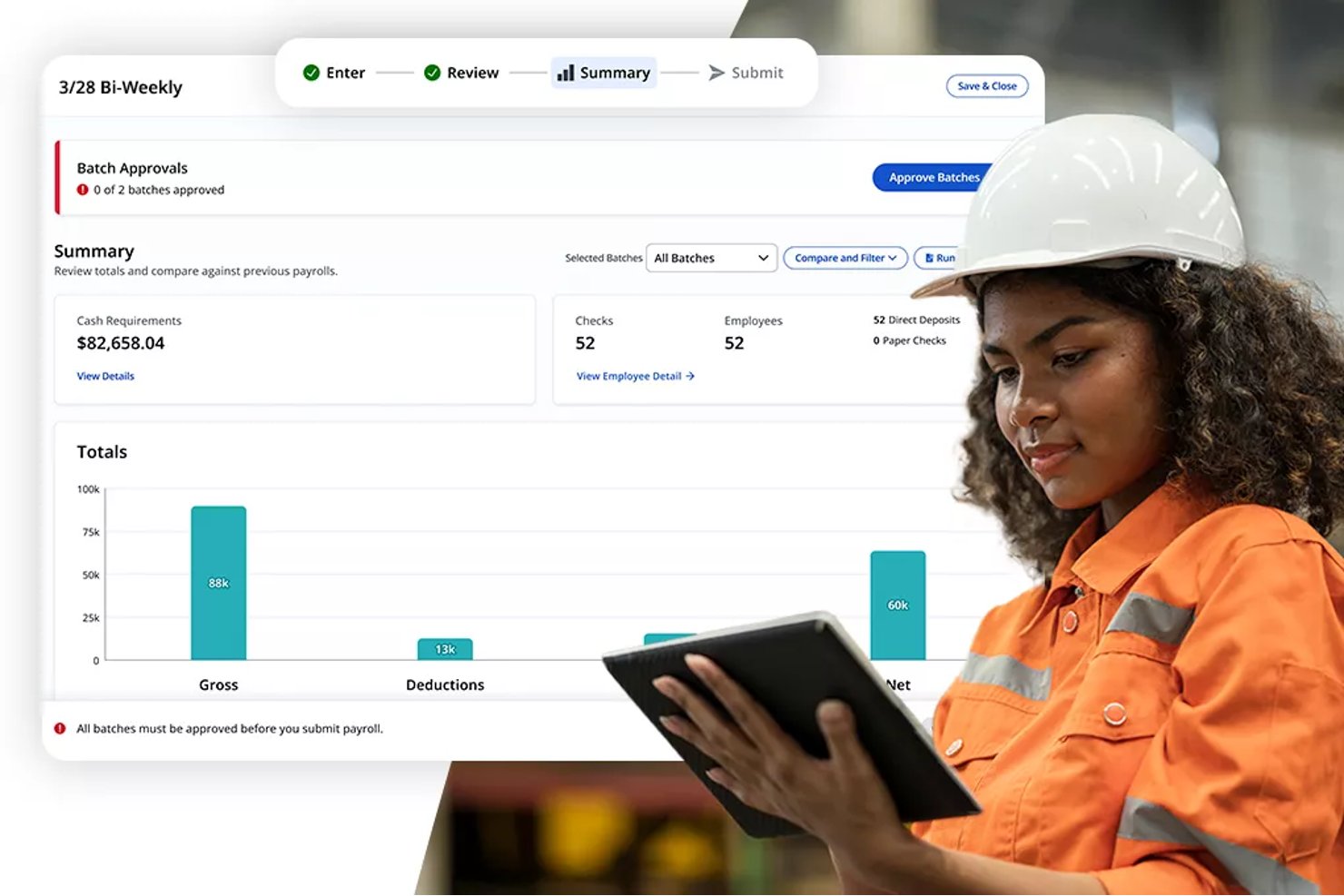
Paylocity es una plataforma de gestión del capital humano (HCM) basada en la nube que combina nómina, control de tiempo y asistencia, programación de turnos, analíticas de la fuerza laboral y herramientas de experiencia del empleado para plantillas por horas y con varias ubicaciones.
¿Para quién es mejor Paylocity?
Paylocity es ideal para empresas manufactureras medianas (de 50 a más de 1,000 empleados) donde los equipos de RR. HH. necesitan nómina, programación y analíticas integradas en una sola plataforma.
Por qué elegí Paylocity
Paylocity se gana su lugar en mi lista porque sus paneles de analíticas unifican los datos de RR. HH. y nómina en una sola vista en tiempo real. Me gustan particularmente los dashboards ExecView, que me permiten supervisar los costos laborales, tendencias de horas extra y patrones de asistencia en varias plantas a la vez. La función de analítica predictiva también destaca: puedo utilizar datos actuales e históricos de la fuerza laboral para modelar escenarios de dotación futura antes de que cambien los horarios de producción.
Características clave de Paylocity
- Recopilación de tiempo móvil: Los empleados pueden registrar su entrada y salida utilizando una app móvil, web, quiosco o relojes físicos.
- Funcionalidad para reclamar e intercambiar turnos: Los trabajadores pueden reclamar turnos disponibles o intercambiarlos con compañeros fácilmente a través de herramientas de autoservicio.
- Geoperimetraje para registro de entrada: Los controles basados en ubicación restringen los registros de entrada a zonas de trabajo aprobadas para evitar fichajes fuera del sitio.
- Gestión de aprendizaje integrada: La plataforma incluye un sistema LMS incorporado que ofrece seguimiento de habilidades y gestión de certificaciones para el personal de manufactura.
Integraciones de Paylocity
Las integraciones nativas no están claramente documentadas. Paylocity ofrece una API para integraciones personalizadas.
Pros and Cons
Pros:
- Las analíticas de fuerza laboral abarcan múltiples plantas
- Rastrea certificaciones y vencimientos de habilidades automáticamente
- La analítica predictiva apoya la planificación proactiva de turnos
Cons:
- La configuración de quioscos en el piso de producción requiere configuración adicional
- La personalización de reportes puede ser limitada para fabricantes
New Product Updates from Paylocity

Paylocity Expands Expense and Purchase Request Tools
Paylocity adds connected personal cards, smarter expense categorization, and a streamlined purchase request experience. This reduces manual entry and helps finance teams manage expenses and approvals more efficiently. For more information, visit Paylocity’s official site.
 .
.
TimeTrex
Mejor para implementación local de código abierto
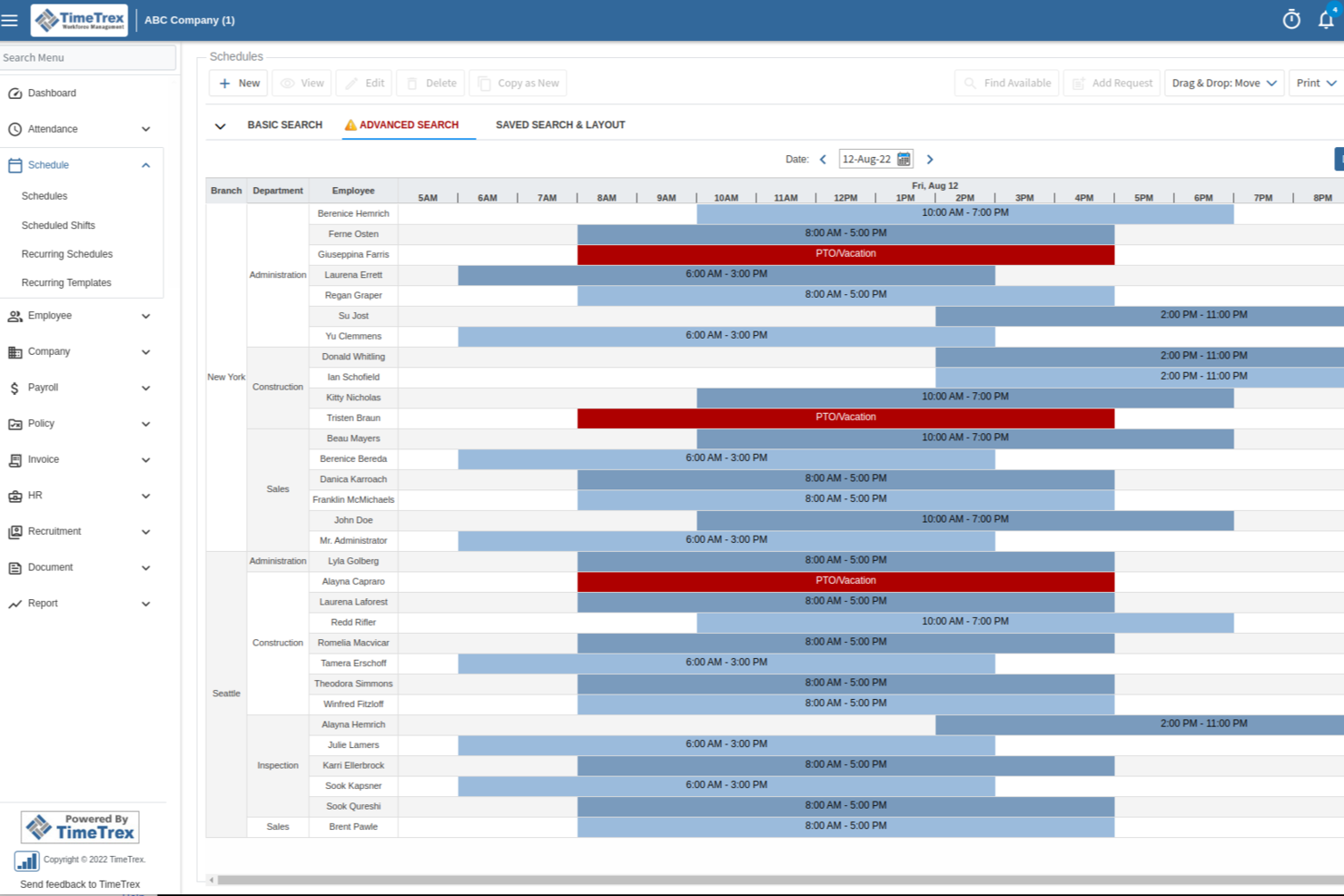
TimeTrex es una plataforma de gestión de la fuerza laboral para equipos de manufactura que reúne seguimiento de asistencia y tiempo, programación de empleados, nómina, cálculo de costos laborales y herramientas de cumplimiento en un solo sistema.
¿Para quién es mejor TimeTrex?
TimeTrex es adecuado para empresas manufactureras que necesitan un sistema unificado para gestionar la programación de la fuerza laboral, la nómina y el cumplimiento en múltiples ubicaciones.
Por qué elegí TimeTrex
Elegí TimeTrex como uno de los mejores porque puedo implementarlo en las instalaciones usando su edición de código abierto, lo cual es poco común en el software de gestión laboral. Mi equipo puede personalizar la plataforma para adaptarla a nuestros flujos de trabajo de manufactura e integrarla con nuestros sistemas locales ya existentes. Me gusta que podamos controlar nuestros datos y políticas de seguridad sin depender de un proveedor de la nube externo.
Características clave de TimeTrex
- Seguimiento de tiempo y asistencia: Captura las horas de los empleados usando opciones de registro biométrico, web o móvil.
- Programación automatizada: Crea y gestiona horarios de turnos complejos para equipos de manufactura.
- Cálculo de costos laborales: Rastrea los costos de mano de obra por trabajo, proyecto o departamento en tiempo real.
- Procesamiento de nómina: Calcula salarios, deducciones e impuestos para empleados por hora y asalariados.
Integraciones de TimeTrex
TimeTrex ofrece integraciones nativas con QuickBooks, ADP, Paychex, Ceridian y Sage para el procesamiento de nómina. Hay una API disponible para integraciones personalizadas con sistemas de RRHH, nómina y contabilidad.
Pros and Cons
Pros:
- Incluye funciones de cumplimiento para nómina en varios países
- Compatibilidad con hardware de reloj biométrico
- Cálculos automáticos de horas extras y diferenciales de turno
Cons:
- La interfaz se percibe anticuada en comparación con la competencia
- Las opciones de personalización de reportes son algo limitadas
New Product Updates from TimeTrex
TimeTrex Adds Quick Punch App With Offline and QR Support
TimeTrex adds a new Quick Punch app, offline punching, QR code scanning, punch images, configurable messages, and punch warnings or lockouts to improve employee clock-ins across browsers and local computers. For more information, visit TimeTrex’s official site.
 .
.
UKG Pro
Mejor para el pronóstico laboral avanzado en plantas grandes
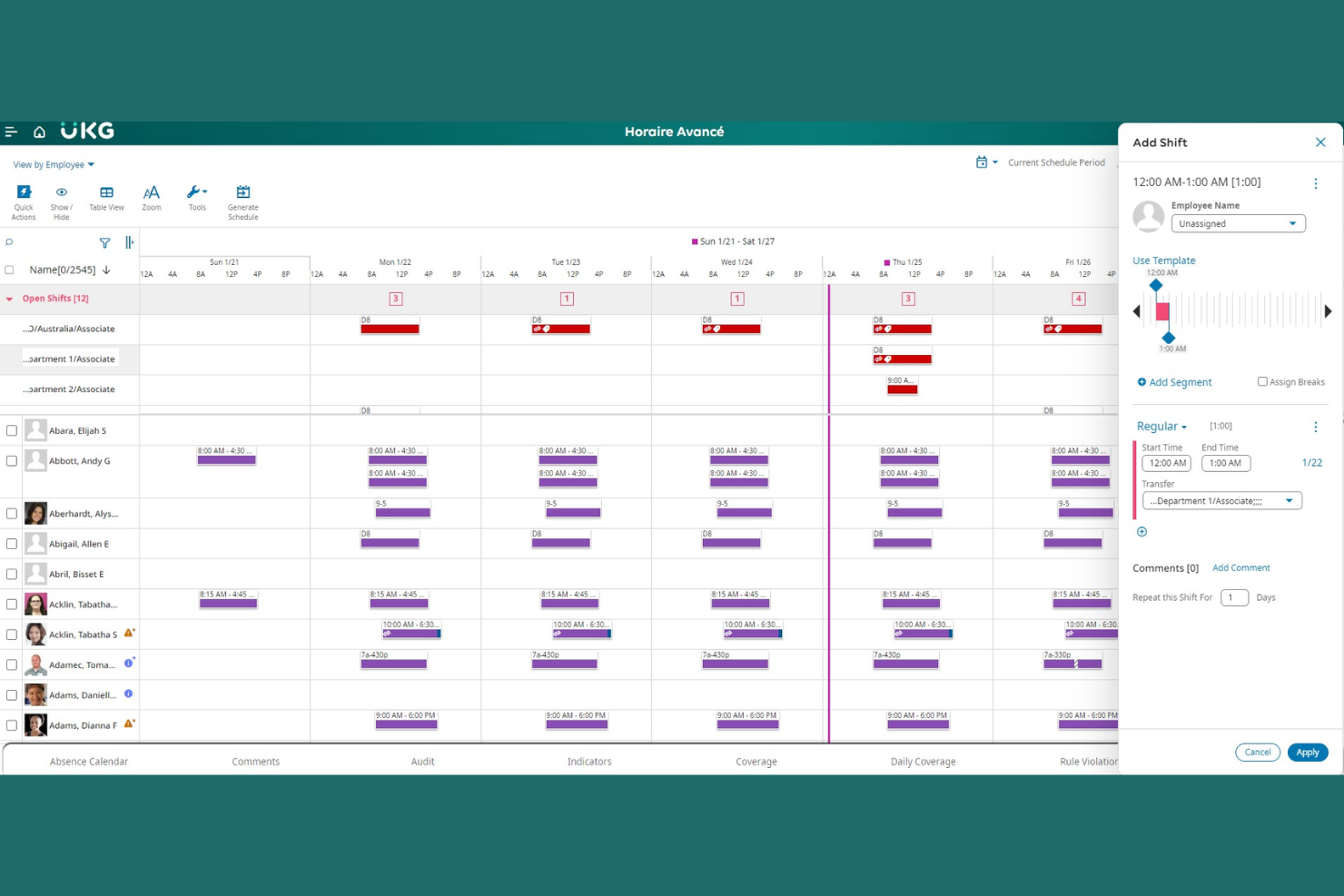
UKG Pro ofrece una plataforma de gestión de la fuerza laboral diseñada para fabricantes con necesidades laborales complejas. Es una opción sólida para plantas grandes o empresas que necesitan coordinar la dotación de personal, el cumplimiento normativo y los costos laborales en múltiples ubicaciones. El software ayuda a los equipos de RR. HH. y operaciones a gestionar la programación dinámica, el control de tiempo y el análisis de la fuerza laboral en entornos de producción exigentes.
¿Para Quién es UKG Pro?
UKG Pro es ideal para grandes empresas manufactureras que necesitan gestionar operaciones laborales complejas en varias instalaciones.
Por Qué Elegí UKG Pro
Elegí UKG Pro porque sus avanzadas herramientas de pronóstico laboral abordan los desafíos únicos de los entornos manufactureros a gran escala. La plataforma utiliza análisis predictivos para ayudar a los gerentes a anticipar las necesidades de personal según la demanda de producción, la estacionalidad y las tendencias históricas. También valoro su capacidad para automatizar la programación compleja y la gestión de horas extra, lo cual es esencial para plantas con cargas de trabajo variables. Estas funciones facilitan a los fabricantes el control de los costos laborales y el mantenimiento de la productividad en múltiples turnos y ubicaciones.
Funciones Clave de UKG Pro
Otras funciones que los equipos de manufactura pueden encontrar útiles incluyen:
- Gestión móvil de la fuerza laboral: Supervisores y empleados pueden acceder a los horarios, solicitar días libres y aprobar cambios desde cualquier dispositivo.
- Seguimiento automatizado del cumplimiento: El sistema supervisa las leyes laborales y acuerdos sindicales para ayudar a reducir los riesgos de incumplimiento.
- Monitoreo de asistencia en tiempo real: Los gerentes pueden ver los datos de asistencia al momento, lo que facilita abordar ausencias o retrasos.
- Portal de autoservicio para empleados: Los trabajadores pueden consultar sus recibos de sueldo, actualizar su información personal y gestionar sus propios horarios en línea.
Integraciones de UKG Pro
Las integraciones incluyen ADP, SAP SuccessFactors, Oracle, Workday, Microsoft Teams, Salesforce, QuickBooks, Ceridian, Infor y ServiceNow.
Pros and Cons
Pros:
- Ofrece pronóstico laboral avanzado
- Herramientas de monitoreo de asistencia y turnos en tiempo real
- Cumplimiento automatizado de reglas laborales y sindicales
Cons:
- La implementación puede ser larga para plantas grandes
- Flexibilidad limitada para fabricantes pequeños

Dayforce
Ideal para el monitoreo en tiempo real del cumplimiento normativo
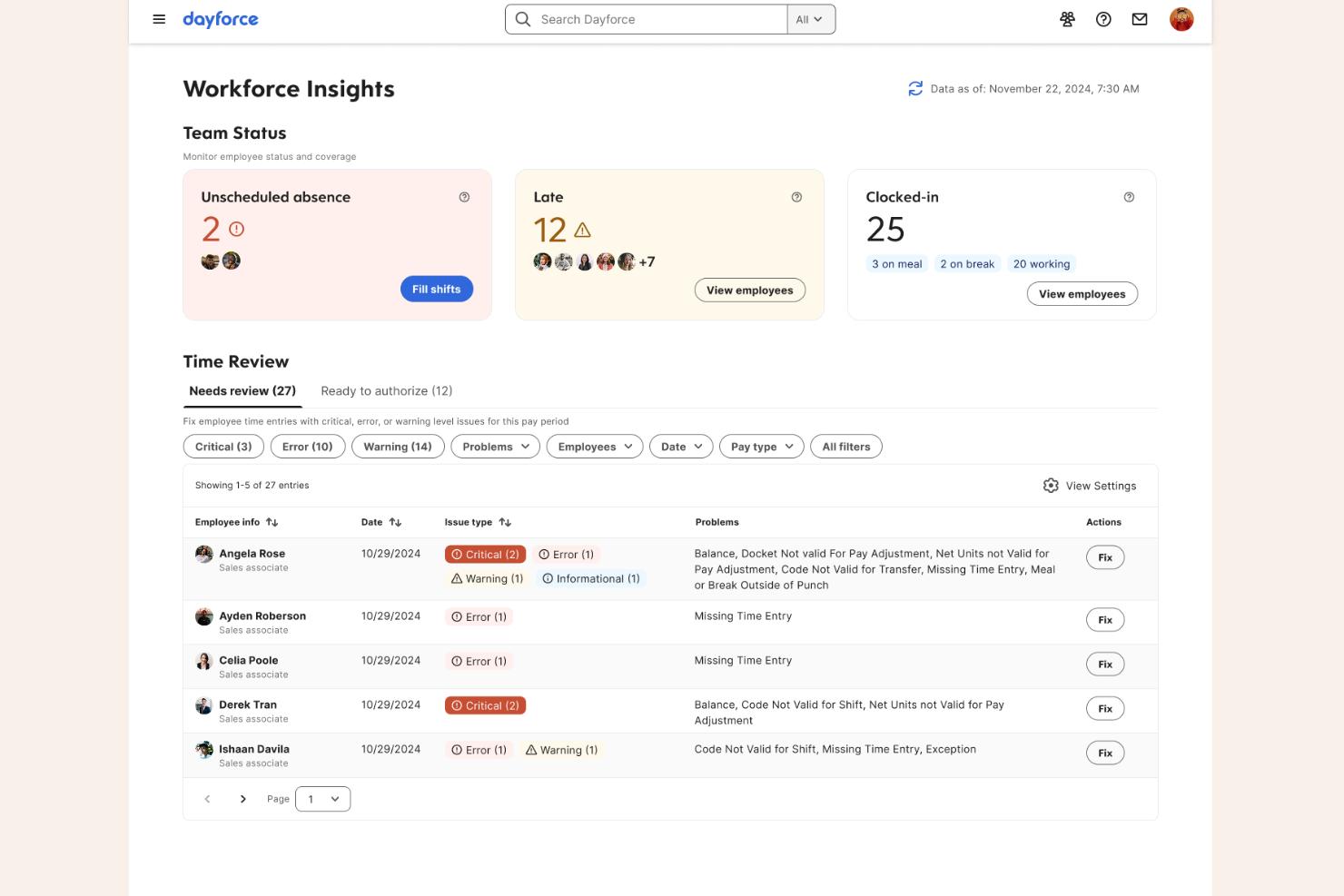
Dayforce es una plataforma de gestión de la fuerza laboral diseñada para fabricantes que necesitan gestionar requisitos laborales complejos y el cumplimiento normativo. Está especialmente indicada para líderes de RR. HH. y operaciones en entornos de fabricación a gran escala o con múltiples sedes. La plataforma ayuda a abordar desafíos como el seguimiento de la fuerza laboral, la programación de turnos y el cumplimiento de normativas en plantillas diversas.
¿Para quién es mejor Dayforce?
Dayforce es una excelente opción para grandes organizaciones manufactureras que necesitan gestionar el cumplimiento normativo y las operaciones de personal en varias ubicaciones.
Por qué elegí Dayforce
Lo que me atrajo de Dayforce para la gestión de la fuerza laboral en manufactura es su fuerte enfoque en el monitoreo del cumplimiento en tiempo real. La plataforma realiza un seguimiento continuo de las regulaciones laborales, las reglas de horas extra y los requisitos de pausas a medida que se crean los horarios y se trabajan los turnos, ayudando a los fabricantes a evitar costosos errores de cumplimiento. También valoro que Dayforce actualiza automáticamente las reglas de cumplimiento en función de los cambios en las leyes locales, estatales o federales, lo cual es especialmente importante para organizaciones con presencia en varias regiones. Estas funciones la convierten en una opción confiable para fabricantes que necesitan mantenerse a la vanguardia de regulaciones laborales complejas y cambiantes.
Características clave de Dayforce
Además de sus capacidades de monitoreo de cumplimiento, Dayforce ofrece varias otras funciones que apoyan la gestión del personal en manufactura:
- Herramientas de programación automatizada: La plataforma genera horarios de turnos optimizados en función de la demanda de mano de obra, las habilidades y la disponibilidad de los empleados.
- Aplicación móvil de autoservicio: Los empleados pueden ver horarios, solicitar permisos y cambiar turnos directamente desde sus dispositivos móviles.
- Integración con procesamiento de nómina: La nómina se calcula y procesa automáticamente utilizando datos de asistencia y horarios en tiempo real.
- Análisis de costos laborales: Los gerentes pueden acceder a paneles e informes para monitorear costos laborales y productividad en diferentes sitios o departamentos.
Integraciones de Dayforce
Las integraciones incluyen Microsoft, SAP, Oracle, Workday, ADP, UKG, Salesforce, Docusign, Cornerstone OnDemand y ServiceNow.
Pros and Cons
Pros:
- Calcula la nómina en tiempo real de manera continua
- Ofrece pago a demanda a través de Dayforce
- Wallet Ejecuta escenarios hipotéticos para costos de prestaciones
Cons:
- Carece de funciones de coincidencia de candidatos impulsadas por IA
- El rendimiento del sistema disminuye en ciclos pico

ADP
Ideal para integración con nómina y beneficios
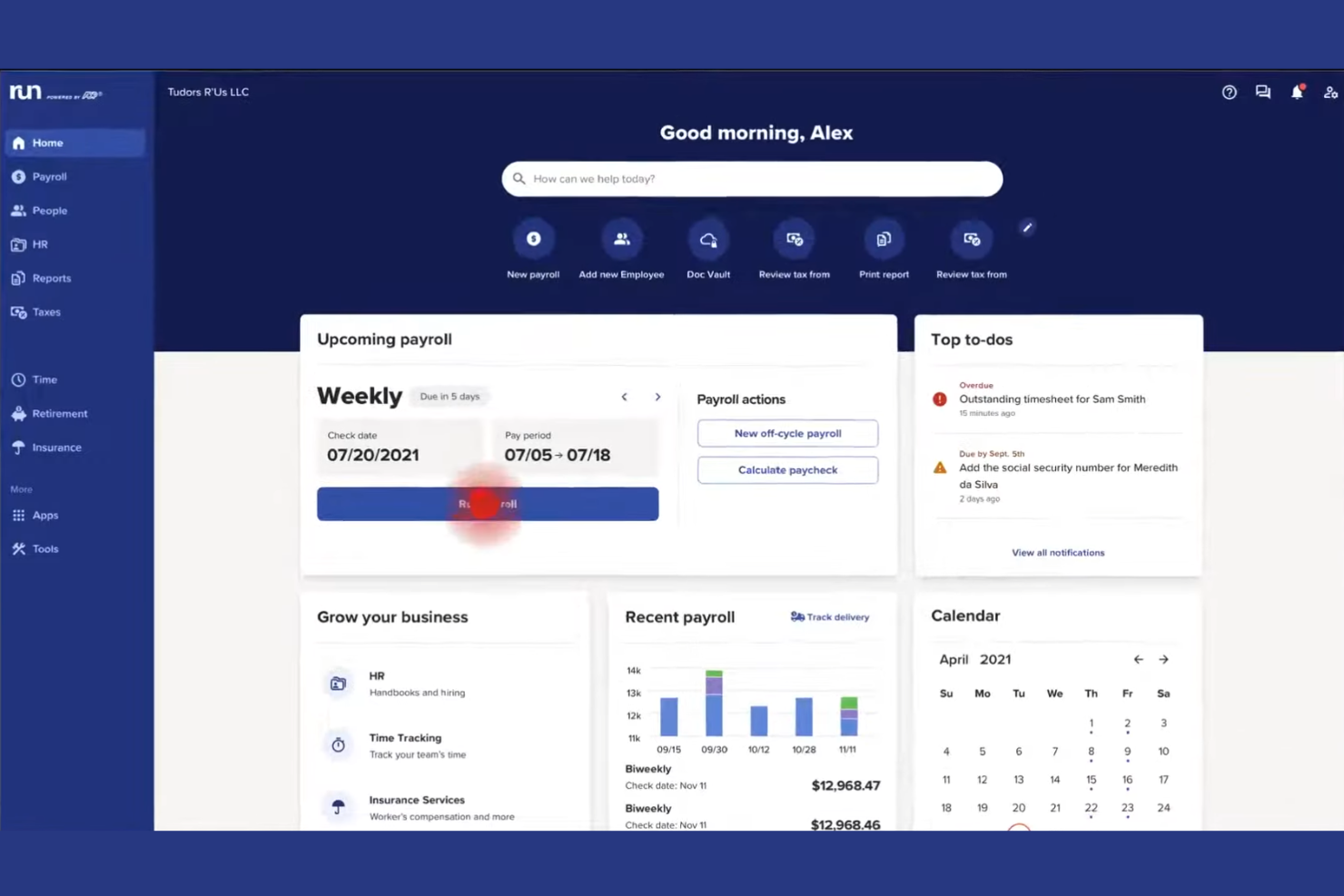
ADP ofrece soluciones de gestión de la fuerza laboral diseñadas para fabricantes que necesitan coordinar RR.HH., control de horarios y cumplimiento normativo en múltiples ubicaciones. La plataforma es ideal para equipos de RR.HH. y gerentes de planta que buscan centralizar los datos de los empleados y automatizar procesos rutinarios de gestión del personal. Los fabricantes suelen recurrir a ADP para ayudar a gestionar la programación compleja, el cumplimiento de la normativa laboral y las necesidades de informes de la fuerza laboral.
¿Para quién es mejor ADP?
ADP es una excelente opción para medianas y grandes empresas manufactureras que necesitan gestión integrada de RR.HH., nómina y fuerza laboral en múltiples sedes.
Por qué elegí ADP
Elegí ADP porque ofrece integración nativa entre la gestión de la fuerza laboral, la nómina y la administración de beneficios, lo cual es una prioridad para muchos fabricantes. Esta integración permite automatizar los cálculos de pago, deducciones y la inscripción en beneficios directamente desde los datos de asistencia y horarios, reduciendo la entrada manual y los errores. También valoro que ADP facilite el cumplimiento de las leyes de salario y jornada laboral al vincular la programación y la nómina, algo especialmente importante para empresas manufactureras con trabajadores por hora y en turnos. Estas funciones ayudan a los equipos de RR.HH. y a los gerentes de planta a mantener la nómina precisa y los beneficios actualizados sin tener que gestionar múltiples sistemas desconectados.
Características clave de ADP
Otras características que hacen a ADP útil para la gestión de la fuerza laboral en manufactura incluyen:
- Programación automatizada de turnos: Crea, asigna y ajusta los turnos de los empleados según las necesidades de producción y la disponibilidad de personal.
- Control de horario móvil: Permite a los empleados registrar la entrada y salida o solicitar ausencias desde sus dispositivos móviles.
- Panel de análisis laboral: Accede a información en tiempo real sobre costos laborales, horas extra y tendencias de la fuerza laboral.
- Registro y seguimiento de incidentes y seguridad: Registra incidentes en el lugar de trabajo y monitorea el cumplimiento de normas de seguridad directamente en la plataforma.
Integraciones de ADP
Las integraciones incluyen QuickBooks, Xero, Sage, Workday, SAP, Oracle, ZipRecruiter, HealthEquity, WEX y ClockShark.
Pros and Cons
Pros:
- Integra nómina, RR.HH. y beneficios
- Admite reglas para trabajadores sindicalizados y no sindicalizados
- Ofrece herramientas de cumplimiento para regulaciones laborales
Cons:
- Las funciones avanzadas de RR.HH. requieren complementos pagos
- La interfaz puede parecer anticuada para algunos equipos
Infor
Ideal para el seguimiento configurable de tiempo y asistencia
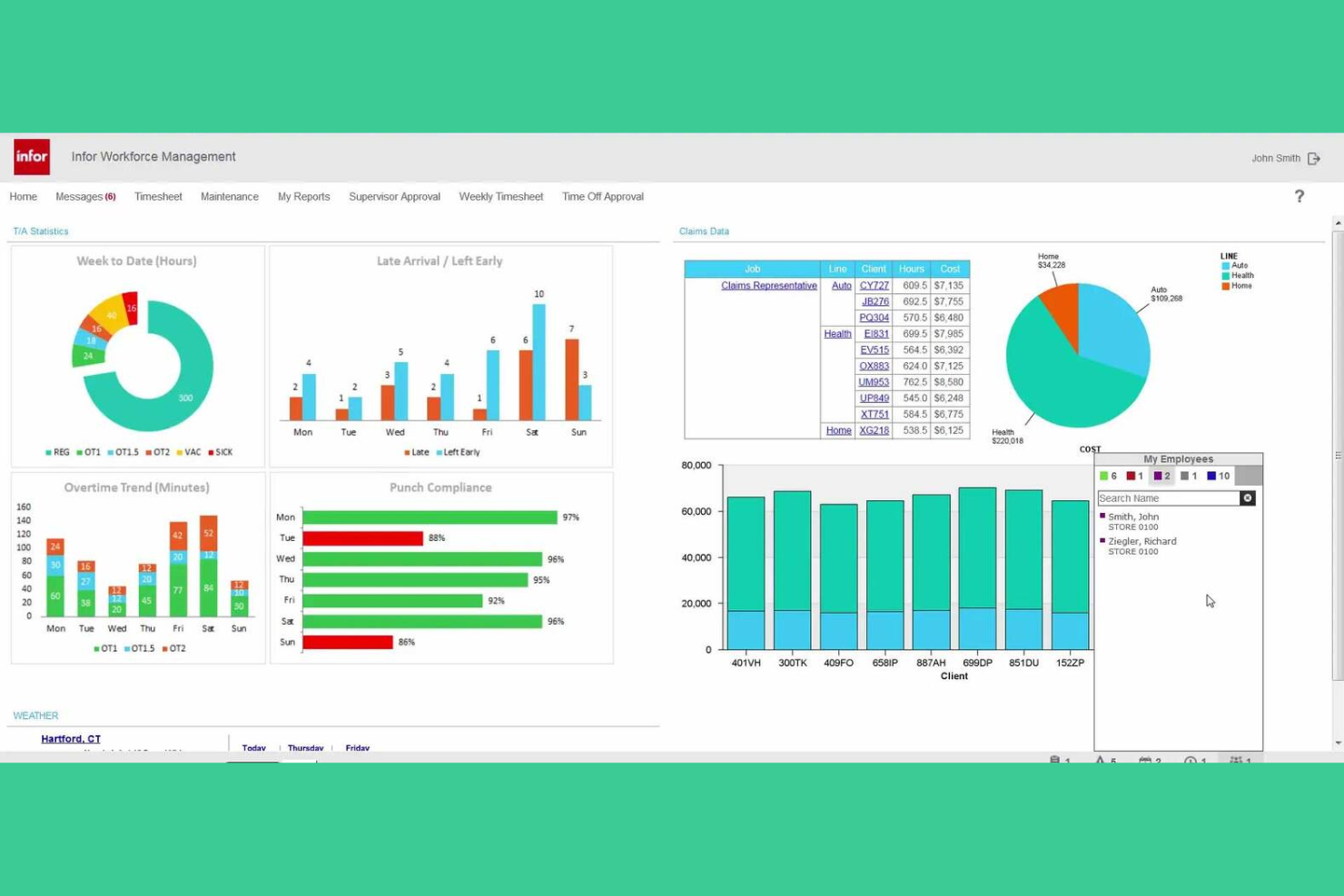
Los fabricantes que buscan una plataforma de gestión de la fuerza laboral con una amplia capacidad de personalización suelen considerar Infor. El sistema está diseñado para organizaciones que necesitan gestionar complejos requisitos de control de tiempo, asistencia y seguimiento laboral en múltiples ubicaciones. Resulta atractivo para los líderes de RR. HH. y operaciones que desean adaptar los procesos de gestión de personal a necesidades únicas de cumplimiento y programación.
¿Para quién es mejor Infor?
Infor es una excelente opción para grandes fabricantes y empresas con varias sedes que necesitan un control de tiempo y asistencia altamente configurable.
¿Por qué elegí Infor?
Elegí Infor porque ofrece un alto nivel de personalización para el seguimiento de tiempo y asistencia, lo cual es esencial para los fabricantes con entornos laborales complejos. La plataforma permite definir reglas de pago personalizadas, políticas de asistencia y patrones de turnos para adaptarse a acuerdos sindicales o requisitos específicos de cada sitio. También me gusta que Infor soporte un seguimiento detallado de excepciones y la captura automática del tiempo desde una variedad de dispositivos, lo que ayuda a reducir errores manuales. Estas características lo convierten en una opción sólida para fabricantes que necesitan adaptar los procesos de gestión de personal a realidades operativas particulares.
Principales características de Infor
Otras funciones que hacen que Infor sea útil para la gestión de personal en manufactura incluyen:
- Pronóstico y programación de mano de obra: Genere horarios impulsados por la demanda según datos históricos, necesidades de producción y disponibilidad de personal.
- Herramientas de gestión de ausencias: Controle, apruebe y reporte ausencias de empleados con flujos de trabajo configurables.
- Acceso móvil para la fuerza laboral: Permite que empleados y gerentes consulten horarios, soliciten permisos y aprueben cambios desde dispositivos móviles.
- Panel de monitoreo de cumplimiento: Supervise el cumplimiento de la legislación laboral y reciba alertas de posibles infracciones en tiempo real.
Integraciones de Infor
Las integraciones incluyen ADP, Oracle, SAP, Workday, Kronos, PeopleSoft, Infor CloudSuite, Microsoft Dynamics 365, Ceridian y UKG.
Pros and Cons
Pros:
- Pronostica el volumen de producción usando aprendizaje automático
- Automatiza la validación de reglas de pago de cero a bruto
- Soporta configuraciones complejas de legislación laboral global
Cons:
- Curva de aprendizaje más pronunciada para los administradores del sistema
- La funcionalidad móvil no ofrece toda la paridad con la versión de escritorio

ADP WorkForce Suite ofrece una plataforma de gestión de personal diseñada para fabricantes con necesidades exigentes de programación y cumplimiento normativo. Es una opción sólida para líderes de operaciones y equipos de RRHH en grandes plantas o instalaciones con múltiples sedes. El software ayuda a abordar desafíos como la cobertura de turnos, el cumplimiento de la legislación laboral y la visibilidad en tiempo real de la fuerza laboral.
¿Para quién es ideal ADP WorkForce Suite?
ADP WorkForce Suite es adecuado para grandes organizaciones manufactureras que necesitan gestionar la programación compleja de turnos en múltiples sedes y garantizar el cumplimiento normativo.
Por qué elegí ADP WorkForce Suite
Lo que destaca de ADP WorkForce Suite es su capacidad para gestionar escenarios de programación de turnos sumamente complejos, comunes en entornos manufactureros. Elegí esta herramienta porque permite gestionar reglas dinámicas de programación, incluidos turnos rotativos, turnos divididos y acuerdos específicos de sindicatos, aspectos que suelen ser difíciles de manejar de forma manual. La plataforma también ofrece visibilidad en tiempo real sobre la cobertura de turnos y la asignación de personal, ayudando a los gerentes a responder rápidamente a cambios de última hora o demandas de producción. Estas capacidades la hacen especialmente valiosa para fabricantes con grandes plantillas y requisitos horarios complejos.
Funciones clave de ADP WorkForce Suite
Otras funciones que pueden resultar útiles para los equipos de manufactura incluyen:
- Seguimiento automático de tiempo y asistencia: El sistema registra en tiempo real las horas y la asistencia de los empleados para garantizar la exactitud de la nómina y el cumplimiento normativo.
- Acceso móvil para la fuerza laboral: Empleados y supervisores pueden consultar horarios, solicitar cambios y aprobar permisos desde cualquier dispositivo.
- Supervisión del cumplimiento de leyes laborales y sindicatos: Herramientas integradas de cumplimiento ayudan a asegurar que los horarios y las políticas salariales se alinean con la legislación laboral local y los acuerdos sindicales.
- Panel de análisis e informes: Los gerentes pueden acceder a análisis de personal y generar informes para respaldar decisiones operativas.
Integraciones de ADP WorkForce Suite
Las integraciones incluyen ADP, SAP, Oracle, Workday, Microsoft, Kronos, Infor, Ceridian, NGA Human Resources y Cornerstone OnDemand.
Pros and Cons
Pros:
- Gestiona reglas de cumplimiento sindical y laboral
- Permite operaciones manufactureras en múltiples sedes
- Automatiza la gestión de la fatiga
Cons:
- Requiere perfiles separados para distintos empleadores
- Navegación poco intuitiva del organigrama
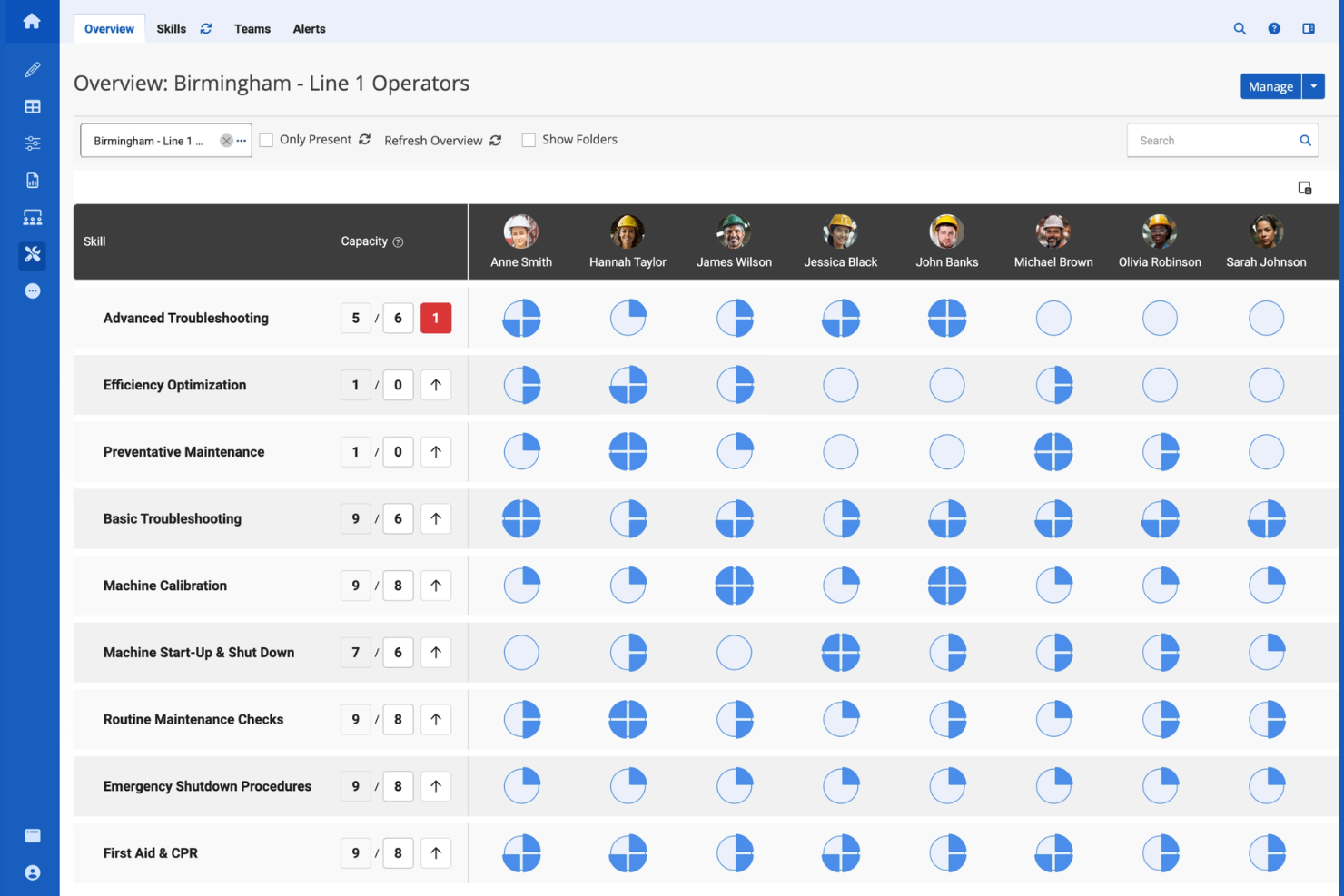
Augmentir ofrece a los equipos de manufactura un enfoque moderno para la gestión de la fuerza laboral al combinar flujos de trabajo digitales con datos operativos en tiempo real. Está diseñado para fabricantes que desean optimizar la productividad en el área de producción y abordar las brechas de habilidades mediante tecnología de trabajador conectado. Esta plataforma ayuda a los líderes a identificar cuellos de botella en los procesos y a fomentar la mejora continua en todas sus operaciones.
¿Para quién es mejor Augmentir?
Augmentir es ideal para organizaciones manufactureras que desean aprovechar la inteligencia artificial para optimizar el desempeño y el desarrollo de habilidades de los trabajadores de primera línea.
Por qué elegí Augmentir
Lo que me atrajo de Augmentir para la gestión de la fuerza laboral en manufactura es su enfoque en la obtención de información basada en IA sobre la fuerza laboral. La plataforma utiliza inteligencia artificial para analizar el desempeño de los trabajadores y recomendar capacitación o soporte específico, lo que ayuda a los fabricantes a abordar brechas de habilidades y mejorar la productividad en la planta. También valoro cómo las herramientas de trabajador conectado de Augmentir capturan datos en tiempo real de las actividades en el área de producción, brindando a los líderes información procesable sobre cuellos de botella y tendencias laborales. Este enfoque facilita a los fabricantes la toma de decisiones basadas en datos sobre el desarrollo de la fuerza laboral y las mejoras operativas.
Características clave de Augmentir
Otras funciones que los equipos de manufactura pueden encontrar útiles incluyen:
- Instrucciones de trabajo digitales: Crear y entregar guías digitales paso a paso a los trabajadores de primera línea para una ejecución de tareas consistente.
- Herramientas de colaboración remota: Permite soporte y resolución de problemas en tiempo real a través de videollamadas y chat con expertos en la materia.
- Seguimiento automatizado de habilidades: Monitorea y actualiza los perfiles de habilidades de los trabajadores según las tareas completadas y certificaciones.
- Integración con dispositivos IoT: Conéctese a sensores y máquinas en la planta para recopilar datos operativos y activar flujos de trabajo.
Integraciones de Augmentir
Las integraciones incluyen SAP, Oracle, IBM Maximo, Infor, Microsoft Dynamics 365, Salesforce, Cornerstone OnDemand, Saba, SuccessFactors y Workday.
Pros and Cons
Pros:
- La IA recomienda capacitación específica para los trabajadores
- Datos en tiempo real de herramientas de trabajador conectado
- Seguimiento automatizado de habilidades para auditorías de cumplimiento
Cons:
- Requiere un esfuerzo significativo para digitalizar los procedimientos existentes
- Desafíos de integración con maquinaria antigua de planta

Replicon ofrece una plataforma de seguimiento del tiempo diseñada para organizaciones que necesitan gestionar los costos laborales y las horas de los proyectos con precisión. Es especialmente útil para fabricantes y equipos orientados a proyectos que necesitan asignar tiempo y recursos entre varios trabajos o líneas de producción. El sistema ayuda a los líderes a obtener visibilidad sobre la utilización de la fuerza laboral y el avance de los proyectos, facilitando una mejor planificación y cumplimiento normativo.
¿Para quién es mejor Replicon?
Replicon es ideal para empresas manufactureras y organizaciones basadas en proyectos que necesitan un seguimiento detallado del tiempo y una gestión de costos laborales en múltiples trabajos o líneas de producción.
Por qué elegí Replicon
Lo que destaca de Replicon para la gestión de la fuerza laboral en manufactura es su enfoque en el seguimiento del tiempo basado en proyectos. Los fabricantes a menudo necesitan registrar las horas y costos laborales por trabajo, turno o línea de producción, y la plataforma de Replicon está construida para manejar estos requisitos con seguimiento detallado a nivel de proyecto y tarea. Me gusta cómo permite a los gerentes asignar el tiempo directamente a proyectos específicos, lo que facilita el monitoreo del progreso y controlar los costos en tiempo real. Este grado de detalle contribuye a una mejor planificación de recursos y ayuda a los fabricantes a mantenerse al día con el cumplimiento y las normativas laborales.
Funciones clave de Replicon
Otras funciones que los equipos de manufactura pueden encontrar útiles incluyen:
- Ingreso de partes de horas desde el móvil: Los trabajadores pueden registrar sus horas y actualizaciones de proyectos directamente desde sus dispositivos móviles en la planta.
- Cálculo automático de horas extra: El sistema aplica reglas complejas de horas extra para garantizar una nómina precisa y el cumplimiento normativo.
- Paneles de análisis en tiempo real: Los gerentes pueden ver datos de la fuerza laboral y métricas de proyectos en paneles personalizables.
- Soporte para múltiples ubicaciones: Replicon permite el seguimiento de tiempo y trabajo entre varias plantas o instalaciones dentro de una sola plataforma.
Integraciones de Replicon
Las integraciones incluyen SAP, Oracle, ADP, QuickBooks, Xero, Sage, Microsoft Dynamics 365, Salesforce, Jira y Tableau.
Pros and Cons
Pros:
- Registra el tiempo por proyecto, trabajo o turno
- Soporta reglas complejas de horas extras y laborales
- Soporta quioscos de reconocimiento facial sin contacto
Cons:
- No tiene programación de turnos integrada
- La funcionalidad está dividida en varios módulos de pago

Indeavor es una plataforma de gestión de la fuerza laboral diseñada para fabricantes con necesidades complejas de programación y cumplimiento laboral. Es especialmente útil para organizaciones que necesitan coordinar grandes equipos por turnos mientras gestionan intrincados acuerdos laborales. Los líderes manufactureros recurren a Indeavor para ayudar a reducir errores manuales de programación y mejorar la visibilidad de la fuerza laboral en múltiples sitios.
¿Para quién es Indeavor?
Indeavor es ideal para organizaciones manufactureras grandes que necesitan automatizar la gestión compleja de reglas sindicales en varias instalaciones.
Por qué elegí Indeavor
Lo que destaca de Indeavor para la gestión de la fuerza laboral en la manufactura es su profunda automatización de la gestión de las reglas sindicales. La plataforma permite configurar acuerdos sindicales complejos, reglas de antigüedad y políticas de horas extra directamente en el motor de programación, por lo que no es necesario hacer un seguimiento o interpretación manual de estos requisitos. Me gusta que Indeavor aplique automáticamente estas reglas al generar horarios y cubrir turnos, lo que ayuda a reducir riesgos de incumplimiento y reclamaciones. Este nivel de automatización es especialmente valioso para fabricantes con múltiples sindicatos o acuerdos laborales en constante cambio.
Funciones clave de Indeavor
Otras funciones que hacen a Indeavor útil para la gestión de la fuerza laboral en manufactura incluyen:
- Licitación automatizada de turnos: Los empleados pueden ver y solicitar turnos disponibles directamente en la plataforma, fomentando una programación justa y transparente.
- Portal de autoservicio móvil: Los trabajadores pueden acceder a sus horarios, solicitar permisos y cambiar turnos desde sus dispositivos móviles.
- Herramientas de gestión de fatiga: El sistema rastrea las horas y periodos de descanso para ayudar a prevenir patrones de programación que puedan provocar fatiga en los empleados.
- Analítica laboral en tiempo real: Los gerentes pueden monitorear métricas y tendencias de la fuerza laboral en varios sitios mediante paneles personalizables.
Integraciones de Indeavor
Las integraciones incluyen SAP, Oracle, Workday, UKG, ADP, Kronos, Infor, Microsoft Dynamics, Ceridian y PeopleSoft.
Pros and Cons
Pros:
- Adecuación de la fuerza laboral a la demanda de producción en tiempo real
- Filtra horarios según certificación de los empleados
- Automatiza la gestión de horas extra forzosas y reglas de antigüedad
Cons:
- Carece de procesamiento de nóminas completo nativo
- Requiere un contrato mínimo de tres años
Otros programas de gestión de personal de fabricación
Estas son algunas opciones adicionales de software de gestión de personal de fabricación que no llegaron a formar parte de mi selección, pero que aún merece la pena consultar:
- Connecteam
Ideal para herramientas móviles dirigidas a la fuerza laboral de primera línea
- TimeClock Plus
Ideal para recolección de tiempo compatible con hardware
- Jibble
La mejor opción para registrar asistencia usando reconocimiento facial
- SafetyCulture
Ideal para inspecciones de seguridad integradas


Wie ich Software für das Management von Produktionspersonal bewerte
Ich bewerte diese Tools auf zwei Ebenen: grundlegende Fähigkeiten, die einen Anbieter qualifizieren, und Unterscheidungsmerkmale, die zeigen, ob das System für Wechselschichten und Tarifvorgaben gebaut ist – und nicht nur für Schreibtischarbeiter.
Kernfunktionen (Mindestanforderungen für diese Liste)
Wenn ich Tools für meine Liste auswähle, bewerte ich jedes einzelne auf einer Skala von 0 (bietet die Funktion nicht) bis 5 (hervorragend in diesem Bereich) für jede der unten genannten Kernfunktionen. Anschließend berechne ich die Gesamtpunktzahl des Tools als Prozentsatz. Jedes Tool muss mindestens eine Gesamtpunktzahl von 55 % erreichen, um berücksichtigt zu werden.
- Schichtplanung: Ich prüfe, wie gut das Tool mit rotierenden Mustern, Mehrlinienaufträgen und Schichttausch umgeht – die Art von Komplexität, die man im 24/7 Produktionsumfeld erlebt.
- Zeit- & Anwesenheitserfassung: Werker in der Fertigung sitzen selten am Schreibtisch. Daher achte ich auf Unterstützung für Kartenterminals, biometrische Geräte und Kioske sowie auf Echtzeiteinblick, wer gerade eingestempelt ist.
- Bedarfsprognose für Personal: Ich prüfe, ob ein Tool den Personalbedarf auf Basis von Produktionsplänen und Ausbringungszielen projizieren kann – und nicht nur die Mitarbeiterzahl der Vorwoche wiederholt.
- Einhaltung von Arbeitsrecht & Tarifvereinbarungen: Überstundenbegrenzungen, verpflichtende Ruhezeiten und Tarifregeln variieren stark. Deshalb schaue ich bei jeder Lösung ganz genau, wie die Regelwerke und Warnfunktionen gestaltet sind.
- Qualifikations- & Zertifikatsmanagement: In der Produktion werden oft spezielle Maschinenzertifikate oder Sicherheitsnachweise gefordert. Darum achte ich auf Ablaufbenachrichtigungen und die Möglichkeit, qualifizierte Mitarbeitende passenden Aufgaben zuzuordnen.
- Abwesenheits- & Urlaubsmanagement: Ich teste, ob die Plattform Echtzeit-Ausfälle erfassen kann und rechtzeitig passende Vertretungen vorschlägt, bevor eine Linie in der Schicht unterbesetzt ist.
Wenn ich die Liste der Tools habe, die die Kriterien erfüllen, prüfe ich, was jede Plattform besonders macht.
Unterscheidende Merkmale (Was Anbieter unterscheidet)
So vergleiche und unterscheide ich verschiedene Lösungen:
Herausragende Funktionen
Ich schaue, ob eine Plattform direkt an ERP- und MES-Systeme angebunden werden kann, damit Produktionspläne die Personaleinsatzplanung in Echtzeit steuern. Analysen der Personalkosten sind ebenfalls wichtig – ich möchte Ausgaben nach Linie, Schicht oder Arbeitsauftrag aufgeschlüsselt sehen, nicht nur Gesamtbeträge. Das Management mehrerer Standorte ist ein großer Pluspunkt für größere Unternehmen: Jedes Werk hat eigene Tarifregeln und Schichtmodelle, benötigt aber trotzdem zentrale Steuerung. Besonders hebe ich eine eigene mobile App für den Shopfloor hervor, denn Vorgesetzte müssen Schichtwechsel und Ausfälle oft abseits des Schreibtischs bearbeiten.
Über die Funktion hinaus
Erfahrung in der Implementierung ist in diesem Bereich entscheidend. Ich prüfe, ob ein Anbieter speziell auf Stundelöhner und nicht-desktopbasierte Mitarbeitende ausgerichtete Onboarding-Ressourcen bietet – und nicht nur Admin-Schulungen für die Personalabteilung. Die Gesamtbetriebskosten fließen ebenfalls in meine Bewertung ein, da eine pro Mitarbeiter bepreiste Plattform bei großen Stundenteams schnell teuer werden kann, vor allem wenn Kioske und Kartenleser hinzukommen. Auch Flexibilität beim Einsatz spielt eine Rolle: In manchen Werken besteht nur eingeschränkter Internetzugang, daher prüfe ich, ob die Plattform Offline-Funktionen oder hybrides Hosting bietet.
Cómo elegir software de gestión de personal de fabricación
Es fácil perderse entre largas listas de funciones y estructuras de precios complejas. Para ayudarte a mantener la concentración mientras avanzas en tu proceso específico de selección de software, estos son los factores que debes tener en cuenta:
| Factor | Qué tener en cuenta |
|---|---|
| Escalabilidad | ¿El software podrá gestionar el tamaño de tu plantilla a medida que crezca, incluidos varios centros o ubicaciones? |
| Integraciones | ¿Se conecta de forma nativa con tus sistemas de nóminas, ERP o RR. HH. para evitar la introducción manual de datos? |
| Personalización | ¿Puedes adaptar los flujos de trabajo, los informes y las reglas para que coincidan con los procesos y las políticas específicos de tu planta? |
| Facilidad de uso | ¿Los supervisores de primera línea y el personal de planta lo adoptarán rápidamente o la formación supondrá un obstáculo? |
| Implementación e incorporación | ¿Cuánto tiempo se tardará en ponerlo en marcha y qué recursos o asistencia necesitarás internamente? |
| Coste | ¿Todos los costes están claros desde el principio, incluidos la configuración, las licencias y la asistencia, o existen cargos ocultos? |
| Medidas de seguridad | ¿El proveedor ofrece una sólida protección de datos, controles de acceso de usuarios y cumplimiento de la normativa? |
| Requisitos de cumplimiento | ¿Puede el sistema adaptarse a los cambios en la legislación laboral, las normas sindicales o los requisitos específicos del sector? |
¿Qué es el software de gestión de personal de fabricación?
El software de gestión de personal de fabricación es un sistema digital que ayuda a los fabricantes a realizar un seguimiento, programar y gestionar el tiempo, la asistencia y los costes laborales de sus empleados. Estas herramientas permiten planificar turnos, calcular horas extraordinarias, cumplir la normativa laboral y obtener visibilidad en tiempo real de las operaciones de la plantilla. Al centralizar los datos del personal, los fabricantes pueden mejorar la productividad, reducir los errores manuales y garantizar la precisión de las nóminas y los informes en varios equipos o ubicaciones.
Características del software de gestión de la plantilla laboral para manufactura
Al seleccionar un software de gestión de la plantilla laboral para manufactura, presta atención a las siguientes características clave:
- Seguimiento del tiempo y la asistencia: Registra cuándo los empleados fichan su entrada y salida, registra los descansos y contabiliza las horas trabajadas para garantizar una nómina precisa y el cumplimiento normativo.
- Programación de turnos: Permite a los responsables asignar turnos, gestionar rotaciones y cubrir vacantes, ayudando a garantizar una cobertura adecuada en todas las líneas de producción.
- Automatización de las horas extraordinarias y las normas laborales: Aplica automáticamente normas complejas sobre horas extraordinarias, convenios colectivos o legislación laboral local para reducir los cálculos manuales y los riesgos de incumplimiento.
- Acceso móvil: Permite a los trabajadores y supervisores consultar los horarios, enviar registros de tiempo y aprobar solicitudes directamente desde dispositivos móviles en la planta.
- Integración con la nómina: Conecta directamente los datos de la plantilla con los sistemas de nóminas, reduciendo los errores y acelerando el procesamiento de las nóminas.
- Análisis e informes en tiempo real: Proporciona paneles e informes sobre costes laborales, tendencias de asistencia y productividad para tomar decisiones basadas en datos.
- Compatibilidad con varias ubicaciones: Gestiona las operaciones de la plantilla en varias plantas o centros desde una única plataforma, centralizando los datos y la supervisión.
- Gestión del cumplimiento: Realiza un seguimiento de los requisitos normativos, las certificaciones y los registros de auditoría para ayudar a cumplir las normas del sector y la legislación vigente.
- Autoservicio para empleados: Permite a los empleados solicitar permisos, intercambiar turnos y consultar los horarios sin la intervención de un supervisor, mejorando la transparencia y la implicación.
Ventajas del software de gestión de la plantilla laboral para manufactura
La implementación de un software de gestión de la plantilla laboral para manufactura ofrece varias ventajas para tu equipo y tu empresa. Estas son algunas de las que puedes esperar:
- Seguimiento preciso de los costes laborales: El seguimiento automatizado del tiempo y la asistencia garantiza que captures los costes laborales reales por trabajo, turno o proyecto.
- Mejora del cumplimiento: La automatización integrada de las normas laborales y los registros de auditoría te ayudan a cumplir los requisitos normativos y de los convenios colectivos.
- Procesamiento más rápido de las nóminas: La integración directa con la nómina y la reducción de errores aceleran los ciclos de nómina y minimizan las correcciones manuales.
- Mayor visibilidad de la plantilla: Los análisis y los informes en tiempo real ofrecen a los responsables información sobre la asistencia, la productividad y las tendencias de los costes laborales en las distintas ubicaciones.
- Programación simplificada: Las herramientas de programación de turnos facilitan la asignación, el ajuste y la comunicación de los turnos, reduciendo las carencias de cobertura y las horas extraordinarias.
- Mayor implicación de los empleados: Las funciones de autoservicio para empleados permiten al personal gestionar sus horarios y solicitudes, aumentando la transparencia y la satisfacción.
- Operaciones escalables: La compatibilidad con varias ubicaciones y los flujos de trabajo personalizables permiten que tus procesos de gestión de la plantilla crezcan junto con tu empresa.
Costes y precios del software de gestión de la plantilla laboral para manufactura
La selección de un software de gestión de la plantilla laboral para manufactura requiere comprender los distintos modelos de precios y planes disponibles. Los costes varían en función de las características, el tamaño del equipo, los complementos y otros factores. La siguiente tabla resume los planes habituales, sus precios medios y las funciones que suelen incluir las soluciones de software de gestión de la plantilla laboral para manufactura:
Tabla comparativa de planes de software de gestión de la plantilla laboral para manufactura
| Tipo de plan | Precio medio | Funciones habituales |
|---|---|---|
| Plan gratuito | $0 | Seguimiento básico del tiempo, programación limitada e informes sencillos. |
| Plan personal | $5-$15/user/month | Seguimiento del tiempo y la asistencia, acceso móvil y programación básica de turnos. |
| Plan empresarial | $15-$30/user/month | Programación avanzada, automatización de normas sobre horas extraordinarias, integración con la nómina, análisis y compatibilidad con varias ubicaciones. |
| Plan corporativo | $30-$50/user/month | Flujos de trabajo personalizados, gestión del cumplimiento, asistencia exclusiva, integraciones avanzadas y registros de auditoría. |
Preguntas frecuentes sobre el software de gestión de la plantilla del sector manufacturero
Estas son algunas respuestas a preguntas frecuentes sobre el software de gestión de la plantilla del sector manufacturero:
¿Cómo ayuda el software de gestión de la plantilla del sector manufacturero a cumplir la normativa?
El software de gestión de la plantilla del sector manufacturero ayuda a cumplir la normativa automatizando la aplicación de las normas laborales, realizando un seguimiento de las certificaciones y manteniendo registros de auditoría. En el complejo sector manufacturero, esto reduce el riesgo de infracciones relacionadas con las horas extraordinarias, los acuerdos sindicales y las normativas del sector, lo que facilita superar las auditorías y evitar sanciones costosas.
Además, al abandonar las hojas de cálculo manuales, las empresas se aseguran de que todas las horas trabajadas se contabilicen de acuerdo con las leyes locales y federales.
¿Puede el software de gestión de la plantilla del sector manufacturero integrarse con los sistemas de nóminas y ERP?
Sí, la mayoría de las soluciones de software de gestión de la plantilla del sector manufacturero pueden integrarse con los sistemas de nóminas y ERP. Estas integraciones reducen la introducción manual de datos, minimizan los errores y garantizan que los datos de tiempo, asistencia y costes laborales fluyan entre las plataformas. Cuando se combinan con una estrategia más amplia de gestión del capital humano (o HCM), estas integraciones proporcionan una visión integral de la cadena de suministro y de la plantilla necesaria para mantenerla en funcionamiento.
¿Qué debo tener en cuenta al elegir una solución para varias ubicaciones?
Al gestionar varias ubicaciones, busque una solución basada en la nube con paneles centralizados, compatibilidad con varias instalaciones y reglas personalizables para cada centro. Esto garantiza procesos coherentes, informes precisos y la flexibilidad necesaria para abordar las necesidades específicas de cada instalación. Las herramientas de WFM (gestión de la plantilla) permiten a los responsables mantener niveles óptimos de personal en distintas regiones e identificar ineficiencias operativas en tiempo real.
¿Es importante el acceso móvil para la gestión de la plantilla del sector manufacturero?
Sí, el acceso móvil es importante porque permite a los supervisores y empleados fichar, consultar los horarios y gestionar las solicitudes de permisos directamente desde la planta de producción. El software moderno de planificación de horarios que ofrece funcionalidades móviles mejora la experiencia de los empleados al permitir recibir notificaciones instantáneas sobre cambios de horario o intercambios de turnos disponibles. Este nivel de transparencia y flexibilidad es un factor clave para la retención de empleados en un mercado laboral competitivo.
¿Cuánto tiempo se tarda en implementar el software de gestión de la plantilla del sector manufacturero?
Los plazos de implementación varían, pero la mayoría de las soluciones pueden configurarse en un periodo de entre unas semanas y unos meses. Entre los factores se incluyen la complejidad de los flujos de trabajo, el número de integraciones y el nivel de asistencia proporcionado por el proveedor. Una planificación eficaz de la plantilla durante la fase de implementación —incluida la formación sobre la planificación de horarios de los empleados— y una migración de datos cuidadosa pueden ayudar a acelerar el proceso y garantizar el éxito a largo plazo.