

Los 10 mejores software de programación de turnos para pequeñas empresas

10 La mejor lista de software de programación de empleados para pequeñas empresas


Gestionar los horarios de los empleados puede ser complicado, especialmente cuando tienes que ocuparte de varias tareas a la vez. Quieres que tu equipo esté satisfecho y sea productivo, pero la programación manual puede provocar errores y conflictos. Ahí es donde entra en juego el software de programación de empleados.
Según mi experiencia, estas herramientas te ayudan a ahorrar tiempo, reducir errores y mejorar la comunicación del equipo. Como alguien con amplios conocimientos en gestión de recursos humanos, he probado varias soluciones para ofrecerte una evaluación imparcial de las mejores opciones disponibles.
En este artículo, te guiaré por las mejores opciones que se adaptan a las necesidades de tu empresa. Tanto si necesitas gestionar cambios de turnos como garantizar el cumplimiento normativo, encontrarás una solución adecuada. Analicémoslas y encontremos la herramienta correcta para tu equipo.
Por qué confiar en nuestras reseñas de software
Nuestro equipo lleva probando y evaluando software desde 2012. Como expertos en RR. HH., sabemos lo difícil —y lo importante— que es elegir el software adecuado.
Para esta guía, evaluamos las herramientas mediante pruebas prácticas e investigación independiente, puntuando las herramientas según nuestros criterios de selección. También nos basamos en la experiencia de líderes de opinión del sector y de profesionales de RR. HH. en activo.
Nuestras reseñas reflejan nuestro criterio editorial humano, no un discurso de ventas.
Revisores expertos:
Tabla comparativa de software de programación de empleados
Esta tabla comparativa resume los detalles de precios de mis principales selecciones de software de programación de empleados para pequeñas empresas.
| Tool | Best For | Trial Info | Price | ||
|---|---|---|---|---|---|
| 1 | Mejor para planificar, distribuir y cambiar turnos en tiempo real | Prueba gratuita de 14 días | Desde $39/mes | Website | |
| 2 | La mejor opción de IA para empresas | Demostración gratuita disponible | Desde $8/usuario/mes | Website | |
| 3 | Mejor reloj de fichaje en línea para pequeñas empresas | Prueba gratuita de 14 días | Desde $25.99/mes | Website | |
| 4 | Ideal para pequeñas empresas canadienses que gestionan turnos | Prueba gratuita de 21 días + demo gratuita disponible | Desde $2.93/usuario/mes (facturado anualmente) | Website | |
| 5 | El mejor software de programación de turnos para empleados en la industria de restaurantes | Prueba gratuita de 14 días + plan gratuito disponible | Desde $17.99 por mes | Website | |
| 6 | Ideal para empresas de servicios de campo o construcción | Prueba gratuita de 14 días + demostración disponible | Desde $40/mes | Website | |
| 7 | El mejor software de operaciones de personal para la industria de eventos | Demo gratuita disponible | Desde $49/mes | Website | |
| 8 | El mejor software de seguimiento de tiempo habilitado por GPS | Prueba gratuita de 30 días | Desde $10 por usuario al mes | Website | |
| 9 | La mejor gestión de ausencias de empleados para pequeñas empresas | Prueba gratuita de 30 días | Desde $5.50 por empleado al mes | Website | |
| 10 | Ideal para gestionar tanto recursos humanos como no humanos | Prueba gratuita de 14 días | Desde $5/usuario/mes (facturado anualmente) | Website |

Análisis del mejor software de programación de empleados para pequeñas empresas
A continuación encontrarás mis resúmenes detallados del mejor software de programación de empleados para pequeñas empresas que llegó a mi lista de favoritos. Mis análisis ofrecen una visión detallada de las funciones clave, las ventajas & desventajas, las integraciones y los casos de uso ideales de cada herramienta para ayudarte a encontrar la mejor opción para ti.

Mejor para planificar, distribuir y cambiar turnos en tiempo real

Connecteam ofrece a las pequeñas empresas y equipos sin escritorio una plataforma móvil para gestionar la programación de empleados, el control de tiempo y la comunicación de turnos, ayudando a los dueños y gerentes a mantener a todos organizados y conectados.
¿Para quién es mejor Connecteam?
Connecteam es ideal para pequeñas empresas con fuerzas laborales por hora o por turnos, especialmente en sectores como el comercio minorista, la hostelería y los servicios de campo.
Por qué elegí Connecteam
Elegí Connecteam como uno de los mejores debido a lo bien que gestiona todo el ciclo de programación: desde crear los turnos hasta mostrárselos a los empleados en tiempo real. Me encanta la función de turnos abiertos, que permite a los gerentes publicar turnos sin asignar para que los empleados los reclamen por orden de llegada, eliminando el ida y vuelta de la asignación manual. El flujo de trabajo para reemplazo de turnos es otro punto destacado: los empleados pueden liberar un turno directamente en la aplicación, los compañeros calificados pueden tomarlo y los gerentes pueden requerir aprobación antes de confirmarlo. En la práctica, mi equipo puede responder a faltas de cobertura de última hora sin una sola llamada telefónica.
Características clave de Connecteam
- Generador de horarios por arrastrar y soltar: Crea y edita horarios semanales visualmente arrastrando turnos en una vista de línea de tiempo.
- Reloj de tiempo con GPS: Los empleados fichan la entrada y la salida desde sus teléfonos, con verificación de ubicación para confirmar que se encuentran en el sitio.
- Gestión de disponibilidad y permisos: El personal puede enviar sus ventanas de disponibilidad y solicitudes de días libres directamente en la aplicación para que los gerentes las aprueben.
- Chat en la aplicación: Envía mensajes directos o anuncios grupales para mantener conectados a los equipos por turnos sin necesidad de una herramienta de mensajería aparte.
Integraciones de Connecteam
Las integraciones incluyen QuickBooks, Gusto, Xero, ADP, Wix, Lightspeed, PrismHR, Square, BambooHR y Accu-Time Systems.
New Product Updates from Connecteam

Connecteam Expands Break and Timesheet Controls
Connecteam adds flexible break thresholds, personalized policies, auto-end options, a centralized exceptions report, and improved timesheet issue visibility to help teams manage breaks and timesheets more effectively. For more information, visit Connecteam’s official site.
 .
.
La mejor opción de IA para empresas
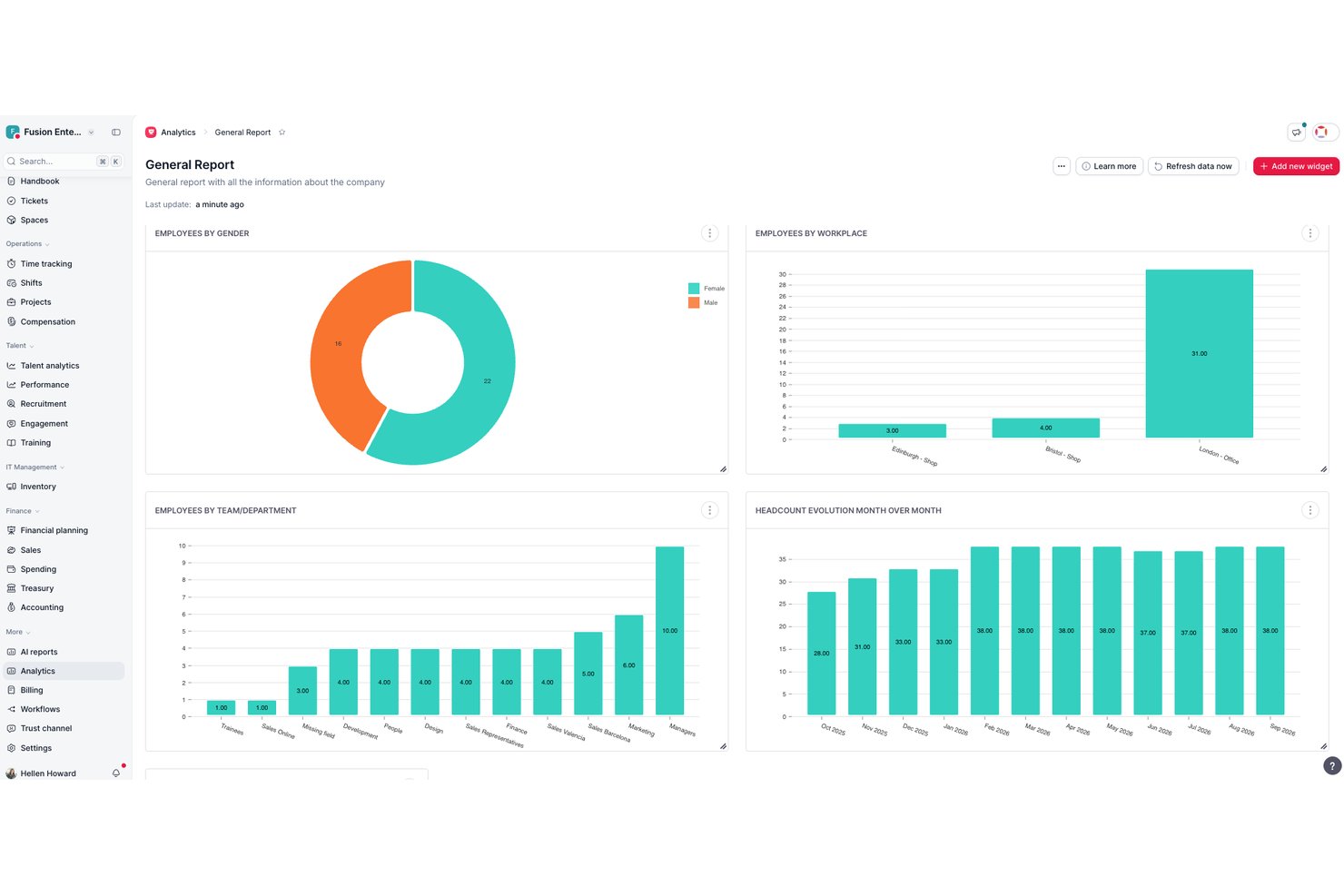
Factorial es una plataforma de RR. HH. impulsada por IA que gestiona la programación de empleados, la planificación de turnos, el control del tiempo y la gestión de la plantilla para pequeñas empresas.
¿Para quién es más adecuado Factorial?
Factorial es ideal para responsables de RR. HH. y responsables de operaciones que quieren una única plataforma impulsada por IA para gestionar la programación, los informes y las preguntas sobre políticas de empleados en sus flujos de trabajo diarios.
Por qué elegí Factorial
He incluido Factorial entre mis principales opciones porque su enfoque de IA para empresas implica que hace mucho más que generar un horario: te ayuda a planificar calendarios, obtener informes sobre la plantilla y responder automáticamente a preguntas sobre las políticas de empleados. Me gusta que los responsables puedan arrastrar y soltar turnos, copiar periodos completos de programación y resolver conflictos señalados antes de publicar, todo sin tener que cambiar de una herramienta a otra. Los empleados pueden solicitar cambios de turno directamente desde la aplicación móvil, manteniendo los cambios de cobertura de última hora en un solo lugar.
Características principales de Factorial
- Revisión de conflictos de turnos: Factorial señala los conflictos de programación y exige a los responsables resolverlos antes de poder publicar un horario.
- Solicitudes móviles de cambio de turno: Los empleados pueden solicitar cambios de turno directamente desde la aplicación; la aceptación por parte de un compañero activa una notificación de aprobación para el responsable.
- Calendario de ausencias: Las ausencias del equipo y las solicitudes de tiempo libre aprobadas aparecen en un calendario centralizado para que los responsables puedan ver de un vistazo las carencias de cobertura.
- Registro de entrada mediante GPS: La aplicación móvil registra las coordenadas GPS al fichar la entrada y la salida, proporcionando a los responsables información sobre la ubicación de cada registro de tiempo.
Integraciones de Factorial
Factorial incluye integraciones del mercado de aplicaciones con Google Workspace, Slack, Microsoft Power BI, LinkedIn, Recruitee y herramientas de nóminas, como DATEV LODAS y Sage 200. También admite API REST, webhooks, SDK, OAuth 2.0, claves de API y Zapier.
Pros and Cons
Pros:
- Los responsables pueden copiar horarios y resolver conflictos
- Los usuarios elogian la centralización de las ausencias y el control del tiempo
- La IA ayuda a planificar horarios y generar informes
Cons:
- No hay comprobaciones documentadas de la disponibilidad de los empleados
- La planificación automática de turnos requiere acceso al plan empresarial

Mejor reloj de fichaje en línea para pequeñas empresas
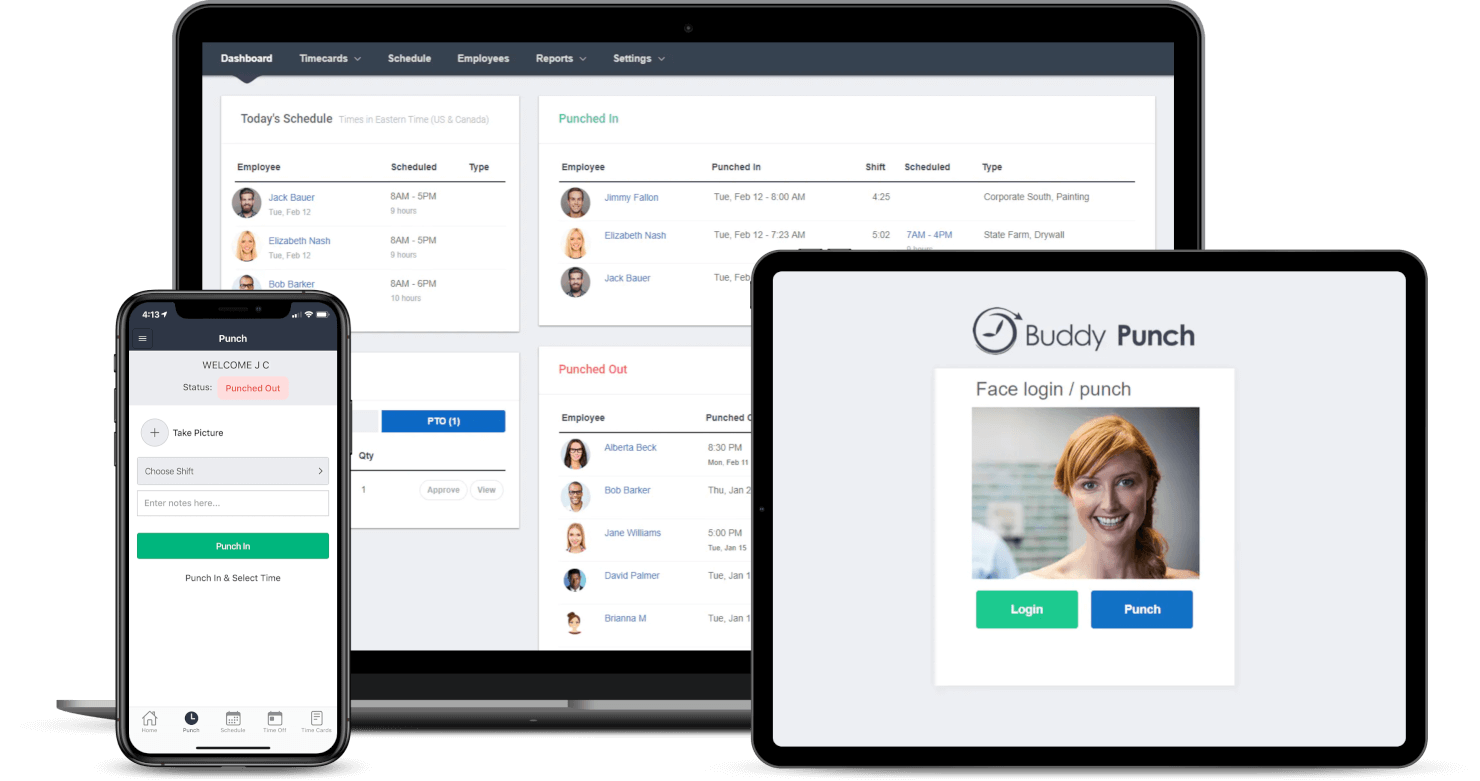
Buddy Punch es una herramienta en la nube para la programación de empleados y el seguimiento de tiempos, diseñada para pequeñas empresas que necesitan formas simples y precisas de gestionar turnos, seguir la asistencia y administrar solicitudes de tiempo libre sin usar hojas de cálculo ni papeleo manual.
¿Para quién es mejor Buddy Punch?
Buddy Punch es ideal para propietarios y gerentes de pequeñas empresas en industrias como el comercio minorista, la hostelería y la salud, que requieren una forma sencilla de programar a los trabajadores por hora y registrar el tiempo.
Por qué elegí Buddy Punch
Buddy Punch se gana su lugar como uno de los mejores en mi lista porque su reloj de fichaje en línea realmente está pensado para las pequeñas empresas. Me gusta que los empleados puedan fichar desde un navegador web, una app móvil o incluso un quiosco compartido, con rastreo GPS y verificación con cámara web para confirmar quién está fichando realmente. Mi equipo puede configurar la geolocalización para que los empleados solo puedan fichar cuando estén físicamente en el lugar de trabajo, lo que reduce el fichaje entre compañeros sin necesidad de equipos costosos. Las alertas automáticas por horas extra son otra función en la que confío para controlar los costes laborales antes de que se conviertan en un problema.
Funciones clave de Buddy Punch
- Programación por arrastrar y soltar: Crea y publica horarios visualmente, con la opción de copiar turnos de semanas anteriores.
- Seguimiento de PTO: Los empleados pueden enviar solicitudes de tiempo libre directamente desde la app y los gerentes pueden aprobarlas o rechazarlas con un solo clic.
- Reportes para nómina: Exporta los partes de horas con cálculos de horas regulares, extras y de tiempo libre, listos para procesar la nómina.
- Notificaciones de turnos: Notifica automáticamente a los empleados por correo electrónico o notificación push cuando su horario es publicado o modificado.
Integraciones de Buddy Punch
Las integraciones incluyen QuickBooks Online, QuickBooks Desktop, ADP Workforce Now, Gusto, Paychex, Paylocity, Paycor, Rippling, Workday y Justworks.

Agendrix
Ideal para pequeñas empresas canadienses que gestionan turnos

Agendrix es una plataforma de programación y control de tiempo diseñada para pequeñas empresas que necesitan gestionar personal por horas, simplificar la planificación de turnos y manejar solicitudes de tiempo libre con menos idas y vueltas.
¿Para Quién es Mejor Agendrix?
Agendrix es ideal para pequeñas empresas en los sectores de venta minorista, hostelería y salud que gestionan equipos por horas o basados en turnos.
Por Qué Elegí Agendrix
Agendrix se gana su lugar en mi lista porque está diseñado específicamente para el tipo de programación basada en turnos que las pequeñas empresas canadienses enfrentan a diario. Me gusta especialmente el soporte en francés y la interfaz bilingüe, lo que lo hace realmente práctico para empresas que operan en Quebec o con equipos bilingües. La plataforma también gestiona bien el cumplimiento de las leyes laborales provinciales: los gerentes pueden configurar horarios que respeten las reglas de horas extra y los requisitos de períodos de descanso sin tener que hacer un seguimiento manual. También uso regularmente las funciones de solicitud de tiempo libre y cambio de turnos, que reducen las típicas idas y vueltas que consumen el tiempo del gerente.
Características Clave de Agendrix
- Creador de horarios de arrastrar y soltar: Crea y ajusta horarios semanales de manera visual arrastrando turnos directamente a la fila del empleado.
- Reloj registrador móvil: Los empleados pueden fichar entrada y salida desde sus teléfonos, con verificación GPS para confirmar la asistencia en el sitio.
- Mensajería para empleados: Envía comunicados o mensajes directos al personal desde la propia plataforma, manteniendo la comunicación relacionada con turnos en un solo lugar.
- Exportación a nómina: Exporta los datos de horas y asistencia en formatos compatibles con herramientas de nómina para reducir la introducción manual de datos.
Integraciones de Agendrix
Las integraciones incluyen ADP Workforce Now, Ceridian y Sage. También hay una API disponible para integraciones personalizadas.
7shifts
El mejor software de programación de turnos para empleados en la industria de restaurantes
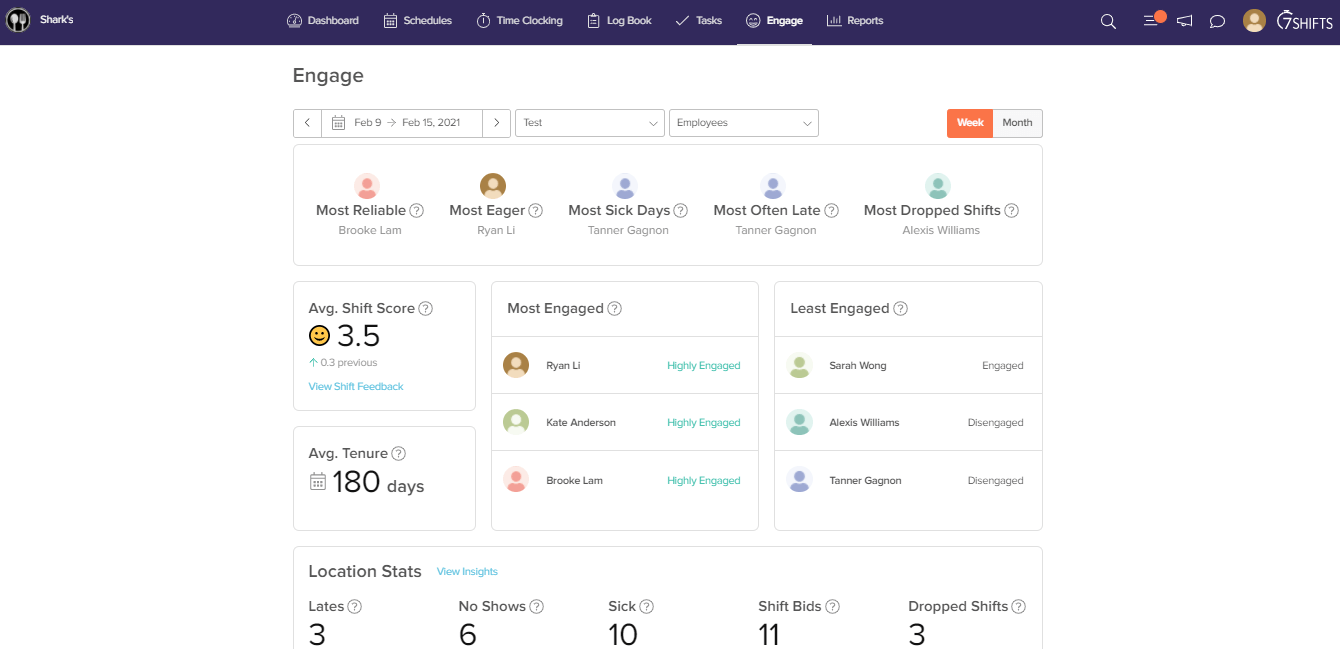
7shifts es una plataforma de gestión de horarios y personal diseñada para propietarios y gerentes de restaurantes que necesitan organizar turnos, hacer seguimiento de la asistencia y simplificar la comunicación del equipo en entornos de hospitalidad de ritmo acelerado.
¿Para Quién es Mejor 7shifts?
7shifts es ideal para pequeños operadores de restaurantes independientes que necesitan herramientas de programación adaptadas a las realidades del trabajo por turnos y por horas en restaurantes.
Por Qué Elegí 7shifts
7shifts se gana su lugar como uno de los mejores en mi lista corta porque está construido exclusivamente para restaurantes—no adaptado de una herramienta genérica de programación. Me encanta que la previsión de ventas impulsada por IA utilice los datos de tu POS para recomendar exactamente cuántos empleados programar por turno, lo que es una gran ventaja cuando buscas alcanzar objetivos de costos laborales en márgenes ajustados. Las herramientas de cumplimiento laboral también están genuinamente enfocadas en restaurantes: recibes alertas en tiempo real para turnos 'clopen', aplicación automática de pausas y restricciones de programación para menores integradas directamente en el planificador de horarios. Además, la función Shift Pool permite que tu equipo gestione los intercambios por sí mismo, mientras los gerentes mantienen la aprobación—algo fundamental en entornos de alta rotación en restaurantes.
Funciones Clave de 7shifts
- Reloj de asistencia: El personal puede fichar la entrada y salida directamente desde la app de 7shifts o una tableta compartida en el punto de acceso.
- Mensajería de equipo: El chat integrado permite que gerentes y empleados se comuniquen por rol, ubicación o de manera individual sin salir de la aplicación.
- Reparto de propinas: Calcula y distribuye propinas automáticamente entre tu equipo según las horas trabajadas o reglas personalizadas.
- Seguimiento de involucramiento: Supervisa el ánimo del equipo mediante encuestas rápidas enviadas regularmente al personal vía la app móvil.
Integraciones de 7shifts
Las integraciones incluyen Toast, Square, Lightspeed, Clover, Revel, Aloha POS, ADP Workforce Now, QuickBooks, Heartland y Micros.

Ideal para empresas de servicios de campo o construcción
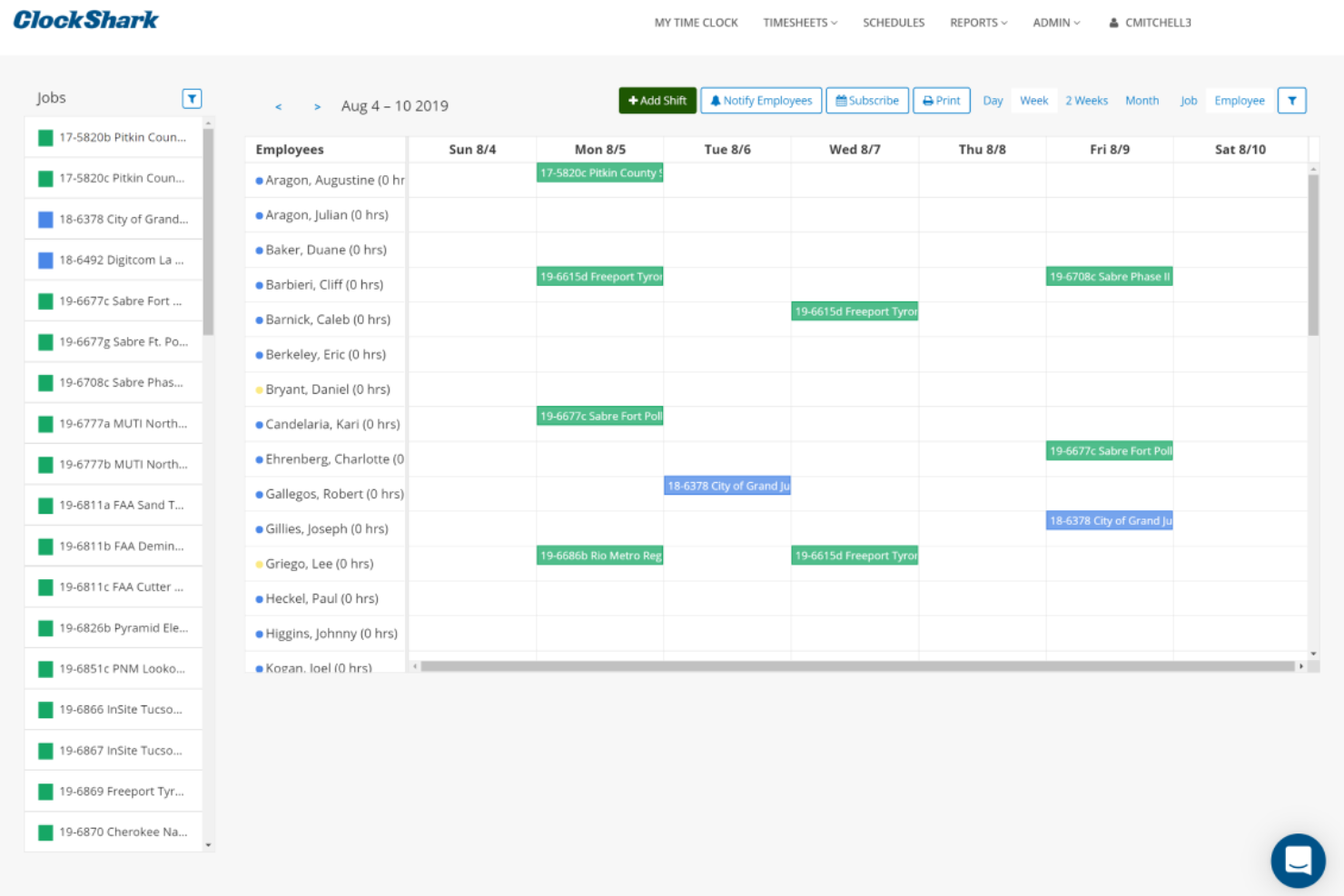
ClockShark es una plataforma de programación y seguimiento de tiempo diseñada para pequeñas empresas que gestionan equipos móviles o en campo, ayudándote a coordinar turnos, registrar horas y simplificar la nómina con funciones de GPS y asignación de trabajos.
¿Para Quién es Mejor ClockShark?
ClockShark es ideal para pequeñas empresas en la construcción, servicios de campo y otras industrias donde los empleados trabajan en múltiples sitios de trabajo.
Por Qué Elegí ClockShark
ClockShark merece un lugar en mi lista porque está especialmente diseñado para equipos de campo y de construcción, no sólo adaptado para ellos. Me gusta especialmente el reloj de tiempo con GPS, que registra la ubicación del empleado cada vez que marca entrada o salida y genera un rastro de migas de pan de su jornada a través de los diferentes sitios de trabajo. La función de geoperimetraje va más allá, creando un límite virtual alrededor de cada sitio, solicitando automáticamente al trabajador marcar su entrada al llegar y su salida al irse. Para pequeñas empresas de construcción o servicios de campo que administran varios equipos en ubicaciones distintas, esa combinación elimina gran parte del seguimiento manual que usualmente recae sobre los gerentes.
Características Clave de ClockShark
- Programación de empleados por arrastrar y soltar: Crea y ajusta horarios de equipos visualmente, reasignando trabajos y turnos en cuestión de clics.
- Costeo de trabajos: Registra horas y costos de trabajo por tarea y empleo, permitiendo que los empleados carguen fotos de recibos directamente en la app.
- Formularios de cierre y cumplimiento de turnos: Crea preguntas personalizadas al marcar la salida para obtener reportes de fin de turno, declaraciones de lesiones o notas de exposición a peligros.
- Conversaciones: Envía y recibe mensajes específicos de trabajo entre el personal de oficina y los equipos en campo, manteniendo a todos informados sobre el avance de la labor.
Integraciones de ClockShark
Las integraciones incluyen QuickBooks, QuickBooks Online, ADP Workforce Now, RUN Powered by ADP, Sage 100 Contractor, Xero, Simpro, Paychex, Gusto y MYOB.

Ubeya
El mejor software de operaciones de personal para la industria de eventos
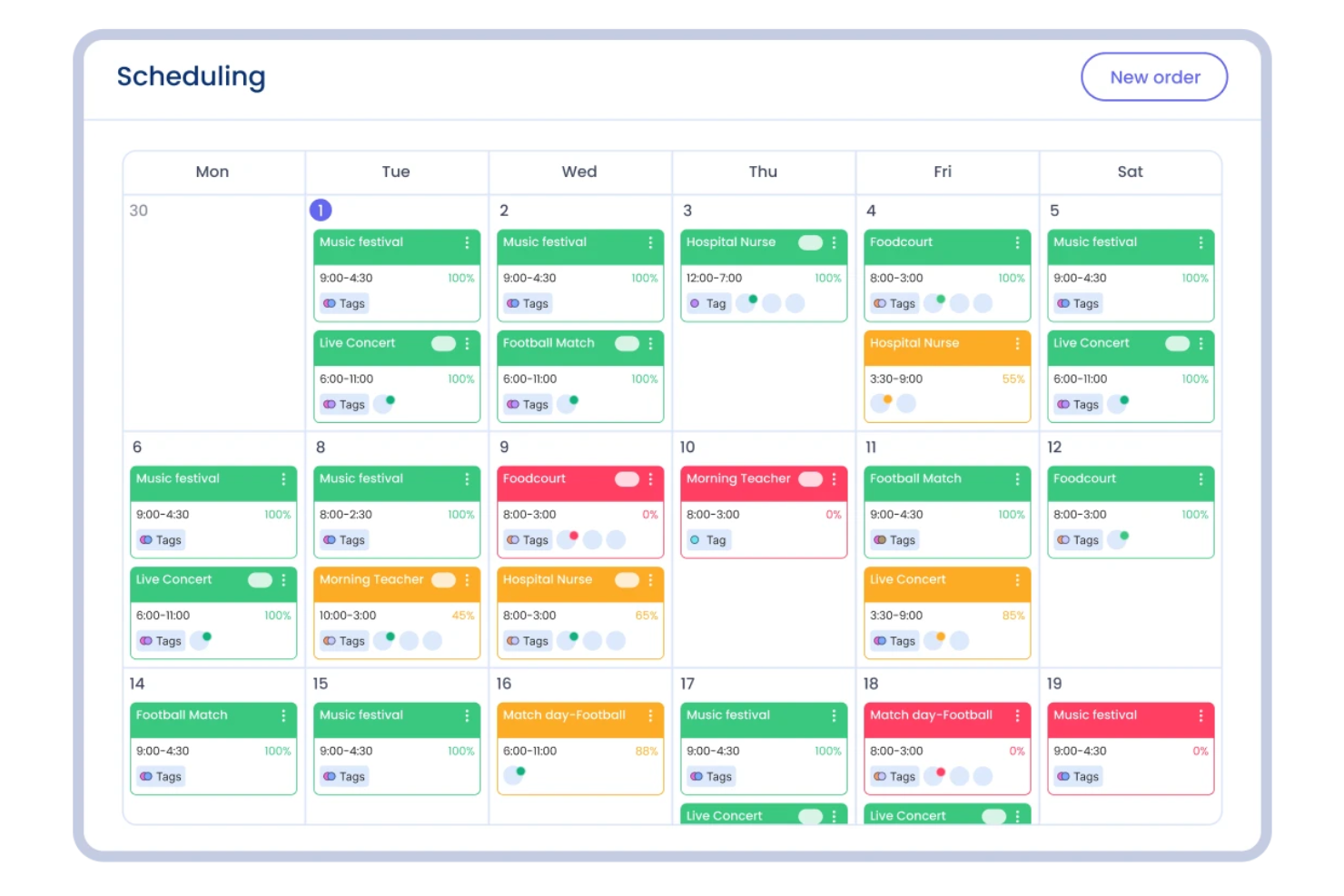
Ubeya es una plataforma de gestión de personal para pequeñas empresas en el sector de la hostelería, eventos y agencias de personal que necesitan programar, comunicarse y gestionar equipos por hora o turnos.
¿Para quién es mejor Ubeya?
Ubeya es una excelente opción para pequeñas empresas de producción de eventos, catering y hostelería que dependen de equipos flexibles y basados en turnos.
Por qué elegí Ubeya
Elegí Ubeya porque está diseñada en torno a las realidades de la gestión de equipos para eventos. Me encanta que gestione la programación de varios puestos en eventos desde una sola vista; así, si organizas un evento de catering con bartenders, camareros y personal de cocina la misma noche, puedes asignar y hacer seguimiento de cada rol sin tener que cambiar de herramienta. También me gusta el emparejamiento de turnos con IA, que cruza la disponibilidad, habilidades y normativas laborales para sugerir a las personas adecuadas para cada trabajo. La función de confirmación automática de llegada envía registros en tiempo real antes y durante el turno, lo cual es útil cuando gestionas equipos en varias ubicaciones de eventos y no puedes estar en todas partes a la vez.
Características clave de Ubeya
- Seguimiento de tiempo y asistencia: Los empleados fichan la entrada y salida desde la app móvil, con verificación por GPS para confirmar la presencia en el sitio.
- Cálculo automático de nóminas: Ubeya calcula los salarios según las horas trabajadas, tarifas y reglas de horas extra, listo para exportar a la nómina.
- Gestión de disponibilidad del personal: Los trabajadores envían su disponibilidad directamente en la app, por lo que solo programas a quienes están libres.
- Mensajería en la aplicación: Envía mensajes generales o directos a trabajadores individuales o a grupos de turno desde la plataforma.
Integraciones de Ubeya
Las integraciones incluyen Teamtailor, SAP SuccessFactors, ADP, QuickBooks, Xero, BambooHR, Gusto, Workday, Paychex y una API abierta para integraciones personalizadas.
El mejor software de seguimiento de tiempo habilitado por GPS

ezClocker es una aplicación de programación y control de tiempo diseñada para pequeñas empresas y equipos que trabajan por horas y necesitan una manera sencilla de gestionar los turnos, controlar la asistencia y manejar la nómina desde cualquier lugar.
¿Para quién es mejor ezClocker?
ezClocker es una excelente opción para pequeñas empresas con trabajadores móviles o en campo, como los de construcción, limpieza, jardinería o servicios a domicilio.
Por qué elegí ezClocker
Elegí ezClocker como uno de los mejores por lo bien que funciona su seguimiento de tiempo por GPS para pequeñas empresas que gestionan trabajadores en varios sitios de trabajo. Cada vez que un empleado marca la entrada o salida a través de la aplicación móvil, su ubicación GPS se registra y guarda automáticamente, así que puedo ver un mapa y confirmar que mi equipo está en el lugar sin tener que llamar a nadie ni desplazarme para comprobarlo. También me gusta que la programación de turnos se sincronice directamente con los teléfonos de los empleados, incluyendo detalles de ubicación y notas diarias, así los trabajadores siempre saben dónde deben estar y qué esperar. La exportación de hojas de tiempo con un solo clic permite enviar las horas exactas directamente a un contador sin usar una hoja de cálculo.
Características clave de ezClocker
- Programación de empleados: Crea y publica turnos desde la web o la aplicación móvil, con notificaciones instantáneas a los empleados cuando su horario se actualiza.
- Gestión de hojas de tiempo: Visualiza y edita las hojas de tiempo de los empleados en un solo lugar, con cálculos automáticos de horas regulares y extras.
- Exportación para nómina: Descarga los datos de las hojas de tiempo como archivo CSV o Excel para compartir directamente con tu proveedor de nómina.
- Soporte para múltiples sitios de trabajo: Asigna empleados a distintos lugares y controla el tiempo por separado en cada ubicación.
Integraciones de ezClocker
ADP Workforce Now, Gusto, ACS Technologies y Paychex.
Sage HR
La mejor gestión de ausencias de empleados para pequeñas empresas

Sage HR ayuda a las pequeñas empresas a gestionar los horarios de los empleados, hacer seguimiento de los días de descanso y manejar los cambios de turno, para que los gerentes y equipos se mantengan organizados y reduzcan los dolores de cabeza con la planificación de turnos.
¿Para quién es mejor Sage HR?
Sage HR es ideal para pequeñas empresas que necesitan una herramienta de recursos humanos y gestión de horarios simple, sin la complejidad de sistemas de nivel empresarial.
Por qué elegí Sage HR
La gestión de ausencias está integrada en el plan principal de Sage HR y no añadida como algo secundario, lo cual es una de las principales razones por las que lo recomiendo. Me gusta que los empleados puedan solicitar días libres directamente desde la app móvil, y que los gerentes reciban notificaciones instantáneas para aprobar o rechazar sin necesidad de iniciar sesión en un ordenador. El calendario compartido de ausencias es especialmente útil para equipos pequeños, ya que puedes ver de un vistazo quién está fuera y planificar los turnos en torno a eso. También encuentro realmente útil la posibilidad de seguir tendencias de ausencias a lo largo del tiempo para detectar patrones antes de que se conviertan en un problema de personal.
Funciones clave de Sage HR
- Programación de turnos con arrastrar y soltar: Crea y ajusta horarios de turnos usando un planificador visual interactivo que actualiza automáticamente a los empleados cuando se realizan cambios.
- Registro de horas trabajadas: Los empleados fichan entrada y salida mediante el panel o la app móvil y envían las hojas de horas a los gerentes para su aprobación.
- Portal de autoservicio para empleados: El personal puede ver sus horarios, enviar solicitudes de gastos, pedir retroalimentación y acceder a sus recibos de nómina directamente desde la app.
- Gestión del desempeño: Establece objetivos y OKRs, programa reuniones individuales y recopila retroalimentación continua de compañeros y gerentes.
Integraciones de Sage HR
Las integraciones incluyen Sage Payroll, Sage 50 Payroll, Outlook, Slack, Google Calendar, Xero, Zapier y una API abierta para integraciones personalizadas.

Ideal para gestionar tanto recursos humanos como no humanos
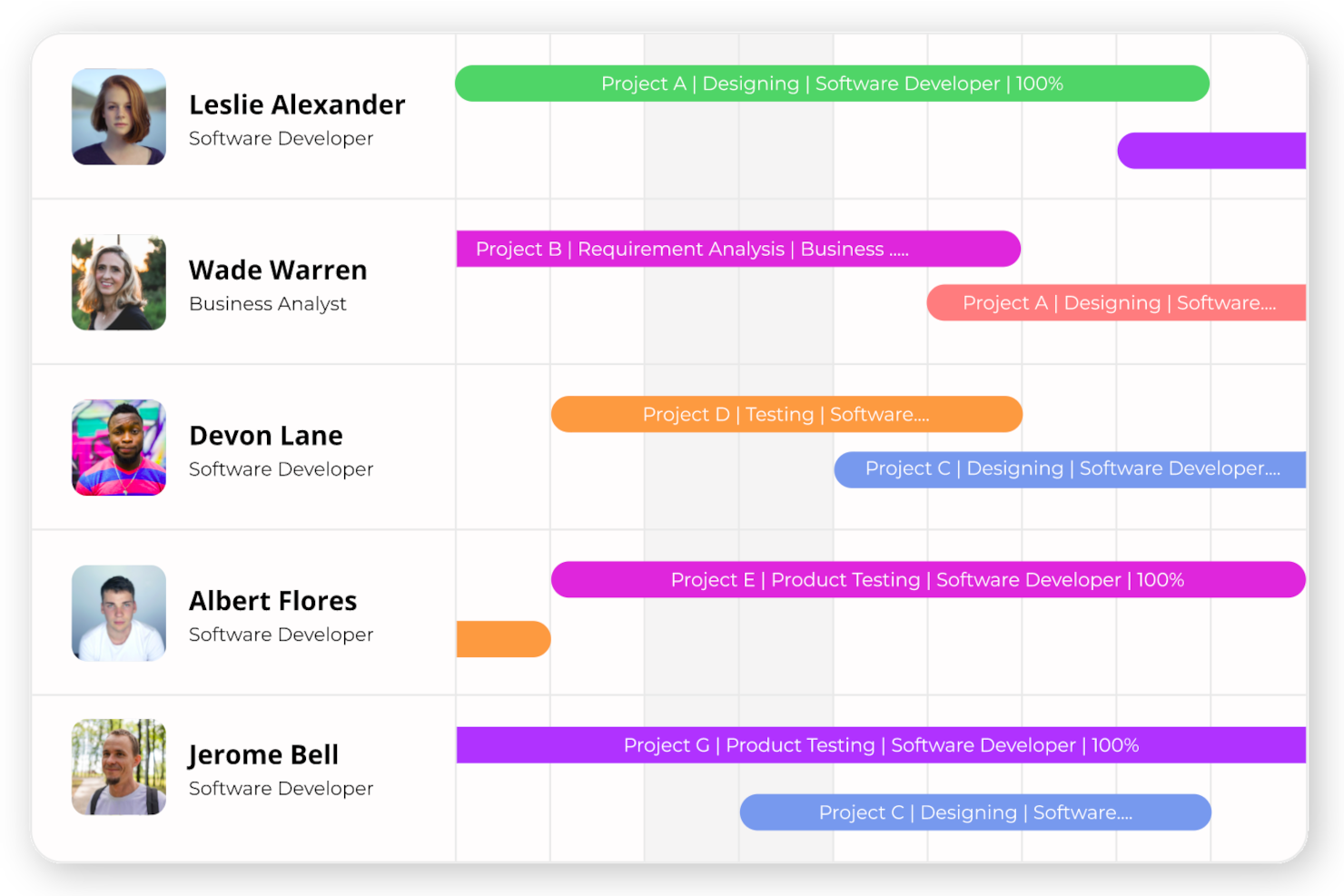
eResource Scheduler ofrece a las pequeñas empresas una manera de programar empleados y recursos en un solo lugar, ayudando a los equipos en industrias de servicios, consultoría y basadas en proyectos a gestionar la disponibilidad, asignaciones y cargas de trabajo con claridad.
¿Para quién es mejor eResource Scheduler?
eResource Scheduler es adecuado para pequeñas empresas en industrias orientadas a proyectos como construcción, TI y consultoría que necesitan coordinar tanto al personal como a los activos físicos.
Por qué elegí eResource Scheduler
eResource Scheduler se gana su lugar en mi lista porque es una de las pocas herramientas de programación que trata a las personas y los activos físicos como partes iguales dentro de un mismo plan. Me gusta que puedas programar salas de conferencias, equipos y herramientas junto con tu personal en la misma vista tipo Gantt, por lo que no necesitas un sistema separado para gestionar cuando un trabajo requiere tanto a un técnico como un equipo. El filtrado basado en habilidades con puntuaciones de coincidencia integradas también es útil: puedo filtrar por rol, disponibilidad y conjunto de habilidades para encontrar la persona adecuada para un proyecto sin tener que cruzar manualmente hojas de cálculo. Para pequeñas empresas donde una persona puede gestionar varios proyectos y el equipo compartido es limitado, la visibilidad a través de tipos de recursos en una sola vista es poco común.
Características clave de eResource Scheduler
- Calendarios personalizados: Define horas de trabajo, turnos, días festivos y zonas horarias para reflejar cómo opera realmente tu equipo en diferentes ubicaciones o con horarios flexibles.
- Registro de hojas de horas: Captura las horas reales trabajadas por proyecto o tarea directamente en la plataforma para facturación y responsabilidad precisas.
- Flujo de solicitud y aprobación de recursos: Realiza solicitudes de recursos, recibe coincidencias sugeridas por el sistema con puntuaciones ordenadas y rastrea aprobaciones con indicadores visuales de estado.
- Informes de utilización y disponibilidad: Accede a informes predefinidos y personalizables sobre utilización de recursos, brechas de disponibilidad y capacidad para apoyar decisiones de programación.
Integraciones de eResource Scheduler
Actualmente no se listan integraciones.
Pros and Cons
Pros:
- Funciones detalladas de informes
- Interfaz fácil de usar
- Programación flexible
Cons:
- Opciones de personalización limitadas
- Curva de aprendizaje para nuevos usuarios
Otro software de programación de empleados para pequeñas empresas
Estas son otras opciones sólidas de programación que puedes considerar. No llegaron a mi lista de las 10 principales, pero aún merece la pena echarles un vistazo:
- ABC Roster
El mejor para la gestión de empleados y restricciones de turnos
- Deel HR
Ideal para políticas de horarios
- monday AI Workspace
La mejor herramienta de visualización de horarios para equipos pequeños
- Resource Guru
Ideal para programación eficiente en pequeñas agencias
- BambooHR®
Mejor sistema de seguimiento de candidatos para pequeñas empresas
- WebWork Time Tracker
Ideal para el seguimiento de asistencia y turnos
- Justworks
El mejor software de programación de empleados con equipo de soporte de expertos en RRHH 24/7
- Wrike
Ideal para empresas que buscan visibilidad sobre la disponibilidad de cada miembro del equipo
- TimeTrex
Ideal para programación automatizada
- Zoho Shifts
Mejor para programación y seguimiento de tiempo en uno solo
- Homebase
El mejor software de programación para la gestión integral de equipos
- TimeClock Plus
Ideal para la gestión de turnos
- Breathe HR
El mejor con plantillas de turnos autogestionadas


Cómo evalúo el software de programación de empleados
Evalúo estas herramientas en dos capas: lo básico indispensable como la creación de turnos, la gestión de disponibilidad y el acceso móvil, y luego los diferenciadores como el control de costos laborales y las integraciones de nómina.
Funcionalidad principal (Requisitos básicos para esta lista)
Cuando selecciono las herramientas para mi lista, califico cada una en una escala del 0 (no ofrece la funcionalidad) al 5 (sobresale en esta área) en cada funcionalidad clave que se menciona a continuación. Luego, calculo la puntuación total de la herramienta como un porcentaje. Cada herramienta debe alcanzar una puntuación mínima total del 75% para ser considerada para su inclusión.
- Programación y asignación de turnos: Busco creadores de turnos tipo arrastrar y soltar, plantillas recurrentes y detección de conflictos, cosas que importan cuando debes cubrir un rol rotativo de 50 personas en varios departamentos.
- Gestión de disponibilidad y tiempo libre: Los empleados deben poder establecer disponibilidad recurrente y enviar solicitudes de días libres que se integren directamente al horario, para que los gerentes no tengan que consultar hojas de cálculo.
- Intercambio de turnos y autoservicio: Verifico si los empleados pueden tomar turnos disponibles o iniciar intercambios por sí mismos, con controles como filtros de elegibilidad según el rol y flujos de aprobación por el gerente integrados.
- Registro de asistencia y tiempo: La herramienta debe conectar los turnos programados con los datos reales de registro de entrada, ya sea mediante un reloj de tiempo incorporado, modo kiosco o una integración nativa con un sistema dedicado de T&A.
- Cumplimiento laboral y normas: Evalúo cómo la plataforma maneja los umbrales de horas extras, los períodos de descanso obligatorios y las reglas de pausas, especialmente para equipos con menores o trabajadores en varias jurisdicciones.
- Acceso móvil y notificaciones: Los trabajadores de primera línea rara vez están en un escritorio, por lo que busco una aplicación móvil nativa con notificaciones push para nuevos horarios, cambios de turno y solicitudes de intercambio.
Una vez que tengo una lista de herramientas que cumplen los criterios, considero qué diferencia a cada plataforma.
Factores diferenciadores (Lo que distingue a los proveedores)
Así es como comparo y contrasto los diferentes proveedores:
Características destacadas
La previsión de demanda con IA es un gran diferenciador: las herramientas que aprovechan datos históricos para predecir las necesidades de personal ahorran a los gerentes horas de suposiciones durante temporadas pico. También evalúo los controles de costos laborales, especialmente el seguimiento presupuestal en tiempo real que alerta cuando un horario provisional se desvía del objetivo antes de publicarse. Para organizaciones con varias sedes, la gestión multilocalización es importante. Poder compartir personal entre ubicaciones y ver todos los horarios desde un único panel marca la diferencia para los gerentes regionales que deben cubrir huecos de personal.
Más allá de las funcionalidades
Las integraciones con nómina y HRIS son una de las primeras cosas que reviso. Una herramienta de programación que sincroniza horas directamente con plataformas como ADP, Gusto o BambooHR elimina la doble carga y reduce los errores de nómina. La transparencia en los precios también importa: busco modelos claros por usuario o por localización para que los equipos en crecimiento puedan prever los costos a medida que escalan. Finalmente, considero el ajuste por industria. Una herramienta diseñada con flujos de credenciales para salud o plantillas de semanas laborales justas para retail ya incluidas puede ahorrar a tu equipo un tiempo considerable de configuración en comparación con una plataforma genérica.
Cómo elegir un software de programación de empleados para pequeñas empresas
Es fácil perderse entre largas listas de funciones y estructuras de precios complejas. Para ayudarte a mantener la concentración mientras avanzas en tu proceso particular de selección de software, aquí tienes una lista de factores que debes tener en cuenta:
| Factor | Qué tener en cuenta |
|---|---|
| Escalabilidad | ¿Puede la herramienta crecer con tu negocio? Busca opciones que permitan añadir más usuarios o ubicaciones sin costes adicionales. Evita las herramientas que limiten el crecimiento con planes restrictivos. |
| Integraciones | ¿Se conecta con tus sistemas actuales? Comprueba la compatibilidad con las herramientas de nóminas, recursos humanos y comunicación para garantizar un flujo de datos fluido y evitar la introducción manual de datos. |
| Personalización | ¿Puedes adaptarla a tus flujos de trabajo? Asegúrate de que el software permita utilizar campos, informes y configuraciones personalizados para adaptarse a tus necesidades específicas de programación. |
| Facilidad de uso | ¿Es sencilla de utilizar para tu equipo? Busca interfaces intuitivas y una navegación sencilla para minimizar el tiempo de formación y reducir la frustración de los usuarios. |
| Implementación e incorporación | ¿Con qué rapidez puedes empezar a utilizarla? Ten en cuenta el tiempo y los recursos necesarios para la configuración. Las herramientas con guías claras y asistencia pueden ayudar a acelerar el proceso. |
| Coste | ¿Se ajusta a tu presupuesto? Compara los planes de precios y presta atención a las tarifas ocultas. Considera los costes a largo plazo y los posibles descuentos por suscripciones anuales. |
| Medidas de seguridad | ¿Están protegidos tus datos? Asegúrate de que el software incluya cifrado, controles de acceso seguros y cumpla las normativas pertinentes de protección de datos para proteger la información confidencial. |
| Disponibilidad de asistencia | ¿Recibirás ayuda cuando la necesites? Comprueba las opciones de asistencia disponibles las 24 horas, los 7 días de la semana, y la calidad del servicio de atención al cliente. Unos tiempos de respuesta rápidos pueden ser cruciales cuando surgen problemas. |
¿Qué es el software de programación de empleados para pequeñas empresas?
El software de programación de empleados para pequeñas empresas es una herramienta que ayuda a gestionar y automatizar la planificación de los turnos y las horas del personal. Estas herramientas suelen ser utilizadas por gerentes, profesionales de recursos humanos y responsables de equipos para ahorrar tiempo y reducir los conflictos de horarios. Las funciones de programación automatizada, intercambio de turnos y notificaciones ayudan a mejorar la gestión y la comunicación. En general, estas herramientas aumentan la productividad y reducen la carga de trabajo administrativo de las pequeñas empresas.
Funciones
Al seleccionar un software de programación de empleados para una pequeña empresa, presta atención a las siguientes funciones clave:
- Programación automatizada: Crea y ajusta automáticamente los horarios en función de la disponibilidad de los empleados y las necesidades de la empresa, ahorrando tiempo y reduciendo los errores.
- Intercambio de turnos: Permite a los empleados intercambiar turnos fácilmente, proporcionando flexibilidad y reduciendo los conflictos de horarios.
- Notificaciones y alertas: Envía actualizaciones y alertas oportunas a los empleados sobre los cambios de horario, asegurándote de que todos estén informados.
- Capacidades de integración: Conéctate sin problemas con los sistemas existentes de nóminas y recursos humanos para garantizar un flujo de datos fluido y reducir la introducción manual de datos.
- Acceso móvil: Permite a los empleados consultar y gestionar sus horarios desde cualquier lugar, aumentando la accesibilidad y la comodidad.
- Informes personalizados: Genera informes adaptados para analizar los datos de programación y tomar decisiones fundamentadas.
- Gestión de varias ubicaciones: Gestiona la programación en varias ubicaciones de la empresa, optimizando las operaciones de las empresas en crecimiento.
- Registro del tiempo: Supervisa con precisión las horas y la asistencia de los empleados, facilitando la gestión de nóminas y el cumplimiento normativo.
- Interfaz fácil de usar: Asegúrate de que el software sea fácil de navegar, minimizando el tiempo de formación y mejorando la experiencia del usuario.
- Medidas de seguridad: Protege los datos confidenciales de los empleados mediante cifrado y controles de acceso seguros, garantizando el cumplimiento de la normativa.
Beneficios
Implementar un software de programación de empleados para una pequeña empresa ofrece varias ventajas para tu equipo y tu negocio. Estas son algunas de las que puedes esperar:
- Ahorro de tiempo: La programación automatizada reduce el tiempo dedicado a crear y ajustar manualmente los horarios.
- Mejora de la comunicación: Las notificaciones y alertas mantienen a todos informados sobre los cambios de horario, mejorando la comunicación del equipo.
- Flexibilidad: Las funciones de intercambio de turnos proporcionan a los empleados la flexibilidad necesaria para gestionar sus horarios, mejorando su motivación.
- Mayor precisión: El registro del tiempo garantiza un seguimiento preciso de las horas trabajadas, facilitando una gestión exacta de las nóminas.
- Mejor gestión de los recursos: La gestión de varias ubicaciones permite programar eficazmente el trabajo en distintos centros y optimizar la asignación de recursos.
- Decisiones basadas en datos: Los informes personalizados ofrecen información sobre los patrones de programación y ayudan a tomar decisiones empresariales fundamentadas.
- Mayor accesibilidad: El acceso móvil permite a los empleados gestionar sus horarios desde cualquier lugar, aumentando la comodidad y la participación.
Costes y precios
Seleccionar un software de planificación de horarios de empleados para una pequeña empresa requiere comprender los distintos modelos de precios y planes disponibles. Los costes varían según las funciones, el tamaño del equipo, los complementos y otros factores. La tabla siguiente resume los planes habituales, sus precios medios y las funciones que suelen incluir las soluciones de software de planificación de horarios de empleados para pequeñas empresas:
Tabla comparativa de planes de software de planificación de horarios de empleados para pequeñas empresas
| Tipo de plan | Precio medio | Funciones habituales |
|---|---|---|
| Plan gratuito | $0 | Planificación básica, intercambio de turnos y asistencia limitada al usuario. |
| Plan personal | $5-$15/usuario/mes | Planificación automatizada, acceso móvil, notificaciones e informes básicos. |
| Plan empresarial | $20-$40/usuario/mes | Informes avanzados, integraciones, gestión de varias ubicaciones y asistencia mejorada al cliente. |
| Plan corporativo | $50-$100/usuario/mes | Funciones personalizables, gestor de cuenta dedicado, seguridad avanzada y análisis exhaustivos. |
Preguntas frecuentes
Antes de terminar, quería responder y comentar algunas preguntas frecuentes relacionadas con el software de planificación de horarios de empleados para pequeñas empresas. Estas son algunas respuestas a preguntas habituales que he recibido:
¿Pueden estas herramientas integrarse con mi sistema de nóminas actual?
Sí, muchas soluciones de software de planificación de horarios de empleados ofrecen funciones de integración con sistemas de nóminas populares. Comprueba la compatibilidad del software con tu sistema actual antes de comprarlo. Esto garantiza una transferencia de datos fluida y reduce la carga de trabajo manual, lo que permite ahorrar tiempo y evitar errores.
¿Es difícil implementar un software de planificación de horarios de empleados?
No, la mayoría de las herramientas modernas de planificación están diseñadas para facilitar su implementación. A menudo incluyen guías, tutoriales y asistencia al cliente para ayudarte a empezar rápidamente. Busca un software con interfaces fáciles de usar y recursos completos de incorporación para que la transición sea fluida para tu equipo.
¿Necesito conocimientos técnicos para utilizar estas herramientas?
No, no necesitas conocimientos técnicos para utilizar la mayoría de los programas de planificación de horarios de empleados. Normalmente están diseñados con interfaces intuitivas y una navegación sencilla. Sin embargo, tener conocimientos informáticos básicos te ayudará. La mayoría de los proveedores ofrecen asistencia y recursos de formación para ayudar a usuarios de cualquier nivel.