

10 mejores herramientas en línea para programar a los empleados en 2026

10 Lista de los mejores programas de planificación de horarios de empleados en línea


Mantener a tu equipo organizado y los horarios bajo control puede ser un verdadero quebradero de cabeza. Coordinar turnos, gestionar la disponibilidad y asegurarte de que todos estén al tanto requiere tiempo y esfuerzo. Ahí es donde el software de planificación de horarios de empleados en línea resulta útil. Está diseñado para facilitarte la vida y mantener a tu equipo funcionando sin problemas.
Por mi experiencia, contar con las herramientas adecuadas puede transformar la forma en que afrontas los desafíos de la planificación de horarios. He probado y analizado diversas opciones para ayudarte a encontrar la que mejor se adapte a tus necesidades. Obtendrás una visión imparcial de mis principales selecciones, junto con información sobre sus funciones y ventajas.
A medida que sigas leyendo, descubrirás qué soluciones de software pueden marcar realmente la diferencia para ti y tu equipo.
Por qué confiar en nuestras reseñas de software
Nuestro equipo lleva probando y evaluando software desde 2012. Como expertos en RR. HH., sabemos lo difícil —y lo importante— que es elegir el software adecuado.
Para esta guía, evaluamos las herramientas mediante pruebas prácticas e investigación independiente, puntuando las herramientas según nuestros criterios de selección. También nos basamos en la experiencia de líderes de opinión del sector y de profesionales de RR. HH. en activo.
Nuestras reseñas reflejan nuestro criterio editorial humano, no un discurso de ventas.
Tabla comparativa de programas de planificación de horarios de empleados en línea
Esta tabla comparativa resume los detalles de precios de mis principales selecciones de programas de planificación de horarios de empleados en línea:
| Tool | Best For | Trial Info | Price | ||
|---|---|---|---|---|---|
| 1 | Ideal para crear hojas de horas e integrarlas con la nómina | Demo gratuita disponible | Desde $8/usuario/mes | Website | |
| 2 | Mejor para trabajadores sin escritorio que necesitan información sobre turnos accesible | 14 días de prueba gratuita | Por $35/mes (facturado mensualmente) para hasta 200 empleados | Website | |
| 3 | Mejores flujos personalizados para la programación de equipos | 14 días de prueba gratuita | Desde $8/usuario/mes | Website | |
| 4 | La mejor para la predicción laboral impulsada por IA | Demostración gratuita disponible | Desde $5/usuario/mes (facturado anualmente) | Website | |
| 5 | Mejor reloj de asistencia en línea con programación | Prueba gratuita de 14 días | Desde $25.99/mes | Website | |
| 6 | Mejor si necesitas una plataforma completa de RR. HH. en línea | Plan gratuito + prueba gratuita de 14 días disponible | Dispone de un plan gratuito que puedes usar con un número ilimitado de empleados | Website | |
| 7 | Lo mejor para pymes basadas en turnos en Canadá | Prueba gratuita de 21 días + demo gratuita disponible | Desde $2.93/usuario/mes (facturación anual) | Website | |
| 8 | La mejor opción para restaurantes | 14 días de prueba gratis | Desde $19.99/mes/ubicación (facturado mensualmente) | Website | |
| 9 | Mejor para empresas de servicios de campo o construcción | Prueba gratuita de 14 días + demostración gratuita disponible | Desde $40/mes | Website | |
| 10 | Ideal para la gestión de ausencias | Demostración gratuita disponible | Precio a consultar | Website |


Análisis de los mejores programas de planificación de horarios de empleados en línea
A continuación, encontrarás un breve resumen de cada programa de planificación de horarios de empleados en línea que se incluyó en mi lista de los 10 mejores. Para mis 10 favoritos, he explicado en qué destacan y he incluido una captura de pantalla de cada uno para mostrar sus funciones en acción. Además, hay 20 opciones adicionales más abajo por si quieres considerar aún más posibilidades.

Ideal para crear hojas de horas e integrarlas con la nómina
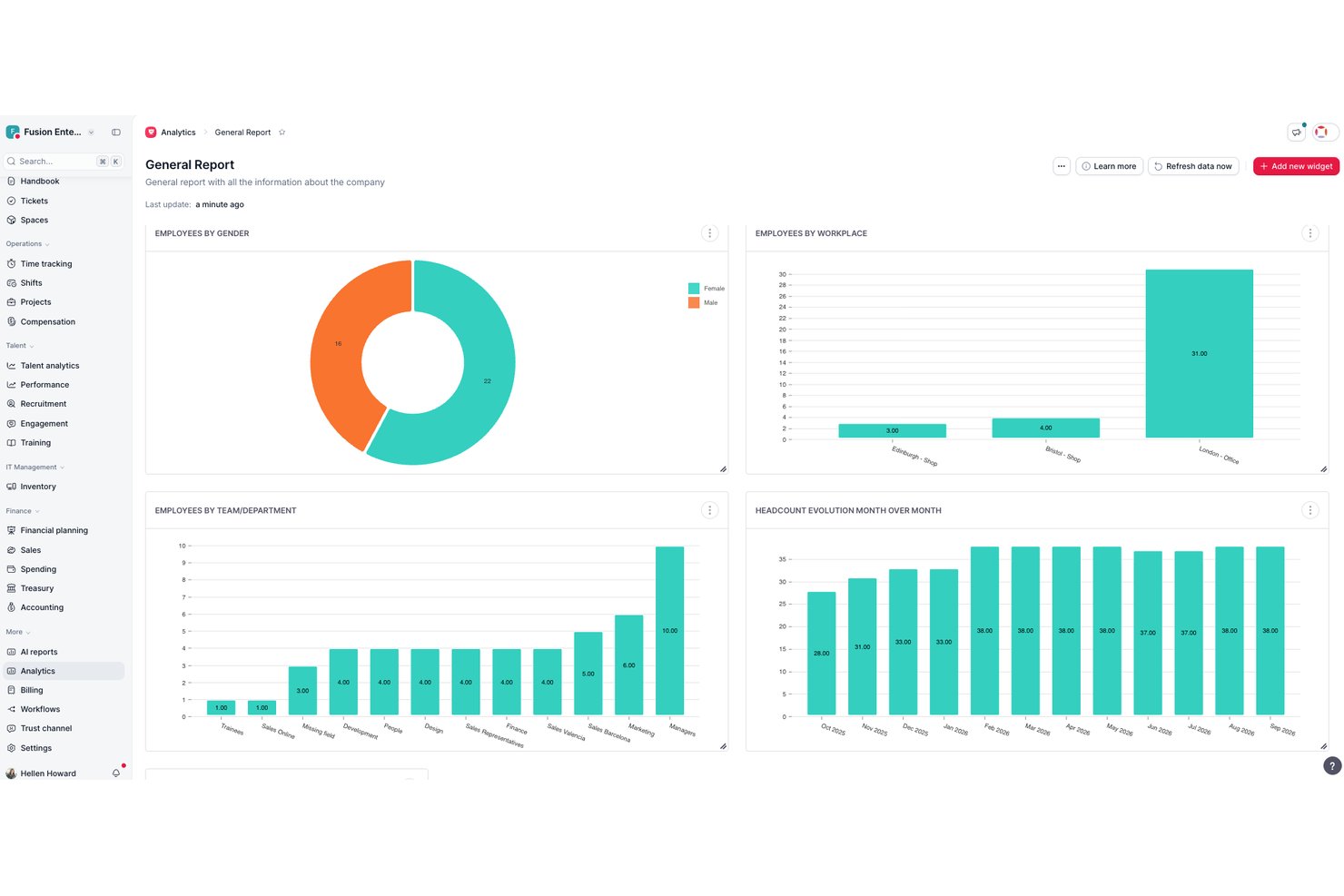
Factorial es un software en línea que se dedica a ayudar a las empresas a gestionar su plantilla de manera más eficiente. Elegí Factorial porque, seamos sinceros, organizar los horarios puede ser un verdadero dolor de cabeza. Buscaba algo que pudiera simplificar el proceso y ayudarme a llevar un control de quién hace qué y cuándo. Factorial parecía cumplir todos los requisitos. Es fácil de usar, cuenta con un montón de funciones útiles y está diseñado específicamente para empresas de cualquier tamaño.
Lo que realmente distingue a Factorial del resto son sus funciones. Cuenta con una increíble vista de calendario que permite ver de un vistazo el horario de todo el equipo. Puedes añadir turnos fácilmente, asignar tareas e incluso establecer recordatorios. Además, tiene una función de control del tiempo muy práctica para llevar un seguimiento del tiempo que cada persona dedica a sus tareas. Pero mi función favorita, sin duda, es la gestión de ausencias. Permite gestionar todo tipo de ausencias, desde vacaciones hasta bajas por enfermedad, en un solo lugar.
Factorial se distingue aún más por priorizar el bienestar de los empleados mediante un módulo específico que permite proporcionar comentarios anónimos, comunicar inquietudes y sugerir mejoras. Este módulo ofrece un espacio seguro para que los empleados expresen sus opiniones sin miedo a represalias, fomentando una cultura de comunicación abierta y transparente. También incluye funciones de análisis de sentimientos que ayudan a los equipos de recursos humanos a identificar tendencias y abordar posibles problemas de forma proactiva.
Las integraciones incluyen Sage, Gmail, Payflow, Dynamics 365, LinkedIn, TravelPerk, PowerBI, Indeed, Recruitee, Slack y otras.

Mejor para trabajadores sin escritorio que necesitan información sobre turnos accesible
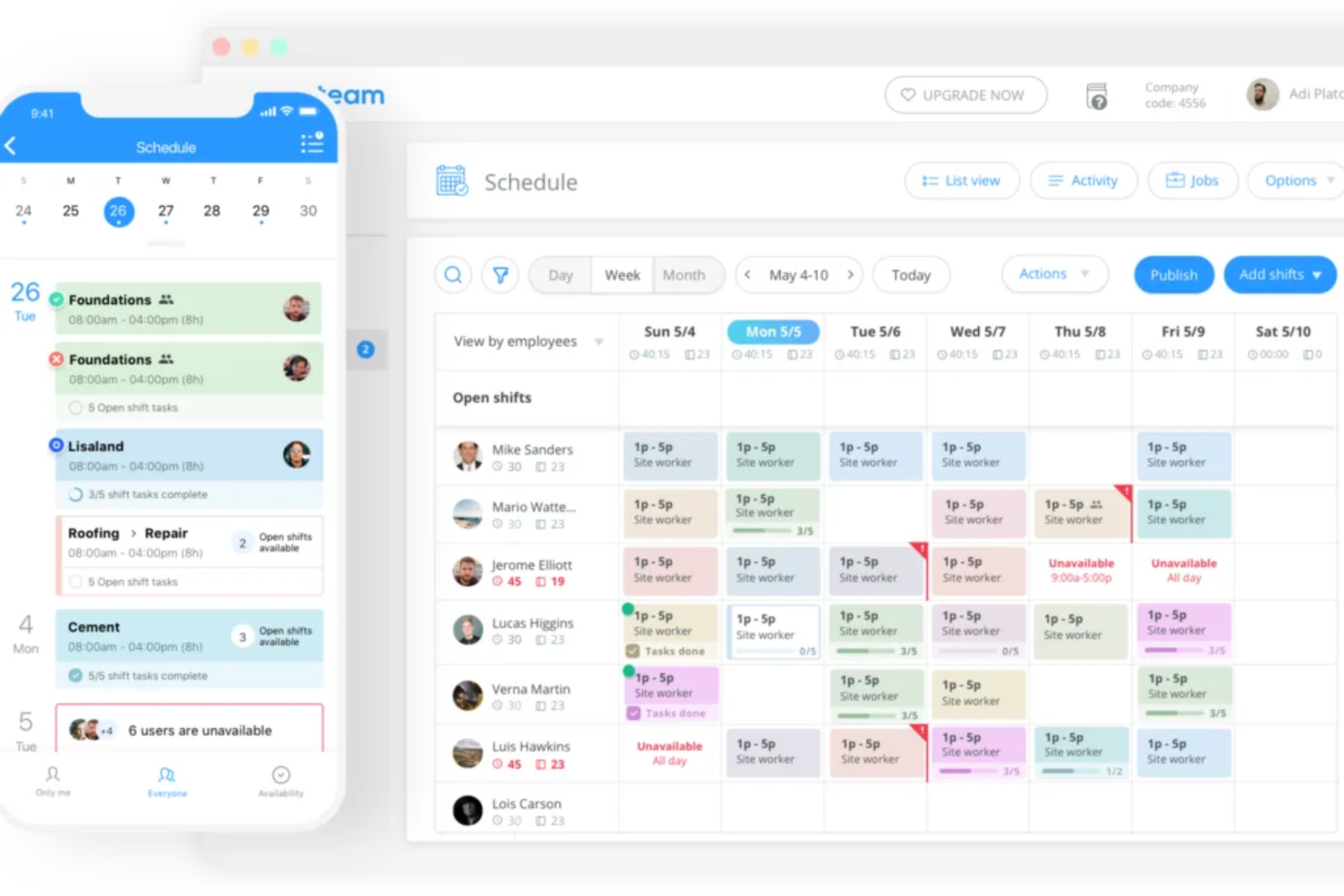
¿Necesita algo más que un software de programación de personal? Connecteam es una plataforma completa de gestión laboral que los gerentes de todo tipo de industrias utilizan para manejar sus operaciones diarias, programación, comunicaciones internas y capacitación de empleados.
Sus capacidades de seguimiento de tiempo incluyen geovallas, lo que garantiza que su equipo esté en el lugar correcto y no pueda registrar salida cuando está fuera del sitio de trabajo designado. Formularios digitales, listas de verificación y notificaciones push o recordatorios son puntos extra que lo convierten en una buena opción para los trabajadores sin escritorio.
Las integraciones incluyen Paychex, Xero, Gusto, QuickBooks Payroll (en línea + de escritorio), Zapier, Google Calendar, acceso API y otros.
New Product Updates from Connecteam

Connecteam Onboarding Notifications and Default Rules Control
Connecteam updates onboarding pack notifications and customizable default rules with more targeted controls. This helps admins reduce unnecessary alerts and apply policies more precisely. For more information, visit Connecteam’s official site.
 .
.
Mejores flujos personalizados para la programación de equipos
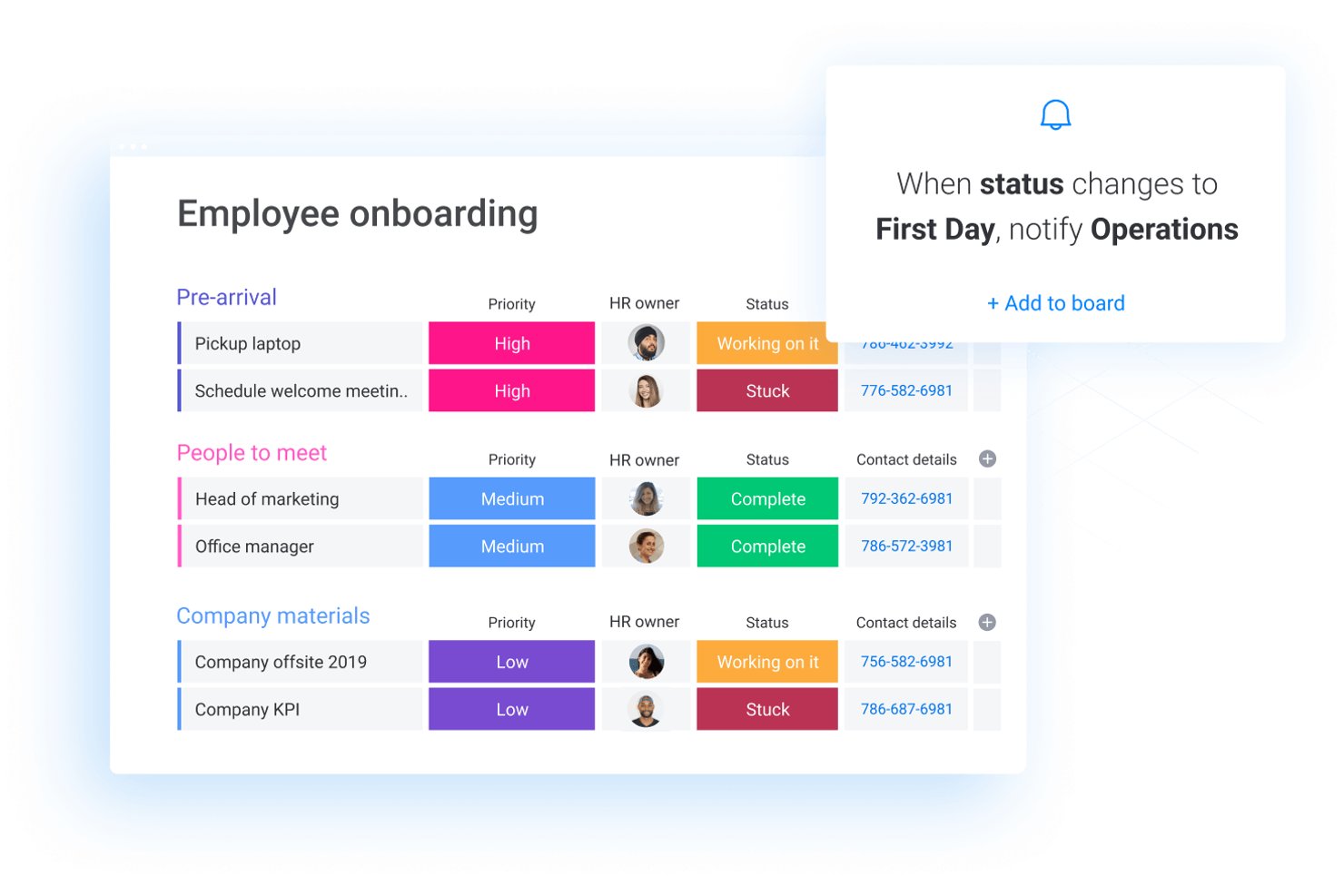
monday AI Workspace es una plataforma personalizable de gestión de trabajo que permite a los equipos crear flujos de trabajo de programación, gestionar tareas y recursos, automatizar procesos y coordinar el trabajo entre proyectos utilizando tableros, cronogramas y herramientas impulsadas por IA.
¿Para quién es mejor monday AI Workspace?
Es especialmente adecuado para equipos de operaciones y proyectos en organizaciones medianas y grandes que necesitan crear flujos de trabajo de programación personalizados entre varios departamentos.
Por qué elegí monday AI Workspace
monday AI Workspace está en mi lista corta porque permite llevar un flujo de trabajo de programación personalizado muy lejos sin escribir una sola línea de código. Utilizo el sistema de tableros y columnas para crear cuadrantes de turnos que notifican automáticamente a los miembros del equipo cuando cambian sus asignaciones, usando disparadores automáticos vinculados a columnas de estado. Lo que encuentro especialmente útil es superponer las vistas de Cronograma y Calendario en el mismo tablero, para poder ver las brechas de cobertura y las cargas de trabajo individuales lado a lado.
Características clave de monday AI Workspace
- Gestión de recursos: Asigna, equilibra y visualiza la carga de trabajo de los empleados entre proyectos utilizando widgets de panel y herramientas de capacidad.
- Creador de automatizaciones: Configura disparadores personalizados que automatizan actualizaciones de horarios, notificaciones y cambios de estado en los flujos de trabajo.
- Columna de seguimiento de tiempo: Registra las horas dedicadas a tareas asignadas directamente en los tableros para un registro básico de tiempo y conciliación.
- Vistas de calendario y cronograma: Visualiza el trabajo programado, filtra por equipo o individuo y compara asignaciones superpuestas dentro de un calendario interactivo o una interfaz tipo Gantt.
Integraciones de monday AI Workspace
monday.com ofrece cientos de integraciones a través de sus integraciones incorporadas y su marketplace, incluyendo herramientas como Slack, Salesforce, HubSpot, Google Workspace, Microsoft Teams y Zoom. También es compatible con Zapier y proporciona una API para integraciones personalizadas.
Pros and Cons
Pros:
- Constructor de flujos de programación de turnos altamente personalizable
- Vistas de tablero flexibles para visualizar la cobertura del equipo
- Las potentes herramientas de automatización reducen las tareas manuales de programación
Cons:
- Sin cumplimiento laboral integrado ni motor de reglas
- Funciones nativas limitadas para intercambio de turnos y disponibilidad
New Product Updates from monday AI Workspace
monday AI Workspace Adds Human Approval Routing
monday AI Workspace adds a human-in-the-loop approval block to AI Workflows, sending approval requests and routing workflow paths based on responses. For more information, visit monday AI Workspace's official site.

La mejor para la predicción laboral impulsada por IA
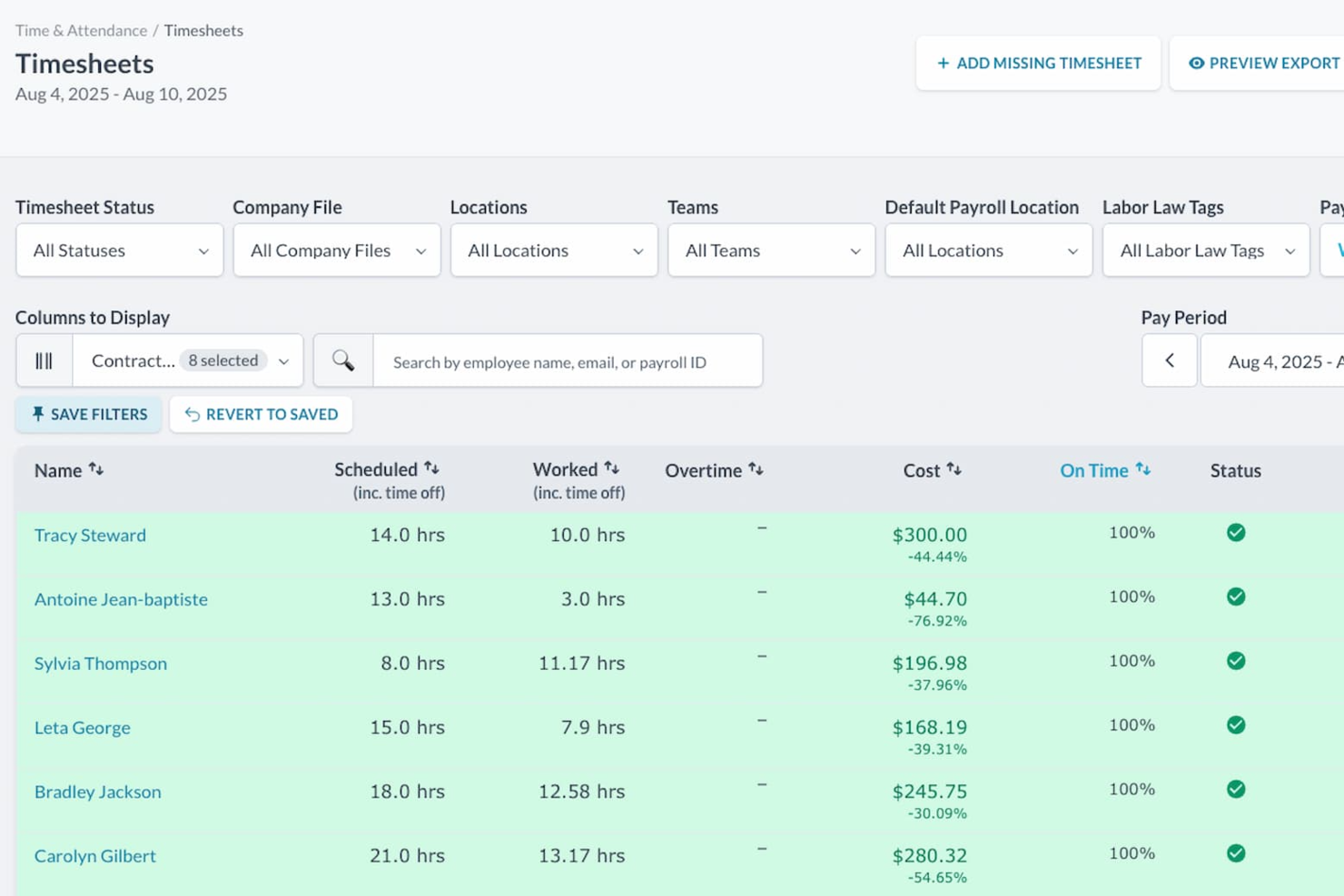
Gestionar equipos por horas se vuelve mucho más predecible cuando cuentas con herramientas de programación que responden a la demanda cambiante, y ahí es donde destaca Workforce.com. Obtienes un sistema diseñado específicamente para operaciones basadas en turnos, que proporciona a tus gerentes una visión clara de las necesidades de personal y ayuda a tu equipo a mantenerse organizado y preparado para cada día.
Por qué elegí Workforce.com
Elegí Workforce.com por su función de predicción de mano de obra impulsada por IA, que anticipa las necesidades de personal según las ventas y el tráfico de clientes, lo cual es crucial para negocios con demanda fluctuante. Esta capacidad única ayuda a optimizar tu plantilla, reduciendo tanto las horas extra como la escasez de personal. Además, sus herramientas de gestión de turnos permiten a los empleados gestionar su disponibilidad y encontrar reemplazos, minimizando las interrupciones por ausencias de último momento. Estas características abordan de manera integral los desafíos principales de la planificación de personal, convirtiendo a Workforce.com en un recurso valioso para cualquier organización.
Características clave de Workforce.com
También encontré varias otras funciones que aumentan su utilidad como herramienta de programación:
- Intercambio y puja de turnos: Permite a los empleados solicitar reemplazos o pujar por turnos abiertos sin la microgestión del gerente.
- Alertas de cumplimiento: Señala conflictos de horario como riesgos de horas extra o infracciones de descansos antes de publicar el horario.
- Gestión de ausencias: Conecta las solicitudes de permiso aprobadas directamente al calendario para que no falte cobertura.
- App móvil para empleados: Da al personal acceso a sus horarios, actualizaciones de turnos y notificaciones desde sus teléfonos.
Integraciones de Workforce.com
Las integraciones incluyen 401Go, Abacus, ADP, Azure, Clover, EduMe, Gusto, QuickBooks, Lightspeed, Paychex, Paycom, Square, Wokrday, Vend y Xero.
Pros and Cons
Pros:
- La app móvil permite marcar entradas, acciones de turnos y autoservicio
- Las herramientas de previsión ayudan a alinear la dotación con la demanda prevista
- Cálculos de pago precisos según roles, reglas y horas
Cons:
- La profundidad analítica puede no igualar a plataformas de BI independientes
- Algunas industrias pueden requerir integraciones no listadas públicamente

Mejor reloj de asistencia en línea con programación
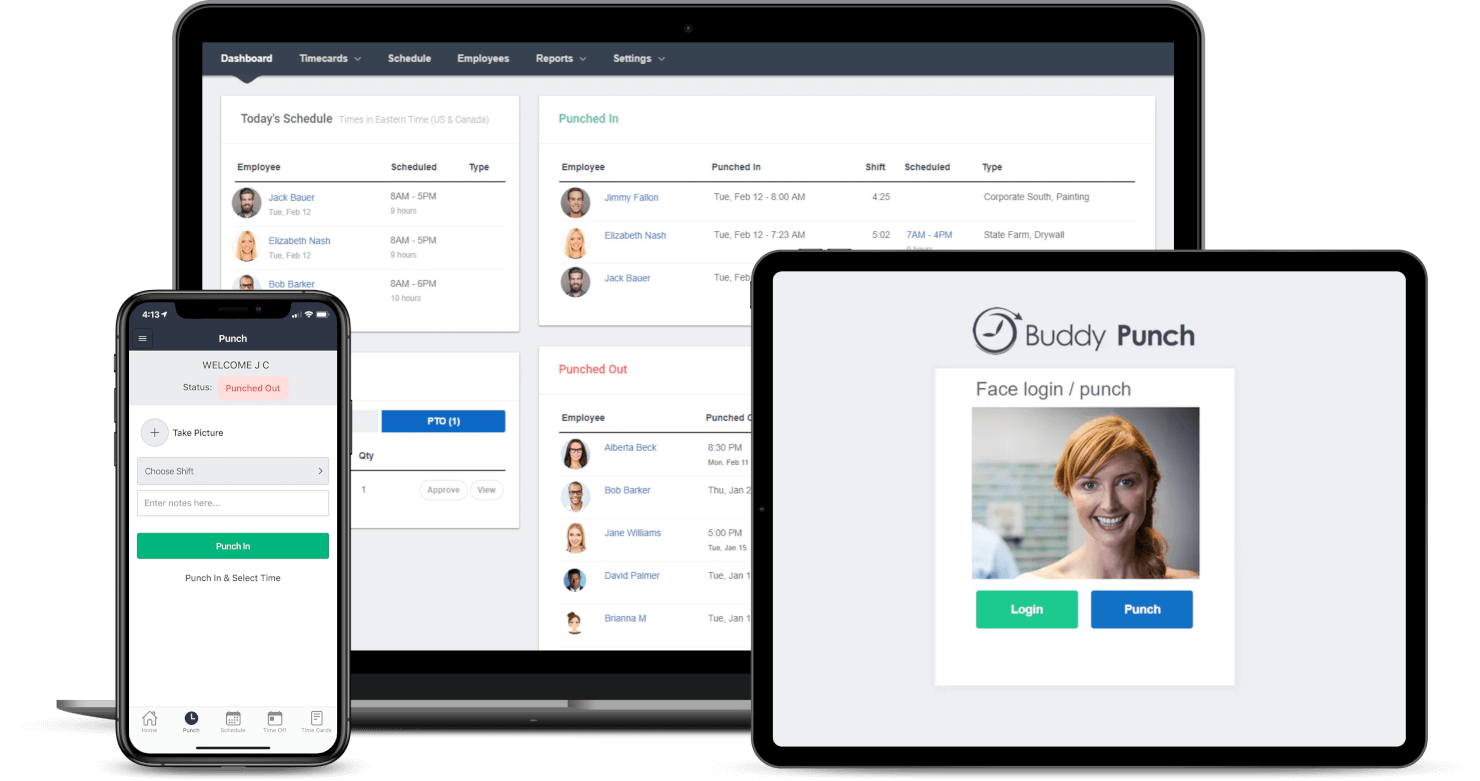
Buddy Punch es un software de reloj registrador y programación basado en la web. Tus empleados pueden ver su tarjeta de tiempo actual, solicitar permisos, enviar una corrección por un error de entrada o incluso enviar su tarjeta de tiempo para aprobación, todo sin salir de la aplicación Buddy Punch. La interfaz está diseñada para asegurar una navegación y uso sencillos, con funciones como la creación de horarios por arrastrar y soltar y la capacidad de crear turnos repetitivos/recurrentes.
Las funciones clave de Buddy Punch ayudan a mantener a tu equipo responsable y honesto. Mediante el seguimiento por GPS, puedes estar al tanto de la ubicación de tu personal siempre que registran su entrada o salida. Algunas funciones adicionales incluyen reconocimiento facial y fotos al registrar la entrada/salida, que realizan un escaneo biométrico del rostro de los empleados para verificar quién intenta marcar. Además, Buddy Punch se integra con QuickBooks, ADP, Gusto, Paychex, Paylocity, PayPlus, SurePayroll y Workday. Con una cuenta de Zapier, tendrás acceso a miles de otras aplicaciones y herramientas.
Buddy Punch cuesta desde $3.49/usuario/mes más una tarifa base de $19/mes para su paquete estándar de tiempo y asistencia. Para empresas con más de 200 empleados, puedes solicitar una cotización gratuita. También ofrecen una prueba gratuita de 14 días.

Homebase
Mejor si necesitas una plataforma completa de RR. HH. en línea
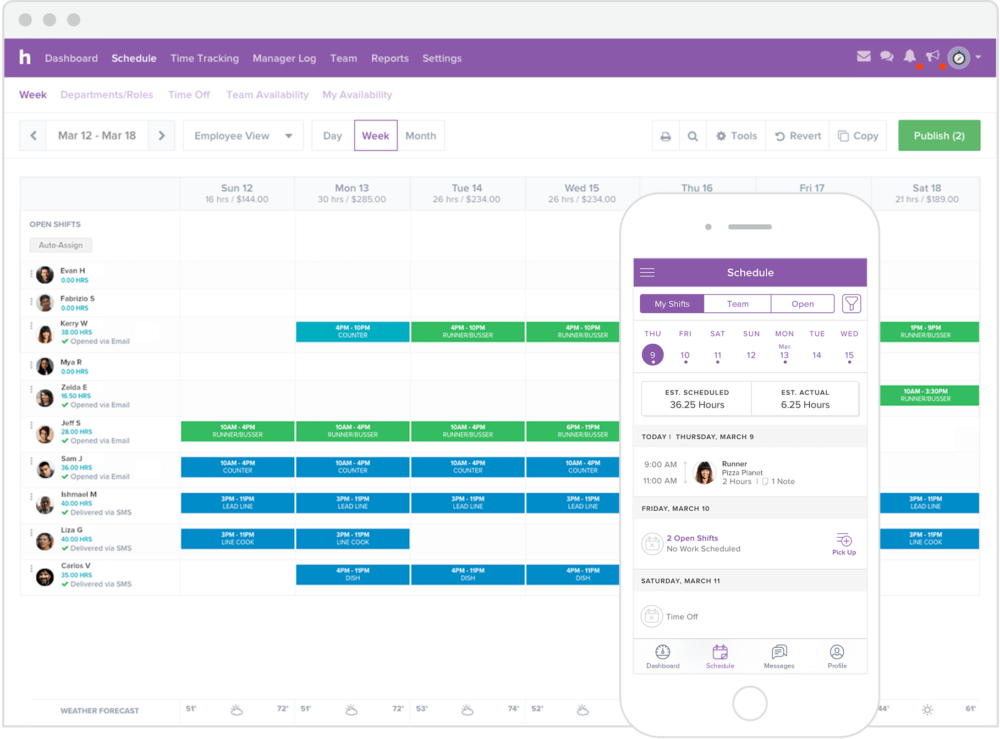
El software de programación de equipos de Homebase está dirigido principalmente a pequeñas empresas como tiendas, salones de belleza o centros de fitness, y otros proveedores de servicios. La plataforma ofrece un conjunto exhaustivo de funciones que te permite gestionar todas tus tareas de RR. HH. de principio a fin, incluyendo contratación e incorporación, programación de turnos, control de asistencia, comunicación con el equipo y más.
Su sencillez y amplia gama de funcionalidades le han valido numerosas distinciones, como “Mejor Software de Reloj Checador” por The Blueprint y una valoración de 5 estrellas en QuickBooks Apps.
Homebase tiene un plan gratuito que puedes usar con un número ilimitado de empleados pero con menos funciones avanzadas. Esto reemplaza la prueba gratuita.

Agendrix
Lo mejor para pymes basadas en turnos en Canadá
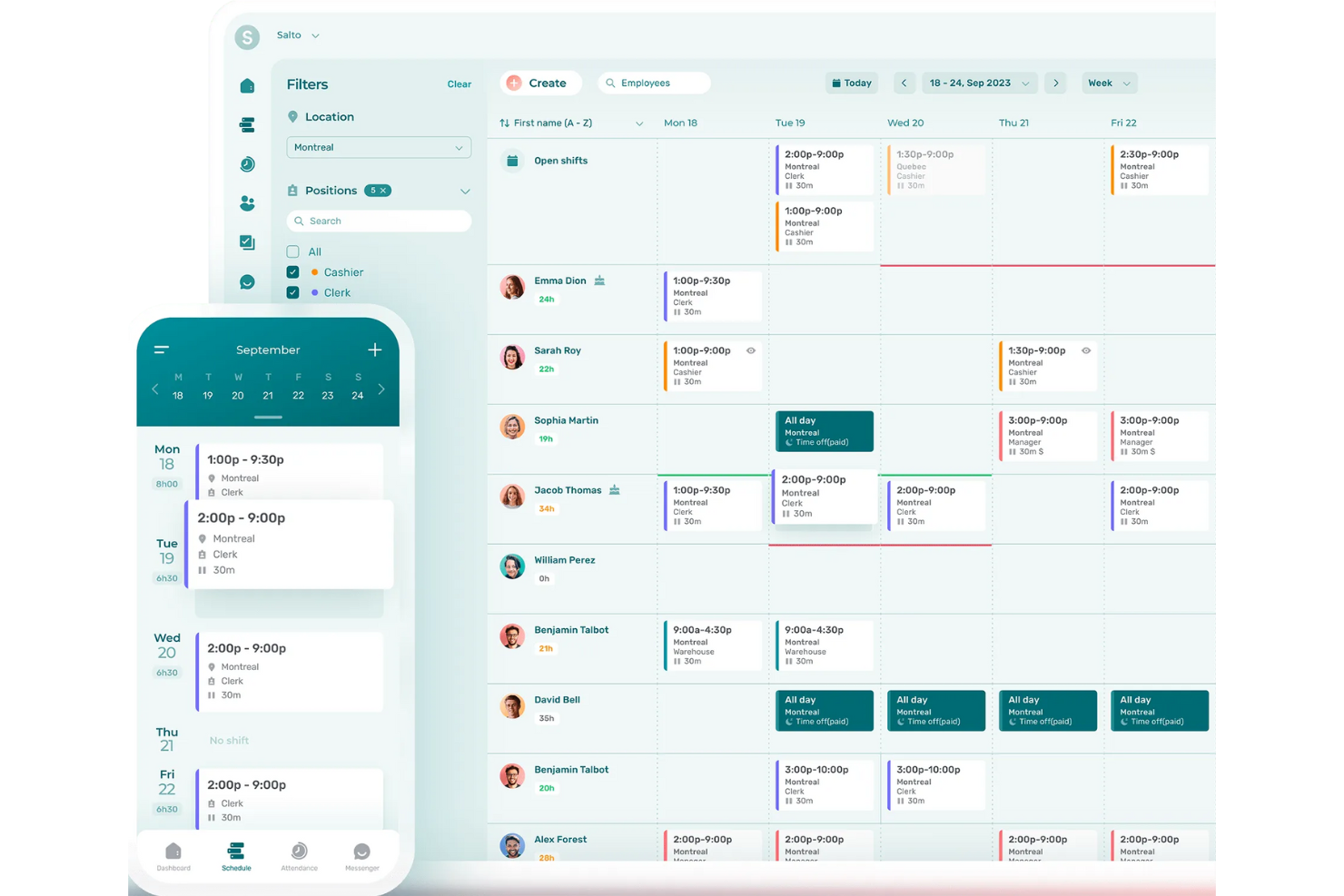
Agendrix es una plataforma canadiense que ayuda a pequeñas y medianas empresas basadas en turnos a gestionar horarios de personal, control de tiempo y comunicación con los empleados. Su software de programación de horarios en línea soporta necesidades complejas de programación entre distintas ubicaciones, roles y niveles de disponibilidad. La plataforma y la aplicación móvil ofrecen soporte bilingüe en inglés y francés, lo que la convierte en una herramienta accesible para equipos diversos.
Escogí Agendrix porque está diseñada teniendo en cuenta las realidades del trabajo por turnos, especialmente para equipos pequeños que manejan disponibilidad variable. Puedes crear horarios manualmente o dejar que el sistema los complete automáticamente según la disponibilidad, los días libres y la configuración de carga de trabajo. Me gusta que admita múltiples ubicaciones y permita a los gerentes dar permisos de acceso específicos, lo que la hace más útil para equipos en crecimiento. La app móvil también es sólida: los empleados pueden consultar horarios, confirmar turnos o solicitar cambios sin necesidad de una computadora de escritorio.
Además, los gerentes pueden ver si un empleado ha visto un turno asignado y solicitar confirmaciones de turno, añadiendo una capa de responsabilidad. Agendrix también permite a los gerentes adjuntar listas de tareas a los turnos, ayudando a asegurar que las responsabilidades diarias sean claras y se puedan rastrear.
Programación automática de turnos, seguimiento de confirmación de turnos, interfaz bilingüe (inglés/francés), asignación de tareas por turno, programación entre múltiples ubicaciones, gestión de roles y disponibilidades, mensajería integrada para el equipo y documentos electrónicos para RRHH.
EmployerD, Nethris, Sage 50, Acomba, QuickBooks, Ceridian Powerpay, ADP Workforce Now, Payworks, Lightspeed, Azur, Easypay, BeLocum, Hopem y Folks HR.
7shifts
La mejor opción para restaurantes
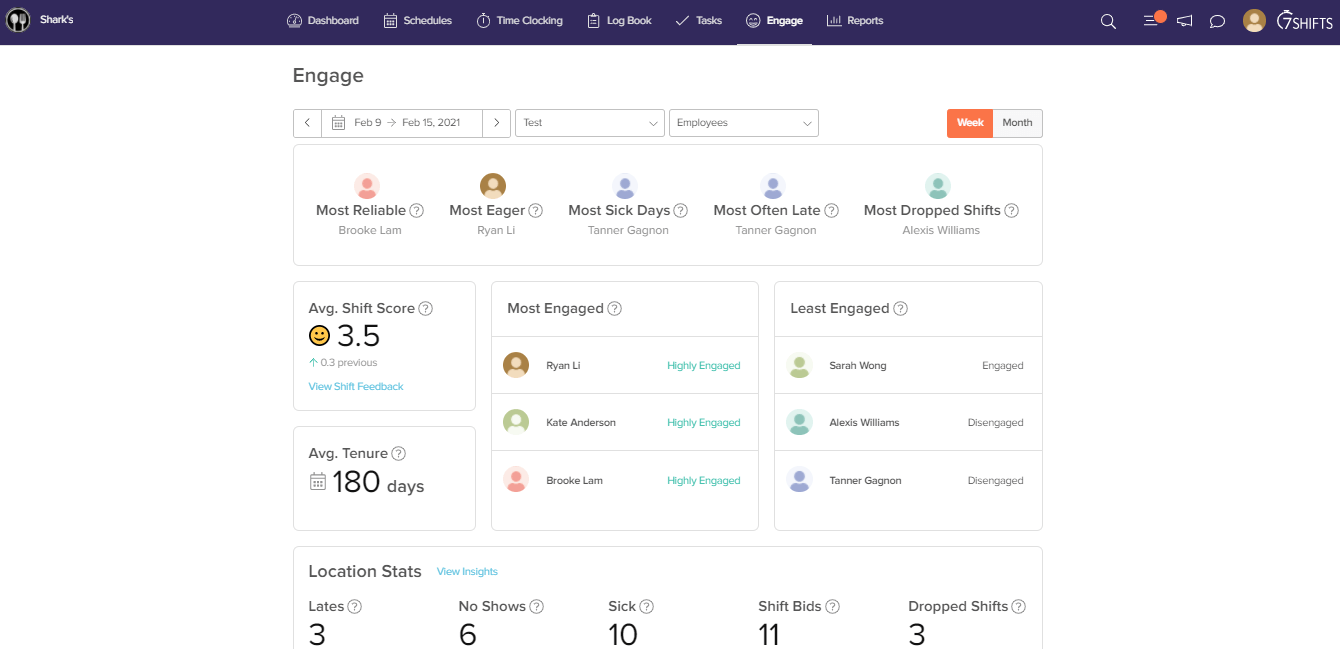
¿Tienes un restaurante? 7shifts es la solución preferida por marcas reconocidas como Five Guys o Sambo’s, pero los pequeños restaurantes de servicio completo también la aprovechan al máximo. El planificador basado en IA permite crear y optimizar horarios automáticamente, para que puedas satisfacer la demanda en tiempo real.
Los empleados pueden avisar a los gerentes sobre cambios en su disponibilidad desde la app, facilitando un sistema colaborativo y bidireccional. Para sincronizar ventas y datos laborales con salarios, 7shifts se integra con docenas de las principales soluciones de puntos de venta (POS) y nómina.
El plan de pago de 7shifts cuesta $24.99/mes/ubicación, pero puedes elegir una prueba gratuita de 14 días o usar el plan gratis para funciones sencillas de programación.

Mejor para empresas de servicios de campo o construcción
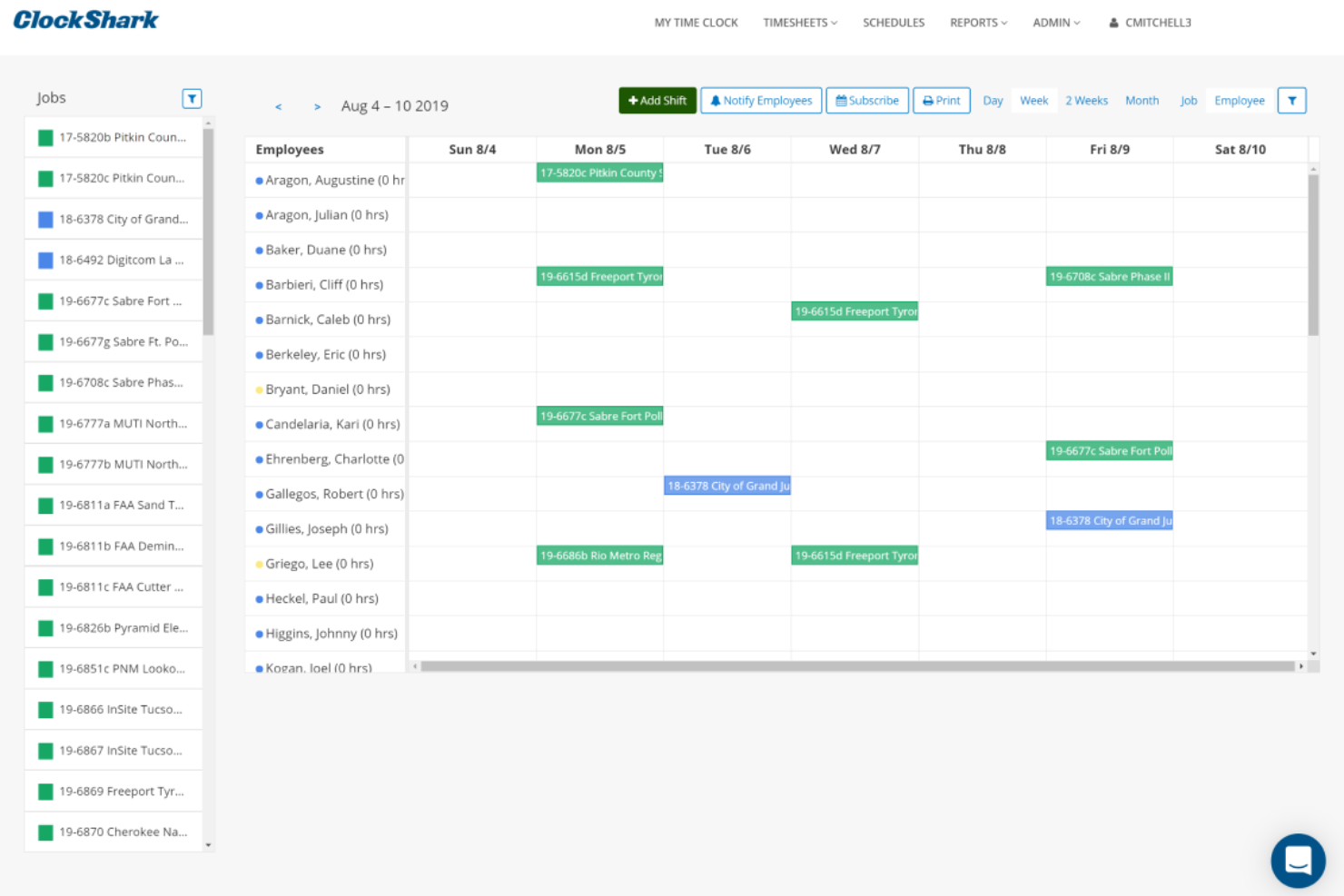
ClockShark es un software de programación de empleados en línea con hojas de tiempo y seguimiento de horas diseñado para empresas de servicios de campo y construcción. Los empleados pueden registrar su entrada y salida desde sus teléfonos inteligentes, y todos los datos para el coste de mano de obra se registran en la aplicación, lo que permite acceder fácilmente a la información para procesar nóminas y facturas. Existen múltiples opciones para que los empleados accedan a ClockShark: por navegador web, aplicación móvil o incluso mediante un 'quiosco' de ClockShark utilizando una tableta. Puedes aprovechar herramientas de reconocimiento facial y PIN individuales para garantizar la máxima seguridad, sin importar cómo se acceda al software.
La gestión de equipos es sencilla con el calendario de programación de trabajo de ClockShark. Puedes crear y asignar turnos, codificar entradas por colores y mover elementos mediante arrastrar y soltar para realizar cambios rápidamente. Las notificaciones avisarán en tiempo real a las personas afectadas si su turno se modifica de algún modo (cancelado, acortado, intercambiado, etc.). ClockShark también incorpora funciones de GPS y geoperimetraje que te permiten ver dónde y cuándo se registran los empleados.
En general, ClockShark es un software imprescindible de programación de empleados en línea para empresas de servicios de campo o construcción que buscan optimizar el flujo de trabajo desde las hojas de tiempo hasta la nómina.
ClockShark se integra con QuickBooks, Sage 100 Contractor, Xero, ADP, Paychex y otras aplicaciones.
ClockShark cuesta desde $7/usuario/mes más una tarifa base de $16/mes. También ofrecen una prueba gratuita de 14 días.

edays
Ideal para la gestión de ausencias
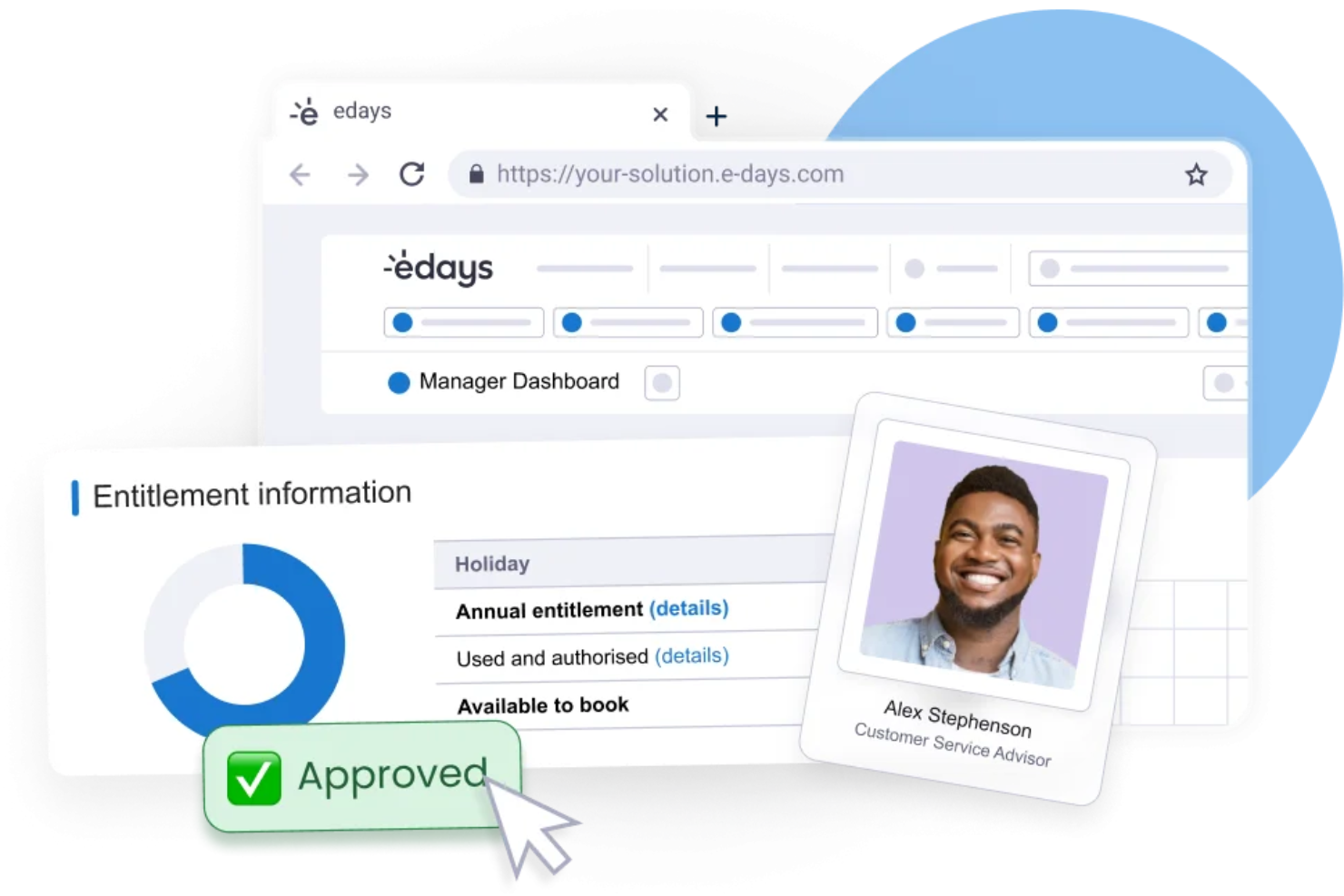
Navegar por las complejidades de la programación de empleados puede ser una tarea abrumadora, pero edays ofrece una solución adaptada a las necesidades de empresas que buscan eficiencia en la gestión de su personal. Diseñado para organizaciones de todos los tamaños, incluidas las que tienen presencia global, edays proporciona herramientas para afrontar diversos desafíos de programación, como la gestión de permisos y el seguimiento de ausencias. Al ofrecer una plataforma que se integra perfectamente con los sistemas de recursos humanos existentes, edays responde a la necesidad de un enfoque centralizado para gestionar los horarios de los empleados, mejorando finalmente la productividad y el cumplimiento en toda la organización.
Por qué elegí edays
Elegí edays por su enfoque único de la programación de empleados en línea, centrado en la gestión integral de ausencias. Con funciones como tipos de permisos personalizables y calendarios compartidos de equipo, edays te permite gestionar escenarios complejos de planificación sin esfuerzo. La capacidad de la plataforma para automatizar alertas de ausencia y ofrecer información en tiempo real sobre la disponibilidad del personal la convierte en una herramienta valiosa para cualquier organización que desee optimizar sus procesos de programación. En mi opinión, la integración de estas funciones con herramientas de cumplimiento garantiza que tu equipo pueda mantenerse al día con los requisitos tanto de programación como regulatorios.
Características clave de edays
Además de sus destacadas capacidades para programación, edays ofrece varias otras funciones:
- Reserva de vacaciones autoservicio: Los empleados pueden solicitar permisos fácilmente a través de un formulario web o móvil.
- Seguimiento de derechos: Esta función te permite monitorear los permisos usados, pendientes y restantes.
- Importación de días festivos: Importa más de 200 días festivos regionales o personaliza los tuyos según las necesidades de tu organización.
- Compensación por horas extras (TOIL): Haz seguimiento y solicita automáticamente las horas extras acumuladas, ofreciendo flexibilidad en la gestión de la jornada laboral.
Integraciones de edays
Las integraciones incluyen SAP SuccessFactors, ADP, Workday, Microsoft Outlook, Google Calendar, Microsoft Teams, Slack, Xero, BambooHR y Sage.
Pros and Cons
Pros:
- Sólida gestión de ausencias y permisos
- Potentes integraciones con sistemas de RR. HH.
- Cumplimiento global y soporte regional
Cons:
- La configuración inicial puede resultar compleja
- La interfaz de informes puede sentirse recargada
Otros programas de planificación de horarios de empleados en línea
Aquí tienes más aplicaciones que no llegaron a la lista de los mejores programas de planificación de horarios de empleados en línea, pero que merece la pena revisar:
- Bonsai Agency Software
Mejor para agencias enfocadas en proyectos
- Ubeya
Ideal para la programación de turnos con IA
- Sage HR
Mejor para pequeñas y medianas empresas
- eResource Scheduler
Ideal para gestionar horarios, hojas de tiempo y finanzas
- Shiftboard
Ideal para industrias altamente reguladas donde se requiere cumplir con diversas normativas de seguridad y leyes laborales
- Shiftbase
Mejor para la programación fácil de turnos
- Schedule360
Ideal para proveedores de servicios de salud
- Insightful
Ideal para la programación de turnos con monitoreo de empleados integrado
- Resource Guru
Ideal para programar empleados en agencias
- BambooHR®
Mejor opción para gestionar empleados durante todo el ciclo laboral
- Justworks
Ideal para gestionar una fuerza laboral distribuida
- Wrike
Ideal para empresas que buscan programación de recursos con potentes funciones de gestión de proyectos
- Paylocity
Mejor para eficiencia en programación impulsada por IA
- TimeTrex
Ideal para programación automatizada
- Parim
Mejor para la programación de eventos y seguridad
- TimeClock Plus
Ideal para la gestión de turnos
- Hub Planner by Milient
Ideal para la asignación de recursos y el mapeo de disponibilidad


Cómo evalúo el software de programación de empleados en línea
Divido mi evaluación en dos capas: lo básico que cualquier herramienta de programación debe cubrir—como la construcción de turnos y el acceso móvil—y los diferenciadores que separan una buena opción de la ideal.
Funcionalidad central (requisitos esenciales para esta lista)
Cuando selecciono herramientas para mi lista, califico cada una en una escala de 0 (no ofrece la funcionalidad) a 5 (destaca en esta área) para cada funcionalidad esencial listada a continuación. Luego, calculo el puntaje total de la herramienta en porcentaje. Cada herramienta debe lograr una puntuación total mínima del 65% para ser considerada para su inclusión.
- Creación de programación de turnos: Busco generadores de arrastrar y soltar o herramientas basadas en plantillas que permitan a los gerentes asignar turnos por rol, departamento o ubicación sin tener que reconstruir la semana desde cero.
- Gestión de disponibilidad y solicitudes de ausencia: Los empleados deben poder enviar sus ventanas de disponibilidad y solicitudes de permiso directamente, y los gerentes necesitan flujos claros de aprobación—especialmente para escenarios de intercambio de turnos.
- Acceso móvil para empleados: Una aplicación móvil nativa es importante aquí porque el personal por hora y de campo rara vez está frente a un escritorio. Verifico si los empleados pueden ver sus horarios, tomar turnos y recibir notificaciones push desde sus teléfonos.
- Seguimiento de tiempo y asistencia: Ya sea una función integrada de entrada/salida o una integración robusta con una herramienta de seguimiento de tiempo, evalúo qué tan bien se reconcilian las horas programadas frente a las horas realmente trabajadas.
- Normativas de cumplimiento laboral: Reviso cómo la plataforma maneja los umbrales de horas extra, los períodos de descanso obligatorios y las leyes de programación predictiva—especialmente si se pueden configurar las reglas por región o rol.
- Herramientas de comunicación para el equipo: Los cambios en los horarios deben llegar rápidamente al personal. Evalúo si la herramienta ofrece mensajería interna, alertas de turnos o funciones de anuncios que eviten que los gerentes tengan que perseguir al personal por mensajes de texto o correos electrónicos.
Una vez que tengo una lista de herramientas que cumplen con los criterios, considero qué distingue a cada plataforma.
Factores diferenciales (qué distingue a los proveedores)
Así es como comparo y contrasto los diferentes proveedores:
Características destacadas
La previsión basada en la demanda es un diferenciador importante; analizo si la herramienta incorpora datos de ventas o de afluencia de clientes para sugerir los niveles de personal, en lugar de dejar que los gerentes lo adivinen. La programación para múltiples ubicaciones es crucial para los equipos que comparten personal entre sedes, y evalúo qué tan bien una plataforma gestiona la visibilidad entre ubicaciones sin registros duplicados. También considero los mercados de turnos abiertos, ya que permiten que los empleados elegibles reclamen turnos vacantes por sí mismos, reduciendo la ida y vuelta típica de la cobertura de última hora.
Más allá de las funcionalidades
Las integraciones con nómina y sistemas HRIS están entre mis prioridades: los datos de programación deben transferirse a sistemas como ADP, Gusto o QuickBooks sin exportaciones manuales. También evalúo el ajuste por industria, ya que una herramienta creada para hostelería quizás no sirva a equipos de salud que gestionan personal certificado. La estructura de precios también es relevante. Verifico si los modelos por usuario o por ubicación escalan de manera justa a medida que crece el personal, sobre todo para negocios que abren nuevas sedes o contratan personal temporal.
Cómo elegir un programa de planificación de horarios de empleados en línea
Es fácil perderse entre largas listas de funciones y estructuras de precios complejas. Para ayudarte a mantener la concentración mientras avanzas en tu proceso particular de selección de software, aquí tienes una lista de factores que debes tener en cuenta:
| Factor | Qué debes considerar |
|---|---|
| Escalabilidad | ¿Puede el software crecer junto con tu equipo? Considera el crecimiento futuro y si la plataforma puede gestionar más usuarios o una mayor complejidad en la planificación de horarios. |
| Integraciones | ¿Funciona con tus herramientas actuales, como los sistemas de nóminas o las plataformas de comunicación? Asegúrate de que el flujo de datos entre sistemas sea fluido. |
| Personalización | ¿Puedes adaptar el software a tus necesidades específicas? Busca ajustes flexibles y plantillas personalizables que se adapten a tu flujo de trabajo. |
| Facilidad de uso | ¿La interfaz resulta intuitiva para tu equipo? Elige una solución que minimice el tiempo de formación y reduzca la curva de aprendizaje para todos los usuarios. |
| Implementación e incorporación | ¿Con qué rapidez puedes empezar a utilizarlo? Evalúa la disponibilidad de recursos de formación y asistencia durante la fase de configuración. |
| Coste | ¿El precio se ajusta a tu presupuesto? Compara los planes de suscripción, comprueba si hay cargos ocultos y considera los costes a largo plazo frente a las ventajas. |
| Medidas de seguridad | ¿Están protegidos tus datos y la información de tus empleados? Busca cifrado, permisos de usuario y cumplimiento de la normativa de protección de datos. |
| Disponibilidad de asistencia | ¿Recibirás ayuda cuando la necesites? Comprueba la disponibilidad de la atención al cliente, incluido el chat en directo, la asistencia telefónica y los tiempos de respuesta. |
¿Qué es el software de programación de empleados en línea?
El software de programación de empleados en línea es una herramienta digital que ayuda a las empresas a crear, gestionar y optimizar los horarios de trabajo de los empleados. Los profesionales de recursos humanos, los gerentes y los líderes de equipo suelen utilizar estas herramientas para simplificar la programación, reducir los conflictos y mejorar la comunicación. Funciones como el intercambio de turnos, el seguimiento de la disponibilidad y el acceso móvil ayudan a gestionar los horarios de forma eficiente y a mantener a todos informados. En general, estas herramientas ahorran tiempo y mejoran la productividad en el lugar de trabajo.
Funciones
Al seleccionar un software de programación de empleados en línea, presta atención a las siguientes funciones clave:
- Intercambio de turnos: Permite a los empleados intercambiar turnos fácilmente, reduciendo los conflictos de horarios y mejorando la flexibilidad.
- Seguimiento de la disponibilidad: Ayuda a los gerentes a ver cuándo están disponibles los empleados para trabajar, haciendo que la programación sea más eficiente.
- Acceso móvil: Permite a los empleados consultar los horarios y realizar cambios sobre la marcha, aumentando la accesibilidad.
- Integración con la nómina: Conecta la programación con los sistemas de nómina para garantizar pagos precisos y puntuales.
- Seguimiento del cumplimiento normativo: Supervisa el cumplimiento de la legislación laboral y ayuda a las empresas a evitar problemas legales.
- Plantillas personalizables: Ofrece plantillas de horarios prediseñadas que pueden adaptarse a las necesidades específicas de cada empresa.
- Actualizaciones en tiempo real: Proporciona cambios y notificaciones instantáneos sobre los horarios, manteniendo a todos informados.
- Sugerencias basadas en inteligencia artificial: Utiliza inteligencia artificial para recomendar una programación óptima basándose en datos anteriores.
- Herramientas de comunicación: Se integra con plataformas de mensajería para mejorar la comunicación y la colaboración del equipo.
- Informes y análisis: Proporciona información sobre los patrones de programación y los costes laborales, ayudando en la toma de decisiones estratégicas.
Ventajas
La implementación de un software de programación de empleados en línea ofrece varias ventajas para tu equipo y tu empresa. Estas son algunas de las que puedes esperar:
- Ahorro de tiempo: La automatización de la creación y las actualizaciones de los horarios reduce el tiempo dedicado a las tareas de programación manual.
- Mejora de la comunicación: Las herramientas de mensajería integradas garantizan que todos estén informados sobre los cambios y las actualizaciones de los horarios.
- Mayor flexibilidad: Funciones como el intercambio de turnos y el acceso móvil permiten a los empleados gestionar sus horarios con mayor facilidad.
- Eficiencia de costes: La integración con la nómina y las herramientas de informes ayudan a controlar los costes laborales y a evitar una programación excesiva.
- Mayor cumplimiento normativo: El seguimiento automatizado del cumplimiento ayuda a garantizar el respeto de las leyes y normativas laborales.
- Mejor toma de decisiones: Los análisis y los informes proporcionan información sobre las tendencias de programación y el uso de la mano de obra, apoyando la planificación estratégica.
- Satisfacción de los empleados: Permitir que los empleados participen en la programación aumenta su satisfacción y reduce la rotación de personal.
Costes y precios
Seleccionar un software de programación de empleados en línea requiere comprender los distintos modelos de precios y planes disponibles. Los costes varían en función de las funciones, el tamaño del equipo, los complementos y otros factores. La tabla siguiente resume los planes habituales, sus precios medios y las funciones que suelen incluir las soluciones de software de programación de empleados en línea:
Tabla comparativa de planes de software de programación de empleados en línea
| Tipo de plan | Precio medio | Funciones habituales |
|---|---|---|
| Plan gratuito | $0 | Programación básica, acceso limitado de usuarios y acceso a la aplicación móvil. |
| Plan personal | $5-$15/usuario/mes | Opciones avanzadas de programación, seguimiento de la disponibilidad e intercambio de turnos. |
| Plan empresarial | $20-$40/usuario/mes | Integración con la nómina, seguimiento del cumplimiento normativo y plantillas personalizables. |
| Plan para empresas | $50+/usuario/mes | Programación basada en inteligencia artificial, análisis detallados y asistencia al cliente exclusiva. |
Preguntas frecuentes
¿Es seguro el software de programación de empleados en línea?
Sí, el software de programación de empleados en línea suele ser seguro. La mayoría de los proveedores utilizan cifrado y cumplen la normativa de protección de datos para mantener tu información a salvo. Al elegir una solución, comprueba si cumple estándares como el RGPD o la HIPAA, si son aplicables a tu sector. Asegúrate siempre de que tu equipo utilice contraseñas seguras y siga las buenas prácticas de seguridad.
¿Puede el software de programación de empleados en línea integrarse con otros sistemas?
Sí, muchas herramientas de programación de empleados en línea se integran con otros sistemas. Puedes conectarlas con plataformas de nóminas, recursos humanos y comunicación para optimizar los procesos. Antes de realizar la compra, asegúrate de que el software sea compatible con las integraciones que necesitas. Esto ahorrará tiempo y reducirá la introducción manual de datos.
¿Es necesario recibir formación para utilizar el software de programación de empleados en línea?
La formación suele ser útil, pero no siempre es necesaria. Muchas herramientas están diseñadas para ser fáciles de usar e intuitivas. Sin embargo, ofrecer sesiones de formación o tutoriales puede ayudar a tu equipo a sacar el máximo partido del software. Busca proveedores que ofrezcan asistencia durante la incorporación, vídeos de formación o guías interactivas.