

Los 10 mejores programas de gestión del conocimiento analizados en 2026

10 Mejor selección de software de gestión del conocimiento


El mejor software de gestión del conocimiento te ayuda a capturar, organizar y compartir el conocimiento colectivo de tu organización, para que tu equipo pueda acceder a la información al instante y trabajar de forma más eficiente.
Cuando el conocimiento está disperso en documentos, correos electrónicos o conversaciones de chat, la productividad se ralentiza y se duplican los esfuerzos. La herramienta adecuada centraliza esa información, agiliza la colaboración y convierte los conocimientos cotidianos en información práctica y fácil de buscar que impulsa mejores decisiones.
Basándome en años de experiencia evaluando software de RR. HH. y de colaboración, he revisado las principales soluciones de gestión del conocimiento, intuitivas, escalables y diseñadas para ayudar a los equipos a trabajar de forma más inteligente. En esta guía encontrarás herramientas que mantienen el conocimiento fluyendo por toda tu organización, ahorran tiempo y mejoran la alineación.
Por qué confiar en nuestras reseñas de software
Nuestro equipo lleva probando y evaluando software desde 2012. Como expertos en RR. HH., sabemos lo difícil —y lo importante— que es elegir el software adecuado.
Para esta guía, evaluamos las herramientas mediante pruebas prácticas e investigación independiente, puntuando las herramientas según nuestros criterios de selección. También nos basamos en la experiencia de líderes de opinión del sector y de profesionales de RR. HH. en activo.
Nuestras reseñas reflejan nuestro criterio editorial humano, no un discurso de ventas.
Revisores expertos:
Resumen del mejor software de gestión del conocimiento
Esta tabla comparativa resume los detalles de precios de mis principales selecciones de software de gestión del conocimiento para ayudarte a encontrar la mejor opción para tu presupuesto y las necesidades de tu empresa.
| Tool | Best For | Trial Info | Price | ||
|---|---|---|---|---|---|
| 1 | Mejor para atención al cliente | Prueba gratuita de 14 días disponible | Precios a consultar | Website | |
| 2 | Ideal para funciones de desvío de tickets de soporte | Prueba gratuita de 14 días + demo gratuita disponible | Precio a consultar | Website | |
| 3 | Ideal para la creación automatizada de contenido | Prueba gratuita de 10 días + demo gratis disponible | Desde $40/mes (facturado anualmente) | Website | |
| 4 | Mejor para portales de autoservicio | Prueba gratuita de 14 días + demo gratis disponible | Desde $19/agente/mes (facturación anual) | Website | |
| 5 | Mejor para integración de búsqueda a nivel empresarial | Demo gratuita disponible | Precio bajo consulta | Website | |
| 6 | Ideal para el conocimiento de RR. HH. con controles de actualización del contenido | Demo gratuita disponible | Precios bajo solicitud | Website | |
| 7 | Mejor para la gestión del conocimiento en intranets | Demo gratuita disponible | Precio a consultar | Website | |
| 8 | Mejor para formación empresarial | Prueba gratuita de 30 días + demo gratuita disponible | Desde $3.97/usuario/mes | Website | |
| 9 | Ideal para compartir conocimiento en equipos remotos | Demo gratuita disponible | Precio bajo consulta | Website | |
| 10 | Mejor para perfiles con capacidad de búsqueda. | Prueba gratuita disponible | Desde $1.50/usuario/mes | Website |


Análisis del mejor software de gestión del conocimiento
A continuación encontrarás mis resúmenes detallados del mejor software de gestión del conocimiento que llegó a mi selección. Mis análisis ofrecen una visión detallada de las principales funciones, ventajas y desventajas, integraciones y casos de uso ideales de cada herramienta para ayudarte a encontrar la mejor opción para ti.

Stonly
Mejor para atención al cliente
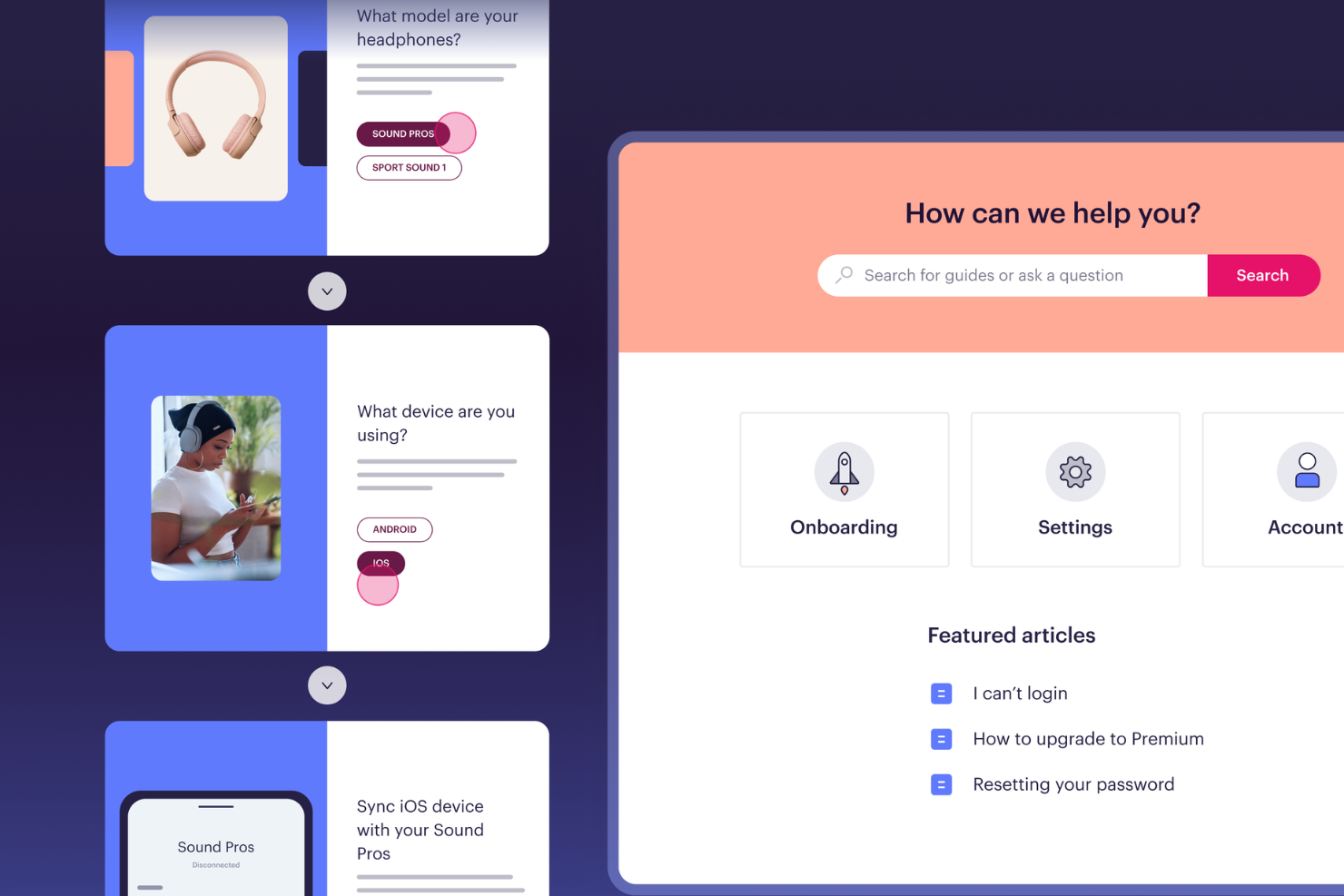
Stonly es una plataforma de gestión del conocimiento que permite a los equipos crear guías interactivas, tutoriales paso a paso y bases de conocimiento con capacidad de búsqueda, tanto para uso interno como orientado al cliente.
¿Para quién es mejor Stonly?
Stonly es ideal para equipos de soporte al cliente que necesitan ofrecer respuestas guiadas y consistentes a los clientes en varios canales.
Por qué elegí Stonly
Stonly merece un lugar en mi lista porque aborda de manera específica la entrega de conocimientos para equipos de atención al cliente. A diferencia de una base de conocimientos estándar, utiliza un formato de guía interactiva: en lugar de dirigir a los agentes o clientes a un largo artículo estático, Stonly los guía a través de árboles de decisión ramificados que se adaptan a la situación. Los agentes pueden acceder a estas guías desde su sistema de tickets sin cambiar de pestaña, lo que mantiene el flujo de trabajo enfocado durante los tickets en tiempo real. La posibilidad de rellenar automáticamente los campos de los tickets y activar macros desde una guía es una función que no he visto manejada tan bien en otras soluciones.
Funciones clave de Stonly
- Traducción automática: Traduce automáticamente el contenido de la base de conocimientos a varios idiomas para atender clientes a nivel global.
- Segmentación y orientación de contenido: Muestra distintos contenidos de conocimiento a diferentes usuarios según su contexto o perfil.
- Flujos de revisión: Establece procesos estructurados de revisión y aprobación de contenido para mantener el conocimiento preciso y actualizado.
- Respuestas guiadas: Detecta la intención del usuario y muestra la guía más relevante, permitiéndote controlar la resolución de los problemas.
Integraciones de Stonly
Stonly ofrece integraciones nativas con Zendesk, Freshdesk, Intercom, Salesforce, HubSpot, LiveChat y Front. También dispone de una API para integraciones personalizadas.
Pros and Cons
Pros:
- Las guías interactivas adaptan las instrucciones a la situación de cada usuario.
- La búsqueda con IA localiza los pasos exactos en lugar de artículos completos.
- La ayuda contextual lleva el conocimiento directamente a las aplicaciones web.
Cons:
- La creación de guías puede resultar compleja para flujos condicionales grandes.
- Las respuestas con IA y las integraciones con sistemas de tickets solo están disponibles en el plan empresarial.

Ideal para funciones de desvío de tickets de soporte
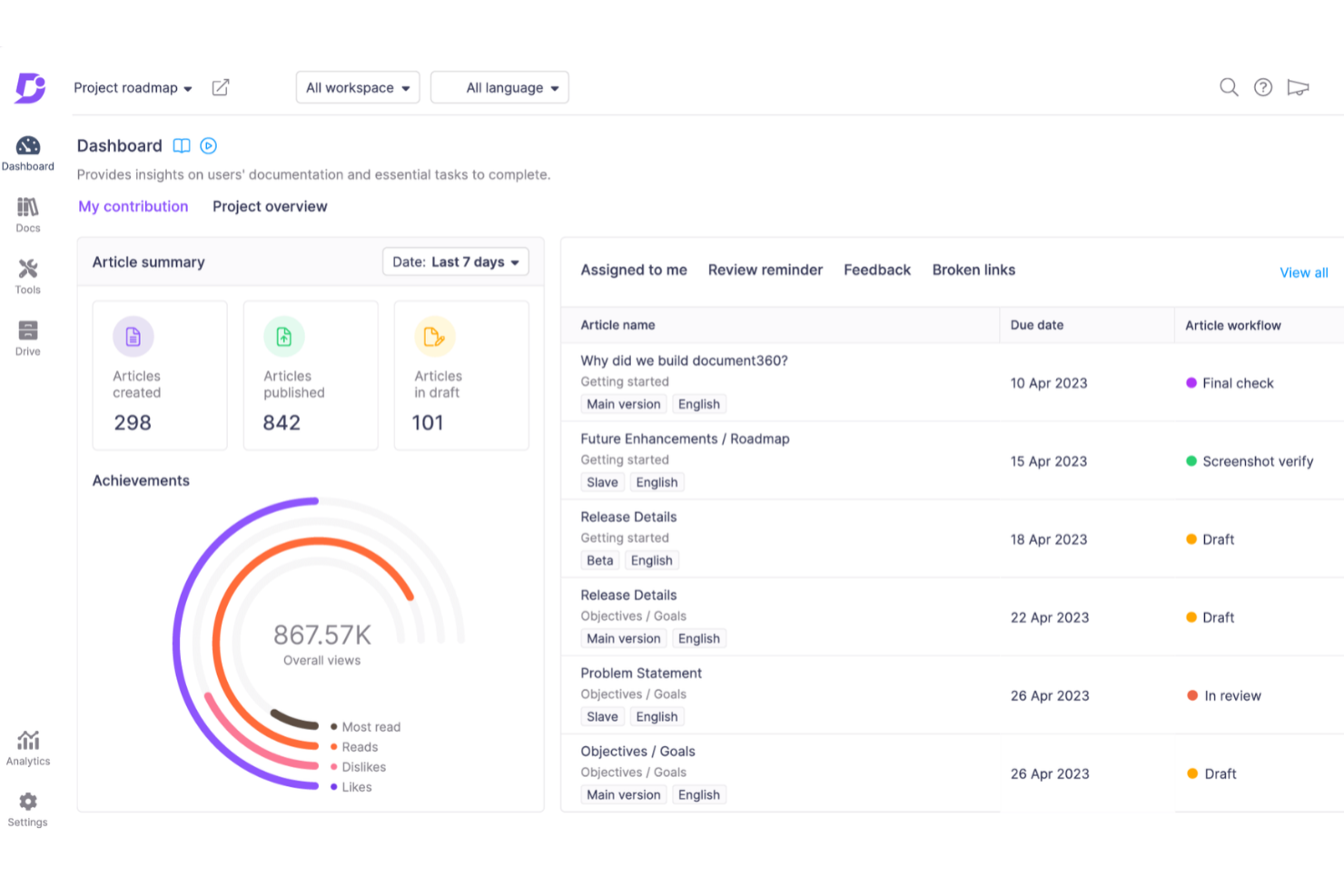
Document360 es una plataforma de software de gestión del conocimiento para crear, organizar y publicar bases de conocimiento internas y externas con herramientas avanzadas de autoría, categorización y análisis.
¿Para quién es mejor Document360?
Document360 es ideal para los equipos de atención al cliente y de producto en empresas SaaS que necesitan una base de conocimiento de autoservicio para ayudar a los usuarios a encontrar respuestas sin necesidad de contactar al soporte.
Por qué elegí Document360
Incluí Document360 en mi lista porque está construido intencionalmente para mantener a los usuarios fuera de tu cola de soporte. Me gusta especialmente la función Deflector de Tickets, que muestra automáticamente artículos relevantes de la base de conocimiento cuando un usuario está a punto de enviar una solicitud de soporte—interceptando el ticket antes de que sea creado. El chatbot Eddy AI está entrenado en el contenido de tu base de conocimiento y puede manejar preguntas de seguimiento en tiempo real, escalando a Zendesk o Freshdesk solo cuando no puede resolver el problema. Las analíticas de búsqueda muestran qué consultas no arrojan resultados, lo que me permite identificar vacíos de contenido y llenarlos antes de que se conviertan en tickets recurrentes.
Características clave de Document360
- Gestor de categorías: Organiza tu base de conocimiento usando un gestor de categorías de arrastrar y soltar que soporta más de seis niveles de categorías y subcategorías anidadas.
- Control de versiones y restauración: Visualiza el historial completo de cualquier artículo y restaura una versión anterior para evitar sobrescrituras accidentales.
- Árbol de decisiones interactivo: Crea flujos guiados paso a paso que conduzcan a los usuarios por procesos complejos para ayudarles a encontrar la respuesta correcta.
- Traducción automática impulsada por IA: Localiza tu base de conocimiento en más de 50 idiomas utilizando traducción contextual asistida por IA.
Integraciones de Document360
Document360 ofrece integraciones nativas con Zendesk, Freshdesk, Intercom, Slack, Microsoft Teams, Google Analytics y Disqus. También proporciona una API para integraciones personalizadas.
Pros and Cons
Pros:
- Proporciona un control de versiones robusto con pistas de auditoría
- Ofrece análisis e informes potentes
- Características inteligentes de gestión de archivos
Cons:
- Se necesita mejorar el soporte para archivos multimedia grandes
- La mayoría de las integraciones solo están disponibles en planes de nivel superior
New Product Updates from Document360

Document360 Adds Drive and Eddy AI Workflow Updates
Document360 adds Drive file renaming, Eddy AI email ticket notifications, and Drive image support in AI Capture. These updates simplify file management, support escalation, and visual content editing. For more information, visit Document360’s official site.
 .
.
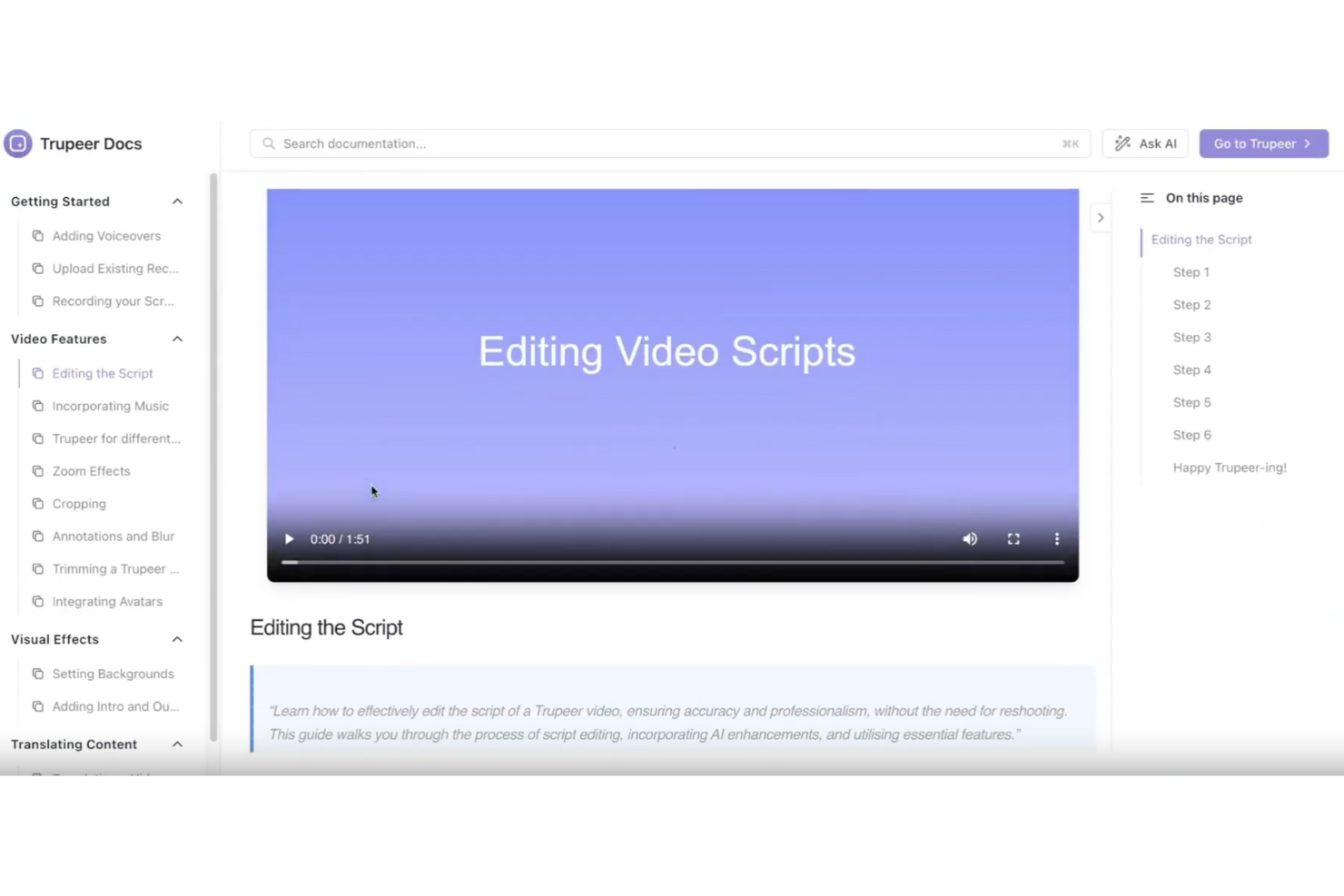
TruPeer es una plataforma de gestión del conocimiento que utiliza IA para ayudar a los equipos a generar, organizar y actualizar contenido y documentación interna.
¿Para quién es mejor TruPeer?
TruPeer es ideal para equipos de RR. HH. y operaciones que necesitan construir y mantener bases de conocimientos internas sin tener que realizar trabajo manual intensivo de contenido.
Por qué elegí TruPeer
Elegí TruPeer como uno de los mejores por la manera en que gestiona la creación de contenido dentro de la gestión del conocimiento. La mayoría de los equipos que conozco pasan horas escribiendo manualmente procedimientos estándar, artículos de ayuda y guías de incorporación desde cero. TruPeer cambia eso al permitirte grabar tu pantalla una vez y luego utilizar IA para generar una guía paso a paso completa con capturas de pantalla, títulos y resúmenes. También me gusta el Generador de Base de Conocimientos, que analiza materiales ya existentes como archivos PDF, preguntas frecuentes y videos de formación y los convierte en artículos clasificados, etiquetados y fácilmente buscables sin necesidad de formateo manual.
Características clave de TruPeer
- Traducción multilingüe: Traduce cualquier video o guía a más de 65 idiomas directamente en la plataforma.
- Imitación de plantillas de marca: Sube un documento de la empresa y TruPeer aplicará tus fuentes, colores y estructura de diseño a todas las nuevas guías automáticamente.
- Búsqueda de video con IA: Busca en toda tu base de conocimientos con consultas en lenguaje natural, incluso dentro del contenido de video.
- Base de conocimientos centralizada: Almacena y organiza artículos, procedimientos estándar y videos en un único espacio compartido con controles de acceso para públicos internos y externos.
Integraciones de TruPeer
Las integraciones nativas no están claramente documentadas. TruPeer ofrece una API para integraciones personalizadas.
Pros and Cons
Pros:
- La búsqueda de video por IA mejora rápidamente el acceso a la información
- Las herramientas colaborativas permiten la edición y el trabajo compartido entre varios usuarios
- Transforma grabaciones de pantalla en videos pulidos rápidamente
Cons:
- Las opciones de personalización pueden no adaptarse a todas las necesidades de marca
- Funciones avanzadas de edición limitadas restringen la personalización detallada

Mejor para portales de autoservicio
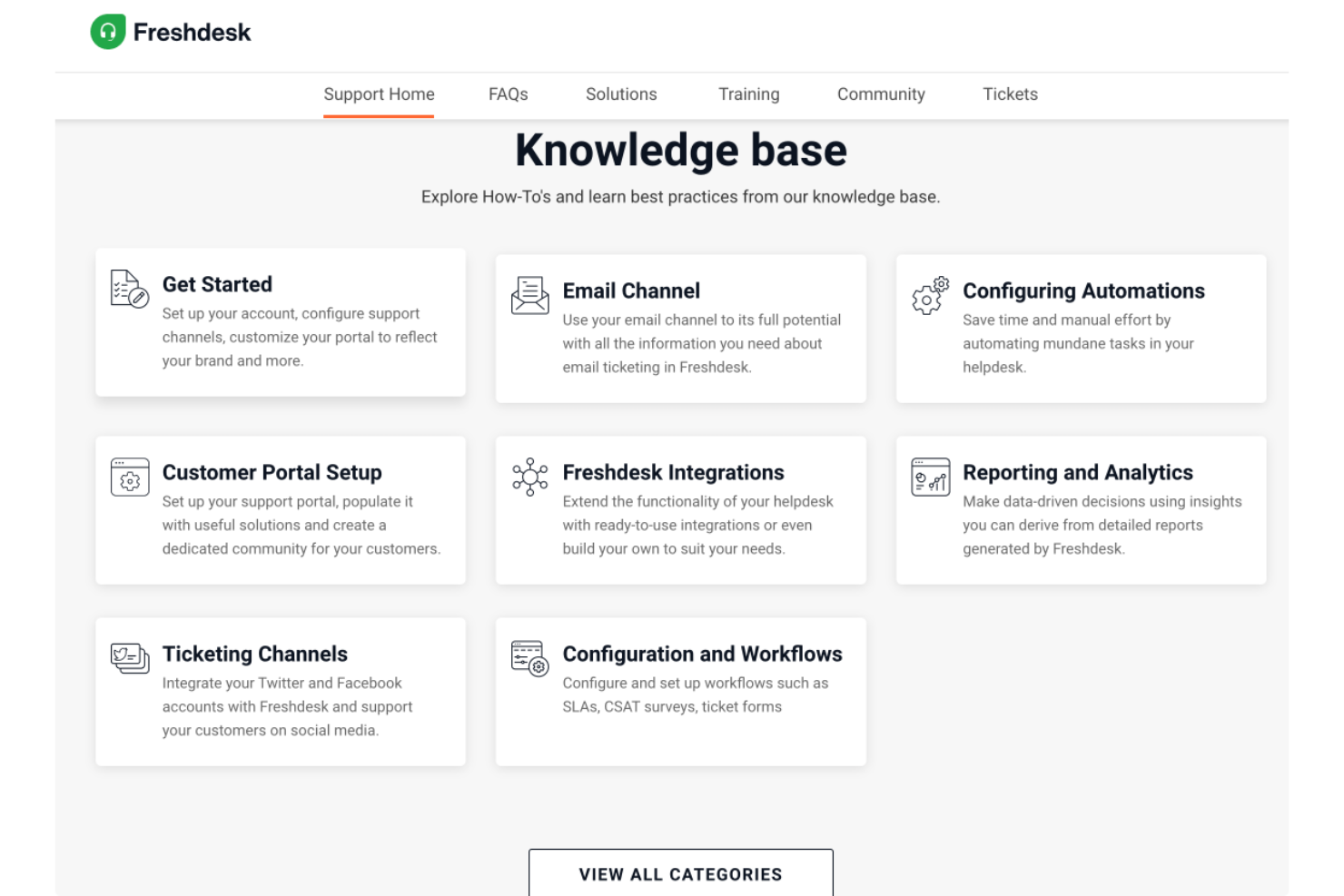
Freshdesk es una plataforma de gestión del conocimiento basada en la nube que permite a los equipos crear bases de conocimiento, gestionar contenido de soporte y organizar recursos de autoservicio tanto para clientes como para usuarios internos.
¿Para quién es mejor Freshdesk?
Freshdesk es una excelente opción para equipos de atención al cliente en pequeñas y medianas empresas que necesitan una forma estructurada de gestionar el contenido de ayuda y reducir el volumen de solicitudes entrantes.
Por qué elegí Freshdesk
Freshdesk se gana su lugar en mi lista corta por lo bien que su portal de autoservicio gestiona tanto el contenido orientado al cliente como las necesidades internas de conocimiento en un solo lugar. Me gusta que puedas crear portales completamente personalizados donde los clientes consultan la base de conocimiento, navegan en los foros de la comunidad o envían una solicitud, todo sin la intervención de un agente. La jerarquía flexible de la base de conocimiento permite a mi equipo organizar el contenido por categoría y tema, y la función de versionado de artículos me permite rastrear cambios y lanzar actualizaciones sin perder borradores anteriores. El flujo de trabajo de aprobación añade otra capa de control antes de que algo se publique.
Características clave de Freshdesk
- Base de conocimiento multilingüe: Crea y gestiona contenido de ayuda en varios idiomas con soporte de traducción incorporado para una base de clientes global.
- Foros comunitarios: Crea un espacio de soporte entre pares donde los clientes pueden publicar preguntas, compartir respuestas y participar con el contenido publicado por tu equipo.
- Freddy AI Copilot: Un asistente de IA que ayuda a los agentes a redactar artículos de la base de conocimiento y sugerir contenido relevante mientras gestionan tickets.
- Control de acceso basado en roles: Asigna diferentes niveles de permisos a agentes y editores para controlar quién puede crear, editar o publicar contenido de conocimiento.
Integraciones de Freshdesk
Freshdesk ofrece más de 100 integraciones nativas, incluyendo Slack, Jira, Salesforce, HubSpot, Shopify, Mailchimp, Google Workspace, Microsoft Teams, Trello y Zoom. Hay una API disponible para integraciones personalizadas.
Pros and Cons
Pros:
- AI Copilot sugiere respuestas y resume solicitudes para ahorrar tiempo a los agentes
- El portal de autoservicio conecta la base de conocimiento con el sistema de tickets para un soporte más rápido
- Sistema de tickets organizado con múltiples vistas para seguimiento y colaboración
Cons:
- No incluye gestión de activos integrada en comparación con otros productos de Freshworks
- Tiempos de carga lentos al manejar grandes volúmenes de tickets
New Product Updates from Freshdesk

Freshdesk Adds Voice AI Agents in Freshcaller
Freshdesk introduces Voice AI Agents available through Freshcaller Marketplace apps to handle routine calls and reduce queues. This feature enables automated call handling with real-time, conversational support. For more information, visit Freshdesk's official site.

Glean
Mejor para integración de búsqueda a nivel empresarial
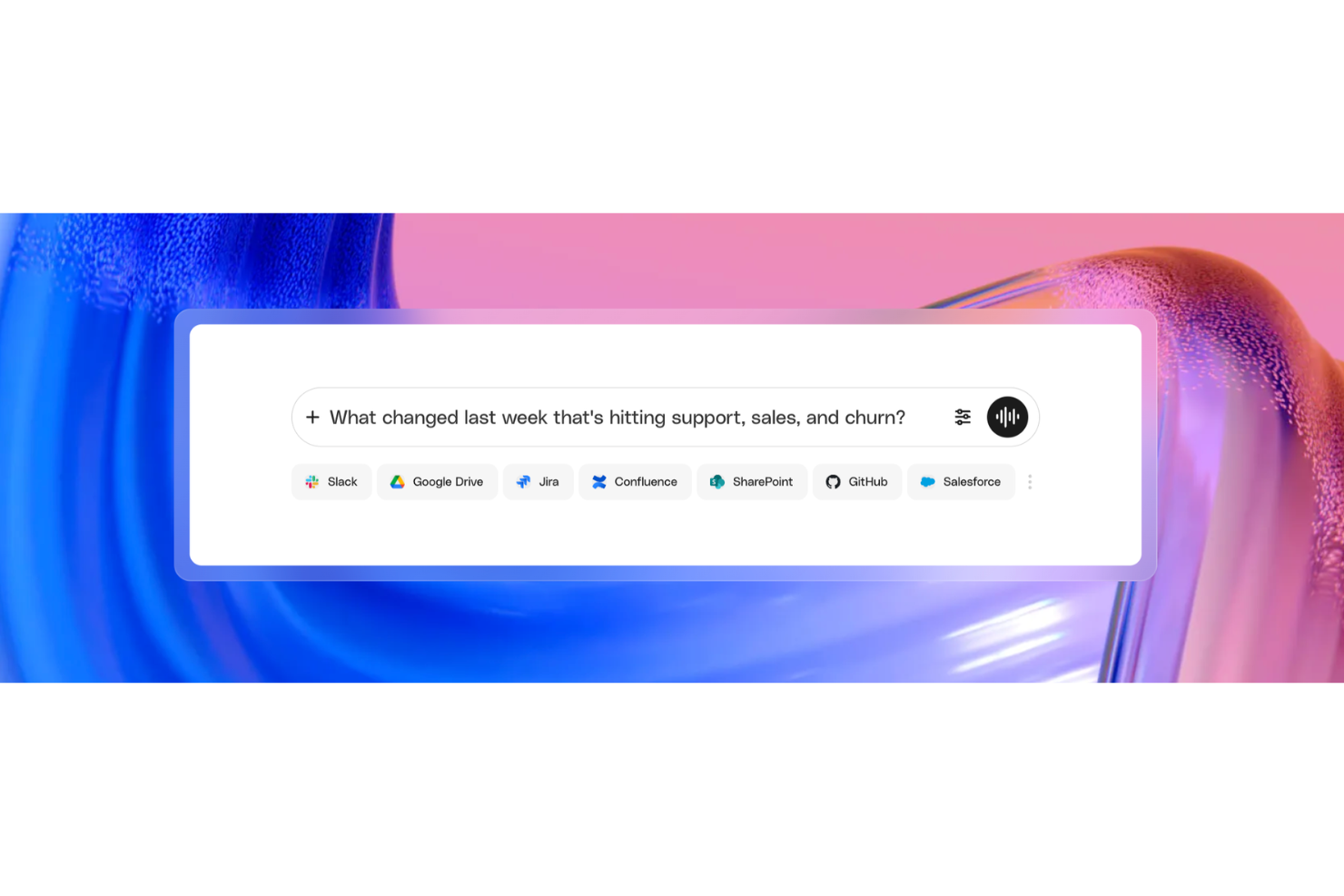
Glean es una plataforma de gestión del conocimiento empresarial impulsada por IA que indexa información a través de tus aplicaciones conectadas, permitiendo búsquedas unificadas, acceso consciente de permisos y respuestas asistidas por IA desde una sola interfaz.
¿Para quién es mejor Glean?
Glean es ideal para grandes empresas con infraestructuras tecnológicas complejas y múltiples aplicaciones, donde los empleados necesitan acceso rápido y centralizado a información distribuida entre docenas de herramientas.
Por qué elegí Glean
Elegí Glean como una de las mejores opciones para la integración de búsqueda a nivel empresarial porque conecta más de 100 aplicaciones mediante conectores nativos, desde Slack y Google Drive hasta Jira y Salesforce, indexando todo en tiempo real desde una única barra de búsqueda. Lo que encuentro especialmente impresionante es que los resultados de búsqueda reflejan automáticamente los permisos existentes de cada aplicación, lo que significa que nunca tienes que gestionar el acceso por separado dentro de Glean. Además, Glean se entrena continuamente con el lenguaje y contenido único de tu empresa, lo que implica que consultas como 'presentación de precios Q3' devuelven resultados relevantes sin necesidad de ajustes manuales.
Características clave de Glean
- Respuestas: Crea y fija respuestas verificadas y autorizadas a preguntas frecuentes para que los empleados siempre encuentren la información más precisa primero.
- Colecciones: Agrupa documentos, enlaces y recursos relacionados de las aplicaciones conectadas en hubs temáticos o de proyectos seleccionados.
- Go Links: Crea URLs internas cortas y fáciles de recordar que dirigen a los empleados directamente a recursos, páginas o herramientas específicas dentro de tu organización.
- Asistente de IA: Realiza preguntas en lenguaje natural y obtén respuestas sintetizadas y citadas extraídas del contenido de todas las fuentes conectadas.
Integraciones de Glean
Glean ofrece más de 275 conectores nativos y basados en MCP, incluidos Confluence, Slack, Google Drive, Jira, Salesforce, GitHub, BambooHR, Dropbox, ServiceNow y Box. También se conecta con Zapier y proporciona una API para integraciones personalizadas.
Pros and Cons
Pros:
- Responde preguntas en lenguaje natural con fuentes citadas
- Busca en más de 100 aplicaciones conectadas al mismo tiempo
- La IA personaliza los resultados según el rol y el equipo
Cons:
- La búsqueda puede mostrar documentos desactualizados o caducos
- Sin transparencia de precios sin contactar a ventas

Haystack
Ideal para el conocimiento de RR. HH. con controles de actualización del contenido
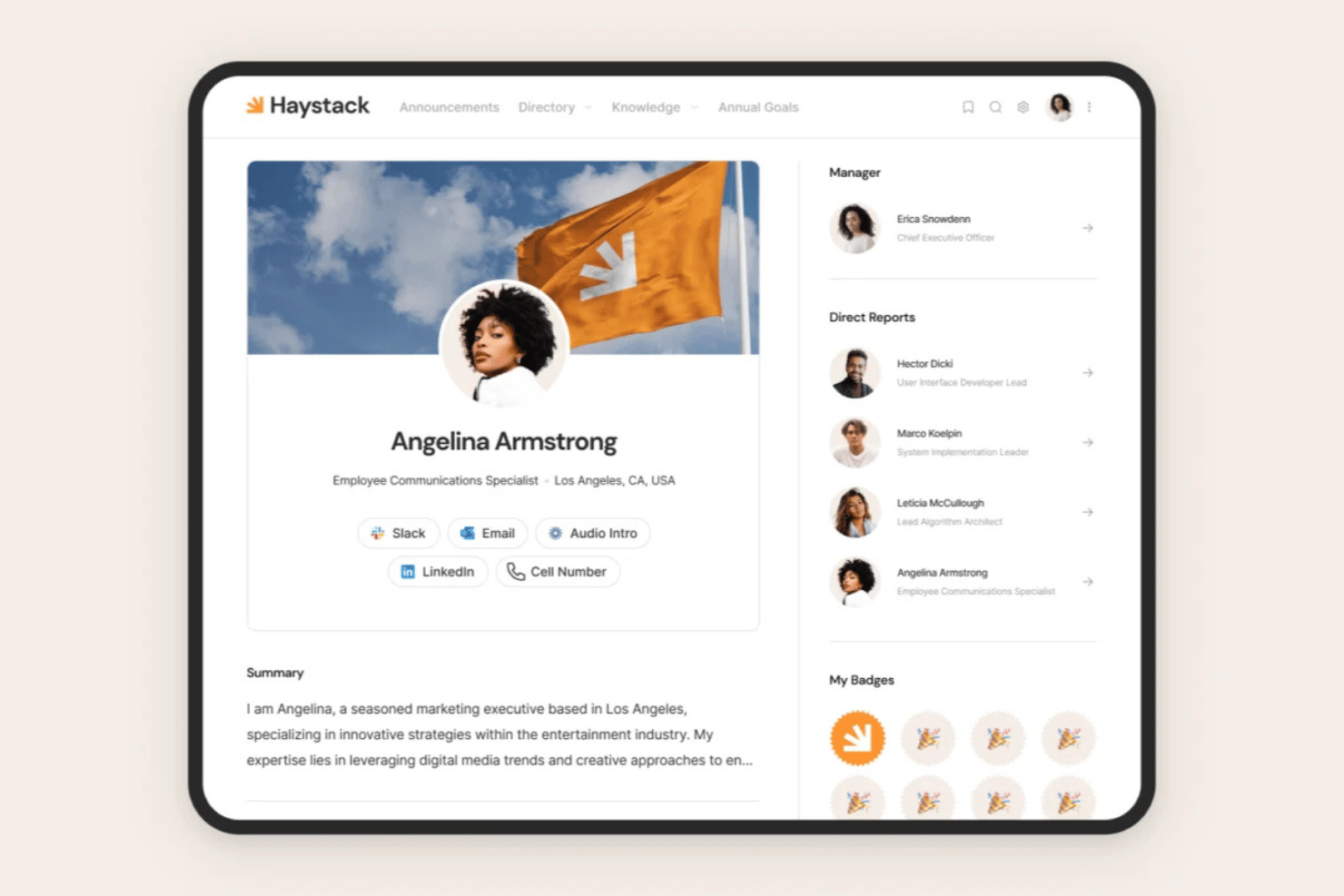
Haystack es una plataforma de intranet y gestión del conocimiento de RR. HH. que centraliza políticas, manuales y procedimientos operativos estándar junto con comunicaciones multicanal para empleados, búsqueda con tecnología de IA y controles de actualización del contenido.
¿Para quién es más adecuado Haystack?
Haystack es una opción excelente para equipos de RR. HH. que gestionan plantillas distribuidas o de primera línea y necesitan que el contenido de las políticas se mantenga actualizado y llegue a todos los empleados, independientemente del canal o la ubicación.
Por qué elegí Haystack
Elegí Haystack como una de las mejores opciones porque su motor de actualización resuelve directamente un problema con el que la mayoría de los equipos de RR. HH. lidian en silencio: que las políticas queden obsoletas sin que nadie se dé cuenta. Puedes establecer fechas de vencimiento para manuales o procedimientos operativos estándar, asignar expertos en contenido para aplicar distintivos de verificación y recibir recordatorios automáticos de revisión antes de que algo quede desactualizado. También me gusta que el seguimiento de confirmación de lectura obligatoria crea un registro claro de quién confirmó haber leído los documentos esenciales.
Características principales de Haystack
- Búsqueda universal: Consulta contenido nativo y plataformas conectadas como Google Drive, SharePoint, Confluence y Guru desde una única barra de búsqueda.
- Distribución multicanal: Envía contenido de RR. HH. mediante Slack, Microsoft Teams, SMS, correo electrónico, notificaciones push y un portal web de marca en un único flujo de trabajo.
- Directorio de empleados: Ofrece un directorio de personas de autoservicio con organigrama y vista de mapa global para buscar compañeros.
- Traducción confiable: Utiliza IA para traducir dinámicamente el contenido a decenas de idiomas para plantillas globales y distribuidas.
Integraciones de Haystack
Haystack ofrece más de 40 integraciones nativas con sistemas de información de recursos humanos, además de Google Drive, Confluence, SharePoint, Guru, Slack y Microsoft Teams. Una API pública permite crear integraciones personalizadas.
Pros and Cons
Pros:
- El motor de actualización alerta sobre políticas desactualizadas
- El seguimiento de lectura obligatoria confirma la recepción del documento
- Acceso prioritario desde dispositivos móviles para plantillas distribuidas
Cons:
- Carece de opciones avanzadas para revertir versiones
- En ocasiones, la búsqueda no encuentra documentos relevantes

Hub
Mejor para la gestión del conocimiento en intranets
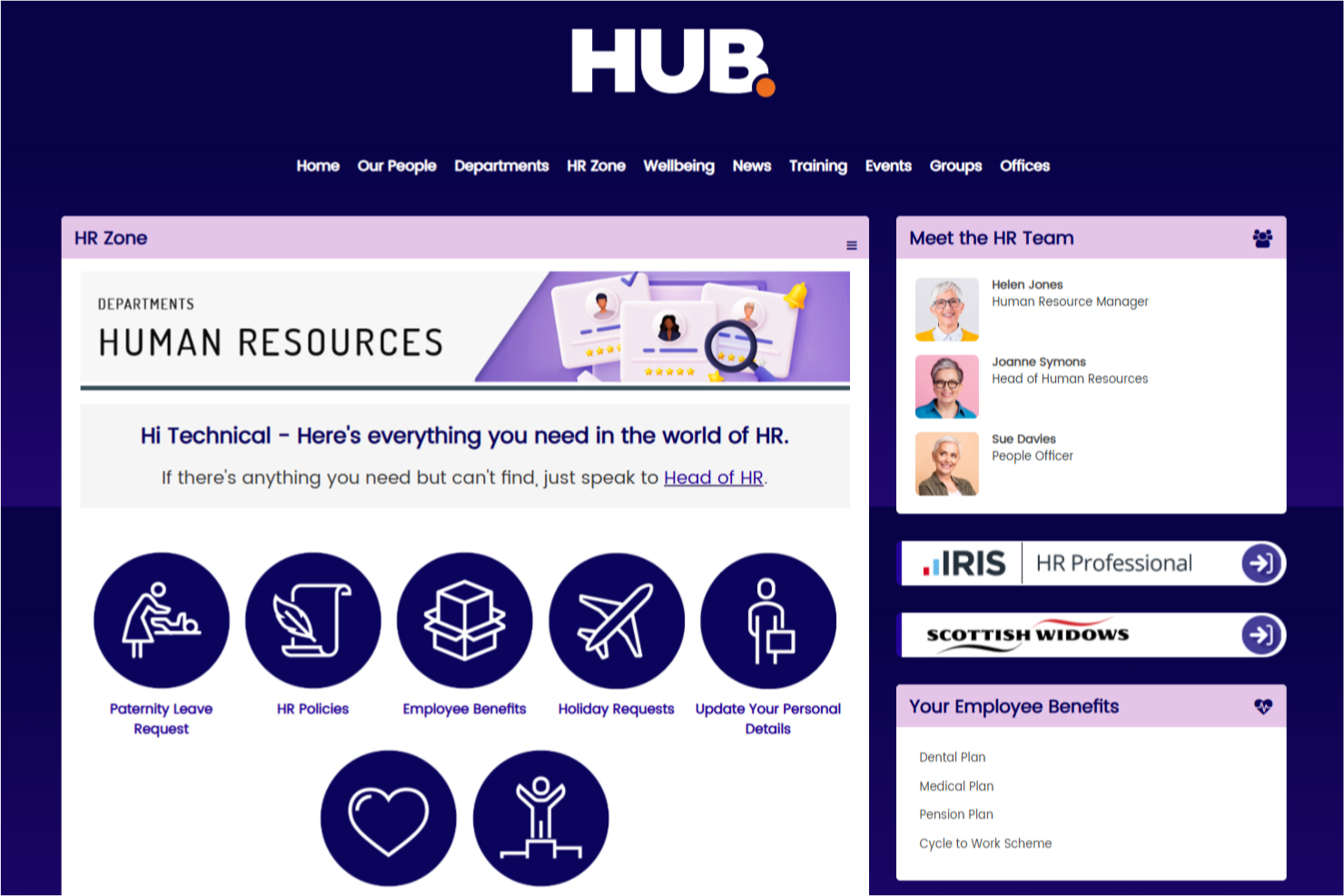
Hub es una plataforma de gestión del conocimiento de intranet que reúne la gestión de documentos, el intercambio de contenido, herramientas de colaboración y una búsqueda avanzada para ayudar a las organizaciones a organizar y acceder a la información interna.
¿Para quién es mejor Hub?
Hub es ideal para organizaciones de tamaño mediano a grande que necesitan una intranet centralizada para gestionar el conocimiento interno, documentos de la empresa y comunicaciones entre empleados en un solo lugar.
Por qué elegí Hub
Hub se gana su lugar en mi lista porque aborda la gestión del conocimiento desde la propia intranet: es decir, tu base de conocimiento no es un complemento, sino que está integrada en el mismo entorno donde los empleados ya se comunican y colaboran. Me gusta especialmente la función de búsqueda federada, que busca en unidades en la nube conectadas como SharePoint y Google Drive, e incluso dentro de archivos PDF, para que los empleados no tengan que buscar en varios sistemas para encontrar una política o procedimiento. El control de versiones en cada página y documento proporciona un historial completo de auditoría y permite volver a una versión anterior con un solo clic, lo cual es importante para gestionar contenido sensible a cumplimiento. La asignación de responsables de contenido también significa que ciertos miembros del equipo son responsables de mantener las páginas actualizadas, con avisos automáticos de revisión cuando el contenido está próximo a caducar.
Características clave de Hub
- Encuestas rápidas: Realiza encuestas anónimas a empleados con puntajes ocultos para cuantificar respuestas y rastrear tendencias de bienestar a lo largo del tiempo.
- Constructor de evaluaciones: Crea pruebas de conocimiento con preguntas aleatorias, respuestas puntuables y tablas de clasificación para evaluar el entendimiento del contenido clave por parte de los empleados.
- Flujos de aprobación: Envía páginas en borrador y artículos de noticias a través de un proceso de aprobación estructurado antes de su publicación, de modo que solo el contenido revisado se publique.
- Lecturas obligatorias: Marca contenido como obligatorio y rastrea quién ha confirmado que lo ha leído, con recordatorios automáticos enviados a quienes no lo hayan hecho.
Integraciones de Hub
Hub ofrece integraciones nativas con Microsoft 365, SharePoint, Google Drive, OneDrive y Dropbox. Está disponible una API para integraciones personalizadas.
Pros and Cons
Pros:
- Funcionalidad de búsqueda avanzada
- Brinda información sobre la participación de los usuarios
- Gestión y compartición de documentos eficiente
Cons:
- Las funciones integrales pueden no ser ideales para empresas pequeñas
- Soporte de idiomas limitado

Mejor para formación empresarial

iSpring LMS es un sistema de gestión del conocimiento basado en la nube, diseñado para organizar, ofrecer y hacer seguimiento de materiales de formación, cursos y recursos de la empresa.
¿Para quién es mejor iSpring LMS?
iSpring LMS es ideal para equipos de RR.HH. y de aprendizaje y desarrollo en empresas medianas y grandes que necesitan una plataforma estructurada para la incorporación de empleados, formación en cumplimiento normativo y el desarrollo continuo de habilidades.
Por qué elegí iSpring LMS
iSpring LMS se gana su lugar en mi lista corta porque es una de las pocas plataformas que trata la formación empresarial como un ciclo completo de conocimiento, no solo como una biblioteca de cursos. Me gusta especialmente el sistema inteligente de reinscripción, que rastrea automáticamente las fechas de caducidad de las certificaciones y reasigna la formación antes de que ocurra una interrupción. Eso marca una verdadera diferencia para equipos que gestionan muchas certificaciones en una plantilla numerosa y con alta carga de cumplimiento. También utilizo las listas de verificación de observación para verificar que los empleados no solo completen cursos, sino que realmente apliquen el conocimiento en el trabajo, algo que la mayoría de las plataformas LMS no aborda en absoluto.
Características clave de iSpring LMS
- Planes de desarrollo individual: Crea rutas de aprendizaje personalizadas para cada empleado que incluyan cursos, hitos y actividades de desarrollo de habilidades vinculadas a su puesto.
- Base de conocimientos: Almacena y organiza recursos corporativos, guías y preguntas frecuentes en un centro accesible en la nube, basado en roles, que los expertos en la materia y los gerentes pueden actualizar directamente.
- Evaluación 360 grados: Recoge retroalimentación de desempeño desde múltiples fuentes para construir una visión integral de las competencias de cada empleado, más allá de los datos de finalización de cursos.
- Gamificación: Otorga puntos y distintivos y muestra clasificaciones en tablas de líderes para ofrecer a los empleados visibilidad en tiempo real sobre su progreso en la formación.
Integraciones de iSpring LMS
iSpring LMS ofrece integraciones nativas con Zoom, Microsoft Teams y Salesforce. Hay una API disponible para integraciones personalizadas.
Pros and Cons
Pros:
- Buen sistema de gestión de contenidos
- Admite diversas necesidades de formación
- La app móvil facilita el aprendizaje en movimiento
Cons:
- Podría ofrecer capacidades de búsqueda más robustas
- Algunas opciones de informes son limitadas
New Product Updates from iSpring LMS

iSpring LMS Adds Multiple Observations to OJT Sessions
iSpring LMS now lets managers log multiple observations within one OJT session, grouping visits and auto-generating summary stats like averages, criterion results, and comparisons. For more information, visit iSpring LMS's official site.

SkyPrep
Ideal para compartir conocimiento en equipos remotos

SkyPrep es una plataforma de gestión del conocimiento que te permite organizar, compartir y hacer seguimiento de materiales de capacitación, documentos y recursos en un centro en línea centralizado.
¿Para quién es mejor SkyPrep?
SkyPrep es ideal para equipos de RRHH y L&D en organizaciones medianas que necesitan gestionar y distribuir contenido de formación entre plantillas distribuidas o remotas.
Por qué elegí SkyPrep
SkyPrep gestiona especialmente bien el intercambio de conocimiento en equipos distribuidos. SkyPrep Unity, el módulo de aprendizaje colaborativo de la plataforma, permite que los empleados remotos participen en debates grupales, comenten sobre materiales de capacitación y planteen preguntas directamente dentro del contenido; así, el conocimiento no solo fluye de arriba hacia abajo, sino que circula entre los miembros del equipo. También me gusta la gestión documental basada en carpetas, que te permite almacenar materiales en carpetas públicas o privadas y asignarlas a usuarios específicos, asegurando que las personas adecuadas siempre tengan acceso al contenido correcto. La función de búsqueda avanzada, que te permite buscar texto tanto dentro de los documentos como en los comentarios y discusiones, facilita a los empleados remotos encontrar lo que necesitan sin tener que consultar a otros.
Características clave de SkyPrep
- Creador de cursos con IA: Genera automáticamente evaluaciones, preguntas y elementos visuales a partir de tu contenido utilizando herramientas de autoría con IA integrada.
- Automatización de flujos de trabajo basada en desencadenantes: Inicia inscripciones, notificaciones y actualizaciones de grupos de usuarios según eventos como finalización de cursos, vencimientos o cambios en el estado del usuario.
- Reportes programados y configurables: Te permite crear informes personalizados con filtros y columnas, y programarlos para que se entreguen automáticamente a los interesados de forma periódica.
- Compatibilidad con SCORM y multimedia: Acepta paquetes SCORM, vídeos, PDFs y medios interactivos para que puedas subir y entregar contenido en varios formatos.
Integraciones de SkyPrep
SkyPrep ofrece integraciones nativas con Google Workspace, Microsoft 365, Zoom, Okta, BambooHR y Salesforce. También proporciona una API para integraciones personalizadas.
Pros and Cons
Pros:
- Funciones de compromiso del empleado
- Análisis sólidos
- Fácil organización del contenido
Cons:
- Sin acceso sin conexión
- Personalización limitada
Sift
Mejor para perfiles con capacidad de búsqueda.

Sift es una plataforma de gestión del conocimiento que ayuda a las organizaciones a crear un directorio buscable de perfiles de empleados, habilidades y estructura organizacional.
¿Para quién es mejor Sift?
Sift es ideal para organizaciones medianas y grandes donde encontrar a la persona o experiencia adecuada entre equipos y departamentos es un desafío diario.
Por qué elegí Sift
Sift se gana un lugar en mi lista por lo bien que resuelve el problema de “quién sabe qué” que ralentiza el trabajo en grandes organizaciones. La función de búsqueda muestra resultados en menos de 100 milisegundos en cada punto de datos del directorio—habilidades, experiencia, proyectos, idiomas y más—para que mi equipo encuentre a un experto en la materia sin tener que buscar en organigramas o molestar a los gerentes. También me gusta que los perfiles extraen datos de múltiples fuentes, incluidos los sistemas de RRHH, Active Directory y LinkedIn, por lo que la información que encuentran los empleados es actual y completa. Los niveles de dominio de habilidades en cada perfil también son un buen detalle, ya que permiten evaluar no solo quién sabe algo, sino qué tan bien lo conoce.
Funciones clave de Sift
- Visualización del organigrama: Un organigrama interactivo que se actualiza automáticamente a partir de los datos de tus sistemas de RRHH y TI, con codificación por colores, vistas flexibles en tarjetas y visibilidad de puestos vacantes.
- Sift Pages: Páginas dedicadas para departamentos, proyectos, equipos remotos, ERG y comunidades que van más allá del directorio estándar para capturar la estructura informal de tu organización.
- Panel de análisis: Desgloses visuales de habilidades, intereses, ubicaciones y otros puntos de datos de perfil, con filtros para identificar brechas de talento y apoyar decisiones de movilidad interna.
- API abierta: Una API GraphQL y REST que permite a los desarrolladores extraer datos de perfiles, fotos y funciones de búsqueda a otras herramientas y aplicaciones internas.
Integraciones de Sift
Sift ofrece integraciones nativas con Microsoft 365, Azure Active Directory, Google Workspace, Okta y Workday, y proporciona una API para integraciones personalizadas.
Pros and Cons
Pros:
- Organigramas visuales que mejoran la claridad
- Encuentra expertos en segundos
- Perfiles personalizables para contexto enriquecido
Cons:
- Opciones limitadas de análisis avanzado
- No es ideal para equipos pequeños
Otro software de gestión del conocimiento
Estas son algunas opciones adicionales de software de gestión del conocimiento que no llegaron a mi selección, pero que aún vale la pena explorar:
- Notion
El mejor para bases de datos de conocimiento interconectadas
- Slite
Ideal para respuestas instantáneas impulsadas por IA
- Google Drive
Mejor con almacenamiento en la nube seguro
- Nuclino
Ideal para la gestión de proyectos unificada
- Microsoft 365
Ideal para compartir conocimiento comunitario de manera integrada
- Bloomfire
Ideal para el intercambio social de conocimientos
- Knowmax
Ideal para acceso centralizado al conocimiento
- Tettra
Ideal para la gestión interna del conocimiento
- XWiki
Ideal para wikis empresariales de código abierto
- Guru
Ideal para búsquedas contextuales impulsadas por IA
- Bit.ai
Ideal para opciones flexibles de compartición
- Papyrs
Ideal para equipos pequeños que necesitan personalización
- Kipwise
Mejor para integración con Slack
- SlimWiki
Ideal para wikis de equipo simples


Cómo evalúo el software de gestión del conocimiento
Cuando los equipos de RR. HH. se ven abrumados por políticas dispersas y preguntas repetitivas de los empleados, evalúo si una herramienta puede servir primero como una fuente de verdad confiable, y luego observo qué la diferencia del resto.
Funcionalidades principales (Requisitos indispensables para esta lista)
Cuando selecciono herramientas para mi lista, califico cada una en una escala de 0 (no ofrece la funcionalidad) a 5 (sobresale en esta área) para cada funcionalidad principal que se enumera a continuación. Luego, calculo la puntuación total de la herramienta como un porcentaje. Cada herramienta necesita alcanzar un puntaje total mínimo del 65% para ser considerada para su inclusión.
- Repositorio centralizado de conocimiento: Evalúo qué tan bien organiza una herramienta el contenido de RR. HH. en estructuras lógicas, como espacios separados para beneficios, políticas de permisos y seguridad en el trabajo, con etiquetado y enlaces cruzados.
- Búsqueda y recuperación por IA: Una buena búsqueda es fundamental cuando los empleados necesitan respuestas rápidas, así que verifico si la herramienta admite consultas en lenguaje natural como "¿Cómo actualizo mi contacto de emergencia?"
- Controles de acceso y permisos: Los equipos de RR. HH. gestionan contenido sensible como bandas salariales y procedimientos disciplinarios, por lo que busco permisos granulares basados en roles a nivel de artículo o sección.
- Redacción y colaboración de contenido: Compruebo si los generalistas de RR. HH. pueden redactar, comentar y coeditar actualizaciones de políticas usando un editor de texto enriquecido con plantillas y medios incorporados como videos explicativos.
- Control de versiones y registros de auditoría: Las actualizaciones de políticas necesitan un historial claro, así que la herramienta debe rastrear el historial de revisiones, admitir la reversión y registrar quién aprobó los cambios y cuándo.
- Portal de autoservicio para empleados: Busco un portal con la marca de la empresa orientado al empleado o integraciones nativas con herramientas como Slack o Microsoft Teams, que permitan al personal encontrar respuestas de RR. HH. sin tener que abrir un ticket.
Una vez que tengo una lista de herramientas que cumplen con los criterios, considero qué diferencia a cada plataforma.
Factores diferenciadores (Qué distingue a los proveedores)
Así es como comparo y contrasto a los diferentes proveedores:
Características destacadas
Un asistente de conocimiento por IA puede convertir una biblioteca de políticas estática en algo que los empleados realmente utilicen, respondiendo preguntas como "¿Tengo derecho a permiso parental?" sin que RR. HH. tenga que intervenir. También busco análisis que revelen vacíos de contenido, como búsquedas sin resultado o artículos desactualizados, para que los equipos de RR. HH. sepan exactamente dónde enfocarse. Las revisiones de contenido programadas completan el panorama al señalar automáticamente las políticas próximas a su renovación, lo que mantiene la documentación de cumplimiento al día.
Más allá de las funciones
Las integraciones con sistemas de información de RR. HH. son importantes porque una base de conocimientos que se conecta con plataformas como BambooHR o Workday puede ofrecer contenido contextual según el rol, la ubicación o el departamento. Los estándares de cumplimiento y seguridad son igualmente relevantes: verifico la certificación SOC 2 Tipo II y opciones de residencia de datos, especialmente para equipos de RR. HH. que gestionan registros sensibles de empleados. La estructura de precios también influye en la adecuación; los modelos por usuario pueden volverse caros rápidamente cuando el objetivo es el acceso de toda la empresa, así que evalúo si una herramienta ofrece niveles amigables para los lectores/visualizadores.
Cómo elegir un software de gestión del conocimiento
Es fácil perderse entre largas listas de funciones y estructuras de precios complejas. Para ayudarte a mantener la atención mientras avanzas en tu proceso único de selección de software, aquí tienes una lista de factores que debes tener en cuenta:
| Factor | Qué debes considerar |
|---|---|
| Escalabilidad | ¿Puede crecer con tu equipo? Ten en cuenta los límites de usuarios y la capacidad de datos. Asegúrate de que pueda gestionar el crecimiento previsto sin necesidad de una renovación completa. |
| Integraciones | ¿Se conecta con tus herramientas actuales? Comprueba la compatibilidad con software esencial como Slack, Google Workspace o Salesforce, y evalúa la facilidad de configuración. |
| Personalización | ¿Puedes adaptarlo a tus flujos de trabajo? Busca configuraciones flexibles y la posibilidad de crear campos o paneles personalizados que se ajusten a tus procesos. |
| Facilidad de uso | ¿Es intuitivo para todos los usuarios? Prueba la interfaz con un grupo diverso de tu equipo para asegurarte de que sea sencilla y no requiera una formación extensa. |
| Implementación e incorporación | ¿Cuánto tiempo se tardará en empezar? Evalúa el tiempo y los recursos necesarios para la configuración. Busca soluciones con guías de inicio rápido y recursos de asistencia. |
| Coste | ¿Se ajusta a tu presupuesto? Ten en cuenta el coste total de propiedad, incluidas las suscripciones, la formación y los posibles complementos. Evita las soluciones con cargos inesperados. |
| Medidas de seguridad | ¿Están protegidos tus datos? Verifica funciones como el cifrado, los controles de acceso de usuarios y el cumplimiento de normas como el RGPD o la HIPAA, si corresponde. |
Tendencias del software de gestión del conocimiento
El software de gestión del conocimiento está cambiando notablemente y transforma la forma en que las empresas gestionan sus recursos humanos y nóminas. A medida que avanza la tecnología, es esencial mantenerse informado sobre las últimas novedades. Estas son algunas tendencias clave a las que conviene prestar mucha atención, ya que podrían afectar a su organización.
- Búsqueda impulsada por IA: la búsqueda impulsada por IA es cada vez más común. Ayuda a los usuarios a encontrar información de forma más rápida y precisa. Esta tendencia es importante porque mejora la productividad.
- Integración con herramientas de colaboración: el software de gestión del conocimiento se integra cada vez más con las herramientas de colaboración. Esto permite compartir mejor la información y trabajar en equipo. Es interesante porque elimina los compartimentos estancos dentro de las organizaciones.
- Mayor seguridad de los datos: se están priorizando las funciones mejoradas de seguridad de los datos. Estas funciones protegen la información confidencial frente a las filtraciones. Esta tendencia es importante debido al aumento de las ciberamenazas.
- Accesibilidad móvil: la accesibilidad móvil está aumentando. Los usuarios pueden acceder a los sistemas de gestión del conocimiento desde cualquier lugar. Esto es importante para los trabajadores remotos y quienes trabajan en movilidad.
- Experiencia de usuario personalizada: las experiencias de usuario personalizadas se están convirtiendo en la norma. El software se adapta a las necesidades y preferencias individuales de cada usuario. Esta tendencia es interesante porque aumenta la participación de los usuarios.
Es probable que las empresas que aprovechen estas tendencias cambiantes obtengan una ventaja competitiva a medida que avance la tecnología.
¿Qué es el software de gestión del conocimiento?
El software de gestión del conocimiento es una herramienta que ayuda a las organizaciones a recopilar, almacenar y compartir información de manera eficiente. Profesionales como los responsables de recursos humanos, los especialistas en TI y los equipos de atención al cliente utilizan estas herramientas para mejorar la colaboración y acceder rápidamente a datos importantes.
Las funciones de búsqueda, las herramientas de colaboración y las capacidades de gestión de documentos facilitan el manejo eficiente del conocimiento de la empresa. Estas herramientas aportan valor general al mejorar la productividad y garantizar que los miembros del equipo puedan encontrar y utilizar fácilmente la información que necesitan.
Funciones
Al elegir un software de gestión del conocimiento, es esencial reconocer las funciones clave que le permitirán gestionar sus tareas de recursos humanos de manera más eficiente. Estas son las funciones más importantes que debe buscar.
- Interfaz fácil de usar: una interfaz fácil de usar garantiza que el software sea sencillo de implementar, configurar y utilizar. Esto ahorra tiempo y reduce la frustración, aumentando la productividad y la satisfacción laboral.
- Funcionalidad de búsqueda sólida: un motor de búsqueda sólido, como Google, permite a los usuarios encontrar rápidamente información relevante. Esta función es esencial para agilizar el proceso de búsqueda y recopilación de información.
- Compatibilidad con varios dispositivos: la compatibilidad con varios dispositivos garantiza que los usuarios puedan acceder a la base de conocimientos desde distintos dispositivos, incluidos ordenadores de sobremesa, portátiles, tabletas y teléfonos inteligentes. Esto es esencial para los equipos remotos y los usuarios que trabajan en movilidad.
- Opciones de personalización: las opciones de personalización permiten a las organizaciones adaptar la base de conocimientos a sus necesidades. Esto incluye la identidad de marca, los temas y la posibilidad de crear roles y permisos personalizados.
- Herramientas de colaboración en equipo: las herramientas de colaboración en equipo permiten que varios usuarios trabajen juntos en la creación, gestión y mantenimiento de la base de conocimientos. Esta función es esencial para fomentar una cultura de trabajo en equipo y de intercambio de conocimientos.
- Creación y edición de contenido: una herramienta intuitiva de creación y edición de contenido permite a los usuarios crear y actualizar contenido fácilmente. Esta función es esencial para mantener la base de conocimientos actualizada y relevante.
- Integraciones con terceros: la integración impecable con herramientas de terceros, como software de CRM, servicios de asistencia y encuestas, mejora la funcionalidad del sistema de gestión del conocimiento. Esta función garantiza que la base de conocimientos pueda servir como centro neurálgico de diversos procesos empresariales.
- Análisis integrados: los análisis integrados proporcionan información sobre el rendimiento de la base de conocimientos. Esto incluye métricas como el número de artículos creados, las tasas de éxito de las búsquedas y la participación de los usuarios. Estos datos ayudan a tomar decisiones informadas para mejorar la base de conocimientos.
- Sistema de comentarios: un sistema de comentarios sólido permite a los usuarios aportar sus opiniones sobre el contenido. Esta función es esencial para mantener la relevancia y el valor de la base de conocimientos, incorporando las sugerencias de los usuarios y abordando cualquier problema.
- Escalabilidad: la escalabilidad garantiza que el sistema de gestión del conocimiento pueda crecer dentro de la organización. Esta función es esencial para adaptarse al aumento de datos y usuarios a medida que la empresa se expande.
Elegir el software de gestión del conocimiento adecuado implica centrarse en estas funciones clave para garantizar que satisfaga las necesidades específicas de su organización.
Beneficios
Al aprovechar el software de gestión del conocimiento, las empresas pueden mejorar la productividad y la toma de decisiones, además de fomentar una cultura de aprendizaje continuo. A continuación se presentan cinco beneficios principales del software de gestión del conocimiento para los usuarios y las organizaciones.
- Colaboración mejorada: el software de gestión del conocimiento facilita la colaboración eficiente entre los miembros del equipo al proporcionar una plataforma centralizada para compartir información y recursos.
- Mayor eficiencia: el software organiza y categoriza la información, reduciendo el tiempo que los empleados dedican a buscar datos y aumentando la productividad y la eficiencia.
- Mejor toma de decisiones: el acceso a información precisa y actualizada permite a los empleados tomar decisiones fundamentadas rápidamente, mejorando los resultados generales de la empresa.
- Retención del conocimiento: el software documenta y almacena la información para garantizar que el conocimiento valioso se conserve dentro de la organización, incluso cuando los empleados se marchan.
- Satisfacción del cliente: con un acceso sencillo a la información, los equipos de atención al cliente pueden ofrecer respuestas más rápidas y precisas, lo que se traduce en una mayor satisfacción y fidelidad de los clientes.
Invertir en software de gestión del conocimiento puede transformar la manera en que las organizaciones gestionan la información, generando numerosos beneficios que mejoran las operaciones internas y las experiencias de los clientes.
Costos y precios
Esta sección proporciona una estimación detallada de los planes de software de gestión del conocimiento y sus costos asociados. Los datos se derivan de un análisis de los niveles de precios estándar y las funciones que ofrecen.
Al comprender estas estructuras de precios, los usuarios pueden evaluar mejor sus necesidades y consideraciones presupuestarias al elegir un software de gestión del conocimiento que se ajuste a sus requisitos.
Tabla comparativa de planes de software de gestión del conocimiento
| Tipo de plan | Precio medio | Funciones habituales |
|---|---|---|
| Plan gratuito | $0 | Almacenamiento básico de documentos, usuarios limitados y funcionalidad de búsqueda básica |
| Plan personal | $4 - $12/ usuario/mes | Búsqueda mejorada, análisis básicos, integraciones limitadas y asistencia básica |
| Plan empresarial | $12 - $54/ usuario/mes | Búsqueda avanzada, análisis detallados, múltiples integraciones, control de acceso basado en roles y asistencia mejorada |
| Plan corporativo | $54/ usuario/mes | Funciones personalizables, integraciones amplias, seguridad avanzada, asistencia exclusiva y usuarios ilimitados |
Preguntas frecuentes sobre software de gestión del conocimiento
Aquí encontrarás respuestas a preguntas frecuentes sobre el software de gestión del conocimiento:
¿Cómo puedo garantizar la seguridad de los datos en el software de gestión del conocimiento?
Implementa controles de acceso sólidos, cifrado y auditorías de seguridad periódicas para garantizar la seguridad de los datos en el software de gestión del conocimiento. Utiliza la autenticación multifactor (MFA) para añadir una capa adicional de protección. Actualiza periódicamente el software para corregir vulnerabilidades y garantizar el cumplimiento de las normas y regulaciones del sector.
¿Cuáles son las mejores prácticas para migrar datos a un nuevo sistema de gestión del conocimiento?
Al migrar datos a un nuevo sistema de gestión del conocimiento, comienza con una auditoría completa de los datos para identificar qué debe transferirse. Limpia los datos para eliminar duplicados e información obsoleta. Utiliza herramientas automatizadas para facilitar el proceso de migración y garantizar la integridad de los datos. Prueba la migración en un entorno controlado antes de ponerla en marcha para identificar y resolver cualquier problema.
¿Cómo mido el ROI de un sistema de gestión del conocimiento?
Mide el ROI de un sistema de gestión del conocimiento mediante el seguimiento de indicadores clave de rendimiento (KPIs), como las tasas de adopción por parte de los usuarios, el tiempo ahorrado en la recuperación de información y la reducción del trabajo redundante. Realiza encuestas periódicas para recopilar comentarios de los usuarios y evaluar el impacto del sistema en la productividad y la toma de decisiones. Compara estas métricas con los costes de implementación y mantenimiento del sistema para determinar el ROI.
¿Qué estrategias puedo utilizar para fomentar la adopción del software de gestión del conocimiento por parte de los usuarios?
Para fomentar la adopción por parte de los usuarios, proporciona formación y asistencia completas para ayudarles a comprender las ventajas y funcionalidades del software. Crea una interfaz fácil de usar e integra el software con las herramientas y los flujos de trabajo existentes. Reconoce y recompensa a los usuarios que contribuyan activamente a la base de conocimientos. Actualiza periódicamente el sistema basándote en los comentarios de los usuarios para mejorar su experiencia.
¿Cómo puedo integrar el software de gestión del conocimiento con otros sistemas empresariales?
Integra el software de gestión del conocimiento con otros sistemas empresariales mediante API y soluciones de middleware. Asegúrate de que el software sea compatible con protocolos de integración estándar, como REST o SOAP. Colabora con los proveedores para desarrollar integraciones personalizadas si es necesario. Prueba exhaustivamente las integraciones para garantizar el flujo de datos y la funcionalidad entre los sistemas.
¿Cuáles son los retos habituales al mantener un sistema de gestión del conocimiento y cómo pueden abordarse?
Entre los retos habituales al mantener un sistema de gestión del conocimiento se incluyen mantener el contenido actualizado, garantizar la participación de los usuarios y gestionar la calidad de los datos. Aborda estos retos estableciendo políticas claras de gobernanza del contenido, revisando y actualizando periódicamente la base de conocimientos y fomentando las contribuciones de los usuarios. Utiliza análisis para supervisar el uso del sistema e identificar áreas de mejora.
Qué sigue:
Si estás investigando software de gestión del conocimiento, ponte en contacto con un asesor de SoftwareSelect para recibir recomendaciones gratuitas.
Rellenarás un formulario y mantendrás una breve conversación en la que profundizarán en los detalles de tus necesidades. Después recibirás una lista de programas para revisar. Además, te acompañarán durante todo el proceso de compra, incluidas las negociaciones de precios.