

Los 10 mejores programas de salud y seguridad para 2026

Lista de los mejores programas de seguridad y salud


Los programas de seguridad y salud ayudan a tu equipo a gestionar los riesgos laborales, supervisar el cumplimiento y mantener un entorno más seguro mediante herramientas digitales y automatización. Si estás buscando los mejores programas de seguridad y salud, probablemente estés tratando de equilibrar las exigencias normativas, el bienestar de los empleados y la necesidad de contar con informes fiables, todo ello mientras fomentas una cultura de seguridad.
Esta guía te ayudará a comparar las mejores soluciones para 2026, para que puedas encontrar la opción adecuada para los requisitos y desafíos específicos de tu organización.
Por qué confiar en nuestras reseñas de software
Nuestro equipo lleva probando y evaluando software desde 2012. Como expertos en RR. HH., sabemos lo difícil —y lo importante— que es elegir el software adecuado.
Para esta guía, evaluamos las herramientas mediante pruebas prácticas e investigación independiente, puntuando las herramientas según nuestros criterios de selección. También nos basamos en la experiencia de líderes de opinión del sector y de profesionales de RR. HH. en activo.
Nuestras reseñas reflejan nuestro criterio editorial humano, no un discurso de ventas.
Revisores expertos:
Resumen de los mejores programas de seguridad y salud
Esta tabla comparativa resume los detalles de precios de mi selección de los mejores programas de seguridad y salud para ayudarte a encontrar el más adecuado para tu presupuesto y las necesidades de tu empresa.
| Tool | Best For | Trial Info | Price | ||
|---|---|---|---|---|---|
| 1 | Mejor para cronogramas de implementación rápidos | Prueba gratuita a solicitud | Desde $3,600/año | Website | |
| 2 | Ideal para plantillas de inspección personalizables | Plan gratuito disponible | Desde $24/usuario/mes (facturado anualmente) | Website | |
| 3 | Ideal para bibliotecas de contenido de formación integradas | Demo gratuita disponible | Precios a consultar | Website | |
| 4 | Mejor para módulos de cumplimiento configurables | Demostración gratuita disponible | Desde $44/usuario/mes (facturado anualmente) | Website | |
| 5 | Mejor opción para la escalabilidad empresarial de grandes compañías | Demostración gratuita | Precios a consultar | Website | |
| 6 | Ideal para preparación ante auditorías regulatorias | Demo gratuita disponible | Precio a consultar | Website | |
| 7 | Mejor para funciones de gestión de productos químicos | Demo gratuita disponible | Precios disponibles a solicitud | Website | |
| 8 | Mejor para cumplimiento normativo en la industria automotriz | Demo gratuita disponible | Precios bajo consulta | Website | |
| 9 | Ideal para capacidades de inspección móvil | Demo gratuita disponible | Precios bajo petición | Website | |
| 10 | Ideal para paneles de análisis avanzados | Demo gratuita disponible | Precio a consultar | Website |
Reseñas de los mejores programas de seguridad y salud
A continuación encontrarás mis resúmenes detallados de los programas de seguridad y salud que llegaron a mi lista de opciones. Mis reseñas ofrecen un análisis detallado de las funciones, los mejores casos de uso y las integraciones de cada plataforma para ayudarte a encontrar la más adecuada para ti.

Mejor para cronogramas de implementación rápidos
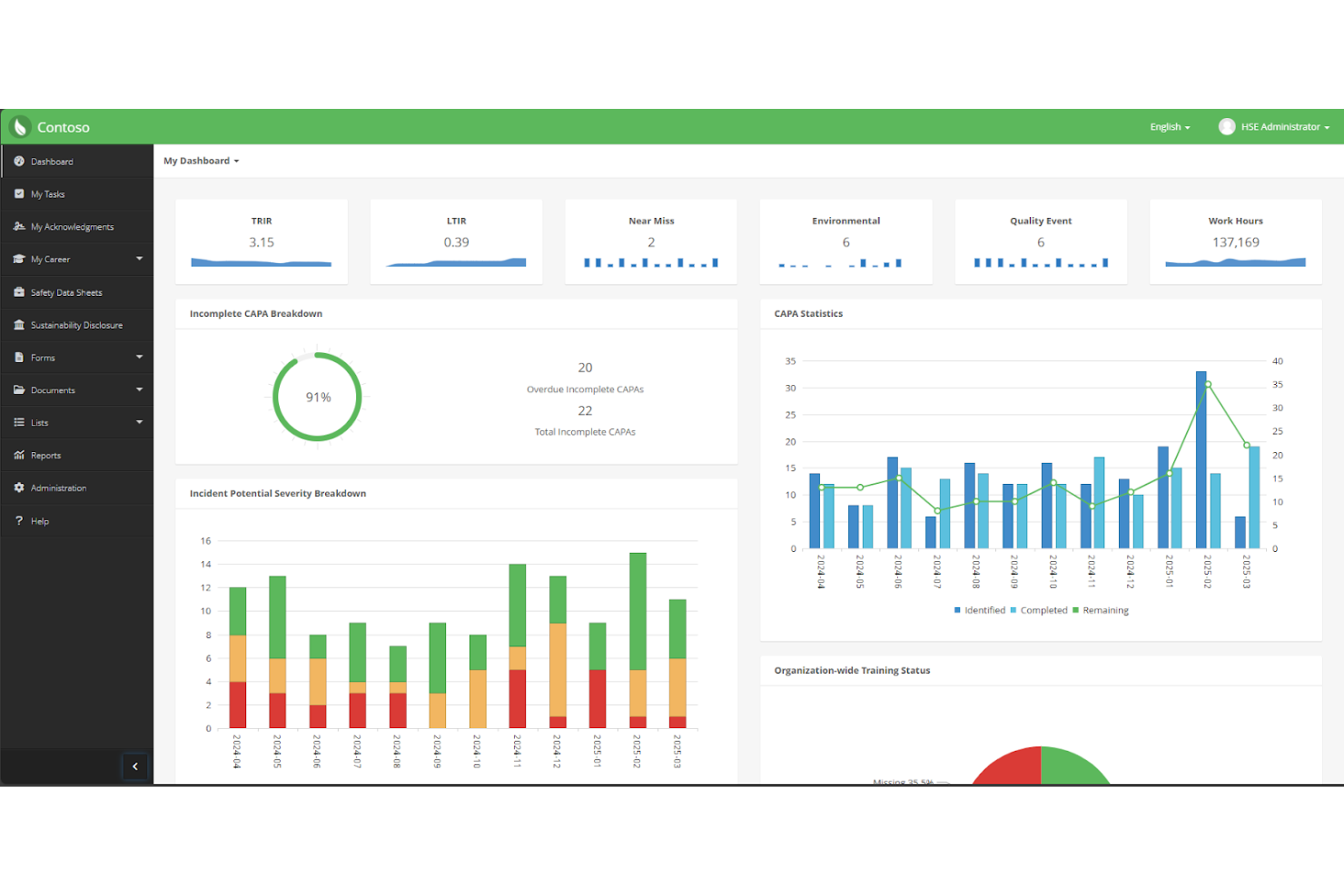
EHS Insight está diseñado para organizaciones que necesitan implementar un software de salud y seguridad rápidamente. Sus módulos preconfigurados y la orientación guiada en la incorporación ayudan a los responsables de seguridad y a los equipos de cumplimiento a lanzar los procesos principales sin una configuración extensa. Esto lo convierte en una opción sólida para empresas que enfrentan plazos ajustados o cambios regulatorios rápidos.
Por qué elegí EHS Insight
Cuando la rapidez importa, EHS Insight destaca por sus capacidades de implementación rápida. La plataforma ofrece plantillas y flujos de trabajo prediseñados que permiten a los equipos empezar a registrar incidentes, auditorías y acciones correctivas casi de inmediato. Me gusta que el proceso de incorporación incluya pasos guiados de configuración, lo que ayuda a las organizaciones a evitar retrasos y confusiones. Para las empresas que necesitan cumplir con requisitos normativos en un plazo limitado, estas características hacen que EHS Insight sea una opción práctica.
Funciones clave de EHS Insight
Además de su rápida configuración, también encontré valiosas estas funciones para los equipos de salud y seguridad:
- Inspecciones móviles: Realiza y documenta inspecciones de seguridad directamente desde un dispositivo móvil.
- Gestión de documentos: Almacena, organiza y accede a políticas y procedimientos de seguridad en una biblioteca centralizada.
- Seguimiento de capacitación: Monitorea la finalización de las capacitaciones y el estado de certificación de los empleados.
- Gestión ambiental: Controla métricas medioambientales como emisiones, residuos y consumo de agua.
Integraciones de EHS Insight
Actualmente no se enumeran integraciones nativas.
Pros and Cons
Pros:
- Módulos preconfigurados que permiten un despliegue rápido
- Notificaciones automáticas por correo electrónico para tareas vencidas
- Gestión de certificaciones incorporada
Cons:
- Se han reportado tiempos de carga lentos en los paneles
- Los detalles de la trazabilidad pueden ser difíciles de exportar


SafetyCulture es un software EHS diseñado en torno a plantillas personalizables para controles de salud y seguridad. Es especialmente útil para responsables de seguridad y equipos de operaciones en sectores como la construcción, la manufactura y la hostelería que buscan estandarizar y digitalizar inspecciones. Con SafetyCulture, puede adaptar las listas de verificación según las necesidades de su sitio y ajustarse rápidamente a requisitos normativos cambiantes.
Por qué elegí SafetyCulture
Lo que distingue a SafetyCulture para mí es su enfoque en plantillas de inspección personalizables, lo cual es esencial para equipos con requerimientos de seguridad únicos o en evolución. Puede crear listas de inspección desde cero o modificar plantillas existentes para que coincidan con los protocolos y peligros específicos de su organización.
Elegí SafetyCulture porque permite adjuntar fotos, asignar acciones correctivas y automatizar inspecciones recurrentes, todo dentro del mismo flujo de trabajo. Esta flexibilidad lo convierte en una opción sólida para organizaciones que necesitan adaptar rápidamente sus procesos de seguridad de manera constante.
Funciones clave de SafetyCulture
Otras funciones que hacen valioso a SafetyCulture para los equipos de salud y seguridad incluyen:
- Panel de análisis en tiempo real: Vea los resultados de las inspecciones y tendencias de seguridad a medida que se recopilan los datos.
- Generación automatizada de informes: Cree y comparta informes de inspección detallados instantáneamente después de realizar la inspección.
- Herramientas de gestión de activos: Haga seguimiento del estado del equipo, los programas de mantenimiento y el historial de activos.
- Módulo de reporte de incidentes: Envíe, supervise y gestione incidentes laborales para una mejor gestión de riesgos directamente desde la plataforma.
Integraciones de SafetyCulture
Las integraciones incluyen Tableau, Okta, SharePoint, Microsoft Teams, Power BI, Slack, Google Sheets, Dropbox, OneDrive y Box.
Pros and Cons
Pros:
- Admite flujos de trabajo de inspección complejos
- La aplicación móvil funciona sin conexión para sitios remotos
- Los informes automatizados incluyen captura de fotos y firmas
Cons:
- Carece de funciones avanzadas de mantenimiento de activos
- No permite envíos anónimos


HSI ofrece una plataforma de salud y seguridad con un fuerte enfoque en bibliotecas de contenido de formación integradas. Es una opción práctica para organizaciones que necesitan materiales de capacitación en seguridad, cumplimiento y gestión de personal listos para usar sin tener que crear cursos desde cero. Los responsables de seguridad y los equipos de RR. HH. pueden usar HSI para impartir, realizar el seguimiento y gestionar la formación en una amplia variedad de temas regulatorios.
Por qué elegí HSI
Lo que distingue a HSI es su amplia biblioteca de contenido de formación integrado, lo cual es especialmente valioso para organizaciones que necesitan ofrecer capacitación en seguridad y cumplimiento de manera rápida. La plataforma incluye cientos de cursos listos que abarcan los requisitos normativos de OSHA, DOT y otros, por lo que los equipos no tienen que crear materiales desde cero.
Me gusta que HSI también ofrezca herramientas para rastrear la finalización de cursos y automatizar la asignación de formaciones según los roles de trabajo. Para empresas con necesidades de capacitación constantes y pocos recursos para el diseño instruccional, estas funciones hacen que HSI sea una buena opción.
Funciones clave de HSI
Otras características que hacen útil a HSI para los equipos de salud y seguridad incluyen:
- Gestión de incidentes: Registrar, rastrear e investigar incidentes laborales desde un panel centralizado.
- Constructor de cursos personalizados: Crear y subir tus propios materiales de formación junto a la biblioteca incorporada.
- Recordatorios automáticos: Enviar notificaciones programadas a empleados sobre formaciones próximas o vencidas.
- Informes y analíticas: Generar informes detallados sobre el progreso de la capacitación, incidentes y métricas de cumplimiento.
Integraciones de HSI
Actualmente no se listan integraciones nativas.
Pros and Cons
Pros:
- Biblioteca de cursos conforme a OSHA
- Autoría de cursos incorporada para contenido personalizado
- Asignación automática de formación por rol laboral
Cons:
- Flujos limitados de gestión de incidentes
- Las actualizaciones de la biblioteca de cursos pueden retrasarse frente a nuevas regulaciones

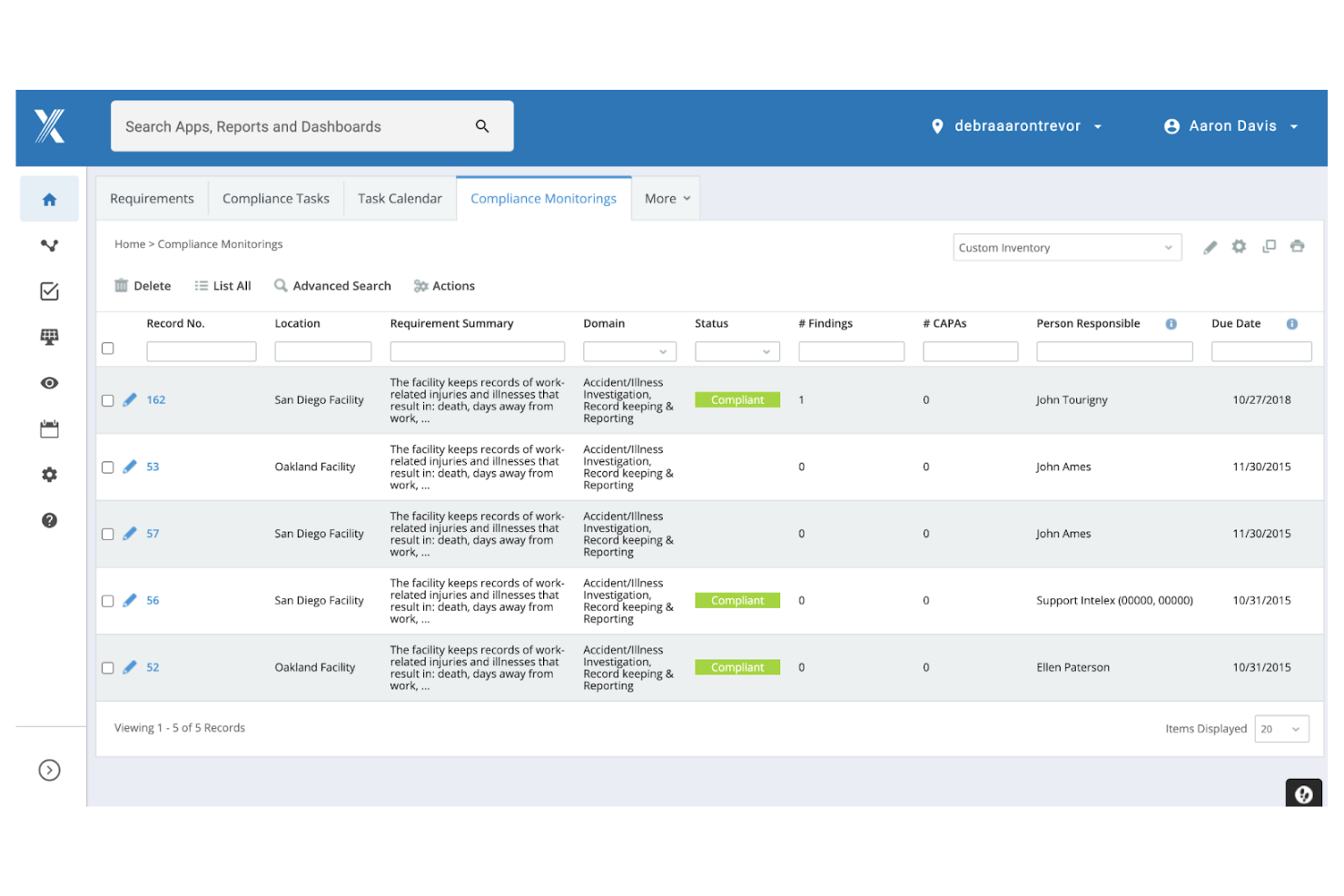
Intelex se destaca para las organizaciones que necesitan una gestión de cumplimiento altamente configurable en múltiples ubicaciones o unidades de negocio. Esta plataforma es ideal para responsables de seguridad y equipos de cumplimiento en industrias con requisitos regulatorios complejos o cambiantes. Su enfoque modular te permite adaptar los flujos de trabajo, informes y documentación de cumplimiento para ajustarse a tus necesidades operativas específicas.
Por qué elegí Intelex
Lo que me atrajo de Intelex es su capacidad para permitirte configurar módulos de cumplimiento a medida de los requisitos únicos de tu organización. Puedes crear flujos de trabajo personalizados para reportar incidentes, auditorías y acciones correctivas, lo cual resulta especialmente útil para equipos que gestionan múltiples marcos regulatorios.
Me gusta que Intelex te permita adaptar formularios, campos y procesos de aprobación sin una gran intervención del área de IT. Esta flexibilidad lo convierte en una excelente opción para empresas que necesitan mantenerse al día con los estándares de cumplimiento cambiantes o que operan en diferentes jurisdicciones.
Características clave de Intelex
Otras funciones de Intelex que apoyan a los equipos de salud y seguridad incluyen:
- Control de documentos: Gestiona, rastrea y actualiza las políticas y procedimientos de seguridad en un repositorio centralizado.
- Acceso desde app móvil: Captura incidentes, auditorías y observaciones directamente desde el campo usando dispositivos móviles.
- Paneles en tiempo real: Visualiza datos de cumplimiento y métricas de seguridad con paneles personalizables.
- Notificaciones automáticas: Configura alertas y recordatorios para tareas, fechas límite y eventos de cumplimiento.
Integraciones de Intelex
Actualmente no se mencionan integraciones nativas.
Pros and Cons
Pros:
- Módulos de cumplimiento y auditoría altamente configurables
- Soporta operaciones multi-sitio y multi-jurisdicción
- Control de documentos integrado para la gestión de políticas
Cons:
- La configuración inicial requiere intervención de IT
- Plantillas de informes integradas limitadas
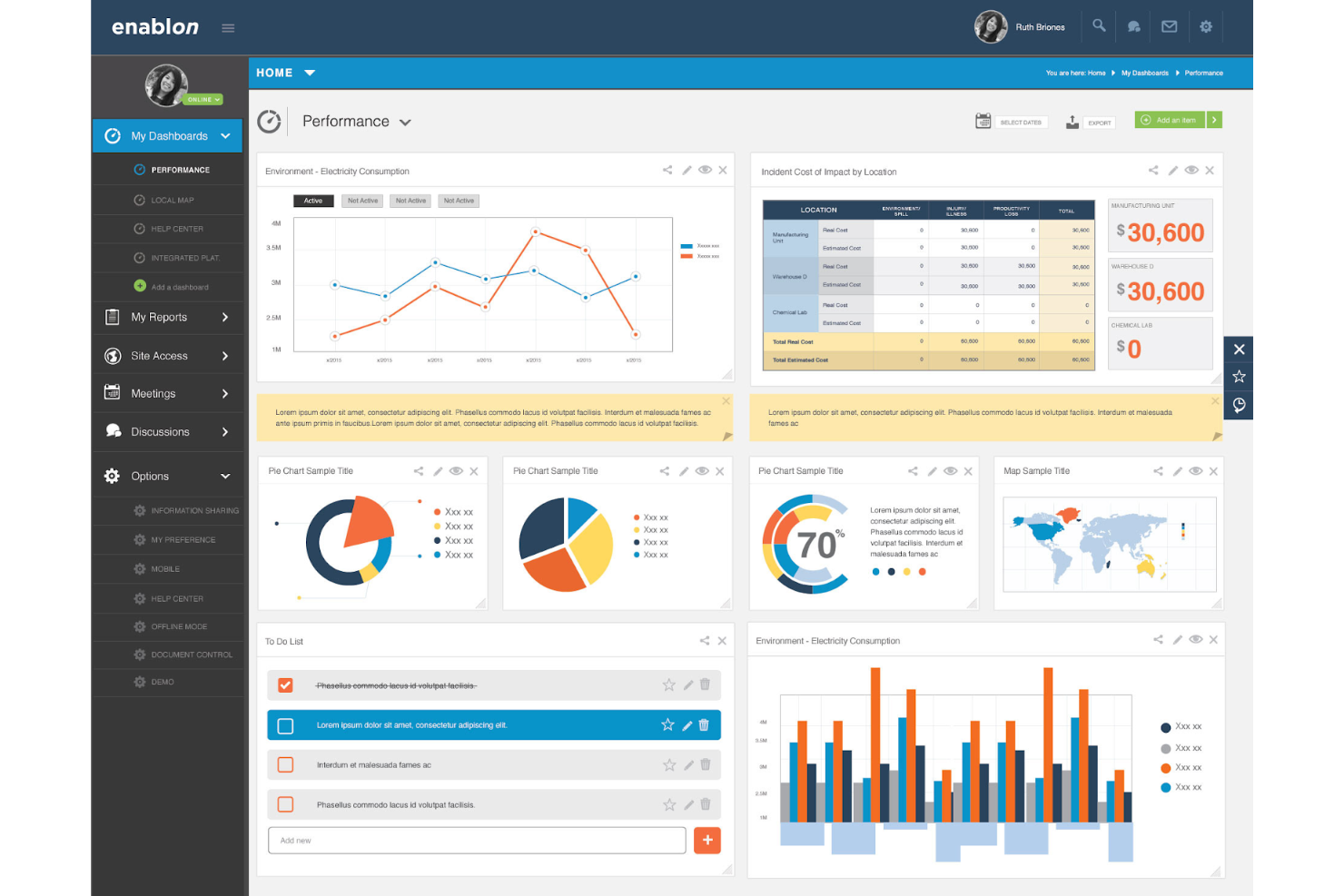
Enablon está diseñado para grandes organizaciones que necesitan gestionar requisitos complejos de salud y seguridad en múltiples sitios y regiones. Es especialmente útil para equipos corporativos de EHS en industrias como energía, servicios públicos y manufactura que requieren automatización avanzada e informes a gran escala. Con Enablon, puedes coordinar el cumplimiento global, estandarizar los procesos y gestionar grandes volúmenes de datos de seguridad en una sola plataforma.
Por qué escogí Enablon
Cuando se trata de gestionar la salud y la seguridad a gran escala, Enablon destaca por su capacidad de respaldar organizaciones grandes y complejas. La plataforma ofrece automatización avanzada de flujos de trabajo y paneles centralizados que ayudan a los líderes EHS a supervisar el cumplimiento y el riesgo en múltiples sitios. Escogí Enablon porque permite estandarizar procesos a nivel global y, al mismo tiempo, adaptarse a requisitos locales. Para las empresas con equipos distribuidos y grandes volúmenes de datos, estas características hacen de Enablon una fuerte opción para la gestión escalable de salud y seguridad.
Funciones clave de Enablon
Otras características que hacen valioso a Enablon para los equipos de salud y seguridad incluyen:
- Reporte de incidentes móvil: Captura y envía detalles de incidentes directamente desde dispositivos móviles en el campo.
- Gestión de auditorías: Programa, realiza y rastrea auditorías con listas de verificación personalizables y seguimientos automatizados.
- Biblioteca de contenido regulatorio: Accede a requisitos regulatorios y normas actualizadas dentro de la plataforma.
- Gestión de seguridad de contratistas: Usa herramientas especializadas para la gestión de contratistas y monitorea el cumplimiento y desempeño en seguridad.
Integraciones de Enablon
Actualmente no se listan integraciones nativas.
Pros and Cons
Pros:
- Modelado avanzado de riesgos para entornos empresariales
- Flujos de trabajo de auditoría e inspección personalizables
- Contenido regulatorio integrado para estándares globales
Cons:
- El proceso de implementación puede ser largo
- Interfaz de usuario desactualizada

UL Solutions ofrece una plataforma de salud y seguridad diseñada para organizaciones que necesitan estar siempre listas para auditorías y cumplir con regulaciones complejas. Es ideal para responsables de cumplimiento y profesionales de EHS en industrias altamente reguladas como la manufactura, los químicos y la energía. Con UL Solutions, puedes centralizar la documentación, automatizar el seguimiento del cumplimiento y prepararte para auditorías con confianza.
Por qué elegí UL Solutions
La preparación para auditorías regulatorias es una de las mayores preocupaciones para muchas organizaciones, y UL Solutions responde a esta necesidad con herramientas específicas de gestión del cumplimiento. La plataforma te ayuda a mantener registros actualizados, automatizar los informes regulatorios y gestionar las acciones correctivas derivadas de los hallazgos de auditoría.
Me gusta cómo UL Solutions centraliza la documentación de cumplimiento, haciendo más sencillo prepararse para las inspecciones y demostrar la adhesión a los estándares. Para equipos que se enfrentan a auditorías frecuentes o trabajan en sectores altamente regulados, estas características hacen que UL Solutions sea una excelente opción.
Características clave de UL Solutions
Otras funciones que hacen valiosa a UL Solutions para equipos de salud y seguridad incluyen:
- Herramientas de evaluación de riesgos: Identifica, evalúa y prioriza peligros en el lugar de trabajo usando matrices de riesgo integradas.
- Gestión de incidentes: Registra, rastrea y analiza incidentes laborales con flujos de trabajo configurables.
- Seguimiento de capacitaciones: Supervisa el estado de capacitación de los empleados y automatiza recordatorios para certificaciones requeridas.
- Control de documentos: Gestiona, actualiza y distribuye políticas y procedimientos de seguridad desde un repositorio centralizado.
Integraciones de UL Solutions
Las integraciones nativas no se encuentran listadas actualmente.
Pros and Cons
Pros:
- Calendario de cumplimiento automatizado para fechas límite regulatorias
- Herramientas integradas de evaluación y puntuación de riesgos
- Gestión de incidentes con flujos de trabajo configurables
Cons:
- Comunidad pública o foros de soporte limitados
- Opciones básicas de personalización de informes

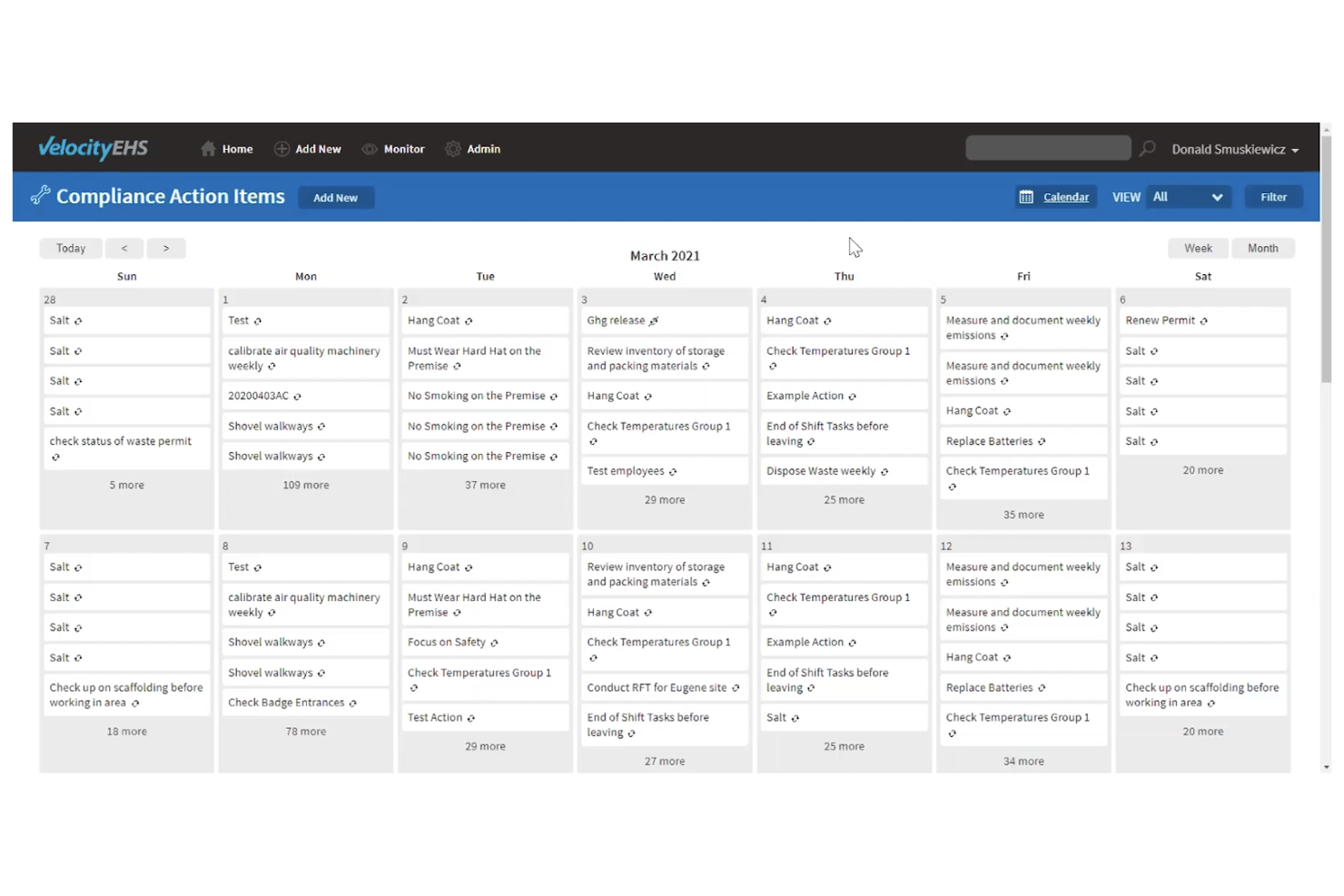
VelocityEHS ofrece herramientas especializadas para la gestión de productos químicos y el cumplimiento normativo. Es adecuado para fabricantes, laboratorios y equipos que manejan materiales peligrosos con estrictos requisitos regulatorios. La plataforma admite la gestión de SDS, el etiquetado y la elaboración de informes regulatorios para ayudar a mantener operaciones seguras y en conformidad.
Por qué elegí VelocityEHS
Lo que distingue a VelocityEHS es su profundo enfoque en la gestión de productos químicos, una necesidad crítica para muchos equipos de salud y seguridad. El seguimiento del inventario químico de la plataforma te permite mantener registros actualizados de sustancias peligrosas en múltiples ubicaciones.
Me gusta cómo su función de gestión de SDS centraliza las hojas de datos de seguridad y las hace fácilmente accesibles para el cumplimiento y la capacitación. Para las organizaciones que necesitan cumplir regulaciones estrictas sobre la seguridad química, estas herramientas especializadas ayudan a reducir riesgos y simplifican la gestión diaria.
Características clave de VelocityEHS
Otras características que hacen que VelocityEHS sea útil para los equipos de salud y seguridad incluyen:
- Gestión de incidentes: Registra, rastrea y analiza incidentes laborales para apoyar investigaciones y acciones correctivas.
- Herramientas de evaluación de riesgos: Realiza y documenta evaluaciones de riesgos para diversos peligros en el lugar de trabajo.
- Gestión de auditorías e inspecciones: Programa, realiza y realiza seguimiento de auditorías e inspecciones para asegurar el cumplimiento continuo.
- Gestión de capacitación: Asigna, rastrea y documenta la formación en seguridad y certificaciones de los trabajadores.
Integraciones de VelocityEHS
Actualmente no se indican integraciones nativas.
Pros and Cons
Pros:
- Amplia gestión de inventario químico y SDS
- Informes regulatorios automatizados para materiales peligrosos
- Herramientas integradas para etiquetas compatibles con GHS
Cons:
- Retrasos ocasionales en la actualización de la base de datos de SDS
- Personalización limitada para los diseños del panel de control

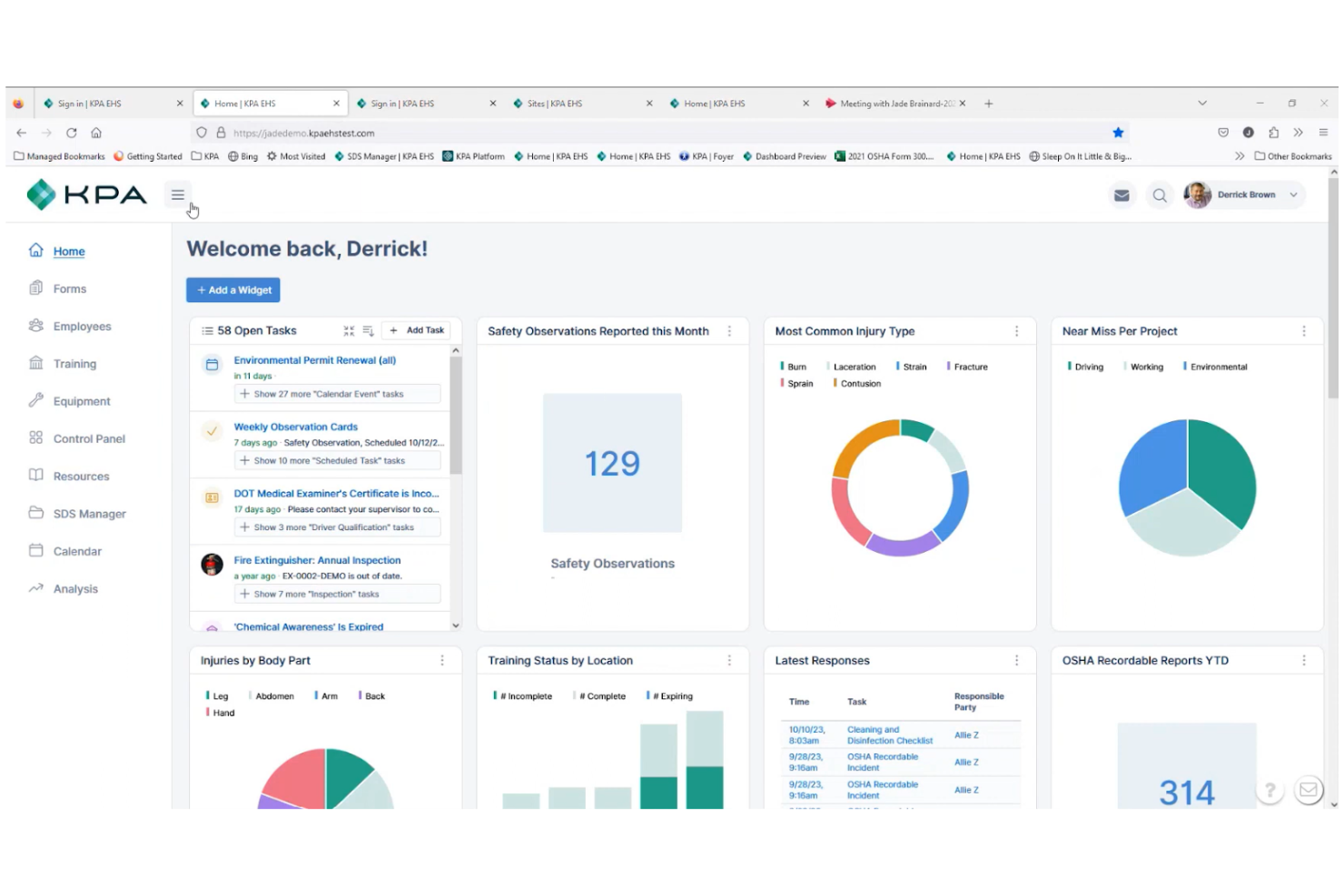
KPA está diseñado para empresas automotrices que necesitan gestionar requisitos de seguridad y cumplimiento normativo específicos del sector. Esta plataforma ayuda a concesionarios, talleres de servicio y operaciones automotrices relacionadas a abordar regulaciones de OSHA, EPA y DOT con herramientas especializadas. Sus contenidos y flujos de trabajo ayudan a los equipos a rastrear capacitaciones, inspecciones e incidentes propios del sector automotor.
Por Qué Elegí KPA
Lo que distingue a KPA es su enfoque en las necesidades exclusivas de cumplimiento normativo de la industria automotriz. La plataforma ofrece módulos de capacitación en seguridad y listas de verificación para inspecciones prediseñados específicamente para concesionarios, talleres de servicio y minoristas de automóviles.
Valoro que KPA incluya contenido regulatorio para OSHA, EPA y DOT, lo que ayuda a los equipos a mantenerse actualizados con los requisitos específicos del sector. Esto lo convierte en una solución ideal para las empresas automotrices que necesitan gestionar obligaciones complejas de cumplimiento y seguridad en un solo lugar.
Principales Características de KPA
Otras funciones que hacen que KPA sea útil para los equipos de salud y seguridad incluyen:
- Gestión de Incidentes: Registra, rastrea e investiga incidentes laborales desde un panel centralizado.
- Seguimiento de Acciones Correctivas: Asigna y controla tareas de seguimiento para resolver problemas de seguridad.
- Acceso a Aplicación Móvil: Realiza inspecciones, auditorías y capacitaciones desde cualquier dispositivo móvil.
- Herramientas de Reportes Personalizados: Crea y exporta informes sobre actividades de cumplimiento y tendencias en seguridad.
Integraciones de KPA
Actualmente no se listan integraciones nativas.
Pros and Cons
Pros:
- Contenido de capacitación específico automotriz para normativas
- La app móvil permite inspecciones de seguridad en sitio
- Seguimiento de incidentes incluye análisis de causa raíz
Cons:
- Las opciones de personalización de reportes son limitadas
- No hay detalles públicos de precios o planes
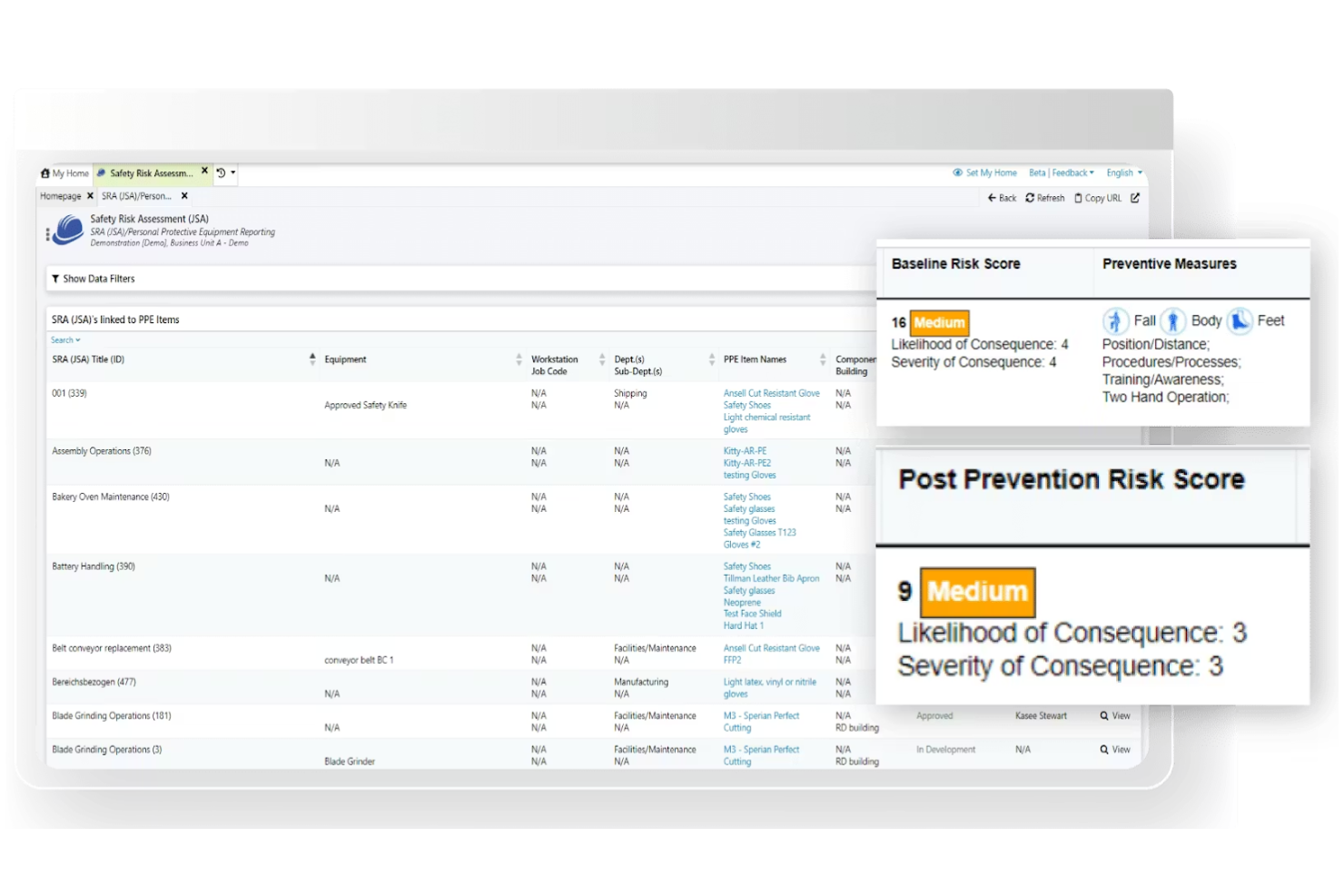
Benchmark Gensuite destaca por sus capacidades de inspección móvil, lo que lo convierte en una excelente opción para equipos que necesitan realizar auditorías e inspecciones en el campo. Es especialmente útil para responsables de seguridad y líderes de operaciones en industrias como la manufactura, construcción y energía, que requieren recopilación y reporte de datos en tiempo real. Con Benchmark Gensuite, puedes captar los resultados de inspecciones en el lugar, asignar seguimientos y monitorear acciones correctivas desde cualquier dispositivo.
Por qué elegí Benchmark Gensuite
Las capacidades de inspección móvil son el gran punto fuerte de Benchmark Gensuite, especialmente para organizaciones con centros de trabajo dispersos o equipos de campo. La plataforma permite a los usuarios realizar inspecciones directamente desde sus dispositivos móviles, adjuntar fotos y registrar hallazgos en el momento. Me gusta que puedas asignar acciones correctivas de inmediato y seguir su resolución en tiempo real, lo que ayuda a mantener fluidos los procesos de seguridad.
Para equipos que necesitan documentar el cumplimiento y responder rápidamente a los problemas dondequiera que estén, estas funciones hacen de Benchmark Gensuite una opción muy práctica.
Características clave de Benchmark Gensuite
Además de sus herramientas móviles de inspección, Benchmark Gensuite ofrece varias otras funciones que respaldan la gestión de la salud y la seguridad:
- Reporte de incidentes: Registra y gestiona incidentes laborales con formularios y flujos de trabajo configurables.
- Gestión de auditorías: Programa, realiza y sigue auditorías de salud y seguridad ocupacional en varias ubicaciones desde un panel centralizado.
- Gestión de documentos: Almacena, organiza y controla el acceso a políticas, procedimientos y documentos de cumplimiento en seguridad.
- Gestión de formación: Asigna, controla y documenta los requisitos y las finalizaciones de la formación de los empleados.
Integraciones de Benchmark Gensuite
Actualmente no se enumeran integraciones nativas.
Pros and Cons
Pros:
- Seguimiento en tiempo real de acciones correctivas
- Soporte multilingüe para equipos globales
- Análisis integrados de tendencias de inspección
Cons:
- Las actualizaciones de la interfaz de usuario pueden ser inconsistentes
- Opciones limitadas de personalización del panel


Sphera está diseñada para organizaciones que buscan una visibilidad profunda del desempeño en salud y seguridad a través de análisis avanzados. Es una excelente opción para líderes de EHS y equipos orientados a los datos en industrias como la química, petróleo y gas, y manufactura que necesitan rastrear tendencias y descubrir riesgos. Con Sphera, puedes visualizar datos de seguridad, monitorear KPIs y tomar decisiones informadas mediante paneles de control personalizables.
Por qué elegí Sphera
Lo que me llamó la atención de Sphera es su enfoque en paneles de análisis avanzados que ayudan a los equipos de salud y seguridad a convertir los datos en información procesable. La plataforma ofrece visualizaciones personalizables e informes en tiempo real, facilitando la identificación de tendencias y el monitoreo de métricas de seguridad clave en toda la organización.
Elegí Sphera porque permite profundizar en los datos de salud laboral y comparar el desempeño, lo cual es especialmente valioso para organizaciones que gestionan entornos de riesgo complejos. Para los equipos que quieren ir más allá del seguimiento básico de cumplimiento y aprovechar la analítica para una gestión proactiva de la seguridad, Sphera se destaca como una opción sólida.
Características clave de Sphera
Otras características que hacen útil a Sphera para los equipos de salud y seguridad incluyen:
- Módulo de gestión de incidentes: Registra, rastrea e investiga incidentes laborales desde un panel centralizado.
- Seguimiento del cumplimiento normativo: Supervisa y gestiona el cumplimiento con regulaciones y estándares específicos de la industria.
- Recopilación de datos móvil: Captura observaciones de seguridad y datos de auditorías directamente desde dispositivos móviles en el campo.
- Seguimiento de acciones correctivas: Asigna, monitorea y documenta acciones correctivas para abordar riesgos o incidentes identificados.
Integraciones de Sphera
Actualmente no se enumeran integraciones nativas.
Pros and Cons
Pros:
- Paneles avanzados para métricas de desempeño
- Admite metodologías de evaluación de riesgos complejos
- Actualizaciones de contenido normativo para múltiples industrias
Cons:
- Ocasionalmente hay demoras en la respuesta del soporte al cliente
- Algunos módulos requieren licencias por separado
Otros programas de seguridad y salud
Estas son algunas opciones adicionales de programas de seguridad y salud que no llegaron a mi lista de opciones, pero que aún vale la pena consultar:
- Vector Solutions
Ideal para el seguimiento de certificaciones del personal
- EcoOnline
Mejor para la automatización de informes de incidentes
- Evotix
Ideal para herramientas de compromiso de empleados


Wie ich Gesundheits- und Sicherheitssoftware bewerte
Ich bewerte Tools auf zwei Ebenen: grundlegende Funktionen wie Vorfallmeldungen und die Einhaltung der OSHA-Dokumentationspflicht, die jede Plattform bieten muss, sowie die Unterscheidungsmerkmale, die einzelne Anbieter auszeichnen.
Kernfunktionen (Mindestanforderungen für diese Liste)
Bei der Auswahl von Tools für meine Liste bewerte ich jede Funktion auf einer Skala von 0 (Funktion nicht vorhanden) bis 5 (hervorragend in diesem Bereich). Anschließend berechne ich die Gesamtpunktzahl des Tools als Prozentsatz. Jedes Tool muss eine Mindestpunktzahl von 65 % erreichen, um für die Aufnahme in Betracht gezogen zu werden.
- Unfall- & Verletzungsmeldung: Ich achte auf strukturierte Vorfallformulare, Abläufe zur Untersuchung sowie Ursachenanalyse-Tools, mit denen HR-Teams Details wie Fotos oder Zeugenaussagen direkt vor Ort erfassen können.
- Regulatorisches Compliance-Management: Jedes Tool sollte erforderliche Protokolle und Berichte – etwa OSHA 300/300A-Formulare – erzeugen und idealerweise zusätzliche Anforderungen wie ISO 45001 oder regionale Standards unterstützen.
- Schulungs- & Zertifikatsverfolgung: Ich prüfe, ob die Plattform Kurse nach Rolle zuweist, Erinnerungen an Verlängerungen versendet und abgeschlossene Lehrgänge nachverfolgt, sodass abgelaufene Stapler- oder Engraumbescheinigungen nicht manuell verfolgt werden müssen.
- Risikobewertung & Audits: Leistungsstarke Tools bieten konfigurierbare Checklisten für Inspektionen, Risikobewertung und Planung für wiederkehrende Begehungen, sodass Excel-basierte Standortprüfungen überflüssig werden.
- Management von Korrekturmaßnahmen: Ich bewerte, wie jedes Tool Korrekturmaßnahmen mit dem zugrunde liegenden Vorfall oder Auditfund verbindet, inklusive Beauftragten, Fälligkeiten und Eskalationswegen.
- Sicherheitsanalysen & Dashboards: Die Plattform sollte sowohl vorlaufende als auch nachlaufende Kennzahlen wie TRIR und Unfalltrends in übersichtlichen Dashboards darstellen, sodass HR und Führungskräfte agieren können, ohne Rohdaten auswerten zu müssen.
Nachdem ich eine Liste von Tools habe, die diese Kriterien erfüllen, schaue ich mir die Besonderheiten der einzelnen Plattformen an.
Unterscheidungsmerkmale (Was einzelne Anbieter abhebt)
So vergleiche und bewerte ich verschiedene Anbieter:
Herausragende Funktionen
Mobile und Offline-Nutzung ist entscheidend, wenn das Personal sowohl in Lagerhallen, auf Baustellen als auch an abgelegenen Orten ohne stabile Internetverbindung arbeitet. Ich achte zudem auf das Management von Fremdfirmen und Besuchern, da viele Arbeitsunfälle externe Arbeitskräfte betreffen, die gesondert eingewiesen und überprüft werden müssen, bevor sie Zutritt erhalten. Auch verhaltensorientierte Sicherheits-Tools sind ein Plus: Plattformen, die positives Verhalten ebenso wie Beinaheunfälle erfassen, ermöglichen es HR-Teams, von einer reaktiven Unfallerfassung zu einer proaktiven Kulturentwicklung zu wechseln.
Über die Funktionen hinaus
HRIS-Integrationen sind hier besonders wichtig. Wenn sich die Sicherheitsplattform nicht mit Systemen wie Workday, BambooHR oder ADP synchronisieren lässt, verbringen Sie Stunden damit, Mitarbeiterlisten und Strukturen manuell zu aktualisieren. Ebenso prüfe ich die Konformität mit Vorschriften und Datensicherheit, da in diesen Tools sensible Gesundheitsdaten gespeichert werden, die SOC 2, rollenbasierte Zugriffe und Audit-Trails erfordern. Branchenspezifische Konfigurierbarkeit rundet meine Bewertung ab: Ein Bauunternehmen und ein Krankenhaus haben grundverschiedene Gefahrenprofile. Daher prüfe ich, ob die Plattform anpassbare Vorlagen ohne zusätzliche Entwicklerunterstützung bereitstellt.
Cómo elegir un programa de seguridad y salud
Es fácil perderse entre largas listas de funciones y complejas estructuras de precios. Para ayudarte a mantener la concentración mientras avanzas en tu proceso de selección de programas, aquí tienes una lista de factores que debes tener en cuenta:
| Factor | Qué debes considerar |
|---|---|
| Escalabilidad | ¿El programa será compatible con el crecimiento de tu organización, incluidas nuevas ubicaciones, equipos o necesidades normativas? Comprueba los límites de usuarios y la gestión de varias sedes. |
| Integraciones | ¿La herramienta se conecta con tus sistemas de información de recursos humanos, nóminas o gestión del aprendizaje? Confirma las integraciones nativas y evita depender exclusivamente de APIs o de la introducción manual de datos. |
| Personalización | ¿Puedes adaptar los flujos de trabajo, formularios e informes para que coincidan con los procesos y la terminología de tu organización? Considera cuánta flexibilidad necesitas para el cumplimiento normativo o las políticas internas. |
| Facilidad de uso | ¿Tu equipo adoptará rápidamente la herramienta? Busca una navegación clara, requisitos mínimos de formación y accesibilidad para todos los tipos de usuarios, incluido el personal de campo. |
| Implementación e incorporación | ¿Cuánto tiempo se tardará en ponerla en funcionamiento? Pregunta por la asistencia para la migración, los recursos de formación y si el proveedor ofrece una incorporación guiada o opciones de autoservicio. |
| Coste | ¿Los niveles de precios son transparentes y previsibles? Ten en cuenta todos los costes, incluidos la configuración, la asistencia y los posibles complementos, para evitar sorpresas después de la compra. |
| Medidas de seguridad | ¿El programa cumple las normas de privacidad y seguridad de datos de tu organización? Busca cifrado, controles de acceso y cumplimiento de normativas como el RGPD o HIPAA. |
| Requisitos de cumplimiento | ¿La herramienta te ayudará a cumplir las normativas específicas de tu sector? Comprueba si incluye seguimiento del cumplimiento, registros de auditoría y asistencia para la documentación obligatoria. |
¿Qué es un programa de seguridad y salud?
El software de salud y seguridad es una plataforma digital que ayuda a las organizaciones a gestionar la seguridad en el lugar de trabajo, el cumplimiento normativo y los riesgos. Estas herramientas centralizan tareas como la notificación de incidentes, la gestión de la formación, el seguimiento de certificaciones y la documentación normativa.
Mediante el uso de software de salud y seguridad, los equipos de RR. HH. y los responsables de seguridad pueden mantener el cumplimiento normativo, supervisar los riesgos y contribuir a crear un entorno de trabajo más seguro para todos los empleados.
Funciones
Al seleccionar un software de salud y seguridad, presta atención a las siguientes funciones clave:
- Notificación de incidentes: Permite a los empleados registrar rápidamente accidentes laborales, cuasi accidentes o riesgos, creando un registro digital para su investigación y seguimiento.
- Seguimiento de certificaciones: Supervisa las licencias, credenciales y requisitos de formación de los empleados, y envía alertas antes de las fechas de vencimiento para ayudar a mantener el cumplimiento normativo.
- Gestión de la formación: Asigna, imparte y realiza un seguimiento de la finalización de cursos de seguridad, garantizando que todo el personal reciba la instrucción obligatoria y la formación de actualización.
- Gestión de documentos: Almacena y organiza las políticas y los procedimientos de seguridad en una ubicación central mediante un repositorio con función de búsqueda.
- Herramientas de auditoría y cumplimiento: Facilita las auditorías internas y externas mediante la generación de informes, el seguimiento de las acciones correctivas y el mantenimiento de los registros de cumplimiento.
- Acceso móvil: Permite al personal de campo y a los equipos remotos acceder a los recursos de seguridad, completar formaciones y notificar incidentes desde cualquier dispositivo.
- Flujos de trabajo personalizables: Permite a las organizaciones adaptar los formularios, los procesos de aprobación y las notificaciones para ajustarlos a sus protocolos de seguridad específicos.
- Análisis y paneles: Proporciona visibilidad en tiempo real sobre las tendencias de seguridad, el progreso de la formación y el estado del cumplimiento mediante informes visuales y paneles.
- Herramientas de investigación de incidentes: Facilita el análisis de las causas fundamentales y el seguimiento de las acciones correctivas para ayudar a prevenir futuros incidentes.
- Controles de acceso basados en roles: Restringe la información confidencial y las funciones del sistema a los usuarios autorizados, contribuyendo a la privacidad de los datos y al cumplimiento de los requisitos normativos.
Funciones habituales de IA del software de salud y seguridad
Además de las funciones estándar del software de salud y seguridad indicadas anteriormente, muchas de estas soluciones están incorporando IA con funciones como las siguientes:
- Análisis predictivo de riesgos: Utiliza IA para analizar los datos de rendimiento de EHS e identificar patrones, ayudando a las organizaciones a mitigar los riesgos antes de que se produzcan.
- Categorización automatizada de incidentes: Aplica el procesamiento del lenguaje natural a los informes de incidentes, clasificando y priorizando automáticamente los casos para agilizar la respuesta y la resolución.
- Reconocimiento inteligente de documentos: Utiliza IA para escanear, extraer y organizar información de documentos de seguridad, certificados y formularios de inspección, reduciendo la introducción manual de datos.
- Detección de riesgos en tiempo real: Se integra con sensores o fuentes de vídeo para identificar en tiempo real condiciones o comportamientos inseguros y alertar a los equipos de seguridad para que tomen medidas inmediatas.
- Supervisión del cumplimiento basada en IA: Revisa continuamente la documentación de tu programa de EHS para señalar deficiencias y favorecer el cumplimiento normativo proactivo.
Beneficios
La implementación de un software de gestión de salud y seguridad ofrece varios beneficios para tu equipo y tu empresa. Estos son algunos de los que puedes esperar:
- Mejora del cumplimiento normativo: Las funciones automatizadas de seguimiento, generación de informes y documentación ayudan a tu organización a mantenerse al día con las normativas del sector y los requisitos de auditoría.
- Respuesta más rápida ante incidentes: La notificación digital de incidentes y las alertas en tiempo real permiten a tu equipo abordar rápidamente los riesgos y accidentes, reduciendo los riesgos y el tiempo de inactividad.
- Gestión de la seguridad centralizada: Una única plataforma para la formación, las certificaciones y la documentación facilita la organización, el acceso y la actualización de la información de seguridad.
- Mayor responsabilidad de la plantilla: Las herramientas de seguimiento de certificaciones y gestión de la formación garantizan que los empleados completen los cursos obligatorios y mantengan las credenciales necesarias.
- Toma de decisiones basada en datos: Los análisis y los paneles proporcionan información sobre las tendencias de seguridad, ayudándote a priorizar iniciativas para acciones preventivas.
- Mejora de la incorporación y la formación: Los módulos de formación integrados y los recursos de incorporación ayudan a los nuevos empleados y favorecen el desarrollo continuo de la plantilla.
- Mayor transparencia y supervisión: Los controles de acceso basados en roles y los registros de auditoría ofrecen a los responsables una visibilidad clara de las actividades de seguridad y del cumplimiento en toda la organización.
Costes y precios
Seleccionar un software de salud y seguridad requiere comprender los diversos modelos de precios y planes disponibles. Los costos varían según las funciones, el tamaño del equipo, los complementos y otros factores. La tabla siguiente resume los planes habituales, sus precios promedio y las funciones que suelen incluir las soluciones de software de salud y seguridad:
Tabla comparativa de planes de software de salud y seguridad
| Tipo de plan | Precio promedio | Funciones habituales |
|---|---|---|
| Plan gratuito | $0 | Informes básicos de incidentes, almacenamiento de documentos limitado y acceso para un número reducido de usuarios. |
| Plan personal | $5-$15/usuario/mes | Seguimiento individual de certificaciones, módulos básicos de capacitación e informes sencillos de cumplimiento. |
| Plan empresarial | $20-$40/usuario/mes | Gestión de incidentes basada en equipos, gestión avanzada de la capacitación, paneles de análisis y acceso móvil. |
| Plan corporativo | $50-$100/usuario/mes | Flujos de trabajo personalizados, integraciones con HRIS, controles de seguridad avanzados, asistencia especializada y herramientas de auditoría. |
Preguntas frecuentes sobre el software de salud y seguridad
Estas son algunas respuestas a preguntas frecuentes sobre el software de salud y seguridad:
¿Cómo ayuda el software de salud y seguridad al cumplimiento normativo?
El software de salud y seguridad ayuda al cumplimiento normativo al centralizar la documentación, automatizar los recordatorios de capacitación y generar informes preparados para auditorías. Esto facilita el seguimiento de las actividades de cumplimiento, el mantenimiento de registros actualizados y la respuesta rápida a inspecciones o auditorías de seguridad.
¿Pueden los trabajadores de campo o los equipos remotos utilizar el software de salud y seguridad?
Sí, muchas soluciones de software de salud y seguridad ofrecen acceso móvil y capacidades sin conexión. Esto permite que los trabajadores de campo y los equipos remotos informen incidentes, completen capacitaciones y accedan a documentos de seguridad desde cualquier ubicación, incluso sin conexión a Internet.
¿Qué debo tener en cuenta al migrar de procesos manuales a un software de salud y seguridad?
Al migrar de procesos manuales, considera las opciones de importación de datos, los recursos de capacitación y la disponibilidad de asistencia para la incorporación. Busca soluciones fáciles de usar que ofrezcan plantillas, configuración guiada y atención al cliente para ayudar a tu equipo a realizar la transición sin inconvenientes y minimizar las interrupciones.
¿Qué nivel de seguridad tienen los datos de los empleados en el software de salud y seguridad?
La mayoría de los proveedores de software de salud y seguridad utilizan cifrado, controles de acceso y auditorías de seguridad periódicas para proteger los datos de los empleados. Revisa siempre las certificaciones de seguridad de un proveedor y su cumplimiento de normativas como el GDPR o la HIPAA antes de tomar una decisión.
¿Puede el software de salud y seguridad integrarse con otros sistemas de RR. HH. o empresariales?
Sí, muchas plataformas ofrecen integraciones con sistemas HRIS, de nómina y de gestión del aprendizaje. Esto ayuda a reducir la duplicación de la introducción de datos, garantiza la coherencia entre las plataformas y simplifica los informes y el seguimiento del cumplimiento.