




BambooHR is an HRIS human resources information system built for small and mid-size businesses that need to manage the full employee lifecycle in one place. It covers onboarding, performance management, time tracking, and offboarding without requiring a large HR team to operate it. I'd consider it over Rippling if your priority is people management rather than IT and device management—BambooHR® is purpose-built for HR, and that focus shows in its feature depth and overall design.
BambooHR® Evaluation Summary

- From $10/employee/month
- Free trial available
Por qué confiar en nuestras reseñas de software
Nuestro equipo lleva probando y evaluando software desde 2012. Como expertos en RR. HH., sabemos lo difícil —y lo importante— que es elegir el software adecuado.
Para esta guía, evaluamos las herramientas mediante pruebas prácticas e investigación independiente, puntuando las herramientas según nuestros criterios de selección. También nos basamos en la experiencia de líderes de opinión del sector y de profesionales de RR. HH. en activo.
Nuestras reseñas reflejan nuestro criterio editorial humano, no un discurso de ventas.
Revisores expertos:
BambooHR® Overview

pros
-
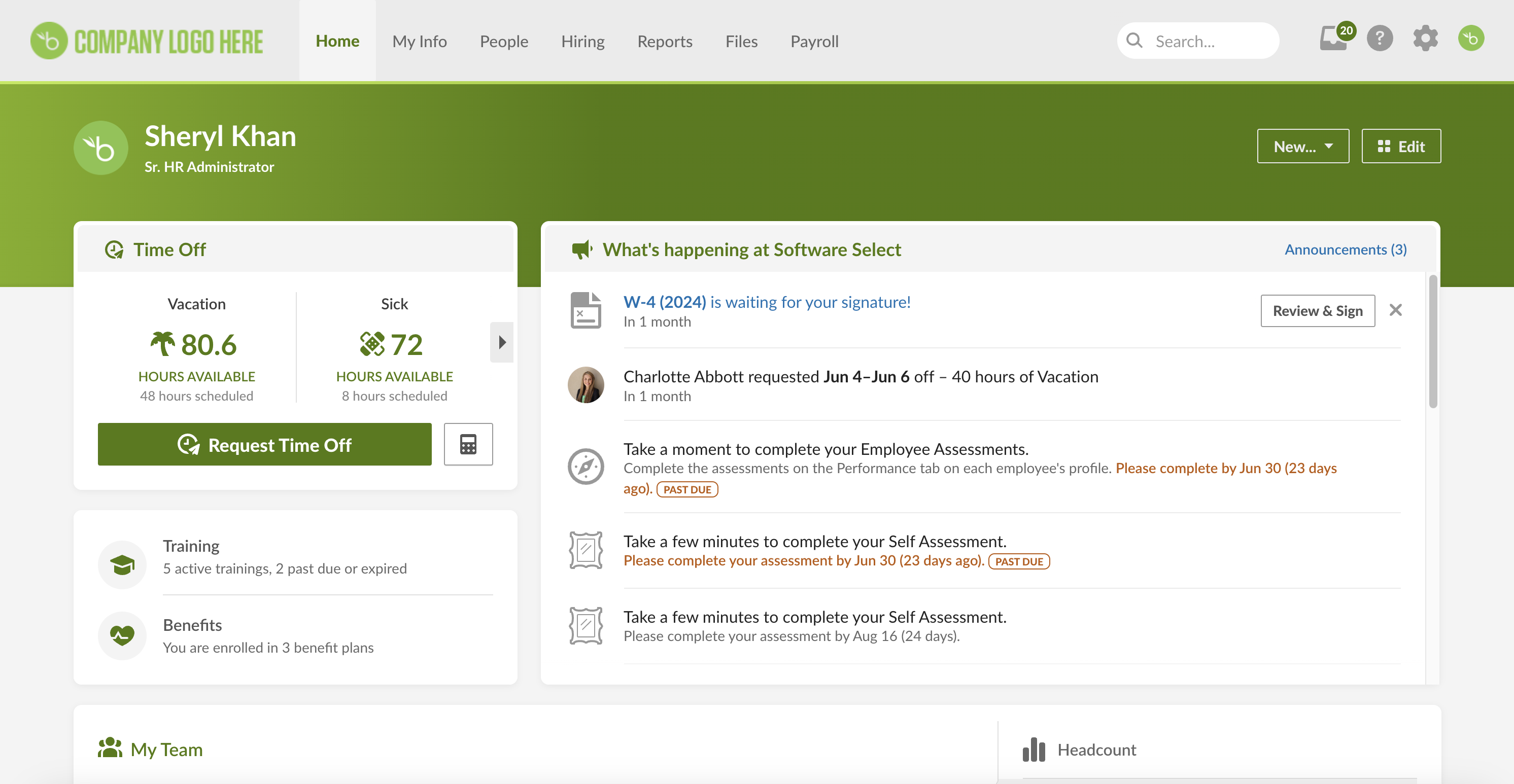
The modern, intuitive interface makes it simple to find information and complete tasks. The free trial includes dummy data so you can test out the user experience easily.
-
Excellent employee engagement features, including the Employee Community.
-
Employee self-service features help staff access their data, request time off, sign documents, and more.
cons
-
Benefits administration, payroll, and time tracking are paid add-ons (and some are only available to U.S. customers)
-
Not a ton of wiggle room if you require lots of platform customization.
-
Native payroll is limited to the United States. Global payroll is only available through a third-party EOR provider.
-

Deel HR
Visit WebsiteThis rating combines scores from multiple user review sites to reflect overall customer sentiment about the product.4.8 -
Justworks
Visit WebsiteThis rating combines scores from multiple user review sites to reflect overall customer sentiment about the product.4.6 -
Factorial
Visit WebsiteThis rating combines scores from multiple user review sites to reflect overall customer sentiment about the product.4.4





Cómo probamos y puntuamos nuestras herramientas
Hemos pasado años construyendo, refinando y mejorando nuestro sistema de pruebas y puntuación de software. La rúbrica está diseñada para capturar los matices de la selección de software y lo que hace que una herramienta sea efectiva, centrándose en los aspectos críticos del proceso de toma de decisiones. A continuación, puedes ver exactamente cómo funcionan nuestras pruebas y puntuaciones a través de siete criterios. Esto nos permite ofrecer una evaluación imparcial del software basada en la funcionalidad principal, características destacadas, facilidad de uso, incorporación, soporte al cliente, integraciones, reseñas de clientes y relación calidad-precio.
Funcionalidad principal (25% de la puntuación final)
El punto de partida de nuestra evaluación siempre es la funcionalidad principal de la herramienta. ¿Tiene las funciones básicas que se espera encontrar? ¿Alguna de esas funciones básicas está restringida a planes de precio superiores? En esencia, esperamos que una herramienta se compare favorablemente con las capacidades básicas de sus competidores.
Características destacadas (25% de la puntuación final)
Luego, evaluamos características poco comunes que van más allá de la funcionalidad principal que normalmente se encuentra en herramientas de su tipo. Una puntuación alta refleja funciones especializadas o únicas que hacen que el producto sea más rápido, eficiente o que ofrezca un valor adicional al usuario. También evaluamos lo fácil que es integrar con otras herramientas comúnmente usadas en el entorno tecnológico para ampliar la funcionalidad y utilidad del software. Las herramientas que ofrecen muchas integraciones nativas, conexiones de terceros y acceso a API para construir integraciones personalizadas obtienen las mejores puntuaciones.
Facilidad de uso (10% de la puntuación final)
Consideramos qué tan rápido y fácil es ejecutar las tareas definidas en la funcionalidad principal utilizando la herramienta. El software que obtiene una puntuación alta está bien diseñado, es intuitivo, ofrece aplicaciones móviles, proporciona plantillas y hace que tareas relativamente complejas parezcan simples.
Incorporación (10% de la puntuación final)
Sabemos lo importante que es la rápida adopción del equipo para una nueva plataforma, por eso evaluamos qué tan fácil es aprender y usar una herramienta con una capacitación mínima. Evaluamos cuán rápido un miembro del equipo puede configurarse y comenzar a usar la herramienta sin experiencia. Las soluciones con mejores puntuaciones requieren poco o ningún soporte.
Soporte al cliente (10% de la puntuación final)
Revisamos cuán rápido y fácil es obtener ayuda mediante teléfono, chat en vivo o base de conocimientos. Las herramientas y empresas que ofrecen soporte en tiempo real obtienen las mejores puntuaciones, mientras que los chatbots obtienen las peores.
Reseñas de clientes (10% de la puntuación final)
Además de nuestras propias pruebas y evaluaciones, consideramos el puntaje neto de promotores de clientes presentes y pasados. Revisamos su probabilidad, dada la opción, de elegir nuevamente la herramienta por su funcionalidad principal. El software con una puntuación alta refleja un alto puntaje neto de promotores por parte de clientes actuales o anteriores.
Relación calidad-precio (10% de la puntuación final)
Por último, considerando todos los demás criterios, revisamos el precio promedio de los planes de entrada frente a las funciones principales y valoramos el resto de los criterios de evaluación. El software que ofrece más por menos tendrá una mejor puntuación.
Core Features
Employee Records
Digital management of employee records is made easy with the platform's secure, centralized database. It efficiently organizes employee information, including emergency contacts, contract details, job responsibilities, salary, and addresses, in a user-friendly manner. The system also provides a centralized “Documents” hub to store resumes, signed documents, task lists, and project workflows. Additionally, the “Assets” hub lists equipment assigned to employees, such as computers, monitors, and other hardware. For miscellaneous items, the “Notes” hub offers a space to store agendas, meeting minutes, and other relevant information.
Hiring
When evaluating BambooHR's hiring capabilities, I found it lacks automatic importation and parsing of resumes, which limits efficient data entry and candidate tracking when recruiting at scale. While it simplifies job posting with an intuitive three-step process, the absence of robust resume handling is a significant drawback. BambooHR can automatically push job postings to major job boards, but setting up connections involves extra steps and permission controls, slowing recruitment efforts. During the free trial, interview emails cannot be sent directly, hindering communication. The platform supports GDPR compliance but lacks information on other international regulations, which could be a concern for global organizations. BambooHR offers strong controls over access permissions, balancing collaboration and data confidentiality. Its pre-built templates and reporting features support comprehensive analytics without additional modules, making it suitable for large organizations needing detailed HR metrics.
Employee Onboarding and Offboarding
The platform streamlines employee onboarding and offboarding workflows. Customizable steps and comprehensive new starter checklists make the onboarding process transparent and self-managed. It provides an easy-to-access space for resources and information, such as employee details via the “Directory” under the People tab, which supports adding new employees, list view, search, and organizational charts. Offboarding templates cover essential tasks, including vacation payout/accrual, disabling access to software systems and shared drives, and collecting company assets.
Time Tracking
A suite of tools allows employees to track work hours, submit time-off requests, and manage various leaves of absence, including paid time-off accruals. Users can easily submit time-off requests and view their remaining sick, bereavement, and vacation balances. Managers can review and approve timesheets and time-off requests, ensuring accurate and efficient time management.
Performance Management
Tools to enhance performance management and employee development are integrated into the platform. Learning and development (L&D) resources and training channels are housed in the “Performance” tab under My Info. The platform includes templates for review cycles, as well as 60- and 90-day performance assessments, making it easy to start an assessment. The Training tab provides templates for various trainings, including security training, unlawful harassment, product trainings, and COVID office protocols. You can track incomplete trainings and assign deadlines to ensure timely completion.
Payroll and Benefits Administration
The platform offers streamlined payroll and benefits administration modules or integrations. It houses employee information, calculates gross and net pay, and disburses payments. Integration with several payroll providers allows for seamless payroll processing and benefits administration. The Benefits tab offers a clear overview of benefits coverage and dependent information, including medical, dental, and vision insurance, 401k plans, and any opt-in supplemental benefits. Note that users are unable to try out the payroll and integrations experience via the 7-day free trial.
Reporting & Analytics
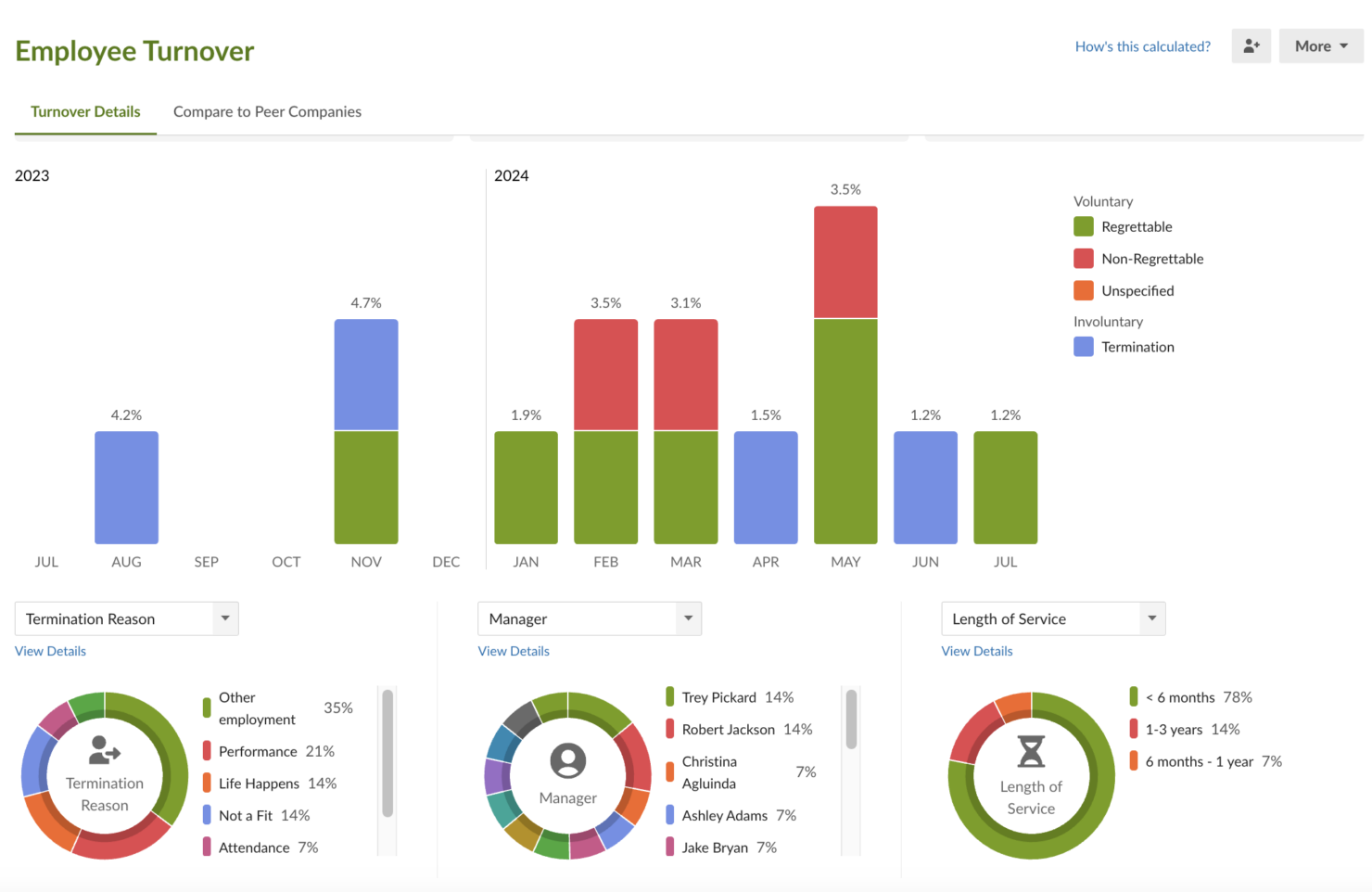
The Reports tab helps track signed documents, custom reports (with limited field configuration), and standard reports. Templates include headcount, employee turnover, additions and terminations, and time off used. You can configure custom reports to export assets, contact information, training history, and contract renewals, although details are somewhat limited. For example, generating a report on time-to-hire per recruiter or representative is not supported.
Ease of Use
BambooHR is highly user-friendly, with an intuitive interface that simplifies HR tasks for your team. Its clean design allows you to navigate easily, reducing the learning curve for new users. Features like employee self-service and customizable workflows enhance usability, letting your team manage their own data efficiently. Compared to other systems, BambooHR stands out for its straightforward approach, making it a preferred choice for businesses seeking simplicity and ease in managing HR processes.

Integrations
Integrations include Checkr, Greenhouse Software, Culture Amp, TalentLMS, Slack, Google Single Sign-On, Blue Marble Global Payroll, Deel, Oyster, Papaya Global, QuickBooks, and Xero.

New Product Updates from BambooHR®

BambooHR Expands Compensation Benchmarking Data
BambooHR Compensation Benchmarking now includes BambooHR salary data alongside Mercer SMB and Mercer Comptryx results. New Exact and Close labels, match sorting, and source details help users evaluate how closely each benchmark fits their criteria. Highlights include:
- Monthly Benchmark Updates: Refresh BambooHR compensation data each month.
- Additional Data Sources: Compare BambooHR benchmarks with Mercer SMB and Mercer Comptryx data.
- Exact Matches: Identify benchmarks that match selected location, company size, industry, and job level.
- Close Matches: See when one or more matching criteria differ and review those differences.
- Match-Based Sorting: Surface exact matches first in benchmark results.
- Source Visibility: See which provider supplied each benchmark.
Visit BambooHR’s official site for more details.
 for more details.
BambooHR Expands Benefits Carrier Connections
BambooHR now supports connections to more than 500 insurance carriers and lets admins request new carrier connections directly from the carrier dashboard. Once connected, employee benefits information syncs automatically to help keep carrier records current. Highlights include:
- 500+ Carrier Connections: Access a broader network of supported insurance carriers.
- Carrier Dashboard: Check whether a carrier is supported from within BambooHR.
- Connection Requests: Request new carrier connections directly from the platform.
- Automatic Data Sync: Send employee benefits information to connected carriers automatically.
- Benefits Administration: Manage enrollment data with fewer manual updates.
Visit BambooHR’s official site for more details.

BambooHR Adds Enrollment Waivers and Plan Year Continuity
BambooHR adds automatic waiver submissions for eligible employees who miss enrollment deadlines and plan year continuity for carrying existing plan details into renewals. These updates help benefits teams resolve incomplete enrollments and keep plan history connected across years. Highlights include:
- Automatic Enrollment Waivers: Create waiver submissions for eligible employees who miss open or new hire enrollment deadlines.
- Admin Review: Review, edit, and approve system-created waivers through the existing approval workflow.
- Plan Year Continuity: Start a new plan year using eligible plans from the previous year.
- Plan Detail Carryover: Bring forward files, coverage costs, rates, contribution splits, and eligibility filters.
- Connected Plan History: Keep related plan versions linked while updating renewal details for the new year.
- Plan Review Status: Mark new plan versions as Needs Review so admins can identify what requires attention.
Visit BambooHR’s official site for more details.

BambooHR Redesigns Its iOS Mobile App
BambooHR adds a refreshed Home screen, new More menu, updated navigation, revised layouts, and Apple Liquid Glass support to its iOS app. These changes organize employee updates and commonly used tools into a more consistent mobile experience. Highlights include:
- For You Section: Bring tasks, announcements, celebrations, surveys, and open enrollment updates into one feed.
- More Menu: Access Ask BambooHR, Files, Hiring, Settings, and other tools from one place.
- Updated Navigation: Add clearer entry points for Ask BambooHR, Employee Community, and Announcements.
- My Time Updates: Show pay-period hours directly in the My Time widget.
- Refreshed Layouts: Simplify profile details, pay stubs, compensation, emergency contacts, and notes.
- Liquid Glass Support: Apply Apple’s Liquid Glass styling to compatible iOS devices automatically.
Visit BambooHR’s official site for more details.

BambooHR Adds Employee Navigator Integration
BambooHR has introduced an Employee Navigator integration to help keep benefits administration and payroll aligned. It reduces duplicate entry by syncing key employee information and supports more accurate payroll processing. Highlights include:
- Demographic Sync: Keep employee details updated across BambooHR and Employee Navigator.
- Benefit Deduction Sync: Send Employee Navigator deductions directly into BambooHR Payroll runs.
- Guided Setup: Connect accounts, choose sync options, and configure deduction codes from Settings.
- Deduction Mapping: Match existing BambooHR benefit deductions with Employee Navigator equivalents.
- Payroll Reporting: Review synced deductions, employer contributions, frequencies, and effective dates.
Visit BambooHR’s official site for more details.

BambooHR Adds Manager Team View for Time & Attendance
BambooHR Manager Team View gives managers real-time visibility into hourly direct reports, attendance patterns, and workday details. Managers can also open employee timesheets for follow-up. Highlights include:
- Team Pulse: Shows who is clocked in, late, on break, or on PTO.
- Attendance Summary: Flags late clock-ins, early clock-outs, missed breaks, and unscheduled work.
- Attendance Insights: Highlights recurring attendance patterns.
- Workday Details: Shows hours, overtime, shifts, and clock-in information.
- Timesheet Access: Links managers directly to employee timesheets.
Visit BambooHR’s official site for more details.

BambooHR Introduces Job Organization
BambooHR Job Organization brings job titles, descriptions, codes, skills, and assigned employees into centralized Job Profiles. Admins can also connect roles to standardized BambooHR Job Codes. Highlights include:
- Job Profiles: Centralizes job titles, descriptions, EEO categories, skills, and assigned employees.
- Internal Job Codes: Stores company-specific identifiers alongside each role.
- BambooHR Job Codes: Links profiles to standardized roles from the BambooHR Job Library.
- Role Skills: Associates relevant skills with individual Job Profiles.
- Centralized Management: Lets admins create, update, and review job information from one place.
Visit BambooHR’s official site for more details.
BambooHR Launches Bamboo AI and AI Connectors
BambooHR adds AI assistance for reporting, payroll review, scheduling, job organization, benefits, and data hygiene, while AI Connectors link BambooHR with external AI assistants using existing permissions. The Claude connector is currently available in beta, with ChatGPT and Gemini support planned for future releases. Highlights include:
- Report Assistant: Builds and refines custom reports through conversational prompts.
- Payroll Tools: Compares payroll runs, explains changes, and prepares reminders as reviewable pay items.
- Scheduling Assistant: Drafts schedules from previous patterns and helps managers review conflicts.
- Data Hygiene: Identifies missing employee information and prepares outreach for admin approval.
- AI Connectors: Brings BambooHR data into supported AI assistants for information access and select actions.
- Claude Connector: Connects BambooHR with Claude in beta, while ChatGPT and Gemini connectors are planned for future release.
Visit BambooHR’s official site for more details.

BambooHR Automates Recurring Shift Schedule Publishing
BambooHR Time & Attendance lets admins automatically publish recurring schedules based on a set lead time of up to eight weeks. This helps teams reduce manual publishing while keeping upcoming shifts visible to employees. Highlights include:
- Auto-Publish Shifts: Publishes recurring schedules automatically based on the configured lead time.
- Flexible Lead Times: Supports publishing from the start of the scheduled week up to eight weeks in advance.
- Schedule Visibility: Shows when the next schedule is set to publish.
- Conflict Handling: Publishes eligible shifts while leaving conflicting shifts unpublished for review.
- Manual Publishing: Lets managers continue publishing schedules manually when needed.
Visit BambooHR’s official site for more details.

BambooHR Expands Its Integration and Contractor Management Tools
BambooHR introduces an Ecosystem page for discovering and managing integrations, along with expanded Remote Contractor Management access regardless of billing entity location. These updates give admins more flexibility when connecting tools and hiring contractors. Highlights include:
- Ecosystem Page: Lets admins search, review, install, and manage integrations directly within BambooHR.
- Integration Details: Provides information on capabilities, synced data, pricing, support, and setup before connecting an app.
- Remote Contractor Management: Gives users access to available contractor hiring options regardless of their default billing entity location.
- Contractor Onboarding: Lets teams review and select Remote Contractor Management plans directly from the new employee workflow.
Visit BambooHR’s official site for more details.
BambooHR® Specs
- 2-Factor Authentication
- 360 Degree Feedback
- API
- Application Tracking
- Attendance Tracking
- Batch Permissions & Access
- Compliance Tracking
- Dashboard
- Data Export
- Data Import
- Data Visualization
- Employee Database
- Employee Engagement
- Employee Incentive Management
- Employee Onboarding
- Employee Training
- Expense Tracking
- External Integrations
- Feedback Management
- Multi-User
- Notifications
- Payroll
- Performance Appraisal
- Scheduling
- Time Management
- Timesheets
- Travel Management
- Vacation & Absence Calendar
Alternatives to BambooHR®




BambooHR® FAQs
Who are the main user groups of this service?
Does this service offer guides, tutorials and or customer support?
What is this service generally used for?
Does this service integrate with any other apps?
What are some applications this service is commonly used in tandem with?
What platforms does this service support?
Does this service offer multi-user capability (e.g. teams)?
Does this service offer an API?
Descripción general y trayectoria de la empresa BambooHR
BambooHR es una empresa de software de recursos humanos que ofrece un sistema basado en la nube para gestionar datos de empleados, contratación, incorporación, compensación y desempeño. La empresa se centra en atender a pequeñas y medianas empresas. BambooHR es una compañía privada con sede en Lindon, Utah, y cuenta con más de 500 empleados.
Más de 16,000 empresas en más de 100 países utilizan BambooHR para optimizar sus procesos de RRHH. Algunos de los clientes más destacados de BambooHR incluyen Postmates, Change.org, University of Maryland, FreshBooks, ZipRecruiter y Stance.
BambooHR tiene unos ingresos anuales estimados de más de $54 millones. En 2018, la empresa alcanzó una valoración de $1 mil millones después de recaudar $54 millones en una ronda de financiación Serie B. BambooHR es reconocida por su cultura laboral galardonada y ha sido reconocida como uno de los mejores lugares para trabajar por Great Place to Work y la revista Fortune durante varios años consecutivos.
Principales hitos de BambooHR
- 2008: Fundada por Ben Peterson y Ryan Sanders en Lindon, Utah
- 2012: Recaudó $3 millones en financiación Serie A
- 2016: Superó los 10,000 clientes
- 2018: Alcanzó una valoración de $1 mil millones con una ronda Serie B de $54 millones
- 2019: Lanzó funciones de bienestar para empleados
- 2021: Incluida en la lista Forbes Cloud 100
¿Qué sigue?
Para mantenerte al día con las últimas novedades en gestión de personas, suscríbete a nuestro boletín para líderes y gerentes. Recibirás análisis y ofertas personalizados para líderes y profesionales de recursos humanos directamente en tu bandeja de entrada.