


Avis OfficeSpace : Avantages, Inconvénients, Fonctionnalités et Tarifs


OfficeSpace is a workplace and office space management platform that helps teams organize, book, and optimize their workplaces. It’s a great fit for HR and workplace managers in hybrid offices, corporate environments, and fast-growing teams juggling space, seating, and collaboration needs. With OfficeSpace, you get a clear, easy way to manage your workspace so your people can focus on doing great work together.
In this review, you’ll get a full look at OfficeSpace’s features, pros and cons, pricing, and best and worst use cases. If you’re looking to create a more efficient, flexible, and people-first workplace, this guide is for you.
OfficeSpace Evaluation Summary
- Pricing upon request
- Free demo available
Pourquoi faire confiance à nos avis sur les logiciels
Notre équipe teste et évalue des logiciels depuis 2012. En tant qu’experts RH nous-mêmes, nous savons à quel point il est difficile — et important — de choisir le bon logiciel.
Pour ce guide, nous avons évalué les outils grâce à des tests pratiques et une recherche indépendante, en notant les outils selon nos critères de sélection. Nous nous appuyons également sur les enseignements de leaders d’opinion du secteur et de professionnels des RH en activité.
Nos avis reflètent notre jugement éditorial humain, et non un argumentaire de vente.
Réviseurs experts:
OfficeSpace Overview
OfficeSpace is a solid contender in the office management space — it shines at helping hybrid and mid-sized to large workplaces bring order to their seating, bookings, and space planning. It beats many rivals in usability, support, and polished visual tools, though it can feel tricky when setups get very complex or when you need deep customization. Overall, it’s best suited for organizations that want an out-of-the-box, scalable solution rather than building everything themselves.
pros
-
You get clear, visual floor plans and maps so your team can see where desks and rooms are.
-
Wayfinding features help staff and visitors find rooms, desks, or people easily.
-
Scenario planning and move management let you test layout options before committing.
cons
-
The mobile app can feel limited compared to the desktop version.
-
May offer more features than necessary for super small business needs
-
You can’t always customize dashboards or workflows for very niche needs.
-

Justworks
Visit WebsiteThis rating combines scores from multiple user review sites to reflect overall customer sentiment about the product.4.6 -
Small Improvements
Visit WebsiteThis rating combines scores from multiple user review sites to reflect overall customer sentiment about the product.4.3 -
HiBob
Visit WebsiteThis rating combines scores from multiple user review sites to reflect overall customer sentiment about the product.4.5





Comment nous testons et évaluons nos outils
Nous avons passé des années à construire, affiner et améliorer notre système de test et d’évaluation des logiciels. La grille d’évaluation est conçue pour saisir les nuances de la sélection des logiciels et ce qui rend un outil efficace, en se concentrant sur les aspects critiques du processus décisionnel. Ci-dessous, vous pouvez voir exactement comment fonctionne notre test et notre système d’évaluation à travers sept critères. Cela nous permet de fournir une évaluation impartiale des logiciels basée sur les fonctionnalités principales, les caractéristiques remarquables, la facilité d’utilisation, l’intégration, le support client, les intégrations, les avis clients et le rapport qualité-prix.
Fonctionnalités principales (25 % de la note finale)
Le point de départ de notre évaluation est toujours la fonctionnalité principale de l’outil. Dispose-t-il des fonctionnalités de base qu’un utilisateur s’attend à voir ? Certaines de ces fonctionnalités principales sont-elles réservées à des forfaits plus élevés ? En substance, nous nous attendons à ce qu’un outil soit à la hauteur des capacités de base de ses concurrents.
Fonctionnalités remarquables (25 % de la note finale)
Ensuite, nous évaluons les fonctionnalités remarquables, peu courantes, qui vont au-delà de la fonction principale habituellement présente dans les outils de ce type. Un score élevé reflète des fonctionnalités spéciales ou uniques qui rendent le produit plus rapide, plus efficace, ou offrent une valeur ajoutée à l’utilisateur. Nous évaluons également la facilité d’intégration avec d’autres outils généralement présents dans la pile technologique pour étendre la fonctionnalité et l’utilité du logiciel. Les outils qui proposent de nombreuses intégrations natives, des connexions tierces et un accès API pour développer des intégrations personnalisées obtiennent les meilleurs résultats.
Facilité d’utilisation (10 % de la note finale)
Nous prenons en compte la rapidité et la simplicité d’exécution des tâches définies par la fonctionnalité principale à l’aide de l’outil. Un logiciel bien noté est bien conçu, intuitif à utiliser, offre des applications mobiles, propose des modèles, et permet de simplifier des tâches relativement complexes.
Mise en route (10 % de la note finale)
Nous savons à quel point une adoption rapide par l’équipe est cruciale pour une nouvelle plateforme, c’est pourquoi nous évaluons la facilité d’apprentissage et d’utilisation d’un outil avec un minimum de formation. Nous évaluons la rapidité avec laquelle un membre de l’équipe peut s’installer et commencer à utiliser l’outil sans expérience préalable. Les solutions bien notées impliquent qu’aucune ou très peu d’assistance soit requise.
Support client (10 % de la note finale)
Nous examinons la rapidité et la simplicité d’obtention d’aide par téléphone, chat en direct ou base de connaissances. Les outils et sociétés qui proposent une assistance en temps réel obtiennent les meilleurs scores, tandis que les chatbots sont moins bien notés.
Avis clients (10 % de la note finale)
En plus de nos propres tests et évaluations, nous prenons en compte le score net de recommandation (NPS) des clients actuels et passés. Nous évaluons leur propension, s’ils en avaient l’option, à choisir à nouveau l’outil pour la fonctionnalité principale. Un logiciel obtenant un score élevé reflète un NPS élevé de clients actuels ou passés.
Rapport qualité-prix (10 % de la note finale)
Enfin, en tenant compte de tous les autres critères, nous comparons le prix moyen des forfaits d’entrée de gamme aux principales fonctionnalités et considérons la valeur des autres critères d’évaluation. Un logiciel qui en offre plus, pour moins, sera mieux noté.
Core Features
Wayfinding
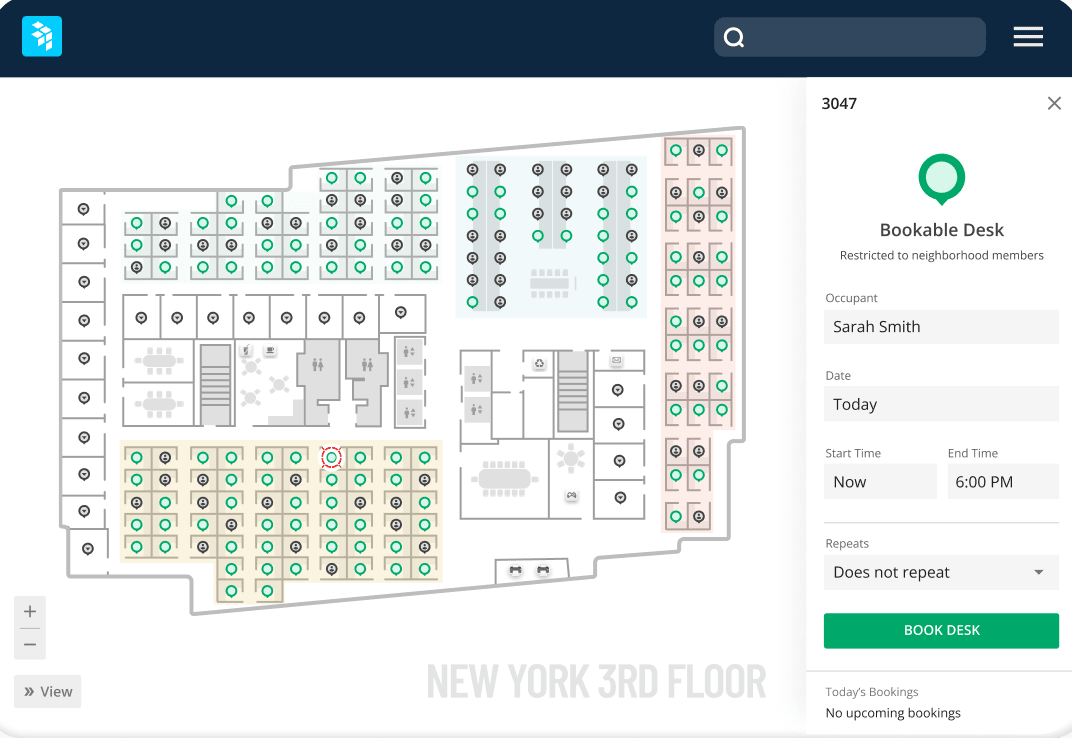
OfficeSpace offers indoor navigation to assist employees and visitors in finding their way around the office. This feature is accessible through a directory, where users can locate various 'Space Types' that can be assigned custom colours for easy identification on the floor plan. This function is particularly useful in large or complex buildings.
Space Management
OfficeSpace allows companies to manage their office space and facilities. It provides tools for space allocation, move management, desk booking, and more.
Desk and Meeting Room Booking
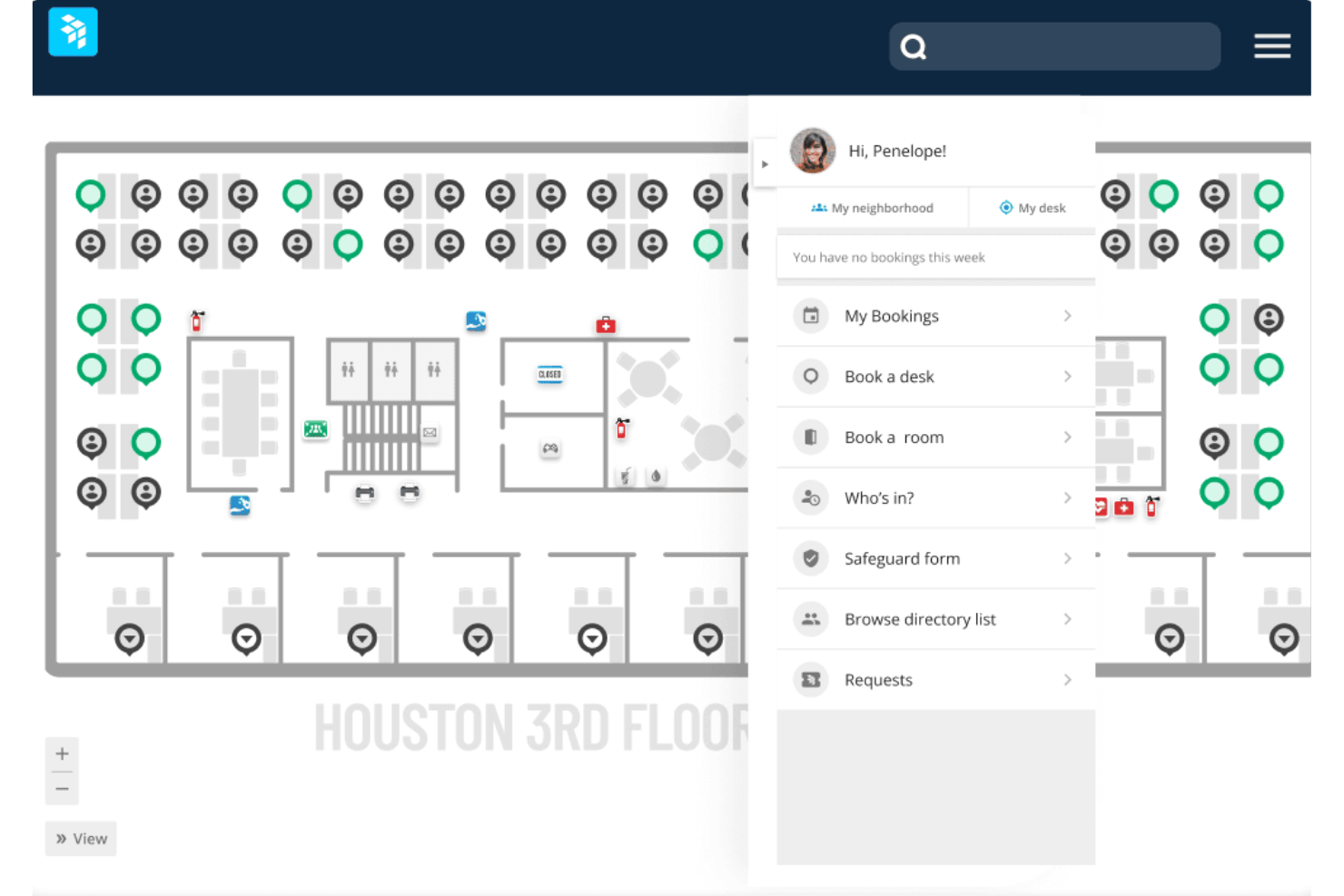
Employees can easily reserve desks or workspaces through OfficeSpace. The software shows real-time desk and room availability, so those “hot spots” are easily bookable for rotating meetings or scoring the best window seat. You can even see who is in the office that day, so you can swing by their desk.
Visitor Management
OfficeSpace enables contactless visitor check-in and screening. It prints visitor badges, notifies hosts when guests arrive, and is able to track and log visitors. OfficeSpace also allows you to easily book desks for guests and coworkers.
Maintenance Management
Companies can manage work orders and maintenance requests with OfficeSpace. It allows these tasks to be assigned to team members.
Reporting and Analytics
You can access easy-to-read reports on occupancy, bookings, and space trends. It gives you the data you need to make smarter real estate decisions.
Ease of Use
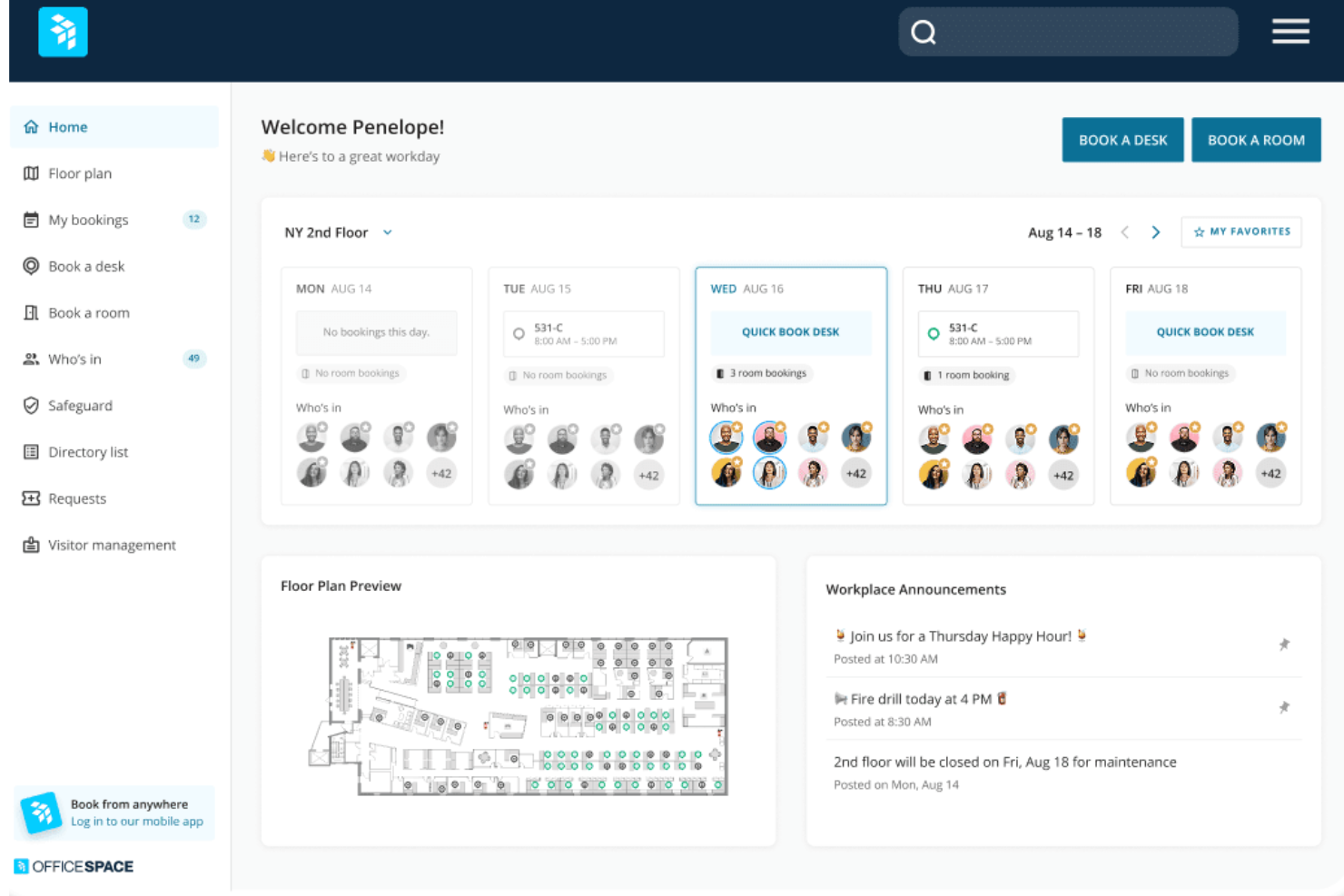
I find OfficeSpace has an intuitive interface and is relatively easy to use compared to some other office management systems. Core functions like desk booking, visitor check-in, and space allocation are straightforward for end users and administrators. The mobile app also provides a simple way for employees to access key features.
New Product Updates from OfficeSpace

OfficeSpace Adds Work Order Status and Cost Reports
OfficeSpace adds Work Order Status and Work Order Cost reports under the Reports menu. The new reports give facilities and operations teams built-in visibility into maintenance activity and spending for easier performance tracking. Highlights include:
- Work Order Status Report: Provides visibility into maintenance activity and work order status.
- Work Order Cost Report: Helps teams review maintenance costs directly within OfficeSpace.
- Built-In Reporting: Reduces reliance on manual spreadsheets for work order analysis.
Visit OfficeSpace’s official site for more details.
 for more details.
OfficeSpace Adds a Three-Level Space Types Hierarchy
OfficeSpace replaces its flat space type structure with a three-level hierarchy of Function → Category → Space Type. The new taxonomy helps organizations standardize space classification while supporting more consistent reporting, visualization, and space management. Highlights include:
- Three-Level Space Hierarchy: Organize spaces using standardized Functions with customizable Categories and Space Types.
- Improved Space Classification: Classify office, collaboration, amenity, technical, and other space types using a structured taxonomy.
- Enhanced Reporting: Analyze and filter workplace data by Function and Category across Insights Hub and other reporting tools.
- Floor Plan Visualization: Color floor plans by Function or Space Type for clearer space allocation and utilization insights.
Visit OfficeSpace's official site for more details.

OfficeSpace Adds Early Booking Access for Desk Reservations
OfficeSpace adds Early Booking Access for bookable desks, enabling admins to configure advance booking windows for different employee groups. The feature helps organizations prioritize desk reservations while keeping desks available for broader employee access as booking windows open. Highlights include:
- Group-Based Booking Windows: Set different advance booking windows for employee groups based on existing restrictions and custom employee fields.
- Multiple Restriction Tiers: Apply up to 10 booking tiers per desk, with the longest booking window automatically applied when employees belong to multiple groups.
- Bulk Configuration: Update Early Booking Access settings across multiple desks using the bulk editor.
Visit OfficeSpace's official site for more details.****
OfficeSpace Specs
- Access Management
- API
- Appointment Scheduling
- Batch Permissions & Access
- Calendar Management
- Chat
- Click-to-Dial
- Contact Management
- Custom Data Forms
- Custom Reports
- Customer Management
- Dashboard
- Dashboards
- Data Export
- Data Import
- Data Visualization
- Email Integration
- External Integrations
- Forecasting
- Google Apps Integration
- Lead Management
- Map Visualization
- Marketing Automation
- Mobile App
- Multi-User
- Notifications
- Resource Management
- Scheduling
- Self-service Portal
- Workflow Management
Alternatives to OfficeSpace




OfficeSpace FAQs
How quickly can your team get up and running with OfficeSpace?
Is there a mobile app for OfficeSpace?
Can OfficeSpace handle hybrid work schedules?
How secure is OfficeSpace for sensitive workplace data?
Does OfficeSpace support global or multi-location teams?
How does OfficeSpace’s AI help your team?
What kind of support does OfficeSpace provide after implementation?
Et ensuite ?
Pour rester informé de toute l’actualité de la gestion des ressources humaines, abonnez-vous à notre newsletter destinée aux dirigeants et managers. Vous recevrez des analyses et des recommandations spécialement conçues pour les cadres dirigeants et les professionnels RH, directement dans votre boîte de réception.