

I 10 migliori software per la salute e la sicurezza per il 2026

Elenco dei migliori software per la salute e la sicurezza


Il software per la salute e la sicurezza aiuta il tuo team a gestire i rischi sul luogo di lavoro, monitorare la conformità e mantenere un ambiente più sicuro attraverso strumenti digitali e automazione. Se stai cercando il miglior software per la salute e la sicurezza, probabilmente devi bilanciare requisiti normativi, benessere dei dipendenti e necessità di una reportistica affidabile, sostenendo al contempo una cultura della sicurezza.
Questa guida ti aiuterà a confrontare le migliori soluzioni per il 2026, così potrai trovare quella più adatta ai requisiti e alle sfide specifiche della tua organizzazione.
Perché fidarsi delle nostre recensioni sui software
Il nostro team testa e recensisce software dal 2012. In quanto esperti HR noi stessi, sappiamo quanto sia difficile — e importante — scegliere il software giusto.
Per questa guida, abbiamo valutato gli strumenti attraverso test pratici e ricerche indipendenti, assegnando un punteggio agli strumenti in base ai nostri criteri di selezione. Ci basiamo inoltre sulle competenze di leader di pensiero del settore e di professionisti HR attivi.
Le nostre recensioni riflettono il nostro giudizio editoriale umano, non un discorso di vendita.
Revisori esperti:
Riepilogo dei migliori software per la salute e la sicurezza
Questa tabella comparativa riassume i dettagli sui prezzi delle mie migliori selezioni di software per la salute e la sicurezza, per aiutarti a trovare quello più adatto al tuo budget e alle esigenze della tua azienda.
| Tool | Best For | Trial Info | Price | ||
|---|---|---|---|---|---|
| 1 | Ideale per tempistiche di implementazione rapide | Prova gratuita su richiesta | Da $3,600/anno | Website | |
| 2 | Ideale per modelli di ispezione personalizzabili | Piano gratuito disponibile | Da $24/utente/mese (fatturazione annuale) | Website | |
| 3 | Ideale per librerie di contenuti formativi integrati | Demo gratuita disponibile | Prezzo su richiesta | Website | |
| 4 | Ideale per moduli di conformità configurabili | Demo gratuita disponibile | Da $44/utente/mese (fatturato annualmente) | Website | |
| 5 | Ideale per la scalabilità nelle grandi aziende | Demo gratuita | Prezzi su richiesta | Website | |
| 6 | Ideale per la preparazione agli audit normativi | Demo gratuita disponibile | Prezzo su richiesta | Website | |
| 7 | Ideale per le funzionalità di gestione dei prodotti chimici | Demo gratuita disponibile | Prezzi su richiesta | Website | |
| 8 | Ideale per la conformità nel settore automobilistico | Demo gratuita disponibile | Prezzo su richiesta | Website | |
| 9 | Ideale per le capacità di ispezione mobile | Demo gratuita disponibile | Prezzo su richiesta | Website | |
| 10 | Ideale per dashboard analitici avanzati | Demo gratuita disponibile | Prezzi su richiesta | Website |
Recensioni dei migliori software per la salute e la sicurezza
Di seguito trovi i miei riepiloghi dettagliati dei software per la salute e la sicurezza inclusi nel mio elenco. Le mie recensioni offrono una panoramica approfondita delle funzionalità, dei casi d’uso migliori e delle integrazioni di ciascuna piattaforma, per aiutarti a trovare quella più adatta a te.

Ideale per tempistiche di implementazione rapide

EHS Insight è progettato per le organizzazioni che hanno bisogno di avviare rapidamente un software per la salute e la sicurezza. I suoi moduli preconfigurati e l'onboarding guidato aiutano i responsabili della sicurezza e i team di conformità a lanciare i processi principali senza lunghe configurazioni. Questo lo rende una scelta solida per le aziende che si trovano ad affrontare scadenze strette o rapidi cambiamenti normativi.
Perché ho scelto EHS Insight
Quando la velocità è fondamentale, EHS Insight si distingue per la sua capacità di implementazione rapida. La piattaforma offre modelli e flussi di lavoro preimpostati che consentono ai team di iniziare quasi immediatamente a monitorare incidenti, audit e azioni correttive. Mi piace che il processo di onboarding includa passaggi guidati, il che aiuta le organizzazioni a evitare ritardi e confusione. Per le aziende che devono soddisfare requisiti di conformità in tempi ridotti, queste funzionalità rendono EHS Insight una scelta pratica.
Funzionalità principali di EHS Insight
Oltre alla rapida configurazione, ho trovato anche queste funzionalità utili per i team di salute e sicurezza:
- Ispezioni mobili: Effettua e documenta le ispezioni di sicurezza direttamente da un dispositivo mobile.
- Gestione documentale: Archivia, organizza e accedi a politiche e procedure di sicurezza in una libreria centralizzata.
- Monitoraggio della formazione: Controlla il completamento della formazione dei dipendenti e lo stato delle certificazioni.
- Gestione ambientale: Monitora parametri ambientali come emissioni, rifiuti e consumo idrico.
Integrazioni di EHS Insight
Le integrazioni native non sono attualmente elencate.
Pros and Cons
Pros:
- Moduli preimpostati per un rapido avvio
- Notifiche email automatiche per attività scadute
- Gestione delle certificazioni integrata
Cons:
- Segnalati tempi di caricamento lenti delle dashboard
- I dettagli della traccia di controllo possono essere difficili da esportare


SafetyCulture è un software EHS ideato attorno a modelli personalizzabili per i controlli di salute e sicurezza. È particolarmente utile per i responsabili della sicurezza e i team operativi in settori come edilizia, produzione e ospitalità che desiderano standardizzare e digitalizzare le ispezioni. Con SafetyCulture puoi adattare le checklist alle esigenze del tuo sito e rispondere rapidamente ai cambiamenti nei requisiti di conformità.
Perché ho scelto SafetyCulture
Ciò che distingue SafetyCulture per me è la sua attenzione ai modelli di ispezione personalizzabili, fondamentale per i team con esigenze di sicurezza particolari o in evoluzione. Puoi creare checklist di ispezione da zero o modificare i modelli esistenti per adattarli ai protocolli e ai rischi specifici della tua organizzazione.
Ho scelto SafetyCulture perché consente di allegare foto, assegnare azioni correttive e automatizzare ispezioni ricorrenti, tutto nello stesso flusso di lavoro. Questa flessibilità lo rende una scelta forte per le organizzazioni che devono adattare rapidamente e costantemente i propri processi di sicurezza.
Funzionalità principali di SafetyCulture
Altre funzionalità che rendono SafetyCulture prezioso per i team di salute e sicurezza includono:
- Dashboard di analisi in tempo reale: Visualizza i risultati delle ispezioni e le tendenze della sicurezza man mano che i dati vengono raccolti.
- Generazione automatica dei report: Crea e condividi report dettagliati delle ispezioni immediatamente dopo il completamento.
- Strumenti di gestione delle risorse: Monitora lo stato delle attrezzature, i programmi di manutenzione e la cronologia degli asset.
- Modulo di segnalazione degli incidenti: Invia, traccia e gestisci gli incidenti sul lavoro per una migliore gestione dei rischi direttamente dalla piattaforma.
Integrazioni di SafetyCulture
Le integrazioni includono Tableau, Okta, SharePoint, Microsoft Teams, Power BI, Slack, Google Sheets, Dropbox, OneDrive e Box.
Pros and Cons
Pros:
- Supporta flussi di lavoro d'ispezione complessi
- L'app mobile funziona offline per i siti remoti
- I report automatici includono acquisizione di foto e firme
Cons:
- Manca di funzionalità avanzate per la manutenzione degli asset
- Non supporta invii anonimi

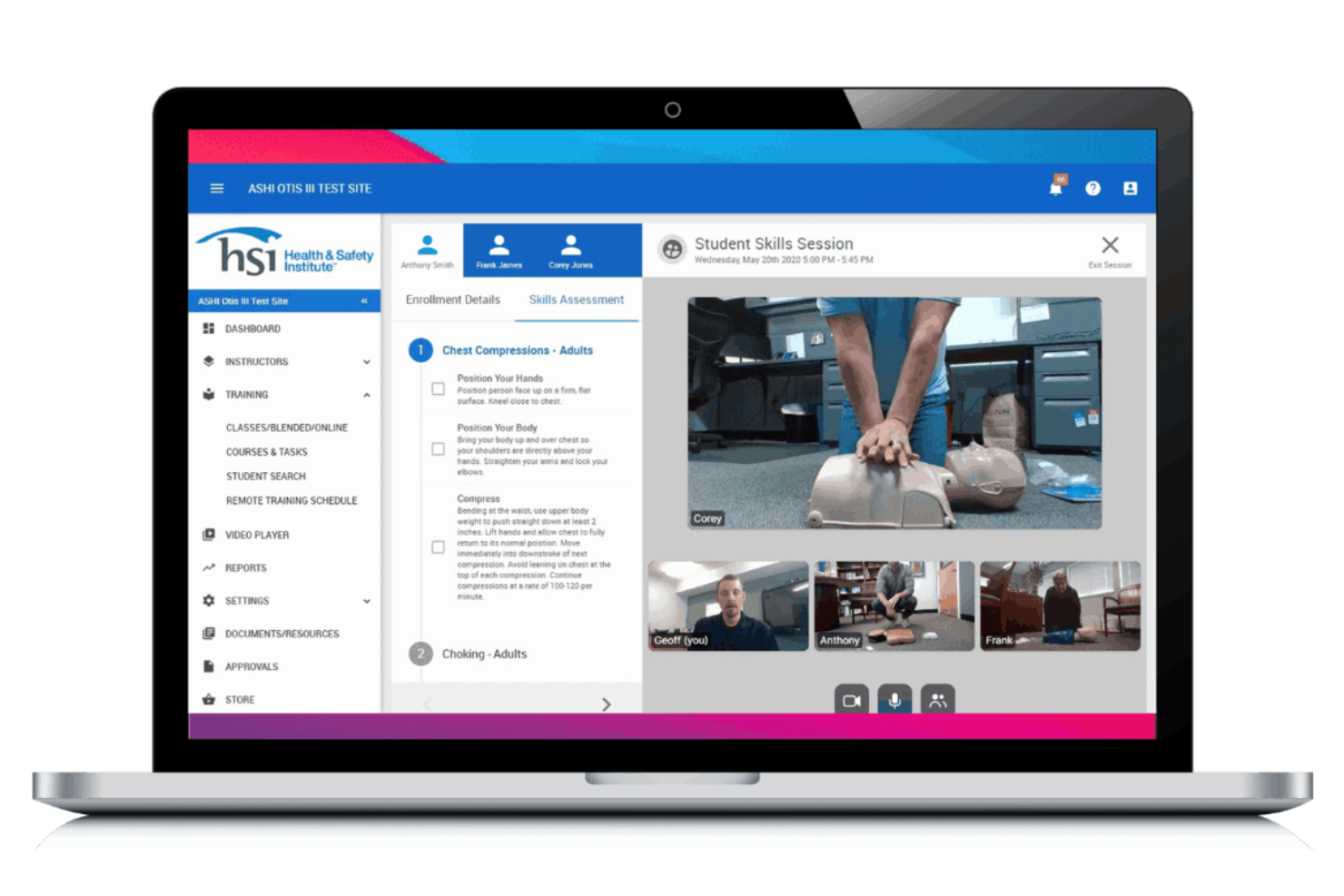
HSI offre una piattaforma per la salute e la sicurezza con una forte attenzione alle librerie di contenuti formativi integrati. È una soluzione pratica per le organizzazioni che necessitano di materiali per la sicurezza, la conformità e la formazione della forza lavoro pronti all’uso, senza dover creare i corsi da zero. I responsabili della sicurezza e i team HR possono utilizzare HSI per erogare, tracciare e gestire la formazione su una vasta gamma di argomenti normativi.
Perché ho scelto HSI
Ciò che distingue HSI è l’ampia libreria di contenuti formativi integrati, particolarmente preziosa per le organizzazioni che devono fornire velocemente formazione su sicurezza e conformità. La piattaforma include centinaia di corsi pronti che coprono i requisiti OSHA, DOT e altre normative, così i team non devono creare materiali da zero.
Apprezzo anche che HSI offra strumenti per tracciare il completamento dei corsi e automatizzare l’assegnazione della formazione in base al ruolo lavorativo. Per le aziende con esigenze formative continue e risorse limitate di progettazione didattica, queste funzionalità rendono HSI una scelta solida.
Funzionalità principali di HSI
Altre funzionalità che rendono HSI utile per i team di salute e sicurezza includono:
- Gestione degli incidenti: Registra, traccia e indaga gli incidenti sul lavoro da una dashboard centralizzata.
- Costruttore di corsi personalizzati: Crea e carica i tuoi materiali formativi insieme alla libreria integrata.
- Promemoria automatici: Invia notifiche programmate ai dipendenti per la formazione imminente o in ritardo.
- Report e analisi: Genera report dettagliati sull’avanzamento della formazione, sugli incidenti e sulle metriche di conformità.
Integrazioni HSI
Le integrazioni native attualmente non sono elencate.
Pros and Cons
Pros:
- Libreria di corsi conformi OSHA
- Autore di corsi integrato per contenuti personalizzati
- Assegnazione automatica della formazione per ruolo lavorativo
Cons:
- Workflow di gestione incidenti limitati
- Gli aggiornamenti della libreria dei corsi possono non seguire tempestivamente le nuove normative


Intelex si distingue per le organizzazioni che necessitano di una gestione della conformità altamente configurabile su più sedi o unità aziendali. Questa piattaforma è particolarmente adatta a responsabili della sicurezza e team di conformità in settori con requisiti normativi complessi o in evoluzione. Il suo approccio modulare consente di personalizzare flussi di lavoro, reportistica e documentazione in base alle specifiche esigenze operative.
Perché ho scelto Intelex
Ciò che mi ha colpito di Intelex è la possibilità di configurare i moduli di conformità in base alle esigenze uniche della propria organizzazione. Puoi creare flussi di lavoro personalizzati per la segnalazione degli incidenti, gli audit e le azioni correttive, il che è particolarmente utile per team che gestiscono diversi quadri normativi.
Apprezzo il fatto che Intelex consenta di adattare moduli, campi e processi di approvazione senza un forte coinvolgimento dell'IT. Questa flessibilità lo rende una scelta valida per le aziende che devono adattarsi a standard di conformità in continuo cambiamento o che operano in diverse giurisdizioni.
Funzionalità principali di Intelex
Altre funzionalità di Intelex che supportano i team dedicati a salute e sicurezza includono:
- Controllo dei documenti: Gestisci, monitora e aggiorna le politiche e procedure di sicurezza in un archivio centralizzato.
- Accesso tramite app mobile: Raccogli segnalazioni di incidenti, audit e osservazioni direttamente dal campo utilizzando dispositivi mobili.
- Dashboard in tempo reale: Visualizza dati di conformità e metriche di sicurezza con dashboard personalizzabili.
- Notifiche automatiche: Imposta avvisi e promemoria per attività, scadenze ed eventi di conformità.
Integrazioni di Intelex
Le integrazioni native non sono attualmente elencate.
Pros and Cons
Pros:
- Moduli di conformità e audit altamente configurabili
- Supporta operazioni multi-sito e multi-giurisdizione
- Controllo documentale integrato per la gestione delle policy
Cons:
- La configurazione iniziale richiede il coinvolgimento dell'IT
- Template di reportistica preimpostati limitati

Enablon è pensato per grandi organizzazioni che devono gestire requisiti complessi di salute e sicurezza su più siti e regioni. È particolarmente utile per i team aziendali EHS nei settori dell'energia, delle utility e della produzione che necessitano di automazione avanzata e reportistica su larga scala. Con Enablon, puoi coordinare la conformità globale, standardizzare i processi e gestire grandi volumi di dati di sicurezza su un'unica piattaforma.
Perché ho scelto Enablon
Quando si tratta di gestire la salute e sicurezza su larga scala, Enablon si distingue per la sua capacità di supportare organizzazioni grandi e complesse. La piattaforma offre automazione avanzata dei flussi di lavoro e dashboard centralizzate che aiutano i responsabili EHS a monitorare la conformità e il rischio su più siti. Ho scelto Enablon perché consente di standardizzare i processi a livello globale, pur adattandoli alle esigenze locali. Per le aziende con team distribuiti e grandi volumi di dati, queste caratteristiche rendono Enablon una scelta solida per la gestione scalabile di salute e sicurezza.
Caratteristiche principali di Enablon
Altre funzionalità che rendono Enablon prezioso per i team di salute e sicurezza includono:
- Segnalazione di incidenti da mobile: Acquisizione e invio dei dettagli degli incidenti direttamente da dispositivi mobili sul campo.
- Gestione audit: Pianifica, esegui e monitora audit con checklist personalizzabili e follow-up automatizzati.
- Libreria dei contenuti normativi: Accesso a requisiti normativi e standard aggiornati all'interno della piattaforma.
- Gestione sicurezza appaltatori: Utilizza strumenti specializzati per la gestione degli appaltatori per monitorare la conformità e le prestazioni in materia di sicurezza.
Integrazioni Enablon
Le integrazioni native al momento non sono elencate.
Pros and Cons
Pros:
- Modellizzazione avanzata dei rischi per ambienti aziendali
- Workflow per audit e ispezioni personalizzabili
- Contenuti normativi integrati per gli standard globali
Cons:
- Il processo di implementazione può essere lungo
- Interfaccia utente datata

UL Solutions offre una piattaforma per la salute e la sicurezza pensata per le organizzazioni che devono rimanere pronte per gli audit e conformi alle normative complesse. È particolarmente indicata per i responsabili della conformità e i professionisti EHS nei settori altamente regolamentati come produzione, chimica ed energia. Con UL Solutions, puoi centralizzare la documentazione, automatizzare il monitoraggio della conformità e prepararti agli audit con sicurezza.
Perché ho scelto UL Solutions
La preparazione agli audit normativi è una delle principali preoccupazioni per molte organizzazioni, e UL Solutions risponde a questa esigenza con strumenti mirati per la gestione della conformità. La piattaforma aiuta a mantenere registri aggiornati, automatizzare la reportistica normativa e gestire le azioni correttive legate ai risultati degli audit.
Apprezzo come UL Solutions centralizzi la documentazione relativa alla conformità, rendendo più semplice prepararsi alle ispezioni e dimostrare il rispetto degli standard. Per i team che affrontano audit frequenti o operano in settori altamente regolamentati, queste funzionalità rendono UL Solutions una scelta ideale.
Funzionalità principali di UL Solutions
Altre funzionalità che rendono UL Solutions prezioso per i team dedicati alla salute e sicurezza includono:
- Strumenti di valutazione dei rischi: Identifica, valuta e dai priorità ai rischi sul posto di lavoro utilizzando matrici di rischio integrate.
- Gestione degli incidenti: Registra, monitora e analizza gli incidenti sul posto di lavoro con flussi di lavoro configurabili.
- Monitoraggio della formazione: Segui lo stato della formazione dei dipendenti e automatizza i promemoria per le certificazioni obbligatorie.
- Gestione della documentazione: Gestisci, aggiorna e distribuisci le politiche e le procedure di sicurezza da un archivio centralizzato.
Integrazioni di UL Solutions
Attualmente non sono elencate integrazioni native.
Pros and Cons
Pros:
- Calendario di conformità automatizzato per le scadenze normative
- Strumenti integrati di valutazione e punteggio dei rischi
- Gestione degli incidenti con flussi di lavoro configurabili
Cons:
- Comunità di utenti pubblica o forum di supporto limitati
- Opzioni di personalizzazione dei report di base


VelocityEHS offre strumenti specializzati per la gestione dei prodotti chimici e la conformità normativa. È ideale per produttori, laboratori e team che gestiscono materiali pericolosi con severi requisiti regolatori. La piattaforma supporta la gestione delle SDS, l'etichettatura e la reportistica normativa per aiutare a mantenere operazioni sicure e conformi.
Perché ho scelto VelocityEHS
Ciò che distingue VelocityEHS è la sua profonda attenzione alla gestione dei prodotti chimici, un'esigenza fondamentale per molti team di salute e sicurezza. Il monitoraggio dell'inventario chimico della piattaforma consente di mantenere registri aggiornati delle sostanze pericolose in più sedi.
Apprezzo come la funzione di gestione delle SDS centralizzi le schede di sicurezza rendendole facilmente accessibili per la conformità e la formazione. Per le organizzazioni che devono rispettare normative rigorose sulla sicurezza chimica, questi strumenti specializzati aiutano a ridurre i rischi e semplificare la gestione quotidiana.
Caratteristiche principali di VelocityEHS
Altre funzionalità che rendono VelocityEHS utile per i team di salute e sicurezza includono:
- Gestione degli incidenti: Registra, monitora e analizza gli incidenti sul luogo di lavoro per supportare indagini ed azioni correttive.
- Strumenti di valutazione dei rischi: Effettua e documenta valutazioni dei rischi relativi ai diversi pericoli presenti sul posto di lavoro.
- Gestione di audit e ispezioni: Pianifica, esegui e monitora audit e ispezioni per garantire la conformità continua.
- Gestione della formazione: Assegna, monitora e documenta la formazione dei lavoratori sulla sicurezza e le certificazioni.
Integrazioni di VelocityEHS
Le integrazioni native non sono attualmente elencate.
Pros and Cons
Pros:
- Gestione estesa dell'inventario chimico e delle SDS
- Reportistica normativa automatizzata per materiali pericolosi
- Strumenti integrati per etichettatura conforme GHS
Cons:
- Ritardi occasionali negli aggiornamenti del database SDS
- Personalizzazione limitata dei layout della dashboard


KPA è progettato per le aziende del settore automobilistico che devono gestire requisiti di conformità e sicurezza specifici del settore. Questa piattaforma aiuta concessionarie, centri di assistenza e le relative attività automotive a rispondere alle normative OSHA, EPA e DOT con strumenti mirati. I suoi contenuti specializzati e i flussi di lavoro supportano i team nel monitoraggio della formazione, delle ispezioni e degli incidenti propri del settore automobilistico.
Perché ho scelto KPA
Ciò che distingue KPA è l’attenzione alle esigenze specifiche di conformità dell’industria automobilistica. La piattaforma offre moduli di formazione sulla sicurezza preimpostati e checklist di ispezione pensati per concessionarie, centri di assistenza e rivenditori di auto.
Apprezzo che KPA includa contenuti normativi per OSHA, EPA e DOT, aiutando i team a mantenersi aggiornati sui requisiti specifici del settore. Ciò la rende una scelta ideale per le aziende automobilistiche che devono gestire in un unico posto i complessi obblighi di conformità e sicurezza.
Funzionalità principali di KPA
Altre caratteristiche che rendono KPA utile per i team di salute e sicurezza includono:
- Gestione degli incidenti: Registra, monitora e indaga sugli incidenti sul posto di lavoro da una dashboard centralizzata.
- Monitoraggio delle azioni correttive: Assegna e controlla le attività di follow-up per affrontare le problematiche di sicurezza.
- Accesso tramite app mobile: Esegui ispezioni, audit e formazione da qualsiasi dispositivo mobile.
- Strumenti di reportistica personalizzabili: Crea ed esporta report sulle attività di conformità e sulle tendenze della sicurezza.
Integrazioni KPA
Le integrazioni native non sono attualmente elencate.
Pros and Cons
Pros:
- Contenuti formativi specifici per la conformità automobilistica
- L’app mobile supporta le ispezioni di sicurezza in loco
- Il monitoraggio degli incidenti include l’analisi della causa principale
Cons:
- Le opzioni di personalizzazione dei report sono limitate
- Non sono disponibili dettagli pubblici sui prezzi o sui piani
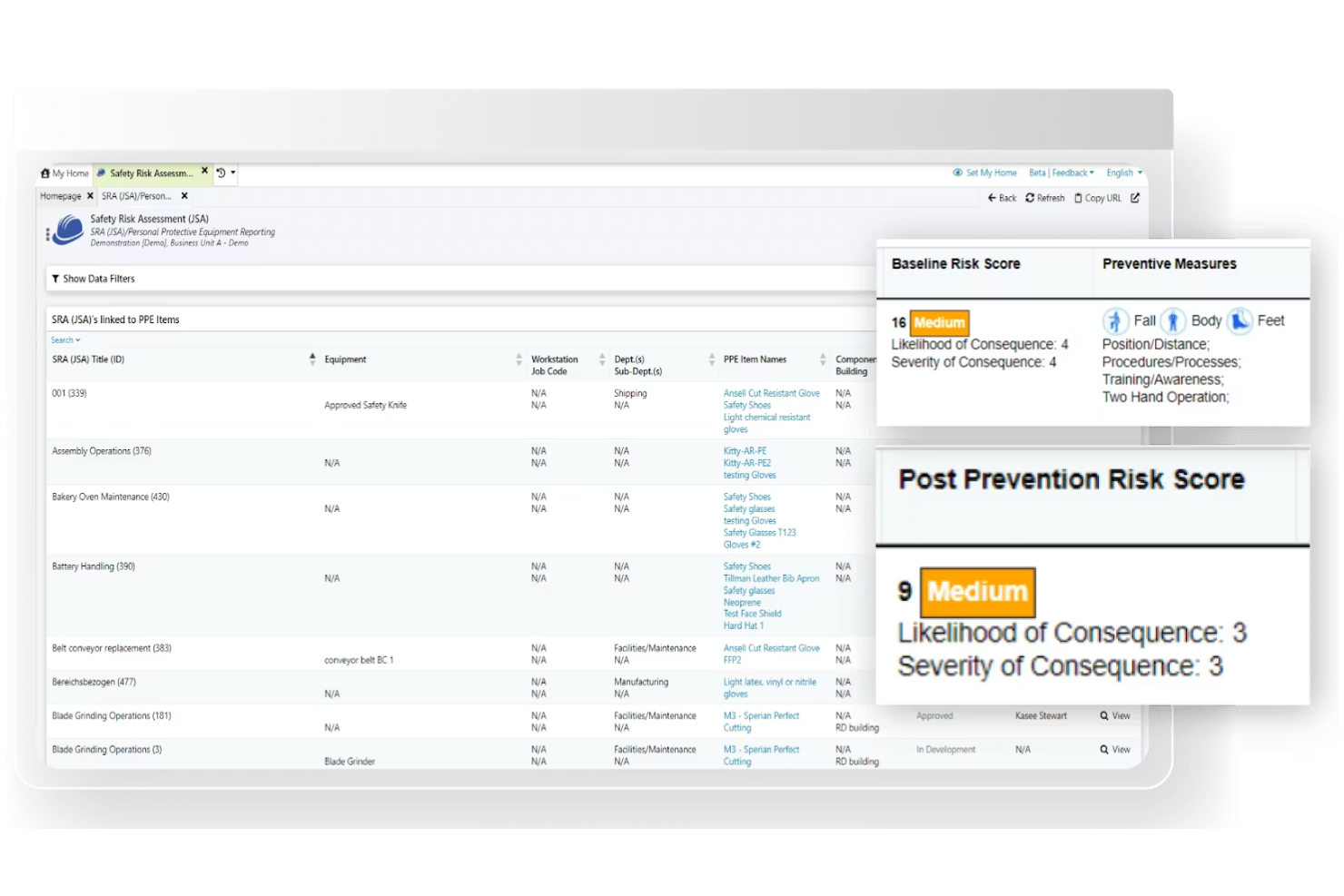
Benchmark Gensuite si distingue per le sue capacità di ispezione mobile, risultando una scelta eccellente per i team che devono condurre audit e ispezioni sul campo. È particolarmente utile per responsabili della sicurezza e leader operativi nei settori della manifattura, costruzione ed energia che necessitano di raccolta e reportistica dati in tempo reale. Con Benchmark Gensuite, puoi acquisire i risultati delle ispezioni direttamente in loco, assegnare azioni di follow-up e monitorare le azioni correttive da qualsiasi dispositivo.
Perché ho scelto Benchmark Gensuite
Le capacità di ispezione mobile rappresentano il vero punto di forza di Benchmark Gensuite, specialmente per le organizzazioni con siti di lavoro distribuiti o team sul campo. La piattaforma consente agli utenti di effettuare ispezioni direttamente dai loro dispositivi mobili, allegare foto e registrare i risultati in tempo reale. Apprezzo il fatto che si possano assegnare immediatamente le azioni correttive e monitorarne la risoluzione in tempo reale, agevolando così la continuità dei processi di sicurezza.
Per i team che devono documentare la conformità e rispondere rapidamente ai problemi ovunque si trovino, queste funzionalità rendono Benchmark Gensuite una scelta pratica.
Funzionalità principali di Benchmark Gensuite
Oltre ai suoi strumenti di ispezione mobile, Benchmark Gensuite offre anche altre funzionalità a supporto della gestione della salute e sicurezza:
- Segnalazione degli incidenti: Raccogli e gestisci gli incidenti sul luogo di lavoro con moduli e flussi di lavoro configurabili.
- Gestione degli audit: Pianifica, esegui e monitora audit di salute e sicurezza sul lavoro su più sedi da una dashboard centralizzata.
- Gestione dei documenti: Archivia, organizza e controlla l'accesso a politiche di sicurezza, procedure e documenti di conformità.
- Gestione della formazione: Assegna, monitora e documenta i requisiti formativi e le completazioni dei dipendenti.
Integrazioni di Benchmark Gensuite
Le integrazioni native non sono attualmente elencate.
Pros and Cons
Pros:
- Monitoraggio in tempo reale delle azioni correttive
- Supporto multilingue per team globali
- Analisi integrate per le tendenze delle ispezioni
Cons:
- Gli aggiornamenti dell'interfaccia utente possono essere incoerenti
- Opzioni limitate per la personalizzazione della dashboard

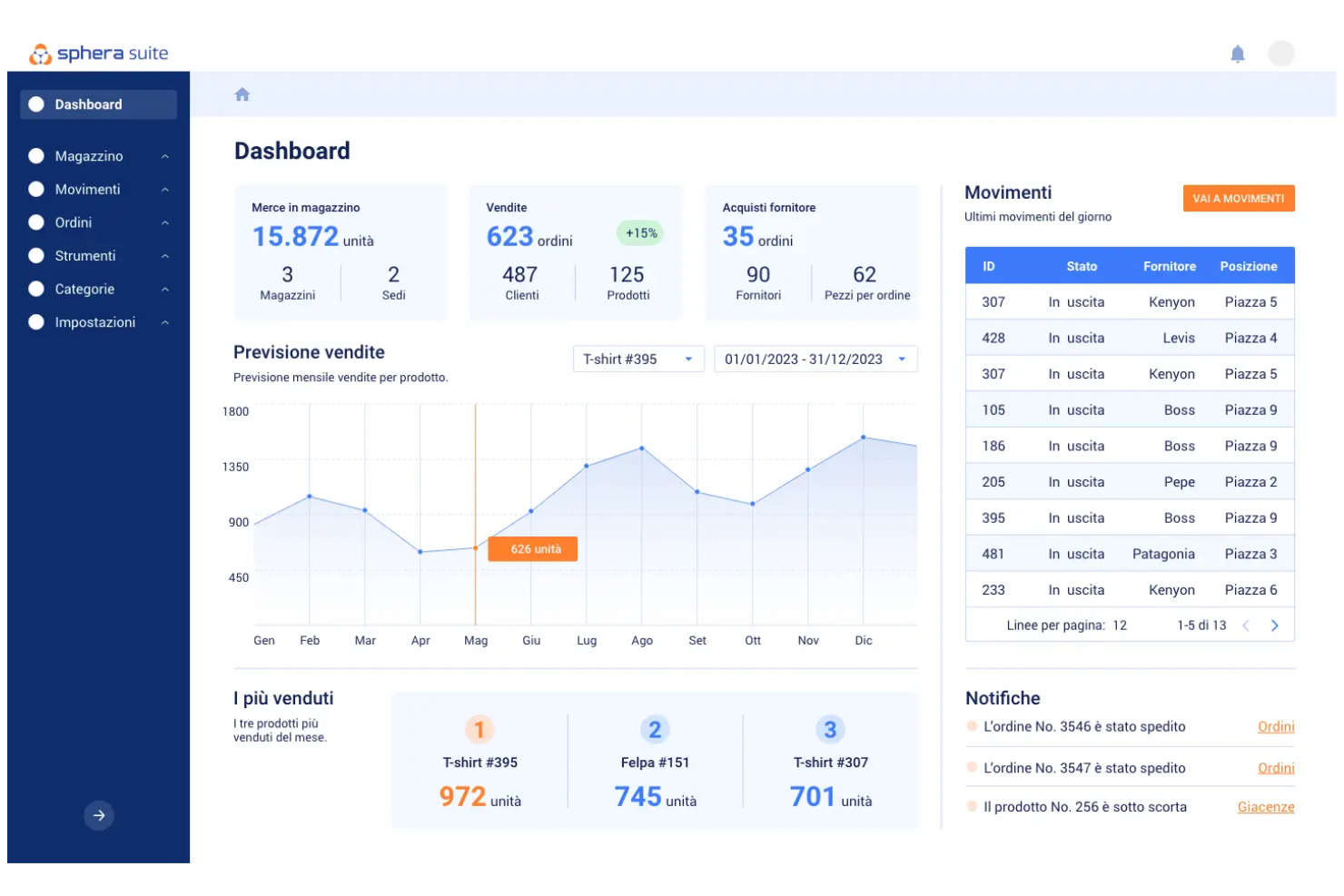
Sphera è pensato per le organizzazioni che desiderano una visibilità approfondita sulle prestazioni in materia di salute e sicurezza tramite analisi avanzate. È particolarmente indicato per responsabili EHS e team orientati ai dati in settori come chimica, petrolio e gas e manifatturiero che necessitano di monitorare le tendenze e individuare i rischi. Con Sphera, puoi visualizzare i dati sulla sicurezza, monitorare gli indicatori chiave di prestazione (KPI) e prendere decisioni informate grazie a dashboard personalizzabili.
Perché ho scelto Sphera
Ciò che mi ha attratto di Sphera è la sua attenzione verso dashboard analitici avanzati che aiutano i team dedicati alla salute e sicurezza a trasformare i dati in informazioni pratiche. La piattaforma offre visualizzazioni personalizzabili e reportistica in tempo reale, facilitando l’individuazione di tendenze e il monitoraggio delle metriche di sicurezza più importanti in tutta l’organizzazione.
Ho scelto Sphera perché consente di approfondire i dati sulla salute nei luoghi di lavoro e confrontare le prestazioni, caratteristica particolarmente preziosa per le organizzazioni che gestiscono ambienti a rischio complesso. Per i team che vogliono andare oltre il semplice monitoraggio della conformità e sfruttare l’analisi per una gestione della sicurezza proattiva, Sphera si distingue come una scelta eccellente.
Funzionalità principali di Sphera
Altre funzioni che rendono Sphera utile per i team HSE comprendono:
- Modulo di gestione degli incidenti: Registra, traccia e indaga sugli incidenti sul lavoro da un’unica dashboard centralizzata.
- Monitoraggio della conformità normativa: Monitora e gestisci la conformità a regolamenti e standard specifici del settore.
- Raccolta dati da dispositivi mobili: Raccogli direttamente dal campo osservazioni e dati di audit tramite dispositivi mobili.
- Monitoraggio delle azioni correttive: Assegna, monitora e documenta azioni correttive per gestire rischi o incidenti identificati.
Integrazioni Sphera
Le integrazioni native non sono attualmente elencate.
Pros and Cons
Pros:
- Dashboard avanzati per le metriche di prestazione
- Supporta metodologie complesse di valutazione dei rischi
- Aggiornamenti sui contenuti normativi per diversi settori
Cons:
- Occasionali ritardi nell'assistenza clienti
- Alcuni moduli richiedono licenze separate
Altri software per la salute e la sicurezza
Ecco alcune altre opzioni di software per la salute e la sicurezza che non sono entrate nel mio elenco, ma che vale comunque la pena prendere in considerazione:
- Vector Solutions
Ideale per il monitoraggio delle certificazioni del personale
- EcoOnline
Ideale per l'automazione delle segnalazioni di incidenti
- Evotix
Ideale per strumenti di coinvolgimento dei dipendenti


Come Valuto i Software per la Salute e la Sicurezza
Valuto gli strumenti su due livelli: le capacità di base come la segnalazione degli incidenti e la registrazione OSHA, che ogni piattaforma deve offrire, e i fattori distintivi che differenziano i fornitori.
Funzionalità Principali (Requisiti Minimi per Questa Lista)
Quando seleziono gli strumenti per la mia lista, valuto ciascuno su una scala da 0 (non offre la funzionalità) a 5 (eccelle in quest'area) per ciascuna delle funzionalità principali riportate di seguito. Calcolo poi il punteggio totale dello strumento come percentuale. Ogni strumento deve raggiungere un punteggio totale minimo del 65% per essere preso in considerazione per l'inclusione.
- Segnalazione di Incidenti e Infortuni: Cerco moduli di segnalazione strutturati, flussi di lavoro per le indagini e strumenti di analisi delle cause profonde che permettano ai team HR di raccogliere dettagli come foto o testimonianze direttamente dal campo.
- Gestione della Conformità Normativa: Ogni strumento dovrebbe generare registri e report obbligatori, come i moduli OSHA 300/300A, e idealmente supportare altri quadri normativi come ISO 45001 o equivalenti regionali.
- Monitoraggio di Formazione e Certificazioni: Verifico se la piattaforma assegna corsi in base al ruolo, invia promemoria per i rinnovi e tiene traccia del completamento, così da non dover inseguire manualmente certificazioni scadute per carrelli elevatori o spazi confinati.
- Valutazioni dei Rischi e Audit: I migliori strumenti offrono checklist di ispezione configurabili, valutazione del rischio e programmazione di controlli ricorrenti, evitando di basarsi su audit di sito gestiti tramite fogli di calcolo.
- Gestione delle Azioni Correttive: Valuto come ogni piattaforma collega le azioni correttive all'incidente o alla rilevazione dell'audit da cui originano, con assegnatari, scadenze e percorsi di escalation integrati.
- Analitiche e Dashboard sulla Sicurezza: La piattaforma dovrebbe evidenziare indicatori anticipatori e ritardati come il TRIR e le tendenze sugli incidenti in dashboard visivi, così che HR e management possano agire senza dover analizzare dati grezzi.
Una volta che ho una lista di strumenti che soddisfano i criteri, considero cosa distingue ogni piattaforma.
Fattori Differenzianti (Cosa Distingue i Fornitori)
Ecco come confronto e metto a paragone i diversi fornitori:
Funzionalità Distintive
L'accesso mobile e offline è importante quando la tua forza lavoro è distribuita tra magazzini, cantieri o sedi remote dove la connettività è instabile. Valuto anche la gestione di appaltatori e visitatori, poiché molti incidenti sul lavoro coinvolgono lavoratori terzi che necessitano di un onboarding separato e della verifica delle credenziali prima di accedere al sito. Si distinguono anche gli strumenti per la sicurezza basata sul comportamento. Le piattaforme che permettono ai supervisori di segnalare osservazioni positive insieme ai quasi-incidenti aiutano i team HR a passare dal monitoraggio reattivo degli incidenti alla creazione proattiva di una cultura della sicurezza.
Oltre le Funzionalità
Le integrazioni con sistemi HRIS sono fondamentali. Se la tua piattaforma sicurezza non sincronizza i dati dei dipendenti con sistemi come Workday, BambooHR o ADP, passerai ore ad aggiornare manualmente elenchi e strutture organizzative. Valuto anche la conformità agli standard di sicurezza e protezione dei dati, poiché questi strumenti gestiscono dati sensibili sulla salute che richiedono SOC 2, accessi basati sui ruoli e tracciabilità delle attività. La configurabilità specifica per settore completa la mia valutazione. Una ditta edile e un ospedale hanno profili di rischio molto diversi, quindi verifico se la piattaforma offre template personalizzati senza bisogno di sviluppatori.
Come scegliere un software per la salute e la sicurezza
È facile perdersi in lunghi elenchi di funzionalità e strutture tariffarie complesse. Per aiutarti a rimanere concentrato mentre affronti il processo di selezione del software più adatto alle tue esigenze, ecco una lista di fattori da tenere a mente:
| Fattore | Cosa considerare |
|---|---|
| Scalabilità | Il software supporterà la tua organizzazione durante la crescita, comprese nuove sedi, team o esigenze normative? Verifica i limiti di utenti e la gestione di più sedi. |
| Integrazioni | Lo strumento si collega al tuo sistema informativo delle risorse umane, al sistema paghe o ai sistemi di gestione dell'apprendimento? Conferma la presenza di integrazioni native ed evita di affidarti esclusivamente alle API o all'inserimento manuale dei dati. |
| Personalizzazione | Puoi adattare flussi di lavoro, moduli e reportistica ai processi e alla terminologia della tua organizzazione? Considera il livello di flessibilità necessario per la conformità o le politiche interne. |
| Facilità d'uso | Il tuo team adotterà rapidamente lo strumento? Cerca una navigazione chiara, requisiti di formazione minimi e accessibilità per tutti i tipi di utenti, compreso il personale operativo. |
| Implementazione e avviamento | Quanto tempo servirà per rendere operativo il sistema? Informati sul supporto alla migrazione, sulle risorse formative e sulla disponibilità di un avviamento guidato o di opzioni autonome da parte del fornitore. |
| Costo | I livelli di prezzo sono trasparenti e prevedibili? Tieni conto di tutti i costi, inclusi configurazione, assistenza e possibili componenti aggiuntivi, per evitare sorprese dopo l'acquisto. |
| Misure di sicurezza | Il software soddisfa gli standard di privacy e sicurezza dei dati della tua organizzazione? Cerca crittografia, controlli degli accessi e conformità a normative come GDPR o HIPAA. |
| Requisiti di conformità | Lo strumento ti aiuterà a rispettare le normative specifiche del settore? Verifica la presenza di monitoraggio integrato della conformità, registri di audit e supporto per la documentazione richiesta. |
Che cos'è un software per la salute e la sicurezza?
Il software per la salute e la sicurezza è una piattaforma digitale che aiuta le organizzazioni a gestire la sicurezza sul lavoro, la conformità e i rischi. Questi strumenti centralizzano attività come la segnalazione degli incidenti, la gestione della formazione, il monitoraggio delle certificazioni e la documentazione normativa.
Utilizzando un software per la salute e la sicurezza, i team delle risorse umane e i responsabili della sicurezza possono mantenere la conformità, monitorare i pericoli e favorire un ambiente di lavoro più sicuro per tutti i dipendenti.
Funzionalità
Quando selezioni un software per la salute e la sicurezza, presta attenzione alle seguenti funzionalità chiave:
- Segnalazione degli incidenti: consente ai dipendenti di registrare rapidamente incidenti sul lavoro, eventi mancati o pericoli, creando un registro digitale per le indagini e il follow-up.
- Monitoraggio delle certificazioni: monitora licenze, credenziali e requisiti formativi dei dipendenti, inviando avvisi prima delle scadenze per contribuire a mantenere la conformità.
- Gestione della formazione: assegna, eroga e monitora il completamento dei corsi sulla sicurezza, garantendo che tutto il personale riceva la formazione obbligatoria e gli aggiornamenti periodici.
- Gestione dei documenti: archivia e organizza le politiche e le procedure di sicurezza in un'unica posizione tramite un archivio consultabile.
- Strumenti per audit e conformità: supporta gli audit interni ed esterni generando report, monitorando le azioni correttive e conservando i registri della conformità.
- Accesso da dispositivi mobili: consente al personale sul campo e ai team remoti di accedere alle risorse sulla sicurezza, completare la formazione e segnalare incidenti da qualsiasi dispositivo.
- Flussi di lavoro personalizzabili: permette alle organizzazioni di adattare moduli, processi di approvazione e notifiche ai propri protocolli di sicurezza specifici.
- Analisi e pannelli di controllo: offre visibilità in tempo reale sulle tendenze relative alla sicurezza, sui progressi della formazione e sullo stato della conformità attraverso report visivi e pannelli di controllo.
- Strumenti per le indagini sugli incidenti: facilitano l'analisi delle cause principali e il monitoraggio delle azioni correttive per contribuire a prevenire incidenti futuri.
- Controlli degli accessi basati sui ruoli: limitano le informazioni sensibili e le funzioni del sistema agli utenti autorizzati, supportando la privacy dei dati e i requisiti normativi.
Funzionalità comuni di intelligenza artificiale nei software per la salute e la sicurezza
Oltre alle funzionalità standard dei software per la salute e la sicurezza elencate sopra, molte di queste soluzioni integrano l'intelligenza artificiale con funzionalità come:
- Analisi predittiva dei rischi: utilizza l'intelligenza artificiale per analizzare i dati sulle prestazioni EHS e identificare schemi ricorrenti, aiutando le organizzazioni a mitigare i pericoli prima che si verifichino.
- Categorizzazione automatizzata degli incidenti: applica l'elaborazione del linguaggio naturale ai rapporti sugli incidenti, classificando e assegnando automaticamente la priorità ai casi per una risposta e una risoluzione più rapide.
- Riconoscimento intelligente dei documenti: sfrutta l'intelligenza artificiale per analizzare, estrarre e organizzare le informazioni da documenti sulla sicurezza, certificati e moduli di ispezione, riducendo l'inserimento manuale dei dati.
- Rilevamento dei pericoli in tempo reale: si integra con sensori o flussi video per identificare in tempo reale condizioni o comportamenti non sicuri, avvisando i team della sicurezza affinché intervengano immediatamente.
- Monitoraggio della conformità basato sull'intelligenza artificiale: esamina continuamente la documentazione del tuo programma EHS per segnalare eventuali lacune, supportando il rispetto proattivo delle normative.
Vantaggi
L'implementazione di un software per la gestione della salute e della sicurezza offre diversi vantaggi al tuo team e alla tua azienda. Ecco alcuni dei benefici che puoi aspettarti:
- Migliore conformità normativa: le funzionalità automatizzate di monitoraggio, reporting e documentazione aiutano la tua organizzazione a rimanere aggiornata sulle normative di settore e sui requisiti degli audit.
- Risposta più rapida agli incidenti: la segnalazione digitale degli incidenti e gli avvisi in tempo reale consentono al tuo team di affrontare rapidamente pericoli e incidenti, riducendo i rischi e i tempi di inattività.
- Gestione centralizzata della sicurezza: un'unica piattaforma per formazione, certificazioni e documentazione semplifica l'organizzazione, l'accesso e l'aggiornamento delle informazioni sulla sicurezza.
- Maggiore responsabilizzazione della forza lavoro: gli strumenti di monitoraggio delle certificazioni e gestione della formazione garantiscono che i dipendenti completino i corsi obbligatori e mantengano le credenziali necessarie.
- Processo decisionale basato sui dati: analisi e pannelli di controllo offrono informazioni sulle tendenze relative alla sicurezza, aiutandoti a dare priorità alle iniziative per le azioni preventive.
- Miglioramento dell'inserimento e della formazione: i moduli formativi integrati e le risorse per l'inserimento supportano i nuovi assunti e lo sviluppo continuo dei dipendenti.
- Maggiore trasparenza e supervisione: i controlli degli accessi basati sui ruoli e i registri di audit offrono ai responsabili una visione chiara delle attività di sicurezza e della conformità in tutta l'organizzazione.
Costi e prezzi
La selezione del software per la salute e la sicurezza richiede una comprensione dei vari modelli e piani tariffari disponibili. I costi variano in base alle funzionalità, alle dimensioni del team, ai componenti aggiuntivi e ad altro ancora. La tabella seguente riassume i piani più comuni, i relativi prezzi medi e le funzionalità generalmente incluse nelle soluzioni software per la salute e la sicurezza:
Tabella comparativa dei piani per il software di salute e sicurezza
| Tipo di piano | Prezzo medio | Funzionalità comuni |
|---|---|---|
| Piano gratuito | $0 | Segnalazione di base degli incidenti, spazio di archiviazione limitato per i documenti e accesso per un numero ridotto di utenti. |
| Piano personale | $5-$15/utente/mese | Monitoraggio individuale delle certificazioni, moduli di formazione di base e semplici report sulla conformità. |
| Piano aziendale | $20-$40/utente/mese | Gestione degli incidenti basata sui team, gestione avanzata della formazione, dashboard analitiche e accesso mobile. |
| Piano per grandi aziende | $50-$100/utente/mese | Flussi di lavoro personalizzati, integrazioni con HRIS, controlli di sicurezza avanzati, assistenza dedicata e strumenti per gli audit. |
Domande frequenti sul software per la salute e la sicurezza
Ecco alcune risposte alle domande comuni sul software per la salute e la sicurezza:
In che modo il software per la salute e la sicurezza aiuta a garantire la conformità normativa?
Il software per la salute e la sicurezza aiuta a garantire la conformità normativa centralizzando la documentazione, automatizzando i promemoria per la formazione e generando report pronti per gli audit. Ciò facilita il monitoraggio delle attività di conformità, il mantenimento di registri aggiornati e la risposta rapida alle ispezioni o agli audit di sicurezza.
Il software per la salute e la sicurezza può essere utilizzato dai lavoratori sul campo o dai team remoti?
Sì, molte soluzioni software per la salute e la sicurezza offrono accesso mobile e funzionalità offline. Ciò consente ai lavoratori sul campo e ai team remoti di segnalare incidenti, completare la formazione e accedere ai documenti di sicurezza da qualsiasi luogo, anche senza una connessione Internet.
Cosa devo considerare quando passo dai processi manuali al software per la salute e la sicurezza?
Quando si passa dai processi manuali, occorre considerare le opzioni di importazione dei dati, le risorse per la formazione e la disponibilità di assistenza per l’avvio. È consigliabile cercare soluzioni intuitive che offrano modelli, configurazione guidata e assistenza clienti per aiutare il team a effettuare la transizione senza problemi e ridurre al minimo le interruzioni.
Quanto sono sicuri i dati dei dipendenti nel software per la salute e la sicurezza?
La maggior parte dei fornitori di software per la salute e la sicurezza utilizza crittografia, controlli di accesso e audit di sicurezza regolari per proteggere i dati dei dipendenti. Prima di prendere una decisione, è sempre opportuno verificare le certificazioni di sicurezza del fornitore e la conformità a normative come il GDPR o l’HIPAA.
Il software per la salute e la sicurezza può integrarsi con altri sistemi HR o aziendali?
Sì, molte piattaforme offrono integrazioni con HRIS, sistemi per la gestione delle buste paga e sistemi di gestione dell’apprendimento. Ciò contribuisce a ridurre l’inserimento duplicato dei dati, garantisce la coerenza tra le piattaforme e semplifica la reportistica e il monitoraggio della conformità.