I 10 migliori sistemi HRIS per le piccole imprese nel 2026

10 Selezione dei migliori HRIS per piccole imprese


Le migliori piattaforme HRIS aiutano le piccole imprese a semplificare le attività delle risorse umane, ridurre gli errori e mantenere organizzati i dati dei dipendenti in un unico luogo centrale, liberando al contempo tempo prezioso per attività più strategiche.
Quando i processi manuali si basano su fogli di calcolo, e-mail e strumenti non collegati tra loro, la gestione delle risorse umane diventa rapidamente caotica e dispendiosa in termini di tempo. Il sistema giusto automatizza le attività di routine, migliora la precisione e ti permette di concentrarti su ciò che conta davvero: sostenere e far crescere il tuo team.
In base alla mia esperienza diretta nella gestione di grandi volumi di dati dei dipendenti, ho selezionato le migliori soluzioni HRIS, intuitive, scalabili, convenienti e progettate pensando alle piccole imprese.
In questa guida troverai strumenti per semplificare ogni attività, dall'inserimento dei nuovi dipendenti alla gestione delle paghe e delle prestazioni, così potrai dedicare meno tempo all'amministrazione e più tempo alla costruzione di un ambiente di lavoro efficiente e motivante.
Perché fidarsi delle nostre recensioni sui software
Il nostro team testa e recensisce software dal 2012. In quanto esperti HR noi stessi, sappiamo quanto sia difficile — e importante — scegliere il software giusto.
Per questa guida, abbiamo valutato gli strumenti attraverso test pratici e ricerche indipendenti, assegnando un punteggio agli strumenti in base ai nostri criteri di selezione. Ci basiamo inoltre sulle competenze di leader di pensiero del settore e di professionisti HR attivi.
Le nostre recensioni riflettono il nostro giudizio editoriale umano, non un discorso di vendita.
Revisori esperti:
Tabella comparativa: HRIS per piccole imprese
Questa tabella comparativa riassume i dettagli dei prezzi delle mie migliori selezioni HRIS per i titolari di piccole imprese.
| Tool | Best For | Trial Info | Price | ||
|---|---|---|---|---|---|
| 1 | Miglior HRIS per piccoli team che assumono a livello globale | Demo gratuita disponibile | Da $5/dipendente/mese | Website | |
| 2 | Ideale con strumenti integrati di rilevazione presenze | Demo gratuita disponibile | Da $599/dipendente/mese | Website | |
| 3 | Ideale per i riscontri dei dipendenti | Demo gratuita disponibile | A partire da $8/utente/mese | Website | |
| 4 | Ideale per automazione buste paga e integrazioni | Demo gratuita disponibile | Prezzi su richiesta | Website | |
| 5 | Ideale per l’automazione dell’onboarding | Demo gratuita disponibile | Prezzo su richiesta | Website | |
| 6 | Ideale per un flusso HRIS-to-performance allineato | Demo gratuita disponibile | Prezzo su richiesta | Website | |
| 7 | Ideale per integrare paghe e HR | 30 giorni di prova gratuita | Da $6 USD/mese/dipendente | Website | |
| 8 | Ideale per il self-service dei dipendenti | Demo gratuita e prova gratuita disponibili | Prezzi su richiesta | Website | |
| 9 | Ideale per la gestione dei dati dei dipendenti | Prova gratuita disponibile | A partire da $99/mese | Website | |
| 10 | Ideale per piccole e medie imprese canadesi | Demo gratuita disponibile | Prezzi modulari, a partire da $6/dipendente/mese (in base al modulo) | Website |


Recensioni dei migliori HRIS per piccole imprese
Ecco una breve descrizione di ciascun HRIS, per presentare il caso d’uso migliore di ogni strumento, alcune funzioni degne di nota e schermate che offrono una panoramica dell’interfaccia utente.

Deel HR
Miglior HRIS per piccoli team che assumono a livello globale

Deel HR offre alle piccole imprese una piattaforma unica per gestire i dati dei dipendenti, le buste paga, la conformità e l'onboarding sia per i team locali che globali, aiutando i team HR a gestire processi complessi senza dover utilizzare diversi sistemi.
Per chi è ideale Deel HR?
Deel HR è una soluzione perfetta per le piccole imprese che assumono in diversi paesi e desiderano una sola piattaforma per gestire HR, buste paga e conformità senza un team HR dedicato.
Perché ho scelto Deel HR
Deel HR merita un posto tra le migliori soluzioni della mia lista perché copre in modo completo l’intero ciclo di vita delle risorse umane da un’unica piattaforma—cosa che la maggior parte degli HRIS per piccole imprese offre solo in parte. Apprezzo particolarmente la configurazione modulare: si può iniziare con le funzionalità principali dell’HRIS come i dati delle persone, il congedo e le approvazioni, per poi aggiungere pianificazione, valutazioni delle prestazioni o un ATS man mano che il team cresce. Ogni modulo utilizza la stessa base dati, quindi quando aggiorno la scheda di un collaboratore, il cambiamento si riflette su buste paga, conformità e reportistica senza bisogno di sincronizzazioni manuali. Le regole integrate per la conformità nei vari paesi (più di 150) consentono ai piccoli team di non doversi destreggiare tra le leggi locali ogni volta che devono assumere una nuova persona.
Funzionalità chiave di Deel HR
- Pianificazione della forza lavoro: Prevedi organici, ruoli e costi utilizzando dati aggiornati sulla forza lavoro e sulle assunzioni invece di file Excel.
- Reportistica anonima: Uno strumento integrato per le segnalazioni anonime che permette ai dipendenti di comunicare preoccupazioni in modo sicuro e senza rivelare la propria identità.
- Sistema di gestione candidature (ATS): Raccogli candidati automaticamente, gestisci colloqui e offerte, e integra i nuovi assunti direttamente nell’onboarding.
- Strumenti per prestazioni e coinvolgimento: Gestisci cicli di valutazione, definisci obiettivi, crea percorsi di apprendimento e misura il coinvolgimento dei dipendenti in un unico sistema.
Integrazioni Deel HR
Le integrazioni includono FaceUp, Snowflake, DefensX, Microsoft Finance, Kintsugi, ReFresh OS, Revo.ai, Keeper, Human Interest e Everyminute.
Pros and Cons
Pros:
- Strumenti self-service che riducono il carico amministrativo
- Gestione di spese e partecipazioni azionarie integrata nello stesso sistema
- Potenti funzionalità di conformità per assunzioni internazionali
- Report e analisi potrebbero essere più dettagliati
Cons:
- Personalizzazione limitata per flussi di lavoro HR avanzati
New Product Updates from Deel HR

Deel Expands Stablecoin Wallet to 80+ Countries
Deel expands its Stablecoin Wallet to 80+ countries with dollar-backed balances and optional rewards. This gives eligible contractors more ways to hold and manage earnings inside Deel. For more information, visit Deel’s official site.
 .
.
Ideale con strumenti integrati di rilevazione presenze
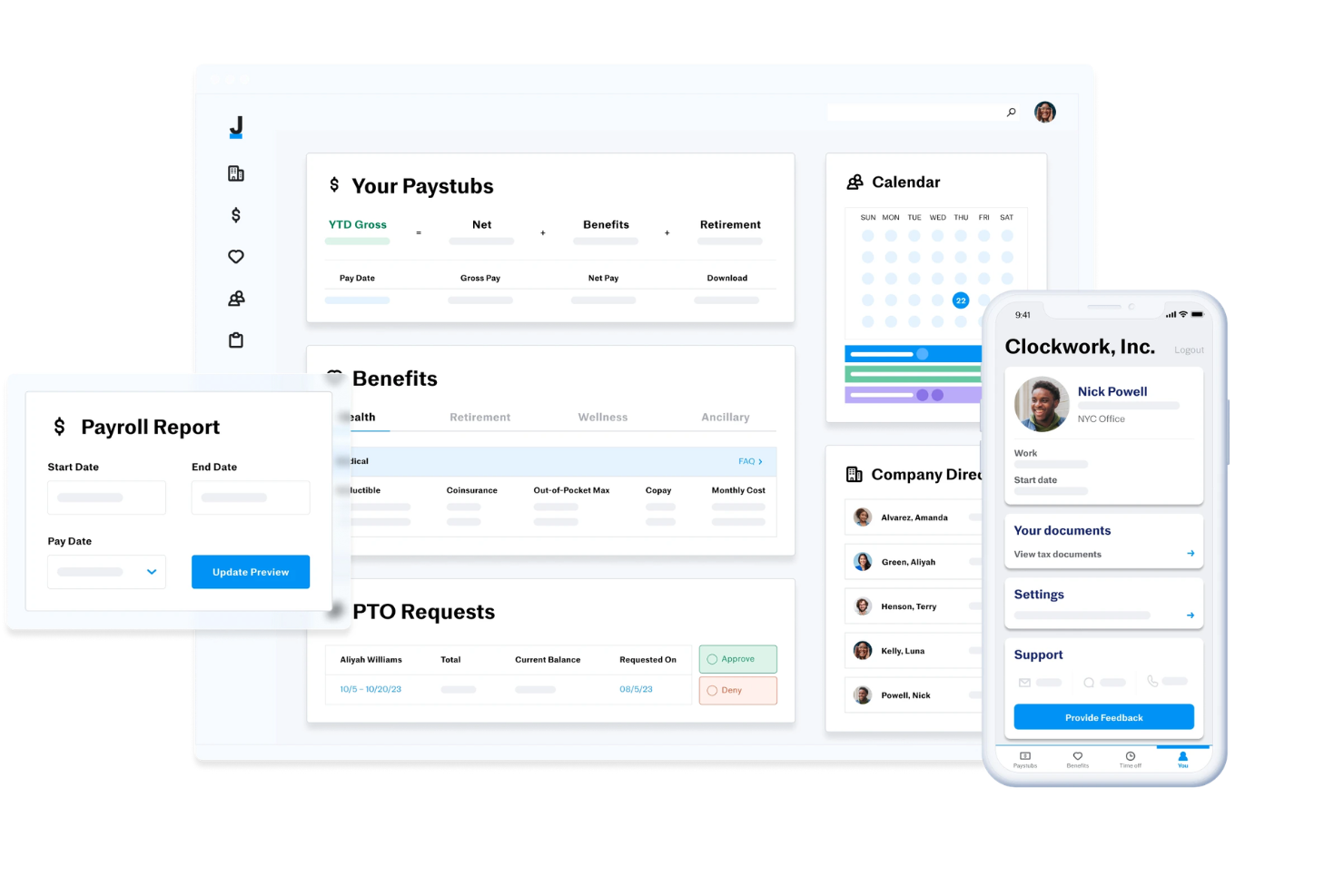
Justworks è una piattaforma HRIS per piccole imprese che combina gestione delle paghe, amministrazione dei benefit, gestione della conformità, rilevazione delle presenze e supporto HR in un unico sistema.
Per chi è Justworks?
Justworks è adatto a piccole imprese e startup che necessitano di un HRIS unificato per paghe, benefit e conformità in più stati.
Perché ho scelto Justworks
Ho scelto Justworks tra i migliori perché apprezzo come integra la rilevazione delle presenze direttamente nella sua piattaforma HRIS. Il mio team utilizza gli strumenti integrati per tracciare le ore lavorate e sincronizzarle automaticamente con le paghe. Inoltre, trovo vantaggioso che i dipendenti possano timbrare entrata e uscita dallo stesso sistema che usano per i benefit e le attività HR.
Servizi principali di Justworks
- Paghe multi-stato: Gestisci le paghe dei dipendenti in più stati da un unico cruscotto.
- Amministrazione dei benefit: Gestisci assicurazione sanitaria, 401(k) e altri benefit per i dipendenti in un unico posto.
- Archiviazione documenti HR: Conserva e organizza in modo sicuro importanti documenti HR all'interno della piattaforma.
- Supporto alla conformità: Accedi a strumenti e risorse integrate per rispettare le normative federali, statali e locali in materia di lavoro.
Integrazioni di Justworks
Le integrazioni native non sono chiaramente documentate. Justworks offre un'API per integrazioni personalizzate.
Pros and Cons
Pros:
- Rilevazione presenze integrata per il personale orario
- Onboarding digitale e iscrizione ai benefit
- Gestione automatica delle dichiarazioni fiscali e generazione W-2
Cons:
- Le funzionalità di reportistica non consentono una personalizzazione avanzata
- La rilevazione delle ferie manca di impostazioni di maturazione dettagliate

Ideale per i riscontri dei dipendenti
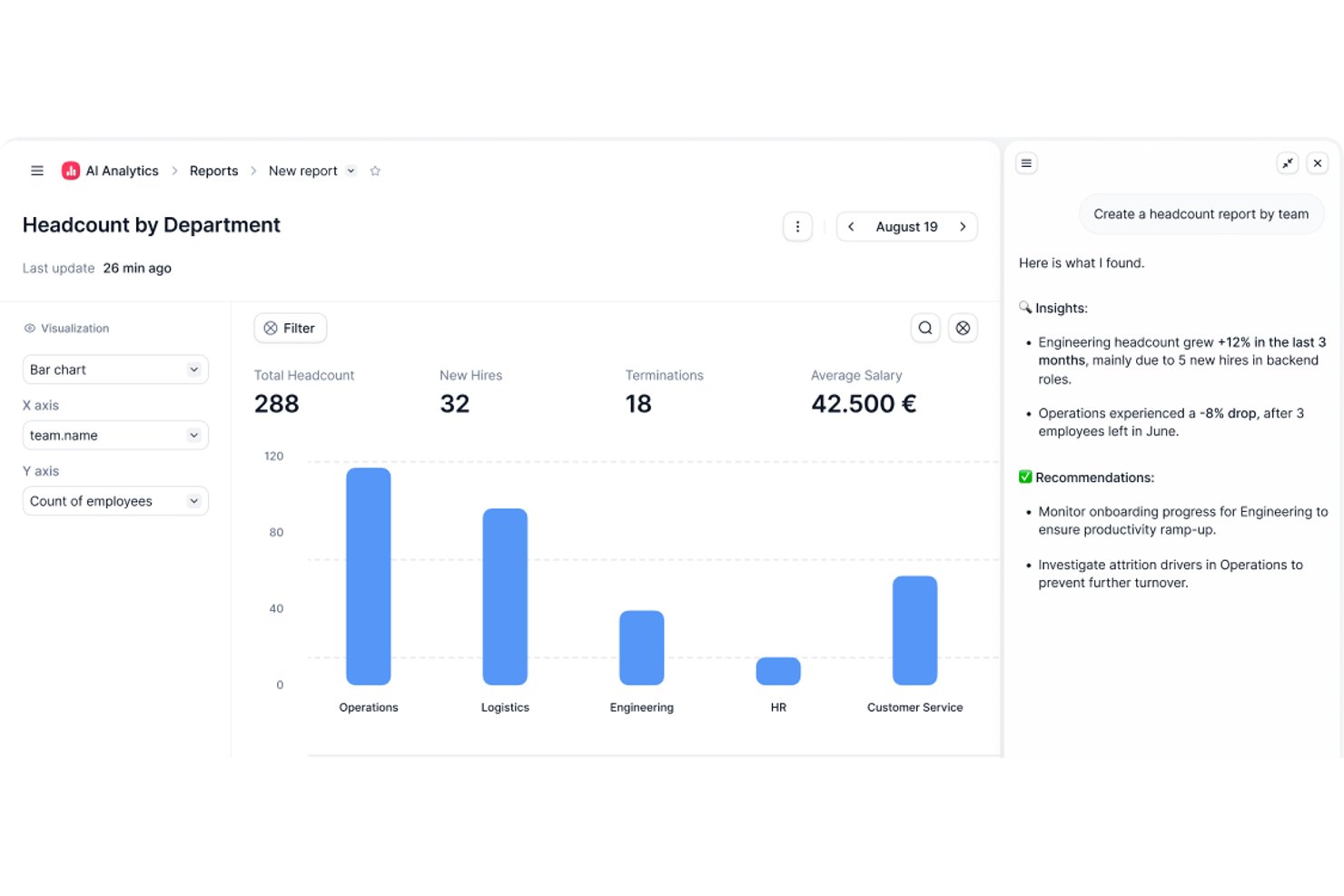
Factorial è un sistema informativo delle risorse umane basato sul cloud, progettato per aiutare le piccole imprese a gestire i propri processi HR. È una soluzione completa per tutto ciò che riguarda le risorse umane, dall'inserimento dei dipendenti e dal monitoraggio delle ore alla gestione delle prestazioni e all'amministrazione dei benefit. Il portale per i dipendenti è estremamente utile. Consente ai dipendenti di accedere ai propri dati personali, richiedere permessi e visualizzare le buste paga, tutto da un unico luogo. Anche la funzione di monitoraggio delle ore è un grande vantaggio. Semplifica il monitoraggio delle ore lavorate, degli straordinari e delle assenze. E non dimentichiamo la funzione di gestione delle prestazioni. Consente di impostare obiettivi, monitorare i progressi e fornire riscontri, tutto in tempo reale.
Factorial va oltre il software HR standard integrando una funzione intelligente di gestione dei documenti. Questa funzione utilizza una tecnologia avanzata di riconoscimento ottico dei caratteri (OCR) per scansionare ed estrarre automaticamente le informazioni rilevanti da vari documenti relativi alle risorse umane, come contratti, curriculum e fatture. Ciò non solo riduce l'inserimento manuale dei dati, ma garantisce anche accuratezza e coerenza dei dati. Il sistema può categorizzare i documenti, estrarre i dettagli principali e collegarli ai profili dei dipendenti o ai progetti pertinenti.
Factorial si distingue perché dà priorità al benessere dei dipendenti attraverso un modulo dedicato che consente loro di fornire riscontri anonimi, segnalare problemi e suggerire miglioramenti. Questo modulo offre uno spazio sicuro in cui i dipendenti possono esprimere le proprie opinioni senza timore di ritorsioni, favorendo una cultura della comunicazione aperta e trasparente. Include inoltre funzionalità di analisi del sentiment che aiutano i team HR a identificare le tendenze e ad affrontare proattivamente i potenziali problemi.
Le integrazioni includono Sage, Gmail, Payflow, Dynamics 365, LinkedIn, TravelPerk, PowerBI, Indeed, Recruitee, Slack e altri.
Factorial costa a partire da $6.50/dipendente/mese e include una prova gratuita di 14 giorni. È inoltre possibile richiedere una demo gratuita per verificare se il software soddisfa le proprie esigenze specifiche.

Ideale per automazione buste paga e integrazioni
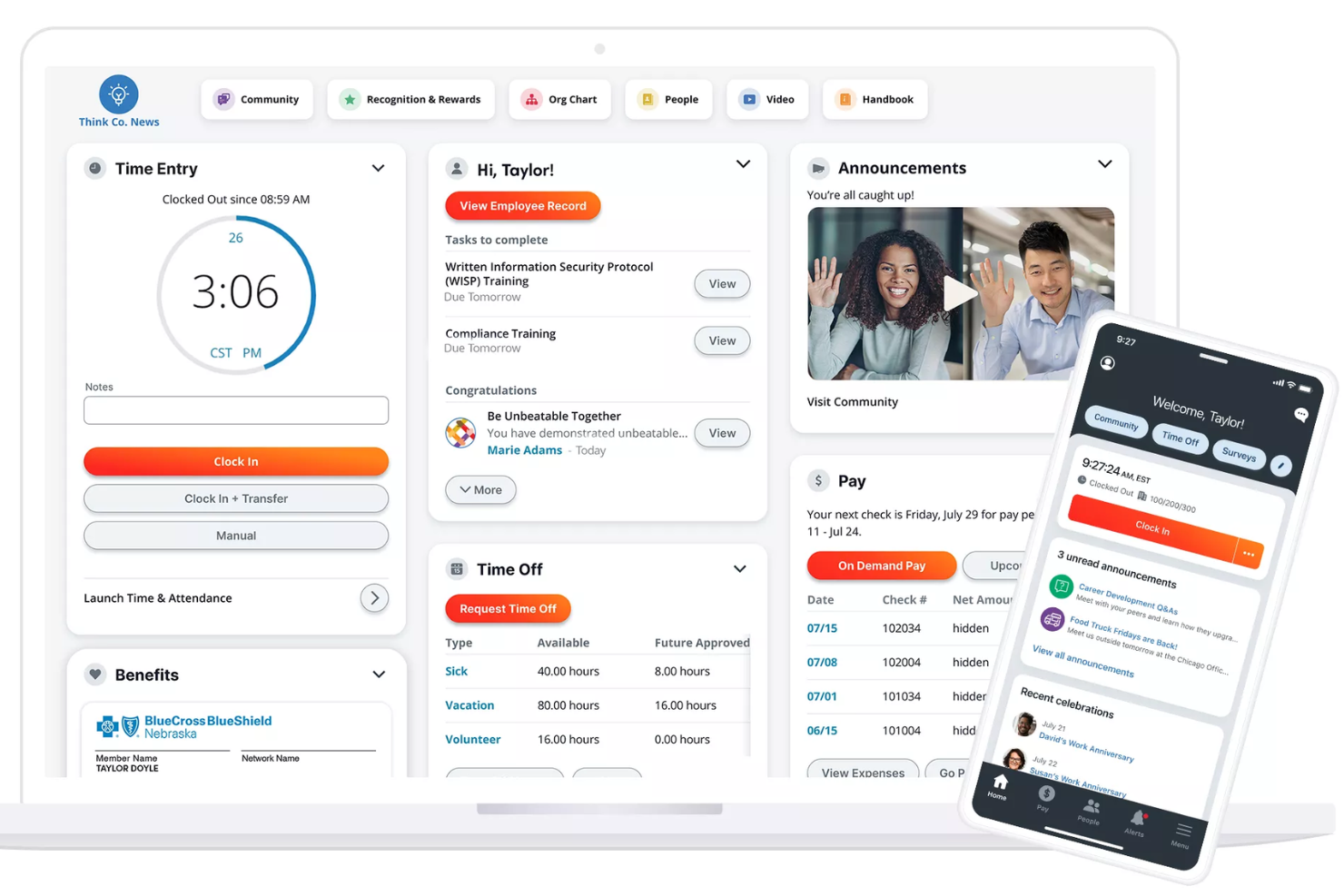
Paylocity offre alle piccole imprese una piattaforma HRIS basata su cloud che semplifica la gestione di buste paga, benefit e compiti principali delle risorse umane, permettendo ai team di gestire le operazioni del personale in un unico posto.
Per chi è ideale Paylocity?
Paylocity è adatto per piccole e medie imprese che necessitano di una piattaforma unificata per gestire buste paga, risorse umane e benefit senza avere un grande team HR.
Perché ho scelto Paylocity
Paylocity si merita un posto nella mia shortlist grazie alla sua automazione delle buste paga, che gestisce con precisione i dettagli che spesso creano problemi ai piccoli team HR. Apprezzo in particolare la Dashboard di Prontezza del Payroll, che evidenzia le attività critiche prima del giorno dell'elaborazione e svolge controlli per segnalare problemi come aumenti di stipendio inaspettati prima dell'invio. In pratica, ciò significa che il mio team può individuare errori in modo proattivo invece di doverli risolvere dopo. Dal punto di vista delle integrazioni, Paylocity si connette direttamente a provider 401(k) e di benefit, sistemi ERP e piattaforme di contabilità generale così ore e allocazioni di lavoro fluiscono automaticamente nelle buste paga senza necessità di inserimenti manuali.
Caratteristiche principali di Paylocity
- Supporto decisionale per i benefit: Fornisce ai dipendenti raccomandazioni personalizzate sui piani durante l'iscrizione, basate sulle loro preferenze e situazioni individuali.
- Pagamento su richiesta: Permette ai dipendenti di accedere ai compensi maturati prima del giorno di paga, offrendo un'opzione di accesso anticipato al salario senza interrompere il ciclo di busta paga.
- Geolocalizzazione fiscale: Verifica la posizione di ogni dipendente per assicurarsi che paghino le tasse corrette, con Paylocity che agisce come Agente di Segnalazione Registrato presso l'IRS in tutti i 50 stati.
- Portale self-service per i dipendenti: Offre ai dipendenti accesso diretto a cedolini, richieste di ferie, iscrizione ai benefit e saldo dei conti spesa da qualsiasi dispositivo.
Integrazioni di Paylocity
Le integrazioni includono QuickBooks, NetSuite, Xero, ADP, SAP Concur, Indeed, Slack, Microsoft Teams, Google Workspace e Airbase.
New Product Updates from Paylocity

Paylocity Expands Expense and Purchase Request Tools
Paylocity adds connected personal cards, smarter expense categorization, and a streamlined purchase request experience. This reduces manual entry and helps finance teams manage expenses and approvals more efficiently. For more information, visit Paylocity’s official site.
 .
.
HiBob
Ideale per l’automazione dell’onboarding
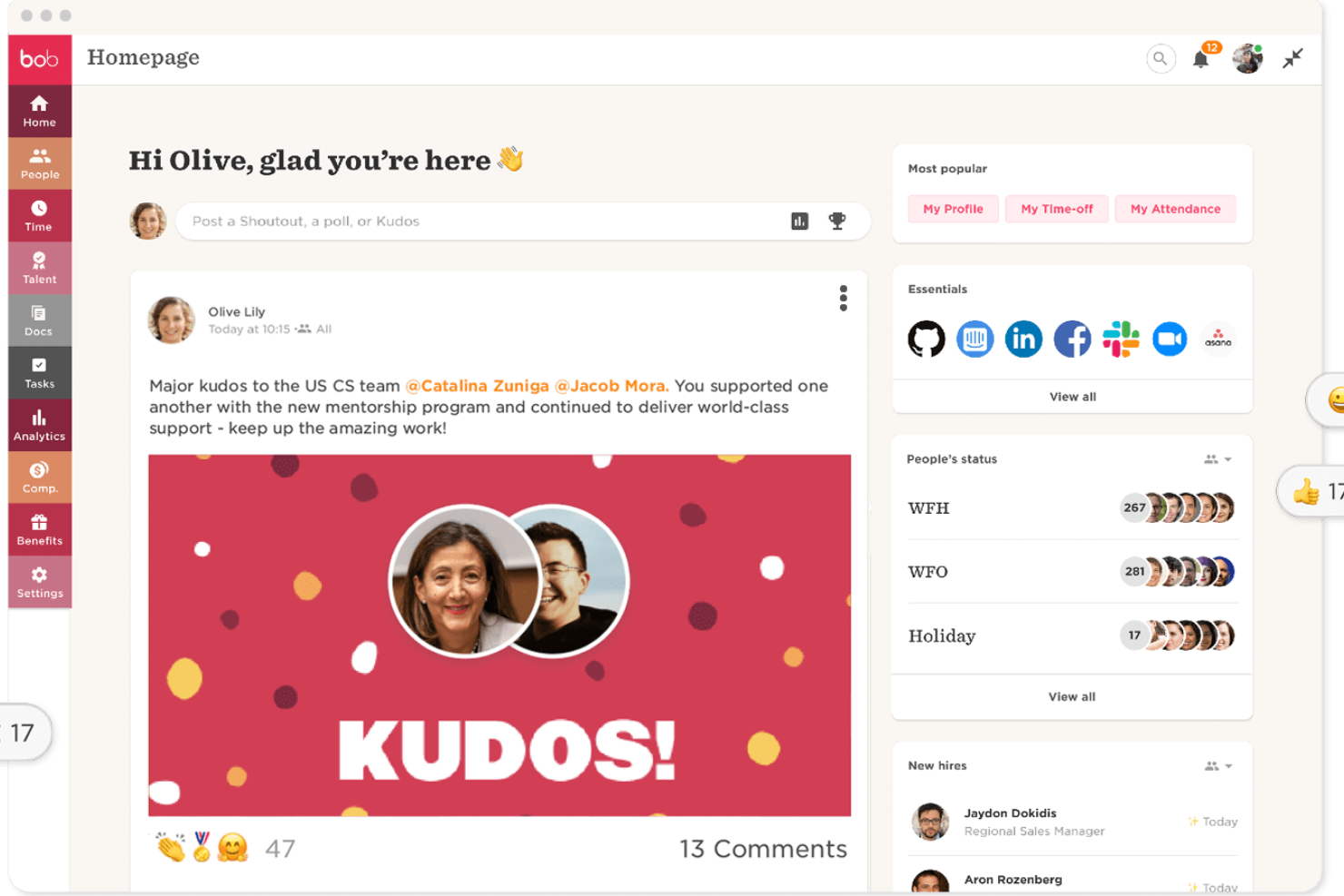
HiBob è una piattaforma HR moderna pensata per le piccole imprese che desiderano centralizzare i processi HR, automatizzare i flussi di lavoro e migliorare il coinvolgimento dei dipendenti durante tutto il ciclo di vita del dipendente.
Per chi è ideale HiBob?
HiBob è perfetto per aziende di piccole e medie dimensioni che hanno bisogno di una piattaforma HR orientata alle persone per gestire una forza lavoro in crescita senza complicare troppo la struttura HR.
Perché ho scelto HiBob
HiBob si guadagna un posto tra i migliori della mia lista per la cura con cui è stata progettata l’automazione dell’onboarding. Mi piace che si possano creare flussi di onboarding illimitati e personalizzare ciascuno per team, dipartimento o sede. La funzione di pre-onboarding è particolarmente utile: i nuovi assunti possono completare il profilo, caricare documenti e consultare i materiali aziendali prima del primo giorno, così nella prima giornata possono concentrarsi sulle persone invece che sulle scartoffie. Apprezzo anche che i compiti possano essere assegnati automaticamente a manager, IT e colleghi, così nulla va perso e l’HR non deve rincorrere nessuno.
Caratteristiche principali di HiBob
- Cruscotto di analisi delle persone: Monitora il numero, la retention, l’assenteismo e gli indicatori di crescita usando dati in tempo reale, poi pianifica e condividi report direttamente con la leadership.
- Valutazioni delle prestazioni a 360 gradi: Gestisci cicli di valutazione strutturati che includono feedback tra pari, manager e autovalutazioni, con obiettivi allineati a livello di team e aziendale.
- Gestione ferie e assenze: I dipendenti possono richiedere e i manager approvare ferie, malattia e festività direttamente dalla piattaforma.
- Sondaggi ai dipendenti: Esegui sondaggi di esperienza o coinvolgimento nei momenti chiave e visualizza i risultati in un cruscotto analitico integrato.
Integrazioni con HiBob
Le integrazioni includono ADP, Breezy HR, Globalization Partners, Paylocity, Trinet, Xero, Sequoia, Greenhouse, Slack, Deel e NetSuite.
Pros and Cons
Pros:
- Flussi di onboarding personalizzabili per diversi ruoli o sedi
- Strumenti di coinvolgimento efficaci come i sondaggi e il monitoraggio eNPS
- Buone integrazioni native per payroll, ATS e strumenti di collaborazione
Cons:
- La personalizzazione dei report può richiedere tempo per essere configurata
- Il modulo di valutazione delle performance manca di funzioni di calibrazione che i team più grandi si aspettano

Leapsome
Ideale per un flusso HRIS-to-performance allineato

Leapsome offre alle piccole imprese una piattaforma HR unificata che collega i dati dei dipendenti, la gestione delle prestazioni e gli strumenti di coinvolgimento per aiutare i team HR a gestire i processi del personale e favorire lo sviluppo in un unico luogo.
Per chi è più indicato Leapsome?
Leapsome è particolarmente adatto a piccole e medie imprese che desiderano HR e gestione delle performance in un unico sistema connesso.
Perché ho scelto Leapsome
Leapsome si è guadagnato il suo posto nella mia selezione grazie all’integrazione tra dati HRIS e flussi di lavoro relativi alle performance—una caratteristica che la maggior parte degli strumenti HR per piccole imprese tratta come sistemi separati. Mi piace che, quando viene aggiunto un nuovo assunto all’HRIS, questo possa essere automaticamente iscritto ai percorsi di onboarding e assegnato agli obiettivi del team senza interventi manuali. Il collegamento tra Reviews + Goals è particolarmente utile: il mio team può collegare i progressi OKR direttamente nei cicli di performance review, così i manager non scrivono feedback nel vuoto. L’Assistente di Revisione AI raccoglie inoltre il contesto da feedback precedenti, dati sugli obiettivi e note di riunione per costruire valutazioni più coerenti e basate su prove.
Funzionalità principali di Leapsome
- Profili dipendenti e organigramma: Archivia e gestisci dati dei dipendenti, linee di reporting e strutture di team in una directory centralizzata.
- Sondaggi di coinvolgimento: Avvia sondaggi rapidi e monitora il sentiment dei team utilizzando modelli personalizzabili.
- Gestione delle retribuzioni: Pianifica e documenta i cicli salariali con flussi di approvazione integrati legati ai registri dei dipendenti.
- Gestione dei meeting: Struttura 1:1 e riunioni di team con agende condivise, punti di discussione e azioni.
Integrazioni Leapsome
Le integrazioni includono Slack, Microsoft Teams, Jira, BambooHR, Workday, Greenhouse, ADP Workforce Now, DATEV, Gusto e Okta.
Pros and Cons
Pros:
- I sondaggi di coinvolgimento includono benchmark e suggerimenti concreti per i prossimi passi
- Automatizza onboarding, rilevamento delle presenze e sincronizzazioni delle buste paga per ridurre le attività manuali
- Collega direttamente i dati HRIS con obiettivi, revisioni e flussi di sviluppo
Cons:
- Personalizzazione limitata per esigenze aziendali di nicchia
- L’esperienza mobile è meno curata rispetto a quella desktop

Gusto
Ideale per integrare paghe e HR

Gusto è una piattaforma HR tutto-in-uno progettata per le piccole imprese che vogliono semplificare paghe, benefit e attività fondamentali di gestione del personale senza dover gestire sistemi diversi.
Per Chi È Ideale Gusto?
Gusto è perfetto per titolari di piccole imprese e generalisti HR che hanno bisogno di gestire paghe, assunzioni e benefit dei dipendenti in un'unica piattaforma, senza un team HR dedicato.
Perché Ho Scelto Gusto
Ho scelto Gusto perché colma il divario tra paghe e risorse umane meglio della maggior parte degli strumenti per piccole imprese. Quando elabori le paghe su Gusto, queste si sincronizzano automaticamente con la rilevazione delle presenze, i saldi ferie e l'iscrizione ai benefit, eliminando la necessità di riconciliazioni manuali tra sistemi. Mi piace anche che l'onboarding dei nuovi assunti sia direttamente collegato alla configurazione delle paghe: i dipendenti si autogestiscono nell'onboarding, inseriscono i propri dati e vengono iscritti ai benefit prima che venga elaborato il primo stipendio. Gusto gestisce inoltre la dichiarazione automatica delle tasse in tutti e 50 gli stati ogni volta che vengono elaborate le paghe, riducendo così l'onere della conformità per i piccoli team senza una funzione HR o finanziaria dedicata.
Caratteristiche Principali di Gusto
- Gestione dei benefit: Gestisci i piani sanitari, dentistici, oculistici e 401(k) direttamente all'interno della piattaforma, con auto-iscrizione dei dipendenti integrata.
- Archiviazione documenti HR: Conserva lettere di offerta, contratti e politiche firmate nei profili dei dipendenti per un facile accesso e una gestione ordinata dei documenti.
- Gestione assunzioni e tracciamento candidati: Pubblica offerte di lavoro e gestisci i candidati tramite un flusso di lavoro di assunzione integrato che si connette all'onboarding.
- Reportistica sulla forza lavoro: Genera report su numero di dipendenti, retribuzioni e demografia del team per supportare la pianificazione HR e le verifiche.
Integrazioni di Gusto
Le integrazioni includono QuickBooks, Xero, FreshBooks, 7shifts, Asana, Box, Bench, Betterment at Work, ApplicantPro e 15Five.
Pros and Cons
Pros:
- Offre onboarding self-service e archiviazione online di documenti fiscali e buste paga per collaboratori e dipendenti.
- Gestisce paghe per collaboratori e dipendenti, semplificando le forze lavoro miste.
- Paghe, benefit e HR in un'unica piattaforma integrata.
Cons:
- Non è sufficientemente personalizzabile per gestire organizzazioni grandi e complesse.
- Le PMI che necessitano di funzioni avanzate di conformità o moduli HR di nicchia settoriale potrebbero trovare Gusto limitativo.
New Product Updates from Gusto
Gusto Adds Solo Advisory Tools and Mobile Money Features
Gusto adds Solo S-Corp Advisory Tools and Gusto Money on Mobile for tax guidance, invoicing, and bill payments. These updates help accountants advise solopreneurs and let users manage business finances from their phones. For more information, visit Gusto’s official site.

Ideale per il self-service dei dipendenti
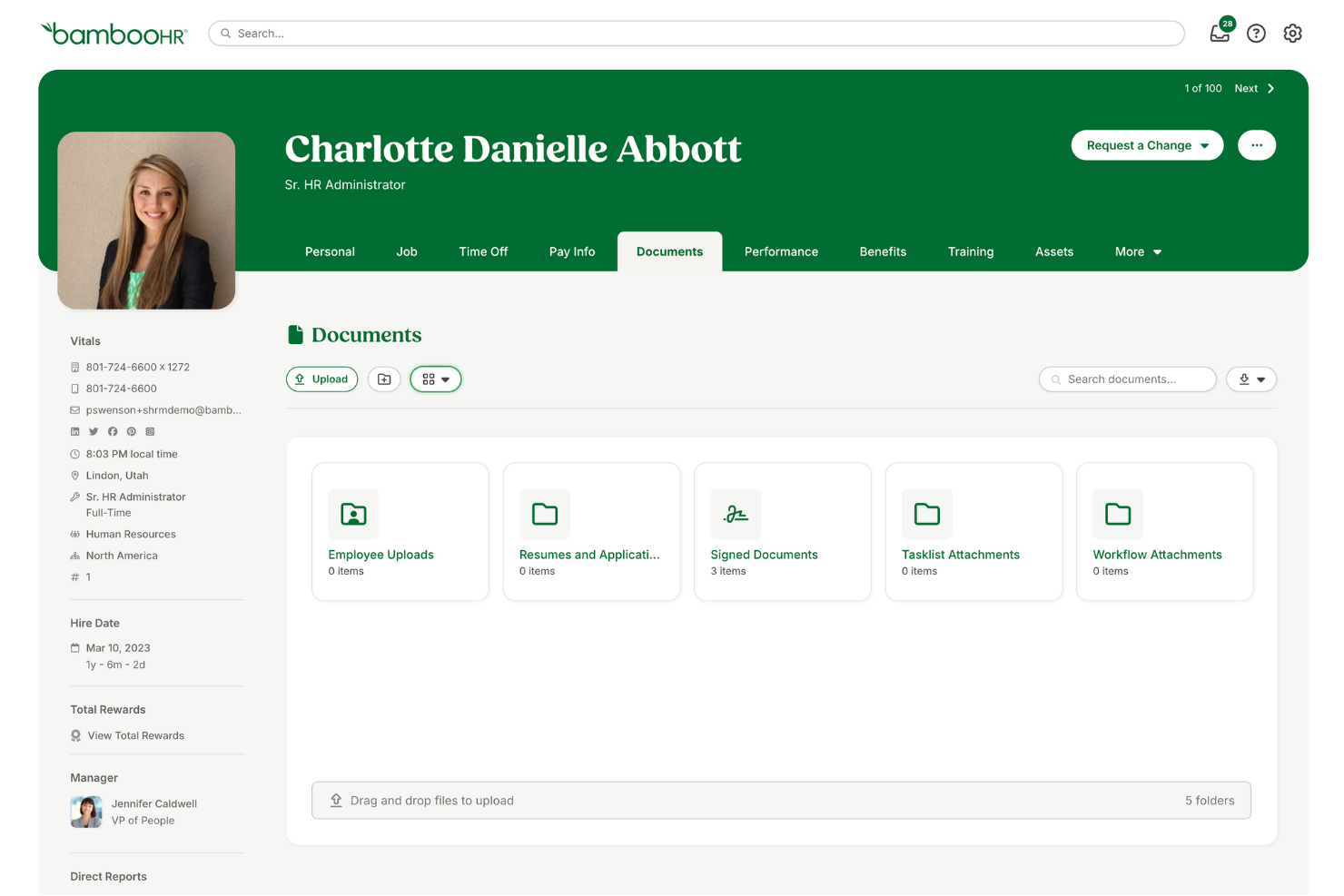
BambooHR è una piattaforma HR pensata per le piccole imprese che vogliono semplificare i processi di gestione delle risorse umane come l'onboarding, il monitoraggio delle ferie e la gestione dei dati dei dipendenti, rendendo così più facile per i team gestire le attività HR quotidiane senza complicazioni aggiuntive.
Per chi è ideale BambooHR?
BambooHR è una scelta ideale per le piccole e medie imprese che hanno bisogno di una piattaforma HR dedicata senza la complessità dei sistemi di livello enterprise.
Perché ho scelto BambooHR
BambooHR si guadagna un posto tra i migliori della mia lista grazie alla sua capacità di mettere le attività HR direttamente nelle mani dei dipendenti. Le funzionalità di self-service permettono alle persone di aggiornare i propri dati di contatto, accedere alle buste paga, richiedere ferie e firmare documenti senza dover necessariamente contattare l’HR. Mi piace inoltre l’assistente Ask BambooHR AI, che offre risposte istantanee alle domande su policy e benefit 24/7—così il reparto HR non si trova più a gestire ripetutamente le stesse domande di routine. Questa combinazione di accesso self-service e supporto basato su intelligenza artificiale alleggerisce davvero il carico dei piccoli team HR già sovraccarichi di lavoro.
Funzionalità principali di BambooHR
- Sistema di tracciamento dei candidati: Pubblica offerte di lavoro, valuta i candidati e gestisci l’intero flusso di assunzione direttamente da BambooHR.
- Flussi di lavoro per l’onboarding: Assegna e traccia le attività di pre-onboarding, le firme elettroniche e la documentazione dei nuovi assunti prima del primo giorno.
- Gestione delle performance: Conduci cicli di valutazione, definisci obiettivi e raccogli feedback tra colleghi direttamente sulla piattaforma.
- Dashboard e analisi personalizzate: Genera report in tempo reale su dati della forza lavoro come organico, turnover e tendenze retributive.
Integrazioni BambooHR
Le integrazioni includono Checkr, Slack, Remote, Evolia e si possono realizzare integrazioni personalizzate tramite l’API di BambooHR.
New Product Updates from BambooHR®

BambooHR Adds Enrollment Waivers and Plan Year Continuity
BambooHR adds automatic enrollment waivers and plan year continuity for Benefits Administration. These updates help admins handle missed deadlines and prepare benefit renewals with less manual work. For more information, visit BambooHR’s official site.
 .
.
Ideale per la gestione dei dati dei dipendenti

Workable HR offre alle piccole imprese una piattaforma centralizzata per organizzare i dati dei dipendenti, automatizzare l’onboarding e gestire i processi HR senza la complessità dei sistemi aziendali di livello superiore.
Per chi è ideale Workable HR?
Workable HR è adatto a piccole e medie aziende che cercano una soluzione semplice per gestire le attività HR senza un team HR dedicato.
Perché ho scelto Workable HR
Ho scelto Workable HR tra i migliori perché il suo sistema di archiviazione dei dati dei dipendenti è ben strutturato per piccoli team HR. Ogni profilo dipendente conserva in un unico punto lo storico dei ruoli, i cambiamenti di retribuzione e le informazioni personali, con un organigramma digitale che si aggiorna in tempo reale al cambiare della squadra. Apprezzo la gestione digitale dei documenti: è possibile creare, distribuire e tracciare documenti con firme elettroniche e promemoria automatici, eliminando gran parte del lavoro manuale di follow-up. Il portale self-service permette ai dipendenti di aggiornare direttamente i propri dati, così il mio team non deve più gestire continue richieste di modifiche basilari alle informazioni personali.
Funzionalità principali di Workable HR
- Gestione delle assenze e dei permessi: Imposta più policy di assenza, personalizza regole PTO e orari di lavoro, gestisci i flussi di approvazione e monitora i saldi delle ferie.
- Strumenti di valutazione delle prestazioni a 360°: Conduci valutazioni tramite modelli personalizzabili tra dipendente, manager, diretti riporti e colleghi, con tracciamento delle tempistiche e rapporti sui progressi.
- Rilevazione presenze e orari: Registra le ore lavorative con timbratura in entrata/uscita geolocalizzata e invio dei timesheet, poi genera report delle presenze per payroll e conformità normativa.
- App HR mobile: Dipendenti e responsabili possono gestire timbrature, richieste di assenza e approvazioni dei turni direttamente da dispositivi iOS o Android.
Integrazioni di Workable HR
Le integrazioni comprendono Indded, BambooHR, Xe e Zain.
Folks HR
Ideale per piccole e medie imprese canadesi

Folks HR è una piattaforma HRIS progettata per piccole e medie imprese che devono gestire i registri dei dipendenti, le assenze e i processi HR, rispettando al contempo la normativa canadese.
Per chi è ideale Folks HR?
Folks HR è particolarmente adatto per le piccole e medie imprese canadesi che cercano una piattaforma HR basata sui requisiti normativi locali, con supporto in francese o inglese.
Perché ho scelto Folks HR
Folks HR si è guadagnato un posto nella mia selezione perché è una delle poche piattaforme HRIS costruite fin dall'inizio specificamente per realtà canadesi—non adattata da un prodotto statunitense o europeo. Apprezzo il fatto che gestisca la conformità sia federale che provinciale in maniera nativa, comprese le ferie previste in Quebec e il calcolo degli straordinari in Ontario, senza bisogno di soluzioni manuali. La piattaforma dispone inoltre della certificazione SOC 2 Type 2 e tutti i dati sono conservati su server canadesi, esterni alla giurisdizione del CLOUD Act statunitense—un fattore importante per i team HR canadesi che gestiscono dati sensibili dei dipendenti. Inoltre, l'interfaccia completamente bilingue (francese e inglese) supporta i team operanti sia nel Quebec sia nel resto del Canada.
Caratteristiche principali di Folks HR
- Gestione delle performance: Conduci valutazioni strutturate delle performance e monitora gli obiettivi dei dipendenti direttamente sulla piattaforma.
- Monitoraggio di formazione e certificazioni: Tieni traccia delle ore di formazione, dei budget e delle scadenze delle certificazioni per tutta la forza lavoro, con promemoria automatici per i rinnovi.
- Flussi di onboarding e offboarding: Crea piani di onboarding personalizzati con compiti assegnati, scadenze e raccolta di documenti con firma elettronica per i nuovi assunti.
- Reportistica e analisi HR: Monitora i principali indicatori HR come turnover, assenteismo e demografia della forza lavoro tramite dashboard integrati e in tempo reale.
Integrazioni di Folks HR
Le integrazioni includono Nethris, DLGL, EmployeurD, Synerion, LinkedIn, Facebook, Google, Indeed, Jobboom e Jobillico.
Pros and Cons
Pros:
- Gli strumenti per le revisioni delle performance supportano valutazioni strutturate e il monitoraggio degli obiettivi dei dipendenti
- I registri dei dipendenti e i dati HR sono organizzati in un unico sistema centralizzato
- Gli strumenti di gestione assenze e ferie monitorano le richieste di permesso dei dipendenti
Cons:
- Alcuni passaggi di configurazione HR possono risultare confusi nella configurazione iniziale del sistema
- Alcune funzionalità HR risultano mancanti secondo gli utenti nelle prime fasi di adozione
Quando utilizzare un HRIS per piccole imprese
Un HRIS riunisce in un unico sistema i dati dei dipendenti, le paghe e i flussi di lavoro delle risorse umane, così nulla viene trascurato. Per le piccole imprese, fa la differenza tra inseguire fogli di calcolo e avere davvero tempo da dedicare al proprio team. Ecco quando conviene utilizzarlo:
- Stai affogando in strumenti non collegati tra loro: immagina di monitorare le ferie in un foglio di calcolo, gestire le paghe con QuickBooks e l'inserimento dei nuovi dipendenti tramite e-mail. Un HRIS come BambooHR o Gusto centralizza tutto, riducendo il tempo amministrativo che perdi ogni settimana passando da un sistema all'altro.
- Stai assumendo rapidamente e l'inserimento dei nuovi dipendenti è un caos: se hai assunto più di 10 dipendenti in pochi mesi e i nuovi arrivati continuano a perdersi tra le pratiche burocratiche, questo è un segnale. Un buon HRIS automatizza le liste di controllo per l'inserimento e la raccolta dei documenti, così ogni nuovo dipendente vive un'esperienza coerente fin dal primo giorno.
- Temi di non riuscire a rispettare gli obblighi normativi: quando gestisci manualmente le leggi salariali, le regole sulle ferie o le dichiarazioni fiscali, gli errori non sono una questione di se, ma di quando si verificheranno. Un HRIS automatizza i calcoli fiscali e segnala i rischi di non conformità prima che si trasformino in sanzioni costose.
- Trascorri ore a gestire le paghe a ogni ciclo: se le paghe richiedono a te o al responsabile dell'ufficio mezza giornata ogni due settimane, il tempo si accumula rapidamente. Piattaforme come Gusto o Rippling automatizzano l'intero ciclo, inclusi i depositi diretti e la presentazione delle dichiarazioni fiscali, così puoi completarlo in pochi minuti.
- Sei finalmente abbastanza grande da aver bisogno di dati reali: una volta superati i 15-20 dipendenti, le decisioni basate sull'istinto riguardo al numero di dipendenti, al turnover o alle retribuzioni smettono di funzionare. Un HRIS offre report e analisi per prendere decisioni più intelligenti sulle persone durante la crescita.
Altri HRIS per piccole imprese
Ecco alcune altre opzioni valide che non sono entrate nell’elenco dei migliori software HRIS per piccole imprese, ma che vale comunque la pena prendere in considerazione:
- Paycor
Ideale per piccole imprese che necessitano scalabilità
- TriNet
Ideale per approccio piattaforma più servizio
- Agendrix
Ideale per la programmazione automatica dei turni
- RemoFirst
Ideale per piccole imprese con team internazionali
- OnPay
Ideale per imprenditori e startup
- Lattice
Ideale per i flussi di lavoro sulle modifiche dei dati dei dipendenti
- GoCo
Ideale per la gestione della conformità
- HiBob
Ideale per promuovere il coinvolgimento dei dipendenti
- IntelliHR
Ideale per coinvolgimento e benessere dei dipendenti
- ChartHop
Ideale per la pianificazione visiva della forza lavoro
- Kallidus Sapling
Ideale per la standardizzazione dei processi
- Collage HR
Ideale per le PMI canadesi
- Trinet
Ideale per la sua solida app mobile
- Insperity
Migliore gestione completa dei dati HR
- Rippling
Ideale per automazioni di workflow che fanno risparmiare tempo
- monday AI Workspace
Ideale per dashboard di visualizzazione dei dati
- TalentHR
Ideale per i team HR alle prime armi
- Justworks
Ideale per piccole imprese che iniziano a creare un team HR
- Homebase
Ideale per la gestione dei dipendenti orari
- Employment Hero
Ideale per startup canadesi


Recensioni correlate di software per le risorse umane
Se non hai ancora trovato quello che cerchi, dai un'occhiata a questi altri strumenti correlati che abbiamo testato e valutato:
- Software HR
- Software per buste paga
- Software per il reclutamento
- Servizi di datore di lavoro ufficiale
- Sistemi di tracciamento dei candidati
- Software per la gestione della forza lavoro
Come Valuto gli HRIS per le Piccole Imprese
Valuto gli strumenti HRIS per le piccole imprese su due livelli: le funzionalità di base senza le quali un team in crescita non può operare—come flussi di onboarding e sincronizzazione delle buste paga—e i fattori differenzianti degni di attenzione.
Funzionalità di Base (Requisiti Fondamentali per Questa Lista)
Quando seleziono gli strumenti per la mia lista, valuto ciascuno su una scala da 0 (non offre la funzionalità) a 5 (eccelle in quest'area) per ogni funzione fondamentale elencata di seguito. Poi, calcolo il punteggio totale dello strumento come percentuale. Ogni tool deve ottenere un punteggio totale minimo del 65% per essere considerato.
- Gestione Dati dei Dipendenti: Verifico se la piattaforma centralizza profili, documenti e dati organizzativi in un unico posto—in modo da non dover cercare tra drive condivisi un contratto di lavoro.
- Onboarding & Offboarding: Ogni tool dovrebbe offrire flussi strutturati per nuovi assunti, inclusi firme elettroniche e assegnazione di compiti, invece di affidarsi a catene di email manuali e moduli cartacei.
- PTO & Rilevamento delle Presenze: Cerco richieste di permesso integrate, flussi di approvazione e monitoraggio dei ratei che sostituiscono i sistemi basati su fogli di calcolo tipici delle piccole squadre.
- Collegamento Paghe: Che si tratti di paghe native o di una profonda integrazione con fornitori come Gusto o QuickBooks, valuto quanto sia fluido il trasferimento dei dati HR nelle buste paga senza reinserimenti manuali.
- Gestione dei Benefit: Anche i piccoli team hanno bisogno di iscrizioni digitali e gestione dei piani, quindi verifico se lo strumento gestisce i periodi di iscrizione e i collegamenti con i provider.
- Gestione della Conformità: Valuto se la piattaforma offre avvisi sulle leggi sul lavoro, modelli di report obbligatori e documentazione pronta per audit per aiutare anche i piccoli team HR a essere aggiornati.
Una volta ottenuta una lista di strumenti che soddisfano i criteri, considero ciò che distingue ogni piattaforma.
Fattori Differenzianti (Cosa Distingue i Fornitori)
Ecco come confronto e differenzio i vari fornitori:
Funzionalità Distintive
I portali self-service per i dipendenti sono molto importanti per i piccoli team. Quando il personale può aggiornare il proprio indirizzo, scaricare fantastiche buste paga e inoltrare richieste di permesso dal loro telefono, si alleggerisce il lavoro amministrativo di routine. Inoltre, verifico se uno strumento include funzionalità di gestione delle performance come cicli di recensione e monitoraggio degli obiettivi—le piccole imprese che tralasciano queste funzioni di solito finiscono per inserirle più avanti in fretta. Anche la reportistica è un'altra area che valuto attentamente, soprattutto dashboard già pronte su turnover e organico che forniscono approfondimenti reali senza dover creare query da zero.
Oltre le Funzionalità
La trasparenza dei prezzi è una delle prime verifiche che effettuo. Le piccole imprese hanno bisogno di costi chiari per dipendente al mese, senza costi nascosti che crescono con l'aumentare del personale. Anche la velocità di implementazione è fondamentale—cerco piattaforme che consentano a un unico referente HR o office manager di migrare i dati e andare online in pochi giorni, non mesi. L’adattabilità delle integrazioni completa il quadro. Il tuo HRIS deve collegarsi agli strumenti già in uso, che si tratti di QuickBooks per la contabilità, Google Workspace per la produttività o Slack per la comunicazione quotidiana.
Come scegliere un HRIS per le piccole imprese
Un HRIS può semplificare la vita delle risorse umane e dell'intera popolazione aziendale.
Per aiutarti a capire quale HRIS soddisfi meglio le esigenze della tua piccola impresa, il primo passo consiste nell'individuare gli utenti principali e documentare le loro difficoltà specifiche.
Mentre porti avanti il tuo processo unico di selezione del software, tieni presenti i seguenti aspetti:
- Quali problemi stai cercando di risolvere: inizia identificando le difficoltà che stai cercando di superare, ad esempio l'aggiornamento manuale dei dati dei dipendenti e l'elaborazione delle richieste di ferie. Questo ti aiuterà a chiarire le caratteristiche e le funzionalità principali che l'HRIS deve offrire. Una volta chiarito questo aspetto, è anche utile classificare le esigenze dei diversi utenti per individuare le priorità principali per gli utenti avanzati, i manager e i dipendenti, assicurandoti che siano tutte soddisfatte.
- Chi dovrà utilizzarlo: per valutare costi e requisiti, considera chi utilizzerà il software e di quante licenze avrai bisogno. Per un HRIS, probabilmente vorrai un accesso a livello di dipendente per tutta la forza lavoro, con accessi speciali per gli amministratori HR e i manager.
- Con quali altri strumenti dovrà funzionare: chiarisci quali strumenti stai sostituendo, quali rimarranno e con quali strumenti dovrai integrarlo, come software per le buste paga, software per la gestione della formazione, applicazioni per l'accesso singolo o sistemi operativi per il lavoro come Microsoft 365 o Google Workspace. Dovrai decidere se gli strumenti dovranno integrarsi tra loro oppure, in alternativa, se puoi sostituire più strumenti con una soluzione software HR tutto-in-uno.
- Come funzionerebbe all'interno della tua organizzazione: considera la selezione del software insieme ai flussi di lavoro e ai sistemi esistenti. Valuta cosa funziona bene e le eventuali aree problematiche che devono essere affrontate.

Tendenze degli HRIS per le piccole imprese nel 2025
Le soluzioni software HR si evolvono continuamente per supportare le esigenze mutevoli delle piccole imprese.
Ecco alcune tendenze nel settore degli HRIS che sto osservando e che sono particolarmente vantaggiose per le piccole imprese:
- Maggiore integrazione con l'intelligenza artificiale e l'apprendimento automatico: Si sta delineando una chiara tendenza a sfruttare l'intelligenza artificiale e l'apprendimento automatico per automatizzare attività più complesse, fornire analisi predittive e migliorare i processi decisionali. Questa tecnologia si sta evolvendo rapidamente all'interno delle piattaforme HRIS per offrire esperienze dei dipendenti più personalizzate e ottimizzare le operazioni delle risorse umane.
- Gestione della conformità basata sull'intelligenza artificiale: I moderni HRIS basati sull'intelligenza artificiale sono dotati di strumenti che aggiornano automaticamente e garantiscono la conformità alle leggi e alle normative sul lavoro, oltre a funzionalità di avvisi e report in tempo reale per prevenire problemi di conformità relativi alla dichiarazione dei redditi o alle disposizioni della legislazione sul lavoro.
- Accessibilità e flessibilità da dispositivi mobili: Poiché il lavoro da remoto continua a essere diffuso, le funzionalità HRIS che offrono accessibilità e flessibilità da dispositivi mobili sono molto richieste. Ciò include app mobili e sistemi basati sul cloud che consentono a dipendenti e responsabili di accedere alle funzioni HR da qualsiasi luogo e in qualsiasi momento.
- Analisi e reportistica avanzate: La domanda di funzionalità di analisi sofisticate e report personalizzabili è in crescita. Le piattaforme HRIS si stanno evolvendo per includere strumenti di analisi dei dati più avanzati, come l'analisi del sentimento, consentendo ai professionisti delle risorse umane di generare informazioni utili all'azione e prendere decisioni basate sui dati.
- Sistemi integrati di gestione delle prestazioni: Molti sistemi HRIS si integrano ora con i software per la gestione delle prestazioni o offrono direttamente strumenti per le prestazioni. Questi strumenti aiutano a identificare le lacune nelle competenze dei dipendenti e le opportunità di formazione, promuovendo una cultura del miglioramento continuo. Alcune funzionalità di gestione delle prestazioni che stanno comparendo nelle piattaforme HRIS includono:
- Modelli per la valutazione delle prestazioni
- Quadri per la definizione degli obiettivi, come le funzionalità OKR
- Pianificazione della successione.
Che cos'è un HRIS?
Un HRIS è una soluzione digitale per la gestione dei dati dei dipendenti e l'automazione dei processi HR, come assunzioni, gestione delle buste paga e valutazioni delle prestazioni. Lo scopo principale di un HRIS è semplificare e ottimizzare la gestione delle risorse umane attraverso l'automazione digitale e l'organizzazione dei dati.
Funzionalità principali degli HRIS per le piccole imprese
Quando scegli un HRIS per le piccole imprese, presta attenzione alle seguenti funzionalità principali:
- Gestione dei dati HR fondamentali: Nella sua funzione principale, un HRIS agisce come unica fonte attendibile per tutti i dati dei dipendenti. Centralizzare informazioni come dati personali, titoli professionali, storico delle retribuzioni e documentazione semplifica gli aggiornamenti, riduce gli errori amministrativi e migliora la precisione complessiva dei dati.
- Gestione delle buste paga: Gli strumenti integrati per la gestione delle buste paga automatizzano il calcolo degli stipendi, le ritenute fiscali e la distribuzione dei pagamenti. Ciò garantisce che i dipendenti siano pagati correttamente e puntualmente, riducendo al contempo l'inserimento manuale dei dati e i rischi di non conformità.
- Monitoraggio delle assenze e delle presenze: Le piattaforme HRIS includono strumenti per monitorare le ore lavorate dai dipendenti, i ritardi, gli straordinari, i giorni di ferie e le richieste di congedo. Queste funzionalità aiutano a garantire la conformità alle leggi sul lavoro e l'accuratezza della pianificazione.
- Amministrazione dei benefit: Gestire i benefit dei dipendenti direttamente all'interno del proprio HRIS, come assicurazione sanitaria, piani pensionistici, indennità e politiche relative ai congedi, mantiene tutto coerente e facilmente accessibile sia ai dipendenti sia ai responsabili.
- Gestione delle prestazioni: Gli strumenti integrati per la valutazione delle prestazioni supportano colloqui periodici, feedback continuo e definizione degli obiettivi, aiutandoti ad allineare i piani di sviluppo individuali con gli obiettivi organizzativi più ampi.
- Selezione del personale: Molti sistemi HRIS offrono funzionalità di monitoraggio dei candidati per aiutarti a pubblicare offerte di lavoro, selezionare i candidati, gestire i colloqui e accompagnare gli aspiranti dipendenti in modo fluido lungo il processo di assunzione.
- Inserimento dei nuovi dipendenti: Un HRIS efficace rende fluido l'inserimento dei nuovi dipendenti grazie a flussi di lavoro automatizzati, raccolta digitale dei documenti, assegnazione della formazione e processi guidati passo dopo passo che aiutano i neoassunti a diventare operativi più rapidamente.
- Gestione della formazione e dell'apprendimento: I sistemi possono includere il monitoraggio delle certificazioni, moduli di formazione interna, distribuzione dei corsi e promemoria per le qualifiche in scadenza, garantendo che il tuo team mantenga aggiornate le competenze richieste.
- Portale self-service per i dipendenti: I dipendenti possono aggiornare autonomamente i propri dati personali, richiedere permessi, consultare i cedolini, firmare documenti e accedere alle informazioni HR, riducendo le richieste amministrative ripetitive.
- Report e analisi: I software HRIS offrono solidi strumenti di reportistica per analizzare il turnover, le tendenze delle presenze, gli aspetti relativi alle buste paga, i risultati delle prestazioni e molto altro. Queste analisi contribuiscono a prendere decisioni migliori e a definire strategie HR a lungo termine.
Funzionalità comuni degli HRIS basate sull'intelligenza artificiale per le piccole imprese
Molte piattaforme HRIS stanno integrando funzionalità di intelligenza artificiale per migliorare l'esperienza dei dipendenti e delle risorse umane, ad esempio:
- Convalida automatizzata dei dati: l'IA verifica i dati dei dipendenti alla ricerca di incongruenze, campi mancanti o informazioni obsolete, riducendo la pulizia amministrativa e migliorando l'accuratezza dei record.
- Abbinamento intelligente dei candidati: l'IA analizza le descrizioni delle posizioni e i profili dei candidati per consigliare quelli più adatti, aiutando i piccoli team ad accelerare le assunzioni e a ridurre lo screening manuale dei curriculum.
- Analisi predittiva del ricambio del personale: l'IA identifica i primi indicatori del rischio di ricambio del personale, come il calo del coinvolgimento o le presenze irregolari, aiutando i team HR a intervenire in modo proattivo.
- Flussi di lavoro per l'inserimento basati sull'IA: i sistemi possono assegnare automaticamente le attività di inserimento, consigliare i moduli formativi e personalizzare il percorso dei nuovi assunti in base al ruolo e al reparto.
- Analisi delle prestazioni: l'IA fornisce informazioni sui modelli di rendimento, sui progressi verso gli obiettivi e sulle lacune nelle competenze, supportando valutazioni eque e piani di sviluppo mirati.
- Pianificazione automatizzata e avvisi sulle presenze: l'IA rileva modelli insoliti nelle presenze, come ritardi ripetuti, assenze non pianificate o picchi di straordinari, aiutando i manager a reagire rapidamente.
- Raccomandazioni intelligenti sui benefit: l'IA può analizzare i dati demografici della forza lavoro e i modelli di utilizzo per consigliare benefit che massimizzino il valore e riducano i costi superflui.
- Ricerca in linguaggio naturale: i dipendenti possono porre domande (“Come posso richiedere un permesso?”) e ricevere immediatamente risposte accurate dagli assistenti HR basati sull'IA all'interno dell'HRIS.
- Assistenti virtuali basati sull'IA per il supporto ai dipendenti: gli assistenti virtuali gestiscono le richieste HR comuni, come il saldo delle ferie, le domande sulle politiche e le attività di inserimento, riducendo la dipendenza dal personale HR e fornendo supporto 24 ore su 24, 7 giorni su 7.
- Monitoraggio automatizzato della conformità: l'IA tiene traccia delle modifiche alle leggi sul lavoro, alle normative fiscali e alle politiche HR pertinenti alla propria regione, avvisando quando gli aggiornamenti richiedono interventi o modifiche alla documentazione.
Vantaggi del software HRIS
L'implementazione di un nuovo HRIS per la propria azienda può offrire numerosi vantaggi al personale HR, ai dipendenti e all'organizzazione nel suo complesso. Ecco alcuni dei principali vantaggi che è possibile ottenere:
- Migliore gestione dei dati: La centralizzazione dei dati dei dipendenti migliorerà l'accuratezza e la coerenza delle informazioni sul personale, semplificherà la reportistica e l'analisi e consentirà di prendere decisioni migliori.
- Maggiore efficienza: automatizzando attività come l'elaborazione delle buste paga, il monitoraggio delle ore lavorate e la gestione dei benefit, un HRIS riduce significativamente il tempo e l'impegno necessari per gestire questi processi, consentendo al personale HR di concentrarsi su attività più strategiche.
- Semplificazione dell'inserimento dei dipendenti: un solido modulo di inserimento semplifica l'inserimento dei nuovi assunti, rendendo più facile per loro diventare rapidamente membri produttivi del team.
- Migliore pianificazione del personale: l'HRIS offre strumenti per creare, gestire e comunicare i turni di lavoro, aiutando a evitare conflitti di pianificazione e garantendo una copertura adeguata.
- Maggiore conformità: un HRIS aiuta le organizzazioni a rimanere aggiornate sulle leggi sul lavoro e sui requisiti di conformità, riducendo il rischio di sanzioni e problemi legali associati alla non conformità.
Come si può vedere, l'implementazione di un HRIS può trasformare significativamente il modo in cui si gestiscono i dati dei dipendenti e le relative attività HR.
Per un'analisi più approfondita, leggi il nostro riepilogo dei diversi modi in cui un HRIS può essere utile alla tua azienda.
Costi e prezzi del software HRIS
La scelta del sistema HRIS migliore per la propria piccola impresa richiede la comprensione dell'intera gamma di piani e opzioni di prezzo. Ecco una panoramica delle opzioni di piano più comuni e dei relativi costi, per aiutarti a prendere una decisione informata.
Tabella di confronto dei piani HRIS
| Piano | Prezzo medio | Funzionalità comuni |
|---|---|---|
| Gratuito | $0 | Banca dati di base dei dipendenti, reportistica limitata e monitoraggio semplice delle ore e delle presenze |
| Base | $5 per utente/mese | Registri dei dipendenti, gestione delle buste paga, monitoraggio delle ore e delle presenze, pianificazione di base e supporto limitato |
| Standard | $10 per utente/mese | Elaborazione avanzata delle buste paga, gestione dei benefit, valutazioni delle prestazioni, gestione della conformità e supporto |
| Avanzato | $20 per utente/mese | Flussi di lavoro personalizzabili, analisi avanzate, strumenti di inserimento, supporto prioritario e accesso da dispositivi mobili |
| Aziendale | Prezzo personalizzato | Suite HR completa, responsabile clienti dedicato, integrazioni avanzate, utenti illimitati e supporto 24 ore su 24, 7 giorni su 7 |
La scelta del piano giusto dipende dalle dimensioni dell'azienda, dal budget e dalle specifiche esigenze HR. Valuta di iniziare con un piano gratuito o base e di passare a un piano superiore man mano che l'azienda cresce e i requisiti HR diventano più complessi.
Ti consiglio di richiedere prove gratuite o demo, così potrai valutare concretamente la facilità d'uso del sistema prima di prendere un impegno. Se il costo è il fattore più importante per te, questo articolo approfondisce i costi dei software per le risorse umane e spiega come decidere quale sia la soluzione migliore per la tua azienda.
Domande frequenti sui sistemi HRIS per piccole imprese
Quanto tempo richiede l'implementazione di un nuovo HRIS?
La maggior parte delle piccole imprese può implementare un nuovo HRIS in 4-12 settimane. I tempi dipendono dalle dimensioni dell’azienda, dalla quantità di dati da migrare, dalle integrazioni con il software paghe o altre piattaforme e dal livello di formazione di cui il team ha bisogno. Le configurazioni di base possono richiedere solo un mese, mentre implementazioni complesse con più integrazioni possono arrivare a quasi tre mesi. Un buon supporto del fornitore e una pianificazione chiara aiutano a rispettare le tempistiche.
Un HRIS può integrarsi con i sistemi paghe o contabili che utilizzo già?
Sì, molte piattaforme HRIS si integrano direttamente con i più diffusi software per l’elaborazione delle buste paga e la contabilità. Chiedi ai fornitori informazioni sulle integrazioni preconfigurate e sulle piattaforme supportate. Per gli strumenti meno comuni, verifica se l’HRIS offre l’accesso API o connettori come Zapier. Un’integrazione fluida evita duplicazioni e riduce gli errori.
In che modo un HRIS può aiutare le piccole imprese a rispettare gli obblighi di conformità?
Un HRIS semplifica la conformità automatizzando la gestione dei documenti, monitorando quelli obbligatori e archiviando in modo sicuro i dati dei dipendenti. La maggior parte dei sistemi include promemoria per scadenze importanti, come i rinnovi dei contratti o i requisiti di formazione. Alcuni offrono anche report integrati per gli audit o per la conformità alle normative sulle paghe, riducendo il lavoro e i rischi.
Altre risorse per i proprietari di piccole imprese
Se sei arrivato fin qui, spero che ora tu abbia una visione più completa di come il giusto HRIS possa fungere da potente soluzione per le risorse umane nei normali processi interni. Non lasciare però che il tuo percorso finisca qui.
Poiché le piccole imprese occupano un posto speciale nel mio cuore, ho raccolto un elenco di tutte le mie risorse principali per aiutarti ancora di più. Dai un'occhiata anche a queste altre classifiche dei 10 migliori strumenti:
- Sistemi di tracciamento dei candidati per piccole imprese per assumere meglio
- Software per la pianificazione dei turni dei dipendenti per piccole imprese
- Sistemi ERP per piccole imprese con budget limitato
- Software gratuiti per le risorse umane per PMI con budget limitato
- Software gratuiti per l'elaborazione delle buste paga per budget ridotti
- HRMS per piccole imprese
- Software per le risorse umane per piccole imprese
- Sistemi di gestione dell'apprendimento (LMS) per piccole imprese
- Servizi per l'elaborazione delle buste paga per piccole imprese
- Software per l'elaborazione delle buste paga per piccole imprese
- Software per il reclutamento per piccole imprese
Altre recensioni di software per le risorse umane
La tua azienda sta crescendo rapidamente e cerchi un software per le risorse umane in grado di adattarsi alla crescita? Una di queste altre classifiche dei 10 migliori strumenti potrebbe essere più adatta:
- Software HR: analizzato e confrontato
- I migliori fornitori di software HCM
- Software HRMS per la gestione delle risorse umane
- Sistemi di gestione dei dipendenti
- Software per la gestione delle risorse umane
- Sistemi software HR basati sul cloud
- Software per la gestione dei casi HR e delle problematiche e dei rischi
- Software per le buste paga: analizzato e confrontato